

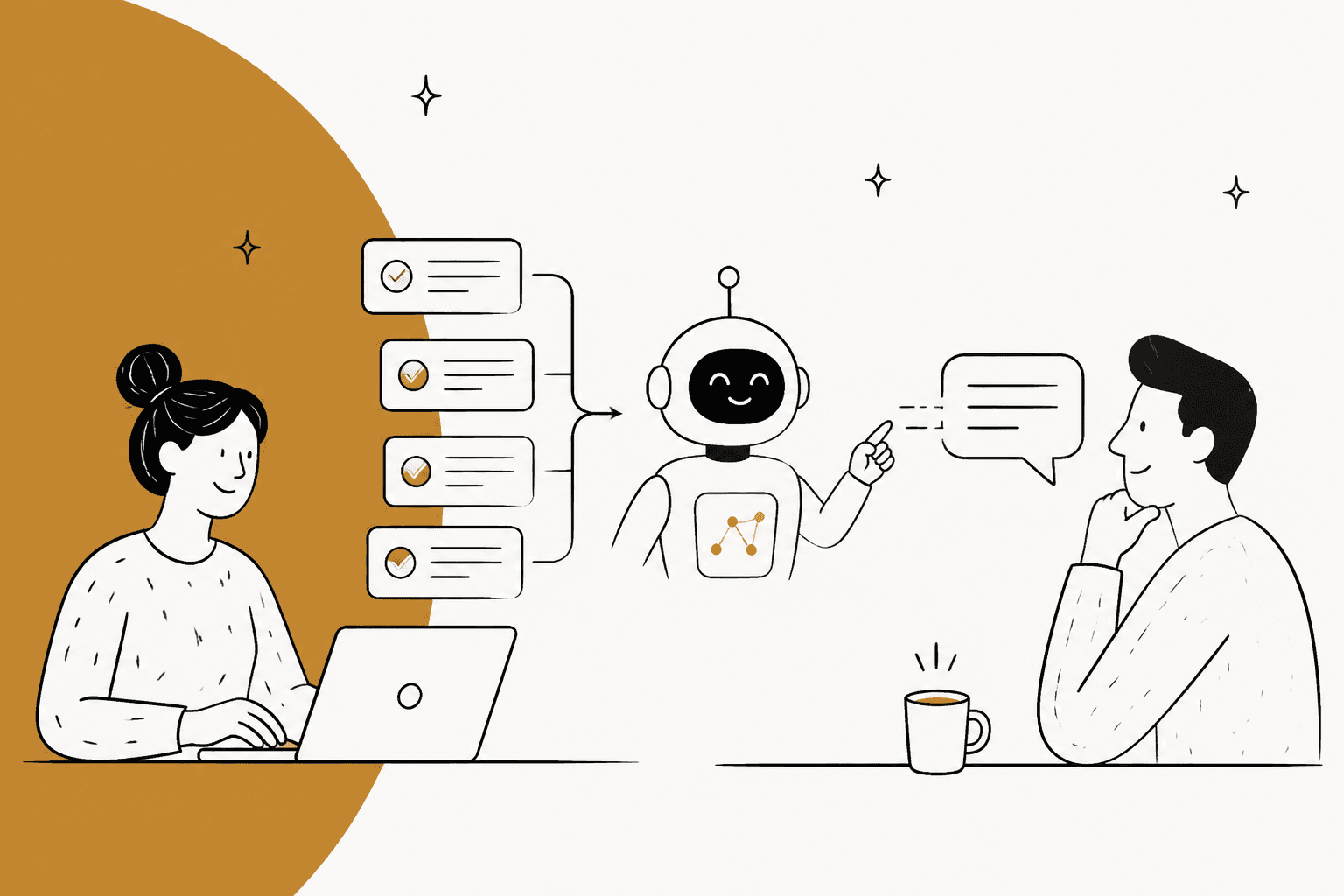
Why "solved" doesn't mean "right"
I've spent the last two years working on search at eesel, and few support topics carry as much buying intent as this one. People don't search "how to train AI on past tickets" out of curiosity. They search it because they're sitting on years of helpdesk history and they've just realized it's the most detailed record of how their team works. Training on past tickets is also the request that comes up most consistently on eesel's own sales calls.
Here's the catch, though. A ticket's status tells you the conversation ended. It doesn't tell you the customer got the right answer, that the policy quoted is still current, or that the reply sounded like the agent you'd want to clone. Plenty of "solved" tickets were closed by an auto-close rule, reopened a week later, or answered by someone in their first month.
The good news is that history teaches the thing AI is usually worst at out of the box: sounding like your team. On one eesel trial, a jewelry ecommerce brand doing about 1,000 tickets a month on Zendesk and Shopify, agents sent only 12% of AI drafts as-is. When the team looked at why, roughly two-thirds of the rewrites were about length and tone, turning long drafts into one-to-three sentence replies, while only about 5% fixed a wrong fact. That's exactly the gap a curated set of your team's own sent replies closes.
So the job isn't "train AI on past tickets." It's "teach AI from your best past tickets, and keep the rest out." That's what this guide walks through, in six steps. If you're still deciding what data you need in general, start with what data you need to train AI and come back.
What a single past ticket can teach an AI
Before you export anything, it helps to see that one ticket teaches several different things, and each lesson belongs somewhere different.
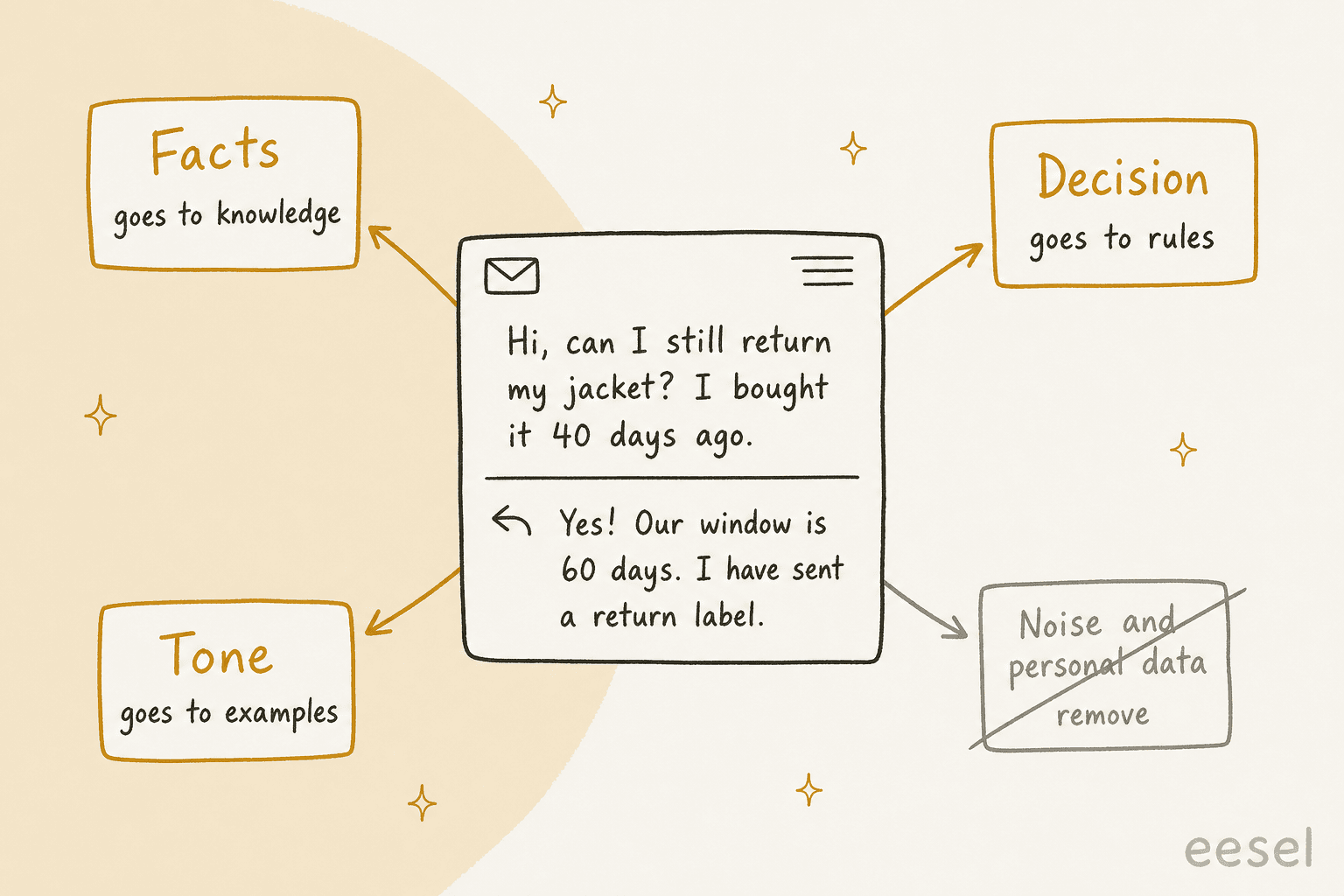
Take a simple return request. The agent's reply carries:
- A fact: the return window is 60 days. That belongs in your knowledge base, where it can be updated in one place when the policy changes.
- A decision: this customer qualifies, so send a label. That's a rule ("within 60 days, unworn, send a label; outside it, hand off"), and rules are safer written down than inferred from hundreds of examples.
- Tone: short, warm, an exclamation mark, no apology. That's what example replies teach.
- Noise: the customer's name, address, order number, the agent's signature and an internal note. None of it should reach the AI.
If you dump the whole ticket into an AI, it learns all four at once and can't tell them apart. That's how you end up with a bot that quotes a 30-day window from 2023 in a perfectly friendly voice. Gorgias puts the risk plainly: "if a help center article says your return window is 30 days but a guidance says 14, AI Agent might not respond the same way every time" (Gorgias knowledge docs). Old tickets are the biggest source of exactly that kind of conflict.
The three ways to use past tickets
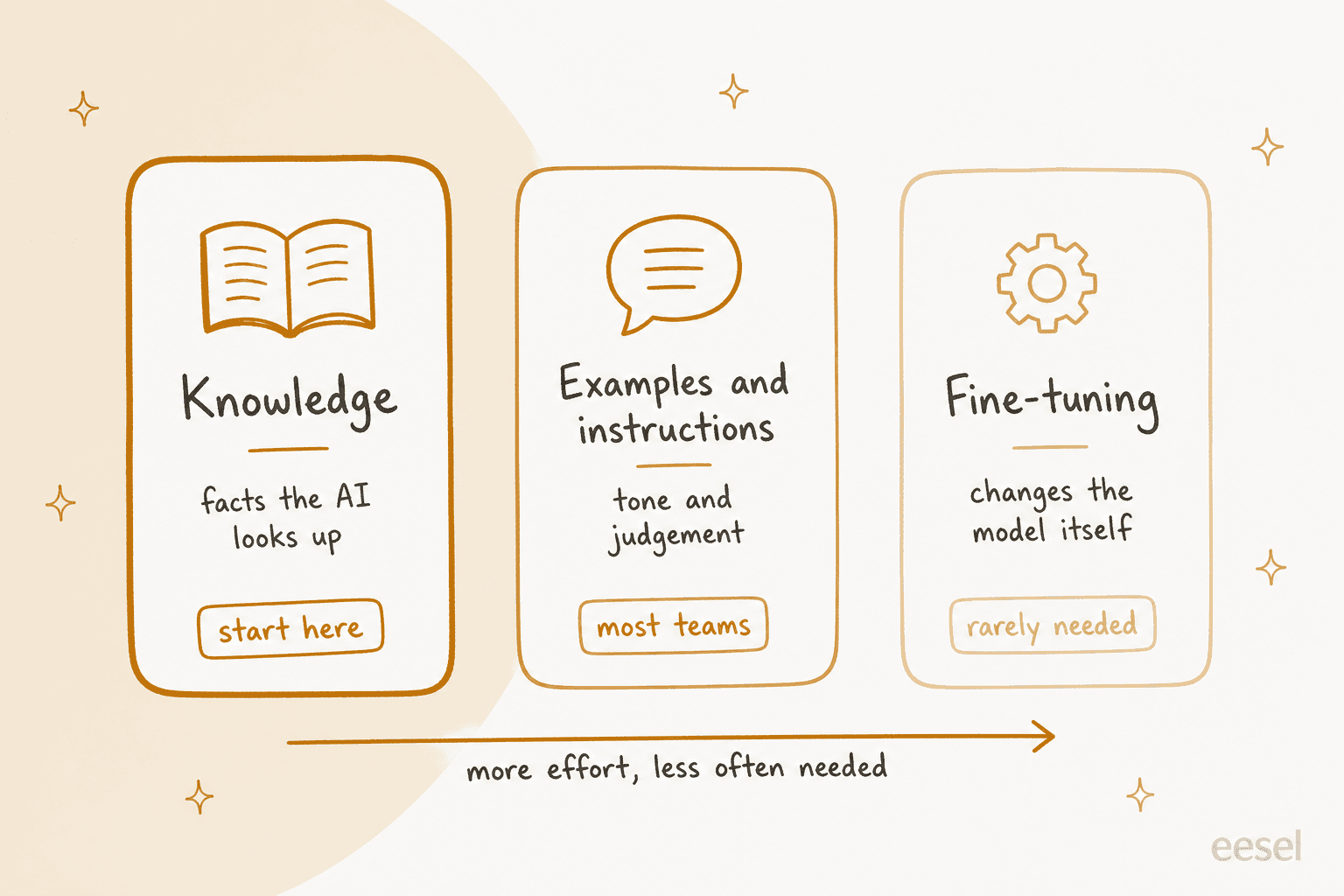
There are three ways to turn ticket history into AI behavior, and they're not equally useful.
| Method | What it teaches | How it works | Effort | When it's the right call |
|---|---|---|---|---|
| Knowledge extraction and retrieval | Facts, steps, policies | Mine tickets for answers, turn them into articles or Q&A, and let the AI look them up at answer time (RAG) | Low to medium | Always. This is where accuracy comes from |
| Examples and instructions | Tone, length, judgement | Pick a few dozen of your best replies as examples, write the decisions down as rules | Low | Almost always. This is where "sounds like us" comes from |
| Fine-tuning | Format and style at scale | Train a model's weights on thousands of example conversations | High | Rarely: very high volume, a narrow task, and evals proving prompting can't do it |
Retrieval is where accuracy lives. The AI searches your help center, macros and cleaned-up ticket answers when a question arrives, and answers from what it finds. When a policy changes, you edit one article and the next answer is right. If you want the deeper version of this argument, see RAG vs fine-tuning.
Examples and instructions are where tone lives. Freshdesk's own advice for its email agent is to "Include examples of ideal responses in your instructions. The agent learns from concrete examples faster than it does from abstract rules" (Freshdesk email AI agent setup). You don't need 10,000 tickets for this. You need 20 to 50 replies your best agents would be proud of.
Fine-tuning is the one people ask about and almost never need. OpenAI's own docs list supervised fine-tuning as best for classification, translation, fixed output formats and "correcting instruction-following failures" (OpenAI supervised fine-tuning). Learning your current refund policy isn't on that list, because facts baked into model weights go stale the day the policy changes. The docs also say "The prompt engineering process may be all you need" (OpenAI model optimization).
One builder on Reddit tried it anyway, and the result is the clearest picture I've found of what fine-tuning on raw tickets actually does:
"So I pulled about 8k past tickets which were mostly about shipping, returns, account issues and product information and anonymized the sensitive data then set up a training run. The good news was that it picked up the brand tone and mirrored our macros, but it also prioritized weird quirks too often. Our old agent would write 'hey there' for nearly every tricket so this model started spraying it everywhere."

They ended up switching back to a strict system prompt and a lightweight retrieval layer. The model learned the tone, and it also learned one agent's habit, because a fine-tune can't tell a quirk from a policy.
And there's a practical reason to skip it now. OpenAI is winding down self-serve fine-tuning: organizations that hadn't fine-tuned before lost access on May 7, 2026, and active customers can't create new jobs after January 6, 2027 (OpenAI deprecations). If you're an existing user, training a gpt-4.1-mini model costs $5.00 per million training tokens, and the tuned model then runs at $0.80 input and $3.20 output per million tokens, twice the base model's rate (OpenAI pricing). For more on that route, see the OpenAI fine-tuning API guide.
Not sure which one your problem needs? Pick the symptom you're seeing.
Pick the symptom you're seeing to get the part of your ticket history that fixes it.
What your helpdesk already does with past tickets
Before you build anything, check what your helpdesk does on its own, because the answer differs more than the marketing suggests. I went through each vendor's help center so you don't have to.
| Helpdesk | Learns from past tickets? | How | Look-back | AI price (vendor page) |
|---|---|---|---|---|
| Zendesk | Partly | Auto assist uses similar solved tickets only when no procedure or article fits; procedures and help center drafts are generated from solved tickets for you to publish | 90 days for generated drafts | Copilot $50/agent/month yearly; AI agent $1.50 per automated resolution committed, $2.00 pay-as-you-go |
| Freshdesk | For testing, not answering | Past tickets aren't a listed knowledge source; solved tickets can be imported as a test set | 30 days by API by default | Freddy AI Agent: first 500 sessions included, then $49 per 100 sessions |
| Gorgias | Indirectly | "Opportunities" (beta) suggests knowledge gaps and conflicts from conversations the AI couldn't resolve; you approve each | Reports use 28 days | $0.85 to $1.00 per automated interaction |
| HubSpot | Yes | Generates Q&A pairs from resolved tickets or inbox conversations; you accept, skip or decline each | 90 days or a ticket segment | 50 credits per resolution, $0.50 at pay-as-you-go rates |
A few details stood out.
Zendesk treats tickets as the last resort. Auto assist suggests replies "based on procedures, help center articles, similar solved tickets", and the order matters: "If there are no relevant procedures or help center articles available, then similar solved tickets are used" (About auto assist). Only tickets from the same brand count. Zendesk will also draft up to three procedures per brand each week from "Relevant solved tickets from the last 90 days", but each one waits for an admin to publish it (AI-generated procedures). Pricing is on Zendesk's pricing page.
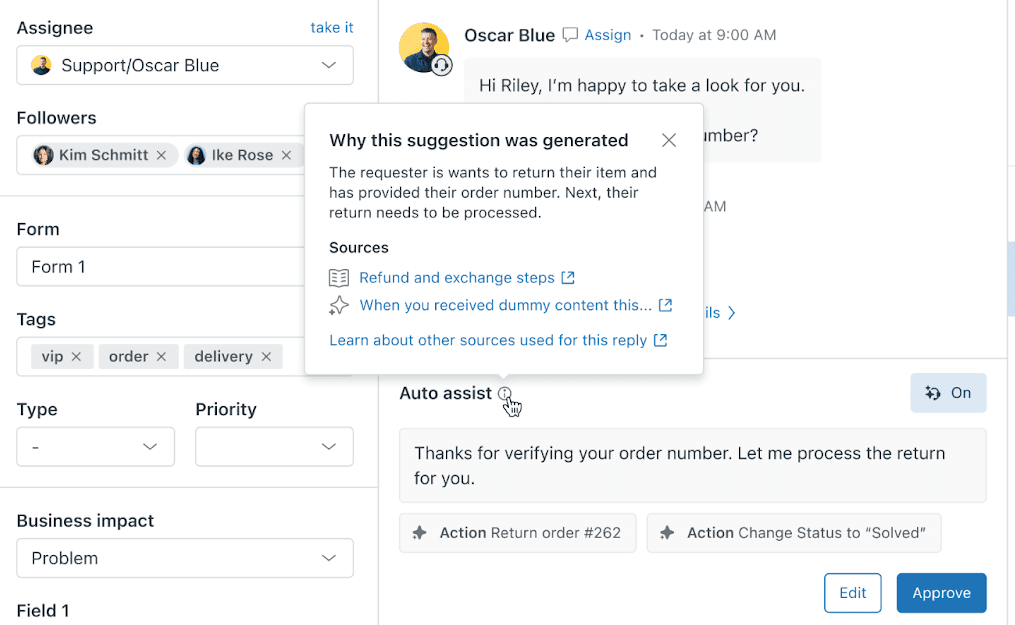
Zendesk's Knowledge builder is also worth knowing about if you have no help center yet. It reads the last 90 days of tickets and proposes up to 40 articles. Its ticket rules are a good model for your own filter: Solved or Closed only, public non-empty comments only, and no internal notes, spam or one-off issues. Zendesk says itself that it "will likely not be helpful" for a well-maintained help center.
Freshdesk keeps tickets out of the answer path. It lists the AI agent's sources as "URLs, files, solution articles, custom Q&As, and external apps" (Freshdesk knowledge docs). Where history shows up is testing: you can import solved historical tickets into an evaluation run. More on that in step 5. Pricing is on Freshdesk's pricing page.
HubSpot is the most direct. It will "generate knowledge sources from your resolved tickets, inbox conversations, or uploaded files", grouped into topics as FAQ-style pairs for you to review (HubSpot knowledge generator). It's on Professional and Enterprise plans.
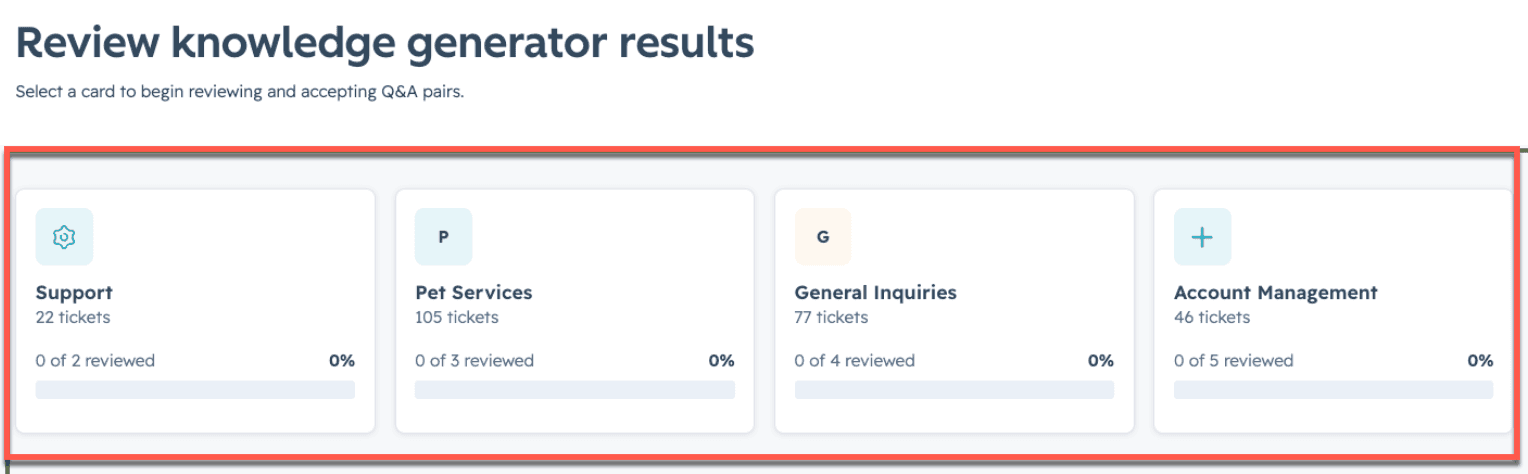
Notice the pattern: every vendor that learns from tickets puts a human approval step in the middle. That's the vendors telling you, politely, that raw ticket history isn't safe to learn from unreviewed.
Step 1: export the tickets, with the conversation attached
The first surprise for most teams: the standard ticket export usually doesn't include the conversation. You get the subject, status and fields, but not the back-and-forth you actually want to learn from.
- Zendesk: the recommended incremental export endpoint is
GET /api/v2/incremental/tickets/cursor.json, up to 1,000 tickets a page and 10 requests a minute (30 with the High Volume add-on), admins only. Comments aren't in it. Pull them from the ticket events stream withinclude=comment_events, or per ticket from the comments endpoint, wherepublic: falsemarks an internal note. The Zendesk incremental export guide has the full walkthrough. - Freshdesk: the UI export "will NOT give you the entire conversation from the ticket or historical data" (Freshdesk export docs). Use an account export or the API, which returns only the last 30 days unless you pass
updated_since, and at most 30,000 tickets per list call (Freshdesk API). - Gorgias: the view export handles up to 1 million tickets but has no message text. "Export with message content" from an analytics drill-down covers only the most recent 30 days, up to 100,000 tickets, public messages only (Gorgias export docs).
Export public messages only. Internal notes are where agents write "customer is lying, refund anyway to make this go away", and you don't want the AI learning from that. Zendesk's own tools drop internal notes for the same reason.
Step 2: filter out the tickets that would teach the wrong thing
This is the step that makes or breaks the project. You're not trying to keep as many tickets as possible. You're trying to keep the ones you'd happily show a new hire as "this is how we do it".
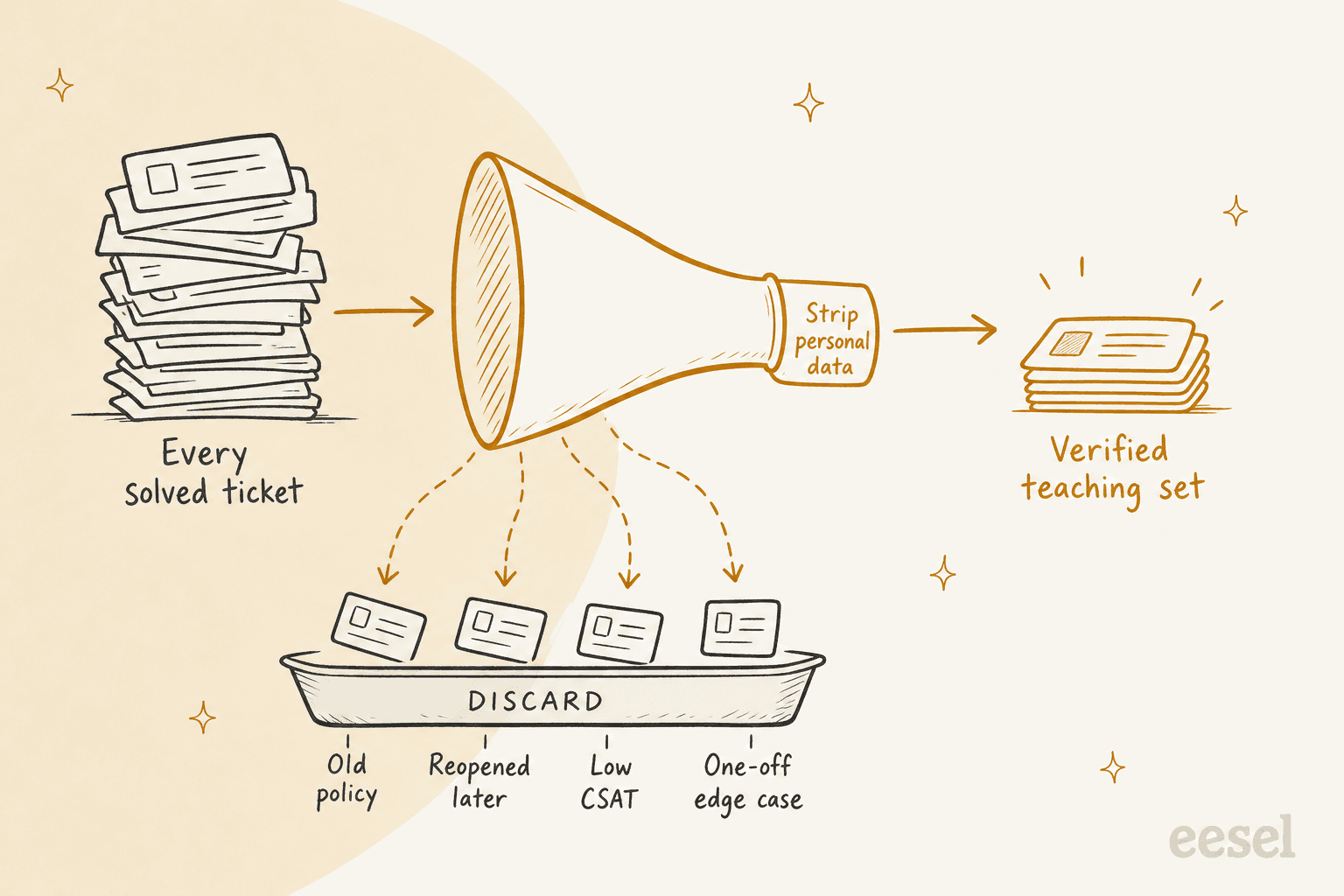
Drop these:
- Tickets older than your last policy change. If your returns policy changed in March, everything before March teaches the old rule. When in doubt, start with the last three to six months. Zendesk and HubSpot both default to 90 days for their own ticket-learning features.
- Tickets that were reopened, escalated after the "solve", or followed by a second ticket on the same issue. The first answer didn't work.
- Tickets with a bad CSAT score or a failed QA review. If you run support QA, the QA-approved tickets are your gold set.
- Auto-closed tickets with no agent reply, spam, and "thanks!" follow-ups.
- One-off edge cases. The bespoke deal your head of support made once for a VIP shouldn't become the default answer.
- Seasonal spikes, if they'd skew the mix. One flower-delivery brand on an eesel sales call asked for 300 random tickets a month across 10 months, leaving out the Valentine's Day and Mother's Day peaks, so a February surge wouldn't drown out the other 10 months.
OpenAI's guidance on training data makes the same point from the other side: "a smaller amount of high-quality data is generally more effective than a larger amount of low-quality data" (OpenAI fine-tuning best practices). It also warns that imbalance teaches habits. If 60% of example replies say "I cannot answer this" but only 5% should, "you will likely get an overabundance of refusals." Your ticket history has its own version of that skew, usually toward whatever your busiest month was.
A Zendesk admin on Reddit put the problem with raw history well, and it's the reason this step exists:
"I am not entirely sure this approach would be bullet-proof (especially for businesses that have struggled to offer consistent customer support across agents - yes, I've worked for one!). Also, training on tickets is only half the battle, it's integrating all the other "knowledge" sources that makes a difference."
Step 3: strip personal data before anything is indexed
Support tickets are full of names, emails, addresses, order numbers, and sometimes card numbers and passwords customers paste in when they're frustrated. If those go into an AI's knowledge, the risk isn't just compliance. It's the AI repeating one customer's details in another customer's reply.
Vendors are explicit about this. HubSpot's docs warn that private knowledge sources "will not be cited, but their content may still appear in responses", so "do not include personal, confidential, sensitive information, or private customer data" (HubSpot knowledge sources). Zendesk's Advanced Data Privacy and Protection add-on flags names, emails, addresses, card numbers, SSNs, IP addresses and phone numbers in comments, with one warning worth reading twice: "Ticket redaction cannot be reversed" (Zendesk redaction).
The legal side is simple to state, as one Hacker News commenter did:
"A support ticket or live chat with a customer is customer data. With things like GDPR you need to know exactly where customer data is stored and for how long."

So don't redact the tickets in your helpdesk to prepare a training set. Redact the copy you're training on. A few rules I'd follow:
- Mask, don't delete. Replace an email with
[EMAIL]rather than removing it, so the example still reads naturally and the AI learns "ask for the order email" without learning anyone's actual email. - Keep order IDs out of examples unless you're teaching the format. The AI should look orders up live, not remember them.
- Fail closed. If a ticket can't be cleaned, skip it. A smaller set beats a leak.
- Check the toggle. Redaction settings are often off by default. In eesel, for example, past-ticket redaction is off on recently created workspaces, and the docs say to "Check the toggle rather than assuming it's on" (eesel PII redaction).
For more on the mechanics, see redacting PII in support transcripts and the Zendesk AI data privacy breakdown.
Step 4: split each ticket into facts, decisions and tone
Now take your clean set and route each lesson to its place.
Facts become knowledge. When the same question gets the same correct answer in 15 tickets and there's no help article for it, that's a missing article, not a training example. Write it once, in your help center or an internal doc, and let the AI retrieve it. This is the part that also makes your human team faster, because answers that used to live in one person's head end up written down. A knowledge gap analysis is the systematic version of this step.
Decisions become rules. Refund over a limit, a warranty claim, a legal threat, an angry VIP: these are judgement calls, and an AI that learned them from examples will be inconsistent, because your agents were inconsistent too. OpenAI's docs put a number on why: if people only agree on 70% of cases, "the model would likely not be able to do better than this" (OpenAI fine-tuning best practices). Write the rule down, including the escalation path, and test it. Zendesk's design reflects this too: auto assist suggests actions only "if they're defined in your procedures", never from similar tickets.
Tone becomes examples. Pick 20 to 50 replies from your best agents across your top topics: a short "where's my order" answer, a careful billing reply, a friendly no. Label each with what makes it good ("two sentences, no apology, link to tracking"). That's enough to shift length and voice, which is where most of the editing time goes. The guides on AI brand voice and support tone cover how to write the rules that sit alongside the examples.
OroSoft, which makes software for the precious metals industry, shows what this looks like in practice. Its eesel agent on Freshdesk learns from about 6,100 past tickets, re-synced every night, but it's told to prefer resolved and closed tickets, weight the recent ones, and treat the help center as the source of truth for policy, following the more recent source when the two disagree. When a past ticket fits, the draft copies its structure, tone and length, so a short answer that worked before stays short. And it never copies customer names or details across from old tickets.
Mining tickets for knowledge doesn't have to be fancy, either. One Hacker News commenter described pointing a model at their history this way:
"read this historical dump of 15k support tickets and break them into categories that make sense, then propose help docs that i could write to handle the most frequent queries in each category"
That's the right instinct: the output is help docs a person writes and approves, not a model that memorized 15,000 tickets.
Step 5: hold back recent tickets and replay them
Here's the testing mistake I see most often: teams test the AI on the same tickets it learned from, get a great score, and launch. Of course it did well. It had seen the answers.
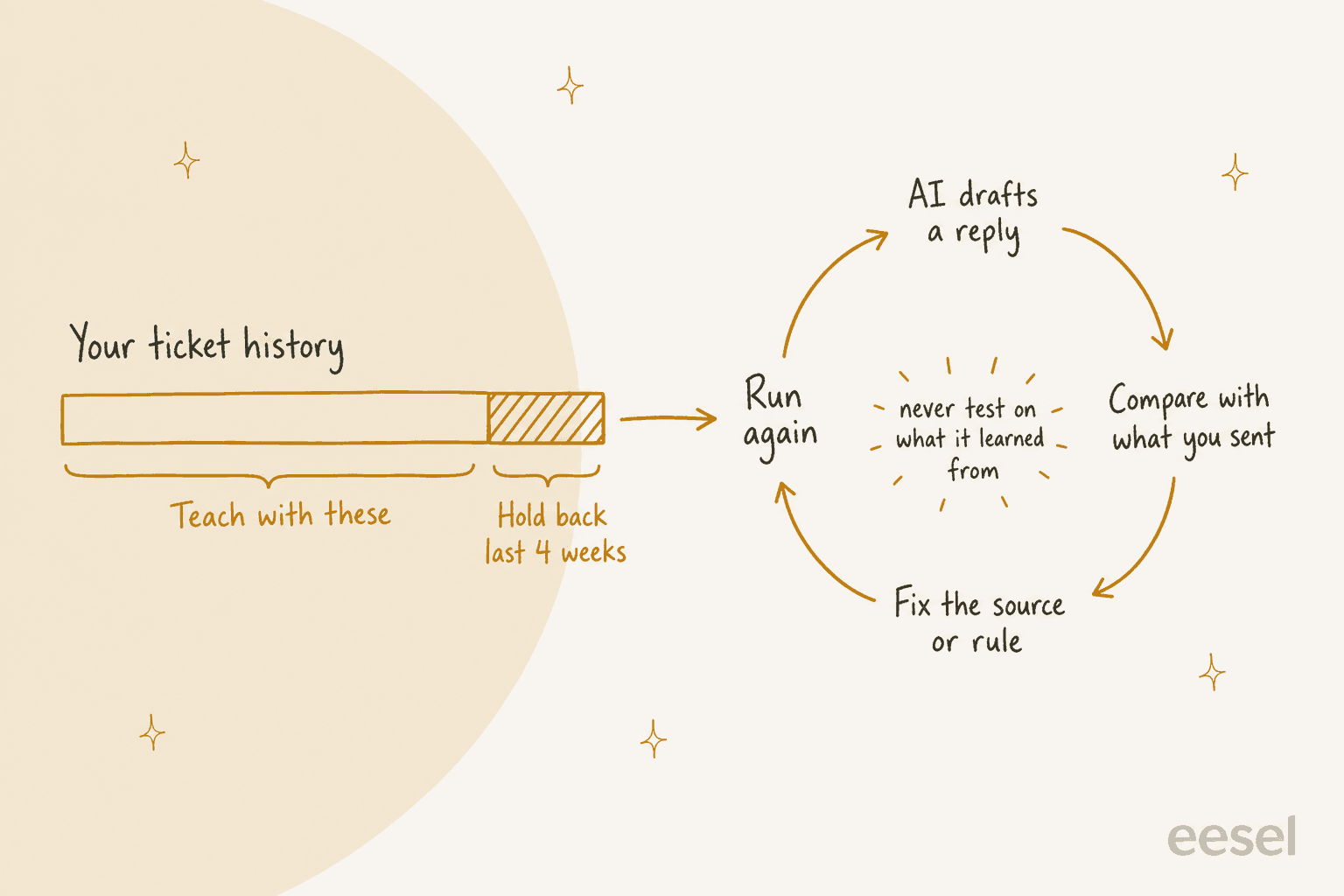
OpenAI's docs say it bluntly: "Good evals first!", and recommend a holdout set that "acts as a control group" (OpenAI supervised fine-tuning). The same applies when you're not fine-tuning at all. A simple version:
- Hold back your most recent three to four weeks of solved tickets from the import. They're the most representative of today's questions and the AI hasn't seen them.
- Replay 50 to 100 of them. Have the AI draft a reply to each customer message without sending anything.
- Compare each draft with what your team actually sent, and score accuracy and tone separately. A draft can be factually right and still need a full rewrite.
- Trace every miss to a cause: a missing article (fix the knowledge), a wrong call (fix the rule), or the wrong voice (fix the examples). Then run it again.
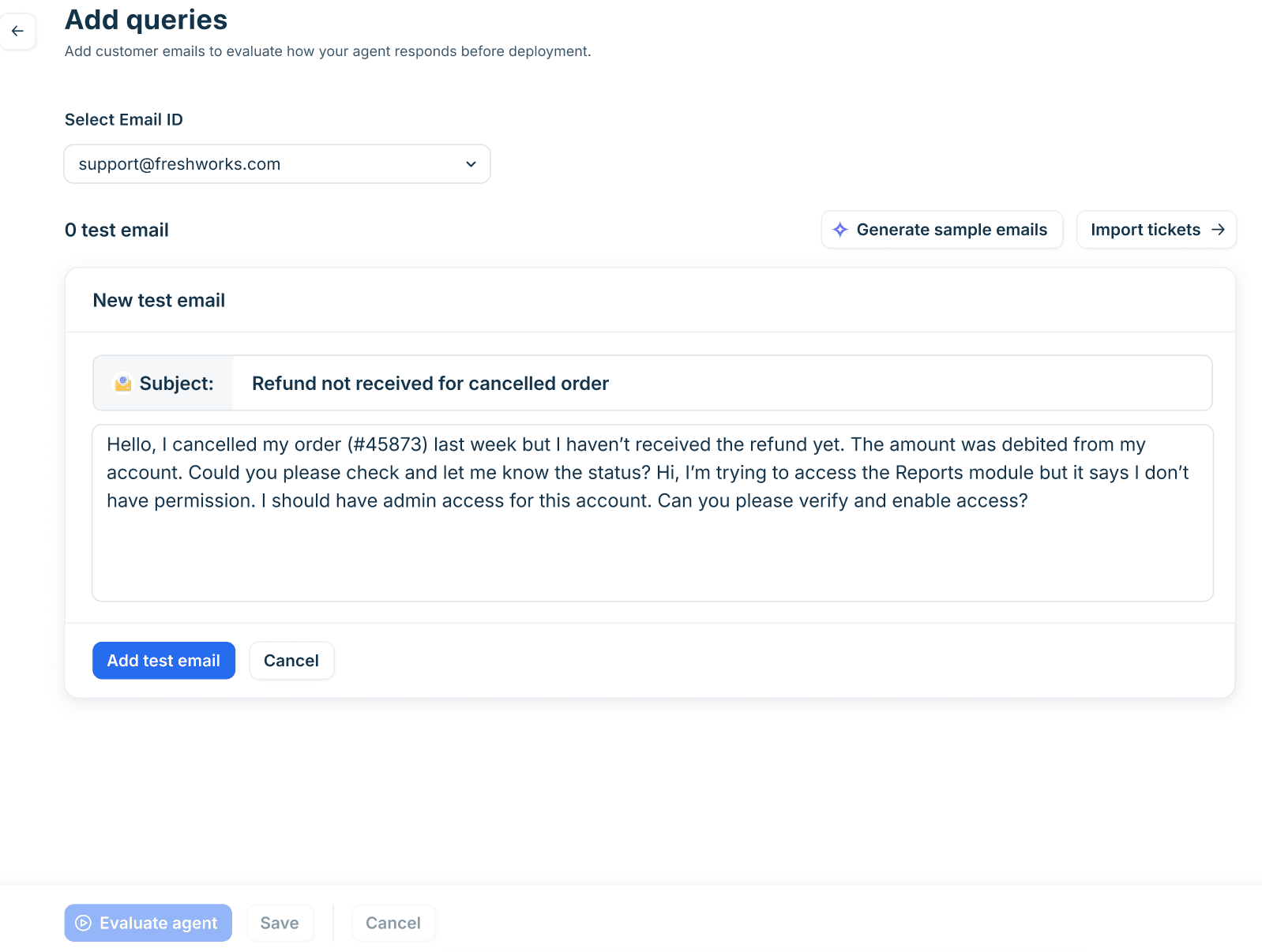
Most helpdesks give you a tool for the replay. Freshdesk's email agent lets you "Import tickets to use solved historical tickets" as a test set, up to 50 queries a run, and recommends at least 20 representative queries before deploying (Freshdesk email AI agent setup). HubSpot's batch testing doesn't use credits. eesel's Simulation skill drafts a reply to 20 tickets your team recently resolved, compares each with what your team sent, and groups the results by theme with fixes, without sending anything to customers.
Cloud ERP company Qontro turned this comparison into a habit rather than a launch gate. Its eesel agent drafts on every new Freshdesk ticket, and the team compares each draft with the reply a person actually sent. Where the draft was wrong, that usually points to a missing help article or a rule that needs tightening, and they fix that. About one in ten drafts now goes out with little or no editing, and the share is rising slowly. For a full test plan, see AI support agent testing and the checks in testing before launch.
Step 6: keep the training current
Ticket training isn't a one-time import. Your products, policies and customers change, and an AI that learned from last year's tickets slowly drifts out of date.
- Re-sync on a schedule. Danish software company Timengo re-syncs its Freshdesk help center every Sunday, re-crawls its docs every Monday, pulls in open tickets weekly and the full ticket history monthly. Norden-Frisia's bots re-sync from Zendesk, so a change to an article about roof racks or disability discounts reaches the bot without retraining.
- Retire tickets when a policy changes. When you update the return window, the old tickets that quote it should leave the training set the same day.
- Mine new tickets for gaps. The questions the AI couldn't answer this month are next month's help articles. HubSpot flags knowledge gaps on tickets the agent couldn't answer, and Gorgias's Opportunities surfaces topics its AI "has repeatedly handed over to your team" (Gorgias Opportunities). A self-updating knowledge base is the goal, with a human approving each change.
- Run a quarterly audit of the knowledge the AI relies on. An AI knowledge base audit will catch more stale answers than any prompt tweak.
Common mistakes when training AI on past tickets
- Importing everything "to be safe". More tickets means more old policies and more inconsistent decisions. Curate first.
- Telling the AI to ignore some tickets instead of removing them. Instructions don't reliably filter knowledge. If a queue shouldn't be learned from (test data, an old product, another team's tickets), exclude it from the import.
- Learning decisions from examples. Refund limits and escalation rules belong in writing, where you can test them.
- Forgetting personal data until legal asks. Redact the training copy before anything is indexed.
- Testing on training data. Hold back recent tickets, or your score is flattering you.
- Reaching for fine-tuning first. It's the slowest, most expensive option and fixes the least common problem.
- Treating launch as the end. The pilot phase is where you find the gaps your history didn't cover.
How eesel learns from your past tickets
I'll be upfront that I'm biased here, but eesel was built around this exact workflow, so it's worth showing how it maps to the six steps.
- Import with control. With a full connection to Zendesk, Freshdesk or Gorgias, eesel reads your help center, macros and past tickets. The first import is a sample of up to 1,000 recent solved tickets, and you can filter by status and date to import more (Zendesk setup docs). If a source shouldn't be learned from, you switch it off on the integration page, because, as the docs put it, telling it to ignore past tickets "does not stop it finding them; the switch does."
- Personal data masked before indexing. Past tickets run through a detector covering 15 kinds of personal data, replaced with typed masks like
[REDACTED:EMAIL], and tickets that can't be cleaned are skipped rather than stored raw (PII redaction docs). - Replay before going live. The Simulation skill replays recent resolved tickets, scores each answer against what your team sent, and suggests instruction changes. Nothing runs on real tickets until you create an automation, and most teams start with drafts.
- Corrections that stick. When you correct a reply in chat, eesel writes the correction into its own instructions, so the fix holds next week.
- A CLI for the export-and-import plumbing. If you'd rather script this, or have a coding agent like Claude Code or Cursor do it, the eesel CLI drives the same agent from a terminal, with JSON output.
eesel integrations sources zendeskshows what the help center, macros and tickets sources hold,eesel integrations download start zendeskcopies them into eesel's knowledge, andeesel chatlets you ask it to import a specific date range or run a simulation. It's the same agent as the dashboard, so anything you set up there shows up in both.
Swedish electric-vehicle retailer Nordbutiker is a good example of the "curate, don't dump" idea. It runs four stores across Sweden, Norway, Denmark and Finland, and each store's bot learns from the solved tickets for its own Zendesk brand, so the answers reflect what that store's agents actually said. Anything the site and past tickets don't cover, like spare parts and warranty claims, goes to a person.
Train an AI on your past tickets with eesel
If you're sitting on years of helpdesk history and want an AI that answers like your best agents, eesel is the shortest path I know. It joins Zendesk, Freshdesk or Gorgias like a new hire who has already read your help center, your macros and your best past tickets, with personal data masked. Then it replays your recent tickets to show you where it would have gone wrong before it drafts a single real reply.

That's what sold Norden-Frisia: in the trial week the team connected Zendesk, pulled in the macros and the last three months of tickets, and signed up within days. The free plan includes 100 credits with no card, and paid plans start at $299/month for 500 credits, where a ticket is one credit however many replies go back and forth (eesel pricing). Try eesel on your own ticket history and see the drafts before you pay anything.