

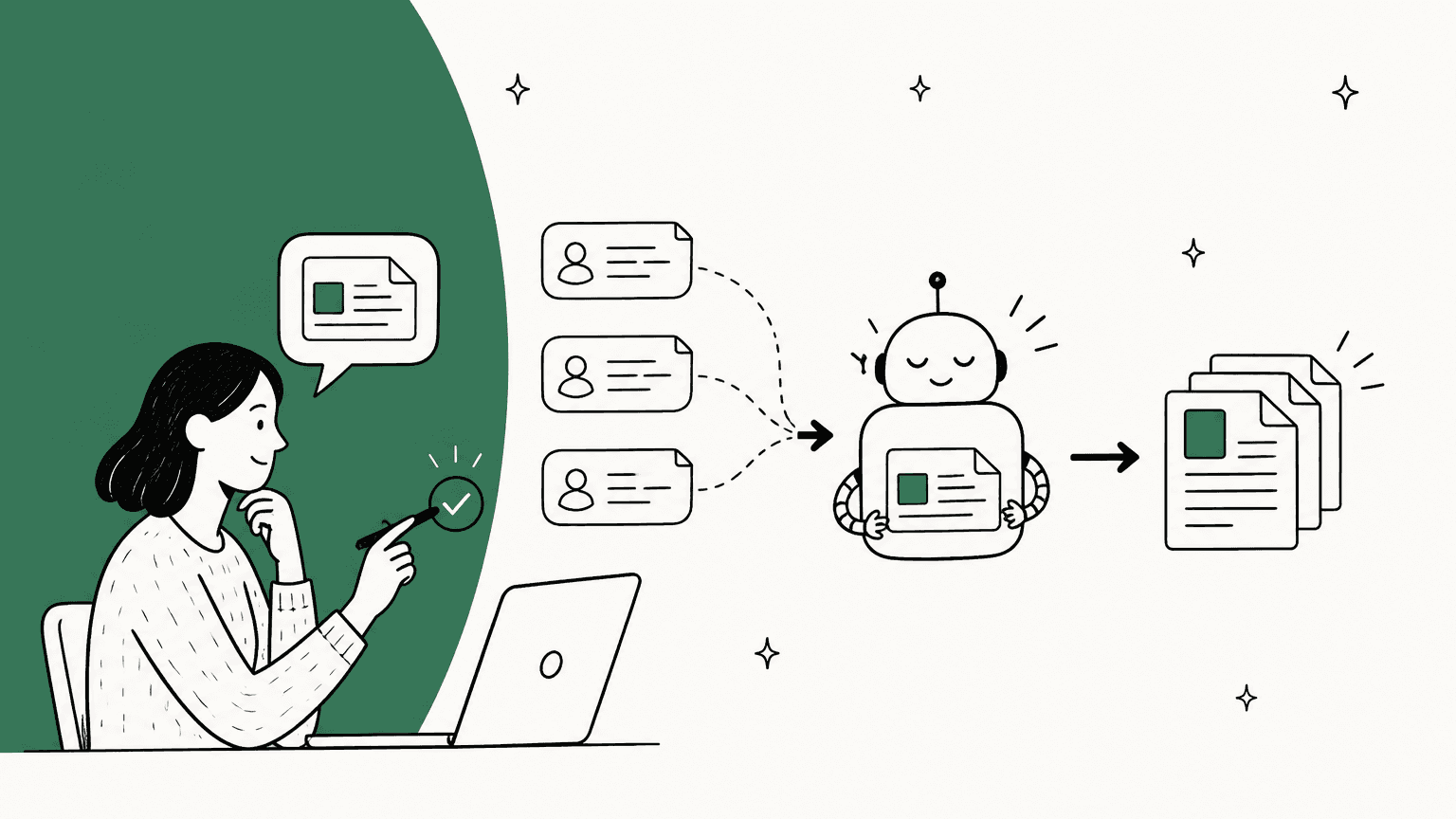
What is a self-updating knowledge base?
A knowledge base is the set of articles your customers and your AI agent read to answer questions. A self-updating one keeps those articles current without a writer having to remember to. In practice, vendors use the phrase for four quite different things, and the difference matters a lot once an AI agent is answering customers from those articles.
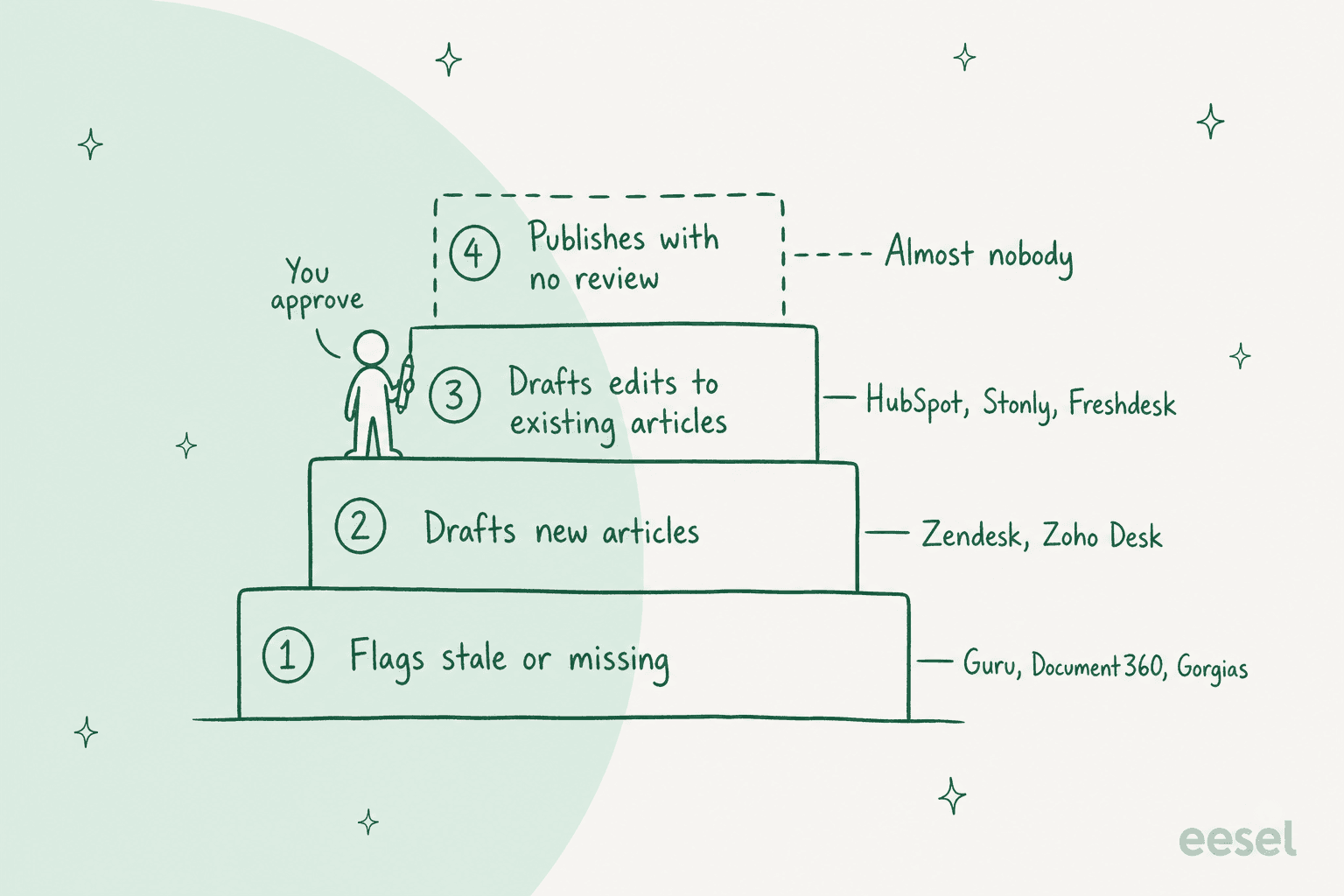
- Flags stale or missing content. The tool marks an article as old, unverified, or missing, and a person writes the fix. Guru and Document360 live here.
- Drafts new articles. It reads tickets, finds a question with no article, and writes a first draft. Zendesk's Knowledge builder and Zoho Desk's Ticket to Article sit on this step.
- Drafts edits to existing articles. It compares what customers ask now with what the article says, and proposes the change. HubSpot, Stonly and Freshdesk's Improve tab reach this step, and so does Zendesk's Knowledge copilot in early access.
- Publishes with no review. Almost nobody does this for help center content. Gorgias has an Auto-run mode in its Gaia assistant that applies changes without approval, but a person has to start that chat.
Most "self-updating" marketing is describing step 1 or 2. Guru's own KM automation page says it "verifies and updates knowledge automatically", and its docs show the update is a change of trust status (verified or unverified), not a rewrite of the card. That is useful. It is just not what most people picture when they read the words.
Why does a help center go out of date?
Nobody decides to let the help center rot. A refund window changes, a plan gets renamed, a feature moves to a different menu, and the people who know about it are busy answering the tickets that the change just created. The article is the last thing to hear about it.
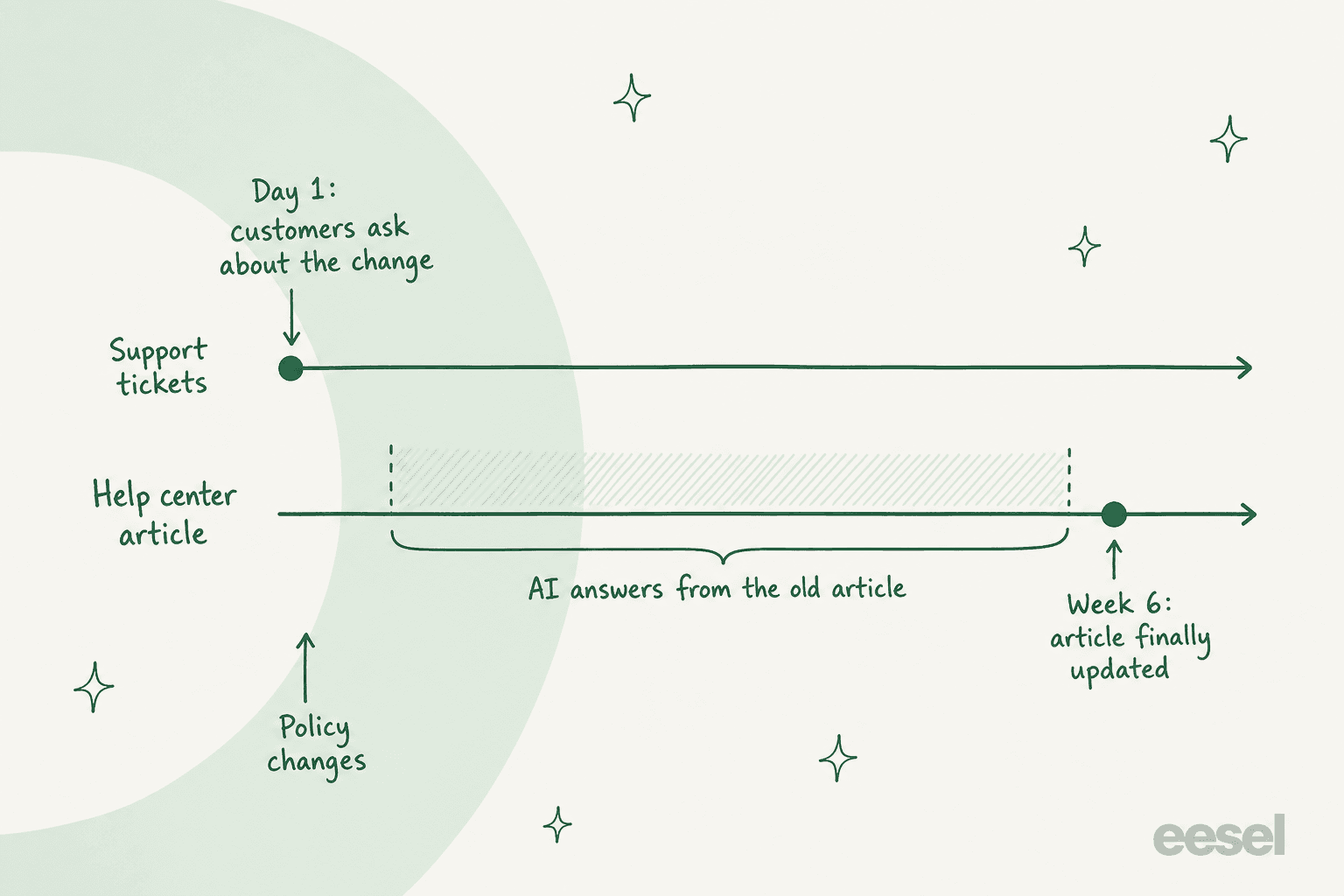
That illustration is the whole problem in one picture. Your tickets learn about a change on day one; your help center learns about it whenever someone gets round to it. Before AI agents, that gap meant a slightly embarrassing article. Now it means an AI agent confidently quoting the old policy to every customer who asks, at scale, until the article catches up.
One support lead on Reddit described the moment their team started taking this seriously:
"the two docs disagreeing thing is the scariest part, bot just picks whichever one it grabbed first and sounds totally sure about it we started doing the source-of-truth cleanup after one of our bots told a customer they could return something 3 years past the actual policy window, support had to eat that one"

The cost of that gap is not hypothetical. In Moffatt v. Air Canada (2024), the airline's chatbot told a customer they could claim a bereavement fare after travel, while the linked policy page said the opposite. The tribunal held Air Canada responsible for what its chatbot said, writing that "It makes no difference whether the information comes from a static page or a chatbot", and awarded $812.02. The bot and the page disagreed, and the customer was entitled to rely on whichever one they read.
What does each helpdesk actually do on its own?
I went through the current docs for six helpdesks in October 2026 and asked the same five questions of each: what does it spot by itself, does it write anything, does anything go live without a person, what does it cost, and how fast does the AI see an edited article. The short version is that every one stops at a flag or a draft.
| Helpdesk | Spots on its own | Writes for you | Goes live without a person? | AI sees an edited article |
|---|---|---|---|---|
| Zendesk | Gap topics from 90 days of tickets, weekly; Freshness score (Knowledge copilot, early access) | New article drafts; update drafts in Knowledge copilot | No, "doesn't automatically create or publish content" | Help center searched live; external sources about every 24 hours |
| Freshdesk | "New content" and "Edit content" insights from unresolved AI conversations | A suggested revision shown next to the current article | No, you copy the suggestion in | Files and URLs need a manual "Resync and relearn" |
| Gorgias | Knowledge gaps and knowledge conflicts (Opportunities, beta) | New article drafts every 3 to 6 months (AI Library) | No, except Gaia's Auto-run when you ask it | Once published; website re-sync is manual, at most once per 24 hours |
| HubSpot | Gaps from closed tickets; existing articles that are "unclear, outdated, or incomplete" | New drafts and edits to existing articles | No, but one click: "Accept all and publish" | Re-syncs automatically when an article is updated |
| Zoho Desk | A note on the ticket when the agent lacks an article | One draft from one ticket, on request | No, drafts only | Answer Bot retrains every 30 minutes |
| Help Scout | Nothing for Docs; Scout's report shows conversations it could not help | Nothing; no AI drafting of Docs articles | No | "Immediately available to Scout" |
What does your helpdesk keep current on its own?
Pick your helpdesk to see what it does by itself, and the part of the loop that is still your job. Checked against vendor docs in October 2026.
Zendesk
Zendesk has three separate pieces, and it helps to know which one you are looking at. The automation potential report reads your last 90 days of tickets, refreshes weekly on every Suite plan, and has a Knowledge gaps tab with a Generate article draft button. Knowledge builder builds up to 40 draft articles from solved tickets, but Zendesk's own doc says that on "an existing, well maintained help center, this feature will likely not be helpful", because it adds new sections rather than fixing old ones.
The maintenance piece is Knowledge copilot, still in early access on Suite Professional and up. It scores Coverage, Freshness and AI readability every week, and its Freshness score drops when an article "hasn't been updated within the last six months". It can recommend an update to an existing article and draft it. Zendesk is direct about the limit: "Knowledge copilot doesn't automatically create or publish content to your help center; you remain in full control."
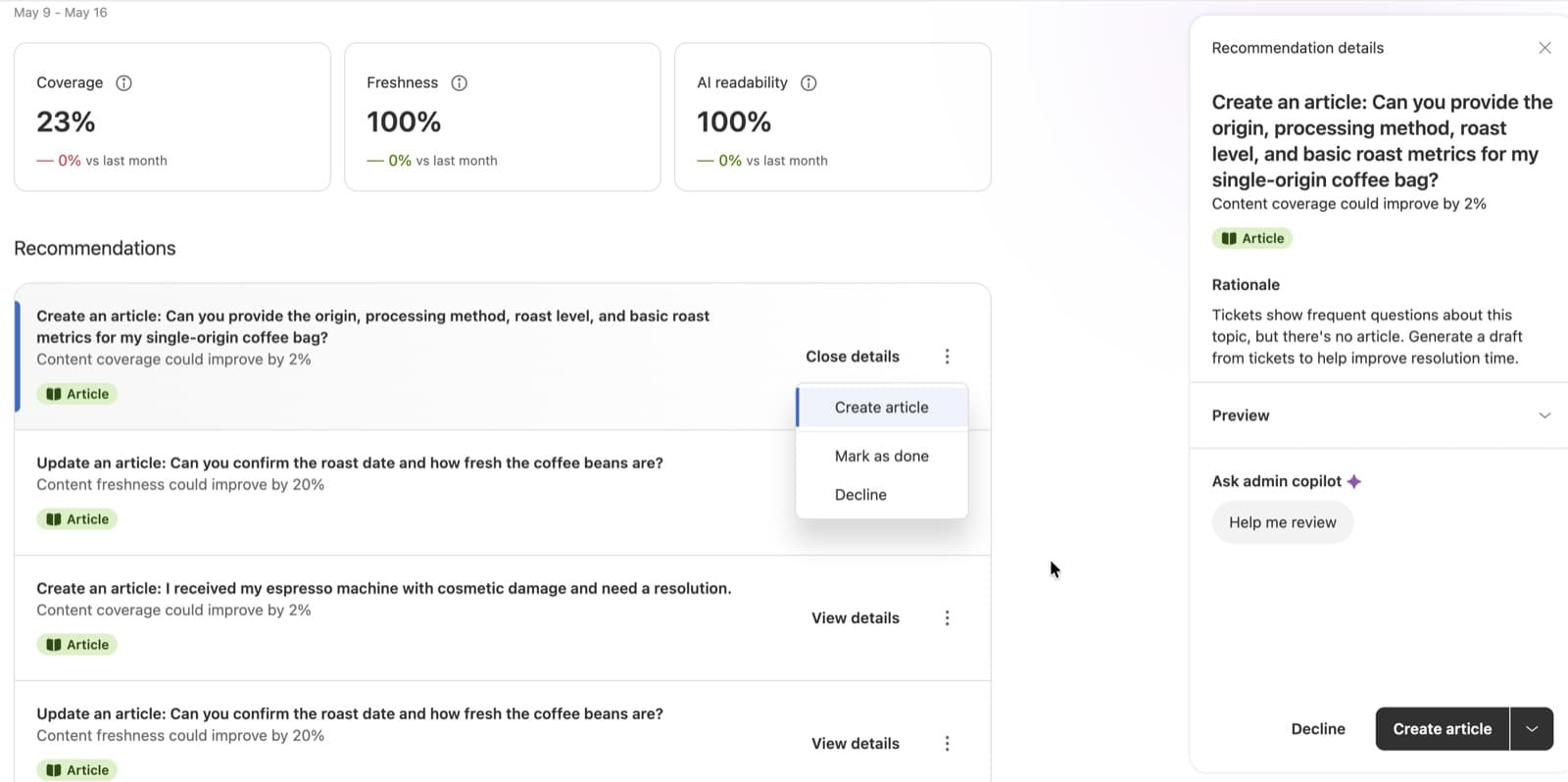
If your plan has article verification (Enterprise only), you can also set a rule that marks articles unverified when they have not been checked within a set period. That is a reminder, not an AI. The Zendesk knowledge gap analysis guide covers the report end to end. One Zendesk admin summed up where it stops today:
"It does not self-correct in my experience. It will recommend missing articles from intent after some time but it needs to be added manually."
HubSpot
HubSpot's knowledge base agent (beta, Service Hub Pro and Enterprise) is the closest thing to the real idea right now. It "uses your closed support tickets to identify gaps and generate article drafts, then analyzes your existing articles to surface suggested edits where content may be unclear, outdated, or incomplete." Each suggestion shows the tickets that caused it, and edits can be accepted one at a time or with Accept all and publish.
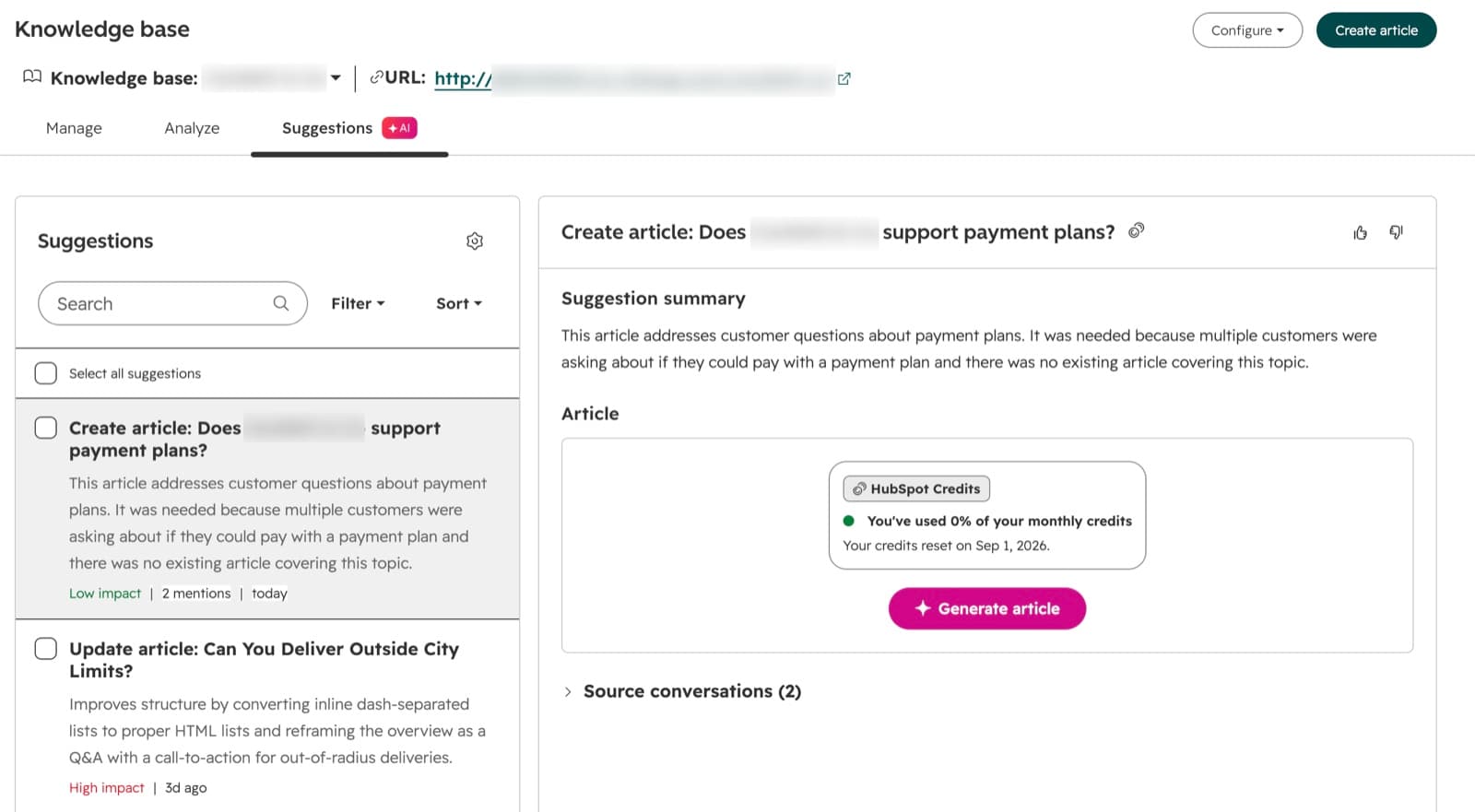
The cost is in credits. HubSpot's product catalog lists 200 credits to generate one new article, which is about $2.00 once your included credits run out at $0.010 each, and the help page says accepting a suggested edit to an existing article uses no credits. It needs at least five closed tickets and works on one knowledge base at a time. More in the Service Hub knowledge base breakdown.
Freshdesk
Freshdesk's Freddy AI Agent Studio has an Improve tab that "identifies gaps, and outdated content in your knowledge base and recommends specific fixes, grounded in real conversations." It looks at conversations where the AI agent did not resolve the question, got negative feedback, or answered inconsistently. For an existing article, it shows the current version next to its suggested update.
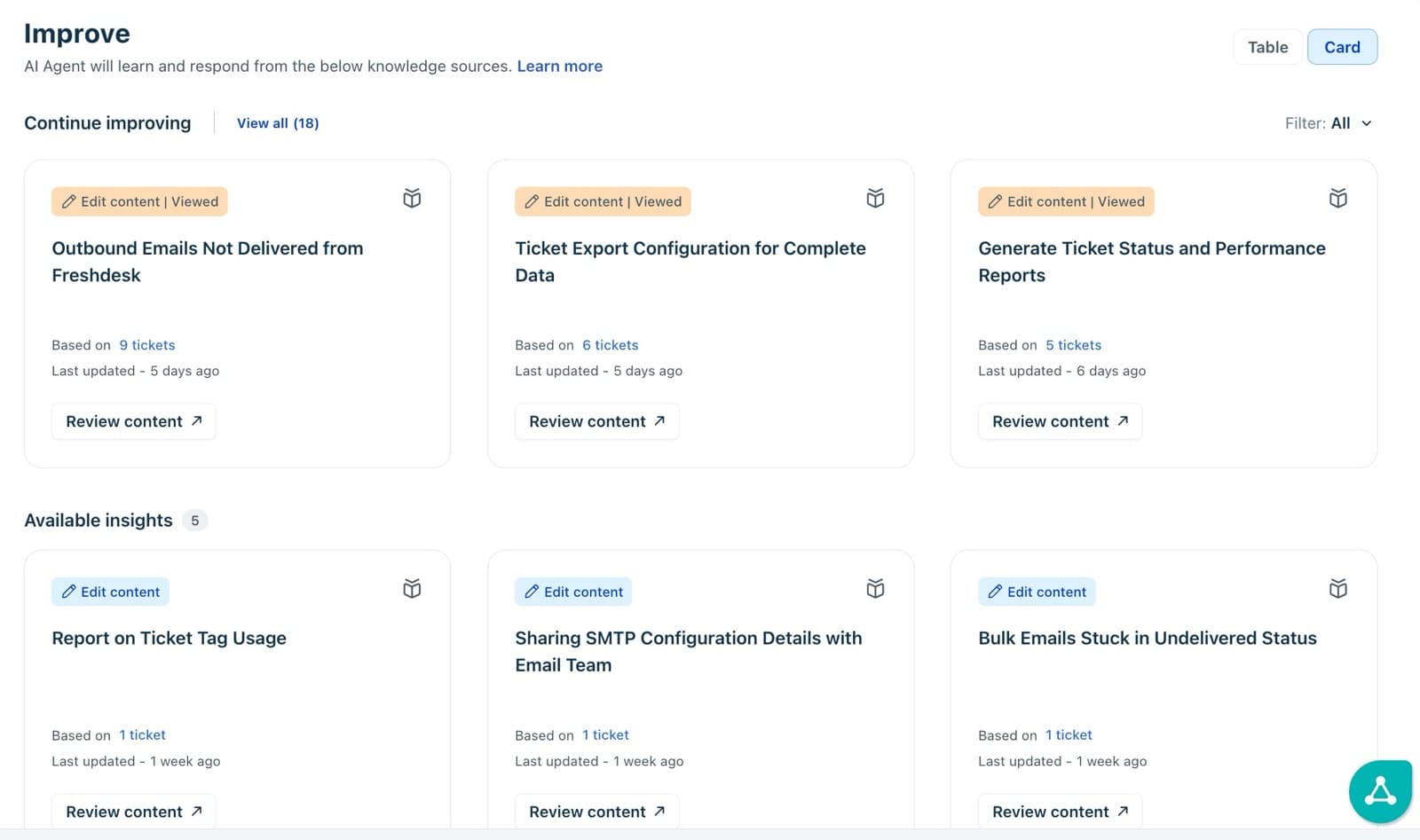
Then you open the document and make the change yourself. Freshdesk writes the fix, but it never applies it. The pricing page shows Improve on Growth, Pro and Enterprise, with the AI agent's first 500 sessions included and $49 per 100 after that. If your knowledge also lives in solution articles you write by hand, the Freshdesk solution articles guide is the companion read.
Gorgias
Gorgias splits the job in two. Opportunities (beta) flags a "Fill knowledge gap" when the AI agent keeps handing a topic over, and a "Resolve knowledge conflict" when two sources disagree, showing both side by side. You do the fix and mark it done. Separately, the AI Library drafts new articles every 3 to 6 months based on your ticket volume, English only, and you choose which to publish.
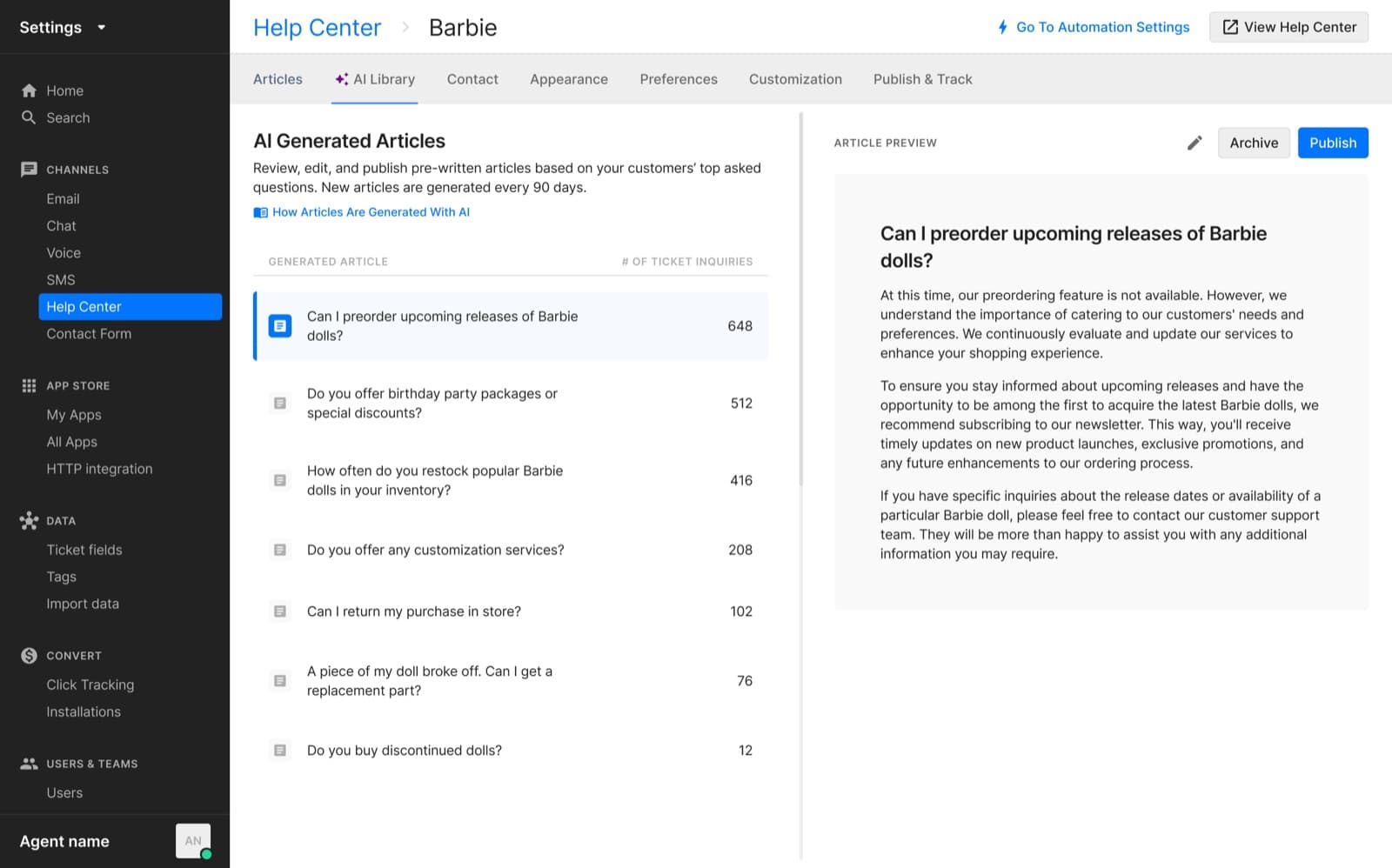
The new piece is Gaia, a chat assistant that can draft guidance or an article from a ticket. It defaults to Ask first; in Auto-run, it "applies its proposed changes directly and skips this step entirely". That is the only no-approval write path I found across these six, and a person still has to start it. More on the setup in the Gorgias help center guide.
Zoho Desk and Help Scout
Zoho Desk's Ticket to Article turns one resolved ticket into a draft article when an agent asks for it, from the Express plan up. It cannot update an existing article. The one fast piece is that Answer Bot retrains itself every 30 minutes, so an article you fix by hand reaches the bot quickly.
Help Scout has no AI drafting for Docs. Its AI agent, renamed Scout in October 2026, sees Docs changes immediately, and the Scout best practices page asks you to review its report by hand for topics with no article. If you are on Help Scout, the gap-finding has to come from somewhere else.
Which standalone knowledge tools update themselves?
If your help center sits outside the helpdesk, or you want a separate tool for internal knowledge, the same four steps apply. Here is how the tools ChatGPT and Google surface for this question actually behave, according to their own docs.
| Tool | Spots on its own | Writes for you | Goes live without a person? | Price |
|---|---|---|---|---|
| Guru | Daily checks on cards used in answers: thumbs, flags, dates, near-duplicates | Nothing; changes verified or unverified status | Status changes yes; content no | Custom quote |
| Stonly | Tickets, failed searches, AI conversations, policy changes | New content and edits to existing guides | No, "review, refine and publish" | Enterprise plan, no published price |
| Document360 | Articles past a review date go Stale; unanswered AI questions | Nothing for maintenance; AI writes from your prompt | No, a person marks it reviewed | Custom quote |
| Zendesk Knowledge builder | Common issues in recent solved tickets | Up to 40 new drafts; never edits existing | No, saved as drafts | Suite Team $55 and Suite Professional $115 per agent/month, annual |
| Fini Knowledge Atlas | Duplicates, contradictions, outdated content | New articles from resolved tickets; proposes rewrites | Says new articles are written "with no one touching a keyboard"; rewrites are proposed | $0.89 to $0.49 per resolved ticket |
Guru
Guru's Knowledge Agents "run daily verification checks on content that's been used in Answers". They verify content that keeps getting a thumbs up, and can unverify content that is past its valid date or has been flagged as inaccurate several times. Auto-verify is on by default and auto-unverify is off. Guru says manual verification usually only reaches 8-12% of content, which is a fair description of why the old "remind someone every 90 days" model stopped working.
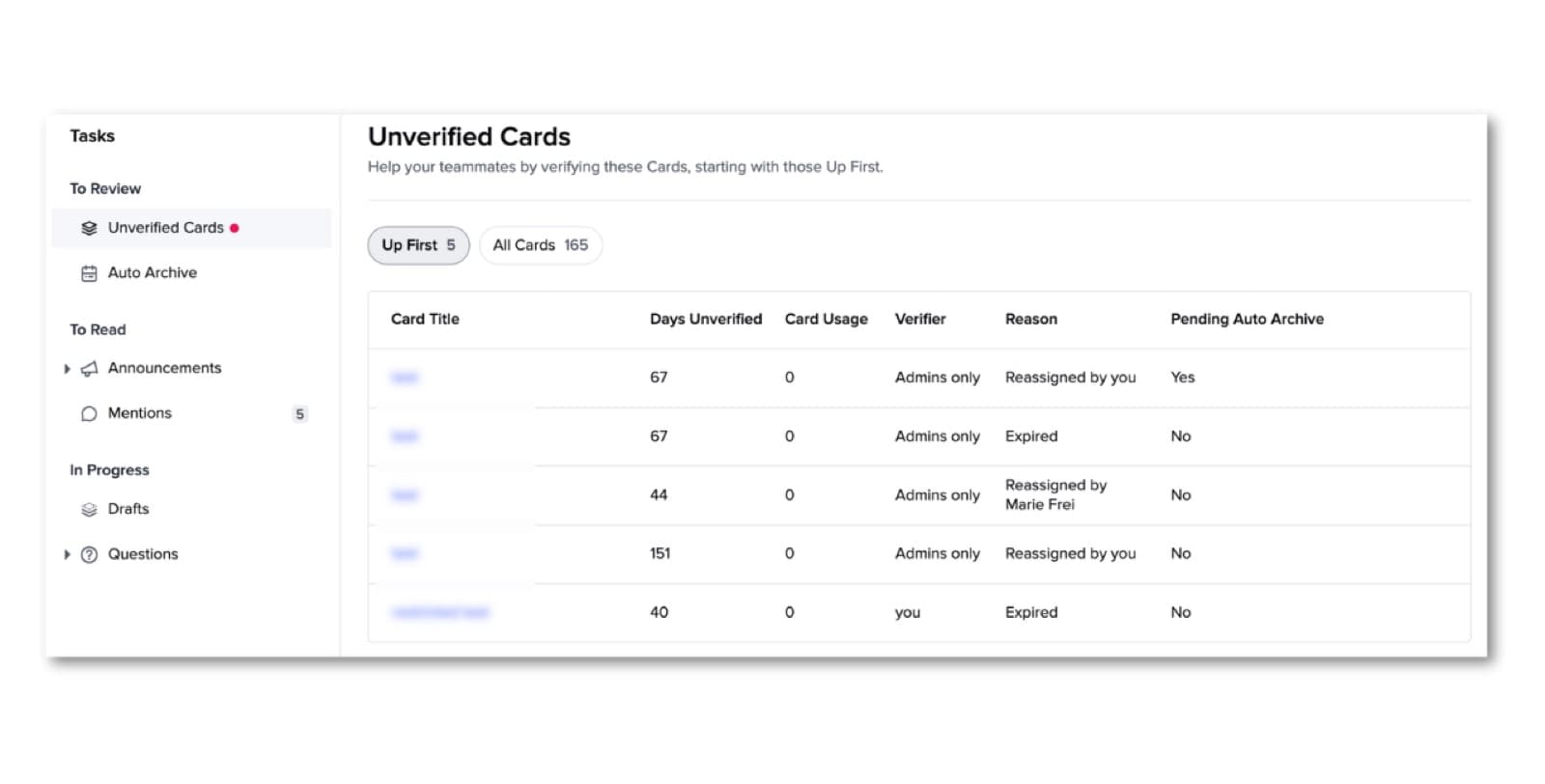
What it does not do is rewrite the card. The named verifier still fixes the content. That makes Guru a strong fit for internal knowledge where the main risk is people trusting something old, and a weaker fit if you want the fix written for you.
Stonly
Stonly's Knowledge Agents are pitched the closest to the full idea. They "automatically check every support ticket that comes in, every search result and AI conversation and every change to your company's policies", look for duplicates, mistakes, outdated content and gaps, then draft content "so you can review, refine and publish." The pricing page puts AI agents and help desk integrations on the Enterprise plan, with no published price.
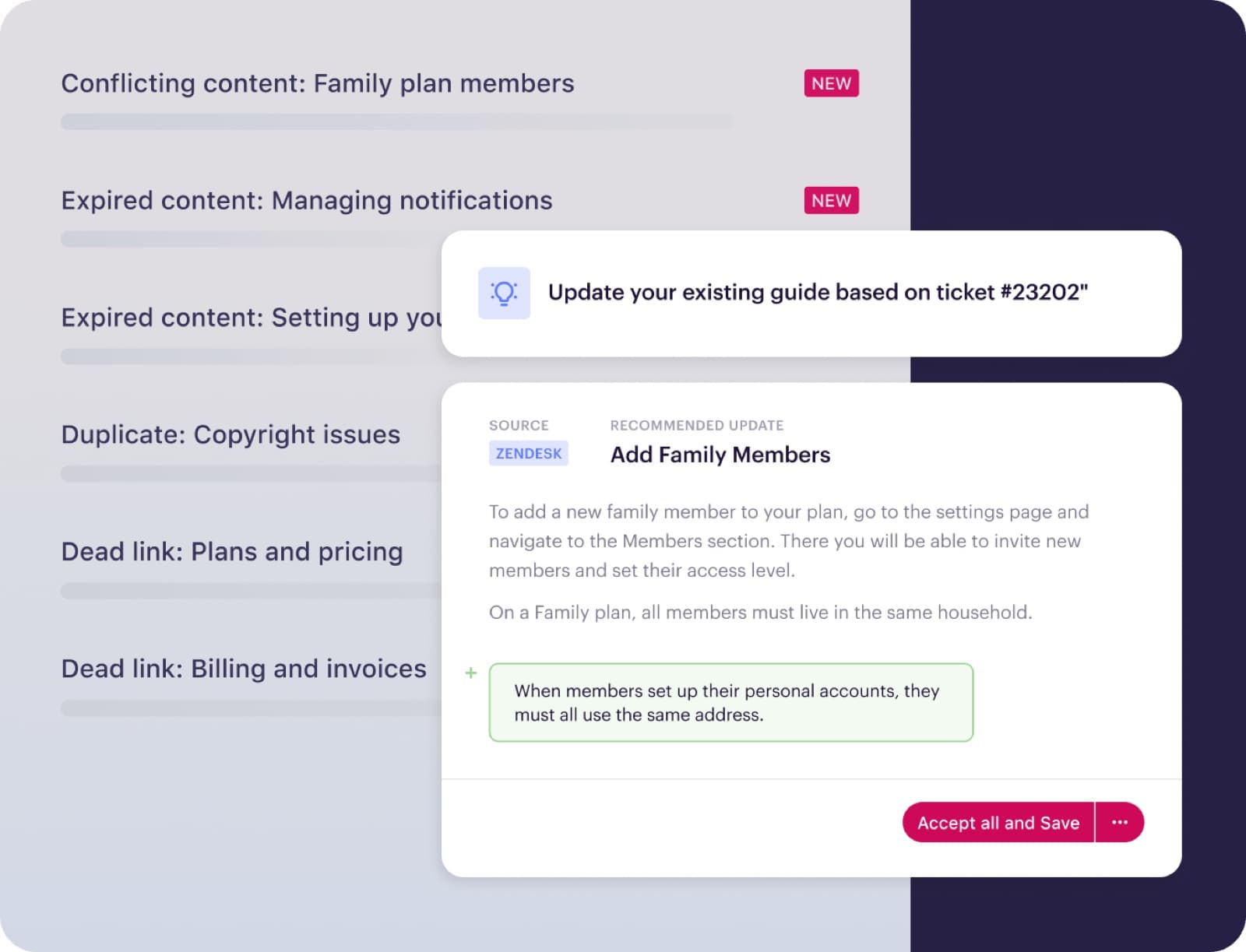
That image is a product render from Stonly's marketing page rather than a raw app capture, but it shows the right shape: an existing guide, a proposed change tied to a specific ticket, and a person accepting it.
Document360 and Fini
Document360 is date-based. When an article reaches its review date it goes Stale, with a red dot in the category tree, and stays that way until someone marks it reviewed. Its AI's unanswered queries tab shows what readers asked and could not find. Both are flags; neither drafts the fix from a ticket.
Fini's pricing bundles its Knowledge Atlas with its AI agent: $0.89 per resolved ticket on Growth, $0.69 on Scale (with a nightly scan) and $0.49 on Enterprise (with hourly updates). Its page says every resolved ticket "becomes a cited article" and that it "proposes the rewrite" for stale ones. I could not find a doc that states whether new articles skip review, so I would ask before assuming they do.
Should AI publish knowledge base edits without a human?
For most of your help center, no, and the vendors agree: every tool above keeps a person on the publish button by default. But "a person approves everything" is also how you end up with 40 drafts nobody reads. The fix is to sort proposed edits by what goes wrong if they are wrong.
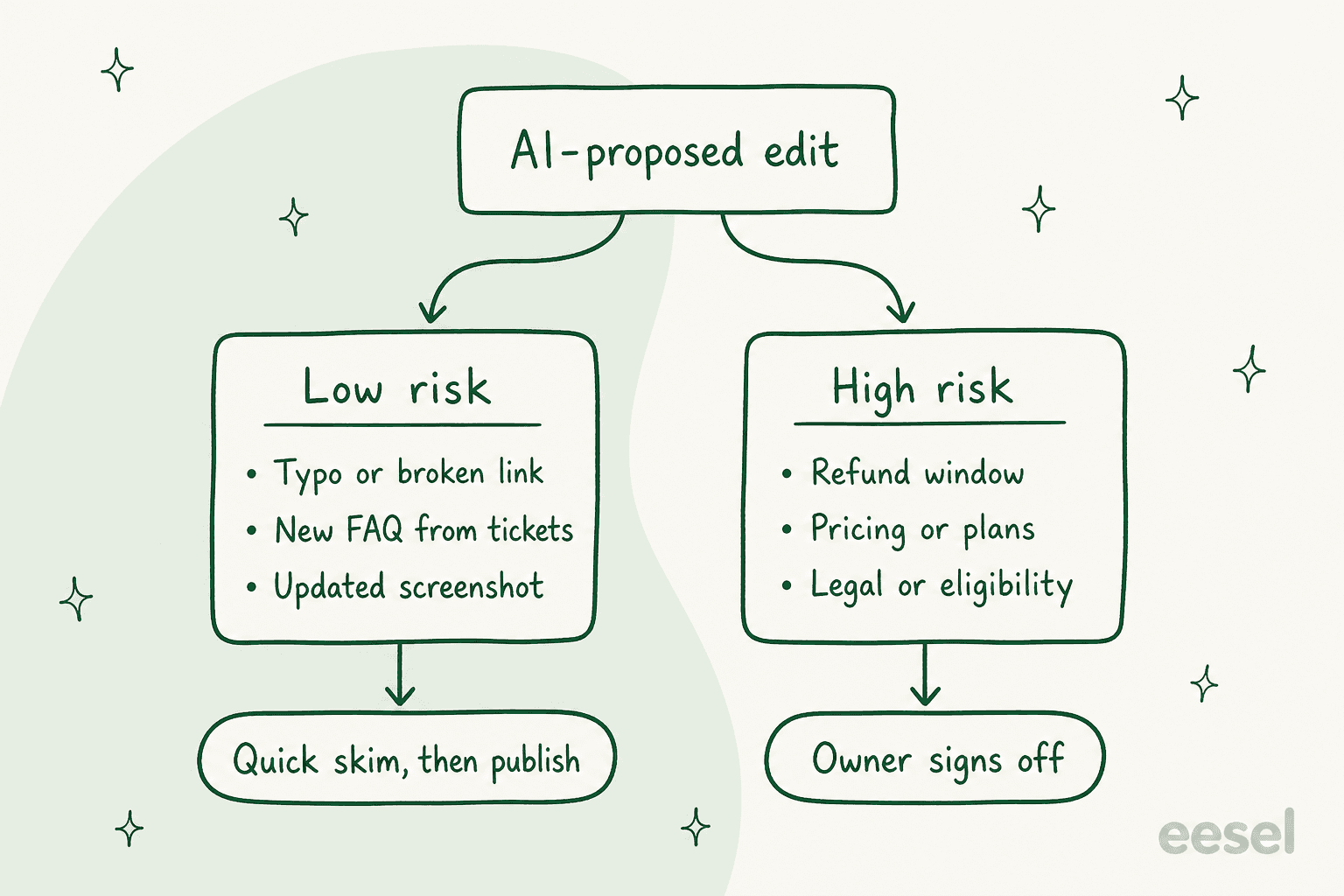
A broken link or a renamed menu item can go out after a quick look. A refund window, a price, an eligibility rule or anything legal needs the person who owns that policy, because that is the Air Canada scenario again. I would set this up as two queues with two owners rather than one inbox, so the low-risk edits never wait behind a policy review.
That matches how the teams actually doing this talk about it. An IT lead trying Atlassian's Rovo agents to keep Confluence current put it plainly:
"We're also exploring the use of Rovo agents (Atlassian's free LLM) to try and keep things updated, but I don't have enough faith in the product to make it completely automatic. I think AI needs eyes to verify there are no hallucinations. At least for now."
A Hacker News commenter on a doc-automation launch landed on the same model engineers already trust for code:
"I would be OK with AI doing it as long as it is more like dependabot and asks for a PR like everyone else. Untruths is the biggest issue but then docs mislead anyway due to getting out of date."

There is a second reason to keep a person in the loop: an AI drafting from tickets only knows what your agents said, and agents sometimes improvise. If a few people have been telling customers a workaround that is not official, an article drafted from those tickets will make it official. The reviewer's job is to catch that.
How to set up a self-updating knowledge base loop
Not everyone thinks you need AI for this at all, and the skeptics have a point:
"It happens naturally. Product update happens, we update it. We notice an issue, we update it. An agent or training team calls something out, we update it. Sometimes we’ll look at articles over X days without an update. Trying to have AI update articles is a great idea but the reality is if you need to have AI doing this, you got bigger problems to fix first."
If your team really does update articles the day something changes, keep doing that. Most teams I talk to cannot, because the people who know about the change are the people buried in the tickets it caused. For them, the loop below is the habit made automatic. You do not need a new tool to get most of the benefit. Here is the order I would set it up in.
- Connect the tickets, not just the articles. Whatever spots gaps has to read resolved tickets, because that is where the new answer shows up first. On HubSpot that means turning on customer conversation data; on Zendesk, the automation potential report needs 90 days of data. For an AI agent, it means a connection that includes past tickets and macros, not just the public help center.
- Get a weekly gap list. Zendesk, Freshdesk, Gorgias and HubSpot all produce one if you are on the right plan. Help Scout and Zoho Desk do not, so you need an outside tool or a weekly read of the AI agent's handoffs. The support knowledge gap analysis guide covers which signal each helpdesk gives you.
- Let the AI draft, sort the drafts by risk. Low-risk edits get a quick skim from whoever is on the queue. Policy edits go to a named owner. Give each a deadline, or the draft pile becomes a second stale knowledge base.
- Re-sync on a schedule. This is the step teams forget. Gorgias does not re-sync your website by itself; Freshdesk needs "Resync and relearn" for files and URLs; HubSpot re-syncs non-article sources weekly. Write the re-sync into the same weekly routine as the gap list, and see the policy change management guide for the per-helpdesk cadence.
- Close the gap while you wait. Even with a fast loop, there are days between a change and a published article. An AI agent that reads recent resolved tickets alongside the help center can answer from what your team said last week, not only from what the article said last quarter. That is the part that makes the gap stop hurting customers.
Every three months or so, run a proper knowledge base audit as well. The weekly loop catches what changed; the audit catches what nobody asked about and nobody noticed was wrong. If you want AI help with that, the detecting outdated help center content guide walks through it.
How eesel keeps knowledge current
eesel is an AI teammate for your helpdesk, and keeping its knowledge current is the part I spend the most engineering time on, because a teammate that answers from last quarter's policy is worse than no teammate. Here is what it does, and what it honestly does not.
It does not silently rewrite your help center. What it does is close the loop around it:
- It reads tickets, not just articles. On a full helpdesk connection it learns from your help center, macros and past tickets, so it knows how your team actually answers before it writes anything. The helpdesk setup docs cover what each connection reads.
- It flags every gap. Each task records whether the agent hit a knowledge gap, and the Reports page charts gaps over time. The Knowledge gaps report groups 30 days of questions it could not answer, or answered thinly, by topic and drafts the top three missing pages.
- It drafts, you approve. The Update knowledge base skill drafts missing articles. It is switched on per workspace, so ask the eesel team to turn it on. Where eesel can write back, like a Zoho Desk article, it saves a draft unless you tell it to publish, and every action can be set to run on its own, ask first, or stay off.
- Its own rules do update themselves. Correct the agent once in chat, say yes, and it writes the fix into its own instructions, editing an existing rule rather than adding a duplicate.

The best example of the loop in real life is Qontro, an ERP software company on Freshdesk. eesel drafts a customer-ready reply as an internal note on every new ticket, grounded in the help center and thousands of past tickets. The team compares each draft with what a person actually sent, and where the draft was wrong, "that usually points to a missing or incomplete help article, or a rule that needs tightening." About one in ten drafts now goes out with little or no editing, and the help center plus the last year of closed tickets re-syncs every Friday evening.
An industrial automation company runs the same loop on its technical documentation: a regular digest goes to the documentation team with what the chat was asked, which answers were rated badly, and where the knowledge had gaps, and "the gaps go straight into the documentation backlog." Timengo keeps four sources fresh on a schedule: the Freshdesk help center every Sunday, its docs site every Monday, open tickets weekly and the full ticket history monthly. SE Ranking re-syncs its Zendesk sources every Monday and Thursday across about 14,100 help center pages.
One small-business founder running eesel on Freshdesk and Notion described the part that matters most for keeping answers current:
"It is so easy to direct it to integrate Freshdesk tickets, Notion.so pages, website pages, effectively letting it read and memorize our company's procedures, products, and policies... when we re-test, it correctly incorporates the coaching."
If you run your support stack from scripts, the eesel CLI does the same jobs from a terminal. eesel integrations download start <platform> refreshes a connected source, eesel chat "send me the knowledge gaps report" asks the same agent you use in the dashboard, and eesel approvals approve <id> clears a held write. Every command prints JSON, so a coding agent like Claude Code or Cursor can run your weekly re-sync and gap report on a schedule, and its writes follow the same approval rules as everything else. One honest limit: website and Google Drive sources do not re-crawl on their own, so that scheduled re-sync is worth setting up.
Try eesel
If your help center keeps falling behind and your AI agent is answering from it anyway, eesel can sit in your Zendesk, Freshdesk, Gorgias or HubSpot queue, answer from recent tickets as well as your articles, and tell you every week which articles are missing or thin. You can replay it against your past tickets before it touches a customer, and plans start with 100 free credits on the pricing page.
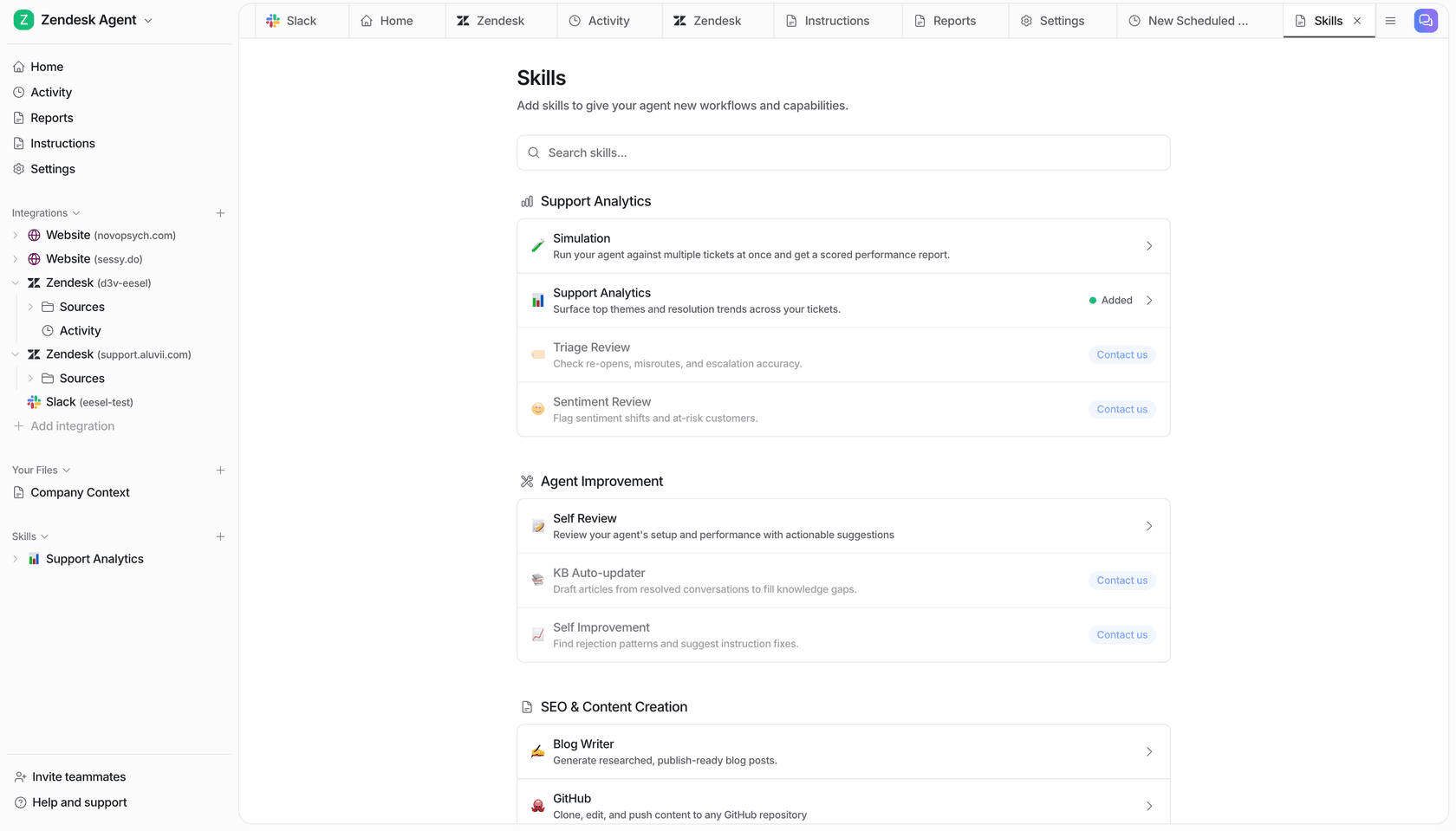
Try eesel on your own help center and see which articles it flags in the first week.