What is a support knowledge base audit?
A support knowledge base audit is a scheduled review of every article in your help center (and the internal docs your agents and AI read) to decide, article by article, whether it stays as it is, gets corrected, gets folded into another article, or gets taken down.
It's the sister job to a support knowledge gap analysis. The gap analysis starts from customer questions and asks "what's missing?" The audit starts from the articles and asks "is what's here still right, still used, and the only copy?" You want both, but they produce different to-do lists:
| Knowledge gap analysis | Knowledge base audit | |
|---|---|---|
| Starts from | Tickets, failed searches, AI escalations | Your list of published articles |
| Question it answers | What do customers ask that nobody wrote down? | Is each article still accurate, used, and unique? |
| Output | Articles to write | Articles to keep, update, merge or archive |
| Typical cadence | Monthly, from fresh ticket data | Quarterly for policy content, yearly for the rest |
| Biggest risk it catches | Customers can't self-serve a common question | Customers (and the AI) get a wrong or conflicting answer |
I work the support queue at eesel every day, and the audit is the one people skip. Writing a new article (or generating one with AI) feels like progress. Re-reading 300 old ones feels like homework. But the old ones are what customers and bots are reading right now, and an article that's confidently wrong does more damage than a missing one. One commenter in an r/ITCareerQuestions thread said it about as well as anyone:
"It leads to documentation become out of date and erroneous, which is often worse than nothing at all, and perpetuates the cycle."

Why a knowledge base audit matters more once AI reads your help center
For years, a stale article was a slow leak. A customer read it, got confused, and filed a ticket. An agent who knew better answered correctly. The damage was one extra ticket.
An AI agent closes that safety net. It's the classic AI hallucination setup, except the model is faithfully repeating your own outdated words. It retrieves whichever article matches best, answers in a confident voice, and nobody in between knows better. A commenter on r/Rag put the mechanism in one sentence:
"Your pipeline can retrieve an article successfully and still produce the wrong operational answer because the article itself is stale or incomplete."
And here's what that looks like when it reaches a customer:
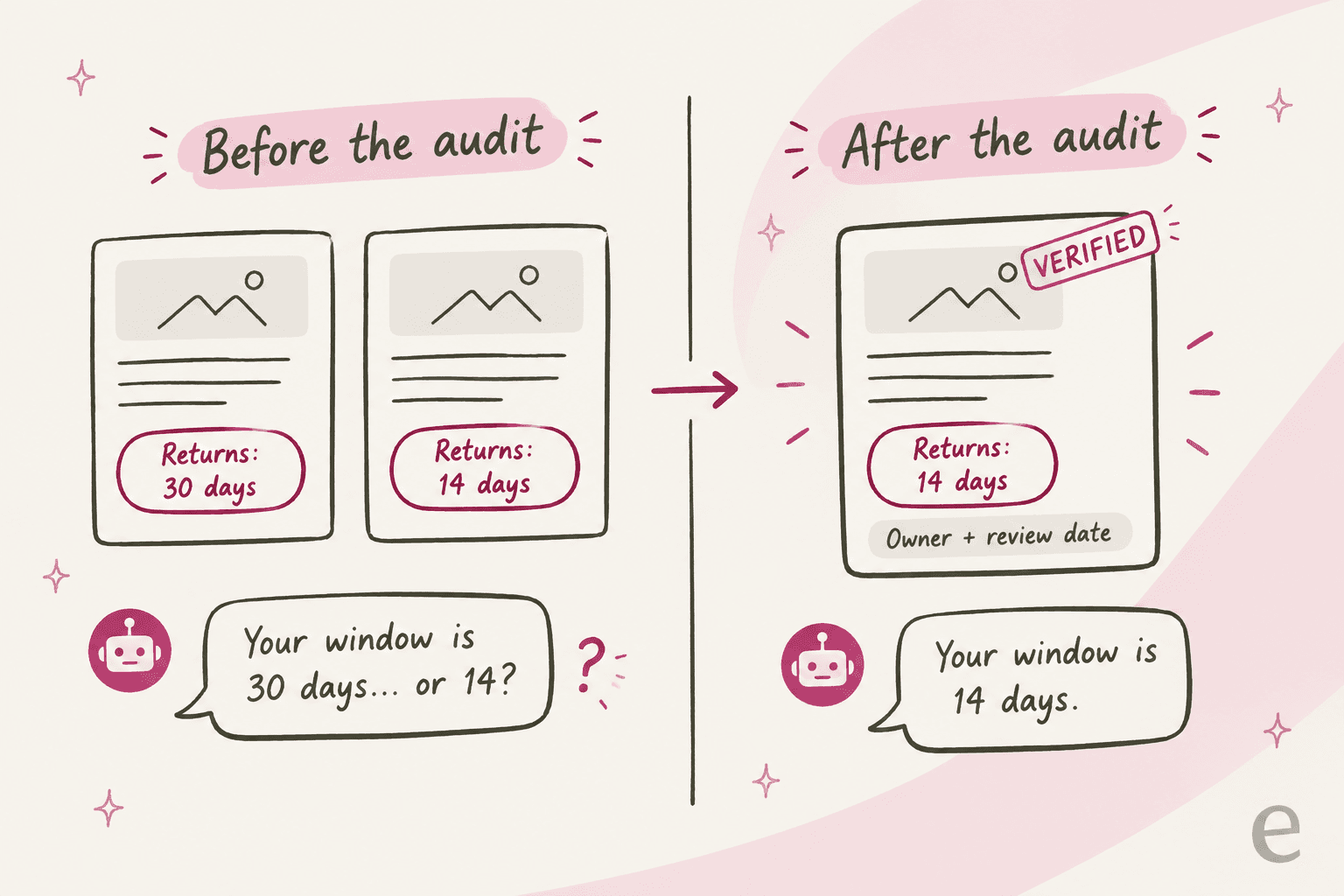
"the two docs disagreeing thing is the scariest part, bot just picks whichever one it grabbed first and sounds totally sure about it we started doing the source-of-truth cleanup after one of our bots told a customer they could return something 3 years past the actual policy window, support had to eat that one"
The vendors know this too. Gorgias's own knowledge docs give the exact example: "if a help center article says your return window is 30 days but a guidance says 14, AI Agent might not respond the same way every time." Zendesk now scores help centers on "AI readability" inside its Knowledge copilot, docking articles that are media-heavy, long, unstructured or link-heavy. The audit has quietly become part of knowledge management for support teams that run an AI agent.
That's also where my own read on this comes from. eesel has spent the last few years putting an AI teammate on live support queues, and the first week of almost every rollout turns into a knowledge audit whether anyone planned one or not. A typical case from eesel's sales calls: a DTC brand on Gorgias doing about 7,000 email tickets a month wanted the AI to resolve half of them, and its knowledge was spread across SOPs in a project tool, untranscribed screen recordings, and a pile of outdated macros, with no website FAQ at all. No AI can be more accurate than that source material. It's why every eesel rollout gets simulated against past tickets before it answers a real customer: the simulation is where stale articles show up.
What to pull before you start the audit
An audit goes fast when the data is in one spreadsheet before anyone opens an article. Here's what I'd put in the columns, and why each one earns its place.
| Column | Where it comes from | What it tells you |
|---|---|---|
| Article title, URL, section | Help center export or API | The inventory itself |
| Last updated date | Article list or export | Candidates for a stale check (Zendesk's copilot treats six months as stale) |
| Owner | Article author or assigned owner | Who signs off on the fix |
| Views, last 90 days | Help center analytics | Whether anyone reads it |
| Helpful / not helpful votes | Article feedback | Whether it answers the question once read |
| Times linked from tickets | Agent article links, macro references | Whether agents rely on it |
| AI usage and handovers | Your AI agent's knowledge report | Whether the bot quotes it, and whether those conversations still escalate |
| Contains a policy, price or plan name | You, reading the title | Whether it needs a quarterly review instead of a yearly one |
The last row matters more than it looks. Policy and pricing articles are where a wrong answer costs money, so I tag them first and review them on a shorter clock. The eesel policy change guide covers what to do the day one of those policies changes; the audit is how you catch the ones that changed without anyone telling support.
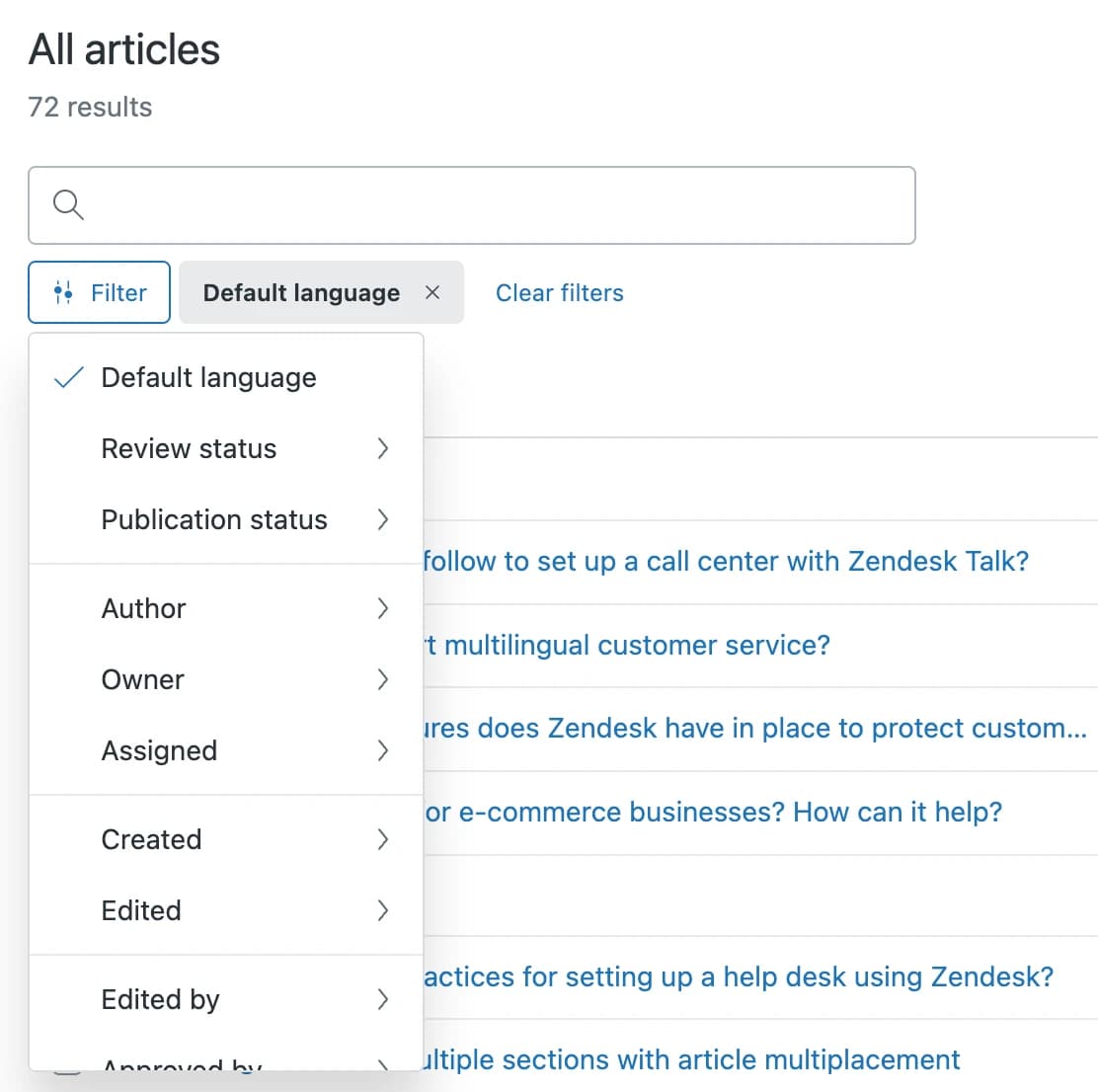
Most of these columns come straight out of your helpdesk. In Zendesk, the Knowledge admin article lists filter by owner, author, created and edited date, and review status, and the Knowledge Base dashboard ranks articles by upvotes, downvotes and net votes.
Freshdesk's curated knowledge base report has a ready-made "bottom 10 least viewed" and "most disliked" list on Pro and up. HubSpot's Analyze tab gives views, helpful and unhelpful counts and search terms with no results, and Help Scout's Docs report flags articles under 60% positive ratings with a sad face.
One Zendesk metric I'd always add: "Tickets submitted after view" in the Explore page efficiency dataset. Zendesk describes it as finding "articles where users couldn't get the answers they needed." A high count on a well-viewed article is the clearest sign it needs a rewrite. It needs Suite Professional or Explore Professional and up.
How to sort articles: keep, update, merge or archive
Every article ends the audit in one of four buckets. The two questions that decide the bucket are simple: is it used, and is it still right? Duplicates are the third question, because two copies of one answer is how a help center ends up contradicting itself.
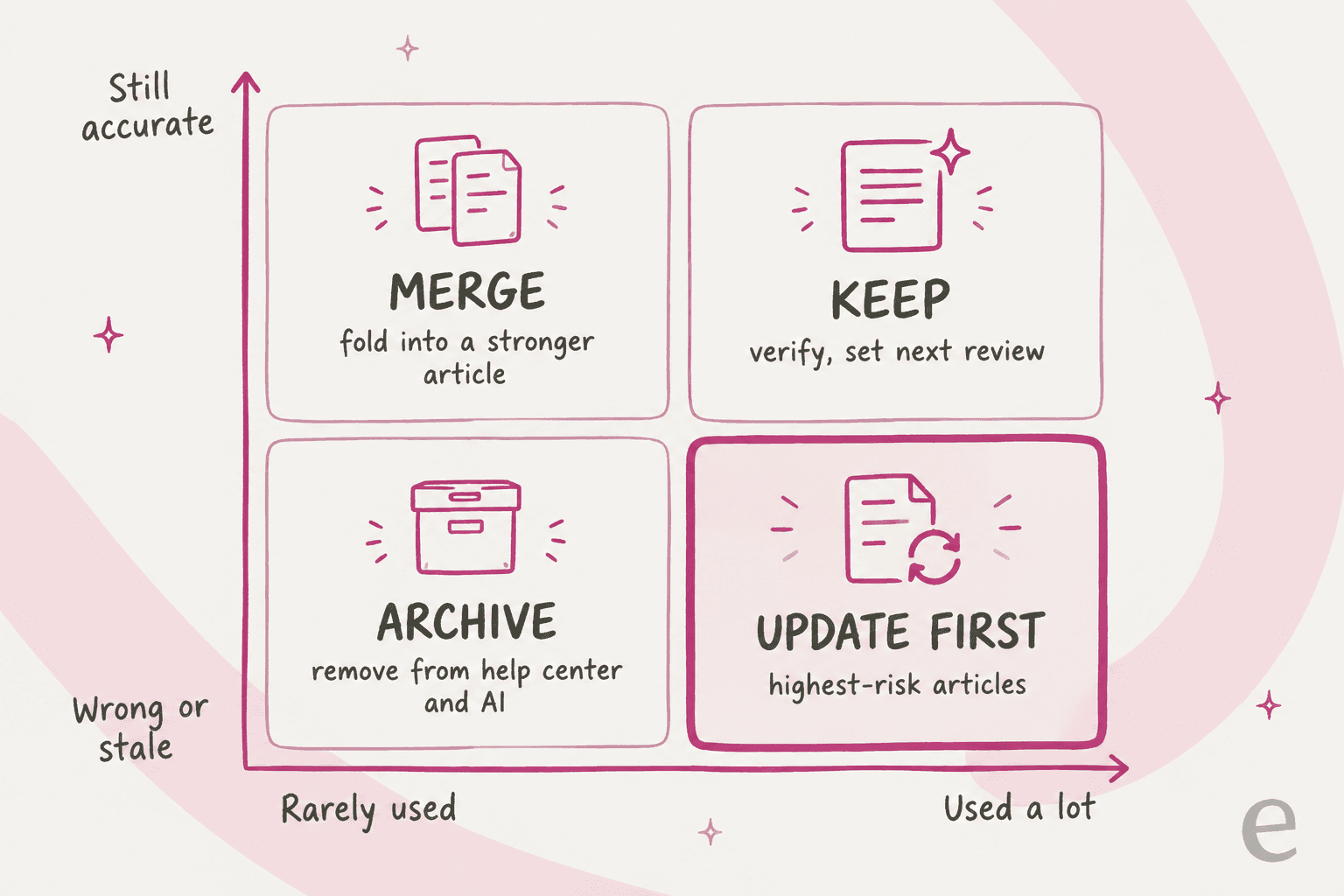
- Keep: used and accurate. Mark it verified, name an owner, set the next review date.
- Update first: used and wrong. These go to the top of the list, because they're the articles misleading customers today.
- Merge: accurate, but a second article answers the same question. Fold the useful bits into the stronger one and redirect the old URL.
- Archive: unused and wrong, or about a feature or policy that no longer exists. Take it out of the help center and out of whatever your AI agent reads.
Try it on one article from your own help center:
Keep, update, merge or archive? Triage one article
Answer three questions about a single help center article. The verdict tells you what to do with it in this audit.
1. Was it used in the last 90 days?Article views, links from tickets, or your AI agent citing it.
2. Is every fact in it still true today?Prices, plan names, policy windows, screenshots, steps.
3. Does another article answer the same question?Search the help center for the article's main question.
Two judgment calls the grid doesn't make for you. First, "unused" is not the same as "useless." An accurate article nobody reads is often a title problem, not a content problem: customers search for "cancel my subscription" and the article is called "Managing your plan." Compare titles against your failed-search terms before you archive. Second, set up a redirect before you archive anything (here's how redirects work in Zendesk). Old article links live in macros, saved replies and past emails, and without a redirect they all break the day the article goes.
How to run a support knowledge base audit, step by step
Here's the loop I'd run, start to finish. The first pass is the slow one. Repeat passes go much faster, because most articles land in "keep" and only the ones that came due need a full read.
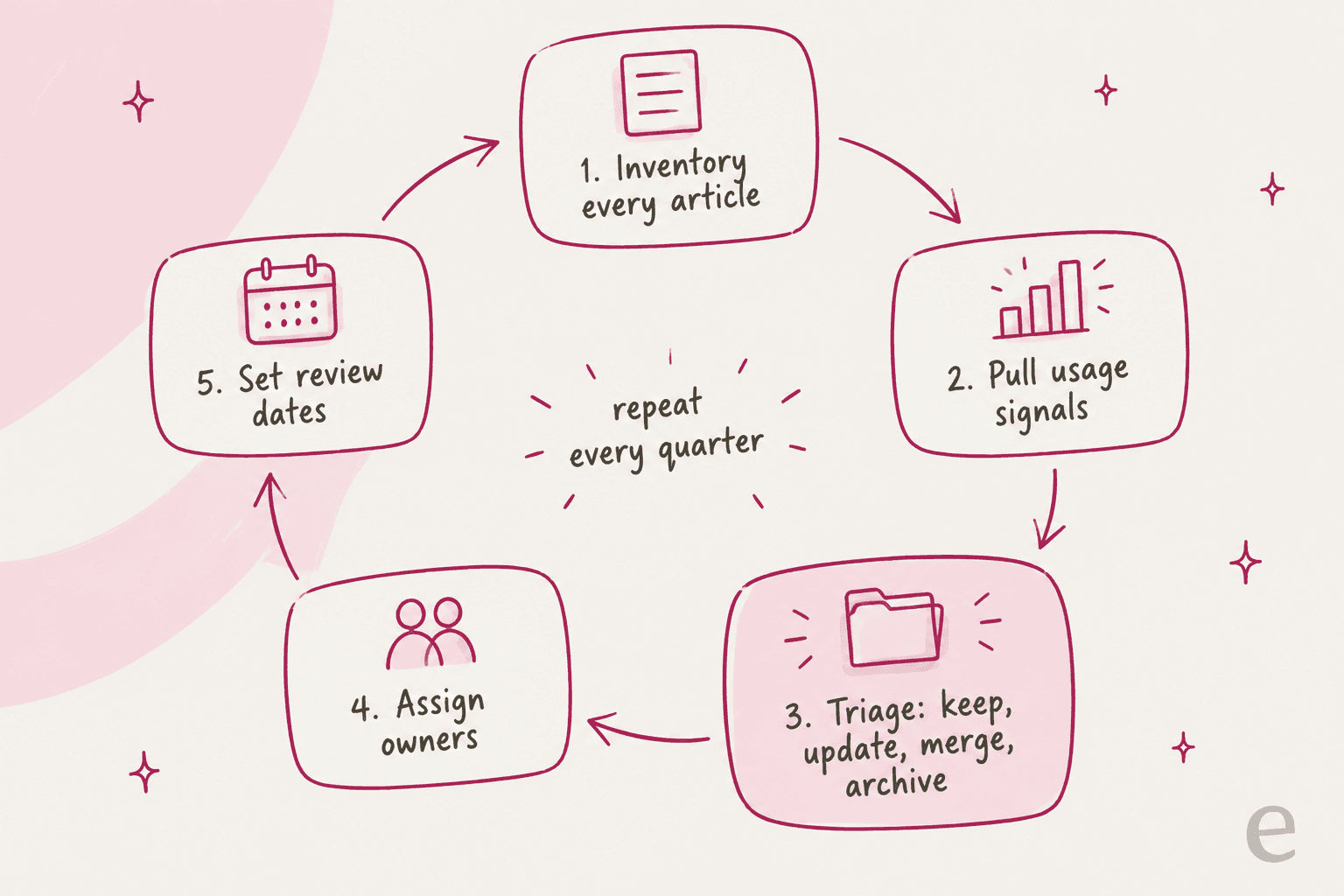
Step 1: Inventory every article, including the ones customers can't see
Export the full article list: public articles, internal-only articles, drafts, and every language version. Then add the places your AI agent reads that aren't articles at all. That usually means macros and saved replies, a Confluence or Google Drive folder of SOPs, and whatever website pages the AI crawls. Help Scout's AI docs note that its AI Answers "Improvements" are a separate knowledge source, so an old Improvement can keep restating an outdated answer after you fix the Doc. The audit has to cover every source, or the old answer survives somewhere.
Step 2: Pull 90 days of usage signals
Fill in views, votes, ticket links and AI usage for every row. Ninety days is long enough to smooth out seasonal spikes and short enough that the data reflects your current product. Sort by views, descending. The top of that list is where you'll spend most of your review time.
Step 3: Triage each article into a bucket
Read every article in the top traffic band in full. For the long tail, a skim is fine: check the last-updated date, whether the feature still exists, and whether the screenshots match the current UI. The guide to detecting outdated content has more tells to look for. Put each one in keep, update, merge or archive. When two articles answer the same question, decide which is the canonical one right there, while both are open.
Step 4: Fix in priority order
Work the "update first" bucket before anything else, then merges, then archives. For each updated article, change the facts, refresh screenshots, and rewrite the title in the words customers actually search. If you use content blocks or shared snippets for things like a return window, update the block once rather than every article. Then re-test your AI agent on that article's topic, because the article is only half of what it reads (here's why a doc edit beats retraining).
Step 5: Assign owners and set review dates
This is the step that decides whether you're doing this again from scratch in a year. Every article gets a named owner (a person, not "Support") and a next-review date. If you want a sign-off step on top, Zendesk approval workflows add one. I'd use two clocks: quarterly for anything with a policy, price, plan name or legal term in it, yearly for everything else. Then let the helpdesk nag people for you, which is where the native tooling below comes in.
Step 6: Re-run the loop every quarter
The second audit is much faster than the first, because owners and review dates do most of the work. Each quarter, pull fresh signals, review only the articles that came due or whose numbers moved (a spike in "not helpful" votes, a jump in AI handovers on that topic), and archive anything that hit zero views for two quarters running.
Which helpdesks help you audit, and what's gated
None of the big helpdesks runs the whole audit for you, and the features that do the most work sit on higher plans. Here's what each one gives you natively, from each vendor's own docs.
| Helpdesk | Find old articles | Review reminders or verification | Usage data per article | Bulk archive | Plan notes |
|---|---|---|---|---|---|
| Zendesk | Article lists filter by owner, created, edited | Verification rules, up to 20, weekly run | Views, votes, tickets submitted after view | 30 articles at a time, all plans | Verification and bulk verify are Enterprise only |
| Freshdesk | Filter by "Last modified at" | None documented | Least viewed, most disliked, feedback tickets | Bulk actions | Filters, bulk actions and reports are Pro and up |
| Gorgias | Filter knowledge by last updated (7 to 90 days) | None documented | Tickets, handovers, CSAT per article (28 days) | Bulk enable, disable, delete | Opportunities flags conflicting knowledge (beta) |
| Front | Filter by review status and date | Scheduled reviews with daily reminder emails | Knowledge base report | Bulk schedule reviews per section | Reviews on Professional ($65/seat) and up |
| Zoho Desk | Filter by expiring today, 7 or 30 days | Article expiry with owner emails | KB dashboard, failed keywords | Mass update tags, owner, status | Dashboard on Standard and up |
| HubSpot | Articles list; last updated date set on each publish | None; beta KB agent suggests edits | Views, helpful votes, no-result searches | Archive and unpublish | KB needs Service Hub Professional ($90/seat) |
| Help Scout | No in-app last-updated sort (API only) | None documented | Ratings, failed searches | No in-app bulk edit | Report history: 2 years on Standard |
A few of these deserve a closer look, because they change how much of the audit you do by hand.
Zendesk: verification rules and Knowledge copilot
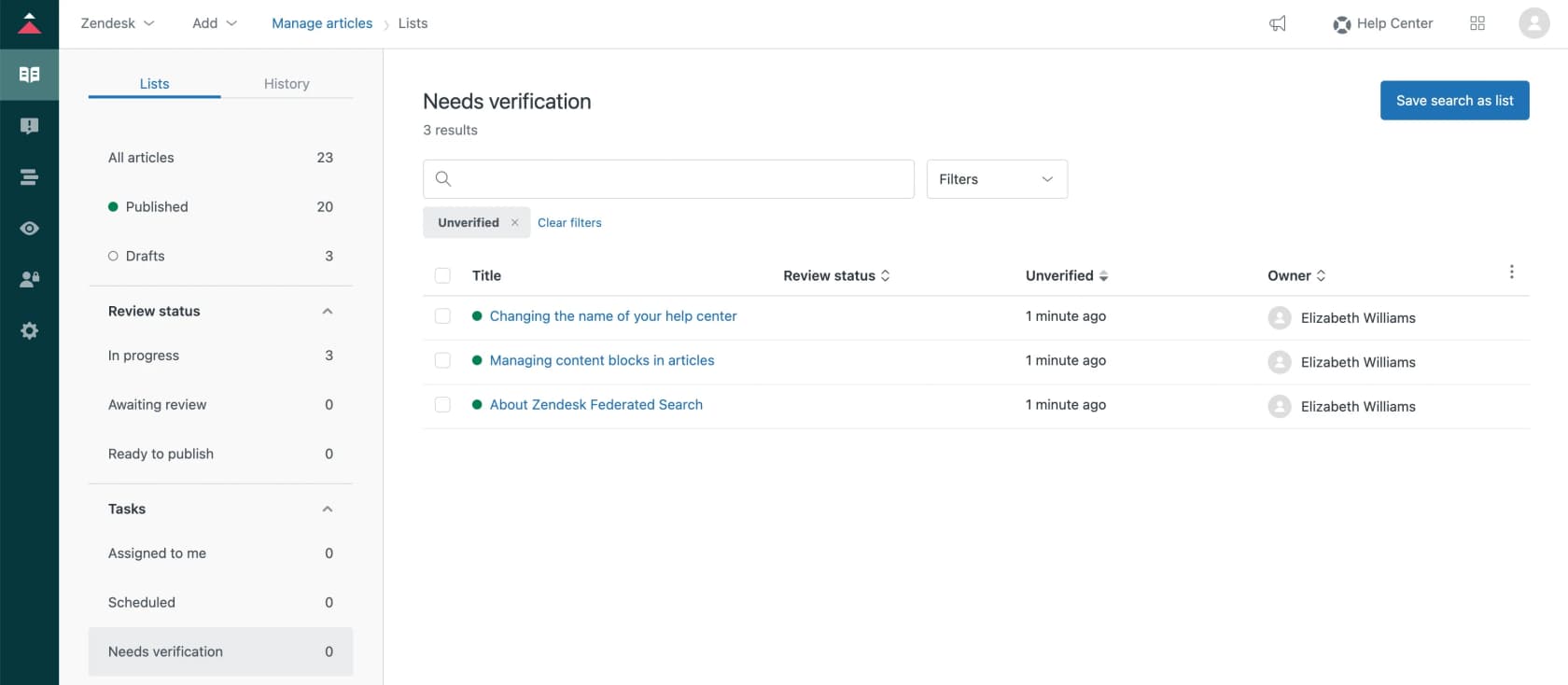
Zendesk has the most complete toolkit, split across plans, and its article version history makes rollbacks safe. Article verification lets you create up to 20 rules with a frequency (two weeks, six months, a year) and filters by brand, section or label. The rules run weekly, unverified articles land in a "Needs verification" list, and owners get bi-weekly emails until they verify. It's exactly the review-date habit from Step 5, automated, but it requires Suite Enterprise or Knowledge Enterprise, which is a quote-only tier.
The newer piece is Knowledge copilot, an early access program on Suite Professional and up. It scores your help center weekly on Coverage (how many common ticket issues have an article), Freshness (articles not updated in the last six months pull the score down) and AI readability, then suggests create, update or decline tasks. Nothing publishes on its own; everything lands as a draft. Think of it as a standing audit dashboard rather than a replacement for one.

For the cleanup itself, Zendesk lets you select 30 articles at a time and archive them on every plan. Two things to know before you do: archiving removes the article and all its translations, and only Knowledge admins can see or restore archived articles, which come back as drafts. Archived articles also stop counting toward Zendesk's 40,000-article cap.
Front: scheduled reviews with reminders
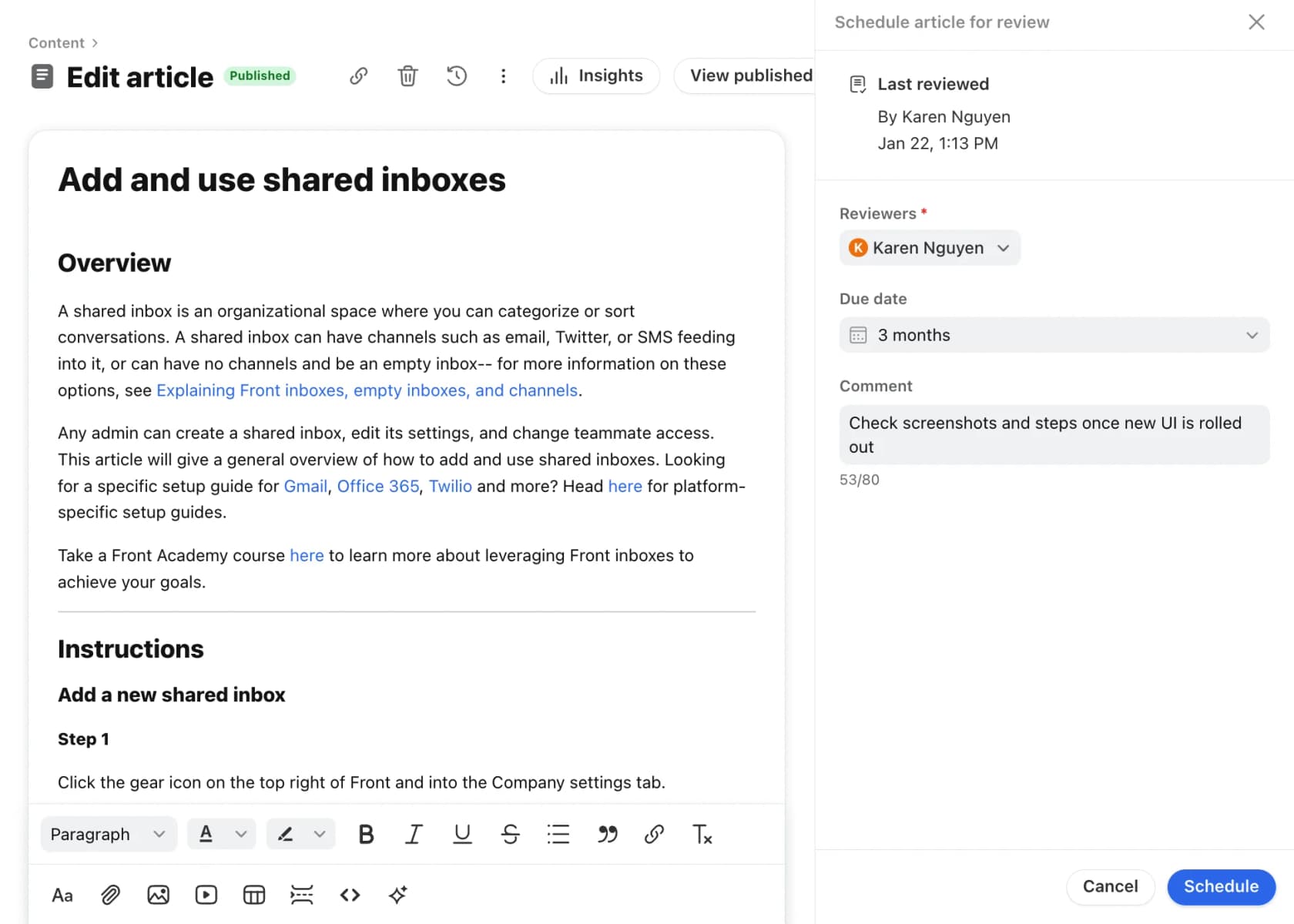
Front's scheduled reviews are the cleanest version of "set a review date and get reminded." You pick reviewers, a due date and a comment; reviewers get a daily reminder email listing reviews due that day and overdue ones, and you can bulk-schedule or resolve reviews per category or section. It's on the latest Professional plan ($65 per seat per month) and above.
Zoho Desk: articles that expire on their own
Zoho Desk is the only one of the group that can retire an article automatically. Set an expiry date and the article "will no longer be available in the help center" when it arrives; the owner gets emails seven days before, the day before, and when it expires. For a seasonal promotion or a time-limited policy, that's the audit doing itself. Its knowledge base dashboard also lists "Failed" search keywords on Standard ($14 per agent per month annually) and up.
Gorgias: usage per article and a conflict finder
Gorgias leans on usage data. Every piece of knowledge shows performance stats (ticket volume, handovers, average CSAT and intent) over the last 28 days, and you can filter knowledge by last updated (7, 30, 60 or 90 days). The standout for audits is Opportunities, a beta that flags "Resolve knowledge conflict" items and shows the two contradicting pieces side by side. That's the merge bucket, found for you.
Freshdesk, HubSpot and Help Scout: reports, not reminders
These three give you good usage data and leave the review schedule to you. Freshdesk calls its articles solution articles.
Freshdesk turns reader feedback into tickets: when someone votes "No" on an article and adds a comment, it becomes a ticket with the article author added as a watcher, which is a free audit signal.
HubSpot's knowledge base has no review-date feature; its beta knowledge base agent suggests edits to unclear or outdated articles, at 200 HubSpot Credits per generated article.
Help Scout Docs keeps revision history but has no scheduled review, so a calendar reminder is your verification rule.
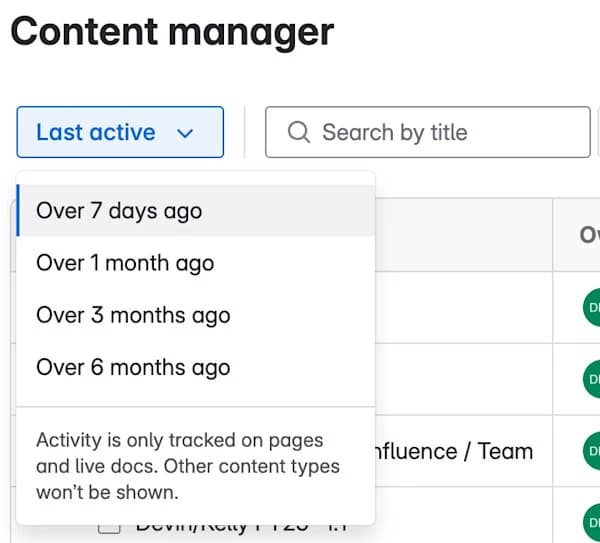
If your internal knowledge base lives in Confluence, the content manager on Premium and Enterprise filters pages by "Last active" (over 7 days up to over 6 months) and by deactivated owners, and archives up to 500 pages at once. Archived pages keep working links, which makes Confluence the gentlest place to be aggressive.
What support teams say about keeping a knowledge base current
The community threads on this are refreshingly consistent: the tooling matters less than whether someone owns the job.
The most common request is the one Zendesk already built, behind a plan wall. A Zendesk admin asked r/Zendesk for exactly that:
"Has anyone found an integration or way to audit articles yearly? It would be nice if there was a way to set a "renewal date" or something similar that would notify the author on a set date."
A day later, after someone pointed them to article verification, the same admin added: "Looks like Enterprise level is required and we are on professional." That's the gap most mid-size teams fill with a spreadsheet and a calendar reminder.
The owner-plus-expiry model has its fans, and a known failure mode. One Hacker News commenter proposed treating docs like medical literature:
"every page is owned and every page has an expiry: when a page expires, the owners are obligated to review it."

The reply in the same thread is worth taping above your monitor:
"This becomes a problem if multiple people leave at once or someone is very busy when expiration comes up and rubber stamps the renewal with outdated information..."
That's why I'd pair review dates with usage data, so a review that comes due on a high-traffic policy article gets a real read and not a click. On the usage side, one sysadmin described a simple rule:
"if an article has not been viewed in one or two years then it automaticlly gets archieved and not part of then main search process, or it flags itself for review and then gets archieved."
And when the bot starts giving different answers to the same question, this r/customerexperience comment names the usual cause:
"They are pulling from different KB entries, or one entry is outdated and the others are not, so the bot is not actually being inconsistent. It is being accurate to three slightly different pieces of content that should have been one."
"Three pieces of content that should have been one" is the merge bucket in a sentence. And if the backlog feels too big, resist the urge to start a fresh knowledge base. As one HN commenter warned, the new one "quickly falls into disarray just the same," and then you're searching two. Audit the one you have.
Mistakes that waste a knowledge base audit
- Auditing articles but not macros. Agents paste macros far more often than they link articles, and your AI agent may read them too. A macro quoting last year's return window undoes the article you just fixed. Zendesk teams can export macros to search them in one file. The macro management guide covers the cleanup.
- Archiving without redirects. Old URLs live in saved replies, past emails and other articles. An archive without a redirect turns a stale answer into a dead link.
- Fixing the help center and forgetting the AI's other sources. If your AI agent also reads a crawled website, a Google Drive folder or an internal wiki, the old answer survives there until that source is re-synced or the old file is removed.
- No owner at the end. An audit without owners and review dates is a one-off cleanup, not knowledge base management. You'll be back at square one within a year.
- Treating "not viewed" as "not needed." Check the title against failed searches first, or run a quick knowledge gap check. Plenty of accurate, low-traffic articles are just named in your team's words instead of the customer's.
- Trying to do it all in one sitting. Do the top traffic band properly, then chip away at the long tail over the following weeks. A finished partial audit beats an abandoned complete one.
eesel for your support knowledge base audit
An audit fixes the articles. The harder part is knowing, week to week, which article each answer actually came from. That's the bit eesel's AI helpdesk teammate is built to show you.
It plugs into Zendesk, Freshdesk and the rest of your helpdesk stack, and reads your help center, macros and past tickets alongside docs in Confluence, Google Drive or Notion. Each source has its own toggle, so the day your audit archives a stale folder, you switch it off without disconnecting anything.

Three things make it useful for an audit specifically:
- Every reply shows what it read. The activity log for each ticket lists the sources the agent searched and whether it hit a knowledge gap, and every draft names the article it used. If a reply leans on a stale article, you see which one.
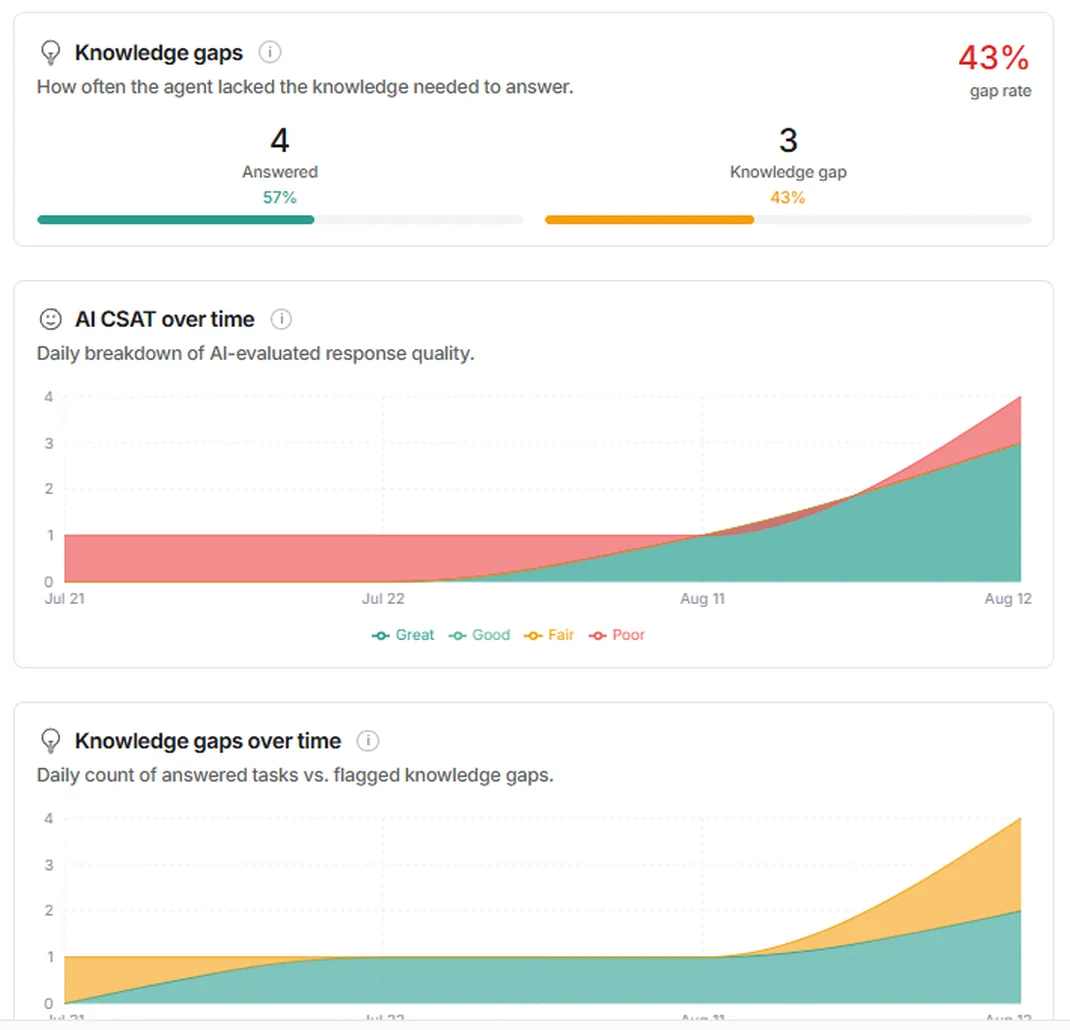
- Gaps get counted for you. The Reports page has a Knowledge gaps card and a trend line. eesel's docs put it simply: "A knowledge gap is your agent telling you something is missing." The Update knowledge base skill then drafts the missing articles for your review.
- You can re-test after the cleanup. The Simulation skill replays real past tickets, scores each answer against what your team sent, and suggests fixes, without sending anything to a customer.
Where it isn't the right tool: eesel won't run the audit for you. The keep, update, merge and archive calls stay with your team, and its website, Google Drive and Confluence connections only read. What it gives you is the evidence for where to look first. Pricing starts with 100 free credits and no card, then the Teammate plan from $299 a month for 500 credits, where a ticket is one credit however long it runs. Try eesel on your own help center and see which articles it reaches for first.
Frequently Asked Questions
What is a support knowledge base audit?
How often should you audit a support knowledge base?
How do you decide whether to update, merge or archive a help center article?
What metrics should a knowledge base audit include?
Does Zendesk have a knowledge base audit tool?
Why does a knowledge base audit matter for AI agents?
Who should own a support knowledge base audit?
Can AI help with a knowledge base audit?


Article by
Riellvriany Indriawan
Riell is a designer and writer at eesel AI with about two years of experience researching CX platforms, AI chatbots, and helpdesk software. She combines her design background with a sharp eye for how these tools actually look and feel in practice — making her comparisons unusually visual and user-focused.