What is support policy change management?
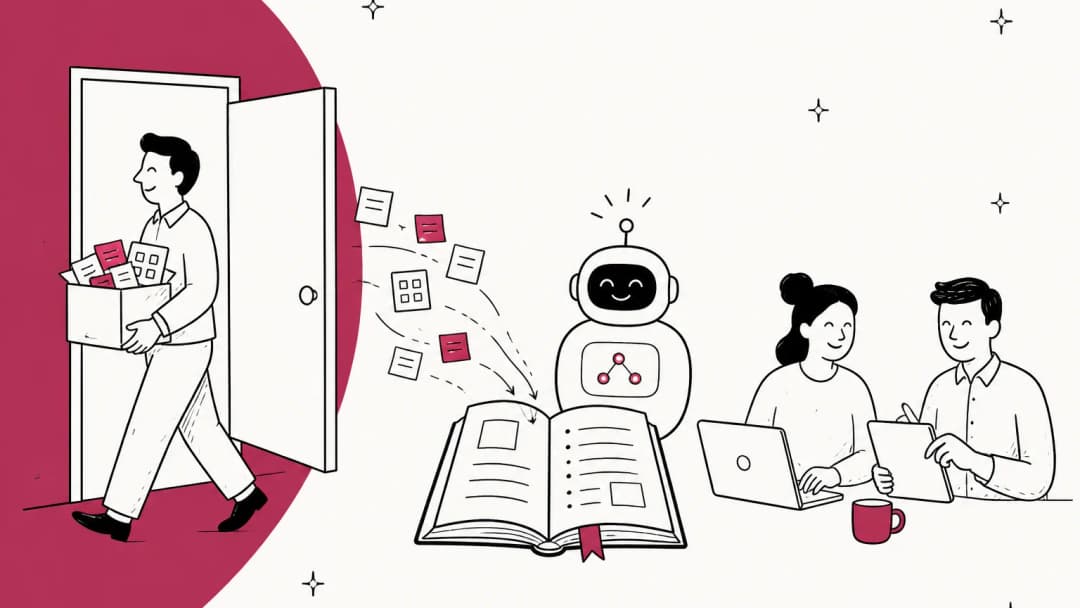
It's the process of changing a customer-facing rule and making sure every channel, person and tool that repeats that rule switches to the new version on the same day. Think of a 30-day return window becoming 14 days, a restocking fee appearing, a refund that now needs a photo, or a response-time promise (an SLA) that moves from 4 hours to 1 business day.
I work eesel's support queue every day, and the pattern I see is always the same. The policy owner (finance, legal, ops) updates the policy page and tells the support lead. The support lead updates the main help center article. Then, for the next three weeks, tickets keep landing where a customer quotes the old rule back at you, because they read it in a saved reply, a French translation, an order confirmation email, or an answer from the chatbot.
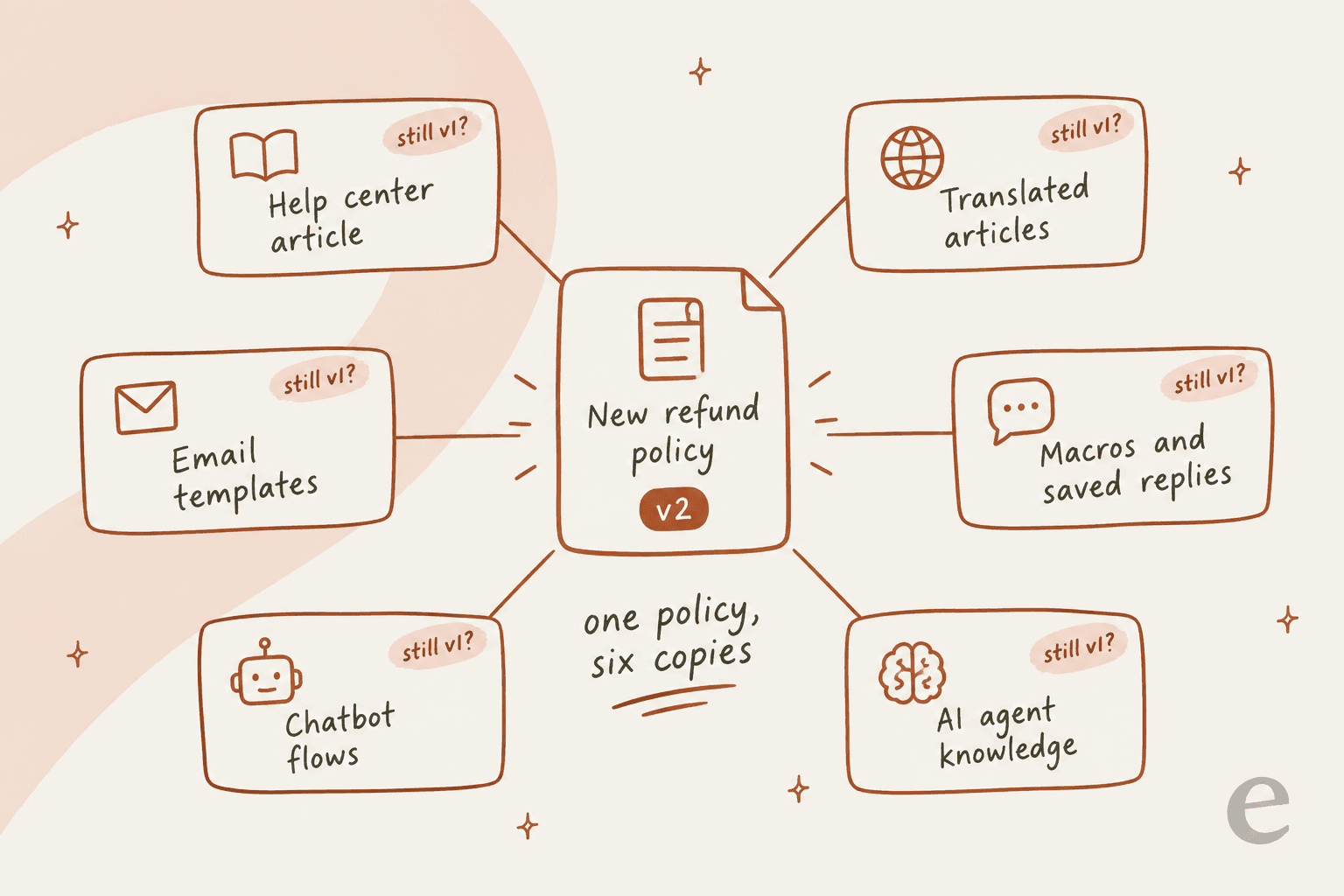
That's the core idea of this guide: a policy isn't one document, it's six or seven copies of one document, and change management is the work of finding all of them.
Where old policy copies hide
Before you change anything, you need an inventory. These are the places I check every time, roughly in order of how often they bite.
- The main help center article. Everyone remembers this one.
- Other articles that mention the rule in passing. The shipping FAQ that says "returns are free within 30 days." The gift card article. The international orders page. These are the ones nobody remembers.
- Translations. Each language version is its own copy, and it doesn't update when the English one does.
- Macros and saved replies. Usually the biggest pile, and the hardest to search (more on that below).
- AI agent knowledge. Help center articles, uploaded PDFs, Google Docs, crawled website pages, and any rule or "guidance" you typed into the AI tool directly.
- Chatbot flows and email templates. Order confirmations, return portal copy, automated replies triggered by tags.
- Your agents' heads. The rule they've typed from memory 400 times.
The search problem nobody warns you about
Here's the part that surprised me when I went through the vendor docs. Most helpdesks only document searching macros and saved replies by name, not by the text inside them. Zendesk's macro search works on the name or partial name. HubSpot snippets are looked up by name. Help Scout and Zoho Desk search saved replies and snippets by name too. So you can't type "30 days" and get every reply that promises 30 days.
The workaround is an export. Freshdesk lets you export canned responses to CSV, edit the Content HTML column and re-import, as long as you don't touch the Canned Response ID. Gorgias does the same with macro CSVs keyed on id. In Zendesk, exporting macros gets you a file you can search with Ctrl+F. Once the text is in a spreadsheet, finding every copy of the old rule takes minutes instead of an afternoon of clicking.
Help Scout has one extra trap. Saved replies live per inbox, and the Copy button creates a separate reply in the other inbox. Five inboxes means five edits.
This is also why messy macro libraries hurt more than they look. On one eesel sales call, a DTC brand on Gorgias doing around 7,000 tickets a month described its knowledge as scattered across SOP tools, untranscribed Loom videos and outdated macros. Every policy change in a setup like that is an archaeology project. If yours looks similar, my guide to managing macros is a good first cleanup.
How fast does your AI agent notice the change?
This is the section I'd tell every support lead to read twice. When you edit an article, a human agent sees the new version the next time they open it. Your AI agent might not.
The rule of thumb from the vendor docs: edits to articles inside your helpdesk reach the AI fast, while edits to anything outside it (a website page, a Google Doc, a crawled policy page) can sit stale until someone resyncs.
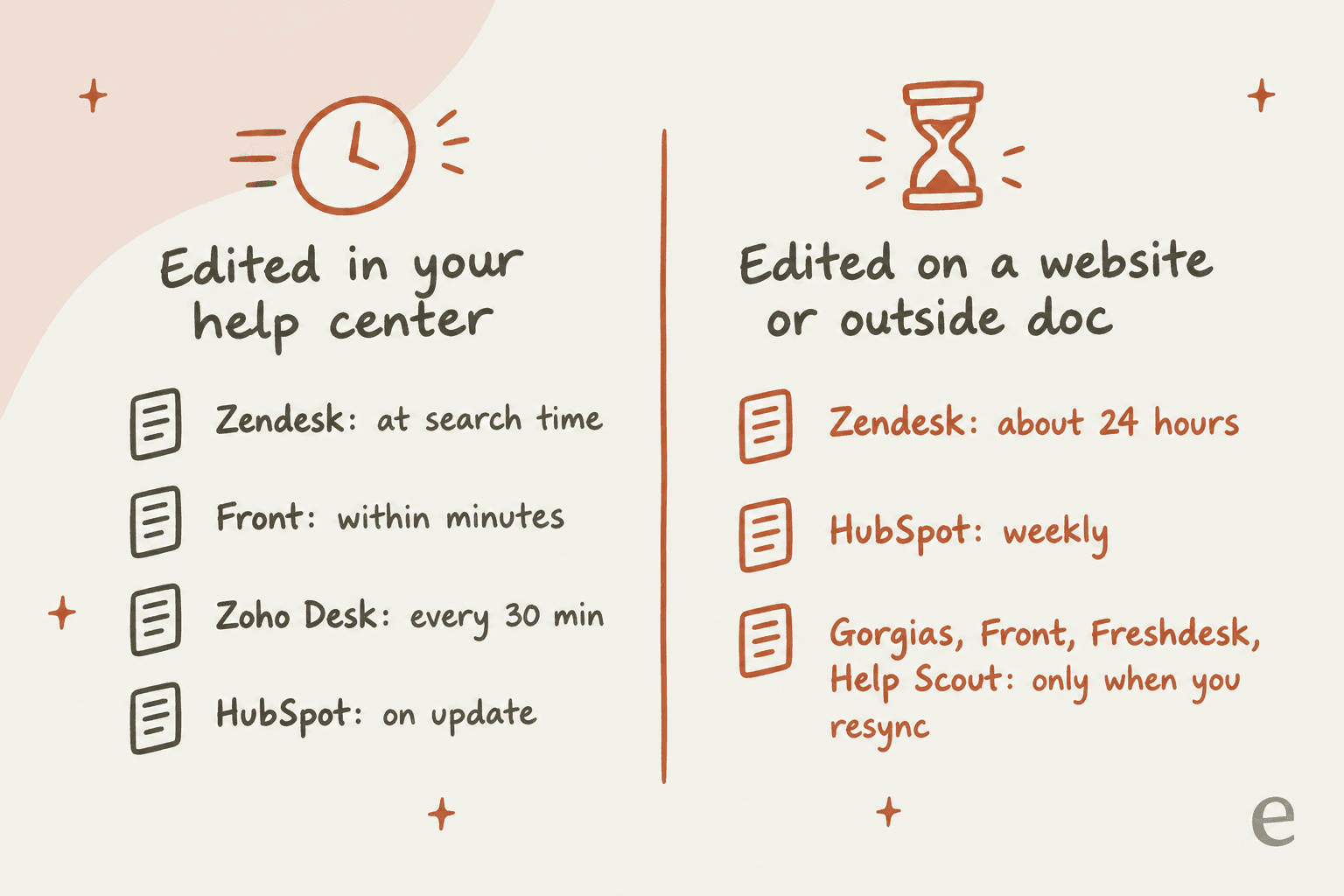
Here's the detail, all from each vendor's own help center:
| Helpdesk | Edited help center article | Website page or outside doc | Manual fix |
|---|---|---|---|
| Zendesk | Searched "at the time the search is performed" | Last sync, "usually every 24 hours" (source) | Reimport (legacy Advanced AI agents) |
| HubSpot | Re-synced automatically on update | Re-synced weekly (source) | Refresh button per source |
| Front | "Typically available to AI within minutes" | Never auto-syncs (source) | Manual re-sync |
| Zoho Desk | Answer Bot retrains every 30 minutes (source) | Not applicable (articles only) | Re-train All |
| Freshdesk | Published solution articles are a source | URLs and files need "Resync and relearn" (source) | Resync; SharePoint re-indexes about every 15 minutes |
| Gorgias | Articles and guidance are used once published | "Doesn't automatically re-sync" (source) | Resync once every 24 hours; store sites can take several hours |
| Help Scout | Not stated in the docs | Manual resync after "a pricing change... changes in procedures" (source) | Resync the source |
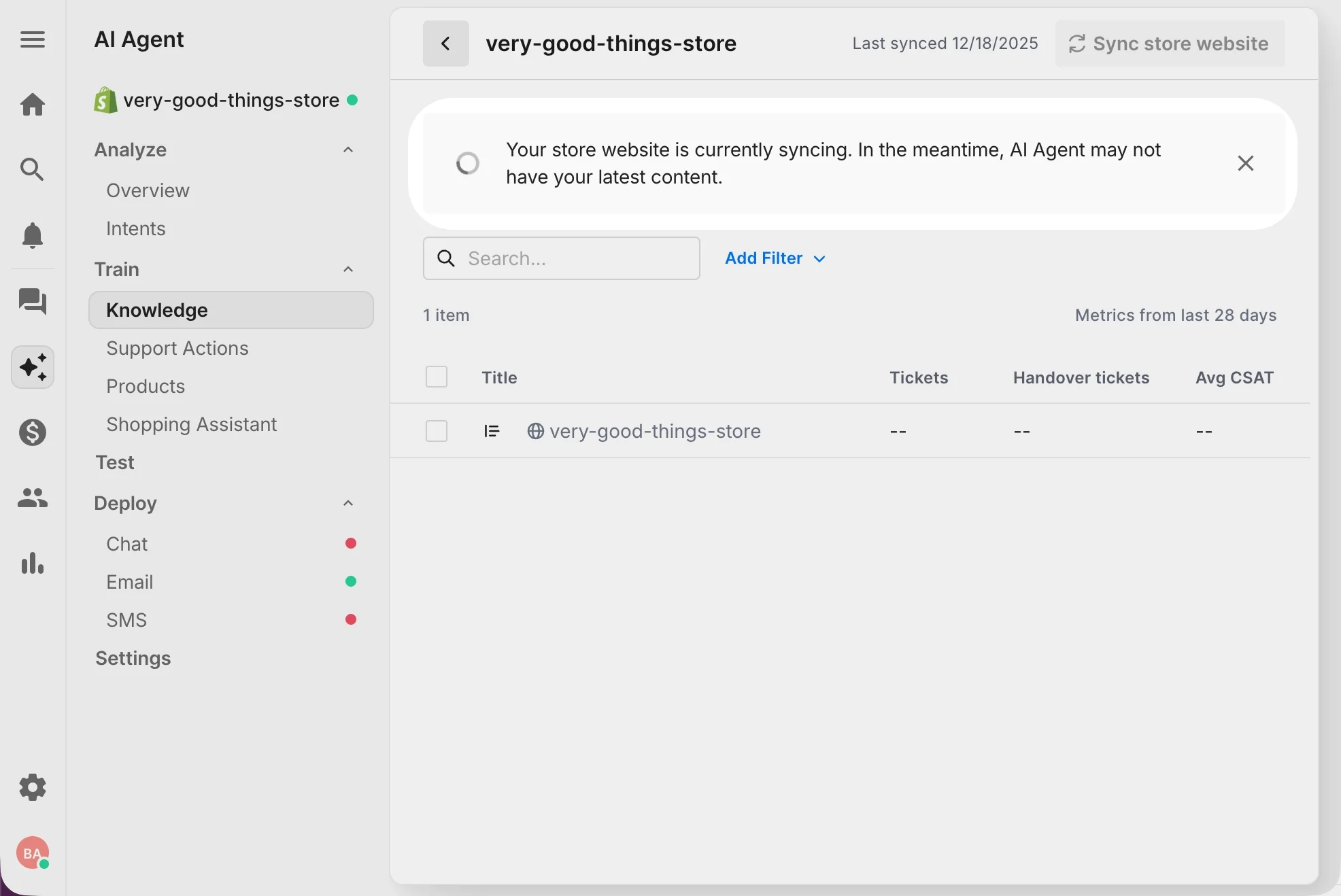
The Gorgias row deserves a closer look, because Shopify stores keep their returns and shipping policy on the store website. Gorgias pulls those pages into Q&A snippets you can't edit, and re-syncing is allowed once every 24 hours. If you change the returns page at 9am, your AI agent can be quoting the old window that afternoon. Gorgias's own fallback, when you can't wait, is to disable the snippet with the outdated content.
Two copies that disagree are worse than one stale copy
Gorgias also published the clearest warning I found about conflicting copies. Its knowledge docs say "guidance carries the most weight," and give this exact example: if a help center article says the return window is 30 days but a guidance says 14, the AI agent "might not respond the same way every time." That's the realistic failure mode of a half-finished policy change. Not a wrong answer every time, but a coin flip. Gorgias's Opportunities feature (in beta) can flag these as "Resolve knowledge conflict" and show both pieces of content side by side.
Help Scout has a version of the same trap. Its AI Answers lets you add short "Improvements" to patch answers. Fix the Docs article and forget the old Improvement, and the AI can keep restating the old rule. If you're running AI on any helpdesk, the knowledge base management habit that matters most during a policy change is deleting the old version, not just adding the new one.
Why this matters more than it used to
In February 2024, British Columbia's Civil Resolution Tribunal decided Moffatt v. Air Canada. Air Canada's website chatbot told a grieving customer he could apply for a reduced bereavement fare within 90 days of buying his ticket, even after travelling. The bereavement page the chatbot linked to said the policy didn't apply after travel. Air Canada argued, in the tribunal's words, that it couldn't be held liable for information from its representatives, "including a chatbot." The tribunal called that "a remarkable submission" and wrote: "It makes no difference whether the information comes from a static page or a chatbot." It also said customers shouldn't have to double-check one part of a website against another. The airline paid $812.02 in damages, interest and fees.
The amount is small. The principle isn't. When two of your copies disagree, the customer gets to rely on whichever one they read. One Hacker News commenter put the most likely cause plainly:
"I wonder whether the bot hallucinated the wrong information or whether the policy changed and the bot simply wasn't updated / retrained. The latter seems more likely but less interesting, akin to information on a boring HTML page getting overlooked during a site update."

It's not only airlines. In April 2025, Cursor's AI support bot told a user that logins were restricted to one device. Cursor's cofounder replied on Reddit that "we have no such policy," and the Hacker News thread about it ran past 600 comments. An AI agent with a stale or missing policy doesn't stay quiet. It fills the gap.
A step-by-step policy change rollout
This is the timeline I'd use for any customer-facing change, from a small wording fix to a new refund policy. For a big change, stretch the front half. For a small one, compress it into two days. The order stays the same.
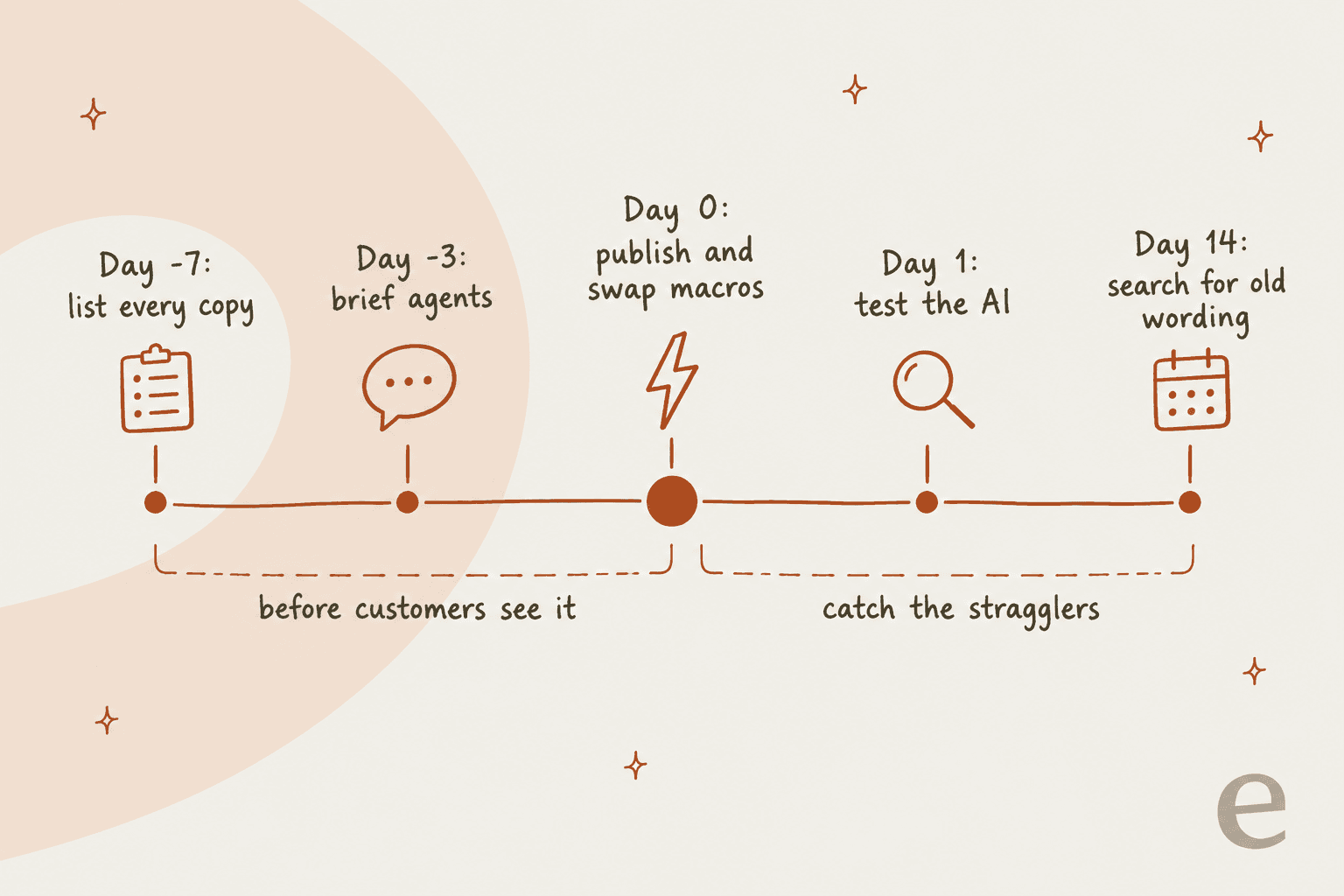
1. Write a one-page change note (day -7)
Before anyone edits anything, write down five things on one page:
- The old rule and the new rule, word for word.
- The effective date and time, with a time zone.
- Who it applies to. This is the grandfathering question: does an order placed on the 3rd get the old 30 days or the new 14? Pick a cutoff (order date is the most common) and write it down.
- The exceptions and who can approve them, with numbers. "Team lead can approve returns up to 30 days for orders under $200" is followable. "Use your judgment" isn't.
- The one-sentence reason you can give customers.
That last line matters more than people think. Agents who can explain why a rule changed handle pushback calmly. Agents who can't end up apologizing for it, which customers read as "this rule is negotiable." If you already keep a customer support SOP for refunds, the change note becomes the diff you apply to it.
2. Inventory every copy (day -7 to day -5)
Go through the seven places listed above. Export macros to a spreadsheet and search for the old numbers and phrases, not just the policy name. Search your help center for the same terms. Check every language.
Then use usage data to prioritize. Zendesk can sort macros by usage over the last 30 days on Suite Growth and up. Freshdesk has a canned response usage report, Front has a message templates report, and Gorgias lets you monitor macro usage from the macro list. The reply your team sends 50 times a day gets fixed first.
3. Stage the edits so they flip together (day -5 to day -3)
The goal is that every copy switches at the same moment. How much the helpdesk helps depends a lot on your plan.
Zendesk has the best tooling and gates most of it behind Enterprise. Content blocks let you write the policy paragraph once and reuse it across articles. Edit the block and every article that uses it updates, with no republishing. If you're on a lower plan, my Zendesk knowledge management guide covers the manual alternatives. Scheduled publishing and unpublishing are Enterprise only, in one-hour increments, and you can apply the schedule to all translations at once.
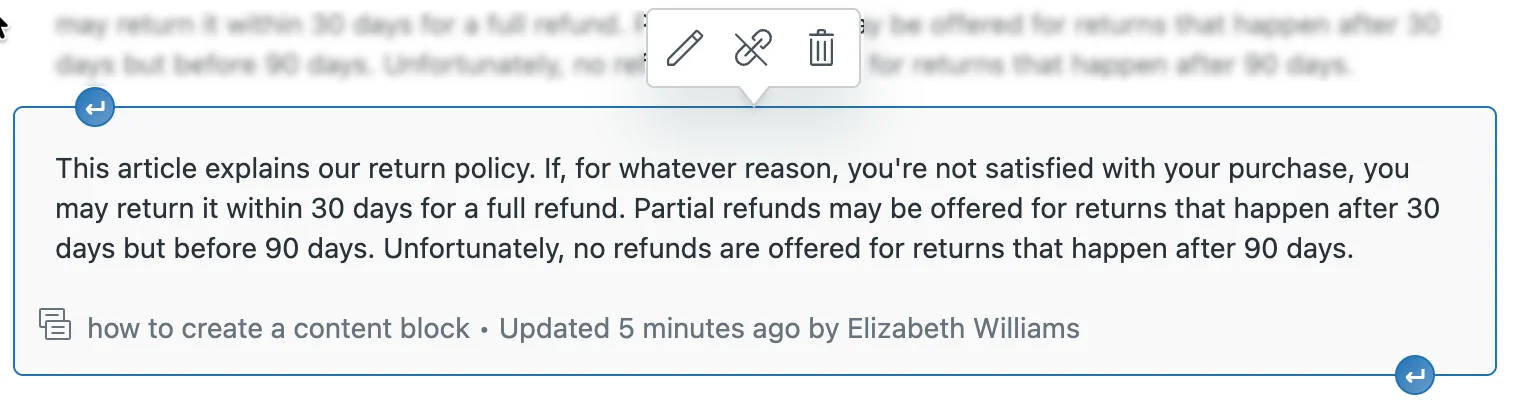
One Zendesk gotcha: if you later restore an old version of an article that contained a content block, Zendesk unlinks the block and pastes its text into the article. That article then stops receiving block updates, so the next policy change silently misses it. My post on Zendesk article version history covers the rest of the revision tools.
HubSpot (Service Hub Pro and up, where the knowledge base lives) has a nice touch here: Schedule update, which stages an edit to an article that's already live and publishes it on your effective date.
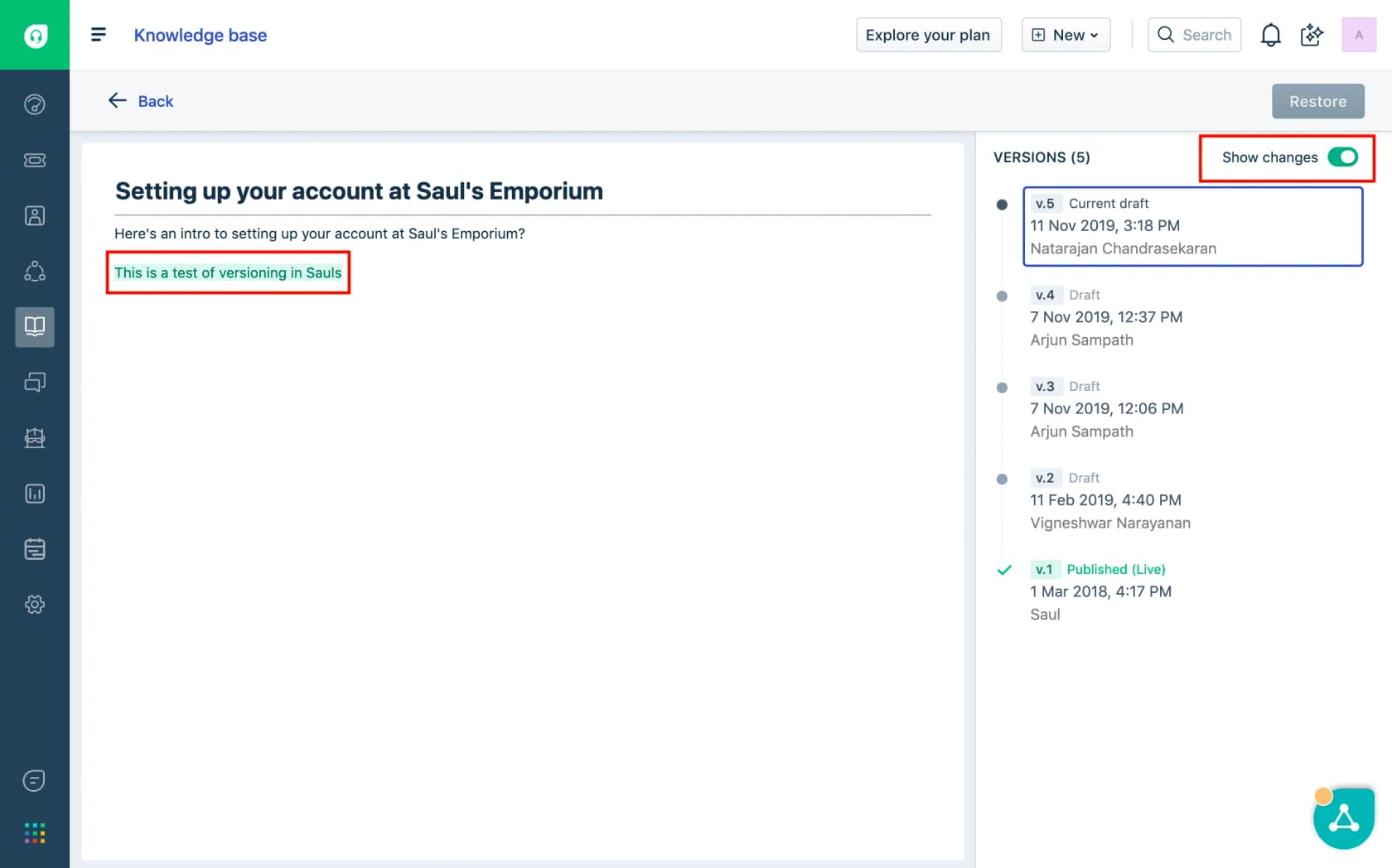
Freshdesk shows a "Show changes" diff on every saved version, and after you edit the main article it offers to mark other translations as outdated. A formal approval step (Draft, In Review, Approved) is Enterprise only.
Gorgias keeps edits to a published article or guidance as drafts, and the docs are clear that "AI Agent does not use drafts in real customer conversations." When you publish a knowledge base change, you can add a change summary. Gorgias's own example is "updated return window from 15 to 30 days" (source).
Front and Help Scout have drafts and version history but no scheduled publishing in the docs I checked, so on those you're editing live on the day. Zoho Desk has a feature nobody else does for time-limited policies: an article expiry date that pulls the article from the help center automatically, with emails to the owner 7 days before, the day before, and on the day. That's perfect for a holiday returns extension.
4. Brief the agents (day -3)
Here's a gap I didn't expect: none of the three big helpdesks I researched most closely (Zendesk, HubSpot, Help Scout) documents a built-in announcement feature for agents. Policy updates go out through Slack, email or the team huddle, and the helpdesk only helps at the point of use. Zendesk's knowledge panel surfaces articles inside the ticket, and HubSpot playbooks can embed an article in the ticket record.
So the briefing is on you. What works:
- Share the one-page change note in your internal knowledge base, not just a link to the new article.
- Walk through the three tickets you expect most: the customer who bought before the cutoff, the customer who bought after and is angry, and the edge case.
- Give agents the exact phrasing for "why did this change," and the exact exception limit they can approve without asking.
- Tell them where the new macro is and that the old one is going away.
The failure mode when this is skipped is painfully familiar to anyone who's worked a queue. A thread on r/callcentres asking how teams hear about policy changes was full of answers like this one:
"Emails get buried so fast man I swear I will find a important update like 3 days later after already giving wrong info to 10 customers. The knowledge base is good when they actually update it but half the time someone forgot to change the article and then supervisor says oh yeah they sent email about that last week"

The one channel people in that thread said reliably landed was a short daily huddle before the shift. Use one for the first day of a big change, even if your team never huddles otherwise.
If you do regular agent feedback, add the new rule to the QA scorecard for the first month. A training scenario built from the tricky ticket type is the fastest way to get newer agents confident.
5. Publish everything on day 0
On the effective date, flip it all in one sitting:
- Publish the new article (or let the schedule do it) and unpublish or redirect the old one.
- Update or replace every macro on your inventory (Gorgias macros and Freshdesk canned responses both support CSV re-imports). Archive old macros rather than deleting them if you might need the history. Gorgias archive is recoverable, delete is permanent (source).
- Update the AI. Edit or remove the old rule in your AI tool, and resync every outside source that holds the policy. For Gorgias, resync the store website. For Front, Freshdesk and Help Scout, resync any website or document source.
- Turn off anything you can't fix today. Disable the stale snippet, unpublish the old PDF, toggle off the source.
- Update chatbot flows and automated email templates.
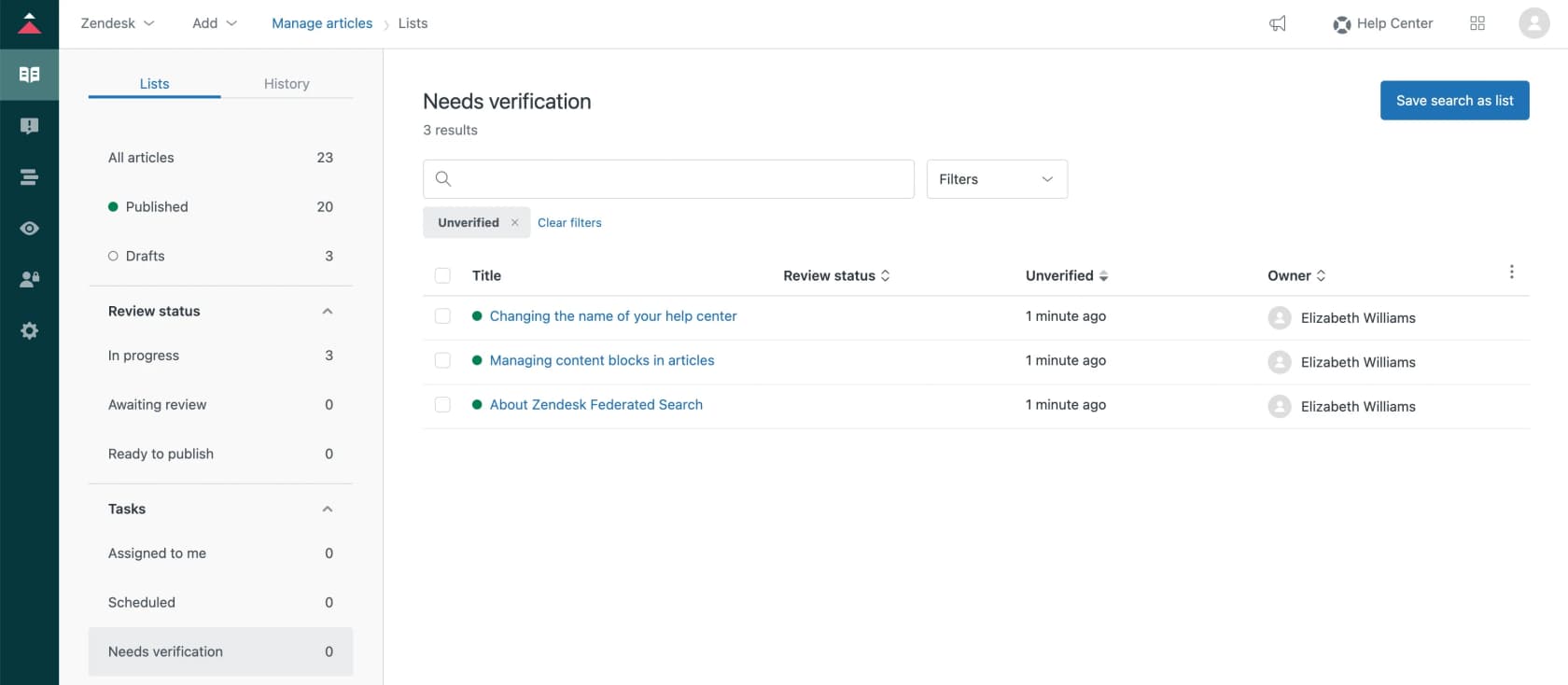
In Zendesk on Enterprise, there's one more trick worth stealing. Zendesk itself suggests bulk-unverifying articles after a big change (its example is a brand rename). Every article you unverify lands in a "Needs verification" list, and owners get emails every two weeks until they confirm it. For a policy change, unverify every article that matched your keyword search and let the list chase people for you.
6. Test the AI before customers do (day 0 to day 1)
Write ten test questions the way customers actually phrase them: "can I still return this, I bought it on the 2nd," "why is there a fee now," "your website said 30 days." Ask the AI each one and read the answer and its source.
Most helpdesks now have a place to do this safely. Freshdesk's AI Agent Studio has a Test tab that runs up to 100 queries at a time, and an email AI agent shadow mode that drafts replies as private notes. Gorgias lets you test a draft in Playground before publishing, using all your live settings with the draft swapped in. Front's Autopilot has a simulation that runs scenarios you write.
Pay special attention to the grandfathered case. AI agents are good at quoting a rule and less good at "it depends on your order date" unless you tell them how to check it. If the AI can't look up the order date, the right instruction is to escalate those tickets, not to guess.
7. Search for the old wording (day 14)
Two weeks later, search your sent replies for the old numbers and phrases. Every hit is a copy you missed. Common stragglers: an agent's personal macro, a template inside an automation, a translated article, a PDF the AI still has.
Front documents a smart way to catch auto-sent copies: create a rule that tags outbound messages whose body contains a unique snippet of the template, since the templates report doesn't count auto-replies. The same idea works anywhere you can tag on message content.
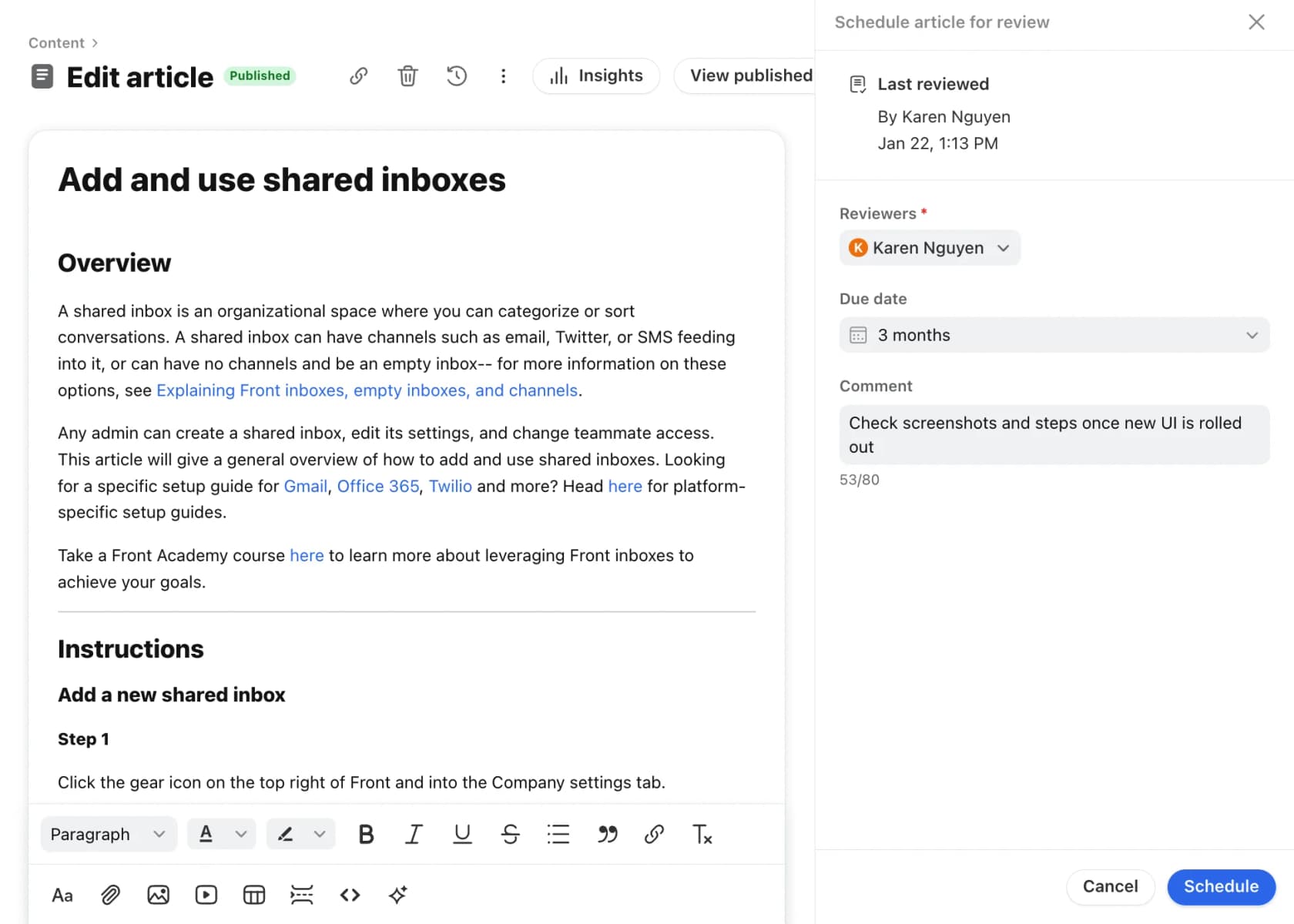
Then put the review on a schedule, the same way you'd handle outdated help center content generally. Front's scheduled article reviews (Professional plan and up) send reviewers a daily reminder for articles due, and Zendesk's verification rules can re-flag policy articles every few months.
Policy change cheat sheet for your helpdesk
Every helpdesk handles the four jobs of a rollout differently: staging the article, finding old replies, getting the AI to notice, and testing before customers do. Pick yours.
Where does a policy change bite in your helpdesk?
Pick a helpdesk to see how to stage the article, find old replies, refresh the AI and test, from each vendor's own docs.
- Stage: revision history on Suite Growth and up. Content blocks, scheduled publishing and verification rules are Enterprise only.
- Find old replies: macro search is by name only. Sort by usage (last 30 days, Growth and up) or export macros and search the file.
- AI refresh: help center edits are live at search time. External sources sync "usually every 24 hours".
- Watch for: restoring an old article version unlinks its content block.
- Stage: version history with a Show changes diff. Approval workflow (In Review, Approved) is Enterprise only.
- Find old replies: export canned responses to CSV, edit Content HTML, re-import. Never change the Canned Response ID.
- AI refresh: URLs and files need "Resync and relearn". SharePoint re-indexes about every 15 minutes.
- Test: Test tab runs up to 100 queries per run; email AI agent shadow mode drafts private notes.
- Stage: edits stay as drafts the AI never uses live. Add a change summary when you publish.
- Find old replies: export macros to CSV and re-import by id. Opportunities (beta) flags knowledge conflicts.
- AI refresh: store website and URLs don't auto re-sync. Resync once every 24 hours; store sites can take several hours.
- Test: try the draft in Playground before publishing. Guidance outweighs articles, so update both.
- Stage: Schedule publish, Schedule update and Schedule unpublish on Service Hub Pro and up.
- Find old replies: snippets are searched by name; up to 5,000 per account, 2,500 characters each.
- AI refresh: knowledge base edits re-sync automatically. Other sources re-sync weekly unless you click Refresh.
- Watch for: a returns policy uploaded as a file can be a week stale after you edit it.
- Stage: Docs revision history with restore. No scheduled publishing in the docs.
- Find old replies: saved replies live per inbox. Copies are separate, so edit each inbox.
- AI refresh: website sources need a manual resync after a pricing or procedure change.
- Watch for: old AI Answers Improvements can keep restating the previous rule.
- Stage: edits create a "Published with pending changes" draft. Scheduled reviews on Professional and up.
- Find old replies: templates report shows usage; tag outbound messages containing a unique template phrase to catch auto-replies.
- AI refresh: knowledge base edits reach AI within minutes. Websites and third-party sources need a manual re-sync.
- Test: Autopilot simulation runs scenarios you write.
- Stage: category reviewers (up to 50) and minor/major versions. Expiry dates pull time-limited articles automatically.
- Find old replies: snippets are searched by name; up to 200 per account on Standard and up.
- AI refresh: Answer Bot retrains every 30 minutes, or click Re-train All.
- Watch for: owners get expiry emails 7 days before, 1 day before and on the day.
Handling customers during the transition
The tickets you get in the first two weeks are mostly from people who read the old rule somewhere. A few things make them much easier.
Honor the version they saw, within reason. If a customer can show you the old wording on your own site or in your own email, the cheapest fix is almost always to honor it once and fix the copy. That's also, roughly, what the Air Canada ruling says you'll end up doing anyway.
Write a transition macro. If you need a starting point, adapt one of these refund and returns macro templates. One reply that says: the policy changed on this date, here's why, here's what applies to your order, and here's what I can do for you. Agents shouldn't be improvising that 40 times a day.
Give agents a real exception limit. If an agent has to escalate every grandfathering question, your queue doubles for two weeks. A clear dollar or day limit they can approve on their own keeps tickets moving.
Inconsistent exceptions are what turn a policy change into a long fight. Retail workers know this one well:
"Yup, customers have definitely played the "but the other guy did it for me!" card and it sucks because now there's precedent"
One fix from the same thread: managers enter their own code for out-of-policy returns, so every exception has a name on it. In a helpdesk, the equivalent is an internal note and a tag on every exception ticket.
Tag the tickets. Add a tag like policy-change-returns to every ticket about the change. After a month you'll know how many customers it affected, what they objected to, and whether the change needs a better explanation on the policy page. If you use AI ticket tagging, this happens without anyone remembering to do it.
Common mistakes
- Updating the main article and calling it done. It's one copy out of six or seven.
- Leaving the old version enabled next to the new one. Two conflicting copies give the AI a coin flip, as Gorgias's 30-versus-14-days example shows.
- Forgetting outside sources. A policy PDF uploaded to the AI tool, a Google Doc, a crawled policy page. These are the slowest copies to refresh.
- Not deciding the grandfathering rule upfront. Agents will each invent their own, and customers will compare notes. One Hacker News commenter, reacting to a provider that cancelled prepaid annual plans to raise prices, wrote that they'd "actually stick with them" if prepaid plans had been grandfathered.
- Training the AI on old tickets. If your AI learns from past replies, the last six months of tickets all teach the old rule. Filter the ticket source to after the change date where your tool allows it.
How eesel handles a policy change
I'll be upfront about why I care so much about this one: helping teams roll out rule changes to their AI teammate is a big chunk of what I do on eesel's support queue. And the team has some scars here. Early on, eesel had customers re-teach the agent rules they thought they'd already saved in a previous chat. That's why the current product shows every saved rule on one Instructions page you can read and edit, and why I now tell everyone to check that page after any change.
Here's how a policy change works with eesel's AI helpdesk teammate, step by step.
Facts go in documents, rules go in instructions. eesel's docs are blunt about this: don't put prices or policies in the agent's instructions. Your agent answers factual questions by searching connected knowledge, and instructions govern "tone, policy and escalation". It's the same reason retrieval beats fine-tuning for help centers: you change a document, not a model. In practice, the new returns policy text lives in your help center article or a doc, and the behavior rule ("ask before approving any return over 14 days") lives in instructions.
Changing a rule edits the old rule. When you correct the agent in chat ("we changed the return window to 14 days, orders before the 1st still get 30"), it reads its current instructions first. If a rule already covers the point, it edits that rule instead of adding a new line. That's exactly the conflicting-copies problem from earlier, handled at the source.

Here's what that looks like in a real setup. One support admin on Zendesk taught the agent their cancellation rule in plain words:
"I have a rule in CS where we do not address a cancel or refund request when there is an issue attached to it."
That's a support admin encoding a "troubleshoot before you cancel" policy, and when the agent later drafted a cancellation reply too early, the admin's correction was one line: "This is incorrect. You have not provided troubleshooting steps yet." That's the whole interface: tell it what was wrong, say yes when it offers to keep the change, and the correction becomes a rule on the Instructions page.
Know how each source refreshes. This is where I'd slow down, because it's the same outside-doc problem every helpdesk has:
| Where the policy lives | How eesel picks up an edit |
|---|---|
| Your helpdesk (help center, macros, tickets) | Updates as the agent works |
| Confluence | Edits re-index on their own, with an hourly check |
| Google Drive | Re-sync refreshes edits, but a brand new file has to be picked again |
| Website | No automatic re-crawl; re-save the integration |
| Uploaded file | Upload a file with the same name to replace it |
All of that is from eesel's knowledge docs. The Google Drive row is the one to watch. If your new policy is a new Google Doc rather than an edit of the old one, a re-sync won't find it, and the old doc stays indexed until you remove it. Edit the existing doc, or re-pick the folder. One more Zendesk detail: help center drafts are excluded unless you include them, so a draft of the new article won't leak into answers early.
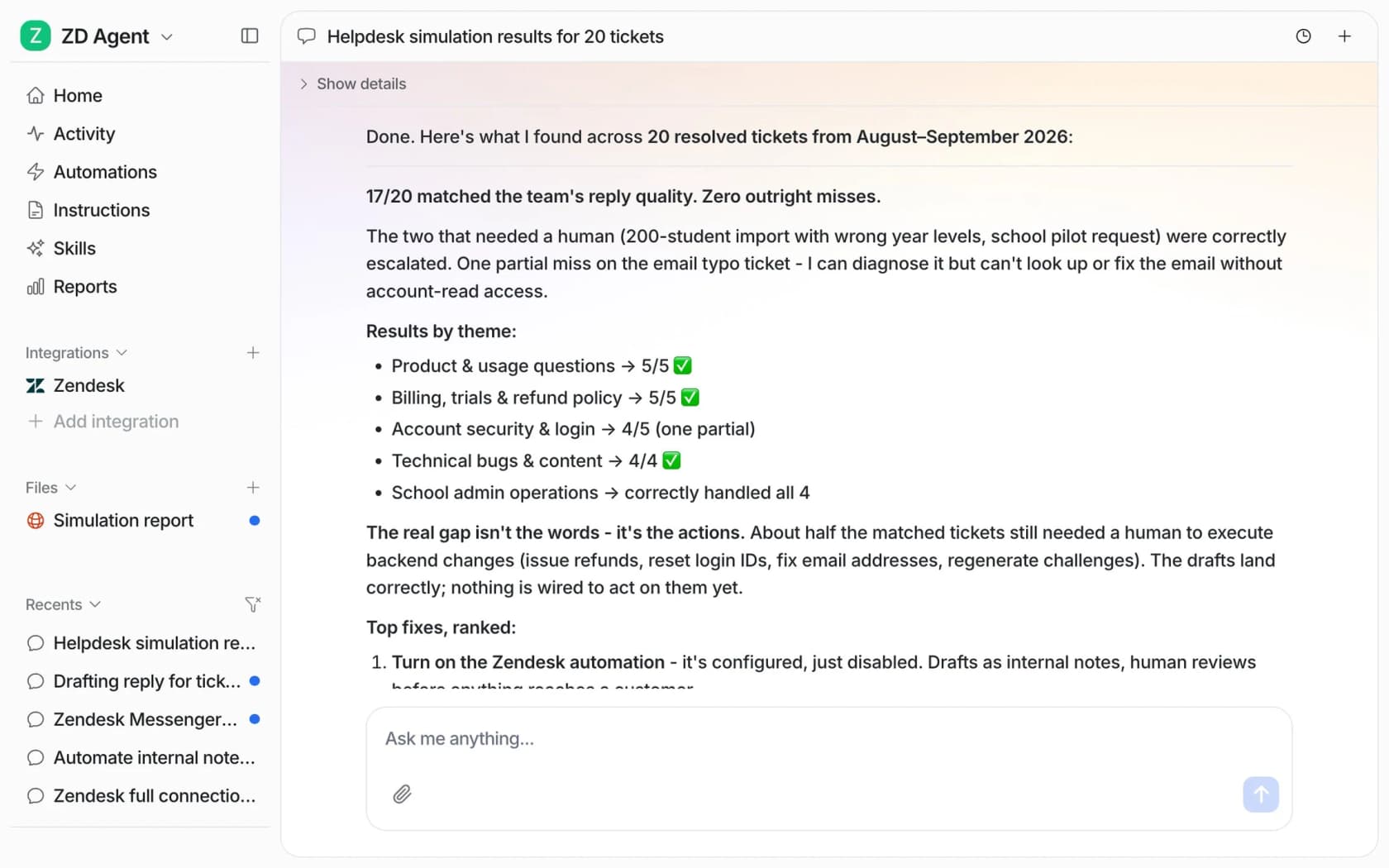
Test it against real tickets before it's live. eesel's simulation skill replays your real past tickets (or test cases it writes for you) without sending anything, and scores each answer against what your team actually sent. One caveat for policy changes: the baseline is your team's replies under the old policy, so a "mismatch" on the changed topic can be the correct answer. I'd ask it to generate test cases for the new rule specifically, and read the results for everything else to make sure nothing else moved.
Hold the risky topic for approval during the transition. Each action can be set to Auto, Needs approval or Disabled, and you can hold one topic even when replies are on Auto with an instruction like "ask before replying to anything about refunds" (approvals docs). For the first week after a refund policy change, that's what I'd do, and it's how I'd set up AI for refund requests in general. Every draft also names the help center article it used, so you can see at a glance whether it read the new version.
Pricing. eesel's Free plan includes 100 credits with no card. Teammate plans start at $299 a month for 500 credits, and a ticket or chat counts as one credit however long it runs. Questions you ask in the dashboard (like testing your ten policy questions) are mostly free.
What eesel won't do: it doesn't replace your helpdesk's article tools. Content blocks, scheduled publishing and verification lists still live in Zendesk or wherever your help center is. eesel is the teammate that reads the result and answers from it.
Try eesel for your next policy change
If your next policy change has you dreading the AI more than the help center, try eesel. It joins your existing helpdesk as an AI teammate, reads your help center, macros and docs, and takes rule changes in plain sentences. You can replay real past tickets against the new rule before customers see a single reply. The free plan includes 100 credits and every integration.

Frequently Asked Questions
What is support policy change management?
How do you communicate a policy change to support agents?
How do I find every macro that mentions an old policy?
How long does it take an AI agent to learn a policy change?
Should existing customers be grandfathered into the old policy?
Is a company responsible if its chatbot quotes the wrong policy?
How do I test my AI agent after a policy change?


Article by
Riellvriany Indriawan
Riell is a designer and writer at eesel AI with about two years of experience researching CX platforms, AI chatbots, and helpdesk software. She combines her design background with a sharp eye for how these tools actually look and feel in practice — making her comparisons unusually visual and user-focused.