

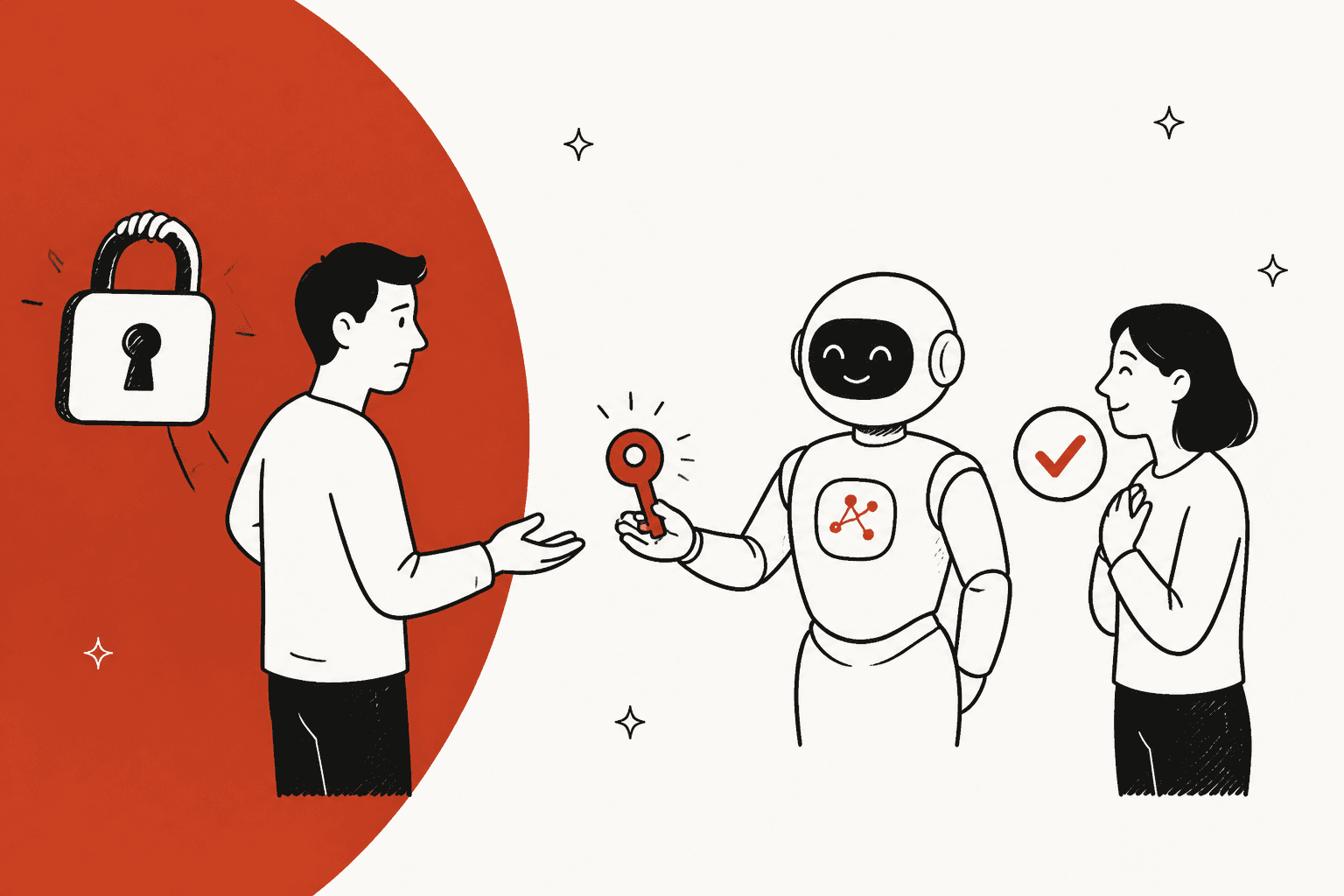
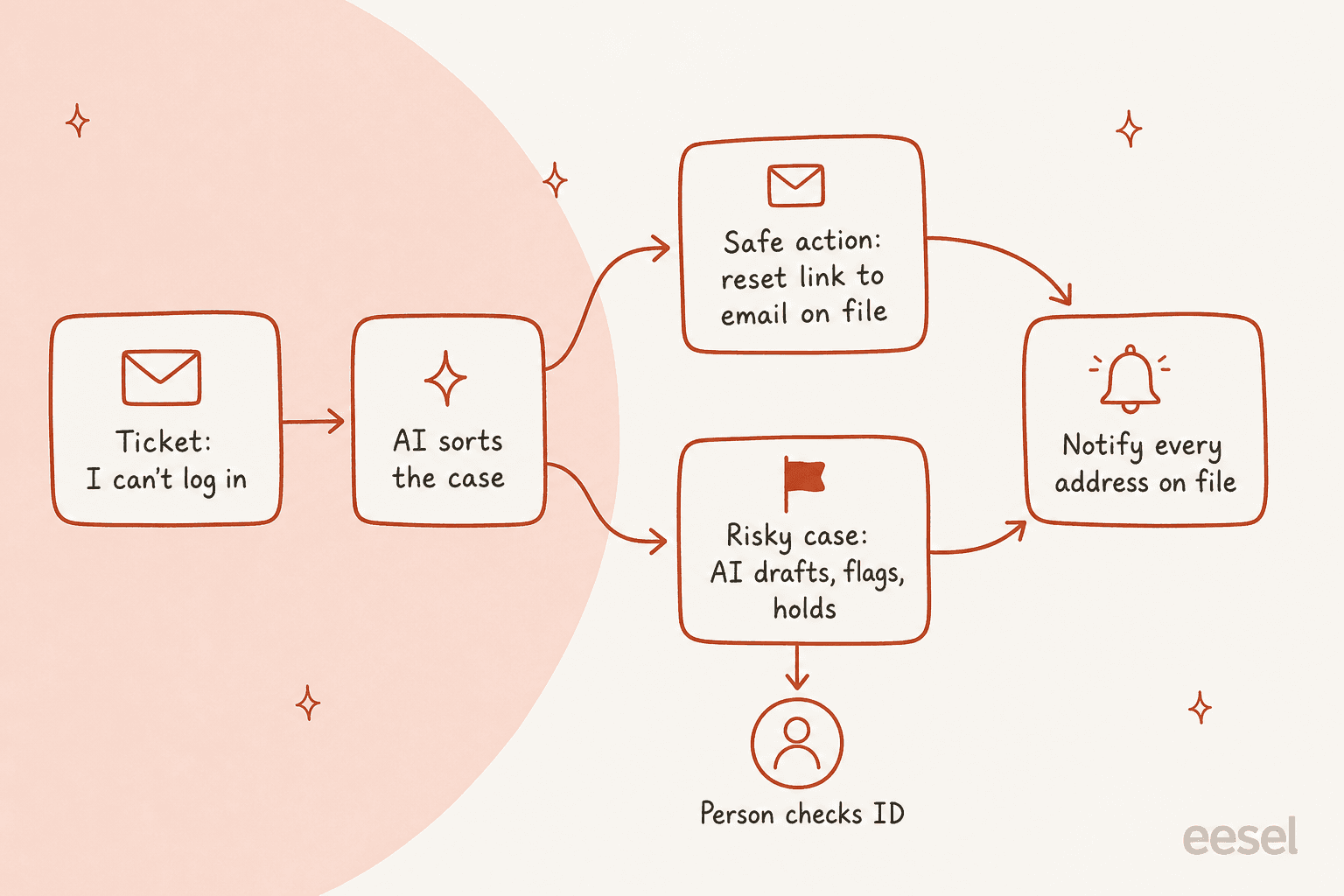
AI for account recovery support is safe when every action it can take still helps the real owner, even if the person asking is lying. Sending your normal reset email to the address already on the account passes that test: an attacker can ask for it all day and the link still lands in the owner's inbox. Changing the email, resetting 2FA or "just turning it off" fails it. So let the AI resolve forgotten passwords and lockouts, sort and draft the 2FA and email-change cases, and send anything that smells like a takeover straight to a person.
The split matters because support desks are a known way in. US cyber agency CISA's Scattered Spider advisory describes attackers calling help desks to reset passwords and move MFA to their own devices. An AI that can be talked into the same thing is a faster version of that hole.
eesel works this way inside Zendesk, Freshdesk, HubSpot and other helpdesks: it calls only the reset endpoint you allow, holds risky actions for approval, and never sees your API keys. XAP, which runs student portals for US states and colleges, lets its eesel agent take portal password resets in Freshdesk while account deletions stay with the team, and a person sends every reply.
Why are account recovery tickets so hard to automate?
Because they are the one ticket type where being helpful and being safe pull in opposite directions. The customer is locked out, often stressed, and wants their account back now. The attacker writes exactly the same message.
They are also a lot of volume. Bron Gondwana of the email provider Fastmail put a number on it on Hacker News:
"In 2016 before we had automated account recovery, lost password was in the top 3 categories of ticket every single week! Every member of the support team dealt with multiple account-loss tickets per day, both forgotten password or stolen account."

That pairing, forgotten password and stolen account in the same queue, is the whole problem. I work eesel's support queue every day, and "I can't log in" is one of those messages where the reply that feels kindest is sometimes the one you must not send. A person can feel the hesitation. A chatbot built to resolve tickets will happily close the loop for whoever is on the other end.
The other side of it is how tired customers get of bad recovery flows. One Hacker News user summed up the frustration with MFA backups and support desks in one go:
"Plus a ton of vendors allow customer support to trivially turn off MFA via social-engineering, so what is the point?"
So the job is not "automate account recovery". It is to automate the parts where a wrong guess costs nothing, and slow down the parts where a wrong guess hands someone the account. The good news is that most of the volume sits in the first group. If you only ever handle password resets, my post on AI for password reset requests covers that one ticket type in more detail. This guide covers the whole recovery queue.
What is the one test an AI recovery action has to pass?
Ask: if the person in this chat is an attacker, does this action still only help the real owner? If yes, the AI can run it. If no, a person decides.
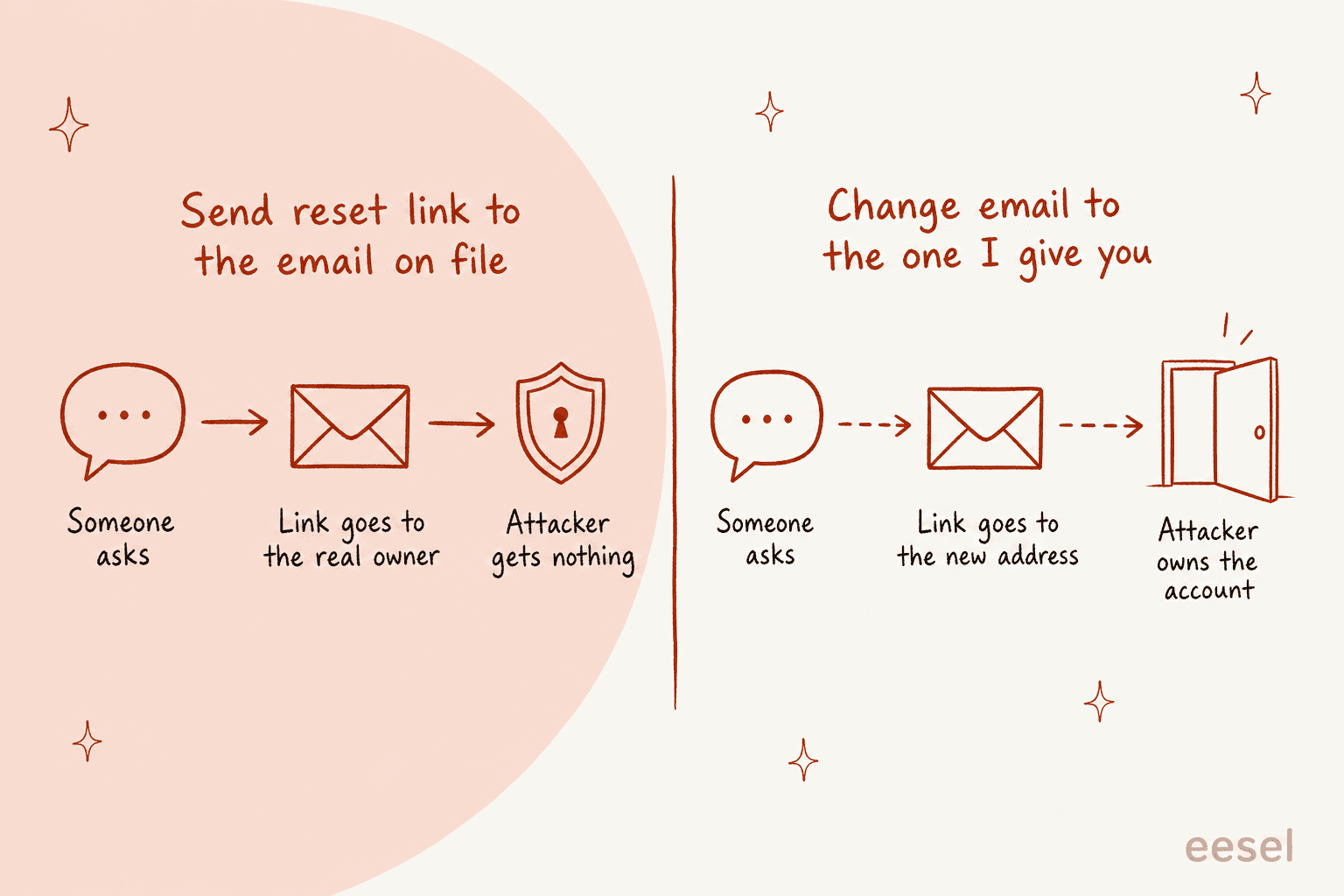
This test sounds simple, and it sorts almost every recovery action cleanly:
| Action the customer asks for | Does it still only help the real owner? | Who runs it |
|---|---|---|
| Send the standard reset link | Yes, it goes to the address on file | AI, on its own |
| Explain why the account is locked and when it unlocks | Yes, it is information, not access | AI, on its own |
| Walk through using a saved recovery code | Yes, only the owner has the code | AI, on its own |
| Resend a code to a recovery address already on file | Yes | AI, on its own |
| Change the email or phone number on the account | No, the new address could be anyone's | A person, after checks |
| Reset or remove 2FA | No, it strips the second lock | A person, after checks |
| Tell the customer whether an email has an account | No, it leaks who your customers are | Nobody, ever |
| Paste a reset link or code into the chat | No, the chat is the untrusted channel | Nobody, ever |
The last two rows come straight from the OWASP Forgot Password Cheat Sheet, the security community's reference for reset flows. It says to return a consistent message for both existent and non-existent accounts, so a reply like "if that email has an account, a reset link is on its way" is the right one even when the AI can see the account exists.
The table also tells you what to connect. An AI agent that only has a "send reset email" button cannot be talked into the dangerous rows, because it has no button for them. That is a much stronger guarantee than an instruction telling it to be careful. Instructions can be argued with. A missing permission cannot. I come back to this in the setup section.
Which account recovery requests can AI handle?
Sort them by what goes wrong if the AI is fooled. I would start every team with three lanes:
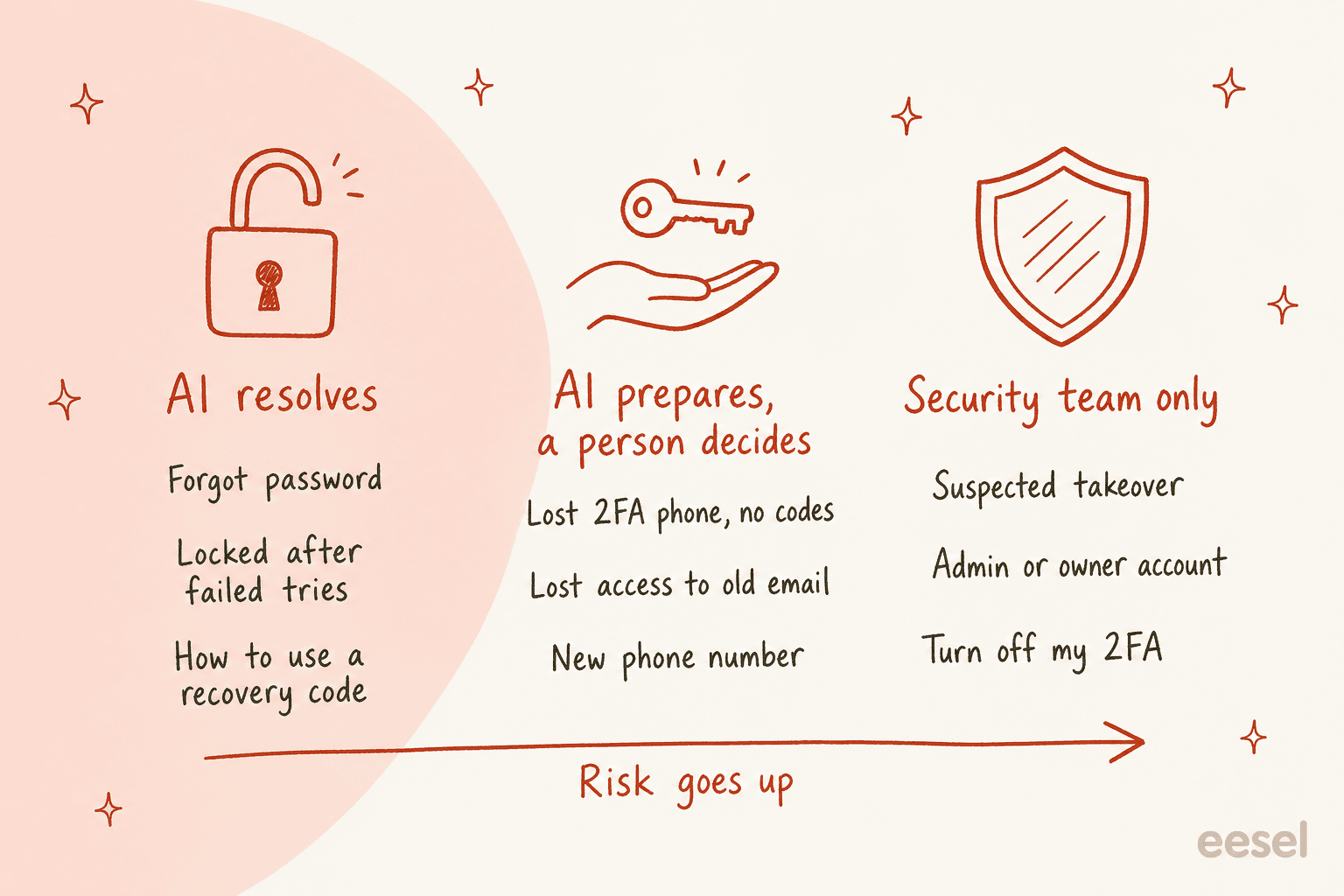
Lane 1: the AI resolves it. Forgotten passwords, lockouts after failed attempts, and customers who still have a recovery code or a second device. The fix travels through something the owner already controls. The AI triggers the reset, explains the lockout, or walks through the code, then closes the ticket. This is where most of your volume is, and it is where an AI earns back the most hours. It is also the lane to run 24/7, because nobody locked out on a Saturday wants to wait for Monday.
Lane 2: the AI prepares, a person decides. A lost 2FA phone with no recovery codes, no access to the email on file, or a new phone number. There is no channel left that proves ownership, so someone has to check. The AI still does most of the work: it reads the account, lists which recovery options exist, opens the case, drafts the ID request, and writes an internal note so the agent picking it up starts with the facts. This is the same shape as a human handoff for refunds, just with a stricter rule on who presses the button.
Lane 3: security team only. "Someone changed my password", a request to remove 2FA, or any request on an admin or account-owner login. The AI's job here is speed and silence: tag it urgent, route it, tell the customer what happens next, and send nothing to any address that changed recently.
One customer story shows why lane 1 needs context, not just a keyword. MentorShow, a French online learning company, has eesel read each HubSpot ticket alongside the member's record, including subscription status and renewal date. Their instructions carry a line I would copy into any setup: a login problem from someone with no active subscription is not a login problem. That ticket needs a billing answer, and a reset link would just send the member around in a circle.
What do security standards say about account recovery?
The two references most security teams reach for on this question are NIST SP 800-63B-4, the US government's digital identity guidelines, and OWASP. They were written for engineers building login systems, but most of the rules translate directly into what a support agent, human or AI, should and should not do.
| What the standard says | What it means in a support ticket |
|---|---|
| NIST lists four recovery methods: saved recovery codes, issued codes sent to a recovery address, recovery contacts, and repeating identity proofing | Your agent should check which of these the account has before promising anything |
| Recovering an account that uses 2FA needs two recovery codes from different methods, one code plus another working factor, or repeated identity proofing (NIST) | "Tell me your date of birth" is not one of the options. A lost-phone case with nothing on file goes to a person |
An issued recovery code lasts at most 10 minutes by text or voice and 24 hours by email (NIST) | Tell customers how long the link is good for, and to request a fresh one rather than reply to an old email |
| A new recovery address must be confirmed with a code before it is used (NIST) | Never treat an email the customer types in chat as theirs |
| Every account recovery sends a notification to the addresses on file, with a way to say "this wasn't me" (NIST) | The old address hears about every recovery, so the real owner can stop a fake one |
Failed attempts on one authenticator are capped at 100 before it is disabled (NIST) | Lockouts are on purpose. Explain them; don't hunt for a bypass |
| Return the same message whether or not the account exists (OWASP) | The AI never confirms "yes, that email is a customer" |
| Don't log the user in automatically after a reset, and offer to end other sessions (OWASP) | After a takeover, a new password alone may not lock the attacker out |
| Security questions should not be the only reset check (OWASP) | Answers like a birthday or a pet's name are often findable online |
That notification rule is the one support teams forget most, and it is the cheapest protection you have. NIST says recovery notifications go to all notification addresses on the account, and that the notice must include clear instructions and contact details in case the recipient did not ask for it. If your AI triggers a recovery, make sure your system sends that notice to the old address too. If someone is hijacking the account, the owner finds out in minutes, not when they next try to log in.
OWASP also makes a point that changes how you treat "I think I was hacked" tickets. It says a password reset alone may not restore control of a compromised account, because the attacker may still have an active session or may have changed the recovery details. That is why takeover cases sit in lane 3, where someone can end every session and check what changed, rather than in lane 1 with a cheerful reset link.
Why shouldn't AI change emails or reset 2FA on its own?
Because those are the exact requests attackers bring to support desks, and a model reading one chat cannot tell them apart from a real customer.
CISA's advisory on Scattered Spider, a group behind several large breaches, lists the moves. The group posed as employees "to convince IT and/or helpdesk staff to provide sensitive information, reset the employee's password, and transfer the employee's MFA to a device they control". The advisory adds that these calls often come over several conversations, first learning what the help desk asks for, then coming back with the answers. Their homework comes from social media, data leaks and open sources, which is exactly why "confirm your address and date of birth" is a weak check.
Okta saw the same pattern. In its 2023 security write-up, Okta said several US customers reported callers trying to convince service desk staff to reset all MFA factors on their most powerful admin accounts. Okta's advice includes stronger help desk identity checks, limiting help desk roles so they cannot touch admin accounts, and alerting whenever all of a user's MFA factors are reset.
Now picture the same attack against an AI agent. It does not get tired, it answers instantly, and an attacker can try fifty phrasings in an hour. If the agent has a "remove MFA" action switched on, one of those phrasings might work. If it does not have that action at all, none will. That is the rule I would write into any agent's setup: the AI can start a recovery, it cannot finish a risky one.
Email changes deserve their own warning. A Hacker News commenter who has run a high-traffic site listed what you avoid by not allowing email changes at all:
"Email change is one of the most abused recovery vectors in account takeover (ATO)."
You probably cannot ban email changes, but you can make sure an AI never performs one from a chat request. If your AI hallucination worries are about wrong answers, this is the bigger worry: a right-sounding action taken for the wrong person.
How should the AI talk to your login system?
Through one narrow endpoint that is safe by design, not through admin access to your user database.
Most identity providers already have the call you need, and it is the boring one: send the standard reset email to the address on file. I checked the docs for four common ones:
| Login system | The safe call to give an AI | The risky call to keep away from it |
|---|---|---|
| Amazon Cognito | AdminResetUserPassword, which sends a reset code the same way the user's own "forgot password" does | AdminSetUserPassword, which sets a password directly |
| Firebase Authentication | Generate a password reset link and email it to the user's existing address | Setting the email or password from the admin SDK on request |
| Auth0 | Trigger the standard change-password email | Deleting a user's MFA enrollment through the Management API, which Auth0 describes as the same as removing their MFA registration |
| Okta | User-initiated self-service recovery | Resetting all factors, the exact request in Okta's 2023 incident report |
One detail worth knowing on Cognito: its docs say recovery messages only go to users with a verified email or phone. If neither is confirmed, an administrator has to step in. That is a natural lane 2 case, and your AI should say so plainly rather than retry.
If your own app has a "forgot password" button, the cleanest option is often to expose the same thing as a small internal endpoint: takes an email, sends the normal reset email if the account exists, always returns the same response. Your AI calls that. It cannot do anything your public login page does not already let anyone do.
How to set up AI for account recovery in your helpdesk
This is the order I would run it in. Steps 1 to 3 are worth doing even if you never let the AI take an action.
Step 1: count what you actually get
Before writing a rule, tag a month of tickets by recovery type: forgot password, locked out, lost 2FA, lost email, new phone, suspected takeover, and "not actually a login problem". AI ticket tagging can do this backwards over past tickets. The mix decides everything else. A queue that is 90% forgotten passwords needs one endpoint and a good reply. A queue full of lost 2FA needs a better ID check process first.
Step 2: write the lanes into the instructions
Put the three lanes into the agent's instructions in plain words, with examples of what customers actually write: "can't get in", "new phone, authenticator gone", "I don't use that email anymore", "someone changed my password". Add the hard rules too: never confirm whether an account exists, never paste a link or code into the chat, never change contact details on request. In eesel, instructions are plain text you edit, and the agent can tighten them when you correct it in chat, as the instructions docs explain.
Step 3: give it the account context
Connect whatever tells the AI who this is: your subscription or billing system, your CRM, your helpdesk's customer record. This is the MentorShow lesson. Half the "I can't log in" tickets are expired plans, wrong product, or a portal you do not even run. XAP found the same: some students who cannot log in are on a college's own portal, which XAP does not run, so the right reply is a referral, not a reset.
Step 4: connect one safe endpoint
Give the agent the single reset call from the section above, and nothing else that touches login. In eesel this is Network Access: you allow one domain, add the auth header in settings, and the agent can call it. Requests to any other domain are refused.
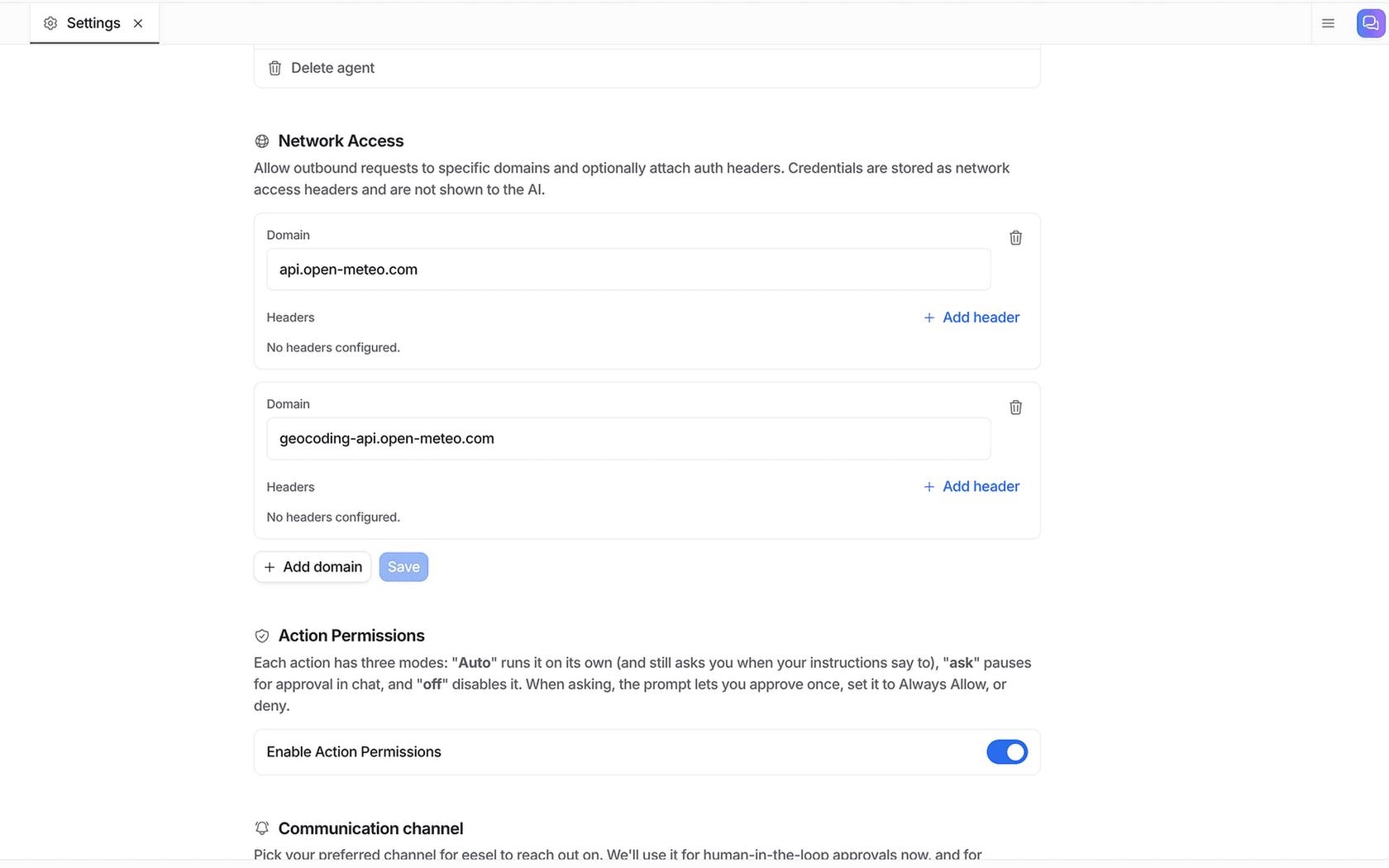
The part that matters for recovery is the line at the top of that screen: credentials are stored as headers and are not shown to the AI. The key that can trigger resets never sits in a prompt, so it cannot be talked out of the agent. Your developers can set this up from a terminal too. The eesel CLI runs the same agent and workspace as the dashboard, so an engineer, a script, or a coding agent like Claude Code or Cursor can wire up the endpoint, edit the recovery instructions, and test the agent without opening the browser.
Step 5: set every helpdesk action that touches identity to need approval
Each action an eesel agent can take is set to run on its own, ask first, or stay off, per agent. The actions and approvals docs recommend starting supervised, with replies and anything irreversible on approval.
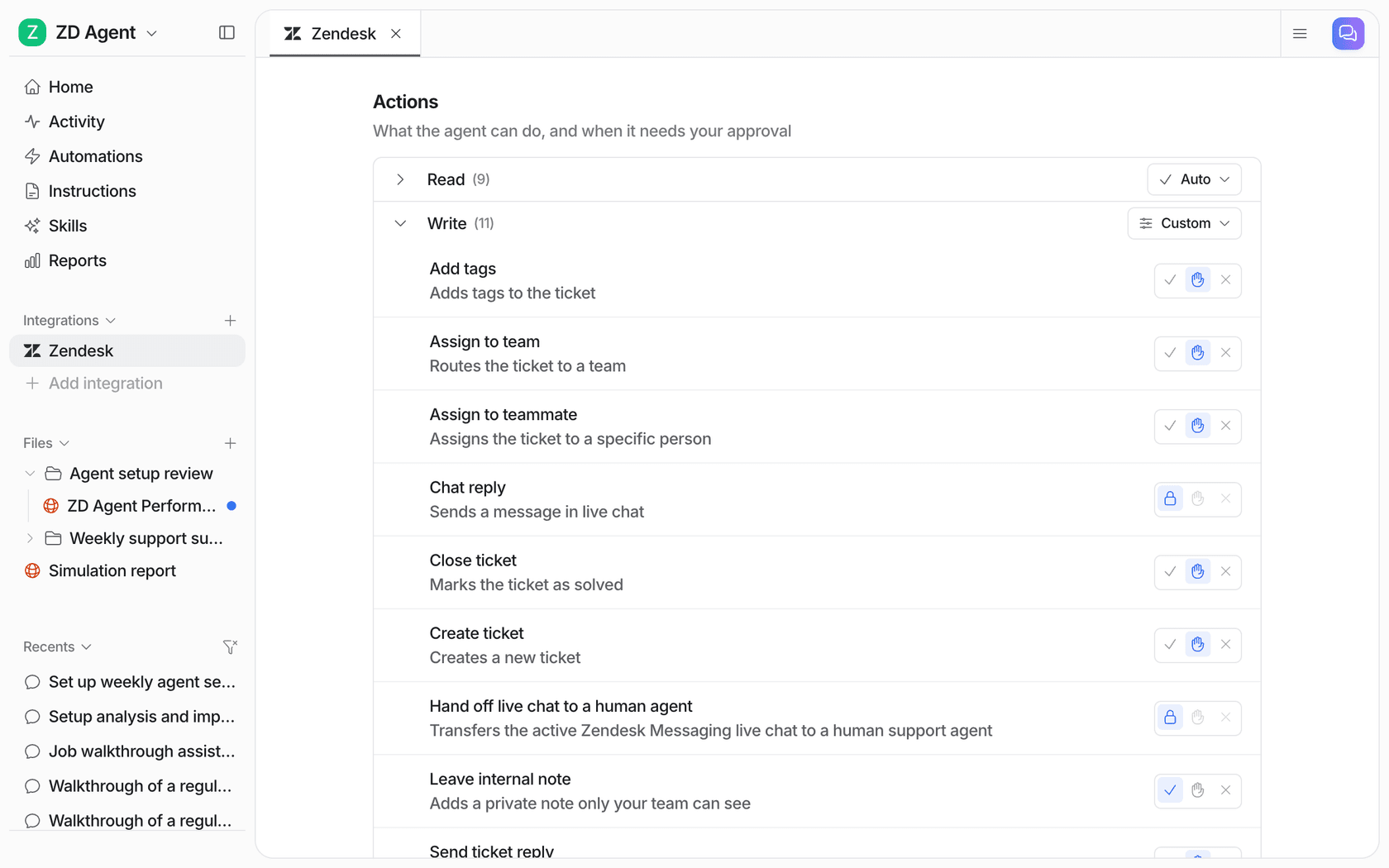
For recovery, I would leave tagging and internal notes on their own from day one, and put public replies on approval for the first week or two. You can also hold one kind of case even when replies are on: an instruction like "ask before replying to anything about 2FA or changing an email" makes the agent stop for those cases only.
Step 6: route lanes 2 and 3 to named people
Lane 2 goes to whoever can run your ID check, usually a senior agent or tier 2. Lane 3 goes to security, by name, with an urgent tag and a short SLA. An AI can route by tag instantly; it cannot fix a routing rule that points at a shared inbox nobody watches on weekends. If your tier 2 team is small, have the AI write the internal note so they start with the account facts.
Step 7: test it on your past login tickets
Run the agent over the recovery tickets you already handled before it touches a live one. Did it send reset links only in lane 1? Did it ever confirm that an email had an account? Did it catch the takeover hidden inside an angry billing complaint? A simulation on past tickets answers that in an afternoon, and it is the step I would never skip on this ticket type.
Which lane does this ticket go in?
Pick a request type to see who handles it, what the AI does, and the rule behind it.
How do you measure whether it is working?
Track speed and safety side by side. A recovery setup that is fast but occasionally hands over an account is worse than no AI at all.
- Share of recovery tickets closed by the AI. This should be roughly your lane 1 share from step 1. If it is much higher, the AI is closing tickets it should not.
- Time to first reply on lane 1. Locked-out customers feel every minute. This is the number that should drop most.
- Lane 3 response time. A takeover sitting in a queue for six hours is the failure that ends up in a headline. Watch it in your SLA reporting.
- "This wasn't me" replies to recovery notifications. Each one is a recovery somebody did not ask for. Read every single one.
- Repeat contacts within 7 days. If the same customer is back, the reset link did not reach them or the reply missed the real issue.
The AI support reporting guide shows how to build these from tagged tickets.
Common mistakes with AI and account recovery
These are the ones I would watch for in the first month:
- Letting the AI confirm the account exists. "I found your account, sending a link now" feels helpful and tells an attacker which emails are customers. Use the same reply either way.
- Treating chat details as proof. Name, address, last four digits, date of birth: all of it is in someone's data leak. CISA notes attackers gather exactly this before they call.
- Pasting a link or code into the conversation. The chat is the one channel you cannot trust in a recovery case. Codes go to the address on file.
- Giving the AI admin API keys "to be safe later". If the key can remove MFA, assume someday someone will talk the agent into trying. Give it the one call it needs.
- Skipping the notification. Every recovery should tell the old address. It is the cheapest takeover alarm you will ever set up.
- Forgetting the other login. XAP's queue showed it: sometimes the portal the student cannot reach is not yours. A referral beats a reset link.
If you want the bigger picture of how a rollout like this goes from supervised to hands-off, the implementation timeline post covers the dial.
Try eesel for account recovery tickets
eesel joins your helpdesk as an AI teammate for support. On login tickets, it reads each one with the customer's account context, triggers only the reset call you allow, replies the same way whether or not the account exists, and holds 2FA changes, email swaps and anything that looks like a takeover for your team. It works in Zendesk, HubSpot and the other major helpdesks, and on Freshdesk through the Freshdesk integration.
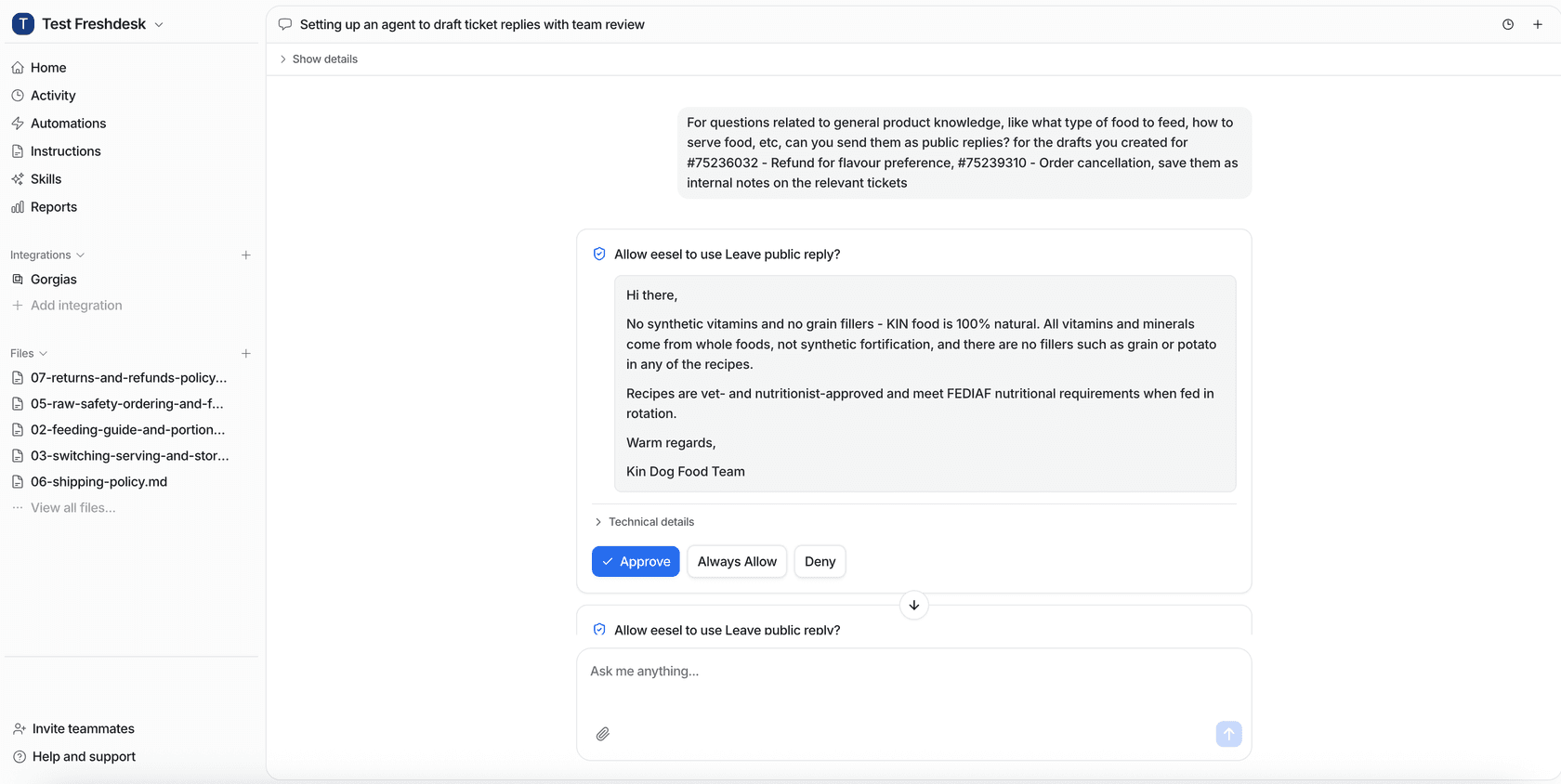
Approvals land where your team already works: the dashboard, a Slack thread, or a link in the helpdesk note, and every approval records who decided and when. Your API keys stay in settings, never in the AI's view, and eesel never uses your data to train the underlying models, per its Trust Center. One honest gap: eesel's SOC 2 Type II audit is still in progress, so if your security team needs the report in hand today, ask for the current status first; my vendor security checklist covers what to request instead.
XAP is a good model for starting small. A filter in front of its eesel agent lets through only referral cases and portal password resets, nothing goes to a student without a person sending it, and account deletions stay with the team. Start there, measure for a month, then open lane 1 up. You can try eesel free for 7 days with 100 credits.