


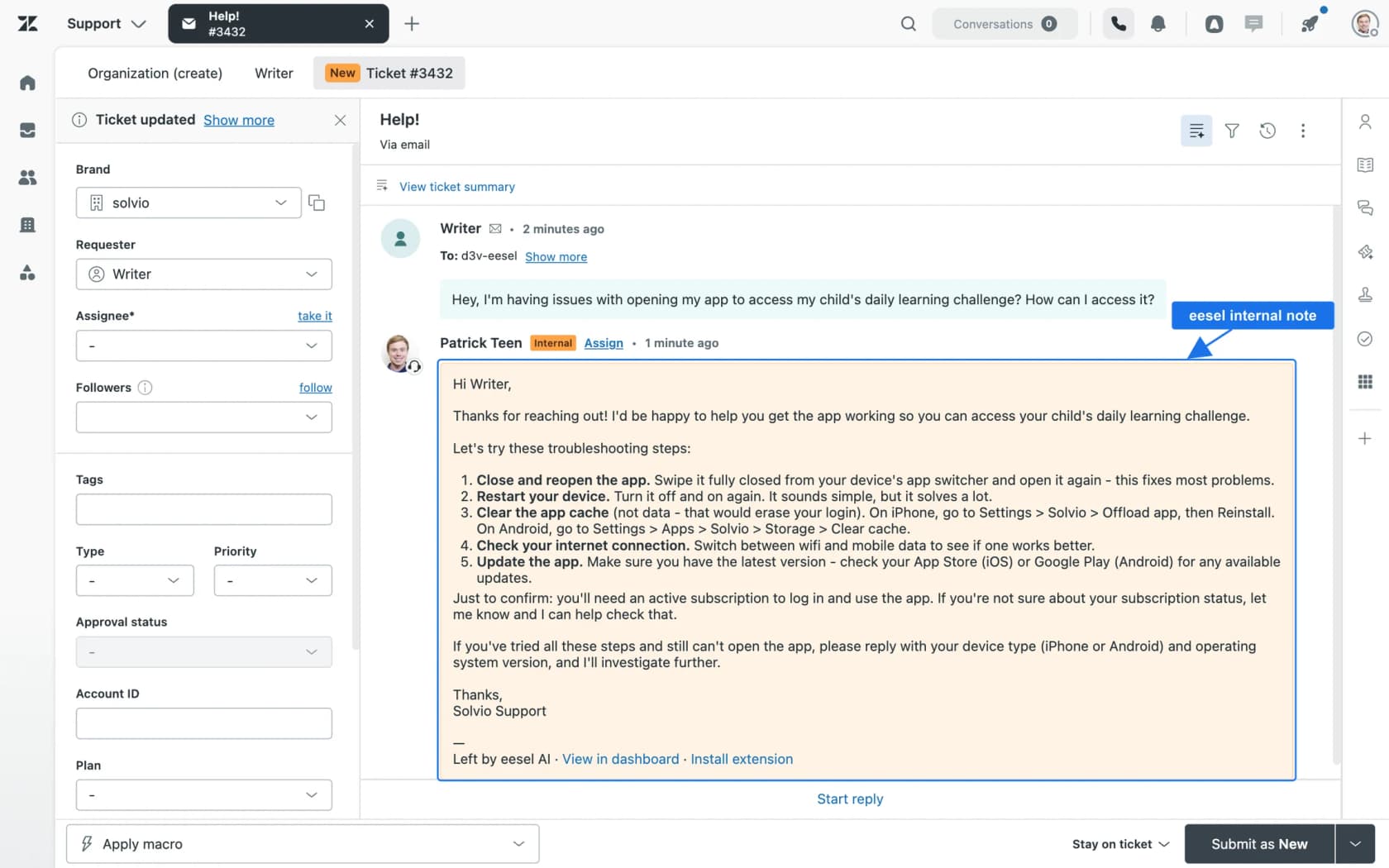
Yes, AI can help tier 2 support, but not as a smarter FAQ bot. At tier 2 the useful AI is an investigator, not an answerer: it runs the order, billing and account lookups, finds the past tickets where your team fixed the same problem, rules out the obvious causes and leaves all of it in an internal note, so the specialist opens a case file instead of a raw ticket.
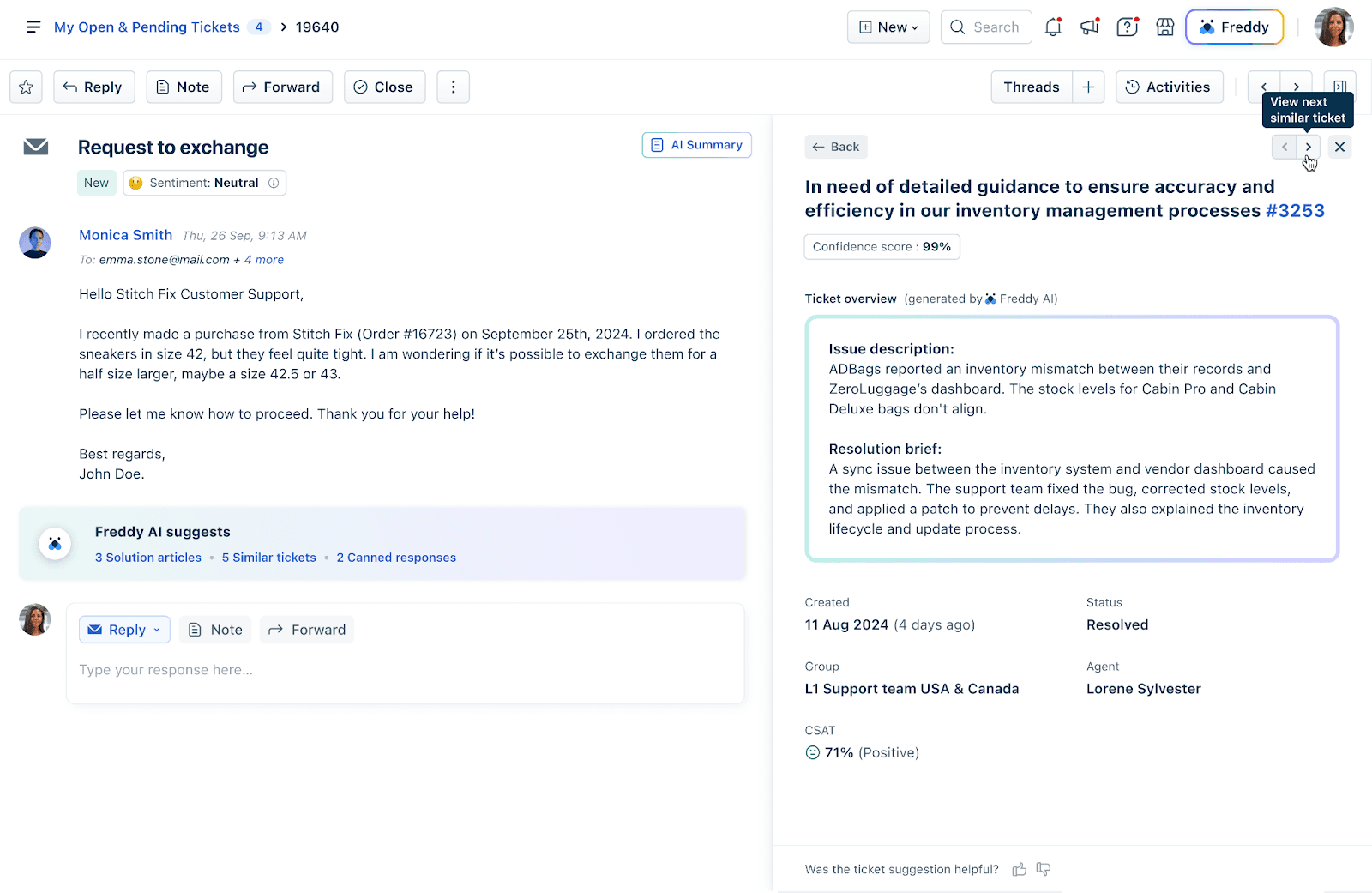
The bigger win is usually upstream. A tier 2 queue holds three kinds of ticket: ones that should never have escalated (AI answers those at tier 1), lookup-heavy ones that only look hard because the answer sits in another system (AI investigates, a person decides), and truly new problems (a person leads, AI writes the notes). Native tools help with pieces of this: Zendesk Copilot adds similar tickets, suggested assignees and auto assist actions for $50 per agent per month, and Freddy AI Copilot surfaces similar tickets with the agent who solved them for $29 per agent per month.
An AI teammate like eesel does the investigation inside the helpdesk you already run. At Timengo, whose tickets are certificate, Outlook add-in and mail flow problems from IT admins, it prepares about 300 Freshdesk tickets a month with a Danish draft and an engineer note built from 5,300 past tickets and the product docs. Plans start at $299 a month for 500 credits, and a ticket is one credit however many lookups it takes.
Can AI actually help with tier 2 support, or only tier 1?
It can, as long as you stop asking it to do tier 1's job on harder tickets. Tier 1 AI mostly retrieves, finding the help article or macro that fits the question and sending it. Tier 2 is another kind of work, where somebody has to work out why an order shows paid but never shipped, why one customer's SSO login fails when everyone else's works, or why an integration stopped syncing on Tuesday. That is investigation. And most of the hours in an investigation go to gathering evidence, much less to reasoning about it.
I build integrations at eesel, the parts that let an AI agent open a Shopify order, read a Stripe subscription or call a customer's own API. On every rollout I see the same thing. Watch a tier 2 specialist work a ticket and the first ten or fifteen minutes go to opening tabs: the order system, the billing tool, the admin panel, then a search for "has anyone seen this before". The judgement call at the end takes about a minute. AI handles the tab-opening part well, which happens to be the part your senior people should be doing least.
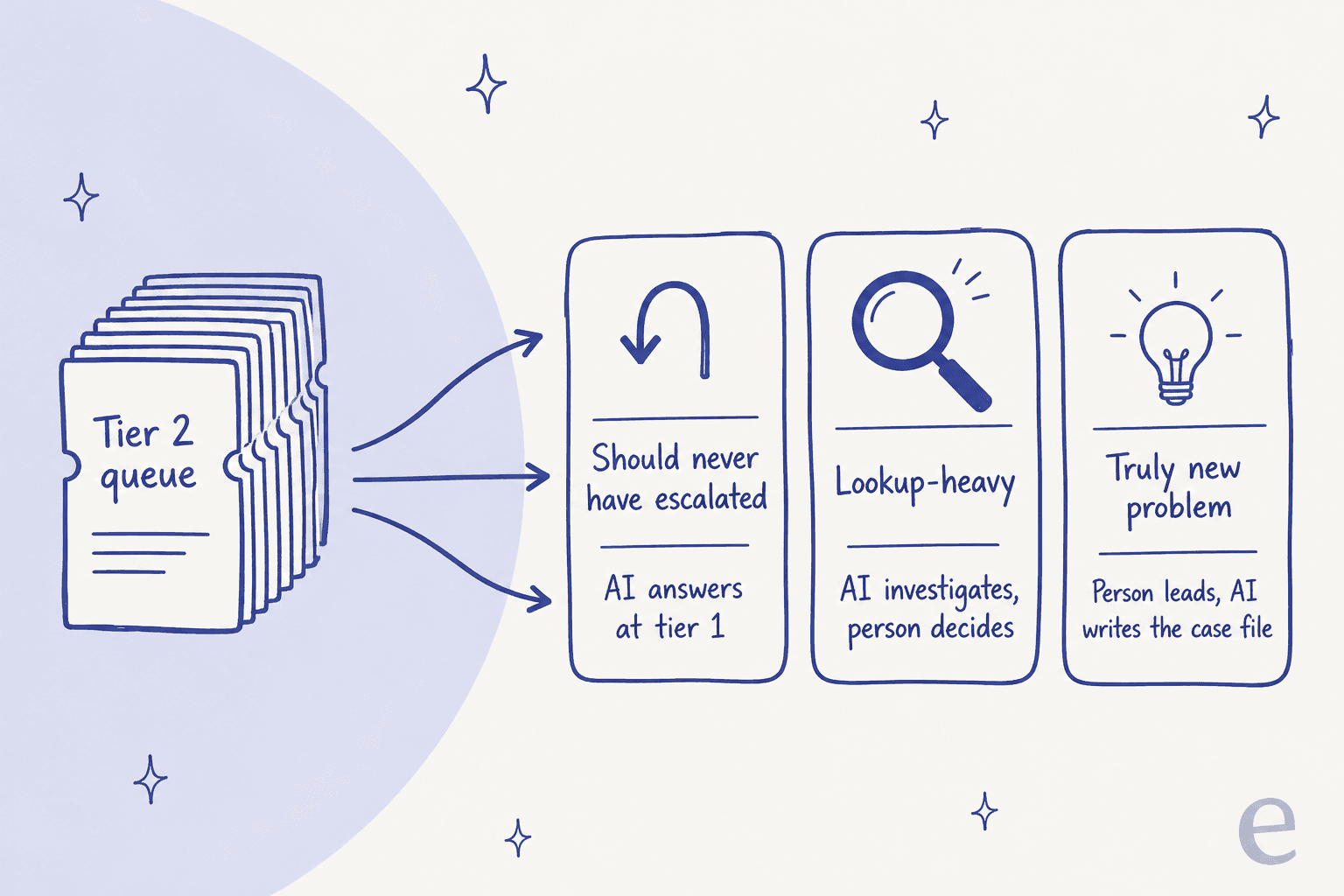
So the honest answer comes in three parts, one for each kind of ticket sitting in your tier 2 queue:
- Tickets that should never have escalated. A tier 1 agent or bot escalated because the knowledge base was thin, or because answering needed a lookup tier 1 couldn't do. AI with better knowledge and read access to the order or account system answers these at tier 1, and they never reach your specialists.
- Lookup-heavy tickets. The fix is known, but finding it needs data from two or three systems. AI does the lookups and the precedent search, drafts the reply, and a person checks the facts and sends.
- Truly new problems. A bug nobody has seen, an edge case in a customer's setup. A person leads, sometimes by swarming the ticket with other specialists. AI still earns its place by summarising what has been tried, attaching the evidence and writing up the fix afterwards so the next one is a category 2 ticket.
Why is your tier 2 queue so full?
Because escalation is where every gap upstream lands. When tier 1 can't see the billing system, every "why was I charged twice?" becomes a tier 2 ticket, which is why payment disputes clog so many tier 2 queues. If the knowledge base doesn't cover the new feature yet, every question about it goes up a level too. None of this is really tier 2 work, and tier 2 ends up doing it anyway.
The second cause is knowledge that lives in two or three people's heads. One support lead at a public-sector IT services firm on Freshdesk, handling about 3,000 tickets a month of complex ERP troubleshooting, told me they were losing two senior agents that year and wanted to capture what those two knew before they left. That sums up the tier 2 problem pretty well. The answers exist, spread across years of solved tickets and a few people's memory, but nobody can find them fast.
The same firm wanted the AI to flag tickets likely to take more than 20 minutes, so they could route them differently from standard support. I think the instinct is right. The tickets that eat tier 2's week and build the ticket backlog are rarely the hardest ones; usually the answer exists already, it just takes twenty minutes of digging to reach it.
You can hear both causes when support people talk about escalation. If tier 1 has nowhere else to go, everything goes up:
"We tried something like that, and almost everything outside of a password reset was escalated... I'm the only "tier 2" person, the other one they call "Tier 2" would often times just pass things on to me..."

And tickets that arrive without notes mean tier 2 repeats work somebody already did. This IT manager's rule is one most teams write down and few actually enforce:
"As a rule, any ticket that is escalated must have complete notes on every troubleshooting step you've already tried so the next team doesn't repeat processes."
Honestly that rule works as a spec for a tier 2 AI. Complete notes on every step are tedious for a person to write, but for software that has already read the thread and run the lookups they cost almost nothing.
The sceptics have a fair case as well, and I'd take it seriously before buying anything:
"Tier-2/3 support isn't just about picking an answer from a knowledge base; it requires deduction, empathy, and finding solutions that don't exist yet."

The first half I agree with, since an AI that only picks answers from a knowledge base has no business at tier 2. The second half is where the split matters, because "solutions that don't exist yet" describes the third kind of ticket, which is a minority in most tier 2 queues. For the rest the solution already exists somewhere, buried in a past ticket or a billing record.
What does AI do differently at tier 2 than at tier 1?
At tier 1 the AI's job is to answer. At tier 2 its job is to shorten the path to a confident answer, and most of the time a person still gives that answer. The skills overlap a lot. What changes is what you measure, and what you let it touch.
| Tier 1 AI | Tier 2 AI | |
|---|---|---|
| Main job | Answer known questions | Gather evidence and find precedent |
| Reads from | Help center, macros, policies | Past solved tickets, order, billing and account systems, internal docs, runbooks |
| Typical output | A public reply | An internal note, a draft reply, a routing decision |
| Actions | Mostly read-only lookups | Read lookups first, write actions behind approval |
| Who sends | Often the AI | Usually a person, at first always |
| Success metric | Resolution or deflection rate | Time to first useful finding, tier 2 handle time, fewer escalations |
| When it should stop | It can't find the answer | It can't find evidence, or the fix changes money or data |
People tend to miss the "reads from" row. A tier 1 bot trained only on the help center won't be useful at tier 2, because the help center is the exact thing tier 1 already tried. Tier 2 answers sit in solved tickets and internal runbooks, plus live data. An AI that can't read those can't investigate, and then the people quoted above are right to be sceptical.
What should a pre-investigated escalation look like?
Think of a case file that a good senior agent writes for a colleague. Whether the AI escalates a ticket itself or picks up one that tier 1 escalated, its note should let the specialist skip straight to the decision.
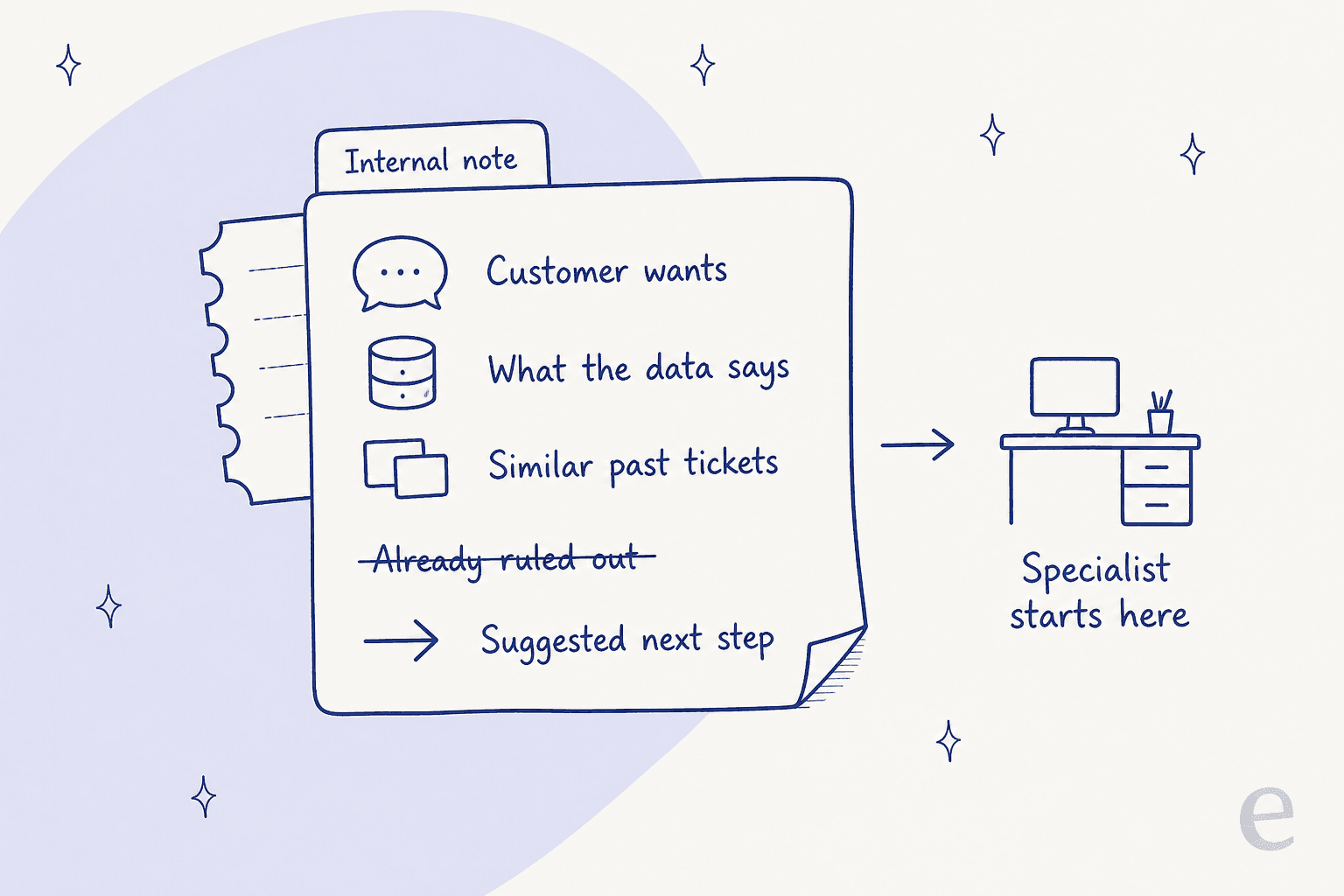
Five things belong in it:
- What the customer wants, in one sentence, not a summary of the whole thread.
- What the data says. The order status, the subscription state, the plan, the last login, whatever the lookups returned, with the record linked.
- Similar past tickets, with how each one was fixed and who fixed it.
- What has already been ruled out. The steps tier 1 tried, the causes the data excludes.
- A suggested next step, plus an honest line about what the AI could not check.
Here is the shape of a note I'd want on a billing escalation:
Customer wants: refund for a second charge on 14 Oct.
Data: Stripe shows two successful charges of $49 on 14 Oct, 3 minutes apart,
  same card. One subscription active. No refund issued yet.
Similar tickets: 3 in the last 60 days, all double charges after a failed
  card update retry. All refunded in full by the billing team.
Ruled out: not a plan change (plan unchanged since June), not a currency
  conversion charge.
Next step: refund the second charge (needs approval). Could not check
  whether the retry bug ticket in engineering is still open.
eesel's docs describe exactly this for escalations: the note "should give the human everything they need: what the customer wants, what you found, and what you'd have said," and when the agent can't find an answer it should "say what you searched for in your note" (eesel instructions docs). At tier 2 that last part matters a lot, since a note that says "I searched the last 1,000 tickets and the billing docs and found nothing on this error" saves the specialist from repeating the same search.
Which tier 2 jobs can AI take today?
Most of the investigation, and not much of the judgement. Here is the split I'd start with; it also lines up with what the helpdesk vendors document themselves.
| Tier 2 job | What AI does | What stays with a person |
|---|---|---|
| Ticket enrichment | Pulls the order, account, plan and recent activity onto the ticket | Deciding which data matters for an odd case |
| Precedent search | Finds solved tickets about the same problem, even in different words | Judging whether the old fix still applies |
| Triage and routing | Tags, prioritises and assigns to the right specialist group | Exceptions, VIPs, anything politically sensitive |
| Draft reply | Writes the fix in your team's tone, citing its sources | Checking facts, sending |
| Write actions | Prepares a refund, cancellation or address change | Approving it |
| Knowledge capture | Turns a solved escalation into a draft help article or runbook | Publishing it |
Two of those rows need a bit more explanation. Precedent search gives tier 2 the most back, since senior agents do it from memory and newer agents can't do it at all. Knowledge capture is how the next escalation stops being needed, because any tier 2 fix that turns into an article becomes a tier 1 answer next month. eesel's knowledge gaps report, for example, lists the last 30 days of questions it could not answer and drafts the top three missing pages (eesel skills docs).
What do Zendesk, Freshdesk, Jira Service Management and Gorgias already do?
Each of the big helpdesks now ships some tier 2 help, mostly an AI copilot aimed at the human agent working the escalation. It's worth checking what your current plan already includes before you buy anything.
| Helpdesk | Similar tickets | Summaries | AI actions and lookups | Price for the AI layer |
|---|---|---|---|---|
| Zendesk | Yes, matches solved tickets "even when it's described in different words" | Public comments only | Auto assist: Shopify order actions, custom API actions | Copilot $50 per agent per month, paid yearly |
| Freshdesk | Yes, shows confidence, agent, group and CSAT | Issue, Steps Taken, Outcome, includes private notes | AI Agent API actions | Freddy AI Copilot $29 per agent per month |
| Jira Service Management | Title-based panel; Rovo Service Request Helper finds similar work items | Premium and Enterprise, visible only to you | Request Resolver with connected tools | Rovo credits included per plan |
| Gorgias | Not documented for human agents | Ticket summary on long conversations | AI Agent actions, including HTTP requests | $1.50 per automated interaction past your limit |
Zendesk Copilot
Zendesk's tier 2 features sit in the Copilot add-on, $50 per agent per month paid yearly, available on Professional plans and above (Zendesk pricing). Without the add-on, Suite Professional gets summaries, similar tickets and merge suggestions capped at 5 uses per agent per month. The most tier 2 shaped feature is suggested assignees, which helps find someone for "a ticket that needs to be reassigned or escalated" based on who has resolved similar tickets (About Zendesk Copilot).
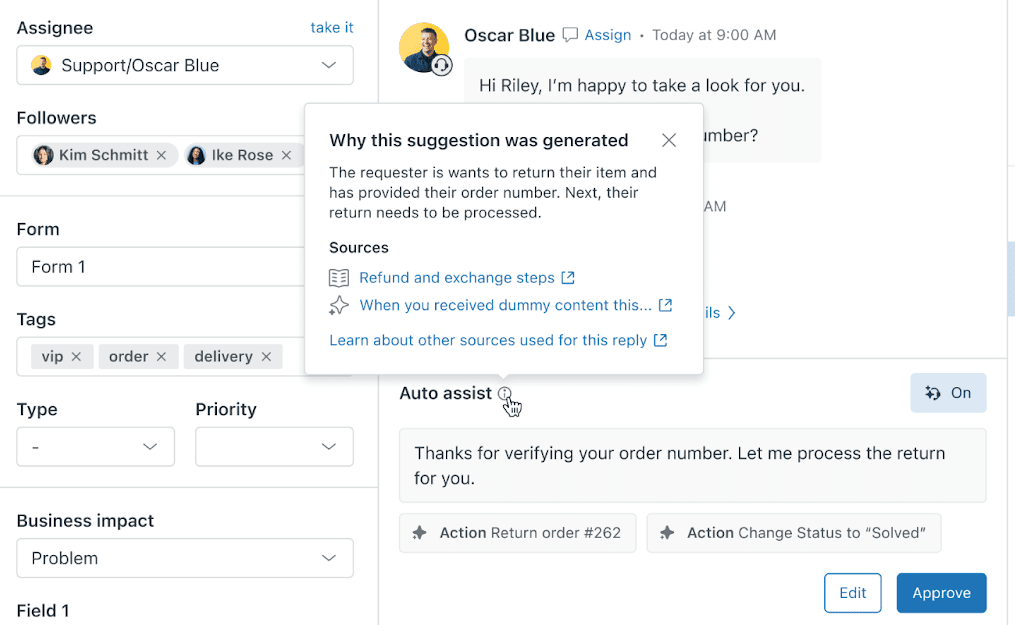
Auto assist is the part closest to investigation. It suggests replies and actions. It can look up, cancel or refund a Shopify order, and through custom actions it can also call your own API. Paired with intelligent triage for routing, it covers most of the escalation path.
Lookups can be pre-approved, while "actions that update data, such as refunding an order, still require your approval" (Using auto assist). Two limits to know: it suggests "up to four actions at a time" (About actions), and it can't be configured on the chat or voice channels.
Freddy AI Copilot in Freshdesk
Freshdesk's similar tickets feature is the most useful native tier 2 tool I found, because each match shows the confidence score, the agent and group who resolved it and the CSAT score (Similar tickets in Freshdesk). So a newer agent learns what fixed it and also who to go ask. It learns from up to six months or 120,000 resolved tickets, takes two to five days to ingest, and Freshdesk recommends at least 5,000 tickets for good accuracy.
Freddy's ticket summary pulls private notes into its "Steps Taken" section too. Tier 2 needs exactly that, because private notes are where tier 1 writes down what it tried (Freddy Summarize). Both sit in Freddy AI Copilot, $29 per agent per month, sold only on Pro ($55) and Enterprise ($89) (Freshdesk pricing).
Jira Service Management and Gorgias
Atlassian frames this directly: "when a request does reach a human, agents burn time reading long threads," and its Service Request Helper agent summarizes activity, suggests next steps, drafts replies, recommends experts and surfaces past tickets (Atlassian AI guide). Its "Generate case summary" is written "for effective resolution and handover" (Service Request Helper). The built-in non-AI similar requests panel matches on title only, so for real precedent search you want the Rovo version.
Gorgias has put most of its AI effort into the front line. Its AI Agent always hands over on anger, a request for a human, or legal and financial topics, and admins can't turn those off (Gorgias handover docs). For the person who picks up, Gaia can summarize "what's already been tried" and assign tickets, but it "doesn't draft messages" (Gaia explained).
What these have in common is that native tools summarise well and find precedent well, as long as it's inside the helpdesk. They stop at the data outside it (the order system, the billing tool, your own product's admin panel), and that outside data is where most tier 2 answers live.
How does this look in production?
Below are four eesel customers, each with a setup that maps onto the three kinds of ticket above. None of them replaced their helpdesk; eesel works as AI for the existing helpdesk each team already ran.
Technical support from years of solved tickets. Timengo supports DPG Sikker Post, secure email and Digital Post software used by municipalities, schools and accounting firms in Denmark. The people writing in are IT admins with certificate renewals, Outlook add-ins that won't install and stopped mail flow. eesel searches the product documentation and about 5,300 past tickets and articles for the same problem, writes a Danish draft and leaves an internal note for the engineer with what it found. In one month it prepared about 300 Freshdesk tickets, with about 180 drafts and 260 internal notes. An engineer sends every reply.
Precedent search on request. OroSoft builds ERP software for bullion traders and refiners, so its Freshdesk questions are specific and technical. A support agent mentions eesel on a ticket, and it drafts from about 6,100 resolved tickets, mirroring how a similar ticket was answered and naming the ticket or article it used. If nothing supports a reply, it doesn't invent one; it leaves an internal note saying so and asks for a person.
Keeping known fixes out of tier 2. Cactus Club Cafe runs its internal tech support desk in Zendesk. Its tier 1 agent reads the whole ticket, checks the emergency policy and routing matrix, then drafts the fix from the matching runbook, step for step. In one month it handled about 750 tickets, wrote about 790 drafts and read runbooks and policies about 1,650 times, roughly two documents per ticket. Each known problem it drafts for is one less ticket landing on a specialist.
Lookups before a single word. At STIL Classics, a planner and stationery brand on Gorgias and Shopify, any ticket with an order number gets the order, its fulfilment status, the items and the ship-to address pulled first. About 230 Shopify orders were looked up across 320 tickets in a month, and a person does any refund the draft describes. eesel never changes an order there.
How many tier 2 hours could AI give back?
Plug in your own numbers here. The defaults are only placeholders, not benchmarks, so change them until they match your queue. The calculator splits your escalations into the three kinds of ticket and estimates the specialist hours each lever frees.
Watch the first card. Most teams I talk to assume the payoff comes from making tier 2 faster, but more often the bigger lever is the slice of tickets that never needed tier 2 in the first place. Each one of those you stop saves the full handle time instead of a few minutes.
What should AI never do on a tier 2 ticket?
Tier 2 limits are sharper than tier 1 limits, since these tickets touch money, accounts and data. The ones I'd hold to:
- Guess at a cause it can't see. If the AI can't read the logs, the admin panel or the order system, it can't investigate them. In a good setup it says what it couldn't check instead of filling the gap with a story that sounds plausible.
- Change money or data on its own. Refunds, cancellations, plan changes and account edits go behind an approval. eesel's docs recommend keeping "refunds, cancellations and anything that costs money behind an approval" (eesel actions docs), and Zendesk takes the same line for auto assist.
- Own a brand new bug. A failure nobody has seen before needs a person, and usually engineering. The AI's job there is a clean summary and a filed bug report, which my post on AI for bug report triage covers.
- Reply to an angry or high-value customer unreviewed. Gorgias hard-codes this handover for its AI Agent, and it is a sound default for any tier 2 setup.
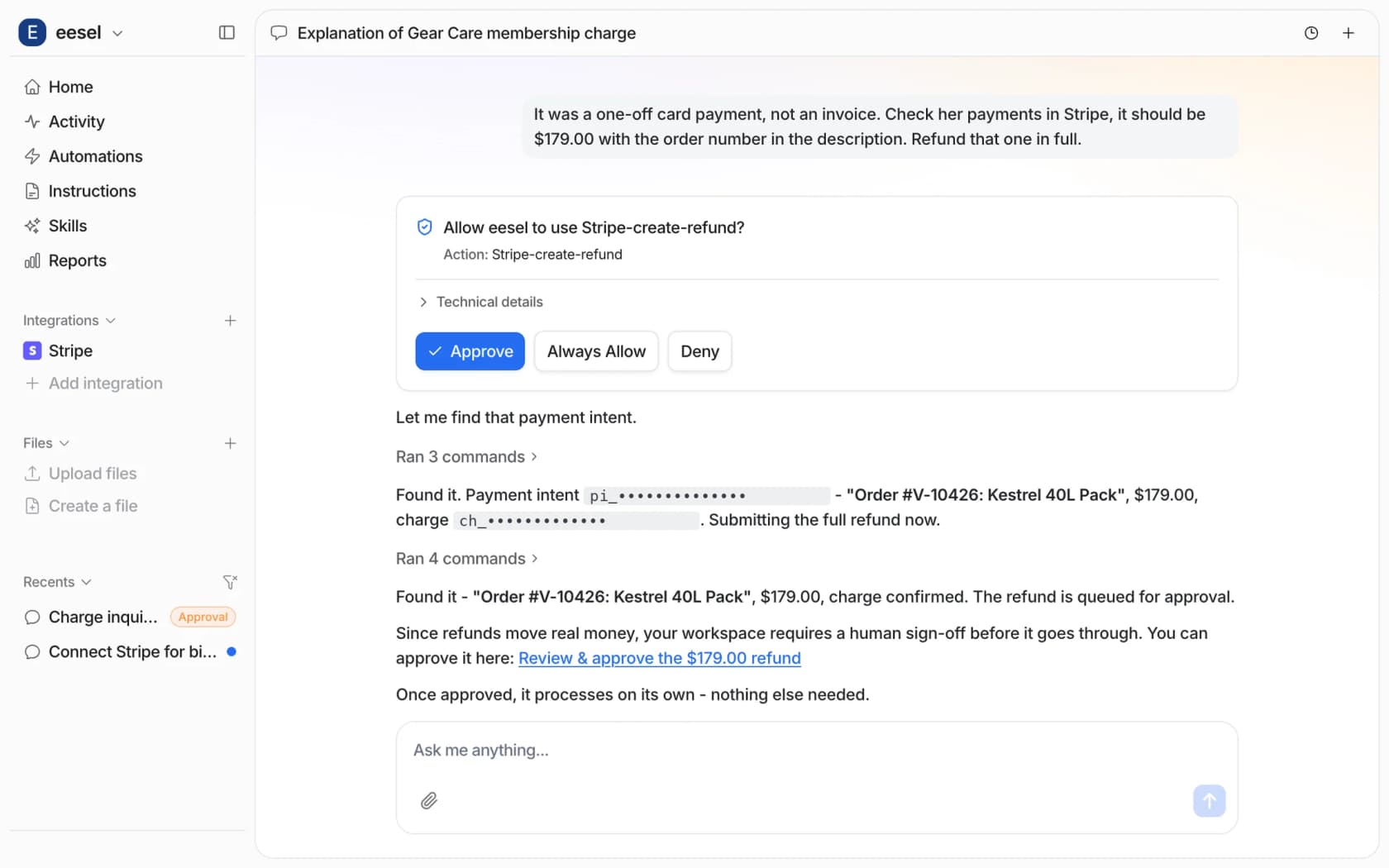
For tier 2 write actions, the screenshot above shows the pattern I like. The agent did the investigation (found the payment intent, matched the order, confirmed the charge) and then stopped right at the step that moves money, where a person clicks Approve. Every approval choice is Approve, Always allow or Deny, and approvals never run by themselves after a timeout.
How do you roll out AI on tier 2 without risking bad answers?
Slowly, in the order that keeps a person in control for longest. The rollout I recommend has four steps, and you move up only once the step below has become boring.
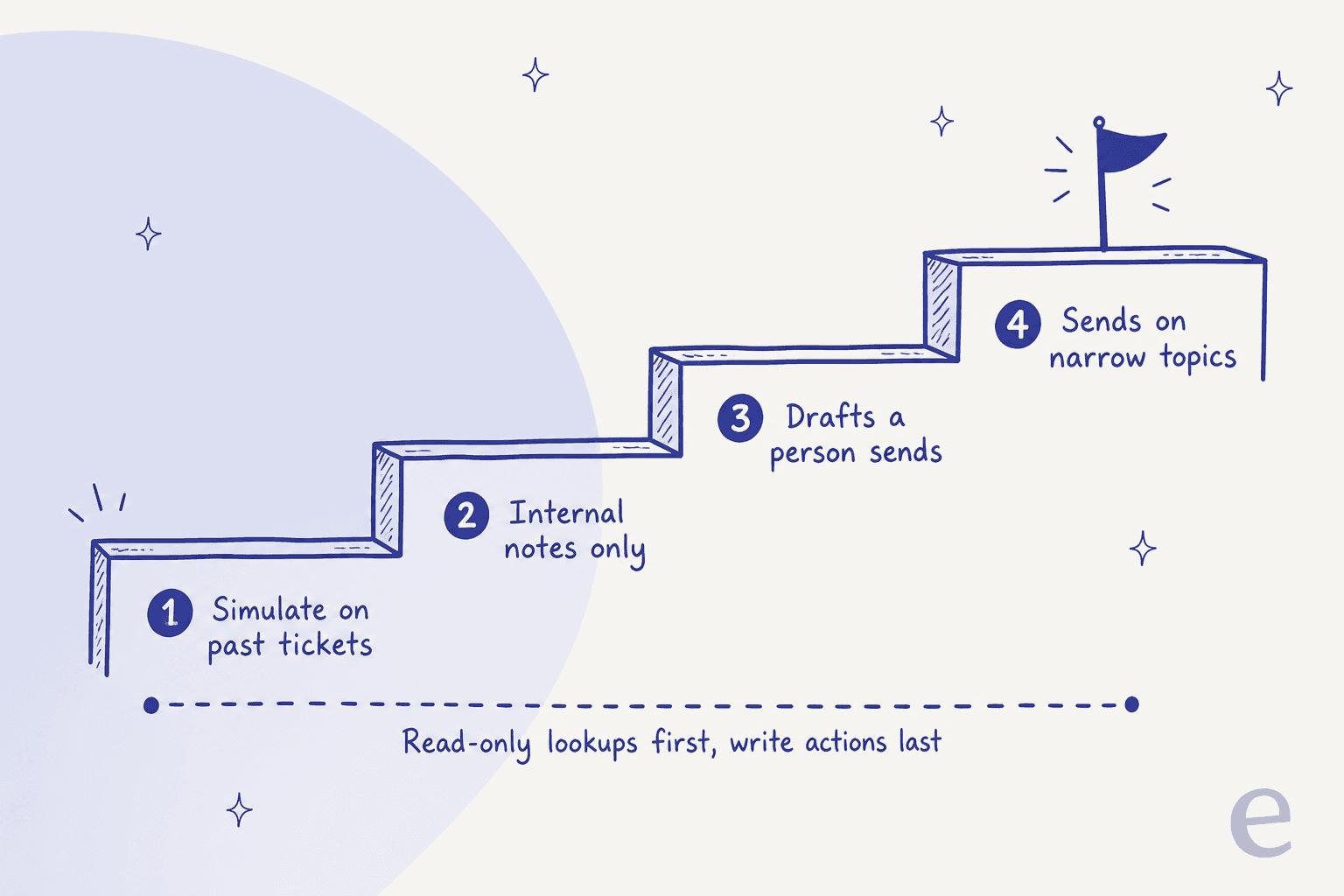
Step 1: simulate on tickets you already solved
Before the AI touches a live escalation, replay it on escalations your team already closed and compare its answers with what your specialists sent. eesel's helpdesk simulation takes 20 recently resolved tickets, drafts its own reply to each, scores them by theme and "sends nothing to customers" (eesel skills docs). Run it on your tier 2 group specifically rather than the whole queue, so the score reflects the hard tickets.
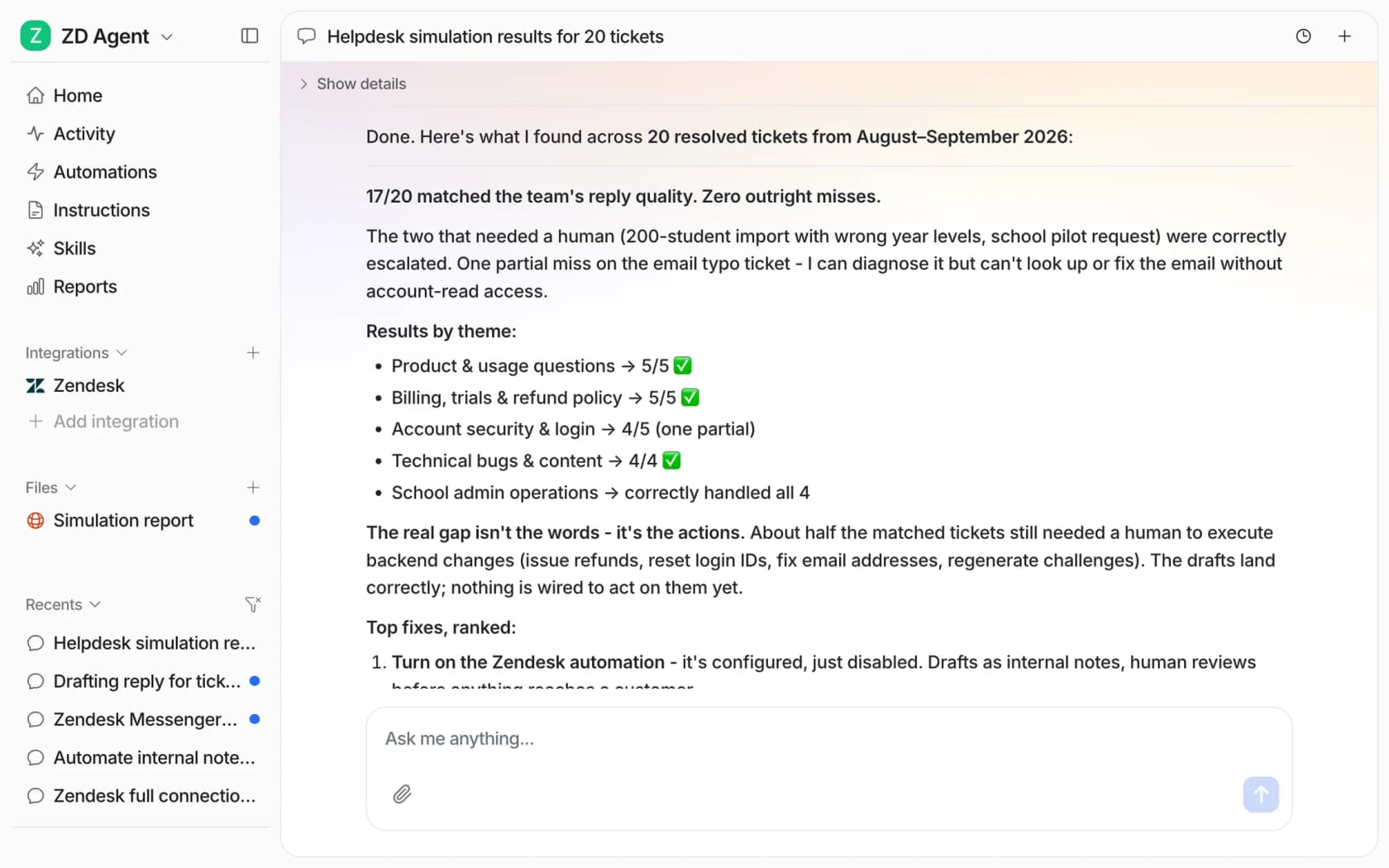
Read the misses closely. In the example run from eesel's docs, 17 of 20 matched, and the report's point was that the real gap wasn't the wording, it was actions: the tickets still needing a person needed backend changes nothing was wired to do. That's a tier 2 finding, and a useful one, because it tells you which lookups and actions to connect next.
Step 2: internal notes only
Turn it on for your tier 2 group with one output: an internal note on every escalated ticket, written in the case-file shape above. No customer replies. Specialists read the note, work the ticket like normal and flag it when the note was wrong. This step is where you find out if the AI's lookups return the right records.
Step 3: drafts a person sends
Once specialists trust the notes, add a draft reply for them to edit and send. Track by topic how often a draft goes out unchanged, since that shows which topics are ready for step 4. With eesel, corrections you make in chat are saved as an instruction or a memory, so the same mistake doesn't come back next week (eesel instructions docs).
Step 4: send on narrow, proven topics
Let the AI reply directly only on the topics where drafts have gone out unchanged for weeks, and keep write actions on approval even then. For most teams a few lookup-heavy topics get here, and truly new problems never do, which is fine. A tier 2 AI that never sends a single reply but pre-investigates every escalation still gives your specialists hours back.
How do you know it's working?
Not by deflection rate. At tier 2 the AI is mostly helping people, so it makes more sense to measure their work:
- Escalation rate from tier 1. If it falls while CSAT holds, the AI is stopping tickets that never needed tier 2.
- Time to first useful finding. How long from escalation to the first piece of evidence a specialist acts on. Pre-investigation should cut this hardest.
- Tier 2 handle time. It should fall on lookup-heavy topics and stay flat on truly new problems.
- Note acceptance. How often specialists act on the AI's note without redoing its lookups.
- Reopen rate. Faster fixes that come back are not fixes.
My post on AI for support reporting shows how to pull most of these from your helpdesk, and AI for reducing handle time explains why handle time on the remaining tickets can rise even when total hours fall.
Try eesel for tier 2 support
If your specialists spend the first fifteen minutes of every escalation opening the same four tabs, eesel can open them first. It joins your Zendesk, Freshdesk or Gorgias queue like a new teammate, learns from your past tickets and runbooks, looks up the order, the subscription or your own API, and leaves a case-file note before anyone opens the ticket. You decide which actions it can take alone and which wait for a click.
A good first step is a simulation on last month's tier 2 tickets, to see how many it would have cracked. It's free to try, and paid plans start at $299 a month for 500 credits on the eesel pricing page. Try eesel.