
You do not have to switch helpdesks to get AI. Adding AI to the Zendesk, Freshdesk, Gorgias, Front or Help Scout you already run is faster, cheaper, and far less risky than a migration.
There are two ways to do it. Turn on your helpdesk's native AI add-on (least setup, but you're locked to one vendor's model and its per-resolution price), or connect a dedicated AI layer that trains on your past tickets and works inside your existing queue. Native meters vary a lot: Zendesk runs $1.50 to $2.00 per automated resolution on top of seats, Help Scout adds $0.75 per resolution, Front's Autopilot is around $0.05 per conversation. A layer like eesel is from $299/month for 500 credits (1 credit per ticket) with no per-seat fee.
Whichever route you pick, roll it out gradually: simulate on your own ticket history first, start the AI on a small slice of volume, keep humans on the rest, and dial it up as you trust the replies. That is the whole playbook.
The instinct to rip everything out is usually wrong
Here's the pattern I see over and over. A support leader decides they want AI, and the first thing they reach for is a whole new platform. New vendor, new data migration, new tool for the team to learn, and a switchover that eats a quarter.
Most of the time, that is solving the wrong problem. The helpdesk you have is probably fine. Zendesk, Freshdesk, Gorgias, Front and Help Scout are all mature tools that your team already knows and your customers already reach you through. What you actually want is the AI, not the address change.
I hear the frustration that drives the rip-and-replace instinct, though, and it is real. One CX lead I spoke to, at a US healthcare platform with a few thousand patients, put it bluntly after trying their helpdesk's own AI:
"We have kicked the tires in Zendesk AI solutions and found it largely inadequate and overpriced. So we're looking for other options to bring some automation to that whole process."
Notice what they wanted: options to add automation to the process they already had. Not a different helpdesk. The lesson I'd take from hundreds of conversations like this is that the helpdesk is rarely the thing holding you back, the AI on top of it is. So that is the thing to change.
What "adding AI to your existing helpdesk" actually means
When you strip away the marketing, there are only two real ways to get AI running on the helpdesk you already have.
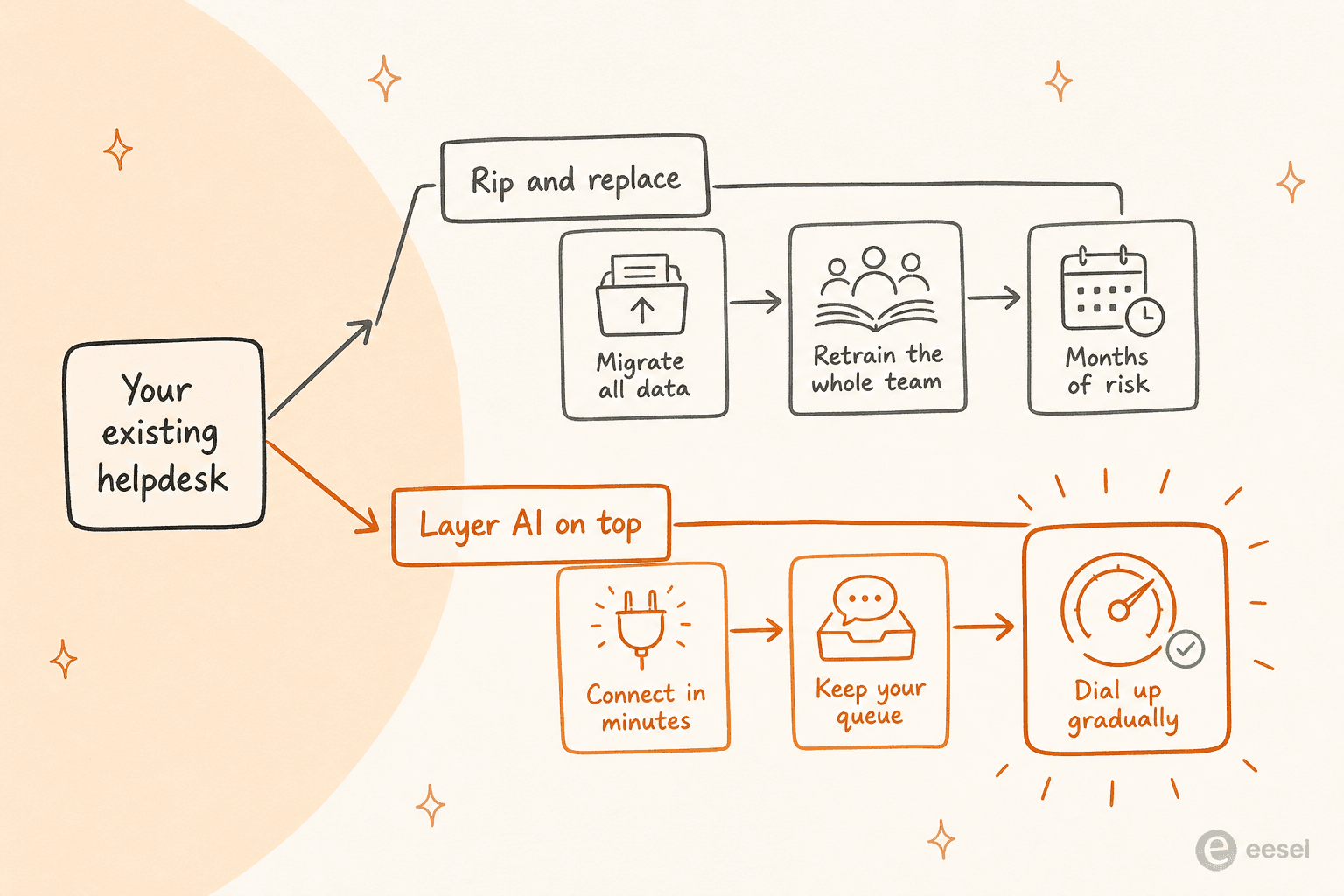
Route one: your helpdesk's own native AI. Every major helpdesk now sells an AI agent or copilot as an add-on. You flip it on inside the tool you already pay for. Least moving parts, one bill, one vendor.
Route two: a dedicated AI layer on top. A separate AI helpdesk agent connects to your helpdesk through its API, trains on your existing knowledge, and works inside the same queue. Your agents don't see a new tool, they see better draft replies and fewer tickets in the queue.
Both leave your helpdesk exactly where it is. The choice between them comes down to price, control, and whether you run more than one tool. Let's take each route in turn.
Route one: turn on your helpdesk's native AI
This is the path of least resistance, and for some teams it's the right one. The trade-off is that you're buying whatever your vendor built, at whatever they charge per resolution, with limited say over how it behaves.
Here's how the native AI meters actually price out across the big helpdesks:
| Helpdesk | Native AI | Billable unit | Headline price | On top of |
|---|---|---|---|---|
| Zendesk | AI Agents (Advanced) | Automated resolution | $1.50 committed / $2.00 pay-as-you-go | Suite seats ($55-115/agent) |
| Freshdesk | Freddy AI Agent | Session | $49 per 100 sessions | Plan seats (Growth from $29/agent) |
| Gorgias | AI Agent | Resolution | Bundled by plan, overage per resolution | Plan tickets (Pro from $300/mo) |
| Front | Autopilot | Conversation | ~$0.05 per conversation | Plan seats |
| Help Scout | AI Answers | Resolution | $0.75 per resolution | Per-user seats ($25-75/user) |
A couple of things jump out. First, these are almost all on top of your existing seat costs, so the AI is a second line item, not a replacement for the first. Second, the per-resolution meters (Zendesk especially) add up fast at volume, which is the single most common complaint I read about native helpdesk AI.
The other catch is quality. Native AI is only as good as the knowledge you point it at, and most teams find out the hard way that their help center isn't as clean as they thought:
"The Co-Pilot stuff is decent, but we found its effectiveness really depends on having a perfectly curated Zendesk knowledge base, which... ours isn't, lol."

That is the honest limit of route one. If your knowledge base is pristine and you're a single-helpdesk shop, native AI is a reasonable place to start. For a deeper look at any one vendor, the Zendesk AI capabilities, best AI for Freshdesk, best AI for Gorgias, and best AI for Front guides go tool by tool.
Route two: layer a dedicated AI agent on top
The second route keeps your helpdesk and adds a purpose-built AI agent that trains on your history instead of a generic model. This is the route I'd reach for if native AI has underwhelmed you, or if you run more than one tool.
The mechanics are simpler than they sound. It's four steps:
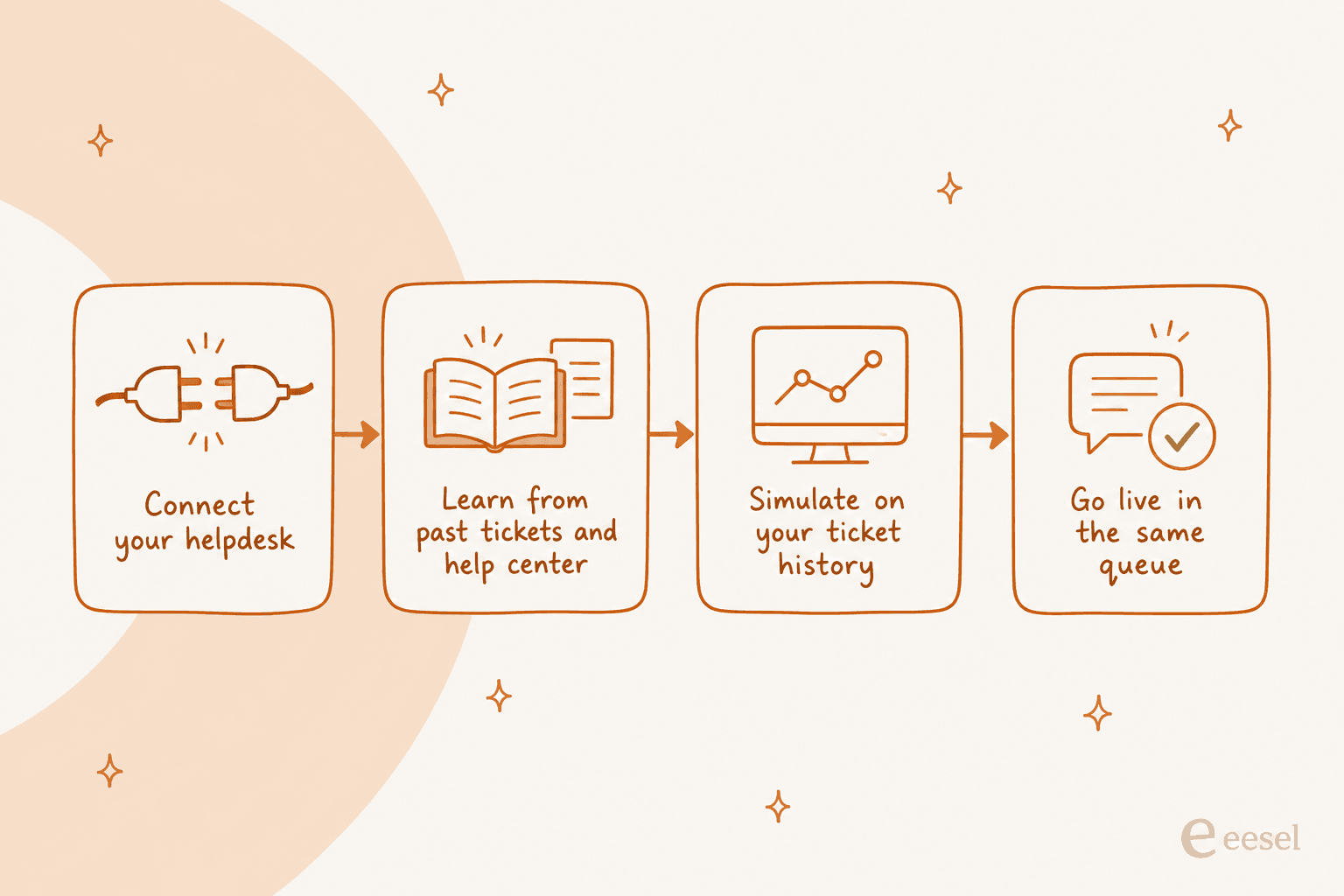
The big unlock is that a layer isn't tied to one vendor. The same agent can sit across your Zendesk queue, your Freshdesk tickets, and your shared inbox at once, which native AI can't do. In eesel's case, that connection list covers the helpdesks most teams already run:

Because the agent works through your helpdesk's own API, your team keeps using the exact inbox they use now. Here's what that looks like running inside a live Zendesk queue, drafting and sending replies without anyone leaving the tool:
And the same agent inside Freshdesk, no separate console:
On price, a layer usually comes out ahead of a stack of per-seat plus per-resolution meters. eesel is one fixed monthly price, from $299/month for 500 credits, with 1 credit per ticket the AI actually handles, no platform fee and no per-seat charge, and tickets your human agents take don't use credits. A real example: DTC brand Ecosa had eesel handling 75% of tier-1 tickets on Zendesk, fully integrated in under an hour. That's the shape of a good layer, it earns its keep on the repetitive volume and hands the rest back.
Don't bet the queue on day one
Whichever route you choose, the biggest mistake is switching AI on for 100% of your traffic and hoping. You wouldn't ship code straight to production without a test, and support replies are customer-facing production too.
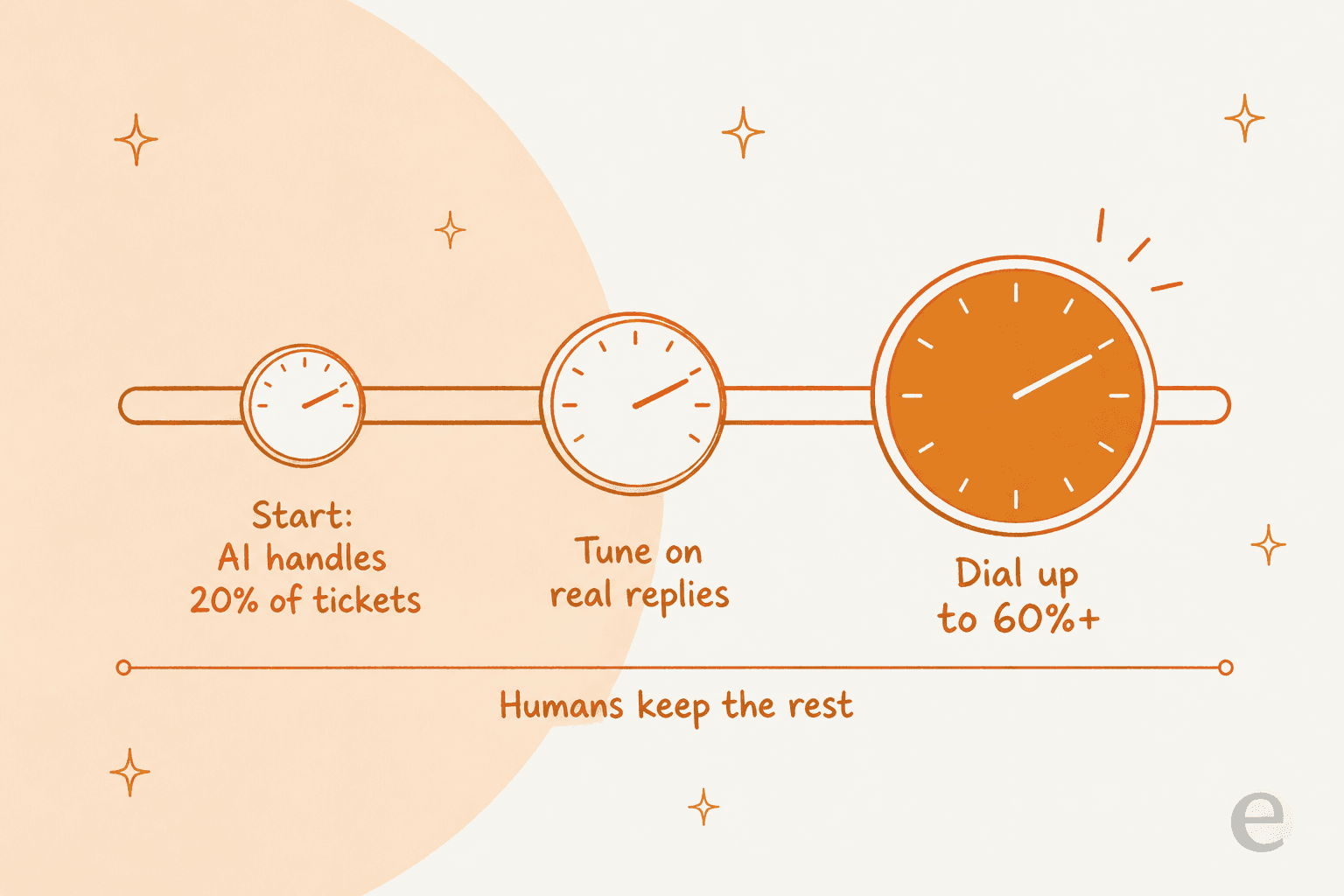
The safer playbook has two parts. First, simulate before you go live: run the AI over a batch of your real past tickets and read what it would have said, so you can measure accuracy and coverage before a single customer sees an AI reply. Second, roll out gradually: start the agent on a small slice of volume, keep humans on everything else, and turn the dial up as the numbers hold.
This is exactly where native AI tends to be thin, and where the horror stories come from. Teams turn something on, can't see what it's doing, and pull it back out:
"No, it's just terrible and a rip off. You can't even export the data on what people ask the bot... We stopped using it because ARs are a rip off, and it's a rushed product to get into the AI hype."
Reporting is not a nice-to-have here, it's how you decide whether to keep going. Before you scale anything, make sure you can see task volume, what triggered each action, and where the AI is handing off to a human:

That visibility is what turns "we bought some AI" into a number you can defend to your boss. It's also what lets you tune the agent on first-contact resolution and live-chat deflection instead of guessing.
A short checklist before you switch anything on
Before you commit to either route, run through this:
- Where does your knowledge live? If it's a clean help center, native AI has a chance. If it's spread across past tickets, macros, and docs, favor a layer that learns from all of it.
- How many tools? One helpdesk, native AI is simplest. More than one, a layer that spans them saves you buying AI twice.
- What's the real per-unit cost at your volume? Multiply the per-resolution meter by your monthly ticket count before you sign, not after.
- Can you test on your own tickets first? If a tool can't simulate on your history, you're flying blind.
- Can you roll out gradually? You want a percentage dial, not an on/off switch.
- Does it report clearly? If you can't see what it did, you can't scale it.
Getting these six right matters more than which brand you pick. A cheaper meter with no simulation and no reporting will cost you more in the end than a slightly pricier tool you can actually control. If you want the wider market view, the best AI helpdesk software roundup lines the options up side by side.
Add AI to the helpdesk you already run with eesel
If route two sounds right, this is the part eesel was built for. It's an AI helpdesk teammate that plugs into the Zendesk, Freshdesk, Gorgias, Front or Help Scout you already use, learns from your past tickets and help center, and starts drafting or sending replies inside your existing queue, usually within minutes and with no migration.

The two things I'd flag as the difference-makers: you can simulate the agent against thousands of your real historical tickets before it ever touches a live one, and pricing is from $299/month for 500 credits (1 credit per ticket) with no per-seat fee, so the cost scales with ticket volume rather than the size of your team. You can start free with 100 credits and keep the exact helpdesk you have.