

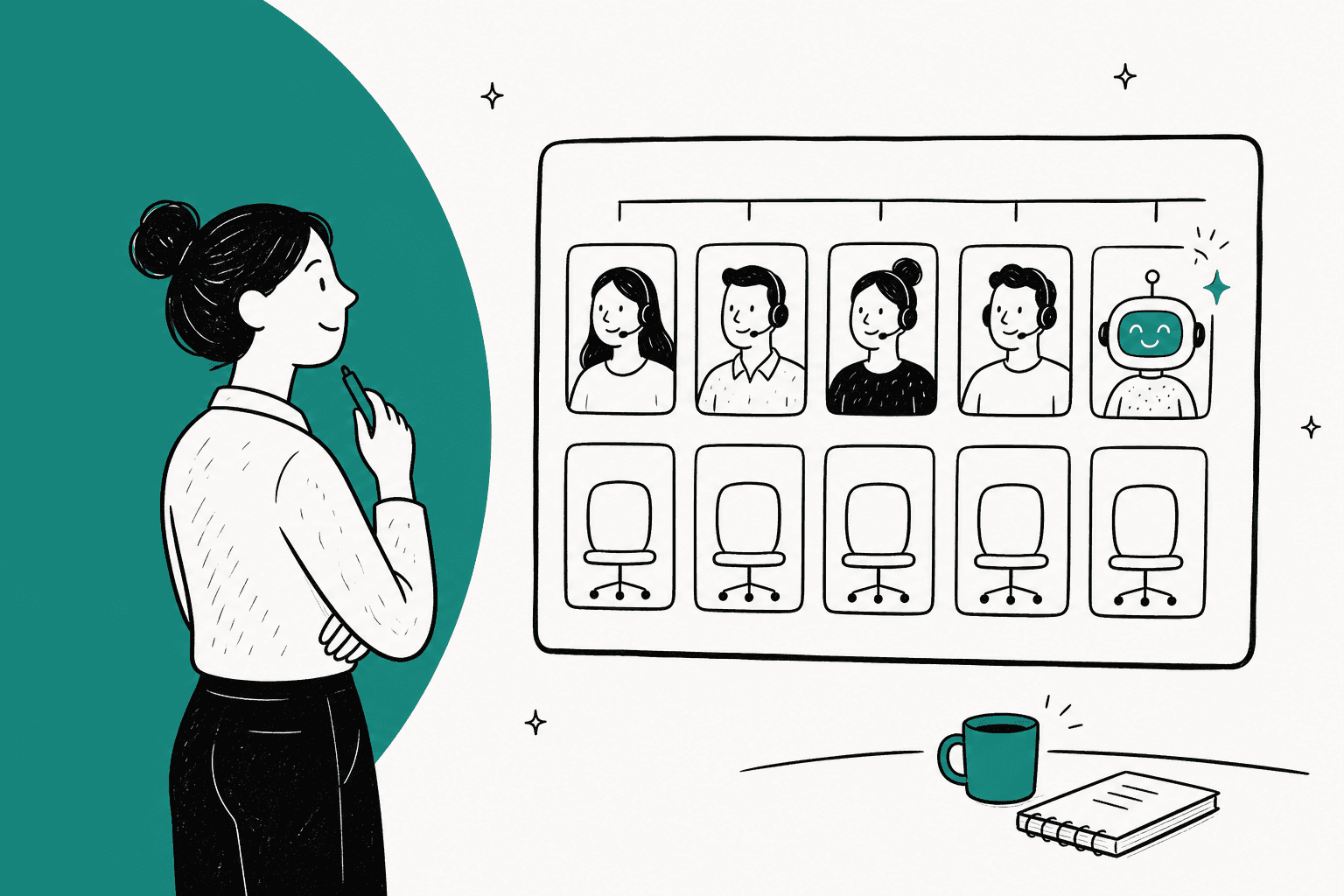
AI changes your support staffing plan in two places: it removes tickets (the ones it resolves on its own) and it shortens tickets (the ones it drafts for a person). Plan headcount on the hours left, not the tickets left. You can't cut agents by the AI resolution rate, because AI takes the short, easy tickets first and what reaches your team takes longer. In my worked example, a 30% resolution rate saves only about 15% of agent hours until drafts cut handle time on the rest.
To get your hiring gap, take next year's tickets, subtract AI resolutions, multiply what's left by its handle time, divide by productive hours per agent after shrinkage, then subtract the agents who'll still be with you after attrition. The calculator below runs it with real volumes from eesel customers. Gartner found only 20% of service leaders have actually cut staff due to AI, while 55% held staffing steady on higher volume. That second group is the realistic plan.
An AI teammate like eesel handles both halves inside Zendesk, Freshdesk or Gorgias. At Question Beauty it closed about 280 of 990 Gorgias tickets in a month and handed refunds and complaints to a person with a note attached. Plans are a fixed monthly batch of credits from $299, one ticket or chat per credit.
How does AI change your support staffing plan?
A staffing plan is answering two questions. How many agents next year's workload need, and how many of those you have to hire. AI don't change the method for either one, what it changes is the inputs, so how many tickets reach a person and how long each one is taking.
I'm on eesel's support team and I work the queue every day, so I get to see both side of this. There is what an AI agent closes on its own, and there is what it hands over to me. The handoffs are never the "where's my order" tickets, they are the ones where customer is upset, or the answer depends on something only a person can check.. That's the whole staffing problem in one sentence and most headcount plans are missing it.
The data backs this up. A Gartner survey of 321 service leaders in October 2025 found only 20% had reduced agent staffing due to AI. 55% reported stable staffing while handling higher volumes, and 42% were hiring specialized roles like conversational AI designers and automation analysts. A separate Gartner prediction says that by 2027, 50% of organizations that expected to significantly reduce their service workforce will abandon those plans.
So the realistic version of "AI in the staffing plan" is looking more like this:
| Planning question | Without AI | With AI in the plan |
|---|---|---|
| Tickets that reach a person | All forecast tickets | Forecast minus tickets AI fully resolves |
| Handle time per ticket | Today's average | Longer (harder mix), then shorter again where AI drafts |
| Productive hours per agent | Paid hours minus shrinkage | Same, minus time spent owning the AI |
| What the hiring gap usually does | Grows with volume | Flattens: volume grows, headcount holds |
| New roles | None | Someone owns the AI's knowledge and checks its answers |
If you didn't build the volume forecast yet, it's worth to start with my guide to support workforce forecasting. It covers interval forecasting, Erlang C and shrinkage in detail. This post pick up from where that one stops, so what you do with the forecast once an AI helpdesk agent is part of the team.
Why can't you cut headcount by the AI resolution rate?
Because a ticket isn't a unit of work. AI resolves the short repetitive tickets first, so the share of hours it saves is smaller than the share of tickets it closes. The tickets that left for people are the long ones, and on average they get even longer once the easy ones are gone.
A call center forecaster on Reddit, whose team went live with voice bot nearly two years ago, put it in a plain way:
"Bots handle the easy calls, leaving the more complex (higher AHT calls) for agents. The volume should diminish but AHT will go up on the calls that get through to agents."

AHT is the average handle time, meaning the minutes an agent spend on one ticket from opening it until sending the reply. Here is what that do to the math. Say next year's forecast is 10,000 tickets a month at 12 minutes each. That's 2,000 hours of work. The AI resolves 30% of tickets, so the naive plan cuts hours by 30% too, to 1,400. But the 7,000 tickets left are the harder ones. If they average 14.6 minutes instead of 12, about a fifth longer, the real workload is about 1,700 hours. You saved 15% of hours, not 30%.
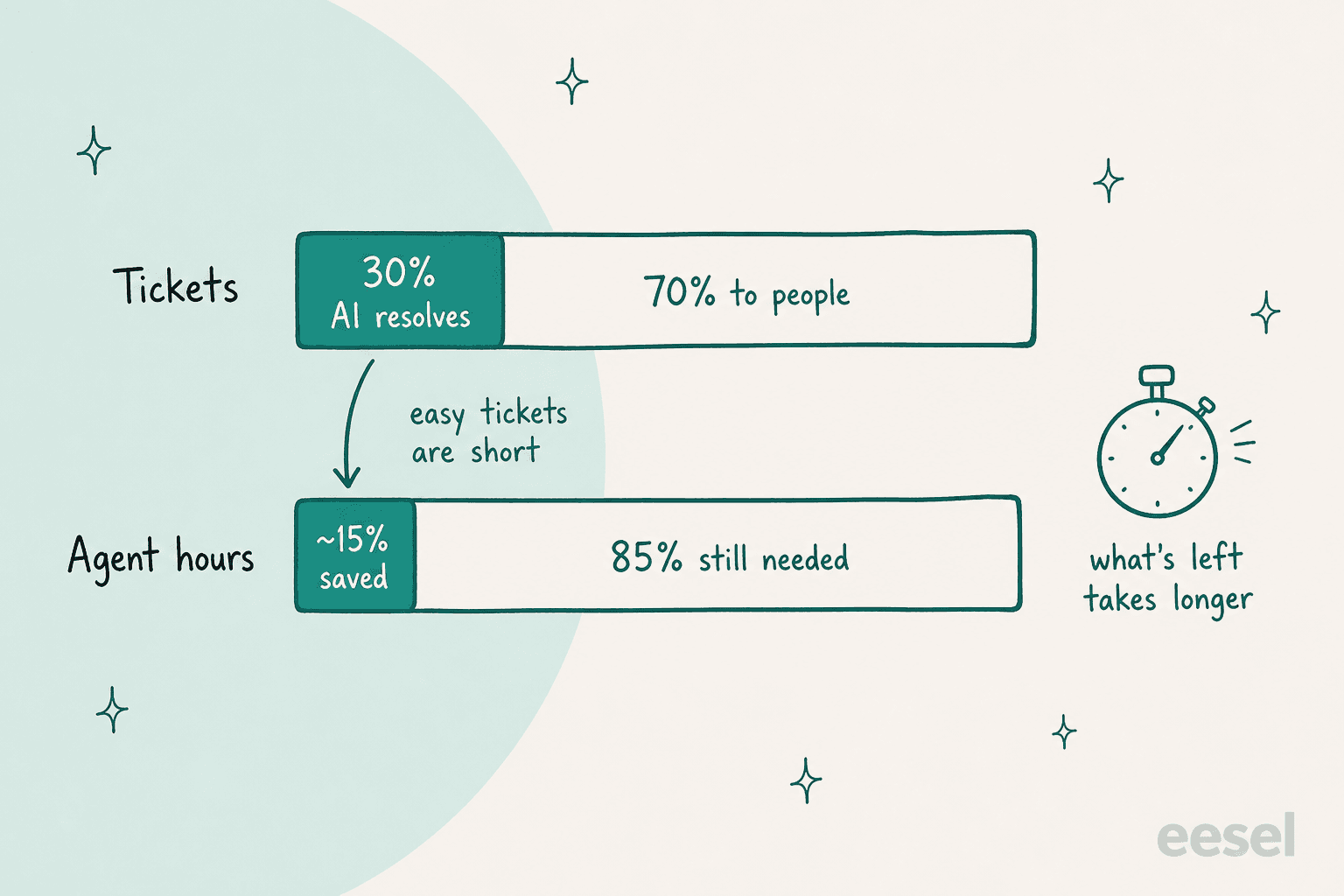
The 14.6 minutes is an example and not a benchmark, your number depends on what your AI is resolving. But the direction is holding everywhere I have looked. Zachary McGeary, who has spent 25 years in support and operations, made the same point on LinkedIn with his own example:
"But a ticket isn't a unit of work. A password reset and a billing dispute both count as one. AI takes the easy ones first, so 20% of the tickets can be closer to 8% of the hours."

There is two more things that makes the resolution rate a bad headcount number:
- "Resolved" can mean different things. Some tools count a ticket as resolved when the customer stops replying. Gorgias counts a ticket as automated only if no human is needed within 72 hours. Zendesk splits AI outcomes into tiers and only bills on verified resolutions. Before you plan on a rate, check on how it's counted. My post on deflection vs resolution rate goes deeper.
- Reopens come back to your team. A ticket the AI closed wrongly isn't saved work, it's delayed work and also an annoyed customer on top. Track reopen rate and repeat contacts next to the AI resolution rate, or the rate flatters the plan.
The best-known cautionary tale is Klarna. Its February 2024 announcement said its AI assistant handled 2.3 million conversations in a month, "the equivalent work of 700 full-time agents". In a 2025 Hacker News thread about Klarna's AI and its support hiring, one commenter who said he'd worked in contact center AI for almost 10 years gave his rough planning numbers:
"Rough order of magnitude you can expect to deflect around 30% of inbound contacts with an AI chatbot. You can also expect to reduce agent Average Handle Time by 15-20% using AI enabled semantic search and workflow automation."

Those are figures of one practitioner, not a standard, and your rate could be higher or lower. What I like about them is the shape of it, one number for tickets removed and then a separate number for time saved on the rest. That two-part model is the one the rest of this post uses.
How do you calculate your hiring gap with AI in the plan?
Your hiring gap is the agents next year's workload needs, minus the agents you will still have after attrition. With AI in the plan it takes six steps.
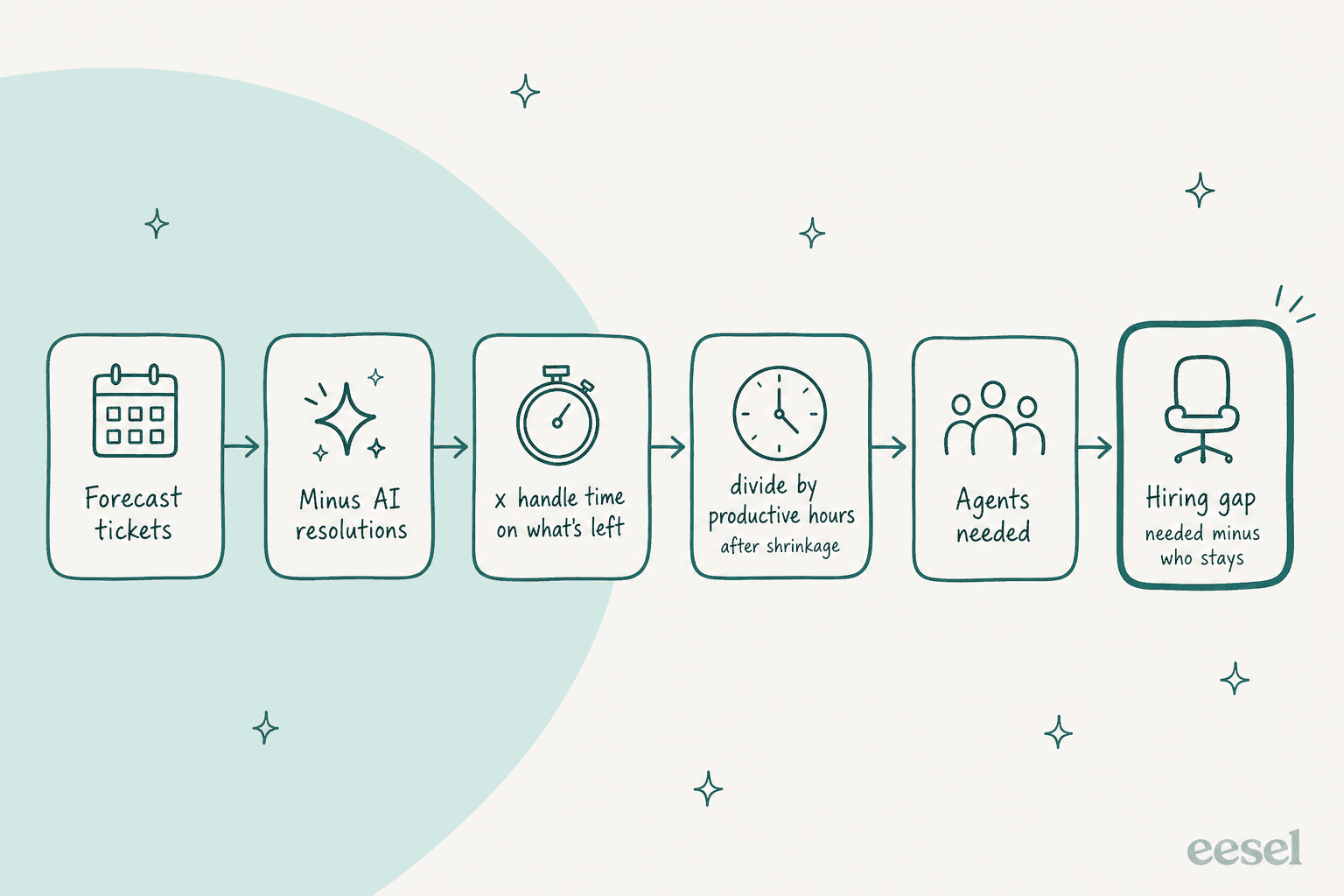
- Forecast tickets. Next year's monthly volume by channel, including growth. My forecasting guide covers this step.
- Subtract AI resolutions. Use a verified resolution rate from your own tickets, not a vendor headline. If you haven't run AI yet, test it on past tickets first (more on that below).
- Multiply by handle time on what's left. Start from today's AHT, raise it for the harder mix, then lower it for the share of tickets where AI writes the first draft.
- Divide by productive hours per agent. Paid hours minus shrinkage. Shrinkage is everything that isn't ticket work: breaks, training, meetings, vacation and sick days. Assembled, a workforce management vendor, calls 35% an industry standard.
- That's your agents needed. For live chat and phone, run this through Erlang C instead, since queues need slack to hit a response target. For email, Assembled notes Erlang C "is typically not appropriate", and the hours method works.
- Subtract the agents who'll stay. Today's team minus expected attrition. What's left is the hiring gap. If it's negative, you can let attrition shrink the team instead of cutting anyone.
One detail on shrinkage trips people up a lot. Assembled's example multiplies, so 10 agents at 35% shrinkage becomes 13.5. Many planners divide instead, 10 / (1 - 0.35), which gives about 15.4. The divide method is the one which actually leaves 10 agents' worth of hours after shrinkage, that's why I use it below.
Here is the 10,000-ticket example, worked all the way through to the end. I've assumed 160 paid hours per agent a month, 30% shrinkage (so 112 productive hours), a current team of 16, and 25% attrition over the year (so 12 stay).
| Scenario | Tickets to people | Minutes each | Hours | Agents needed | Hiring gap |
|---|---|---|---|---|---|
| No AI | 10,000 | 12.0 | 2,000 | 17.9 | 6 |
| Naive plan: cut by the 30% resolution rate | 7,000 | 12.0 | 1,400 | 12.5 | 1 |
| AI resolves 30%, rest take longer | 7,000 | 14.6 | 1,703 | 15.2 | 4 |
| Same, plus AI drafts cutting 15% off the rest | 7,000 | 12.4 | 1,448 | 12.9 | 1 |
The naive plan says hire one person. Reality says hire four, unless the AI also drafts the remaining tickets. Then you are back to about one. That last row is the part most staffing plans leaves out, full resolution gets the headlines but it's the drafts on harder tickets that close the gap.
How many agents do you need to hire next year?
Plug in your own numbers below. The three presets loads real monthly volumes and AI rates from published eesel customer stories, from 8 August to 8 September 2026. Handle time, shrinkage, attrition and the slowdown on harder tickets are example values, so change them to yours.
Move the AI sliders to see how resolutions and drafts change the hiring gap. The calculator uses the hours method; for live chat and phone queues, check the result against Erlang C.
Try the smava preset and slide "share of the rest AI drafts" from 0 to 57%. That's the real shape of a drafts-first setup, almost nothing resolved on its own and still a big cut in hours, because a person approves a draft faster than writing one from the scratch. Then try ClutchLoop, where the AI replies by itself to most tickets. Both setups save hours, they just arrive there through different halves of the model.
Where does AI-assist fit versus full resolution?
Full resolution removes tickets from your plan. AI-assist, where the AI drafts and a person sends, cuts the handle time on tickets that stay. A good staffing plan uses both of them and it sorts tickets into lanes before counting anything.
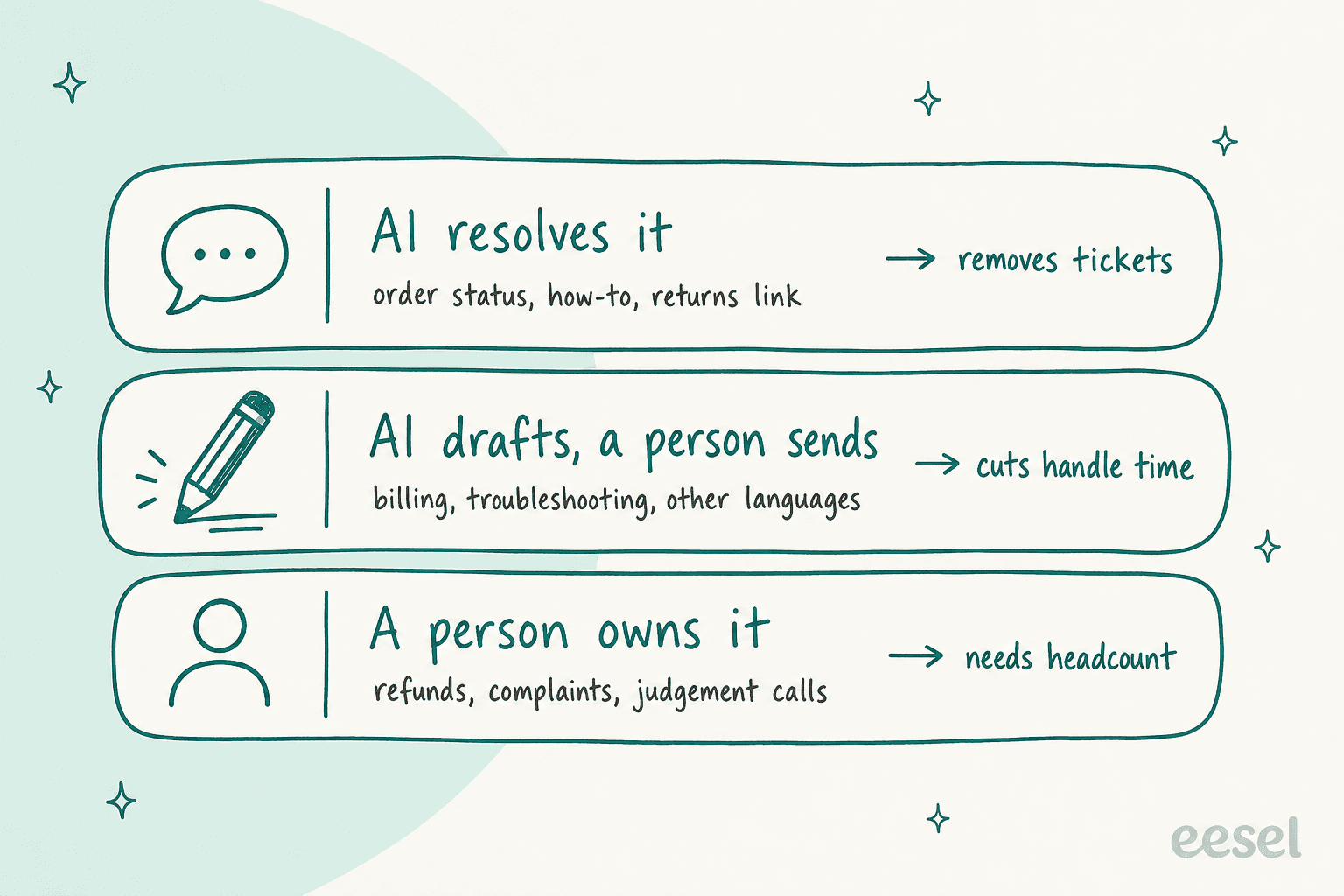
Lane 1: AI resolves it. Questions with one right answer or one next step: order status, how-to, shipping times, a returns link. At ClutchLoop, a phone accessories brand on Gorgias, eesel handled about 230 tickets in a month and sent about 180 replies directly, sending US returns to the returns portal and checking live stock in Shopify. That is the lane where tier 1 deflection lives.
Lane 2: AI drafts, a person sends. Tickets where wording matters, or where a person should stay accountable: billing, troubleshooting, regulated industries, other languages. smava, a German loan comparison site, runs about 27,000 Zendesk tickets a month this way. eesel prepared about 15,300 draft replies in a month, and agents approve each one or ask for a different macro. The agent assist lane don't remove even a single ticket from the forecast, but the AHT number moves a lot with it.
Lane 3: a person owns it. Refunds, complaints, chargebacks, anything that needs a decision. This is the lane your hiring plan is really for. Question Beauty has eesel reply directly on routine Gorgias tickets, but refunds, returns and complaints go to a person with a note saying what the customer asked and what eesel found in Shopify. About 250 tickets were assigned to a person in the month, against about 280 that eesel closed. That handoff note matters for staffing because it cuts the handle time in lane 3 as well.
Most teams start in lane 2 and then widen lane 1 as they trust the answers more, which is the pattern I see in eesel's own customer data, drafts first and full automation later. At MentorShow, an online learning platform on HubSpot, eesel may reply directly on six narrow topics, but in practice almost everything still goes to the team as a draft. The story is explicit that opening up that lane "is where the time saving grows". For a staffing plan it means you can count on lane 2 savings in the first quarter, and on lane 1 savings later once you have measured them. My guides to human handoff and AI copilots for support cover the setup for each lane.
Should you hire or automate?
Hire for judgement and automate repetition, then don't cut people to fund the AI before it proved its numbers. That's the short version. Here is how I'd decide it, one ticket type at a time:
| Situation | Hire or automate? | Why |
|---|---|---|
| Repeat questions with a fixed answer are growing | Automate | AI resolution scales with volume; people don't |
| Hard tickets are growing (billing, technical, complaints) | Hire, and add AI drafts | AI can shorten these, not remove them |
| Seasonal spike of simple questions | Automate | No hiring and training for a few months |
| Seasonal spike of complex work | Hire temps, give them AI drafts | New hires ramp faster with a draft and the policy linked |
| You need 24/7 coverage | Automate the routine, keep on-call for the rest | Night shifts for "where's my order" rarely pay off |
| Nobody owns the AI's knowledge and answers | Hire or reassign one person | Someone has to fix what it gets wrong |
Seasonal teams is where this shows up the most clearly. Norden-Frisia, a German ferry operator, gets the same timetable, vehicle and ticket questions every summer, and the story spells out the problem: hiring and training a team that grows and shrinks with the season "is expensive and slow". So it planned for 10,000 AI interactions a month in high season, on a plan that scales back down from October to March. The people stays for what the bot can't close. If you still need seasonal hires, my guide to seasonal support onboarding covers getting them productive fast.
The last row of that table is the one most plans forget about. AI creates work too, someone has to update the knowledge it answers from and check its replies, also catch what it gets wrong. Gartner's March 2026 prediction says most organizations are "understating the talent required to make AI successful", and nearly 80% plan to move at least some agents into new roles. In practice it's often your best senior agent, in a part time way. At Norden-Frisia, the support team lead reviews the bot's conversations and fixes its instructions herself. Budget a slice from someone's week for it.
And be careful on cuts that are made on a forecast. Gartner's February 2026 prediction says 50% of companies that attributed headcount cuts to AI will rehire staff to do similar work by 2027, under different job titles. The more gentle path is the one a call center agent described on Reddit:
"We haven't had layoffs yet, but we seem to have stopped hiring new phone agents, so as the natural attrition you see in call centers occurs, we're getting fewer and fewer humans answering calls."
Same agent, same thread: the calls that still reach people are "more complicated". So if attrition is how you shrink, make sure the agents who stays aren't buried in only hard tickets. That is a burnout risk and burnout is feeding attrition. For the broader version of this question, my post on whether AI can replace your support team gives the long answer, and AI vs human support compares the two by ticket type.
How do you put AI into the staffing plan without getting caught short?
Measure first and plan on the measured numbers, then re-forecast every quarter. Here's the order I would follow:
- Test the AI on your own past tickets before the plan is final. A vendor's average resolution rate tells you nothing on your ticket mix. eesel can run a simulation on hundreds of your past tickets and score its answers against what your team actually sent. That gives you a lane 1 and lane 2 estimate built from your own data. My guide to onboarding an AI support agent walks through it.
- Start with drafts. Lane 2 savings shows up in week one and there is no risk of a wrong reply reaching a customer. Measure AHT on drafted tickets against undrafted ones.
- Open full resolution topic by topic. Start with the topics where drafts were sent unedited the most often, that's your evidence the AI can answer them alone.
- Track the right four numbers. Verified resolution rate, reopen rate, AHT on what reaches people, and CSAT on AI tickets. My list of customer service KPIs covers the rest.
- Use attrition, not layoffs, to absorb the difference. Pause backfills while the AI numbers settle, then decide. This way a slower-than-expected AI ramp costs you a hiring delay instead of an understaffed queue.
- Re-forecast every quarter. Volume, resolution rate and AHT all move after go-live. A plan built in October with guessed AI rate is wrong by the March.
If you are a small team deciding on the first or second hire, same logic works on a smaller scale. My AI support scaling guide for startups covers that version.
What does AI cost next to another hire?
AI pricing usually scales by ticket while a hire scales by person, so compare them on same month of volume. With eesel, pricing is a fixed monthly batch of credits, and a ticket or chat is one credit however long it runs, whether eesel resolves it or drafts it:
| eesel plan | Credits a month | Price a month |
|---|---|---|
| Free | 100 | $0 |
| Teammate | 500 | $299 |
| Teammate | 1,000 | $499 |
| Teammate | 2,500 | $999 |
| Teammate | 5,000 | $1,749 |
| Above 5,000 | Custom | Talk to eesel |
Every Teammate plan includes every integration and unlimited agents and seats, and there are batch sizes in between (1,500 credits is $699, for example). Overage is off by default, so there's no surprise bill if a month runs hot.
To compare, take the hiring gap the calculator gives you with and without AI and multiply the difference by your fully loaded cost per agent (salary, benefits, tools, management time). Then you set that against the plan which covers your monthly volume. My breakdowns of AI vs human agent cost and cost per resolution go deeper, and AI customer service cost compares pricing models across vendors.
If what you're really weighing is adding people without hiring them, that's more an outsourcing decision. eesel's Managed Support is the done-for-you option for ecommerce brands: eesel handles every customer conversation inside your own tools for $5,000 a month flat, against eesel's own estimate of $7,000-$10,000 a month for an offshore 24/7 team. My guide to outsourcing customer service covers the alternatives.
Where eesel isn't the right call: if your queue is mostly one-off, high-stakes cases (enterprise escalations, legal disputes), lane 1 is going to be small and your plan should be mostly people, with drafts. And if you're on a helpdesk eesel doesn't connect to, check the integrations list first.
Try eesel for your support staffing plan
If you are building next year's headcount plan and don't know what AI will really take off from it, eesel is the quickest way to find out on your own tickets. It joins your existing queue in Zendesk, Freshdesk or Gorgias like a new teammate. It answers what your help center and past tickets already cover and drafts the rest for your team. Every refund and complaint goes to a person with a note attached. The reports page then shows how many tickets it handled and how many replies your team approved or rejected, which is exactly the inputs your staffing model needs.

That's how smava drafts about 15,300 replies a month on Zendesk while a person does the sending, and how Question Beauty closes routine Gorgias tickets on its own. You can connect your helpdesk and test it on real tickets with 100 free credits, and no card is needed.
Try eesel on your own queue before you lock the plan, or compare options in my best AI agents roundup first.