


Yes, AI can cover weekend customer support, if you give it three jobs instead of one: answer the routine questions, resolve the ones that only need a lookup (order status, a returns link), and prep everything else so Monday starts with summaries and drafts instead of a raw pile. That third job is the one that shrinks the Monday backlog.
The part that breaks is escalation. With nobody on shift, the AI needs three routes: page an on-call person for outages and failing payments, promise a Monday reply for refunds and complaints, and never tell a customer "someone is joining now". Track your weekend automation rate next to your reopen rate, because a bot that closes tickets wrongly makes the queue look smaller, not better.
An AI teammate like eesel does this inside Zendesk, Freshdesk or Gorgias today. At SE Ranking, where support runs on Zendesk, it answers live chat for three products and turns weekend handovers into tickets: about 400 Tier 2 and weekend tickets in one month, out of 4,650 conversations. Plans are a fixed monthly batch of credits, one ticket is one credit, from $299 a month.
Can AI cover weekend customer support?
Yes, for most of what arrives on a Saturday. Weekend tickets lean toward the routine stuff, things like where's my order or how do I reset this, and also whether they can still return it. Those have a fixed answer or a fixed next step, and that kind of ticket is what an AI helpdesk agent handles well. The thing it shouldn't do is pretend a person is around when nobody is.
I'm on eesel's support team, I work the queue every day, and that includes the Monday after a long weekend. The pattern doesn't really change from one to the next, and a Hacker News commenter described it better than I can:
"Or, it's 13:00 on a Monday in Berlin, customer support/PR department just got started and are working through the weekend backlog, haven't had time yet to respond in any reasonable way."

The tension here is simple enough. Customers want answers at any hour, while most teams don't want (or can't afford) people working weekends. Another HN commenter managed to put both halves in one sentence:
"At the startup that I work at the biggest complaint from customers is no 24 hour support, but my company doesn't want people to work on weekends or work overnight."
So you've got four realistic options. Below is how they compare on the two things that matter most, which is what the customer gets on Saturday and then what your team walks into on Monday.
| Option | What the customer gets on Saturday | What Monday looks like | The catch |
|---|---|---|---|
| Close for the weekend, send an auto-reply | An acknowledgement and your hours | The full pile, untouched | Two days of silence on every ticket |
| On-call rotation | A person, but only for emergencies | Most of the pile still there | Extra pay, and someone's weekend |
| Outsourced 24/7 team | A person on every ticket | Small | $7,000-$10,000 a month offshore for five agents, per eesel's comparison |
| AI teammate | Instant answers on routine tickets, an honest Monday promise on the rest | Judgement calls, with drafts attached | Needs escalation rules and a reopen check |
By the way, the auto-reply route isn't wrong. Wordfence's founder wrote that his customers were "surprisingly understanding" about a weekend autoresponder, and his advice still holds up pretty well:
"So pick your hours, and just communicate clearly what they are."
Where it falls short is volume. An auto-reply sets expectations but it doesn't answer anything, so every ticket from Saturday is still sitting there on Monday. If your weekend volume is only a handful of messages, you can stop reading here and set up a good auto-reply rule. If it's a hundred or more, keep going.
What should AI do with weekend tickets?
It should do three jobs: answer and resolve, then prep the rest for Monday. Most teams only switch on the first one and then wonder why Monday still hurts.
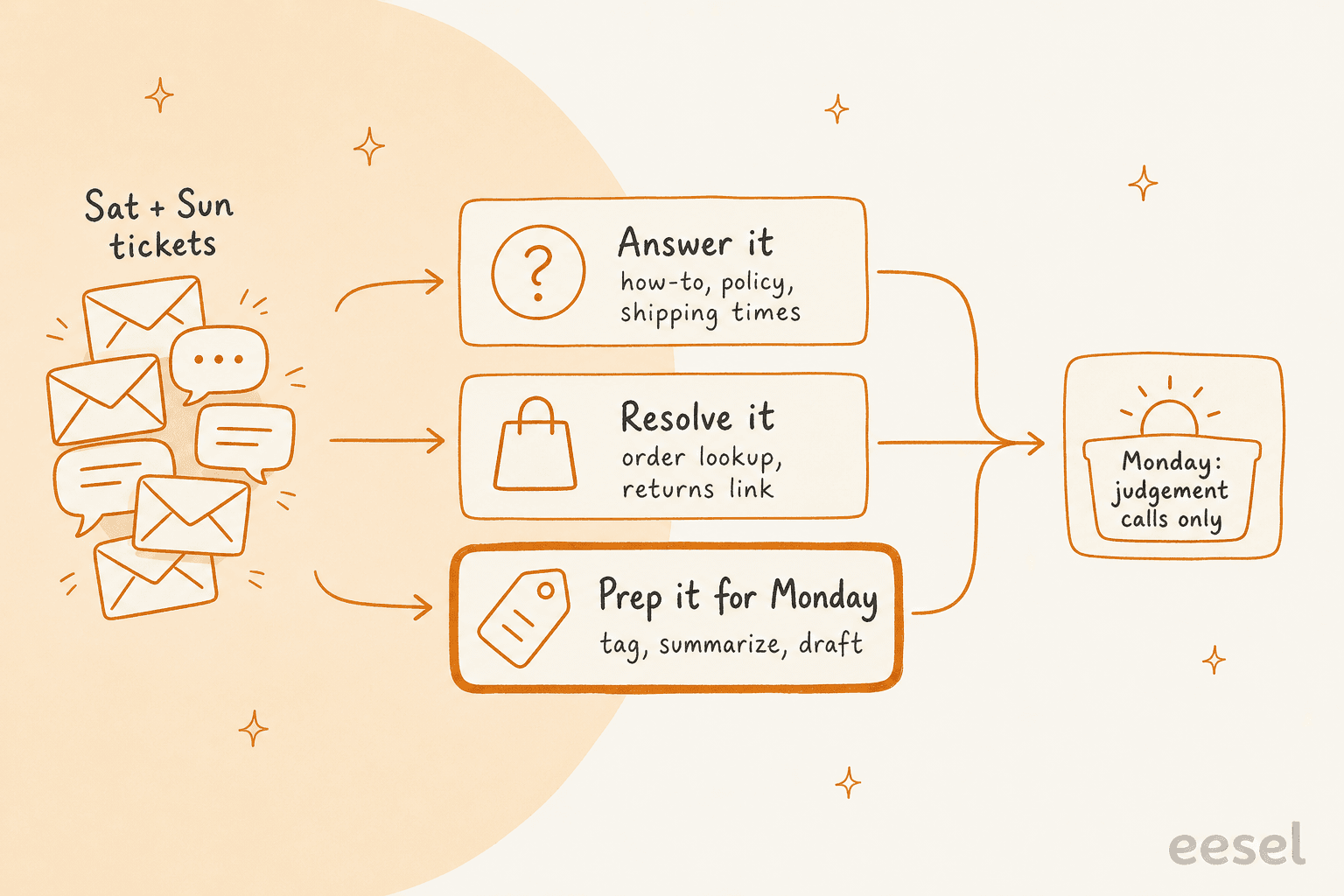
- Answer it. How-to questions and policies, shipping times, basically anything your help center already covers. This is classic FAQ deflection, and it's the part that every chatbot demo shows you.
- Resolve it. These are tickets that need one lookup in another system, like order status from Shopify or a returns portal link or a tracking number. In ecommerce this is where most of the weekend volume sits, and a chatbot for order status has to read live data for it, not a page it crawled last week.
- Prep it for Monday. Whatever is left over gets a tag and a one-line summary, plus a draft reply sitting as an internal note. Nothing gets sent, but Monday morning starts with "approve or edit" instead of "read from scratch".
Here is how that looks in production. ClutchLoop, a phone accessories brand on Gorgias, runs an eesel agent called Loopy that replies on its own to two kinds of tickets: returns from US customers, which it points to the returns portal, and product questions, which it answers after checking live prices and stock in Shopify. Anything else it leaves for the team, with a draft or a note where that helps. In one month Loopy handled about 230 Gorgias tickets and sent about 180 replies directly, which the story describes as about seven in ten conversations with no person needed. And the work is spread across the day and the night too.
The split matters because "answer" and "resolve" both have a ceiling. A one-person Shopify store owner on Reddit described where that ceiling usually sits:
"We tried Gorgias and Jotform, they are good for trimming down normal queries like where is my order, how do I initiate a return kind of things. It would be great if return/refund/exchange problems is also solved somehow."

Exchanges and refunds are the tickets that need a person, and that's fine. The weekend win isn't about closing them, it's about making sure each one lands on Monday already read and tagged, with a draft on it. Swiftreg, a UK number plate seller on Zendesk, works like this: the agent sends a public reply where the facts allow one and leaves an internal note where a person owns the next step. In one month that was 1,494 public replies and 1,055 internal notes across about 2,100 tickets, and the story notes that tickets arriving overnight get the same treatment as daytime ones. For the tagging half of this, my guide to automated ticket triage has the details.
Which weekend tickets should AI escalate, and to whom?
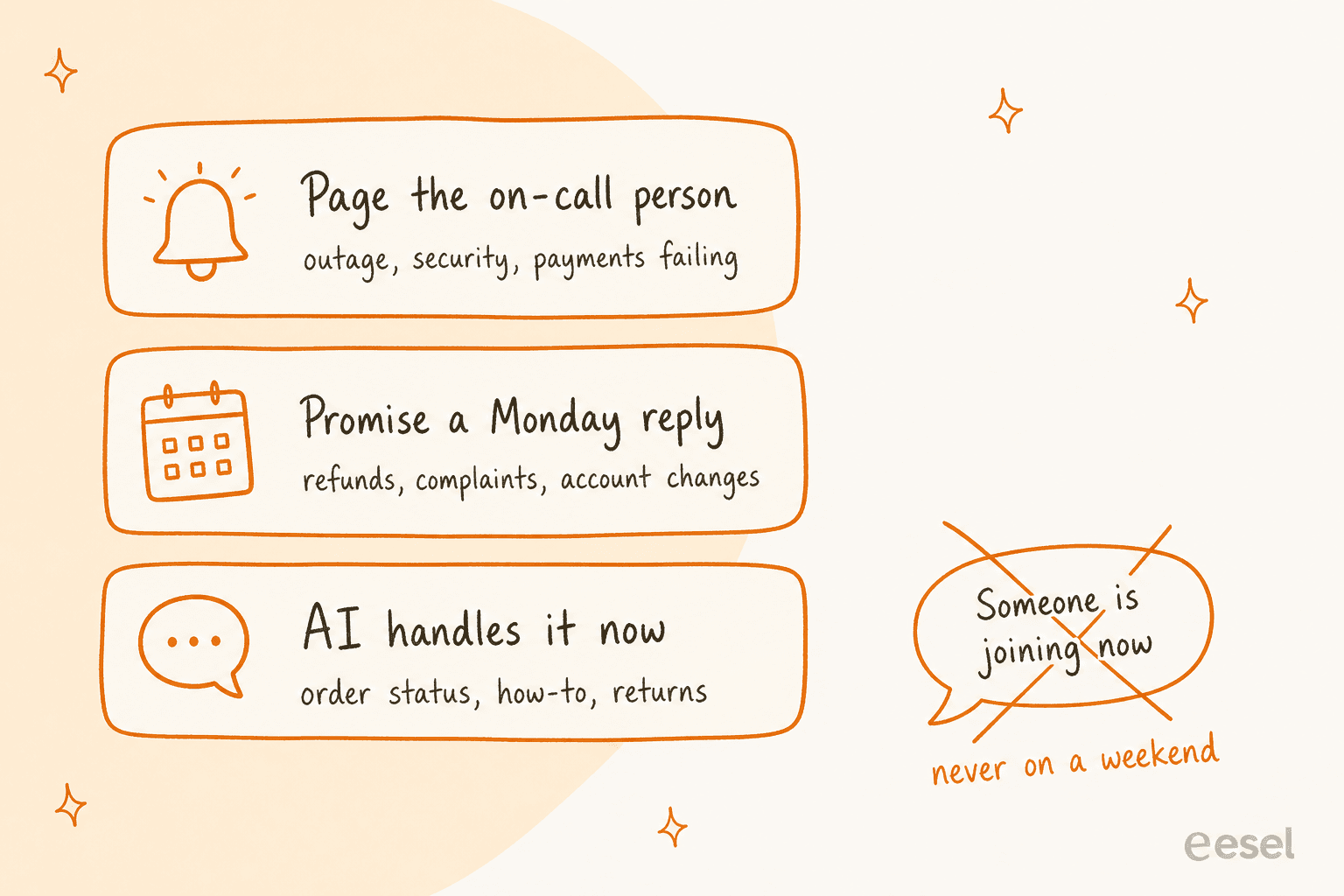
Escalation is the spot where weekend coverage tends to go wrong, because the usual rule ("hand it to a human") assumes there is a human there. On a Saturday you need three routes instead of that one.
| Ticket type | Weekend route | What the customer hears |
|---|---|---|
| Order status, tracking, shipping times | AI resolves it | The answer, now |
| How-to and policy questions | AI answers from the help center | The answer, now |
| Return request within policy | AI sends the returns link or portal | The next step, now |
| Refund, exchange, billing dispute | Prep for Monday: tag, summary, draft | "A person will reply by Monday" |
| Angry customer or repeat contact | Prep for Monday, flag as priority | An apology and a specific time |
| Site down, security issue, payments failing | Page the on-call person | "We're on it" |
The one rule I would copy word for word comes from the way SE Ranking set up its agent. When a chat needs a person, eesel tells the customer to expect a reply in one or two business days, never that someone is joining now, and on weekends it creates a ticket instead of handing over the chat. Their support team spans 16 countries and covers all timezones, and even so they wrote that rule down, since a bot that promises a live agent who never shows up is worse than having no bot. In one month it created about 400 tickets for Tier 2 and weekend cases.
For the "page someone" route, most helpdesks can already do it natively. Zendesk's own docs show a trigger called "After hours escalation for VIPs" built on the Ticket: Within business hours? condition:
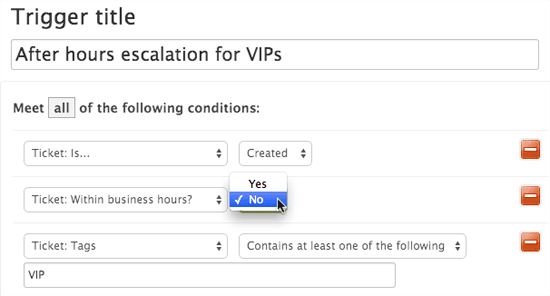
That condition lets a trigger behave differently inside and outside business hours. If you pair it with a tag that your AI agent sets (say weekend-urgent), you end up with a pager that only rings for the tickets that can't wait. For the rest of the design, my posts on AI escalation and human handoff in chat go deeper.
If you do run an on-call rotation, keep it small. One HN commenter described a setup that sounds like something people could actually sustain:
"Each person in the support team has one week on call. The following week they get the Friday off, and they get some extra compensation in addition just for being on call."
Once AI is taking the routine volume, the on-call person only hears about outage-level stuff, and that is what makes a rotation like this one bearable.
How do you set up weekend coverage in your helpdesk?
There are five steps, and the first two happen in your helpdesk before the AI touches anything at all. Every menu path below comes from the vendor's own docs, checked on October 29, 2026.
Step 1: set business hours, with the weekend closed
Your helpdesk has to know when "outside business hours" actually is, otherwise none of the weekend logic will work.
- Zendesk: Admin Center > Objects and rules > Business rules > Schedules. One schedule on Suite Growth, Professional and Support Professional; multiple schedules need Enterprise.
- Freshdesk: Admin > Team > Business hours. Business hours start on Growth, and multiple business hours need Pro or above.
- Gorgias: Settings > Workspace > Business and holiday hours, on every plan from Basic.
- Help Scout: Settings > Company Hours, with custom inbox hours on Plus and Pro.
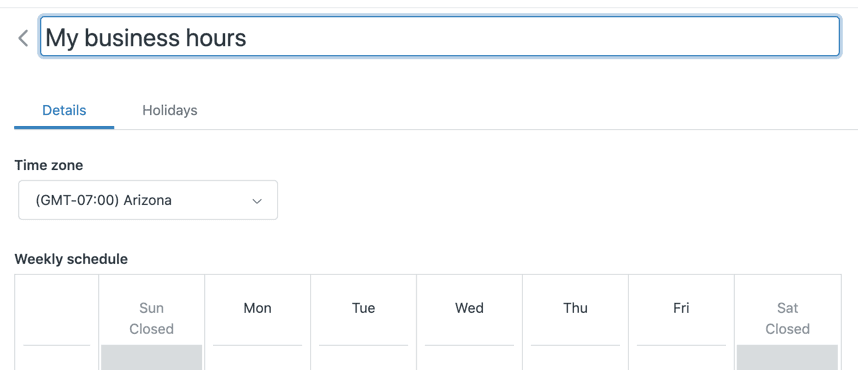
One gotcha on Gorgias is that if you never set default hours, it treats all time as outside business hours, so rules meant to run during the week won't run at all. It's worth a check before you build weekend rules on top of it.
Step 2: decide whether the SLA clock runs on weekends
Most teams make this decision by accident, without noticing. If your SLA policy uses business hours, a ticket that arrives Friday at 6pm doesn't start aging until Monday morning. Freshdesk's docs use nearly the same example: a ticket due in six hours on Friday evening can wait till Monday under business hours. In Zendesk's version, a business-hours automation pauses on Friday at 5 and resumes Monday at 9.
| Helpdesk | Do SLA timers pause outside business hours? | Where to set it |
|---|---|---|
| Zendesk | Yes, when the target is set in business hours | Per priority on the SLA policy |
| Freshdesk | Yes, when the policy uses business hours | Admin > Workflows > SLA Policies |
| Gorgias | Yes, with an opt-in toggle | "Pause SLA timer outside of business hours and holiday hours" in SLA settings |
| HubSpot | Yes, via a schedule | Schedule > During specific time, on Service Hub Professional or Enterprise |
| Help Scout | Office hours filter reports only | Email and User reports |
My take is to keep the SLA on business hours for normal tickets, so your metrics stay honest, and to put urgent priorities on calendar hours if you've promised round-the-clock support. Freshdesk recommends that same split too. What the AI does here is make the business-hours SLA mostly irrelevant for routine tickets, since they get answered before the clock even starts. My AI SLA management guide and Zendesk SLA policies walkthrough cover the setup in detail.
Step 3: switch off weekend auto-close rules
This one looks small, but it does real damage. Plenty of helpdesks close a ticket after 48 hours with no reply from the customer. If that runs over a weekend, you end up closing tickets the customer was always going to answer on Monday. A sysadmin on Reddit described how it feels from the other side:
"They will routinely send me a responce to a ticket after 5PM my time on a Friday. Then automatically close the ticket for "48 hours of inactivity". It's two clicks to reopen the ticket on Monday, but to goes back to the bottom of the queue. So I won't hear anything until Tuesday at the earliest."
The fix is to use the "(business)" version of the timer. In Zendesk, every "Hours since" condition in automations has a business-hours option, so "Hours since pending (business) is greater than 48" won't count Saturday and Sunday.
Step 4: connect the AI and give it the three jobs in writing
Connect your agent to the helpdesk and to whatever systems it needs for lookups (Shopify for orders, your help center, past tickets). After that, write the weekend rules the way you would brief a new hire. Spell out which topics it answers and which it resolves with a lookup, which ones it only drafts and which it pages someone about, then also the exact wording it uses for "a person will reply by Monday". In eesel that brief is just plain English in the agent's instructions, and the agent reads your past tickets as well as the help center. My guide to first response automation has more on how to write it.
Step 5: tell customers what to expect
Now your weekend message only has to cover the tickets the AI hands over to Monday, so it can stay short: a specific time ("by Monday 11am", not "soon") and one thing they can do right away. A CSM on Reddit shared a trick that works on the Monday side as well. On her first day back she sets an out-of-office saying replies are delayed and handled in order, which she says "cut down on the follow ups from the same person" (r/CustomerSuccess).
How big will your Monday backlog be?
Plug in your own weekend volume below. The defaults are based on a mid-sized ecommerce store: 150 tickets across Saturday and Sunday, the AI fully resolving 40% of them (ClutchLoop's agent sends about seven in ten replies on its own, so 40% is a cautious start), and 8 minutes per ticket when an agent starts from scratch.
Change the weekend volume, the share the AI resolves and how many of the rest it drafts to see how many tickets and hours land on Monday. Credits assume 52 weekends a year.
Two things stand out once you play with it. First, the drafts carry real weight. At the defaults the resolved tickets save about 8 hours and the drafted ones save about 5 more, so Monday goes from roughly 20 hours of catch-up to under 7. Second, the hours fall faster than the ticket count does, so "we still had 90 tickets on Monday" can hide the fact that Monday was done by lunch. If your backlog is already out of hand, my posts on reducing a ticket backlog and shared queue management cover the weekday side.
How do you know weekend AI is working?
Measure it on weekend tickets only, and don't ever look at automation rate on its own. A bot that closes tickets wrongly makes your queue look smaller while making your customers angrier, and that first number won't show it.
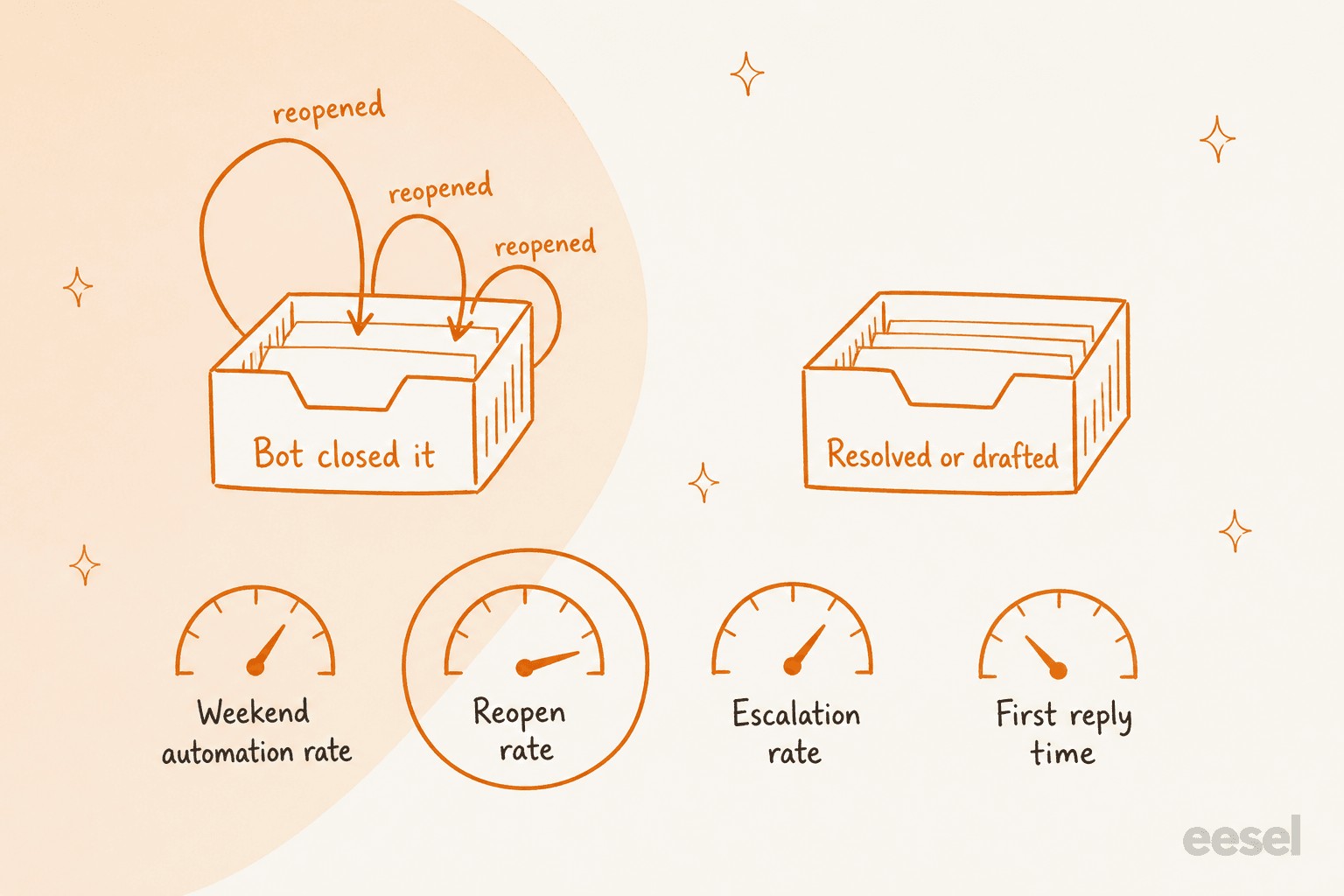
Track these five, filtered down to tickets created on Saturday and Sunday:
- Weekend automation rate. Share of weekend tickets the AI resolved with no person. My post on AI resolution rate explains why this is a different number from deflection.
- Reopen rate. Share of those "resolved" tickets the customer reopened or wrote back on. Think of it as your honesty check.
- Escalation rate. Share routed to Monday or to on-call. If it's too low, that usually means the AI is answering things it shouldn't.
- First reply time on weekends. This should drop from "Monday" down to minutes. See reducing first response time.
- Monday catch-up time. How long it takes until the queue is back to normal, which is the number your team actually feels.
A small business owner on Reddit made the case for number 2 better than a dashboard ever could:
"Faster replies are useful, but if customers come back annoyed because the answer was wrong or generic, the saving is fake. AI works best when it handles obvious repetitive work and stops before judgement calls."
To make these numbers trustworthy, tag everything the AI touches. SE Ranking asked for an ai_handled tag on every ticket eesel works on, plus helpful and not-helpful tags from the customer, so containment is counted in Zendesk instead of guessed. When eesel reviews chat quality, it sorts answers into four buckets rather than two: in one internal sample of 434 chats, 86% were good answers, 7% partial, 6% handed off and 1% failed. The partials are what I'd read first on a Monday, since those are the near misses that turn into reopens later. For more on this, see containment and escalation quality and also my list of AI customer service metrics.
How should you roll out AI for weekend support?
Over four weekends, starting with drafts and only widening when the Monday review says it's safe. I've watched eesel put AI agents on live support queues for years, and the rollouts that go badly tend to be the ones that switch to fully automatic on day one. A confident bot that is wrong on a Saturday gets two whole days to repeat the mistake before anyone notices.
| When | What the AI does over the weekend | What you check on Monday |
|---|---|---|
| Before you start | Nothing live. Export your last 4-8 weekends of tickets and group them by topic | Which 3-5 topics make up most of the volume |
| Weekend 1 | Drafts only, as internal notes, on every ticket | Would you have sent each draft as written? |
| Weekend 2 | Sends replies on your top 2-3 routine topics, drafts the rest | Reopen rate on the sent replies |
| Weekend 3 | Adds lookups (order status, returns) and the on-call route | Did anything urgent get paged, and did anything get paged that shouldn't have? |
| Weekend 4 | Widens to every topic that passed, keeps drafting the rest | All five metrics against your pre-AI weekends |
Before weekend 1, test the agent against your own history rather than questions you make up. At eesel every new setup runs over real past tickets first, because that's where I've seen confident-sounding answers go wrong before a customer ever saw them. It's also how a gig-economy driver-analytics app on Zendesk Business got to 73% of its tier-1 requests resolved in the first month, after a 7-day trial on its own tickets. If you want the common ways this goes sideways, read my list of AI implementation mistakes.
What does AI weekend coverage cost compared with staffing it?
Far less than people do, as long as you're honest that it covers the routine work and not every ticket. Here is the comparison, using the numbers I was able to source:
| Option | Monthly cost | What you get | Source |
|---|---|---|---|
| Offshore 24/7 team, 5 agents | $7,000-$10,000 | People on every ticket, usually one or two channels each | eesel Managed Support page |
| US-based 24/7 team, 5 agents | About $25,000 | Same, onshore | Same page |
| eesel Managed Support | $5,000 flat | eesel runs every channel for you, up to about 5,000 conversations a month | Same page |
| eesel AI teammate, 1,000 credits | $499 | AI answers, resolves and drafts in your own helpdesk, your team handles the rest | eesel pricing |
The eesel plans are a fixed monthly batch of credits: $299 for 500, $499 for 1,000, up to $1,749 for 5,000. One ticket or chat counts as one credit no matter how many replies go back and forth, and overage is $0.80 a credit if you turn it on. With the estimator's default of 150 weekend tickets a week, that comes to about 650 credits a month, so the 1,000-credit plan covers your weekends and still leaves room for weekday tickets. You can try it first on the free plan's 100 credits.
If what you really want is people on every conversation all weekend, without hiring them, then that's an outsourcing decision rather than an AI one. My guides to outsourcing customer service and outsourcing costs lay out the options, and eesel's own Managed Support is the done-for-you version for ecommerce brands. For the AI-only route, my AI customer service cost breakdown compares the pricing models.
Where eesel isn't the right call: if your weekend volume is under 20 tickets and most of them are "are you open?", then a clear auto-reply plus a Monday morning block will do the job. Also, if you're on a helpdesk eesel doesn't connect to, check the integrations list first.
Try eesel for weekend support coverage
If your Saturday tickets sit untouched until Monday, eesel works like a weekend teammate that joins your existing queue in Zendesk, Freshdesk, Gorgias or Help Scout. It answers what your help center and past tickets already cover and looks up orders before it replies. For refunds and complaints it drafts a reply for your team instead, and it tells the customer honestly when a person will get back to them. On Monday morning you open the activity log and see exactly what it did, ticket by ticket.

That's the setup SE Ranking runs on Zendesk chat for three products, and ClutchLoop runs on Gorgias and its website chat. You can connect your helpdesk and see real drafts on your own weekend tickets using 100 free credits, and no card is needed.
Try eesel on this weekend's tickets, or compare it with the field in my best AI agents roundup first.