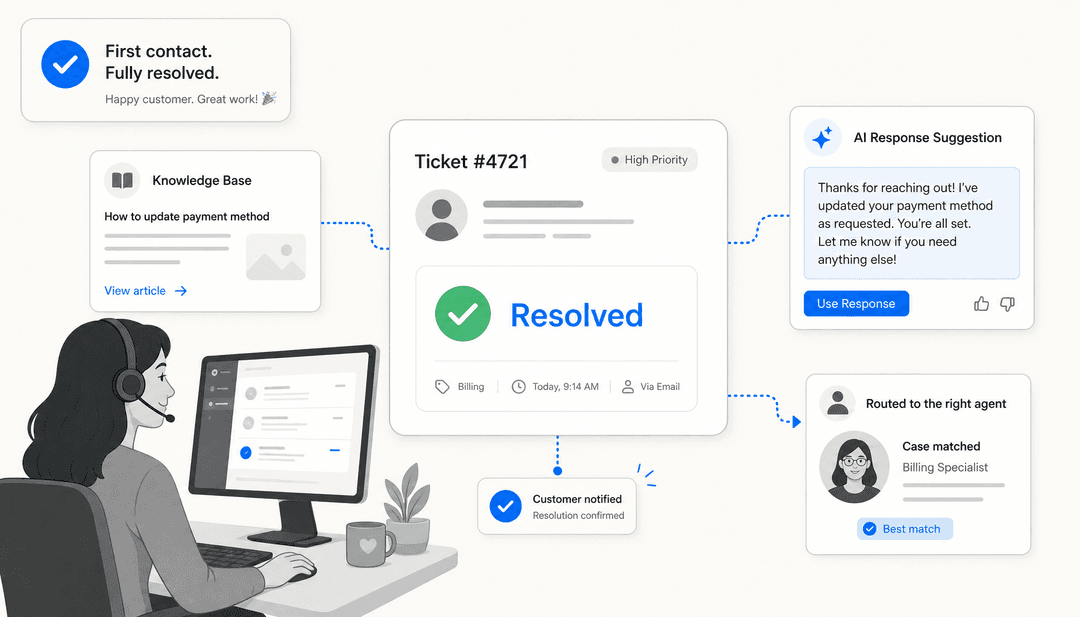
First, where your first response time actually goes
I spend a lot of time looking at what people actually type into Google, and "how do I reduce first response time" almost always hides a wrong assumption underneath it: that FRT is about how fast agents type. It isn't. If you break down a ticket's journey, the typing is the small part.
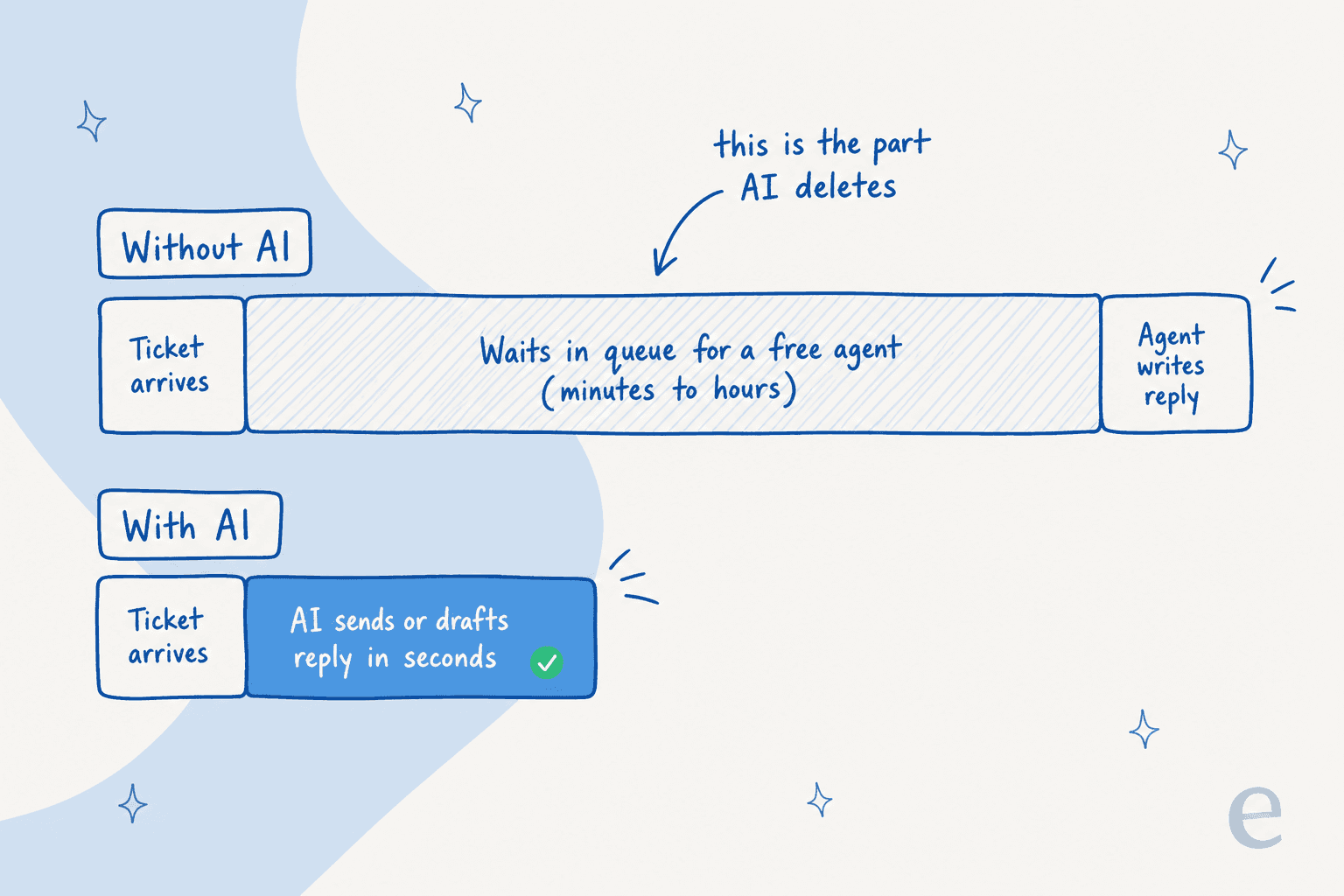
A ticket arrives, then it sits in a queue waiting for an agent to become free, then an agent reads it and writes a reply. The middle step is where the hours go. Writing the answer takes a minute or two; waiting for a human to get to it takes the rest. First response time is almost entirely a queue-wait problem, not a typing-speed problem.
That's why the usual fixes plateau. Faster macros and canned responses shave the typing step, but they don't touch the wait. Hiring more agents widens the queue's throughput, but it's expensive and it still collapses at 2am, on weekends, and every time a product incident or a Black Friday spike hits. If you only ever optimize the typing, you're polishing the wrong two minutes.
The reason AI moves the needle where macros can't is that it deletes the wait. An answer that the AI is confident about doesn't queue at all, which is the whole point of proper support ticket automation.
The four ways AI actually cuts first response time
When people say "use AI to reduce FRT," they usually picture one thing: a bot auto-replying to customers. That's one lever of four, and it's the one most likely to get you in trouble if you reach for it first. Here's the full set.
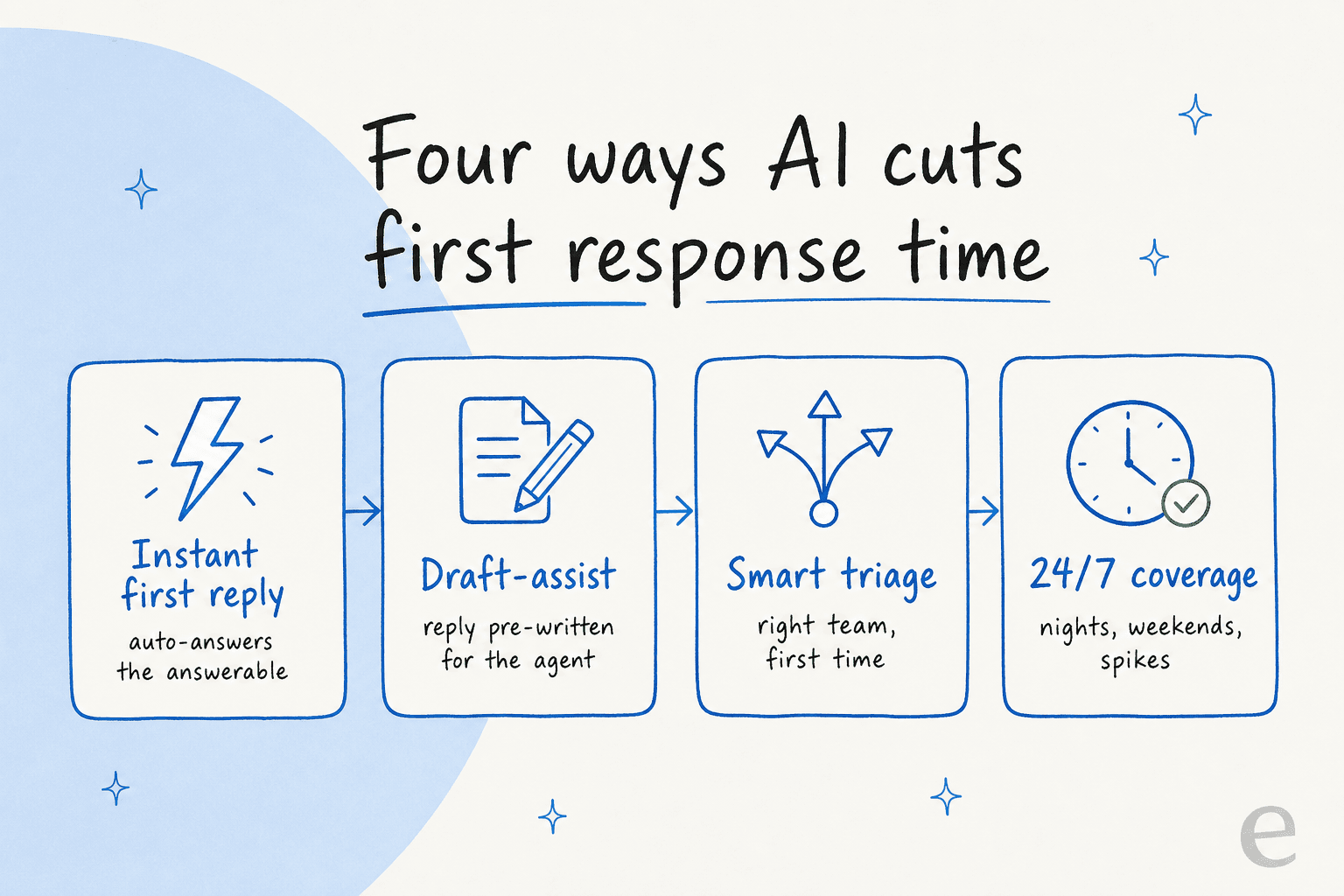
- Instant first reply. For the questions with one clear answer, the AI replies in seconds with no human in the loop. This is the headline lever, and it's also the one to roll out carefully (more on that below).
- Draft-assist for agents. Even when you don't want the AI talking to customers yet, it can pre-write the reply and leave it as an internal note. The agent reviews and sends instead of researching from scratch, so the human first response gets dramatically faster. This is the AI copilot pattern, and it's the safest place to start.
- Smart triage and routing. A chunk of slow FRT is tickets landing in the wrong place and getting reassigned twice before anyone answers. AI ticket triage tags and routes each ticket to the right team on arrival, so even the ones a human must handle reach that human faster.
- 24/7 coverage. The AI doesn't sleep. Tickets that used to sit overnight until the morning shift now get a first response at the moment they arrive, which is where most of the headline FRT improvement actually comes from.
Pulling all four at once is what takes first response time from "depends who's online" to "consistent across every hour and every channel."
Start with the tickets that should already be instant
Here's the part that makes this practical rather than scary. You're not trying to make the AI answer everything. You're trying to make it answer the slice of your queue that's the same dozen questions on repeat.
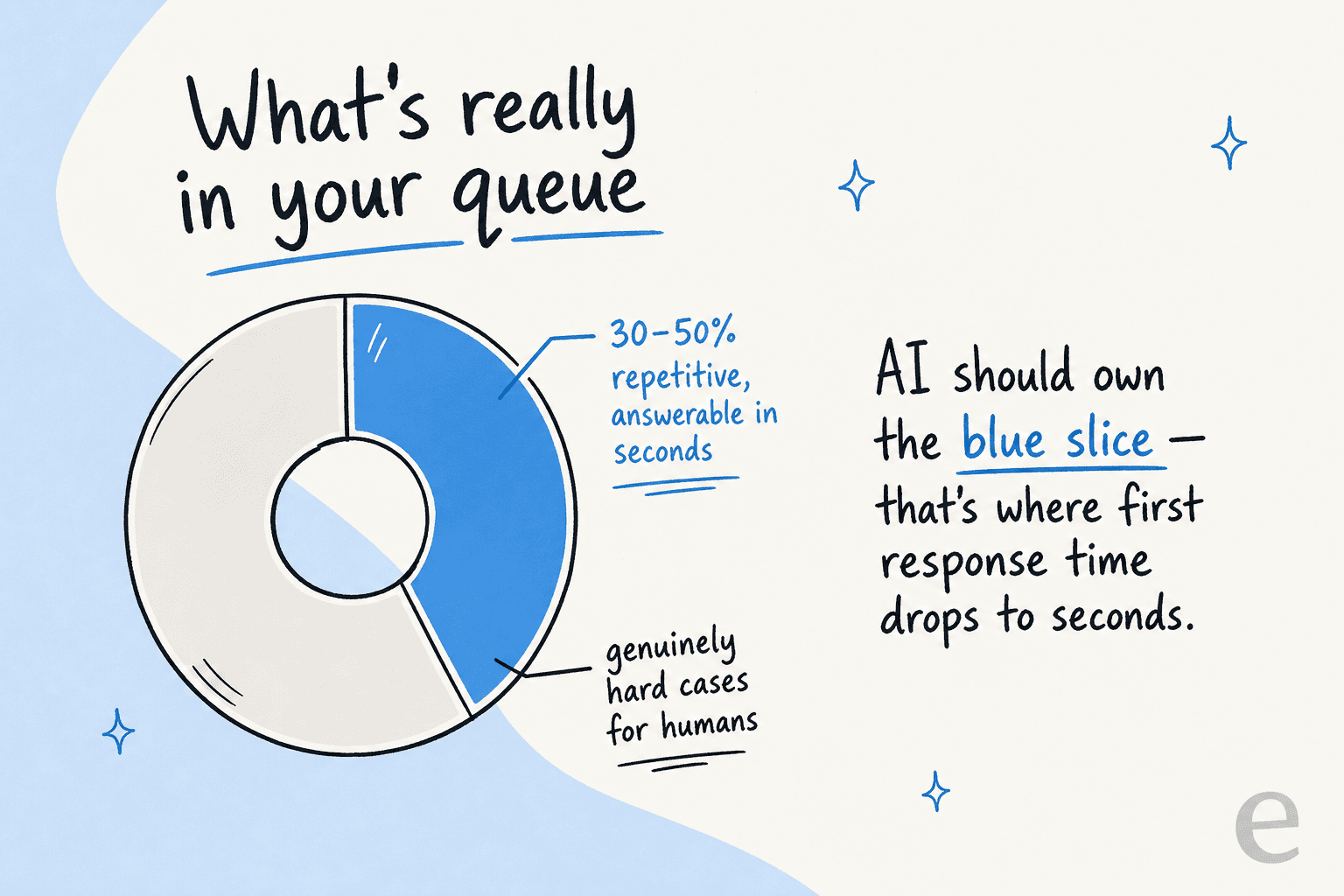
Having watched a lot of support queues, the pattern is consistent: somewhere between 30 and 50% of tickets are variations on a handful of questions, the "where's my order," "how do I reset my password," "what's your return policy" kind. Those answers already exist in your docs. Those are the tickets where first response time should be seconds, not hours, and they're the ones AI should own so your team can spend its attention on the cases that are actually hard.
The lever here is retrieval, and it's the part worth obsessing over. An AI that answers from a thin or out-of-date help center will be confidently wrong, which is worse than slow. So before you switch anything on, train the agent on your knowledge base and your past resolved tickets, not just the marketing FAQ. That's the difference between a useful answer and a generic one, and it's why knowledge management is the unglamorous foundation under every FRT number.
A practical playbook to actually roll it out
You don't go from zero to fully autonomous on day one. The teams that get FRT down and keep it down climb a ramp and earn each step.
Step 1 - Run it as a copilot first. Connect the AI to your helpdesk and let it draft every reply as an internal note. A human still reviews and sends, so nothing reaches a customer unseen, but agents stop researching from scratch and the human first response speeds up immediately.

Step 2 - Simulate before you go live. This is the step most teams skip, and it's the one that protects you. A good tool lets you run the agent against your historical tickets and see exactly how it would have replied to real past conversations, plus a projected resolution rate, before a single live customer is involved. We learned the hard way that a confident-sounding bot can quietly give wrong answers, which is why we now simulate every rollout first.
Step 3 - Auto-send the confident lane, one category at a time. Once you trust the drafts on a category, say order status, let the AI auto-send those and keep drafting the rest. You're widening the instant-reply lane gradually, watching the numbers as you go.
Step 4 - Monitor instead of reviewing every reply. At steady state the AI handles confident tickets end to end, humans own the hard cases, and you watch the resolution rate and FRT trend rather than auditing every message.
Don't trade speed for trust
The fastest way to wreck an FRT program is to flip on full automation, let the AI try to answer 100% of tickets, watch it get some wrong, and have a customer screenshot a bad reply. The goal was never 100% coverage. It's to answer the answerable tickets perfectly and not touch the rest.
A CX lead at a DTC supplements brand running about 7,000 tickets a month on Gorgias put it to me in a way that stuck: the AI will never answer every question, and if it just replies "sorry, I don't know" to the hard ones, that's useless, because nobody can go back and audit 7,000 tickets to catch the bad answers. What they actually needed was an AI that only handles the tickets it's confident about and leaves everything else alone. Confidence-based routing, not coverage, is what makes fast first responses safe.
So the control to demand from any tool is a real confidence threshold you can set, plus the ability to exclude whole ticket types and clean escalation rules for when the AI should step back. Buyers ask us for exactly this constantly: "there are certain tickets I don't want to go through AI," or "I only want the agent to respond when I @-mention it." If a tool can't give you that level of control, it isn't ready for your live queue, no matter how good its FRT demo looks.
What it looks like when it works
When confidence routing and a solid knowledge base come together, the numbers move in a way teams notice. Kim Simpson at Gridwise reported eesel resolving 73% of their tier-1 requests in the first month, and saw results during the 7-day trial. A payments company using AI for fast answers and onboarding reported up to 80% time savings on getting to an answer. That tier-1 share is exactly the repetitive volume that was dragging first response time down.

The point isn't the headline percentage, it's where the time goes. Every ticket the AI answers instantly is one your team didn't have to queue, and every draft it writes is research your agents didn't have to do. That's the real return: not replacing the team, but giving them back the hours that repetitive first responses were eating. If you're putting a dollar figure on it, our breakdown of AI versus human agent cost is a good place to start, and it's worth watching out for per-resolution pricing that charges you more precisely when volume spikes during your busiest season.
Common mistakes that keep FRT high
A few patterns reliably stall first response time even after you add AI. I've seen all of them:
- Optimizing typing instead of the wait. Faster macros don't fix a queue that's gated on agent availability. Remove the wait for the answerable tickets first.
- Automating on a thin knowledge base. If the answer isn't in your docs, the AI dodges or guesses. Fix the knowledge base or train on past tickets before you switch on auto-replies.
- Chasing coverage over confidence. Trying to answer everything is how you ship wrong answers. Narrow the instant lane until you trust it, then widen it.
- Ignoring the off-hours. Most of your FRT damage happens overnight and on weekends. If your AI only runs during business hours, you've left the biggest win on the table.
- Picking a tool you can't control. If you can't set a confidence threshold, exclude ticket types, or start in draft mode, the tool is making your risk decisions for you.
Avoid those five and the rest is iteration: watch what the AI gets wrong, feed those cases back, and let the confident lane grow. For the broader picture, our guide to building an AI customer service workflow ties the pieces together.
Try eesel to cut your first response time
If you want faster first responses that start safe, eesel is built around exactly the confidence-first approach above. It plugs into Zendesk, Freshdesk, and Gorgias, trains on your help center and past tickets out of the box, and runs across email, live chat, and WhatsApp so FRT improves on every channel rather than just one.

The thing I'd point to first: you can simulate it against your historical tickets and see its projected resolution rate before going live, then start in draft-only mode and set the confidence threshold yourself. You decide which tickets it touches, and it's free to try. If you've been burned by an over-eager bot before, this is the version that doesn't repeat that mistake.
Frequently Asked Questions
How do I reduce first response time with AI?
What is a good first response time for a support team?
Will using AI to reduce first response time send customers wrong answers?
Can AI improve first response time on live chat and WhatsApp too?
How much does it cost to reduce first response time with AI?
How does AI reduce first response time on tickets a human still needs to handle?
Do I need a perfect knowledge base before AI can lower my FRT?


Article by
Kurnia Kharisma Agung Samiadjie
Kurnia is a software engineer and writer at eesel AI with two years of SEO experience, writing about AI tools, helpdesk software, and customer support. He pairs a developer's understanding of how these products are built with search-driven research into what actually ranks and resonates with the people searching for them.