


There are only two ways a support ticket response template really fails. Either it answers the company's question instead of the customer's, or it went stale and nobody noticed. Fix the structure first, because the "robotic" complaint is almost never about vocabulary. It's about a reply that doesn't mention the thing the customer actually wrote in.
Below are eight templates you can paste in today, plus the exact placeholder syntax for Zendesk, Freshdesk, Gorgias, Help Scout, Front and HubSpot, and the traps in each one that will make you look worse than sending nothing.
The part most teams miss: your macro library is already the answer key. I work the support queue at eesel, and what keeps surprising me in our own rollout data is how little it takes to get something out of it. A UK support team on Zendesk drove 56 resolved tickets from just nine synced macros, and stayed in daily use 38 days after their trial expired. If you have 40 good templates sitting in a helpdesk, most of a working AI support agent is already written.
Pick a scenario, take the template
Eight of the tickets I see most often, with the reply I'd actually send. Swap out the bracketed bits, and the placeholder syntax too, for whatever your helpdesk uses. The table further down has the exact spelling for each one.
Why most support ticket response templates sound canned
Here's the thing I'd push back on: teams rewrite the wording when the problem is the shape.
Read a template that customers hate and you'll almost always find the same structure underneath. It opens with a thank you. Then it restates the policy, apologises in the passive voice, and closes by asking the customer to reach out if they have any further questions. Four sentences, and not one of them mentions the thing they wrote in about. Someone who waited nine hours for a reply reads that and correctly concludes nobody read their message.
The templates people don't notice are the ones that lead with the specific. "Your order left the warehouse on Tuesday and is stuck in Milan" reads as a human even if every word after it was pre-written.
The sharpest version of this rule I've read came from a Hacker News thread, and it's more than a decade old:
"I've worked in customer service, and the reps use 'canned text' all the time for common issues. I assumed this was common knowledge. Not doing so would be a recipe for RSI within a couple weeks.
The problem with canned text is when it's reused on the same person, which leads to anger on the part of the recepient (or suspicions that they're being serviced by a robot)."

The failure is repetition to the same person, not templating. Which means the guard you want isn't a warmer tone at all. It's a rule: never fire the same macro twice on one thread.
eesel's own trial data puts a real number on this. On a German ecommerce team's rollout, agents sent AI drafts as-is only 12% of the time, and the dominant pattern was "glance and rewrite": they were turning 8 to 15 sentence drafts into 1 to 3 sentence replies. About 65% of those rewrites were length and tone. Only around 5% were the draft being factually wrong. And it's the same complaint agents make about canned responses. The template is accurate and still the wrong length, still the wrong voice for the ticket in front of them.
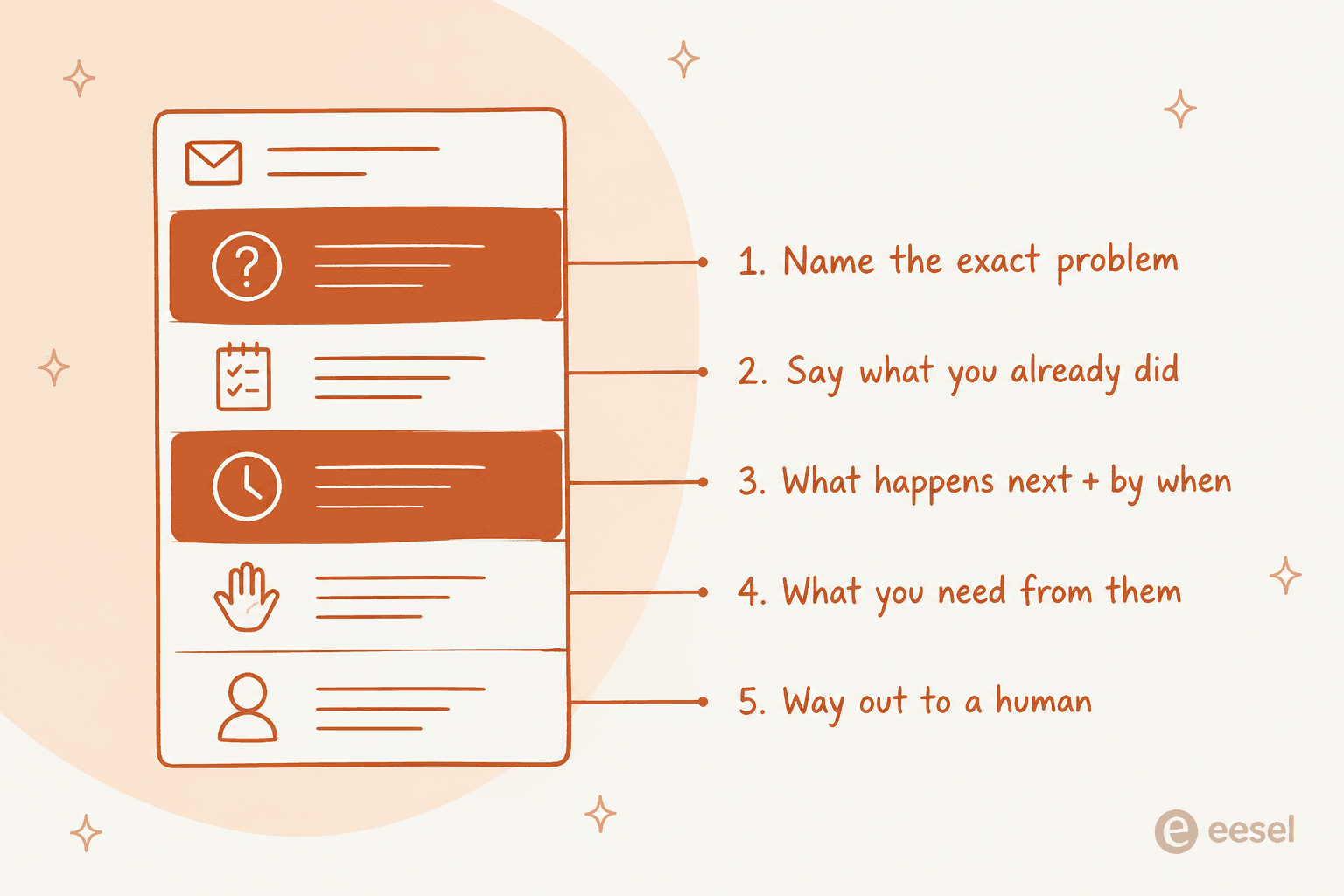
So here's the five-part shape I'd hold every template to:
- Name the exact problem in the first sentence, using their words and their order number.
- Say what you already did. Past tense, specific. "I checked with the warehouse" beats "we are looking into this".
- What happens next, and by when. A date. Not "shortly", not "as soon as possible".
- What you need from them, or explicitly that you need nothing.
- A way out to a human, so the reply doesn't feel like a wall.
Drop point 3 and the reply reads as a brush-off. Drop point 5 and it reads as a bot. Everything else is style. There are fourteen more worked examples in the customer service email templates post if you want the same shape applied to email specifically.
For anyone letting AI write the first pass, that length finding has a practical consequence. A better prompt won't fix it. Feeding it your own sent replies will, since that's how it learns how long your team actually writes. Which is the whole argument for maintaining brand voice from real examples rather than a tone slider.
Where templates live in each helpdesk
Every helpdesk has this feature. Every one of them calls it something different, too, which is its own small tax when you're migrating. Here's the same feature across six tools, with what actually differs.
If you just need the step-by-step for one tool, there are separate walkthroughs on creating a macro in Zendesk. The Gorgias macros guide covers the ecommerce side, and Freshdesk canned responses has the Freshdesk equivalent.
| Helpdesk | What it's called | Insert shortcut | Placeholder syntax | Fallback if empty | Personal library? | Can a rule send it? |
|---|---|---|---|---|---|---|
| Zendesk | Macro | / in composer | {{ticket.requester.first_name}} | No, renders blank | Yes, agents get personal macros | No. Triggers can't apply a macro |
| Freshdesk | Canned response | /c then Enter | {{ticket.requester.firstname}} | No | Yes, but not on the Free plan | No, you retype the text in the rule |
| Gorgias | Macro | Lightning-bolt icon | {{ticket.customer.firstname}} | No, renders a blank space | No, workspace-wide only | Yes, via an apply-macro rule |
| Help Scout | Saved reply | / in editor | {%customer.firstName%} | Yes, ,fallback=there | No, shared per inbox | No, workflows compose their own text |
| Front | Message template | {{ in composer | {{recipient.first_name}} | Yes, | 'there' | Yes, private or shared | Yes, with Once/Always modes |
| HubSpot | Snippet / template | # then shortcut | Token picker, no braces | Via personalisation default | Templates only | Templates via sequences only |
Three things in that table are worth pulling out.
Zendesk macros can't be automated at all. People migrating in are always surprised by this one. Zendesk is explicit that macros "only contain actions, not conditions", because nothing is evaluating tickets on your behalf, an agent is. There is no trigger action that fires a macro, and the community request for it is still open. The documented workaround runs backwards: your macro adds a tag, then the tag fires a trigger. Want automatic first responses? That's a job for Zendesk auto-reply rules or an AI agent, not the macro library.
Freshdesk makes you write the text twice. Canned responses can't be attached to an automation rule. The automation editor gives you a free-text "send email to requester" body instead, so your acknowledgement copy lives in two places and editing the canned response never updates the rule. Worth knowing before you build a Freshdesk auto-responder on top of your library.
Only Help Scout and Front give you a fallback value. Help Scout's syntax is {%customer.firstName,fallback=there%}, and Front's is {{recipient.first_name | 'there'}}. On Zendesk, Freshdesk and Gorgias an empty field just renders blank, so "Hi ," goes out to anyone who signed up without a first name. That is a real thing that happens on real queues every single day.
The placeholder traps
I've sent a broken one. So has everyone who's worked a queue for longer than a month or so. Below are the ones that bite hardest, all of them documented by the vendors themselves, and most turn up again in the roundup of Zendesk macro issues.
Problem tickets leak the wrong name in Zendesk. If you reply to a Problem ticket with a macro containing {{ticket.requester.name}}, Zendesk sends that requester's name to every linked incident ticket as well as theirs. The fix is a backslash: Hello \{{ticket.requester.first_name}}. That's Zendesk's documented workaround, and it is not something you'd ever guess.
Bulk-applying a macro breaks the subject line. Zendesk lets you apply a macro to up to 100 tickets at once from a view, but placeholders in the subject save as the literal bracketed text, per the bulk update docs. Your customer gets an email titled {{ticket.created_at}}. Attachments are silently dropped in bulk too, and any CC action in the macro just doesn't happen.
Rule-fired templates sign with the wrong person. Gorgias resolves every current_user variable to the account owner when a rule applies the macro rather than an agent, so your automated reply is signed by your CEO. Front has the same problem with the opposite symptom: in rule-sent replies the {{user...}} variables come back blank.
Migrating from Help Scout to HubSpot means rewriting every template. HubSpot explicitly bans curly brackets in snippets and templates because they break its rendering service, so every {%customer.firstName%} has to be replaced by hand through the Personalize picker. Budget an afternoon.
And the one that stings most, because it's ours. We shipped a German draft to a customer with a raw {{ticket.requester.first_name}} sitting in the middle of it, and a Dutch one with an unfilled [Employee Name]. We fixed it, but that's exactly why I now treat "does this render on a ticket with missing fields?" as a required check before a template goes shared, not a nice-to-have.
Your template library will rot, plan for it
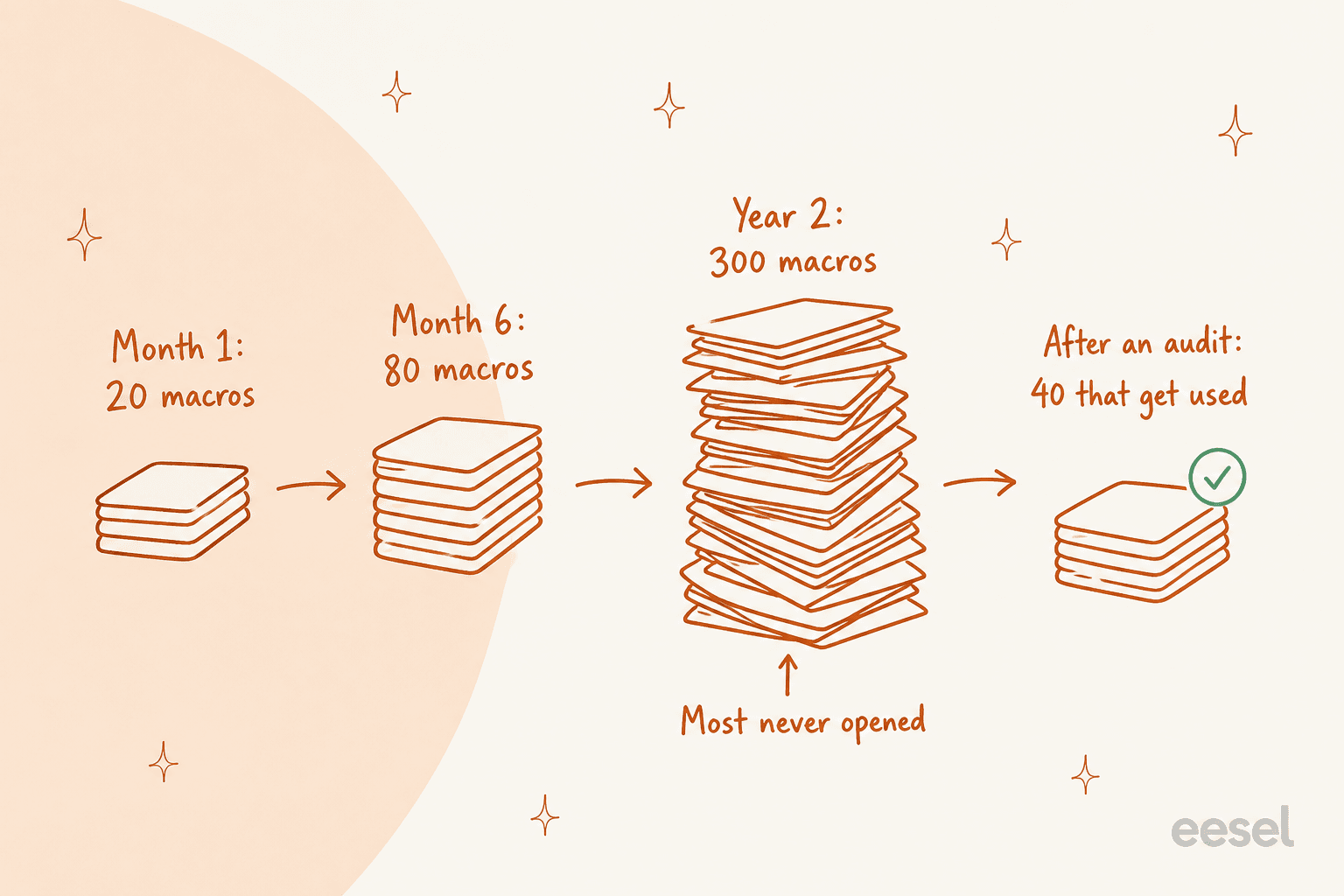
Here's the pattern I hear over and over on customer calls. Month one, you write 20 macros and everyone loves them. By month six there are 80, because every agent added their own. Year two: 300, six of which contain a shipping cost that changed in 2025, and nobody can find the good one in the search box anyway.
This isn't hypothetical. One ops lead at a DTC supplements brand running around 7,000 tickets a month told us their knowledge lived across SOP docs, untranscribed video walkthroughs, and "many outdated macros". What they had wasn't really an asset. It was maintenance debt with a search box on top.
Agents describe the same thing from the inside, and they're funnier about it:
"lol i'm helping the supes clean up a 6 year old macro library that has sunset nothing. some of the most used ones get an update when the policies or products change but typically we just write a whole new one and leave the old one to rot 🥲"

That's the actual mechanism. Nobody edits, everybody duplicates.
The ceilings are generous enough that nothing stops you. Zendesk allows 5,000 shared macros per account, and Gorgias caps at the same 5,000. Neither number is a target.
What I'd actually do, quarterly:
- Sort by usage and delete the zeroes. Anything unused in 90 days goes. On Zendesk this needs Suite Growth or Support Professional to sort by usage at all, which is worth knowing before you promise your manager a report.
- Put an owner on every template that names a number. Prices, refund windows, SLA times, delivery estimates. Those are the ones that go quietly wrong.
- Use the naming convention as folders. Zendesk nests by double colons in the title, like
Refunds::Declined::Outside window, and it's the only nesting there is. There's more on organising macro categories if your list has already sprawled. Help Scout has no manual ordering at all, so replies show alphanumerically and a naming convention is your only lever. - Decide what stays personal. Zendesk is the one that lets individual agents keep private macros, which is great for personal shortcuts and terrible for policy text that should be shared. The guide on personal vs shared macros covers where to draw that line.
- Export before you delete. Gorgias exports to a four-column CSV (
name,body_text,tags,id) and re-importing with a matching id updates in place, which makes bulk editing in a spreadsheet pleasant. Zendesk has an export path too, with the mechanics in the macro export and import guide.
The audit is boring. It is also the whole game. A library of 40 templates that are all correct beats 300 where six of them are lying.
The best description of a working routine I've seen came from a Zendesk admin describing their weekly cadence:
"Yes. We run our email macros by our QA so we know we're doing best response (oh, we feed it in ChatGPT that's pre-configured with our support bible) and update everyone on Slack that it's good to go and everyone uses it, it saves so much time! We also create macros to auto-tag tickets and complete tagging of forms. In our weekly meetings we calibrate on correct tagging, macros to add, edit, archive."
QA review, then a Slack announcement, then a weekly calibration where things get added, edited and archived. Another admin in the same thread put a real budget on it: about an hour a month. That's the price of a library that doesn't lie.
When to stop writing templates
Templates are the right tool in a narrower band than most teams assume. Two variables decide it: how much volume a ticket type has, and how much the tickets vary inside it.
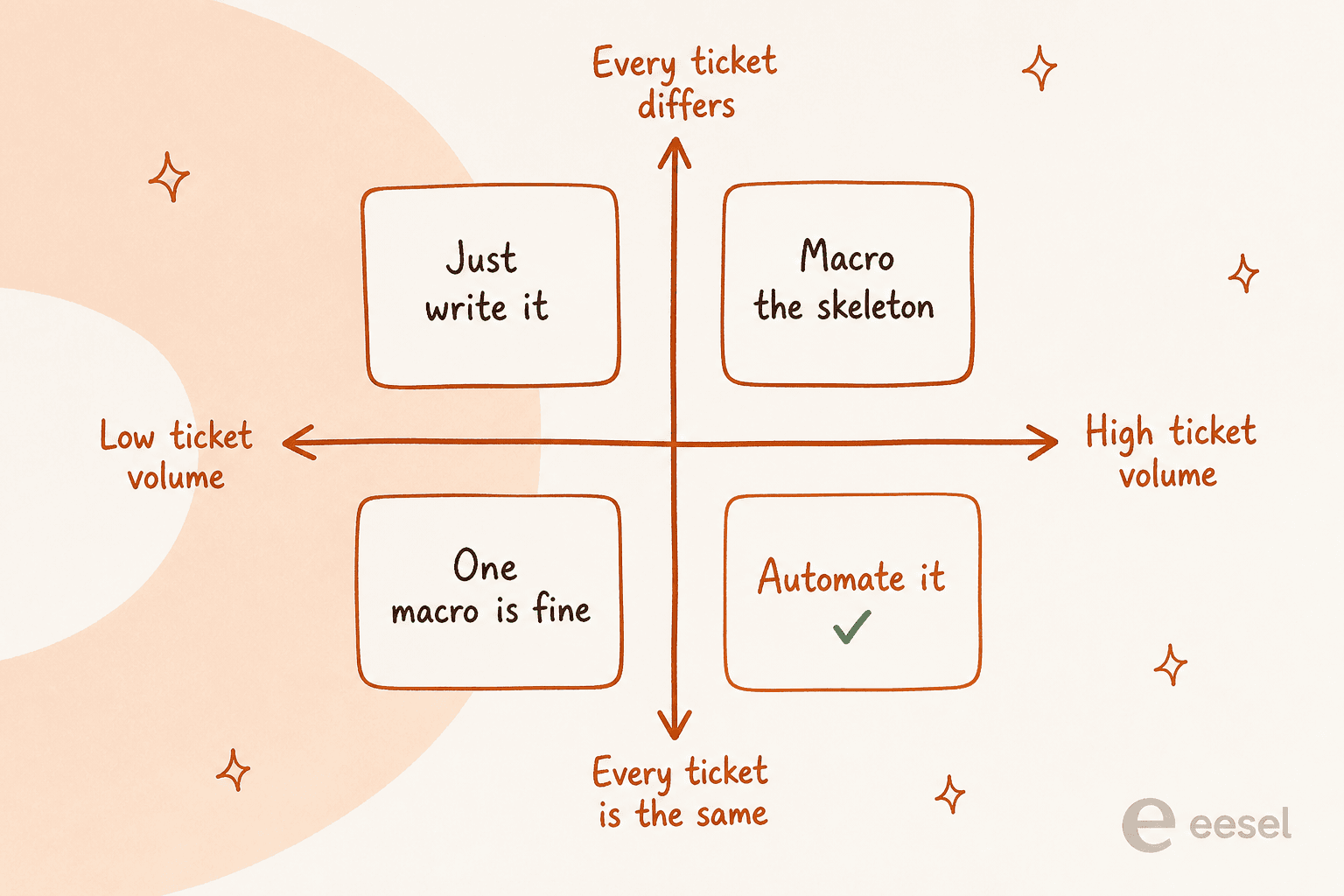
High volume and every ticket basically the same, order status, password resets, "do you ship to X", is the quadrant where a human copying a template forty times a day is an expensive API call. An AI ticketing system earns its place there, and the results show up as a moving deflection rate rather than a vibe.
High volume but varied, a billing dispute say, is where you want the template as a skeleton with a human writing the middle. That's the job AI macros do. Low volume? Just write it.
The three ecommerce categories worth automating first are almost always refunds, exchanges and shipping, already written out as AI macro templates if you want a starting point rather than a blank page. Routing them correctly matters as much as answering them, so pair it with ticket triage that runs before the reply is drafted.
An agent on r/Zendesk framed the middle ground better than I would have:
"Pretty accurate tbh. Macros work best as a 70% draft, not a final reply. Once they get stale, agents absolutely start retyping, and yeah, 20 to 40 "same-ish" responses a day isn't weird at all. What makes them stick is good naming, folders by scenario, placeholders, and letting agents edit/own them instead of using stuff leadership wrote years ago."
A template is a 70% draft, and the last 30% is the part the customer actually reads. True whether the first 70% comes from a macro or from an AI. It cuts the other way too, as another agent in the same thread pointed out: AI drafting doesn't replace the library, it reads from it. So a rotting macro library quietly poisons the AI output as well.
The nice part is that the transition doesn't waste the work you've already done. Macros are a first-class knowledge source, not a thing you throw away. One German events company we work with runs on 580 documents made up of their help center, their macros and their past tickets, and their bot handled real German tickets on full autopilot across refunds, vouchers and host inquiries.
That's the reframe I'd leave you with. The library you already maintain is training data, and the nine-macros-to-56-resolutions number from earlier is what that looks like at the small end.
Try eesel
If you're on Zendesk, Freshdesk, Gorgias, Front or Help Scout and your macro library is doing more work than your agents, this is the specific thing eesel does: it reads the macros, past tickets and help center you already have, then drafts the reply inside the helpdesk you already use. No new tab, no rewriting your templates into someone else's format.

Two things I'd point at specifically. First, the workflow is an internal note. An agent types @eesel draft a reply on a ticket and gets a full draft back for review, which is the same muscle memory as reaching for a macro. Second, before any of it touches a customer, you can run a simulation over roughly 100 of your old tickets, compare what the AI would have said against what your humans actually sent, and read the gap report. We built that because we've watched confident-sounding bots give wrong answers, and finding that out on historical tickets beats finding it out on a live queue.
"It is getting us to the right articles really quickly and easily, as well as curating well-formed responses with consistent, on-brand tone, still keeping our own style and still keeping that human touch."
Eddie Stephens, Service Desk Lead, CartonCloud
It's free to try, and setup is measured in minutes rather than an implementation project.
The Zendesk integration is the one most macro-heavy teams land on first. There's a native Freshdesk one too, and Gorgias for ecommerce queues. If your best templates are already written, most of the work is done.
Frequently Asked Questions
What is a support ticket response template?
How do I write a support ticket response template that doesn't sound robotic?
What placeholders can I use in a support ticket response template?
{{ticket.requester.first_name}}, Freshdesk uses {{ticket.requester.firstname}}, Help Scout uses {%customer.firstName,fallback=there%}, and HubSpot bans curly braces entirely in favour of a token picker. The guide to dynamic fields walks through the Freshdesk side.