What a live chat script actually is (and what it isn't)
A live chat script is a reusable message you keep on hand for a recurring moment in a conversation. Most live chat software calls these canned responses, saved replies, or macro actions, the label changes, the idea doesn't: stop retyping the same 40 words forty times a day.
What a script is not is the whole conversation. The failure mode I see most often is an agent who pastes a greeting, a hold message, and a closing that clearly belong to three different people, none of them the customer in front of them. The reader on the other end can smell it instantly. A good script handles the predictable 80% of a message so you can spend your attention on the 20% that's actually about this person's problem.
So the goal isn't more scripts. It's the right scripts, written so they disappear into your own voice.
The anatomy of a live chat reply that doesn't sound like a robot
Almost every good chat reply, scripted or not, moves through the same four beats. If you build your templates around this shape, they'll feel human even when they're 90% pre-written.
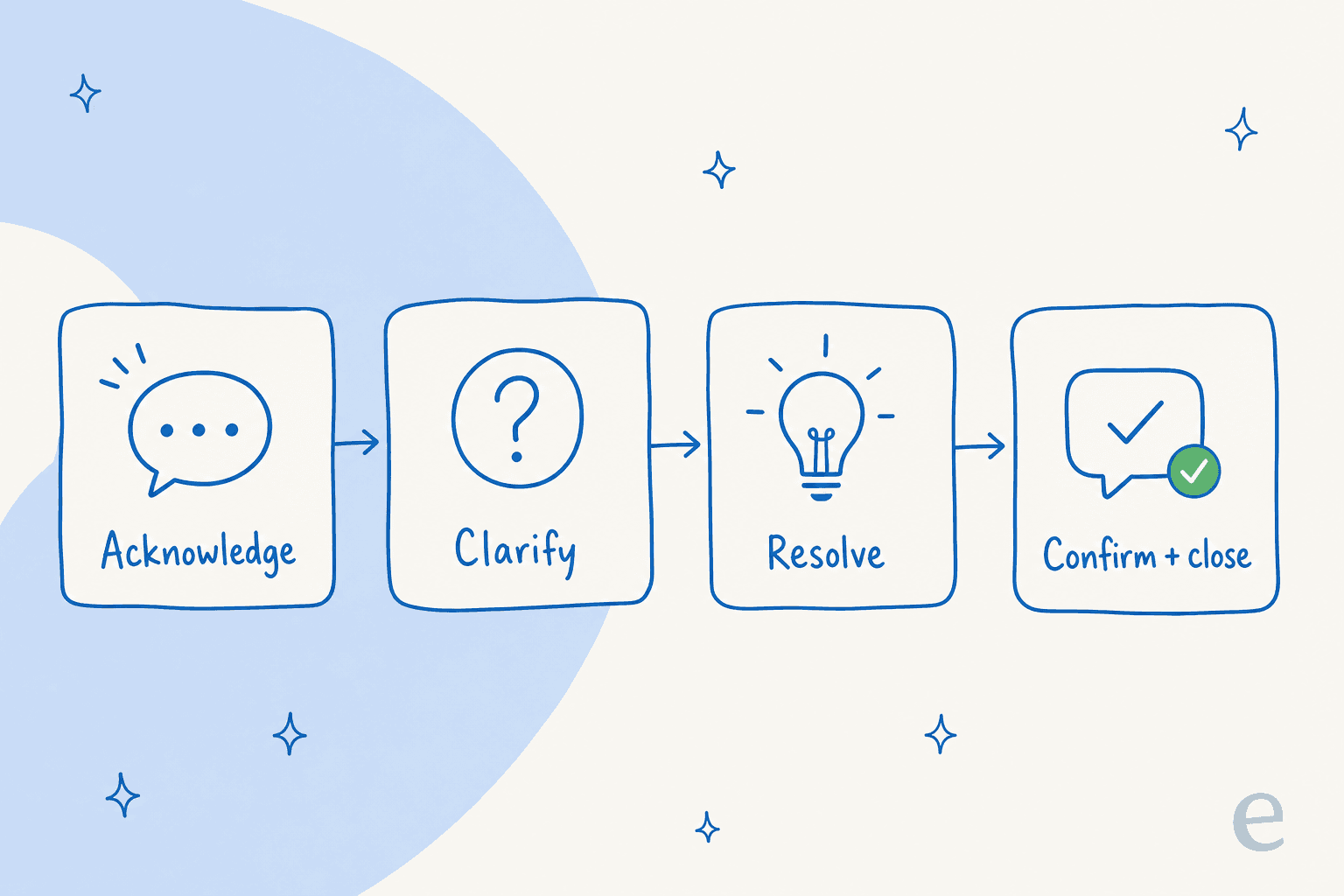
- Acknowledge. Name the person and the problem so they know a human read it. "Hi Sara, sorry your order arrived damaged, that's frustrating."
- Clarify. Ask one sharp question, not five. The fastest chats resolve because the agent asked the right single thing up front.
- Resolve. Give the actual answer or the steps. This is where a script saves the most typing.
- Confirm and close. Check it worked, then leave the door open: "anything else I can help with?"
Keep that skeleton and your scripts stay warm. Skip beat one and you sound like an IVR menu.
25+ live chat scripts you can steal
Grab these, drop them into your saved replies, and swap the bracketed bits for real details. I've grouped them by the moment they're for.
Greetings and openers
- "Hi [name], thanks for reaching out! I'm [agent], happy to help. What can I do for you today?"
- "Hey [name], good to see you. Give me one sec to pull up your account and I'll be right with you."
- "Hi there! You've reached [company] support. I can see you're on the [page] page, is that what you'd like a hand with?"
- "Welcome back, [name]! I can see your previous chat about [topic], want to pick up where we left off?"
The proactive opener ("I can see you're on the pricing page") is the one worth learning; it's the backbone of good live chat upselling and it makes the whole chat feel attended-to.
Holds and wait times
- "Great question, let me dig into that for you. This might take me two or three minutes, I'll keep you posted so you're not left staring at a blank screen."
- "Thanks for your patience! Still looking into this, I haven't forgotten you."
- "I want to get this right rather than guess, so I'm checking with our [billing] team now. I'll update you within [10 minutes]."
The unforgivable sin on chat is silence. Even a "still here, still on it" every couple of minutes keeps the customer from bouncing.
Troubleshooting and how-to
- "Let's fix this together. First, can you tell me what you see when you [action]? A screenshot helps if it's easy to grab."
- "Okay, I think I know what's happening. Try [step 1], then [step 2], and let me know if the [error] clears."
- "That one's a known quirk, here's the workaround while our team ships the fix: [steps]."
- "Looks like this needs a change on our end. I've done it just now, can you refresh and confirm it's working?"
For the messy technical ones, a static script only gets you so far, which is exactly where customer service problem solving skills (and AI that can read your docs) take over.
Angry or frustrated customers
- "I'm really sorry, [name]. You're right to be annoyed, this isn't the experience we want you to have. Let me make it right."
- "That sounds genuinely frustrating, and I'd feel the same. Here's exactly what I'm going to do: [action]."
- "I hear you. I can't undo what happened, but I can [concrete fix] right now, and I'll flag this so it doesn't happen again."
Notice none of these argue or explain policy first. Acknowledge the feeling, then move straight to the fix. A script here is a lifesaver precisely because it stops you writing something defensive when you're rushed.
Refunds, returns, and "where is my order" (WISMO)
- "Happy to sort your refund, [name]. I've started it for [amount], it'll land back on your [card] in [3-5 business days]."
- "Let me check on that order. Your tracking shows it's [status] and due to arrive [date], here's the live link: [link]."
- "So sorry it's running late. I've [reshipped / refunded / escalated to the courier], and here's your new [tracking / confirmation]."
- "I can see the return window closed [date], but given the circumstances I'm going to make an exception this once."
WISMO and refund questions are the highest-volume, most repetitive tickets in almost every ecommerce queue, they're the textbook case for macro templates and, increasingly, for handing straight to AI.
Closing and wrap-up
- "Glad we got that sorted! Anything else on your mind while I'm here?"
- "You're all set, [name]. I'll email you a summary so you've got it in writing. Have a great [day]!"
- "If [the issue] pops back up, just reply to this chat and it'll come right back to me or a teammate, no need to start over."
Handoffs and escalation
- "This one needs our [specialist] team, they'll have you sorted faster than I can. I'm passing along everything you've told me so you won't have to repeat yourself."
- "I'm going to loop in a teammate who owns [area]. You'll hear back within [timeframe], and I've added the full history to the ticket."
- "I've reached the edge of what I can do from here, but I don't want to leave you stuck. Escalating now with all the context attached."
The "you won't have to repeat yourself" promise is the one customers care about most on a handoff. Keep it, and mean it.
After-hours and offline
- "Thanks for the message! Our team's offline right now (we're back at [time, timezone]), but I've logged this and you'll get a reply first thing."
- "You've caught us after hours, but you don't have to wait, [these help docs] cover [common topic], and a human will follow up in the morning."
When to follow the script and when to ditch it
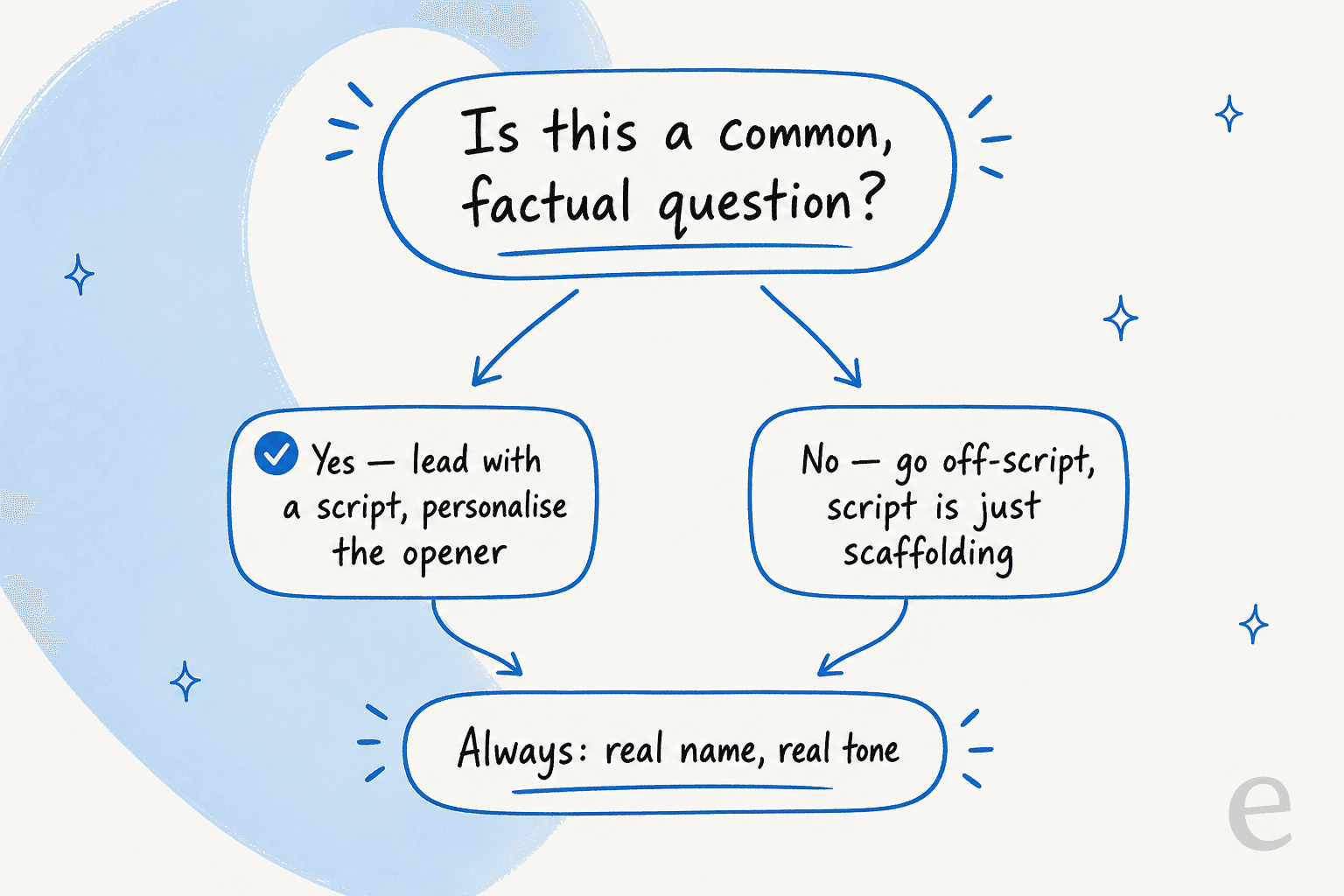
Here's the rule I actually use at the queue: if it's a common, factual question, lead with the script and personalise the opener. If it's anything else, the script is just a warm-up, not the answer.
A billing date, a return policy, a "how do I reset my password", those are script-first all day. But the moment a chat has a real edge case, an upset regular, a bug nobody's seen, a request that bends a policy, pasting a canned reply is how you lose someone. Scripts are for volume, judgment is for everything else. The best agents I've worked with can tell which is which in the first line, and that instinct is worth more than a library of 200 templates.
Where scripts fall apart (the honest bit)
I'm not going to pretend a folder of saved replies fixes support. A few places scripts consistently break down:
- They go stale. Prices change, policies change, product names change. Your scripts don't, until someone remembers to update all 60 of them. Half the "wrong answer" chats I've reviewed trace back to a macro nobody refreshed.
- Nobody can find the right one. Past ~30 templates, agents stop scrolling the dropdown and just retype from memory, which defeats the point.
- They tempt you into paste-and-pray. The more polished the script, the more tempting it is to fire it off without reading whether it actually fits.
- They don't scale with volume. When chat volume doubles, a script library doesn't make anyone type faster. You just have more people pasting.
This is the ceiling of the manual approach, and it's why a lot of teams stop thinking about "better scripts" and start thinking about customer support automation.
How AI turns your scripts into live answers
Here's the shift. Instead of an agent hunting for the right saved reply, an AI reads the incoming chat, pulls the answer from your past tickets and help docs, and drafts, or sends, the reply itself. The script stops being a snippet you paste and becomes something the AI already learned from your best past replies.
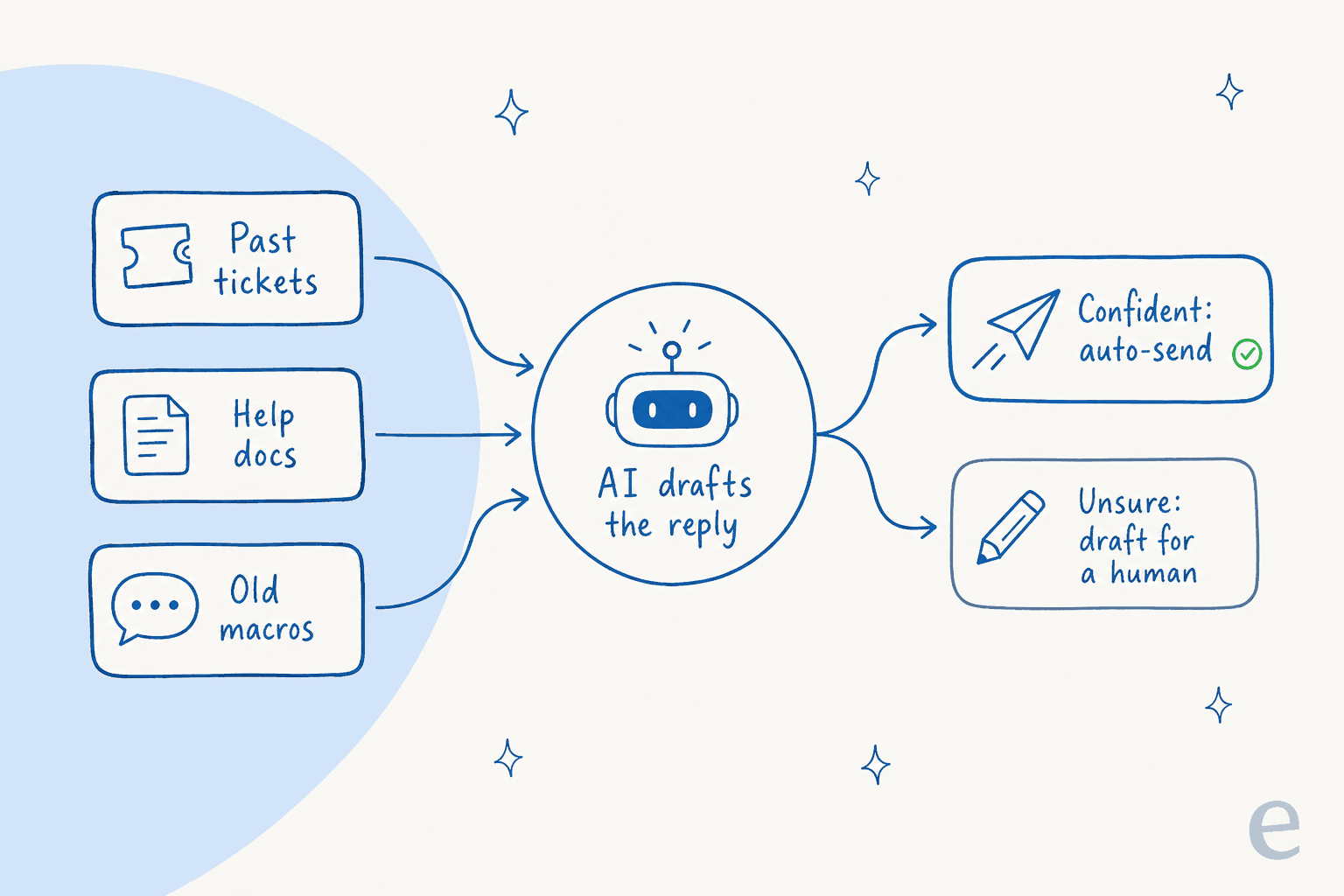
This is what I spend my days with. eesel AI sits on top of your existing helpdesk, Zendesk, Freshdesk, Gorgias, Front, Help Scout, learns from years of your solved tickets and docs, and drafts replies in your voice. The part I care about most, having watched confident-sounding bots quietly give wrong answers, is that it uses confidence-based routing: it only auto-answers what it's sure of and leaves the rest as a draft for a human. One DTC supplements CX lead we work with framed the whole philosophy in a line I think about a lot, that the AI should only handle the tickets it's confident to handle, and leave the others alone.
The results back it up. Gridwise saw it resolve most of their tier-1 volume almost immediately:
"In the first month, eesel is resolving 73% of our tier-1 requests... we saw results quickly during our 7-day trial."
Kim Simpson, Gridwise, shared on eesel's helpdesk agent page
And it doesn't flatten your team's voice into robot-speak, which is the fear everyone has. A service desk lead at logistics platform CartonCloud described it as getting to the right articles fast while "curating well-formed responses with consistent, on-brand tone, still keeping our own style and still keeping that human touch." That's the whole game: the consistency of a script with the warmth of a person.
Try eesel for your live chat
If you've read this far building a script library, here's the honest upgrade path: instead of writing and maintaining 60 templates by hand, let eesel AI learn them from the tickets you've already solved. It plugs into your helpdesk in minutes, runs a simulation on your past chats so you can see exactly what it would have answered before it goes live, then handles live chat deflection on the repetitive stuff and drafts the rest for your agents.

Pricing is usage-based at $0.40 per resolution, no per-seat fees and no minimum, so you only pay for the chats it actually handles. You can try eesel free with $50 of usage, no credit card, and watch it turn your best scripts into answers that send themselves.
Frequently Asked Questions
What are live chat scripts?
How do I write a live chat script that doesn't sound robotic?
Are live chat scripts the same as canned responses?
How many live chat scripts does a support team need?
Can AI write and run live chat scripts for me?


Article by
Riellvriany Indriawan
Riell is a designer and writer at eesel AI with about two years of experience researching CX platforms, AI chatbots, and helpdesk software. She combines her design background with a sharp eye for how these tools actually look and feel in practice — making her comparisons unusually visual and user-focused.