

Tired of handling the same repetitive support tickets day in and day out? This guide explores the world of Macro Actions, from basic helpdesk shortcuts to smart AI agents that can triage, route, and resolve customer issues on their own. Let's look at how to build an automation strategy that actually works.
Introduction to Macro Actions
Let's be honest, a huge part of customer support is a grind. Answering the same questions, tagging tickets, and routing issues over and over is necessary, but it’s also a massive time sink. It’s the kind of repetitive work that burns out your best agents and keeps them from tackling the complex problems where they can really make a difference.
For years, "macros" have been the go-to solution for this. But what are Macro Actions, really? And are they still enough in an age where customers expect instant answers and teams are stretched thinner than ever?
In this guide, we'll break down everything you need to know about Macro Actions. We'll start with the basics, explore how they've evolved (or, in many cases, haven't), and show you how to build a modern automation strategy that goes far beyond simple click-to-run scripts.
What are Macro Actions?
In the customer support world, a Macro Action is just a predefined sequence of tasks that an agent can trigger with a single command, like a button click or a keyboard shortcut. Think of them as speed-dials for your most common helpdesk chores. Instead of doing three or four separate things by hand, you just press one button, and the system does it for you.
Let's take a super common example: a password reset request. Without a Macro Action, an agent would have to manually:
-
Tag the ticket as "Password Reset."
-
Assign it to the Tier 1 support team.
-
Reply with a pre-written message that links to the password reset page.
With a Macro Action, the agent just clicks a "Password Reset" button, and all three of those things happen instantly. It's a simple but effective way to shave a few seconds off each ticket. You'll find them as a core feature in pretty much every helpdesk, from Zendesk and Freshdesk to e-commerce platforms like Gorgias. They’re really the first layer of support automation.
Common types of Macro Actions
Most Macro Actions in support platforms are built from a few simple, rule-based pieces. While they're useful for basic organization, they come with some serious downsides.
Macro Actions for ticket property updates
This is the most fundamental job of a Macro Action: changing a ticket's fields to keep the queue organized and easy to sort through. It's all about categorization, like setting a ticket's status from "New" to "Pending", changing the priority from "Normal" to "High" for any ticket containing the word "urgent," or applying tags like "billing-inquiry" or "feature-request".
Macro Actions for agent and team assignments
Macro Actions are also frequently used for simple ticket routing. This makes sure a ticket gets in front of the right person or team without someone having to manually pass it along. For instance, you could have a Macro Action that assigns all tickets from a VIP customer to their dedicated account manager, or one that sends any ticket mentioning "bug" or "error" straight to the Engineering support queue.
Macro Actions for canned responses and internal notes
Finally, Macro Actions handle basic, repetitive messages. This can be a standardized "We've received your request" email that goes out to the customer, or it could be a private internal note for another agent, like "Check order status in Shopify before replying."
The limitations of traditional Macro Actions
Here's the catch. While these actions sound great on paper, traditional Macro Actions are fundamentally reactive and rigid. They don't think; they just follow a script.
This leads to some big limitations:
-
They still require manual work: An agent has to read the ticket, figure out what the customer actually wants, and then scroll through a potentially long list of Macro Actions to find the right one. The cognitive load isn't gone, it's just shifted.
-
They lack context: A Macro Action can be programmed to find the word "refund," but it can't tell the difference between a customer asking for a refund versus asking about the status of one they've already requested. This lack of nuance often leads to the wrong actions or impersonal responses that miss the mark.
-
They are high-maintenance: As your company and product grow, you can easily end up with hundreds of Macro Actions. This "macro debt" becomes a nightmare to manage. Many become outdated, redundant, or just plain wrong, which creates confusion and actually slows agents down.
-
They are siloed: A Macro Action inside your helpdesk can’t see information from other systems. It can’t check an order's shipping status in Shopify, pull a user's subscription details from your billing system, or look up an article in your internal knowledge base.
Here’s a quick breakdown of where these traditional actions tend to fall short:
| Action Type | Description | Common Use Case | Major Limitation |
|---|---|---|---|
| Set Status/Tag | Changes ticket properties. | Categorizing a new ticket. | Doesn't grasp customer intent, just spots keywords. |
| Assign Agent/Team | Routes the ticket to a user or group. | Sending a sales lead to the sales team. | Rules are rigid and break with team changes. |
| Send Reply | Uses a pre-written text template. | Answering a common FAQ. | Impersonal and can't include real-time data. |
| Add Note | Adds a private comment for context. | Leaving instructions for another agent. | The note is static and needs to be manually entered. |
The evolution of Macro Actions: From manual clicks to intelligent automation
Making an agent search through a list of 50+ Macro Actions isn't real automation. It doesn't reduce their mental workload; it just shifts the manual effort from one task (replying) to another (finding the right Macro Action). This model just doesn't work as you grow.
So, what's the next step?
Introducing AI-powered Macro Actions
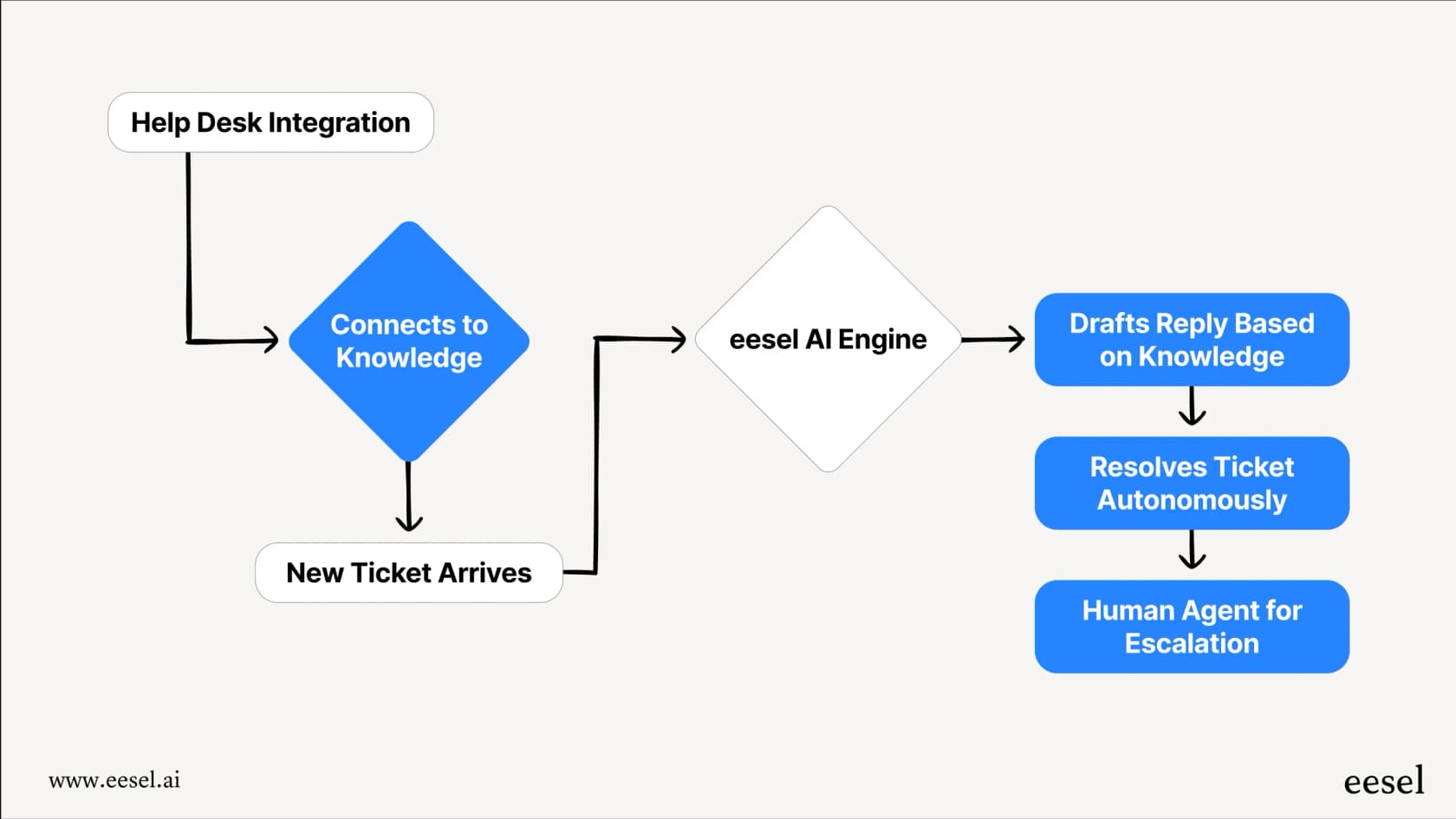
What if a system could not only perform actions but also decide which actions to perform based on the customer's actual intent? That’s the core idea behind modern AI-powered support automation. Instead of relying on rigid, keyword-based rules, AI uses natural language understanding to figure out what a customer is really asking for and then triggers the correct workflow.
This is where platforms like eesel AI come into the picture. eesel acts as an intelligent layer on top of your existing helpdesk. It doesn’t replace your tools; it makes them smarter by learning from your past tickets to understand how your best agents resolve different types of issues.
This opens up a new level of automation that traditional Macro Actions simply can't touch:
-
Intelligent triage: When a new ticket comes in, eesel AI can read it, understand what's really going on (e.g., this is a frustrated customer asking about a late delivery, not just a standard "order status" query), and automatically apply the right tags, set the priority, and route it to the correct team, all without a human lifting a finger.
-
Dynamic responses: An AI agent can do much more than send a static canned response. It can connect to your other tools, like looking up a customer's real-time order status in Shopify, and then compose a personalized reply that includes that specific information. The response is genuinely helpful, contextual, and often resolves the issue on the first touch.
-
Self-learning: The best part? You don't need to spend weeks building hundreds of complex rules. eesel AI learns your unique processes by analyzing your historical ticket data. It sees how your team has handled thousands of past conversations and uses that knowledge to create smart, dynamic workflows for you.
The difference in the workflow is night and day. A traditional Macro Action saves an agent a few clicks. An AI-powered workflow automates the entire process, from understanding the customer's problem to delivering a personalized solution.
Building a modern automation strategy with Macro Actions
Moving from manual Macro Actions to intelligent automation might seem like a huge leap, but it’s a straightforward process when you have the right approach and tools. Here’s how you can get started.
Step 1: Find your biggest time-wasters
Before you automate anything, you need to figure out where your team is spending most of its time. Start by looking for your most frequent and repetitive ticket types. The usual suspects include "Where is my order? (WISMO)," password resets, and simple refund requests.
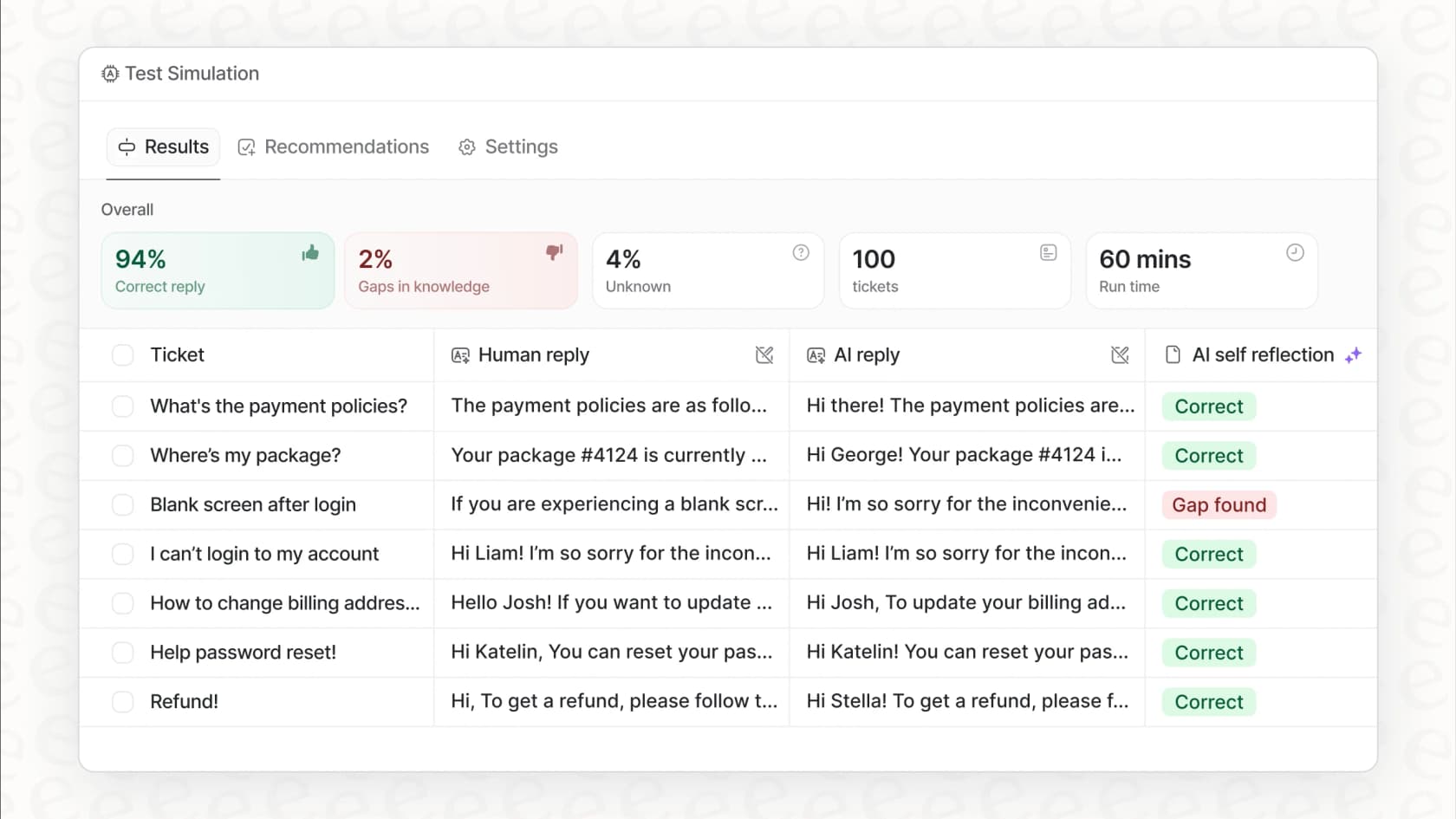
The manual way to do this is to sift through your helpdesk analytics, which can be a real headache. A much better way is to use a tool that does the analysis for you. With eesel AI’s simulation mode, you can connect your helpdesk, and it will run the agent against hundreds of your past tickets and score each answer against what your team actually replied. The results show where the agent is already correct and where your knowledge has gaps. For the ticket types worth automating first, I use eesel's Analyze ticket trends skill, which surfaces your most common themes.
Step 2: Connect all your knowledge
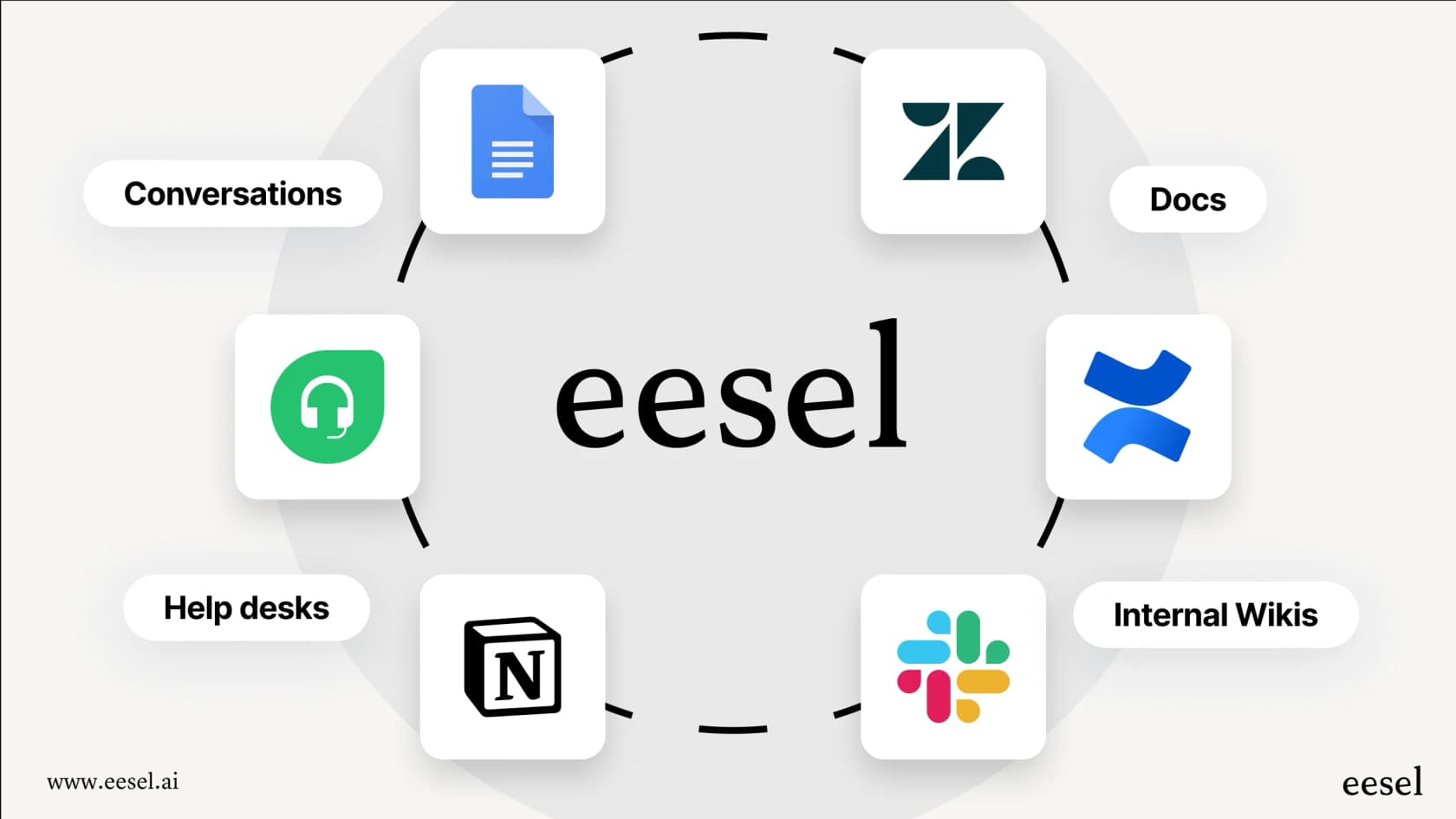
Great automation runs on comprehensive knowledge. The problem with traditional Macro Actions is that they’re stuck inside your helpdesk, but the answers your customers need often live somewhere else entirely.
Modern AI breaks down these silos. You can connect eesel AI to your entire knowledge ecosystem, including internal wikis in Confluence, project docs in Notion, and shared files in Google Docs. This gives your AI all the context it needs to resolve issues accurately without having to escalate to a person.
Step 3: Test your automations safely first
One of the biggest fears with automation is the risk of it going wrong and creating a terrible customer experience. Launching a new workflow without proper testing is a recipe for disaster.
This is where a simulation environment is a lifesaver. For example, eesel AI lets you build your AI agent and test it on your own historical ticket data. You can see precisely how it would have replied and which actions it would have taken across hundreds of real past tickets, all without any risk to your live customers. This allows you to fine-tune its behavior, adjust its prompts, and deploy it with complete confidence.
Step 4: Start small and roll out with confidence
You don’t have to automate 100% of your tickets on day one. In fact, you probably shouldn’t. The best approach is a phased rollout where you start with one channel or one simple ticket type and expand from there.
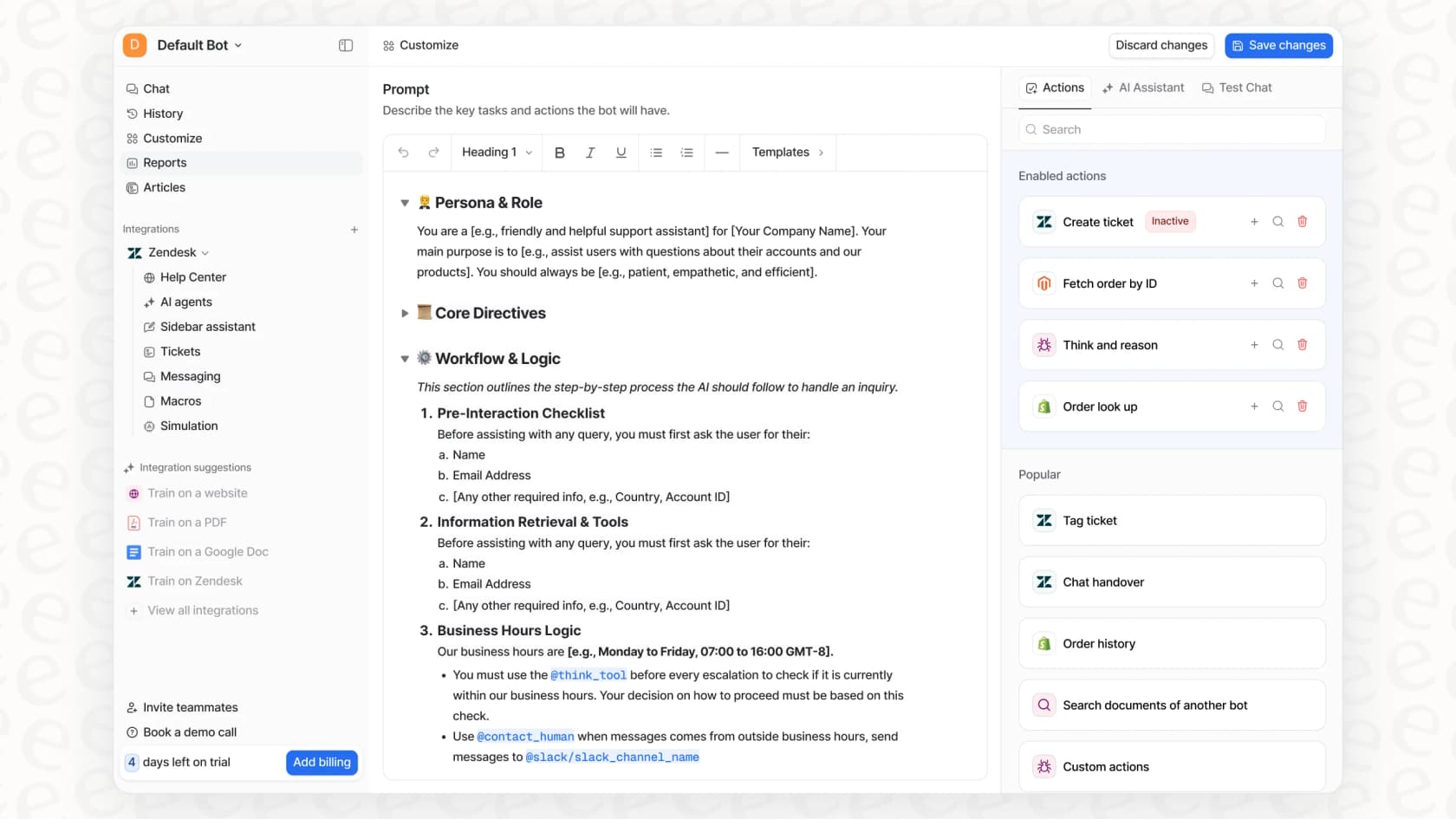
With eesel AI, you get the granular controls you need for a safe rollout. You can configure your AI agent to handle only specific types of tickets (like password resets) and have it confidently escalate everything else to a human agent. This gives you complete control over the scope of automation as you build trust in the system and see its impact on your metrics.
Go beyond Macro Actions with intelligent AI actions
Macro Actions have been a trusty tool for support teams for years, saving a few seconds here and there. But they’re a solution from a different era. They’re reactive, rigid, and ultimately, they still rely on your agents to do the heavy lifting of figuring out what a customer actually needs.
Today's support teams need automation that is contextual, dynamic, and always learning. They need a system that doesn’t just follow rules but understands intent.
It's time to stop spending hours managing hundreds of brittle Macro Actions and start empowering your team with tools that learn from their expertise. eesel AI can help turn your best agents' resolutions into an autonomous system that handles repetitive work 24/7, freeing up your team for the conversations that truly matter.
Frequently asked questions
Could you explain what Macro Actions are in the context of customer support?
Macro Actions are predefined sequences of tasks an agent can trigger with a single command to automate repetitive helpdesk chores. They consolidate multiple manual steps, such as tagging, assigning, and replying, into one streamlined action.
What are the main limitations of traditional Macro Actions that the blog mentions?
Traditional Macro Actions are limited because they are reactive, rigid, and lack context, meaning they can't understand customer intent beyond keywords. They also require manual selection, can become high-maintenance, and are siloed from external systems.
How do AI-powered systems enhance or evolve the concept of Macro Actions for better support?
AI-powered systems use natural language understanding to interpret customer intent, automatically deciding and triggering the correct Macro Actions. This allows for intelligent triage, dynamic responses with real-time data, and continuous self-learning from historical data.
What's the best way to identify areas for improvement when starting to implement new Macro Actions?
The best way to identify areas for improvement is to analyze your most frequent and repetitive ticket types. Tools like eesel AI's ticket trends skill can surface your most common ticket themes from past tickets.
Is it possible for modern Macro Actions to pull information from multiple external systems?
Yes, modern AI-powered Macro Actions can connect to and pull information from your entire knowledge ecosystem, including internal wikis, project docs, and other platforms like Shopify or Notion. This breaks down data silos for more comprehensive issue resolution.
How can I ensure that new Macro Actions are tested thoroughly before they go live with customers?
You can ensure safe implementation by utilizing a simulation environment that allows you to test new Macro Actions on historical ticket data. This lets you fine-tune behavior and adjust prompts without any risk to live customers.
What are the primary benefits of transitioning from basic scripts to intelligent Macro Actions?
Transitioning to intelligent Macro Actions offers benefits like significantly reduced manual workload for agents, more personalized and contextual customer responses, and proactive issue resolution. It frees up your team to focus on complex, high-value interactions.