Support teams today face a familiar dilemma. Customer expectations keep rising while ticket volumes grow. Your agents spend half their day answering the same questions, leaving complex issues waiting in the queue.
AI customer support automation has evolved far beyond the rigid chatbots of years past. Today's tools can understand context, take actions in your systems, and resolve tickets from start to finish without human intervention. But not all AI support tools are created equal. Some merely deflect tickets with FAQ links. Others truly automate the work.
This guide compares the 7 best AI customer support automation platforms for 2026. We'll look at what each tool actually does, how much it costs, and which teams it's best suited for. If you're looking for a solution that learns from your existing data, eesel AI offers a unique approach: you hire it as a teammate rather than configure it as a tool.
What is AI customer support automation?
AI customer support automation uses machine learning and generative AI to handle repetitive support tasks, assist human agents, and provide customers with fast, accurate self-service.
Modern AI support tools fall into three categories:
-
Autonomous AI agents handle tickets end-to-end. They read incoming requests, look up information in your systems, draft responses, take actions like processing refunds, and close resolved tickets.
-
AI copilots work alongside your human agents. They draft reply suggestions, summarize long conversation threads, and surface relevant knowledge base articles in real time.
-
AI triage works behind the scenes. It automatically tags incoming tickets, routes them to the right team, detects spam, and keeps your queue organized.
The difference between old chatbots and modern AI is the difference between deflection and resolution. A basic chatbot might link to a help article. An AI agent can check an order status, process a return, and confirm the refund all in one conversation.
How we evaluated these tools
To create this list, we focused on what actually matters when deploying AI in a real support environment:
-
Ease of setup: How quickly can you go live? Does the AI learn from your existing help center and tickets, or do you start from scratch?
-
Automation depth: Can the tool only answer questions, or can it actually take actions in your systems?
-
Integration ecosystem: Does it connect to the help desk, CRM, and e-commerce platforms you already use?
-
Pricing transparency: Are costs predictable, or do they scale in ways that surprise you?
-
Testing capabilities: Can you verify AI performance on past tickets before it ever talks to a customer?
Comparison at a glance
| Tool | Best For | Pricing Model | Starting Price | Key AI Feature |
|---|---|---|---|---|
| eesel AI | Teams wanting a collaborative AI teammate | Per interaction | $299/mo (1,000 interactions) | Autonomous resolution + agent assistance |
| Zendesk AI | Enterprise teams needing comprehensive WFM | Per agent + add-ons | From $115/agent/mo (Copilot included) | Agentic AI with workforce management |
| Intercom | SaaS companies in the Intercom ecosystem | Per seat + per resolution | $29/seat/mo + $0.99/resolution | Conversational AI with high accuracy |
| Freshdesk Freddy AI | Global teams needing language support | Per agent + add-ons | From $55/agent/mo (AI features included) | Vertical AI with 60+ languages |
| Kustomer | Companies wanting CRM + support unified | Per seat (8 min) | $89/user/mo (8-seat min) | AI fueled by 360-degree customer view |
| Gorgias | Shopify stores | Per ticket volume | $50/mo (300 tickets) + $0.90/resolution | E-commerce focused shopping assistant |
| Crisp | Small teams wanting flat pricing | Per workspace | $45/mo (4 seats included) | No-code AI with MCP integration |
The 7 best AI customer support automation tools
1. eesel AI
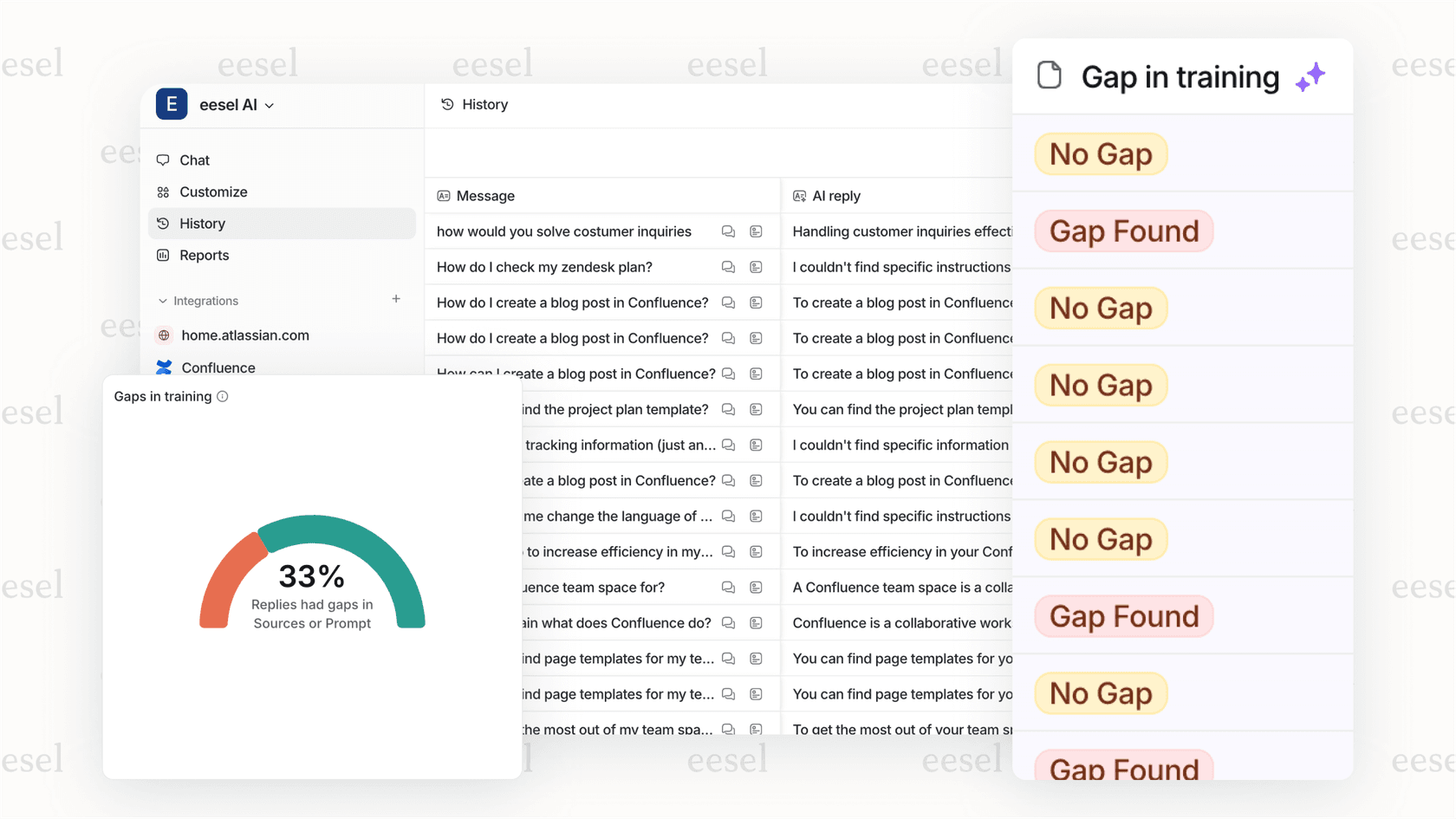
eesel AI approaches customer support differently. Instead of configuring a tool, you hire an AI teammate. Connect eesel to your help desk and knowledge sources with one click, and it reads your past tickets, help articles, and internal docs to learn your business in minutes.
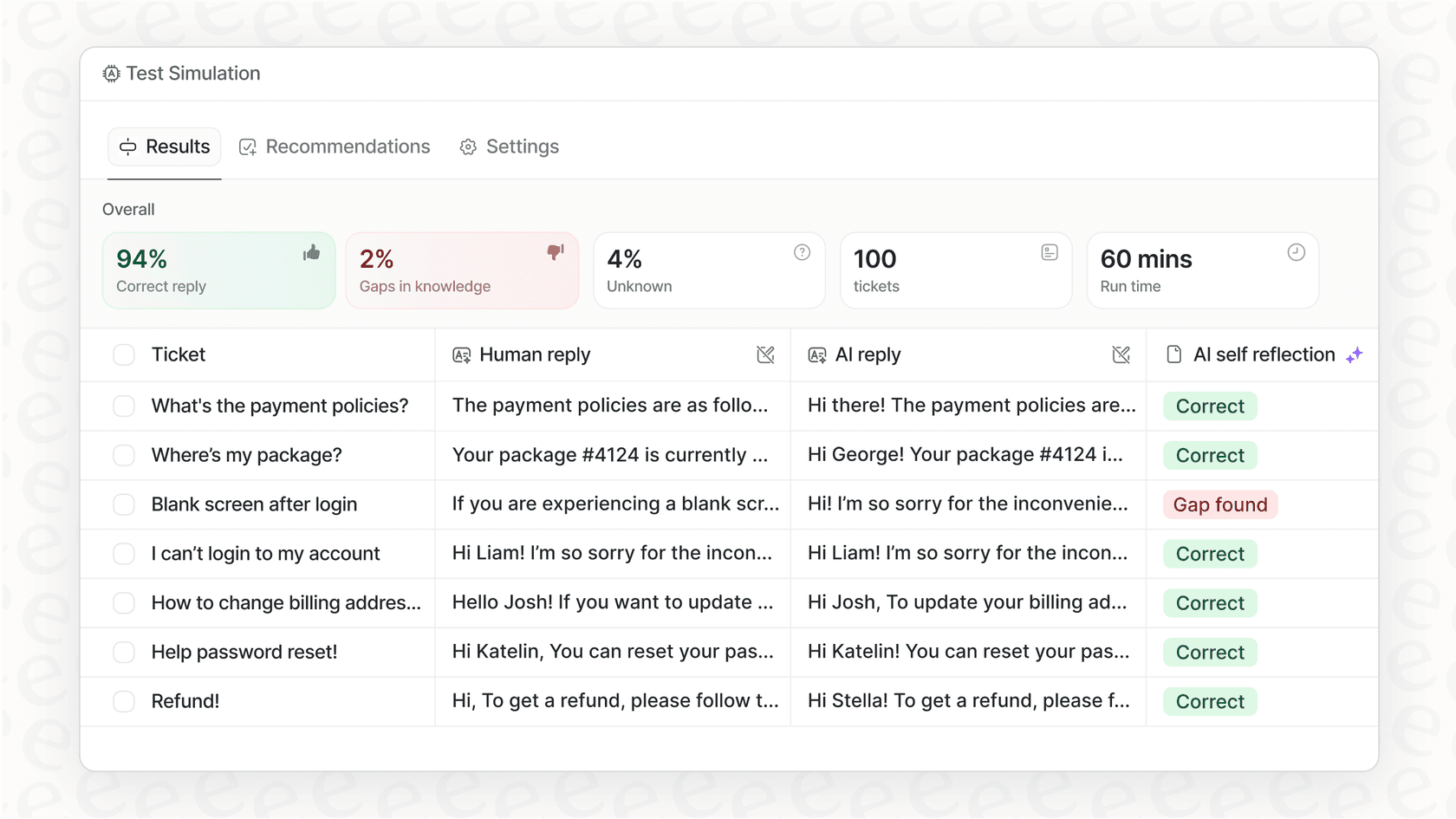
This lets you roll out gradually. Start with eesel as an AI Copilot that drafts replies for your agents to review. Once you're confident in its performance, promote it to a fully autonomous AI Agent that handles tickets end-to-end. You can even run simulations on past tickets before eesel talks to a real customer.
Key features:
- Learns from past tickets, help center, and connected docs (Confluence, Google Docs, Notion)
- One-click integrations with Zendesk, Freshdesk, Intercom, Gorgias, and 100+ tools
- Plain-English controls for setting escalation rules and boundaries
- AI Triage for automatic tagging, routing, and queue management
- Simulation mode to test on historical tickets before going live
Pricing:
| Plan | Monthly | Annual | Interactions | Key Features |
|---|---|---|---|---|
| Team | $299 | $239 (20% off) | 1,000/mo | Website/docs training, Copilot, Slack, reports |
| Business | $799 | $639 (20% off) | 3,000/mo | + Past tickets, MS Teams, AI Actions, bulk simulation |
| Custom | Contact | Custom | Unlimited | Multi-agent orchestration, custom integrations |
Pros:
- Fastest setup: learns your business in minutes, not months
- No per-agent fees: interaction-based pricing scales with usage
- Safe rollout: simulate on past tickets before going live
- Simple controls: plain English instructions, no complex workflows
Cons:
- Dedicated AI platform (not an all-in-one suite with built-in workforce management)
- Best for teams already using a help desk (Zendesk, Freshdesk, etc.)
Best for: Teams wanting collaborative AI that learns from existing data and can be deployed progressively from supervised to autonomous.
2. Zendesk AI

Zendesk is the established leader in customer service platforms, trusted by over 100,000 companies. Their AI is part of a comprehensive suite that includes advanced ticketing, workforce management, and omnichannel support.
Zendesk AI is "agentic," meaning it's built to handle complex conversations across email, chat, voice, and social. The platform excels at scale, with sophisticated routing, forecasting, and quality management tools for large support operations.
Key features:
- AI agents for cross-channel query resolution
- Intelligent triage and automated routing
- AI Copilot for real-time agent assistance
- Workforce management and forecasting
- Conversation analytics and QA monitoring
- 1,000+ pre-built integrations
Pricing:
| Plan | Price (Annual) | AI Features |
|---|---|---|
| Suite Team | $55/agent/mo | Basic AI included |
| Suite Growth | $89/agent/mo | Enhanced AI |
| Suite Professional | $115/agent/mo | Advanced AI |
| Suite Enterprise | Custom | Full AI suite |
AI Add-ons:
- Copilot: Additional $50/agent/mo
- Advanced AI: Varies by plan
Pros:
- Mature, comprehensive platform with extensive ecosystem
- Strong workforce management and forecasting tools
- Gartner Magic Quadrant Leader
- Omnichannel support including voice
Cons:
- Complex pricing with multiple AI add-ons
- AI features require higher-tier plans
- Steeper learning curve for full customization
Best for: Large enterprises needing comprehensive workforce management and mature reporting capabilities.
3. Intercom
Intercom is known for conversational excellence. Its AI solution delivers human-quality, personalized responses across multiple channels. According to Intercom's marketing materials, their AI can resolve up to 82% of support volume autonomously, though real-world results typically vary based on use case complexity.
Intercom works best within its own ecosystem, where it has access to rich customer context and seamless handoff capabilities. It's particularly strong at complex, multi-turn conversations that require understanding nuance and maintaining context.
Key features:
- AI Agent for autonomous resolutions
- AI Copilot for agent assistance
- Omnichannel messaging (chat, email, in-app)
- Proactive support with in-app messages
- No-code workflow automation
- 45+ languages supported
Pricing:
| Component | Price |
|---|---|
| Base Plan (Start) | $29/seat/mo (annual) |
| AI Agent | $0.99 per resolution |
| AI Copilot | Usage-based add-on |
Pros:
- Highly accurate, human-quality responses
- Excellent context preservation during handoffs
- Strong at complex, conversational queries
- Seamless within Intercom ecosystem
Cons:
- Expensive at scale (per-resolution pricing adds up quickly)
- Best experience requires staying within Intercom
- Budgeting can be unpredictable with variable costs
Best for: SaaS and digital-first companies already using Intercom who prioritize conversational quality.
4. Freshdesk (Freddy AI)
Freshdesk's AI solution, Freddy, comes in two forms: a customer-facing agent and an internal copilot for your team. It's built for omnichannel deployment across email, chat, social media, and voice.
Freddy offers "Vertical AI Agents" with pre-built workflows for specific industries like e-commerce and travel. This can accelerate time-to-value for teams that fit those verticals. With support for 60+ languages, it's a strong choice for global operations.
Key features:
- Freddy AI Agent for customer-facing automation
- Freddy AI Copilot for agent assistance
- Auto-triage for automatic tagging and routing
- Vertical AI with industry-specific workflows
- Omnichannel support (email, chat, social, voice)
- Smart suggestions based on past interactions
Pricing:
| Plan | Price (Annual) | Notes |
|---|---|---|
| Growth | $29/agent/mo | Base plan |
| Pro | $69/agent/mo | More features |
| Enterprise | $109/agent/mo | Full feature set |
AI Add-ons:
- Freddy AI Copilot: +$29/agent/mo
- Freddy AI Agent: $49 per 100 sessions (after 500 free)
Pros:
- Vertical AI agents for specific industries
- 60+ languages for global teams
- Mature ecosystem with extensive marketplace
- ITSM-ready via Freshservice integration
Cons:
- Modular pricing can become expensive
- Complex feature tiers to navigate
- AI capabilities split across multiple add-ons
Best for: Global teams needing broad language support and companies wanting industry-specific workflows.
5. Kustomer
Kustomer's approach centers on its unified CRM. By combining customer data from every touchpoint into a single timeline, Kustomer fuels its AI with rich context that enables highly personalized conversations.
The platform includes an AI Agent Studio where non-technical teams can build custom AI agents for specific workflows. This no-code approach puts AI customization in the hands of business users.
Key features:
- AI agents for customers with CRM context
- AI agents for reps (internal copilot)
- AI Agent Studio for no-code custom agents
- Unified CRM with 360-degree customer view
- Omnichannel support (chat, email, social, voice)
- Intelligent routing and workflow automation
Pricing:
| Plan | Price | Requirements |
|---|---|---|
| Enterprise | $89/user/mo (annual) | 8-seat minimum |
| AI Agents for Customers | $0.60 per engaged conversation | Add-on |
| AI Agents for Reps | Included in Enterprise | - |
Pros:
- CRM-native AI with rich customer context
- No-code AI Agent Studio for custom agents
- Single timeline view of all customer interactions
- Highly personalized automation
Cons:
- 8-seat minimum creates barrier for smaller teams
- Higher per-seat cost than many competitors
- Learning curve for full platform utilization
Best for: Mid-market to enterprise companies wanting CRM and support unified in one platform.
6. Gorgias
Gorgias is built specifically for e-commerce, with deep Shopify integration that lets the AI take real actions like editing orders and processing returns. It functions as both a support tool and a sales assistant.
The platform excels at handling the most common e-commerce questions: "Where is my order?" (WISMO), return requests, and product inquiries. It can also proactively recommend products to customers, turning support interactions into revenue opportunities.
Key features:
- AI Shopping Assistant for support and sales
- Order management (edit, cancel, refund) in Shopify
- Product recommendations to drive conversions
- WISMO automation for order status questions
- Deep Shopify integration with real-time data
- Revenue attribution for support interactions
Pricing:
| Plan | Monthly Price | Ticket Limit |
|---|---|---|
| Basic | $50/mo | 300 tickets |
| Pro | $300/mo | 2,000 tickets |
| Advanced | $750/mo | 6,000 tickets |
| Enterprise | Custom | Custom |
AI Add-on:
- AI Agent: $0.90 per resolved conversation
Pros:
- Purpose-built for e-commerce workflows
- Converts support into revenue generation
- Deep Shopify actions (not just lookups)
- Handles high WISMO volume efficiently
Cons:
- Primarily designed for e-commerce (less flexible for other industries)
- Per-resolution AI pricing adds to base cost
- Best features require Shopify integration
Best for: Shopify stores of all sizes wanting to turn support into a sales channel.
7. Crisp
Crisp offers a versatile AI support platform with a flat pricing model that charges per workspace rather than per agent. This makes costs predictable as your team grows.
The platform emphasizes no-code automation with a visual workflow builder. It supports 8+ channels including WhatsApp, Instagram, Telegram, and SMS alongside traditional email and chat. Crisp also offers MCP server integration for connecting to tools like n8n, Make, and Zapier.
Key features:
- AI Agent for autonomous conversations
- AI Copilot for agent assistance
- No-code visual workflow builder
- 8+ channels (chat, email, WhatsApp, Instagram, etc.)
- Knowledge base with AI-powered search
- MCP server for third-party integrations
Pricing:
| Plan | Monthly Price | Seats | AI Credits |
|---|---|---|---|
| Free | $0 | 2 | None |
| Mini | $45/mo | 4 | ~90 conversations ($5 credit) |
| Essentials | $95/mo | 10 | ~450 conversations ($25 credit) |
| Plus | $295/mo | 20+ | ~1,350 conversations ($75 credit) |
Pros:
- Flat workspace pricing (not per agent)
- Strong no-code automation capabilities
- 8+ channels supported
- Affordable entry point with free tier
Cons:
- AI capabilities less advanced than enterprise competitors
- AI credits limited on lower tiers
- Fewer native enterprise integrations
Best for: Small to mid-size teams wanting predictable flat pricing and simple no-code automation.
How to choose the right AI support tool for your team
With seven solid options, how do you pick? Start by asking these questions:
What's your primary goal? If you want full automation of routine tickets, look for tools with autonomous AI agents like eesel AI or Intercom. If you just want to speed up your agents, an AI copilot might be sufficient.
What help desk are you using? Some tools work best within specific ecosystems. Gorgias is purpose-built for Shopify. eesel AI integrates with all major help desks including Zendesk, Freshdesk, and Intercom.
Can you test before going live? The safest way to deploy AI is to simulate its performance on past tickets first. Not all platforms offer this. eesel AI's simulation capability lets you verify quality before customers see it. Learn more about AI customer support automation solutions and explore our guide to the top AI customer service tools.
What's the real total cost? Per-agent pricing scales linearly with team size. Per-resolution pricing can surprise you at high volume. Calculate costs at your actual ticket volume, not just the starting price.
How fast do you need to launch? Some tools require months of configuration and training. Others, like eesel AI, learn from your existing data in minutes with no manual training required.
Getting started with AI customer support automation
The teams seeing the best results with AI support automation follow a similar pattern:
-
Start with a clear use case. Pick one type of ticket to automate first, like order status lookups or password resets. Master that before expanding.
-
Choose a tool that learns from your data. The best AI tools don't force you to start from scratch. They read your past tickets and help center to understand your business.
-
Test before you deploy. Run simulations on historical tickets. Measure resolution rates and quality before the AI ever talks to a customer.
-
Begin supervised, then level up. Start with AI drafting replies for agent review. Once performance is solid, promote it to send replies directly.
-
Monitor and iterate. AI isn't "set and forget." Review conversations, correct mistakes, and update instructions as your business evolves.
If you're looking for an AI teammate that learns from your existing data and lets you deploy gradually, try eesel AI free. You can simulate on your past tickets, see exactly how it would perform, and roll out only when you're confident. For a personalized walkthrough, book a demo with our team.