


The one-hour rule most teams miss
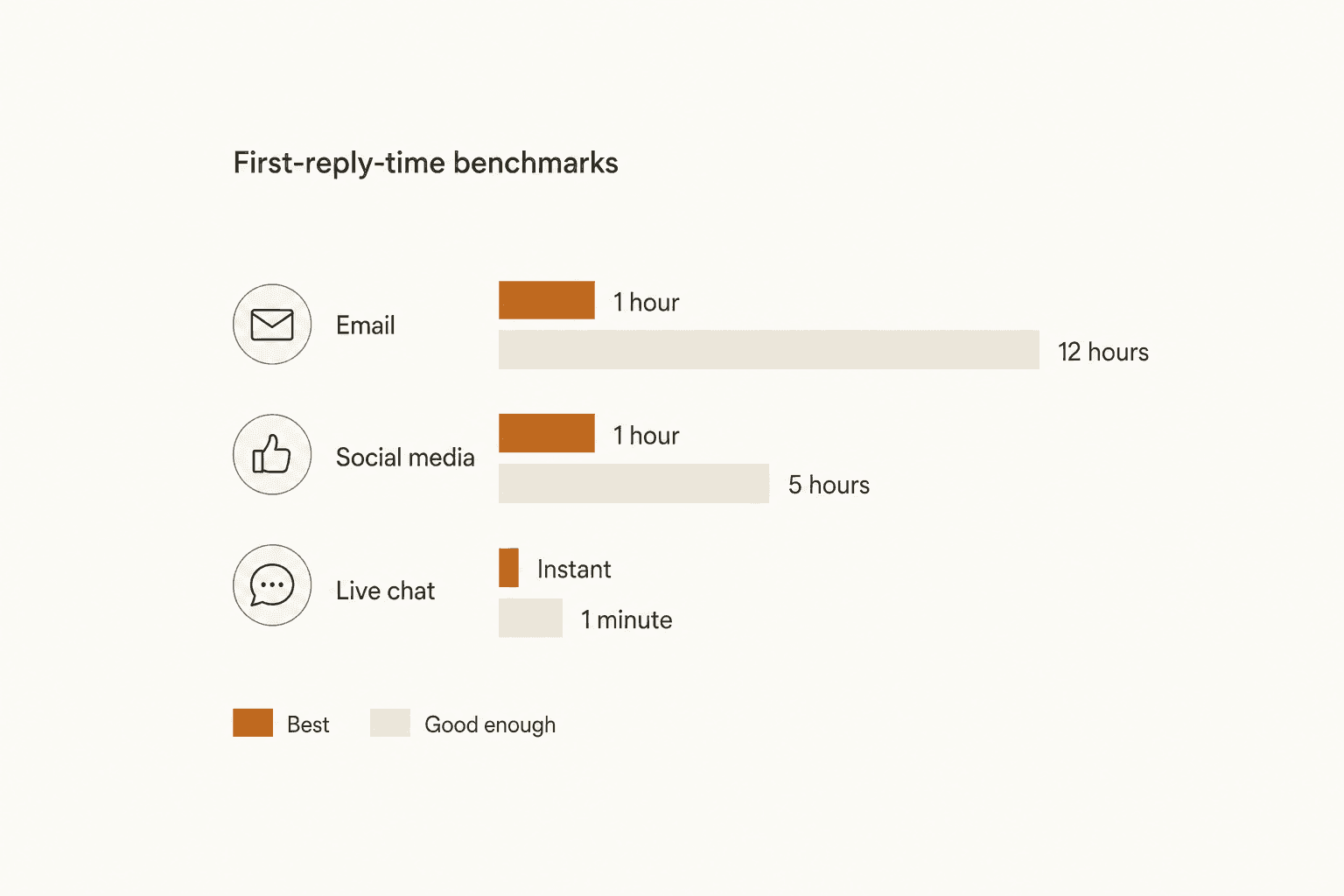
Templates get blamed for a lot of things that are actually a speed problem. Zendesk's own benchmark data (sourced from Toister Performance Solutions, Sprout Social, and Call Centre Helper) puts email's best first-reply time at 1 hour or less, with 4 hours as "better" and 12 hours as the floor of acceptable. Help Scout's own benchmark table lands on the identical number from a different set of sources (Clearly Rated, Timetoreply, Tidio): 1 hour best-in-class, 12 hours "good enough."
| Channel | Best in class | Good enough |
|---|---|---|
| 1 hour | 12 hours | |
| Social media | 1 hour | 5 hours |
| Live chat | Under 1 minute | 1.5 minutes |
Two vendors that compete for the same customers converging on the exact same number is itself a signal. And the stakes behind that number are real: HubSpot's research found that 90% of customers rate an "immediate" response as essential or very important, and 60% of them define "immediate" as 10 minutes or less. Separately, HubSpot's State of Customer Service report found 67% of consumers expect a support ticket resolved within 3 hours.
The cost of missing that window compounds. Zendesk's Benchmark data shows 73% of consumers will switch to a competitor after multiple bad experiences, and more than half will switch after just one. Coveo's research (cited in the same Zendesk roundup) found 56% of unhappy customers won't even bother complaining, they just leave quietly. On the upside, Salesforce research found 88% of customers are more likely to buy again after a good service experience. A clear SLA for first response, tracked and reported on, does more for your numbers than any single template rewrite, especially once first-response automation is handling the acknowledgement instantly. If your team tracks this as one of its core customer service KPIs, the same benchmark table above is the one to hold it against. For the social channel specifically, our social media response examples cover wording that doesn't carry over cleanly from email.
Why canned responses get a bad name
Search "canned response" on any support forum and you'll find agents complaining about the exact same thing customers complain about: replies that sound like nobody wrote them. This isn't a new problem. Fifteen years ago, on a Hacker News thread about live-chat support, a commenter who used to run a competing chat product laid out the split precisely:
"I used to work for a competitor of Olark's and I can confirm this happens all the time. What's funny is that there are two types of companies: 1) Trusts their well-paid chat operators and allows them to type freely. 2) Force-feeds their operators 'canned responses' (as are used in email support) and doesn't encourage them to move off script. #2 is always what marketing departments want, but it was always worse for the customer. The operator's response was too quick, there were no misspellings, and they used PR speak that normal humans don't use."
That script-over-judgment pressure is also a big piece of why agent burnout shows up so often on support teams: reading from a script all day is its own kind of exhausting, on top of the ticket volume. The same tension shows up on Reddit today, in a thread specifically about the phrasing support teams reach for on autopilot:
"Ever more in customer service chat and email I see those canned empathy phrases, such as 'I understand how this can be upsetting and I feel for you.'"
-- Canned empathy phrases in chat & email have gotta go, r/CustomerService
But the same forum has the counter-argument too, and it's worth taking seriously. A different commenter, arguing against a "no-reply" email culture, made the case that a templated reply beats no reply:
"The best way to handle this would be a system where the CS agents can see the email and select a pre-defined response with a single click. This is going to cost you almost nothing. Canned responses aren't ideal, but they're better than nothing, and they come from an actual human being who can deal with further messages if needed."
Both things are true at once. A template is a starting point, not a script, and the difference between the two is entirely in whether the agent still edits the one or two lines that are actually specific to this customer. Help Scout's own template library makes that explicit in its closing line: "There is no single 'best' answer in customer service... use them as a foundation that you can adapt to your situation, in your own voice and tone." Every template below is written to be edited, not pasted.
14 templates for the emails that eat your day
Each one follows the same shape: the scenario, why it's tricky, and wording you can lift and edit. Treat every bracketed placeholder as mandatory, not optional, that's the part that keeps the reply from sounding like everyone else's.
Order and shipping
1. Proactive shipping status update. Sent before the customer has to ask. Zendesk's template library frames this as one of the highest-leverage templates in the whole set, because it converts a "where is my order" ticket into a non-event.
"Hi [Customer Name], just wanted to give you a quick update on your order. It's currently [status] and expected to arrive by [date]. You can track it in real time here: [tracking link]."
2. Order cancellation response. Confirms the cancellation was processed per policy and closes the loop on refund timing in the same message, so it doesn't turn into a second ticket. High-volume stores handle this exact category first when they start automating refunds, since the policy logic behind it rarely changes ticket to ticket.
Money conversations
3. Refund request response. Help Scout's guidance here is the sharpest in its library: dig for the underlying cause before defaulting to yes or no, since the refund often becomes secondary once the real issue is addressed.
"I'm sorry to hear you're not happy with our product. While I'm unable to offer a refund (please see our terms and conditions here), I can offer a billing extension, store credit, or another alternative."
If your policy allows a real refund, our guide on AI and refund handling covers how to route the easy cases automatically and keep humans on the judgment calls.
4. Discount or price-objection response. The instinct is to cave. Help Scout's recommended approach instead: hold the price, pivot to value, and offer a legitimate lever (annual billing, a lower tier) instead of an ad hoc discount that trains customers to always ask.
5. Price increase notice. Transparency plus a grandfather clause does most of the work here.
"I'm reaching out to let you know that, effective [date], the price of [Product/Service Name] will increase from [current price] to [new price]. All purchases made before [date] will be honored at the previously agreed-upon price."
6. Renewal reminder. Zendesk's own recommendation: send this 90 to 180 days before the renewal date, early enough that it reads as a heads-up, not a hard sell.
When things go wrong
7. Sincere apology plus a concrete fix. A form apology stops at "sorry for the inconvenience." A real one names the specific process change that follows. See our full breakdown in how to write an apology message to a customer.
8. Outage or service interruption notice. Proactive, with a link to a live status page so the customer isn't left refreshing their inbox.
9. De-escalating an angry customer. This is the template most teams get wrong by trying to solve the problem before acknowledging the emotion. Zendesk's 11-tip framework for these emails leads with sentiment monitoring and closes with a mandatory follow-up regardless of outcome. Help Scout's version is more direct about the emotional beat:
"I can totally appreciate how frustrating it is to be waiting for your delivery. I wish there were a way for us to get it to you sooner."
For the full escalation path once an email like this can't be resolved in one reply, see how to deal with angry customers and building a ticket escalation process.
10. Access request denial. When a request fails a security check, the recommended framing (per Help Scout) is to position the team as a protector, not a blocker, and lean on a published policy rather than an agent's personal judgment call.
Keeping the relationship warm
11. New customer onboarding message. Sets the tone for the whole relationship in one email, which is why generic copy hurts here more than anywhere else in this list. Our guide on generating onboarding emails with AI covers how to personalize this at scale without it reading like a mail merge.
12. Feature request decline. Honesty beats false hope. Help Scout's recommended wording avoids ever promising a date you can't keep:
"While that feature isn't currently in our development roadmap, we are working on big improvements that will be helpful for the majority of our customers."
13. Stalled conversation handoff. For the ticket that's gone in circles for three replies. Bringing in a colleague with fresh eyes, framed honestly, resets the conversation instead of escalating the frustration:
"It feels like we're a little bit stuck here, and that must be frustrating for you. To help get us back on track, I'm going to bring in my colleague, [Name], and ask him to review our conversation so far."
14. Feedback or review request. Sent once enough time has passed that the customer has actually used the thing you're asking about. Pair this with a real customer feedback survey rather than a single star-rating ask if you want usable detail back.
How to keep any template from sounding canned
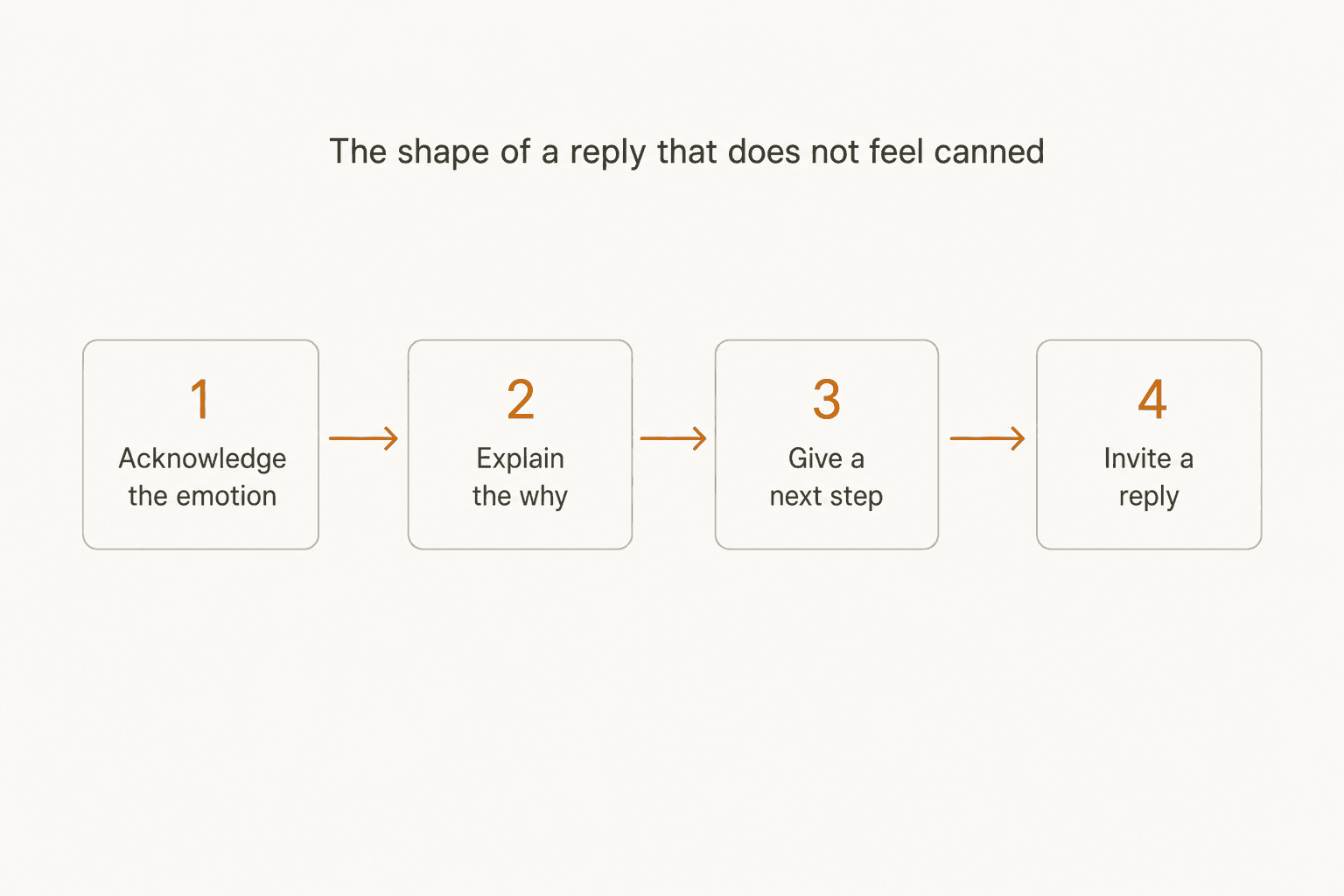
The structure underneath every template above is the same one Help Scout uses when it annotates its own example emails with footnotes explaining why each line is phrased the way it is. Strip the specifics away and four moves remain, in this order: acknowledge what the customer is actually feeling, explain the reasoning behind whatever you're about to say, give them a concrete next step, and invite a reply if anything's unclear. Skip the first step and even a technically correct answer reads as cold. Skip the last step and the customer has no way to tell you the template missed something.
The practical habit worth building on top of that structure: every template should ship with a documented "alternative" for when it doesn't fit, the way Help Scout pairs each of its 13 templates with a fallback option (escalate, switch channel, adjust for a high-value account). A template with no escape hatch is the one that gets pasted verbatim under deadline pressure, which is exactly the failure mode the Hacker News and Reddit quotes above are describing. This is also where automating canned responses with AI tends to work better than a static doc: the fallback option gets chosen per ticket instead of skipped under time pressure.
Templates are a start. Your last 500 tickets are the finish line
Every template on this page came from a vendor's general library, built for every customer they have, not yours specifically. The fastest way past that ceiling isn't a bigger template library, it's building replies from the tickets your own team has already resolved. That's the actual mechanism behind eesel's helpdesk agent: it learns from your team's past tickets and help docs on day one, so a draft for "where's my order" already matches how your team phrases it, not a generic script.
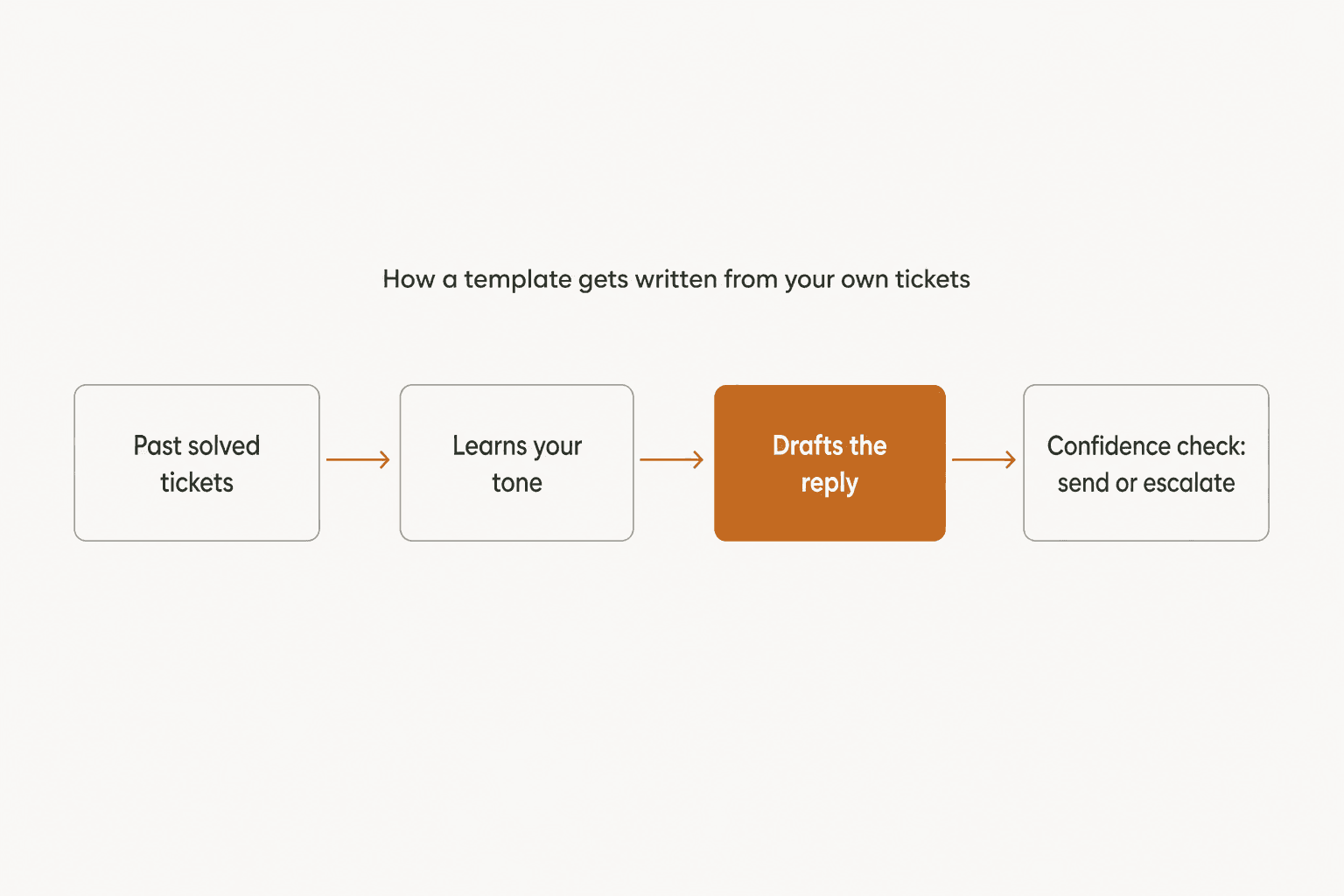
Two details matter more than the drafting itself. First, confidence-based routing: a low-confidence draft goes to a human as a suggestion instead of firing off automatically, which is the guardrail that stops a templated reply from confidently answering the wrong question. Second, simulation mode: you can run the agent against your own past tickets before it ever touches a live conversation, so you see exactly which template categories it nails and which ones still need a human edit, before a real customer is on the other end. One eesel customer running roughly 500 tickets a day across a multi-brand storefront told us their volume was dominated by the same three requests, refunds, unsubscribes, and order tracking, which is precisely the repetitive middle of this list where a learned template earns back the most time.
Try eesel for customer service email
If your team is still maintaining a shared doc of copy-paste templates, the honest next step isn't a better doc, it's an AI teammate that already knows your policies because it learned them from your own tagged, solved tickets. eesel connects to the helpdesk you already run, whether that's Zendesk, HubSpot, Gorgias, or Front, and drafts in the same voice your best agents already use for the refund emails, the angry-customer emails, and the "where is my order" emails that make up most of a support inbox. Pricing is one fixed monthly price, starting at $299 for 500 credits (1 credit per ticket or chat), with no seat fees and a free plan with 100 credits to test it against your own backlog first. See the full breakdown on the pricing page.