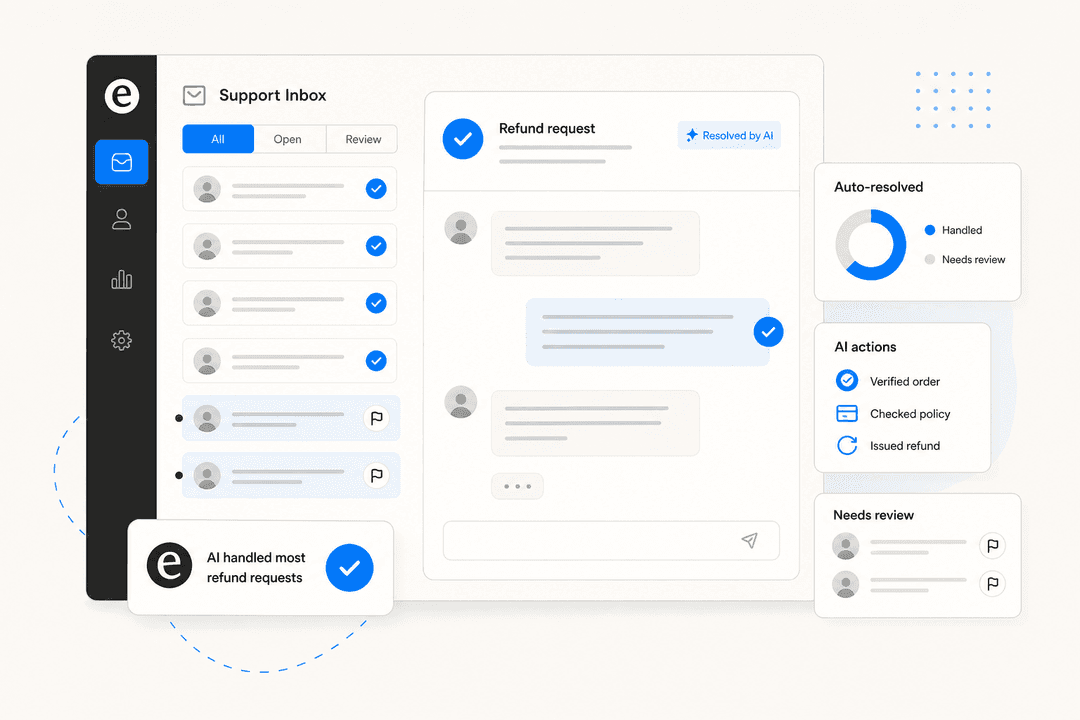
Why refunds are the right place to start with AI
I work the support queue, and I can tell you the refund and returns pile is where agents quietly burn out. It's not hard work, it's repetitive work: the same order lookup, the same policy check, the same copy-paste reply, a few hundred times a week. During a sale or a post-holiday return wave it balloons, and the truly tricky tickets (the angry customer, the lost parcel, the chargeback threat) get buried under routine refund requests that anyone could have closed.
That's the case for automation, and it's a strong one. But here's the thing I'd want you to hear before you switch anything on, because I've seen it sink a rollout.
We spent a sales call with a CX lead at a DTC supplements brand running about 7,000 tickets a month on Gorgias and Shopify, around 30,000 orders a month, and her objection was the whole ballgame:
"The AI will never be able to answer 100% of the questions, but if it tries and just answers 'sorry I don't know this,' I cannot go and check all my 7,000 tickets to see if the AI actually made a good answer. I need an AI who is only handling the tickets that it's confident to handle and all the other ones, leave them alone."
She's right, and that one sentence is the entire design brief for refund automation. The goal isn't an AI that touches every refund. It's an AI that touches only the refunds it should, and knows when to back off. Get that wrong and you've either created a fraud hole or a pile of "sorry I don't know" replies you now have to re-check by hand. Get it right and you've handed your team back hours a day.
How AI refund automation actually works
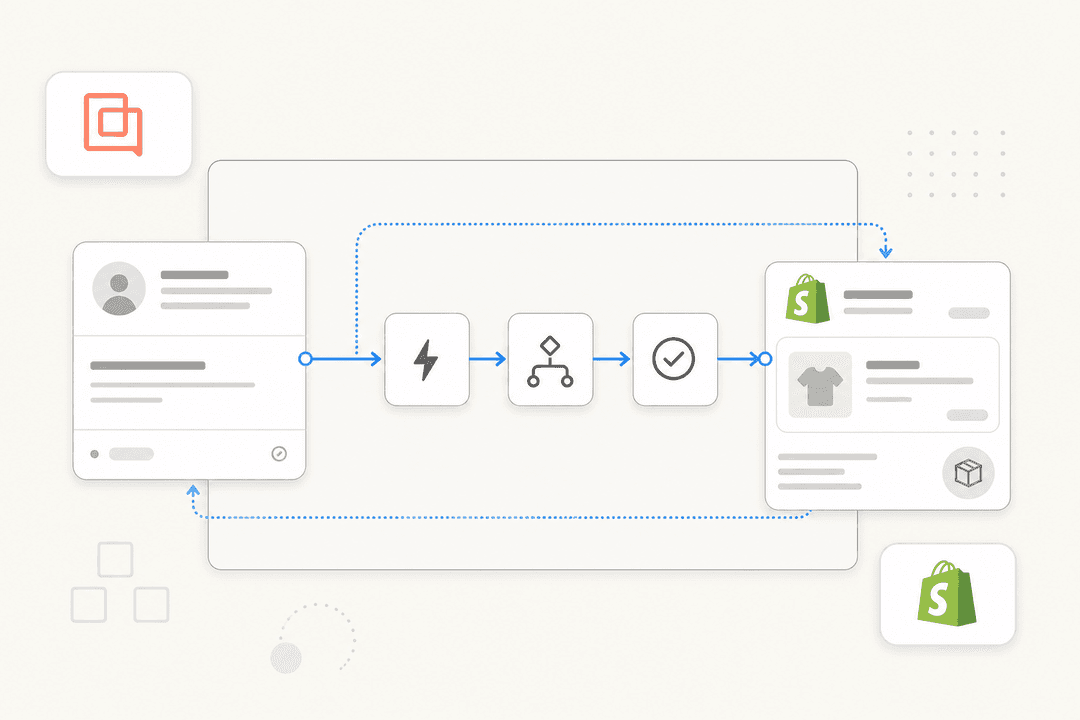
Under the hood it's less magical than it sounds. An AI agent for customer service connects to two things: your store (Shopify, WooCommerce, Magento) and your helpdesk (Gorgias, Zendesk, Freshdesk, Help Scout). When a refund request lands, it runs a short pipeline.
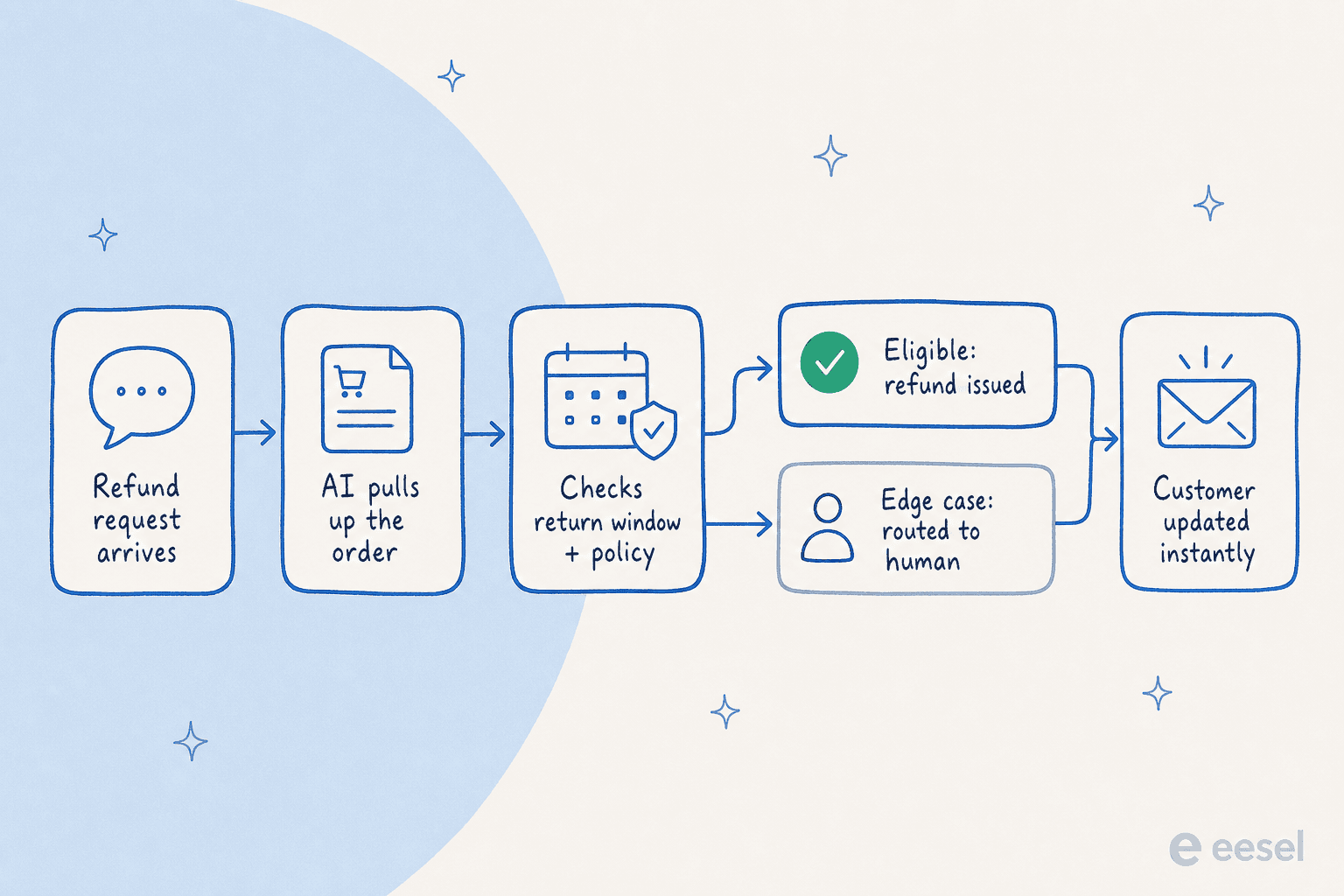
- It reads the request in the customer's own words, in whatever language they wrote it (eesel handles 80+ languages out of the box, which matters once you sell internationally).
- It pulls up the order through the Shopify integration, so it knows the order date, the items, the amount, and the fulfilment status without anyone copy-pasting an order number.
- It checks your policy, the one you wrote, against the order: is it inside the return window, is the item eligible, is there an open dispute.
- It decides: if everything checks out and the agent is confident, it issues the refund and replies. If anything is off, it drafts a reply or routes the ticket to a human instead.
- It updates the customer instantly, which is most of what they actually wanted, a clear answer now rather than a ticket number and a 24-hour wait.
The order-data step is the part that separates real automation from a chatbot that just reads your FAQ. If the AI can't see the order, it can only ever answer "here's our policy," and the customer is back to waiting on a human. That's why the order webhook and action layer matters more than the chat widget on top of it.
The part everyone gets wrong: what to automate vs keep human
This is the bit the supplements CX lead nailed. Confidence-based routing is the difference between refund automation that saves you money and refund automation that costs you money.
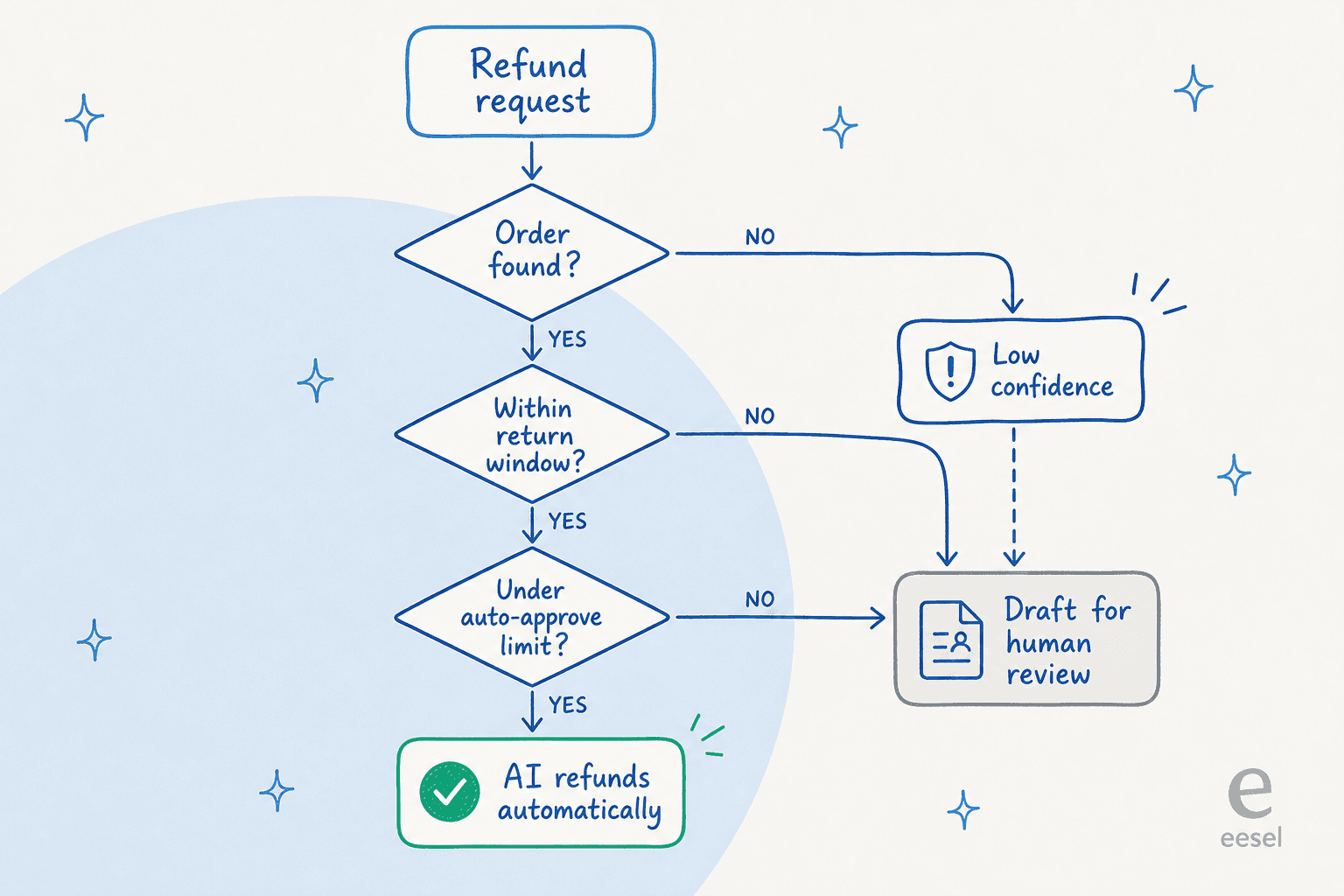
The decision tree I'd set up looks like this: the AI only auto-refunds when the order is found, the request is inside the return window, and the amount is under an approval limit you set. Miss any of those, or come back with low confidence, and the ticket goes to a person with a drafted suggestion attached.
What belongs on the auto side:
- Refund-status and "where's my refund" questions. Pure lookups, no risk, huge volume.
- Returns and refunds clearly inside policy for low-to-mid value orders.
- Order-status (WISMO) questions that often precede a refund request. A good Shopify shopping assistant answers those fast, and the refund ask sometimes disappears.
What I'd keep human, every time:
- High-value orders. Set the approval limit low to start; a wrongly auto-approved $400 refund stings more than a slow one.
- Anything outside the return window or with an exception like damaged-in-transit, wrong item, or exchanges and partial returns.
- Suspected fraud or serial refunders, where a pattern across orders matters more than a single ticket.
- Emotionally charged complaints. A confident, technically-correct refund denial to an already-furious customer is how you end up on social media.
The control you want here isn't just an on/off switch. The teams I talk to want to exclude specific ticket types from the AI entirely, decide whether it acts on every message or only when invoked, and see the routing logic. One support lead put their version of the objection bluntly: "There are certain tickets I don't want to go through AI." A serious tool lets you draw that line yourself.
How to set up AI refund automation (without babysitting it)
Here's the order I'd actually do it in. None of this needs an engineer, and you can run the whole thing in draft mode before a single customer sees an AI reply.
1. Connect your store and your helpdesk
Start by connecting where the orders live and where the tickets land. For most ecommerce brands that's Shopify plus Gorgias, or Shopify plus Zendesk; if you're on Help Scout or Freshdesk, the setup is the same. The AI needs both: the helpdesk to see the conversation, the store to see the order.

2. Brief it on your refund policy in plain language
This is where you write the rules. Not code, just your actual policy: the return window, the eligible categories, the approval limit, the tone you want, when to escalate. If you can explain your refund policy to a new hire, you can brief the AI. Point it at your help center and past tickets too, so it answers from how your team actually handles things, not a generic template.

3. Set the confidence gate and approval limits
Decide the threshold below which the AI drafts instead of sends, and the dollar amount above which a human always signs off. I'd start conservative and loosen as you build trust, the opposite of the instinct to flip everything to fully autonomous on day one.
4. Simulate on your real past tickets first
This is the step I'd refuse to skip. Before going live, run the agent against your historical refund tickets and read what it would have done. We do this on every rollout for a reason: I've watched a confident-sounding bot quietly give wrong answers, and a simulation against real tickets is how you catch that before a customer does. It also gives you a believable resolution-rate estimate instead of a vendor's marketing number.
5. Go live in draft mode, then graduate to autonomous
Launch with the AI drafting replies for an agent to approve. Once you've watched it handle a few hundred refunds correctly, move the safe categories (refund status, in-policy returns) to fully autonomous and leave the rest in draft. This trust ramp is what gets you from "interesting demo" to "I no longer think about refund-status tickets."
When the agent does hit something it shouldn't handle, it should hand off cleanly. In one real chat I saw, an AI answered two self-serve questions and then called a handover the instant the customer asked for a human, no loop, no "let me check that for you" stall. That clean exit is as important as the automation itself.
Does it actually work? The numbers I'd trust
I'm wary of resolution-rate claims, so here are the ones I'd actually stand behind, all from real ecommerce deployments rather than a brochure.
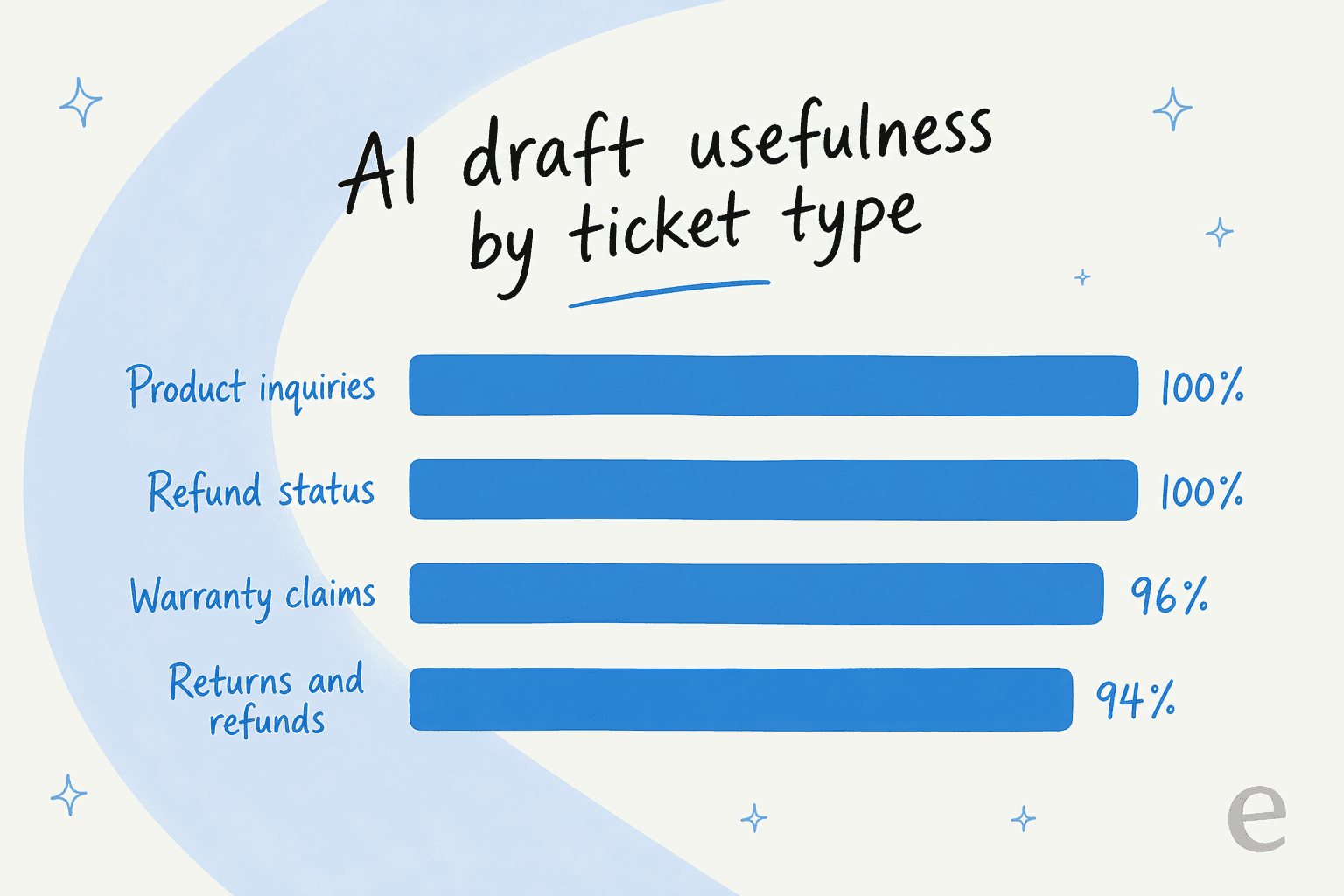
In a cross-validated trial at a German online jewelry retailer running about 1,000 tickets a month on Zendesk and Shopify, AI drafts were rated useful 93.8% of the time on returns and refunds, 96.4% on warranty claims, and 100% on both product inquiries and refund-status questions, alongside 93% triage accuracy and zero false positives on spam. Notice the shape of that: the routine refund work scores highest, which is exactly the work you want off your team's plate.
Elsewhere, a gig-economy app on Zendesk resolved 73% of tier-1 requests in its first month, and at the top end one of the largest deployments handles over 100,000 tickets a month. The pattern holds: the more of your volume is repetitive lookups and in-policy refunds, the more an AI agent clears.
Watch the pricing model, not just the price
One thing I'd flag for ecommerce specifically: refund volume spikes seasonally, and per-resolution pricing punishes you for exactly that. If your tool charges per ticket the AI closes, your post-holiday return wave is also your most expensive support month. That's the catch buried in a lot of Gorgias AI pricing and Freshdesk AI pricing math.
For a homewares brand running about 700 tickets a week on Gorgias and Shopify, the all-in cost on eesel worked out to roughly $1.07 per ticket. The model matters: eesel's pricing is a flat $0.40 per ticket with no per-seat fees and no platform fee, so a 1,000-ticket month is about $400 whether it's a quiet week or a refund avalanche. Predictable beats cheap-until-it-isn't.
Measure it like you'd measure an agent
Once it's live, don't fly blind. Watch the same things you'd watch for a human agent: how many refunds it's resolving, how many it's routing to people, and where it's getting corrected.

The approval-versus-rejection view is the one I'd live in early on. If agents are rejecting a category of refund draft a lot, that's not a failure, it's a signal to tighten the policy, adjust your ticket routing, or pull that category back into draft mode. Refund automation isn't set-and-forget; it's set, watch, and tune, same as onboarding a new teammate. The teams that treat it that way are the ones still happily running it a year later, and there's a whole discipline forming around doing this well.
Common mistakes I'd save you from
- Auto-approving everything on day one. The fastest way to lose trust (yours and your finance team's). Gate it.
- Skipping the simulation. "It demoed well" is not the same as "it handles my actual tickets." Test on history.
- Pointing it at a stale help center. The AI answers from your knowledge; if your return policy page is six months out of date, so are its replies. Sync your real sources.
- Treating WISMO and refunds as separate problems. Most refund requests start as "where's my order." Automate the order-status questions and a chunk of refund requests never get filed.
- Picking a tool by price, not pricing model. See the section above. Seasonal refund spikes break per-resolution math.
Try eesel for ecommerce refund automation
If you're on Shopify and a helpdesk like Gorgias or Zendesk, this is squarely what I'd reach for. eesel works like a new support hire that plugs into your store and helpdesk in a few minutes, reads your refund policy and past tickets, and handles the routine refunds with a confidence gate you control, so it leaves the judgement calls to your team. You can simulate it on your own past tickets before it ever replies to a customer, and the pricing is a flat $0.40 per ticket that doesn't spike when your return season does.
It's free to try, no credit card, and you can have it drafting refund replies against your real tickets this afternoon.
Frequently Asked Questions
What is AI refund automation for ecommerce?
Can AI handle refunds and returns safely without giving money away?
How do I automate refunds in Shopify?
What refund requests should I keep human?
How much does AI refund automation cost for an ecommerce store?



Article by
Riellvriany Indriawan
Riell is a designer and writer at eesel AI with about two years of experience researching CX platforms, AI chatbots, and helpdesk software. She combines her design background with a sharp eye for how these tools actually look and feel in practice — making her comparisons unusually visual and user-focused.