What "AI ticket tagging" actually means
Tagging is the quiet workhorse of a support inbox. Tags are how you answer questions like "how many billing issues did we get this month," route a refund request to the right person, or trigger a follow-up survey. Get tagging right and your reporting, routing, and automation all work. Get it wrong (or leave it to whoever remembers to tag manually) and the whole thing rots: half-tagged conversations, three tags that mean the same thing, dashboards nobody trusts.
There are three ways a ticket gets tagged:
- Manually, by an agent clicking a tag. Accurate when people remember, which they don't, consistently.
- By rules, where the helpdesk applies a tag when a condition is met (subject contains "invoice" → tag
billing). Fast, but blind to anything you didn't anticipate. - By AI, where a model reads the conversation, works out what it's actually about, and applies the tag, the priority, and the routing. This is what people mean by AI ticket tagging, and it's the only one of the three that catches the customer who writes "I got charged twice and I'm furious" without ever using the word billing.
Help Scout does the first two well. The third one is the gap.
What Help Scout gives you out of the box
Help Scout is a deliberately simple, email-style customer support platform that 12,000+ companies run their support on, and its tagging story reflects that simplicity.
You get two relevant tools:
Tags. Plain labels you attach to conversations. The Free plan caps you at 10 tags; every paid plan (Standard at $25/user, Plus at $45, Pro at $75) gives you unlimited tags. Nothing surprising here.
Workflows. This is Help Scout's automation engine, and it's where auto-tagging lives. Help Scout describes Workflows as a way to automate "just about any manual process, from assigning, to tagging, and beyond." You build an if-this-then-that rule: if the subject line contains "cancel," then add the churn-risk tag and assign it to the retention queue. The Standard plan includes 150 basic workflows, Plus bumps you to 500 advanced ones, and Pro is unlimited.
It's worth being clear about what Help Scout's AI features do and don't do here, because the marketing can blur it. AI Answers is a customer-facing agent that resolves questions from your knowledge base (it averages a 73.19% resolution rate, billed at $0.75 per resolution). The Inbox Assistant gives your agents AI Drafts, AI Summarize, and AI Assist for tone and translation. Both are useful. Neither one tags your tickets. Help Scout has no native AI that reads a conversation and applies a tag. Tagging automation in Help Scout means Workflows, and Workflows mean rules.
Where Help Scout's native tagging hits a wall
Rule-based tagging is great until your customers stop writing the way your rules expect, which is immediately.
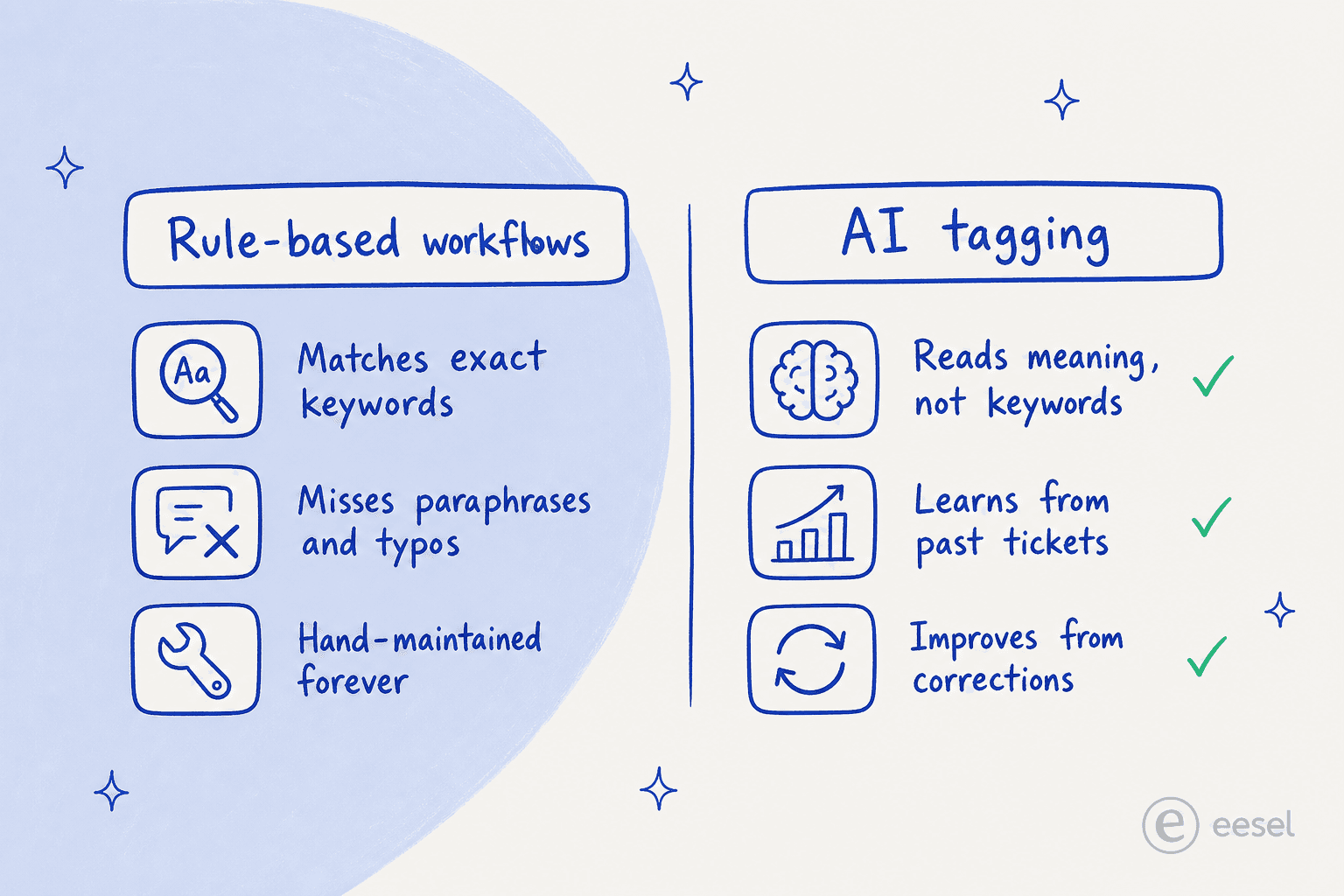
A keyword rule for billing fires on "billing" but misses "you charged my card twice," "the invoice looks wrong," and "why did my plan go up." To cover real language you end up maintaining dozens of brittle rules per tag, and you're still playing whack-a-mole with phrasings you didn't predict. The rule also can't tell an angry billing complaint from a calm billing question; it sees the keyword, not the sentiment.
This is the same complaint that shows up in Help Scout's reviews. On G2, the top aggregated dislike is a "lack of advanced features" and limited customization, and the recurring knock on Help Scout's AI specifically is that it can't take actions or learn from your past tickets. For tagging, that's the whole ballgame: a system that can't learn from the thousands of conversations you've already tagged correctly is stuck guessing from keywords forever.
The practical result is that growing teams hit a ceiling. As one long-time user put it when weighing options on Reddit:
"Something like [a multichannel helpdesk] could handle your setup pretty well since it works across email, live chat, WhatsApp, voice, and text in one place... The AI can also route tickets to the right team, draft replies, and deflect repetitive queries."
u/Apocalypse_1899, r/CustomerSuccess

The point isn't that Help Scout is bad. It's that the thing people increasingly want, AI that routes and tags by understanding the ticket, isn't in the box. It's a layer you add.
How AI ticket tagging actually works
When an AI agent tags a Help Scout conversation, it's doing something fundamentally different from a keyword rule.
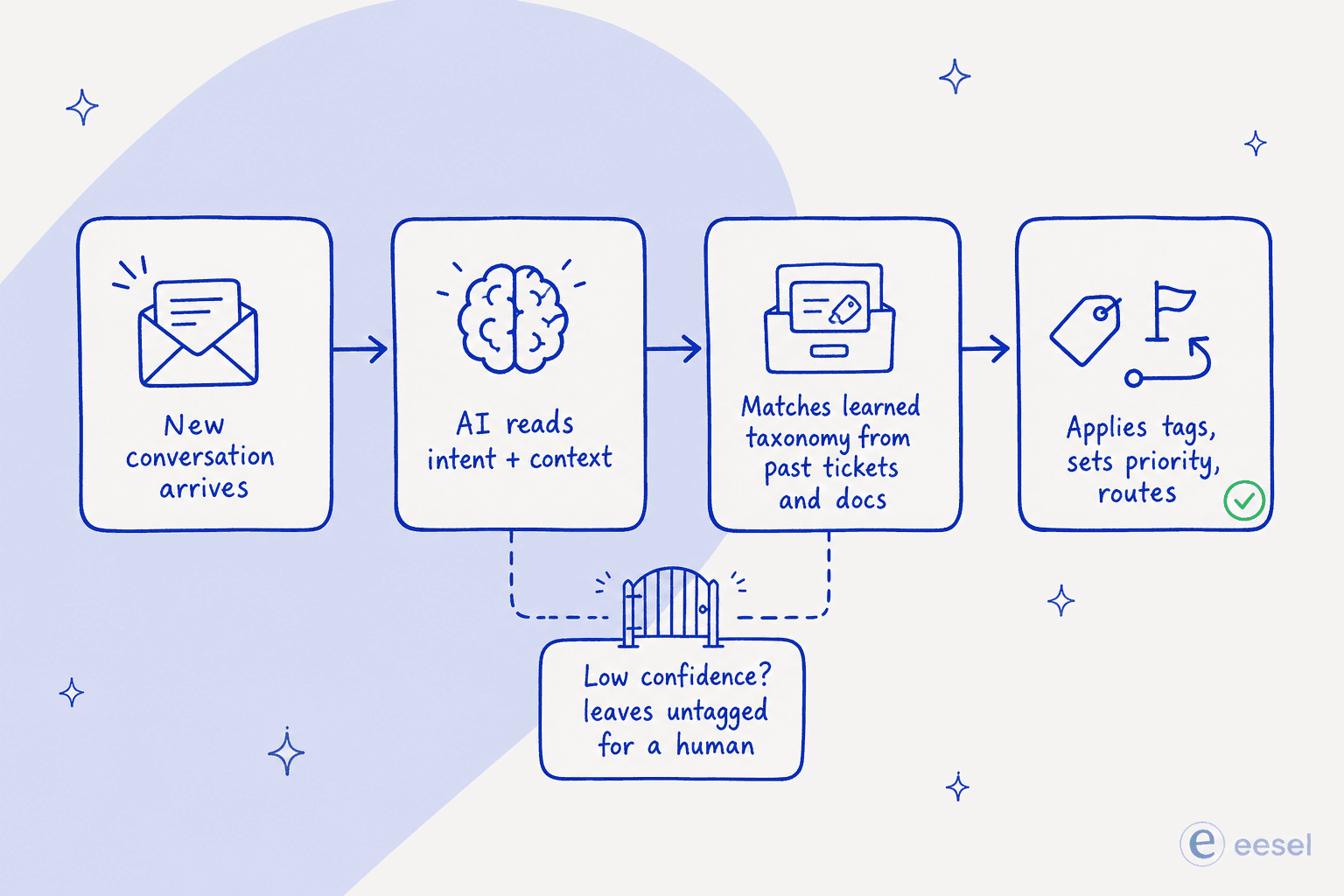
The flow looks like this:
- A new conversation lands in your Help Scout mailbox.
- The AI reads it the way a person would, weighing the whole message, not scanning for keywords. It works out the topic, the urgency, and the sentiment.
- It matches that against a taxonomy it learned from your own data, your Help Scout Docs articles, past conversations, and saved replies. It knows that "charged twice" belongs under billing because it's seen your team tag a hundred conversations exactly like it.
- It applies the tag, sets the priority, and routes the conversation, and it can do the same things a human agent does next: add an internal note, set status, draft or send a reply.
The most important box is the one underneath: when the AI isn't confident, it doesn't guess. Low-confidence conversations get left untagged or handed to a person, which is exactly what keeps AI tagging from quietly polluting your data. A good agent learns from your corrections too, so the edge cases it gets wrong this week become the ones it gets right next week.
Setting up AI ticket tagging on Help Scout
Because Help Scout doesn't tag with AI natively, setup is really about connecting an AI agent to your inbox. Using eesel AI's Help Scout integration as the worked example, it's a no-code, three-step job that takes under 30 minutes.
1. Connect Help Scout. Authorize the agent through the Help Scout API from the eesel dashboard. No developer, no widget to install. It joins as a real agent inside your existing inbox rather than a separate tool.
2. Let it learn your tags. On connection, eesel automatically imports your Help Scout Docs, past conversations, and saved replies. This is the step that makes the tagging good: it's learning your actual taxonomy from conversations your team already tagged, not a generic model's idea of what "billing" means. You can point it at extra sources like Confluence, Notion, or Google Docs too.
3. Simulate, then go live. Before it touches a single live ticket, run it in simulation mode against your past Help Scout conversations. You'll see exactly how it would have tagged and routed them, spot any gaps, and fix them. When you're happy, scope it to specific mailboxes, folders, or tags and turn it on, in draft-only mode first if you want a human in the loop.
One detail that matters for tagging specifically: eesel respects your existing Help Scout Workflows and routing. You're not ripping out the rules that already work, you're adding judgement on top of them.
Designing tags worth automating
Automation amplifies whatever taxonomy you point it at, so this is the step most teams skip and later regret. Before you switch anything on, decide what a tag is for.
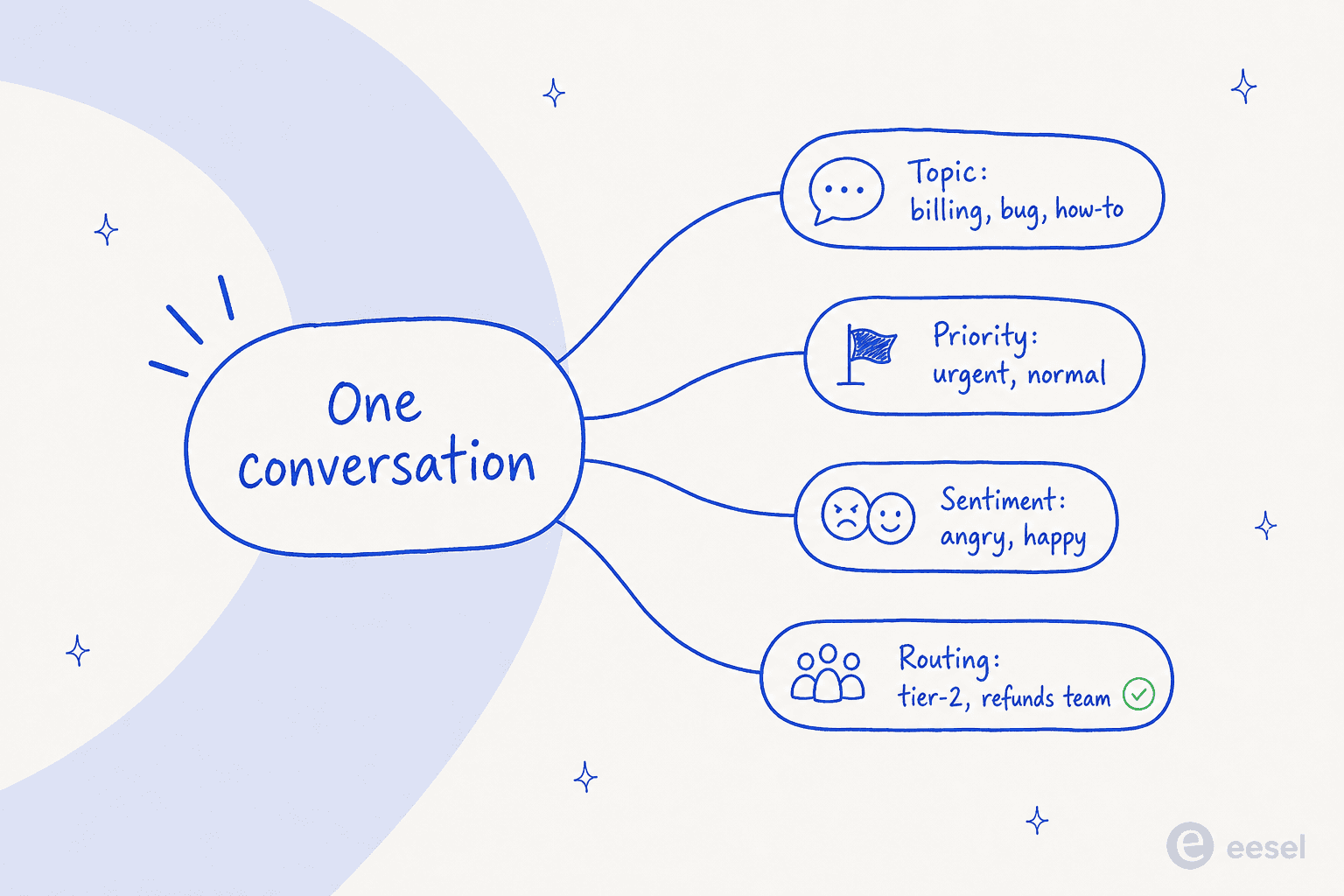
A clean, automatable taxonomy usually splits into a few groups: topic (billing, bug, how-to), priority (urgent vs normal), sentiment (so you can catch the angry ones early), and routing (tier-2, the refunds team). A few principles keep it from sprawling:
- Fewer, clearer tags beat more. If two tags mean almost the same thing, a human is inconsistent about them and so is an AI. Merge them.
- Tag for a decision, not for decoration. Every tag should drive a report, a route, or a follow-up. If nothing happens when a tag is applied, drop it.
- Prune before you automate. A messy manual tag list teaches the AI your mess. Clean it first; the unlimited tags on Help Scout's paid plans make it tempting to never tidy up.
Keeping AI tags accurate (and out of trouble)
The fear with AI tagging is the same as with any automation: it confidently does the wrong thing at scale. A few habits keep it honest.
Lean on simulation, not hope. The single best safeguard is testing against real history before launch. eesel's reporting after a simulation run shows coverage by theme, so you can see where it's strong and where it'll need help, rather than finding out in production.
Start in draft or supervised mode. Let the AI suggest tags and replies while a human approves them for the first week or two. You build trust on real tickets and feed it corrections at the same time.
Trust the confidence gate. A well-built agent tags only when it's sure and routes the rest to a person. That's the line between "tagging that cleans up your data" and "tagging that adds noise."
It's the learning-from-solved-tickets part that teams tell us makes the difference. Customers like EntryLevel run multiple eesel agents triaging and responding to Help Scout tickets, and the recurring theme is that an agent trained on solved conversations, not just help-center content, reads intent far more accurately than native helpdesk AI. (Worth a disclosure: we build eesel, and we integrate directly with Help Scout, so weigh our take accordingly, the simulation step is there precisely so you can check it on your own data rather than take our word for it.)
What AI ticket tagging costs on Help Scout
Native tagging via Workflows is included in your Help Scout plan, so the only real cost there is your seats:
| Help Scout plan | Price (per user/mo, annual) | Tagging-relevant limits |
|---|---|---|
| Free | $0 | 10 tags, no Workflows |
| Standard | $25 | Unlimited tags, 150 basic workflows |
| Plus | $45 | Unlimited tags, 500 advanced workflows |
| Pro | $75 | Unlimited tags, unlimited workflows |
The catch is that this only buys you rule-based tagging, and Help Scout's per-seat model is where reviewers get nervous as they scale. The 2025 pricing-model whiplash (Help Scout moved per-seat → per-interaction, then reverted) left a mark:
"HelpScout changed back to user-based pricing. Guess too many people cancelled including me... Helpscout lost all trust with this flip-flopping on pricing."
u/manu_8487, r/SaaS
An AI tagging layer is usually priced on usage instead of seats. eesel AI charges $0.40 per Help Scout conversation handled, no platform fee, no per-seat fee, and you only pay for conversations the AI actually touches:
| Conversations/month routed to AI | Monthly cost (eesel) |
|---|---|
| 100 | $40 |
| 500 | $200 |
| 1,000 | $400 |
| 2,500 | $1,000 |
For comparison, Help Scout's own customer-facing AI Answers runs $0.75 per resolution. The thing to watch with any usage model is volume: set a monthly spend cap (eesel defaults to one, with alerts) so a traffic spike doesn't surprise you on the invoice.
Try eesel for Help Scout tagging
If Help Scout's keyword Workflows have stopped keeping up with how your customers actually write, eesel AI is the AI layer that tags by understanding the conversation. It joins your Help Scout inbox as a real agent, learns your taxonomy from your own Docs and solved tickets, and updates tags, priority, and routing while leaving the low-confidence ones for a human.
The honest pitch: it's built for teams whose ticket volume has outgrown manual tagging and rule upkeep, and it claims 85%+ tier-1 resolution out of the box within a week. You can simulate it on your past Help Scout conversations before committing, and there's a free trial with $50 of usage and no credit card. Try eesel and run the simulation; the worst case is you learn exactly how your current tags hold up.
Frequently Asked Questions
Does Help Scout tag tickets automatically?
What is AI ticket tagging?
How much does AI ticket tagging for Help Scout cost?
Can AI ticket tagging also reply to customers in Help Scout?


Article by
Alicia Kirana Utomo
Kira is a writer at eesel AI with a Computer Science background and over a year of hands-on experience evaluating AI-powered customer service tools. She focuses on breaking down how helpdesk platforms and AI agents actually work so that support teams can make better buying decisions.