Macros are supposed to make your support team's life easier. You write a response once, save it as a template, and agents can apply it to tickets in seconds. That's the theory, at least.
In practice, Zendesk macro issues can turn this time-saver into a time-drain. Agents waste minutes hunting for the right macro. Formatting breaks in unexpected ways. Actions don't apply. And when something goes wrong, you're left digging through help docs trying to figure out why.
If you're dealing with broken or misbehaving macros, you're not alone. This guide covers the most common Zendesk macro issues and how to fix them. We'll also look at why some teams are moving away from macros entirely in favor of AI that learns from your existing tickets instead of relying on static templates.

Common Zendesk macro issues and how to fix them
Let's start with the problems you're probably here to solve.
The "No plain text comment available" error
This error typically appears when agents try to use macros in the Zendesk Support mobile app or through certain channels. The issue? These channels don't support rich content formatting (HTML), so the macro can't render properly.
Affected channels include:
- Facebook Messenger
- X Corp (Twitter)
- Google Play Store reviews
- Channel Framework apps
The fix: Enable the "Include plain text fallback" option in your macro settings. From a desktop, navigate to your macro settings, open the problematic macro, check the box for plain text fallback, and save. Agents will need to sign out and back into the mobile app to see the change.
Prevention: Make it a habit to enable plain text fallback for any macro that might be used across multiple channels. It's a checkbox that takes two seconds and saves hours of headaches later.
Source: Zendesk Help - I cannot apply macros
Macros not applying to tickets
You click the macro, you see it populate the ticket, but when you submit... nothing happens. The ticket fields haven't updated. The tags aren't there. It's like the macro never ran.
Here are the most common causes:
-
Permission issues: The agent applying the macro needs permission to make the changes the macro is trying to make. If a macro sets a ticket field value but the agent's role doesn't allow editing that field, the action fails silently.
-
Missing ticket fields: If a macro tries to set a field that isn't present on the active ticket form, the action won't occur. Check that the field is actually visible on the form being used.
-
Page refresh timing: If an agent applies a macro and refreshes the page before clicking "Submit," the macro actions get lost even though the comment text might persist.
-
Conflicting actions: Applying multiple macros or manually reverting changes can create conflicts where one action overrides another.
-
Trigger or automation conflicts: Sometimes triggers or automations interfere with ticket updates, causing tag collisions or field overwrites.
Source: Zendesk Help - My macro isn't applying to my ticket
Macro suggestions not appearing
If you've purchased the Zendesk AI add-on for macro suggestions but aren't seeing them, there are a few things to check:
-
Refresh the ticket page: Sometimes the suggestions just need a page reload to appear.
-
Give it time: Macro suggestions use the previous month's data. If you just bought the add-on, you won't see suggestions until the first day of the next month.
-
Check your data volume: The machine learning model needs sufficient ticket data to identify patterns. If your account doesn't have enough repeated responses, the model can't generate meaningful suggestions.
-
All suggestions handled: If you or another admin has accepted or dismissed all recent suggestions, you'll need to wait until new ones are generated (first day of each month).
Source: Zendesk Help - Why don't I see macro suggestions?
Formatting issues with dynamic content
This is where things get frustrating. Your macro worked perfectly yesterday. Today, it's adding extra line breaks, breaking hyperlinks onto new lines, or mangling your formatting entirely.
I just noticed on 5/6 some issues with the way macro content is applied to a ticket. My team uses Dynamic Content for our macros, and up until 5/6, we had no issues. However, we just started seeing the following issues on several macros: When a macro is applied to a ticket, an extra line break/paragraph space is added before the content of the macro... When a macro with a bolded hyperlink is applied, the hyperlink will start on a new line.

I'd like to add that as Zendesk's Dynamic Content macros do not support Rich Text Formatting, we have had to use Markdown in order to have any hyperlinks available at all. The only current solution would be to remove bold formatting for every single hyperlink, which is extremely costly in terms of time and also lowers the visibility of the links we provide to our users.
The core issue is that Dynamic Content doesn't support rich text formatting. You're forced to use Markdown, and even then, formatting can break unexpectedly when Zendesk pushes updates. The "solution" is often removing formatting (like bold on hyperlinks) entirely, which defeats the purpose of making your responses clear and professional.
Source: Zendesk Community - Dynamic Content/Macro formatting issues
Alphabetical sorting not working
You've turned off manual ordering in Admin Center, but your macros still aren't sorting alphabetically. What's going on?
The issue is a URL parameter limitation. By default, the macros page only loads 100 macros per page. If you have more than 100 macros, the alphabetical sorting only applies to what's loaded.
The fix: Change the per_page=100 parameter in the URL to match your total macro count (e.g., per_page=500 if you have 500 macros).
Related issue: When you filter macros by group, click one to edit, and save your changes, the filter resets. You have to reapply your filter every time you make an edit. For teams managing hundreds of macros, this becomes a significant time sink.
Source: Zendesk Help - Why are my macros not sorting alphabetically?
The hidden cost of managing macros
Here's the thing about macros: they don't maintain themselves. Every macro you create is a template that needs ongoing care.
When your product changes, your macros need updating. When policies shift, someone has to hunt down every macro that references the old policy. When you rebrand, you get to manually edit hundreds of templates. This maintenance burden grows linearly with your macro library.
Then there's the organizational overhead. To keep macros usable, you need:
- A consistent naming convention (and enforcement)
- Regular audits to remove outdated content
- Training for new agents on which macro to use when
- Governance to prevent agents from creating duplicate or off-brand macros
The Support Driven blog identifies ten common macro issues, from limited taxonomy to missing actions to poor grouping. Their research shows that macro underutilization is a major productivity killer across Zendesk accounts.
And consider the scaling challenges. The maximum is 5,000 shared macros per account. That sounds like a lot until you realize that teams supporting multiple languages need separate macros for each language (unless they're using Dynamic Content, which brings its own formatting headaches). Suddenly you're managing thousands of templates for what is essentially the same set of responses.
The opportunity cost is real. Every hour your team spends maintaining macros is an hour not spent on actually helping customers or improving your product.
A different approach: AI that learns instead of templates that break
What if you didn't need macros at all?
At eesel AI, we take a fundamentally different approach to support efficiency. Instead of static templates that break and require constant maintenance, we offer an AI teammate that learns from your past tickets and generates contextual responses on demand.

Here's how it works.
How eesel AI eliminates macro issues
When you connect eesel to your Zendesk account, it reads your existing tickets, help center articles, and macros. Within minutes, it understands your business context, tone, and common issues. No template creation. No formatting workarounds. No manual training.
Instead of selecting from a list of pre-written macros, agents get AI-generated draft replies tailored to each specific ticket. The AI considers the customer's exact question, their history, and your company's knowledge base to craft a response that actually addresses what they're asking.
Because the AI generates responses in real-time, there's no "plain text fallback" issue. It naturally adapts the format for each channel. No more broken hyperlinks or extra line breaks from rigid templates.
The teammate model vs. macro management
We don't describe eesel as a tool you configure. You hire it like a new team member.
Like any new hire, eesel starts with guidance. You can have it draft replies that agents review before sending, limit it to specific ticket types, or set business hours when it can respond. This isn't a limitation; it's how you verify eesel understands your business before expanding its role.
As eesel proves itself, you level it up:
| Starting point | Leveled up |
|---|---|
| Drafts replies for review | Sends replies directly |
| Handles simple FAQs | Handles all frontline support |
| Works during business hours | Works 24/7 |
| Escalates most tickets | Escalates only edge cases you define |
The difference between this and macros? Eesel learns continuously. When you correct a response, it remembers. When you message it with a policy update ("We changed our refund window to 30 days"), it incorporates that immediately. No need to edit hundreds of templates.
Macros vs. AI: a side-by-side comparison
| Macros | eesel AI |
|---|---|
| Static templates you manually create and maintain | Learns from your existing tickets automatically |
| Rigid formatting with workarounds for different channels | Generates natural responses adapted to each channel |
| Requires precise categorization and organization | Understands intent and context without manual tagging |
| Scales by adding more templates (and management overhead) | Scales effortlessly as it learns more about your business |
| Breaks when you need to make global changes | Updates knowledge continuously from corrections and feedback |
Making the switch: from macro maintenance to AI assistance
You don't have to rip and replace your entire support operation overnight. Most teams transition gradually.
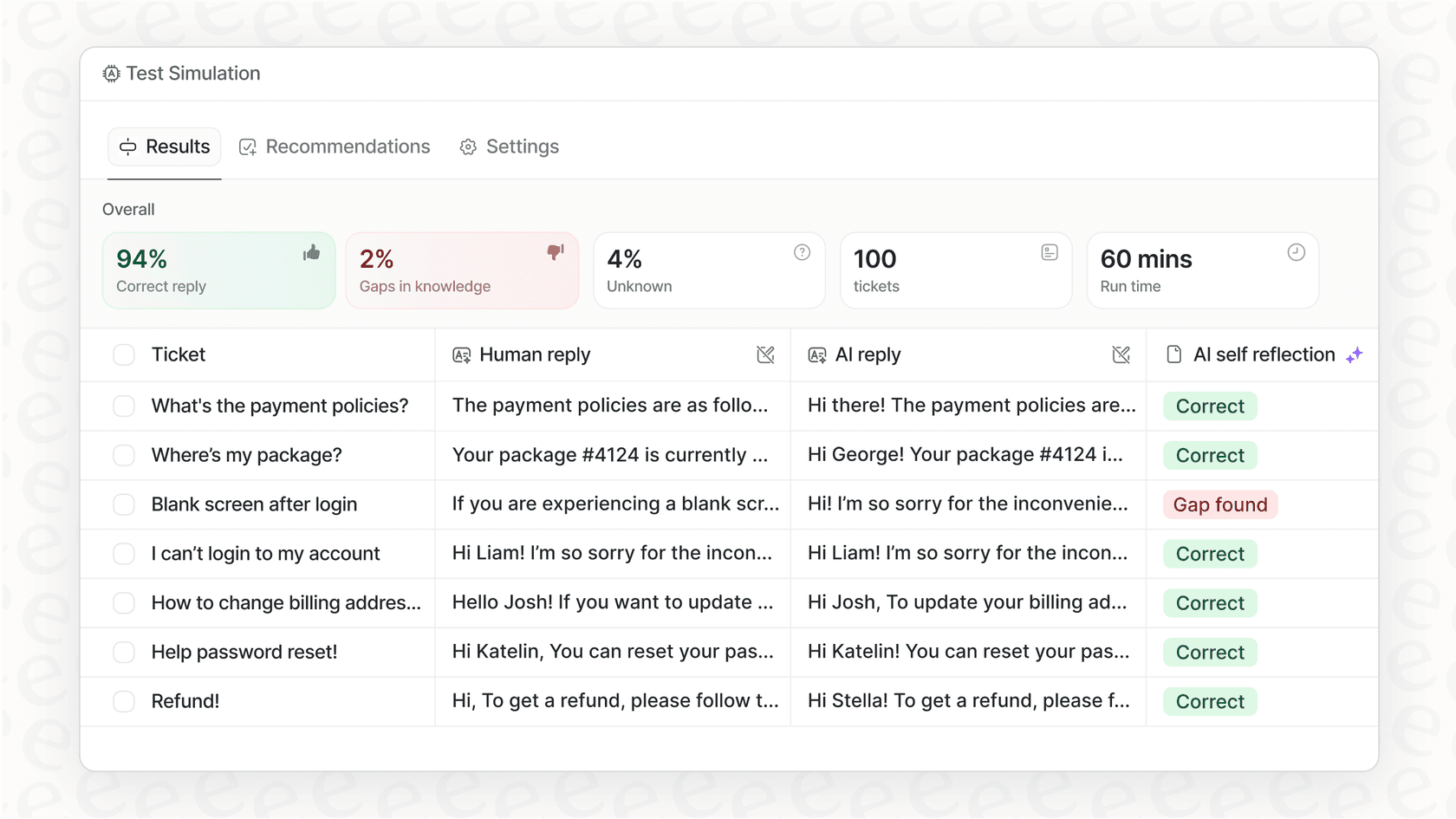
Start by running eesel in simulation mode on your past tickets. See exactly how it would have responded. Measure the quality. Identify any gaps. This lets you verify performance before customers see a single AI-generated reply.
Once you're confident, start with eesel drafting replies for agent review. Agents still control what gets sent, but they save the time of writing responses from scratch. As eesel proves itself, expand its scope. Eventually, it can handle full frontline support autonomously, escalating only the edge cases you define.
The results? Mature deployments achieve up to 81% autonomous resolution. The typical payback period is under two months.
Compare that to the ongoing cost of macro maintenance. The hours spent updating templates, training agents, and fixing formatting issues. The opportunity cost of work that isn't getting done because your team is managing a library of static responses.
Start resolving tickets without macro headaches
Zendesk macros can work. When they're properly maintained, organized, and used consistently, they do save time. But they require ongoing effort to keep working. They're a solution that creates its own work.
If you're tired of dealing with formatting issues, hunting through hundreds of templates, or maintaining a library of responses that seems to grow more unwieldy by the month, there's an alternative.
An AI teammate like eesel learns your business, adapts to each ticket's context, and improves continuously from feedback. No templates to maintain. No formatting workarounds. Just intelligent responses that sound like your best agent wrote them.
Try eesel AI free or book a demo to see how it works with your existing Zendesk setup.