

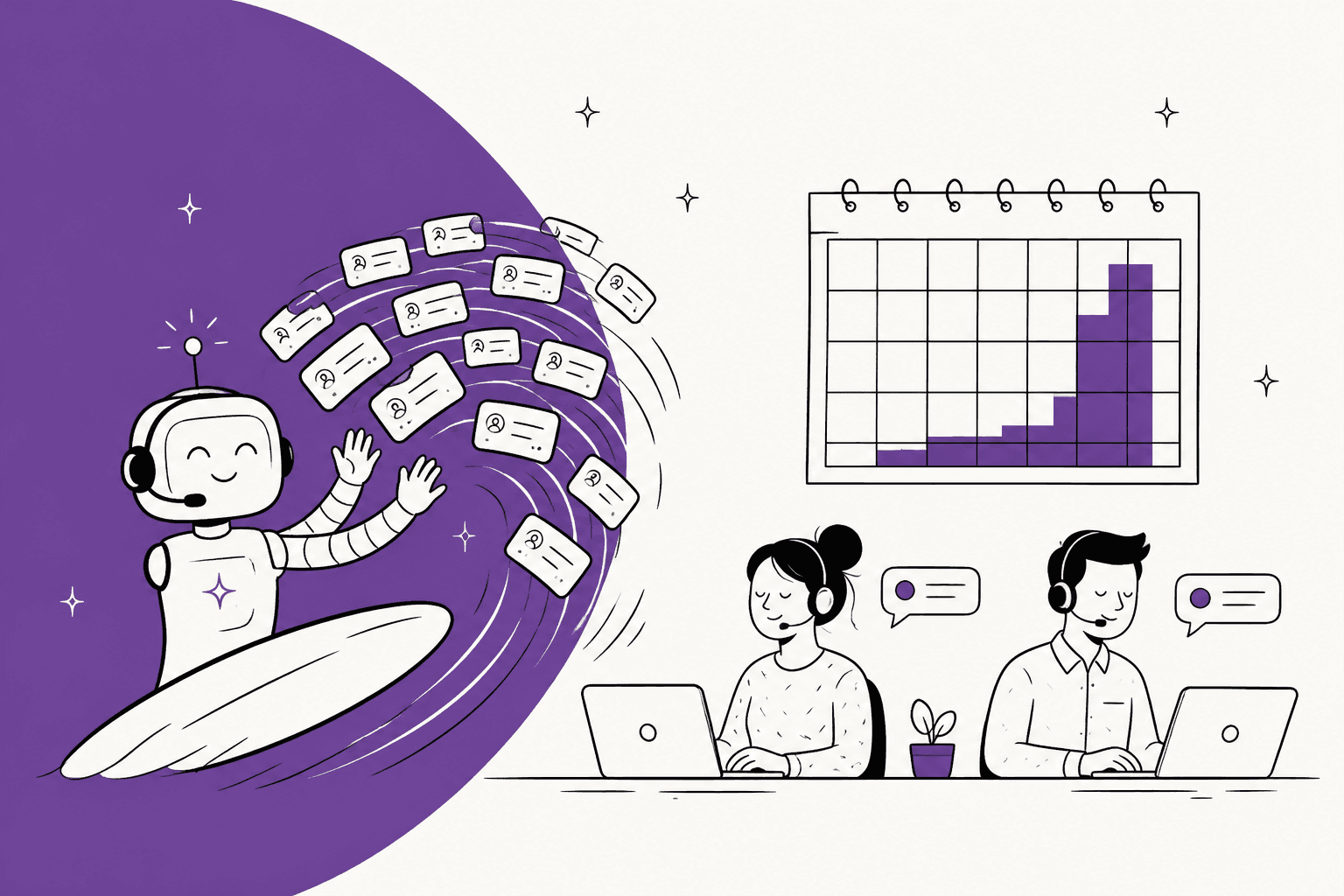
AI handles a seasonal support spike by answering the repeat questions that make up most of it, from the first hour of the peak, and stepping back down when the season ends. Temps take weeks to hire and train, and they leave in January with everything they learned. AI doesn't remove the need for people in peak season, it removes the need for most of the temps: in the calculator below, a team going from 1,500 to 4,500 tickets a month needs five temps without AI and three with AI resolving 30% of the peak.
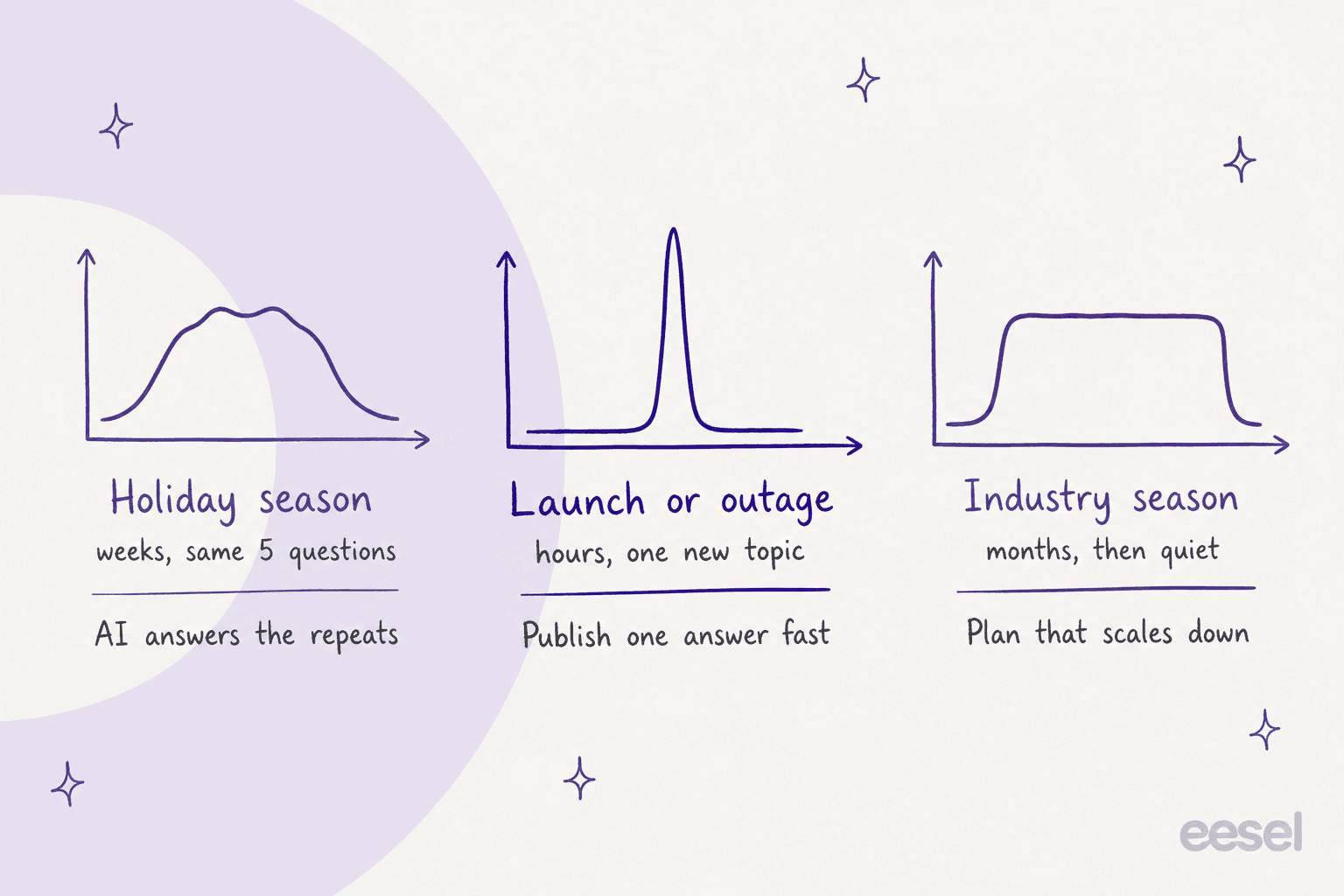
Not every spike is the same. A holiday peak is weeks of the same few questions, a launch or outage is hours of one new question, and a travel or school season is months of high volume and then quiet. Each one needs a different AI setup, and each is covered below.
If your queue lives in Zendesk, Gorgias or Freshdesk, an AI helpdesk teammate like eesel joins it, answers the repeat questions, and leaves drafts for the rest. Norden-Frisia, a German ferry line, planned 10,000 AI interactions a month for high season on a plan that scales back down from October to March, because hiring a team that grows and shrinks with the summer was "expensive and slow."
What does AI change about a seasonal spike?
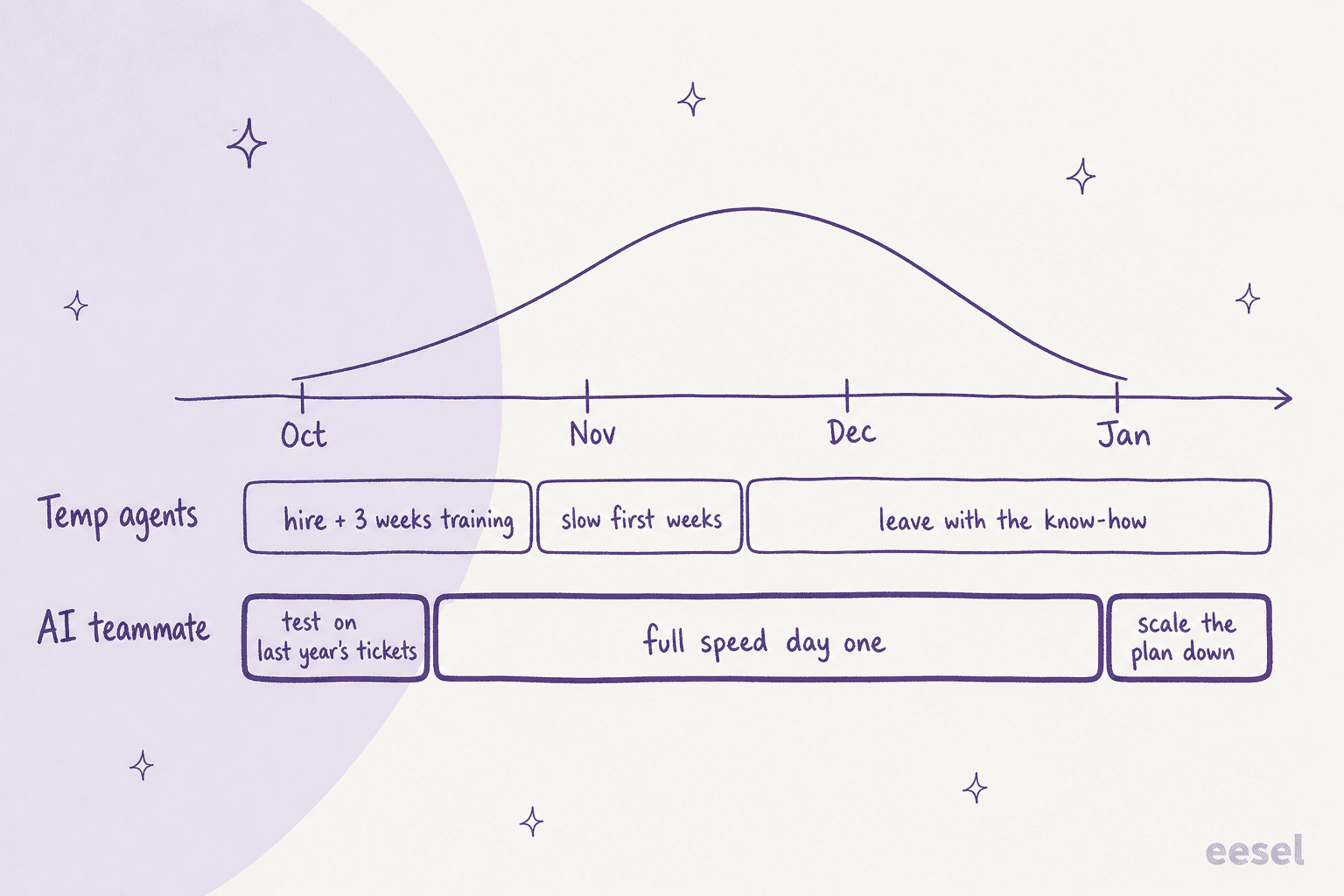
It changes when your extra capacity arrives and when it leaves. Small as that sounds, timing is the whole problem with seasonal hiring.
I've spent two years studying how support teams search for help with problems like this one, and the question people type into ChatGPT is rarely "what is the best AI chatbot." It's closer to "our volume triples every November and hiring temps every year is painful, what do we do?" The pain is about timing. A temp hired for December has to be found in September or October and trained for weeks, and they're at their slowest in the exact days you need them fastest. My seasonal support onboarding plan runs three weeks for a reason. Then the season ends, they leave, and next year you start from zero.
An AI teammate works the other way round. It learns from your help center and past tickets before the peak, runs at full speed on day one, and keeps everything it learned over the summer. When the season ends, you shrink its plan instead of running an exit process.
The volume you're planning for is also growing. Adobe expects US online holiday spending to reach $275.1 billion this season, up 6.7%, with Cyber Monday on November 30 alone at $15.1 billion. Shopify merchants did $14.6 billion in sales over Black Friday Cyber Monday 2025, up 27%, peaking at $5.1 million a minute. Every one of those orders is a possible "where is my order?" ticket a few days later.
Shoppers are warming to AI in that window too. Salesforce's holiday data shows shoppers used retailers' AI for customer service 126% more during the 2025 holiday rush than in the two months before, and those AI agents handled 142% more tasks like address updates and returns.
One support manager at a DTC brand put the timing problem plainly before last year's Black Friday:
"my team of 8 agents is already showing serious burnout and we haven't even hit black friday yet. Average response time has gone from 2 hours to 6 hours. Quality scores are dropping. Two people already asked about taking time off during our busiest season. The problem is we're getting 300 to 400 tickets daily right now and during bfcm that's easily 800 plus. I went to leadership asking to hire seasonal help. They said no because of budget constraints and the time it takes to train people properly."

Which kind of spike are you dealing with?
Support queues see three shapes of spike, and each asks something different of the AI. Once you know the shape, the setup mostly follows.
| Spike | How long | What floods in | The AI's main job | What people keep |
|---|---|---|---|---|
| Holiday peak (BFCM to January returns) | 6 to 8 weeks | The same few questions: order status, shipping cut-offs, returns, discount codes | Answer the repeats with live order data, tag everything | Refund exceptions, lost parcels, angry repeat contacts |
| Launch or outage | Hours to a few days | One new question from many customers at once | Answer one known-issue reply consistently, count the volume | Fixing the cause, bug reports, the edge cases |
| Industry season (travel, education, tax, events) | Months | Product questions specific to the season: timetables, enrolment, deadlines | Carry most of the front line all season | Bookings that need judgement, complaints, payments |
Most teams get more than one of these a year, and the launch ones are the easiest to predict:
"We are always busy, but our peak season is jut after Xmas when people got a new device and don’t know how to use it. Other peaks are directly related to product launches, so those are predictable."
Holiday peaks are a repeat-question problem. Typewise's holiday surge report, built on more than 10 million support interactions, found that more than a quarter of retail holiday contacts are about delivery status, and agents handled 22% more sessions a week during the holidays (195 vs 160). The same report found agents used saved replies 27% less at peak, which says a lot about busy people: they drop the shortcuts built for exactly this moment. AI uses them every time. My guide to AI for order tracking support goes deeper on the delivery-status side, and the Black Friday customer messages post has templates for the replies.
Launch and outage spikes are a speed problem. Volume can jump from normal to ten times normal within an hour, and every ticket asks the same new thing, which isn't in your help center yet. There are no templates, you can't hire temps in an hour, and your best agents are already pulled into the incident. More on this one further down.
Industry seasons are a capacity-for-months problem. A ferry operator, a ski school or a tax software company has a season rather than a weekend spike. A flexible AI plan beats hiring most clearly here, since the alternative is carrying temps for four or five months.
How many temps does AI actually replace?
Fewer than the AI resolution rate suggests, which matters for your hiring plan. If AI resolves 30% of peak tickets, you don't need 30% fewer temps, because the tickets it resolves are the short, easy ones and what's left for people takes longer each. I covered the math in detail in AI for support staffing, and the calculator below applies it to one season.
Put in your normal month, how much bigger the peak gets, and your own numbers for temp cost and training. It compares hiring temps for the whole extra load with AI taking its share first, and prices the AI using eesel's published plans.
The upside is real even at modest rates. An engineer on Hacker News described the same math for a triage queue:
"If you can even route 30% away from the central triage with 90+% accuracy and drop everything else back to the central triage... you suddenly safe 2 FTEs in that spot in some places. And increase customer satisfaction for most of those tickets because they get resolved faster."

I take two things from it. First, the AI resolution rate is the input that moves everything, and it's the one teams guess at. Don't plan on a number you haven't tested: run the AI against last season's tickets and use what it actually resolves. My guide to the AI resolution rate explains which rate to plug in, and deflection vs resolution rate explains why the two get confused. Second, look at the training line: every temp you don't hire also saves 60 hours of someone senior teaching them, right in the weeks before the peak.
How do you set up AI before the peak?
Start now if your peak is November. Three to four weeks is enough for a focused setup, and Adobe expects October 2026 alone to bring $95.8 billion in US online spending, up 8%, so for retail the ramp has already started. This is the order I'd follow.
- Pull last season's top ticket reasons. Export the peak weeks from your helpdesk and group them by topic. You're looking for the 10 to 20 reasons that make up most of the volume. For most retail teams the top three are order status, returns and shipping cut-offs. My ticket volume reduction guide covers how to sort them.
- Fix the help articles behind those reasons. AI answers from what you give it, so update the return window, the holiday shipping cut-off dates, gift card rules and anything that changes for the season before the AI reads it. An AI knowledge base audit speeds this up.
- Connect the helpdesk and the order data. The AI should sit in the queue you already run, through Zendesk, Gorgias or Freshdesk, and read live order status from Shopify or your store. A "where is my order?" reply without the actual tracking link is just a deflection.
- Test on last season's tickets before going live. I'd never skip this step. Run the AI against real peak tickets from last year and read what it would have said, which shows you which topics it handles well and which it shouldn't touch, plus your real resolution rate for the calculator above.
- Go live on a narrow set of topics, then widen. Start with the two or three topics it answered best in the test, run for a week or two before the peak, and add topics as you trust them. Leave everything else as drafts for the team.
Norden-Frisia did a version of this. During its trial week, the team connected Zendesk, pulled in its macros and the last three months of tickets, and training on past tickets was what decided the subscription. CaptAIn now answers from 346 knowledge items across Zendesk, the website chat and a public chat link.
If you already have temps lined up for this year, keep them. The holiday support spikes plan shows how to split the queue into lanes so AI and temps don't step on each other, and the Zendesk holiday schedule guide covers business hours for the days you're closed.
Step 2 is where most rollouts are won or lost. As one r/CustomerSuccess reply put it:
"AI drafting replies for repetitive tickets works well if your documentation is clear and someone reviews the response before it’s sent. If your knowledge base is messy, AI will just repeat the confusion faster."
How should AI handle a launch or outage spike?
Treat it as one new topic arriving all at once, and make the AI the thing that answers it consistently while people fix the cause. This is the spike where AI helps most, because nothing else scales in an hour.
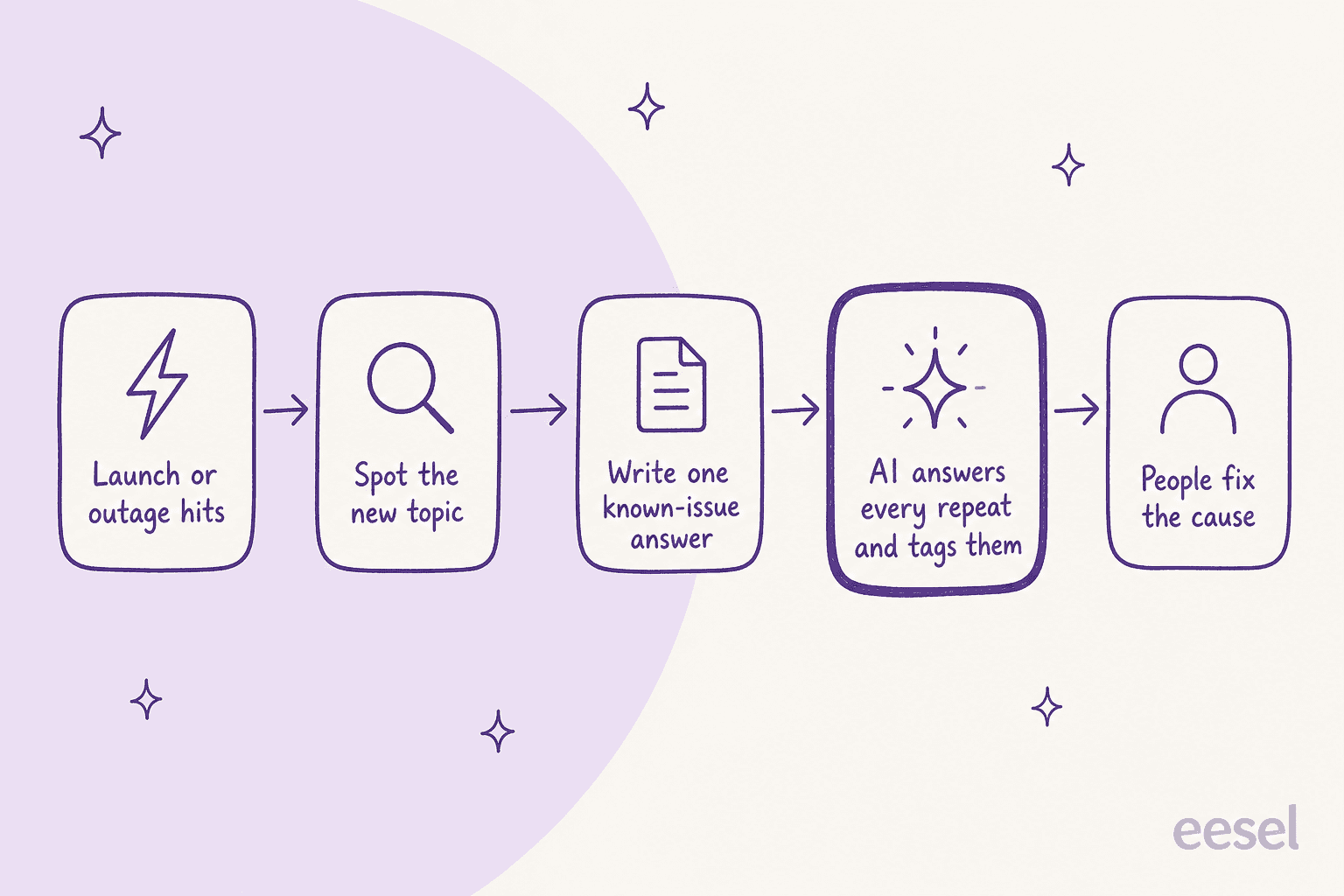
The play has four moves:
- Spot the topic early. The first 10 tickets usually tell you. If the AI is already tagging tickets by topic, the new one shows up as a cluster instead of a feeling. Rúngne, a Norwegian climbing apparel brand, has one eesel agent that tags every Gorgias ticket from a fixed list, 880 tags in one month across 2,100 tickets.
- Write one known-issue answer. One help article or one internal note with what's happening, what the customer should do and when to expect an update. The AI picks it up once it's in its knowledge sources, and every reply after that says the same thing.
- Let the AI answer every repeat, and count them. Consistency matters more than speed here. Ten agents improvising ten versions of the outage message creates the follow-up tickets. Tagging every one also gives engineering a real count.
- Keep people on the fix and the edge cases. The customer whose data looks wrong or whose payment failed twice needs a person.
Launches also change who's asking. When SamCart launched a second platform in 2026 with its own support address, it set up a separate agent, SAM AI, in the same workspace, so replies about the new product come from the right place. Its plan covers 8,000 interactions a month, and a busy month has gone past it. My guide to AI support during SaaS outages covers the outage version in more detail, and AI for product recall support covers the version where the stakes are higher.
What should never go to the AI during a spike?
Anything where a wrong answer costs more than a slow one. Peak season is when a confident wrong reply does the most damage, because it reaches the most people and nobody has time to catch it.
| Keep with people | Why |
|---|---|
| Refund exceptions and goodwill credits | Each one is a judgement call with money attached. See AI for refund requests for the safe split |
| Complaints and angry repeat contacts | They need someone who can own the outcome. See AI for customer complaints |
| Lost or damaged parcels | Usually needs a claim, a reship or a carrier conversation |
| VIP and wholesale customers | Tag them and route them, don't automate them |
| Chargebacks and payment disputes | Deadlines and evidence rules. See AI for payment disputes |
Handing off well is a feature, not a failure. Question Beauty, a cosmetics brand on Gorgias, has eesel reply itself to most messages, 960 replies across 990 tickets in a month, but refunds, complaints and anything that needs a decision go to a person with a note attached. ClutchLoop's agent, Loopy, sends returns to the returns portal and steps back the moment a person is already handling the ticket. That's the pattern to copy: the AI takes the repeats and tags the rest, so a person starts with a head start.
Why does the pricing model matter more in peak season?
Because your support bill follows your volume, and peak season is where billing models pull apart. The same 3x month can cost very different amounts depending on how you're billed.
- Per-seat helpdesks charge you for every temp. A Zendesk Suite Team seat is $55 a month billed annually or $69 billed monthly, and light agents can't be assigned to or edit tickets, so a temp who replies to customers needs a full seat. Freshdesk is friendlier here: occasional agents use day passes instead of licenses, at $2 to $12 a day depending on plan.
- Per-ticket helpdesks charge you for the volume. Gorgias pricing is by billable ticket and "never priced per agent": Pro includes 2,000 tickets for $550 a month, with $0.36 per extra ticket and $1.50 per extra AI automated interaction. That's fair for spikes, but it means the peak shows up on the bill.
- Per-resolution AI pricing rises with success. In a cost comparison eesel prepared for one prospect, a per-resolution AI plan went from $792 a month at 1,000 tickets to $3,168 in a 4,000-ticket Black Friday month at the same 80% resolution rate. The better the AI does in your busiest month, the more you pay.
- A fixed plan you resize rises only when you choose. eesel's Teammate plans run from 500 credits for $299 to 5,000 for $1,749 a month, where one ticket is one credit however many replies it takes, with no seat fees. You can move up a size for the peak, which takes effect straight away, and back down after, which applies from your next billing date. Overage, if you turn it on, is $0.80 a credit under a cap you set.
That last model is what made the numbers work for Norden-Frisia. Ahead of its first high season, its plan went from a fixed monthly allowance to 10,000 interactions a month, with the agreement that it scales back down from October to March. A team that runs 1,000 credits most of the year and 3,000 in November and December pays $499 in the quiet months and $1,149 in the busy ones. For a deeper comparison of the cost of a person vs an AI per ticket, see AI vs human agent cost.
The same goes for outsourced overflow help, which looks cheap until it isn't:
"I worked for an MSP and saw this often. What usually happened was everything got better with the extra hands until the bill came. Once they found out how much money it cost to actually meet their SLA's, they suddenly became much more concerned with not dumping ambitious projects on IT and focusing on freeing up their internal techs to do tickets. A lot of times they realized they were better off hiring more internal the entire time."
What mistakes do teams make with AI in peak season?
Most of them come from treating the peak as the time to start, rather than the time to run.
- Turning AI on in the first week of the peak. There's no test and no fixed help articles, and nobody has time to review its answers. Start three to four weeks out, as above.
- Planning headcount on a guessed resolution rate. Use the rate from a test on last season's tickets, and remember the leftover tickets take longer. An optimistic guess here means being short-staffed in December.
- Letting the AI improvise seasonal policy. If the holiday return window, shipping cut-off or promotion terms aren't written down, the AI can't get them right. Neither can a temp.
- Measuring containment instead of resolution. A bot that stops people reaching a human during your busiest week saves nothing if they come back angrier. Count tickets that were solved and stayed solved.
- Forgetting the January tail. Salesforce counted $181 billion of returns from the 2025 holiday season, 14% of purchases. Don't shrink the AI plan on December 26; the returns questions are still coming.
For the forecasting side of all this, my support workforce forecasting guide covers how to turn last year's volume into this year's plan, and AI for weekend support coverage covers the Saturday version of the same problem.
Try eesel for your next peak
If your queue triples every holiday season, spikes on launch days or runs hot all summer, eesel is an AI teammate that joins the helpdesk you already use, answers the repeat questions from the first hour of the peak, and drafts or tags the rest for your team. You can test it on last season's tickets before it replies to anyone, and resize the plan month to month so you're not paying peak prices in March.

Norden-Frisia runs it as CaptAIn on Zendesk through the summer ferry season and scales it down for winter. Rúngne runs three agents on Gorgias that tag, draft and answer. Try eesel free with 100 credits, or see the AI helpdesk agent page for how it works in your queue. If you'd rather hand the whole queue off for peak season, Managed Support is the done-for-you version.