

Why healthcare support is different
Most "how to automate customer support" advice was written for e-commerce or SaaS, where the worst case is a slightly annoyed customer. Healthcare is not that. A wrong answer about a copay is a bad day; a wrong answer that reads as medical advice is a liability, and a leaked patient record is a reportable breach.
I've watched this stop a deal cold. A US physical-therapy platform running about 500 tickets a month on Zendesk came in ready to buy, and hard-blocked on one question during the demo: is there a signed BAA? There wasn't, at the time, and that was the end of the conversation. Compliance is a gate, not a feature you bolt on later. It's the first thing a healthcare buyer checks and the fastest way to lose their trust if you get it wrong.
The good news is that the volume problem in healthcare support is boringly ordinary. Patients ask where to park, how to reset their portal password, why a claim was denied, when their prescription is ready, and how to reschedule. None of that needs a clinician, and most of it is textbook ticket classification work. That's the pile you want an AI working through, so your human team has room for the calls that actually need a person, and your SLA targets stop slipping on the busy days.
"In legal tech you can't afford to get anything wrong, there's a fine line between being helpful and overstepping into legal advice."
Jesse Jenkins, Co-Founder at Willfully (eesel customer)
Swap "legal" for "medical" and that's the whole challenge in one sentence.
What you can safely automate (and what you can't)
The single most important design decision is drawing the line between what the AI handles and what it never touches. Get this right and the rest is mostly setup.
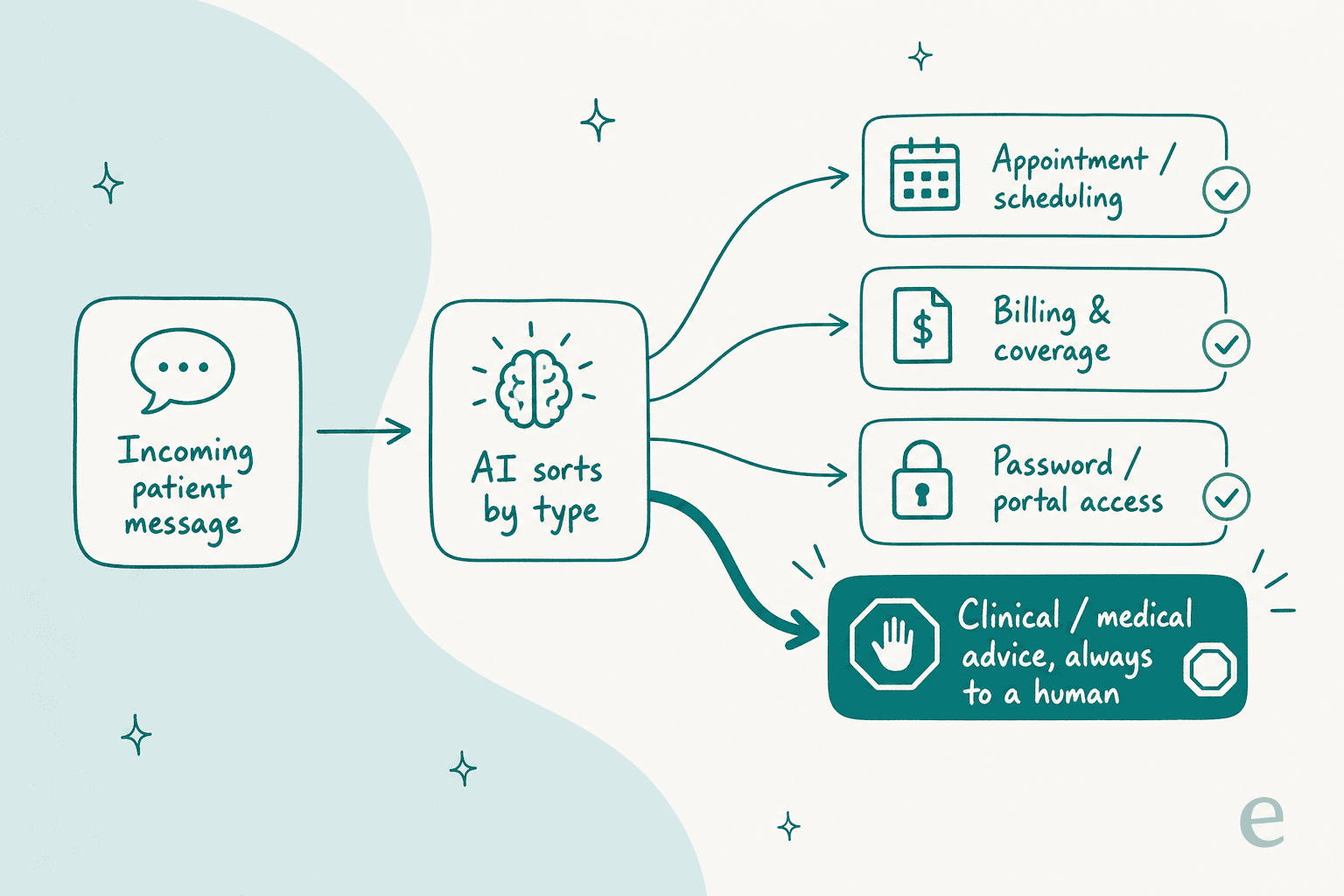
Here's how I'd split the common healthcare ticket types:
| Ticket type | Automate it? | Why |
|---|---|---|
| Appointment scheduling, reschedule, cancel | Full auto | High volume, rules-based, no clinical judgement |
| Billing, copay, and coverage questions | Full auto | Answers live in your knowledge base and policy docs |
| Patient-portal / password / login help | Full auto | Pure account support, identical to any portal access ticket |
| Prescription refill / order status | Full auto | A lookup, once the AI can read status safely |
| Insurance / claims status | Draft for a human | Often correct, but a wrong answer has cost consequences |
| Pre-visit instructions, forms, directions | Draft for a human | Usually fine, but worth a glance before send |
| Symptoms, dosages, "should I be worried?" | Never | This is medical advice. Route to a licensed human, always |
| Anything involving a diagnosis or results | Never | Clinical interpretation is not a support task |
The line that matters most is the bottom one. An AI support agent should never diagnose, interpret results, or give dosing advice, full stop. The safe pattern is what one CX lead at a supplements brand described perfectly when they were shopping for an AI:
"The AI will never be able to answer 100% of the questions... I need an AI who is only handling the tickets that it's confident to handle and all the other ones, leave them alone."
a CX lead evaluating AI support tools, from an eesel sales call
That's confidence-based routing, and it's the feature that separates a healthcare-safe setup from a reckless one. The AI answers what it's sure about and quietly leaves the rest for a person. If a tool can't do that, it doesn't belong anywhere near a patient inbox. It's the same control principle behind good ticket triage, AI escalation rules, and a clean AI-to-human handoff in any vertical, just with much higher stakes.
Before you automate anything: the compliance gate
This is the step teams skip, and it's the one that ends deals. Before an AI touches a single patient message, you need honest answers to five questions.
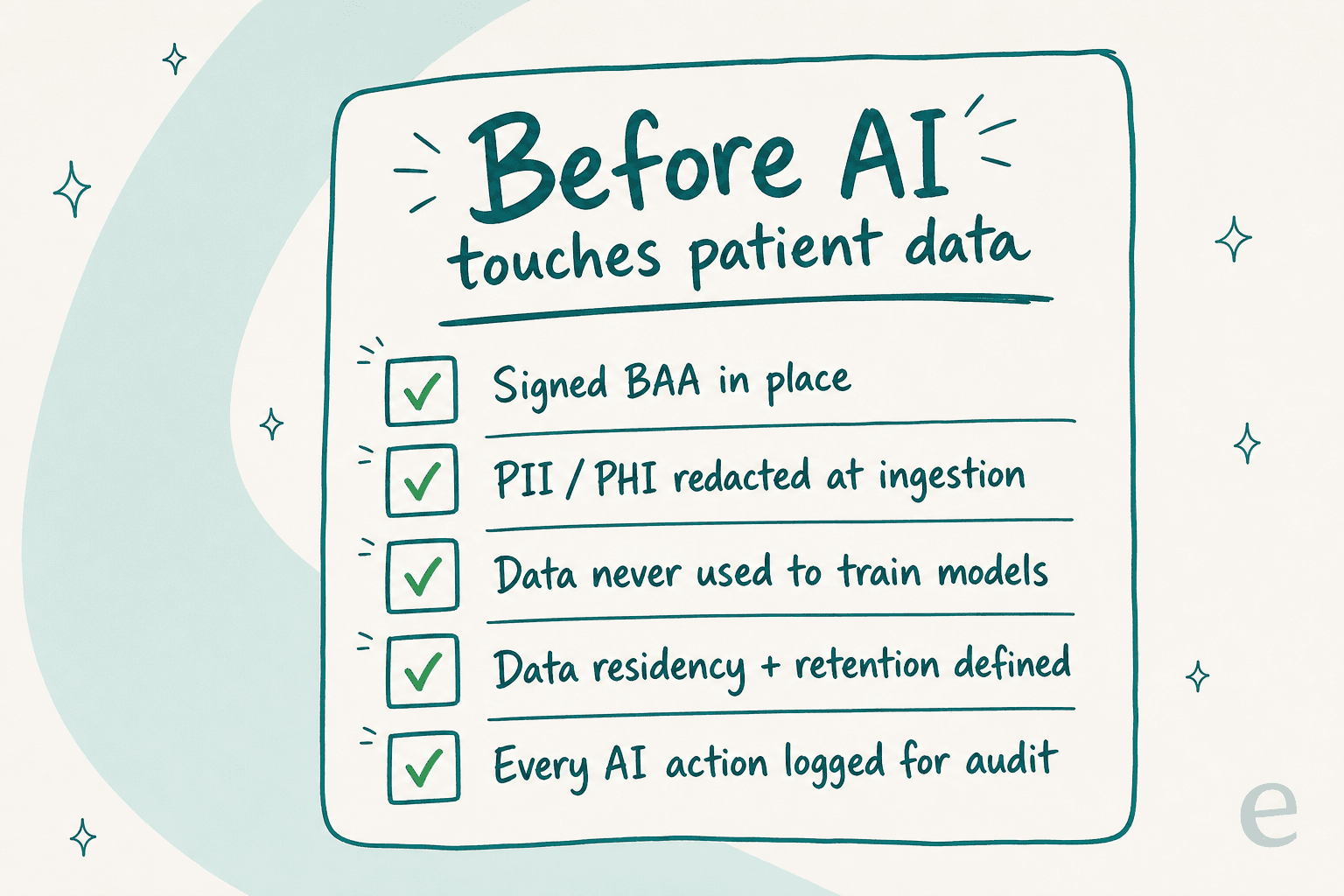
- Is there a signed BAA? A Business Associate Agreement is the contract that makes a vendor legally accountable for the protected health information they handle. No BAA, no PHI, no exceptions. With eesel, HIPAA with a signed BAA is part of the Enterprise plan, so talk to the team about it.
- Is PII redacted before storage? The best pattern is redaction at ingestion, so card numbers, emails, phone numbers, and SSNs are stripped before anything reaches a database or search index. eesel does this at ingestion, so the original data never lands in storage.
- Does your data train the model? The answer you want is a flat no. eesel's is: your data is never used for model training, and the underlying models (Claude, GPT, Gemini) retain data for at most 30 days for abuse monitoring, then it's purged.
- Where does the data live, and how long? Know your hosting region and retention window. eesel runs on AWS with EU hosting available on request and full deletion within 60 days.
- Is every AI action logged? You want an audit trail of what the AI did and why, so a compliance review is a report you pull, not a fire drill.
One honest note, since a fair guide should say it: SOC 2 Type II is a common healthcare buyer requirement, and eesel is certified (the report is available under NDA). GDPR compliance, EU data residency, and the no-training guarantee are already in place. Ask every vendor you evaluate the same five questions and make them show receipts, the way this buyer did:
"Does it use some kind of other ChatGPT if it doesn't know the answer, and can that be turned off? Does the knowledge stay closed to our org?"
a technical evaluator at a hardware company, from an eesel sales call
How to automate healthcare customer support, step by step
Once the gate is cleared, the rollout itself is fast. The whole point is to move in an order where nothing risky ever reaches a patient before you've seen it work.
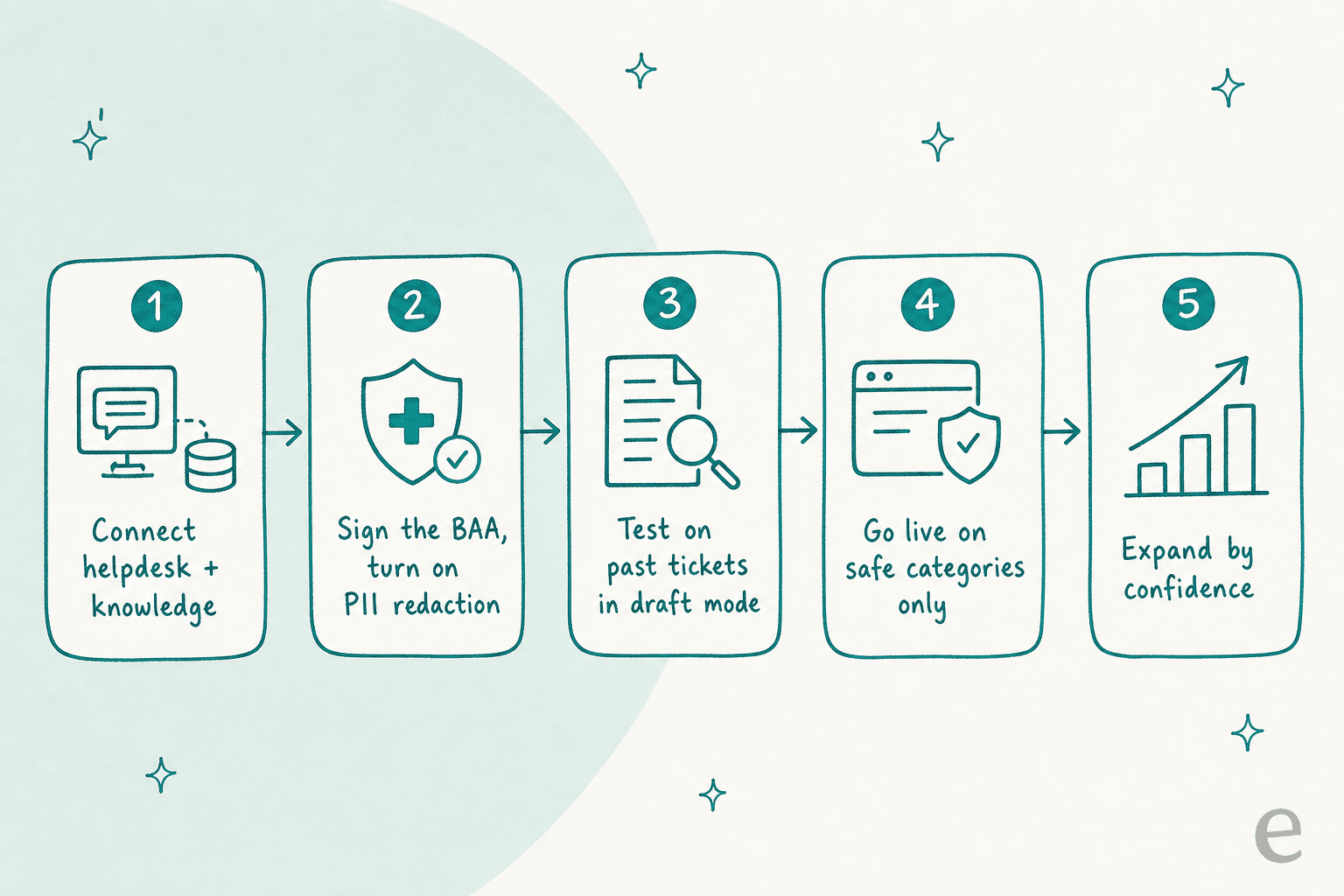
Step 1: Connect your helpdesk and knowledge
Point the AI at wherever tickets already land (Zendesk, Freshdesk, Front, or a shared email inbox) and at your knowledge sources: help center articles, billing and coverage policies, scheduling rules, and past tickets. The AI can only be as accurate as what it reads, so this is where the real work is. eesel connects to over 100 integrations and knowledge sources like Confluence, Notion, and Google Docs.

Step 2: Lock down compliance before it goes anywhere
Sign the BAA, turn on PII redaction, and confirm the retention and residency settings from the gate above. Do this now, not after a pilot, because the moment a real patient message flows through an unconfigured tool, you've potentially created the exact exposure you're trying to avoid. This is the non-negotiable step, and it's why healthcare rollouts look different from a standard support automation project.
Step 3: Test on your own past tickets, in draft mode
This is the step I'd never skip in healthcare. Instead of pointing a fresh AI at live patients, run it against tickets you've already resolved and compare its draft answers to what your team actually sent. In draft mode, the AI writes a reply but a human reviews before anything goes out, so a wrong answer is caught in a spreadsheet, not in a patient's inbox. It's the same idea as training AI on your knowledge base, applied as a safety check.

When we ran this kind of cross-validation on a real support inbox, the AI hit 93% triage accuracy and caught 100% of spam with zero false positives across a 284-chat trial. Numbers like that are what tell you which categories are ready.
Step 4: Go live on safe categories only
Turn on full automation for the green-light rows from the table: scheduling, billing, portal access, refill status. Leave insurance and pre-visit tickets in draft-only. Leave everything clinical routed straight to a human. Resist the urge to flip everything on at once, a narrow, reliable rollout builds more trust with your compliance team than a broad, shaky one.

Step 5: Watch the reports and expand by confidence
Once live, the AI keeps learning from resolved tickets, and you watch the reports to see resolution rate by category. When a draft-only category has been correct for weeks, promote it to full auto. When something looks off, tighten the instruction (in plain English, no rebuild) and it applies immediately. Teams that roll out this way commonly resolve a large share of tier-1 tickets inside the first month, one eesel customer reported 73% of tier-1 requests resolved after a seven-day trial.

Common mistakes to avoid
- Turning on automation before the BAA is signed. The most expensive mistake, and the easiest to avoid. Compliance first, always.
- Letting the AI answer anything clinical. No amount of accuracy makes it safe to give medical advice through a support bot. Route it to a person.
- Going live without testing on past tickets. You wouldn't put a new agent on a patient inbox untrained. Don't do it to an AI either. This is where a lot of AI ticket triage projects quietly fail.
- Picking a tool that can't do confidence routing. If it answers everything or nothing, it's not built for regulated support.
- Ignoring the pricing model. Per-seat tools charge whether the AI resolves anything or not. For a support team weighing AI versus human cost, a plan sized to your ticket volume, like eesel's credits, tracks what you actually get.
Try eesel for healthcare support
If you're automating a patient inbox, eesel AI is built for exactly the order this guide walks through. It plugs into your existing helpdesk in minutes, redacts PII before storage, offers HIPAA with a signed BAA on the Enterprise plan, and lets you simulate on past tickets before a single patient sees a reply. Confidence-based routing means it handles the scheduling-and-billing pile and hands anything clinical to your team, on one fixed monthly price, from $299/month for 500 credits (1 credit per ticket or chat).

You can start with the free trial (100 free credits, no card) or book a demo if you want to walk through the compliance setup with someone first.