


AI reduces handle time by taking work out of each step of a ticket: a summary so agents don't reread the thread, a knowledge search and order lookup so they don't switch tabs, a draft reply so they don't write from scratch, and tags and notes filled in so wrap-up takes seconds. The lookup step is usually the biggest win, and it's the one most "AI reply" tools skip.
The catch: once AI fully resolves your easy tickets, the tickets left for people are the long ones, so average handle time can go up while total agent hours go down. Measure agent hours and AHT per ticket type, and watch reopens, first contact resolution, CSAT and the share of drafts agents rewrite.
An AI teammate like eesel does this inside Zendesk, Freshdesk or Gorgias. At STIL Classics it prepared about 320 Gorgias tickets in a month and looked up about 230 Shopify orders before writing a word. Plans are a fixed monthly batch of credits, one ticket is one credit, from $299 a month.
Where do the minutes in average handle time actually go?
Average handle time (AHT) is the time an agent spends actively working on a ticket, from opening it to finishing the reply and the notes. It is not the same thing as first response time or resolution time, those two measure how long the customer is waiting. A ticket can wait two days and still have a four-minute handle time.
I build the AI agents at eesel, and the first thing I do with a new team is to look at a handful of their tickets step by step. The minutes nearly always splits in the same way.
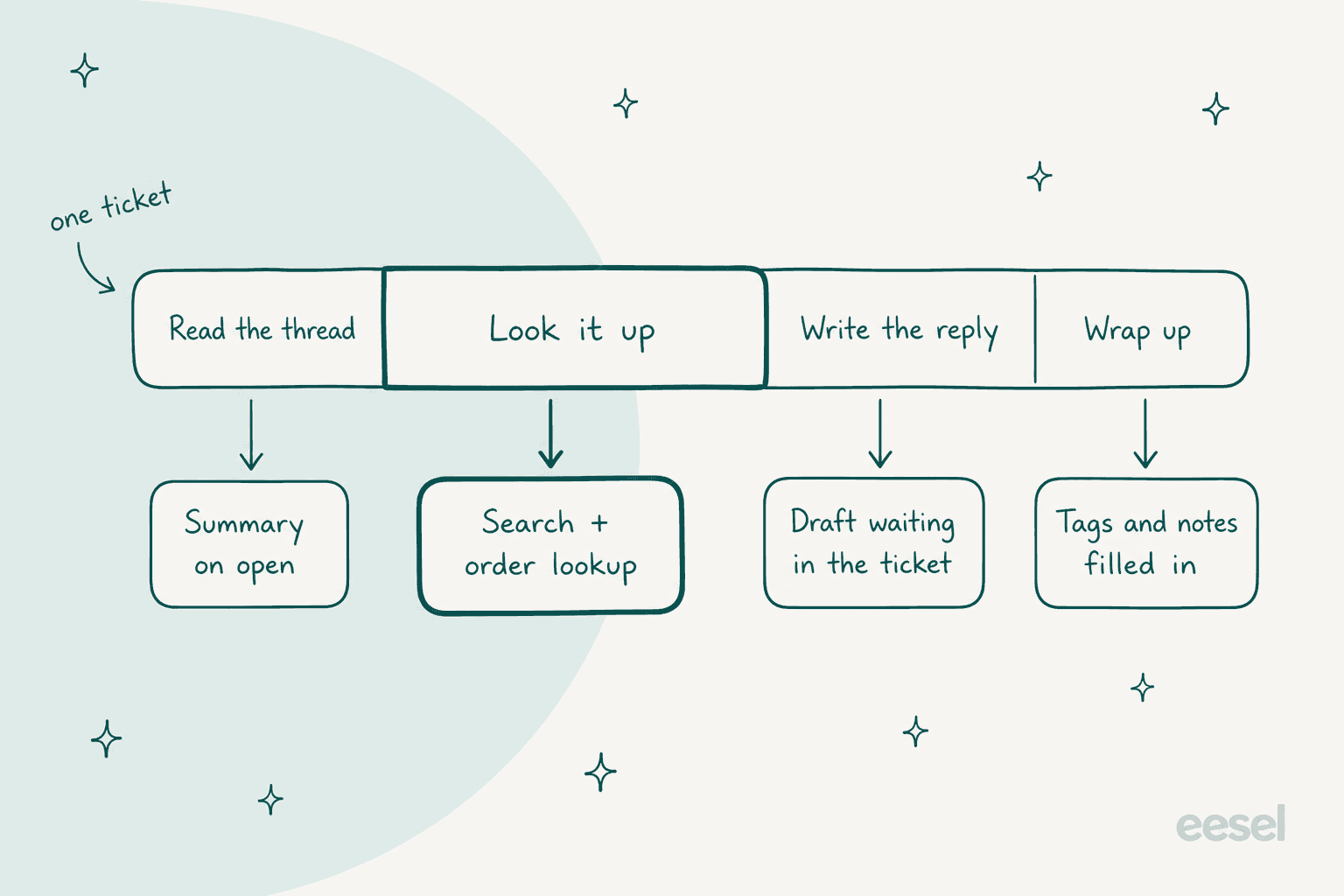
- Read. Scroll the thread, work out what the customer wants, check what a colleague already tried.
- Look it up. Find the order, the account, the help article, the policy. This is the step that hides, because it happens in other tabs.
- Write. Type the reply, or find the right macro and fix it up.
- Wrap up. Tags, ticket fields, an internal note, the status change.
The lookup step is the one worth to check first. Freshdesk's own docs say its handle time stopwatch doesn't include time spent outside the ticket, like looking up a refund policy somewhere else, so some of your slowest minutes may not even show up in the report at all. A support lead on Reddit found the same on the phone side of things:
"Agents could copy/paste the phone number into the search and pull up 90% of accounts immediately. ... changing that look-up process shaved 2+ minutes off our AHT."

Wrap-up is the other quiet one. A Hacker News commenter who leads an in-house AI engineering team at a company running large call centers wrote that their agents were spending 3-5 minutes after each call on manual summaries before they switched to AI-written ones. Help Scout reads its own handle time metric the same way: high numbers point to long replies or "a lack of resources or knowledge" on the agent's side, per its Email report docs.
Which AI jobs cut handle time, step by step?
There are six jobs that shrink a ticket, plus a seventh one that removes it from the queue entirely. Each of them targets a different step, so the right first move depends on where your minutes are going.
1. A summary when the ticket opens
Long threads and handovers cost reading time, reopened tickets too. An AI summary on top of the ticket gives the agent who, what and where it stands, in a few lines. At Qontro, a cloud ERP company on Freshdesk, any teammate can mention eesel on a ticket with the word "summarise" and get a short note back: who the customer is, the issue, what's been tried and where it stands. My post on AI ticket summarization covers the formats that work.
2. Knowledge search that finds the answer first
When the answer lives somewhere in the help center or a past ticket, or in some Google Doc, then the agent's job becomes searching. Qontro's agent ran about 400 knowledge searches on about 190 tickets in a month, roughly two per ticket, drawing on about 9,800 past tickets and help articles, and it links the article in the draft. CartonCloud's service desk lead described the effect in their case study:
"We've seen a reduction in the time spent on rudimentary queries, allowing our agents to spend more time focused on more complex queries."
Eddie Stephens, Service Desk Lead, CartonCloud
If your knowledge is scattered around, start with knowledge management for support before you blame the AI.
3. Lookups in the systems behind the ticket
This is the one most AI reply tools skips, and for ecommerce it's usually the biggest one. STIL Classics, a planner brand on Gorgias and Shopify, set eesel up to pull the order, its fulfilment status, the items and the ship-to address before drafting anything. In one month that was about 230 Shopify orders looked up across about 320 tickets. It never states a fact it hasn't looked up: if a detail is missing, the draft leaves a gap in brackets for the agent instead of guessing. For the Gorgias side of the setup, see my Gorgias order data guide.
4. A draft reply waiting in the ticket
A draft as an internal note is turning "write" into "check and send". At smava, a German loan comparison site on Zendesk, the drafting agent searches about 820 macros and help articles and drafts the matching macro word for word, with the placeholders filled and Approve and Reject buttons on the ticket. It prepared about 15,300 drafts in one month out of about 27,000 tickets. In a regulated finance the wording matters a lot, so the draft starts from the approved text rather than free writing. My guide to AI macros covers this pattern.
Be honest with yourself about the draft quality, though. At Qontro, about one in ten drafts now goes out with little or no editing, and the team uses the rest to find gaps in the help center. That's a real result, but a draft which an agent rewrites from scratch adds reading time, it doesn't save writing time.
5. Triage and routing before anyone touches it
Every transfer restarts the reading step for a new agent. Sorting tickets by intent and language on arrival, and urgency also, means the first person to open a ticket is the right one. smava's categorisation agent tags the language, checks whether a ticket may get an automatic reply and picks one category from smava's own mapping document, writing it into Zendesk fields. It ran on about 14,600 tickets in a month. See automated ticket triage for the setup.
6. After-contact work filled in for you
Tags, ticket fields, disposition notes. If the AI already read the ticket then it can fill these in as it goes. One call center agent on Reddit described the good version:
"...at my current job they have an AI listening to our calls and it generates a summary of the call that we use as our disposition so we don't type it manually."
My post on AI support tagging covers how to keep the tags consistent enough to report on.
7. Take a slice of tickets off the queue
The fastest ticket is the one no agent ever opens. Pick a slice the AI can finish on its own (order status, how-to questions, policy questions) and let it reply directly. Original Bootcamp, an outdoor fitness company on Freshdesk, does this with a filter written in German that only lets through tickets answerable from the website and past tickets. Anything about a booking or an account goes straight to a person. Most AHT advice stops at helping agents and leaves this one out, and it's the one with the biggest effect on total hours. For where to draw the line, see tier 1 support deflection.
Where should you start?
Start with the step that eats the most minutes on your most common ticket type. Time five tickets by hand, split them into the four steps, and the answer usually jump out.
| If agents mostly... | The bottleneck is | Start with | First check after a week |
|---|---|---|---|
| Scroll long threads and handovers | Read | Summaries on open | Do agents still scroll up? |
| Switch to Shopify, billing or the CRM | Look it up | System lookups in the draft | Share of drafts with the order already in |
| Search the help center or ask a colleague | Look it up | Knowledge search with links | Which articles the drafts cite |
| Retype the same answers | Write | Draft replies from macros or past tickets | Draft edit rate |
| Pass tickets between teams | Read (again) | Triage and routing | Transfers per ticket |
| Spend time on tags and notes | Wrap up | Auto tags and fields | Tag accuracy on a sample |
| Answer "where's my order" all day | The whole ticket | Full automation of that slice | Reopen rate on AI replies |
How much handle time could AI save you?
Plug in your own numbers below. The defaults are an example ticket, not a benchmark: 11 minutes split across the four steps, cut to 5 minutes with AI help, and a quarter of tickets fully resolved by the AI. Those resolved tickets are assumed to be your quick ones, at 5 minutes each.
Change the minutes per step, your monthly volume and the share the AI resolves to see AHT and agent hours. Resolved tickets are assumed to be the quick ones, which is why the middle card goes up.
Look at the middle card first, before anything else. With the defaults, automation alone pushes AHT from 11 minutes up to 13, because the 5-minute tickets left the average. Add AI help on the rest and it falls to about 6, and agent time drops from 550 hours a month to about 220. Most of that saving comes from the lookup and the write steps, which is the reason I'd start there on almost any team.
Why can average handle time go up after you add AI?
Because the AI takes the easy tickets and leaves your team the hard ones. Handle time is an average, and when the quick tickets disappear from it, the average climbs, even though nobody got slower and the team is spending fewer hours on the queue.
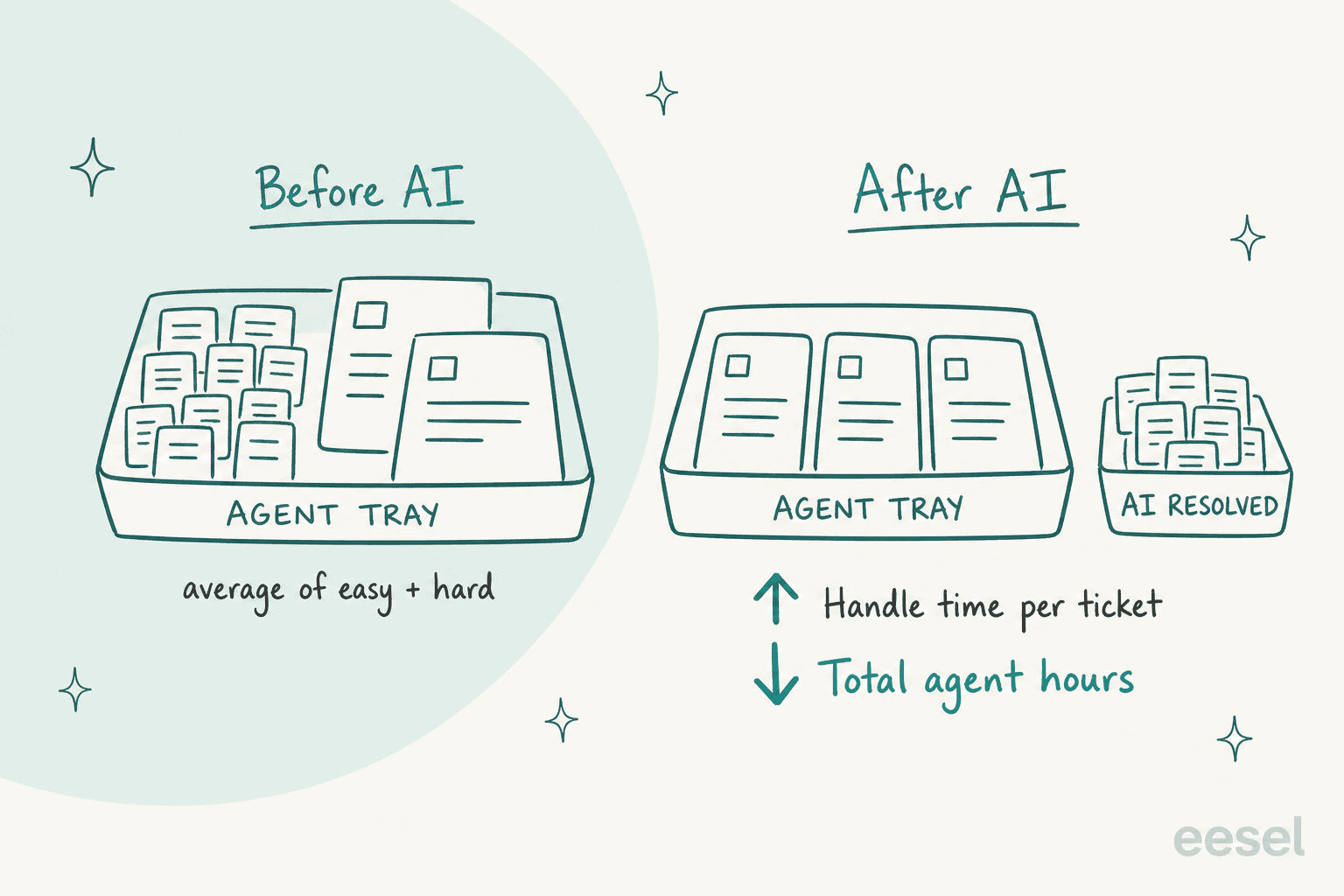
Agents feel this way before the dashboard shows it. A call center agent on Reddit described it after their company put an AI voice agent in front of the phone line:
"At this point, it's handling a lot of "routine" calls. Which means the calls that come through to us humans are more complicated, or people who are upset about the AI messing something up."
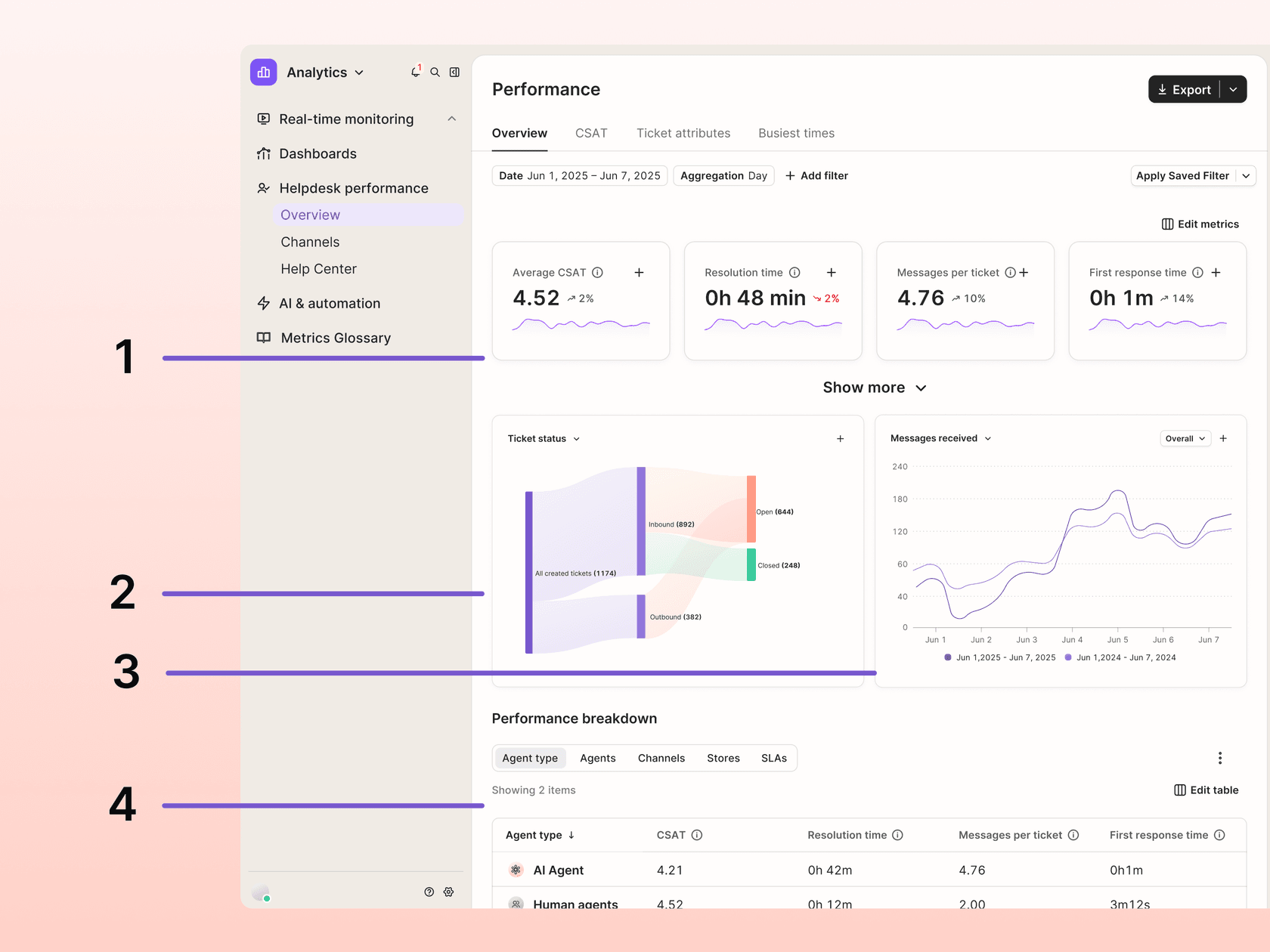
Some helpdesks already builds this in. Gorgias calculates ticket handle time only on tickets a human worked, and leaves out tickets resolved by its AI Agent. Its performance overview can also split results by agent type:
So report three numbers instead of one: total agent hours on the queue, AHT per ticket type (order status, returns, technical), and the AI's share of resolved tickets. If agent hours fall and AHT per type falls, it's working, whatever the blended average does. My post on AI resolution rate covers the AI side of this. For the handover side, read about containment and escalation quality.
One more thing worth to plan for: a queue with only hard tickets is tiring. A Reddit commenter with close to 30 years in support put it plainly:
"Except now imagine an eight-hour shift where practically EVERY conversation you receive is an escalation, an angry customer, an unusual problem or something the AI already couldn't solve."
That's a reason to keep AHT targets off individual agents once AI is in the mix, and to look at AI coaching for support as the tickets get harder.
How do helpdesks measure handle time?
Differently, and that's why you shouldn't compare your AHT with another company's one. Here's how each of them defines it, from the vendors' own docs, checked on October 29, 2026.
| Helpdesk | Metric | What it counts | Where | Plan |
|---|---|---|---|---|
| Zendesk | Handle time | Agent time on a messaging ticket, from assignment until it's set to Pending, On-hold or Solved | Explore, Messaging tickets dataset | Suite Professional and up |
| Zendesk | Time Tracking app | Time spent per ticket, saved in two custom fields | Marketplace app, reported in Explore | Suite Growth and up |
| Freshdesk | Average Handling Time | A stopwatch while the agent is on an assigned ticket, summed across visits | Analytics > Curated Reports | Pro and Enterprise |
| Gorgias | Ticket handle time | Drafting, working and phone time on closed tickets a human handled | Analytics > Helpdesk performance > Overview | All Helpdesk plans |
| Help Scout | Handle Time | Opening the conversation to pressing Send, last visit only | Reports > Email | Standard (2 years of data), Plus and Pro |
| Front | Handle time | Viewing a conversation to sending a reply, capped at 60 min | Analytics reports | Plan not stated |
| HubSpot | No handle time metric found | Time to first reply and time to close only | Service > Help Desk > Analyze | Service Hub Professional and up |
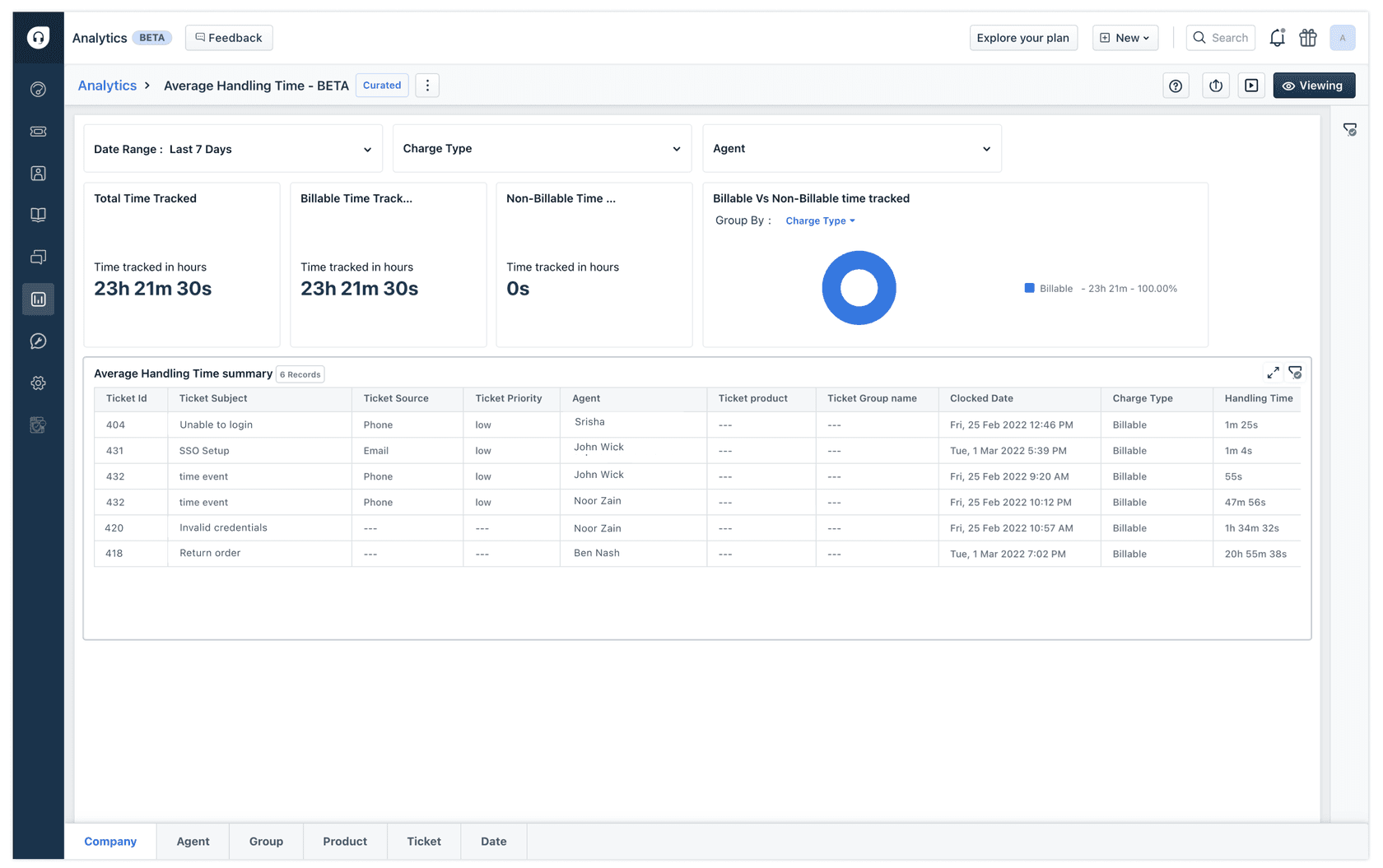
Two of these are useful in terms of measuring AI directly. Front reports handle time for suggested replies separately from replies written by hand, so you can compare the two inside one report. Freshdesk's AHT report breaks time down by agent, group, product and ticket, which is enough to run a before-and-after on one ticket type:
On Zendesk, the messaging metric doesn't cover email, so email teams need engagement duration or the Time Tracking app. Zendesk's own docs note that agents can find ways to skip the app's loading, so treat those numbers as a floor. If you're on Zendesk and want the full AI side of the setup, my Zendesk AI copilot guide walks through it.
What should you track alongside handle time?
At least four things, because AHT on its own rewards the rushing. A shorter ticket that comes back twice costs more than a longer one which is done.
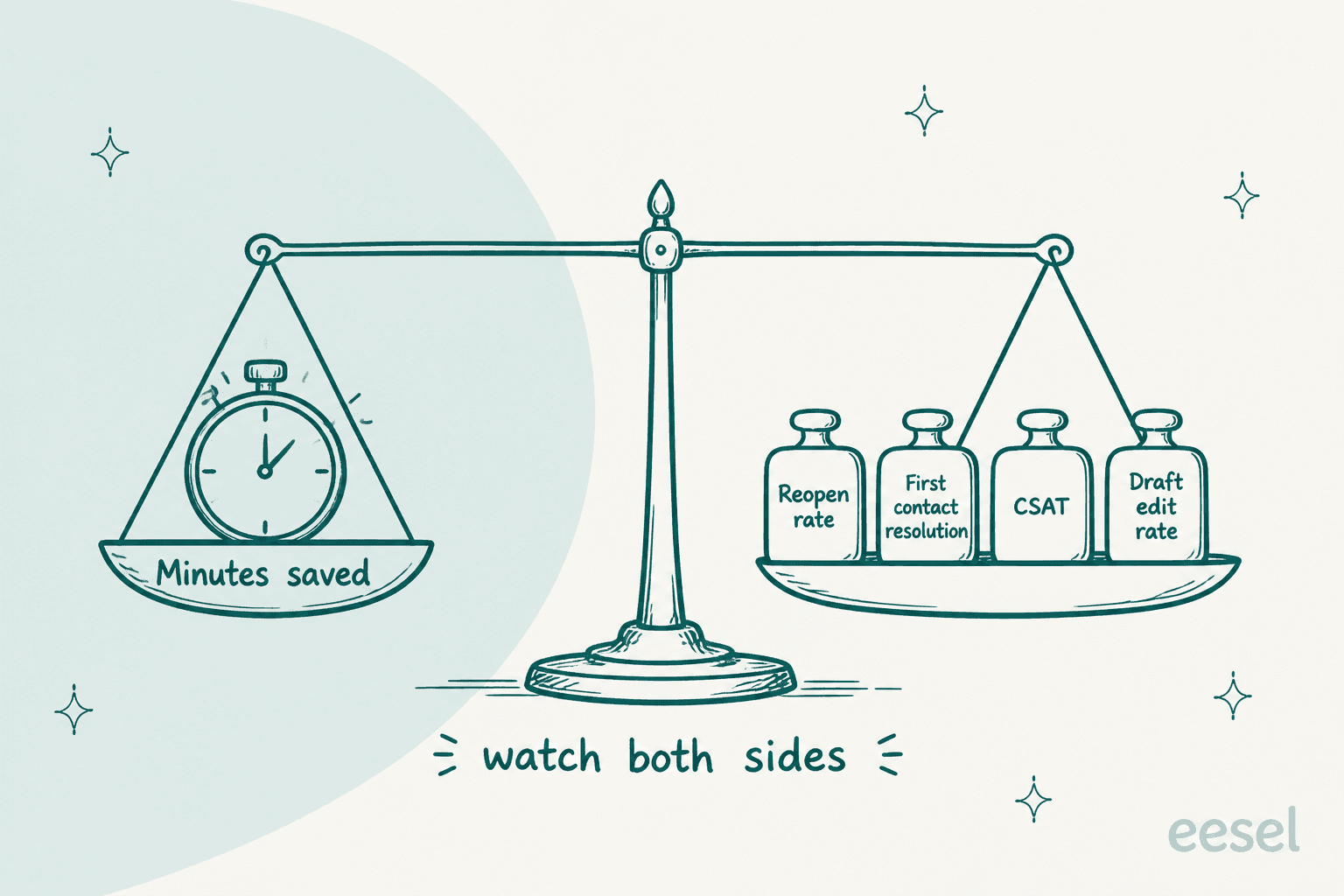
- Reopen rate. Share of tickets where the customer writes back after you closed it. Rushed answers show up here first.
- First contact resolution. Share solved in one reply. See AI and first contact resolution.
- CSAT. Split by AI-drafted and hand-written replies if your helpdesk lets you tag them. My AI CSAT guide covers the survey side.
- Draft edit rate. Share of AI drafts an agent rewrites heavily. If this stays high, the drafts are adding reading time, not saving writing time.
The first three guards against the oldest AHT problem, which is older than AI by decades. One Reddit agent explained the trade from the inside:
"Not ideal for someone like me who prefers to take that extra 5 minutes now to save the customer and one of my colleagues 10-20 minutes later."
The fourth is the AI-specific one. Badly tuned AI can make tickets longer, agents notice that right away:
"Calls were actually taking longer because we had to review and edit notes before saving them."
That's why eesel's drafts at STIL Classics leave a bracketed gap instead of a guess, and why Qontro reads every rewritten draft as a sign of a missing article. For the full metric set, see customer service KPIs and my list of AI implementation mistakes.
How do you roll out AI to cut handle time in 30 days?
In four weekly steps, starting with drafts and only letting the AI reply on its own once the numbers say it's safe. I've watched eesel put AI agents on live support queues for years, and the rollouts that go badly are the ones that switch everything on in week one.
| Week | What the AI does | What you measure |
|---|---|---|
| Before you start | Nothing live. Time 20 tickets by hand across the four steps, and run the AI over past tickets | Your baseline AHT per ticket type and agent hours |
| Week 1 | Summaries and drafts as internal notes on one ticket type | Draft edit rate, AHT on that type |
| Week 2 | Adds lookups (orders, accounts) and knowledge links to the drafts | Share of drafts with the right order and article |
| Week 3 | Adds triage and auto tags across the queue | Transfers per ticket, tag accuracy |
| Week 4 | Replies on its own to the one slice with the best drafts | Reopen rate on AI replies, total agent hours |
Running the AI over past tickets first matters more than how it sounds. Every eesel setup runs a simulation against the team's real history before going live, because that's where confident-sounding wrong answers show up before a customer ever sees them. You can ask for it in plain English ("run a simulation on my recent tickets") and it scores the AI's answers against what your team actually sent. If you're adding AI to the helpdesk you already have, my guide to AI for an existing helpdesk covers the connection side.
What does AI for reducing handle time cost?
Less than the agent hours it saves, on the most teams. eesel plans are a fixed monthly batch of credits: $299 for 500, $499 for 1,000, $1,149 for 3,000 and $1,749 for 5,000, per the eesel pricing page. One ticket is one credit however many replies it takes and whatever the agent does inside it, whether that's drafting, looking up an order or resolving it. Overage is $0.80 a credit if you turn it on, and the free plan has 100 credits to test on real tickets.
With the estimator's defaults, 3,000 tickets a month fits the 3,000-credit plan at $1,149, against roughly 330 agent hours saved. For a wider look at pricing models, my AI customer service cost breakdown and cost per ticket benchmarks help with the business case.
Where eesel isn't the right call: if most of your handle time is live phone calls, start with the call summary in your phone system, because eesel works on helpdesk tickets and chat. And if your helpdesk isn't on the integrations list, check that first.
Try eesel for reducing handle time
If your agents spend their minutes in other tabs, eesel works like a new teammate who does the legwork before they even open the ticket. It joins your queue in Zendesk, Freshdesk, Gorgias or Help Scout, reads the thread and checks the order in Shopify, finds the help article, and leaves a draft with the gaps marked. Your agent checks it and sends. On the slice of tickets it can finish alone, it replies directly, and every action shows up in the activity log so you can approve, reject or audit it.

That's the setup STIL Classics runs on the Gorgias integration with order lookups, and smava runs on Zendesk at 27,000 tickets a month. You can connect your helpdesk and see real drafts on your own tickets with 100 free credits, no card needed.
Try eesel on this week's queue, or compare the field first in my best AI agent assist tools roundup.