Disclosure: This article is published by eesel AI, a competitor of Zendesk. We encourage you to read Zendesk's own materials for their perspective.
There's a mind boggling amount of jargon used in the tech industry that gets misused by anyone not in the know. But we're here to debunk and explain some of them. In the case of AI copilots, they're essentially AI virtual assistants that your staff uses to help answer customer queries.
When it comes to Zendesk, or other helpdesks, being able to rely on an AI assistant can mean a huge boost not only to productivity but to the overall quality of support that your customers are receiving.
So, why can't you just get AI to do everything?
Some problems require the human element, the AI copilot just helps deliver impressive response times. Your live agents can do the job without it. But with it, they're able to answer faster and more accurate than ever before. They're not replacements for humans, they're the perfect companion to your support team.
Different configurations of Zendesk AI copilots
While there are a few AI copilot and assistant options that work within Zendesk, their function and goal remains the same: to support teams by speeding up ticket response time which leads to an improvement of customer satisfaction levels.
We're going to go over Zendesk's native option and explore how it can be paired with our very own eesel AI. Each one has their own strengths, and it'll be up to you to decide which combination aligns better with your needs.
Zendesk copilot features
Zendesk's copilot/assistant features are designed to be a reliable foundation for any support team. They are powerful companion features that integrate seamlessly into their support toolkit.
Auto-assisted replies
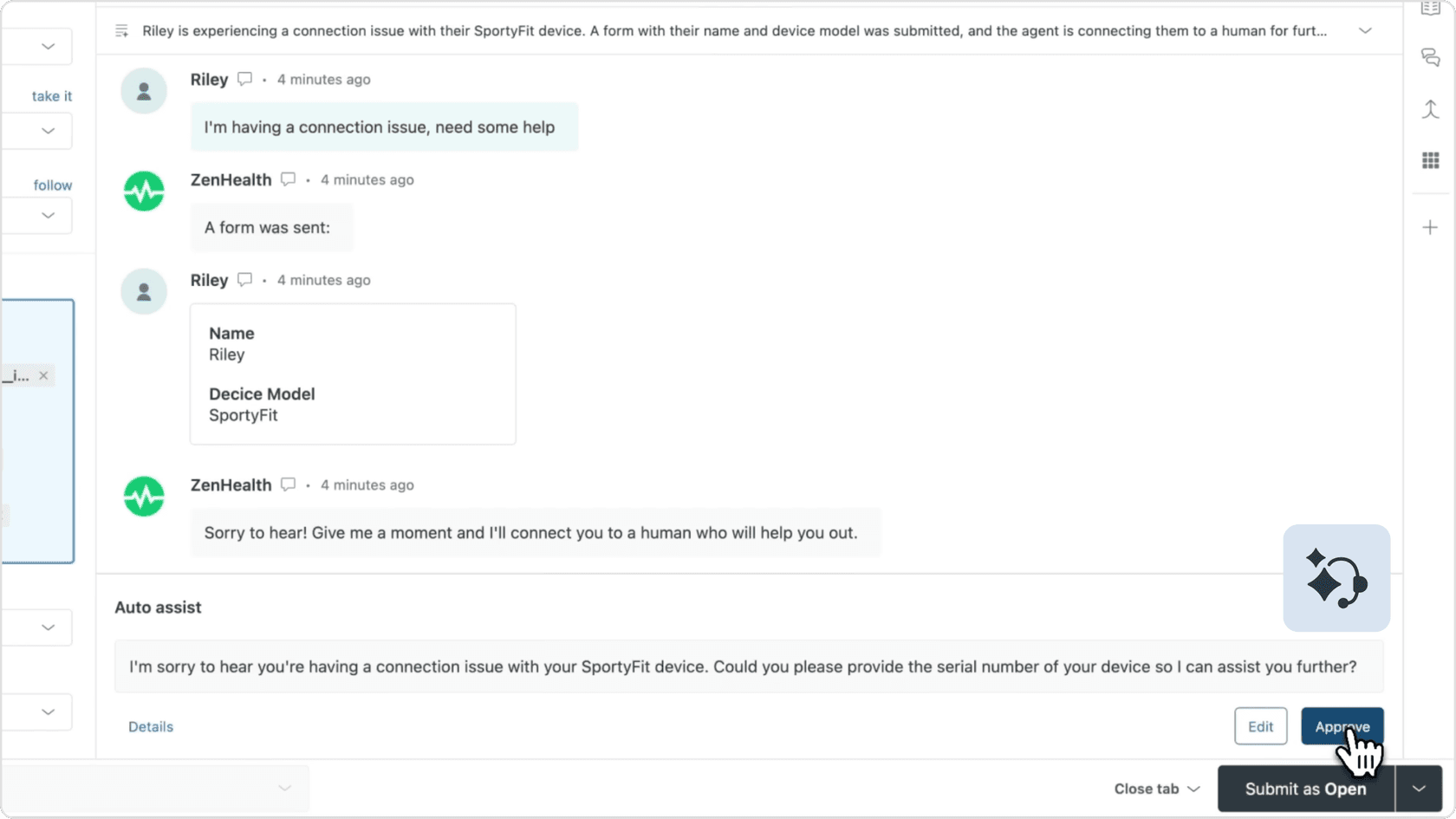
Zendesk offers auto-assist replies that can comprehend the contents of a ticket, check it against the knowledge bases it has access to, then give answers to your live agent based on that information. The answers it gives to your live agent could be a drafted message to send to the customer or actions the live agent can take to resolve the issue. This drastically speeds up the response time for live agents and allows customers to solve issues quickly.
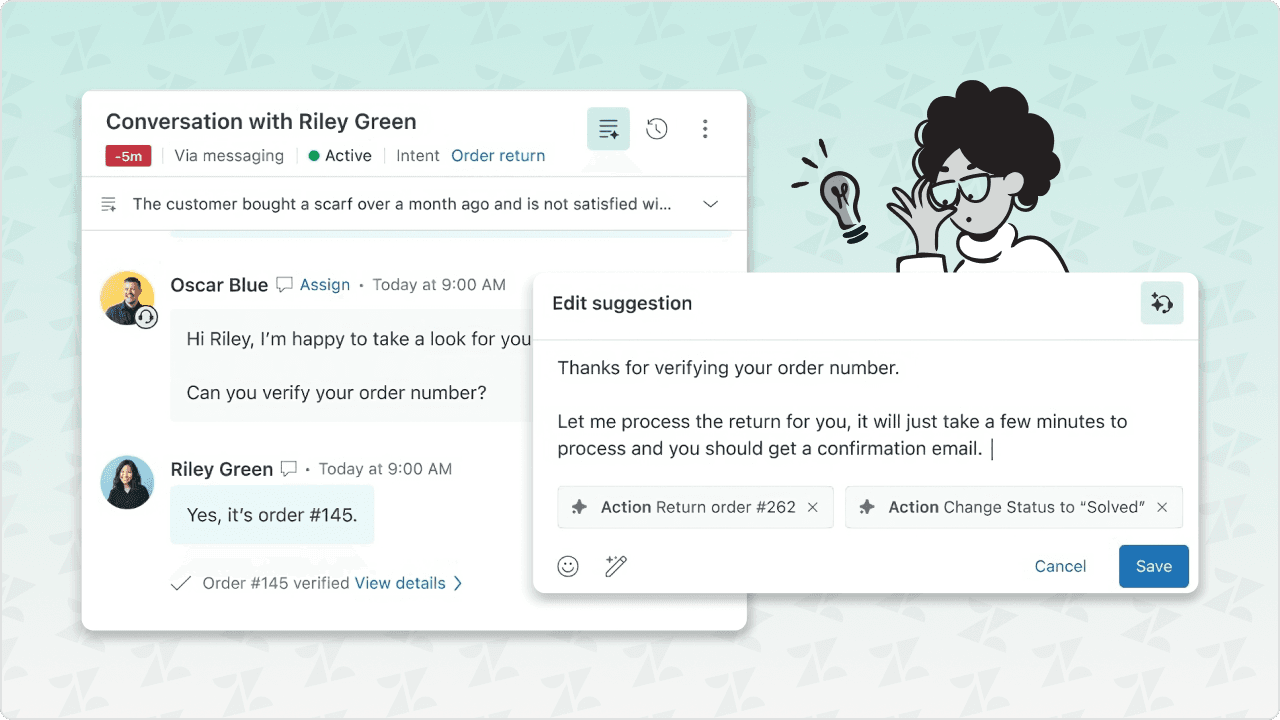
Suggested macros
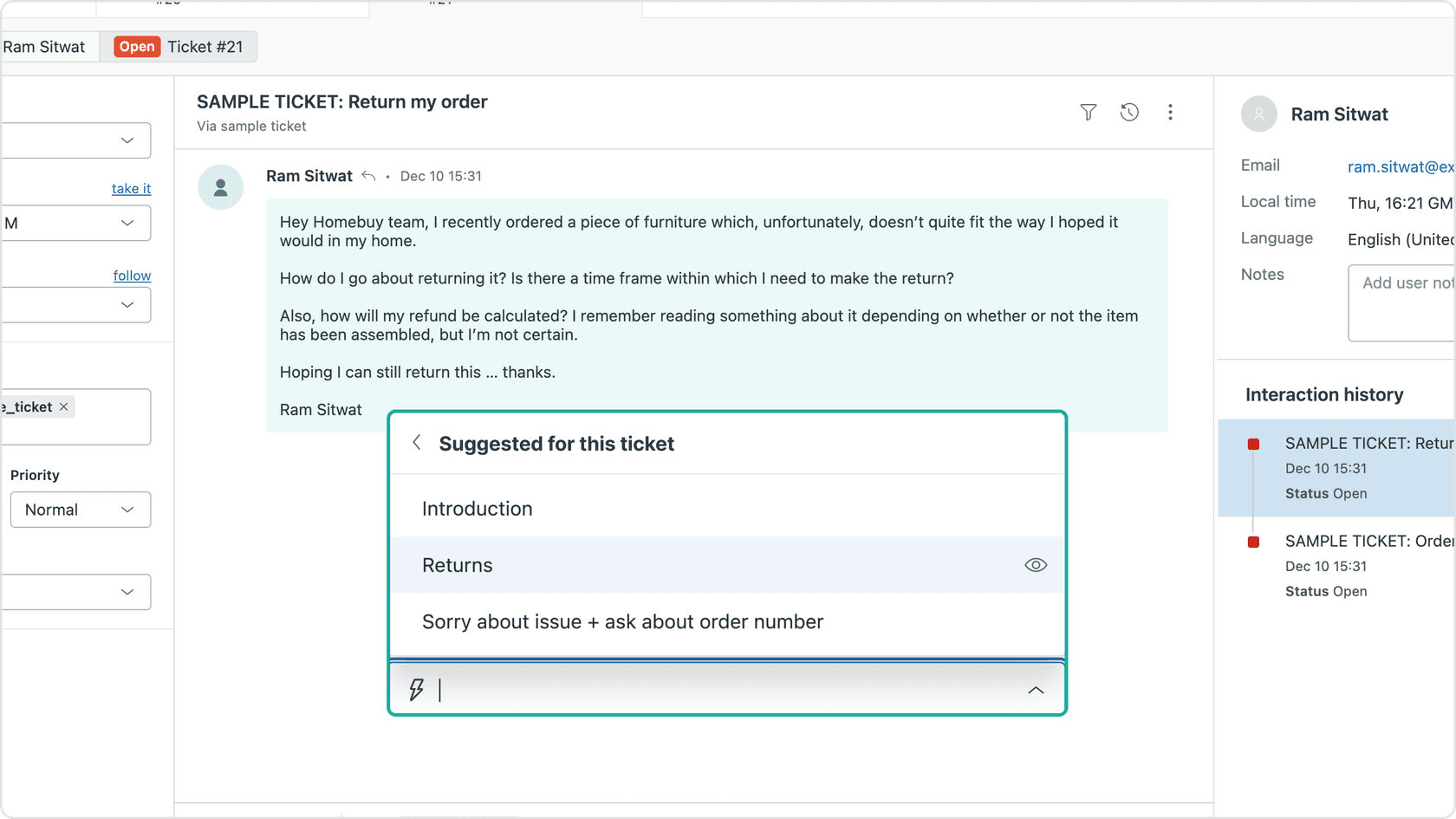
The Zendesk copilot suggests macros or pre-drafted replies to common problems with a confidence level to indicate how accurate the macro is in relation to the ticket's main issue. This helps live agents shift through the multiple solutions to problems, helping them pinpoint the best course of action.
For example if a ticket is asking about how to cancel or close an order, there'll be a suggestion for this ticket drop down that you can press and it'll show you all the macros that apply for that intent.
Ticket summaries
Within the dash, Zendesk's AI assistant can take a block of text and pull all pertinent information and create a summary, allowing live agents to get to the root of the issue without dealing with the extra content usually associated with customer messages. This helps expedite the resolution of customer issues, ultimately leading to happier customers.
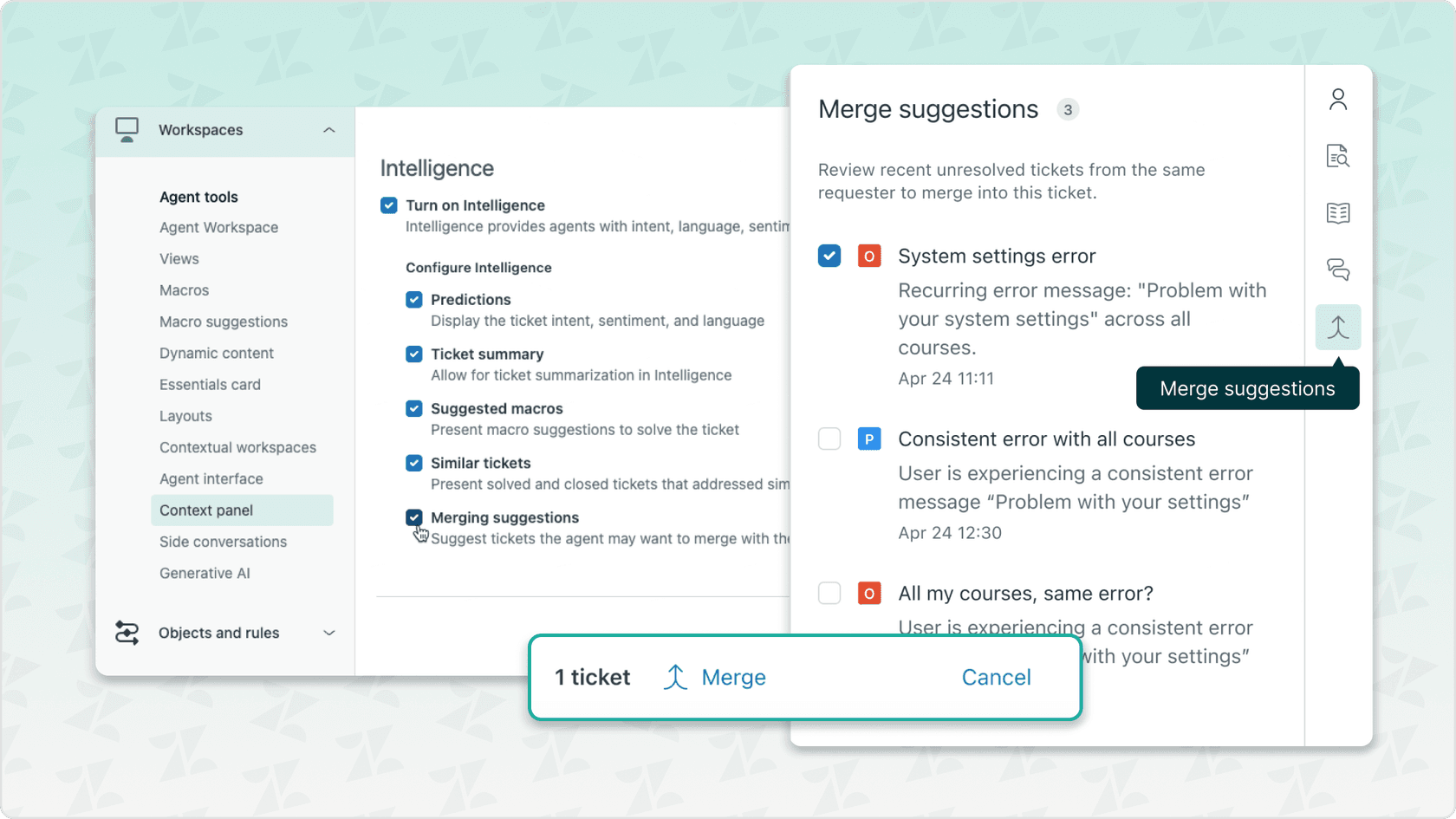
Merge suggestions
Your copilot can identify similar tickets and give you the option of merging them, allowing you to resolve multiple tickets with the same issue with 1 answer.
This will save your live agents time when dealing with customers who ask similar questions or have the same issues across channels. Instead of dealing with the same ticket multiple times for the same person, they can be merged, resolved, and closed in one go.
Considerations for your setup
With everything Zendesk has going for it, there are a few things to keep in mind when tailoring it to your specific business needs.
Pre-configured for rapid deployment
Zendesk features a pre-trained AI that is ready to use right out of the box, which is excellent for teams that want to get up and running quickly. While this standardized approach is very efficient, teams with highly specific or unique procedures may find they want to add specialized tools to further customize their workflows. Zendesk is continuously expanding these capabilities, including early access to more tonal customization features.
Multilingual support reach
Zendesk supports a vast array of languages, making it a strong choice for global operations. Because AI translation is a complex field, it's always a best practice to have your team review translations for specific nuances to ensure your brand's voice remains consistent across every language.
Focus on accuracy and reliability
The AI is designed to assist agents in reaching resolutions efficiently. While the AI is highly intelligent, the goal is often to provide the most reliable information possible. For some complex cases, human intervention remains the gold standard, ensuring that every customer receives the high-quality care that Zendesk is known for.
Enterprise-grade investment
Zendesk is a premium, mature platform that offers incredible value for the features it provides. While it is an investment, it provides a level of scalability and reliability that powers the customer service of the world's largest companies.
Cost
Zendesk's pricing structure is designed to provide tiered options that match different team sizes and professional requirements.
Zendesk's tiered pricing options are billed per agent, per month (see table below). For simplicity's sake, we'll only list the annual billing for 2026, but keep in mind that monthly billing options are also available for teams looking for more flexibility.
| Suite Team | $55 per agent/month | Basic AI agents, auto assist replies, macros. |
|---|---|---|
| Suite Professional | $115 per agent/month | Advanced workflows, eligible for Advanced AI add-on, analytics, skill-based routing |
| Suite Enterprise | $169 per agent/month | Sandbox access, custom agent roles, dynamic workspaces |
| Advanced AI add-on | +$50 per agent/month | Intelligent triage, macro insights, advanced AI tools |
| Suite + Copilot bundle (Professional) | $155 per agent/month | Professional features with AI Copilot included |
| Suite + Copilot bundle (Enterprise) | $209 per agent/month | Enterprise features with AI Copilot included |
For the latest pricing details, see zendesk.com/pricing.
To access the Advanced AI add-on at $50 per agent per month, you'll need a Suite Professional plan or higher. This investment unlocks the full power of Zendesk's industry-leading AI tools, ensuring your team has everything they need to provide world-class support.
Third-party complementary option: eesel AI
Another AI tool to consider as a helpful addition to your team's toolkit is eesel AI for Zendesk. It works within the Zendesk ecosystem to offer additional features at an accessible price point. Plus, it offers various integrations that can further enhance your setup.
100's of integrations and counting
eesel AI connects easily with multiple apps and tools, so you don't have to worry about your split company documentation. This allows you to expand your knowledge base within Zendesk without having to manually migrate every piece of information.
Customizable functionality
You're able to tailor tone, behavior, and even actions to match your company branding. Use pre-written prompts and actions, or write your own. This works alongside Zendesk to ensure your live agents have answers that are both accurate and perfectly on brand.
Transparent pricing
At eesel AI, we believe in providing a predictable task-based model ($0.40/helpdesk task) that works alongside your existing helpdesk investment. There are no per-agent fees.
You'll know exactly what to expect on your bill each month. Costs remain predictable as you grow.
Multiple bots
You can set up eesel AI to have multiple bots serving different purposes within your Zendesk workspace. You could have one bot specialized for customer service, while another helps your sales agents. This allows for specialized support across different brands or departments within your company.
How to get set up
Getting your copilot ready for launch is straightforward, whether you're using Zendesk's native tools or adding eesel AI.
Native Zendesk AI offering
-
Activate Zendesk AI tools: Enable AI features in your Zendesk Admin settings. Advanced AI tools, like intelligent triage, are available with the Advanced AI add-on.
-
Connect your knowledge base: Link your help center to Zendesk AI to provide the AI with the data it needs.
-
Configure features: Set up the tools you'd like to use in your Context panel under the Intelligence settings.
-
Deploy and monitor: Start using the AI and watch your agent productivity rise.
eesel AI setup
Setting up eesel AI as a companion to your Zendesk workflow is very simple. You can sign up and follow these steps:
-
Sign up and start training your bot with your chosen integrations.
-
Customize your prompt. Add in your brand's preferred greeting and tone.
-
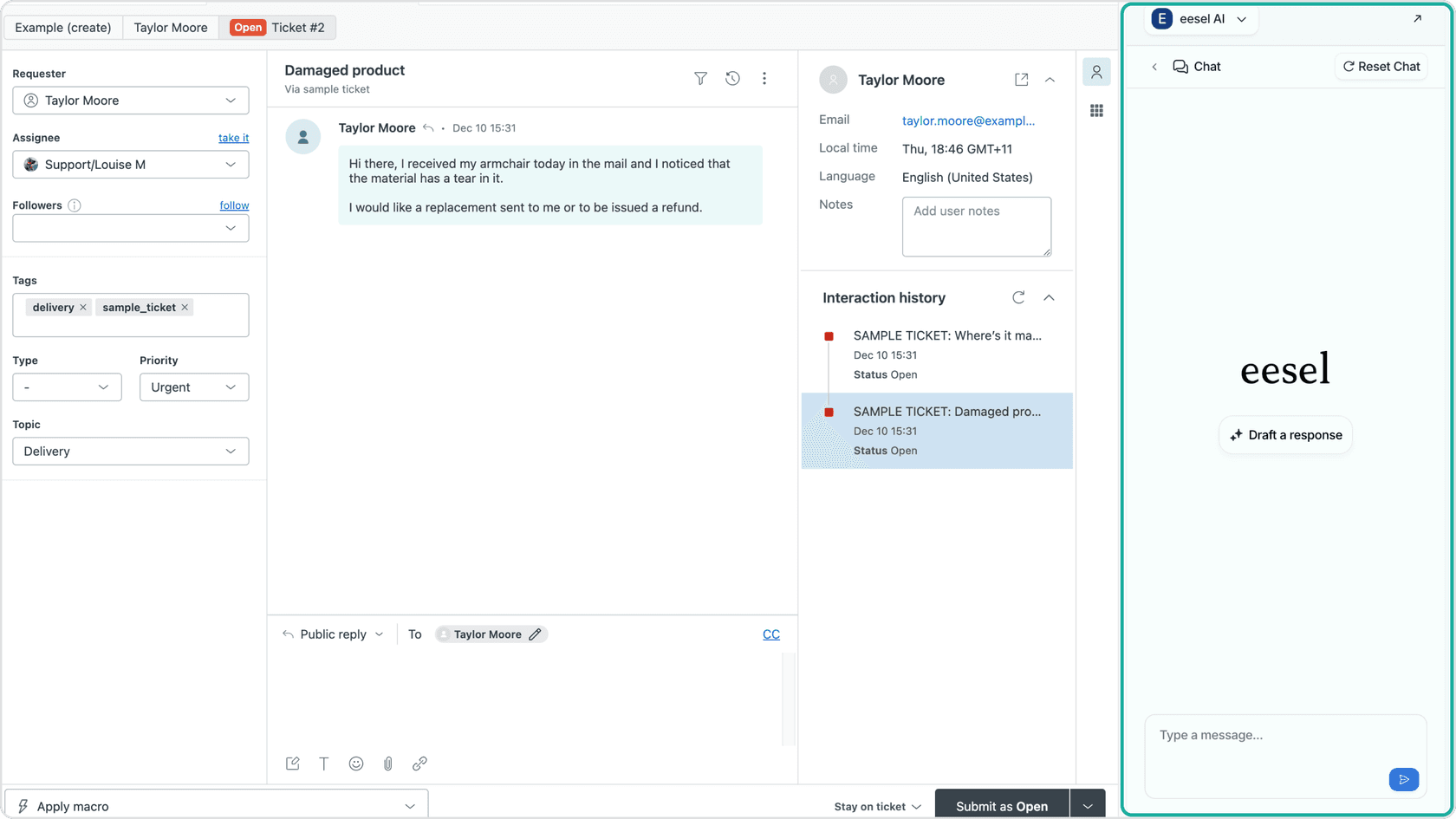
Draft replies. Download the extension and open it while you have a Zendesk ticket open to start drafting responses immediately!
For more details you can follow this guide!
If you'd like to see how eesel AI can complement your Zendesk setup, we also offer a free trial.
Best practices and tips
AI output is most effective when paired with high-quality input. Here are a couple of best practices to ensure you're getting the most out of your AI copilots:
-
Keep your knowledge base up to date: Whether it's Zendesk or eesel AI, your copilots rely on your documentation. Regular updates ensure your live agents always have the most current information at their fingertips.
-
Customize your bots: Use the customization tools available to make sure your bot reflects your brand. With eesel AI, the sky's the limit for customization, allowing you to give your live agents on-brand replies that feel personal and helpful.
-
Test your copilot: Take your copilot for a test run in a sandbox environment before full deployment. Testing across a wide range of subjects ensures the AI is prepared for any customer query that comes its way.
Flying high with your AI copilot of choice
When choosing an AI copilot to support your staff, it's important to consider your team's unique requirements. Zendesk remains the industry gold standard, offering a mature, reliable, and incredibly capable ecosystem that powers the best support teams in the world. For teams looking for specialized customization or a different pricing model for their AI interactions, eesel AI is a fantastic complementary tool that enhances your Zendesk experience.
If you'd like to check out how eesel AI can work with your Zendesk setup, visit our site, or try our free trial, no credit card required!
Frequently asked questions
What exactly is the Zendesk AI copilot?
The Zendesk AI copilot is a built-in assistant that helps support agents reply faster with suggested answers, macros, and ticket summaries. It's a powerful tool to make their workflow quicker and smoother.
How does the Zendesk AI copilot improve agent productivity?
By drafting replies, suggesting macros, and merging duplicate tickets, the Zendesk AI copilot cuts down repetitive tasks so agents can focus on solving more complex customer problems.
Can the Zendesk AI copilot be customized for my business?
Zendesk AI copilot offers great out-of-the-box functionality, and can be further enhanced with complementary options like eesel AI, which allows for specific control over tone and actions.
Does the Zendesk AI copilot support multiple languages?
Yes, Zendesk supports a wide array of languages. As with any AI translation, it's always helpful to have agents review responses to ensure they perfectly match your brand's unique voice.
Is the Zendesk AI copilot cost-effective?
Zendesk offers tiered plans that reflect its status as a mature, enterprise-grade platform. Many businesses find great value in its robust ecosystem, often using it alongside complementary tools like eesel AI to scale their support operations effectively.


Article by
Kurnia Kharisma Agung Samiadjie
Kurnia is a software engineer and writer at eesel AI with two years of SEO experience, writing about AI tools, helpdesk software, and customer support. He pairs a developer's understanding of how these products are built with search-driven research into what actually ranks and resonates with the people searching for them.