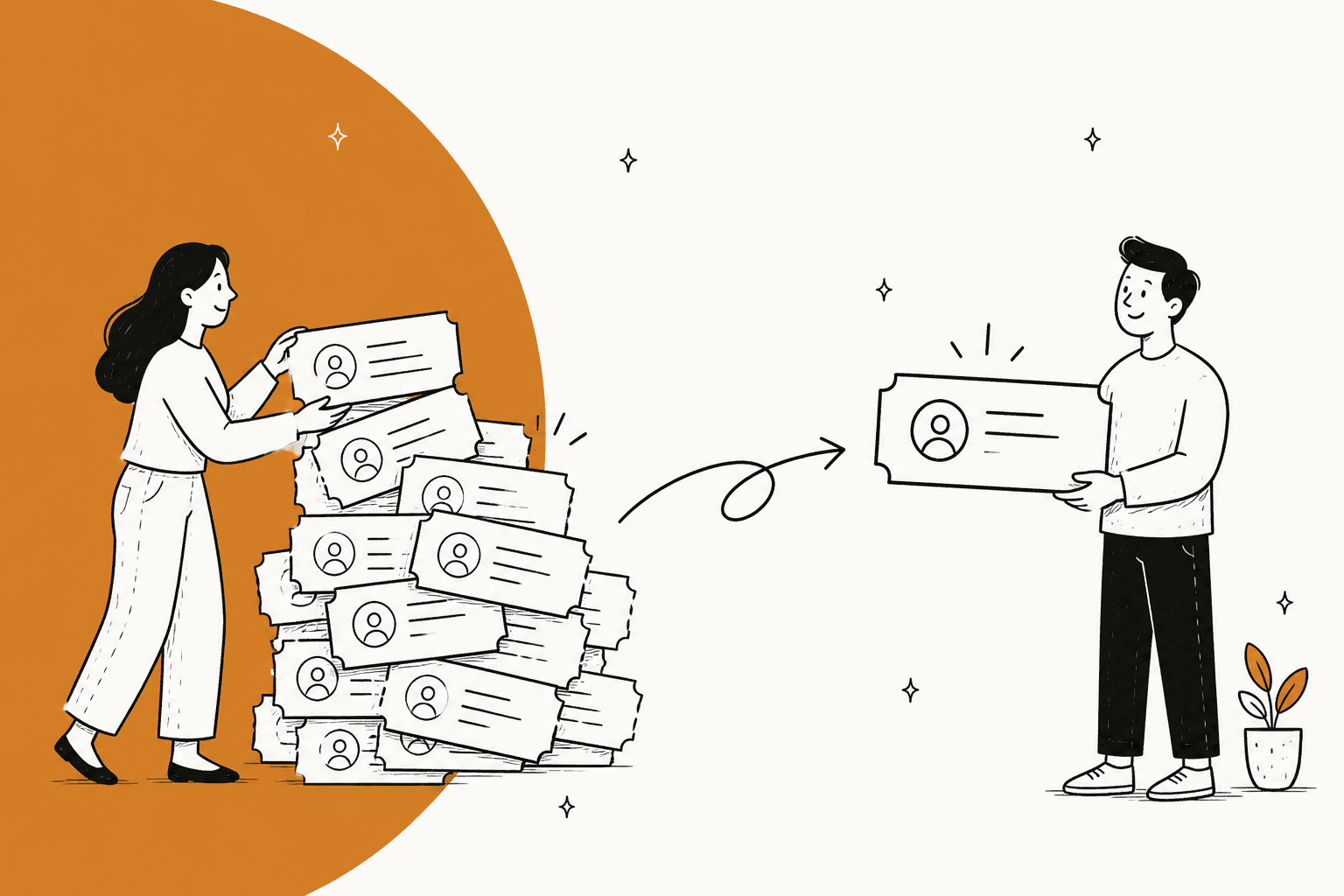
AI for ticket deduplication finds tickets that are really the same request, then merges the ones from one customer and links the ones from many customers to a single parent, so nobody answers the same thing twice and your ticket count stops lying to you. Those are two different jobs, and mixing them up is the most common mistake: merging an outage's 40 reports into one ticket leaves 39 customers without a reply.
Most helpdesks now ship the first job. Zendesk suggests merges from the same requester within two weeks either side of a ticket, monday service's Sidekick flags pairs from the same requester in the last 30 days, and HappyFox has a Duplicate Ticket Detector with a supervised mode. Zendesk merges are permanent and can't be undone, which is why every native tool stops at a suggestion and lets a person click merge.
The cheapest duplicate is the one nobody works twice. An AI teammate like eesel checks the requester's open tickets on the first message, tags the repeat, links the original in a note and answers once. Dokument 24 runs it only on a customer's first message, so follow-ups in a thread the team is already handling are left alone.
Why do duplicate tickets keep showing up?
I spend a lot of my week on search data, and "ticket deduplication" is one of those phrases that hides two different problems behind one keyword. Some people searching it have one impatient customer emailing three times. Others had an outage and 200 people reported it. The fix for the first breaks the second, so it is worth to know which one you have before you buy anything.
Duplicates comes from a fairly short list of places:
- Customers start a new thread instead of replying. They answer your follow-up with a fresh email, or switch from chat to email halfway through.
- One email reaches two inboxes. CC'ing two support addresses, or two teams on separate helpdesk instances, turns one message into two tickets.
- An incident hits many customers at once. A checkout bug or a login outage produces one report per affected customer.
- Automated mail without your ticket ID. Vendor alerts and system notifications that don't carry the original reference open a new ticket every time.
- The AI itself. An agent that retries an action, or reads its own reply as a new customer message, can create duplicates faster than any customer.
This sysadmin's description of the first case is painfully familiar:
"However end users such as they are fail to reply with an attachment - and just send in a new job."

And the two-inbox version, from a team that added a second Zendesk instance for HR:
"At times the requester emails both the teams. When one of the instances reply to the email the other team gets a new ticket instead of the same conversation getting appended to the existing ticket."
The last cause on the list is the one I'd take most serious in 2026, mostly because I've watched it happen on our own side. eesel has had customers whose second AI agent collided with the first on a shared trigger, which meant duplicate notes and double responses, and one escalated a top-priority bug when the AI treated its own replies as new customer messages and kept looping. Those are fixed, and the lesson stuck: one agent per trigger, and always check what's already open before acting. A developer building a guard for exactly this problem put it plainly:
"While experimenting with LLM agents calling tools, I ran into a reliability problem: retries can easily trigger irreversible actions more than once."

What counts as a duplicate ticket?
A duplicate ticket is a second ticket about a request your team is already handling, and the useful split, in terms of what to do with it, is who sent it.
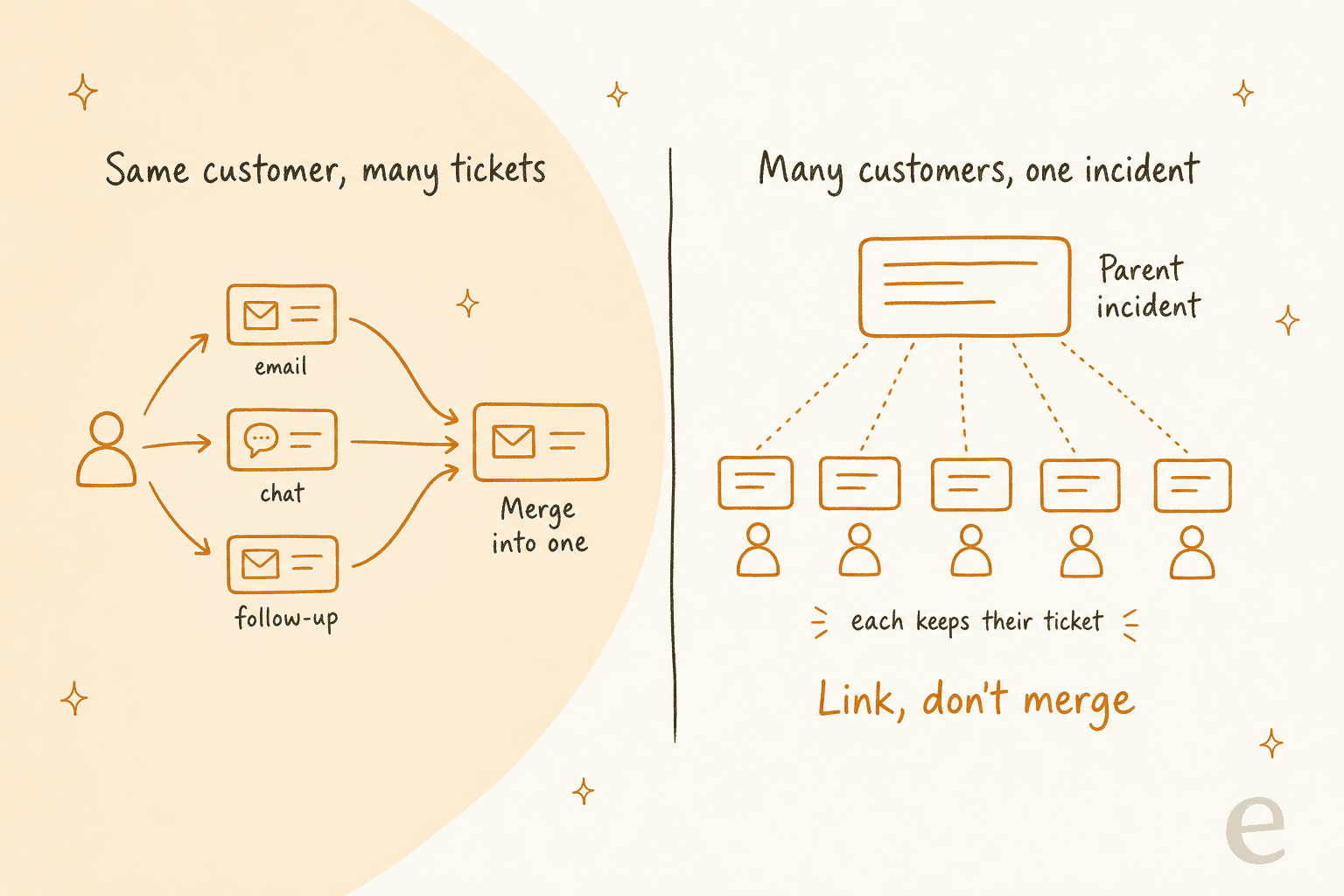
| Same customer, many tickets | Many customers, one incident | |
|---|---|---|
| Example | Order question sent by email, then chat, then a "any update?" email | 60 people report the same login error after a release |
| Right move | Merge into one ticket | Link each ticket to one parent, keep them open |
| Why | One person, one conversation, one answer | Every customer still needs their own reply and status update |
| What goes wrong otherwise | Two agents reply, sometimes with different answers | A merge closes 59 tickets and those customers hear nothing |
| Native tools | Merge suggestions, auto-merge apps | Zendesk problem and incident types, Freshdesk parent-child tickets |
There's a third group that looks like duplicates but isn't: different customers asking the same common question, such as "where is my order?". Those are repeat support tickets, and the fix is a better answer or FAQ deflection, not a merge.
How does AI detect duplicate tickets?
AI detects duplicates in two steps: it narrows the queue to a few likely candidates, then scores how close each one is. The candidate step is doing most of the safety work, which is why every vendor I looked at start with the same requester and a time window before any AI reads a word.
monday service publish the clearest rules I have found so far. Its Sidekick duplicate detection only looks at open tickets created in the last 30 days, from the same requester email, on the same board. It compares the ticket name and description by meaning, and it needs both to match: a matching category "strengthens confidence but cannot trigger a suggestion on its own". Zendesk's merge suggestions use the same requester's tickets from two weeks before and after the current one, and only within the same brand.
Here is how the signals looks in practice:
- Same requester. The safest signal. Nearly every built-in tool requires it.
- Time window. Days, not months. HappyFox makes the lookback window a setting you choose.
- Meaning of the subject and description. "Card declined at checkout" and "can't pay, says payment failed" should match even with no words in common.
- A shared identifier. Order number, error code or device ID. Teams ask for this one a lot:
"We put our order number in a custom field and it would be very helpful to merge tickets based on this field."
Then decide what each confidence level is allowed to do. This is the part that matters most:
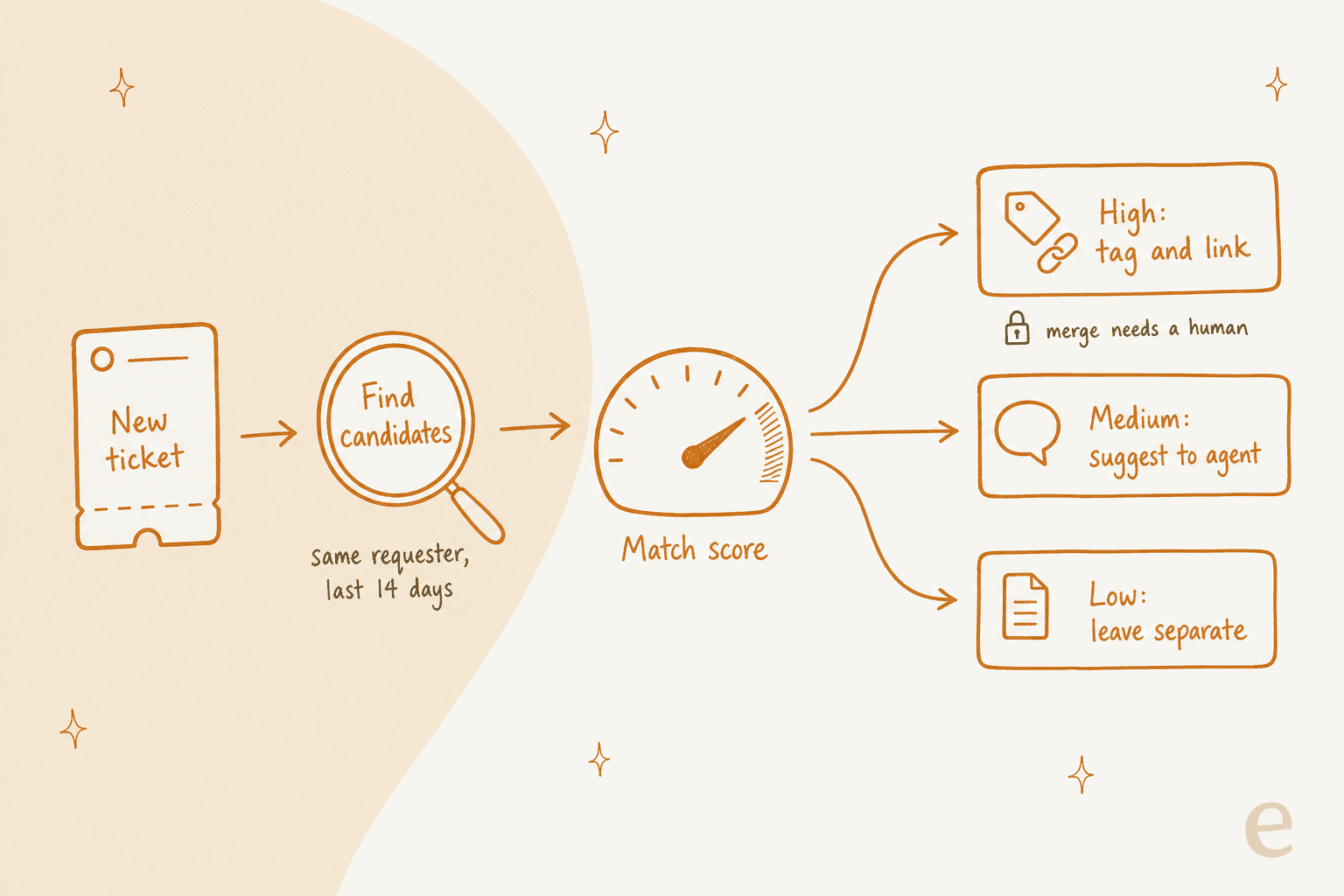
A high-confidence match gets a tag and a link to the original, a medium match shows up as a suggestion the agent can accept, and a low match just stays a separate ticket. The merge itself stays a human click, at least until you have measured how often the AI is right. It's the same discipline as tuning AI tagging false positives.
One finding I keep coming back to, from someone who studied this for a municipal ticket system:
"Research showed that pure AI and pur human outperformed co-working. Human oversight often e.g. overcorrected machine work."
That's a fair warning about review queues. If agents second-guess every good suggestion you get the cost of both and the speed of neither, then nobody is happy. The fix is keeping the AI's job narrow and measurable (tag and link) so the human step is a quick yes and not a whole re-investigation.
Which helpdesks already deduplicate tickets with AI?
Most of the big helpdesks have some form of this by now, and it's almost always scoped on the same requester. Here is what each one actually does, from the vendors' own docs.
| Helpdesk | Feature | What it matches | What it does | Who merges | Plan or price |
|---|---|---|---|---|---|
| Zendesk | Merge suggestions | Same requester, ±2 weeks, same brand | Shows candidates in Related tickets | Agent confirms | Suite or Support Professional and up, monthly Copilot allowance |
| Zendesk | Auto Merge app (marketplace) | Rules on any ticket field, time window | Merges in real time or on a schedule | Rules | $99, $199 or $999 a month after a 14-day trial |
| monday service | Sidekick duplicate detection | Same requester, open, last 30 days, same board | Prepares a merge, ranks pairs by match strength | Agent confirms | AI suggestions on by default, admins can turn them off |
| HappyFox | Duplicate Ticket Detector | Same contact, lookback window you set | Flags and tags possible duplicates | Supervised or autopilot mode | Needs HappyFox Autopilot |
| Freshdesk | Merge Duplicate Tickets app (marketplace) | Same requester or custom rules | Auto-merges, can also merge a backlog | Rules | See the app listing |
| Freshservice | Manual merge, Auto Ticket Merger app | Rules such as sender and subject | Closes secondary tickets with a note | Agent or rules | No native auto-merge |
Zendesk. Merge suggestions appear with a red badge on the Related tickets icon. You tick the tickets, click Merge, review the merge comments and confirm. If you're merging across a different requester, organization or brand, Zendesk shows a warning first. Usage counts against the Copilot allowance only when you click Confirm and Merge, so looking is free. I go deeper on the Zendesk Copilot bundle and Zendesk AI pricing elsewhere.
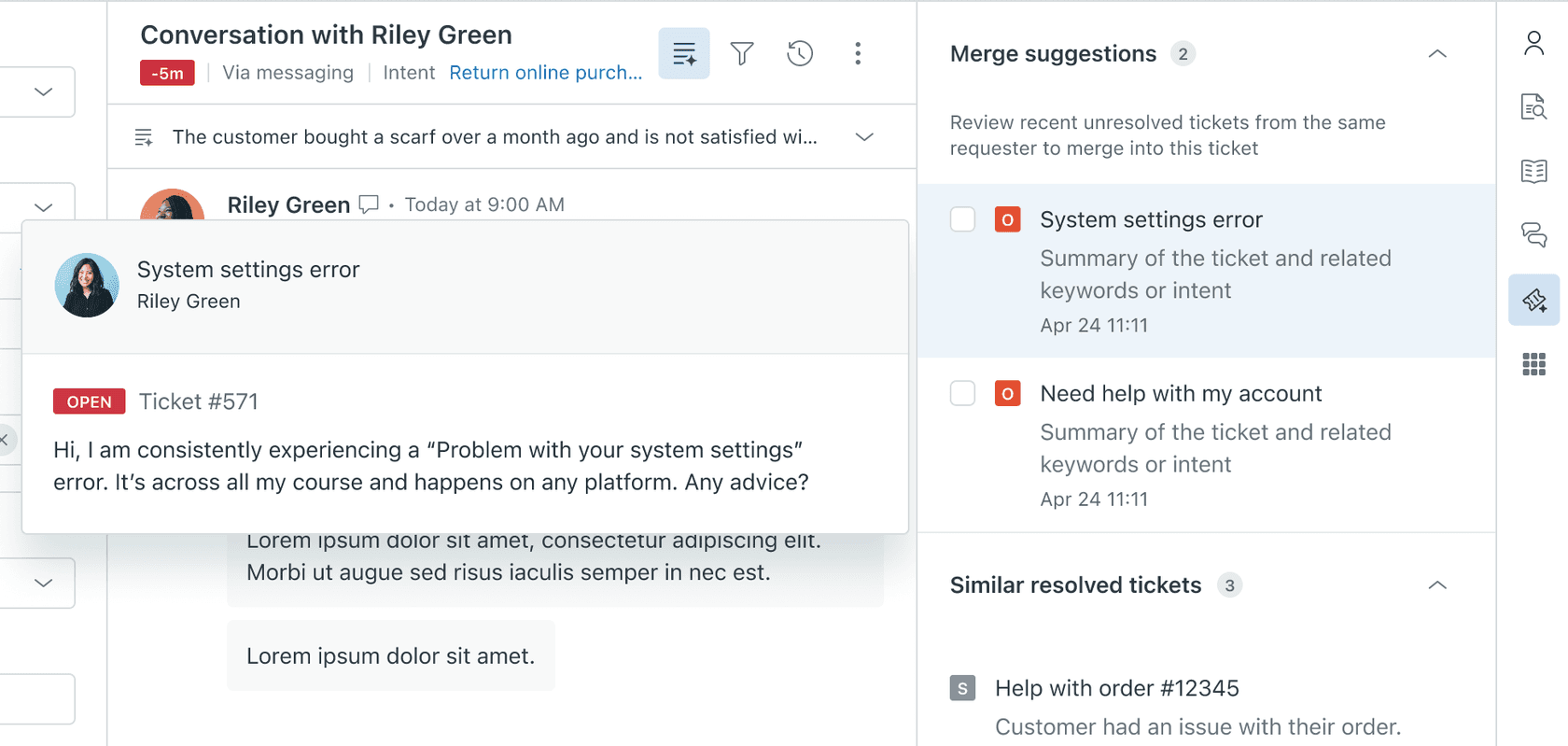
If you want merges without the click, the Auto Merge app on the Zendesk Marketplace merges duplicates from the same requester by rule. You can match on any ticket field, set a time window, choose whether to merge into the newer or older ticket, and run scheduled jobs on the backlog. It's rule-based rather than AI, which for a step you can't reverse is a plus, honestly.
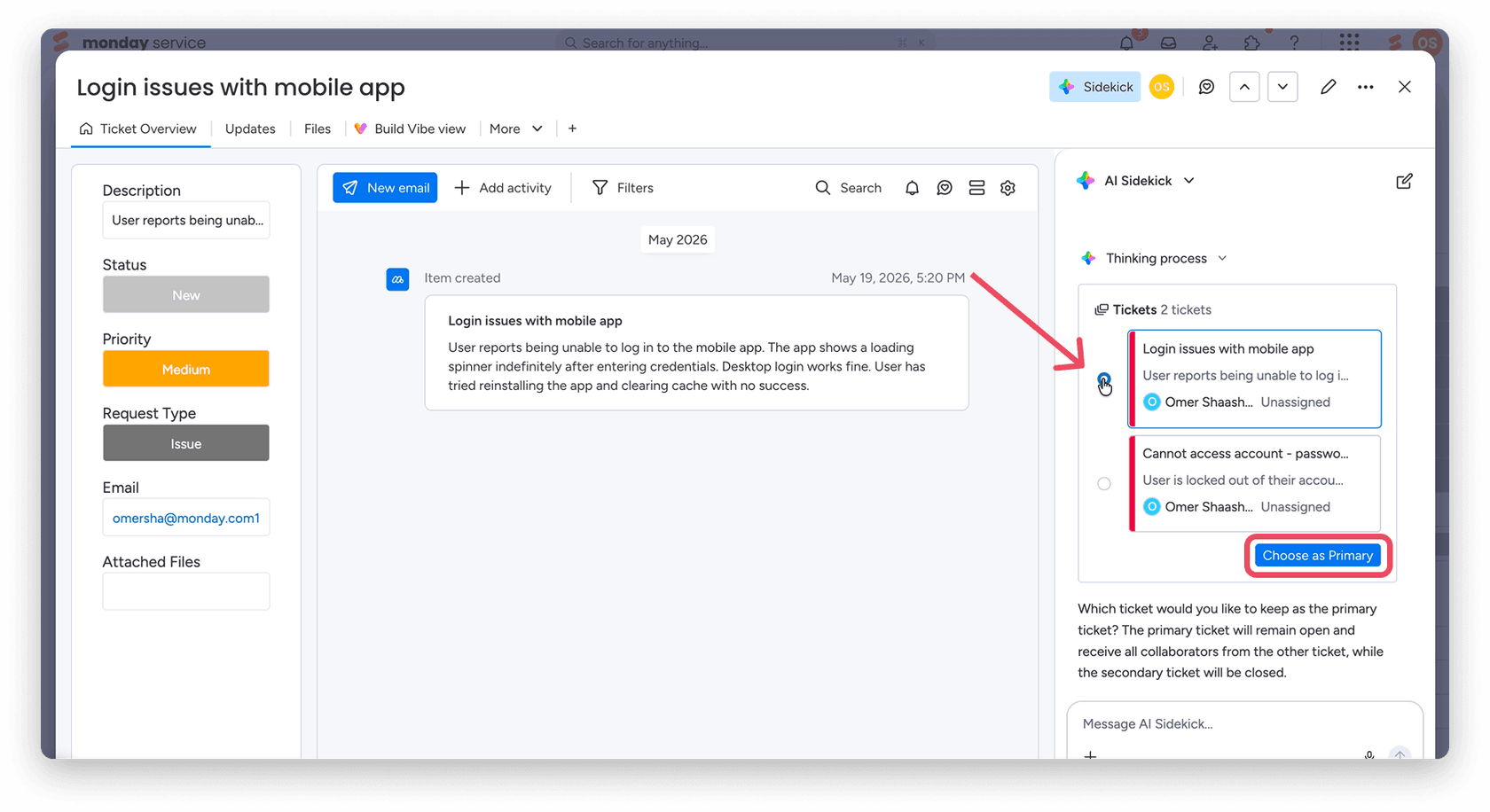
monday service. When you open the Tickets board, Sidekick scans recent open tickets and puts an icon next to likely duplicates. You pick which ticket stays primary and confirm. It closes the duplicate and moves collaborators to the primary ticket, and if the customer later replies on the closed ticket's email thread, that reply stays on the closed ticket. Admins can switch these proactive suggestions off to stop background AI credit usage.
HappyFox. The Duplicate Ticket Detector is one of HappyFox's Autopilot AI agents. It flags possible duplicates from the same contact and adds a duplicate-ticket tag you choose, limited to the ticket categories you pick. The setup is the part I like the most: HappyFox tells you to start narrow and use Supervised Mode until your team has reviewed the results. More on cost in my HappyFox pricing breakdown.
Freshdesk and Freshservice. Freshdesk merging is manual out of the box (see my Freshdesk merge tickets guide), and automatic merging comes from the marketplace, such as the Merge Duplicate Tickets app, which merges tickets from the same requester or by your own rules. Freshservice's own help article says plainly that it does not auto-merge tickets natively and points to the Auto Ticket Merger app.
Should you merge or link duplicate tickets?
Merge when it's one customer, link when it's many, and when you're not sure, link. A link can be removed later. A merge usually can't.
Zendesk's merging rules show why it's worth slowing down:
- Merges are permanent and can't be undone.
- Tickets must be less than Solved to be merged.
- The requester of the closed ticket is added as a CC, as long as CCs are turned on.
- The ticket closed by the merge gets a
closed_by_mergetag, which you can use to keep merged tickets out of reports. - Tickets handled by Zendesk's AI agents can't be merged.
Other helpdesks have their own catches. In Freshservice, merging closes the secondary tickets and adds a private note, and the agent has to add the other requesters to the CC field by hand once. In monday service, a reply on the old email thread lands on the closed ticket. None of these is a dealbreaker, but they are exactly the kind of details an auto-merge rule trips over at 2am.
For incidents, use a parent ticket instead. Zendesk's problem and incident types and Freshdesk's parent-child tickets let one ticket hold the investigation while each customer keeps a ticket that gets a reply. My guide to AI support during SaaS outages walks through that setup with an AI answering each report.
How much are duplicate tickets costing you?
Duplicates cost twice, once in agent time and again in your reporting, because a queue with 10% duplicates looks 10% busier than it really is. Plug in the last month's numbers to see both.
The fourth number is the one people forgets. Most AI agents are priced per ticket or per conversation, eesel included, so a duplicate that reaches the AI gets billed like any other ticket. That's one more reason to catch repeats at the door rather than after both have been worked.
Where should deduplication happen: on arrival, in the queue, or in reports?
All three, and they are different jobs. Most native tools cover the middle one, while the first one is the one that saves the most.
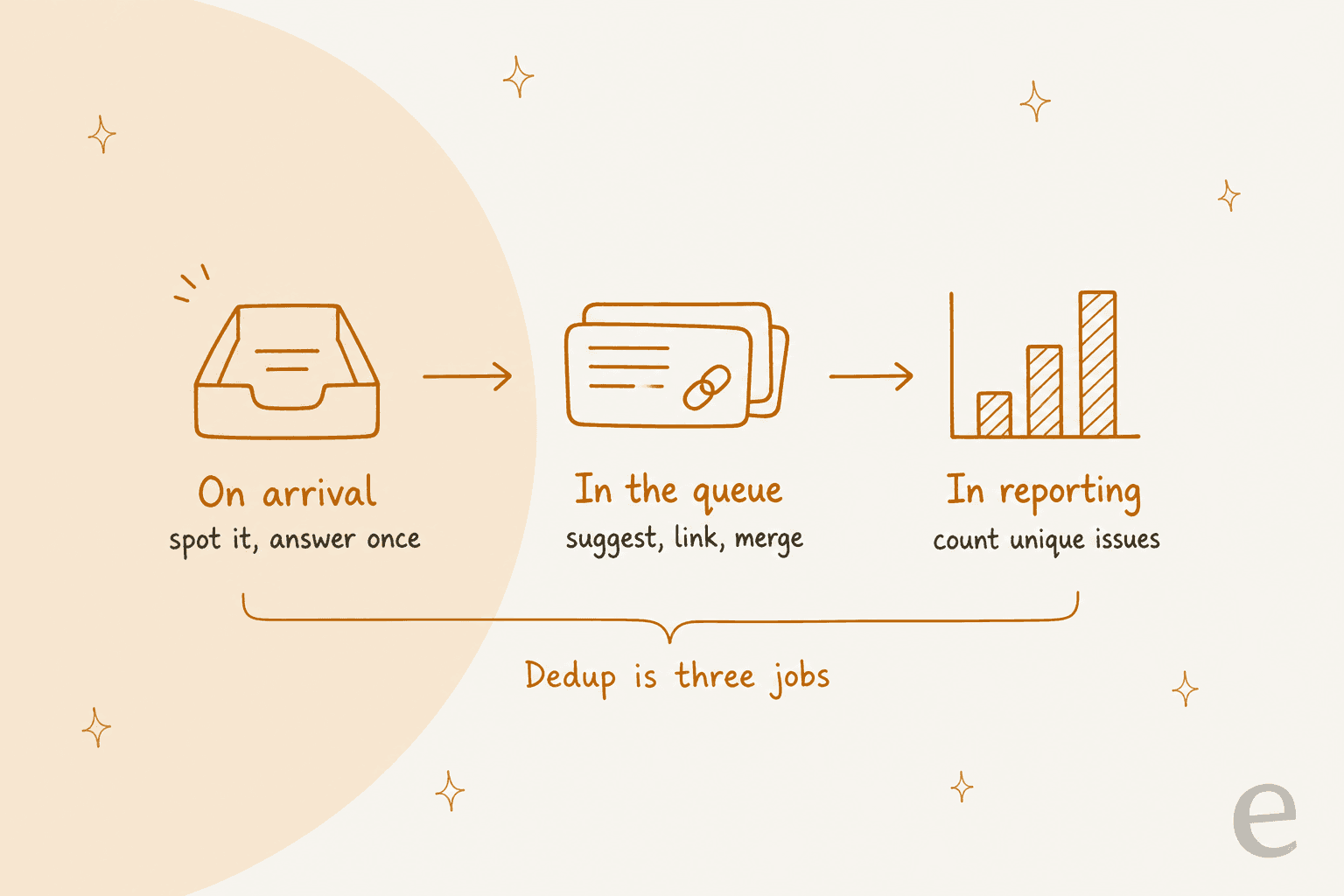
On arrival. Before anyone replies, check the requester's other open tickets. If there's a match, tag it, link the original in an internal note, and make sure only one ticket gets an answer. This is where an AI that already reads every new ticket for triage earns its keep, because the lookup costs nothing extra. It's also where spam and noise filtering belongs, since out-of-office replies and notifications are the other kind of ticket nobody should work.
In the queue. Merge suggestions, scheduled auto-merge rules and a daily sweep for anything that slipped through. Zendesk's suggestions and the bulk merge view live here.
In reports. Count unique requests, not tickets. Exclude closed_by_merge in Zendesk, add your duplicate tag to the filter, and track three numbers: the duplicate rate, how often agents accept the AI's suggestions (precision), and how many duplicates your team still merges by hand that the AI missed (capture rate). My post on AI for support reporting and the list of AI customer service metrics cover how these fit the wider report.
How do you roll out AI ticket deduplication safely?
Start with the safest match and watch it for two weeks, only then widen the net. This is the order I'd follow:
- Measure the problem first. Count last month's manual merges and sample 50 tickets for repeats. If duplicates are under 2% of volume, a merge suggestion panel is plenty.
- Fix the sources you can. Ask vendors to keep your ticket ID in their subject lines, stop routing one address to two instances, and make "reply to this email" obvious in your templates.
- Turn on what your helpdesk already has. Zendesk merge suggestions, monday Sidekick or HappyFox's detector in supervised mode.
- Tag before you merge. Have the AI add a
possible_duplicatetag and a note linking the original. Review a sample every week and track how many tags were right. - Automate merges only for the narrowest rule. Same requester, same subject, inside 24 to 48 hours. Leave anything across requesters as a link.
- Handle incidents separately. When a spike of similar tickets from different customers lands, create one parent ticket and let the AI link and answer each report with the known-issue update. My seasonal spikes guide shows the same pattern for launches.
- Report on unique requests. Change the headline number in your weekly report once the tags are reliable.
How does eesel handle duplicate tickets?
eesel handles duplicates on arrival, as part of the same pass that triages and answers the ticket. I'll be upfront about what it doesn't do: eesel has no merge action. Its Zendesk actions are reply, internal note, draft, add tags, assign, close, update fields and create, plus read, search and list tickets. So the merge stays in your helpdesk, where the native tools and their warnings live, and eesel does the part they don't do, which is stopping the second ticket from being worked.
In practice the instructions look like this, written in plain English in eesel's AI helpdesk agent:
- On the customer's first message, search their other open tickets from the last 14 days.
- If one is about the same thing, tag the new ticket
possible_duplicate, leave an internal note linking the original, and don't draft a second answer. - If it's new, triage and answer it as usual.
- For outages, link each new report to the parent ticket and send the current status update.
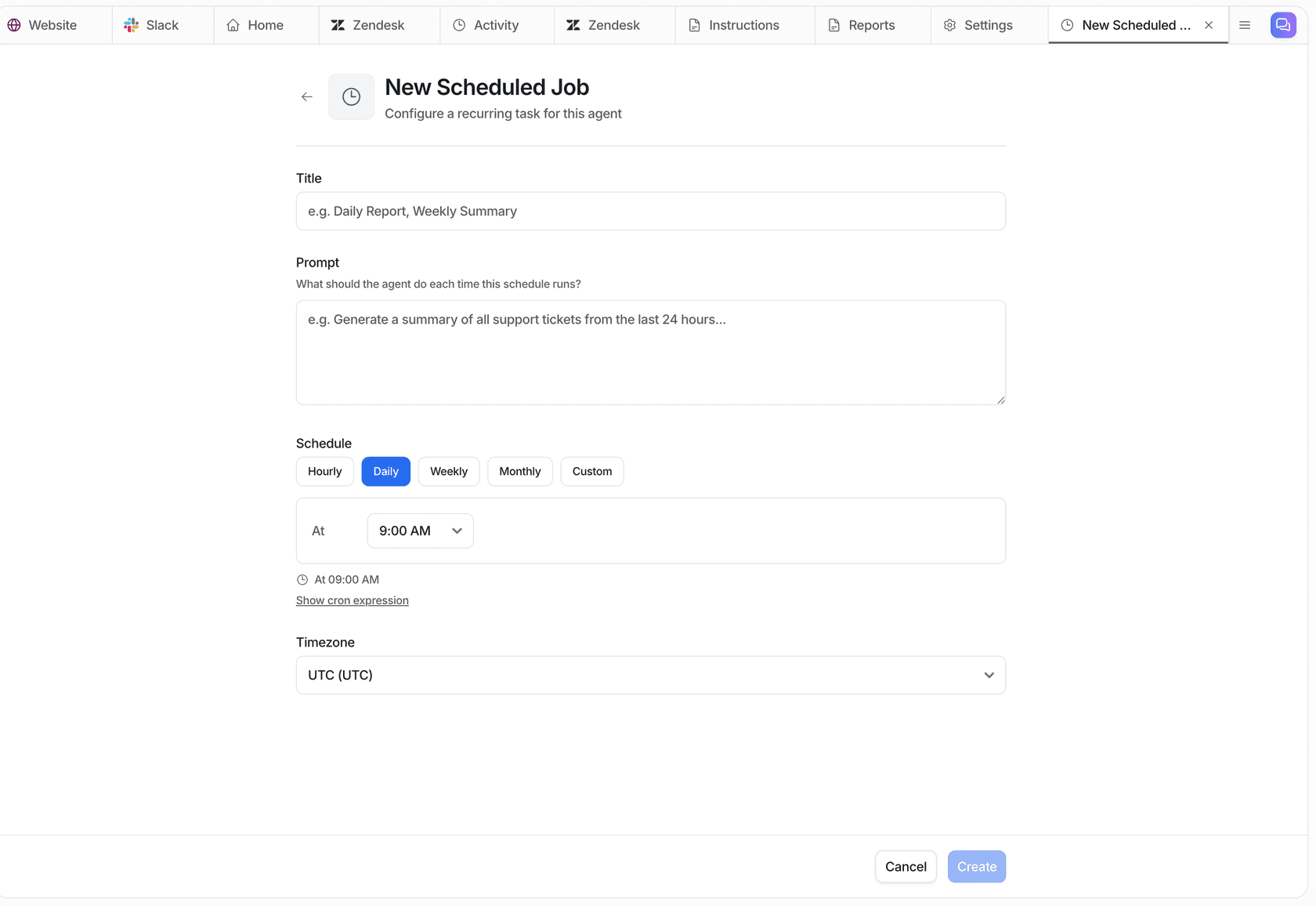
There is two settings that make this work. eesel can wait before processing for up to 15 minutes, so your own Zendesk triggers, spam rules and anything else that runs on new tickets go first. And it can run on a schedule, so a morning sweep can list tickets that look like duplicates and email them to a lead, without touching anything.
This is how it looks for real customers:
- Dokument 24 runs eesel on Zendesk and wakes it only on a customer's first message, "so follow-ups in a thread the team is already handling are left alone." It prepared about
680tickets for the team in a month, with about670Danish draft replies left as internal notes. - Rúngne has a triage agent on Gorgias that tags every ticket from a fixed list and closes social comments, out-of-office replies and spam. Its draft agent reads the whole thread first, looking for a promise a teammate already made, before it writes anything. That came to about
2,100tickets handled in a month. - Cape Coffee Beans runs five scheduled Zendesk sweeps, most of them every morning, for tickets that slipped through: no group, no follow-up date, or the wrong form. The sweeps are read only and end in a short email to the founder, which is exactly the shape a duplicate sweep should take.
Before any of this goes live, eesel's Simulation skill replays your past tickets so you can see what it would have done on real ones. And if your team prefers a terminal, the eesel CLI drives the same agent: eesel activity lists what it did, newest first, which is the quickest way to audit duplicate tags from a script or from Claude Code.
What does AI ticket deduplication cost?
Often nothing extra, because the suggestion tools come bundled into plans you may already pay for. Here is where each option lands on.
| Option | How it's priced | Notes |
|---|---|---|
| Zendesk merge suggestions | Included on Suite and Support Professional and above | Counts against the monthly Copilot allowance only when you confirm a merge |
| Zendesk Auto Merge app | $99, $199 or $999 a month | 14-day free trial, rule-based |
| monday service Sidekick | Part of monday AI in monday service | Proactive suggestions can use AI credits in the background |
| HappyFox Duplicate Ticket Detector | Part of HappyFox Autopilot | Needs Autopilot access on your account |
| Freshdesk Merge Duplicate Tickets app | Marketplace listing | Backlog merging sold as an add-on service |
| eesel | Free plan with 100 credits, then $299 a month for 500 | A ticket or a chat is one credit, every feature included, full pricing |
If you're on Zendesk, start with merge suggestions and see how far they get you. Add an auto-merge app only for the narrow same-requester rule. Add an AI teammate when the real cost is the second reply and not the merge click. That's usually the case for teams on Zendesk, Freshdesk or Gorgias who already want help with first contact resolution and handle time.
Try eesel for duplicate tickets
If two agents keep answering the same customer, eesel joins your Zendesk, Freshdesk or Gorgias queue like a new teammate. It checks the requester's open tickets before it replies, tags the repeat, links the original and answers once, and you can replay past tickets to see what it would have done before it touches a live one. The free plan covers 100 tickets, which is enough to test it on your own queue. Try eesel.