
Duplicate tickets are the silent productivity killer in customer support. One frustrated customer sends the same question through email, chat, and your web form. Suddenly you've got three tickets for the same issue, three agents potentially working on it, and one very confused customer getting multiple responses.
If you're using Zendesk, you already know this problem. The question is: what's the best way to handle it? This guide walks through everything from Zendesk's native merge features to third-party apps and AI-powered automation that can eliminate duplicates before they clutter your queue.
Why Zendesk duplicate tickets happen
Understanding the root causes helps you choose the right solution. Duplicate tickets typically come from three sources:
Customer behavior. When customers don't get an immediate response, they often submit the same request multiple times across different channels. They might email first, then use live chat, then submit a web form, all within an hour.
Technical issues. Email forwarding problems can cause duplicates when your mail provider doesn't correctly process email headers. The In-Reply-to: and References: strings help Zendesk thread messages properly. When these get stripped or corrupted, each reply becomes a new ticket.
Third-party systems. Platforms like PayPal, Facebook, and other e-commerce systems often create tickets using generic email addresses (like info@paypal.com). Even when the ticket includes a user ID or transaction number, the shared email address triggers duplicate creation.
The impact goes beyond clutter. Multiple agents working the same issue wastes time. Customers receiving different answers from different agents erodes trust. And your metrics get skewed, making it hard to measure actual performance.
Native Zendesk methods for handling duplicate tickets
Zendesk offers several built-in approaches. Each has its place depending on your team's size and workflow.
Manual ticket merging
Zendesk's native merge function lets you combine tickets manually. Here's how it works:
Navigate to your ticket list and select the tickets you want to merge. Click the "Bulk Actions" button, then choose "Merge tickets." A window appears showing the tickets you've selected. Choose which ticket to keep as the primary (this retains its ticket number), then click "Merge." All comments, tags, and relevant information combine into the primary ticket.
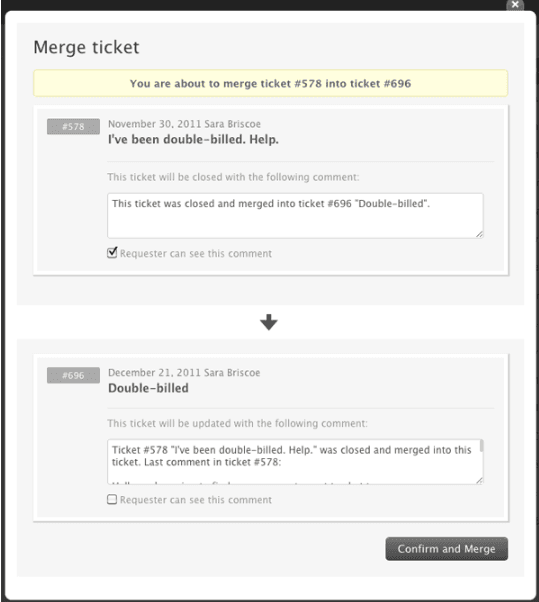
The upside: it's built-in and free. The downside: it's manual, time-consuming, and easy to overlook when your team's busy.
Customer Context Panel
The Customer Context Panel offers a lighter-touch approach. When viewing a ticket, you can see all recent tickets from that requester. Open potential duplicates in new tabs, merge them, then proceed with your work.
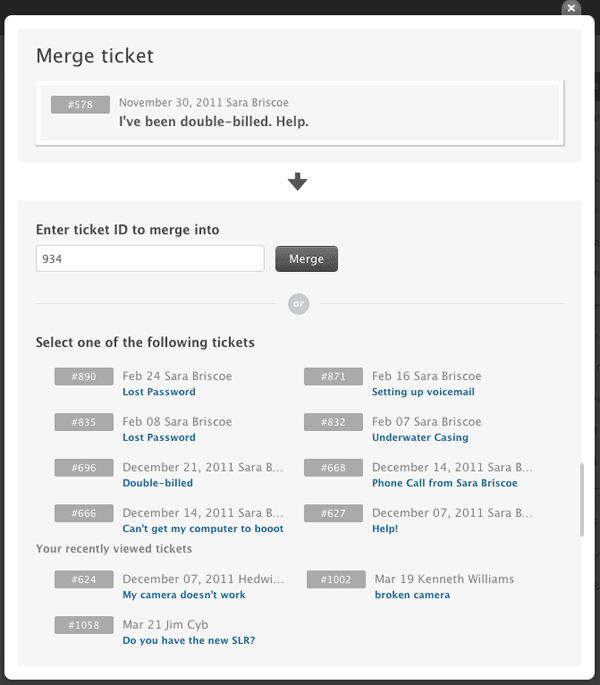
This works well for agents who want to check for duplicates before responding. But it adds steps to every ticket interaction, which slows response times.
Zendesk Advanced AI merge suggestions
If you have Zendesk Advanced AI (part of the Copilot add-on), you get merge suggestions in the Intelligence Panel. The system identifies potentially related tickets from the same requester and surfaces them automatically.
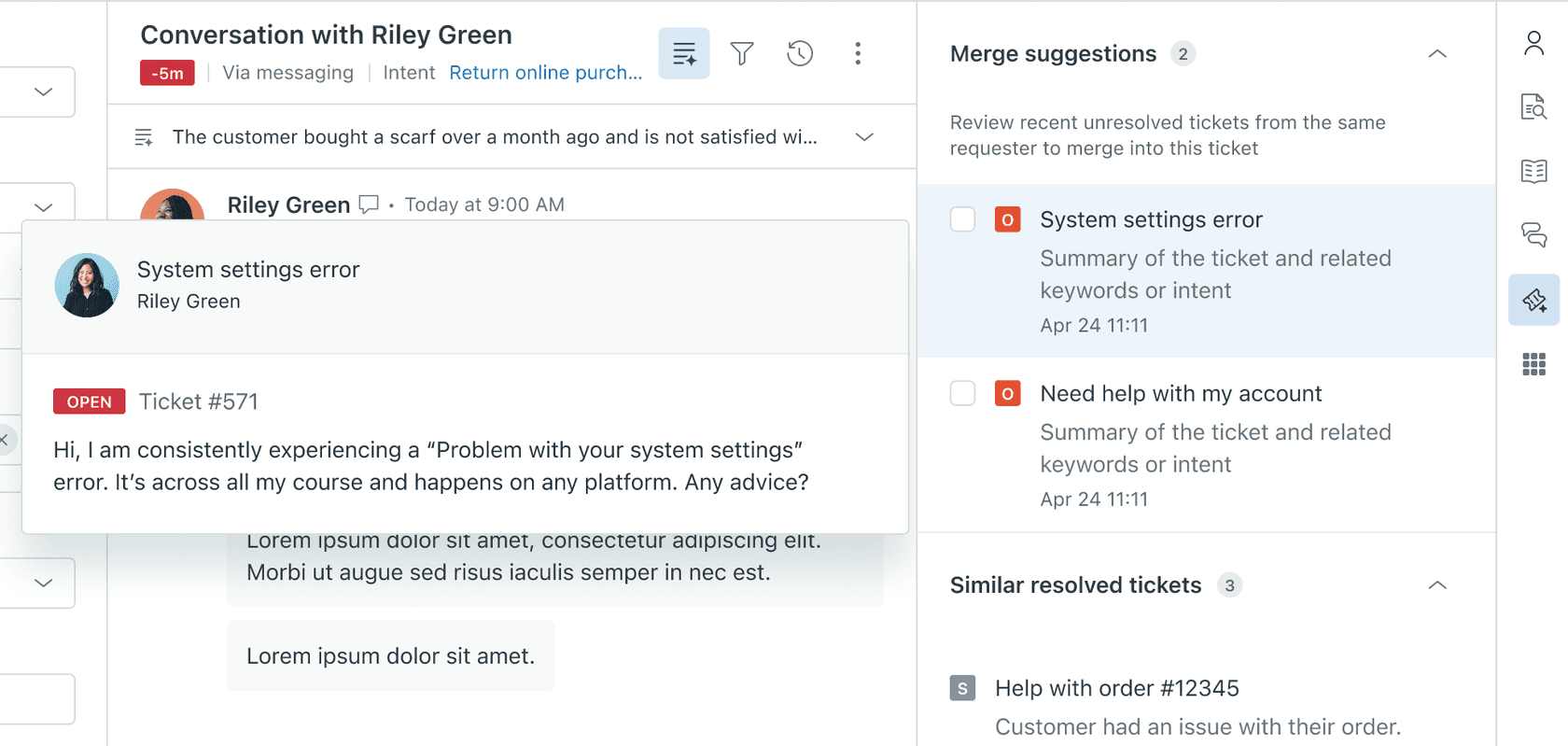
This removes some manual work since the system finds candidates for you. But agents still need to review and execute the merge. And it requires the Advanced AI add-on, which not all teams have.
Third-party apps for automated ticket merging
When native methods aren't enough, several Zendesk Marketplace apps offer automation. Here's how they compare.

Knots.io Merge Tickets
Knots offers a completely free merge app that runs in the background. You define matching criteria (requester, subject, order ID, custom fields), and the app automatically merges tickets that match.
Key features include smart ticket selection, custom merge logic, automatic tagging for audit trails, and optional auto-closing of secondary tickets. The app works with all Zendesk Support plans and requires no agent action once configured.
One user reported processing 51,000 tickets and saving over $800 compared to their previous merge app. Another noted: "Merge Tickets has transformed our support desk. The fact that it's free makes it even better."
The limitation: Knots Merge Tickets works with ticket fields only, not message content. If you need to parse the body of tickets to identify duplicates, you'll need their separate Ticket Parser app.
Swifteq Merge Duplicate Tickets
Swifteq, a Zendesk-qualified technology partner, offers a more customizable solution. Their app lets you set sophisticated merge rules based on requester, common identifiers in comments, or custom fields.
Features include exclusion filters (prevent merging for internal users or bots), backlog merging as a service, and full preservation of ticket history. The app uses Zendesk triggers and webhooks to detect and merge new tickets automatically.
Swifteq serves 400+ support teams and claims $5 million+ in savings for their customers. A Quality & Compliance Supervisor at Primrose noted: "When we hit peak season and see our queues creep up, this app is brilliant for merging together multiple contacts from the same customer."
Pricing isn't publicly listed, so you'll need to contact them for details.
Automate My Store Auto Merge
Built by developers who run their own e-commerce stores, this app focuses on simplicity. It shows all open tickets from the same user in a sidebar and lets you merge duplicates with one click.
The app claims to save 8-10 hours per agent per month. Manual searching and merging takes roughly 5 minutes per ticket, while automatic merging takes about 2 seconds.
Features include duplicate notifications in the sidebar, 1-click merging, unified email replies, and full GDPR, HIPAA, and ISO 27001 compliance. The app offers a 30-day free trial.
With 50+ installations and a 5-star rating, it's particularly popular among e-commerce support teams.
Playlist Auto Merge
At $200 per month, Playlist Auto Merge is the premium option. It offers advanced features like regex matching to extract unique identifiers from subject lines, multiple merge rules for different scenarios, and scheduled jobs to merge backlogs in batches.
The app also supports live chat and phone ticket merging, with options to safely merge older tickets into newer ones. You can customize merge comments with placeholders and make them public so requesters get notified.
A Head of Customer Success at Fi reported: "Auto Merge is truly the BEST THING EVER, it's simple, easy to set up and extremely powerful. It's given us back so much time."
| Solution | Pricing | Best For | Key Strength |
|---|---|---|---|
| Knots.io | Free | Budget-conscious teams | Cost (completely free) |
| Swifteq | Contact for pricing | Teams needing customization | Flexible rules, backlog service |
| Automate My Store | 30-day free trial | E-commerce stores | Simplicity, time savings claims |
| Playlist | $200/month | Enterprise teams | Regex matching, rule flexibility |
AI-powered ticket management with eesel AI
Apps that merge duplicates solve part of the problem. But what if you could prevent duplicates from reaching agents in the first place? eesel's AI triage for Zendesk handles this automatically, identifying and merging duplicates based on conversation content, not just ticket fields.
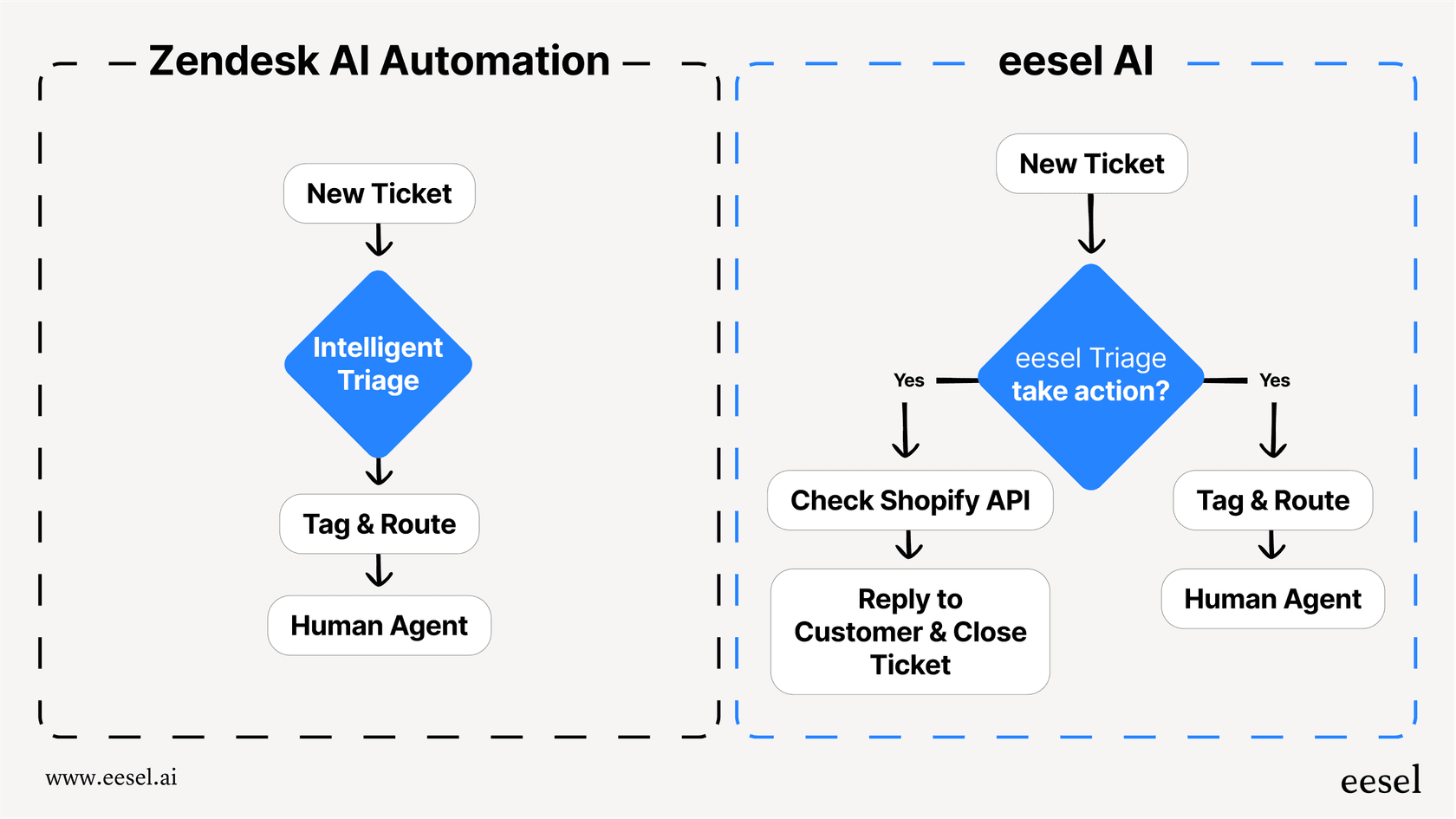
eesel AI takes a different approach. Instead of just merging tickets after they arrive, our AI Triage product identifies duplicates automatically and handles them based on rules you define in plain English.
Here's how it works. You connect eesel AI to your Zendesk account, and it learns from your historical tickets, help center articles, and macros. Within minutes, it understands your business context, tone, and common issues. Then you set up triage rules: "If a new ticket matches an open ticket from the same requester, merge them and add an internal note."
Unlike rule-based apps that only look at ticket fields, eesel AI understands the content of conversations. It can identify duplicates even when the subject lines differ or when customers use different channels. And it gets better over time as you correct its decisions. Learn more about how our AI Agent works alongside your team.
You control the rollout. Start with eesel drafting merge suggestions for agents to review. Once you're confident in its accuracy, let it handle merges automatically. Teams using our AI Triage feature report significant reductions in duplicate ticket handling time.
Our Zendesk integration works alongside your existing setup. You don't replace Zendesk you augment it with intelligent automation that learns your specific workflows.
Prevention strategies: stopping duplicates before they start
Automation helps, but preventing duplicates is even better. A few practical steps:
Fix email header issues. Work with your IT team to ensure email forwarding preserves In-Reply-to: and References: headers. This fixes the technical cause of many duplicates.
Set clear expectations. Use Zendesk's auto-responders to confirm receipt immediately. When customers know their message was received, they're less likely to resubmit.
Offer self-service. A well-organized help center lets customers find answers without creating tickets. eesel AI can also power a chatbot that answers common questions before they become tickets.
Use business rules. Set up triggers to tag potential duplicates based on requester and subject patterns. Even without automatic merging, this flags tickets for agent review.
Choosing the right approach for your team
The best solution depends on your situation:
Small teams (1-5 agents): Start with Zendesk's native merge and the Customer Context Panel. If volume grows, add Knots.io's free Merge Tickets app for automation.
Solo support teams: If you're handling everything yourself, even a few duplicates per day eat into your time. A free app like Knots.io pays off quickly.
Growing teams (5-20 agents): Consider Swifteq or Automate My Store for more sophisticated rules. The time savings add up quickly at this scale.
Large teams (20+ agents): Look at Playlist for advanced regex matching, or consider eesel AI for intelligent triage that goes beyond simple merging.
E-commerce specifically: Automate My Store is built by e-commerce operators and integrates well with WooCommerce and other platforms.
Reduce your duplicate ticket burden with smarter automation
Duplicate tickets waste agent time, confuse customers, and skew your metrics. Zendesk's native tools help, but they require manual effort. Third-party apps add automation, though most only look at ticket fields, not conversation content.
If you're ready to move beyond simple merging to intelligent ticket management, eesel AI integrates with Zendesk to automatically identify and handle duplicates based on what the conversations actually say, not just metadata. You can start with suggestions and level up to full automation as the AI learns your business.


