
You click "Confirm and Merge" and immediately realize your mistake. Two completely unrelated tickets, now permanently joined. That sinking feeling in your stomach? Every Zendesk agent knows it.
Zendesk's native merge functionality is one-way. Once tickets are merged, there's no undo button, no "revert" option, no safety net. The source ticket gets closed forever, and its contents become part of the target ticket.
But that doesn't mean you're out of options. This guide covers everything you need to know about handling merged tickets in Zendesk, from new solutions that can actually unmerge tickets to proven workarounds and prevention strategies. We'll also look at how AI-powered tools like ours can help prevent these mistakes before they happen.
Understanding Zendesk's merge limitations
Before diving into solutions, let's clarify what actually happens when you merge tickets in Zendesk. Knowing the mechanics helps you understand your options (and why prevention matters so much).
What happens when you merge tickets
The merge process is straightforward but irreversible. When you merge Ticket A into Ticket B:
- Ticket A gets closed permanently and tagged with "closed_by_merge"
- All public and private comments from Ticket A transfer to Ticket B
- Attachments come along for the ride
- The requester of Ticket A becomes a CC on Ticket B (if CCs are enabled)
- Ticket fields, tags, type, priority, and status do NOT transfer
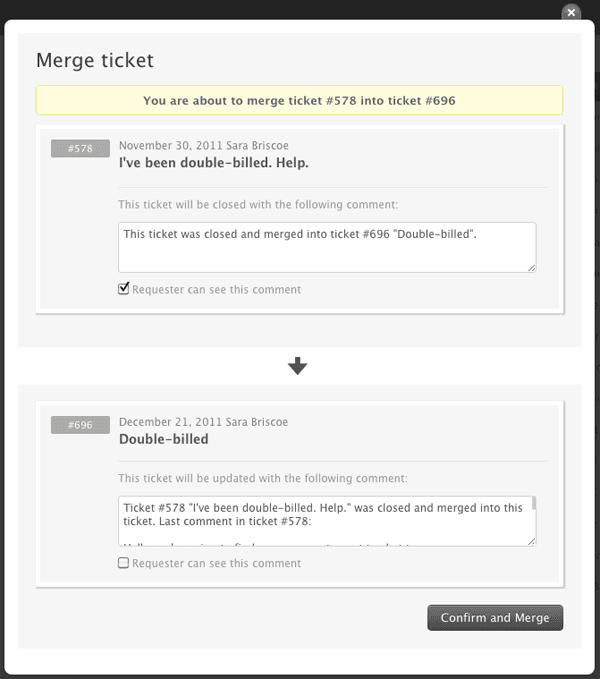
The most recent public comment from the merged ticket appears in the target ticket with a link back to the closed source. But that's it. No other ticket fields carry over.
Source: https://support.zendesk.com/hc/en-us/articles/4408882445594
Why you can't natively unmerge
Zendesk treats merges as permanent operations for data integrity reasons. The platform's architecture doesn't support reversing the process because:
- Ticket IDs are immutable once assigned
- The closed source ticket can't be reopened
- Field data from the source ticket is discarded, not stored
- Reconstructing the original state would require data that no longer exists
The Zendesk community has requested an unmerge feature for years. But until recently, the official answer was always the same: merges are final.
Common accidental merge scenarios
Most merge mistakes fall into three categories:
- Hasty clicks: An agent selects the wrong ticket from the dropdown in their rush to clear the queue
- Misleading subjects: Two tickets with similar subject lines but completely different underlying issues
- Bulk merge mishaps: Selecting too many tickets for a bulk operation without reviewing each one carefully
How to unmerge tickets in Zendesk (2026 solution)
For years, "you can't unmerge" was the final word. That changed in October 2025.
Introducing the GDPR Compliance app's unmerge feature
Growthdot released an unmerge capability as part of their GDPR Compliance app, and it's a genuine breakthrough. The feature lets you split previously merged tickets while preserving all the important data.
Here's what gets restored when you unmerge:
- Original requester for each ticket
- Subject lines
- All tags
- Ticket fields and custom fields
- Complete conversation history including all comments
- Attachments
The app supports both individual unmerging and bulk operations. So if you've had a string of accidental merges, you can fix them all at once rather than one by one.
Source: https://support.zendesk.com/hc/en-us/community/posts/9876157633562
Step-by-step unmerge process
Using the GDPR Compliance app to unmerge tickets is straightforward:
- Install the GDPR Compliance app from the Zendesk Marketplace (7-day free trial available)
- Navigate to the merged ticket you want to restore
- Select the unmerge option from the app's interface
- Confirm the operation
- Verify that both tickets are restored with their complete history intact
The app handles the heavy lifting, recreating the original tickets as they existed before the merge.
Limitations of unmerging
While the unmerge feature is powerful, it's not perfect:
- It requires installing a third-party app (and paying for it after the trial)
- Complex merge scenarios with multiple subsequent comments might not restore exactly as they were
- It's designed as a safety net, not a regular workflow tool
Think of it as insurance, not a license to merge carelessly.
How to split tickets in Zendesk (when unmerging isn't possible)
Sometimes you don't need to unmerge, you need to split. When a customer adds a completely unrelated issue to an existing ticket, separating the concerns becomes necessary for proper tracking and resolution.
Manual workaround method
If you only need to split tickets occasionally and don't want to install an app, you can do it manually:
- Create a new ticket for the secondary issue
- Copy the relevant comments and context from the original ticket
- Add a tracking tag like "split-from-12345" to both tickets for future reference
- Update the original ticket with an internal note explaining what you split and why
- Link the tickets using Zendesk's free Linked Ticket app to maintain the connection
This approach works but it's time-consuming and easy to miss important context during the copy-paste process.
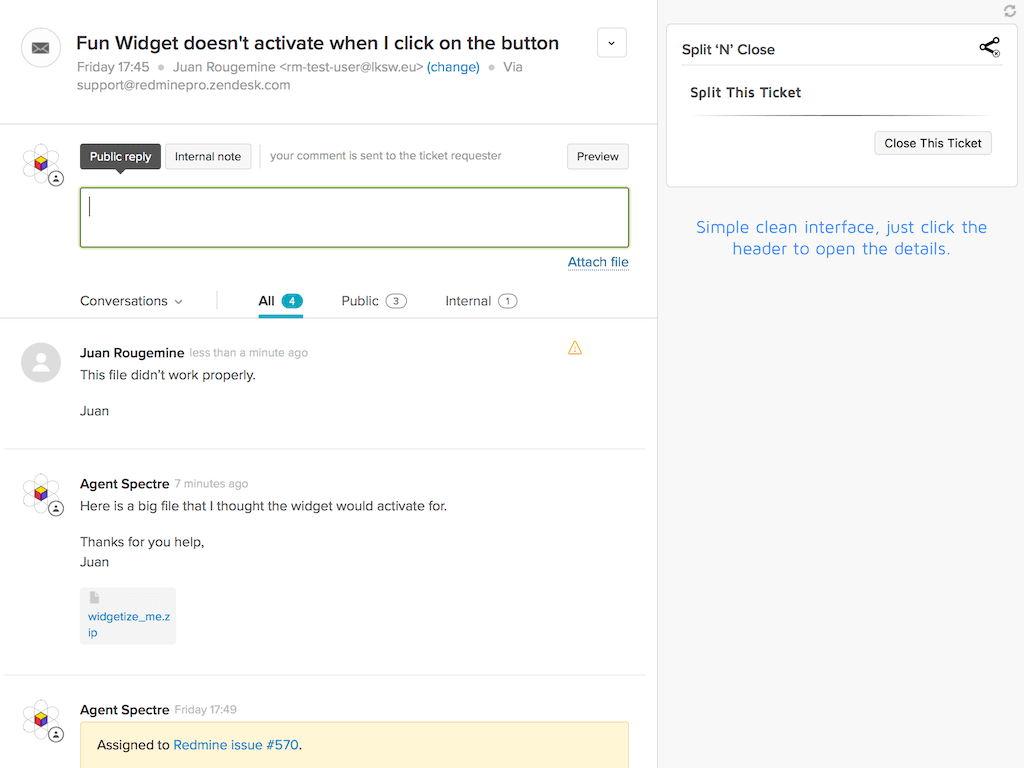
Using Split 'n' Close app
For teams that regularly need to split tickets, Split 'n' Close is the go-to solution. With over 1,000 installs and 82 reviews, it's the most popular splitting app in the Zendesk Marketplace.
The free version handles basic splitting: create a new ticket from the current comment, auto-fill the content, and add cross-reference notes to both tickets.
The premium version at $3 per agent per month unlocks advanced features:
- Choose specific comments to copy over (not just the latest)
- Select a different assignee or requester for the split ticket
- Add attachments from either ticket
- Use custom fields
- Add optional tags to the new ticket
- Designate a default form for all split tickets
Source: https://www.zendesk.com/marketplace/apps/support/105600/split-n-close/
When splitting makes sense vs. leaving merged
Not every merged ticket needs to be split. Here's how to decide:
- Split when: The issues are genuinely unrelated, require different teams or specialists, or need separate tracking for reporting purposes
- Keep merged when: The issues share a root cause, one is a follow-up to the other, or separating them would fragment the customer conversation
- Consider customer impact: Will splitting confuse the customer with multiple ticket numbers? Sometimes it's better to handle the secondary issue within the merged ticket even if it's not ideal for your internal tracking.
Preventing accidental merges: Best practices
The best solution to merge mistakes is preventing them in the first place. Here's how to build safeguards into your workflow.
Native Zendesk precautions
Zendesk offers a few built-in protections:
- Enable merge confirmation dialogs (if not already active)
- Train agents to double-check ticket numbers before confirming
- Use views that show more ticket context (subject, requester, recent comments) so agents can verify they're merging the right tickets
- Set up custom roles so only experienced agents have merge permissions
These basic steps catch a surprising number of would-be mistakes.
AI-powered prevention with eesel AI
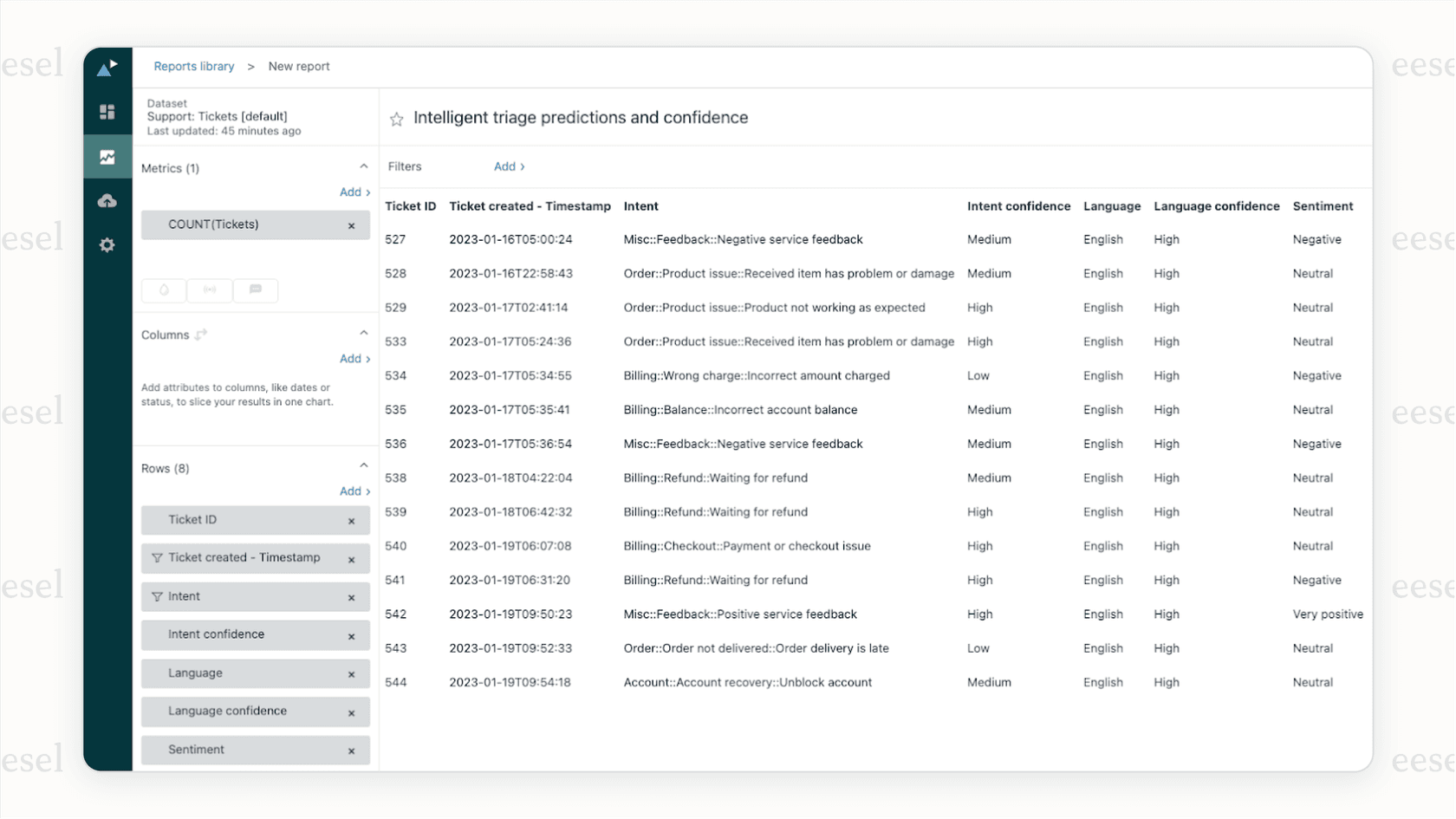
Rule-based systems can only do so much. They match fields, not meaning. Our AI Triage analyzes ticket content to understand meaning, not just metadata.
Instead of relying on simple field matching (same requester + similar subject = merge), our AI analyzes the actual content of tickets. It understands context, identifies when two tickets describe the same underlying issue, and flags potential duplicates for agent review.
The key difference: assisted suggestions rather than blind automation. Agents see the recommendation and confirm with one click. This keeps humans in control while catching duplicates that rule-based systems miss.
Our AI also works across all channels (email, chat, social, messaging apps) and understands 80+ languages. So whether your customer emailed yesterday and chatted today, the system can spot the connection.
Building a merge-aware team culture
Technology helps, but culture matters too:
- Document clear criteria for when to merge vs. when to keep tickets separate
- Conduct regular audits of merged tickets to catch patterns (are duplicates coming from a specific channel or form?)
- Celebrate "caught near-misses" to reinforce caution without creating fear
- Share stories of merge mistakes (anonymously) in team meetings so everyone learns from them
Automating ticket management intelligently
Manual ticket hygiene doesn't scale. As your volume grows, you need automation. But not all automation is created equal.
Rule-based automation options
For straightforward duplicate detection, rule-based apps work well:
-
Knots Merge Tickets (free): Matches tickets by requester, subject, order number, or any custom field. Runs entirely in the background. One user reported processing 51,000 tickets and saving over $800 compared to their previous merge app.
-
Swifteq Merge Duplicate Tickets (€59/month): More advanced matching including text extraction from ticket descriptions, filtering options for internal users or bots, and the ability to merge tickets from different requesters if they contain the same Order ID.
Source: https://knots.io/zendesk-apps/merge-tickets/, https://swifteq.com/zendesk-merge-tickets
The AI difference: Understanding context
Rule-based systems have clear limitations. Consider these scenarios:
- Same order ID, but one ticket is about a shipping delay and the other is about a defective product. A rule-based system might merge them. AI recognizes they're different issues.
- Different subject lines, but both tickets describe the same website outage. A rule-based system keeps them separate. AI suggests merging them.
The difference is semantic understanding. AI reads the content and grasps meaning, not just keywords.
How eesel AI approaches ticket hygiene
Our approach combines the efficiency of automation with the judgment of human oversight:
- AI Triage analyzes incoming tickets and identifies potential duplicates using semantic understanding
- Agents see suggestions in their workflow and can confirm or dismiss with one click
- The system learns from agent feedback, getting smarter over time
- It handles both merge suggestions AND split recommendations (when a customer adds a new issue to an existing ticket)
The result? You get the speed of automation without the risk of incorrect merges. Agents stay in control, but they spend less time on ticket hygiene and more time solving customer problems.

Making the right choice for your team
With all these options, which approach is right for your situation?
When to use each approach
| Scenario | Solution |
|---|---|
| Accidental merge just happened | GDPR Compliance app unmerge |
| Customer added unrelated issue to existing ticket | Split 'n' Close app |
| High volume of duplicates eating agent time | Automated merge app (Knots or Swifteq) or AI Triage |
| Prevention is your top priority | AI-powered suggestions with human confirmation |
| Limited budget | Manual workarounds or Knots (free) |
Cost considerations
| Solution Type | Price Range | Best For |
|---|---|---|
| Manual workarounds, Linked Ticket app | Free | Occasional needs, tight budgets |
| Knots Merge Tickets | Free | Basic automation, field-based matching |
| Split 'n' Close Premium | $3/agent/month | Regular ticket splitting needs |
| Swifteq | €59/month | Advanced matching, text extraction |
| GDPR Compliance | Paid (contact for pricing) | Unmerge capability, compliance needs |
| eesel AI | From $299/mo (500 credits) | Intelligent automation, broader feature set |
The free and low-cost options handle most basic needs. As your volume and complexity grow, the investment in smarter tools pays for itself in time saved and mistakes avoided.
Fix your Zendesk ticket management with intelligent automation
Merges are permanent in Zendesk, but that doesn't mean you have to live with mistakes. Between the new unmerge capability in the GDPR Compliance app, splitting tools like Split 'n' Close, and prevention strategies ranging from simple training to AI-powered suggestions, you have options at every price point.
The key insight: prevention beats cure every time. Building safeguards into your workflow, whether through confirmation dialogs, team training, or intelligent AI suggestions, saves more time and frustration than any fix-it tool.
If you're ready to bring smarter ticket management to your Zendesk setup, explore how our AI Triage works. We designed it to understand your tickets the way a human would, suggesting merges when they make sense and flagging opportunities to split when customers raise new issues. You stay in control, but you spend less time on ticket hygiene and more time helping customers.