


AI for GDPR requests works best as the spotter and the clock-keeper, not the one who deletes. Let the AI read every ticket, recognise "send me my data" or "delete my account" even when nobody types the word GDPR, tag the request type, start the one-month deadline, and draft the acknowledgement. Keep three steps with a person: confirming identity when it is in doubt, approving the data export, and approving any deletion.
The split matters because deletion is irreversible and the right to erasure is not absolute. A customer with an unpaid invoice or an open dispute may be asking for something you are legally required to refuse in part. A model reading one email cannot know that. A person with the account in front of them can.
Two things most guides skip: your helpdesk already has a deletion or redaction tool you will lean on (Zendesk's is the deepest), and your AI tool is on the deletion checklist too if it learned from past tickets. eesel handles the spot, tag and draft work inside Zendesk, Freshdesk and other helpdesks, holds any action you choose for approval, and can mask personal details in past tickets before it stores them. smava, a German loan comparison site, runs this kind of categorise-first setup on about 27,000 Zendesk tickets a month.
What counts as a GDPR request in a support queue?
A GDPR request is any message where a person asks to see, move, fix or remove the personal data you hold about them. In a support queue, it almost never arrives labelled.
The UK regulator is blunt about this. Its guidance on recognising requests says a person can make a request verbally or in writing, including on social media, to any part of your organisation, and does not have to use the words "subject access request" or name the law. It only has to be clear they want their personal information. The same page says any employee may receive a valid request, and you must identify and handle each one correctly.
That is the whole case for AI here. A keyword rule on "GDPR" catches the customers who read a privacy policy. It misses the ones who write "what do you actually have on me?" or "close my account and wipe everything" at the bottom of a billing complaint. An AI agent reads every ticket the way a person would, so it catches both.
I build eesel's helpdesk integrations, and the request types below are the ones I would teach an agent to recognise first. They map to the rights in Articles 15 to 21 of the GDPR.
| Request type | What the customer actually writes | What the AI can do | What stays with a person |
|---|---|---|---|
| Access (a copy of their data) | "Can you send me everything you have on me?" | Tag it, start the clock, draft the acknowledgement, ask for ID if needed | Confirm identity, review the export for other people's data, approve sending it |
| Erasure (delete) | "Delete my account and all my data" | Tag it, check for an open order or dispute and flag it, draft the reply | Decide what can be deleted and what must be kept, run the deletion |
| Rectification (fix) | "My address is wrong in your system" | Draft the update and the confirmation | Approve the change if it touches billing or identity fields |
| Portability (move it) | "I want my order history in a file" | Tag it, gather which systems hold it | Approve the file and how it is delivered |
| Objection or consent withdrawal | "Stop emailing me" / "I don't want you using my data for marketing" | Tag it and route to whoever owns the email list | Confirm the opt-out landed in every tool |
The last row looks trivial and is the one teams fumble most. "Unsubscribe me" handled as a normal ticket gets a polite reply and nothing else. Handled as an objection, it gets checked against every marketing tool. AI ticket tagging that knows the difference is worth more than any clever reply.
How long do you have to answer a GDPR request?
You have one calendar month from the day you receive the request, under Article 12 of the GDPR. You can extend by two further months if the request is complex or you have received a lot of them, but you have to tell the person, with reasons, inside that first month.
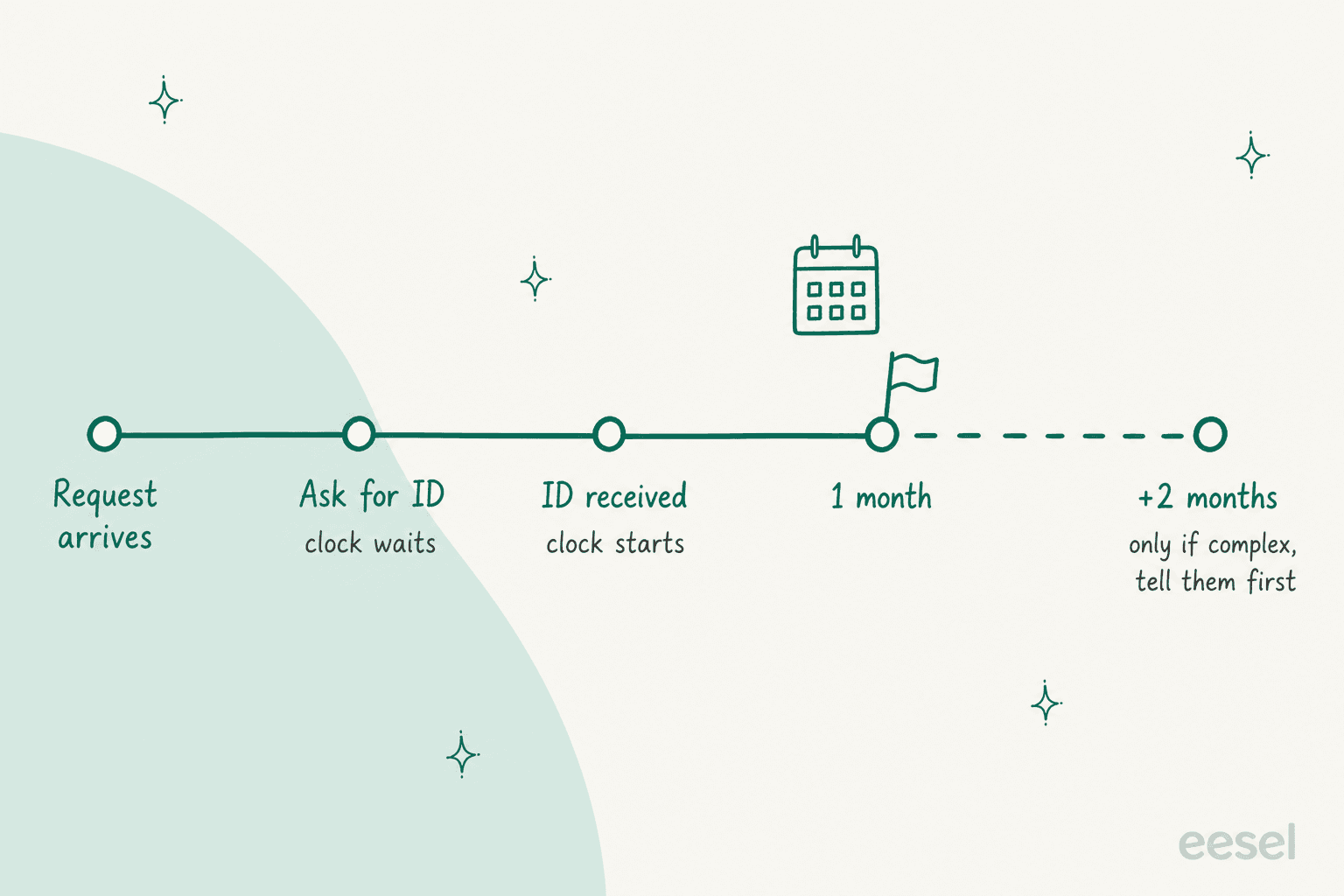
The UK regulator's guidance on responding fills in the counting rules that trip people up:
- The month runs to the same date next month. A request on 14 May is due by the end of 14 June. If the date does not exist (31 January), use the last day of the next month.
- The clock waits for ID you asked for. If you have real doubt about who is asking, the month starts when their ID or the authority of a third party arrives, not before.
- Clarification stops the clock. Ask what they mean on 15 May, get the answer on 18 May, and you add those 4 days back.
- Weekends roll forward. A deadline on a Saturday moves to the end of the next working day.
- A 28-day internal target is allowed if your systems need a fixed number of days, and it always lands inside the month.
That ID rule is where an AI agent earns its keep. The faster you ask for confirmation, the less of your month you spend before the clock has even started, and the agent can send that ask in the first minute rather than when someone next opens the queue. One honest caveat: these counting rules are the UK regulator's reading, so check your own regulator's guidance on when the clock starts if you are in the EU. Ask for ID on the day the request arrives and the difference never matters.
Plug a real ticket's dates into this to see the deadline. It runs the UK counting rules above.
If your helpdesk has an SLA timer, this is the date it should count to. Most do, and the SLA management guide covers how to set one per ticket type.
Which parts of a GDPR request can AI handle?
AI can handle everything that is reading, sorting, timing and writing. It should not handle anything that discloses data to someone or destroys it.
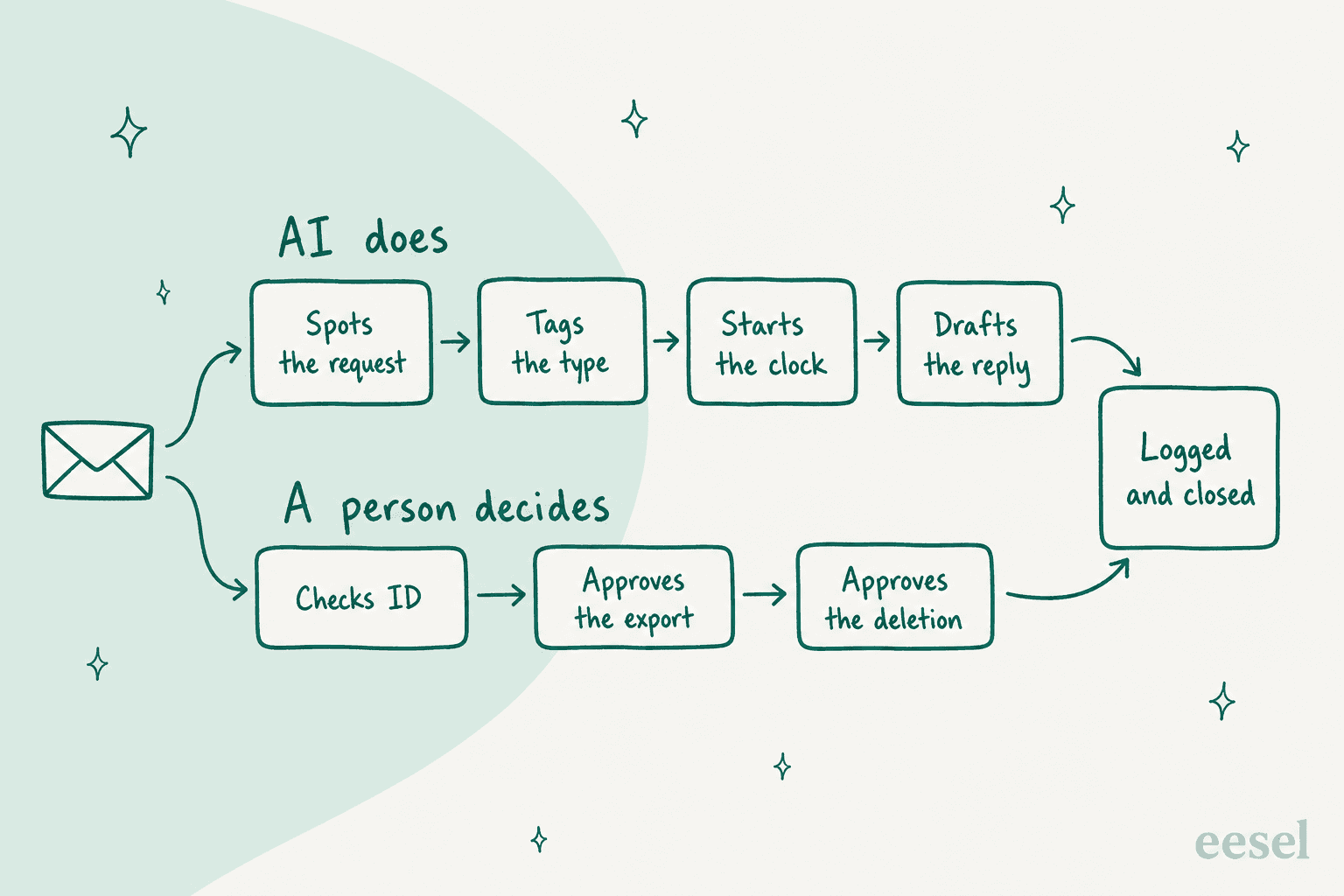
Here is the split I would start any team on:
Hand to the AI from day one
- Spotting. Read every new ticket and comment, and flag the ones that ask about personal data, in any language. This is the step a keyword rule fails at.
- Tagging the type. Access, erasure, rectification, portability or objection, written into a ticket field so it can be reported on.
- Starting the clock. Set the received date and the due date the moment the ticket lands, not when a person gets to it.
- Drafting. The acknowledgement, the ID request, the "we need to clarify" note and the final confirmation, all from templates your privacy owner approved once.
- Gathering. Look up the account, list which systems hold data for this person, and flag anything that blocks deletion, such as an open order or an unpaid invoice.
Keep with a person
- Identity, when it is in doubt. The regulator says to be reasonable and proportionate and use checks you already have, like a logged-in account. A request from a known customer's account email usually needs nothing more. A request from a new address asking for someone else's order history needs a person.
- Approving the export. Someone reads the file before it leaves, because support tickets are full of other people's names: the courier, the colleague on CC, the person they complained about.
- Approving the deletion. Covered in the next section, because it is the one that goes wrong.
If you already run a human handoff for refunds, this is the same pattern with a stricter rule: the AI prepares, the person presses the button.
Why shouldn't AI delete customer data on its own?
Because deletion cannot be undone, and the law often says you must keep some of the data anyway.
The UK regulator's right to erasure guidance opens with it: the right is not absolute and only applies in certain circumstances. You can refuse, fully or in part, where you need the data to comply with a legal obligation or to establish, exercise or defend legal claims. In support terms, that is the customer who wants everything gone while a chargeback is open, or whose invoices you must keep for tax.
The helpdesk tools themselves are built on the same assumption. Zendesk's ticket redaction is irreversible. Help Scout's profile deletion removes every linked conversation with no undo. Freshdesk's Delete forever removes a contact's tickets and notes, and its own guide says delete and export requests should go through an admin who checks the requester is genuine.
There is also an order to it. Zendesk's GDPR guide says to delete the user last: clean the personal data out of ticket conversations first, because you need the profile to find those tickets. An agent that deletes the profile first has just made the rest of the job harder.
So the rule I would write into any agent's instructions is short: never run a deletion, always prepare one. Draft the list of what to remove and what to keep, flag the reasons, and hand it to a person to approve.
What GDPR tools does your helpdesk already have?
Every major helpdesk can delete a customer. They differ on redaction, AI help, and where the request comes in. I checked each vendor's own help center:
| Helpdesk | Built-in deletion | Redaction inside tickets | AI help | Request intake | Worth knowing |
|---|---|---|---|---|---|
| Zendesk | Permanently delete user and tickets; deleted tickets restorable for 30 days | Yes, on every suite plan, irreversible | Redaction suggestions flag 12 kinds of personal data, in the paid Advanced Data Privacy and Protection add-on | None built in | Deletion schedules auto-remove archived tickets |
| Freshdesk | Soft delete, then Delete forever | Not found in the GDPR docs | Not in the GDPR docs | None built in | Delete forever is one contact at a time |
| Gorgias | Delete customer, bulk select supported | Not found in the GDPR docs | Not in the GDPR docs | None built in | Does not delete data in Shopify, Klaviyo or internal notes |
| Help Scout | Delete profile removes all linked conversations | Not found in the GDPR docs | Not in the GDPR docs | None built in | Profiles with over 100 conversations need Help Scout support |
| HubSpot | Permanent delete, purged within 30 days | Not found in the GDPR docs | Not in the GDPR docs | Yes: a public request page and a request queue, all plans | A blocklist stops the email being re-added |
| Front | Private contacts self-serve; shared contacts need a request to Front support | Delete single messages | Not in the GDPR docs | None built in | Deleting a shared contact in the app only hides it |
"Not found" means the vendor's GDPR help pages do not describe it, not that the feature cannot exist elsewhere in the product.
Zendesk is the only one of the six with AI built into the GDPR side itself. Its redaction suggestions highlight personal data in orange so an agent can redact it in one pass:
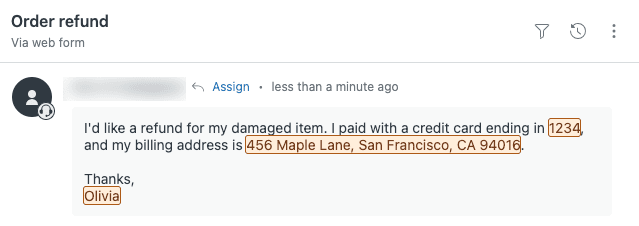
That feature sits in the Advanced Data Privacy and Protection add-on for Suite Enterprise and above, so check your Zendesk plan before you design around it. Zendesk also notes it does not work on AI agent tickets.
HubSpot's request page is the one I would copy on other helpdesks. A form that asks "delete or export?" turns a vague email into a typed request with a verified address, which is exactly the input an AI agent handles best. If you run Freshdesk, I cover its GDPR setup separately. Gorgias teams get the same in Gorgias and GDPR.
How to set up AI for GDPR requests in your helpdesk
This is the setup I would run on any helpdesk, in this order. Steps 1 to 3 are worth doing in your first week even if you never let the AI touch anything else.
Step 1: write the detection rule in plain words
Give the agent examples of what a request looks like, not a keyword list. "What data do you have about me", "delete my account", "remove me from everything", "I want a copy of my order history", "stop using my data", in each language you support. Tell it that a request buried in a complaint still counts, and that a request from a lawyer or a relative on someone's behalf is still a request.
Step 2: tag the type and set the dates
Have the agent write the request type into a ticket field and set the received date. Then let your helpdesk's SLA do the timing. Reporting on that field is how you will know whether you get five of these a month or fifty, which the AI support reporting guide goes into.
smava runs exactly this shape in regulated finance. One eesel agent fires on every new ticket and comment, tags the language, picks one category from a mapping document the team wrote, and writes it into two Zendesk fields. It touches nothing else. Across about 27,000 tickets in a month it categorised about 14,600, and only about 1,100 were marked eligible for an automatic reply. In a regulated queue, most of the value is in the sorting.
Step 3: draft the acknowledgement and the ID ask
Write the templates once with your privacy owner: the acknowledgement with the due date, the "please confirm it's you" message, the clarification note, and the extension notice. The agent fills them in. If the request came from social media, have it ask for a private channel, since the regulator notes social media is not a secure way to send someone their data.
Step 4: set every irreversible action to need approval
This is the step that makes the rest safe. In eesel, each action an agent can take is set to run on its own, ask first, or stay off, per agent. The actions and approvals docs recommend starting supervised with replies and anything irreversible on approval.
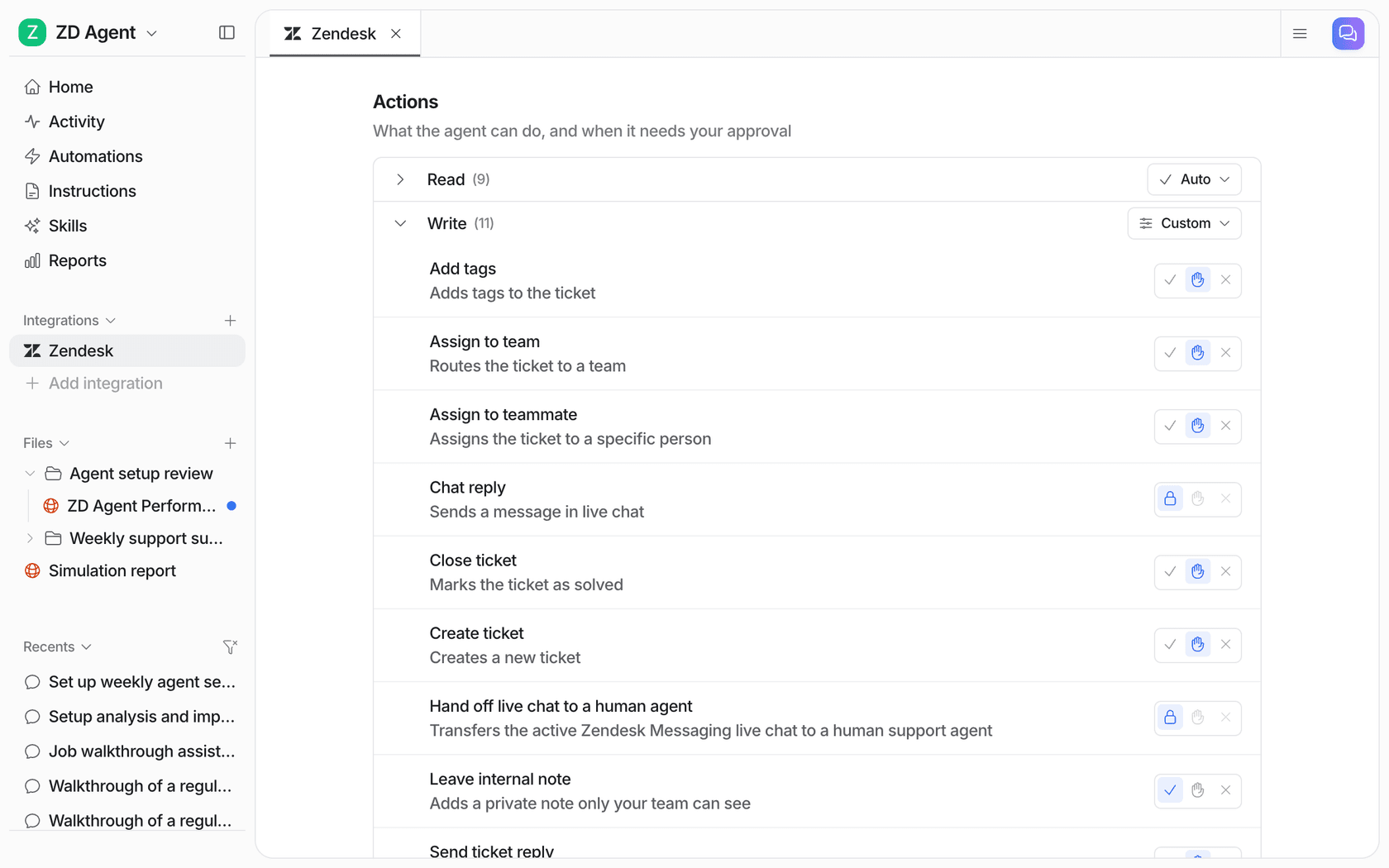
For GDPR tickets, I would leave tagging and internal notes on their own, put public replies on approval, and keep any deletion or data export action off or on approval. You can also hold one case even when an action is on: an instruction like "ask before replying to anything about deleting data" makes the agent stop for that case only. My post on approval workflows covers the pattern for other ticket types.
Step 5: route to one named owner
Every request type should land with a person, not a group inbox. Usually that is your privacy or data protection lead for erasure and access, and support ops for rectification and opt-outs. An AI agent can route by tag instantly; it cannot fix a routing rule that points nowhere. If you are deciding who that owner is, the support job roles post has a model for it.
Step 6: keep the log
You will need to show what happened if a regulator or the customer asks. The helpdesk keeps the ticket history, and the AI tool should keep its own record of every action. In eesel, every run sits in the Activity view with its approval status:

Step 7: test it on your past GDPR tickets
Before it goes live, run the agent against the requests you already handled. Did it spot all of them, including the ones hidden in complaints? Did it tag "unsubscribe me" as an objection rather than a general question? A simulation on past tickets answers that in an afternoon, and it is the cheapest way to find the request your rule would have missed.
Is your AI tool part of the GDPR request?
Yes, and this is the step almost every guide leaves out. If your AI agent learned from past tickets, the customer asking to be forgotten may still be sitting in the AI tool's stored ticket history and search index after you delete them from the helpdesk.
There are two ways to deal with it. The first is to keep personal data out of the AI's index in the first place. eesel's PII redaction runs past tickets through a detector before anything is stored or indexed, and masks 15 categories including names, emails, phone numbers, addresses, IBANs and national IDs. The agent still learns how your team answers; it just never stores who asked. It is opt-in per integration, applies to past tickets synced from your helpdesk, and does not cover tickets indexed before you switched it on, so turn it on before the first sync. The second is to put the AI vendor on your deletion checklist and confirm how long its backups keep data. eesel's Trust Center states encrypted backups roll off within 35 days.
That 35-day window is normal, and the regulator's erasure guidance accepts it: data can stay in a backup until it is overwritten, as long as it is put beyond use and you are clear with the person about what will happen.
The rest of the vendor check is the same one you would run on any AI support vendor:
- A data processing agreement. eesel's covers GDPR, with Standard Contractual Clauses for international transfers.
- A published subprocessor list. On the Trust Center, including the AI model providers.
- No training on your data. eesel does not train or fine-tune models on customer data.
- Where the data lives. EU or US data residency is listed on every eesel plan, free included.
One gap to name plainly: eesel's SOC 2 Type II audit is in progress, with the observation period running 1 October to 31 December 2026 and the report expected in 2027. If your procurement needs the report in hand today, that is a real constraint. My security review guide walks through what to ask for instead.
EU teams have been running eesel with these requirements for a while. Simployer, a Nordic HR compliance software company, put it this way in their case study:
"We needed a turnkey solution for Confluence that met our GDPR requirements and could serve different teams through dedicated Slack bots. eesel AI delivered exactly that, with EU data residency included."
Flemming Ottosen, Development Director, Simployer
Common mistakes with AI and GDPR requests
These are the ones I would watch for in the first month:
- Letting the agent reply "done" before anything is done. A confirmation email is a statement of fact. Have the agent draft it, and only send it after the deletion or export is approved and complete.
- Answering an access request with a chat transcript. An access request covers every system, not just the ticket thread. The agent's job is to list the systems; a person signs off that the list is complete.
- Sending the export to whoever asked. A request from a new email address asking for an existing customer's data is the classic social engineering move. That is exactly when the regulator's ID check applies.
- Forgetting the other tools. Gorgias says plainly that deleting a customer does not touch Shopify or Klaviyo. Your checklist needs every tool, including the AI one.
- Treating "unsubscribe" as small talk. It is an objection to processing. Tag it, route it, and confirm the opt-out landed.
If you want a second opinion on where a rollout like this goes wrong, the implementation timeline post covers the go-live dial in more detail.
Try eesel for GDPR requests in your helpdesk
eesel joins your helpdesk as an AI teammate for support. For GDPR requests, that means it reads every new ticket, recognises a data request in any wording or language, tags the type, drafts the acknowledgement and ID ask from your templates, and holds every reply or action you choose for a person to approve. It works in Zendesk and the other helpdesks in the table above. On Freshdesk, the Freshdesk integration works the same way.
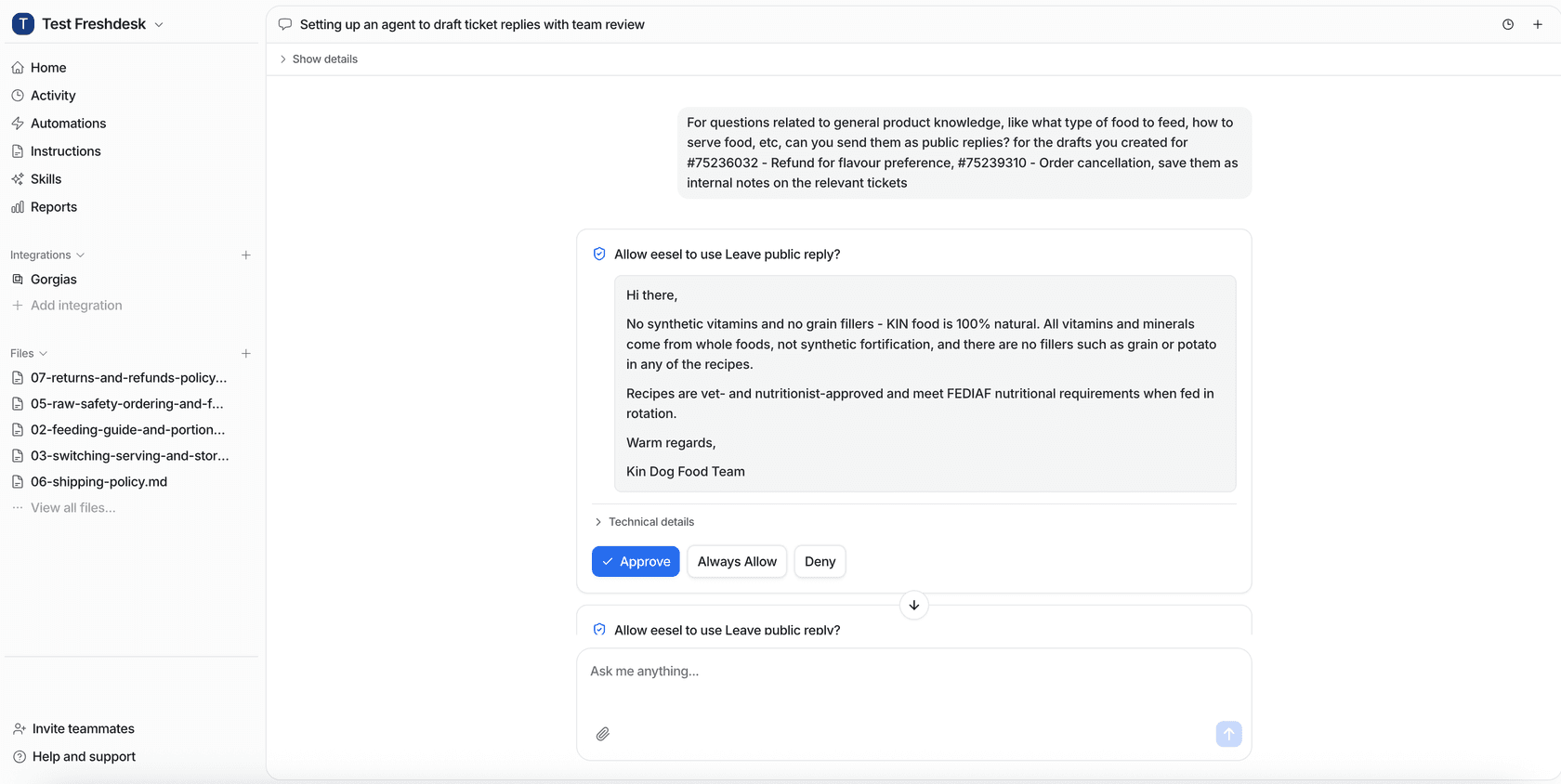
Approvals land wherever your team already works: the dashboard, a Slack thread, or a link in the helpdesk note. Teams that run privacy work from a terminal can list and approve held actions with the eesel CLI (eesel approvals), which coding agents like Claude Code can drive too.
The rules are plain text you write. Swiftreg, a UK number plate dealer, runs an eesel agent on Zendesk that refers to private sellers only as "the seller" or "the current owner", never by name, because that is what their instructions say. Dokument 24 in Denmark has its agent tag about 430 tickets a month by product and leave about 670 Danish draft replies as internal notes for its team to send. That is the shape I would use for GDPR requests: the agent sorts and drafts, people decide.
Plans start free with 100 credits, and a GDPR ticket costs the same 1 credit as any other. Try eesel on your own queue, or read more customer stories first.