What makes a good customer service training scenario?
A customer service training scenario is a short, written practice ticket: who the customer is, what they say first, what they're not telling you yet, and what a good resolution looks like. A trainee works it in a roleplay, a sandbox or a chat with an AI customer, and gets scored against the answer key.
I work the eesel support queue every day, and the eesel team has spent years putting AI agents on live support queues. The habit I never skip is replaying an agent against historical tickets before it talks to a real customer, because I've watched a confident-sounding bot give a wrong answer when nobody tested it first. New hires deserve the same treatment, and it slots straight into a support agent onboarding plan.
Every scenario that actually teaches something has four parts:
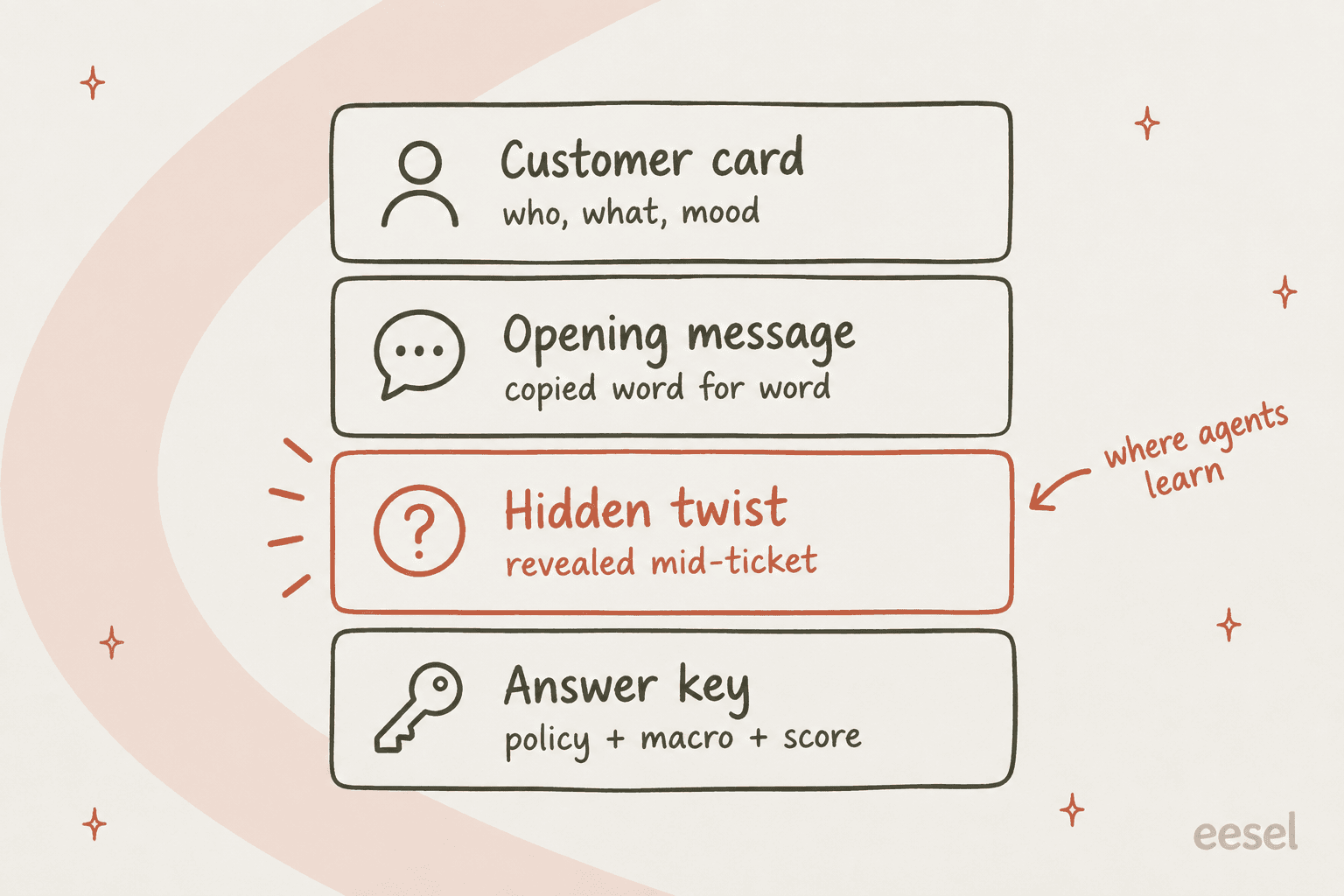
- Customer card. Who they are, what they want, and their mood. Two or three lines, not a novel.
- Opening message. The first thing the customer writes, copied word for word from a real ticket. Real customers misspell product names and bury the question in paragraph three, and trainees need to practice finding it.
- Hidden twist. One fact the customer only reveals if the agent asks the right question, or one detail that changes the right answer. This is the part most scenario lists leave out, and it's where the learning happens.
- Answer key. The policy that applies, the macro or help article the agent should reach for, and how the run gets scored.
If you haven't written down what new agents should be able to do by the end of training, start with your training objectives and work backwards. Each scenario should test one of them.
Where should training scenarios come from?
From your own helpdesk. Invented scenarios drift toward the dramatic (the screaming customer, the threat to post on social media) and away from what fills a real queue, which is mostly ordinary tickets with one awkward detail.
Trainees notice. A customer service rep put it bluntly in a thread on roleplay training:
"The fake scenarios never helped me much compared to actually trying to help the customer."

And a call center agent named the deeper problem with scripted practice:
"Most mock calls I've done end up teaching people how to pass the mock call ."
The fix is to mine the queue. Here's the filter I'd run:
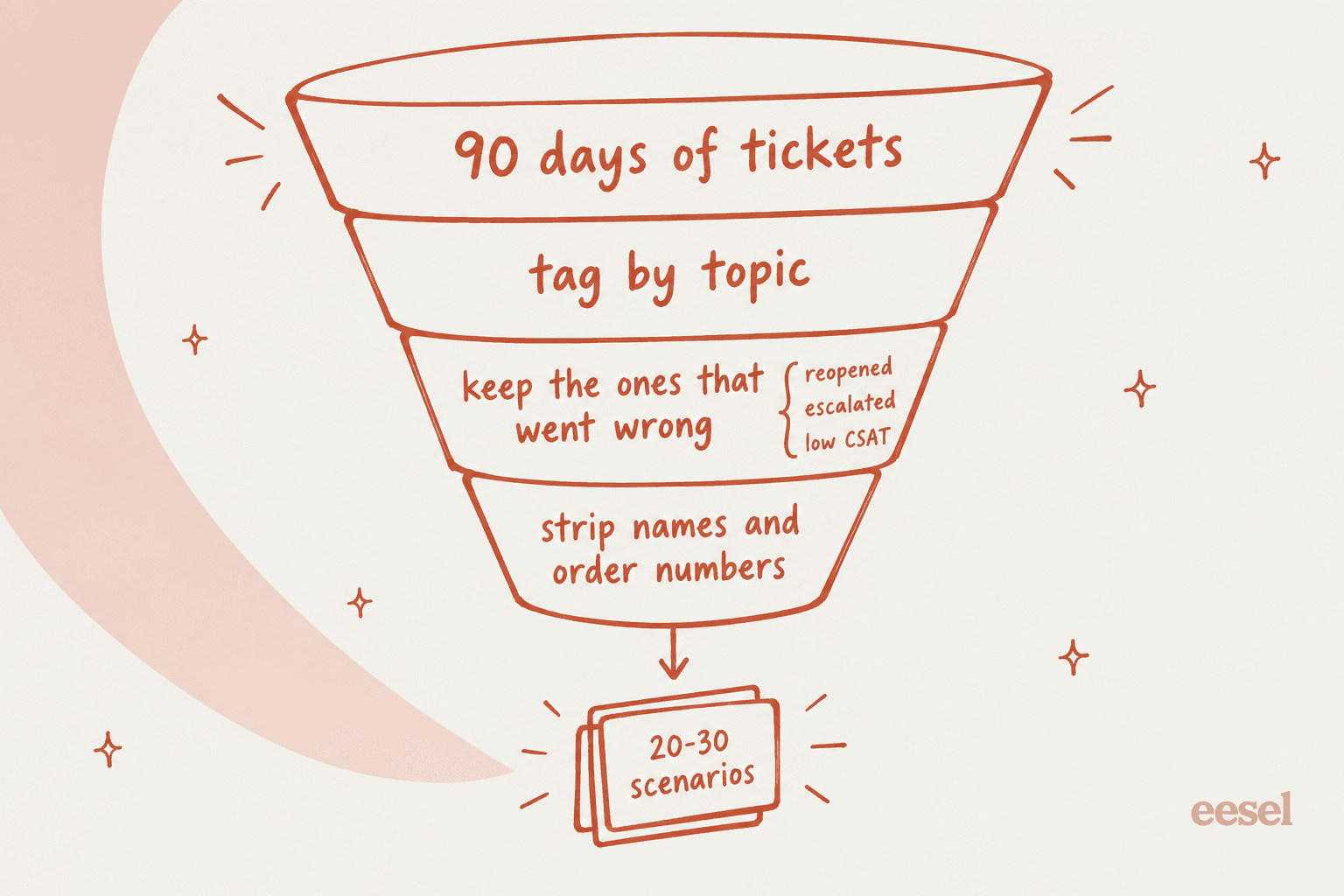
- Pull the last 90 days of solved tickets. Recent enough that the policies still apply.
- Group them by topic. If your helpdesk already tags tickets, use those tags. Your top five or six topics usually cover most of the volume.
- Keep the ones that went wrong. Reopened tickets, escalations and low CSAT scores are where a trainee is most likely to slip. A clean password reset teaches less than the password reset that turned out to be an account takeover.
- Strip personal data. Names, emails, order numbers, addresses. My guide to redacting PII covers how to do this with AI before tickets go anywhere near a chatbot.
- Write the card. Keep the opening message as it was, pick the twist from what actually happened, and write the answer key from the reply your best agent sent. Link the answer key to the article in your internal knowledge base so trainees learn where answers live, not just what they say.
Twenty to thirty scenarios is plenty for a first cohort. You'll add more every time a new hire trips on something the bank didn't cover, and that habit also surfaces knowledge gaps in your help center.
18 customer service training scenarios you can adapt
These are starting points, written the way I'd write them for my own team. Swap in your product, your policy windows and a real opening message from your queue. Use the filter to jump to the ticket type you're training on this week.
1. Charged twice this month
Twist: the second charge is an annual renewal they forgot about, not a duplicate.
Good looks like: checks the invoice history before apologizing for a "bug", explains the renewal, and offers your actual refund window.
2. Refund request on day 31
Twist: your refund window is 30 days, and the customer opened a ticket on day 12 that nobody answered.
Good looks like: spots the earlier ticket and treats the request as in-window, or escalates with that context attached.
3. Cancel, but keep my data
Twist: they only want to cancel because a price went up, and a cheaper plan covers their use.
Good looks like: asks why before processing, mentions the cheaper plan once, then cancels cleanly if they still want out.
4. Where is my order?
Twist: tracking says delivered two days ago.
Good looks like: no "it says delivered" reply; checks the address, explains the carrier claim process, and sets a follow-up date.
5. Wrong size, wants an exchange
Twist: the item was a final-sale product.
Good looks like: states the final-sale policy plainly, offers what is allowed (store credit, a size guide fix), and doesn't promise an exception they can't approve.
6. Change the shipping address
Twist: the order already left the warehouse.
Good looks like: checks fulfillment status first, then offers a carrier redirect or a return-and-reship, with honest timing.
7. Can't log in, reset isn't working
Twist: the reset emails are going to an old work address they no longer have.
Good looks like: asks which email they're checking, then follows the identity check before changing anything.
8. Please give me my ex-colleague's access
Twist: the requester isn't an admin on the account.
Good looks like: refuses politely, explains who can grant access, and doesn't confirm any details about the other user.
9. Someone changed my email
Twist: it's a likely account takeover.
Good looks like: recognizes the security risk, follows the takeover runbook, and escalates fast instead of troubleshooting in the thread.
10. The export button does nothing
Twist: it only fails in one browser, and the customer hasn't said which.
Good looks like: asks for browser and steps, reproduces, and writes a bug report an engineer could act on.
11. Is your service down?
Twist: there is a live incident, and the status page hasn't been updated yet.
Good looks like: confirms the issue without guessing a fix time, links the incident channel, and tags the ticket for the follow-up.
12. My numbers don't match
Twist: it's a time zone setting, not a bug.
Good looks like: asks one sharp question about the report settings before filing anything.
13. Your colleague promised me a discount
Twist: nobody did; there's no record in the history.
Good looks like: checks the history, says what they can see without calling the customer a liar, and routes the request to someone who can approve it.
14. Delete all my data
Twist: they still have an active subscription and an unpaid invoice.
Good looks like: follows the data deletion process exactly, explains the billing step first, and never improvises on privacy.
15. I'll take my business elsewhere
Twist: it's a large account, and only a manager can offer anything.
Good looks like: stays calm, doesn't invent an offer, and escalates with a short written summary of what's at stake.
16. Fourth time I've written in
Twist: each previous agent asked for the same screenshot.
Good looks like: reads the whole thread, owns the repeat, and asks for nothing the customer already sent.
17. Short, rude, one-line message
Twist: the customer is writing in their second language, not being rude.
Good looks like: replies in plain, short sentences, avoids idioms, and solves the problem without commenting on the tone.
18. This was a gift and it's ruined
Twist: the deadline (a birthday) matters more than the refund.
Good looks like: acknowledges the date, offers the fastest replacement option first, and keeps the apology to one line.
A few notes on using them. Scenarios 9, 14 and 15 are the ones I'd never skip, because the cost of getting them wrong is a security incident, a privacy complaint or a lost account, and a trainee should meet them in practice before meeting them live. Scenarios 16 to 18 pair well with my guides on handling angry customers and empathy statements, and for billing scenarios my post on AI for refund requests shows which parts are safe to automate later. The same goes for password resets (scenario 7), order tracking (scenario 4) and outage tickets (scenario 11).
Scenario 3 is really a retention test, and my guide to cancellation retention has the save offers worth putting in its answer key. Scenario 15 needs a clear escalation process behind it, and scenario 17 is worth extending into a full set if you support multiple languages.
How do you make a scenario harder without rewriting it?
Change one thing at a time. A trainee who handles the clean version of "where is my order" hasn't proven much. The same ticket with a frustrated repeat customer, a policy edge and a missing order number is a different test, and you didn't have to write a new scenario to get there.
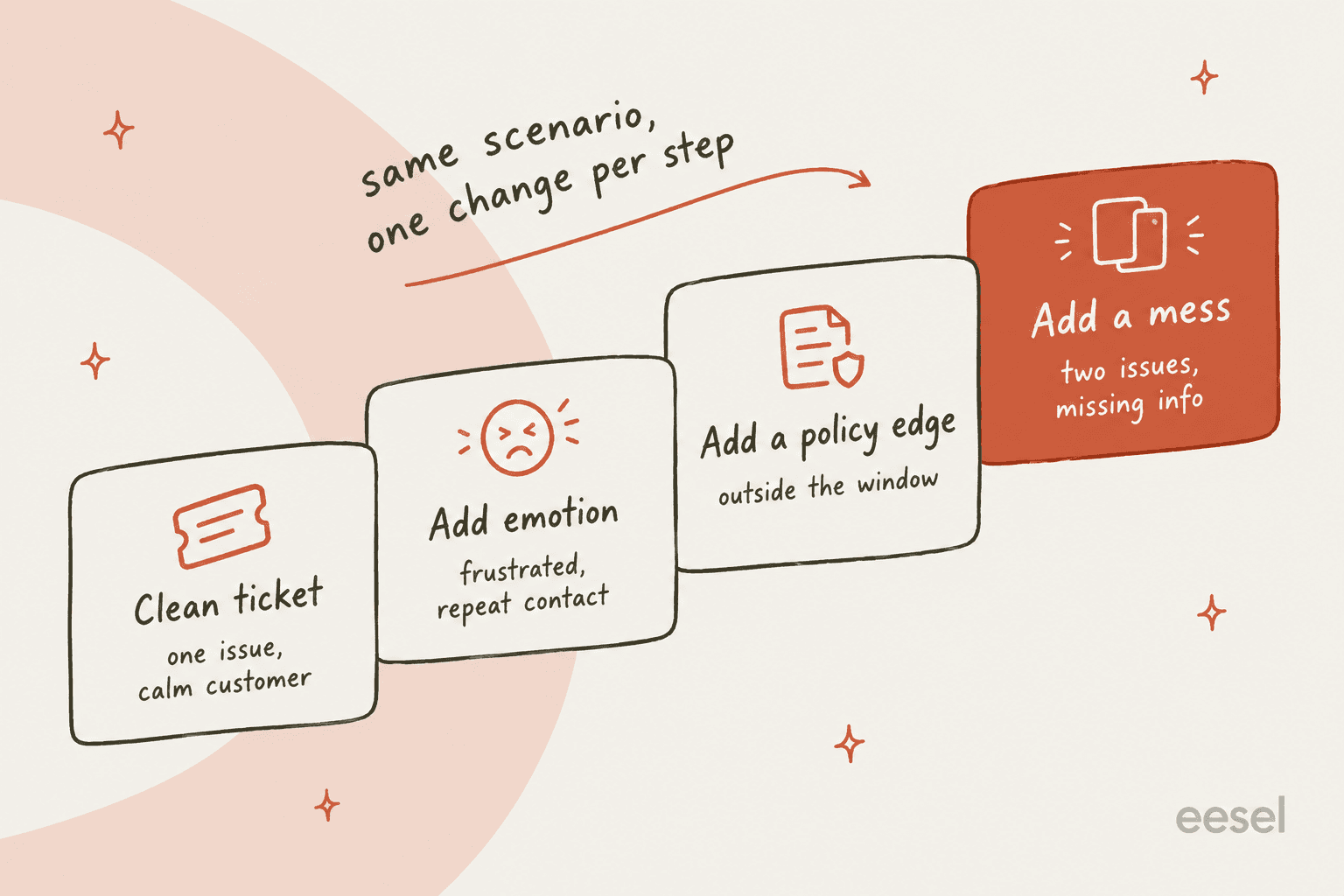
| Level | What changes | Example on scenario 4 (where is my order?) | What it tests |
|---|---|---|---|
| 1. Clean ticket | Nothing. One issue, calm customer | "Hi, my order hasn't arrived yet, can you check?" | Can they find the order and the policy |
| 2. Add emotion | The customer is frustrated or has written before | "Third time asking. Where is it?" | Do they own the repeat without getting defensive |
| 3. Add a policy edge | The right answer sits near a limit | Tracking says delivered, and the claim window closes tomorrow | Do they know the policy well enough to act fast |
| 4. Add a mess | Two issues, or a key fact is missing | No order number, and they also want to change their next delivery | Can they untangle the request and ask the right question |
Move a trainee up a level only after they pass the one below it. A former call center trainer described why that structure matters:
"Offer a scenario? Better. Here's the call, here's what you've learned, show me how you get from A to B. Not the only method, but things that offer constructive feedback and focus on learning always work better."
How should you score a training scenario?
Use the same lines your quality assurance team uses on live tickets, so practice and real work are graded the same way. Five lines is enough. More than that and nobody scores consistently. If you're starting from scratch, my guide to call center QA covers how to build the form itself.
| Line | Question the scorer asks | Weight | Common fail |
|---|---|---|---|
| Policy | Did they apply the right rule, including the edge? | 30% | Promising an exception they can't approve |
| Accuracy | Is every fact in the reply true? | 25% | A wrong delivery estimate or a made-up feature |
| Resolution | Is the ticket solved, or escalated with context? | 20% | "Let me check and get back to you" with no follow-up |
| Tone | Would the customer feel heard? | 15% | Three apologies and no answer |
| Efficiency | Did they ask only what they needed? | 10% | Asking for info that's already in the thread |
Weight knowledge above style. A warm, well-written reply with the wrong refund answer is still a wrong answer, and it's the kind of mistake that reopens tickets. If you want help turning scores into coaching notes, my QA feedback examples and guide to support agent feedback cover the wording.
How do you run the scenarios?
You have four options, and most teams end up using two of them.
Peer roleplay. A senior agent plays the customer. It's free, but it depends on the senior agent's time and how committed they are to staying in character. A former call center trainer put it this way: roleplay was "the least effective training method across the board" because "it's awkward and, frankly, not representative of the live call environment" (r/callcentres). Written scenarios with a hidden twist fix most of that, because the "customer" has a script to follow.
A sandbox. Some helpdesks let trainees practice in a copy of your real setup. Zendesk sandboxes can replicate up to 10,000 real tickets along with shared macros and custom roles, and Zendesk names "train agents without affecting production" as a use. They're included on Enterprise plans (Zendesk sandbox docs). A Freshdesk sandbox copies configuration such as canned responses and roles but not tickets, and is Enterprise only (Freshdesk docs). Good for practicing the clicks, less useful for practicing replies.
An AI customer. A chatbot plays the customer from your scenario card, stays in character as long as you tell it to, and scores the run at the end. Here's a prompt that works in ChatGPT or Claude:
You are a customer contacting [Company] support. Stay in character until I type END.

Customer card: [who they are, what they want, their mood]
Opening message (send this first, word for word): [paste the real message]
Hidden twist (reveal only if the agent asks a question that would uncover it): [twist]
Do not calm down unless the agent [specific behavior, e.g. acknowledges the repeat contact].

When I type END, score my replies 1-5 on policy, accuracy, resolution, tone and efficiency,
using this answer key: [policy + correct resolution]. Quote the line where I lost the most points.
Strip personal data from the opening message before you paste it in. The one known weakness of general chatbots is that they forgive too easily, which is why the prompt spells out what calms the customer down.
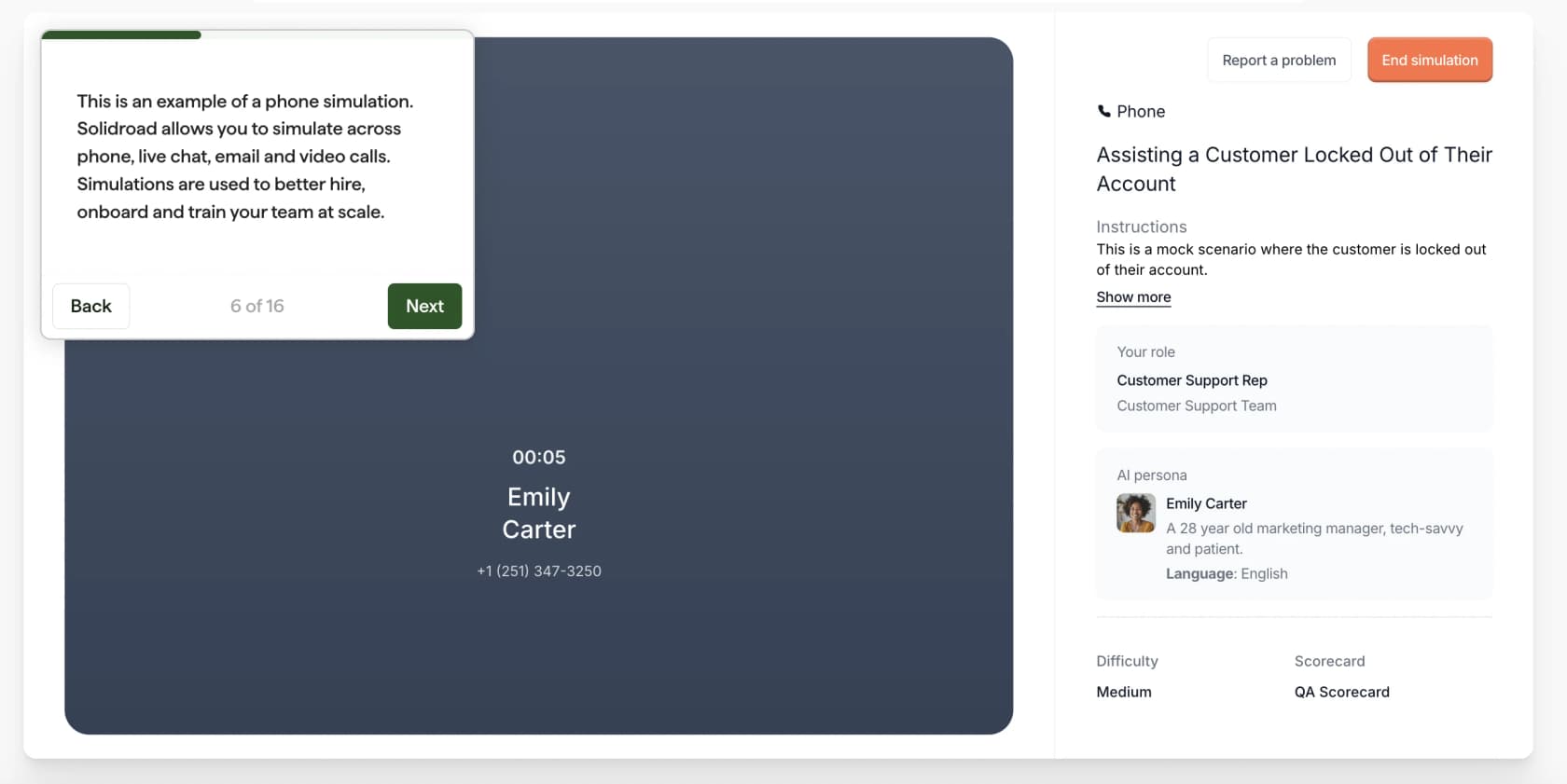
A dedicated simulation tool. If you're training a large team on voice or need graded runs with dashboards, platforms like Solidroad run simulations across phone, chat and email, with personas tuned by difficulty and channel, scored against rubrics built from your SOPs (Solidroad). Pricing is quote only.
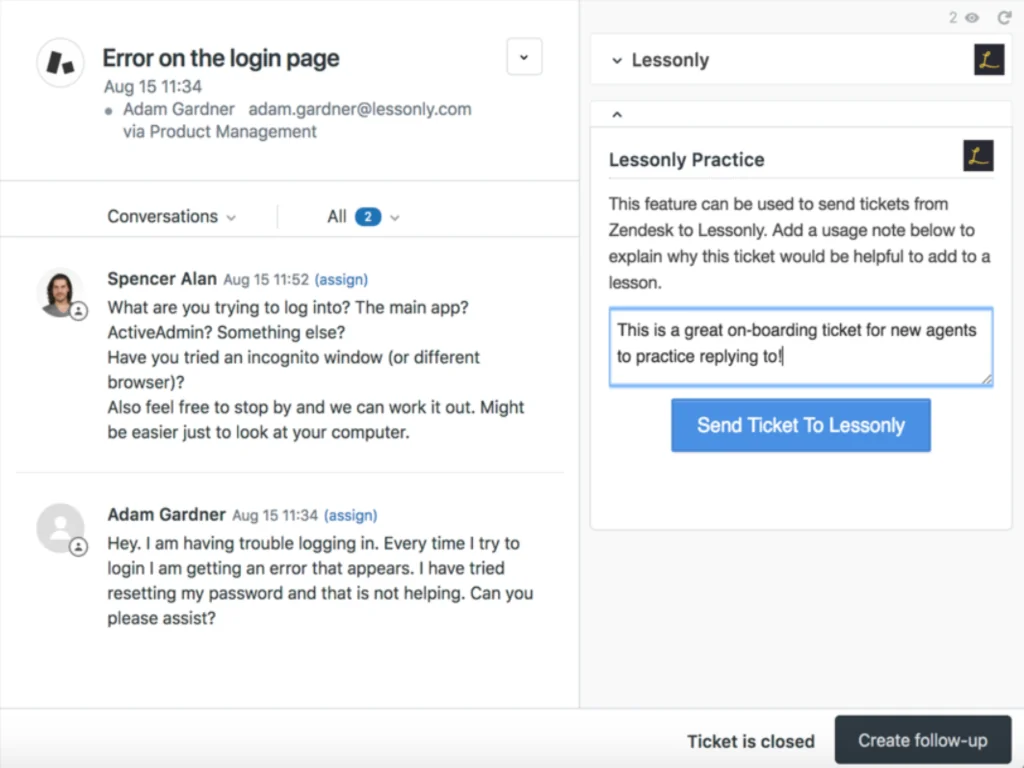
Some learning tools also connect to the helpdesk so a team lead can turn a live ticket into a practice exercise the moment they spot a good one, which is the easiest way to keep your scenario bank fresh.
For a full comparison of options, see my roundups of support agent training software and customer support coaching software.
Can the same scenarios train an AI agent?
Yes, and this is the part I'd push hardest on. The scenario bank you build for new hires is the exact test set you need before an AI agent touches your queue. Same tickets, same answer keys, same five-line scorecard. If the AI fails scenario 9 (the account takeover), you want to find out in a test, not from a customer.
That's how I'd roll out eesel, an AI helpdesk teammate that learns from your help center, macros and past tickets. Its Simulation skill "runs your agent against real past tickets or generated test cases, scores each answer, and suggests instruction changes" (skills docs). With a helpdesk connected, it replays real tickets and compares its answers to what your team actually sent.
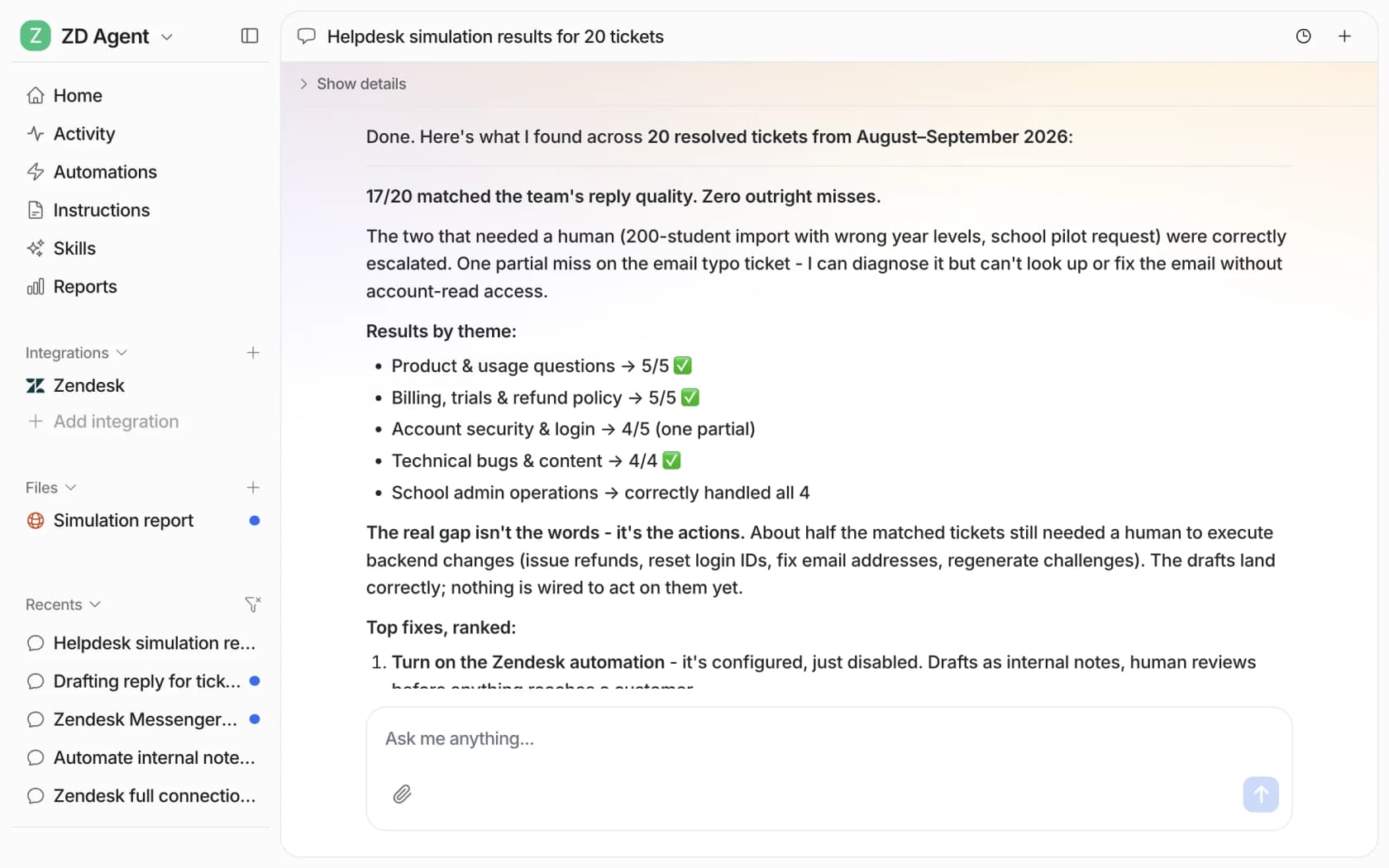
Look at the theme breakdown in that run: account security and login came in at 4 of 5 with one partial miss, which is exactly the ticket type I'd flag for extra scenarios for human trainees too. The report then ranks fixes, the same way a team lead would write coaching notes.
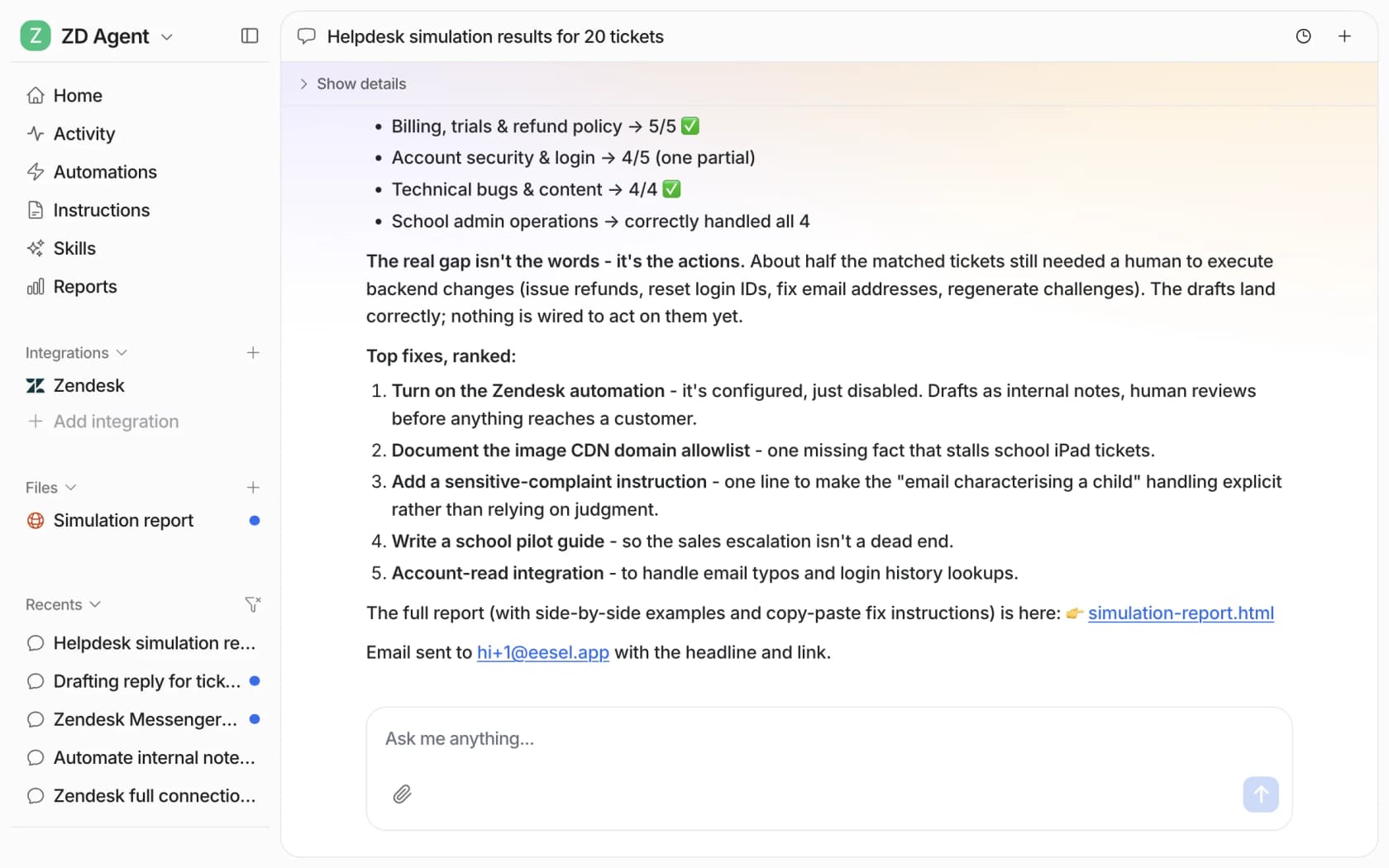
When you correct the agent, it writes the correction into its own instructions (instructions docs), and the next simulation run shows whether the fix held. It's the same loop as coaching agents with AI, just pointed at the AI instead of a person. My guides to training an AI support agent and onboarding one go deeper, and if you're not sure what data you need, start with my post on AI training data.
Common mistakes with training scenarios
- Writing the twist into the opening message. If the customer says "I know my refund window closed", there's nothing for the trainee to discover. Keep the twist hidden until the right question uncovers it.
- Only training the dramatic tickets. Angry customers make memorable scenarios, but most of your queue is calm people with one confusing detail. Weight the bank to your real topic mix.
- No answer key. Without one, two scorers will grade the same run differently and the trainee learns nothing from the score.
- Never retiring scenarios. When a policy changes, the scenario built on the old one teaches the wrong answer. Review the bank whenever you update your SOPs.
- Practice that never touches the real tools. Replies matter, but so do the clicks. Pair written scenarios with a sandbox session or a few supervised live tickets, and give trainees your live chat scripts as a starting point rather than a crutch.
How fast trainees get through all four levels is also a decent proxy for support agent ramp time, so it's worth tracking per cohort.
Try eesel with your own ticket history
If you're building a scenario bank from past tickets anyway, eesel can use the same tickets. It connects to Zendesk, Freshdesk and other helpdesks in minutes, learns from your help center, macros and resolved tickets, and gets simulated against your real history before it answers anyone. New hires can start with its drafts as internal notes and send only what they've checked.

The free plan includes 100 credits with no card, paid plans start at $299 a month for 500 credits, and seats are unlimited, so every trainee gets access at no extra cost (pricing). Try eesel and run your first simulation on the tickets you'd turn into scenarios.
Frequently Asked Questions
What are customer service training scenarios?
What are good examples of customer service training scenarios?
How many customer service training scenarios do new agents need?
How do you score customer service training scenarios?
Can I use ChatGPT to run customer service training scenarios?
What is the difference between training scenarios and roleplay?
How do you make customer service training scenarios harder?
Can customer service training scenarios be used to test an AI agent?


Article by
Riellvriany Indriawan
Riell is a designer and writer at eesel AI with about two years of experience researching CX platforms, AI chatbots, and helpdesk software. She combines her design background with a sharp eye for how these tools actually look and feel in practice — making her comparisons unusually visual and user-focused.