
What counts as support agent feedback?
Support agent feedback is any signal that tells an agent how a reply landed and what to do differently next time. Most teams think of it as the QA scorecard, but that's one of five sources, and usually the slowest one.
| Source | Who gives it | How fast it arrives | What it's good for |
|---|---|---|---|
| Notes on live tickets | Senior agent or team lead | Minutes to hours | Fixing a reply before or right after it goes out |
| QA reviews | QA analyst or lead, on a scorecard | Days to weeks | Consistency across the team, spotting patterns |
| Customer CSAT comments | The customer | Hours to days | Tone and outcome, in the customer's words |
| Metrics | The helpdesk report | Weekly | Trends: handle time, reopen rate, resolution |
| Self and peer review | The agent, or another agent | Whenever it's scheduled | Building judgment, sharing what works |
I work eesel's support queue every day, and the feedback that changed how I write replies almost never came from a score. It came from someone leaving a note on a ticket I'd just answered, while I still remembered why I'd written it that way.
That's the frame for the rest of this guide: each source has a job, and trouble starts when a team expects the slowest one to do all of them.
Why does most support agent feedback not change anything?
Ask agents about feedback and you hear the same four complaints, over and over. None of them are "my manager was too blunt."
It arrives too late. A QA review written two or three weeks after the ticket asks the agent to remember a conversation they've had a hundred more of since. By then the habit has repeated dozens of times.
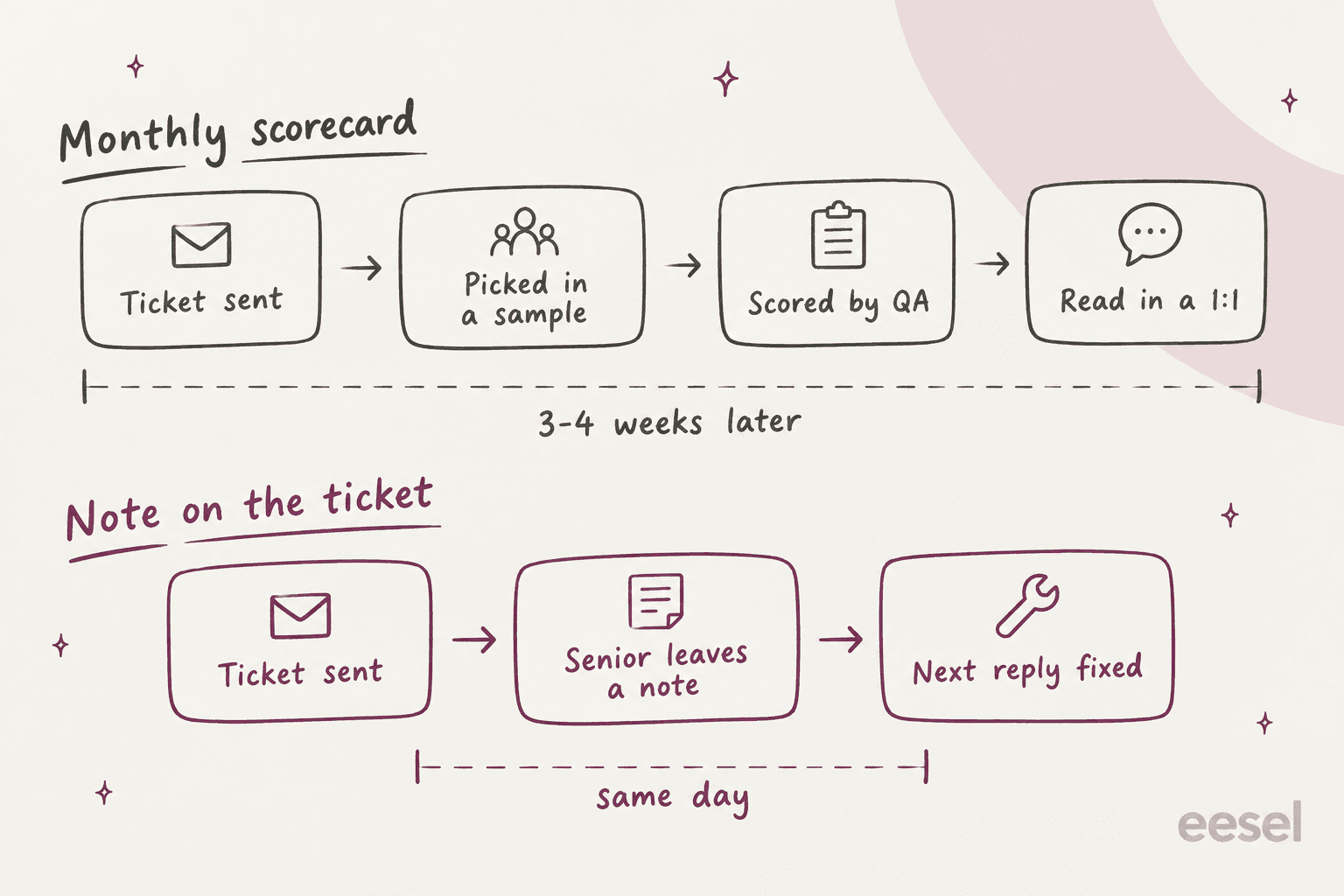
It's a score with no conversation. This is the big one. A percentage tells an agent that something went wrong, never what to do on the next ticket.
"I've gotten the same QA scores for weeks now. I haven't reviewed a single call with my boss yet and I've been graded on 8 or 9 calls. She's sent out a copy of the QA agent rubric sheet for two or three of them - the rest, no detail at all. But with no info on account and no call review or coaching on it, I really can't process the percentage score."

The sample is too small to be fair. When a reviewer reads two tickets a month per agent, one bad ticket becomes the whole story. One agent got a zero on an otherwise perfect call because their dog barked: "Out of hundreds of calls, they got the one where he barked!" Another pointed out that reviewers skip the hard tickets and score the short ones anyone can ace, which rewards exactly the wrong agents.
The scorecard measures the wrong thing. Agents learn what you actually care about from the weighting, not from the values poster on the wall.
"I did tech support, only 30% of our score was actually fixing the user's problem. 70% was getting the opening/closing right, bullshit empathy statements, positive responses about being able to fix the problem (even when I couldn't because it was a misroute that I'd have to transfer), offering to send the knowledge article you were using, etc.."
Metrics used as feedback have the same failure, just louder. On Hacker News, a former call center agent described a team so focused on average call length that it was "common practice" to upset customers on purpose so they'd demand a supervisor and the call could be transferred. Another described a translator call that ran close to an hour and the only feedback the next day, in his telling, was "your handle time is too high." He left within a week.
The good news is that agents are clear about what they want instead. One r/callcentres regular runs every piece of feedback through three questions: is it objective, is it fair, and is it constructive? If the reviewer "can't give practical advise", it gets disregarded. That's a better rubric for managers than most training decks.
The feedback rhythm: daily, weekly, monthly, quarterly
The fix for late, thin feedback isn't more QA. It's putting each kind of feedback on the cadence it's actually good at. Here's the rhythm I'd set up for a team of five to 50 agents.
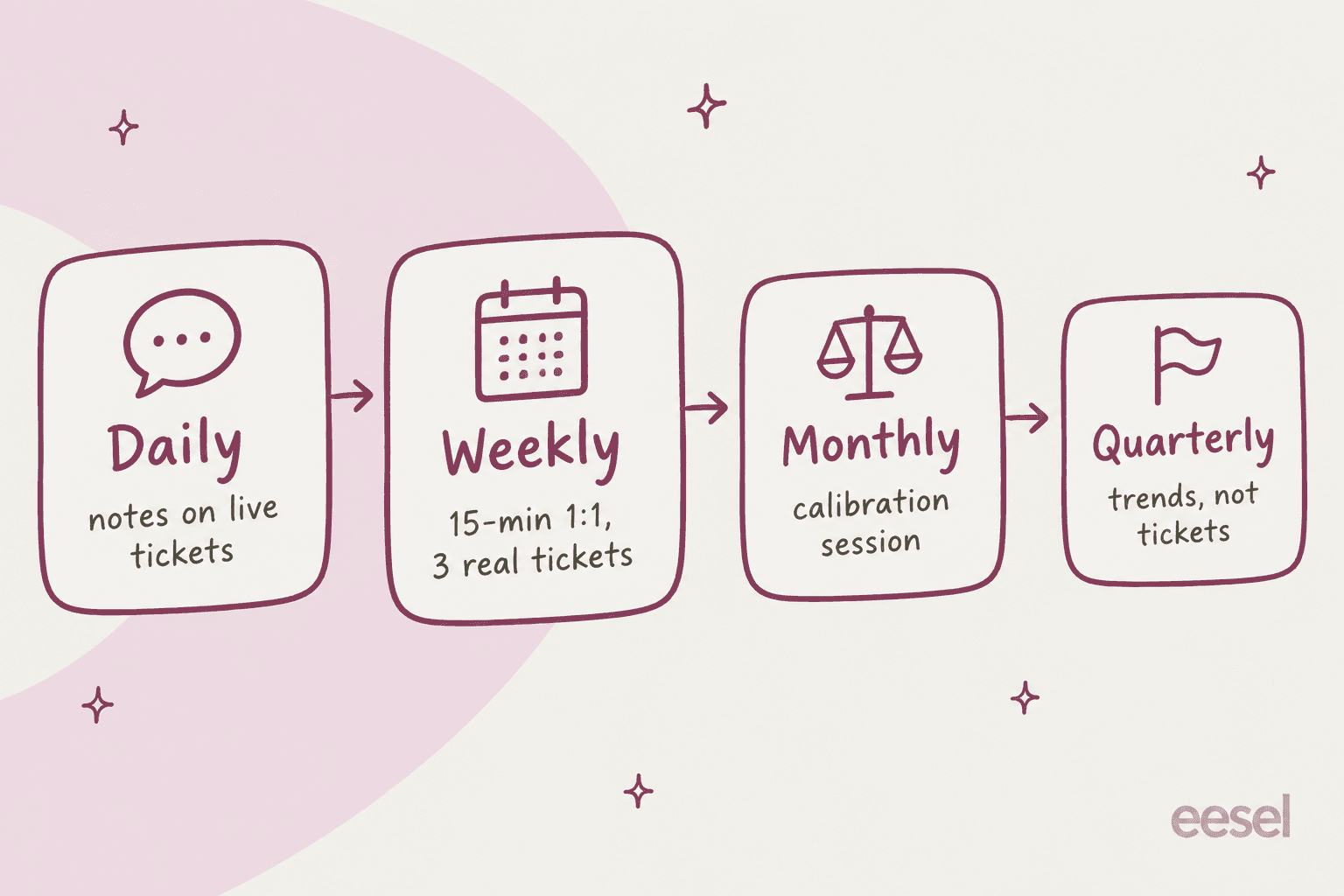
Daily: notes on live tickets
This is the layer that does most of the teaching, and the one most teams don't formalise. A senior or lead reads a handful of replies each day and leaves a short internal note on the ticket: what worked, or the one thing to change. For new agents, go one step earlier and review replies before they're sent.
One support lead on Hacker News described exactly that: new agents shadow the experts, and once their lead deems them ready they answer tickets "reviewed by a senior before sending," per that thread. It's the cheapest feedback you'll ever give, because it lands while the agent still has the customer's problem in their head. My onboarding guide covers how to set up those notes-only seats per helpdesk.
Every helpdesk can do this with tools you already pay for. Freshdesk's private threads, Help Scout notes, Gorgias internal notes and Front comments all notify the person you @mention (details per tool in the table further down).
Weekly: a 15-minute 1:1 on three real tickets
Pick three tickets from the agent's week: one they handled well, one that went sideways, and one they choose themselves. Read them together. Ask what they'd do differently before you say anything.
Three tickets is the right number. One makes it feel like a verdict on a single bad day; ten turns it into a lecture. Bring their CSAT comments too, because customer words land differently from a reviewer's.
"It sounds like your boss is really letting you down. A big part of their job is to help you perform better. When I worked the floor I'd have a weekly meeting with my boss and we'd go over my surveys then."
Keep the ratio honest. A 911 dispatch QA lead on Reddit said they give "a lot of positive and supportive feedback as well as coaching feedback." If every 1:1 is a list of misses, agents stop bringing you the tickets they're unsure about. For phrasing, my QA feedback examples post has before-and-after wording by scorecard criterion.
Monthly: calibrate the reviewers, not the agents
When three reviewers give the same ticket three different scores, agents notice, and every score after that is suspect. One agent described reading the script word for word and still getting "3 different scores" from three reviewers.
Calibration is the fix. Everyone scores the same small batch separately, then you meet and agree on the right answer. The most concrete version I found came from a former quality team lead:
"Every month we'd pick a random call, all score separately, then get together and decide the correct score for each quality point. Whatever we all decided on, we had to be within 3% of that score (and certain elements had to be 100% on point)."
Zendesk QA has calibration sessions built in, with a baseline review to compare against. Two catches worth knowing: calibration sends no notifications, so the lead has to tell reviewers a session exists, and agents see nothing from it. Both are reasonable design choices, but put the session in the calendar yourself.
Quarterly: trends, not tickets
The quarterly conversation is where metrics belong, and only as trends. "Your reopen rate went from 9% to 5% since March" is useful. "You had a high handle time on the 14th" is not. My performance review examples and KPI guide cover which numbers hold up.
If you want a pick-one guide for where a specific piece of feedback should go, here's the version I keep pinned:
Where should this feedback go?
Pick the situation. You get the channel, the timing, and a line you can adapt.
- "Quick one: this customer's on the annual plan, so the refund window is 30 days, not 14. Can you send a follow-up correcting it?"
- If the policy is unclear in the help center too, fix the article in the same sitting.
- Ask first: "How do you think this customer felt reading your reply?"
- Then show one rewritten sentence, not a rewritten email.
- Update the macro, help article, or AI instructions that keep producing the miss.
- "I've updated the shipping macro, so you won't need to remember the exception anymore."
- "Your reopen rate rose from 5% to 9% over six weeks. Let's pull three reopened tickets and see what they share."
- Never raise a single bad day as a metric.
- "This reply to the double-charge ticket is the template now. Clear, short, and it answered the next question before it was asked."
- Praise in public works as training for everyone else.
How to deliver feedback agents can actually use
The rhythm decides when. These five habits decide whether the agent walks away knowing what to do differently.
- Anchor every point to a real ticket. "Be more empathetic" means nothing. "On ticket 4182, the customer said they'd been charged twice; your first line went straight to the refund steps" is something an agent can picture and fix.
- One thing per session. If there are five issues, pick the one that costs the customer most. The other four can wait a week, and the agent will actually remember the one.
- Ask before you tell. "What would you change here?" Half the time the agent spots it themselves, and feedback they arrive at sticks better than feedback they receive.
- Say why it matters to the customer. "Confirm the order number" is a rule. "Confirm the order number, because two of last week's reopens were refunds sent to the wrong order" is a reason.
- Separate coaching from grading. A 1:1 that ends with "and that's why you're at 72%" turns every future conversation defensive. Keep the score for the review; keep the 1:1 about the next ticket.
I'd add one more for anyone managing a mixed team of new and experienced agents: don't judge new hires on the same scorecard in week two. A team lead on Reddit, reacting to a new-hire class let go after 10 days on an 80% target, put it simply: "10 days is nothing." My ramp time guide has the timelines teams actually see.
Let agents push back: disputes and self-reviews
A feedback system without a way to disagree is a grading system. Agents know the difference, and the dispute stories on r/callcentres are a lesson in what goes wrong.
One agent contested a 95.5% score, their manager agreed, and the review came back at 90.25% with about eight "new errors found," the agent wrote. Another said disputes on bad surveys were "almost always ignored for months," then denied, per their comment. And one noticed a score had quietly changed after a successful appeal with no message at all: "an acknowledgment of it would be nice."
Compare that with what a working process sounds like:
"If there's a problem with one of my scores and I feel I have a reason to dispute we have a process, but I've never even had to use it because the scorer just looks at it and either clarifies in a way that makes sense to me or changes it because they agree with me. They are reasonable, and not retaliatory, even the semi cranky ones. That's how adults behave at work."
The rules that make the difference are simple: a written reason from the agent, a set turnaround time, a decision that's explained either way, and a notification when it's resolved. A reviewer on the other side of this added one more I like: when QA gets it wrong, "we own up to it and award the points back and issue an apology," as one QA reviewer put it.
Zendesk QA builds most of that into the product. An agent opens the review, picks who receives the dispute, can suggest new scores per category, and has to write a comment explaining why. The recipient accepts, partially accepts, or rejects it, both sides get notified, and there's no limit on disputes per review, according to the Zendesk QA dispute docs.
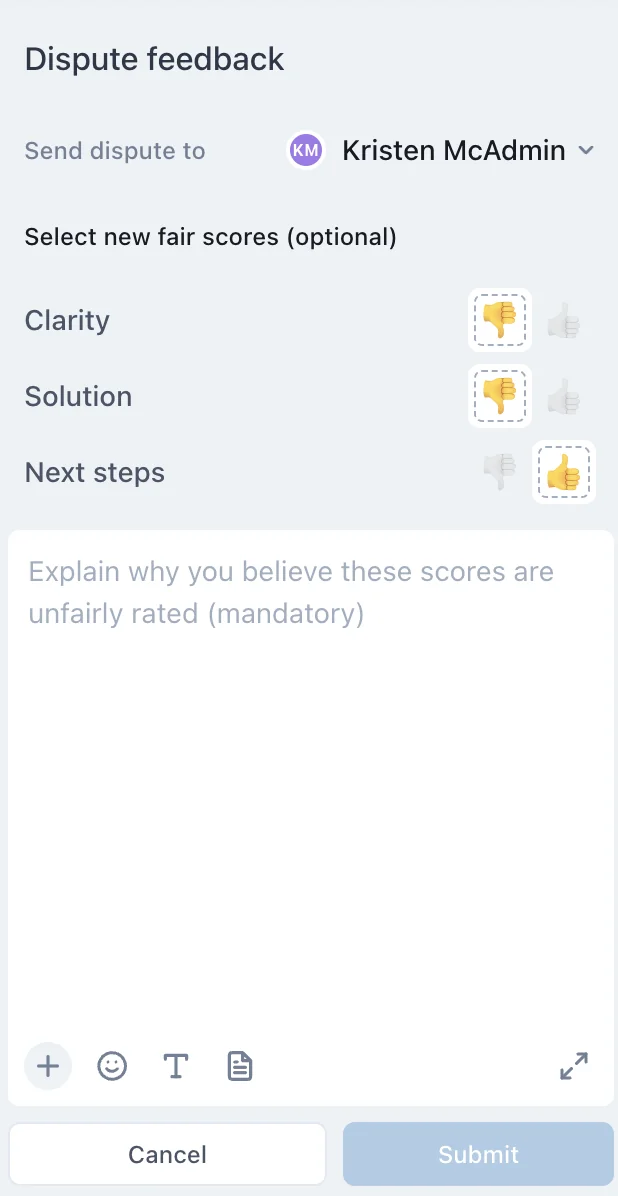
There's also a disputes dashboard with average resolution time in days and a table of which reviewers get disputed most, which is a quiet way to spot a reviewer who needs calibrating. MaestroQA (now Rippit) calls its version appeals, with an option for a team lead to review an appeal first, and Scorebuddy gives agents a "request a review" process from their dashboard.
Self-reviews are the underrated half of this. Zendesk QA lets you switch on self-reviews per workspace, so agents score their own conversations on the same scorecard. Run one a month alongside the reviewer's score, and the gap between the two numbers is often a better 1:1 topic than either number alone.
Where feedback lives in your helpdesk
Here's where it gets practical, and where I found the biggest surprises in the vendor docs. Not every helpdesk lets agents see their own quality scores, and the AI scoring add-ons are deliberately cautious about how their scores get used.
| Tool | Where feedback is written | Agent notified? | Dispute path | Self / peer review | AI scoring | Price |
|---|---|---|---|---|---|---|
| Zendesk QA | Review comments (hashtags, @mentions), coaching sessions, pins | Yes, email or Slack, from instantly to monthly | Yes: new scores, mandatory comment, accept / partial / reject | Both, plus calibration | AutoQA, 8 system categories | $35/agent/mo add-on, yearly |
| Front Smart QA | AI scorecard in the sidebar, admin override with a comment, internal comments | @mentions yes; no QA-specific alert documented | None documented | Not documented | 15 default criteria, up to 10 custom | $20/seat/mo, included on Enterprise |
| Gorgias Auto QA | AI scores in the ticket; leads edit; internal notes | Notes yes; agents can't view QA scores | None | Not documented | 3 auto criteria, 4 manual | Needs AI Agent subscription |
| Freshdesk | Private notes and private threads with @mentions | Yes, email to assignee and participants | No QA module found | None found | None found | Threads on all plans |
| Help Scout | Notes with @mentions | Yes, Notification Station plus optional email | No QA module found | None found | None found | Notes on all plans |
| MaestroQA / Rippit | Rubric grades, coaching sessions with to-dos | Not confirmed publicly | Yes, appeals with optional lead approval | Peer review program | AutoQA | Rippit Free, $185, $495/mo |
| Scorebuddy | Scorecards with evaluator feedback, coaching sessions | Agent dashboards in real time | "Request a review" | Peer scoring and calibration | 500 or 1,000 AI scores/mo | Quote-only |
A few details from that table are worth spelling out, because they change how you'd run feedback on each tool.
Zendesk QA tracks whether agents read their feedback. Its Reviews dashboard reports Unseen reviews, the share of manual reviews the agent hasn't opened yet, and the Coaching dashboard tracks whether agents have reviewed the feedback they received. If your unseen rate is high, your feedback problem isn't wording, it's delivery. The agent's Activity page pulls reviews, comments, reactions, CSAT feedback and disputes into one place.
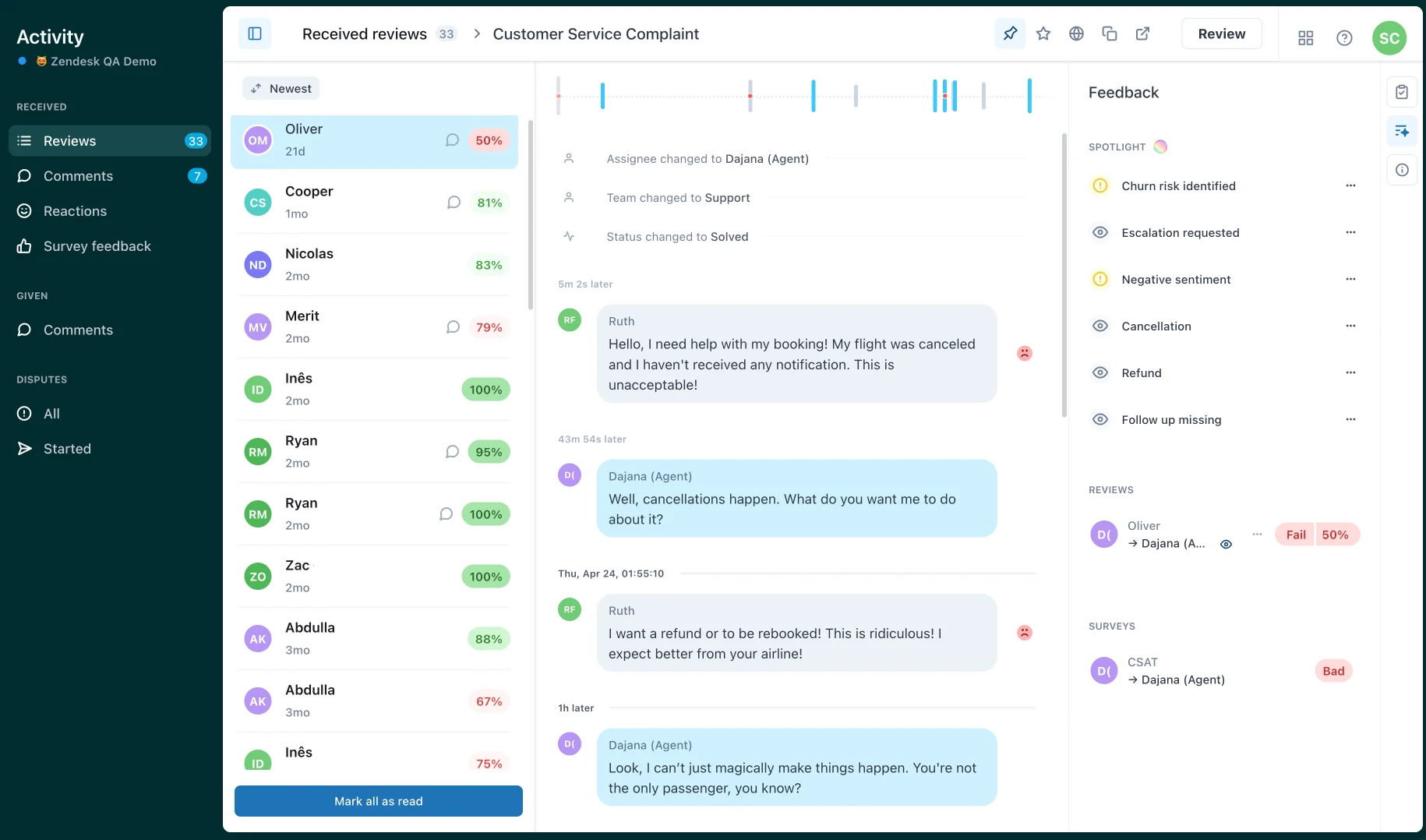
Zendesk keeps AI scores and human scores apart. AutoQA results feed an auto quality score, while the internal quality score stays based only on manual reviews, and Zendesk's own account settings docs say AutoQA evaluations "are for guidance only and shouldn't be used for performance decisions." That's a sensible line to borrow even if you're on a different tool. The QA add-on costs $35 per agent per month on top of any Support or Suite plan, per Zendesk's pricing.
Front shows agents their own AI scores, with the reasoning. Smart QA puts a scorecard in the conversation sidebar with a written explanation for each criterion, and agents can only see their own results. Admins can override a score, add a comment, and mark it confirmed, at which point their name replaces "Generated by AI." Front also asks customers to tell agents when Smart QA is scoring their conversations, which I'd do regardless of tool. It's $20 per seat per month on Starter and Professional, and included on Enterprise at $105, per the Smart QA help article and Front pricing.
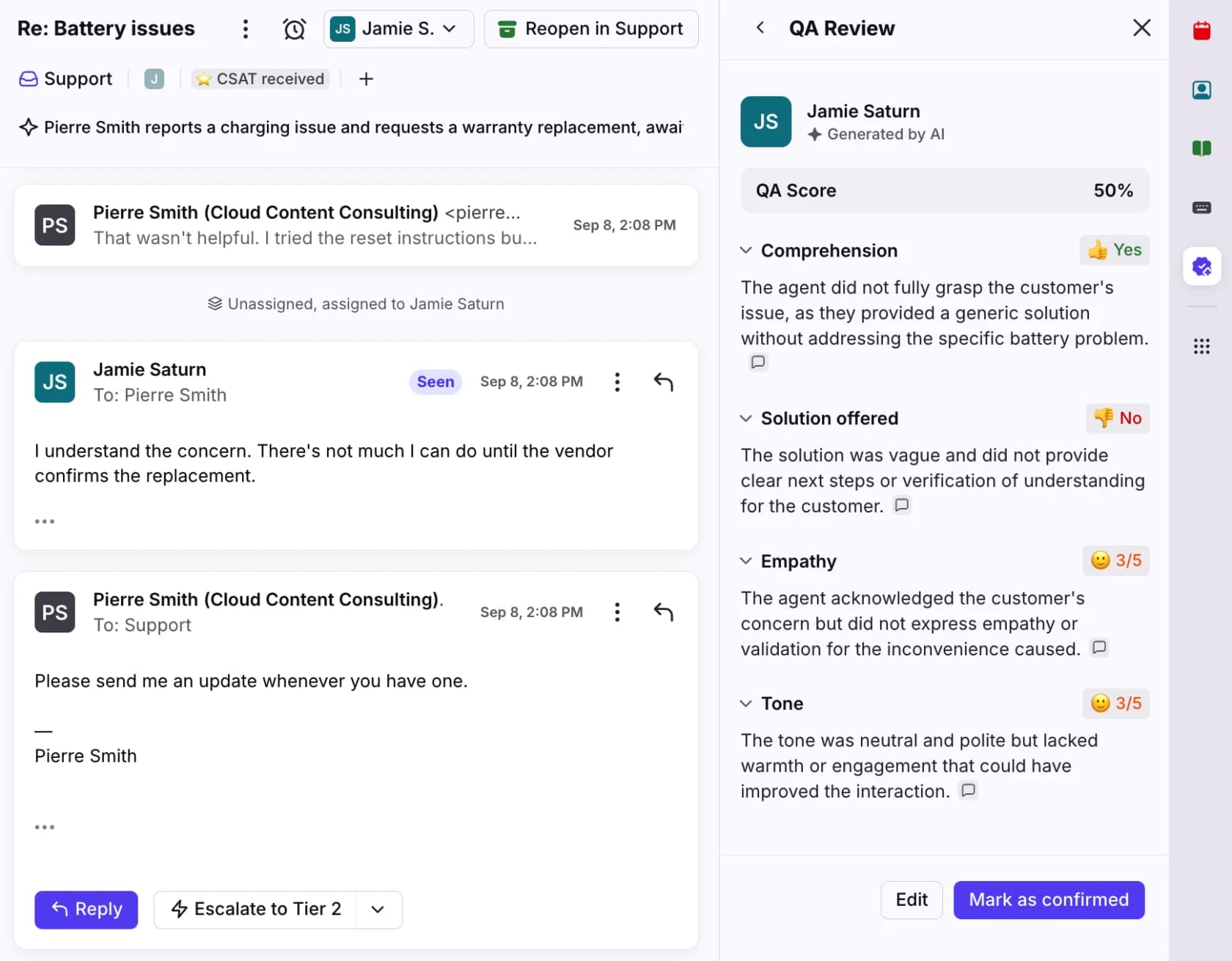
Gorgias Auto QA is a manager tool, not agent feedback. It scores resolution completeness, communication and language proficiency automatically, but "only the account owner, admins, and leads can view and change QA scores," according to the Auto QA docs. So on Gorgias, any feedback that reaches an agent goes through a note, a 1:1, or a report you share. That's fine, as long as someone actually has the conversation.
Freshdesk and Help Scout have no native QA scorecard in their docs or pricing pages. Feedback there runs through notes and @mentions, which do notify the agent, plus CSAT. Freshdesk's private threads let you comment on a specific reply and loop in the assignee, which works well for the daily layer. If you want scorecards on either, that's a dedicated QA tool.
CSAT comments are the one source every major helpdesk exposes to agents. In Zendesk the rating sits at the top of the ticket with comments under Events; Freshdesk shows them under the ticket's Activities; Gorgias lets every role open the Satisfaction report with its comment highlights. Use them in the weekly 1:1, not as a leaderboard.
Fix it once: when feedback is really a missing answer
Here's the part that changed how I think about feedback. If you find yourself giving the same correction a third time, to different agents, the problem probably isn't the agents.
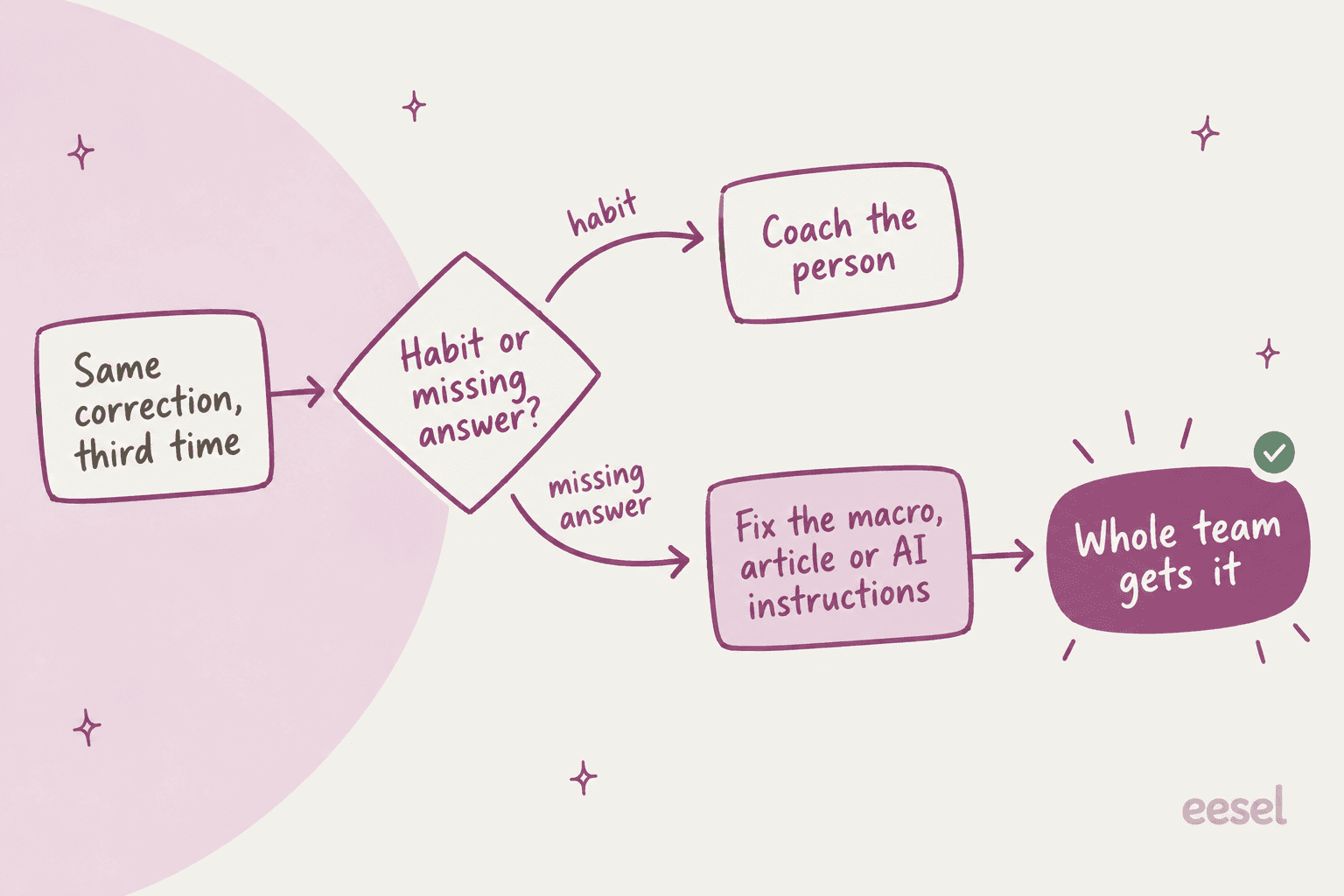
Repeated corrections are usually a knowledge base gap, an outdated macro, or a policy that lives in one senior's head. Coaching each agent separately on it is slow, and the next new hire walks straight into the same hole. Fixing the source once fixes it for everyone, and it's often a five-minute edit.
I saw this clearly in one eesel trial I looked at. Agents sent the AI's drafts unchanged only about 12% of the time; the usual pattern was "glance and rewrite," turning long drafts into one-to-three-sentence replies. Broken down, about 65% were length and tone, about 20% needed data the AI wasn't connected to, and only about 5% were the AI being factually wrong. Every agent was giving the same feedback, by hand, on every ticket. The fix wasn't to coach the agents or the AI ticket by ticket. It was to train on the team's own sent replies so the drafts came out in their voice to begin with.
The same logic applies to your human team. Keep a running list of corrections from the daily notes. Anything that shows up three times gets fixed at the source: the help article, the macro, or the AI's instructions. Then mention it in the 1:1 so the agent knows the problem was the system, not them. That one move does more for morale than any feedback sandwich.

If an AI copilot drafts replies for your team, it belongs in this loop too. It needs the same feedback a new hire does, and the nice part is that a correction made once applies to every future draft. I wrote more on that in my guide to coaching an AI agent.
Mistakes that make support agent feedback backfire
- Saving everything for the monthly review. By the time it arrives, the agent has repeated the habit for weeks. Daily notes catch it on the second ticket, not the fortieth.
- Scoring tickets nobody talks about. A review the agent never discusses is a grade, not feedback. Check your unseen rate if your tool reports it.
- Weighting the scorecard toward scripts. If 70% of the score is greetings and closings, agents will optimise for greetings and closings. Weight first contact resolution and accuracy over phrasing.
- Using AI scores for performance decisions. Even the vendors say not to. Use AI to find the tickets worth a human review, then review them.
- Raising a single bad day as a metric. One translator call can wreck a day's handle time. Look at trends over three or more weeks.
- Having no dispute path, or a slow one. Agents who can't push back stop trusting every score, including the fair ones.
- Coaching people on a broken process. If three agents make the same mistake, fix the macro or the article first.
eesel for support agent feedback
If your team keeps getting the same feedback on the same kinds of tickets, the fastest fix is to put the right answer in front of agents before they send. eesel's AI helpdesk teammate connects to Zendesk, Freshdesk, Gorgias and the rest of your stack, learns from your help center, macros and past tickets, and drafts each reply as an internal note for an agent to check and send. New agents see how your team answers a refund or an outage before they write a word, which turns a lot of after-the-fact feedback into a quick before-the-fact edit.

The part I like most for feedback: when a lead corrects an answer in chat, eesel writes that correction into its own instructions, so the fix shows up in every future draft instead of being repeated in five separate 1:1s. One founder on Freshdesk put it this way in a G2 review:
"When we re-test, it correctly incorporates the coaching... specifically on enabling newer team members to have a 24/7 supervisor that coaches them on how to handle inquiries."
To be clear about the lane: eesel isn't a QA scorecard or dispute tool for human agents, so keep Zendesk QA, Front Smart QA or a dedicated QA platform for that. What it does is cut down how much corrective feedback you need to give in the first place. You can try eesel free with 100 credits and see the drafts on your own tickets.
Frequently Asked Questions
How do you give feedback to a customer support agent?
How often should support agents get feedback?
What is a good example of feedback for a support agent?
Should support agents be able to dispute QA scores?
Can support agents see their own CSAT comments?
How do AI QA tools change support agent feedback?
How can I stop giving the same support agent feedback over and over?


Article by
Riellvriany Indriawan
Riell is a designer and writer at eesel AI with about two years of experience researching CX platforms, AI chatbots, and helpdesk software. She combines her design background with a sharp eye for how these tools actually look and feel in practice — making her comparisons unusually visual and user-focused.