Front pricing at a glance
Front is a collaborative shared inbox and helpdesk platform built for what it calls "complex customer operations", the kind of support that spans billing, ops, and product rather than a single FAQ queue. Its pricing reflects that positioning: three published, per-seat plans, all advertised with "Save 24%" on annual billing.
| Plan | Price (per seat/mo, annual) | Seat range | Built for |
|---|---|---|---|
| Starter | $25 | up to 10 seats | Essential single-channel support |
| Professional | $65 | up to 50 seats | Omnichannel support with automation and reporting |
| Enterprise (most popular) | $105 | not stated | Advanced AI tools and custom controls |
Here's what that buys at each tier, with one detail that catches people out: Starter is single channel type only, meaning email, Front Chat, or SMS, not a mix.
- Starter ($25/seat): shared inbox and ticketing, a single channel type, AI Topics, up to 10 automation rules, basic analytics, a basic knowledge base, and 1 workspace. AI add-ons are available but not included.
- Professional ($65/seat): everything in Starter, plus full omnichannel (email, SMS, social, WhatsApp), macros and up to 20 automation rules, advanced analytics, up to 5 workspaces, SSO and SCIM, and a customizable knowledge base.
- Enterprise ($105/seat): everything in Professional, plus unlimited rules and macros, unlimited workspaces, custom roles, a multi-language knowledge base, and, crucially, Copilot, Smart QA, and Smart CSAT included rather than billed separately.
A few mechanics worth knowing before you sign anything. The free trial runs 14 days with all Professional features and no credit card. Plans are assigned at the organization level, so you can't mix tiers across teams. And there's an onboarding package required on contracts over $25k, with wire/ACH payment available above $12k in total contract value. None of that is unusual for the segment, but it's the kind of thing that doesn't show up on the pricing grid.
The part of Front pricing that actually moves the bill: AI add-ons
This is where a Front quote and a Front invoice start to diverge. Front includes three AI helpers on every plan, Compose, Translate, and Summarize, but each is capped at 200 actions per teammate per day. The AI that does the heavy lifting, the part you're probably buying Front for in 2026, is sold separately.
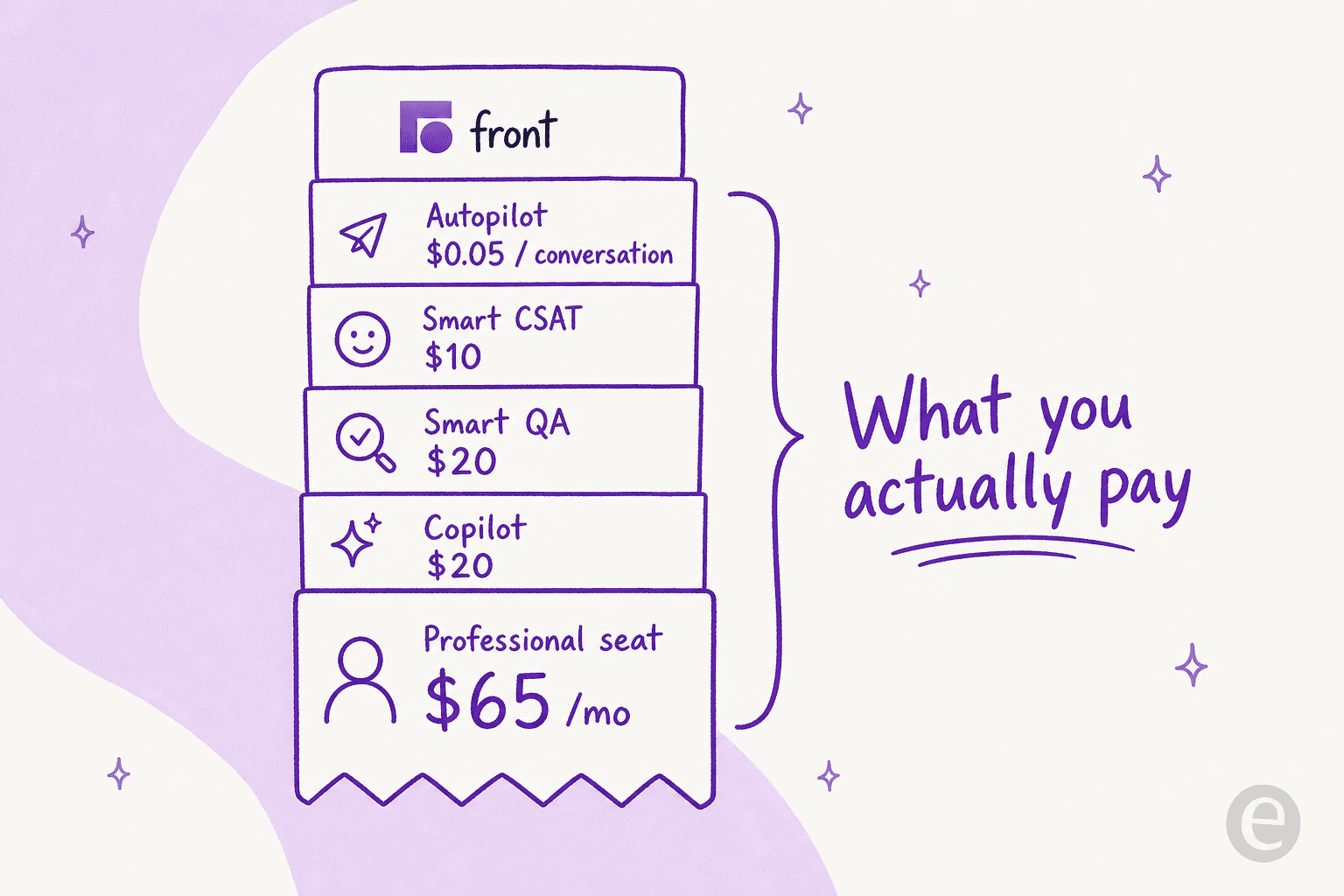
Here's the full add-on menu, straight from the pricing page:
| AI add-on | Price | Notes |
|---|---|---|
| Autopilot (omnichannel AI agent) | from $0.05 / conversation | Add-on on every plan, including Enterprise |
| Copilot (real-time AI assistant) | $20 / seat / mo | Included in Enterprise |
| Smart QA (AI scorecards) | $20 / seat / mo | Included in Enterprise |
| Smart CSAT (inferred satisfaction, no surveys) | $10 / seat / mo | Included in Enterprise |
| Smart QA + Smart CSAT bundle | $25 / seat / mo | Bundled insights |
So a Professional seat that "starts at $65" can quickly become $65 + $20 (Copilot) + $25 (QA + CSAT bundle) = $110 per seat per month before Autopilot's per-conversation charges even enter the picture. At that point you're paying more per seat than Enterprise's $105 list price, but without the unlimited rules and custom controls Enterprise gives you. That inversion is the single most important thing to model before you commit.
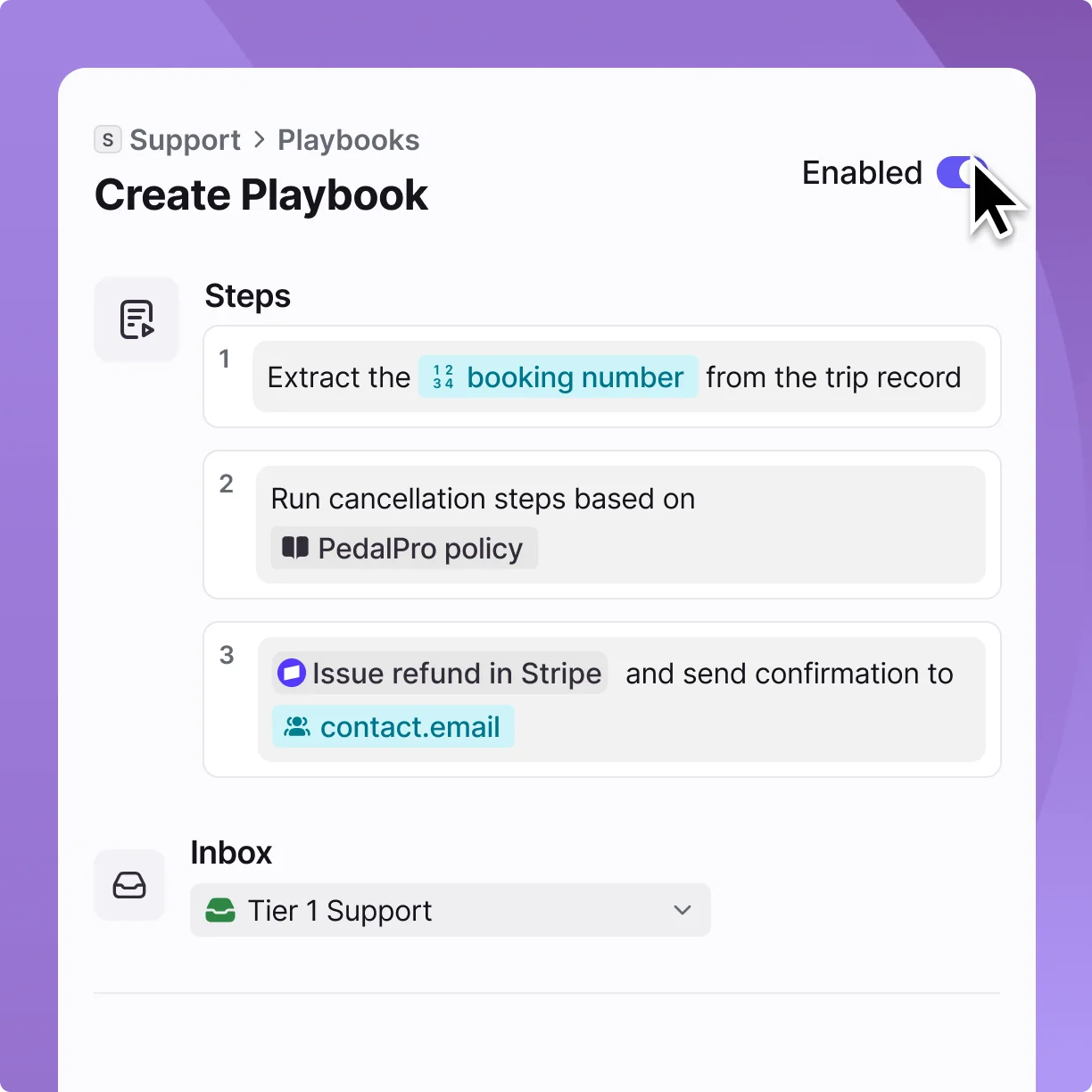
Front's own AI is capable, to be fair. Autopilot is a real autonomous agent that can route by customer type, and its Playbooks let you define multi-step resolutions (extract a booking number, run a cancellation policy, issue a refund in Stripe).
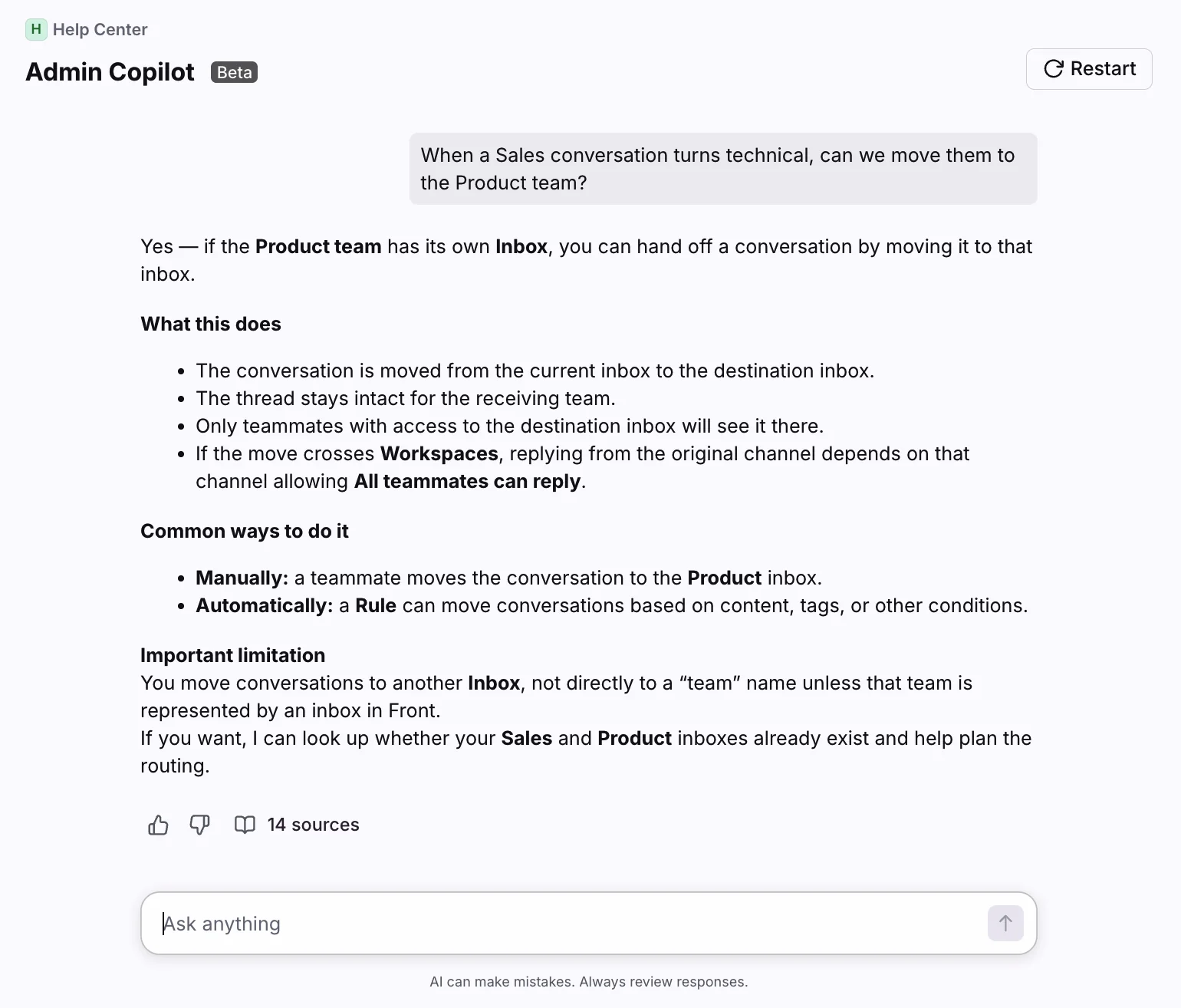
And Copilot's Admin assistant answers operational questions from your help center with cited sources, which is a nice touch for larger teams.
The capability isn't the issue. The pricing structure is, because the features you most want are the ones that aren't in the plan you're quoted. If you want to go deeper on the agent itself, I've written a full guide to Front Autopilot and what changed with Front's AI Answers. The customer-facing side has its own setup too, covered in my walkthrough of the Front chatbot. Multilingual teams should also factor in how Front AI Translate is metered.
Don't forget the smaller line items
Two more charges hide below the AI section. Native WhatsApp on Professional and Enterprise carries the Meta-billed message costs plus a 20% admin fee on top. And if you hit Front's API limits, lifting them costs $200 per 100 additional requests per minute, per month, which matters if you're syncing Front with other systems at volume.
How Front bills you: per seat, not per outcome
Step back from the line items and the model itself is the thing to understand. Front charges per seat, with AI bolted on per seat or per conversation. That's fine when your headcount maps cleanly to your workload. It gets expensive when it doesn't, like when you're adding agents for coverage but each handles a shrinking share of tickets, or when AI is meant to reduce the human work you're paying per-seat for.
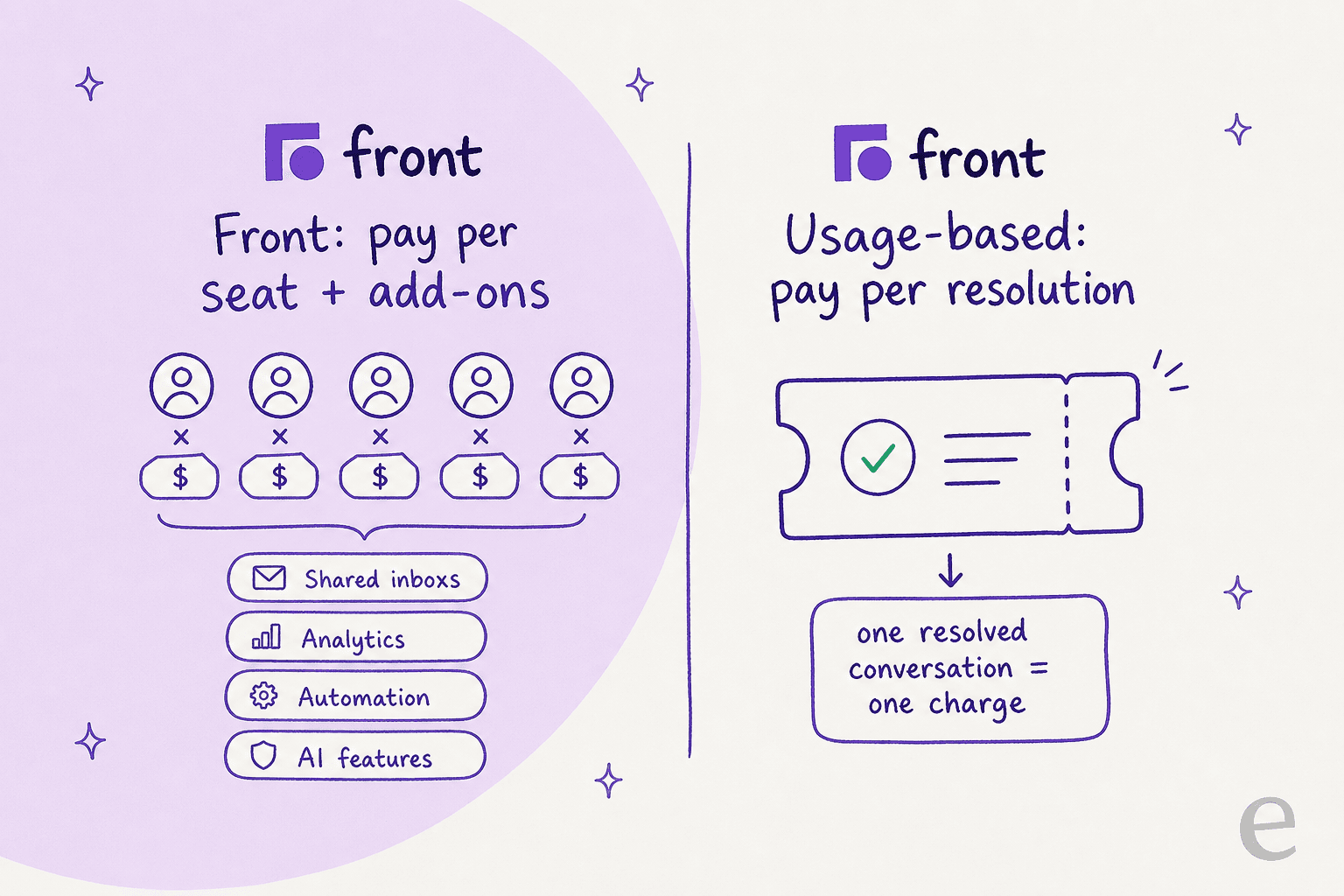
This is the friction I hear constantly from teams evaluating per-seat and per-interaction support tools. One operations lead at a payments fintech doing 7-8K escalated tickets a month told me per-interaction pricing was simply a non-starter versus a session-based model. A multi-company e-commerce operator scaling toward 150K tickets a month found the per-interaction-versus-per-ticket distinction so confusing mid-call that he projected wildly different totals depending on which unit you used. The billable unit isn't a detail. It's the whole game.
There's a sharper version of this I've watched play out in my own customer base. A colleague, Amogh, broke down a churned account this way: "$799/mo divided by ~40 interactions a month is ~$20 per AI reply. Without showing the deflection math, that price is indefensible at renewal." I lost that account not on product, but because nobody framed the cost per resolution. The lesson stuck with me: a support tool's real price is what one solved ticket costs, and a per-seat model hides that number rather than showing it.
What a real team actually pays
Sticker prices are abstract, so let's run two realistic scenarios.
A 5-person team on Professional, wanting AI assist. Five seats at $65 is $325/mo. Add Copilot at $20/seat ($100) and the QA + CSAT bundle at $25/seat ($125), and you're at $550/mo, before any Autopilot conversations. Annualized, that's $6,600.
A 12-person team on Enterprise, leaning on Autopilot. Twelve seats at $105 is $1,260/mo with Copilot, QA, and CSAT included. But Autopilot is still an add-on. If Autopilot handles, say, 3,000 conversations a month at $0.05 each, that's another $150, bringing you to ~$1,410/mo, or roughly $16,900 a year. Push Autopilot volume higher and the per-conversation line keeps climbing.
Neither of those is outrageous for the value Front delivers to the right team. But notice how far each lands from the "$65" and "$105" you started with. That gap is the entire point of doing this exercise before you buy.
For context on how that stacks up against the wider market, my roundups of the best AI helpdesk software for 2026 and the cheapest AI apps for helpdesks are a useful sanity check, and the AI agent vs human agent cost breakdown reframes the whole "is it worth it" question around cost per resolution.
What users actually say about Front's pricing
Front scores well where it counts on the big review sites: 4.7/5 on G2 from around 2,466 reviews and 4.5/5 on Capterra from roughly 286. The praise is consistent and earned, mostly around collaboration and ease of use.
"I like being able to organize our emails and not having to CC a bunch of coworkers if they need to be involved or forward them."
A G2 reviewer, on the shared-inbox value that is Front's genuine strength.
But the pricing sentiment is just as consistent, and it's the dominant criticism. On G2's pros and cons, one reviewer put it bluntly:
"Extremely overpriced, and the pricing is very complicated. They ask you to pay separately for features."
That "pay separately" theme runs through the negative reviews, and it maps exactly onto the add-on structure above. On Trustpilot, where Front skews noticeably more negative than on the B2B-buyer sites, the complaints get sharper, tying price to the recent UI redesign and AI features some teams didn't ask for. Worth knowing that the platform split is real: G2 and Capterra sit at 4.5-4.7, while Trustpilot leans the other way, so don't average them into a single number.
The community framing is telling too. In a r/CustomerSuccess thread, Front gets described as a "supercharged shared inbox" rather than a ground-up ticketing system, and on r/smallbusiness more than one team reports leaving for cheaper options:
"I chose Missive App over front. It's cheaper and in my opinion much better."
If you're weighing the shared-inbox-versus-ticketing question yourself, my piece on shared inbox vs ticketing system and the list of best shared inbox software for teams go deeper.
Front buyers rarely shop in one lane, either. Teams that want structured ticketing often weigh it against Zendesk, while leaner shops size it up through my Dixa review. Ecommerce teams usually start from the best Gorgias alternatives instead.
Which Front plan fits
If Front is the right shape for your team, here's the quick decision logic.
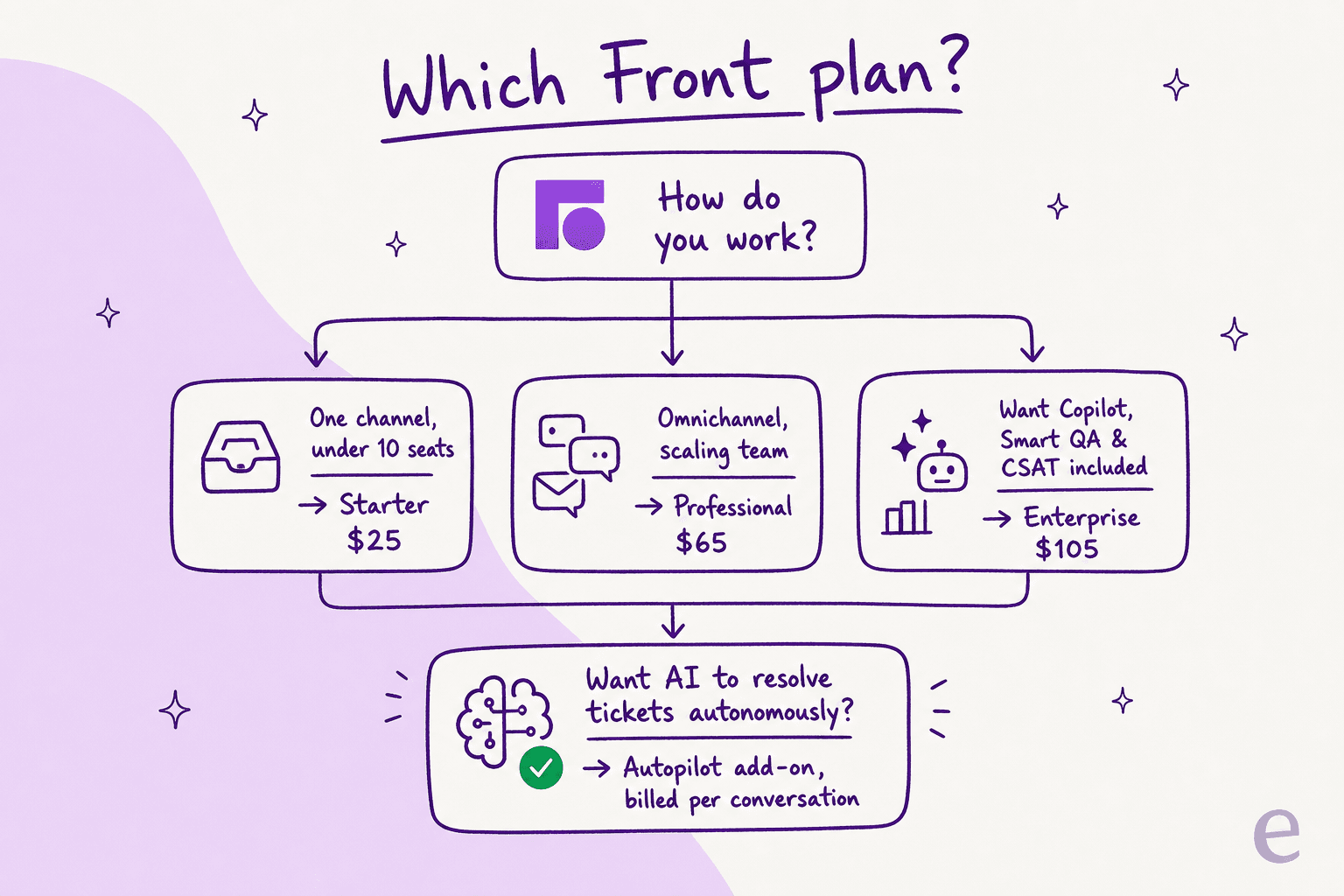
- Starter ($25) suits a small team running a single channel who just needs a tidy shared inbox. Watch the 10-seat ceiling and the single-channel limit.
- Professional ($65) is the realistic default for most growing support teams, omnichannel, more automation, SSO. Just price the AI add-ons in.
- Enterprise ($105) earns its keep specifically if you'll use Copilot, Smart QA, and Smart CSAT, since bundling them in is what closes the gap with stacking add-ons on Professional. If you won't use all three, the math for Enterprise weakens fast.
And a fourth option people forget: stay on a lower Front plan and add a dedicated AI customer service layer on top, rather than buying up the tiers for AI you'll be billed for per seat.
The bigger question: are you paying for seats or for resolutions?
Here's where I'll plant a flag. For a collaborative inbox, Front is a strong, well-liked product, and I'd happily recommend it to a team that mostly needs people working the same conversations without stepping on each other. Front is built for that, and it shows.
For AI automation, the per-seat-plus-add-ons model fights against the thing you're trying to do. You're adding AI to handle more tickets without adding people, but the pricing is still anchored to people (seats) and to raw activity (per conversation), not to the outcome you care about, a resolved ticket. The teams I've seen get burned aren't the ones who overpaid on the sticker. They're the ones who never modeled the cost per resolution and got surprised at renewal.
That's the gap I built eesel AI to close, and since it integrates directly with Front, you don't have to choose between the two.
Try eesel for AI on top of Front
If you like Front's inbox but not the prospect of buying up to Enterprise (or stacking add-ons) just to get real AI, eesel AI is the layer that sits inside it. It installs from the Front App Store, joins as a real AI Agent in your shared inbox, drafts and sends on-brand replies, routes escalations, and updates tags, exactly like a human agent would, with setup that takes under 30 minutes.

Two things make the pricing legible in a way the add-on stack doesn't. First, it's a fixed monthly plan from $299/month for 500 credits (1 credit per ticket or chat), with no per-seat fee and no platform fee, so the number you budget is the number on the invoice. Second, before you pay for anything, you can run a simulation on your real past Front conversations to see the resolution rate and exact cost up front, the deflection math that, frankly, most vendors leave you to guess at. New accounts start with 100 free credits, no card, and you can route just a slice of your tickets to start. If you're comparing options more broadly, my Front review and the Front alternatives roundup lay out the full field.
Frequently Asked Questions
How much does Front cost per month?
Is Front AI included in the Front pricing plans?
What does Front Autopilot cost?
Why is Front considered expensive?
Is there a free trial or free plan for Front?
How does Front pricing compare to Hiver and other alternatives?
Can I add AI to Front without upgrading my plan?


Article by
Kira
Kira is a writer at eesel AI with a Computer Science background and over a year of hands-on experience evaluating AI-powered customer service tools. She focuses on breaking down how helpdesk platforms and AI agents actually work so that support teams can make better buying decisions.