Why support QA looks completely different now
I am on eesel's customer support team, so I live in the queue. The old QA ritual always bugged me: you score a tiny handful of tickets, write up some notes, and the patterns that actually hurt you (a policy everyone gets wrong, a tone problem on one channel) only surface weeks later, if at all. Most teams review somewhere between 1% and 3% of their support interactions by hand. The other 97% is a blind spot.
The bigger reason QA changed, though, is that I have spent the last three-plus years at eesel watching AI agents go onto live support queues, and I have seen a confident-sounding bot quietly give a wrong answer. One customer, a Danish vehicle-telematics team on Zendesk, hit it early: their bot started telling customers "yes, we support your car model" for brands that were not in their database, because the help center said "we support all models." Nobody wrote that as a rule. The AI inferred it, sounded sure, and was wrong.
That experience is exactly why I now simulate every rollout against historical tickets first, and it reframes what "support QA" even means. There are now two jobs:
- QA on the conversations that already happened (human or AI), the classic scorecard job.
- QA on the AI agent before and after it replies, so it never ships the kind of confident-wrong answer above.
Most tools on this list are very good at job one. A smaller number do job two. The best stack does both, and I will flag which is which for every tool.
How AI support QA actually works
If you have only ever done manual QA, the mechanics of an AutoQA tool are worth a quick look, because they are the same across almost every vendor here. You connect your helpdesk or contact-center platform, define a scorecard in plain language (greeting, verification, empathy, resolution, compliance), and the AI reads every conversation against it, returns a score with the reasoning attached, and surfaces the high-risk ones for a human to look at.
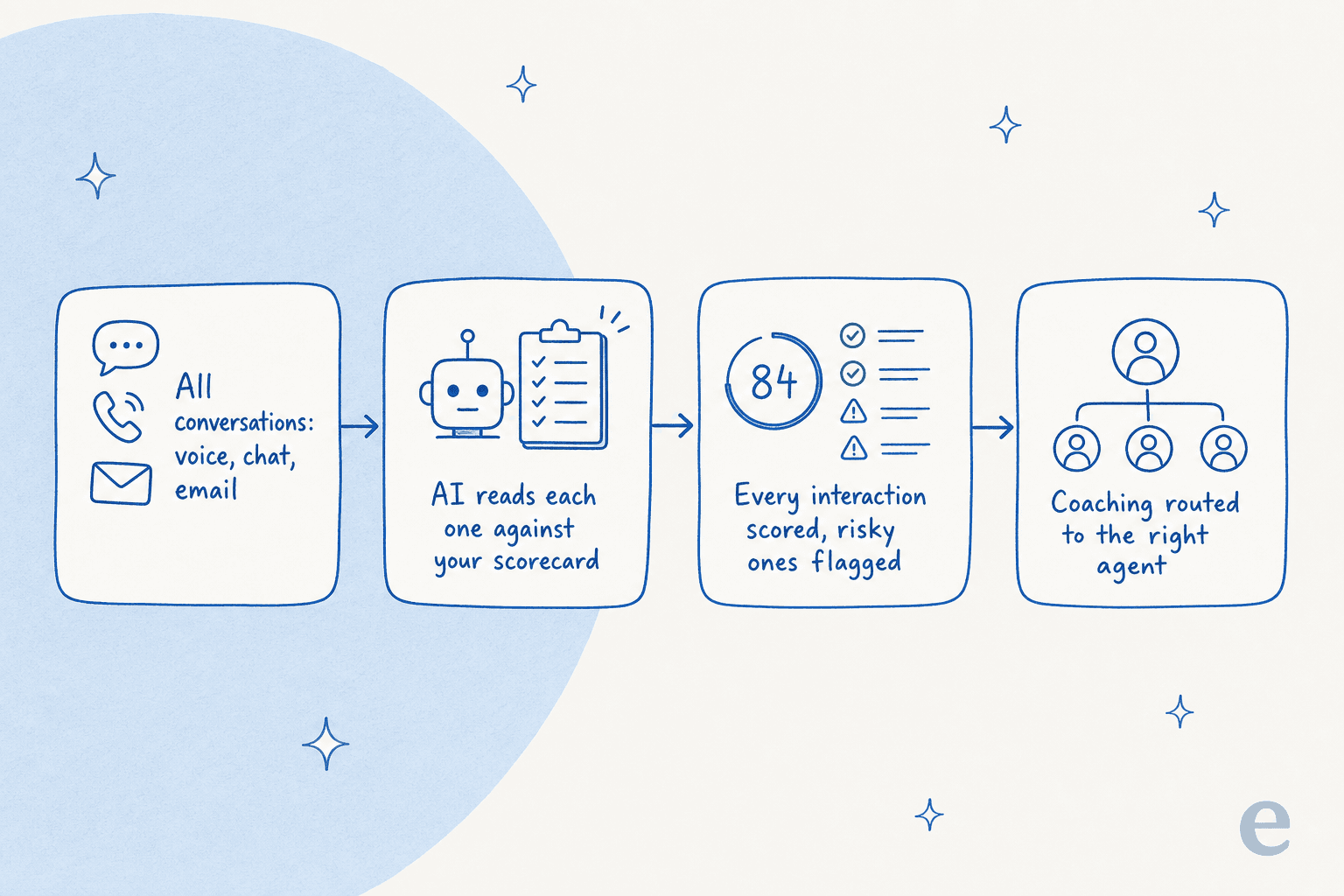
The leap from sampling to full coverage is real, and the support metrics you can finally trust (consistent quality scores, sentiment trends, escalation patterns) get a lot more honest when they are built on 100% of conversations instead of a lucky dip. The one thing to keep in your back pocket: an auto-score is only as good as its calibration, so every serious tool here lets you test scoring against past tickets before you trust the number.
What I looked for
I weighted these the way I would if I were buying it for my own team:
- Coverage. Does it actually score 100% of conversations, or is it sampling with extra steps?
- Scorecard flexibility. Can I write my own criteria in plain language and see the reasoning behind each score?
- The coaching loop. Scoring is half the job. Does it close the loop into agent coaching and improvement?
- AI-agent QA. Does it score (and pre-test) bot conversations, not just human ones?
- Pricing honesty. Can I see a number, or do I have to sit through a sales call to learn if I can afford it?
- Fit. Helpdesk-native and small-team friendly, or built for a 500-seat voice contact center?
The best AI tools for support QA in 2026 at a glance
| Tool | Best for | AutoQA coverage | QAs AI agents? | Starting price | Rating |
|---|---|---|---|---|---|
| eesel AI | QA-ing your AI agent before go-live | Simulation on 100% of past tickets | Yes, this is its core job | $0.40 / ticket, no seat fee | 4.6 / 5 (G2) |
| Zendesk QA | Teams already on Zendesk | 100% (AutoQA) | Yes (AI Agent QA) | ~$35 / agent / mo (add-on) | 4.9 / 5 (Capterra, n=23) |
| MaestroQA | Enterprise, deep customization | 100% (AutoQA) | Yes | Quote only | 4.7 / 5 (G2, 324) |
| EvaluAgent | Mid-market, QA + coaching | 100% (AutoQM) | Yes (bot observability) | $35 / user / mo | 4.5 / 5 (G2, 440) |
| Loris (Contentsquare) | Conversation analytics at scale | 100% | Yes (AI Agent Analytics) | Quote only | 4.8 / 5 (G2, 11) |
| Level AI | Contact centers wanting real-time | 100% (QA-GPT) | Partial | Quote only | 4.7 / 5 (G2, 200) |
| Playvox (NiCE) | QA bundled with WFM | 100% (AutoQA) | Limited | Quote only | 4.8 / 5 (G2, 1,163) |
| Cresta | Large enterprise voice | 100% (Quality Management) | Yes (unified scoring) | Quote only | 4.2 / 5 (G2, 43) |
One way to read the field: it splits cleanly by who you are. Helpdesk-native and small-team-friendly on one side, enterprise voice and contact-center on the other.
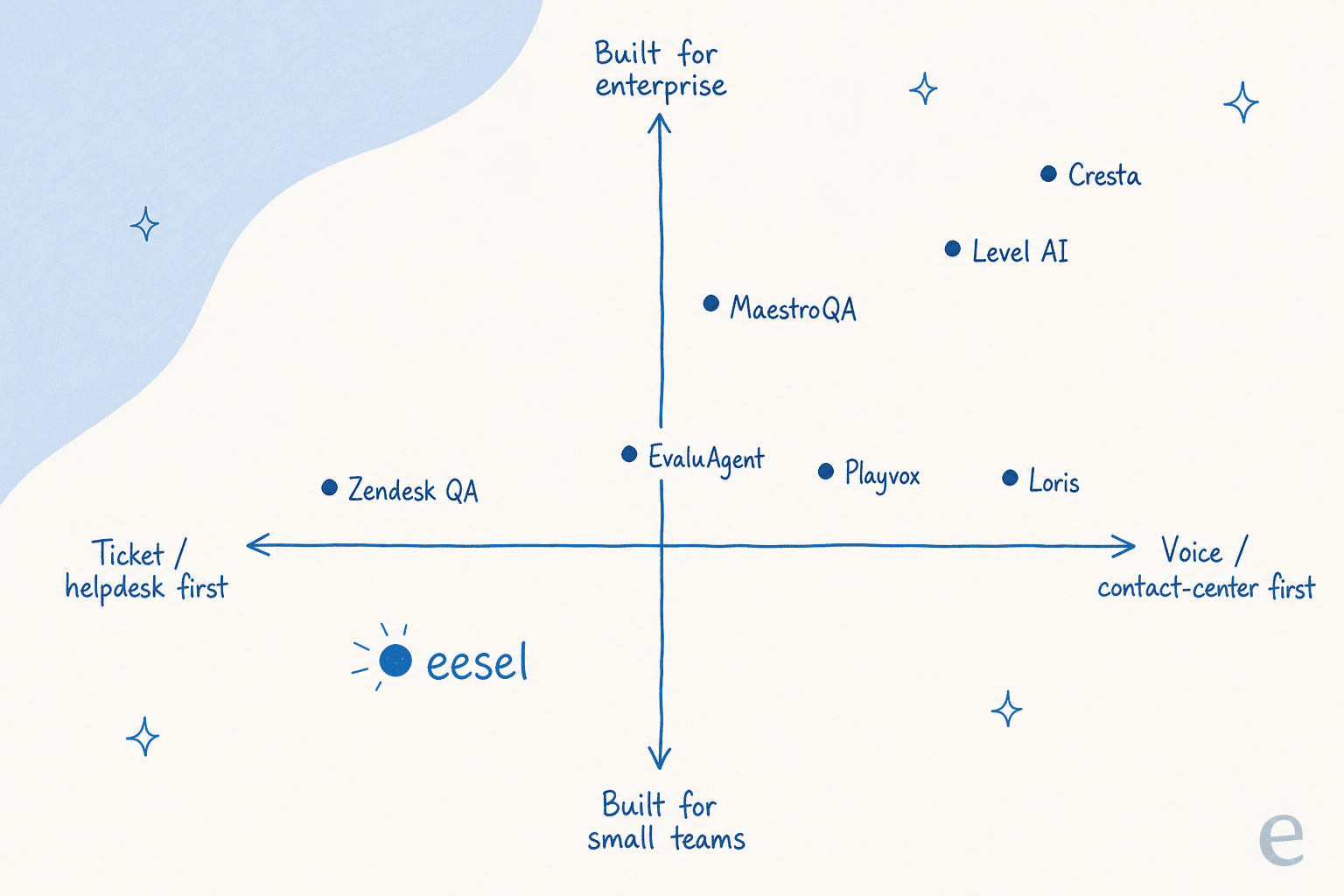
If you would rather not eyeball a quadrant, here is the same logic as a quick picker.
Now, the tools in detail.
1. eesel AI
Best for: QA-ing your AI support agent before and after it touches a customer.
Let me be straight about why eesel leads a QA list, because it is not a traditional scorecard tool. eesel is an AI support agent that plugs into your existing helpdesk, learns from your past tickets and docs, and answers tickets. The reason it belongs here is that the single highest-stakes QA in 2026 is on the AI's own answers, and eesel is built around testing those answers before they go live.
What it does for QA. eesel's simulation mode runs the AI against thousands of your real, historical tickets and shows you exactly how it would have responded, what it would have resolved, and where it would have fumbled, broken down by theme. You see coverage and accuracy before a single customer is affected, then fix the gaps and re-run. On the live side, confidence-based routing keeps the AI from answering when it is not sure: low-confidence tickets become drafts for a human instead of an autonomous reply. That is the guardrail that would have caught the "we support your car model" miss.
Strengths.
- It QAs the thing most lists ignore: the AI's own output, before go-live.
- Learns from solved tickets, not just help-center articles, so the simulation reflects how your team actually answers.
- Every live answer can be reviewed and corrected, and those corrections improve future responses.
- Genuinely self-serve setup, with 100+ integrations across Zendesk, Freshdesk, Gorgias, Front, HubSpot, and Slack.
Limitations.
- It is not a human-agent scorecard platform. If your job is to grade 200 human agents on a rubric and run calibration sessions, a dedicated tool like Zendesk QA or MaestroQA is the better fit, and the honest answer is to run eesel alongside one.
- Reporting is built around AI performance and ticket themes, not formal QA appeals or HR-ready performance plans.
Pricing. Usage-based and transparent, which is rare in this category.
| Plan | Price | Notes |
|---|---|---|
| Free trial | $50 in free usage | No credit card |
| Pay-as-you-go | From $0.40 / ticket | No per-seat fee, no platform fee, no minimum |
| Annual commit | 25% less | Commit to $300+/month for the year |
| Enterprise | $1,000/mo platform fee + usage | SSO, HIPAA, BAA, dedicated SE |
My take: Pick eesel when the AI agent is what you need to QA. One customer, Gridwise, saw eesel resolve 73% of tier-1 requests in the first month, with results visible during a 7-day trial, precisely because they could simulate first and trust the coverage before flipping it on. Pair it with a scorecard tool below if you also need formal human-agent QA.
2. Zendesk QA (formerly Klaus)
Best for: teams already living in Zendesk.
Zendesk QA is the former Estonian startup Klaus, acquired by Zendesk in early 2024 and folded into the platform as a per-agent add-on. It is the most natural pick if your support already runs on Zendesk, and eesel customers regularly use it for evaluating AI agent performance.
What it does. AutoQA scores every interaction across all channels, including AI agents and voice, with out-of-the-box categories (Empathy, Solution) plus no-code custom prompt-based categories. Spotlight automatically flags churn risks, escalations, and knowledge gaps, and AI Agent QA compares human and bot scores side by side.
Strengths.
- 100% coverage instead of sampling, native to Zendesk.
- No-code custom categories you write in plain language.
- Strong Klaus-era reputation. As one Redditor weighing vendors put it, "+1 for Klaus, I never had any issues with them, support was amazing."
"Sampling + CSAT only catches a fraction of issues, so patterns show up late."
a support manager describing the problem AutoQA solves, r/Zendesk

Limitations.
- It is a paid add-on on top of an already-pricey base. A Capterra reviewer put the con plainly: "A bit expensive."
- Customization is shallower than MaestroQA for unusual rubrics.
- Reporting UI slows down with a lot of agents.
Pricing. The standalone QA add-on price is not published; community estimates put it around $35/agent/month, and the bundled WFM + QA pack is $50/agent/month, all on top of a $19 to $115/agent base plan.
My take: If you are on Zendesk, this is the default and a good one. It rates 4.9/5 on Capterra (small sample, n=23). Just budget for the stacked add-on cost, and remember it scores conversations after the fact rather than pre-testing your bot.
3. MaestroQA
Best for: enterprise teams that want deep, transparent, customizable scoring.
MaestroQA started as a contact-center QA tool in 2017 and has repositioned as a "conversation data platform," used by support orgs at Etsy, DraftKings, Stitch Fix, and Brex. It sits at the enterprise end and earns it.
What it does. AutoQA analyzes 100% of tickets and explicitly directs human reviewers to where judgment matters. The standout is the AI Platform, a prompt-to-metric engine where you write the rule, test it on real tickets, and see the reasoning before launching, positioned against "black-box tools." Add GPT-powered root-cause analysis and AI calibration.
Strengths.
- Deep customization. A support operator who used it at multiple companies said it "allows for a great deal of customization" and suits "larger environments where you have more data-driven metrics."
- Transparent, controllable scoring (you see the reasoning).
- Strong Zendesk integration and 16+ connectors.
Limitations.
- Quote-only and expensive. G2 marks perceived cost at the top "$$$$$" band, and a recurring con is that "AI features require additional purchase which drives the cost up significantly."
- Roughly a 3-month implementation; heavy for small teams.
"I've used Maestro at a couple companies and have generally been happy with it... it allows for a great deal of customization. Their newer AI based features are kind of interesting, but I haven't deployed them so can't speak to how well they actually work."
Brosenjew, r/Zendesk
My take: The pick for a serious, well-resourced QA team that wants to own its rubric and see the reasoning behind every score. It rates 4.7/5 from 324 G2 reviews. Smaller teams will find it overkill, and you cannot price-check it without a sales call.
4. EvaluAgent
Best for: mid-market teams that want QA plus coaching, with pricing you can actually see.
EvaluAgent is a UK-rooted QA and conversation-intelligence platform promising "complete visibility across every agent, human and AI." It is the rare tool in this category that publishes ballpark pricing, which I appreciate.
What it does. AutoQM scores every conversation automatically across voice, chat, and email, with SmartScore AI line items that attach reasoning to each score. Blended Scorecards mix automated checks with human observation ("AI handles the rote, people handle judgment"), and the Context Engine has a testing console to try scoring changes against archived conversations before going live. Its AI Agent Observability grades bots from any vendor against your knowledge base, including hallucination detection.
Strengths.
- One of the most complete coaching loops in the category: 1-to-1s, HR-ready plans, gamification, agent disputes.
- Genuinely transparent pricing and a dedicated CSM on every tier.
- Strong compliance posture (SOC 2 Type II, ISO 27001, GDPR, HIPAA), good for regulated verticals.
Limitations.
- Scorecard setup is the friction point. A G2 reviewer's main gripe: "the time and clarity required to design a scorecard... the AI-assisted scorecard builder should be improved."
- UI has a learning curve for newcomers, per G2.
Pricing. Published and per-seat.
| Plan | Price | For |
|---|---|---|
| AutoQM & Improvement | From $35 / user / mo | Human agents: auto-scoring + coaching |
| AutoQM + Conversation Intelligence | From $65 / user / mo | Adds sentiment, intent, predictive VoC |
| AutoQM for AI Agents | From $0.05 / conversation | Bot quality scoring |
| Full Bundle for AI Agents | From $0.13 / conversation | Bot QA + conversation intelligence |
My take: My favorite of the dedicated scorecard tools for mid-market teams. It rates 4.5/5 from 440 G2 reviews, the coaching depth is real, and you can actually budget for it. Just plan time for scorecard setup.
5. Loris (now Contentsquare Conversation Intelligence)
Best for: conversation analytics and voice-of-customer at scale.
Loris has an unusual lineage worth knowing: it began as a for-profit spinoff of Crisis Text Line, which became a notable privacy controversy in 2022, and was acquired by Contentsquare in 2025. It now ships as Contentsquare's Conversation Intelligence line.
What it does. Automated QA evaluates every conversation and, importantly, links quality signals to real outcomes like repeat contacts and escalations so the score is not a vanity number. Conversation Insights surface intent and sentiment shifts over time, and AI Agent Analytics tracks bot containment, transfers, and abandonment.
Strengths.
- Analytics depth and out-of-the-box intent tagging that reviewers single out.
- Standout implementation and support team (the most consistent praise on G2).
- Ties QA to outcomes, not just rubric pass rates.
Limitations.
- Sentiment is not perfect. G2's own summary flags that the AI "may not always accurately represent customer sentiment," which matters for a tool whose pitch is automated scoring.
- It is now a feature of a larger analytics suite, not a focused independent QA vendor.
- Quote-only, enterprise-leaning, and the small G2 sample (11 reviews) makes crowd-validation hard.
My take: Strong if you want conversation analytics and VoC alongside QA, and you are comfortable buying into the Contentsquare ecosystem. It rates 4.8/5 on G2, but the small review count and the acquisition shuffle are real considerations.
6. Level AI
Best for: contact centers that want semantic AutoQA plus real-time assist.
Level AI positions itself as the "intelligence and orchestration layer for customer experience," analyzing 100% of interactions across voice, chat, and email using semantic understanding rather than keyword matching.
What it does. Its QA-GPT engine uses an LLM trained on your own data to evaluate over 90% of scorecard standards, including subjective items, and delivers transparent scores with supporting evidence. It pairs that with agent screen recording, real-time AgentGPT assist, and a coaching module.
Strengths.
- Semantic NLU scores subjective rubric items, not just exact phrases. One operator: "we've gone from manually scoring 1-2% of our calls to scoring 100%."
- Real-time assist plus screen recording with strong redaction, valued in regulated verticals.
Limitations.
- Scoring accuracy is still maturing, the most common G2 dislike. One reviewer noted the system "may mark the agent down" for not using an exact word even when they clearly complied.
- Quote-only with a public pricing page that 404s, and roughly a 3-month implementation.
- Built for call/contact centers; heavy for a small ticket-based team.
"It has made QA meaningful for my team. It was easy to setup and use." (The dislike: "The prompting setup takes some tinkering to get it exactly right.")
Validated Reviewer, Level AI on G2

My take: A strong contact-center pick, rated 4.7/5 from 200 G2 reviews. The real-time layer is the differentiator. Expect to tune the scoring and to talk to sales for a number.
7. Playvox by NiCE
Best for: teams that want QA bundled into a full workforce suite.
Playvox is a digital-first workforce engagement suite (QA, WFM, coaching, learning, VoC, gamification) that was acquired by NiCE in October 2024 and is being folded into the CXone stack.
What it does. AutoQA (built on its Prodsight acquisition) extends QA across 100% of interactions with sentiment-based scoring, and it sits in one suite alongside WFM and coaching. It connects to Zendesk, Salesforce, Freshdesk, Kustomer, and Help Scout.
Strengths.
- Breadth: QA, WFM, coaching, learning, and gamification in one platform.
- Strong native integrations (20+) and a dominant ease-of-use theme on reviews.
- Very high ratings: 4.8/5 across 1,163 G2 reviews.
Limitations.
- Post-acquisition uncertainty. NiCE leads with the WFM angle, the standalone site is hollowed out, and the roadmap is in flux.
- G2 cons flag weak reporting and limited customization.
- Quote-only, no free version, and a broad-suite weight that is heavy for a small team.
My take: Makes most sense if you want QA as one piece of a full workforce-management stack, especially if you are already heading toward NiCE CXone. As a focused, independently-evolving QA tool it is less certain than it was a year ago.
8. Cresta
Best for: large enterprise voice operations that want real-time coaching.
Cresta is an enterprise CX AI platform spun out of the Stanford AI Lab in 2017, $280M+ raised, serving large voice operations like United Airlines, Marriott, and Verizon. It is well-funded, at scale, and unapologetically enterprise.
What it does. Cresta Quality Management auto-scores 100% of conversations with generative AI, correlating agent behaviors to business outcomes and scoring both human and virtual agents on one rubric. Its signature is real-time Agent Assist, coaching agents live mid-conversation rather than only after the call.
Strengths.
- Real-time, not just post-call. A Holiday Inn Club Vacations director: "Cresta is instantaneous... it's 100% better because it's instant coaching."
- 100% coverage with quantified results. An Oportun VP: "we went from a sampling approach to 100% QA" with a 50% QA-team workload reduction.
- Named a leader in the Forrester Wave for Conversation Intelligence, Q2 2025.
Limitations.
- Enterprise-only. Cresta's own ICP names "250+ employees" and "$250M+" revenue, and lists small business as not ideal.
- Opaque, module-based pricing requiring a sales cycle to even estimate.
- Integrations are services-led. A former employee on Reddit noted they are "all managed by a professional services team."
My take: If you run a large voice contact center and want live coaching, Cresta is a genuine leader, even with a modest 4.2/5 from 43 G2 reviews. For a modern ticket-based helpdesk or a small team, it is the wrong shape and the wrong budget.
So which one do you actually pick?
After living in this space, the decision is less "which tool is best" and more "what are you QA-ing":
- You're scoring human agents on a helpdesk: Zendesk QA if you're on Zendesk, EvaluAgent if you want transparent pricing and coaching, MaestroQA if you're enterprise and want to own the rubric.
- You run a large voice operation: Cresta or Level AI for the real-time layer, or Playvox if you want it bundled with WFM.
- You're putting an AI agent on your queue: start with QA on the AI itself. That is the conversation most likely to ship a confident-wrong answer, and it is the one a scorecard tool only catches after the customer has already seen it.
That last point is the one I would push hardest, because it is the gap I watch teams fall into. You can buy the best scorecard platform on this list and still have your AI agent telling customers the wrong thing, because the QA happens after the reply. The fix is to QA the bot before it speaks.
Try eesel for AI agent QA
If you are rolling out an AI support agent, this is where eesel earns its place on the list. Instead of waiting to grade the AI's answers after customers see them, eesel's simulation mode replays thousands of your real past tickets and shows you exactly how the AI would have responded, what it would have resolved, and where it would have missed, before it goes live. Then confidence-based routing keeps it from answering when it is unsure.

It connects to your existing helpdesk in minutes, learns from your solved tickets, and is free to try with no credit card. If your real worry about AI support is "will it answer wrong," that is exactly the worry eesel was built to put to bed. Try eesel.
Frequently Asked Questions
What is the best AI for customer support QA in 2026?
How much does AI support QA software cost?
Can AI really score 100% of support conversations?
What should I look for in an AI support QA tool?
Is AI support QA different from QA-ing an AI agent?
Does Zendesk have AI quality assurance built in?
How do I QA an AI support agent before it goes live?


Article by
Riellvriany Indriawan
Riell is a designer and writer at eesel AI with about two years of experience researching CX platforms, AI chatbots, and helpdesk software. She combines her design background with a sharp eye for how these tools actually look and feel in practice — making her comparisons unusually visual and user-focused.