Why look for a Tawk.to alternative at all?
Let me be fair to Tawk.to first, because the love is earned. It's one of the few tools in this category where "free" isn't a freemium trick. You get unlimited agents, unlimited concurrent chats, and unlimited chat history at $0, forever, no card required. For a solo founder or a small shop that just needs to catch website visitors before they bounce, it's hard to argue with. As one reviewer put it:
"For a free tool, it's been remarkably powerful."
Steve W., Director (IT & Services), Capterra

The friction shows up when you grow. Tawk.to funds the free software through paid add-ons, and the add-ons are exactly the parts a serious team needs. Here's the stack of what "free" actually leaves out.
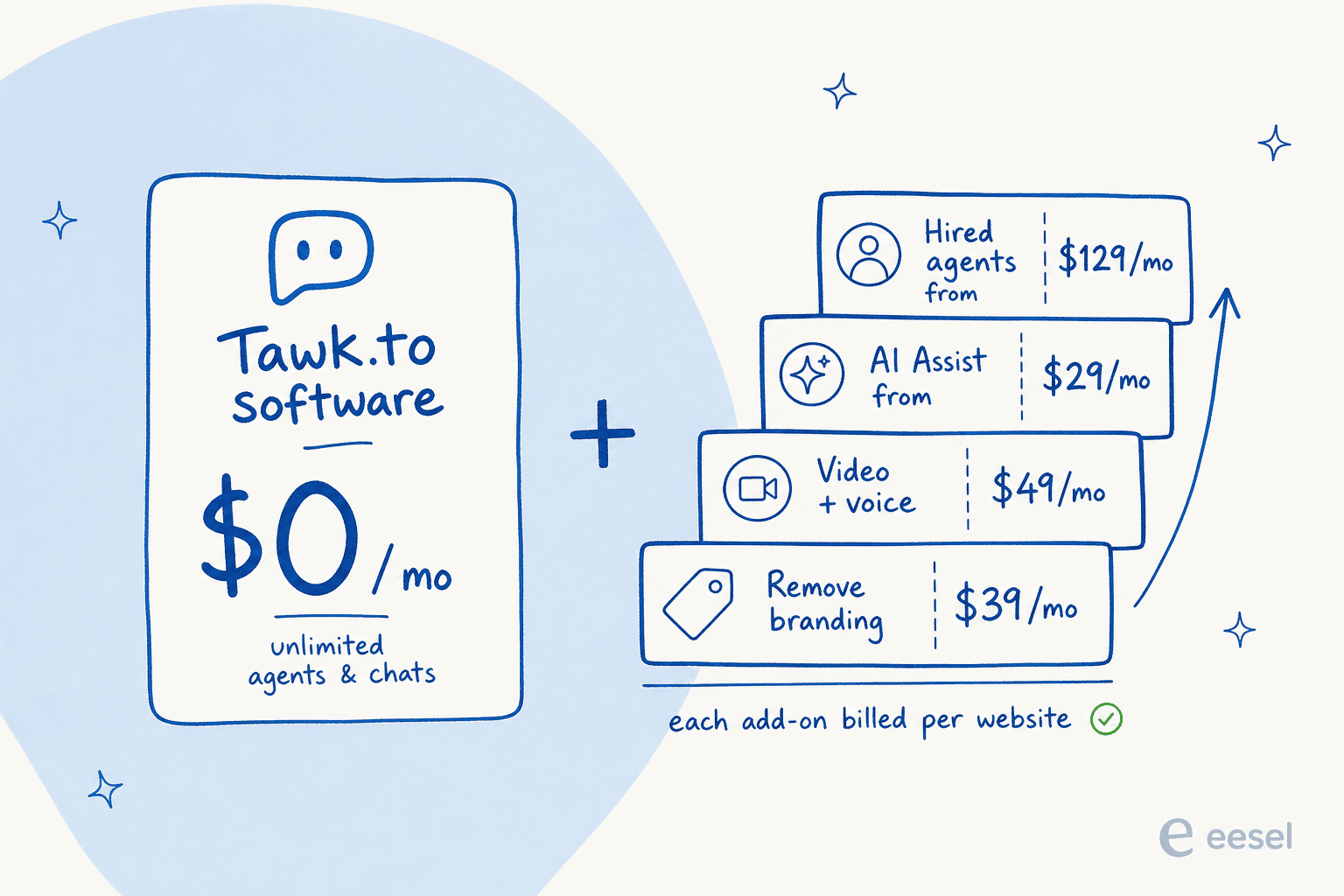
Three complaints come up again and again in the reviews, and they map cleanly onto why people start shopping:
- The branding is paywalled. Dropping the "Powered by tawk.to" badge is the $39/month Remove Branding add-on, billed per website. One reviewer called Tawk.to "a great entry into live chat as a free product" but noted it "was less adaptable to our company branding than we wanted."
- The AI is thin. AI Assist (the Apollo bot) is a separate add-on, and even fans say it's shallow: "The AI agent could be more powerful if it could learn from external documentation or knowledge bases," wrote one G2 reviewer. Analytics get the same "fairly basic" verdict.
- Notifications drop chats. The most painful one for a sales-led team: "When I haven't had the browser tab open, I missed a couple of incoming chats," one Capterra reviewer reported, adding there's "really no way to configure notifications other than 'on' or 'off'."
There's also a trust gap worth knowing about. Tawk.to scores 4.5-4.6 on G2 and Capterra, but only ~2.4 on Trustpilot, where post-cancellation billing disputes dominate. That split is the story: people love it as a free widget, and get frustrated the moment money and scale enter the picture.
What I looked for in a replacement
I've spent the last few years putting AI support agents on live queues, and that shapes what I weigh. A prettier chat box isn't an upgrade if it can't actually resolve tickets. So I judged each tool on:
- The real free tier, and what runs out first (usually AI conversations).
- The true cost at your size, including AI billed per resolution on top of seats.
- AI quality, meaning does it train on your own history or just read a help center.
- How you pay, since per-seat, per-conversation, per-ticket, and usage-based models behave very differently as you grow.
Here's where each tool lands. The vertical axis is the one most "best live chat" lists skip, and it's the one that actually predicts whether you'll be back here in a year.
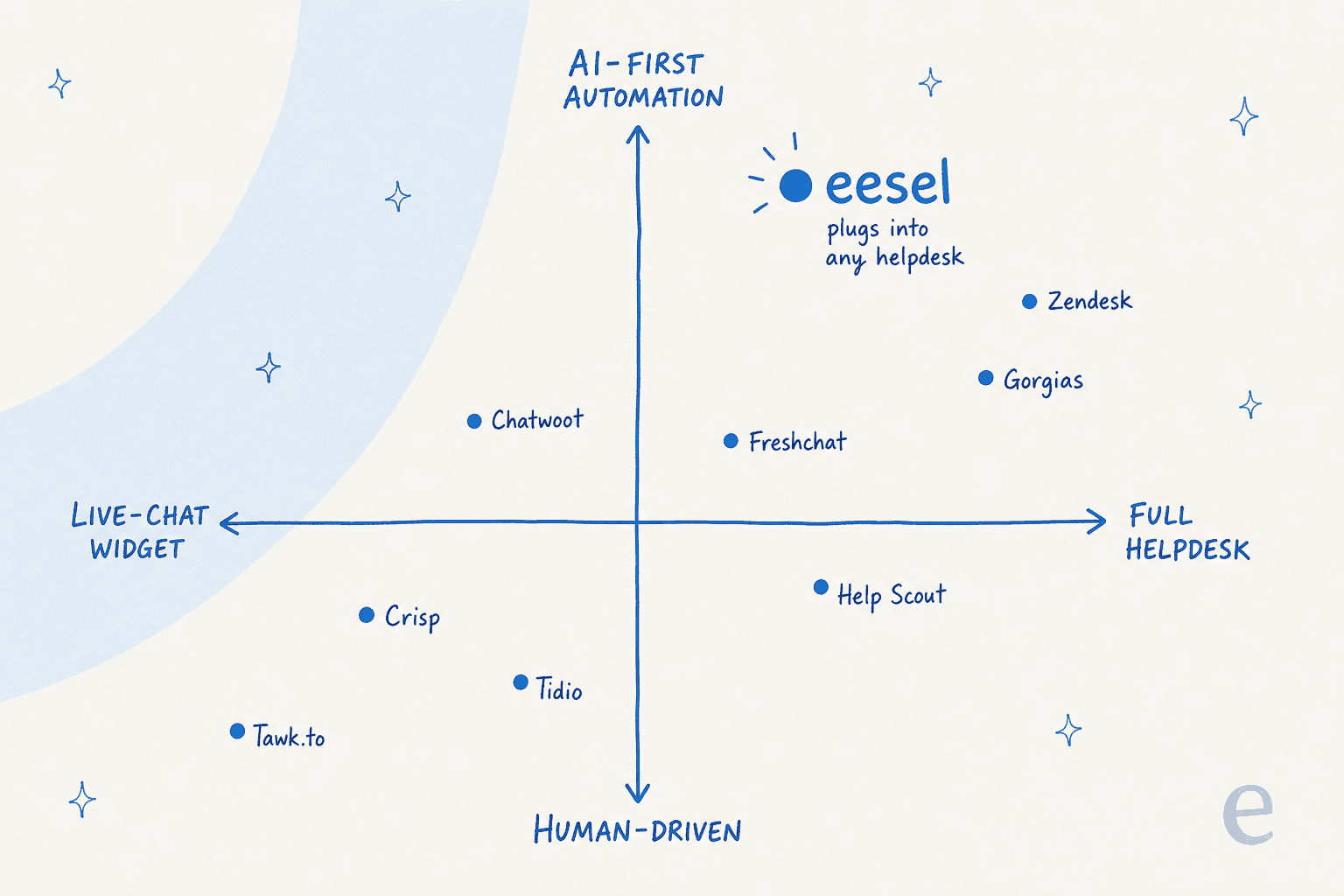
The best Tawk.to alternatives at a glance
| Tool | Best for | Free plan | Cheapest paid | AI / automation | Billing model |
|---|---|---|---|---|---|
| eesel | Adding AI to your existing helpdesk | $50 trial credit | Usage, ~$0.40/ticket | Trains on past tickets, confidence routing | Usage-based, no per-seat |
| Tawk.to (incumbent) | Free live chat on a budget | Yes (full suite, $0) | Add-ons from $29/mo | AI Assist from ~$29/mo, basic | Free + paid add-ons |
| Tidio | Small ecommerce stores | Yes (50 convos/mo) | $24.17/mo (Starter) | Lyro AI from $32.50/mo | Per-conversation tiers |
| Crisp | Startups wanting flat pricing | Yes (2 seats) | $45/mo (Mini) | AI credits bundled per plan | Flat per workspace |
| Chatwoot | Teams that want to self-host | Yes (Community $0) | $19/agent/mo (cloud) | Captain AI, $20 / 1,000 credits | Per agent, or self-host |
| Freshchat | Teams scaling inside Freshworks | Yes (up to 10 agents) | $19/agent/mo (Growth) | Freddy AI, $49 / 100 sessions | Per agent + AI usage |
| Help Scout | Email-first support teams | Yes (5 users) | $25/user/mo (Standard) | AI Answers, $0.75/resolution | Per user |
| Zendesk | Enterprises that need everything | No (14-day trial) | $19/agent/mo (Support) | Per automated resolution | Per agent + AI usage |
| Gorgias | Shopify ecommerce brands | No (trial) | $10/mo (Starter, 50 tickets) | AI Agent, $0.90-$1.00/resolution | Per billable ticket |
1. eesel: best for adding real AI to the helpdesk you already run

Best for: teams whose real complaint about Tawk.to is the AI, not the chat box.
Here's the reframe I'd push on you before you go widget shopping. Most people who leave Tawk.to think they need a better live chat tool. What they actually need is automation that works, and a new chat widget doesn't deliver that on its own. That's the gap eesel fills: it's an AI support agent that plugs into the helpdesk or chat tool you already use, rather than another inbox to migrate to.
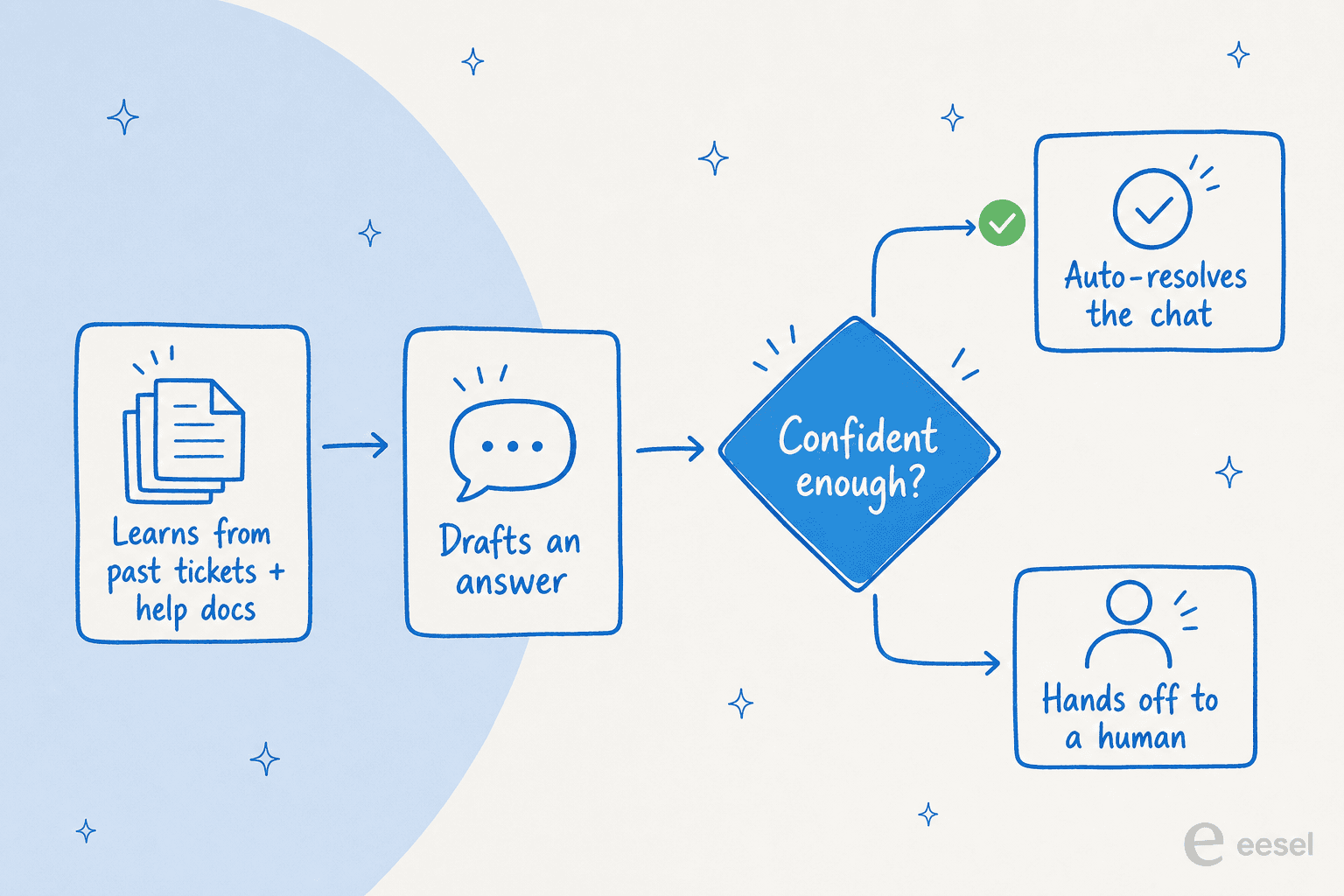
The difference that matters is where the AI learns from. Tawk.to's bot answers from your knowledge base and plain text. eesel trains on your past tickets, macros, and help docs, so it picks up the actual answers your team has given over years, not just the FAQ. It then drafts or fully resolves tickets, and a simulation mode lets you test it against your historical tickets before it ever touches a live customer.
That last part isn't a nice-to-have. I've watched confident-sounding bots quietly give wrong answers, which is why every rollout we do gets simulated against real ticket history first. It also answers the single biggest objection I hear from support leads, which one DTC supplements lead put perfectly:
"The AI will never be able to answer 100% of the questions... I need an AI who is only handling the tickets that it's confident to handle, and all the other ones, leave them alone."
CX lead at a DTC supplements brand, eesel customer interview
That's exactly how eesel's confidence-based routing works: low-confidence tickets get left for a human instead of getting a guessed answer.
Pricing: usage-based, starting around $0.40 per ticket with no per-seat fee and no platform fee on the standard tier. You start with $50 of free usage, no card. Because there's no per-agent charge, it often comes out cheaper than seat-based tools once more than a couple of people are answering chats.
Pros:
- Trains on your real ticket history, not just a help center.
- Confidence routing and simulation guard against hallucinated answers.
- Keeps your current stack: 100+ integrations across Zendesk, Freshdesk, Gorgias, Help Scout, Front, and HubSpot.
Cons:
- It's an AI layer, not a live chat widget itself, so you still need a helpdesk or chat tool underneath.
- Usage-based pricing takes a minute to forecast versus a flat plan.
Verdict: if you're leaving Tawk.to because the AI couldn't pull its weight, eesel is the most direct fix, because it upgrades the automation without forcing a full migration. One customer, Gridwise, saw it resolve 73% of tier-1 requests in the first month, with results showing during a 7-day trial. If you want a brand-new chat widget too, read on.
2. Tidio: best free-tier upgrade for small ecommerce stores
Best for: small online stores that want a more modern free widget with a built-in AI bot.
Tidio is the closest like-for-like swap for Tawk.to if you like the "free live chat" model but want something that feels current. It pairs live chat with Lyro, its AI chatbot, and leans hard into ecommerce, with deep Shopify support and pre-built sales flows.
The free plan covers 50 conversations a month plus 50 lifetime Lyro AI conversations, which is enough to test the water but runs out fast on a busy store. Paid plans add headroom but are metered by conversation volume, so costs scale with how chatty your traffic is.
Pricing: Free ($0, 50 conversations); Starter at $24.17/month (100 conversations); Growth from $49.17/month. Lyro AI is sold separately from $32.50/month for 50 AI conversations.
Pros:
- A modern UI, a real step up from Tawk.to's dated one.
- Strong Shopify and ecommerce flows out of the box.
- Lyro AI is easy to switch on.
Cons:
- Conversation-based billing gets expensive as volume climbs.
- The free AI allowance is tiny.
Verdict: a clean pick for a small store outgrowing Tawk.to's look and feel. Just model your conversation volume before committing, and if Lyro's limits pinch, compare it against these Tidio alternatives.
3. Crisp: best for startups that want flat, predictable pricing
Best for: startups that hate per-seat math and want one predictable bill.
Crisp takes the opposite approach to almost everyone else here. Instead of charging per agent or per conversation, it bills a flat rate per workspace with seats bundled in and unlimited conversations on every paid tier. For a growing team, that predictability is the whole pitch, and one reviewer from Hoxton Mix said they "evaluated over 20 products, and Crisp came out on top."
You get an all-in-one shared inbox across chat, email, WhatsApp, Messenger, and more, plus a no-code AI agent that Crisp says can automate up to 50% of inquiries.
Pricing: Free ($0, 2 seats); Mini at $45/month (4 seats); Essentials at $95/month (10 seats); Plus at $295/month (20+ seats). AI credits are bundled into each tier.
Pros:
- Flat per-workspace pricing is rare and budget-friendly.
- Unlimited conversations, no volume anxiety.
- Truly all-in-one (inbox, CRM, knowledge base, chat).
Cons:
- Bundled AI credits are modest; heavy automation needs the top tier.
- Some advanced features and white-labeling are gated to Plus.
Verdict: the value play for startups. If the AI ceiling on lower tiers gets in your way, weigh it against a few Crisp alternatives before you commit, or layer a dedicated AI agent on top.
4. Chatwoot: best for teams that want to own their data
Best for: privacy-conscious or developer-heavy teams that want to self-host.
If part of your Tawk.to itch is "I don't want my customer data living on someone else's cloud," Chatwoot is the answer. It's open-source, with a free Community Edition you can self-host on your own infrastructure, plus a managed cloud if you'd rather not run servers. It's SOC 2 Type II compliant and has over 32,000 stars on GitHub, so it's a serious project, not a hobby.
Its native AI suite, Captain, handles first-response automation and agent assist, though reviewers note the AI and reporting are still maturing.
Pricing: Cloud: Hacker $0 (2 agents, live chat only), Startups $19/agent/month, Business $39, Enterprise $99. Self-hosted Community Edition is free; Captain AI credits run $20 per 1,000.
Pros:
- Open-source and self-hostable; you own your data.
- Strong omnichannel inbox across WhatsApp, social, and email.
- Transparent, low cloud pricing.
Cons:
- Self-hosting is a real maintenance cost once you count your time.
- Native AI is thinner than dedicated tools, per reviewers.
Verdict: the best choice if data ownership is non-negotiable. Just be honest about the self-hosting upkeep, and if Captain's automation falls short, eesel and other Chatwoot alternatives can fill the AI gap while you keep the open-source inbox.
5. Freshchat: best for teams scaling inside the Freshworks suite
Best for: growing teams that want chat inside a broader support suite.
Freshchat is Freshworks' messaging product, and it's a natural step up from a standalone widget if you also want ticketing, a knowledge base, and a path into a full helpdesk. It still has a real free tier (up to 10 agents), though the free plan is web chat and email only, with social channels starting on Growth.
Its Freddy AI bot is billed by resolution session rather than by seat, which is fairer for spiky volume but adds a usage line to forecast.
Pricing: Free ($0, up to 10 agents); Growth $19/agent/month; Pro $49; Enterprise $79. Freddy AI Agent gives 500 free sessions, then $49 per 100 sessions.
Pros:
- Real free tier for up to 10 agents.
- Slots neatly into the wider Freshworks ecosystem.
- Usage-based AI billing suits variable volume.
Cons:
- Free plan is missing social and messaging channels.
- You're buying into the Freshworks ecosystem to get the most out of it.
Verdict: a solid pick if you want chat plus a growth path into a full suite. If you mostly want the AI part, note that Freddy is one of several AI bots eesel customers have found more precise to replace.
6. Help Scout: best for email-first support teams
Best for: teams whose support is mostly email, with chat as a secondary channel.
If Tawk.to felt too chat-centric and your real volume is email, Help Scout flips the model. It's a shared inbox built around email first, with live chat delivered through its Beacon widget, plus a knowledge base and AI features layered on. It's known for a clean, human feel that small teams love.
One thing to flag, since it's easy to get wrong: Help Scout bills per user, not per contact, despite a recent positioning shift. Contacts are a plan limit, not the meter.
Pricing: Free ($0, 5 users, 100 contacts/month); Standard $25/user/month (the first tier with live chat); Plus $45; Pro $75. AI Answers is an add-on at $0.75 per resolution.
Pros:
- Best-in-class email and shared-inbox experience.
- Clean, approachable UI; low training overhead.
- Real free plan for tiny teams.
Cons:
- Live chat is secondary to email; not a chat-first tool.
- Per-user pricing adds up for larger teams.
Verdict: the right move if your support is email-led and chat is the side dish. Compare it with these Help Scout alternatives if you need stronger native AI, or add eesel for email-to-chat deflection.
7. Zendesk: best for enterprises that need everything
Best for: larger teams that need a deep, every-channel platform and have the budget for it.
At the opposite end from a free widget sits Zendesk, the enterprise default. It does ticketing, omnichannel messaging, voice, a knowledge base, QA, and workforce management, and it claims up to 80% automation with AI agents that learn from every interaction. If you're scaling fast and need one platform to run all of support, it's the safe institutional choice.
The trade-off is cost and complexity. The headline $19 entry plan has no AI at all; AI Agents first appear on the $55 Suite Team tier, and the AI itself is billed separately per automated resolution on top of seats.
Pricing: Support Team $19/agent/month (no AI); Suite Team $55; Suite Professional $115; Enterprise is custom. AI resolutions are billed on top.
Pros:
- The most complete platform on this list.
- Mature ecosystem of 1,800+ marketplace apps.
- Proven at enterprise scale.
Cons:
- Layered pricing (seats + per-resolution AI + add-ons) is easy to underestimate.
- Overkill and overpriced for a small team replacing a free widget.
Verdict: the right ceiling for an enterprise, the wrong floor for a startup. A common move I see is keeping Zendesk as the system of record and running eesel on top for the AI, since its native AI capabilities often cost more than they resolve.
8. Gorgias: best for Shopify ecommerce brands
Best for: online retail brands on Shopify that want support and sales in one inbox.
If you run a Shopify store, Gorgias is built for you in a way the generalist tools aren't. Orders, customers, and store data live natively in the ticket view, so an agent (or the AI) can issue a refund, edit an order, or recommend a product without leaving the conversation. It claims to power 40% of Shopify brands and its AI Agent is pre-trained on a billion-plus ecommerce conversations.
It's priced on billable tickets rather than seats, which suits stores with a few agents and lots of volume.
Pricing: Starter from $10/month (50 tickets); Basic $50 (300 tickets); Pro $300 (2,000 tickets); Advanced $750 (5,000 tickets). The AI Agent is a usage add-on at $0.90-$1.00 per resolution, and each AI interaction also counts as a billable ticket.
Pros:
- Deepest native Shopify integration of any helpdesk.
- AI handles ecommerce actions (refunds, order edits, upsells).
- Ticket-based pricing fits high-volume small teams.
Cons:
- Pricey versus generalist tools at similar volumes.
- Overkill if you're not on Shopify or another supported store.
Verdict: the clear winner for Shopify-native support, and not worth it otherwise. If you like Gorgias but want stronger or cheaper AI, here are some Gorgias alternatives to weigh.
How to actually choose
Strip away the feature lists and it comes down to a few honest questions:
- Just want free live chat that looks current? Tidio or Crisp, with Crisp winning on predictable flat pricing.
- Need to own your data? Chatwoot, self-hosted, eyes open about the upkeep.
- Email-first team? Help Scout. Shopify store? Gorgias. Enterprise scale? Zendesk.
- The real problem is the AI? Don't switch widgets, fix the automation.
That last one is the one I'd plant a flag on. A new chat box doesn't resolve a single extra ticket. If you're leaving Tawk.to because its bot couldn't answer your customers, the highest-leverage move is to put a real AI agent on the helpdesk you already trust, train it on the tickets you've already solved, and let it handle only what it's sure about.
Try eesel on top of whatever you pick
Here's the move most "alternatives" posts won't tell you: you don't have to choose between a chat tool and good AI. eesel plugs into the helpdesk or live chat you land on, learns from your past tickets and help docs on day one, and resolves the repetitive questions while routing anything it's unsure about to a human. You can simulate it on your real ticket history before it goes live, so there are no surprises, and it's usage-based at around $0.40 a ticket with no per-seat tax.
It's free to try with $50 of usage and no card, so you can see what it resolves against your own tickets in an afternoon. If your Tawk.to problem was ever really an AI problem, start there.
Frequently Asked Questions
What are the best Tawk.to alternatives in 2026?
Is there a truly free Tawk.to alternative?
Does Tawk.to have AI, and is it any good?
Why do people switch away from Tawk.to?
How much do Tawk.to alternatives cost?


Article by
Kurnia Kharisma Agung Samiadjie
Kurnia is a software engineer and writer at eesel AI with two years of SEO experience, writing about AI tools, helpdesk software, and customer support. He pairs a developer's understanding of how these products are built with search-driven research into what actually ranks and resonates with the people searching for them.