Why small teams outgrow Freshdesk
Let me be fair to Freshdesk first, because it earned its 74,000+ customers. It's a capable, mature helpdesk with solid ticketing, a decent knowledge base, and omnichannel coverage, and its $19/agent Growth plan is a reasonable entry point. For a lot of teams it's genuinely fine.
The friction shows up as you grow, and it's almost always about cost and AI. Three things drive the small-team exodus:
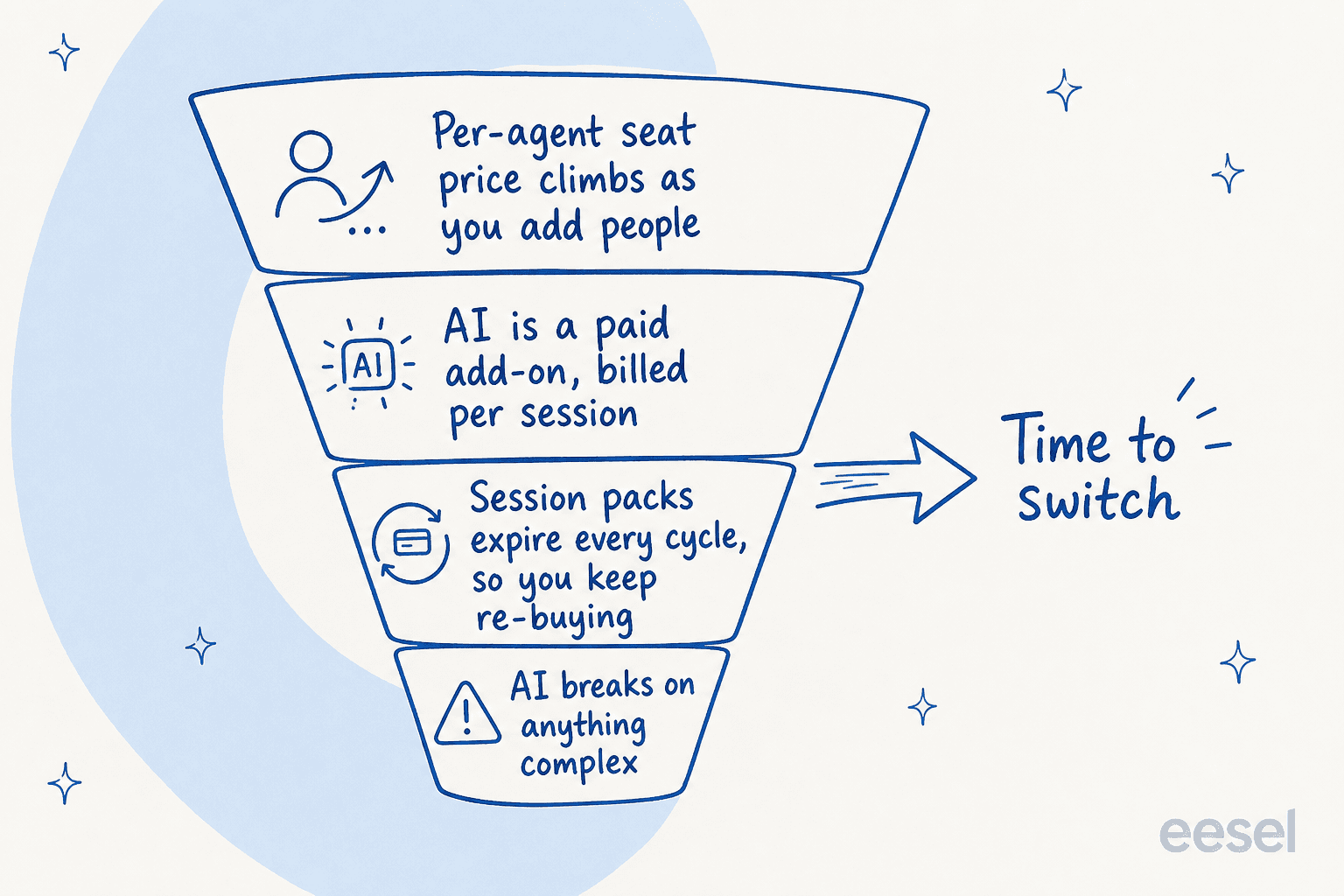
First, the seat price compounds. Freshdesk bills per agent, per month: Growth at $19, Pro at $55, Enterprise at $89, all annual. The "Most popular" Pro tier is where most teams land, and $55 per agent adds up fast once you're past three or four people.
Second, Freddy AI is a metered add-on, not a feature. Freshdesk's AI agent gives you the first 500 sessions, then charges $49 per 100 sessions after that, where a "session" is a 72-hour window from a customer's first email. Those packs reset every billing cycle, so you keep re-buying them. As one admin put it on r/sysadmin, Freddy is "so expensive for what it can do."
Third, the AI breaks on anything complex. This is the one that actually pushes people out. A support team described their Freshdesk AI trial on r/AiAutomations:
"We tested an ai integration in freshdesk and had almost the exact same experience. it worked for very simple tickets but anything slightly complex got misclassified. agents ended up spending more time fixing errors than before, so we had to rethink our approach."
That last line is the real cost. An AI that you have to babysit is worse than no AI, because it adds a verification step to every ticket. It's exactly the failure mode we obsess over at eesel, which is why we simulate every rollout against a team's historical tickets before it ever touches a live customer, so you see the resolution rate before you trust it.
Before you switch: do you actually need to leave?
Here's the reframe I promised. The most common reason a small team wants out of Freshdesk is the AI, and migrating helpdesks to fix the AI is the expensive way to solve that.
Switching helpdesks means re-importing ticket history, retraining agents, rebuilding macros and automations, and re-pointing your support email, all to escape a $49-per-100-sessions add-on. If Freshdesk's ticketing works fine for you and only the AI disappoints, the cheaper fix is to swap the AI, not the whole platform.
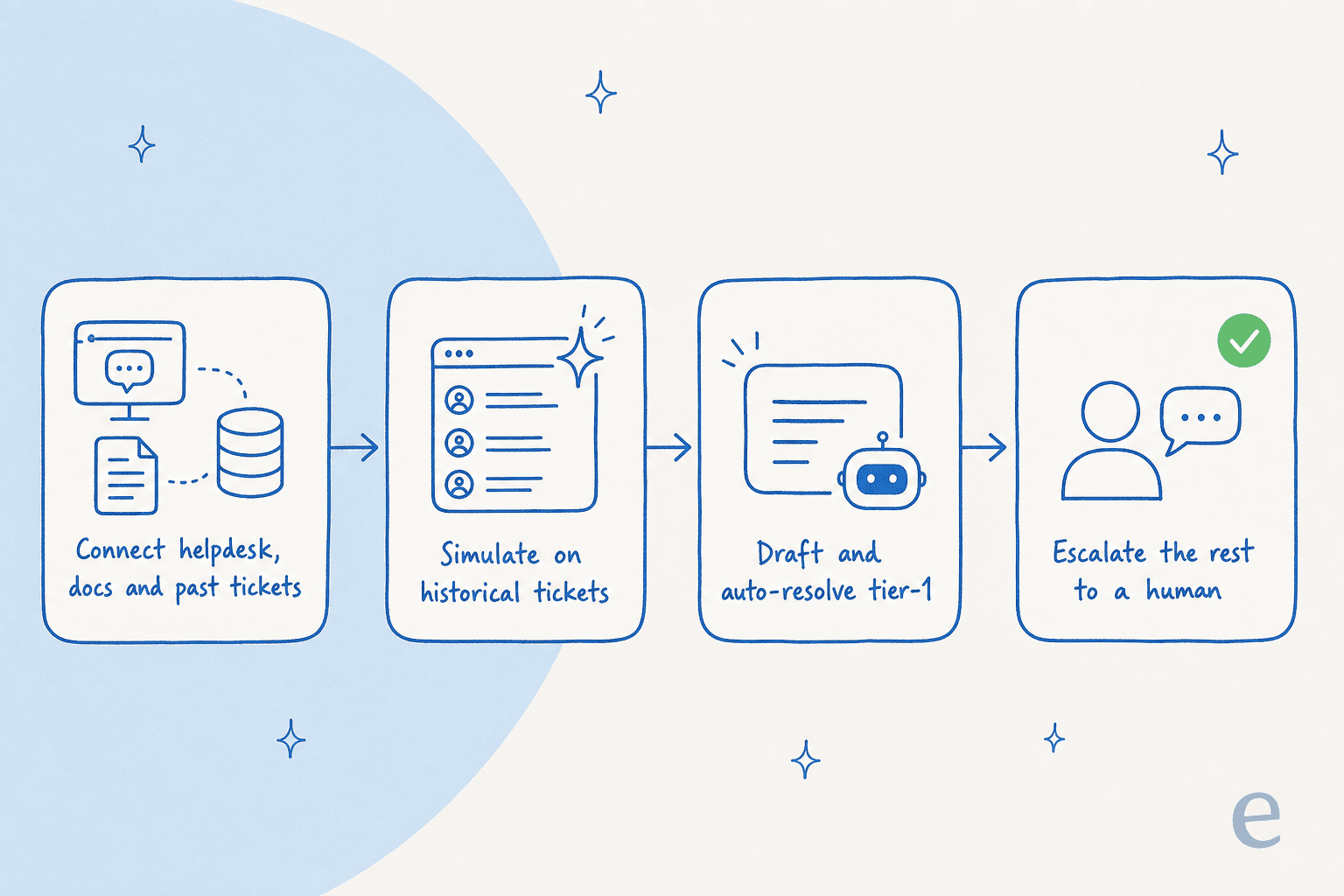
That's what eesel for Freshdesk does: it connects to your existing Freshdesk, learns from your solved past tickets and help docs, and drafts or auto-resolves tier-1 right inside the tools your agents already use. Design.com runs a multi-agent eesel setup on Freshdesk across 1,000+ help articles, handling 50,000+ tickets a month. You keep your helpdesk and just upgrade the brain.
So before you read the list below, be honest about your reason for leaving. If it's the AI, try fixing that in place first. If it's the price-per-seat, the lock-in, the clunky UI, or you've simply outgrown the fit, then yes, switch, and the rest of this guide is for you.
What to look for in a Freshdesk alternative
I weighed every tool below on the things that actually bite a small team, not a feature checklist:
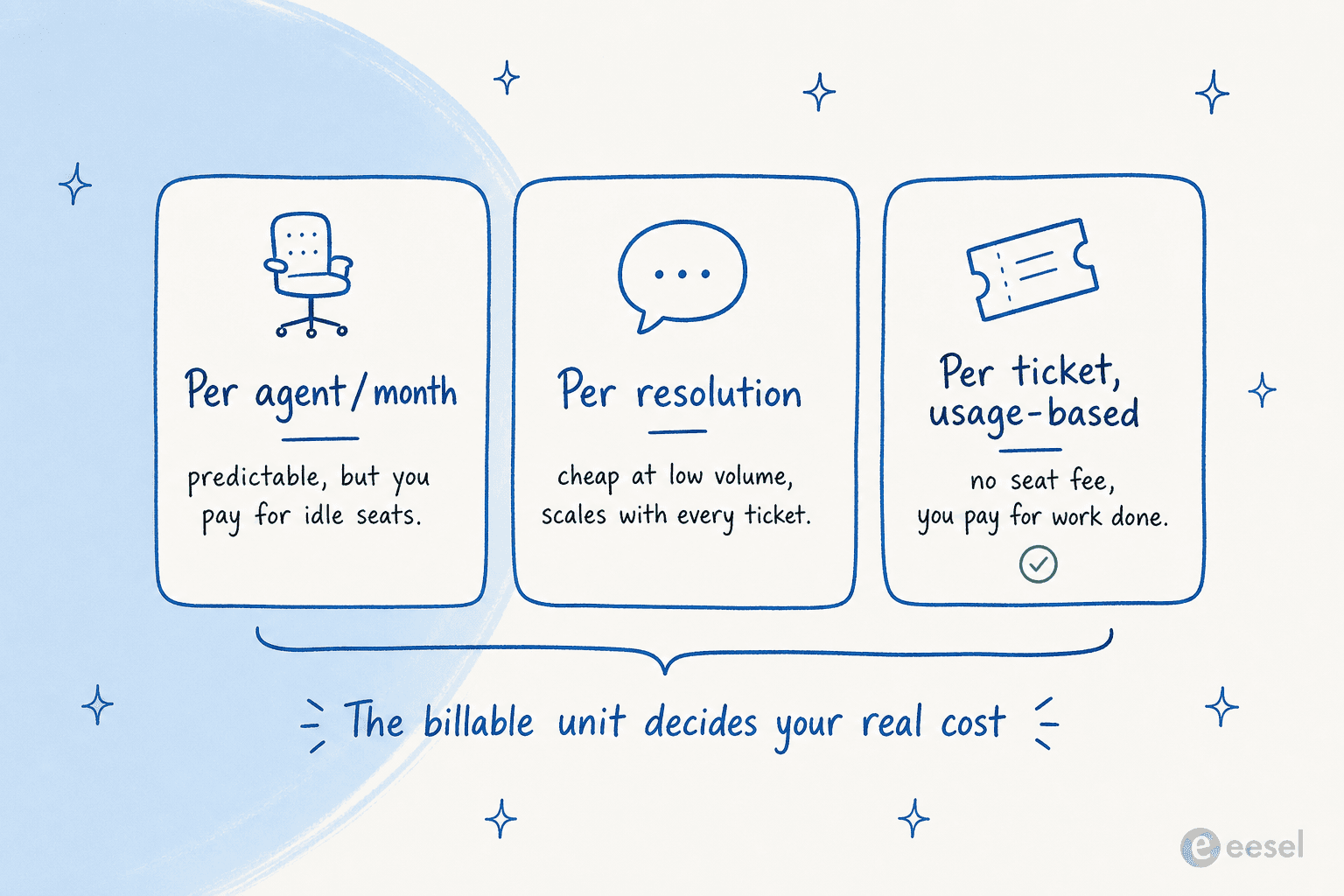
- The billable unit. This matters more than the headline price. Are you paying per agent, per resolution, or per ticket? Get this wrong and a "cheap" tool becomes your most expensive line item.
- What AI really costs. Bundled into the plan, or metered on top? A $25 seat with a $0.75-per-resolution AI add-on is a very different bill at 1,000 resolutions than at 50.
- Time to value. A small team has no time for a six-week implementation. The best switches feel familiar on day one.
- Where you already work. If you live in Gmail, in Shopify, or in shared email, the right tool meets you there instead of forcing a new home.
That first point deserves a picture, because the billing model decides your real cost far more than the sticker price does.
The best Freshdesk alternatives for small teams, at a glance
| Tool | Best for | Entry paid price | Free tier | AI pricing | Billing unit |
|---|---|---|---|---|---|
| eesel | Adding AI to the helpdesk you already have | From $0.40/ticket | $50 free usage | Included (pay per ticket) | Per ticket, usage-based |
| Help Scout | Email-first teams that want simple | $25/user/mo | Up to 5 users | $0.75/resolution add-on | Per user/mo |
| Zoho Desk | Budget teams and Zoho users | $14/agent/mo | Free Forever (3 users) | Zia, gated by plan | Per agent/mo |
| Gorgias | Shopify and ecommerce stores | $10/mo (50 tickets) | Trial only | $0.90/resolution | Per ticket/conversation |
| Front | Collaborative shared-inbox teams | $25/seat/mo | Trial only | From $0.05/conversation | Per seat/mo |
| Hiver | Gmail-native small teams | $25/user/mo | Free forever | Bundled from Growth | Per user/mo |
| Zendesk | Teams that will scale fast | $19/agent/mo | Trial only | Per automated resolution | Per agent/mo + usage |
| Chatwoot | Open-source, data-ownership teams | $19/agent/mo | Self-host for $0 | $20 per 1,000 credits | Per agent/mo |
| Tidio | Solo and small ecommerce shops | $24.17/mo | Free (50 convos) | $0.50/Lyro conversation | Usage-based |
A quick note on reading that table: the "billing unit" column is the one to study. Per-agent tools reward small headcounts and punish growth. Per-resolution AI is cheap at low volume and scales with every ticket. Usage-based-per-ticket has no seat floor at all. More on what that means for your wallet at the end.
The 9 best Freshdesk alternatives for small teams
1. eesel
Best for: small teams who want serious AI on tier-1 without ripping out their helpdesk or paying per seat.
I'll put my own employer first and then be honest about the trade-offs. eesel isn't a full helpdesk replacement in the Zendesk sense, it's an AI layer that plugs into the helpdesk you already run, whether that's Freshdesk, Zendesk, Front, Help Scout, or Gorgias. It trains on your solved tickets and docs, drafts replies, triages, and auto-resolves the repetitive tier-1 volume, then hands the rest to a human.
The thing that sets it apart for a nervous small team is simulation mode: it replays your historical tickets so you can see the resolution rate before going live. That's the antidote to the "confident but wrong" AI that pushes people off Freshdesk in the first place.
Pricing: usage-based from $0.40 per ticket, with no per-seat fee, no platform fee, and no minimum. There's a free trial with $50 of usage and no card required. One ticket counts as one task no matter how many messages it takes.
Pros:
- You pay only for tickets handled, so cost doesn't balloon with headcount.
- Learns from past resolved tickets, not just help-center articles, and runs in 80+ languages.
- Keeps your current helpdesk, so there's no migration project.
Cons:
- It's not a standalone ticketing system, you still need a helpdesk underneath it.
- SOC 2 is listed as in progress rather than certified, which can stall security-led buyers.
Verdict: if your Freshdesk complaint is really about AI cost and quality, eesel is the option that fixes the problem without the migration. Skip it if you want a single all-in-one platform with a flat per-seat bill for budgeting certainty.
2. Help Scout
Best for: email-first teams leaving Freshdesk for something warmer and simpler.
Help Scout is the classic "Freshdesk feels too heavy" landing spot. It's a clean, email-like shared inbox with a knowledge base, the Beacon help widget, and live chat, and it deliberately hides the ticketing machinery. The pitch is that you can learn it in under an hour, and most reviewers agree.
Pricing: Free for up to 5 users, then Standard at $25/user/mo and Plus at $45/user/mo (annual). The AI Answers feature is a $0.75-per-resolution add-on on top of seats.
Pros:
- Genuinely fast onboarding and a low-clutter inbox.
- All channels, internal notes, and collision detection in one view.
- A real free tier for very small teams.
Cons:
- AI pricing stacks on seats: $0.75/resolution is roughly +$750/mo at 1,000 resolutions.
- Help Scout has flip-flopped on its pricing model before, and one reviewer summed up the fallout bluntly: "lost all trust with this flip-flopping on pricing."
Verdict: the best pick if you want simple and human and your volume is modest. Look elsewhere if you'll scale AI resolutions hard, where that per-resolution cost compounds. Worth comparing in our Help Scout vs Front breakdown if collaboration matters.
3. Zoho Desk
Best for: budget-conscious teams, especially anyone already inside the Zoho suite.
Zoho Desk is the value champion. It does most of what the big platforms do at a fraction of the per-seat price, with a real Free Forever plan and strong rule-based automation. One r/SaaS user put the appeal plainly: "Zoho Desk offers almost everything that Zendesk does at like half the cost."
Pricing: Free Forever for 3 users, then Express at $7/agent/mo, Standard at $14, Professional at $23, and Enterprise at $40 (annual).
Pros:
- The cheapest serious option, with a genuine free tier.
- Blueprint workflows and SLA automation that reviewers call a game changer.
- Deep ecosystem fit with Zoho CRM and 360+ integrations.
Cons:
- Zia, its native AI, is widely panned, with one user calling it "a trainwreck of unhelpful responses."
- The UI is cluttered and has a steeper learning curve than Help Scout or Hiver.
Verdict: pick Zoho Desk if price is the deciding factor and you can live with weak native AI (or bolt a better AI layer on top). Skip it if smooth setup and capable out-of-the-box AI matter more than the monthly invoice.
4. Gorgias
Best for: small Shopify and ecommerce brands where support is tied to orders.
If you run an online store, Gorgias is built for you in a way Freshdesk never was. Its native Shopify integration puts order data, refunds, and discounts right inside the conversation, and its AI Agent is trained to drive sales, not just deflect tickets.
Pricing: ticket-based, not per-seat. Starter from $10/mo (50 tickets), Basic from $50/mo, Pro from $300/mo, with the AI Agent at $0.90 per resolved conversation on annual billing.
Pros:
- Best-in-class Shopify, BigCommerce, and Magento depth.
- Ticket-based pricing means headcount doesn't drive cost.
- The AI Agent can recommend products and apply discounts in-thread.
Cons:
- It runs roughly 3x the cost of a generic helpdesk at similar volume, so it only pays off if a big share of tickets need store actions.
- Each AI resolution is also counted as a billable ticket, so automated volume can be charged twice.
Verdict: a clear winner for Shopify-first teams where support means refunds, order edits, and upsells. A poor fit if you're not in ecommerce, where you're paying for commerce depth you'll never use. See Gorgias alternatives if the cost gives you pause.
5. Front
Best for: small, collaborative teams who live in shared email and want to comment and escalate, not file tickets.
Front blurs the line between email client and helpdesk. Its standout is collaboration: internal comments, shared drafts, and escalation so, as one customer put it, "nothing gets lost in Slack." Branch's CTO reported a 40% productivity improvement in member support after moving from Zendesk.
Pricing: Starter at $25/seat/mo (single channel), Professional at $65, Enterprise at $105, plus AI add-ons starting from $0.05/conversation for Autopilot.
Pros:
- Collaboration features genuinely ahead of the pack.
- Strong reported outcomes (97% CSAT, 7x faster response in Front's own data).
- Familiar, email-like experience that adopts quickly.
Cons:
- Operators repeatedly call it a "supercharged shared inbox," not a ticketing system built for CX from the ground up, per r/CustomerSuccess.
- Price-to-value slips for simple support, where cheaper inbox tools win.
Verdict: great if your team's work is collaborative email and you'll use the comment-and-escalate workflow. Skip it if you need a true ticketing engine or you're price-sensitive. Our Front vs Hiver comparison is worth a read if you're torn between the two inbox-style options.
6. Hiver
Best for: very small teams that already live in Gmail and want zero migration.
Hiver runs your helpdesk inside Gmail itself. For a team on Google Workspace that finds Freshdesk's separate ticketing UI a chore, that's the whole pitch: there's almost no learning curve because it's the inbox you already use. It scores 4.6/5 on G2 across 1,283 reviews.
Pricing: Free forever, then Growth at $25/user/mo, Pro at $55, and Elite at $85 (annual), with a 2-seat minimum. AI is bundled from the Growth tier up, not metered per resolution.
Pros:
- Near-zero adoption friction for Gmail teams.
- AI included from the entry paid tier, not a separate add-on.
- Strong third-party ratings (Capterra 4.7/5).
Cons:
- Per-seat cost climbs quickly as you add inboxes and users, and there's at least one sharp billing complaint on record ("Abusive billing behavior," a G2 reviewer who says they were overcharged $450).
- Hiver's AI is thinly tested by independent reviewers.
Verdict: an easy yes for small Gmail-native teams that want a helpdesk without leaving their inbox. Less ideal if you're not on Gmail or expect seats to multiply. Compare it against Help Scout vs Hiver before committing.
7. Zendesk
Best for: small teams that expect to scale into omnichannel and need room to grow.
Zendesk is the heavyweight on this list, and that cuts both ways. You get a deep Resolution Platform, a 1,800+ app marketplace, and proof at scale, but you also get a layered bill that's easy to underestimate.
Pricing: Support Team at $19/agent/mo (no AI), Suite Team at $55 (this is where AI agents start), Suite Professional at $115, plus $50/agent add-ons and per-automated-resolution AI billing on top.
Pros:
- Enormous scale and ecosystem depth, with up to 80% automation claimed.
- Named a Leader in the 2025 Gartner Magic Quadrant for CRM Customer Engagement.
- The most integrations of anything here.
Cons:
- The cheapest $19 plan has no AI at all, and the jump to $55 plus per-resolution billing surprises small teams. One r/Zendesk user estimated "about $1.50-$1.20 per resolution" under the new model.
- It's overkill (and overpriced) for a lean team that just wants email support handled.
Verdict: the right call if you're a small team today that will be a much bigger one soon and wants headroom. The wrong call if you want predictable costs now. If it's mainly Zendesk's AI you're after, our Zendesk AI review is a useful gut-check.
8. Chatwoot
Best for: budget and privacy-minded teams who want to own their data.
Chatwoot is the open-source answer. You can run it on Chatwoot's cloud or self-host it on your own servers and own every byte of customer data, which is a real draw for teams leaving a closed suite over cost or compliance. It's SOC 2 Type II and backed by 32k GitHub stars.
Pricing: cloud Hacker tier at $0 (2 agents), Startups at $19/agent/mo, Business at $39. Self-hosting the Community Edition is free, and its Captain AI is $20 per 1,000 credits.
Pros:
- Self-host for $0 per agent solves cost and privacy at once.
- A real omnichannel inbox (WhatsApp, social, email) in one place.
- Open APIs and webhooks make it easy to wire in your own AI.
Cons:
- Self-hosting is a genuine maintenance burden: updates, storage, security all become your job.
- Native AI and reporting are thin, with reviewers wanting "more advanced AI-powered automation."
Verdict: the pick if you have the DevOps appetite and want to slash spend or keep data in-house. Skip it if you want polished, out-of-the-box AI without babysitting infrastructure. Many teams pair self-hosted Chatwoot with a dedicated AI layer to cover the gap.
9. Tidio
Best for: solo and very small ecommerce shops that want live chat plus AI, live in minutes.
Tidio is the lightweight, no-code option, built around live chat and its Lyro AI agent (powered by Claude, with a claimed 67% average resolution rate). It installs in minutes and rates 4.8/5 across 1,300+ Shopify App Store reviews.
Pricing: Free for 50 conversations, Starter at $24.17/mo (annual), Growth from $49.17/mo, with Lyro billed at $0.50 per resolved conversation.
Pros:
- Lyro stays grounded in your data, with guardrails against hallucination.
- Strong Shopify fit and native order-tracking actions.
- The fastest setup on this list, no engineering needed.
Cons:
- Three-axis usage pricing (billable conversations + Lyro conversations + Flows visitors) is hard to forecast.
- The Growth-to-Plus jump is a steep cliff to $749/mo.
Verdict: ideal for a solo or tiny store that wants chat plus capable AI without engineering lift. Skip it if you run higher volume or need predictable flat costs. Compare it in our Tidio alternatives guide if the pricing axes worry you.
A worked cost example for a 3-agent team
Abstract pricing hides the real story, so let's run a concrete one. Say you're a 3-agent team handling about 500 conversations a month, and roughly 40% of those (200 tickets) are repetitive tier-1 questions an AI could resolve.
- Freshdesk Pro: 3 agents at $55 = $165/mo for seats. The first 500 Freddy sessions are free, so AI is included at this volume, but you're paying $165 whether the AI helps or not, and the next tier of sessions costs $49 per 100.
- Zoho Desk Standard: 3 agents at $14 = $42/mo. Cheapest by far, but Zia is weak, so you're mostly buying ticketing.
- Help Scout Standard: 3 users at $25 = $75/mo, plus AI Answers at $0.75 x 200 resolutions = $150. Total around $225/mo.
- eesel: no seats. 200 AI-handled tickets at $0.40 = $80/mo, and you keep whatever helpdesk you're on.
The lesson isn't that one number is always lowest, it's that the billing unit changes the answer. Per-seat tools are predictable but charge for idle agents. Per-resolution AI is fair but climbs with volume. Usage-per-ticket has no floor. Map your real ticket mix against the model before you sign anything, and re-read the pricing of your shortlist with your own numbers plugged in.
Try eesel
If you've read this far and your honest reason for leaving Freshdesk is the AI, eesel is built for exactly this moment. It layers onto Freshdesk (or whichever helpdesk you pick from this list) in minutes, learns from your past tickets and help docs, and resolves the repetitive tier-1 volume that's eating your team's day, billed per ticket with no per-seat fee.

The differentiator worth trying for yourself is simulation mode: run it against your historical tickets and you'll see your real resolution rate before a single customer talks to it. That's the difference between hoping the AI works and knowing it does. It's free to try with $50 of usage and no card, so you can test it on your own queue this afternoon.
Frequently Asked Questions
What is the best Freshdesk alternative for a small team?
Are there any free Freshdesk alternatives for small teams?
How much does Freshdesk cost per agent?
Why do small teams switch away from Freshdesk?
Do I have to leave Freshdesk to get good AI support?
Which Freshdesk alternative is best for a Shopify store?



Article by
Kurnia Kharisma Agung Samiadjie
Kurnia is a software engineer and writer at eesel AI with two years of SEO experience, writing about AI tools, helpdesk software, and customer support. He pairs a developer's understanding of how these products are built with search-driven research into what actually ranks and resonates with the people searching for them.