

Freshdesk's Freddy AI is solid, but plenty of teams go shopping anyway: the consumption-based AI pricing gets unpredictable, API throttling bites power users, and support has a habit of steering everything back toward Freddy. The good news is the 2026 market is full of strong alternatives with real automation.
If you want the short version: keep your current helpdesk and add an AI layer on top with eesel AI, the fastest path if you'd rather not run a migration project. For a full platform swap, Zendesk is the enterprise pick, Gorgias owns Shopify, Zoho Desk is the value play, and Help Scout is best for small, relationship-driven teams.
The thing nobody tells you up front: these tools bill on completely different units (per seat, per resolution, per ticket, per task), and that single detail will shape your bill more than any feature list. We compare all eight below, with real numbers.
Why teams leave Freshdesk (even when Freddy AI is fine)
Let's be fair to Freshdesk first. It's a capable helpdesk used by 74,000+ businesses, and Freddy AI is a genuinely useful three-part suite: an AI Agent for autonomous resolution, a Copilot for human agents, and AI Insights for leaders. Freshworks claims Freddy resolves up to 80% of queries on its own. For a lot of teams that's enough.
So why do people still shop around? Three reasons keep coming up.
First, the AI pricing is hard to predict. Freddy AI Agent sessions are metered: you get 500 free sessions once per account on Growth, Pro and Enterprise, then pay $49 per 100 sessions after that. A session is one end-user-to-AI interaction, so a busy month can quietly turn into a four-figure AI line item nobody forecasted.
Second, the platform fights power users. We've seen real teams hit Freshdesk's API rate limits while trying to run their own automation rules alongside Freddy. One team we spoke with, a Freshdesk customer trying to make third-party automation coexist with their existing rules, kept getting throttled and was repeatedly redirected to Freddy AI whenever they asked Freshdesk support for help. When the platform's answer to "your automation broke" is "use our AI instead," that's a nudge out the door.
Third, Freddy is locked to Freshdesk. If your knowledge or your team lives partly in Slack, Confluence, or a separate KB, Freddy can only see what's inside Freshdesk. Teams that want one AI brain across every tool start looking elsewhere.
Interestingly, the most common "alternative" isn't a rival helpdesk at all. It's an AI layer that sits on top of the helpdesk you already have, so you skip the migration entirely. More on that in a second.
How we picked these eight
We weren't chasing the longest feature list. The bar for this list was: does the tool offer advanced automation and AI that actually moves the needle on ticket volume, not just a chatbot bolted onto an FAQ? We weighted four things:
- Automation depth: can the AI take real actions (look up an order, process a refund, triage and route), or just suggest replies?
- How it bills for AI: per seat, per resolution, per ticket, or per task. This is the hidden cost driver.
- Setup effort: can you go live without a three-month implementation, or is it a project?
- Real user sentiment: what people actually say on G2, Capterra, and Reddit, not the marketing page.
That last point about billing deserves a picture, because it trips up almost every buyer.
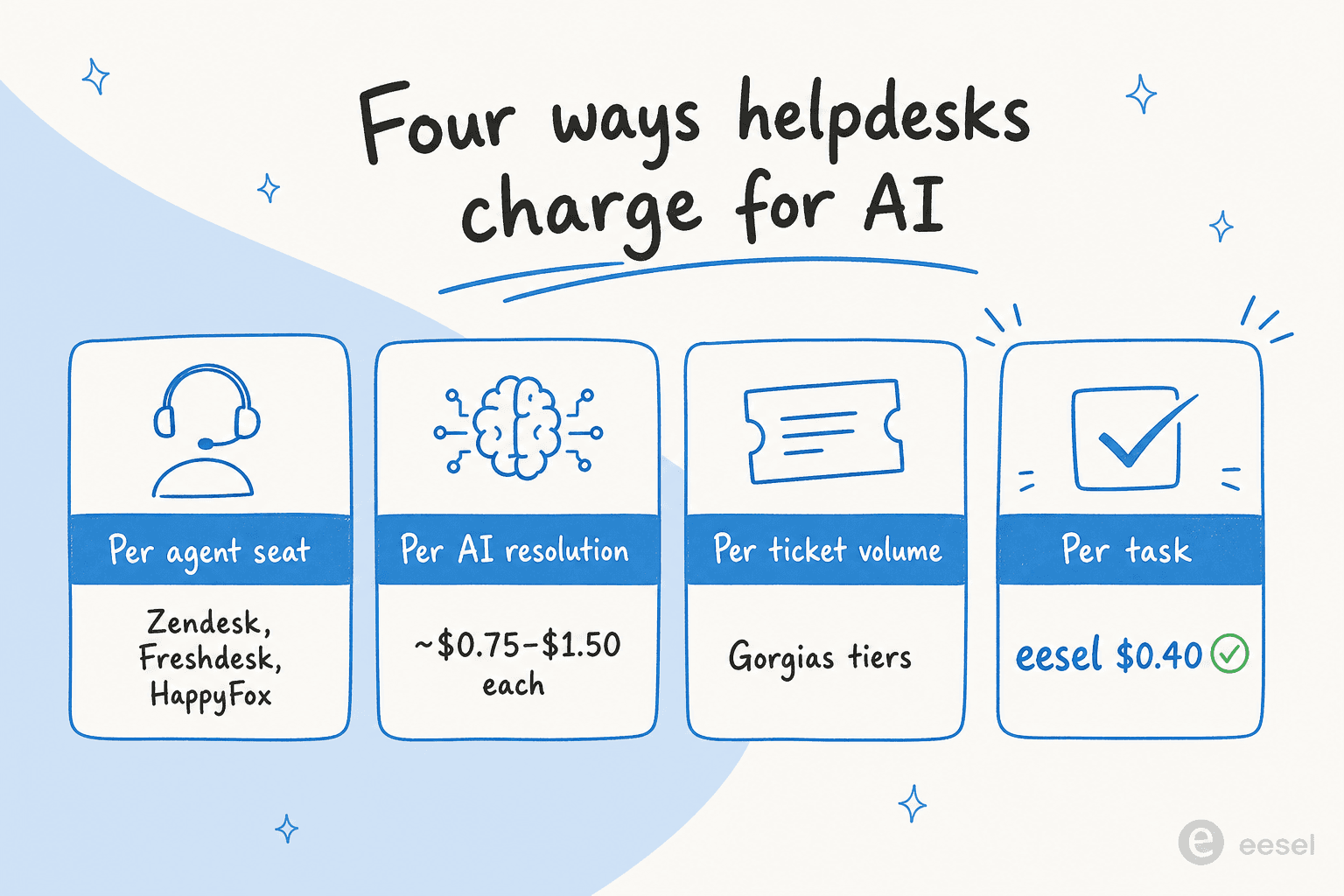
The trap is comparing a $19 seat price against a $0.90 resolution and assuming the cheaper sticker wins. It doesn't work that way. A per-resolution model can balloon when volume spikes; a per-seat model can punish you for adding occasional agents; a credit-based plan only counts tickets the AI actually works on. Pin down the unit before you fall for the headline number.
The 8 best Freshdesk alternatives at a glance
Here's the whole field, side by side. Product names link to the full write-up below.
| Tool | Best for | AI billing model | Starting price (annual) | Standout automation | Rating | SOC 2 |
|---|---|---|---|---|---|---|
| eesel AI | Adding AI to your existing helpdesk | Per credit (1 credit per ticket or chat) | Free (100 credits), then $299/mo | Self-serve setup, simulation on past tickets | New, fast-growing | Yes |
| Zendesk | Enterprise CX at scale | Per resolution ($1.50-$2.00) | $19/agent | Advanced AI Agents, Intelligent Triage | 4.3/5 (G2, 6,837) | Yes |
| Zoho Desk | Value and the Zoho ecosystem | Bundled (Zia) | $7/agent | Blueprint workflows, Zia auto-tagging | 4.4/5 (Gartner 4.5) | Yes |
| Gorgias | Shopify and ecommerce | Per automated interaction ($0.85-1.00) | $10/mo (50 tickets) | Shopify actions, AI Agent for refunds/orders | 4.6/5 (G2, 560+) | Yes |
| Help Scout | Small, relationship-driven teams | Per resolution ($0.75) | Free, then $25/user | AI Answers, Inbox Assistant drafts | 4.4/5 (G2) | Yes (Pro) |
| Front | Complex cross-team operations | Per outcome (from $0.05) + add-ons | $25/seat | Autopilot agent, no-code workflows | 4.5/5 (G2) | Yes |
| Kustomer | High-volume B2C and CRM-style support | Per engaged convo (~$0.60) | Quote-only (~$89/seat) | Concierge AI on a unified timeline | 4.4/5 (G2, 555) | Yes |
| HappyFox | IT plus multi-team support on a budget | Per agent + per task ($0.02) | $21/agent | Autopilot agents, Smart Rules | 4.6/5 (Capterra, 92) | Yes |
Now the detail.
1. eesel AI
Best for: teams that want advanced AI automation without leaving Freshdesk (or whatever helpdesk they're on).

We'll be upfront that this is our own tool, so read the verdict with that in mind. But it earns the top slot for a specific reason: it solves the exact problem that sends people off Freshdesk in the first place. Instead of asking you to migrate, eesel AI connects to your existing helpdesk and works inside it.
Here's how it fits together.
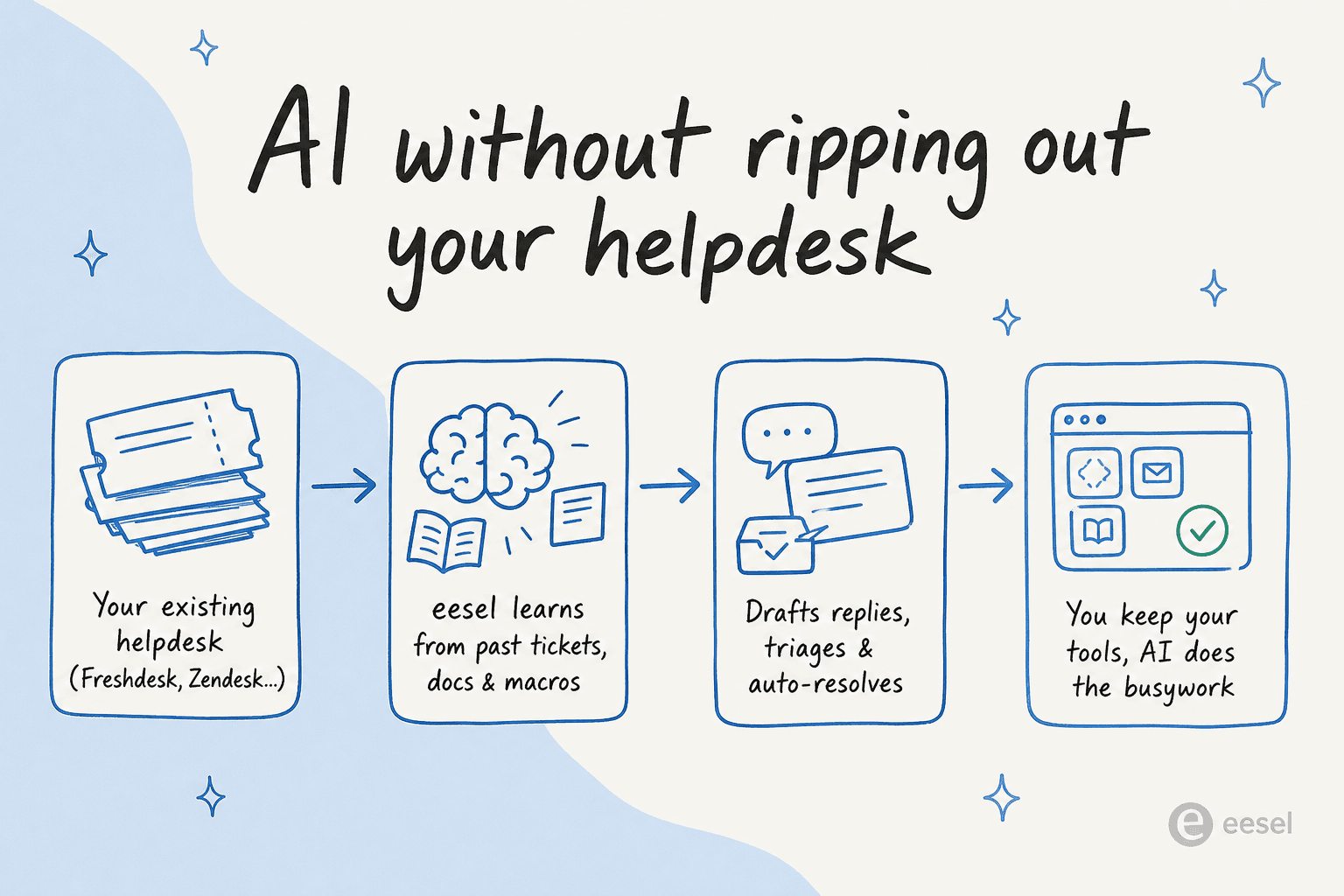
eesel plugs into Freshdesk, Zendesk, Zoho Desk, Slack, Gmail, Shopify, and 100+ other tools, learns from your past tickets, macros, and help docs, then drafts replies, triages and tags incoming tickets, and resolves the repetitive ones end to end. You keep your existing setup; the AI does the busywork on top of it.
Standout automation and AI. Two things set it apart for automation buyers. The first is a simulation mode that replays the AI over your real historical tickets, so you see the projected resolution rate and exact answers before a single customer touches it. That's the opposite of the "turn it on and hope" experience most AI agents give you. The second is granular control: you decide which ticket types the AI handles autonomously and which it just drafts for a human, so you can keep humans in the loop where judgment matters.
Pricing. One fixed monthly price, no seats. Every ticket or chat costs 1 credit, however long, and plans start at $299/month for 500 credits (1,000 credits is $499). There's a free plan with 100 credits and no card, and paying a year upfront gets you two months free. The full pricing is public, with optional overage capped at a limit you set so the bill can't run away from you.
Pros
- Sits on top of Freshdesk and other helpdesks, so there's no migration.
- Simulation on past tickets before go-live; no guessing on deflection rate.
- One fixed monthly price with an optional overage cap, so AI cost stays predictable.
Cons
- It's an AI layer, not a full ticketing system, so you still need a helpdesk underneath.
- Newer than the incumbents, so it doesn't have a decade of G2 reviews.
Our take: if your reason for leaving Freshdesk is the AI (cost, control, or it being trapped inside one tool) rather than the ticketing itself, an AI layer is the path of least resistance. You get advanced automation without the rip-and-replace. If you specifically need to ditch the helpdesk too, read on.
2. Zendesk
Best for: enterprise CX teams that want everything in one platform and have the budget to match.
Zendesk is the heavyweight, now positioned as "the Resolution Platform": ticketing plus a deep AI layer covering customer-facing AI Agents, an agent-side Copilot, Intelligent Triage, and AutoQA. It's a 2025 Gartner Magic Quadrant Leader, scores 4.3/5 across 6,837 G2 reviews, and has 1,800+ marketplace apps. If a feature exists in customer support, Zendesk probably has it.
Standout automation and AI. The Advanced AI Agents tier (derived from its Ultimate.ai acquisition) is the real automation engine: branching dialogue flows, generative procedures, authorized actions, and API integrations across messaging, email, and voice. Intelligent Triage auto-classifies every ticket by intent, sentiment, and language to drive routing. This is as deep as native helpdesk automation gets.
Pricing. The Suite ladder runs Support Team $19, Suite Team $55, Suite Professional $115 per agent per month, then Enterprise on quote. Copilot is a $50/agent/month add-on below Enterprise. The catch is the AI billing unit: the "automated resolution." Extra resolutions bill at $1.50 each committed or $2.00 pay-as-you-go, and the only overage control is to pause AI entirely. Per-resolution costs stack fast.
The community is blunt about it:
"No, it's just terrible and a rip off... We stopped using it because ARs are a rip off, and it's a rushed product to get into the AI hype."
u/OGShakey, r/Zendesk thread on AI Agents

Pros
- The most complete feature set on this list.
- Genuinely advanced AI Agents and triage.
- Huge app marketplace and integration depth.
Cons
- Per-resolution AI billing with no soft cap; costs are hard to predict.
- Admins repeatedly describe configuring the AI layer as a full-time job.
- Easily 2-3x the base subscription once AI add-ons stack on.
Verdict: the right call for large teams that need one platform and can staff the setup. If you mostly want Zendesk's AI without the AR bill, note that eesel and others run on top of Zendesk too, so you can keep the ticketing and swap the AI. See our Zendesk AI agents guide for the full setup math.
3. Zoho Desk
Best for: budget-conscious teams, especially anyone already living in the Zoho ecosystem.
Zoho Desk is the value champion. It's trusted by 125,000+ businesses, scores 4.5/5 on Gartner Peer Insights from 2,403 ratings, and is widely described on Reddit as doing "almost everything that Zendesk does at like half the cost." Its AI assistant, Zia, spans self-service chatbots, in-ticket agent assist, and admin automation.
Standout automation and AI. The automation backbone here is genuinely strong: Blueprint is a drag-and-drop process engine that enforces step-by-step resolution, and reviewers regularly call it "a game changer" for structured workflows. Zia adds auto-tagging, sentiment analysis, field predictions for auto-assignment, and an Answer Bot across 29 languages.
Pricing. This is where Zoho shines. There's a Free Forever plan for 3 agents, then Express $7, Standard $14, Professional $23, and Enterprise $40 per agent per month on annual billing. Zia's token allowance (up to 30M tokens/month) is included even on Free. The full Zoho Desk pricing breakdown is worth a read because of the catch below.
Pros
- Among the cheapest serious helpdesks here.
- Blueprint automation and SLA rules are powerful for the price.
- Free tier and a deep, cohesive Zoho ecosystem.
Cons
- Most advanced Zia features are gated to the Enterprise tier, pricing out the SMBs who are Zoho's core market.
- Reddit users are harsh on Zia quality: "a trainwreck of unhelpful responses."
- Steep learning curve and a cluttered UI (112 "learning curve" mentions on G2).
Verdict: unbeatable on price, and the automation rules are real. Just go in knowing Zia itself is the weak link, which is why some teams run a stronger AI on top of Zoho Desk. For a head-to-head with the incumbent, see Freshdesk vs Zoho Desk.
4. Gorgias
Best for: Shopify and ecommerce brands where support is also a revenue channel.
If you sell on Shopify, Gorgias is built for you specifically. It's Shopify's only Premier Partner for CX, powers 40% of the top Shopify brands, and scores 4.6/5 from 560+ G2 reviews. The whole product is designed around pulling Shopify order data into every ticket.
Standout automation and AI. The AI Agent runs in two modes, a pre-purchase shopping assistant and a post-purchase support agent, and crucially it can take Shopify actions: track orders, process refunds, edit subscriptions, and generate discount codes, fully automated. Gorgias claims it automates up to 60% of support. That action-taking is what separates it from chatbots that just answer FAQs.
Pricing. Gorgias bills by ticket volume, not seats: Starter $10 (50 tickets), Basic $60 (300), Pro $360 (2,000), Advanced $900 (5,000), then Enterprise. The AI Agent is an add-on at $0.85-1.00 per automated interaction. The community rule of thumb: it's worth it if 40%+ of your tickets need direct Shopify actions.
Pros
- The deepest Shopify integration on the market, full stop.
- AI Agent takes real ecommerce actions, not just replies.
- Unlimited agents on every plan.
Cons
- Roughly 3x the cost of Zendesk for similar ticket volumes.
- Pricing by ticket volume can sting in a high-traffic month.
- Overkill if you're not an ecommerce brand.
Verdict: if you're on Shopify, it's a top pick and the AI Agent is the real draw. If the price gives you pause, our best Gorgias alternatives and best AI helpdesk for ecommerce cover cheaper ways to get Shopify-aware automation.
5. Help Scout
Best for: small, relationship-driven teams that want a human, email-like feel.
Help Scout is the anti-enterprise pick: a clean, low-clutter shared inbox you can learn in under an hour. It's used by 12,000+ companies, and the single most-repeated praise is how fast new agents get productive. Its AI layer resolves a claimed 73% of interactions on average.
Standout automation and AI. AI Answers is the customer-facing agent (autonomous resolution from your knowledge base and web), and the Inbox Assistant handles the agent side: AI Drafts auto-writes replies, AI Summarize recaps long threads, and AI Assist edits tone and translates. It's less about deep branching automation and more about quietly speeding up a human team.
Pricing. There's a free tier for up to 5 users, then Standard $25, Plus $45, and Pro $75 per user per month on annual billing. AI Answers is a usage add-on at $0.75 per resolution. The complaint to know about: at 1,000 resolutions that's an extra ~$750/month on top of seats.
The bigger trust issue is pricing instability. Help Scout switched from per-seat to per-interaction pricing, churned customers, then reverted:
"HelpScout changed back to user-based pricing. Guess too many people cancelled including me... Helpscout lost all trust with this flip-flopping on pricing."
u/manu_8487, r/SaaS, November 2025
Pros
- Easiest tool here to adopt; minimal training.
- Clean, human, email-like experience.
- Free tier and a genuinely useful Inbox Assistant.
Cons
- Thin reporting and limited advanced features.
- AI pricing stacks on top of seats and adds up at scale.
- Scaling teams report outgrowing it.
Verdict: great for a small team that values simplicity over automation depth. If you're growing fast, check our Help Scout alternatives and the Help Scout review before you commit.
6. Front
Best for: complex, cross-team customer operations that span multiple departments.
Front deliberately positions against simple support: "AI for simple support is everywhere. Complex customer operations demand Front." It blends a shared inbox with helpdesk capabilities and heavy cross-team collaboration, trusted by 9,300+ companies with 160+ integrations. It's the pick when a single request has to bounce across logistics, finance, and support before it's resolved.
Standout automation and AI. Front AI claims to resolve up to 70% of requests, "not just the low-hanging fruit." Autopilot is the omnichannel AI agent, Copilot assists agents in real time, and no-code workflows plus flexible tagging automation route work across teams. The differentiator is coordination, handling multi-step requests that other tools just escalate.
Pricing. Per seat, billed annually: Starter $25, Professional $65, Enterprise $105 per seat per month. AI is mostly an add-on: Autopilot is billed by outcome ($0.05 triage, $0.39 handoff, $0.89 resolution), and Copilot is $20/seat/month (included on Enterprise). One customer captured the upside:
"After switching from Zendesk, we saw our productivity improve by 40% in our member support team managing email, text, and chat channels."
Joe Emison, CTO of Branch, on Front's homepage
Pros
- Best-in-class for multi-team, multi-step operations.
- Strong collaboration and no-code workflow tooling.
- AI built for complex requests, not just FAQs.
Cons
- AI capabilities are fragmented into separate paid add-ons.
- Overkill (and pricey) for straightforward FAQ support.
- Per-seat plus per-add-on pricing gets complicated fast.
Verdict: the strongest fit for operations teams, less so for simple deflection. If you're comparing it against simpler tools, our Front alternatives and Help Scout vs Front pieces help.
7. Kustomer
Best for: high-volume B2C brands that want a CRM-style, customer-centric model.
Kustomer flips the model: instead of a ticket-centric helpdesk, it's built on a unified customer timeline, so every interaction ties back to a complete record (order history, loyalty tier, churn risk). Its pitch is "AI runs on context, not guesswork." It's trusted by 600+ companies, heavily skewed to retail and DTC, and scores 4.4/5 from 555 G2 reviews.
Standout automation and AI. The native AI suite is four products: Concierge (customer-facing autonomous resolution across chat, email, SMS, and WhatsApp), Envoy (agent copilot), Architect (a no-code AI builder with native Model Context Protocol support), and Data Explorer (conversational analytics). Vuori reportedly automates 70% of all chat conversations on it.
Pricing. This is the friction point: pricing is quote-only. Competitor teardowns put it around $89/seat (Enterprise) or $139/seat (Ultimate), annual, with an 8-seat minimum, and AI billed separately at roughly $0.60 per engaged conversation plus ~$40/user for agent-assist AI. Treat those as directional, since Kustomer publishes no figures. The full Kustomer pricing picture is worth checking.
Pros
- Unified customer timeline is excellent for high-volume B2C.
- Genuinely strong autonomous AI in Concierge.
- Omnichannel including SMS, WhatsApp, and voice.
Cons
- No public pricing, 8-seat minimum, and AI metered on top.
- Reviewers flag a buggy voice channel and a complex UI.
- A technical buyer called the API "somewhat stagnant."
Verdict: a strong B2C platform if you can stomach the seat floor and the sales-led pricing. For smaller teams, our Kustomer alternatives cover lighter options.
8. HappyFox
Best for: teams supporting IT and multiple internal departments on a tighter budget.
HappyFox is a broad support suite that covers customer service, IT service management, and employee support under one roof. It's used by 12,000+ organizations, claims 98% CSAT, and a Forrester study cites 401% ROI for power users. Its strongest selling point is doing "75-80% of the features" of the big players at a fraction of the price.
Standout automation and AI. HappyFox splits AI across several products: HappyFox AI (agent copilot with summaries and reply drafts), Autopilot (a fleet of pre-built AI agents like a Duplicate Ticket Notifier and a Shopify Return Policy Checker), Assist AI (a 24/7 IT/HR assistant inside Slack and Teams), and a deflecting Chatbot. Underneath it all, Smart Rules handle the classic trigger-condition-action automation for SLAs and auto-assignment. Notably, its Workflows product uses Anthropic as the LLM for generative steps.
Pricing. Agent-based: Basic $21 (capped at 5 agents), Team $39, Pro $89 per agent per month annual, then Enterprise on quote. AI is priced separately, with HappyFox AI at $14-29/agent/month and Autopilot at $0.02 per completed task. Value is the consistent theme in reviews:
"It is incredible... for the price I do not think that it can be beaten."
Verified reviewer, HappyFox on Capterra (4.6/5, 92 reviews)

Pros
- Covers customer, IT, and employee support in one tool.
- Strong value; high feature-to-price ratio.
- Pre-built Autopilot agents are quick to deploy.
Cons
- Reviewers call the reporting "very challenging" and the KB editor weak.
- Basic plan is capped at 5 agents.
- AI-quality track record is still thin (the AI products are new).
Verdict: a smart budget pick if you need to support internal teams as well as customers. Just temper expectations on the newer AI products until more user feedback lands.
How to actually choose
Eight tools is a lot, so here's the shortcut. Match your situation to the pick.
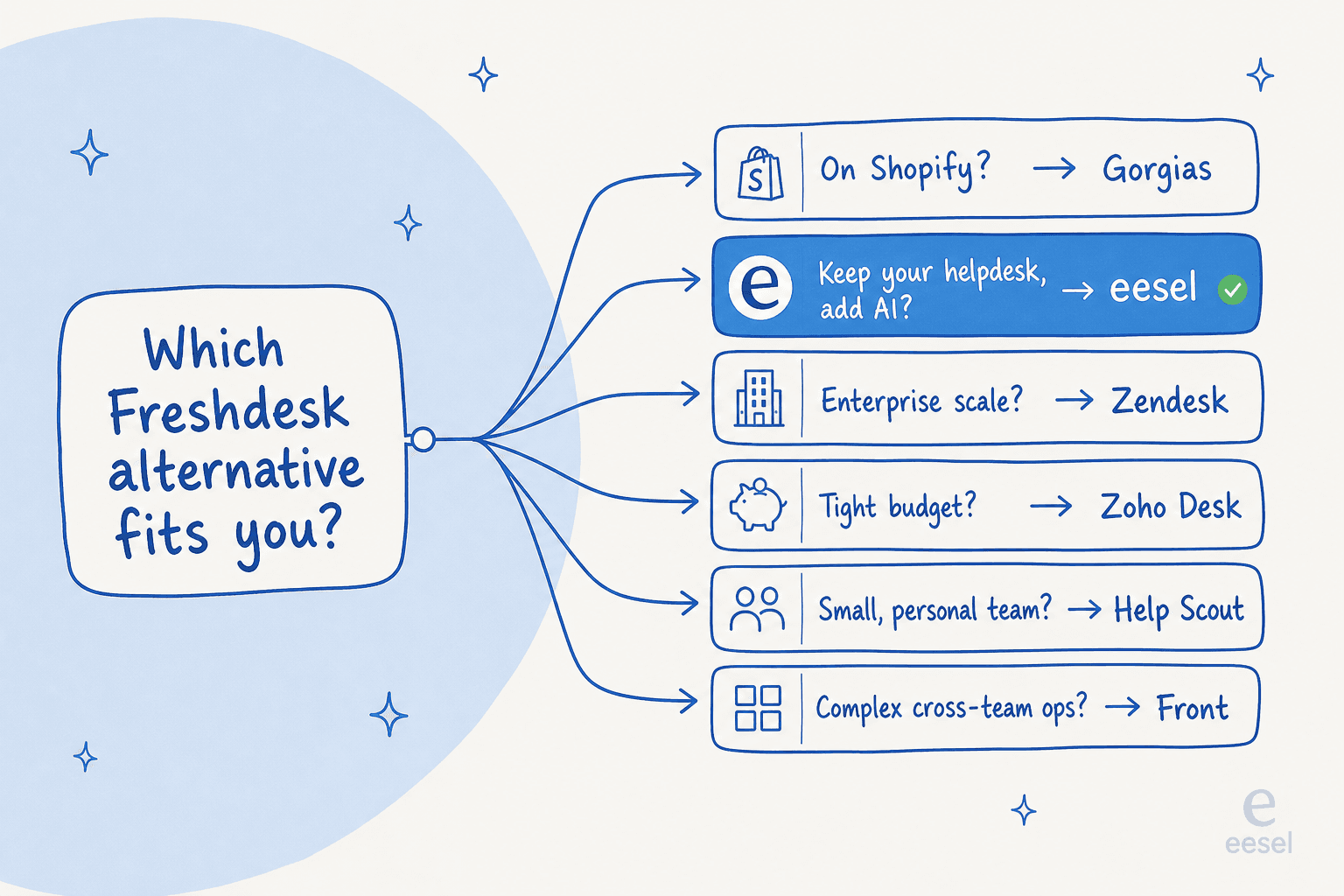
- You're on Shopify -> Gorgias, every time.
- You want AI automation but don't want to migrate -> add eesel AI on top of your current helpdesk.
- You're enterprise with budget and need everything in one place -> Zendesk.
- You're cost-sensitive or already in Zoho -> Zoho Desk.
- You're a small, personal-feel team -> Help Scout.
- Your requests span multiple departments -> Front.
- You're high-volume B2C and want a CRM model -> Kustomer.
- You support IT plus other internal teams on a budget -> HappyFox.
The one mental shift worth making: leaving Freshdesk doesn't have to mean a migration. If your frustration is specifically with the AI (its cost, its limits, or the fact that it can't see beyond Freshdesk), the lowest-risk move is to keep the helpdesk and change the AI layer. That's the whole reason AI helpdesk tools that run on top of your stack exist.
Try eesel
If the reason you're reading this is Freddy AI rather than Freshdesk itself, eesel AI is built for exactly that. It connects to Freshdesk in a few clicks, learns from your past tickets and help docs, and starts drafting and resolving the repetitive stuff, no migration, no rip-and-replace.
The differentiator most teams care about: you can simulate the AI on your real ticket history before going live, so you see your projected resolution rate up front instead of guessing. Pair that with a fixed monthly price and an optional overage cap, and the AI cost stops being a mystery. You can start free and see the numbers on your own tickets in an afternoon.