Open-source tools like Chatwoot have a certain magic to them. They promise a world where you’re not locked into platforms like Zendesk. You get full control over your data, endless customization options, and the chance to save on subscription fees. For teams who love flexibility, it sounds pretty great.
But what’s it really like to run a tool like Chatwoot? The day-to-day reality can be a bit more complicated than just firing up a server. This guide is an honest look at what Chatwoot offers, from its core features to who it’s actually for. We’ll also get into the common headaches, like tricky setups and constant upkeep, and show you a different, AI-first approach that beefs up your current tools without making you start from scratch.
What is Chatwoot?
At its heart, Chatwoot is an open-source, self-hosted platform designed to bring all your customer conversations into one place. Think of it as a single dashboard for your website's live chat, support emails, and social media DMs from Facebook, Twitter, and WhatsApp.
It’s built for businesses that have developers on hand and want total command over their support tools. This is a big deal for companies in fields like finance or healthcare, where owning your data is a must-have, not a nice-to-have. While Chatwoot does have a paid cloud version, the main appeal has always been its open-source roots. You can grab the code, host it on your own servers, and tweak it however you like. That’s a lot of power, but it also comes with a lot of responsibility.
A look at Chatwoot's features and setup
To figure out if Chatwoot is right for you, you need to weigh what it can do against the effort it takes to get it running.
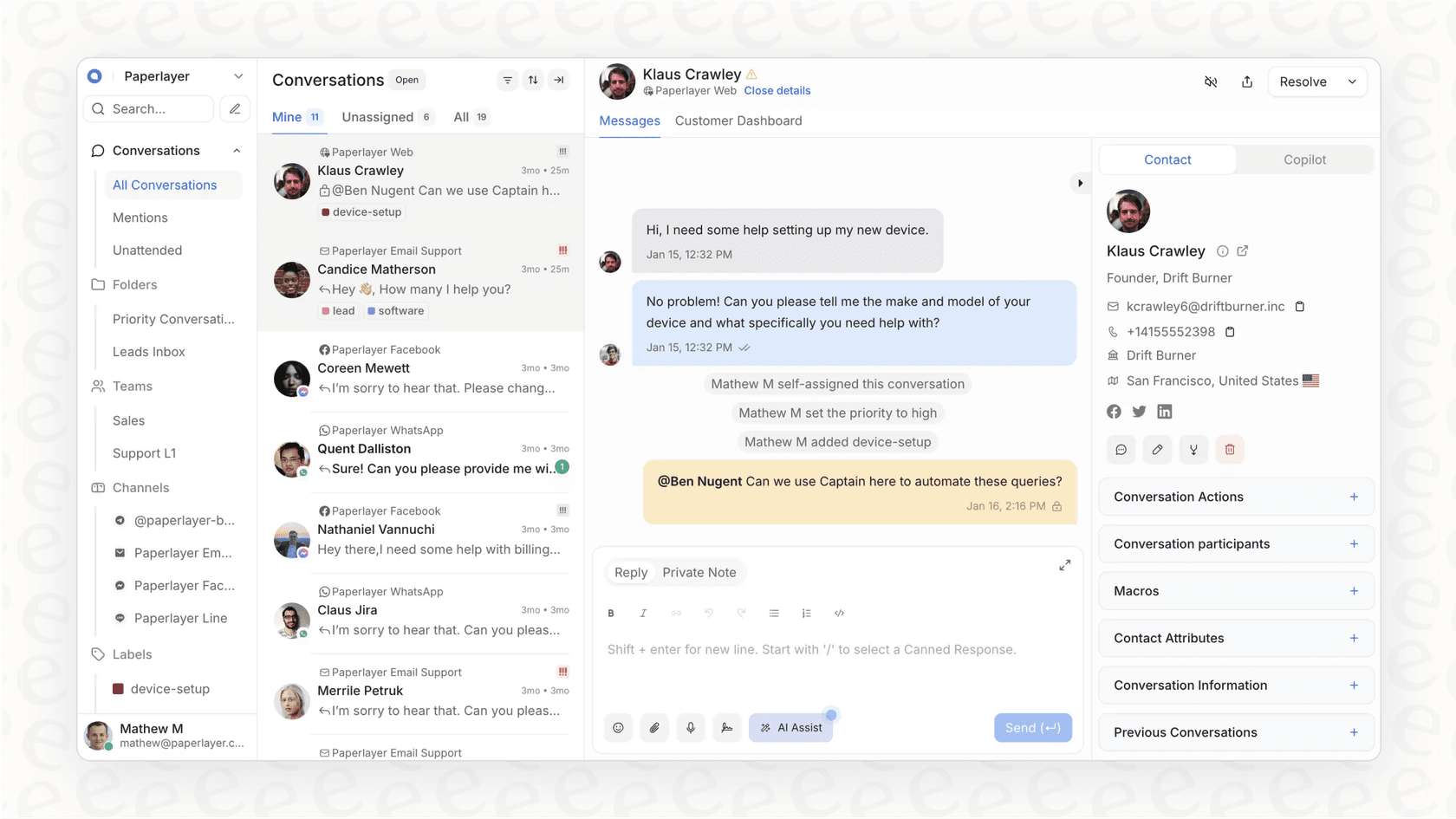
One inbox for everything
Chatwoot’s main attraction is its shared omnichannel inbox. It pulls in conversations from all your different channels, so your support team can work together without constantly switching between browser tabs. You can hook up your company’s Facebook page, Twitter DMs, email, and more.
It also comes with a live chat widget for your website that you can customize with your brand colors and language. It’s a nice touch for a consistent customer experience, but just know that every single channel has to be set up one by one, which can eat up a surprising amount of time.
The self-hosting reality check
This is where the dream of "free" software gets a dose of reality. Getting a Chatwoot server ready for real customers isn't a simple one-click affair. A standard setup usually involves:
-
Getting a server: You'll need to rent a Linux virtual machine from a service like AWS or DigitalOcean.
-
Installing all the pieces: This means setting up other software it depends on, like Docker, PostgreSQL, and Redis.
-
Pointing your domain to it: You’ll have to configure DNS records and a web server like Nginx to manage traffic and secure your site with SSL/TLS.
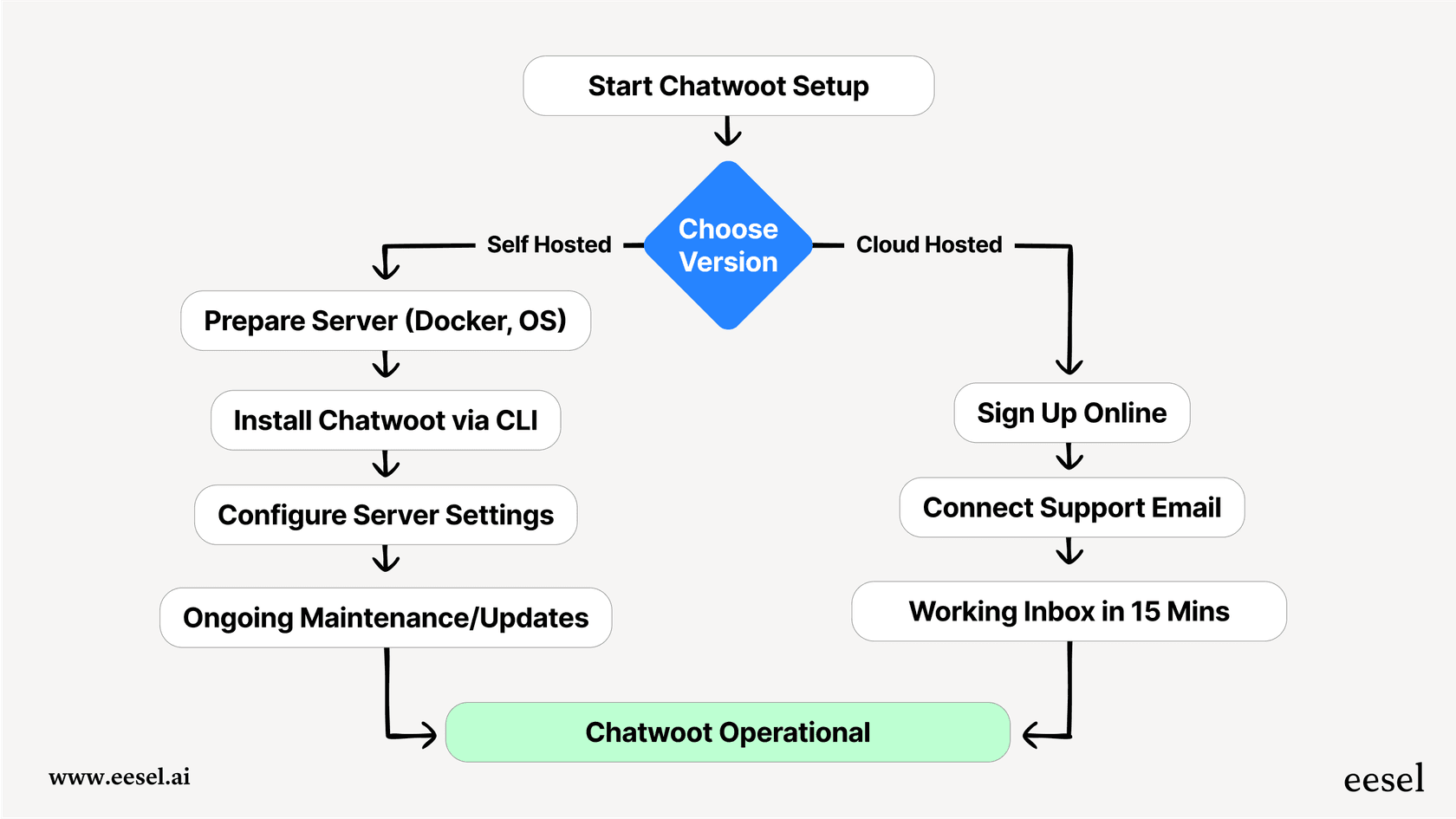
This isn't a job for the faint of heart; it requires someone who’s comfortable with server management and the command line. It's probably not something your support manager can knock out between meetings. This complexity is a common theme in user feedback, with people mentioning instability and confusing instructions. One user on Reddit even called their setup the "Chatwoot that fell constantly," a frustration that hits home for anyone who's tried to self-host important tools.
It’s a different world from modern AI tools designed for simplicity. For instance, a platform like eesel AI plugs right into the helpdesk you’re already using, whether it’s Zendesk or Freshdesk, often with just a single click. Instead of losing days to server setup, you can be up and running in minutes, putting your energy into better support, not just maintaining your software.
AI and chatbots in Chatwoot
Chatwoot has an AI assistant called "Captain" that now handles first-response conversations on its own, learning from your help center, past chats, and FAQs before handing off to an agent. It also includes a Copilot for suggesting replies to your agents and Smart FAQs that surface questions your help center doesn't cover. On the cloud plans it runs on credits (300 on Startups at $19/agent/month, 500 on Business at $39), and not at all on the free Hacker plan. For custom automation, you can plug your own bot into any inbox through the Agent Bot API.
But this brings another layer of work. Building, training, and maintaining a chatbot on a separate platform is a whole project on its own, requiring specialized AI skills. You end up juggling two complex systems that have to play nicely together.
This is where an all-in-one tool really shines. eesel AI includes a ready-to-go, autonomous AI Agent from the get-go. It learns from your past tickets, help articles, and other documents to give customers complete and accurate answers. The AI can resolve tickets, add tags, and hand things off to a human agent when needed, all managed through a simple, no-code dashboard. No bolting on other systems required.
Who is Chatwoot for (and who is it not for)?
So, let's get down to it. When does Chatwoot make sense, and when might you want to look elsewhere?
Chatwoot is a great fit for...
Chatwoot can be a fantastic choice, but it’s not for everyone. It really clicks with teams that:
-
Have strong in-house developers: If you have engineers who can set aside time for setup and regular maintenance, Chatwoot can be a great way to dodge SaaS fees.
-
Need to control their own data: For companies dealing with sensitive information, hosting customer data on your own private servers is often a must.
-
Require deep, custom features: If you need to build very specific functions into your support tool, having full access to the source code is a huge plus.
Where the open-source road gets bumpy
For many businesses, the trade-offs of a self-hosted platform can start to feel pretty heavy.
-
The hidden cost of "free": "Free" software isn't actually free. The time your engineering team spends on updates, security patches, and fixing things that break is a real cost. Every hour they work on Chatwoot is an hour they aren't working on your actual product.
-
The scaling headache: As you grow, so will your support tickets. Keeping your self-hosted Chatwoot fast and stable under a heavy load can easily turn into a full-time job for a dedicated engineer.
-
Credit-capped built-in AI: Captain can automate first responses, but it runs on a monthly credit allowance per plan. For custom bot logic beyond it, you’ll have to build and manage your own bot through the Agent Bot API.
-
The "rip and replace" problem: Moving to Chatwoot is a big commitment. It means pulling your entire support team out of their current helpdesk, whether that’s Zendesk, Intercom, or something else. This is a massive project involving moving data, retraining everyone, and rebuilding all your workflows.
A Chatwoot alternative: Add AI to the helpdesk you already use
Instead of tearing everything down and starting over, what if you could just make your current setup smarter? That's the idea behind modern AI platforms that add on to your existing tools, giving you powerful new features without the painful migration.
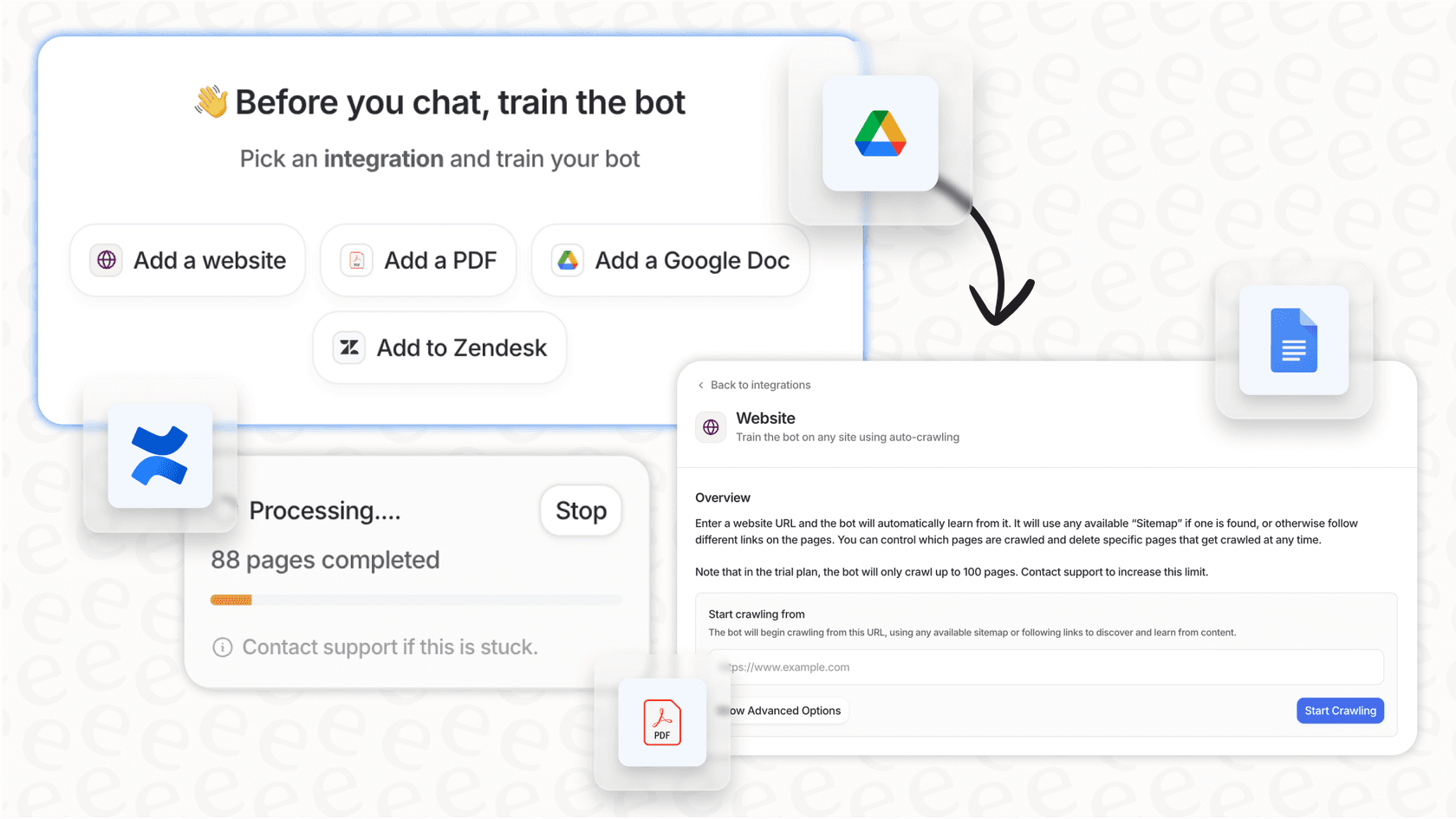
eesel AI is built to do just that. It connects directly to your helpdesk, pulls knowledge from your docs in Confluence or Google Docs, and even works with chat tools like Slack. You get a top-tier AI agent without ditching the tools your team already relies on.
Go live in minutes, not weeks
The difference in setup is night and day. With eesel AI, the whole process is genuinely self-serve. You can sign up, connect your helpdesk, and get your first AI agent running all on your own, without having to sit through a sales call.
Best of all, you can launch it with confidence. eesel AI's simulation skill lets you test your AI against hundreds of your past tickets in a safe, sandboxed environment. You can see how it would have answered, get each answer scored with suggested fixes that protect your resolution rate, and tweak its behavior before it ever talks to a real customer. Chatwoot's Captain pages don't list a replay against past tickets like this.
Give your AI the right answers, easily
An AI is only as good as the information it has. The eesel AI AI Agent starts by learning from your team's resolved tickets, so it picks up your brand voice and common solutions right away.
From there, you’re in the driver's seat. A simple, no-code workflow builder lets you decide exactly what kinds of tickets the AI should handle. You can set its personality, connect it to other tools to pull live data (like order status from Shopify), and create clear rules for when to pass a chat to a human. It's all the control you need, without writing a line of code.
| Feature | Chatwoot | eesel AI |
|---|---|---|
| Setup Time | Days to weeks; needs a developer | Minutes; completely self-serve |
| Core Model | Replaces your helpdesk | Plugs into your existing helpdesk |
| AI Training | Captain learns from help center, chats, FAQs (credit-capped) | Learns automatically from your tickets & docs |
| Automation Control | Basic rules; coding for complex logic | Easy, no-code workflow builder |
| Pre-launch Testing | Manual testing on a live setup | Safe simulation on historical tickets |
| Maintenance | All on you and your team | Fully managed for you |
Pick the tool that matches your focus
Chatwoot is a powerful platform for tech-savvy teams who value the complete control of open-source and have the engineering time to invest in it. It lets you build your support system exactly how you want it, but you're also the one responsible for keeping it up and running.
For most teams, though, the main goal is to deliver great support, not to manage servers. If you want to use powerful AI to automate tickets and help your agents without the operational headache, a managed platform that works with your existing tools is the smarter way to go. You get all the perks of AI without the pain of a massive migration.
Ready to see what AI can do for your current support stack? Try eesel AI for free and automate your first few tickets in minutes.
Frequently asked questions
What exactly is Chatwoot, and how does it help businesses manage customer conversations?
Chatwoot is an open-source, self-hosted platform designed to centralize all customer conversations from various channels like live chat, email, and social media into a single shared inbox. It provides businesses with full control over their support infrastructure and data.
How complicated is it to set up and self-host Chatwoot on my own servers?
Setting up and self-hosting Chatwoot is a complex process that requires significant technical expertise in server management, Docker, PostgreSQL, and Nginx. It's not a one-click solution and typically demands dedicated developer time for initial deployment.
Can Chatwoot handle advanced AI automation and chatbot functionalities out of the box?
Chatwoot's Captain AI can answer first-response conversations from your help center, past chats, and FAQs, and help agents draft replies, with a credit allowance on paid cloud plans (300 on Startups, 500 on Business). For custom bot logic beyond that, you plug your own bot in through the Agent Bot API, which adds another layer of setup and maintenance.
Which kinds of teams or businesses would benefit most from using Chatwoot?
Chatwoot is an excellent fit for teams with strong in-house developers who need deep customization and complete control over their customer data, especially in regulated industries like finance or healthcare. It suits those willing to invest engineering resources into their support platform.
How does Chatwoot address the need for data control and privacy for sensitive information?
By being a self-hosted solution, Chatwoot allows businesses to host all customer data directly on their own private servers. This ensures maximum control over data privacy and compliance, which is often a critical requirement for companies handling sensitive information.
What are the main challenges when it comes to scaling Chatwoot for a growing customer base?
Scaling Chatwoot can become a significant challenge, potentially turning into a full-time job for a dedicated engineer as your support volume grows. Ensuring stability, speed, and consistent performance under heavy load requires continuous monitoring and optimization of your self-hosted infrastructure.