Why do new support agents take so long to ramp?
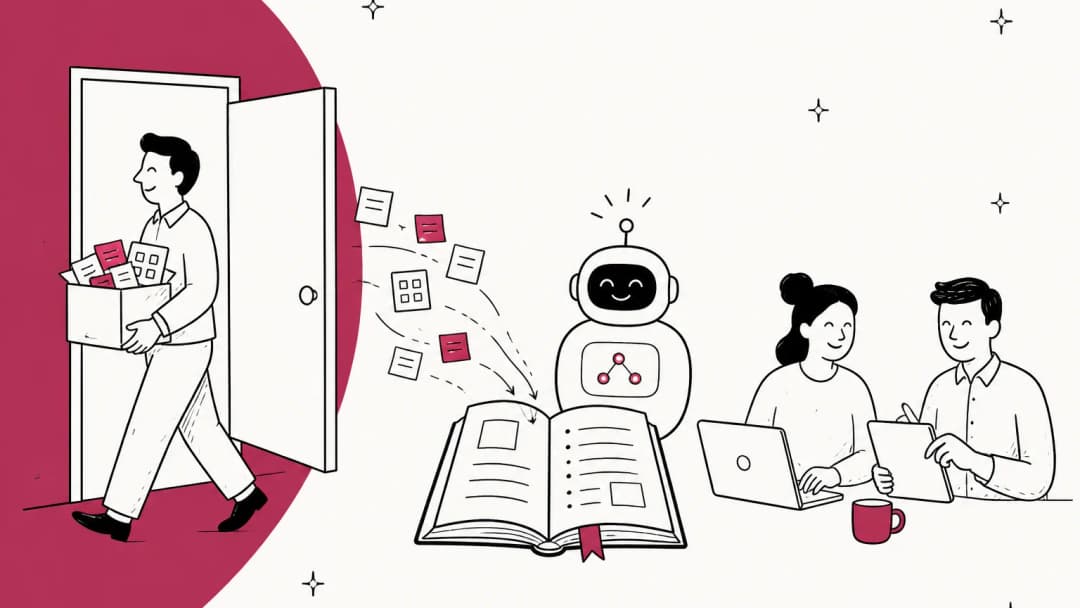
I build the AI agents at eesel, and the funny thing about my job is that a new AI teammate learns exactly the way a new support hire does. It reads the help center, studies a few hundred past tickets, drafts answers, gets corrected, and gets better. When it struggles, it's never because it couldn't read the policy doc. It's because the policy doc doesn't say how the team actually answers a refund request from a customer who's already been refunded once.
New humans hit the same wall. Most training covers the policy, then drops people into the queue.
"My training was three days, trainer took 3 calls, asked if I had any questions then threw me on the phones."

Even teams that do write things down find the gap. FastMail's team said on Hacker News that their support staff "learned on the job from each other" and later called that a failing. A tech writer on the same site said building a support wiki cut call times by 40% for one team, because agents finally had a place to look things up. The lesson I take from both: the course is the easy part; the first weeks on real tickets are the slow part. That's why your knowledge base and macros end up being training material whether you planned it or not.
So before picking a tool, decide which of four jobs you're hiring it for.
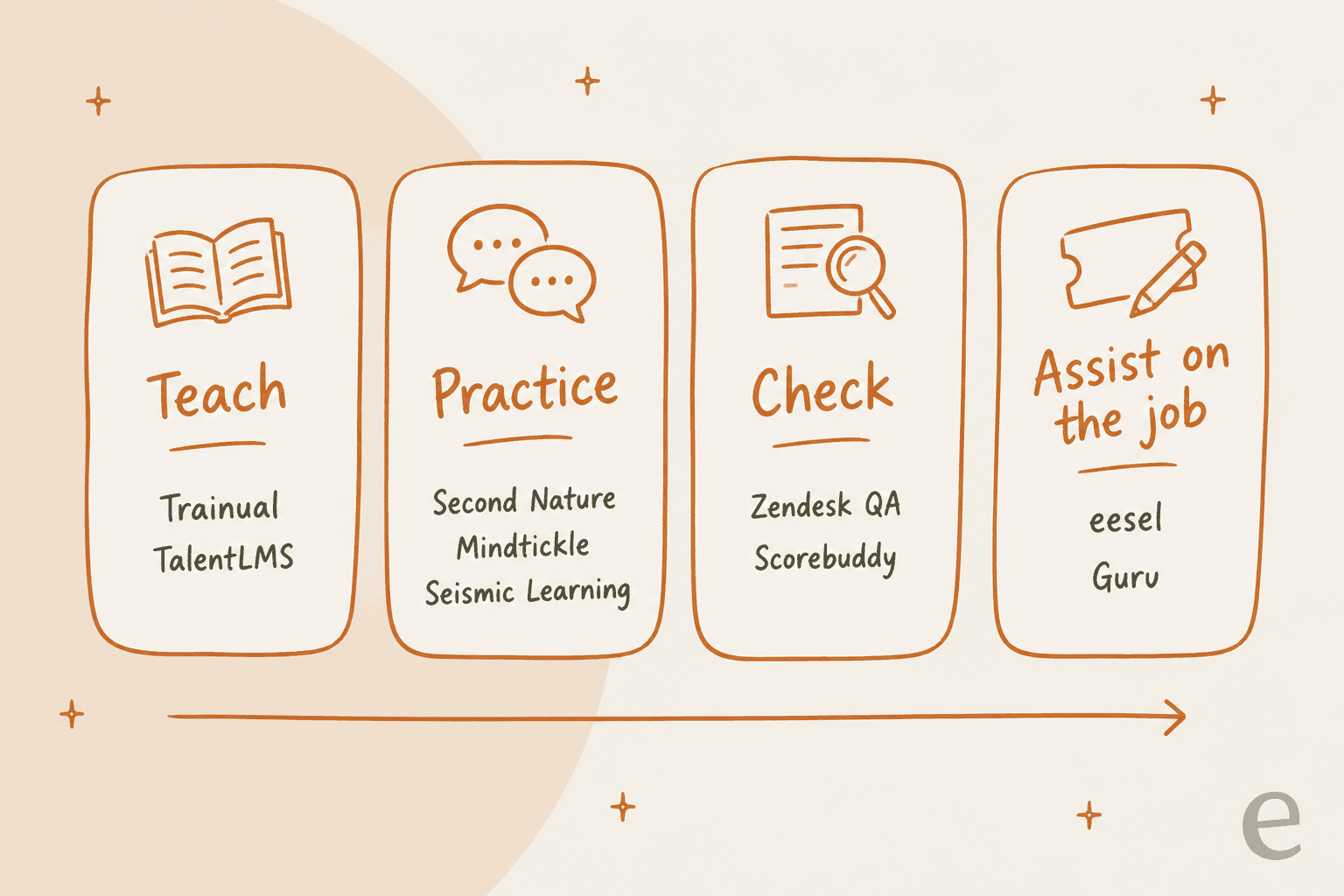
- Teach: courses, SOPs and quizzes on products and policies. TalentLMS and Trainual live here.
- Practice: rehearsing conversations before they're real. Second Nature, Mindtickle and Seismic Learning.
- Check: reviewing real tickets, scoring them, and coaching from what you find. Zendesk QA and Scorebuddy.
- Assist on the job: help inside the queue while the agent works. eesel drafts replies from past tickets; Guru surfaces verified answers.
If you only buy a "teach" tool, you get agents who pass the quiz and still ping a senior every 20 minutes. I've written more on setting the goals for each stage in customer service training objectives.
How I picked these tools
I started from what a support lead actually asks: "New agents take forever to get up to speed. What should we use?" I put a version of that question to ChatGPT and it named Trainual, Seismic Learning, Mindtickle and "your helpdesk plus a QA tool", so every one of those gets its own section here. I added the tools that fill the gaps it left.
For each tool I read the vendor's own pricing page, product pages and help center, and checked review sites for what users complain about. I scored them on five things:
- Fit for support specifically, not sales enablement wearing a support hat.
- Practice on real tickets, or at least realistic ones.
- Helpdesk connection, since that's where agents spend their day.
- Pricing you can see before a demo call.
- How much setup before the first agent learns anything.
A pattern jumped out fast: six of the nine tools don't publish a price, and only three connect to a helpdesk in a way that touches real tickets.
Support agent training software compared
| Tool | Job | Best for | Starting price | Free plan or trial | Practice on real tickets | Helpdesk connection | AI features | Security | G2 rating |
|---|---|---|---|---|---|---|---|---|---|
| eesel | Assist on the job | Teams who want new agents drafting real replies from day one | Free (100 credits); Teammate from $299/mo for 500 credits, unlimited seats | Free plan | Yes, drafts on live tickets that an agent approves | Zendesk, Freshdesk, Gorgias, Help Scout and more | Drafts from past tickets, Slack Q&A, simulation | EU or US data residency; HIPAA with BAA on Enterprise; SOC 2 Type II underway | Not listed |
| Trainual | Teach | SOP-heavy onboarding at 25 to 1,000 person companies | Quote only, plus $1,000 setup | Demo only | No | None found | AI doc drafts, auto quizzes, knowledge Q&A | SOC 2 Type 2 | 4.7 across review sites (vendor figure) |
| TalentLMS | Teach | Teams who want public pricing and a free start | Free (5 users); Core $119/mo yearly for 1 to 40 users | Free plan and 14-day trial | No (AI role play is generic) | Chat embed and user sync only | TalentCraft course builder, AI role play, AI Coach | ISO 27001, GDPR, CSA STAR Level 1 | 4.6 from 784 (vendor figure) |
| Seismic Learning | Teach and practice | Zendesk teams who want practice on real tickets | Quote only | Demo only | Yes, via Zendesk Practice app | Two free Zendesk apps | AI role-plays, AI feedback, AI lesson authoring | SOC 2 Type 2, ISO 27001 (Seismic-wide) | Listing retired |
| Second Nature | Practice | Voice roleplay of tough customer conversations | Quote only | Demo only | No, scenarios built from docs | None published | AI voice personas, AI rubric, 45 to 90 second feedback | SOC 2 Type 2, ISO 27001, HIPAA, GDPR | 4.7 from 438 |
| Mindtickle | Practice | Large contact centers training systems and calls together | Quote only | Demo only | No, replica app screens | No helpdesk named | AI Role Play Simulator with app simulation | ISO 27001, SOC 2, HIPAA, GDPR | 4.7 from 2,401 |
| Zendesk QA | Check | Zendesk teams coaching from reviewed tickets | $35/agent/mo add-on, yearly | Via sales | Yes, coaching on reviewed conversations | Native to Zendesk | AutoQA scoring, quizzes | SOC 2 Type 2, GDPR, HIPAA-enabled | No separate listing |
| Scorebuddy | Check and teach | Contact centers wanting QA and an LMS in one place | Quote only; LMS is an add-on | 14-day free trial | Yes, coaching tied to the scored conversation | Zendesk, Freshdesk, Salesforce and more | AI Auto Scoring, AI course authoring | ISO 27001:2022, SOC 2 Type 2 | 4.5 from 835 |
| Guru | Assist on the job | Verified answers inside the tools agents already use | Custom package only | Demo only | No | Zendesk, Slack, Teams and 100+ sources | Knowledge Agents, AI search, verification | SOC 2 Type II, HIPAA | 4.7 from 2,322 |
Not sure which column matters for you? The picker below maps the most common ramp problem to the kind of tool that fixes it.
What slows your new agents down the most?
Pick the one that sounds most like your team right now.
Choose an option above to see which kind of tool fits.
You need a Teach tool. Put policies, products and macros into short courses with quizzes.
Start with TalentLMS (free for 5 users) or Trainual if your SOPs are scattered across docs. Keep modules short; nobody remembers 75 videos.
You need a Practice tool. Let agents rehearse the hard conversations before they're real.
Second Nature and Mindtickle do AI voice roleplay with scoring. On a smaller budget, TalentLMS includes an ungraded AI role play.
You need help on the job. The answers exist, they're just in a senior's head or buried in old tickets.
eesel learns from your past tickets and macros and drafts replies inside the helpdesk; Guru surfaces verified knowledge cards. Both stop the shoulder-tap.
You need a Check tool. Review real tickets, spot the pattern, coach one skill at a time.
Zendesk QA if you're on Zendesk; Scorebuddy if you want QA and an LMS in one. Pair it with drafts a senior approves for the first weeks.
You need things that scale without a trainer. Per-seat pricing hurts most here.
A course tool for week one, plus eesel with unlimited seats so every new hire gets the same AI help on live tickets, whether you hire 3 or 30.
1. eesel
Best for: teams who want new agents working real tickets in week one, with an AI teammate that already knows how the team answers.
What it does for agent training
eesel isn't a course platform, and I'd be misleading you if I put it in that column. It's an AI helpdesk teammate that joins your existing queue. For training, that matters because it fills the stretch every other tool on this list leaves empty: the first weeks when a new agent is on real tickets and doesn't yet know how your team answers them.
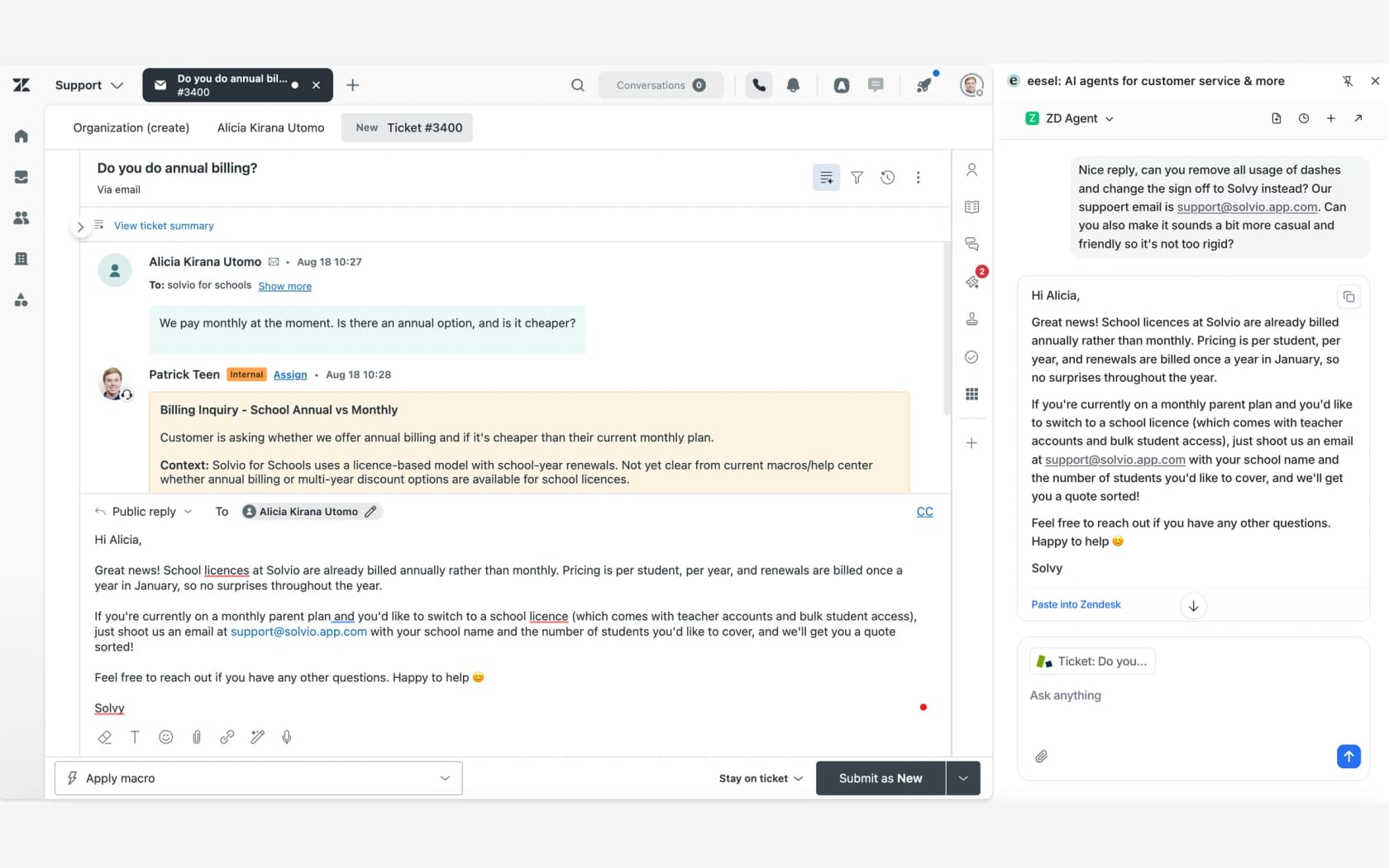
When you connect it to Zendesk, it reads your help center, macros and past tickets "so it already knows how your team answers" (eesel docs). You can sample up to 1,000 recent tickets and redact personal data first. From there, a new agent can call @eesel in an internal note and get a draft reply on demand, or use the browser extension to draft from the open ticket (helpdesk docs). The agent reads it, fixes it, sends it. That's the shadow-mode step training plans talk about, except the senior is always available.
The same setup works on Freshdesk, and on Gorgias and Help Scout too, so you don't need to switch helpdesks to train this way.
The customers who use it this way say it better than I can:
"Recently, a new customer success hire joked that our eesel AI bot was their best friend during onboarding and interviewing."
Jon Miron, Director of Support & Operations, Yellowdig
vfm Group put it this way: "We can onboard new employees much faster with eesel AI's Copilot, and help train them or answer questions with accurate responses straight from the source." The same idea works off the helpdesk too. eesel answers internal questions in Slack with the source linked, and "if it cannot find something, it says so" (internal operations docs), which is exactly what you want a new hire to see. I wrote more about that pattern in AI for employee onboarding questions.
The training also runs the other way. When a senior corrects a draft, "it writes the correction into its own instructions" (instructions docs), so the next new hire gets the corrected answer. And before you let it near customers, the Simulation skill replays real past tickets and scores its answers against what your team actually sent. In the docs example it matched the team's reply quality on 17 of 20 tickets and ranked five fixes (skills docs).
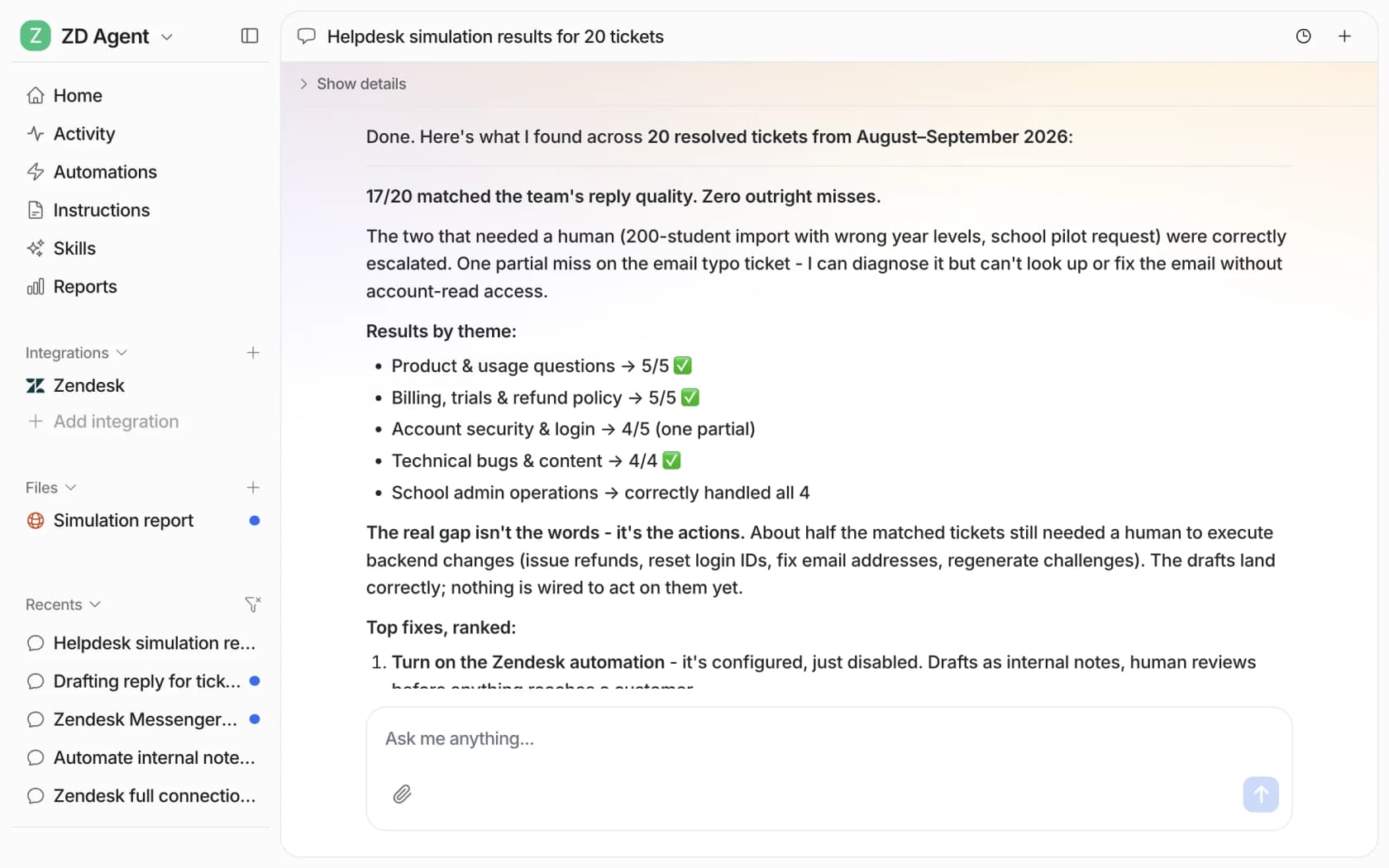
One honest note from trial data I've looked at: agents sent drafts unedited only 12% of the time early on, and about 65% of their rewrites were length and tone. That's the part training on your own sent replies fixes, which is why I always tell teams to connect past tickets, not just the help center.
Pros
- New agents draft on real tickets from day one, with a human sending every reply.
- Learns from past tickets and macros, not just help articles.
- Corrections stick for everyone, not just the agent who was coached.
- Unlimited seats, so every trainee gets it at no extra cost.
Cons
- It isn't an LMS. No courses, quizzes or completion tracking for human agents.
- No voice roleplay. If agents struggle on phone calls specifically, pair it with a practice tool.
- The Simulation skill tests the AI's answers, not the agent's.
Pricing
| Plan | Price | What you get |
|---|---|---|
| Free | $0/month | 100 credits, no card |
| Teammate | From $299/month | 500 credits; batches up to 5,000 credits for $1,899/month |
| Enterprise | Custom | SSO, custom data residency, HIPAA with BAA, annual contract |
A ticket or a chat is one credit however long it runs, and every integration and channel is included (eesel pricing). Paying a year upfront gets two months free.
My take: pick eesel if your new agents already sit through training but still need a senior for every third ticket. Skip it if what you really need is a place to host courses and track completions; get a Teach tool for that and add eesel for the live-ticket stretch.
2. Trainual
Best for: companies with support SOPs scattered across Google Docs who want one place to document, assign and test them.
What it does for agent training
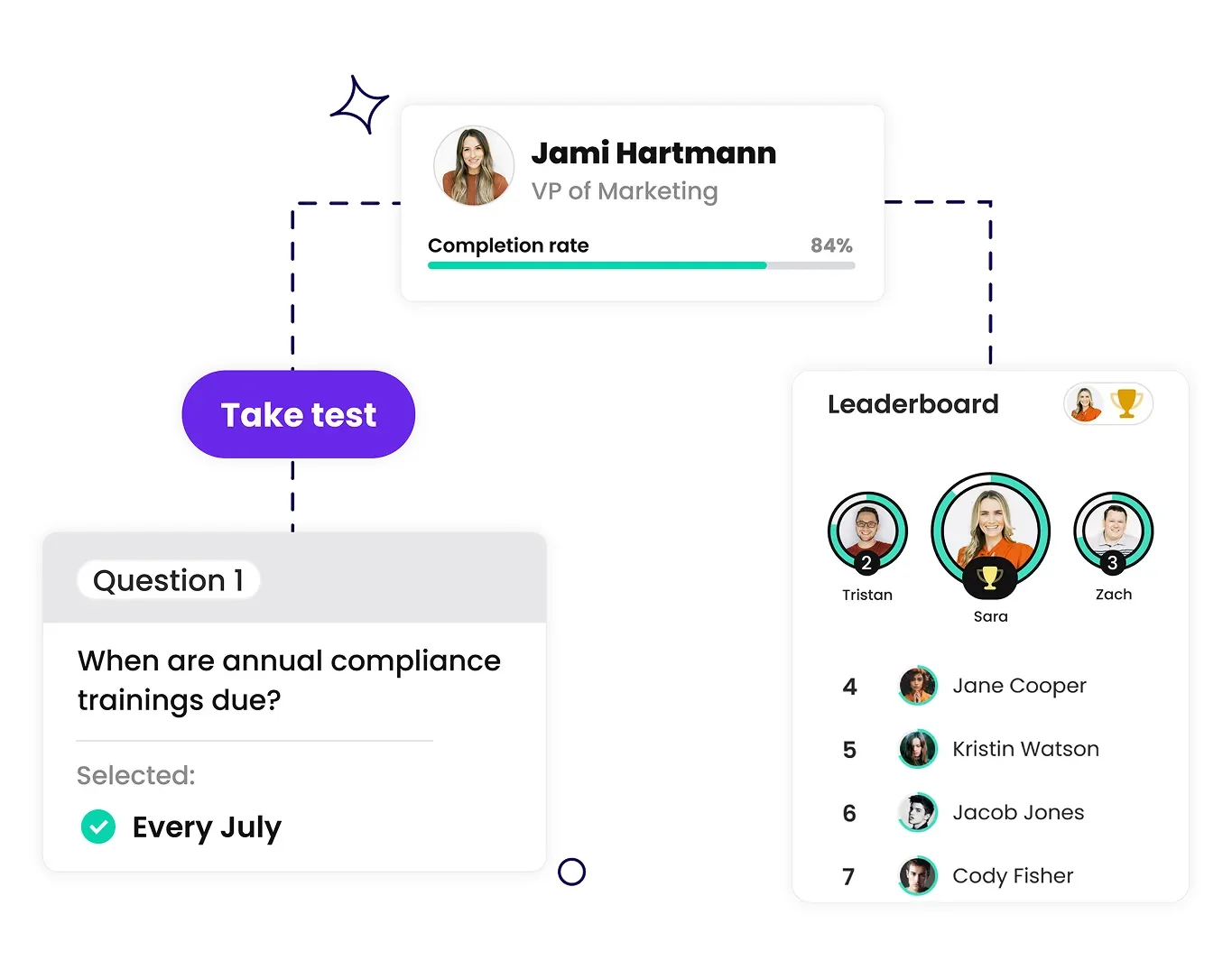
Trainual is a training, SOP and onboarding platform aimed at companies of "25 - 1000 employees". For a support team, it's where your refund policy, escalation rules and tone guide become structured lessons with tests at the end. Tests come on every plan with five question types and unlimited retakes (test results help), and AI can draft documents and auto-generate quizzes from your content.
It's good at the boring, important stuff: e-signed policy acknowledgments, completion dashboards with CSV export, and role-based paths so a new chat agent doesn't wade through phone scripts. A call center supervisor on G2 summed up why teams like it:
"It allows employees to self-service, reducing the need to reach out to managers constantly. We can update the material once, and everyone has access to the materials all in one place, which is very convenient."

Where it stops: I found no helpdesk integration, no practice on real or simulated tickets, and no QA scoring. Training is documents, video and quizzes. A contact center manager on G2 also warned that setup took "several weeks" of content building.
Pros
- Turns scattered SOPs into structured, testable onboarding paths.
- AI drafts docs and quizzes from your existing content.
- E-signatures and completion reports make policy sign-off easy to prove.
- SOC 2 Type 2.
Cons
- No helpdesk integration or practice on tickets.
- Individual training paths need Pro; SSO and custom branding need Premium.
- No free trial, and a required implementation fee.
Pricing
| Plan | Price | Notable limits |
|---|---|---|
| Core | Quote only | Tests on all plans |
| Pro | Quote only | Individual training paths; 300 e-signatures a year |
| Premium | Quote only | SSO, custom branding, unlimited e-signatures |
| Enterprise | Quote only | API access, SOC 2 documentation |
Every plan carries a one-time $1,000 implementation fee, and seats are named profiles, so trainees count (Trainual pricing).
My take: pick Trainual if your biggest problem is that nobody wrote anything down. Skip it if your SOPs are already in a decent internal knowledge base; you'd be paying to rebuild them.
3. TalentLMS
Best for: teams who want a proper LMS with public pricing and a free plan to start on.
What it does for agent training
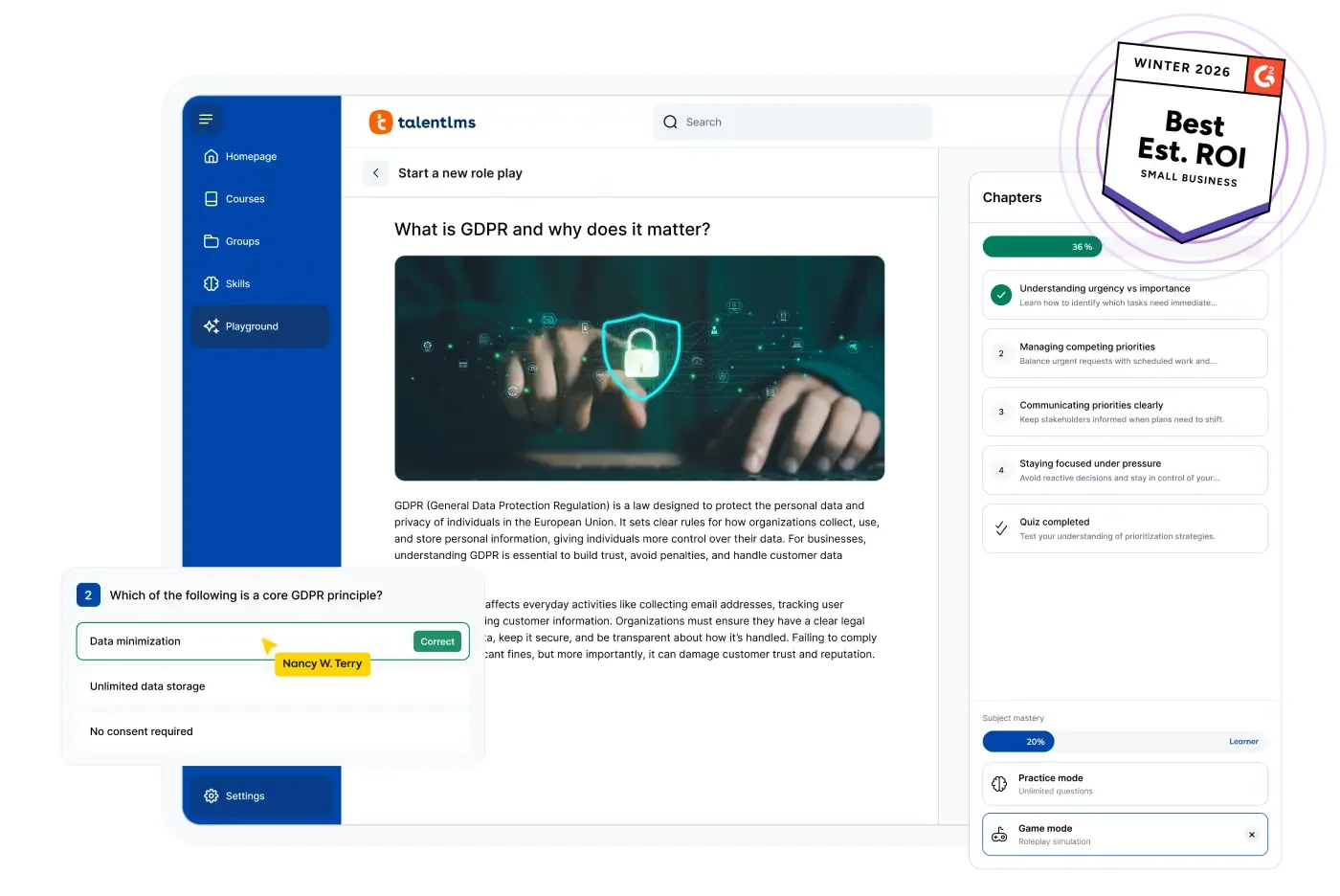
TalentLMS is a general LMS, and it's the most transparent tool on this list. The pricing page shows every tier. Its TalentCraft AI builds courses from your documents, translates them into 40+ languages, and writes tests (TalentCraft). SCORM, xAPI, gamification and scheduled reports come on every plan.
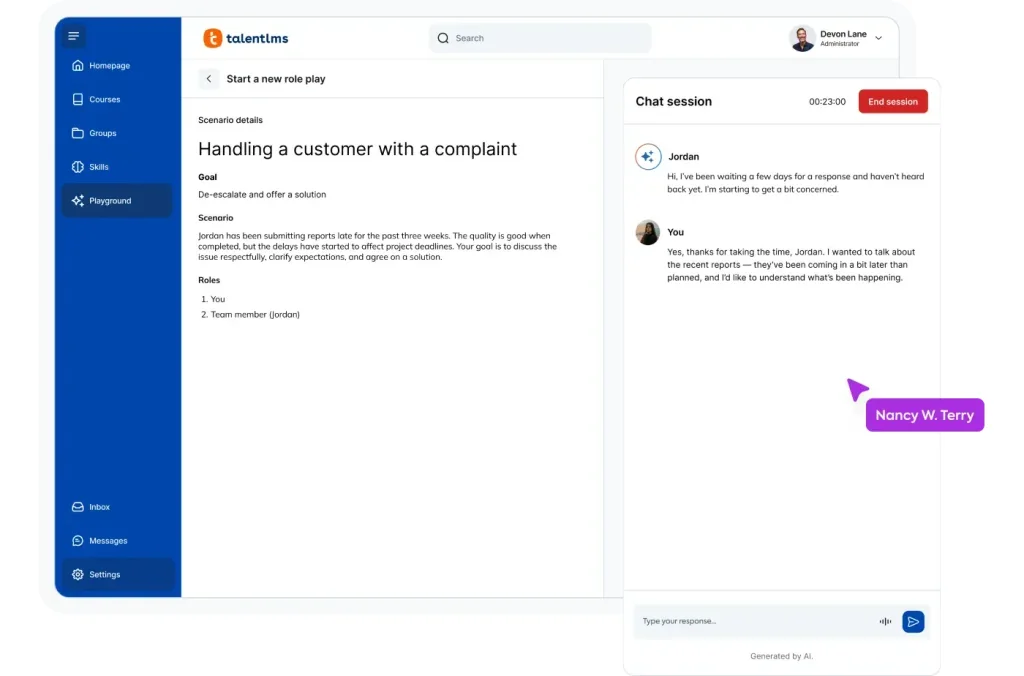
For support teams, the interesting bit is the Learning Playground. Its Role Play tool lets an agent pick a scenario, including customer interactions, and talk or type with an AI partner. It's ungraded, though, so it doesn't count toward completion or feed any score. One training manager on G2 wanted more of it:
"More options for scenario-based exercises would also help us move beyond knowledge checks and give learners more opportunities to practice real situations."
The Customer Service Essentials collection gives you 15 ready-made soft-skill courses, but the full TalentLibrary is a paid add-on. Its helpdesk integrations embed chat or sync users; none pull in real tickets (integrations).
Pros
- Public, tiered pricing and a free plan for 5 users.
- AI course building and translation included in paid plans.
- AI role play for customer conversations, even on Core.
- ISO 27001 and GDPR.
Cons
- Role play is ungraded and not tied to your tickets.
- Priced by active users, which hurts if you hire in waves.
- Generic library content; you'll still write your own product and policy courses.
Pricing
| Plan | Billed monthly | Billed yearly (per month) | Users |
|---|---|---|---|
| Free | $0 | $0 | 5 users, 10 courses |
| Core | $149 | $119 | 1 to 40 |
| Grow | $299 | $229 | 1 to 70 |
| Pro | $579 | $449 | 1 to 100, plus $6 per additional user |
| Enterprise | Quote only | Quote only, yearly only | 1,000+ |
Prices rise with each user tier, and only active users count (TalentLMS pricing). AI credits scale from 5,000 one-time on Core to 80,000 a month on Enterprise.
My take: pick TalentLMS if you want to start teaching this week without a sales call. Skip it if your new agents already know the policies and the problem is applying them to messy real tickets.
4. Seismic Learning (formerly Lessonly)
Best for: Zendesk teams who want new agents practicing on real tickets before they answer them live.
What it does for agent training
Lessonly was one of the first training tools built with support teams in mind, and Seismic acquired it in 2021. Today lessonly.com serves Seismic's learning and coaching page, which cites a "34% decrease in ramp time" and about 2,000 organizations. Its Fall 2023 release added AI role-plays and AI feedback.
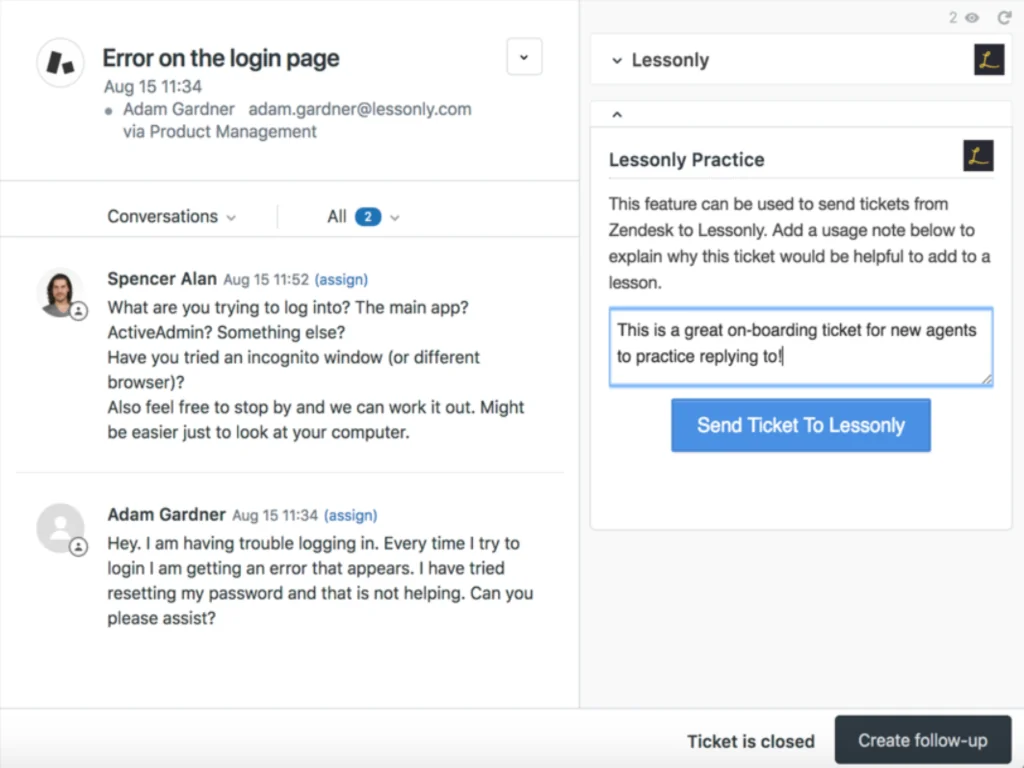
The reason it's on a support list is two free Zendesk apps. The Practice app lets you "send actual Zendesk tickets into Seismic Learning, making them available as practice exercises in a low-risk environment." That's the closest thing on this list to the "practice on 30 to 50 past tickets" step every good ramp plan has. A second Seismic Learning app puts lessons inside Zendesk.
The honest caveats: Seismic now positions this mostly as sales training, the Zendesk apps show modest installs (25+ and 50+), and the visible reviews on them are years old and ask for macros and full ticket threads.
Pros
- Real Zendesk tickets become practice exercises.
- AI role-plays, feedback and lesson authoring.
- Seismic-wide SOC 2 Type 2 and ISO 27001.
Cons
- Sales-first product; support content is thinner than it used to be.
- Quote-only pricing, no trial.
- Zendesk apps need setup through Seismic support first.
Pricing
| Plan | Price |
|---|---|
| Seismic Learning | Quote only; no public pricing page, no free plan |
My take: pick Seismic Learning if you're on Zendesk, already use Seismic for sales, and want real-ticket practice in the same place. Skip it if you're a standalone support team; you'd be buying a sales enablement platform for one feature.
5. Second Nature
Best for: teams whose new agents know the answers but lose their footing on tense customer conversations.
What it does for agent training
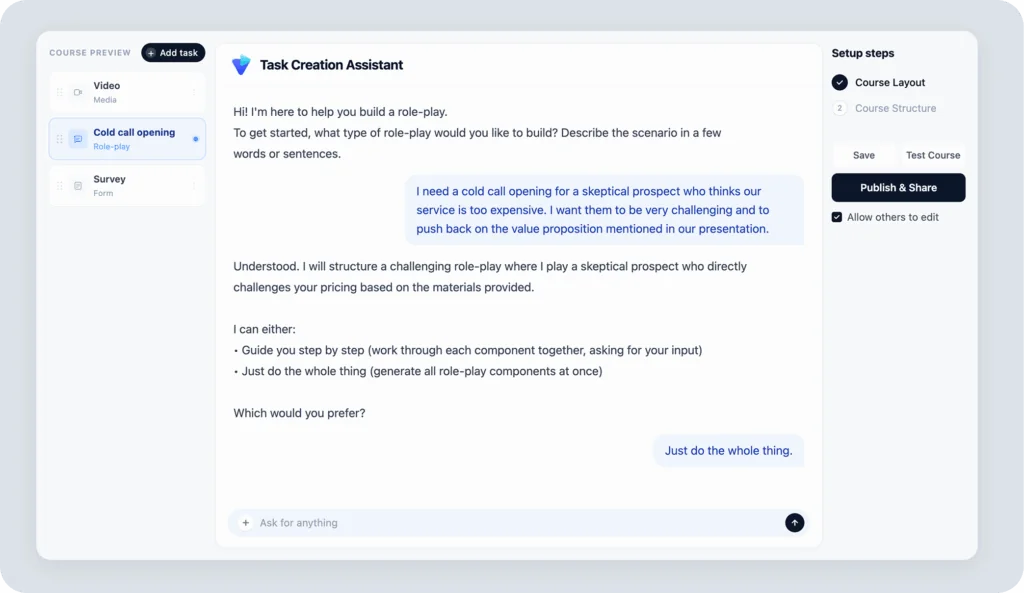
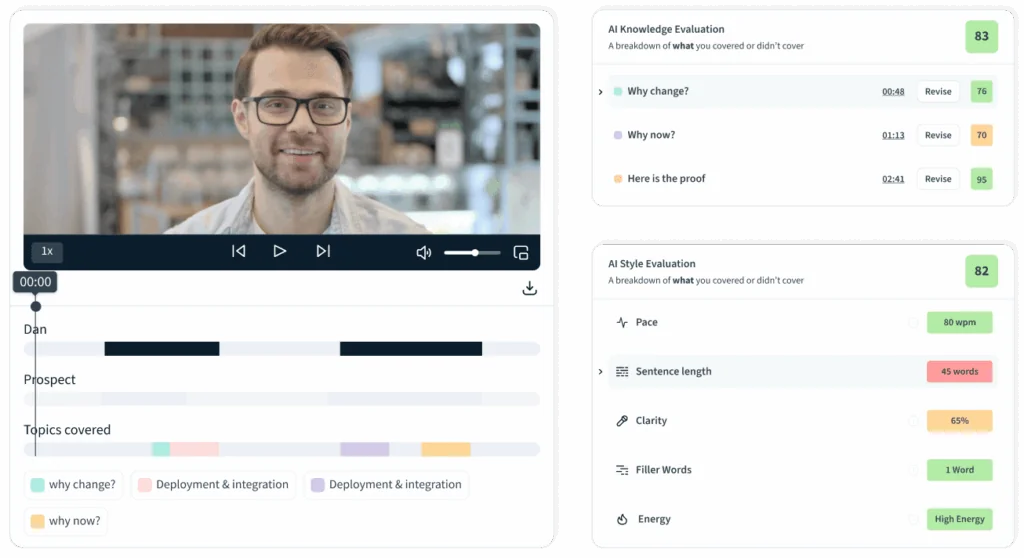
Second Nature runs AI voice roleplay. An agent talks to an AI persona, which can be set to a mood like frustrated, and gets feedback and a score within 45 to 90 seconds (FAQ). You build scenarios by describing them in plain text or uploading PDFs, slides or Word docs; one customer on its homepage said they could create a scenario in 15 minutes.
Scoring defaults to 70% knowledge and 30% style (pace, clarity, filler words), with an editable AI rubric and passing thresholds. It says it supports 25+ languages and has a customer support use case page, though its case studies are sales stories. It plugs into LMSs via SCORM or LTI, plus Salesforce and HubSpot.
Pros
- Realistic voice practice with instant, specific feedback.
- Scenarios built from your own docs in minutes.
- Strong security list: SOC 2 Type 2, ISO 27001, HIPAA, GDPR.
- 4.7 from 438 reviews on G2.
Cons
- No helpdesk integration published; scenarios come from documents, not tickets.
- Voice-first, so less useful for email and chat teams.
- G2 reviewers mention response lag and speech recognition errors in noisy rooms.
Pricing
| Plan | Price |
|---|---|
| Second Nature | Quote only; no published plans or seat minimums |
G2 lists an average implementation time of 2 months.
My take: pick Second Nature if most of your queue is phone and your new agents freeze on angry callers. Skip it if your team is mostly email and chat; the practice won't look like their day.
6. Mindtickle
Best for: large contact centers where agents have to learn a complicated system and a hard conversation at the same time.
What it does for agent training
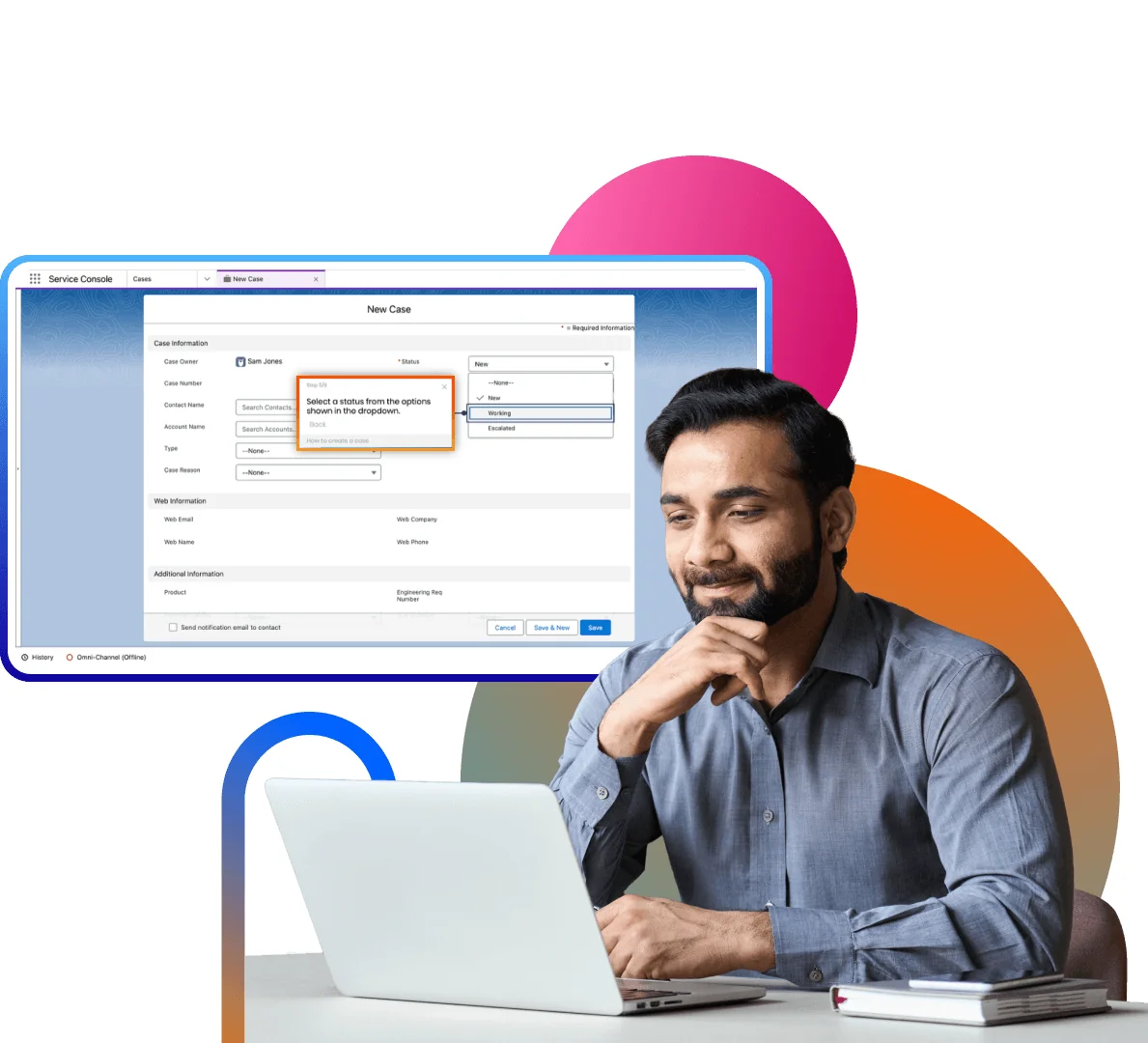
Mindtickle is a big sales enablement platform, but its AI Role Play Simulator is pitched straight at contact center leaders. The clever part is that it trains both halves of the job at once: an AI customer who may be "frustrated or angry", and a near-live replica of the screens your agent has to click through while talking. A no-code builder creates those replica screens from a dev environment, with redaction.
After each session the AI scores qualities you choose, like empathy or confidence, plus how well the agent handled the system. The same simulator page claims 40% faster onboarding, though its named customer stories on the site are sales teams. It's rated 4.7 from 2,401 reviews on G2, with security that includes ISO 27001, SOC 2 and HIPAA (trust page).
Pros
- Practices system navigation and conversation together.
- Replica screens mean no risk to live systems.
- Enterprise-grade security and a 99.9% uptime SLA.
Cons
- Built for scale; heavy for a 15-person team.
- No helpdesk (Zendesk, Freshdesk) named among its integrations.
- Quote-only pricing with a demo-first sales process.
Pricing
| Plan | Price |
|---|---|
| Mindtickle | Quote only; the pricing page returns a 404 and every page routes to a demo |
My take: pick Mindtickle if you run hundreds of agents on a complex CRM or billing system. Skip it if your helpdesk is the only tool your agents use; most of what you'd pay for is the system simulation.
7. Zendesk QA
Best for: Zendesk teams who want coaching to come straight from reviewed tickets, without a separate tool.
What it does for agent training
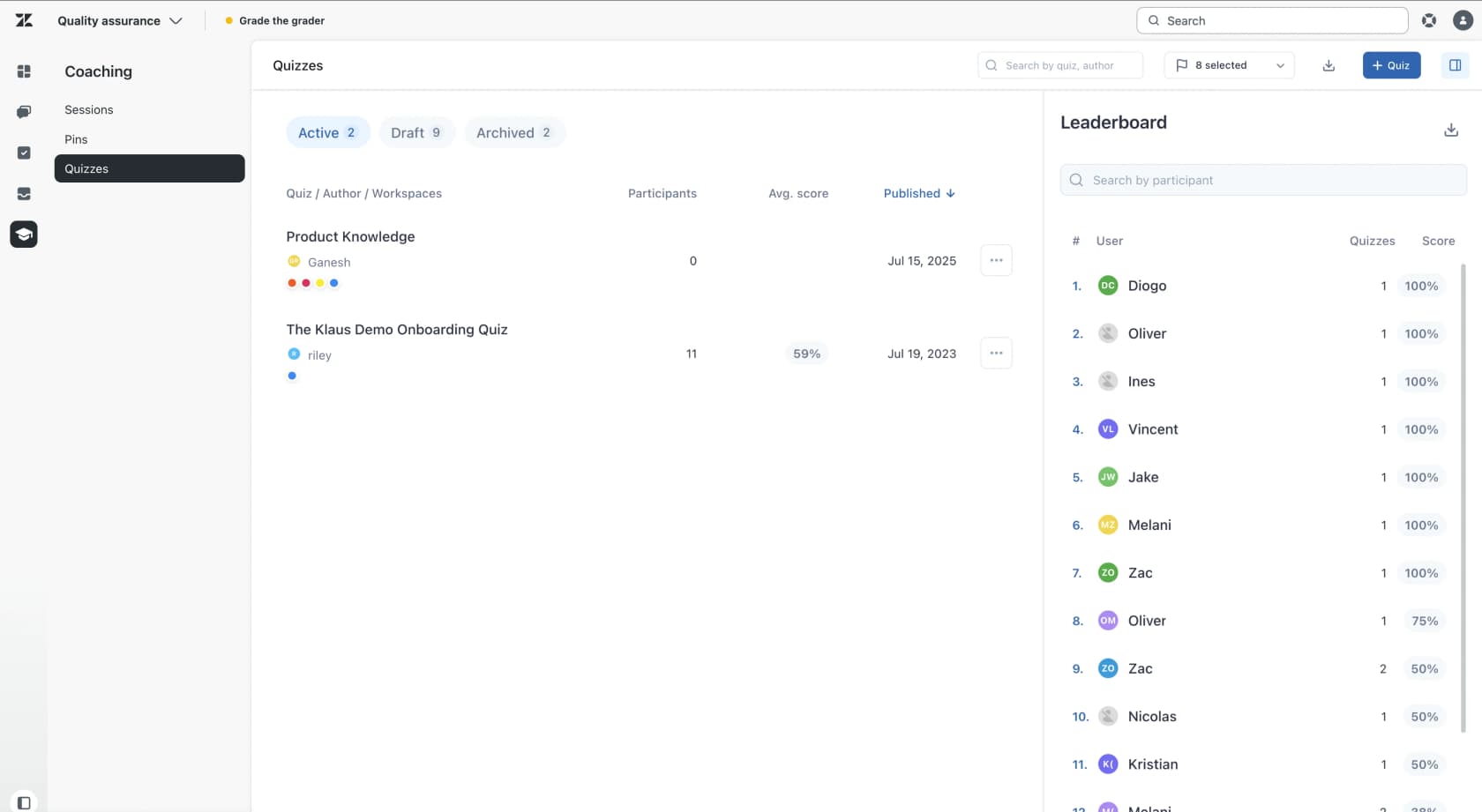
Zendesk QA, formerly Klaus, is Zendesk's quality assurance add-on. It scores conversations with AutoQA, and three of its features double as training tools once agents are live.
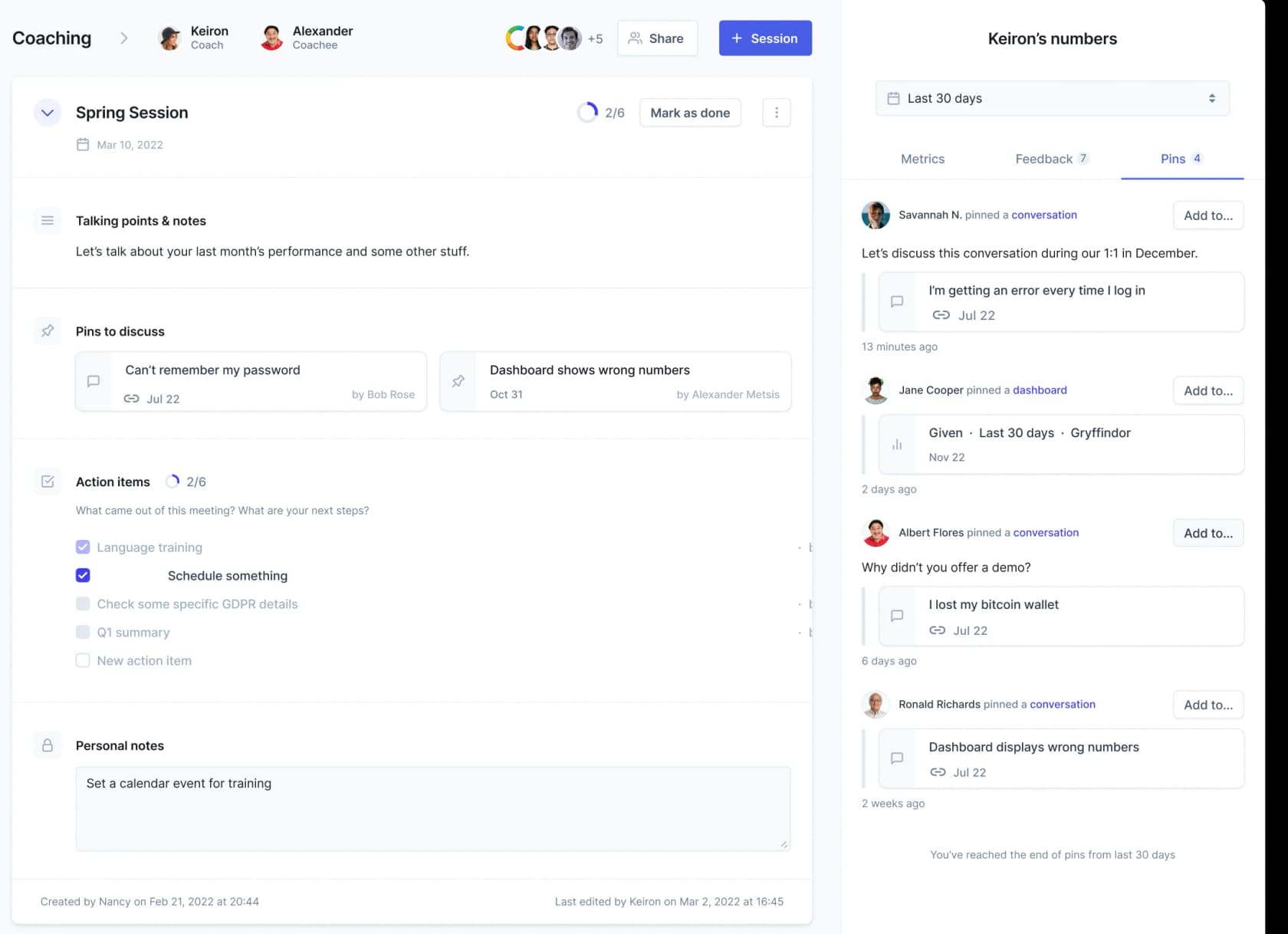
- Pins: a reviewer pins a conversation under an agent with a note (pins help). That's how a real ticket becomes coaching material.
- Coaching sessions: a coach and an agent share talking points, pins and a side panel with the agent's Internal Quality Score, category scores and quiz results (coaching help).
- Quizzes: multiple choice only, one attempt per person, opened to whole workspaces rather than assigned per agent (quizzes help). Fine for a policy change check, thin as a full course.
For pre-go-live practice, Zendesk's sandbox copies up to 10,000 tickets into a safe environment, included on Enterprise plans and sold as an add-on from Support Professional or Suite Growth (sandbox help). There are no lessons or scoring inside it, but it's a safe place to click around. I compared the two environments in Zendesk sandbox vs production. For scorecard design, see creating Zendesk QA scorecards.
Pros
- Coaching built on real reviewed tickets, inside Zendesk.
- Quizzes, pins and coaching at no extra cost on top of the add-on.
- Also reviews your Zendesk AI agents.
Cons
- Zendesk only, and not included in any Suite plan.
- Quizzes are basic: multiple choice, single attempt, no per-agent assignment.
- Free trial only through sales.
Pricing
| Item | Price |
|---|---|
| Zendesk QA add-on | $35/agent/month, billed yearly |
| Workforce Engagement bundle (QA + WFM) | $50/agent/month, billed yearly |
| Required base plan | From $19/agent/month (Support Team, yearly) |
Prices are from Zendesk pricing. See my Zendesk pricing breakdown for the base plans.
My take: pick Zendesk QA if you're on Zendesk and agents are already live. It won't teach a brand-new hire anything, but it's the best tool here for turning week-four mistakes into coaching.
8. Scorebuddy
Best for: contact centers that want QA scoring, coaching and an LMS under one login.
What it does for agent training
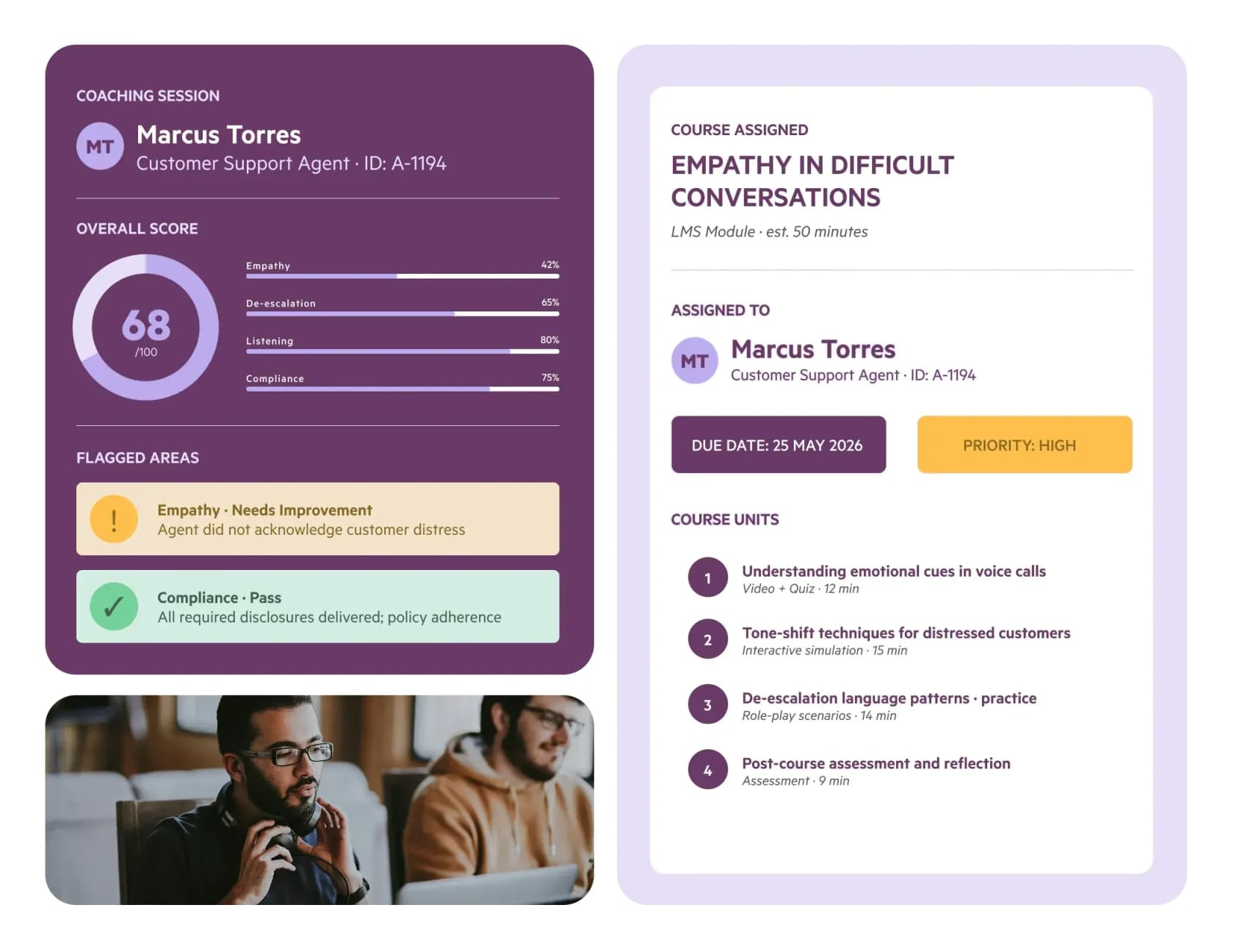
Scorebuddy, now branded ScorebuddyCX, closes the loop that most QA tools leave open. Its AI Auto Scoring evaluates every conversation across voice, chat and email against your scorecards. Coaching sessions link straight to the conversation that triggered them, using GROW, OSKAR or CLEAR templates (coaching). Then its LMS add-on assigns a targeted course for the gap, with AI that turns a PDF into a course.
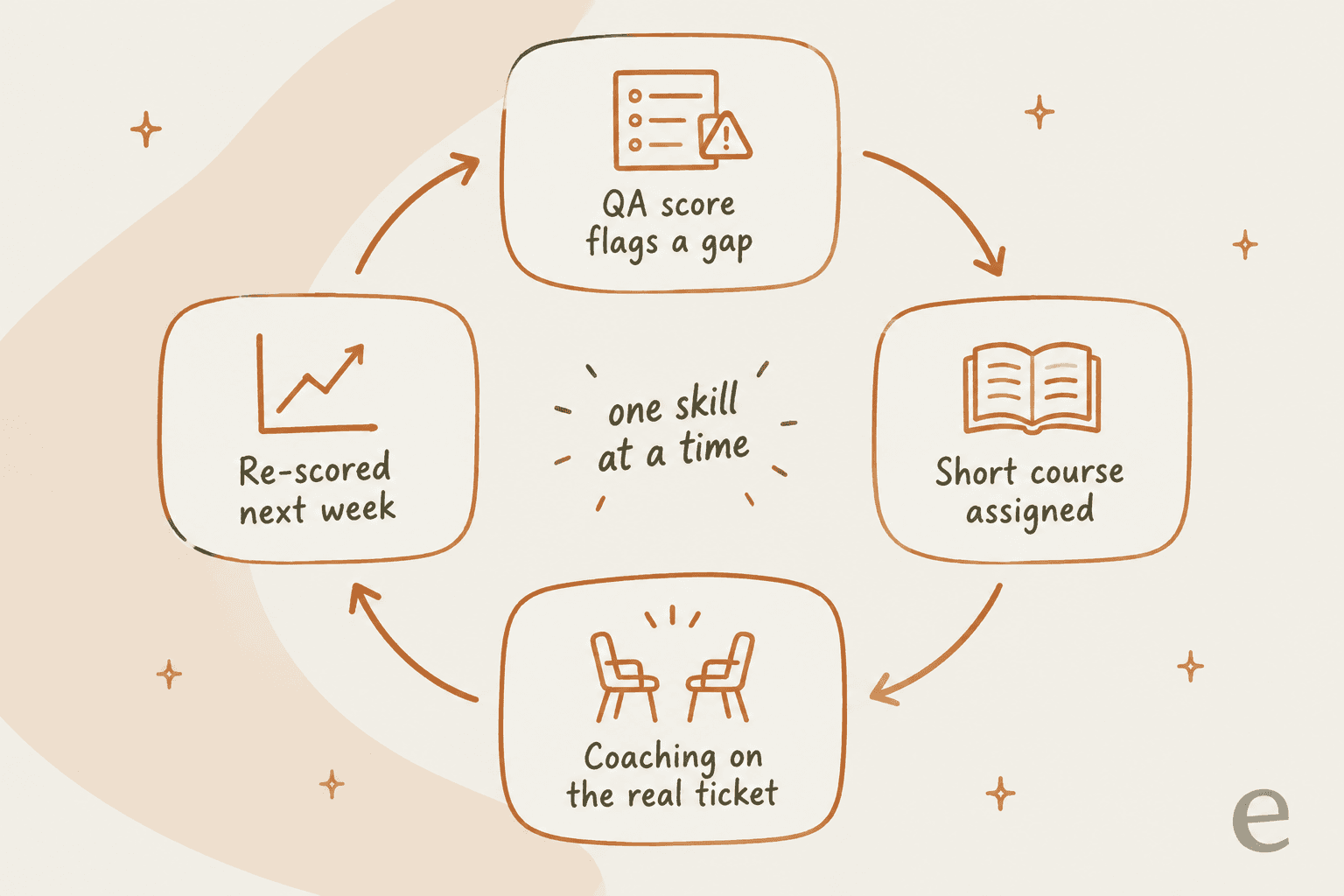
That loop is the right shape for ongoing training. One G2 reviewer called out the built-in coaching feedback loops as the highlight, while noting agents can't dispute their scores. Another said it can feel "a bit slow or overly click-heavy" when you're doing a lot of evaluations (G2 review).
Pros
- QA, coaching and courses connected, so coaching targets a real gap.
- Scores 100% of conversations with AI.
- ISO 27001:2022 and SOC 2 Type 2.
- 4.5 from 835 reviews on G2.
Cons
- The LMS is a paid add-on, only on Accelerate and Elite.
- CCaaS connectors need Accelerate; Salesforce and the open API need Elite.
- No dispute flow for agents who disagree with a score.
Pricing
| Plan | Price | AI scores included |
|---|---|---|
| Foundation | Request a price | Not stated |
| Accelerate | Request a price | 500 a month |
| Elite | Request a price | 1,000 a month |
All plans are annual, priced by user count, with a 14-day free trial (Scorebuddy pricing).
My take: pick Scorebuddy if you're a contact center with a QA team and want training assignments to come straight from QA scores. Skip it for onboarding brand-new agents; it shines once there are real conversations to score.
9. Guru
Best for: teams whose answers live in five different tools and need one verified place agents can trust.
What it does for agent training
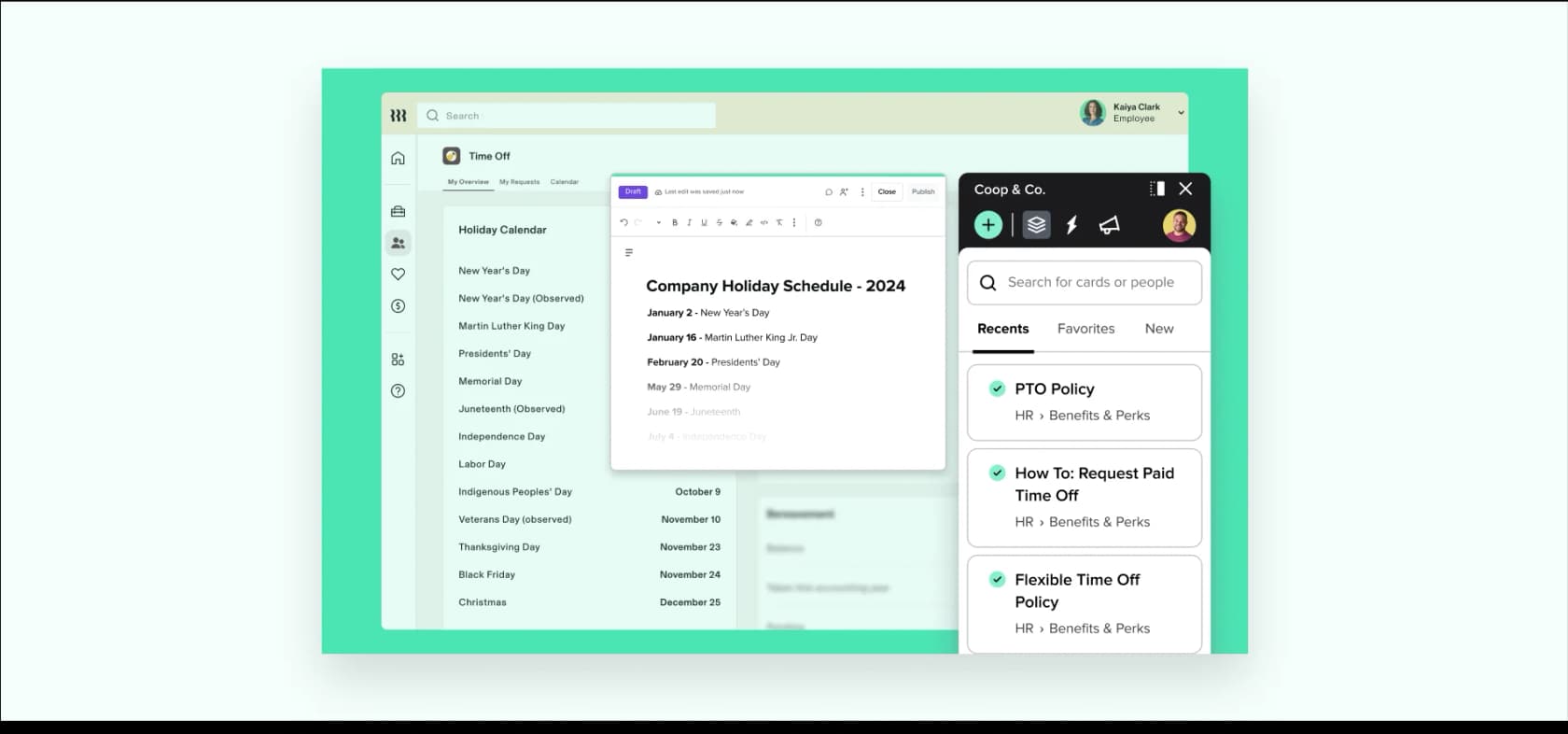
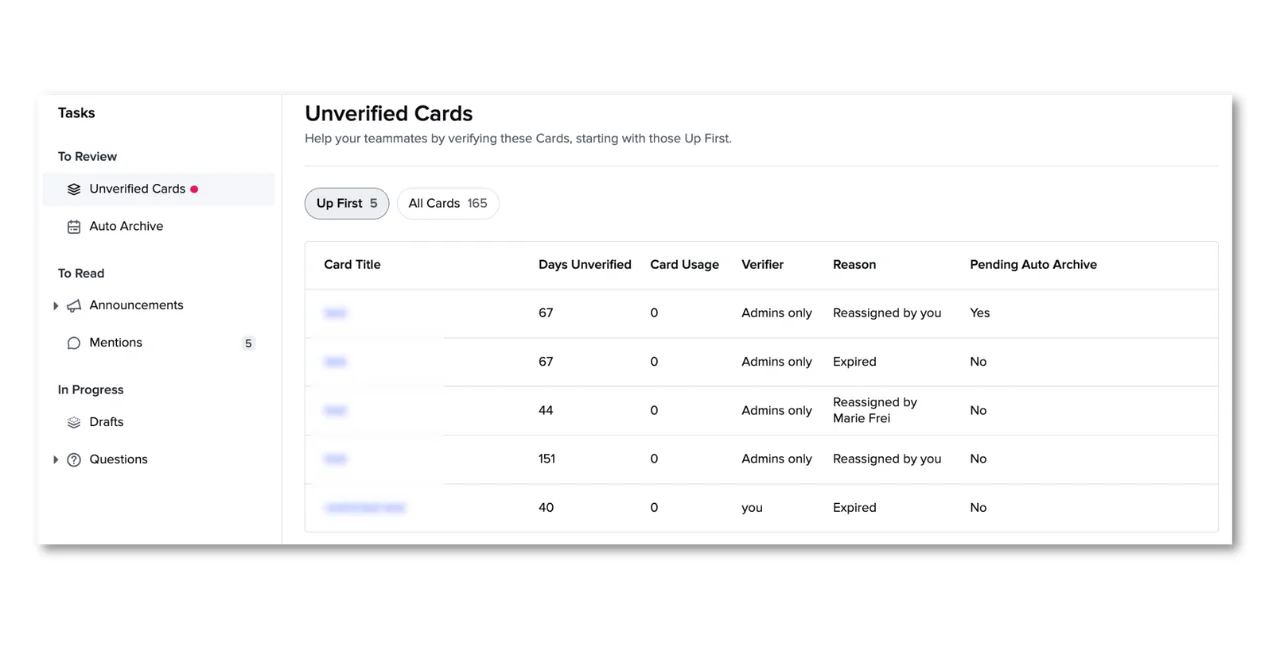
Guru isn't a training tool either, but it shows up in a lot of support onboarding stacks for a good reason. Its core unit is the Guru Card, a piece of knowledge with an assigned expert and a verification interval, so stale answers get flagged before a new agent reads them. It connects to 100+ sources, including Zendesk, Slack and Teams, and its Knowledge Agents give cited answers.
A Guru customer on Hacker News described using it so support agents could search the knowledge base from Zendesk without leaving their workflow. A G2 reviewer, though, flagged that new users can struggle because search needs "highly precise keywords".
For more, see my Guru review and the shortlist of Guru alternatives.
Pros
- Verification keeps the answers new agents rely on current.
- Works inside the helpdesk and chat tools agents already use.
- SOC 2 Type II and HIPAA.
Cons
- Surfaces knowledge; doesn't draft ticket replies.
- No courses, quizzes or practice.
- Custom pricing only, positioned at enterprises.
Pricing
| Plan | Price |
|---|---|
| Guru | One custom package via a sales call; no public per-seat plans |
Details in my Guru pricing post.
My take: pick Guru if the root problem is that nobody trusts the knowledge base. Skip it if your knowledge is fine and agents just need help writing the reply.
The ramp plan I'd build with these tools
Here's how I'd stitch the categories together for a team of 10 to 50 agents. Each step has a clear exit, and the tool changes as the agent moves up.
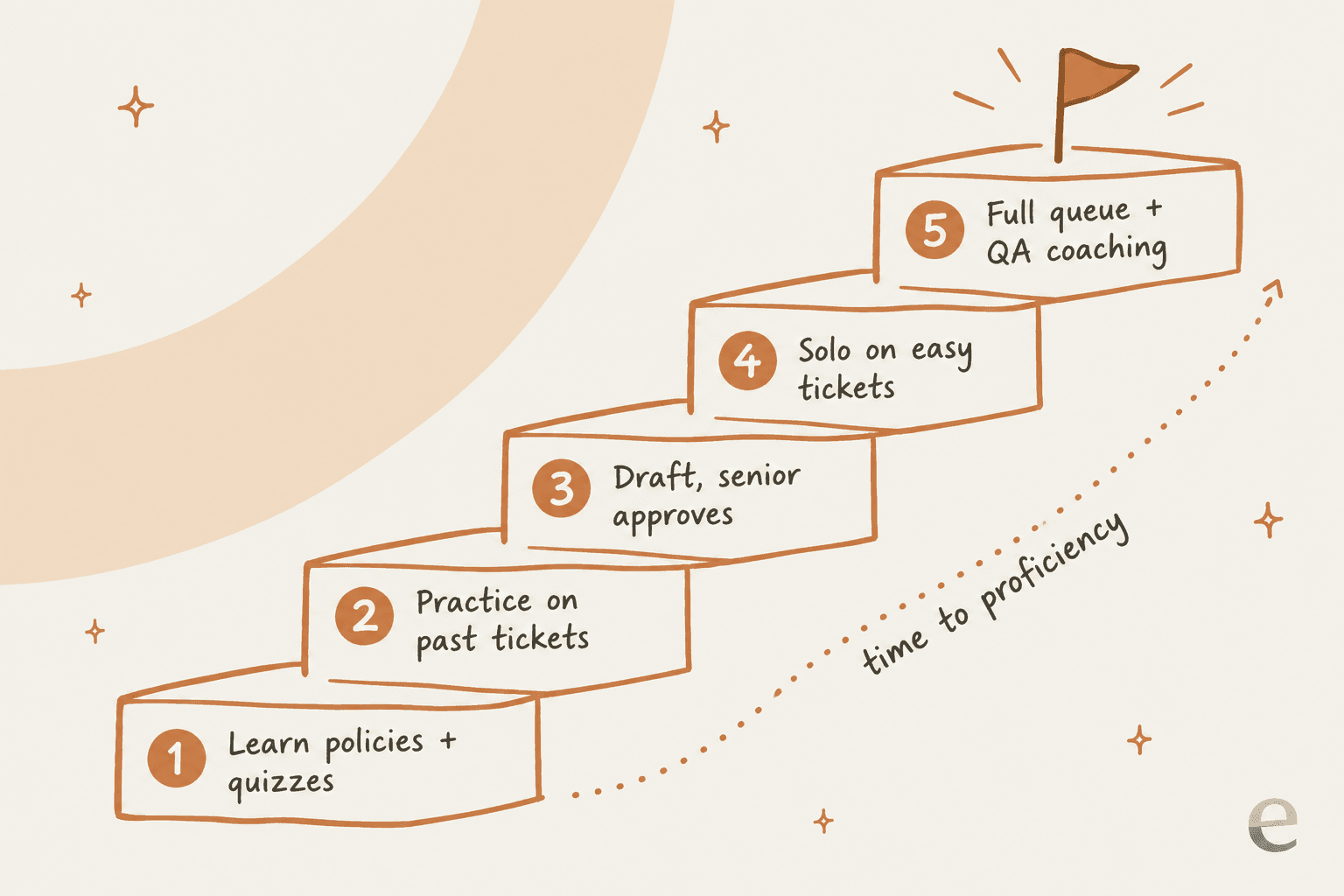
- Learn the policies, with quizzes. Short modules in TalentLMS or Trainual, built from your knowledge base and macros. Exit: passes the policy quiz.
- Practice on past tickets. Pick 30 to 50 resolved tickets that cover your top topics and have the new agent draft replies, then compare with what the team sent. Seismic's Zendesk app does this inside a course; a sandbox works too. Voice teams add Second Nature here.
- Draft on live tickets, senior approves. This is the step most plans skip. The agent works real tickets, and nothing goes out until it's checked. An agent assist tool like eesel makes this cheap: the AI drafts from past tickets, the new agent edits, and seniors only review.
- Solo on easy tickets. Route simple categories first. Watch first contact resolution and CSAT per agent.
- Full queue, coached by QA. Zendesk QA or Scorebuddy flags patterns, and you coach one skill at a time using the real ticket.
The goal is to measure time to proficiency, not "training completed." If you're also onboarding offshore or shift-based teams, the handover pieces matter as much as the courses: see offshore knowledge transfer and support shift handoff.
Common mistakes when buying training software
- Buying a course tool and calling it done. Agents pass the quiz, then ask a senior about every edge case. Budget for the live-ticket stretch too.
- Training on the help center but not your past tickets. The help center says what the policy is. Past tickets show how your team actually answers. Both new humans and AI learn tone from the second. This is also why teams generate macros from past tickets.
- Per-seat pricing during hiring waves. If you add 20 agents for peak season, per-user LMS and QA pricing climbs fast. Check how the vendor counts a seat. Planning for those peaks is covered in support coverage planning.
- Letting the knowledge base rot. Training content goes stale the week a policy changes. Run a knowledge gap analysis every quarter.
- Skipping QA until something breaks. QA catches the habits training missed. See support QA tools if you don't have one yet.
Try eesel for the weeks after training
Every tool above helps an agent learn the job. eesel helps them do it while they're still learning. It plugs into your helpdesk, learns from your help center, macros and past tickets, and drafts replies a new agent checks and sends, so they're productive on real tickets in week one and your seniors stop being the help desk for the help desk. When a senior corrects a draft, the fix sticks for the next hire too.

Seats are unlimited, so every trainee gets it, and there's a free plan with 100 credits to test it on your own tickets. Try eesel.
Frequently Asked Questions
What is support agent training software?
What is the best software to train new customer support agents?
How much does support agent training software cost?
How long does it take to train a new customer support agent?
Can AI replace support agent training?
Should new support agents practice on real tickets?
Do I need a separate LMS if my helpdesk has QA and coaching?
What support agent training software works with Zendesk?


Article by
Kira
Kira is a writer at eesel AI with a Computer Science background and over a year of hands-on experience evaluating AI-powered customer service tools. She focuses on breaking down how helpdesk platforms and AI agents actually work so that support teams can make better buying decisions.