Why offshore knowledge transfer usually breaks
I work the support queue at eesel every day, and I spend a lot of time with teams who are rolling an AI helpdesk agent onto an existing queue. The most common request I hear on those calls is some version of "can it learn from our old tickets?" It comes up so often that one of our co-founders summed up a week of demos like this:
"Also - past ticket training strikes again. Classic. People really, really, really want to train on past tickets."
Amogh, eesel co-founder, after a week of demo calls
That request tells you where support knowledge actually lives. It isn't in the docs. One team I spoke with, a French public-sector IT services firm handling about 3,000 complex tickets a month on Freshdesk, was losing two senior agents within the year and wanted to capture what those two knew before they left. Another, a direct-to-consumer brand on Gorgias, had its process knowledge spread across an old SOP tool, Loom videos nobody had transcribed, and what they called "many outdated macros". That is the raw material most teams try to hand to an offshore vendor.
Community threads show the same pattern from the other side. A consultant who helps startups build support teams put it bluntly when someone asked about outsourcing:
"tribal knowledge and proximity to leadership are great band-aids for underdeveloped training, quality assurance, and technology."

In-house, the band-aid works. The new hire leans over and asks the person who built the feature. Offshore, the band-aid comes off, because nobody can lean over a 12-hour time difference. If you're still deciding whether to move work offshore at all, my outsourcing customer service guide covers that decision. This post assumes you've signed and now need the vendor's agents to answer like your own.
The three ways it fails
From what I see in eesel customer rollouts and in community threads, offshore support knowledge transfer goes wrong in three predictable ways.
- The knowledge sits with one person. One Reddit poster, who worked second-level support and training for a call centre serving an outsourced client, found that most of the training pack was guides he had written himself. When the client switched vendors, nobody else knew that.
"I had to sit and go through all the material which was 80% all based around the system and guides I had built."
-
The docs are written for the wrong reader. A support manager at a bus-tracking service told me their entire knowledge base was written for administrators, while their tickets came from riders. An offshore agent inherits that mismatch on day one and has no one nearby to translate it.
-
The vendor's metrics discourage asking. If the outsourced team is measured on tickets closed, sending a ticket back to you costs them. One Hacker News commenter described exactly that:
"Escalating hurts their numbers, so it's hard to get cases escalated"

When escalation is costly, knowledge gaps stay hidden until a customer complains. And when the docs are wrong, people leave. A call-centre agent on Reddit described training classes losing a large share of new hires within two months because "the resources we had were unreliable, written poorly, incorrect, and sometimes not available" (u/WhineAndGeez, r/callcentres). Every agent who leaves takes the knowledge you transferred with them, and you start over.
What knowledge actually needs to move
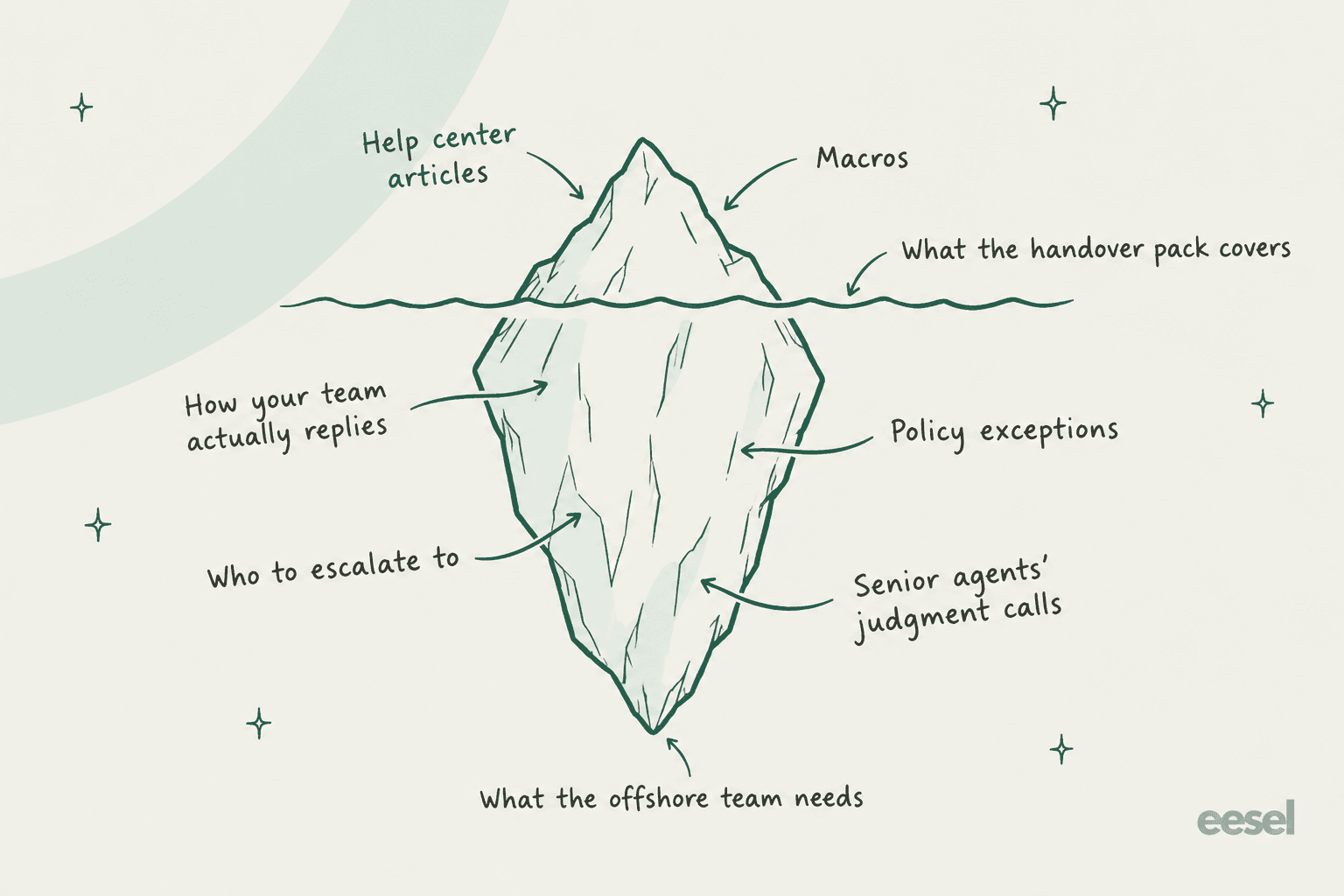
Before writing a single training slide, list what an offshore agent needs to answer your tickets the way your best agent would. Most handover packs cover the top of this list and miss the rest.
| Knowledge layer | Where it lives today | How to hand it over |
|---|---|---|
| Product facts | Help center, Confluence or Notion docs | Share the internal knowledge base, plus a read-through of your top 20 articles |
| Standard replies | Macros and saved replies | Audit them first. Delete stale ones before handover |
| How your team actually answers | Past ticket replies | Hand over 50 to 100 real resolved tickets per top topic |
| Policy exceptions | Senior agents' heads, Slack threads | Write them down as rules ("never refund X without Y") |
| Escalation paths | A senior agent's memory | One written escalation rule per ticket type, with an owner |
| Tone of voice | Nowhere, usually | Five "good" and five "bad" example replies |
The third row is the one I'd fight for. Your help center tells a new agent what's true. Your past tickets tell them how your team says it, which edge cases come up, and what you've promised customers before. In one trial I looked at on a live Zendesk queue, agents rarely sent AI drafts unchanged. They mostly rewrote them for length and tone, not because the facts were wrong. That's a past-ticket problem, and a new offshore agent has exactly the same one. It's also why training AI on your knowledge base alone rarely gets the voice right.
Your macros deserve a cleanup pass before handover too. They're dense with knowledge: one UK team I know runs its AI on just 9 synced Zendesk macros and still sees it resolve real tasks every day. But a stale macro handed to a vendor gets used thousands of times before anyone notices. If you want to rebuild them from what's working now, there's a walkthrough on generating macros from past tickets.
A 30-day offshore support knowledge transfer plan
Here's the ramp I'd run for a new offshore or BPO team taking over tier 1. It assumes the vendor's agents already know how to do support, and what they lack is your product and your judgment.
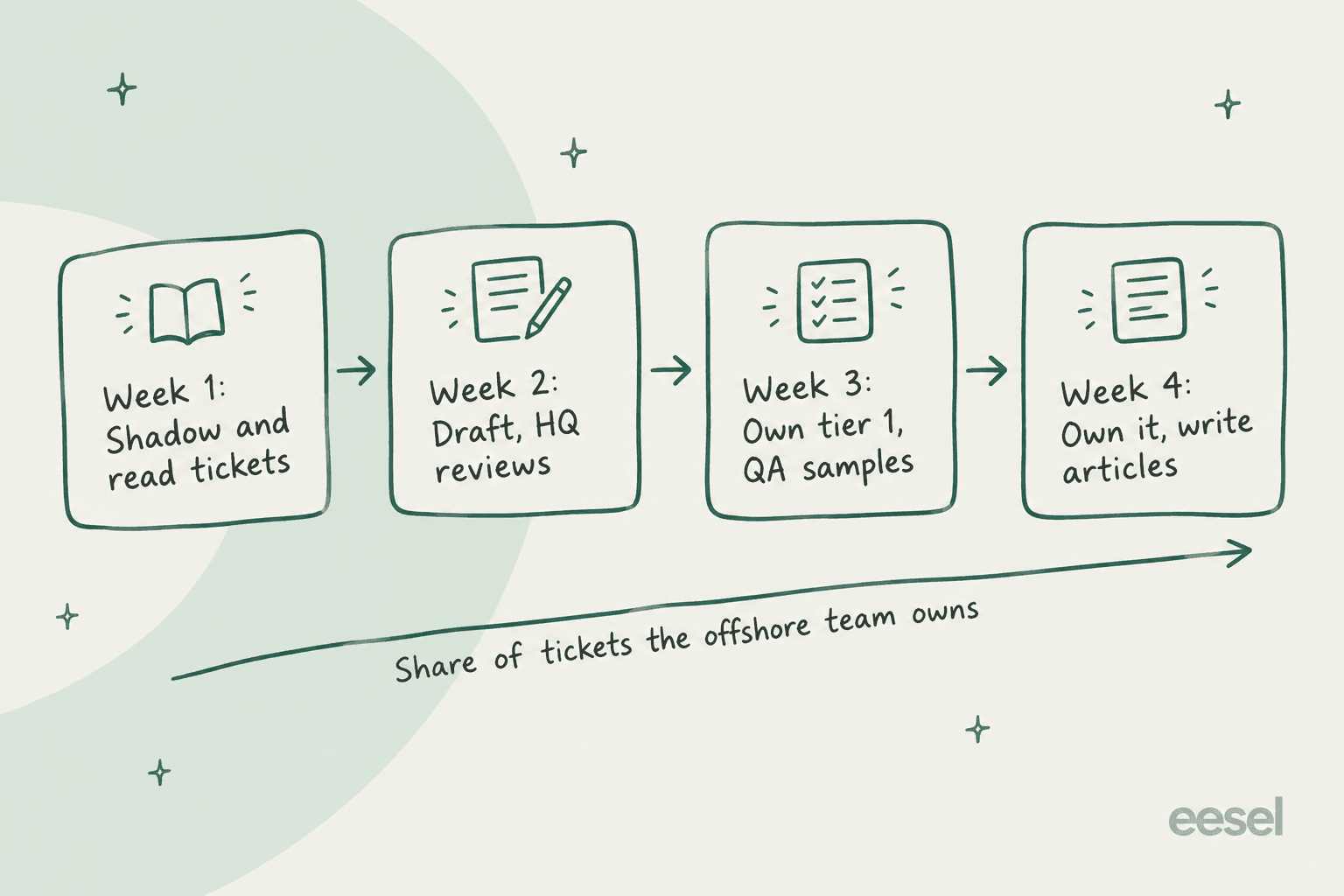
Week 1: shadow and read tickets. The offshore team reads resolved tickets for your top 10 topics and shadows your agents on live ones. Their homework is to find the answer in your docs before they look at what your agent actually sent. Every mismatch they find is a gap in your docs, and that list is gold. Keep it in one shared tracker, not in someone's notes.
Week 2: draft, and HQ reviews. Offshore agents draft replies as internal notes and an in-house agent approves or edits before anything reaches a customer. Keep the review tight: say what was wrong and where the right answer lives, so the fix is reusable. It's the cheapest training you'll ever run.
Week 3: own tier 1, with QA sampling. The vendor sends replies directly on agreed ticket types, and you sample 10 to 20 a day. Score them with a shared rubric, which is where Zendesk QA's scorecards or a simple spreadsheet earn their keep.
Week 4: own it, and write articles. The offshore team owns tier 1 and starts drafting knowledge base articles for the gaps they've hit. You validate them. This is the week the transfer starts flowing both ways.
Two rules hold for all four weeks. First, write down one escalation rule per ticket type before day one, so "when do I hand this back?" never depends on a guess. Second, agree with the vendor that escalations don't count against their agents' numbers in the first month. Otherwise you're paying them to hide gaps from you.
A Reddit commenter who had to buy an outsourced level-1 help desk after their company was sold described the setup that worked for them:
"Found a US based company and basically it's "if it's not in the KB and not some general knowledge, escalate." Then on our end stuff we see repeatedly or something simple that they can do we write up instructions and they add them to their KB for us."
That's the whole model in two sentences: a clear escalation rule, and an onshore team that turns repeat escalations into knowledge base entries.
Keep the knowledge current: the gap loop
Week four is where most plans stop, and it's exactly where knowledge starts to rot. Products ship, policies change, and the offshore team keeps answering from the version you handed over. The fix is a standing loop that runs on every ticket.
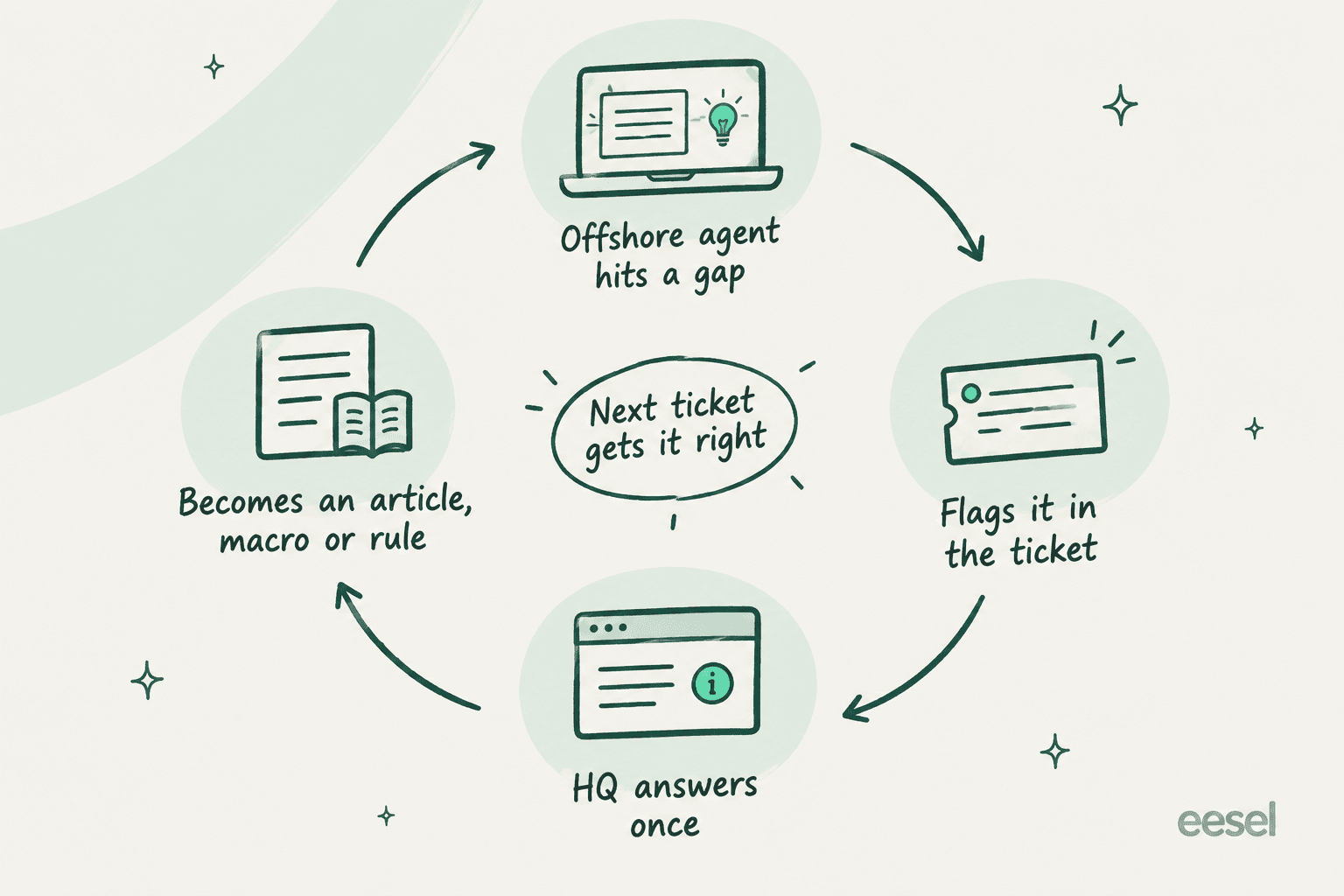
The important bit is "answers once". If an offshore agent asks HQ the same question on Slack three times, three people have learned the answer and the next new hire still doesn't know it. Every answer HQ gives should land somewhere searchable: an article, a macro, or a written rule.
Borrow from KCS
There's a published method built around this loop. Knowledge-Centered Service, maintained by the Consortium for Service Innovation, asks agents to capture knowledge while they solve tickets rather than in a separate documentation project. Its rule for when to bother is easy to remember: "If the issue is worth solving, it is worth saving" (KCS v6, Technique 4.1).
Two parts of KCS map neatly onto an offshore team.
- Article states. Articles move through Work in Progress, Not Validated, Validated and Archived. A new offshore agent can draft a Not Validated article, and an onshore reviewer validates it.
- Licensing levels. Agents start as KCS Candidates who "can only create and modify Not Validated articles, which are then reviewed by a KCS Coach," then become Contributors who validate in their area, then Publishers who can publish externally (KCS v6, Technique 7.1).
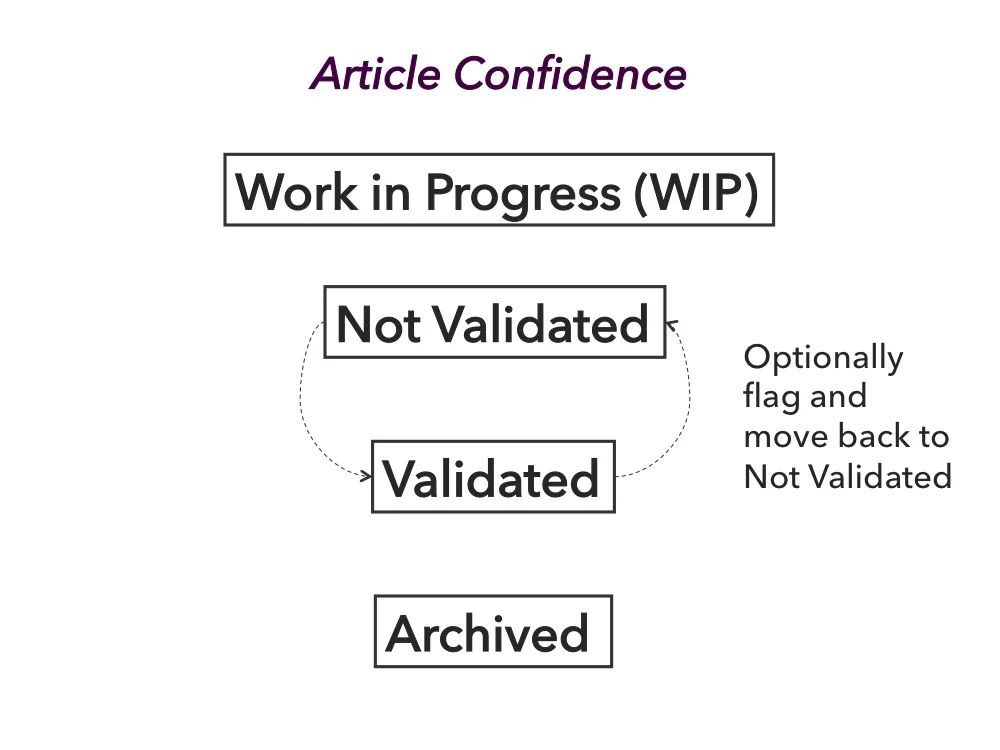
That ladder gives the vendor's best agents somewhere to grow, which also helps with the attrition problem above. KCS recommends one coach for every 5 to 8 agents at the start, easing to about 1 to 50 once the practice matures. On its Why KCS page, the Consortium lists member-reported results including 70% improved time to proficiency and a 30 to 50% increase in first contact resolution. Those figures are self-reported by member companies, so treat them as a direction, not a guarantee.
Knowledge transfer features in your helpdesk
You don't need a new tool to run the gap loop. Most helpdesks have the pieces, though which plan you're on changes a lot. Here's what I found in each vendor's own docs and pricing pages in October 2026.
| Helpdesk | Turn a ticket into an article | Suggest existing answers in the ticket | Coaching, QA or AI review | Cheapest plan with the capture feature |
|---|---|---|---|---|
| Zendesk | Create or request an article from the ticket's knowledge panel | Copilot suggested macros, similar tickets ($50/agent/mo add-on) | Zendesk QA calibration (QA or WEM add-on) | Suite Growth and up, per Zendesk's help center |
| Freshdesk | BCC a reply to your kbase address to create a draft | Freddy article suggester (Copilot, $29/agent/mo) | Freddy quality coach (Copilot) | Every plan, including Free |
| Help Scout | Save a reply as a saved reply from the conversation | AI Drafts learn from past conversations and Docs | AI Assist for saved replies (Plus and Pro) | Saved replies on every paid plan; AI Drafts on Plus ($45) and Pro ($75) |
| Gorgias | Create guidance or an article from the AI Feedback tab | AI Agent uses knowledge, not macros | Lead or admin rates AI sources | Plan-dependent; knowledge-gap detection only on the custom plan |
Zendesk
Zendesk's create and request article flow is the best fit for an offshore team that isn't allowed to publish. Requesting an article opens a new internal ticket tagged knowledge_request_article, linked back to the original ticket, so the gap lands in a queue your onshore team owns.
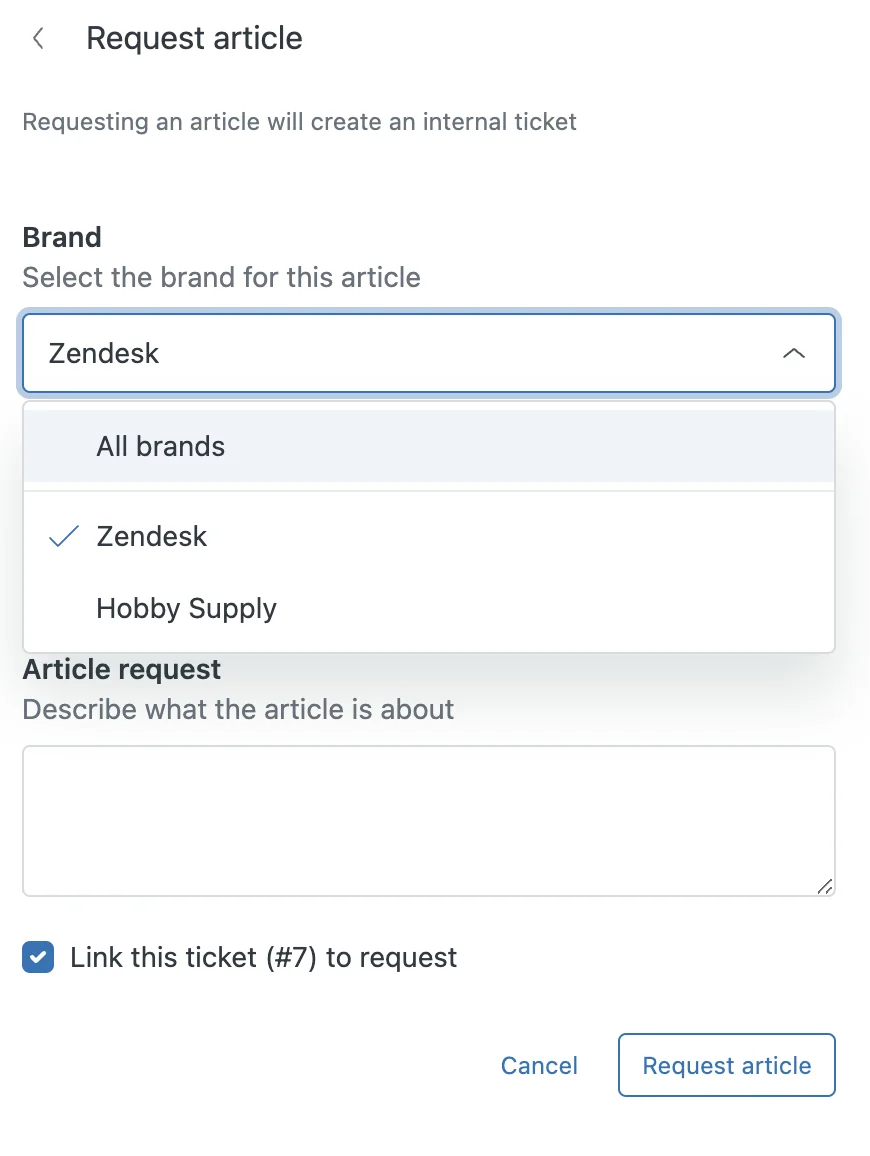
Two things to know. Zendesk notes that "Information from the ticket is not automatically populated in the article," so someone still writes it up. And the old Knowledge Capture app and Content Cues are gone, removed in August 2024 and May 2025 according to Zendesk's removed features list, so older guides that recommend them are out of date. For the wider picture, see my Zendesk knowledge gap analysis post.
On the reuse side, Zendesk's Copilot suggests macros with a confidence level right in the ticket, which helps a new agent who doesn't yet know your macro library by heart. It's worth organizing macro categories before the vendor starts, so suggestions land in sensible folders.
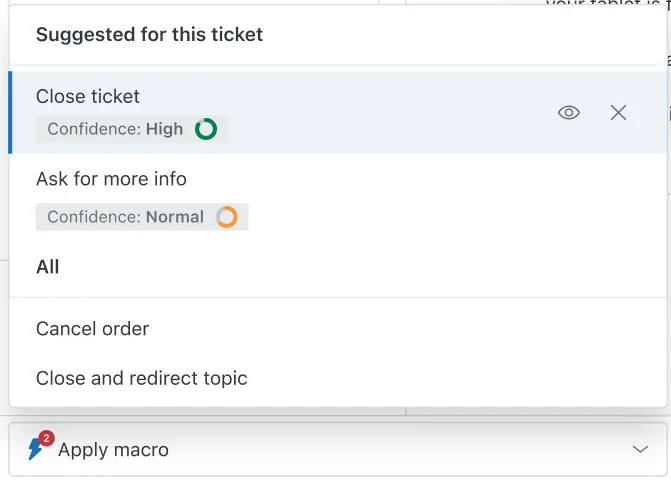
Copilot is a $50 per agent per month add-on on Suite Professional and up, per Zendesk's pricing page. Side conversations, which let an offshore agent pull in an onshore expert who doesn't have a Zendesk seat, need Suite Professional or higher.
Freshdesk
Freshdesk has an old, cheap trick that works on every plan: BCC your kbase address on a good reply and it becomes a knowledge base draft. The agent needs publish permission, so for a vendor team I'd route those drafts to an onshore reviewer. On Pro and Enterprise, the Freddy AI Copilot add-on ($29 per agent per month) adds an article generator and an article suggester, which needs at least 25 published articles before it switches on. More on that in the Freshdesk solution articles guide.
Help Scout and Gorgias
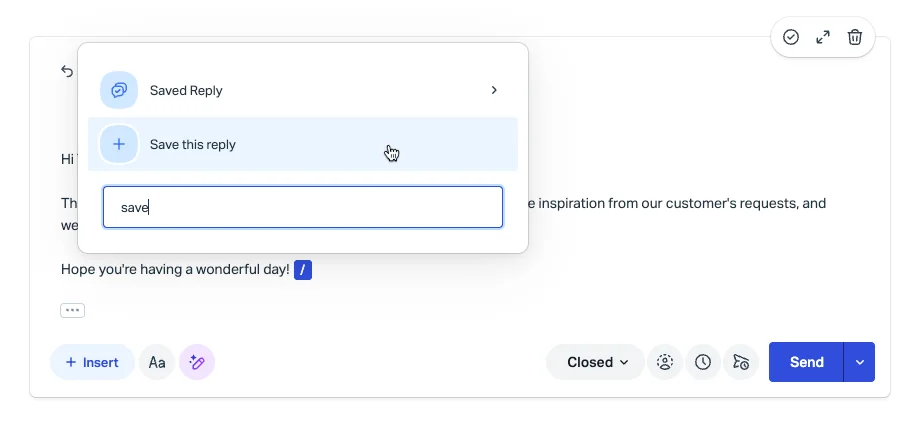
Help Scout lets any agent save a reply straight from the conversation editor, which is the lightest possible version of "answer once".
Gorgias takes a different path. Its docs say plainly that its AI Agent "generates its own responses from your skills and knowledge, not from macros," so if your knowledge transfer lives in Gorgias macros, the AI side won't see it. A lead can mark knowledge as missing from a ticket's AI Feedback tab and create an article on the spot. My Gorgias macros guide covers the human side.
Where AI fits in offshore knowledge transfer
Everything above still depends on people writing things down, and the hardest layer, how your team actually answers, is the one nobody writes down. That's where an AI that reads your past tickets changes the economics. Instead of asking senior agents to document their judgment, you let a model learn it from the thousands of replies they've already sent.
This is what eesel's AI helpdesk teammate is built for. It joins your existing helpdesk, reads your help center, macros and past tickets, and drafts replies for the agent on the ticket, whichever team they work for. The offshore team doesn't learn a new tool: the draft shows up as an internal note in the queue they already work, the same way an agent assist tool would.

Three parts of that setup map straight onto the knowledge transfer problem.
- It learns how your team answers, not just what the docs say. The first import takes up to 1,000 recent solved tickets, so the drafts match your tone and edge cases from the start. You can read more on training AI on past tickets.
- The offshore agent asks the AI, not HQ. An agent can mention @eesel in an internal note and get a draft back in the ticket, instead of pinging a senior on Slack 12 hours away. For questions outside a ticket, the same knowledge answers in an AI Slack bot with the source linked.
- Corrections become rules. When HQ corrects a draft, eesel writes the correction into its own instructions, so the fix holds for every later draft for every agent. That's the gap loop from earlier, minus the step where someone has to remember to update the doc.

Gcore is a good example of how this looks in practice. It runs two eesel bots: a customer-facing one on its public help center, and an internal one trained on its Zendesk macros and full ticket history. Per the Gcore case study, the internal bot helps agents "draft responses based on what's worked before, and even get new team members up to speed faster," and because both bots pull from the same source, "the answers are always consistent." At Yellowdig, a new customer success hire joked that the bot was their "best friend during onboarding."
On keeping things current, eesel's reports track knowledge gaps, the questions the agent couldn't answer from your docs, and a knowledge base skill can draft the missing articles from resolved conversations. That one is switched on by the eesel team rather than self-serve today, so ask for it during setup.
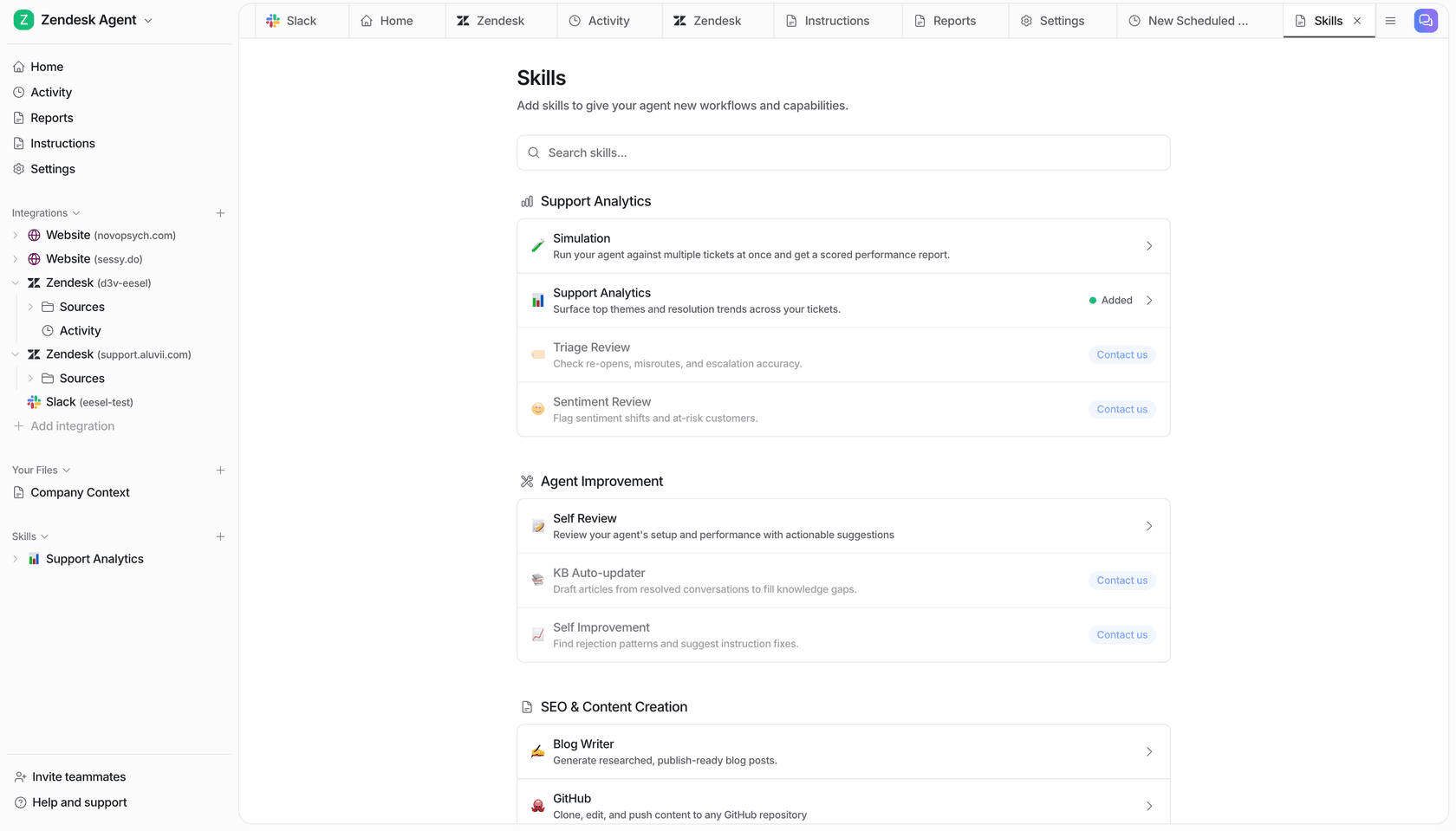
Before you let any of this near a customer, test it the way you'd test a new vendor's first week. eesel's simulation replays your past tickets and scores the drafts against what your team actually sent. It's the same idea as week two of the ramp plan: draft first, review, then hand over more. There's a step-by-step guide to onboarding an AI support agent if you want the full rollout.
One honest limit: none of this replaces the escalation rule or the vendor relationship. An AI teammate makes your knowledge available at 3 a.m. in Manila. It doesn't decide which tickets your offshore team should own. If you're comparing tools for this, my best AI for offshore support roundup covers eight of them. For how AI and an offshore team split the queue, see AI for offshore support, and for running shifts across time zones, the follow-the-sun support guide.
How to tell if the transfer worked
Feelings about a vendor are loud and data is quiet. Track a handful of numbers from week one so you can tell whether knowledge is actually landing.
| Metric | What it tells you | Healthy direction |
|---|---|---|
| Escalation rate back to onshore | How much the offshore team can resolve alone | Falls week over week, then flattens |
| Repeat escalations on the same topic | Whether answers are being captured | Near zero after a topic's first escalation |
| QA score on sampled tickets | Whether answers are right and on-tone | Converges with your in-house agents' scores |
| Reopen rate | Whether "resolved" really meant resolved | No higher than your in-house baseline |
| New articles or rules per week | Whether the gap loop is running | Steady, not zero |
The second row is my favourite, because it measures the loop directly. If the same question reaches HQ twice, the answer didn't get saved anywhere. For more on what to track, there's a list of customer service KPIs and a guide to measuring escalation quality.
Common mistakes to avoid
- Handing over stale macros. Audit and delete before day one. A wrong macro used by a 20-person vendor team spreads fast.
- Training on docs only. Docs say what's true. Tickets say what your team actually tells customers. Hand over both.
- Letting knowledge live in Slack DMs. If HQ answers a question privately, the next agent asks it again. Answer in the ticket, then save it.
- Punishing escalations early. In month one, an escalation is a free map of your knowledge gaps. Don't let vendor metrics hide it.
- Ending the transfer at week four. The pack goes stale the day you ship it. Keep the gap loop running, and give every article an owner.
- Putting business rules only in AI prompts. One long-time eesel customer found that time-zone logic written only into AI instructions behaved inconsistently. Keep routing, business hours and SLA rules in your helpdesk config, and use the AI for answers.
Try eesel for your offshore team
If you're handing tier 1 to an offshore or BPO team, eesel can give every one of their agents your best agent's answers from day one. It plugs into Zendesk, Freshdesk, Gorgias, Front and Help Scout, learns from your past tickets and macros, and drafts replies as internal notes your vendor reviews before sending. Corrections stick, so HQ fixes an answer once instead of re-training every new hire.
The Teammate plan starts at $299 a month for 500 credits, where one ticket counts as one credit however many replies it takes, with unlimited seats, so adding 20 offshore agents doesn't add 20 licences. There's a free tier with 100 credits to test it on your own tickets first. Try eesel and run it against last month's queue before your vendor's first shift.
Frequently Asked Questions
What is offshore support knowledge transfer?
How long does knowledge transfer to an offshore support team take?
What should be included in a knowledge transfer plan for an outsourced support team?
Why does offshore support knowledge transfer fail?
Can AI help with knowledge transfer to an offshore support team?
Is KCS useful for offshore support teams?
How do I keep an offshore team's knowledge base up to date?
How much does offshore support knowledge transfer cost?


Article by
Riellvriany Indriawan
Riell is a designer and writer at eesel AI with about two years of experience researching CX platforms, AI chatbots, and helpdesk software. She combines her design background with a sharp eye for how these tools actually look and feel in practice — making her comparisons unusually visual and user-focused.