What is internal support answer search?
Internal support answer search is the agent-facing side of your knowledge: the place an agent goes mid-ticket to check a policy, a fix, an exception, or "have we seen this before?". It's different from the help center search your customers use in two ways. It reaches content customers never see (internal-only articles, macros, ticket history, Slack), and the person searching is under time pressure with a customer waiting.
I work on eesel's product, building the features and the AI agents that sit on support queues, and eesel has spent years putting AI on live helpdesks across thousands of real tickets. The single most common request I hear from support leads isn't "deflect more tickets". It's some version of "my agents can't find what we already know". One support lead at a public-sector IT services firm told eesel's team on a sales call that they were losing two senior agents that year and wanted their knowledge captured in AI before they walked out the door. Another, a hardware support team, put it as a hard requirement: every answer an agent gets has to cite where it came from.
Those two asks are the whole topic in miniature. The knowledge exists, scattered. And an answer nobody can trace is an answer nobody will trust.
Why agents still can't find answers
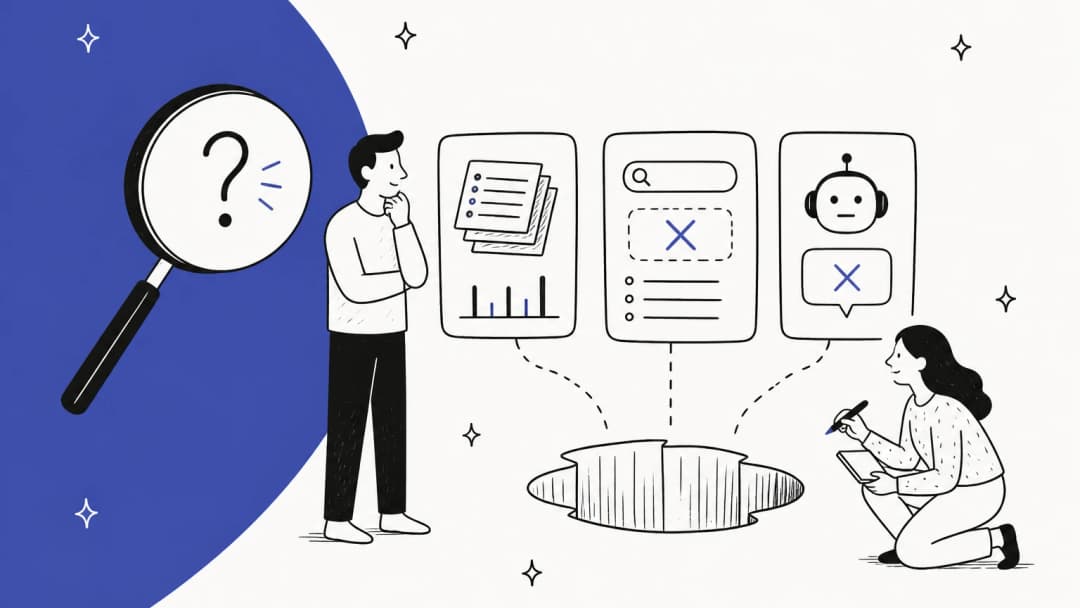
Most teams already have search. Every helpdesk has a knowledge panel, every wiki has a search bar, and Slack has a search box. Agents still ping the senior person on the team. Here's what's going on.
Keyword search only works if you already know the answer. If an agent doesn't know the document is called "Chargeback handling (EU)", they won't find it by typing "customer disputed payment". One call center agent described the upgrade that was promised to be "like Google":
"Yes, you (technically) no longer have to know the exact name of the document to find what you're looking for, but now instead vital documents are buried under 50 other documents even when you put in the exact document name."

The answer usually isn't in the help center at all. The clean public articles cover the obvious questions. The tricky ones live in old tickets, internal notes, a Slack thread from March, or a senior agent's memory. One commenter on r/CustomerSuccess laid it out better than I could:
"The real context is usually scattered across old tickets, internal notes, product quirks, edge cases, sales promises, customer-specific exceptions, random Slack/Teams threads, and the stuff senior support people just "know". If the bot only has a clean help center and some docs, it will answer the obvious questions and fall apart on anything that actually needs judgement."
When search fails, people become the search engine. This is the hidden cost. Every "quick question" lands on your most experienced agents, who then answer the same thing for every new hire. A sysadmin summed up where it ends:
"This means I'll need to announce that I documented a process. In my experience, people remember that announcement... and then just ask me how to do it instead of looking at the docs."
Search finds the stale version as happily as the current one. Two refund policies, one from last year, both match the query. The agent picks the wrong one and the customer gets a confident, outdated answer. This is why a knowledge base audit and answer search go together: answer search makes stale content more visible, not less, because every answer points at the article it used.
Search vs answer: the shift that matters
Here's the reframe I'd push on any team shopping for this. The expensive part of finding an answer was never typing the query. It's what happens after: open four tabs, skim each one, work out which is current, then rewrite it in your own words for the customer. A better ranking algorithm shaves seconds off the first step and leaves the rest untouched.
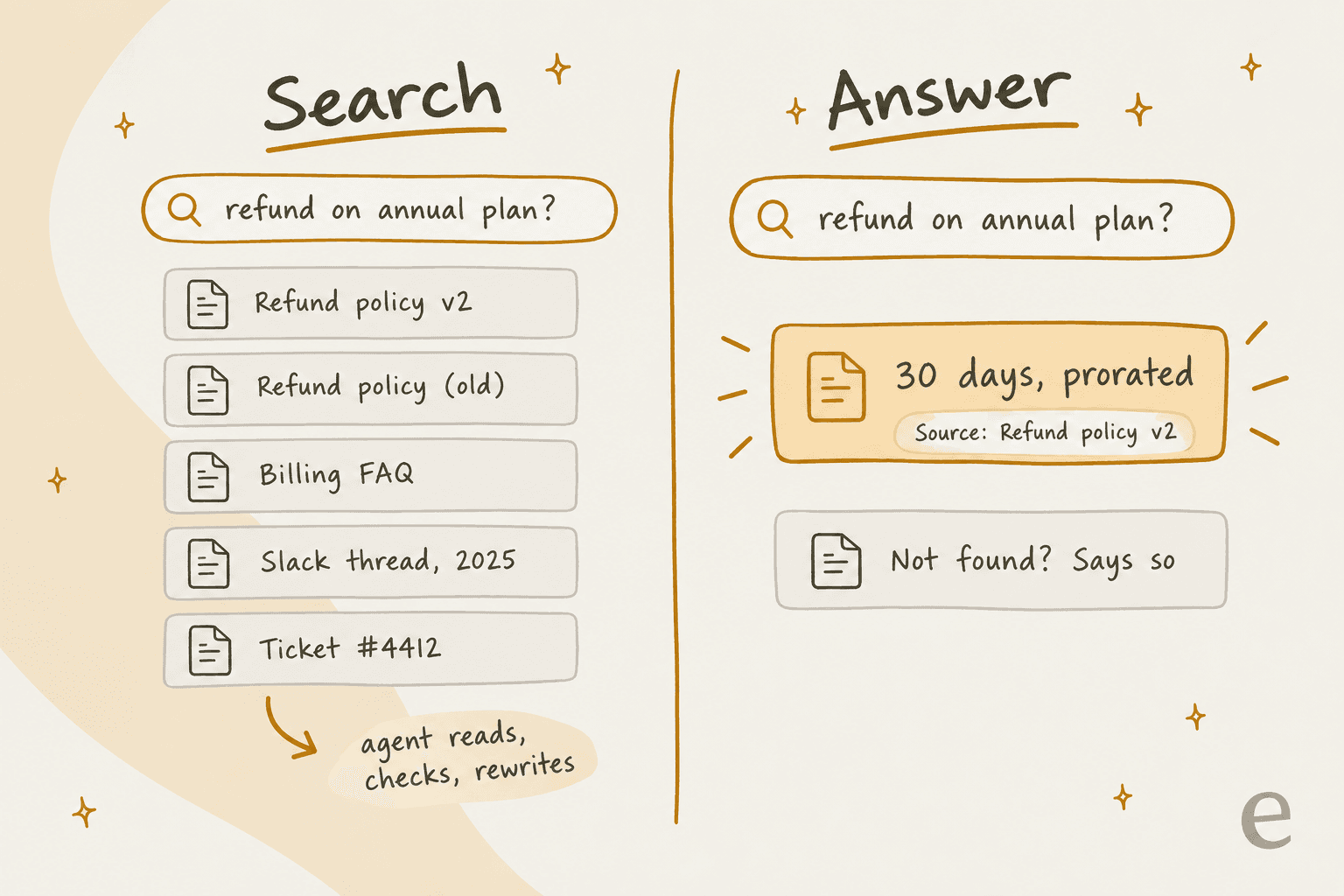
Answer search changes the unit of output. You ask a full question, it reads the candidates for you, and it returns a short answer with a link to the source. Three properties separate a useful answer search from a chatbot that sounds sure of itself:
- It cites. Every answer names the article, ticket or page behind it, so the agent can check in one click before sending.
- It admits gaps. "I couldn't find this" is a feature. It tells the agent to escalate, and it tells you which article to write next (that's the core of a knowledge gap analysis).
- It reads the messy sources. Past tickets and internal notes, not just the public help center, because that's where the edge cases live.
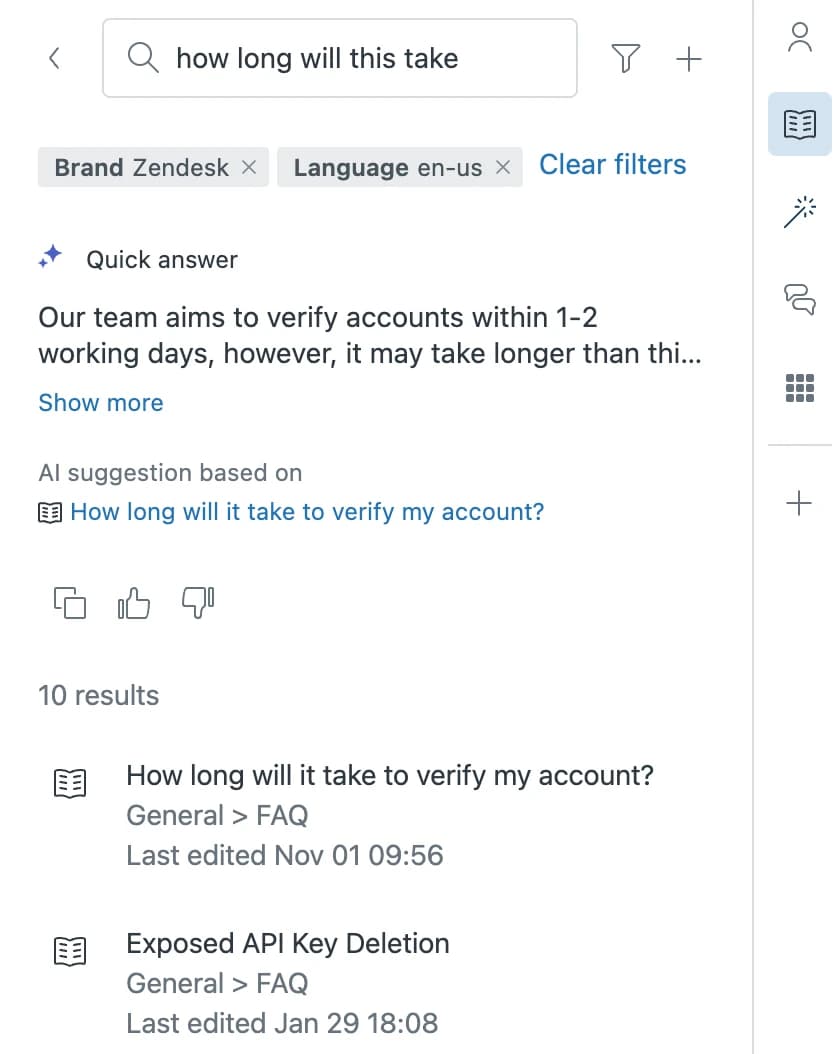
Zendesk's own docs nudge agents this way: quick answers often return nothing for one-word queries, and Zendesk recommends phrasing a full question instead.
The three ways teams set up answer search
There are three broad setups. Most teams end up combining two.
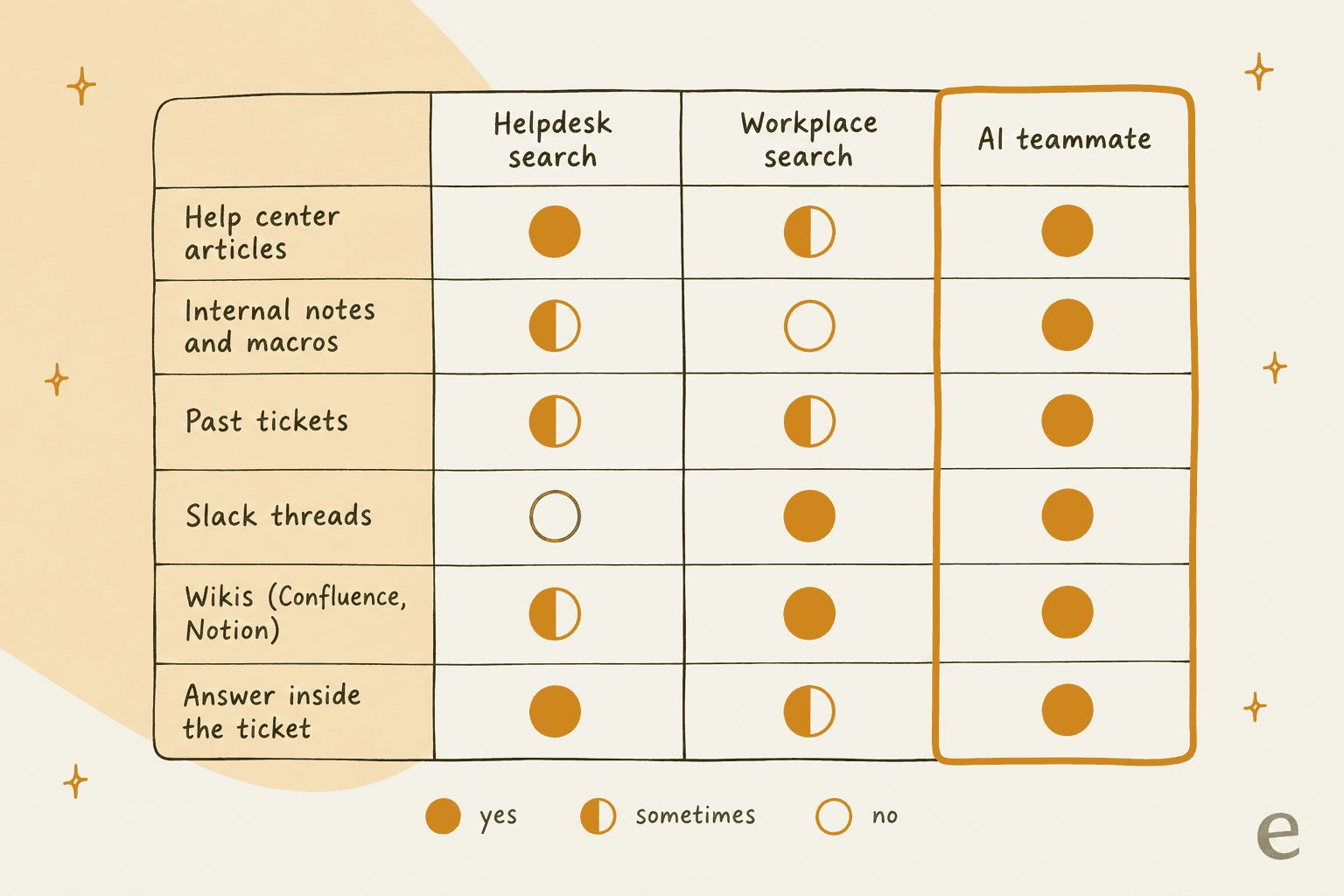
- Helpdesk-native search. The knowledge panel and AI copilot built into Zendesk, Freshdesk, Front and the rest. Lives inside the ticket. Coverage depends heavily on plan and add-ons.
- Workplace search. Tools like Glean, Guru, GoSearch, Atlassian Rovo, Slack enterprise search and Notion AI. They're strong on Slack and wikis, and a few index helpdesk tickets, but most open in a separate tab, sidebar or chat app.
- An AI teammate. One agent connected to the helpdesk and the wiki that answers in Slack and drafts inside the ticket, from the same pool of knowledge.
Here's how coverage typically compares across the sources that matter for support:
Not sure which fits? This picker walks the most common situations I see:
Where does the answer your agents need usually live?
Pick the closest one. The card shows where I'd start.
What each helpdesk gives agents natively
Before you buy anything, check what you already pay for. Here's what six helpdesks offer the agent inside the ticket, from their own docs and pricing pages as of October 2026.
| Helpdesk | Where the agent searches | Sources covered | Past tickets? | Cites source? | Plan and price |
|---|---|---|---|---|---|
| Zendesk | Knowledge panel in the ticket, AI quick answers; Copilot auto assist | Help center, community, up to 50 external sources; internal articles in auto assist | Yes, with Copilot | Yes | Suite Team $55, Professional $115 per agent/mo; Copilot $50/agent/mo, Professional+ |
| Freshdesk | Freddy AI panel ("Ask me anything"), Article Suggester | Solution articles, canned responses, resolved tickets | Yes (24-hour lag) | Yes | Pro $55, Enterprise $89 + Freddy AI Copilot $29/agent/mo |
| HubSpot Service Hub | Reply recommendation in the ticket thread | KB articles, website pages, blogs, files, URLs | No | If "Show citations" is on | Professional from $90/seat + $1,500 onboarding |
| Help Scout | "/" menu Docs link search, AI Draft | Docs articles, past conversations | Yes, in AI Drafts | Not stated | Plus $45, Pro $75 per user/mo |
| Gorgias | Macro search with top 3 AI-picked macros | Macros (Knowledge feeds the shopper-facing AI Agent) | No agent-side search found | n/a | From $40/mo, priced by ticket volume |
| Front | Copilot sidebar, suggested replies | Front KB, websites, Confluence, Notion, Google Drive, Guru, SharePoint, more | Yes | Yes | Copilot $20/seat/mo; included on Enterprise $105 |
Zendesk: quick answers plus Copilot
In a Zendesk ticket, the agent clicks the Knowledge icon in the context panel. It suggests articles for the ticket automatically, and if the agent types a question, generative search posts a quick answer above the results with an "AI suggestion based on" link to the article it used (Zendesk docs).
The bigger move is in Zendesk Copilot. Auto assist reads procedures first, then help center articles, then similar solved tickets. Since July 2026 it also reads 10 external sources (Confluence, Notion, Google Drive, SharePoint, Box, Guru and others) and internal knowledge articles, once an admin makes those segments available. Copilot costs $50 per agent a month on top of Professional or higher, so a 20-agent team on Suite Professional is paying $3,300 a month before anything else. One gap worth knowing about: on r/Zendesk, an admin noted "you can't really train the AI on agents correcting responses right now" (u/lakwanza88, Reddit), so corrections have to go back into articles by hand.
More detail on the panel itself is in my Zendesk AI search breakdown.
Freshdesk: Freddy cites the tickets it used
Freshdesk's conversational Copilot is the closest thing to "ask a colleague who remembers every ticket". The agent opens the Freddy AI panel and asks something like "have we seen refund delays like this before?", and the answer comes back with chips for the tickets behind each point.
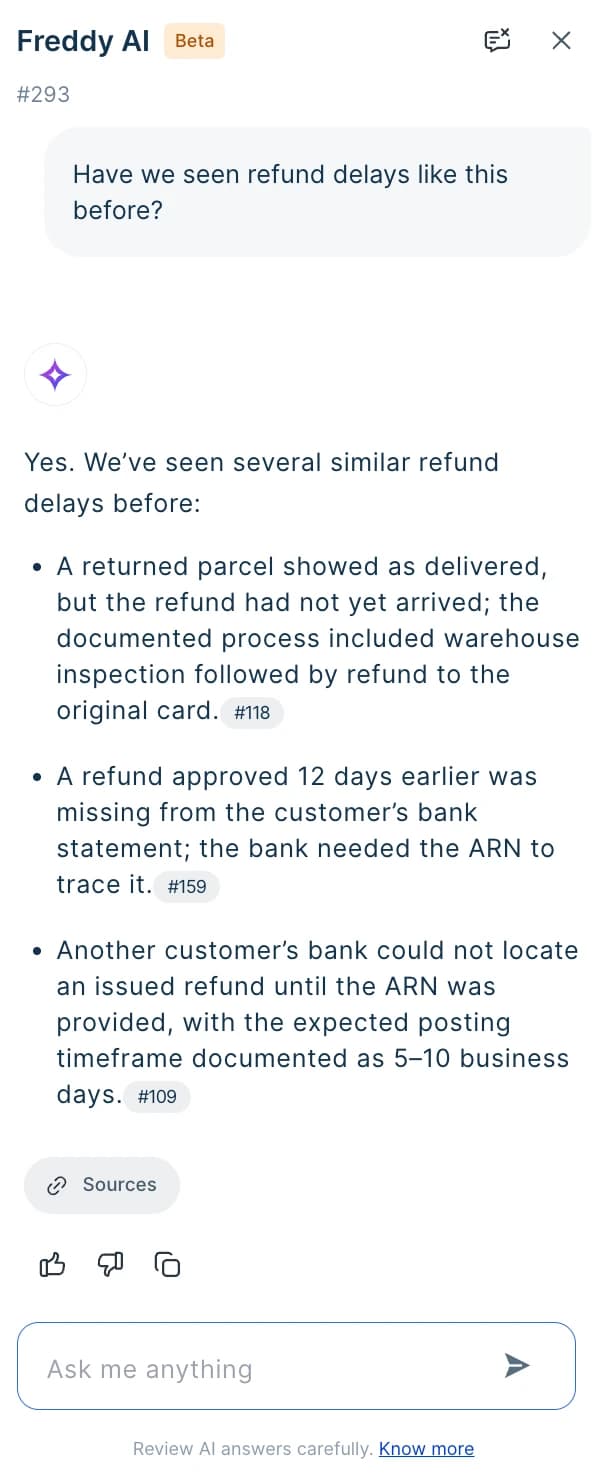
Three caveats from Freshdesk's own docs: it's in early access for selected customers, new articles take at least 6 hours and resolved tickets 24 hours before Freddy can cite them, and it searches Freshdesk content only (articles, canned responses, resolved tickets). It needs Pro or Enterprise plus the Freddy AI Copilot add-on at $29 per agent a month.
Front: Copilot searches conversations and connected wikis
Front's Copilot sidebar lets an agent ask a question and pick which knowledge sources to use. It searches historical conversations, Front knowledge bases, websites up to 3,000 pages, and seven connected apps including Confluence, Notion and Google Drive, and it shows which sources it used (Front help center).
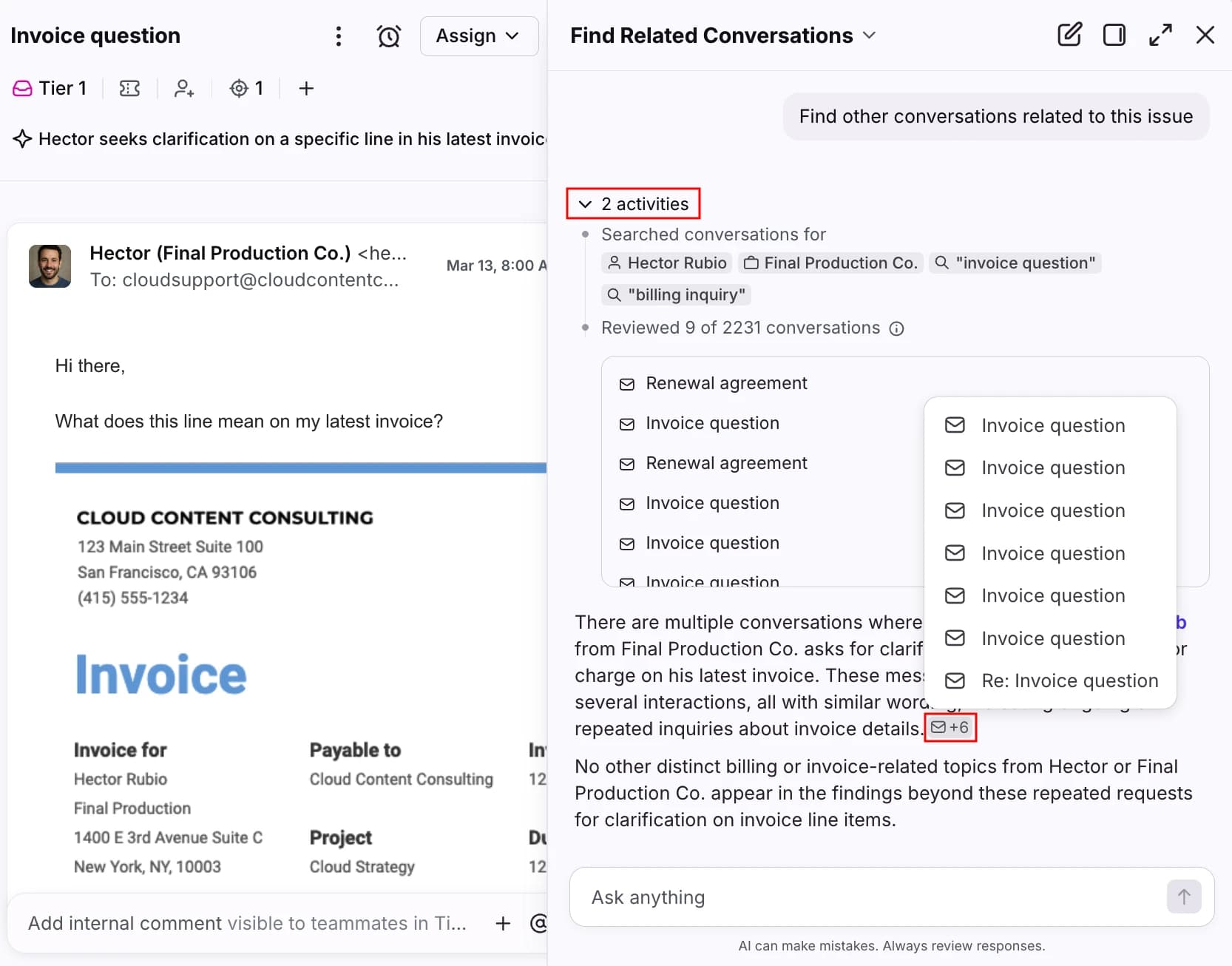
Front Copilot is $20 a seat on Starter and Professional and included on Enterprise. Two things to plan around: connected apps don't re-sync on their own (Front docs), so a Confluence edit won't show up until someone re-syncs, and suggested replies moved into the separate Autopilot add-on in April 2026.
HubSpot, Help Scout and Gorgias: help center first
These three lean on your own help content. HubSpot's reply recommendations pull from knowledge base articles, website pages, blogs and files, but not past tickets, and sources only show when the "Show citations" switch is on (HubSpot docs). Help Scout's AI Drafts learn from past conversations and Docs articles on Plus and Pro, though the docs don't say whether drafts show their sources.
On Gorgias, the agent-side lookup I found is macro search with the top 3 AI-recommended macros pinned first; the Knowledge library feeds the shopper-facing AI Agent (Gorgias help center). If your team runs on Gorgias macros, keeping them current is your answer search.
Workplace search tools: strong on Slack and wikis
If your answers live in Confluence, Notion, Google Drive and Slack more than in the helpdesk, a workplace search tool is the other half of the picture. The trade-off is that agents mostly use these outside the ticket.
| Tool | Price | Indexes helpdesk tickets? | Indexes Slack? | Inside the helpdesk? | Cites + respects permissions? |
|---|---|---|---|---|---|
| Glean | Quote-only | Yes: Zendesk, Freshdesk | Yes | Browser sidebar | Yes |
| Guru | Quote-only | Lists Zendesk, Freshdesk (objects not stated) | Yes | Browser extension in Zendesk | Yes |
| GoSearch | Free, Pro $20/user/mo | Yes: Zendesk | Yes | No (Chrome extension, Slack, Teams) | Yes |
| Atlassian Rovo | Included in Jira/Confluence/JSM Standard+ | Yes: Zendesk tickets + articles | Yes | Only in Jira Service Management | Yes |
| Slack enterprise search | Enterprise+ only | No helpdesk connector named | Native | No | Yes |
| Notion AI | Business $20/seat/mo | Zendesk "coming soon" | Yes | No | Yes |
| Microsoft 365 Copilot | $30/user/mo (annual) | Zendesk tickets (preview) | No Microsoft-built connector | No | Yes |
A few things stand out from the vendors' own pages.
Glean goes deepest on tickets. Its Zendesk connector indexes tickets with comments, pitched for finding "similar past cases", and enforces permissions down to the record. People who use it can be enthusiastic: one Hacker News commenter called its answers "downright magical" (vladgur, Hacker News). The catch is price and fit: there's no public price list, and another commenter summed it up as "the pricey one aimed at big companies" (earcar, Hacker News).
If budget is the blocker, my Glean alternatives roundup covers cheaper options.
GoSearch and Notion are the self-serve options. GoSearch Pro is $20 a user a month and indexes Zendesk tickets, help center articles and ticket customer details, with inline citations.
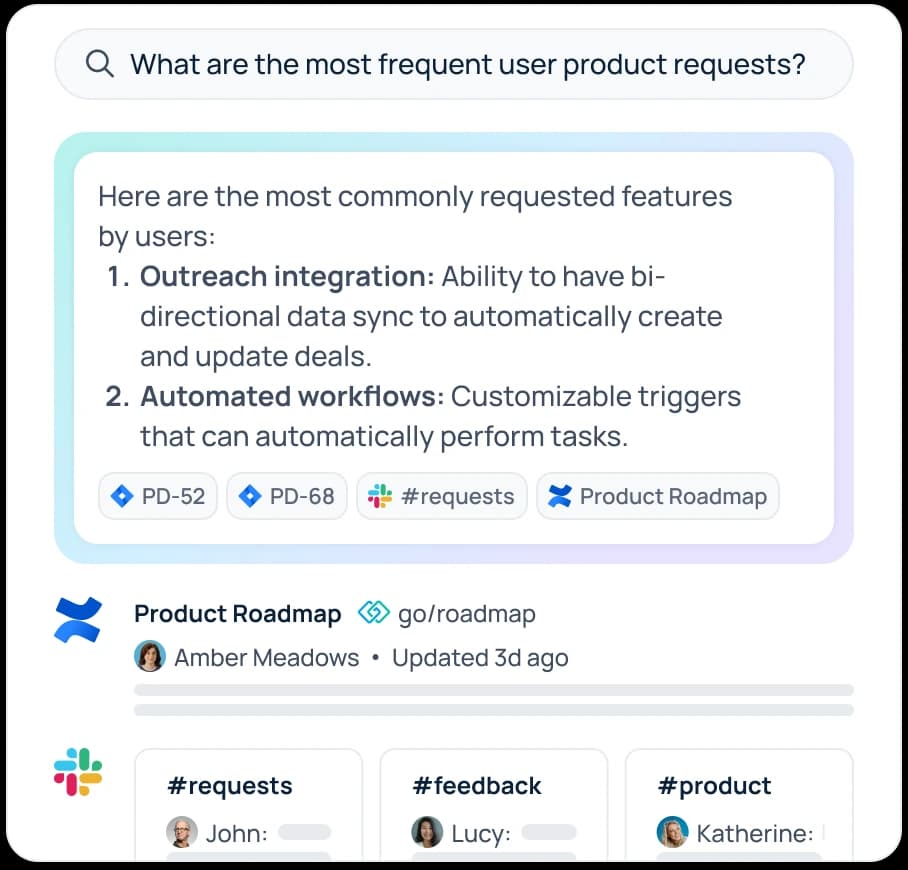
Rovo is "free" if you're already on Atlassian. Rovo search comes with Jira, Confluence and Jira Service Management on Standard plans and up, and search plus indexing use no credits (Atlassian). Its Zendesk connector indexes incident tickets and knowledge articles. For a Zendesk team it's a separate surface; for a JSM team, it's already in the helpdesk. My Rovo pricing explainer has the credit math.
Slack enterprise search is locked to the top tier. It's ticked only on Enterprise+ on Slack's pricing page, and the launch connector list (Asana, Box, GitHub, Google Drive, Jira, Salesforce) names no helpdesk.
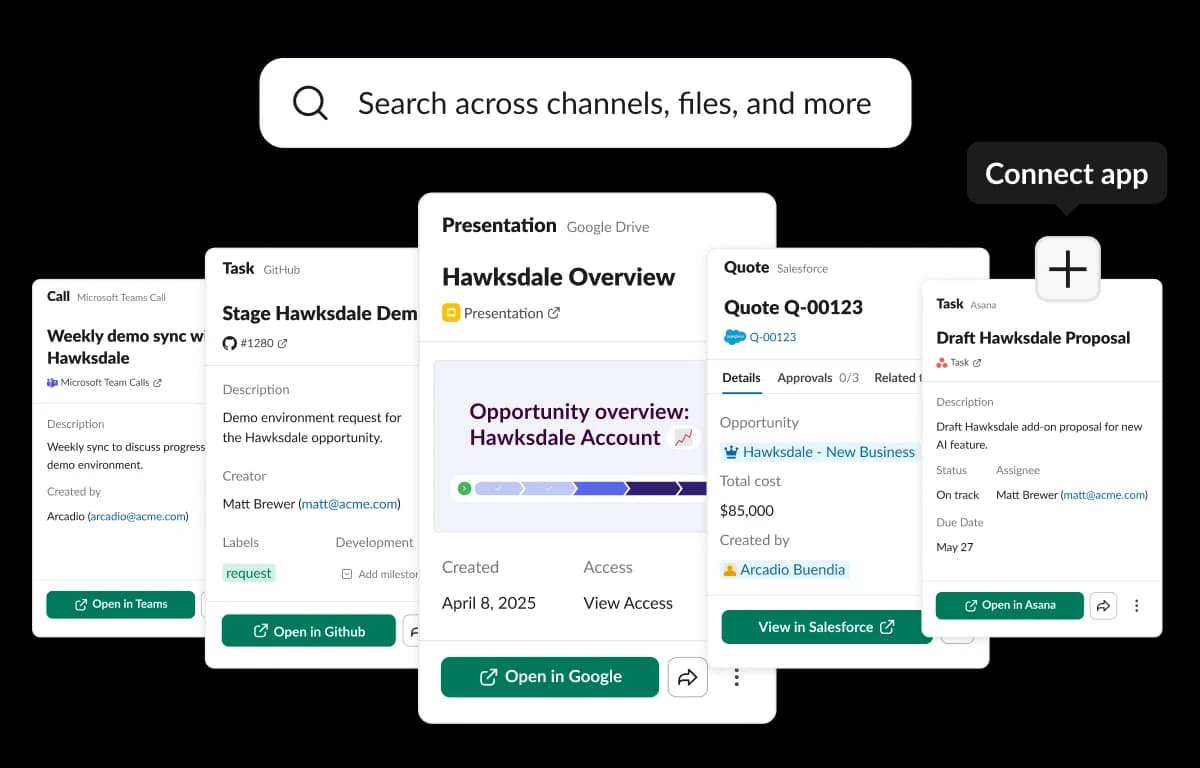
The pattern across all seven: none of them drafts the reply inside the ticket. They find and summarize. The agent still copies the answer across and writes the response. And a purpose-built tool still depends on the content underneath it, as one Guru reviewer on a telecom customer care team noted: "at times, the search bar doesn't display the specific article needed to process a client's request" (Jandolf L, Capterra).
How to set up internal answer search in five steps
Whichever setup you pick, the rollout that works looks the same. I'd budget two to three weeks for a team of 10 to 30 agents.
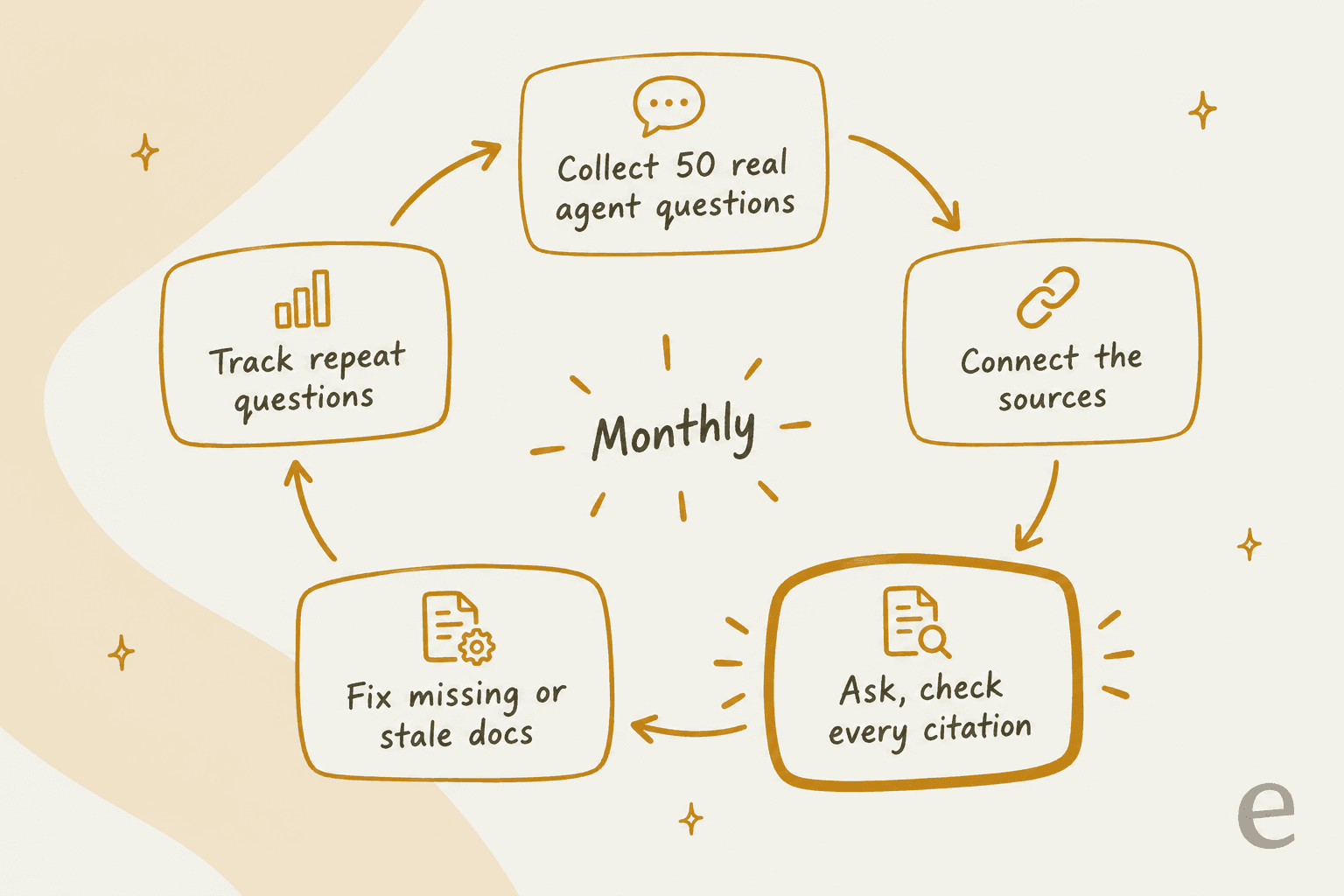
Step 1: Collect 50 real agent questions
Don't start with the tool. Pull the questions agents actually ask: your internal support Slack channel, "how do I" notes on tickets, and whatever new hires asked in their first month. Fifty is enough to see a pattern. This list becomes your test set, and it'll be more honest than any vendor demo.
Step 2: Connect the sources that hold the answers
Map each of the 50 questions to where its answer lives today. If half point at Slack threads and old tickets, a help-center-only tool won't cut it no matter how good its search is. Connect the help center, internal articles and macros first, then past tickets (filtered to solved, recent ones), then the wiki. Leave out anything you wouldn't want an agent to quote, like draft policies or a legal folder.
Step 3: Ask every question and check every citation
Run the 50 questions and score each answer: right, right but cited a stale source, wrong, or "couldn't find it". The citation check matters as much as the answer. A correct answer pointing at last year's refund policy is a future wrong answer.
Step 4: Fix missing and stale docs
The "couldn't find it" and "stale source" buckets are your writing list. Merge duplicates, archive the old versions, and turn the best Slack answers into internal articles. This is where answer search pays for itself twice: it shows you exactly which knowledge gaps cost agents time.
Step 5: Track repeat questions monthly
Once it's live, watch which questions keep coming back and which ones still end up as a ping to a senior agent. A question asked three times a week that the system can't answer is your next article. Feed new-hire questions in especially, since they're the clearest signal of what your agent onboarding is missing.
Mistakes that make answer search fail
Connecting everything on day one. Ten years of Confluence, including abandoned spaces, means the stale page wins as often as the right one. Start narrow and widen.
Skipping past tickets because they're messy. They're messy because they're real. For edge cases, a solved ticket from last month often beats any article. Filter to solved tickets from a recent window and redact personal data where your tool supports it.
Accepting answers without sources. If an agent can't click through to check, they'll either trust it blindly or ignore it. Both are bad. Make citations non-negotiable when you evaluate tools.
Treating it as a one-time project. Policies change. One documentation team member described a launch where "associates can't find anything in the knowledge base, managers start panicking" because nobody told them about the change (u/lockshield, Reddit). Tie knowledge updates to your policy change process.
Forgetting where agents actually ask. If your team asks questions in Slack, a search page they have to open won't change behavior. Put the answers where the question already gets asked.
eesel for internal support answer search
Every setup above covers part of the map. Helpdesk copilots live in the ticket but mostly read helpdesk content. Workplace search reaches Slack and wikis but mostly sits outside the ticket. eesel's AI helpdesk teammate is built to sit across both: one agent, one pool of knowledge, reachable wherever your team asks.
In Slack, an agent @mentions eesel in a channel or DM and gets an answer in the thread with the source linked. It searches your connected knowledge plus Slack messages live, only in public channels it's in and private channels the person asking is also in, so it can't surface a private channel to someone outside it (eesel docs).
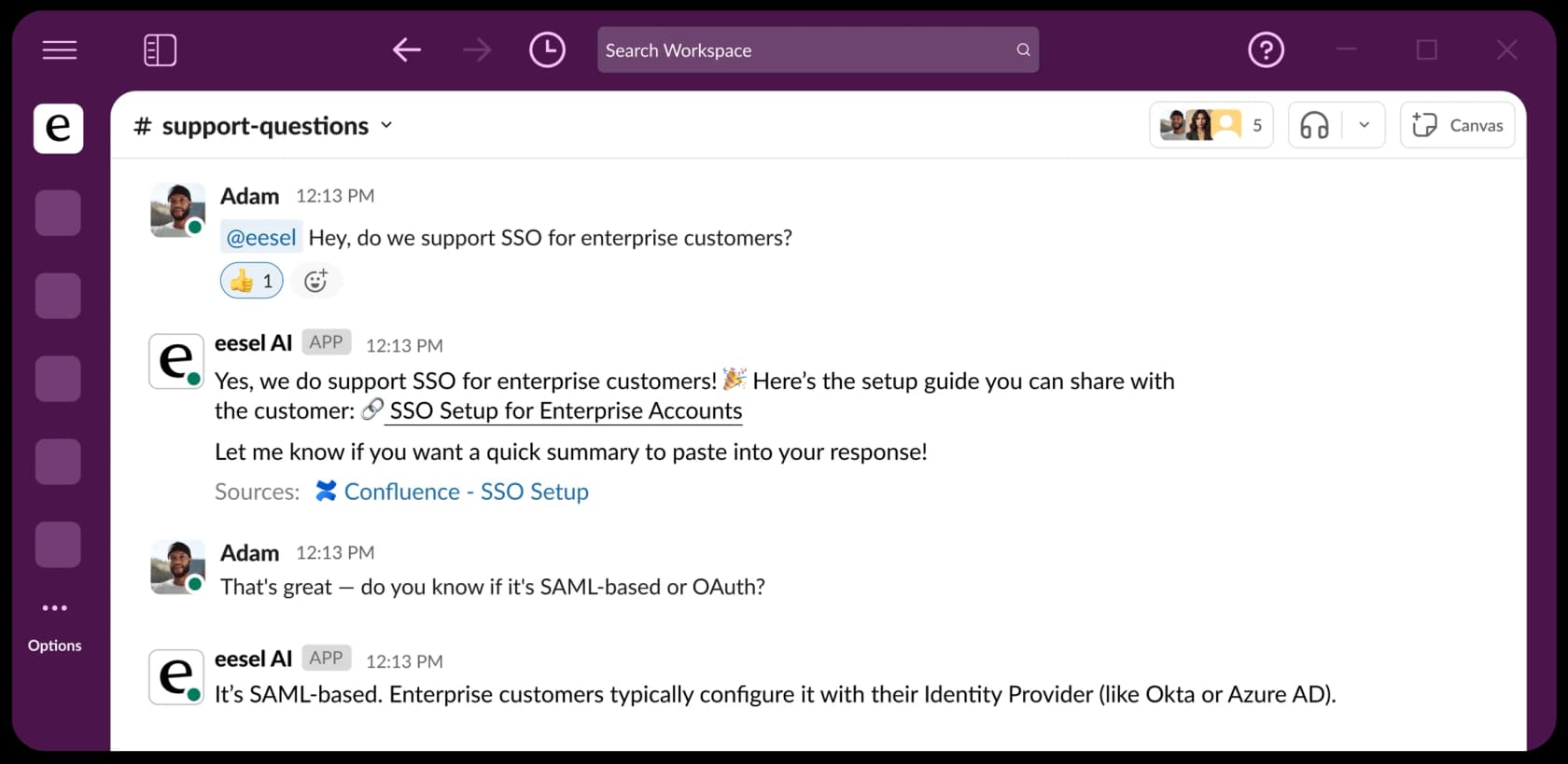
Inside the ticket, the same agent drafts the reply. It can post drafts as internal notes in Zendesk, Freshdesk, Front and other helpdesks for a person to check and send, or agents can use the free Chrome side panel, which reads the open ticket and drafts from it (on Zendesk it pastes straight into the reply field).
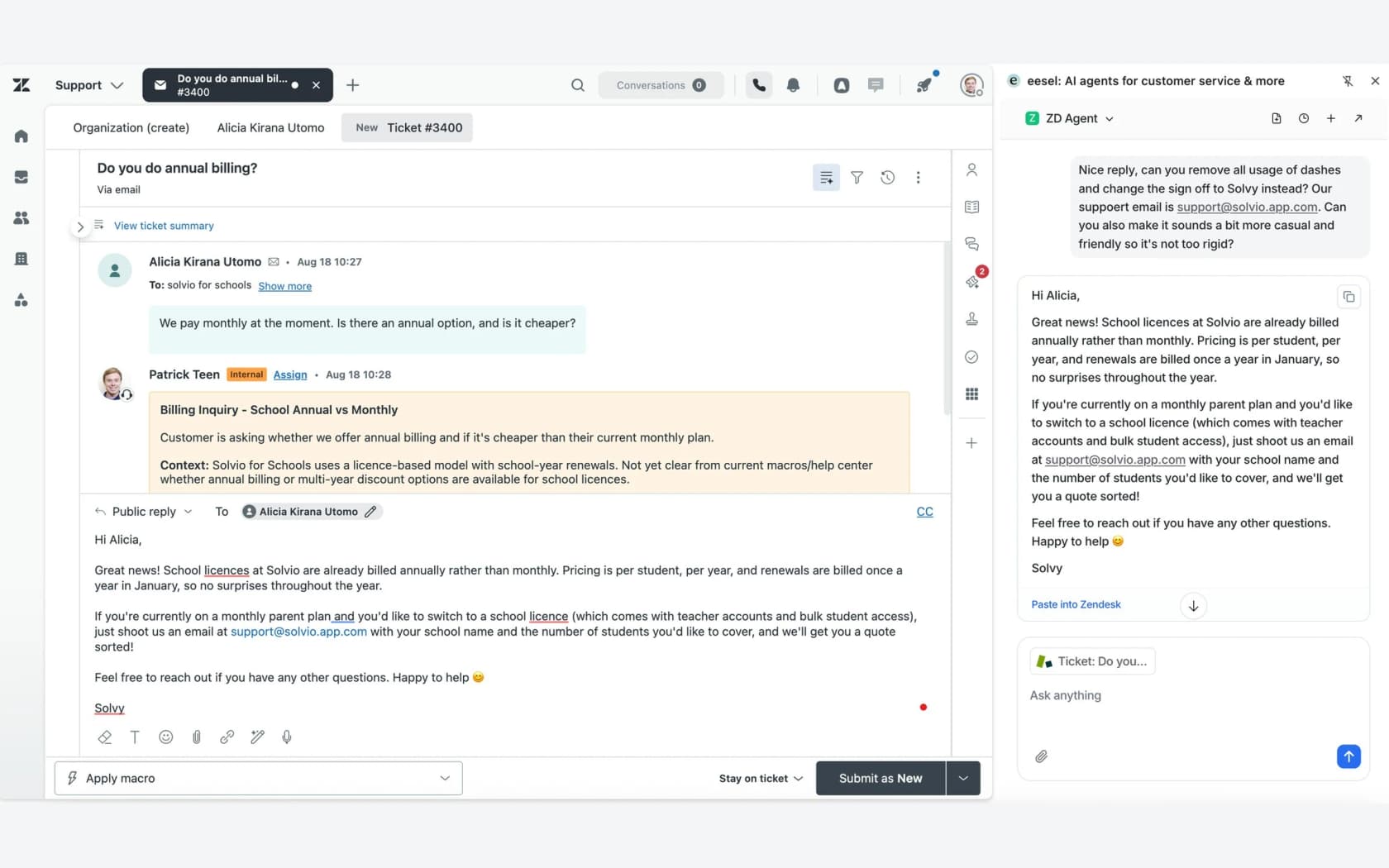
What it reads: your help center, macros and past tickets (filterable by status and date) on a full helpdesk connection, plus Confluence Cloud, Notion, Google Drive, websites and uploaded files, all searched together.
Every answer links its source, and when it can't find something, it says so instead of guessing (eesel docs). Before anything goes live, the Simulation skill replays real past tickets and scores the answers, which is basically Step 3 above, done for you.
For ops leads and engineers, the eesel CLI runs the same teammate from a terminal. eesel chat "what's our refund policy?" asks the exact agent your team asks in Slack, eesel files upload ./refund-policy.pdf adds a new source, and eesel integrations sources zendesk shows which helpdesk sources are on. Every command prints JSON, so Claude Code, Cursor or Codex can drive your setup, and eesel mcp token turns the workspace into an MCP server so you can query your support knowledge from those tools directly. One limit: switching on the Slack mention automation is a dashboard step, not a CLI command.
Real teams use it this way. BitGo runs an internal eesel bot in Slack, fed with tech manuals, policy docs and product specs, so an agent stuck on a tricky ticket can just ask. A payments company put it plainly:
"With eesel, we can find specific answers to questions extremely fast. We can onboard new employees very quickly and have seen up to 80% time savings."
Where it isn't the right fit: eesel doesn't mirror per-user document permissions from Confluence or Google Drive, so the cleanest setup is a separate internal agent that only gets the sources your whole support team should see. Microsoft Teams isn't self-serve yet either. Pricing is 100 free credits with no card, then the Teammate plan from $299 a month for 500 credits, with unlimited agents and seats; a ticket is one credit and Slack questions use credits too. Try eesel on your 50 test questions and see how many come back with the right source.
Frequently Asked Questions
What is internal support answer search?
What's the difference between internal search and answer search for support teams?
Can support agents search past tickets for answers?
How much does internal support answer search cost?
Should we use Glean or a helpdesk copilot for internal support search?
How do I make internal answer search work in Slack?
Why do support agents still ask senior agents instead of searching?
How do you test an internal support answer search tool?


Article by
Kira
Kira is a writer at eesel AI with a Computer Science background and over a year of hands-on experience evaluating AI-powered customer service tools. She focuses on breaking down how helpdesk platforms and AI agents actually work so that support teams can make better buying decisions.