


GoSearch is an AI enterprise search layer from GoLinks that indexes your apps and answers questions across them. In 2026 it costs $0 for Free, $20 per user per month for Pro, and "let's talk" for Enterprise. Those two published rates are the entire price list. I grepped the page's HTML and its JavaScript bundle, and the only dollar figures anywhere are $0 and $20.
Two things are worth carrying into any evaluation. First, the billable unit is the seat, not usage, and there is no published annual discount, so the price scales straight with headcount. Second, the $20 Pro seat only unlocks private connectors. Shared, workspace-wide connectors, the GoSearch API, SSO, SCIM and the audit log all sit on the quote-only Enterprise tier. So the price you can actually compute is not the price of a company knowledge layer, it is the price of a personal search tool.
The Free plan is a demo, not a plan: it caps you at 10 searches and 3 AI answers a day. And every GoSearch connector is read-only, so it finds the answer and hands it to a person who still has to go do the thing.
If you are pricing internal search because your team keeps re-answering the same questions, that read-only line is the one to sit with. A tool that surfaces a Zendesk ticket in search results but never replies to one leaves the actual work on your queue. That is where a helpdesk teammate like eesel fits differently: it has one fixed monthly price with no per-seat fee (1 credit per ticket), and it closes the ticket rather than just finding it.
What GoSearch actually is (and who's behind it)
Before the numbers, it helps to know what you are buying. GoSearch is one of three products from GoLinks, the San Jose company (YC W19) best known for its go/ internal short-link tool. The other sibling is GoProfiles, an employee directory. All three are sold and billed separately, which matters later when a G2 rating gets quoted at you.
GoSearch itself is a retrieval and permissions layer that sits in front of other people's models. It trains none of its own; its subprocessors page names OpenAI, Anthropic, Google and Cohere as the AI providers. You connect your apps, it builds a search index, and it answers questions across that index with inline citations.
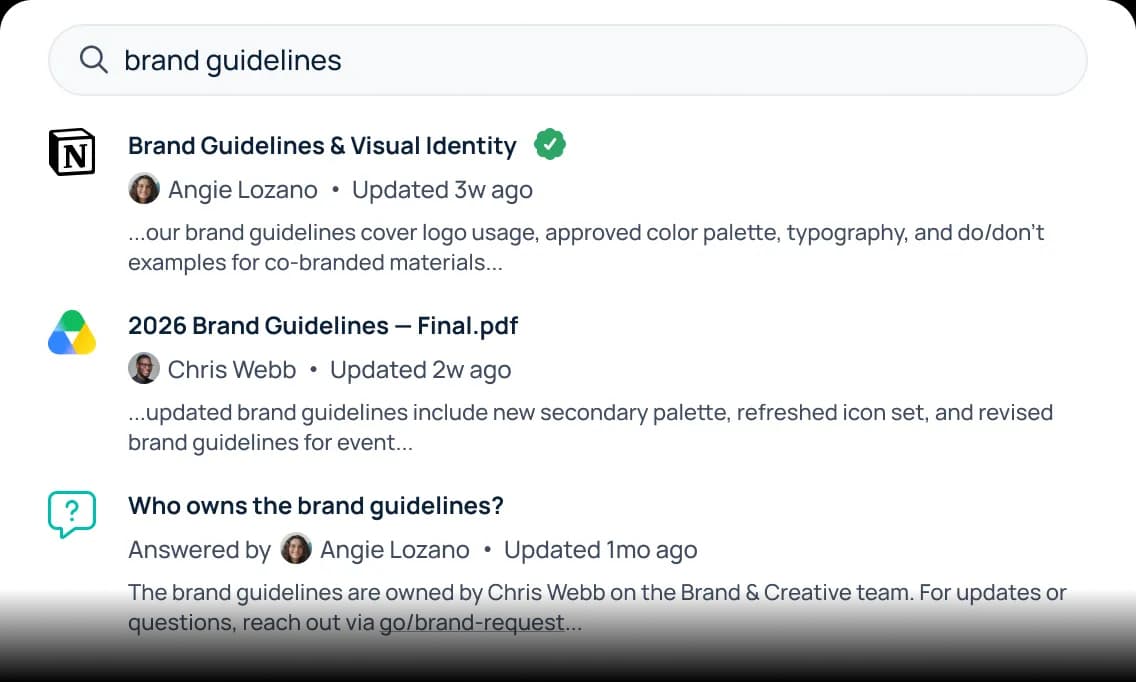
The product does this well, and reviewers back that up: fast, cross-source internal search is the consistent praise on its G2 profile. The catalogue leans toward internal knowledge work, with 34 of its 88 rendered connectors being HR and people systems. If your problem is "our docs are scattered across Confluence, Notion and Google Drive and nobody can find anything", GoSearch is squarely aimed at you. Keep that scope in mind, because the pricing is built around it.
GoSearch pricing at a glance
Here is the whole published price list, straight from the pricing page.
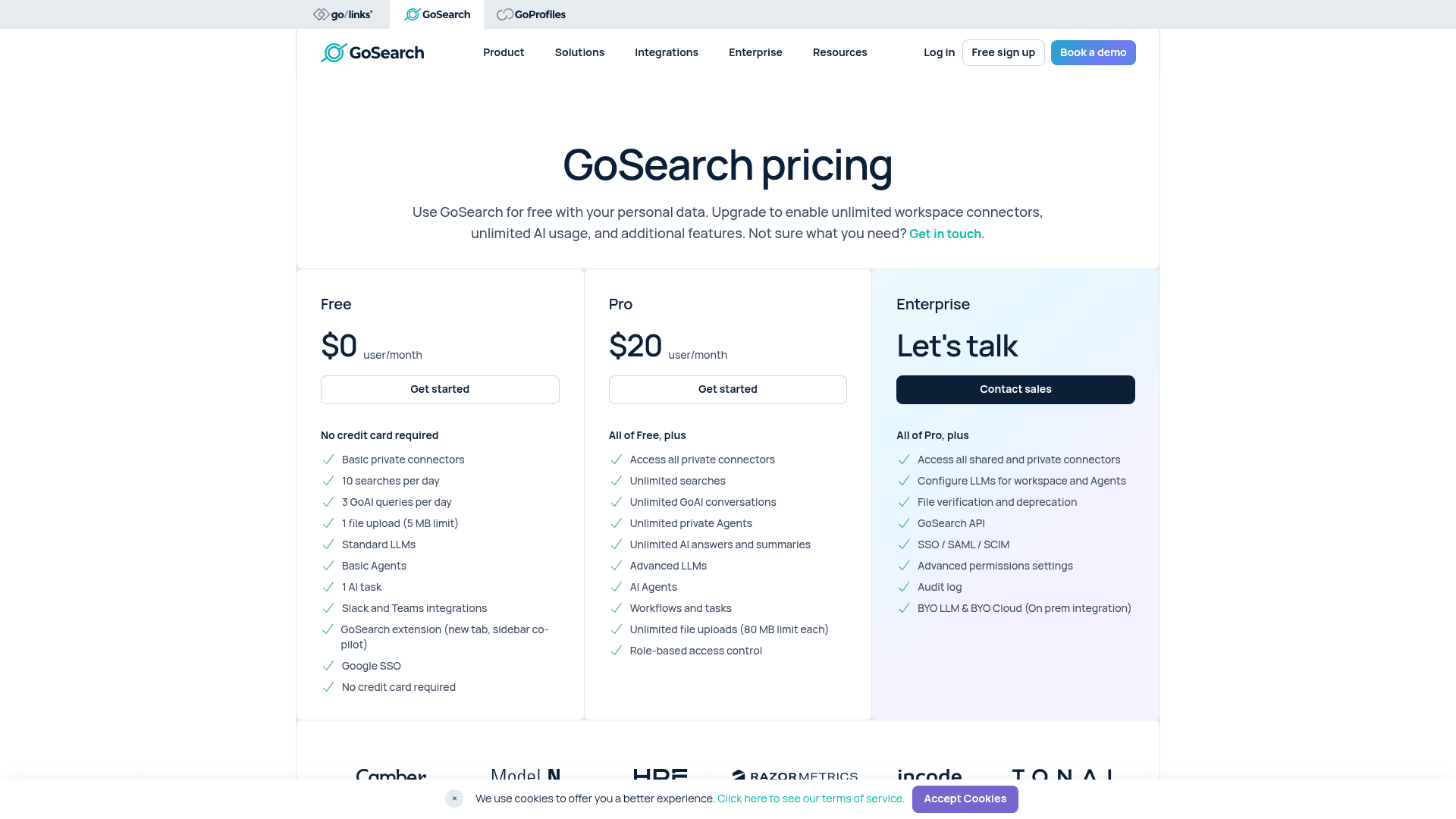
| Plan | Price | Billing unit | What it is really for |
|---|---|---|---|
| Free | $0 | user/month | A personal, capped demo (10 searches/day) |
| Pro | $20 | user/month | Individual power use, private connectors only |
| Enterprise | Let's talk | quote-only | The actual company deployment |
A few things this page does not have, which is as important as what it does. There is no annual-versus-monthly toggle and no annual discount. There is no seat minimum published on any tier. And there is no overage or add-on rate card anywhere: no per-query, per-agent, per-workflow-run or per-connector charge is priced. What you see is what there is, and above Pro, what there is says "contact sales".
That is a cleaner pricing page than a lot of this category ships, and GoSearch deserves credit for publishing two real, computable seat rates when plenty of rivals hide everything behind a form. The catch is where the useful features land, which is the next three sections.
What the free plan actually gets you
"Free forever" is doing a lot of work in the marketing. Look at the actual caps and the Free tier reads as a taster, not a team plan.
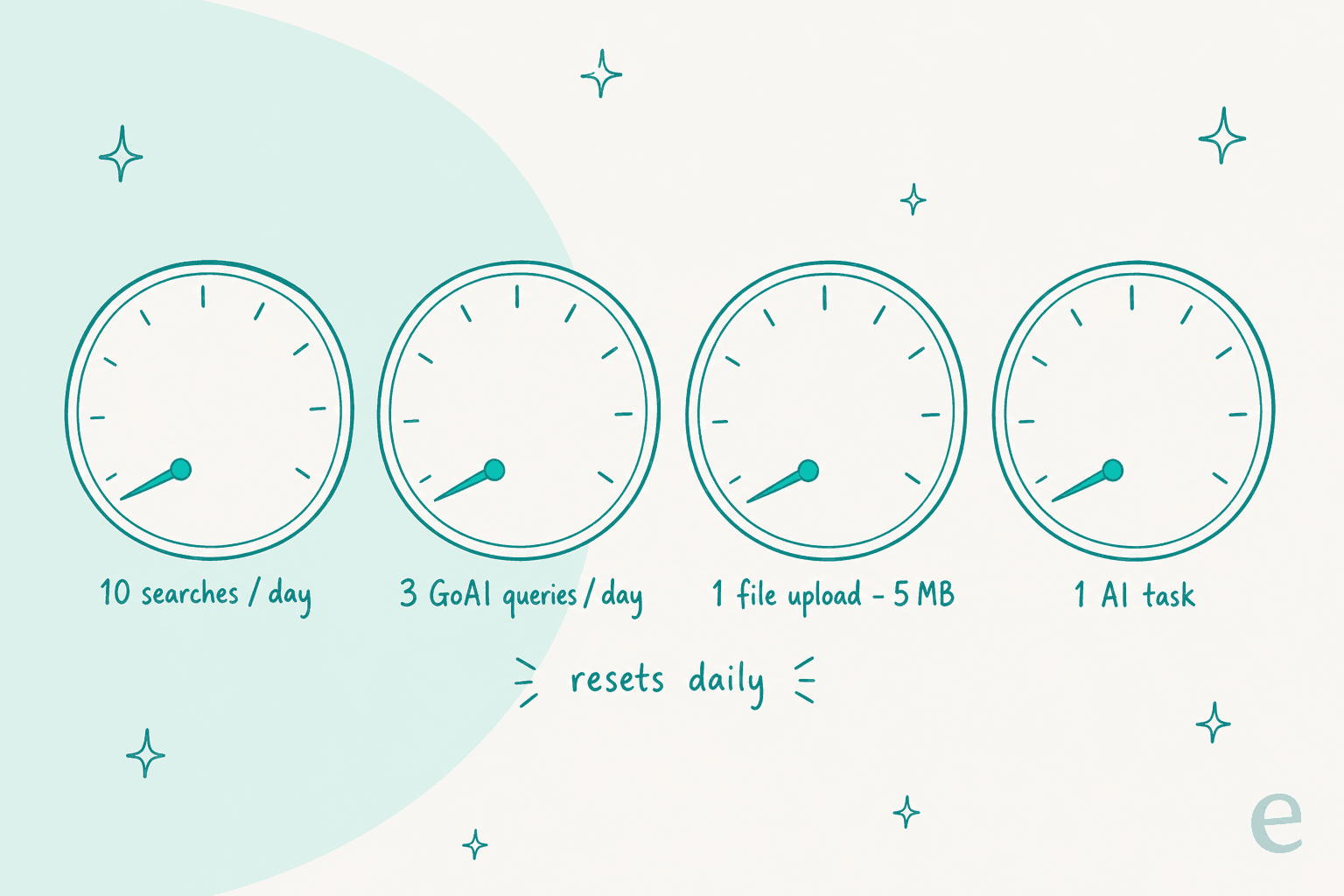
The Free plan is scoped to personal data, not workspace-wide connectors, and the hard limits are daily: 10 searches per day and 3 GoAI queries per day, plus one 5 MB file upload, one AI task, "basic" private connectors and Google SSO only. Ten searches is roughly two questions before your morning coffee. It is a useful way to feel the product, and there is no credit card required, but nobody is running a support or ops function on three AI answers a day.
Worth noting for the sceptics: the Free tier quietly shrank after launch. The September 2025 press release promised "unlimited searches" and 5 AI queries a day. The current page publishes 10 searches and 3 queries a day. Both figures are GoSearch's own, thirteen months apart, so the "free forever" plan is not a fixed contract with you.
What $20 Pro unlocks, and what it doesn't
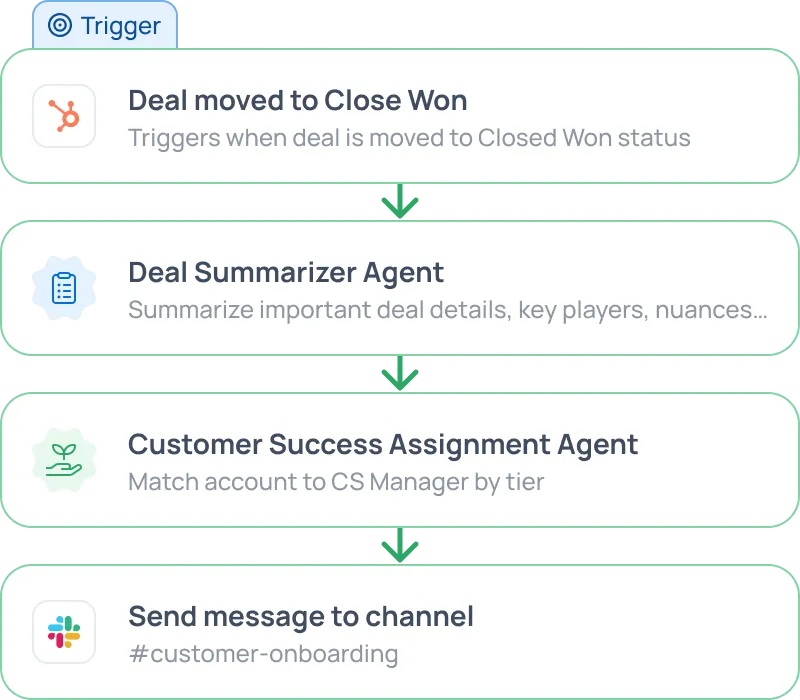
Pro is where GoSearch becomes a real tool. The card opens with "all of Free, plus" and then removes the meters: unlimited searches, unlimited GoAI conversations, unlimited private agents, unlimited AI answers, "advanced" models, 80 MB file uploads and role-based access control. You also get the agents and workflows, which are the most interesting part of the product.
Here is the line to read twice, because it is the whole game: Pro grants "access all private connectors". Private. The page's own header sells the upgrade as unlocking "unlimited workspace connectors", but shared workspace connectors are held back for Enterprise. So the $20 seat connects the data you personally authorise, not the company-wide sources an admin sets up once for everyone. For a solo power user that is fine. For a team knowledge layer, that is the difference between "I connected my Drive" and "IT connected the company wiki for all 200 of us".
There is also a quieter gap that shows up in reviews rather than on the pricing page. One G2 reviewer put the ceiling plainly:
"The AI helps build content but can't actually write to a document, so I find myself cutting and pasting. I'm concerned about how future edits will be managed. Also, I'd like to connect the AI agent to Slack and chat with it specifically, but that functionality seems to be missing."

That is the read-only nature of the whole category surfacing in one seat. The agent drafts, but a person still moves the words. Keep that in view when you weigh $20 a head.
The real gate: what a company actually needs is on Enterprise
Line up the Enterprise card next to Pro and the pricing logic becomes obvious. Almost everything that turns GoSearch from a personal tool into a governed company deployment lives behind the quote.
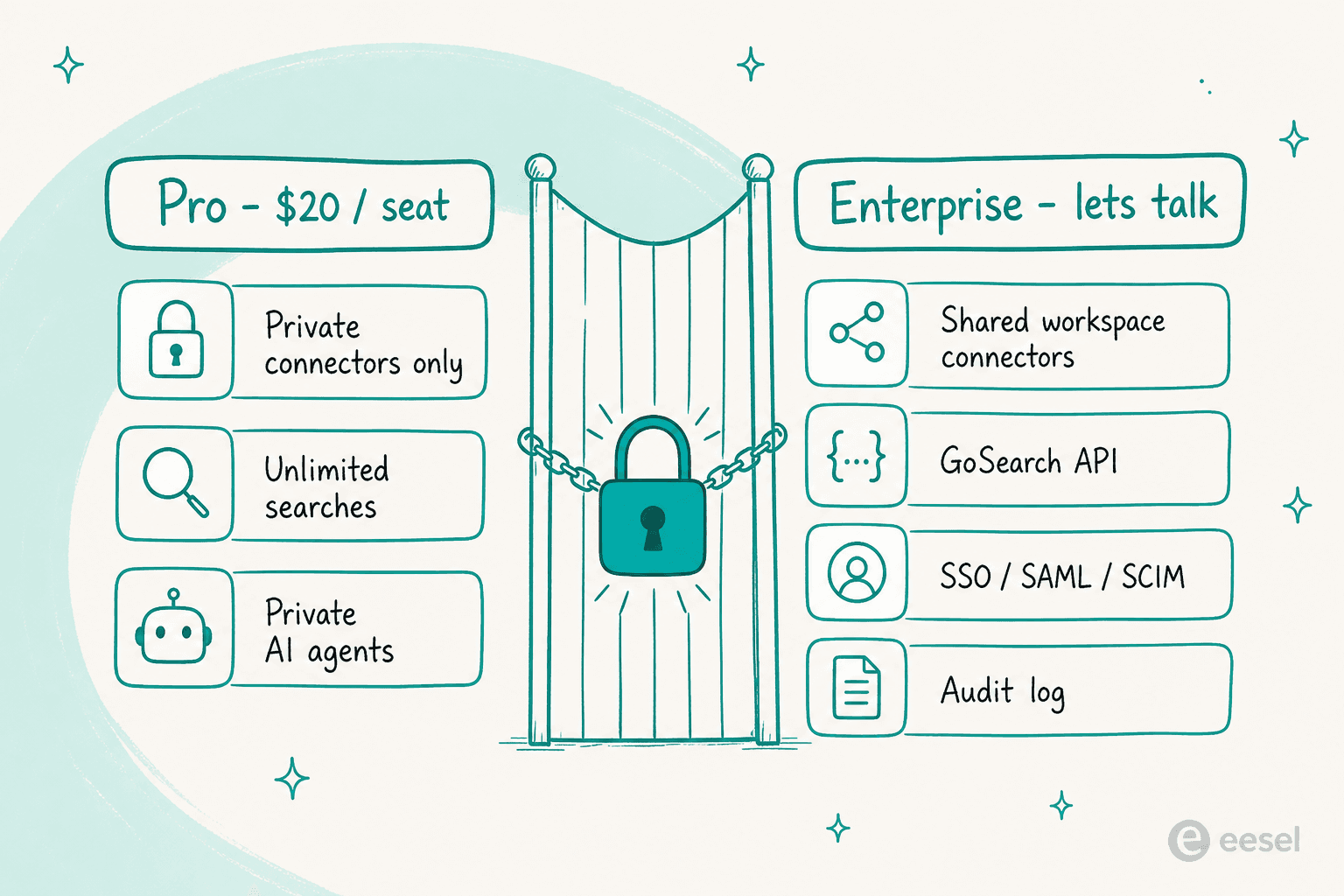
The Enterprise tier is "all of Pro, plus" shared and private connectors, workspace LLM configuration, file verification, the GoSearch API, SSO / SAML / SCIM, advanced permissions, the audit log, and BYO LLM / BYO cloud. Read that list again with a buyer's eye: shared connectors, SSO, SCIM and an audit log are not luxury add-ons, they are the baseline for deploying any tool across a real company. The API is Enterprise-only too, so you cannot even price programmatic access without a call.
None of this is unusual for the category, and it is not a knock on GoSearch specifically. But it does mean the honest way to read the pricing page is: the $20 you can compute buys a personal search tool, and the company knowledge layer the homepage is actually selling is a conversation with sales at an undisclosed price. If a computable, self-serve path to a team deployment matters to you, that is the thing to test before the demo, not after.
What a GoSearch rollout actually costs
Because Pro has a real published number, you can do the arithmetic the Enterprise buyer can't. There is no discount to apply, so it is just $20 times heads times twelve.
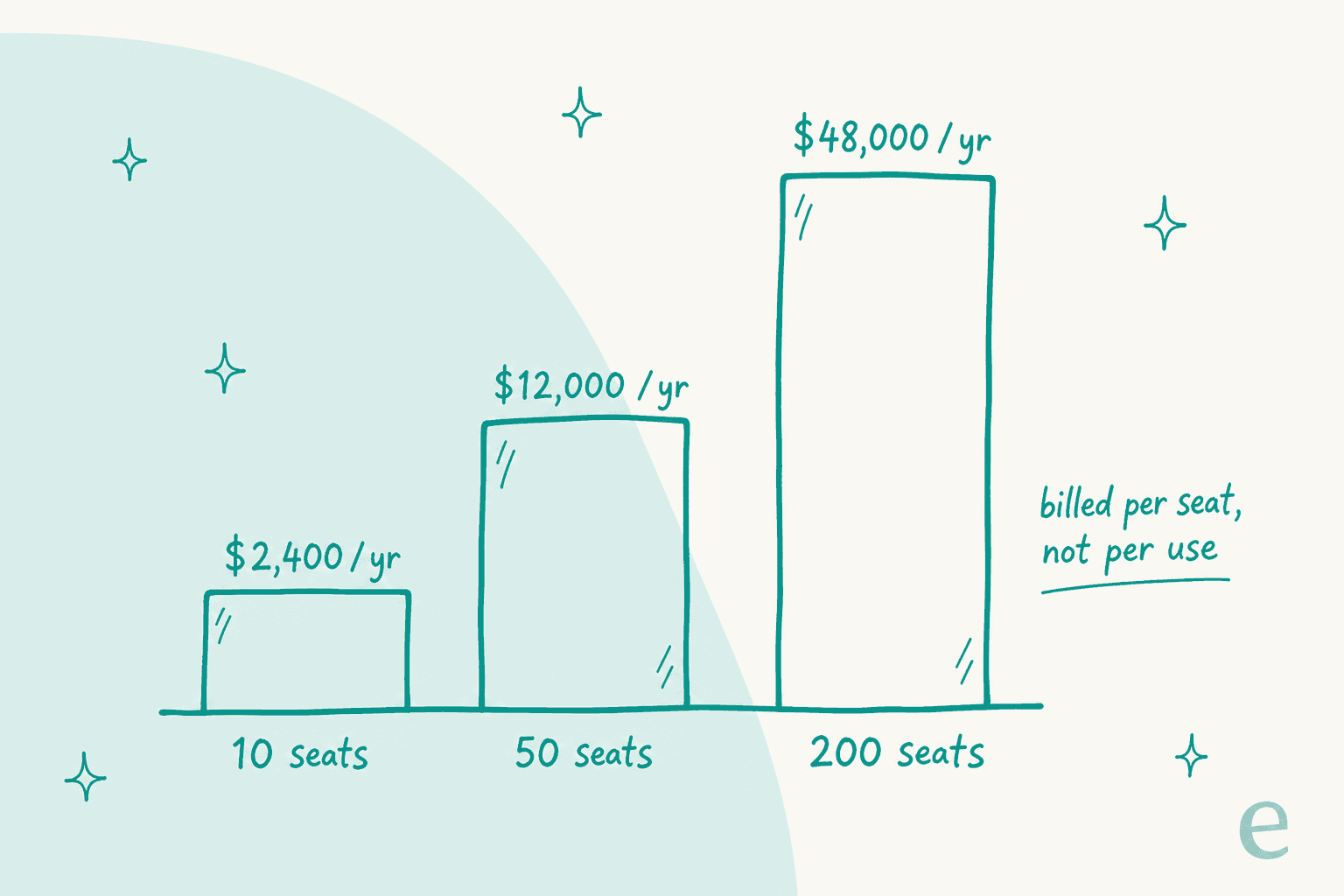
| Team size | Monthly (Pro) | Annual (Pro) |
|---|---|---|
| 10 seats | $200 | $2,400 |
| 50 seats | $1,000 | $12,000 |
| 200 seats | $4,000 | $48,000 |
Two honest caveats on this table. It assumes everyone stays on Pro, which many teams can't, because the shared connectors they need are on Enterprise. And it is the floor, since the moment you need SSO or the API you are in a negotiated quote with no published anchor. The useful takeaway is the shape: the bill tracks headcount, not how much work the tool actually does. A 200-person company pays for 200 seats whether they run one search a week or a hundred.
That per-seat shape is the thing to compare against a per-outcome model. When I price AI knowledge management for support teams, the question I keep coming back to is whether the meter tracks value or just badge count. A seat license charges the same for your heaviest user and the person who logs in twice a month.
What buyers actually say about the value
The review base is thin and worth reading with your eyes open. GoSearch has 21 G2 reviews at 4.7/5 with zero ratings below four stars, which is a small, uniformly positive sample rather than a battle-tested one. A quick trap to flag: the "4.7 from 900+ reviews" figure you might see is the GoLinks seller aggregate, and 846 of those are the go-link shortener, not GoSearch. The Capterra 5.0 is a single review written by GoLinks' own content marketing manager, so treat it as vendor voice.
The one review that names price is positive, and specific about the scope:
"Easy to connect to other enterprise resources. Solid price point for NP/Associations. Fantastic and responsive support."
"NP" is nonprofit. So the strongest price endorsement in the visible set is scoped to nonprofits and associations, not general list price. The most common complaint, meanwhile, is setup friction: G2's own theme tally counts "learning difficulty", "learning curve" and "complex setup" as the top negatives, though at least one reviewer calls setup "quite simple", so your mileage depends on how many connectors you are wiring up.
The question the price hides: find, or do?
Here is the reframe I would take into any GoSearch evaluation, and it is bigger than GoSearch. Every connector in this product is read-only. Its own integrations table has two outcome columns, "appears in search results" and "available in agents", and no write column anywhere. GoSearch finds the answer beautifully. Then it hands that answer to a person, who goes and does the thing.
For a lot of internal search use cases, that is exactly right. If your goal is "help our team find the onboarding doc faster", read-only retrieval is the whole job. But if you are pricing this because your internal helpdesk software is drowning, notice that finding the answer was never the expensive part. The expensive part is the reply, the tag, the status change, the follow-up. A search tool priced per seat doesn't touch any of that, which is why my best internal support chatbot roundup weighs tools on what they do after the answer, not just retrieval.
So the real pricing question isn't "is $20 a seat fair for GoSearch?" It is fair, for what GoSearch is. The question is whether you are buying a tool that finds work or one that does it, and whether your bill should track seats or outcomes.
Try eesel
If your GoSearch shortlist exists because tickets keep piling up and the same questions keep getting re-answered, that is the exact gap eesel is built for. eesel is an AI teammate platform, and the AI helpdesk teammate is the one that fits here: it plugs into your helpdesk, reads your docs and your past tickets, and then actually drafts, tags and resolves, rather than surfacing a ticket in a search result and stopping there.
The pricing sits on the other side of the seat-versus-outcome line I keep drawing: eesel uses one fixed monthly price sized to ticket volume (1 credit per ticket or chat), not per head, so your bill tracks the work done rather than badge count. Before anything goes live, you can simulate the agent over your own past tickets to see the resolution rate and cost on real history, not a sales-deck estimate. And if a scriptable surface is on your wishlist because the GoSearch API is stuck behind Enterprise, eesel's AI helpdesk API and CLI are there at the self-serve tier for scripts and coding agents to drive the same teammate. It is free to try, no sales call required. If you want the full field, my GoSearch alternatives roundup lines up eight options on price and what happens after the answer appears.