GoSearch alternatives in 2026: 8 tools priced and pressure-tested

Kira

Katelin Teen
Last edited August 26, 2026

Why teams start looking for a GoSearch alternative
GoSearch is a decent product, and it has a real customer list behind it. The one deployment with numbers attached is Model N's support desk, and those numbers are good ones: a 47% productivity boost, roughly $400k in savings, 80% daily active use inside three months, and a 49% cut to the ticket backlog. It sits at 4.7 out of 5 on G2 too, where reviewers are warm about the core job.
"GoSearch AI makes it easier to search across internal documents. Their AI-driven search is very fast and very accurate, because it highly reduced the time spent hunting for information, Also I like how it connects multiple data sources into a single search experience."

So the switching triggers are not "it does not work." They are narrower than that, and I hit all four of them while pulling this research apart.
The published price does not buy the shared knowledge layer
This is the one that surprises people. For the category, the GoSearch pricing page is unusually honest: two real per-seat numbers, and no annual-commitment gymnastics or seat minimum anywhere on it. But read the Pro card carefully, because what it grants is "access all private connectors". Shared connectors, meaning the workspace-wide sources that make this a company knowledge layer rather than a personal search bar, are listed over on the Enterprise card, alongside SSO, SAML, SCIM, the audit log, the GoSearch API, and bring-your-own LLM.
The header on that same pricing page says the quiet part out loud: "Use GoSearch for free with your personal data. Upgrade to enable unlimited workspace connectors."
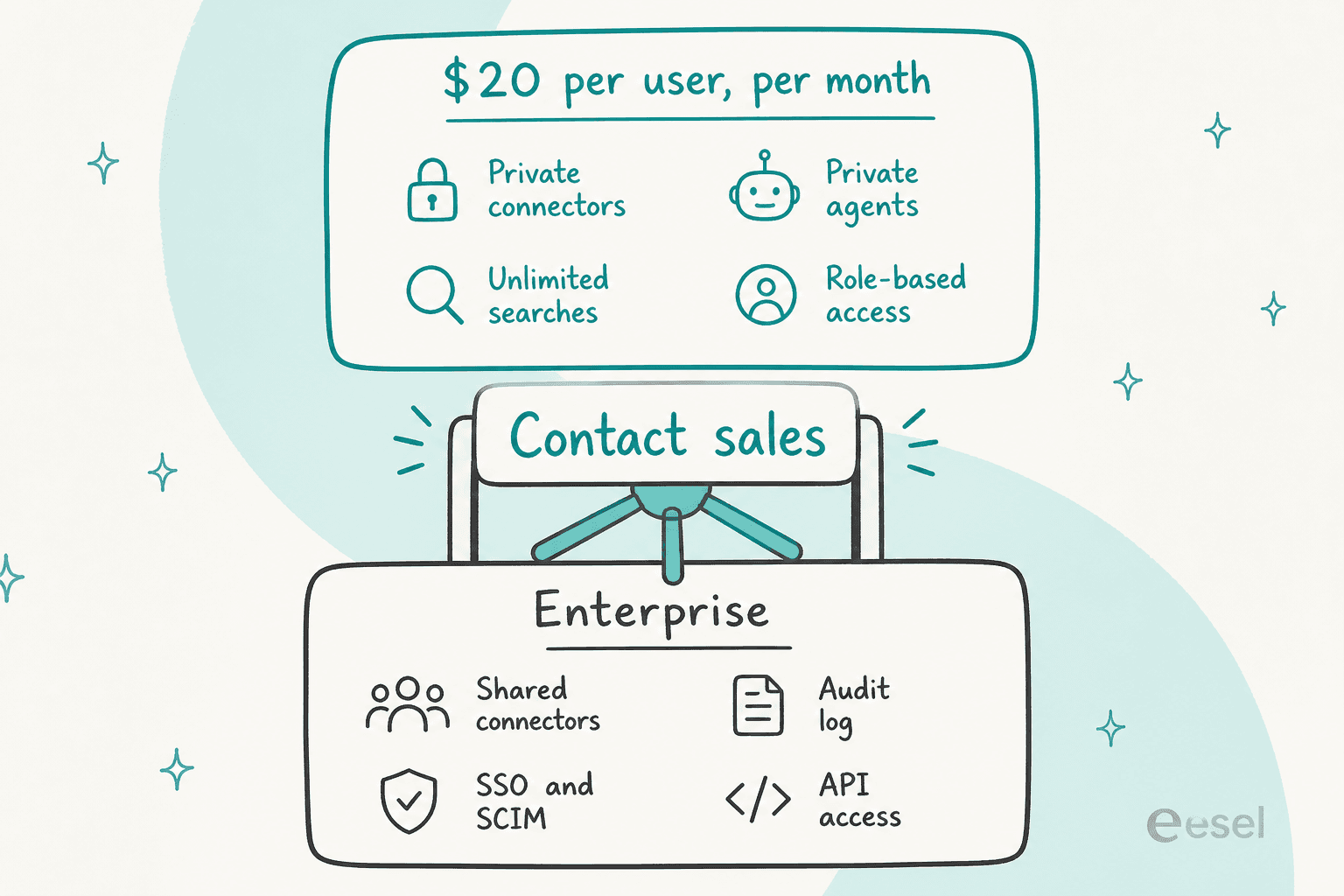
There is no published Enterprise floor, and no range or unit either. Trials of that tier are "offered on a case-by-case basis". Which means the tool most people are actually shopping for is a sales conversation, not a $20 checkout.
Worth flagging too: the free tier got smaller. At launch it promised unlimited searches and five AI queries a day. Today it is 10 searches a day, three GoAI queries a day, one 5 MB file upload and one AI task. So it is a demo rather than a plan, which is fine as long as you size the evaluation accordingly.
It reads. It does not write.
Open the GoSearch integrations grid and look at the per-connector table. There are two outcome columns: whether the source appears in search results, and whether it is available in GoAI and Agents. No reply column. No update or create column either. The Zendesk connector indexes tickets, knowledge base articles, comments, internal notes and customer details, then does precisely nothing with them.
The agents page tells the same story in a friendlier voice. Every illustrated capability is read, generate or recommend. Look at the named example agents: a "Support Tickets Agent" that flags escalation-risk tickets, and an "Incident Response Agent" that triages and recommends next steps. The only actual write path is a bring-your-own MCP server, and even the single example given for that turns out to be a read, pulling task, file and expense data from Asana, Dropbox and Ramp.
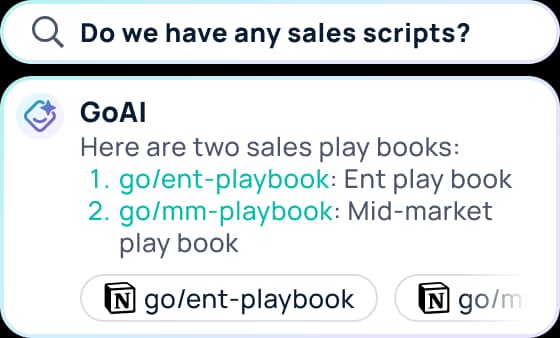
That screenshot is the category in miniature, and to be clear it is doing its job well. You asked a question, you got two correct links. Now go open them.
One reviewer put it more plainly than any spec sheet could:
"The AI helps build content but can't actually write to a document, so I find myself cutting and pasting. I'm concerned about how future edits will be managed. Also, I'd like to connect the AI agent to Slack and chat with it specifically, but that functionality seems to be missing."
I want to be fair here, because this is not really a GoSearch failing. It is a category boundary, and enterprise search sells retrieval. The reason it matters at all is that buyers routinely evaluate these tools against a helpdesk agent, and the two stop in completely different places.
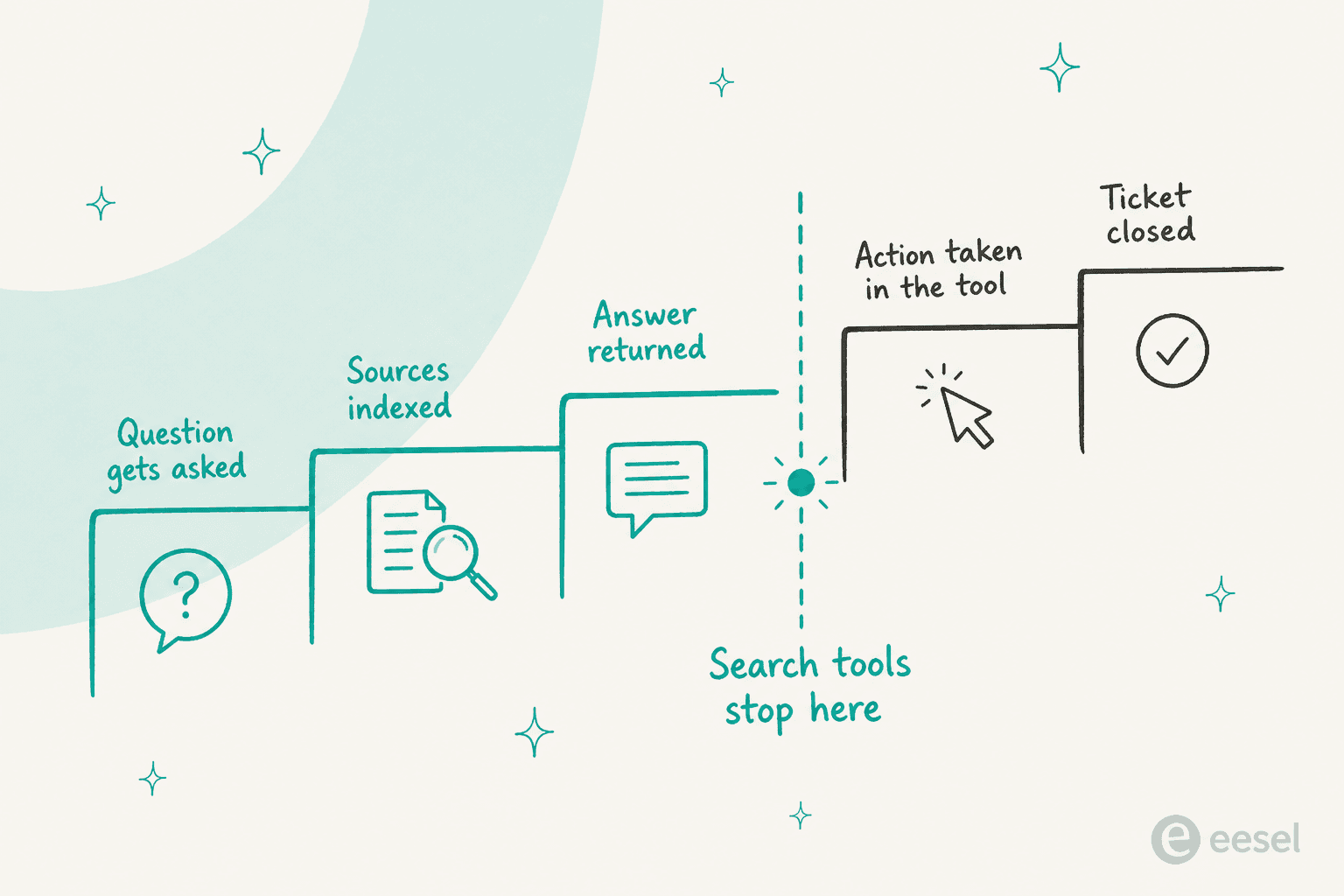
I have spent the last few years shipping the integrations that sit on the far side of that dashed line, and the gap is a lot bigger than it looks on a feature grid. Reading a Zendesk ticket needs one OAuth scope. Replying to it needs a reply tool, a confidence threshold, an approval path, an audit trail of what got sent, and a way to roll back a bad answer at 2am. That second list is the work, and no connector count anywhere tells you whether a vendor has done it.
The connector count has an asterisk
GoSearch advertises "100+ apps". Expand the full grid and it renders 88 connectors, with the category filters summing to 88 as well. Which is still a lot. But the shape of that number matters more than the total, because 34 of the 88 are HR and people-data systems and only 9 sit in CRM and Support.
Which support tools are in there: Zendesk, ServiceNow, Salesforce, HubSpot, NICE CXone, and plain Jira. Which are not: Freshdesk, Gorgias, Front, Help Scout, and Jira Service Management. All five are missing from the grid and from the sitemap. And there is a small trap sitting right next to that, because Freshteam is listed, but Freshteam is Freshworks' HR product, not Freshdesk.
If your queue runs on one of the missing five, that is a hard stop rather than a preference.
The ratings you will see quoted are not GoSearch's
One more thing to check before a shortlist meeting. You will find a "4.7 from 907 reviews" figure floating around. That is the GoLinks seller-level aggregate: roughly 846 GoLinks reviews, 40 GoProfiles and 21 GoSearch. Both numbers happen to round to 4.7, so the conflation stays invisible unless you go looking. GoSearch's own review base is 21 reviews. Over on Capterra there is a single 5.0 review, and the reviewer is GoLinks' own senior content marketing manager, which makes it vendor voice rather than customer voice.
Twenty-one reviews for a product this young is normal and not a criticism. Quoting 907 of them in a board deck is a problem.
How I compared these
Eight tools, all of them shortlisted by real buyers against GoSearch, and several named on GoSearch's own alternatives pages. For each one I pulled the vendor's pricing page, integrations directory, docs and security page, then went to the review platforms for the parts vendors do not publish. Where a number is a vendor claim rather than a verified figure, I say so.
I graded on five things, in this order:
- Can you compute the price without a call? Half of this category cannot be budgeted from public information at all.
- Does it act, or only answer? The precise version of that question: can it write back into the source app.
- Does it reach your actual stack? Connector counts are marketing. The five connectors you actually need are not.
- Can you prove it before launch? I mean a dry run against your own history, not a prompt set you wrote yourself.
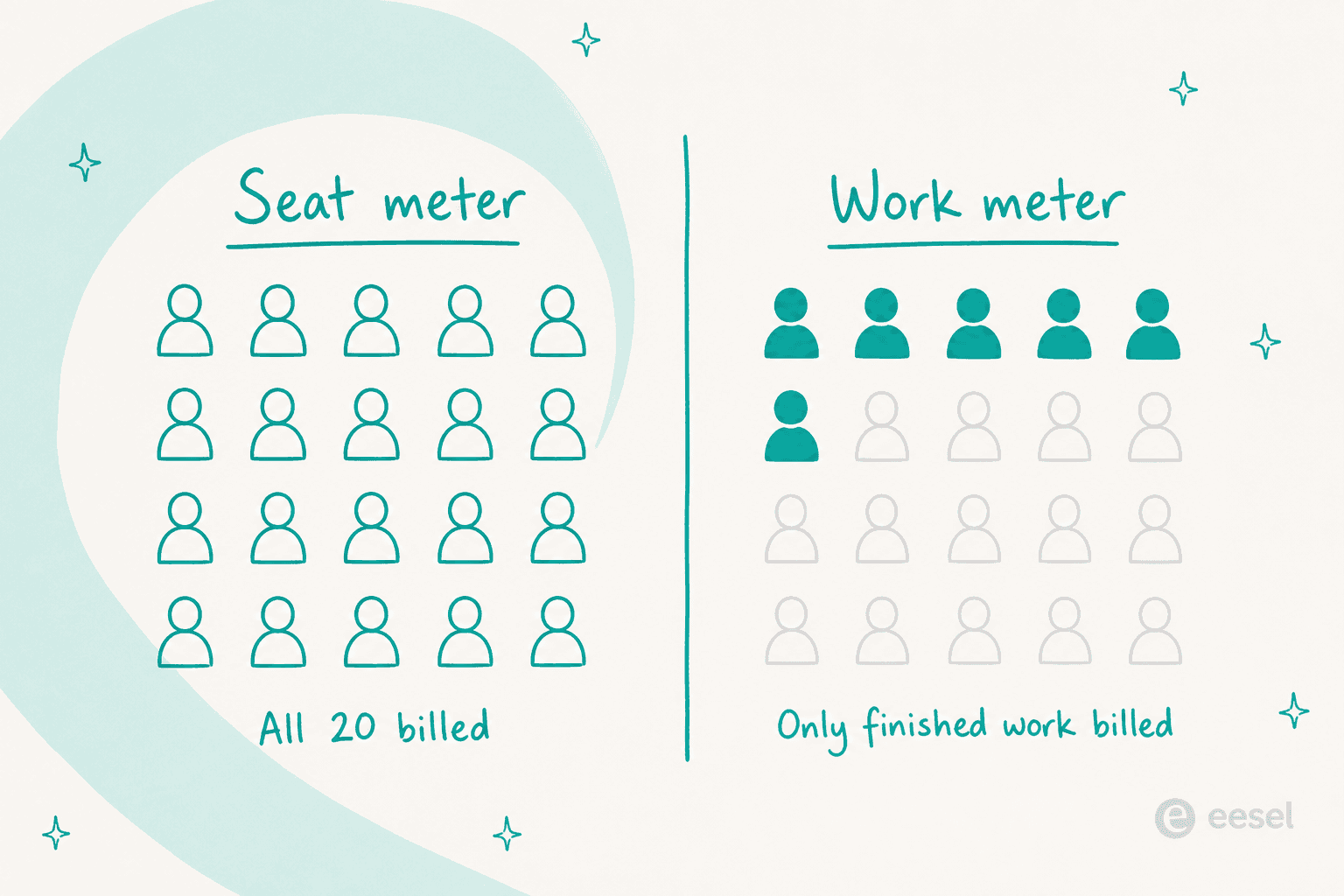
- What does the meter measure? Seats bill the people who might ask. Usage bills the work that got done.
That last one deserves a picture of its own, since it drives more of the final bill than any feature on the list does.
The comparison table
| Tool | Best for | Entry price | Billing unit | Price computable without a call? | Connectors | Writes back to source app? | Dry run before launch? | Free tier / trial | Compliance |
|---|---|---|---|---|---|---|---|---|---|
| eesel AI | Closing the ticket, not only answering it | From $299/mo (500 credits) | Credit (1 per ticket or chat) | Yes | Helpdesks, wikis, Slack, sites | Yes (draft, tag, route, close) | Yes, over your past tickets | 100 free credits | SOC 2 in progress, GDPR-ready, EU residency add-on, HIPAA via add-on |
| Glean | Large enterprises buying one platform | Quote-only | Seat + FlexCredits | No | 100+ | Partial (agent actions) | Agent eval tooling | Demo only | SOC 2, ISO 27001, enterprise governance |
| Guru | Making someone own the documentation | Quote-only | Bundled platform + services | No | 100+ | No (knowledge ops only) | Self-serve POC programme | Legacy free tier closed | SOC 2 Type II, HIPAA, GxP |
| Dashworks | The cheapest credible rollout | $10 per seat/mo annual ($12 monthly) | Seat | Yes | 61 named | No | No | 14-day trial, no card | SOC 2 Type 1, GDPR |
| GoSearch (the incumbent) | Personal cross-app search | $20 per seat/mo | Seat | Partly (Enterprise hidden) | 88 rendered | No | No | Free tier, 10 searches/day | SOC 2 Type II, GDPR, CCPA, HIPAA claim |
| Atlassian Rovo | Companies already inside Jira and Confluence | Included in paid Cloud plans | Seat + AI credits | Yes | 60 | Yes, inside Atlassian | Yes, prompt-set eval | Bundled, no separate trial | Atlassian Cloud posture |
| Microsoft 365 Copilot | All-Microsoft estates | $30 per user/mo, annual | Seat + Copilot Credits | Yes | 100+ Graph connectors | Partial via Copilot Studio | Copilot Studio testing | No standalone free tier | Microsoft 365 posture |
| Onyx | Teams that must self-host | $0 self-hosted, $20 Cloud seat | Seat (or your infra) | Yes | 43 official | No | No | Free self-host, 2-week Cloud trial | Depends on your deployment |
| Zendesk employee service | Teams already running Zendesk | $29 per agent/mo annual | Seat + automated resolution | Yes | 9 external (EAP) | Yes (opens tickets) | No | 14-day trial, no card | SOC 2 Type II, ISO 27001, ISO 42001, FedRAMP LI-SaaS |
Two patterns fall out of that table. Six of the eight alternatives let you build a budget from public information, and the two that do not, Glean and Guru, are quote-only by deliberate choice rather than by oversight. Then there is the second pattern: only three of the eight get a straight yes on writing back into the app the answer came from, and two of those three only manage it inside their own platform. Glean and Copilot land on a partial yes through their agent layers.
Seats or work? Do the arithmetic before the demo
Most of the price difference between these tools has nothing to do with the sticker. It is about which noun the meter counts. A seat bills every person who might ask a question this month, whether they ask one or not, while a credit plan is sized to the tickets you expect to handle. Plug your own numbers in below.
The point here is not that one number comes out smaller. It is that a seat bill grows with your org chart and a credit plan grows with your ticket volume. And if adoption is patchy, which in this category it usually is for the first few months, seat pricing quietly charges you the most at exactly the moment the tool is delivering the least.
1. eesel AI
Best for: teams whose questions arrive as tickets, and who want them closed rather than answered.
I work on eesel, so read this section with that in mind, and check the claims against the links. I have tried to hold it to the same bar as everything else here, including the awkward part where I say what it is not.
What it does
eesel is not a company-wide search bar. What it sells is AI teammates you hire for a defined job, and two of those ship today: an AI helpdesk teammate and an AI blog writer. Every integration gets built from the same three parts: sources (what it can read), triggers (when it wakes up) and actions (what it can do in the tool). Sources are not walled off per integration either, so an agent with Zendesk, Confluence and your website connected will search all three at once when it drafts a reply.
That third primitive is the whole difference between eesel and the rest of this list. Actions are not an afterthought bolted on through a bring-your-own protocol. They are one of the three things an integration is.
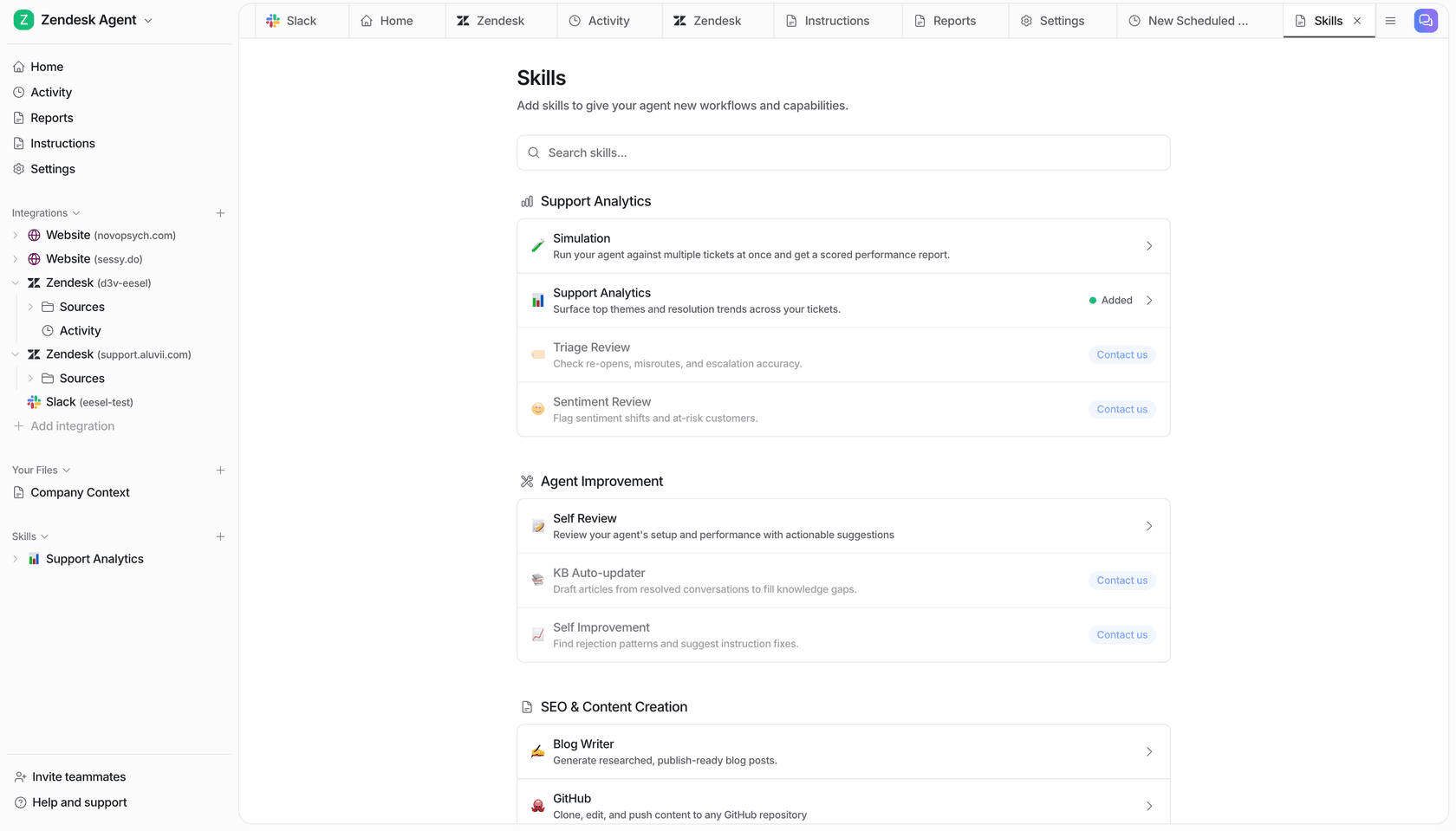
Sitting on top of the day-to-day replies are Skills, which are multi-step jobs with their own output and their own place to put it. Two of them matter most against a search tool. Simulation runs the agent over batches of your real historical tickets and scores every response before anything goes live. The KB auto-updater finds the questions your help centre does not answer, then drafts the missing articles. eesel's own framing of that second one is, to my mind, the right way to think about knowledge gaps: a gap is not the AI failing, it is the AI telling you something is missing from your documentation.
Pricing
| Plan | Price | What you get |
|---|---|---|
| Free | 100 credits, no card | one-off start |
| Teammate, 500 credits | $299/mo | 1 credit per ticket or chat, however many replies |
| Teammate, 1,000 credits | $499/mo | same, for higher volume |
| Teammate, 2,500 credits | $999/mo | same, for higher volume |
| Teammate, 5,000 credits | $1,899/mo | up to 5,000 a month; above that, talk to us |
| Blog post | $4.00 each | one blog post draft |
On the standard eesel plan there is no platform fee and no per-seat fee, and every integration and channel is included. Pick the batch that fits your volume: 1,000 tickets a month fits the 1,000-credit plan at $499. Only tickets the agent actually works on count, so spam and skipped categories do not use credits. Run out and agents pause until credits reset, or you can turn on overage at $0.80 per extra credit with a monthly cap you set. Pay a year upfront and two months are free.
One honest nuance, because this gets misread a lot: the unit is a ticket handled, not a ticket resolved. One credit covers one ticket or chat however long it runs, whatever the outcome, and spam, auto-replies and categories the agent is told to skip do not count. That works out better than per-resolution pricing when your AI is good, and worse when it is not, which is exactly why simulation exists.
Where it wins
- It finishes the job. Draft, tag, route, escalate, close, and write the missing help article afterwards. Nothing else on this list does that last one.
- You can prove it before launch. Simulation over your own ticket history is the single most useful thing in a rollout, and it is also the thing this category almost universally lacks.
- The bill tracks work. No seats means no argument about who gets a licence, and no bill for the 200 people who never open it.
- It learns from solved tickets, not just the help centre. A support manager at a bus-tracking service running 200 to 250 Zendesk tickets a month put the problem neatly during a call. Their entire knowledge base had been written for administrators, while the tickets were all coming from riders. Indexing that knowledge base harder was never going to fix it. Learning from how humans actually answered those riders did.
- Real volume behind it. Gridwise resolved 73% of tier-1 requests in the first month, and one customer runs over 100,000 tickets a month entirely in German.
Where it stops
- It is not an everyone-in-the-company search bar. If your goal is that every one of 4,000 employees gets a universal search box across 80 SaaS apps, Glean and GoSearch are built for that shape. eesel is not.
- Connector breadth is helpdesk-shaped. Deep on helpdesks, wikis, Slack and websites. It is not going to index 34 HR systems.
- SOC 2 is in progress, working with SOC 2 compliant sub-processors, and HIPAA is available on request through a paid add-on (talk to them). If a security review needs a finished certificate today, that is a real blocker, and I have watched deals stall on exactly that.
Verdict: pick eesel when the questions show up as tickets and the win is measured in resolved queue, not in seconds saved per search. Skip it if what you actually want is universal search across every app in the company, for every employee.
2. Glean
Best for: large enterprises that want one governed AI platform and can absorb a quote-only contract.
What it does
Glean is the category's reference implementation. It builds a permissions-aware knowledge graph out of 100+ connectors, then layers search, an assistant, and a no-code agent builder on top of it. The assistant runs a find, plan, research, iterate, deliver loop, and coordinates sub-agents in parallel while it does. On the business side the company has passed $100M ARR and raised a $150M Series F at a $7.2B valuation, with Reddit, Instacart, Pinterest, Duolingo and Databricks named as customers.
When it lands, it really lands:
"Glean.com does it for the enterprise I work at: It consumes all of our knowledge sources including Slack, Google docs, wiki, source code and provides answers to complex specific questions in a way that's downright magical."

Pricing
Glean publishes nothing. The model is per-user seats plus FlexCredits, which is a pooled consumption layer for agent work, priced in credits with no published credit-to-dollar conversion anywhere. A Fast Mode query runs roughly 3 to 15 credits, Thinking Mode 7 to 26, slide generation 45 to 142. Community estimates put seats around $40 to $50 with the floor near 100 seats, but Glean confirms none of that, so treat the whole thing as directional.
Where it wins
- The deepest index and the best ranking in the category, with real permission enforcement at query time.
- A real agent platform, not a chat box with a prompt library. Gartner named it a Market Shaper for no-code agent builders.
- Governance and observability built into every agent step, which is what actually gets an enterprise security review signed off.
Where it stops
- You cannot budget it from public information, and the practical floor prices out anyone under a few hundred seats. My full breakdown of Glean pricing walks the model in detail.
- Retrieval is not determinism. Verified reviewers report the assistant taking different paths for the same prompt, and struggling with structured queries like Jira JQL.
- Speed comes up repeatedly in reviews, with several calling answer times slow.
Verdict: if you have 1,000+ employees, a security team with opinions, and budget that survives a "let's talk", Glean is the strongest product here. Below that line it is over-bought. There is a wider list in my Glean alternatives roundup, and an honest read in these Glean reviews.
3. Guru
Best for: teams whose real problem is that nobody owns the documentation.
What it does
Guru comes at the same problem from the opposite end. Rather than indexing whatever exists and hoping it is right, Guru makes knowledge an object with an owner, a verification date and an expiry. Cards get verifiers, unverified cards land in a queue, and answers cite the card they came from.
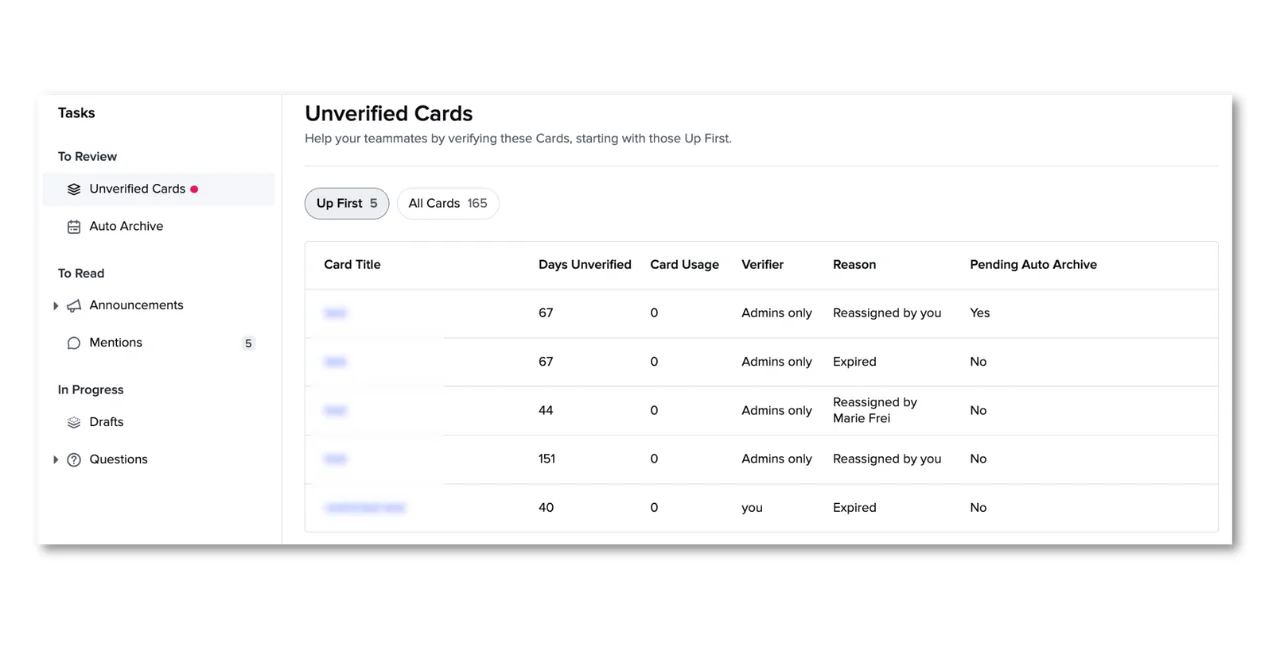
That screenshot is the entire pitch in one frame. A card sitting 151 days unverified with zero usage is a fact about your company that no search ranking algorithm will ever tell you.
Pricing
Guru went quote-only. As of my check the pricing page carries zero dollar figures and zero named tiers, and there is no comparison grid on it either. Its own FAQ explains the shift: Guru is "a platform and expertise solution, not just a per-seat tool," and the price covers solution engineers, knowledge architecture design and ongoing optimisation.
The tier names do survive in the help centre (legacy Starter, All-in-One, Enterprise), and the gate that matters is documented plainly: Knowledge Agents, the entire AI layer, require All-in-One or Enterprise. The legacy free tier gets none of that, and it is closed to new signups anyway. What survives as an evaluation path is a documented self-serve POC for Knowledge Agents, and that is a structured programme rather than a trial you can start tonight.
Where it wins
- Verification workflows nobody else ships. If your docs rot, this is the only tool here that treats rot as a first-class problem.
- Strong compliance posture: SOC 2 Type II, HIPAA and GxP, with DLP masking and centralised audit logs.
- Services included. For teams without a knowledge manager, the embedded strategy team is the product.
Where it stops
- The services attach is why there is no rate card. You cannot compare it on price with anything else on this list.
- It manages knowledge, it does not work your queue. No write-back into a helpdesk.
- The free tier is gone, which changes the evaluation path completely.
Verdict: buy Guru when the audit finding is "our documentation is wrong and nobody owns it." Do not buy it expecting ticket deflection. My Guru pricing guide and Guru AI review go deeper, and there is a broader Guru alternatives list too.
4. Dashworks
Best for: the cheapest credible rollout, if answering is all you need.
What it does
Dashworks is the most direct like-for-like swap for GoSearch, and it undercuts it on price. It queries 61 named connectors live at request time instead of maintaining an index, so answers reflect the current state of the source and there is no sync to babysit. Its "Bots" are, in the vendor's own words, custom AI search assistants, which puts them closer to a search assistant than to an agent.
The framing fact that most shortlists miss: Dashworks is a HubSpot company, acquired in April 2025, terms undisclosed. The acquisition banner still runs on every page, and G2 lists the seller as HubSpot. Depending on your view of tuck-in acquisitions, that reads as either reassuring or as a roadmap risk.
Pricing
| Plan | Monthly | Annual | Seat minimum |
|---|---|---|---|
| Team | $12 per seat/mo | $10 per seat/mo | none |
| Business | $15 per seat/mo | $12 per seat/mo | 10 seats ($120/mo floor) |
| Enterprise | Quote-only | Quote-only | not published |
There is a 14-day free trial with no credit card, and every tier advertises unlimited usage with no message or credit caps. I grepped the raw pricing HTML out of curiosity: only three dollar strings exist in the whole document, so no hidden rate card is sitting in there. The API add-on is Enterprise-only, with no price and no unit attached to it.
Where it wins
- Half GoSearch's seat price on annual billing, with no meter to worry about.
- No index means no staleness. Live queries at request time.
- Real review volume for its size: 4.5 out of 5 across 71 G2 reviews, and 4.3 from 39 on Capterra.
Where it stops
- Read-only, unambiguously. All 61 connector descriptions use retrieval verbs; "Workflows" on the pricing page means reusable prompt templates, not app automation.
- Freshdesk and Jira Service Management are absent. Zendesk is there for ticket search, ServiceNow for knowledge articles only.
- The site contradicts itself on compliance: the security page says SOC 2 Type 1 while the homepage says Type 2. Cite Type 1 until they fix it.
- The 87% "internal questions automated" headline has no published methodology.
Verdict: the value pick, and a straight upgrade on GoSearch's price if all you want is answers. See my Dashworks review and the wider Dashworks alternatives list.
5. Atlassian Rovo
Best for: companies whose knowledge already lives in Jira and Confluence.
What it does
Rovo is Atlassian's search, chat and agent layer, and these days it comes bundled into paid Cloud plans of Jira, Confluence and Jira Service Management rather than being sold separately. It reaches 60 third-party connectors, among them Google Drive, Slack, SharePoint, Zendesk and ServiceNow, so it is not confined to the Atlassian estate.
For this particular comparison, though, the headline is that Rovo agents can act. They carry real Jira and JSM tools including update status and raise a request, they confirm before mutating anything, and they inherit the permissions of whoever invoked them. That puts Rovo on the right side of the dashed line, at least while it stays inside Atlassian.
Pricing
There is no standalone Rovo SKU. You get it with a paid plan, and with it a monthly AI credit allowance per user:
| Plan | Rovo credits per user/month | What that buys |
|---|---|---|
| Standard | 25 | ~2.5 agent requests |
| Premium | 70 | ~7 agent requests |
| Enterprise | 150 | ~15 agent requests |
A Rovo agent request costs 10 credits, a Quick Answer chat also 10, and a Deep Research 100. Credits pool org-wide, they reset monthly, and they do not roll over. Search, summaries and definitions cost nothing. On base seats, Jira Service Management is $20 per agent per month on Standard and $51.42 on Premium. And there is a separate Rovo Customer Service meter at $1 per resolution.
Overage is not currently billed, Atlassian promises at least 90 days' notice before that changes, and admins get alerts at 80% and 100%.
Where it wins
- Effectively free if you already pay for Atlassian Cloud.
- Agents that mutate real objects in Jira and JSM, with a confirmation step.
- A real eval harness: a CSV dataset up to 100 prompts, three scoring modes, LLM-judged.
Where it stops
- 25 credits is 2.5 agent requests a month. For an always-on internal assistant, Standard is not a real allowance, and the arithmetic pushes you to Premium fast.
- Agents lose all their tools when triggered by automation and fall back to a text response, which quietly kills the most obviously useful pattern.
- The eval is prompts you wrote, not a dry run over your historical tickets. Those are different confidence levels.
- Bulk actions are capped at 20 items, and Free Atlassian plans get nothing.
Verdict: if you are already an Atlassian shop, start here because you are probably paying for it. Budget for Premium, not Standard. My Rovo pricing explainer and Jira AI pricing guide unpack the credit maths, and there is more on Jira Service Desk AI for the queue side.
6. Microsoft 365 Copilot
Best for: all-Microsoft estates where the licence is already half-bought.
What it does
Microsoft 365 Copilot plus Microsoft Graph connectors is a credible enterprise search layer, and most IT teams overlook it because they think of Copilot as a writing assistant. Graph connectors are free to run: a 50M item index quota per tenant at no cost, 30 connections per tenant, 5M items per connection. The Google Drive, Confluence, ServiceNow, Salesforce and Zendesk connectors are all Microsoft-built.
Copilot Studio then lets you build agents on top, which is where actions become possible.
Pricing
| Line | Price | Note |
|---|---|---|
| Microsoft 365 Copilot | $30.00 user/month | paid yearly, annual auto-renew, requires a qualifying M365 licence |
| Copilot Business (SMB add-on) | $18.00 user/month | promo through 31 Dec 2026, first year only, ≤300 users |
| Business Standard with Copilot | $23.50 user/month | bundle |
| Business Premium with Copilot | $32.00 user/month | bundle |
| Copilot Studio credits | $200 per pack/month | 25,000 Copilot Credits, $0.008 each |
| Pay-as-you-go | $0.01 per Copilot Credit | on Azure |
The meter worth watching: tenant graph grounding costs 10 credits per message against 2 for a plain generative answer, which puts a grounded answer for an unlicensed user at about $0.12. It is zero-rated only for employee-facing use, and only by people who hold the $30 Copilot licence.
Where it wins
- Connector indexing is free at real scale, which is unusual and generous.
- It is already in Teams, Outlook and SharePoint, so adoption is not a rollout problem.
- Copilot Studio agents can take actions across the Power Platform.
Where it stops
- The licensing prerequisite is the trap. Plain Microsoft 365 gets connectors in Microsoft Search only; Copilot grounding needs the $30 add-on per user. Copilot Chat's search is footnoted as not semantically indexed.
- Slack and Zendesk Guide are partner-built only, and Microsoft notes that "support models vary."
- Watch the number traps. The "1,400 external connectors" figure on the Copilot Studio page is the Power Platform action catalogue, not search connectors. And 30 connections times 5M items is not your capacity, because the 50M tenant ceiling binds first.
Verdict: the default if you are already all-in on Microsoft and staffed to run Copilot Studio. Otherwise the effective price per useful seat is the highest here. See my Copilot pricing breakdown and the wider Copilot alternatives list.
7. Onyx
Best for: teams whose security review ends with "it has to run in our own VPC."
What it does
Onyx, formerly Danswer, is the open-core option here: 43 official connectors, bring-your-own model keys including local ones, and a stack you can host yourself. Among the AI knowledge base tools in this bracket it is the one true open option. The repo carries 31,775 stars as of my check, which makes it comfortably the most-adopted open project in the space.
Be precise about the licence, because "MIT" gets repeated pretty loosely around this one. It is MIT Expat for everything outside the ee directories, with the enterprise directories sitting under a proprietary Onyx Enterprise License. GitHub reports the whole thing as NOASSERTION. Open-core is the accurate word.
Pricing
| Option | Price | Note |
|---|---|---|
| Self-hosted core | $0 | plus your infrastructure and your entire LLM bill |
| Cloud Business | $20 per user/month | annual billing; the monthly rate is never published |
| Enterprise | Quote-only |
No fixed seat minimum, but the docs derive it from "current active users and Slack bot accounts", so Slack bots eat seats. Two-week free trial, no card.
On the real cost of free: Onyx's own sizing puts a baseline Standard deployment at roughly 12 CPU and 24 GB, and their 10 GB-corpus worked example at about 14 CPU and 41 GB. Then add Postgres and OpenSearch to operate, and every model call on top of that.
Where it wins
- Full data control, which is the only thing that unblocks some security reviews.
- Bring your own model, including local ones, so no data leaves your boundary.
- Free to try at any scale you can host, with no trial clock.
Where it stops
- Permission sync covers only 9 of 43 connectors (Confluence, Jira, Google Drive, Gmail, Slack, Salesforce, GitHub, Box, SharePoint). Everything else is public-or-private only, which is a meaningful gap for a permissions-aware search product.
- Onyx's own pages contradict each other on tiering: the pricing page puts RBAC and permission inheritance in $20 Business, while the Enterprise Edition doc lists RBAC, permission sync, OIDC and SAML as Enterprise. Get that in writing.
- The Helm docs still reference Vespa while the stack moved to OpenSearch, so expect some doc drift.
- It answers; it does not act on your helpdesk.
Verdict: the right answer when self-hosting is a requirement rather than a preference. If it is a preference, the engineering time will cost more than a seat licence. My knowledge retrieval tools roundup has more context on where open source fits.
8. Zendesk employee service
Best for: teams that already run Zendesk and want internal support in the same place as external.
What it does
This one earns its slot because of what happened to the competition. Zendesk acquired Unleash on 18 December 2025, and unleash.so now returns a 301 to zendesk.com from every path you try. Unleash was the closest GoSearch lookalike on the market: AI enterprise search with permission-based RAG, and native knowledge agents in Slack and Microsoft Teams on top of that.
That technology is now shipping inside Zendesk employee service. The Unleash lineage is visible in the help-centre URLs themselves, which still carry slugs like Connecting-Box-to-Unleash.
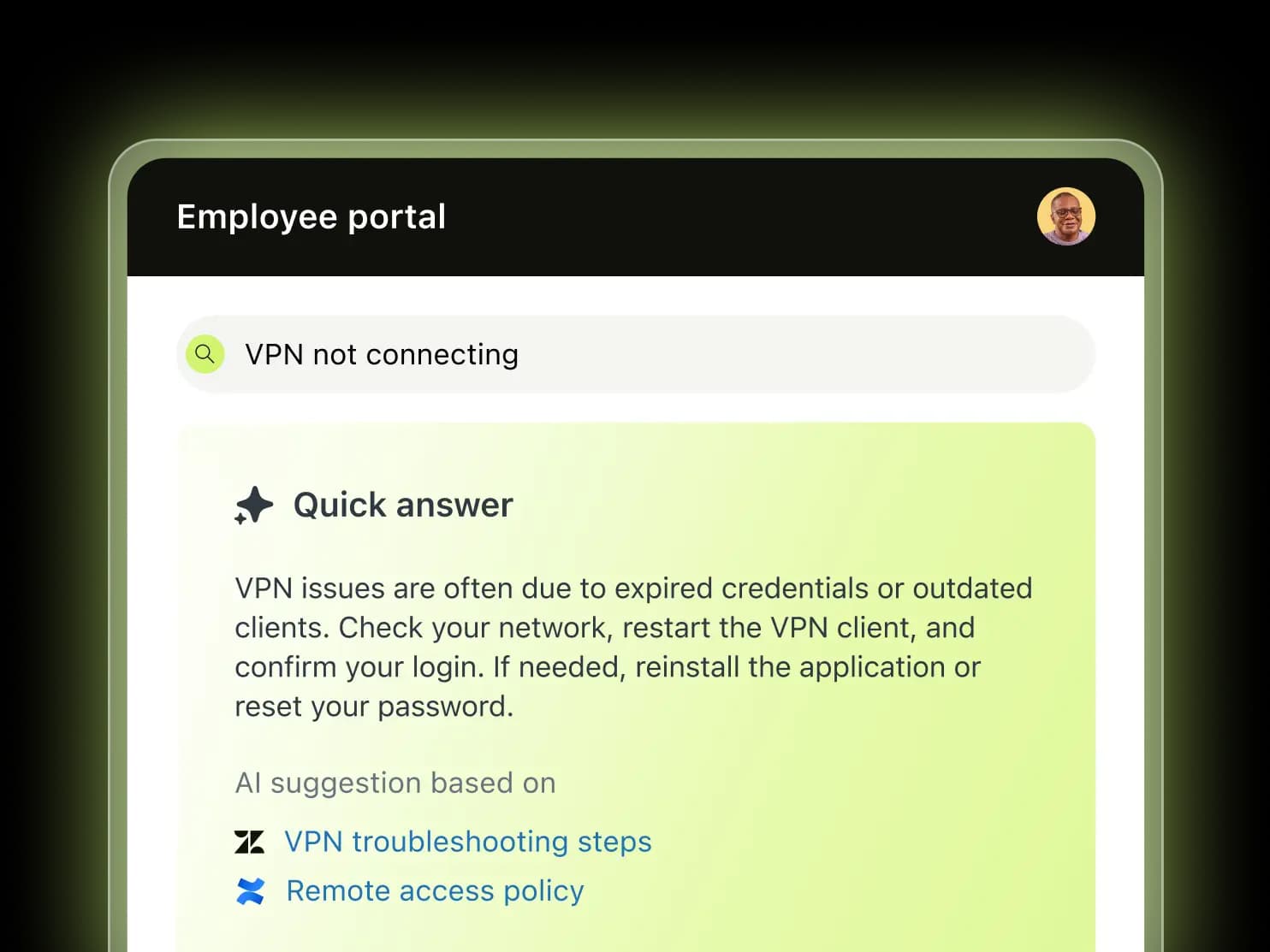
Read the citation line under that answer, because it is the whole argument for this item: one source is a Zendesk help article, the other is a Confluence page. That is enterprise search, running inside the tool that also owns the ticket.
Be precise about the status, though. The AI agent enterprise search is an early access programme, announced 10 July 2026, rolling out from 3 August 2026, with GA targeted for October 2026. And what it searches today is nine external connectors, not the 70+ content sources the acquisition press release advertised: Google Drive, SharePoint, Confluence, Notion, Slack, Teams, Box, Seismic and a web crawler.
Pricing
Employee Service Suite has its own rate card, per agent per month:
| Plan | Annual | Monthly | Automated resolutions included |
|---|---|---|---|
| Suite Team | $29 | $39 | 5 per agent/mo |
| Suite Growth | $59 | $79 | 10 per agent/mo |
| Suite Professional | $99 | $125 | 10 per agent/mo |
| Suite Enterprise | Quote-only | Quote-only | not published |
Past the allowance, automated resolutions run $1.50 committed or $2.00 pay-as-you-go, capped at 10,000 a year. A resolution only bills when the issue closes without human escalation and a model verifies that it did. Then the add-ons stack on top: Copilot $50, QA $35, Advanced Data Privacy $50, all of them per agent per month on annual. The trial is 14 days with no card.
Where it wins
- One platform for internal and external support, which removes a whole category of tooling overlap.
- It acts. The agent builder lists Open ticket and an action catalog as selectable tools alongside enterprise, web and file search.
- The strongest compliance sheet here: SOC 2 Type II, ISO 27001, 27017, 27018 and 27701, plus ISO 42001 for AI management and FedRAMP LI-SaaS.
- Real review depth: 4.3 out of 5 across 7,051 G2 reviews, which is two orders of magnitude more evidence than anything else on this list.
Where it stops
- The $29 Team plan is excluded from the AI agent EAP entirely, so the entry price is not the price of the thing you came for.
- HIPAA and the AI agent are in direct conflict today. HIPAA needs a paid Advanced Compliance add-on plus a BAA, and HIPAA-configured accounts are excluded from the EAP.
- Ticket creation is the documented write path, and there is no EAP article covering transitioning or updating existing tickets yet.
- No dry run. The EAP auto-activates and replaces your help centre search bar, with reasoning controls and QA as after-the-fact safety nets.
- Two meters to model, seats plus resolutions, before you add three per-agent add-ons.
Verdict: the natural choice if Zendesk is already your system of record, as long as you budget Growth or above and treat the search piece as pre-GA. If Zendesk is not your helpdesk, adopting one to get enterprise search is an expensive route to a search bar. My guides to Zendesk knowledge management and Zendesk AI search cover what the native tooling does today.
How to actually choose
Skip the connector-count bake-off. It is the least discriminating thing on the page, and every vendor's number has an asterisk on it somewhere.
Ask these five instead, in order:
- Where do the questions arrive? In Slack and a browser tab, or in a ticket queue? Slack and browser means enterprise search. A queue means a helpdesk agent, and you should be reading my best internal support chatbot roundup instead.
- Are those five connectors real? Open the vendor's grid and find your exact stack. Freshdesk, Gorgias, Front, Help Scout and Jira Service Management are missing from more of these directories than you would guess.
- Can you compute the price? Two of the eight, Glean and Guru, cannot be budgeted without a call. That is a procurement timeline, not a number.
- Can it prove itself before launch? A dry run over your own history beats a prompt set you invented, every time. I have watched a confident-sounding bot give wrong answers on a live queue, and that is precisely why simulation stopped being optional for us.
- Seats or work? Go back and run the calculator above with your real headcount. If adoption is going to be patchy for the first two quarters, seat pricing charges you the most while delivering the least.
One more, and it sounds like a technicality but is not: ask whether the AI can write back into the source app. A team at a B2B SaaS company told me during a demo that they wanted the AI to answer across the user guide, Slack, the internal knowledge base and past tickets, and to spot the gaps and draft the missing articles for them. That second half is where most of this category politely stops.
Try eesel
If the questions you are trying to answer arrive as tickets, then a search bar is the wrong shape of tool. eesel hires in as a teammate rather than as a platform you configure. Connect Zendesk, Confluence, Slack and your website, and it reads all of them at once when it drafts a reply, then tags, routes and closes. Most teams have their first agent live inside 30 minutes, and you can run it against your own historical tickets in simulation before a single customer ever sees it.

The billing is usually the part that settles the GoSearch comparison: one fixed monthly price from $299/month for 500 credits, no seats, no platform fee, sized to the tickets you route to it. Start with 100 free credits, or go read what the AI helpdesk teammate does day to day.
Frequently Asked Questions
How much does GoSearch cost?
What are the best GoSearch alternatives for internal support?
Is there a free GoSearch alternative?
Does GoSearch replace a helpdesk?
How many apps does GoSearch connect to?
What should I ask a vendor on a GoSearch alternatives shortlist?
Is Glean or GoSearch better value?
What happened to Unleash, the GoSearch competitor?


Article by
Kira
Kira is a writer at eesel AI with a Computer Science background and over a year of hands-on experience evaluating AI-powered customer service tools. She focuses on breaking down how helpdesk platforms and AI agents actually work so that support teams can make better buying decisions.