BlueTweak alternatives: 10 AI support platforms compared for 2026

Kurnia Kharisma

Katelin Teen
Last edited August 16, 2026
Why teams start looking for BlueTweak alternatives
I've spent the last few years putting AI agents onto live support queues, and I've watched the same thing happen enough times to know the shape of it: a team runs a great trial, the agent handles a dozen test conversations beautifully, and then someone opens the billing page. One Gorgias trial user we worked with ran twelve successful test chats, looked at what it would cost at their volume, and went straight from enthusiasm to "please cancel my subscription" in the space of an afternoon. Nothing about the product had changed. The pricing model had just become legible.
That is usually what sends people searching for alternatives, and BlueTweak is no exception. So here are the actual reasons, stated fairly, with what the company genuinely does well kept in the frame.
The seat licence and the AI meter are two separate bills
BlueTweak's pricing page leads with a single, clean number: €65 per agent per month, annually. It's a good pitch, and the "no per-channel add-ons" part is real. Email, chat, voice and social messaging all sit inside that licence, which is more than several tools on this list can say.
But the AI sits outside it, as three separate meters.
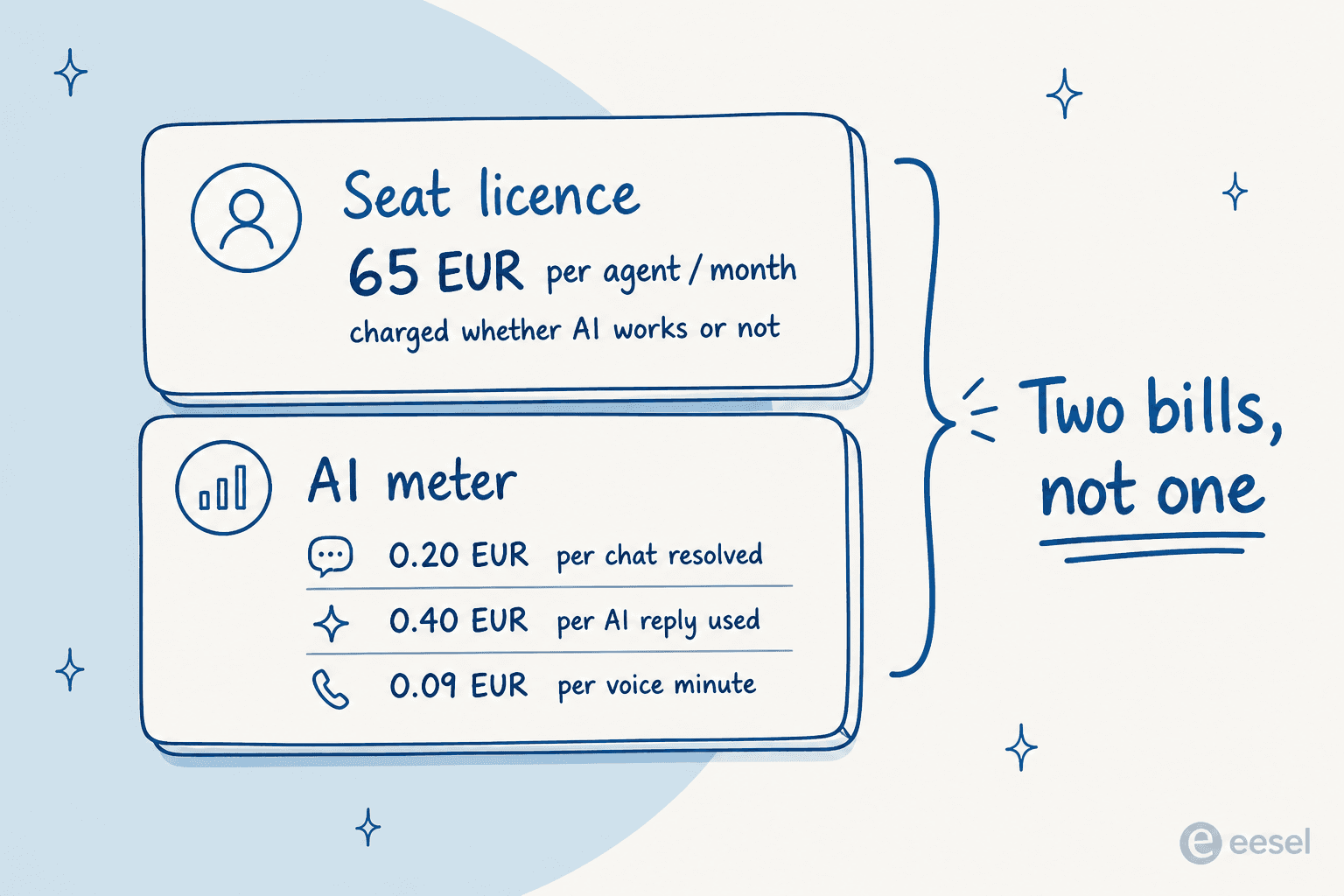
Two of those rates are genuinely fair, and I want to be clear about that before I criticise the structure. €0.20 per chat the AI fully resolves is one of the better resolution rates on the market, well under Zendesk's $1.50 to $2.00, and BlueTweak only charges it when no human touched the conversation. The €0.09 voice minute is billed the same way. Outcome-based, no charge when the AI fails. That's the right instinct.
The €0.40 email row is where I'd push back. That's billed when an agent uses an AI-generated reply, which means a human still reads it, still sends it, and still owns the ticket. You're paying a per-ticket rate for a suggestion. For comparison, that is the same 40 cents eesel charges to handle an entire ticket end to end, no seat licence involved.
Stack it up at ten agents and the shape gets clearer. Ten seats is €650 a month before a single AI action fires. Automate half your email volume at 1,000 tickets and you've added €200 to that, and you're still paying for all ten seats, because seat pricing doesn't care how much of the work the AI took over. The pricing model gives you no financial benefit from automation working, which is an odd place to land for a product sold on automation.
One more thing worth flagging so nobody budgets off the wrong number: the €65 figure is itself the discounted rate. The page computes the monthly price in an inline script as Math.round(65 / 0.9), with a comment confirming 65 is 90% of full price. The undiscounted rate is €72.
You can't validate it from the outside
This one is a fact rather than a criticism, but it changes how you should run the evaluation. BlueTweak has zero public reviews. Its G2 profile shows 0.0 stars from 0 reviews. Capterra shows 0.0 from 0. Software Advice says "no reviews yet." There is no Reddit thread, no Hacker News discussion, no independent write-up from a real operator anywhere I could find.
Every named result on the site is vendor-published. They're specific and they may well be accurate, but they're all first-party, including the testimonial from Conectys, which is also the parent company. Compare that to JustCall's 2,394 G2 reviews or LiveAgent's 1,538, both of which G2 lists as BlueTweak competitors.
For a product you'd hand your entire customer conversation history to, the practical consequence is that the sales call is your only research surface. That's a real cost in evaluation time, and it's a reasonable trigger to look at what else is out there.
The documentation is behind the contract
There's no public help center. help.bluetweak.com resolves in DNS but returns a bare 403. docs., support. and developers. have no DNS record at all. The /integrations, /api, /docs and /help paths on the main site all 404.
This is deliberate and BlueTweak says so plainly: integration documentation, endpoint references and connector details are available during the evaluation phase, before you sign. That's a normal enterprise motion and plenty of contact-center vendors work the same way.
It's still a problem if you're the engineer who has to scope the work. You cannot answer "will this connect to our order system" on a Tuesday afternoon without booking a call first. Teams used to reading Freshdesk's API docs or Front's before they commit will find that friction hard to get past.
The integration surface is four connectors wide
Named native connectors: Shopify, Salesforce, UiPath and ElevenLabs. Social channels are built in for Messenger, Instagram and WhatsApp. Zendesk appears, but framed as a migration path rather than an ongoing integration.
Everything else is your own work against an open API, or paid custom development on request. There's no Freshdesk, no HubSpot, no Gorgias, no Front, no Jira or ServiceNow, no Slack or Teams, no WooCommerce or Magento.
Four connectors is a defensible choice for a platform whose pitch is replace everything you have. It's a hard blocker if your stack is already assembled and you want AI added to it.
The AI only reads your knowledge base
BlueTweak's own description of its AI grounding is knowledge base content, the same articles that power the help center. Historical tickets are never named as a training input, and neither are uploaded files or a website crawl.
This matters more than it sounds. Your knowledge base describes how the product is supposed to work. Your ticket history records how customers actually phrase their problems and what your best agents actually said back. I hear the gap constantly. One support manager we spoke with had an entire knowledge base written for administrators while every ticket came from end users, a mismatch no amount of retrieval quality fixes. Another was watching two senior agents leave that year and wanted their knowledge captured before they walked out the door, and none of it was written down anywhere a KB-only agent could reach.
BlueTweak's own homepage puts the number at 20% automation of routine questions. That's their figure, published on their own site, and it's a fair reflection of what a KB-only agent tends to deliver. It's also roughly the ceiling that separates a retrieval bot from a real AI agent for customer service, and it's the same wall that catches rule-based chatbots.
There's no way to test it before it's live
No simulation mode, no sandbox, no backtest against your own history. The free trial and a booked demo are the only pre-purchase paths, and the pricing page doesn't state how long the trial runs.
I'd treat this as the most important gap on the list. We've watched a confident-sounding bot quietly give wrong answers to real customers, which is exactly why every eesel rollout now replays historical tickets first. A buyer we worked with put it better than I can: they wanted AI that only answers the tickets it's confident about, and silently leaves the rest for humans. You cannot establish that boundary from a demo. You establish it by running the agent over a few thousand tickets you already know the right answers to.
Why the alternatives lists you'll find point at call-center software
Here's the thing that took me a while to work out, and it explains most of the confusion around this search.
BlueTweak is a spin-off of Conectys, a Bucharest business process outsourcing firm founded in 2004 with somewhere between 1,001 and 5,000 employees. Conectys' own about page describes its AI programme as having culminated in the launch of BlueTweak. CEO Andrei Ghiorghiu describes it the same way on his profile. The platform started life as internal tooling for Conectys' own contact center, outgrew that role, and was incorporated as a separate Romanian company in October 2021. It was still branded BlueHub as recently as 2023.
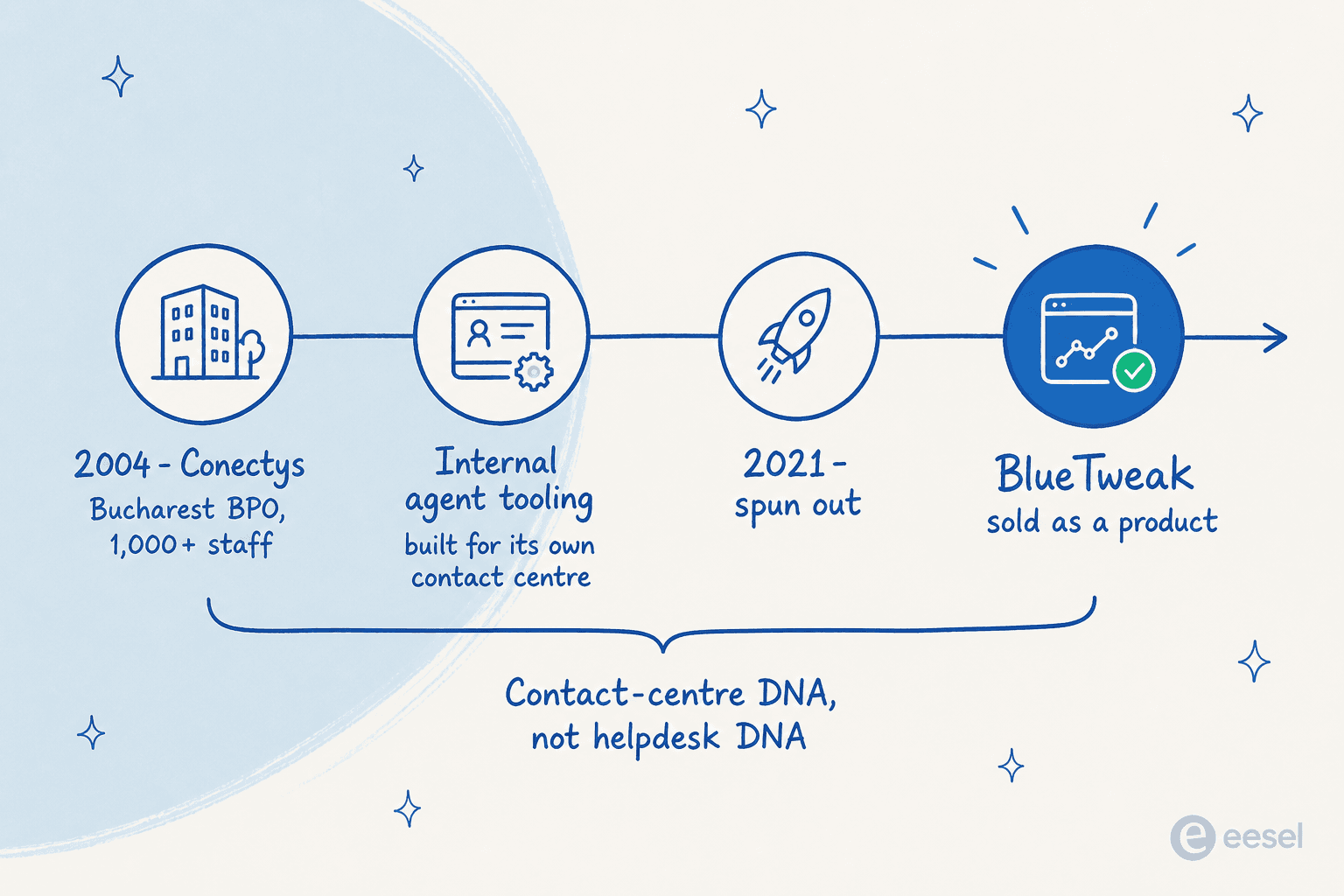
Every design decision I described above traces back to that. Per-seat licensing, because outsourcers price seats. Call transcription, translation across 100+ languages and workforce management, because those are the delivery problems of a multilingual BPO. Documentation released during evaluation and no self-serve checkout, because BPO software is sold in contracts, not credit-card signups. Four connectors, because an outsourcer runs the whole stack itself.
None of that is a flaw. It's coherent. If you are a BPO, an outsourced contact center, or an in-house team that genuinely runs phone as a primary channel, that DNA is a feature and BlueTweak deserves a look.
But it's also why G2 files BlueTweak next to JustCall, Five9, Talkdesk, NICE CXone and Genesys Cloud CX. Those are the neighbours the category assigns it. And if you landed on this page because you run a Shopify store on Gorgias, or a SaaS support team on Zendesk, and you want an AI agent on the queue you already have, then every one of those recommendations is pointing you at a dialer.
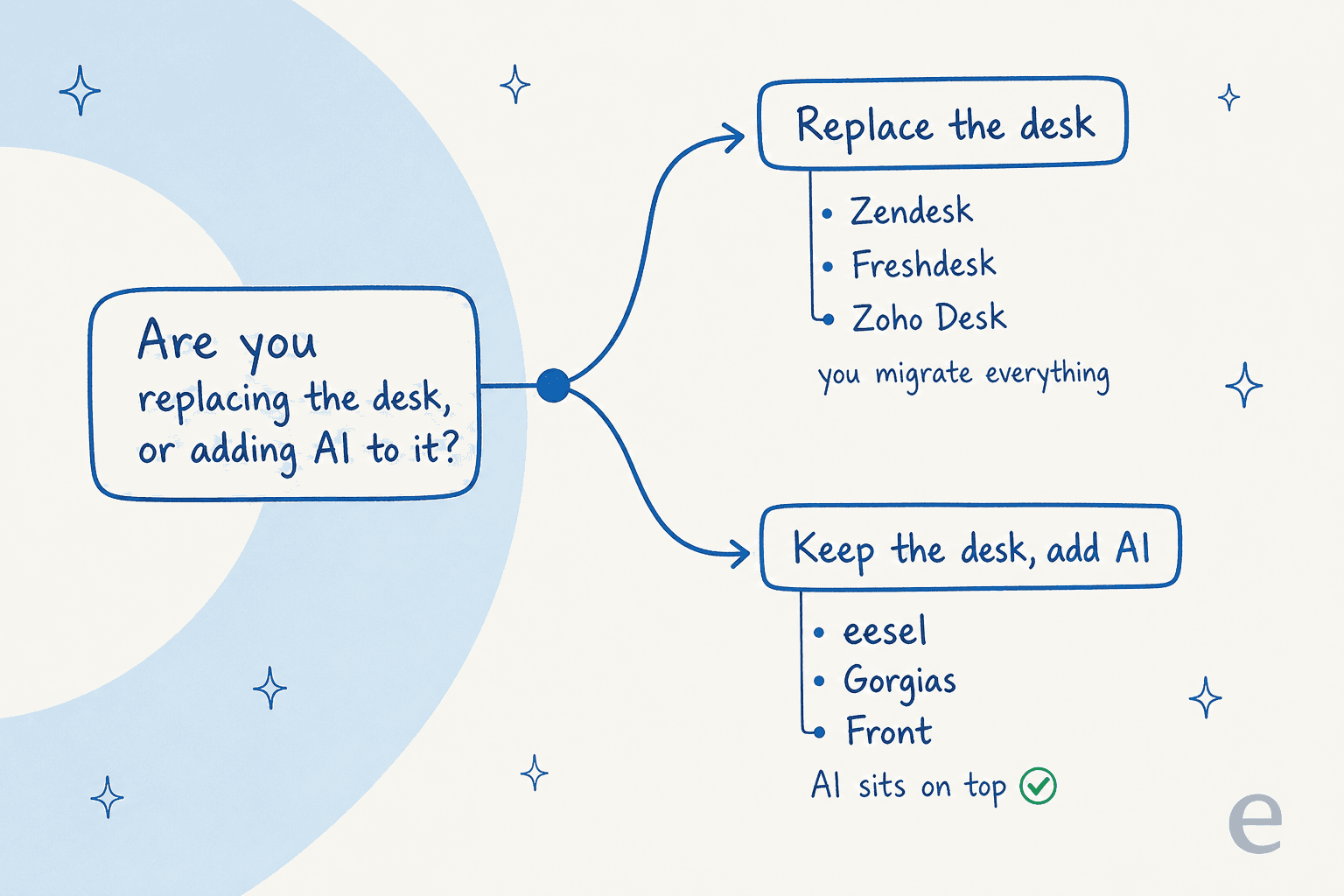
So the first question isn't which tool. It's which of two things you're actually buying.
How I picked these ten
I only shortlisted tools I could verify from primary sources: the vendor's own pricing page, their own docs, and public reviews on G2, Capterra, Trustpilot, Reddit or Hacker News. Every price below is the published figure at the time of writing, with the exact billing unit named, because "starts at $19" and "starts at $19 plus $2 a resolution" are wildly different products.
Three dimensions decided the ranking:
- What the AI is actually billed on. Resolution, conversation, session and ticket are four different units and vendors are not consistent about which they mean. A tool billing per time-windowed session charges you when the AI fails; a tool billing per resolution doesn't. Our guide to first contact resolution unpacks why the unit matters so much.
- Whether the AI can learn from past tickets. Knowledge-base-only grounding is the single biggest predictor of a disappointing pilot, in my experience, and it's usually a knowledge base management problem rather than a model problem.
- Whether you can test it before it goes live. If there's no way to replay your own history, your first real evaluation happens in front of customers.
I've left the call-center-only tools out entirely. If phone genuinely is your primary channel, that's a different shortlist. This one is for teams whose volume lives in email and chat, the same ground covered in our roundup of the best AI helpdesk software.
BlueTweak alternatives compared
| Tool | Best for | Entry price | AI billing unit | AI rate | Free tier | Native voice | Simulation mode | Trains on past tickets |
|---|---|---|---|---|---|---|---|---|
| BlueTweak | Outsourcers and phone-first teams | €65/agent/mo annual | Chat resolution, AI reply, voice minute | €0.20 / €0.40 / €0.09 min | No | Yes, in licence | No | Not stated |
| eesel | AI on the helpdesk you already run | $0 to start | Ticket handled | $0.40 | $50 free usage | Via helpdesk | Yes, replays history | Yes |
| Zendesk | Enterprise omnichannel at scale | $19/agent/mo annual | Automated resolution | $1.50 to $2.00 | No, 14-day trial | Add-on, $83/agent/mo | Inline tester only | Partial |
| Freshdesk | Budget omnichannel with voice | $19/agent/mo annual | Session, time-windowed | $0.49 | No, 14-day trial | Listed channel | Yes | Partial |
| Front | Shared-inbox teams | $25/seat/mo annual | Conversation, by outcome | $0.05 to $0.89 | No, 30-day trial | Via Aircall, Dialpad | Yes | Yes |
| Gorgias | Shopify and DTC ecommerce | $40/mo flat | Automated interaction | $0.90 to $1.50 | No, 30-day trial | Add-on from $25/mo | Playground only | Yes |
| Help Scout | Small teams wanting simplicity | $25/user/mo annual | Resolution | $0.75 | Yes, 5 users | Via Aircall | Yes | Partial |
| Zoho Desk | Value and the Zoho stack | $7/user/mo annual | Included in seat | Enterprise tier at $40 | Yes, 3 users | Marketplace partners | Not documented | Partial |
| Re:amaze | Multi-brand ecommerce | $29/member/mo | Resolution | $0.85 after allowance | No, 14-day trial | Pro, $49/member/mo | Not documented | Partial |
| Tidio | SMB chat-first storefronts | $24.17/mo annual | Lyro conversation | $0.50 | Yes, 50 conversations | Not documented | Yes, playground | Partial |
| HubSpot Service Hub | Teams already on HubSpot CRM | $7/seat/mo commit | Resolution, in credits | $0.50 | Yes, 2 users | 500 to 12,000 min | Yes | Partial |
If the pricing units in that table look like they're deliberately hard to compare, that's because they are. Here's a calculator so you can put your own numbers in.
1. eesel
Best for: putting an AI agent on the helpdesk you already run, without swapping desks or buying seats.
I build eesel, so read this section knowing that. I've put the specifics in so you can check every one of them.
The structural difference from BlueTweak is that eesel isn't a desk. It's an AI layer that connects into the desk you're already on, across Zendesk, Freshdesk, HubSpot, Gorgias, Front, Slack, Confluence and around 100 other tools. Nobody migrates, nobody learns a new inbox, and there's no seat licence, because you're not buying agent workspaces.
Features. Agents learn from past tickets, help docs and connected tools on day one, so years of resolved conversations become knowledge rather than a dead archive. Simulation mode replays your real ticket history and reports coverage by theme before anything goes live. Confidence-based routing sends anything the agent is unsure about to a human as a draft instead of a live reply. Configuration happens in plain language: when to jump in, what tone to take, whether to draft or send. It handles 80+ languages and drafts new knowledge base articles for the gaps simulation finds.
Pros. No seats, no platform fee, no minimum. You can route 200 of your 1,000 monthly tickets to it and pay for 200. The simulation step is the closest thing to a real answer to "will this work on my tickets" that I know of. Training on solved tickets rather than help-center articles is what closes the gap I described earlier.
Cons. SOC 2 is in progress rather than certified, and HIPAA with a signed BAA sits on the Enterprise tier at $1,000/month on top of usage. There's no native voice channel, so a phone-first team is better served by Freshdesk or BlueTweak. And because it layers on your desk, you need a desk.
Pricing. $0.40 per ticket or helpdesk conversation handled, regardless of how many replies are in it, per the eesel pricing page. Light tasks like dashboard lookups are free. $50 of free usage and no credit card to start. An annual commit takes 25% off. Enterprise adds a $1,000/month platform fee for SSO, HIPAA, a BAA and a dedicated solutions engineer.
"With eesel, we can find specific answers to questions extremely fast. We have seen up to 80% time savings."
Alex Capurro, Chief Innovation Officer, Global Pay
Our take: the right pick if you already run a helpdesk and the thing you're missing is the AI, not the desk. Gridwise saw 73% of tier-1 requests resolved in the first month. Skip it if you need one vendor to own phone, workforce management and ticketing in a single contract, which is precisely where BlueTweak is stronger.
2. Zendesk
Best for: large teams that need genuine omnichannel depth and can absorb the per-resolution cost.
Zendesk is the default enterprise answer, and for scale, reporting depth and channel coverage it earns the position. It's also the clearest example of the per-resolution model BlueTweak's chat rate is competing with, and the comparison is not flattering to Zendesk.
Features. Full ticketing, help center, messaging and Talk voice. AI agents handle conversations end to end, with a Dialogue Builder for scripted flows. Sunshine Conversations covers custom channels. The reporting is the deepest on this list.
Pros. Nothing else here matches the breadth of integrations and the enterprise controls. Automated resolutions are only counted when the AI resolves without escalation, so you aren't billed for failures.
Cons. The AI rate is $1.50 per committed resolution and $2.00 pay as you go on Zendesk's pricing page, the highest on this list by a wide margin. The included allowance is thin at five resolutions per agent per month on Support Team. Sandbox is an Enterprise add-on rather than a standard testing surface.
Pricing. Support Team starts at $19/agent/month annually, but the cheapest tier that includes AI agents is Suite Team at $55. Suite Professional is $115. Copilot adds $50/agent/month, and Contact Center adds $83.
"From what I can see in regards to this new 'Automated Resolution' pricing model, we'll be paying about $1.50 ~ $1.20 per resolution. And what Zendesk counts as a resolution can be ... subjective... If you have 500 AR per week, the bill blows out to be $650, where there wasn't a charge before."

Our take: the safe enterprise choice if procurement needs a name it recognises and volume is high enough to negotiate the resolution rate down. If you're leaving BlueTweak over cost, run the Zendesk pricing numbers carefully first, because you may be trading one meter for a more expensive one.
3. Freshdesk
Best for: teams that need voice and omnichannel on a real budget.
Freshdesk is the closest like-for-like swap for BlueTweak on this list. Omnichannel including phone, one vendor, one contract, and roughly a third of the seat price.
Features. Ticketing, knowledge base, chat and phone. Freddy AI covers agent assist, auto-triage and a customer-facing bot. Automation rules are genuinely capable. There's a real simulation step that lets you test scenarios before going live, plus a shareable preview link.
Pros. Freddy AI Agent is available from the Growth tier at $19 rather than being locked behind enterprise pricing. The Omni bundle at $29 puts voice, chat and ticketing under one number. The simulation surface is better than Zendesk's.
Cons. The AI billing unit on the Freshdesk pricing page is a session, a time window rather than an outcome, so you're charged whether or not the conversation resolved. At $49 per 100 sessions that's $0.49 each, and the 500 free sessions are a one-time account grant, not monthly.
Pricing. Growth is $19/agent/month annually, $23 monthly. Omni is $29. There's no free plan on the public page, and the Enterprise trial runs 14 days.
"We tested an ai integration in freshdesk and had almost the exact same experience. it worked for very simple tickets but anything slightly complex got misclassified. agents ended up spending more time fixing errors than before, so we had to rethink our approach."
Our take: the value pick if you're replacing BlueTweak wholesale and phone matters. Read our Freshdesk AI pricing breakdown on the session unit before you commit, because it's the one meter here that bills on failure as well as success. If Freddy's classification worries you, our notes on auto-triage and Freshdesk alternatives go further.
4. Front
Best for: teams who work out of a shared inbox and want AI without a ticket-shaped workflow.
Front sits between an email client and a helpdesk, which suits teams whose support conversations look more like relationships than tickets. Its AI pricing is also the most thoughtfully designed on this list.
Features. Shared inboxes with real collaboration, rules-based routing, and Autopilot for autonomous AI handling. Autopilot supports simulations before go-live, which very few tools on this list do properly.
Pros. The tiered outcome pricing on Front's pricing page is the fairest structure here: $0.05 for a triage, $0.39 for a handoff, $0.89 for a full resolution. You pay in proportion to how much work the AI actually did, which is the model I'd expect more vendors to copy. The 30-day Autopilot trial covers up to 1,000 resolutions.
Cons. No native voice, so phone runs through Aircall or Dialpad. Reporting is thinner than Zendesk's. And Front is a shared inbox at heart, which some teams love and others find structurally limiting.
Pricing. Starter is $25/seat/month annually for up to 10 seats. Autopilot is billed separately on the tiered rates above.
"Front feels like a 'supercharged shared inbox' whereas Zendesk is a proper ticketing system built for customer support from the ground up."
Our take: the best structural pricing on the list and a real simulation step, so it's a strong swap if BlueTweak's voice channel isn't load-bearing for you. Our Front alternatives piece covers where it runs out of room.
5. Gorgias
Best for: Shopify and DTC stores where support conversations are really order conversations.
If you sell physical products online, Gorgias understands your tickets in a way a general helpdesk doesn't. Order data, refunds, subscription changes and returns are native concepts rather than custom fields.
Features. Deep Shopify integration with order data in the ticket view. AI Agent takes actions, not just answers: it can cancel an order or apply a discount. Flows handle scripted paths. Chat campaigns cover proactive outreach.
Pros. Nothing else here matches the ecommerce depth. The AI can complete transactional work end to end, which is where most store volume actually sits.
Cons. Two meters run at once on the Gorgias pricing page: a per-ticket helpdesk fee and a separate automated interaction fee, so a fully AI-resolved ticket is billed twice. Automated interactions are $0.90 to $1.00 included, $1.50 on overage. The AI Agent does not run on the voice channel. The Playground tests one conversation at a time, with no batch backtest.
Pricing. Starter is $40/month flat, monthly only, capped at 50 tickets. Voice is a paid add-on from $25/month annually. The trial runs 30 days.
"The main frustration with Gorgias is the pricing model, which is based on ticket volume rather than a flat monthly fee. As our order volume grows and customer inquiries increase, the cost scales up quickly in ways that can be difficult to predict and budget for. During peak seasons like the holidays when support volume spikes, the costs can increase significantly in a short period."

Our take: the obvious pick for a store, with the caveat that the double meter makes peak-season budgeting hard. Our Gorgias AI agent pricing breakdown has the worked numbers, best Gorgias alternatives covers the escape routes, and we ranked the field in best AI helpdesk for Shopify.
6. Help Scout
Best for: small teams who want the tool to disappear into the background.
Help Scout has spent a decade optimising for the opposite of enterprise. Conversations look like emails, the interface stays out of the way, and setup takes an afternoon rather than a quarter.
Features. Shared inbox, Docs knowledge base, live chat via Beacon, and AI Answers for customer-facing resolution. You can run AI Answers through any scenario before going live.
Pros. A real free plan with five users and 100 contacts a month, per Help Scout's pricing, which BlueTweak has no equivalent for. Three months of unlimited AI Answers on signup. The AI rate of $0.75 per resolution is available on every paid tier rather than gated behind enterprise.
Cons. No native voice at all. Reporting is deliberately light. And the pricing model has moved around enough to have cost them some goodwill.
Pricing. Free for 5 users. Standard is $25/user/month annually. AI Answers is $0.75 per resolution. The plan trial runs 15 days.
"HelpScout changed back to user-based pricing. Guess too many people cancelled including me... I'll still stay with Freescout anyways. Helpscout lost all trust with this flip-flopping on pricing."
Our take: the right call for a team under ten people who value not thinking about their helpdesk. See Help Scout pricing for the tier detail, our Help Scout review for the hands-on read, and Help Scout alternatives if the reporting ceiling bites.
7. Zoho Desk
Best for: teams who want the lowest seat price on the list, especially inside the Zoho stack.
At $7 per user per month, Zoho Desk is less than a ninth of BlueTweak's seat price, and it's a real helpdesk rather than a stripped-down one. The catch is entirely about where the AI sits.
Features. Full ticketing, multi-brand help centers, SLAs and blueprints. Zia handles sentiment analysis, ticket summaries and an answer bot. Tight integration with Zoho CRM, Books and the rest of the suite.
Pros. A free forever tier for three users on Zoho's pricing page, and the lowest paid entry point here. No separate AI meter at all, which is unusual: the AI is included in the seat price rather than metered on top.
Cons. Zia's Answer Bot is Enterprise-only at $40 per user, so the AI you probably want costs nearly six times the entry price. Generative AI from the Standard tier at $14 requires bringing your own OpenAI key. There's no native voice, and no documented simulation mode.
Pricing. Free for 3 users. Express is $7/user/month annually, Standard $14, Enterprise $40. The trial runs 15 days.
"I've started using some of Zia's features - the summary for a ticket is ok but struggles when there is a lot of content - it has a limit [on length]."
Our take: hard to beat on seat cost, and the no-AI-meter model is a real answer to metering fatigue. Just price the Enterprise tier from the start if the AI is the point. Our Zoho Desk pricing guide has the tier-by-tier detail, and Zoho Desk alternatives covers what to do when Zia's ceiling shows up.
8. Re:amaze
Best for: operators running several storefronts out of one workspace.
Re:amaze is the quiet multi-brand specialist. If you run four Shopify stores and want one inbox with four separate brand identities, it handles that natively instead of through workarounds.
Features. Shared inbox, chat, chatbots, FAQ sites, push campaigns and live customer activity tracking. SMS and voice arrive at the Pro tier. Multi-brand support is built into the core model rather than bolted on.
Pros. Real multi-brand handling and unusual channel breadth for the price, across Re:amaze's tiers. Resolutions come with a monthly per-user allowance built into each tier before the $0.85 rate kicks in.
Cons. The interface has a strong point of view and takes getting used to. No documented simulation mode. Voice needs the Pro tier at $49/member/month.
Pricing. Basic is $29/member/month, or $26.10 annually. Starter is a flat $59/month. Pro is $49/member/month. The 14-day trial includes all Plus features.
"Re:amaze allows me to do a lot with minimal time and money investment... It's a real Swiss Army Knife of customer engagement. The fact that they update the product so frequently and add new features makes me feel like I've chosen the right product for our company."

Our take: worth a look if multi-brand is a hard requirement, since most tools here treat it as an afterthought. Our Re:amaze review goes deeper, and Re:amaze AI alternatives covers where the AI falls short.
9. Tidio
Best for: small storefronts where chat is the whole support operation.
Tidio is chat-first and unapologetic about it. If your support is a widget on a Shopify storefront and nothing else, it's the fastest thing here to get running.
Features. Live chat, Lyro AI agent, Flows for scripted automation, and a Shopify integration that reads order data. A Playground previews Lyro's answers before you publish.
Pros. A free plan with 50 billable conversations on Tidio's pricing page, and setup measured in minutes. Lyro's $0.50 per conversation is mid-pack, and a conversation only counts once Lyro actually replies.
Cons. No voice channel documented anywhere in its materials. The free tier's boundaries have drawn real criticism. And it's a chat tool: email ticketing is not where it's strongest.
Pricing. Free with 50 conversations. Starter is $24.17/month annually for 100 conversations. Lyro is a separate add-on starting at $32.50/month. The paid trial runs 7 days.
"Just had a conversation with tidio, their pricing is so off and hidden, "free tier" is just a trap includes most services that are billed separatedly once you want to scale. ive seen this problem with most ai services... tidio is a NO-GO for me they need to be more transparent"
Our take: fine for a storefront doing a few hundred chats a month, wrong for anything with a real email queue. Check Tidio AI pricing and Tidio alternatives before you scale into it, and our live chat deflection guide if chat is the whole queue.
10. HubSpot Service Hub
Best for: teams already running HubSpot CRM who want support in the same record.
The argument for Service Hub is almost entirely about the CRM underneath it. Every ticket sits on the same contact record as the deal, the email history and the marketing touches, which is a real advantage when support and sales overlap.
Features. Help desk workspace, knowledge base, SLAs, skills-based routing and Breeze Customer Agent for AI resolution. Built-in calling with a per-tier minute allowance. You can test the agent by impersonating a CRM contact.
Pros. The CRM integration is the tightest here, and built-in calling on the Service Hub tiers ships with 500 to 12,000 minutes. The free tier covers two users.
Cons. AI is paid in credits at 50 per resolution, which works out at $0.50, but Professional's 3,000-credit allowance is only 60 resolutions a month. That's a very low ceiling for a real support queue. The free tier excludes help desk, knowledge base and the AI agent, so it isn't usable for support on its own.
Pricing. Starter is $7/seat/month on a monthly commit, or $20 pay-monthly. Customer Agent gets 14 days unlimited.
"We got the startup "90% discount" from Hubspot but what they don't tell you is that it's 5 users plan which you are locked in to. Then they lock you on to min 5 users for sales for the next two years where you are spending up to $500 per month which you cannot break out of."

Our take: worth it if you're already paying for HubSpot, hard to justify otherwise. The 60-resolution allowance is the number to check first. See HubSpot AI agent pricing and HubSpot Service Hub AI alternatives for the detail.
What I'd actually do
If phone is genuinely your primary channel and you want one vendor to own transcription, translation, workforce management and ticketing under one contract, stay on BlueTweak or look at Freshdesk Omni. The BPO DNA is a real fit for that shape of team, and I'd rather say so than pretend otherwise.
If you're an in-house support team on an existing helpdesk, don't replace the desk. The migration is the expensive part, and it buys you nothing you actually wanted. Put an AI layer on what you have, and make the vendor prove it works on your own ticket history before you point it at a customer. We've costed that trade both ways in AI vs human cost, and by team shape in small business, B2B and ecommerce roundups.
And whichever way you go, ask three questions on the call. What exactly triggers a charge, and does a failed answer trigger one? Can the AI read our past tickets, or only our help center? And can we run it over last quarter's tickets before it goes live? Those three answers separate the tools that will work on your queue from the ones that demo well.
Try eesel
If you're on Zendesk, Freshdesk, Gorgias, Front or HubSpot and the thing you're missing is AI rather than a new helpdesk, that's the exact gap eesel fills. It plugs into the desk you already run, learns from the tickets your team has already solved, and starts drafting inside a few minutes. No seats, no platform fee, $0.40 per ticket handled, and you only pay for the tickets you actually route to it.
The part I'd point at hardest is simulation. Before eesel answers a single live ticket, it replays your real history and shows you coverage by theme, so you find out where it's weak in a dashboard instead of in a customer's inbox. That's the step almost nothing else on this list does properly, and it's the reason our rollouts don't produce the confident-wrong-answer story.

Start with $50 of free usage, no card required, at eesel.
Frequently Asked Questions
How much does BlueTweak cost per agent?
What are the best BlueTweak alternatives for a small support team?
Does BlueTweak have any reviews on G2 or Capterra?
Which BlueTweak alternative is cheapest once AI is switched on?
Can I test an AI support agent before putting it on live tickets?


Article by
Kurnia Kharisma
Kurnia is a software engineer and writer at eesel AI with two years of SEO experience, writing about AI tools, helpdesk software, and customer support. He pairs a developer's understanding of how these products are built with search-driven research into what actually ranks and resonates with the people searching for them.