The 10 best Assembled alternatives in 2026

Rama Adi

Katelin Teen
Last edited August 20, 2026

Why teams start looking at Assembled alternatives
Fair to Assembled first, because plenty of what it does, it does well. Workforce management is a real discipline. It is also not the same job as customer service automation, which is the confusion this whole category runs on.
The reviews are good, and not in a thin way. Assembled WFM sits at 4.6/5 across 186 G2 reviews with zero one-star ratings, and 4.7/5 across 85 Capterra reviews. What reviewers keep returning to is implementation speed, in a market where legacy WFM rollouts get measured in quarters. Assembled's own FAQ claims "many customers can go live within a month", and the reviewers back that up: two separate ones put full deployment at under two weeks, one of them across 200-plus agents.
Scheduling outcomes hold up too. Pair Eyewear reports 90% less time spent scheduling, an hour-plus Friday ritual cut down to five minutes. Typeform reports 50% less forecasting time, with self-reported accuracy above 90% against roughly 80% in the tool they used before. And Brooks cut average phone wait times by 66%. Numbers of that kind come from a vendor that knows workforce management, plainly.
So why leave? Four reasons come up again and again, and not one of them is "it's too expensive."
The scheduling mechanics have specific gaps. Reviewers name them precisely. No field for agent work availabilities. No shift swaps on the base tier, no bulk edit, plus a single-editor lock on top. One review is blunt about it:
"I hate the fact that it does not have a section for us to insert agent's work availabilities. That's the whole point of getting a scheduling tool, so Assembled is super archaic on this feature."

On the collaboration side, there is this:
"It would be helpful if multiple people could edit in Assembled WFM at one time. Currently, only one person can edit at a time, which is inconvenient for our large team. Each manager should be able to edit their team's schedules independently and simultaneously."
Forecasting hits a ceiling under complex routing. If your queue leans on ticket routing across skills, read this one closely. It is also the fairest version of the complaint:
"It's strong in straightforward support environments, but teams with highly variable demand or multi-skill routing may find the forecasting and capacity planning a bit too simplistic compared with heavier enterprise tools."
The forecasting engine is not on the cheap tier. AI-powered schedule generation and ML-based multi-channel forecasting are both absent from Core; they start at Pro. Which makes the $25 tier a scheduling-and-adherence tool minus the forecasting engine the product is marketed on. Moving up costs another $20 per agent per month.
And the helpdesk you actually use may not be on the list. This is the reason that ends an evaluation fastest. I come back to it further down.
What Assembled actually costs, and where the meter goes vague
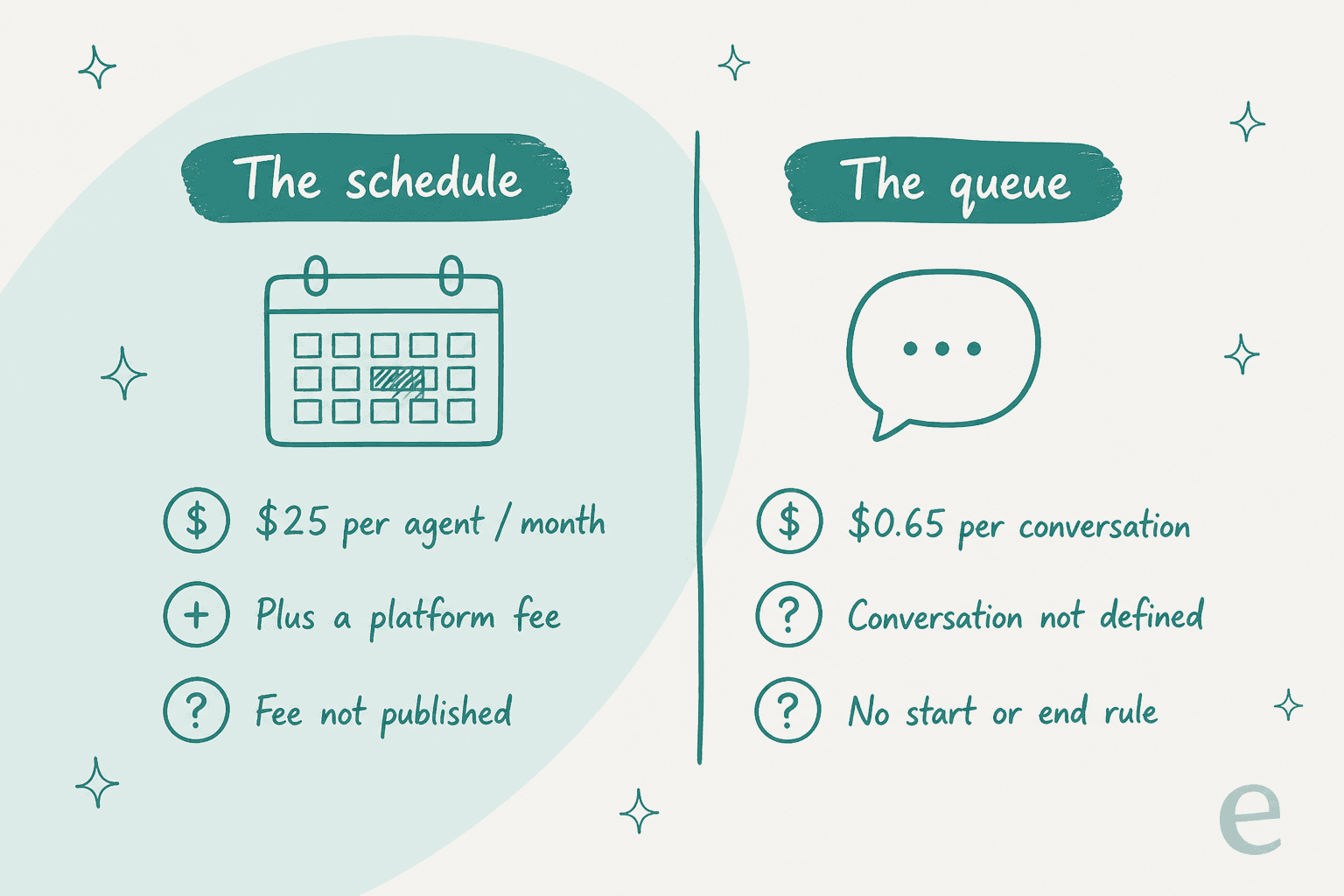
Credit where it is owed: Assembled publishes numbers, and in this market that is rare. The catch is that the numbers are floors on a negotiated quote. And one of the two meters arrives with no definition attached to it at all.
| Product | Published price | Unit, per Assembled's own FAQ | What's not published |
|---|---|---|---|
| Complete orchestration suite | No price | n/a | Everything. "Talk to sales" only |
| Workforce Management, Core | $25 / month | Per agent per month, plus a platform fee | The platform fee amount |
| Workforce Management, Pro | $45 / month | Per agent per month, plus a platform fee | Same |
| Workforce Management, Enterprise | $75 / month | Per agent per month, plus a platform fee | Same |
| AI Copilot | $35 / month | Per agent per month | Whether it needs WFM alongside it |
| AI Agents | $0.65 / conversation | "Priced per conversation" | What one conversation is |
| AI Voice | No price | Per conversation, or optionally per resolution | The rate, both ways |
| Vendor Management (BPO) | No price | n/a | The rate |
The billing definition, word for word from the pricing FAQ: "WFM is priced per agent per month, plus a platform fee. Copilot is also priced per agent per month. AI Agents are priced per conversation with the option to also price by resolution for AI Voice."
Two things stand out here. The platform fee appears nowhere on the pricing cards. Only in the FAQ underneath them, and never with a number next to it. Then the second thing: the page names its conversation meter and never defines the boundary of one. No session window. No re-open rule, and no statement of what happens when a customer replies three days later. There is no published overage rate either, which follows, since there is no published allowance to overrun in the first place.
For what it is worth, the one real AI number a customer has volunteered in public lands between the two:
"Assembled AI is successfully containing well over 50%of contacts into our Help Widget."
Containment is not resolution, and a help widget is not the whole queue, so treat it as encouraging and not conclusive. Still a more useful figure than either number on the marketing page, that one, because a named practitioner put their job title beside it.
The Salesforce AppExchange listing repeats the same three floors, WFM Core at $25 per user per month, AI copilot at $35, AI agents at $0.65 per conversation. What it drops is the platform fee, and the Pro and Enterprise tiers with it. Marketplace listings are normally where you go to find a quote-only vendor's real rate. Here it is where the fee goes missing.
Here is why an undefined unit matters more than a high one. Decagon, which sells the same class of AI agent, published the argument against outcome pricing on its own blog: "You never want to be in a situation where you're arguing over what a 'resolution' is." Swap "resolution" for "conversation" and you have the risk in Assembled's AI line item, exactly. Same trap that makes deflection measurement so slippery whenever the vendor owns the definition.
How I picked these ten
Assembled's own comparison hub names its rivals, and that is a useful place to start: Aspect, Calabrio, CommunityWFM, Genesys, NICE, Verint and Zendesk WFM, plus Decagon and Sierra on the AI side. I went through all of them, then screened on four things:
- Is there a published rate anywhere? Vendor site, help centre, a cloud marketplace listing. Marketplace rates count in my book, because they are real list prices.
- What exactly is the billable unit? A seat, a conversation, a resolution. Or a platform commitment.
- Can you buy the piece you need without the whole platform?
- Does it resolve tickets, or only analyse the people who do? Biggest sorting line in the category, this one, and almost every "Assembled competitor" list gets it wrong. A scheduler and an AI helpdesk agent are not substitutes for one another.
Two housekeeping notes, on brands that have moved. Calabrio no longer exists standalone, calabrio.com redirects to Verint after the merger, so I folded it into the Verint entry. Playvox is now sold as "Playvox by NiCE" with no marketing site of its own, so it sits inside the NICE entry.
If BPO capacity planning specifically was your reason for using Assembled, the better starting point is our notes on outsourcing customer service and call center outsourcing alternatives. Most of the tools below treat vendor capacity as an afterthought.
The 10 best Assembled alternatives in 2026, at a glance
| Tool | Best for | Published rate | Billable unit | Resolves tickets? | Standalone WFM? | Dry run on your own tickets? | Named helpdesk connectors | Seat floor |
|---|---|---|---|---|---|---|---|---|
| eesel AI | The AI half, tested before launch | From $299/mo (500 credits), add-ons for SSO and HIPAA | 1 credit per ticket or chat handled | Yes | No, not a WFM tool | Yes, replays your real tickets | Zendesk, Freshdesk, Gorgias, Front, Help Scout, HubSpot, Salesforce, Jira SM | None |
| Zendesk WFM | Teams already all-in on Zendesk | $50 / agent / mo (WEM bundle, yearly) | Per agent, account-wide | Separate product | No, an add-on | No | Zendesk only | Whole account |
| Dialpad WFM (was Surfboard) | Voice-led teams already on Dialpad | Not published; host platform from $80 / user / mo | Per user | Separate SKU | No, an add-on | No | Zendesk, Salesforce, Kustomer, Front, Dixa, Help Scout, Aircall, Talkdesk, Twilio | Not published |
| Peopleware (was injixo) | Multi-channel WFM outside a CCaaS | Not published (it used to be) | Per agent, quoted | No | Yes | No | 50+ connectors, no Genesys | Not published |
| Aspect Workforce (was Alvaria) | On-prem or hybrid WFM | Not published | Per seat, quoted | No | Yes | No | Amazon Connect, Five9, Avaya, Cisco | 100 seats (Microsoft listing) |
| Genesys Cloud WEM | Buyers consolidating onto one CCaaS | $155 / user / mo (CX 3, WEM included) | Per named user, annual | Separate token meter | No | No | Genesys Cloud only | None published |
| NICE CXone | Large voice-first contact centres | $110 to $249 / agent / mo | Per agent, + $0.25/session on Ultimate | Add-on on every tier | No | No | CXone stack | 10,000-agent ceiling |
| Verint (incl. Calabrio) | Enterprise WFM at real scale | $200,000 / yr platform dimension; $39 / user / mo Salesforce edition | Platform dimension, or per user | No | Yes | No | Salesforce, CCaaS connectors | Effectively 1,000+ |
| Sierra | Enterprise AI agents, outcome-priced | None; /pricing 404s | An outcome | Yes | No | No, written scenarios only | None published | Not published |
| Decagon | Enterprise AI agents, volume-priced | None; /pricing 404s | Conversation or resolution | Yes | No | No, generated tests | Zendesk, Salesforce, Kustomer, Amazon Connect, RingCentral | Not published |
Notice the pattern here. Of ten alternatives, four publish a real per-user rate you can budget against, and none of the pure AI-agent vendors publishes anything at all. Assembled, for all the vagueness sitting in its conversation meter, is more transparent than the AI agents it competes against.
Work out what the meters actually cost you
The comparison above only becomes useful once your own numbers go into it. The calculator below uses published rates only. Any row marked as unpriced stays unpriced, rather than getting a guess dressed up as a figure.
The shape it reveals is worth sitting with for a minute. At 40 agents and 6,000 conversations, Assembled's two meters land in roughly the same ballpark as each other. The AI half is the one whose unit you cannot check against the invoice.
1. eesel AI
Best for: teams who want the AI half of Assembled, on the helpdesk they already run, with a dry run over their own history before go-live.
Plainly, first, what eesel is not. It is not a workforce management tool. No volume forecasting, no shift patterns, and no adherence tracking. If you are leaving Assembled because you need better scheduling, skip down to the entries below, I will not be offended.
The other half is what eesel does. It plugs into your helpdesk, reads the knowledge you already have, then handles tickets and chats end to end, with an AI agent that hands off to a human when it should. It follows the handoff patterns that keep an escalation from feeling like a dead end.
It also handles the unglamorous parts, ticket classification and prioritisation, and that is usually where the first measurable ticket reduction turns up. Named connectors: Zendesk, Freshdesk, Gorgias, Front, Help Scout, HubSpot, Salesforce and Jira Service Management. That is the SMB-and-mid-market helpdesk shape Assembled's directory does not cover.
The thing I would actually flex. We have spent years now putting AI agents onto live support queues, and the lesson that stuck had nothing to do with model quality. It was the confident wrong answer. Which is why eesel's Simulation skill exists. You point it at hundreds of your past tickets. It runs your full agent pipeline in a sandbox, without sending one single reply, scores each answer against what your team actually sent, then hands back the gaps plus the instruction changes that would close them.
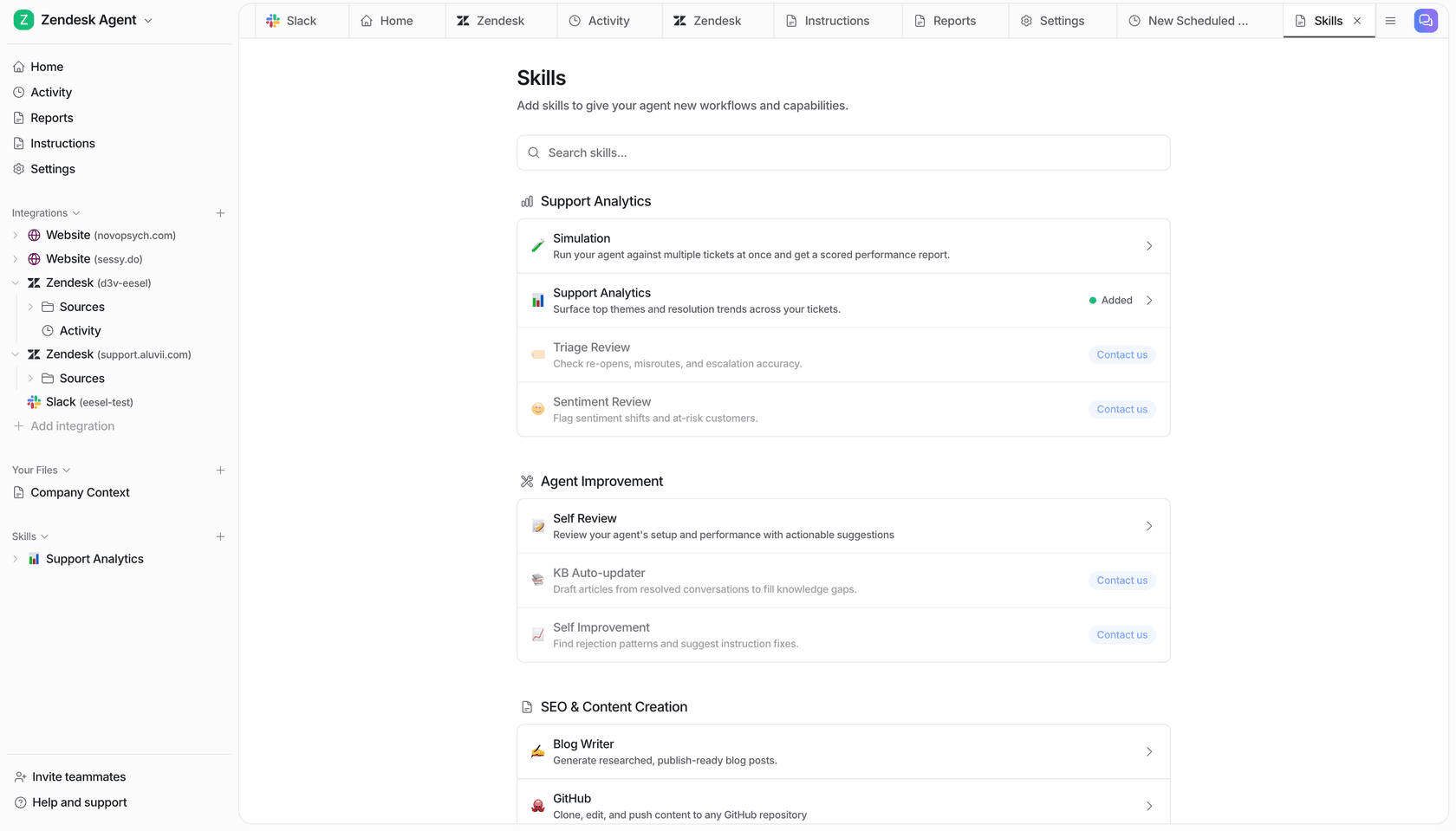
Straight about the limits, though. Simulation returns a scored comparison and a gap list. It does not forecast a resolution rate, and it does not predict your bill. I would not trust a vendor that claims it can do either from a dry run.
Pricing
| Item | Rate | Unit |
|---|---|---|
| Free plan | 100 credits, no card | Also time-limited, duration not published |
| 500 credits | $299 / mo | 1 credit per ticket or chat session handled |
| 1,000 credits | $499 / mo | Monthly batch |
| 2,500 credits | $999 / mo | Monthly batch |
| 5,000 credits | $1,899 / mo | Above 5,000, talk to us |
| Blog post draft | $4.00 | Per blog post |
| Pay a year upfront | Two months free | Prepaid year |
| Add-ons | Priority support from $299 / mo, SSO and MFA from $199 / mo, data residency $500 / mo | HIPAA, talk to us |
| Seats | $0 | There is no per-seat charge |
One honest detail, and it cuts both ways: the unit is a ticket or chat handled, not resolved. A ticket uses one credit, however long it runs, whether or not the AI closed it. On a bad day that is worse than an outcome meter, on every other day it is better, because the number is predictable in advance. If you run out, agents pause until credits reset, or you can turn on overage with a monthly cap you set, at $0.80 per extra credit, on eesel pricing.

Where it stops
- No WFM at all. No forecasting, no scheduling, no adherence, nothing for BPO capacity planning.
- SOC 2 Type II is underway, not certified, per the eesel security page. Assembled has it. If procurement needs the report today, that is a real gap. HIPAA with a BAA sits on the Enterprise tier.
- No connector for Zoho Desk, Crisp, LiveAgent, Helpshift.
Verdict: pick eesel when the queue is the problem and you want to see the agent's performance on your own tickets before a customer does. Worth reading alongside the wider field of AI customer service companies. Came for the schedule? Skip it.
2. Zendesk WFM
Best for: teams whose entire support operation already lives inside Zendesk.
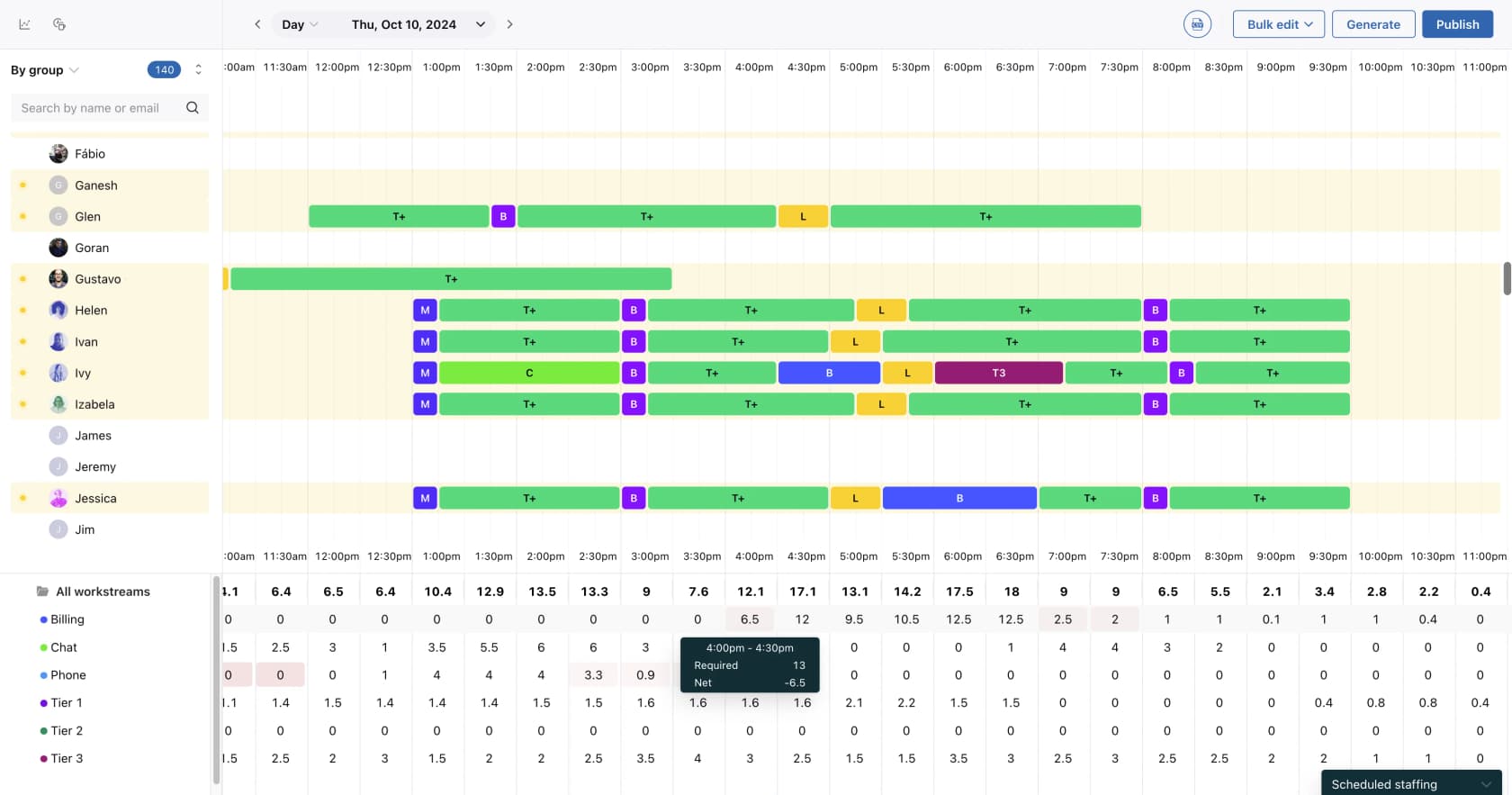
This is the product that used to be called Tymeshift, now a native Zendesk add-on. It forecasts inbound Zendesk ticket and call volume, generates schedules, tracks adherence in real time. Agent time gets auto-tracked off Zendesk activity too, so nobody has to clock in and out.
What it actually does. Forecasting is conditioned on Zendesk channels and ticket properties, and it pulls six months of history at install. Schedules get built against workstreams, net staffing shown per interval. Adherence is live. And because time tracking is automatic, derived off the ticket record itself, the data-entry tax that sinks a lot of WFM rollouts mostly goes away.
Pricing
| Line item | Published figure |
|---|---|
| Workforce Engagement bundle (Zendesk QA + Zendesk WFM) | $50 per agent / month, paid yearly |
| Standalone WFM add-on | Not published. Visible in Admin Center, or via a rep |
| Cheapest base seat it can sit on (Support Team) | $19 / agent / mo annual, $25 monthly |
| Suite Team | $55 / agent / mo annual |
| Suite Professional | $115 / agent / mo annual |
Zendesk does not gate WFM behind a minimum Suite tier, which is worth noting given the same page does gate Copilot to Professional and above. Our full Zendesk pricing breakdown covers the base plans. And if you have already decided the total is steep, that argument is a real one.
The QA half of the bundle deserves its own look, since evaluating agents in Zendesk QA is a different job from scheduling them. If the whole bill is the problem instead, Zendesk alternatives covers the exit routes.
Where it stops
- The roster is your Zendesk user list. On connection, WFM imports team members with four fields, name and email, default group, status. There is no documented way to schedule somebody who has no Zendesk user record, so a phone-only team on separate telephony, or a back-office queue, is out.
- Licensing is account-wide. Zendesk puts it this way: "When you buy an add-on, you purchase it for all agents in your account." So you cannot license only the 20 people you actually schedule.
- Light agents consume a full WFM licence, the moment you give them a WFM role.
- No BPO vendor management. Zendesk attaches its BPO language to the QA add-on, and the WFM docs make no vendor-capacity claim at all. Assembled's clearest structural advantage, that one.
- Forecast import from outside Zendesk sits in an early access program still, not generally available.
Verdict: a Zendesk-only shop gets the cheapest credible replacement for Assembled's schedule here, with no new vendor to onboard. Run BPOs, or staff who never touch Zendesk, and it cannot do the job Assembled was hired for.
3. Dialpad WFM, formerly Surfboard
Best for: voice-led support teams that already standardised on Dialpad.
Shortlisted Surfboard off some older comparison post? Update your notes: teamsurfboard.com now redirects to Dialpad. Dialpad acquired it back in October 2024, and it ships now as Dialpad WFM.
The product itself was always the closest thing to Assembled in spirit. A modern support-team scheduler, not a call-centre relic. And the integration list is still the best part of it: nine named connectors, including Zendesk, Salesforce, Kustomer, Front, Dixa, Help Scout, Aircall, Talkdesk and Twilio, then 50-plus HRIS and calendar sources on top via iCal.
Pricing
| Item | Published figure |
|---|---|
| Dialpad WFM | Not published. Listed as "available as an add-on" with no number |
| Dialpad Support Essentials (host platform) | $80 / user / mo annual, $95 monthly |
| Dialpad Support Advanced | $115 / user / mo annual |
| Dialpad Support Premium | $150 / user / mo annual |
Where it stops
- The WFM rate is CSM-gated. Help articles route every pricing question to "contact your Customer Success Manager." No published number anywhere on the site.
- It does not resolve tickets. Deflection is a separate SKU called Dialpad AI Agents, metered on conversation credits.
- The evidence base is thin, and dated. G2 shows three entries and says outright it hasn't been reviewed yet. Capterra's 4.6 comes off nine reviews, all of them dated 2023, so before the acquisition, and eight were vendor-referred with incentives.
Verdict: worth a call when you already pay Dialpad for voice, because the scheduler is good and the connector list is broad. Otherwise hard to shortlist, when the entry rate is a conversation instead of a page.
4. Peopleware, formerly injixo
Best for: multi-channel WFM, for a team that has no wish to buy a contact-centre platform to get it.
Another rename: injixo.com now redirects to peopleware.com. Underneath it is the same well-regarded cloud WFM, 50-plus connectors, and one of the very few truly standalone options in this post.
Pricing
Quote-only now. The pricing page has become a three-step "your needs, your solution, your pricing" form, and there are no numbers in it.
That is a change, and the buyers themselves documented it. A verified G2 reviewer back in July 2025 said on G2 that they chose injixo specifically because of "the cost of their fees clearly published on the website". The current G2 record for the product lists no vendor pricing, and no free trial. The exact thing that won them a deal a year ago is no longer on the site.
Where it stops
- No published rate, in a place where there used to be one.
- It does not resolve tickets. This is planning software, nothing more.
- Read the trust page carefully. The SOC 2 and PCI DSS listed there belong to AWS's data centres. Peopleware's own certifications are ISO 27001:2022 and GDPR, and no uptime percentage gets published.
- Genesys is missing from the connector list.
Verdict: still one of the better standalone WFM engines, and a real Assembled alternative on capability. Go in knowing that you negotiate blind now, same as with everyone else on this list.
5. Aspect Workforce, formerly Alvaria
Best for: teams that need WFM on-premise, hybrid, or sitting in a private cloud.
The naming here has been through a lot. Alvaria revived the Aspect brand in September 2024 for the workforce suite, so the current product is Aspect Workforce. The Microsoft listing is still titled "Alvaria WEM" under publisher aspectsoftware, and some G2 screenshots say Alvaria too.
The pitch is deployment freedom, and it is a fair pitch. Aspect argues that "most WFM vendors have made the decision for you: cloud or nothing", and it sells across on-premise, hosted, private cloud and public cloud. It is a true standalone. It ingests agent-state and interaction data from whatever contact centre you run instead of owning the interaction itself, which puts it nearer to call center automation than to a helpdesk product. Compliance published on the homepage: PCI DSS v4.0, SOC 2 Type 2, ISO 27001.
Pricing
Quote-only. On the vendor site, and on both cloud marketplaces. The only dollar figures Aspect publishes about itself sit inside a TCO calculator that prices your costs rather than its licence: WFM certification and training at $5,000 to $8,000 per person, ongoing development at $2,500 to $4,000 per person per year, then support contracts at $10,000 to $15,000 per year. Its Amazon Connect interface is listed free on AWS Marketplace, but that is the connector and not the platform.
Where it stops
- A 100-seat minimum, per its Microsoft Marketplace listing. One line, and it disqualifies most teams who would ever consider Assembled.
- It does not resolve tickets. The AI here is forecasting and analysis.
- The published connector list is short. Amazon Connect, Five9, Avaya, Cisco.
- G2 puts average implementation at around five months, against the one month Assembled claims.
Verdict: the right answer when a regulator, or a data-residency rule, means the schedule cannot live in somebody else's cloud. Under 100 seats, the door closes before pricing even comes up.
6. Genesys Cloud WEM
Best for: buyers who are consolidating routing, voice and workforce onto a single platform.
Genesys is one of the very few vendors in this category that publishes a real, complete rate card. Eight currencies, three licence models. Credit where it is due.
Pricing
| Tier | USD, named user, billed annually | WFM status |
|---|---|---|
| Genesys Cloud CX 1 | $75 / user / mo | Add-on, WEM not included |
| Genesys Cloud CX 2 | $115 / user / mo | Add-on, WEM not included |
| Genesys Cloud CX 3 | $155 / user / mo | Included |
| Genesys Cloud CX 4 | $240 / user / mo | Included, plus 30 AI Experience tokens per agent |
Every workforce-management row in the feature matrix, AI forecasting and AI scheduling, capacity planning, time-off, adherence, reads "Add-on" for CX 1 and CX 2. So WFM proper begins at $155 per user per month, unless you buy the add-on separately, and that price is published only in GBP: £42 on top of CX 1, £28 on top of CX 2.
Where it stops
- There is no standalone WEM SKU. Every path runs through a Genesys Cloud CX seat, so what you buy is a contact-centre platform, in order to get a scheduler.
- A single action bills the seat. Create one schedule, or generate one gamification point, and that user flips into a billed WEM seat.
- It does not resolve tickets in this line item. That is virtual agents, metered in AI Experience tokens.
- Named and concurrent licence models will not mix.
Verdict: very good WFM, honest pricing with it, but only if you were replatforming the contact centre anyway. Buying a $155-per-user platform to replace a $25-per-agent scheduler is a different project from the one you started.
7. NICE CXone, including Playvox
Best for: large, voice-first contact centres that want WFM and QA and analytics from one vendor.
NICE has the deepest first-party WEM stack in the category. Workforce management, quality management, interaction analytics, performance management, recording, gamification, all of it its own products rather than partners. It claims 25 billion interactions a year, and the strongest single proof point on the page is a Marriott tile claiming 11 vendor solutions eliminated. Cognigy it acquired, for the conversational-AI story, rather than growing that in-house.
Playvox lives here now too, sold as "Playvox by NiCE", with no marketing site of its own and a quote form as the only way in.
Pricing
| Suite | Price | WFM status |
|---|---|---|
| Omnichannel | $110 / agent / mo | Add-on, no published price |
| Essential | $135 / agent / mo | Add-on, no published price |
| Core | $169 / agent / mo | Included |
| Complete | $209 / agent / mo | Included |
| Ultimate | $249 / agent / mo + $0.25 per session | Included, plus all three Copilots |
NICE publishes list prices, which is rare and useful both. The catch is what a list price actually buys. WFM is only included from Core at $169, which makes the real cost of adding workforce management to the entry tier that $110-to-$169 jump. The $110 Omnichannel suite includes nothing at all from the Workforce Empowerment pillar. All twelve rows there are add-ons, and not one of those add-ons carries a published price. On AWS Marketplace the platform lists at $150,000 per 12 months.
Where it stops
- Every AI Agent product is an add-on on every tier below Ultimate. Even on Ultimate, the knowledge portal stays an add-on.
- All three Copilots are Ultimate-only, so $249 per agent per month, plus per-session consumption on top.
- There is a documented ceiling of 10,000 agents per tenant, per the WFM help centre. Also two different WFM products (CXone WFM and IEX Integrated) which are different code and not different tiers.
- Its G2 category depth tells the honest story. 853 reviews in Contact Center Workforce, and 15 in AI Customer Support Agents.
Verdict: the safe enterprise choice when you run thousands of voice agents and want one throat to choke. As a straight swap for Assembled's scheduler, wildly oversized.
8. Verint, including Calabrio
Best for: enterprise WFM at the kind of scale where a dedicated forecasting team already exists.
Verint is the incumbent Assembled was built to displace, and it now takes in Calabrio as well. The whole calabrio.com domain redirects to verint.com, and Verint sells the Calabrio WFM line in parallel with its own. Its AppExchange profile claims over 85 of the Fortune 100 as customers, and Google, Instacart, Wayfair, Delta and Navy Federal get named on the WFM pages.
Pricing
Verint publishes no pricing page at all. The real rates live on the marketplaces, and they are worth putting side by side.
| Listing | Plan | Published rate |
|---|---|---|
| AWS Marketplace | Workforce Engagement dimension, 36-month contract (the one containing WFM) | $200,000 |
| Microsoft Marketplace | Verint Workforce Engagement, 1 year | $200,000 / year |
| Microsoft Marketplace | 2 years / 3 years | $400,000 / $600,000, strictly linear |
| AppExchange | WFM Professional for Salesforce | $39 USD / user / month, 30-day trial |
| AWS Marketplace, Calabrio | Calabrio WFM, 12-month contract | $468 / user / year ($39/mo) |
| AWS Marketplace, Calabrio | Full Calabrio ONE Suite | $1,500 / user / year ($125/mo) |
That $200,000 figure showing up on two marketplaces is what makes it a real list number and not a placeholder. The $39 per user per month is a different, smaller product, the Salesforce-native Professional edition, whose own pricing details warn that "additional modules might be required."
Where it stops
- Calabrio's WFM hard-stops, it does not degrade. Its own documentation says "The system stops working when the number of active agents exceeds the limit defined in the product activation key," and should the activation key expire, after a 15-day warning, "the product stops working."
- Self-serve purchasing on the AWS listing caps out at 100 seats. Above that you go to sales.
- It does not resolve tickets. The AI is forecasting and transcription, sentiment, Auto QM. Bot Analytics grades a chatbot rather than being one.
- Calabrio's named integrations are CCaaS only. Amazon Connect, Cisco Webex CC, Five9, Talkdesk, RingCentral RingCX, 8x8. No Zendesk, no Freshdesk, no HubSpot or Gorgias, and no Salesforce Service Cloud on the Calabrio line specifically.
- Calabrio sits at 4.4 across 435 G2 reviews, where the negative themes concentrate on reporting, and on billing clarity.
"I definitely find subscription management problematic, as there is no clear interface or option to understand what I am paying for."
Verdict: the right call above roughly a thousand seats, especially with the multi-skill routing that Assembled's own reviewers say strains its forecasting. Below that, you buy a forecasting team's tool, without the forecasting team.
9. Sierra
Best for: enterprises that want an outcome-priced AI agent, and have a budget conversation rather than a signup form.
Now we cross over to the other half. Sierra sells AI agents on outcomes, and its own definition is the clearest statement of that model anybody has published: "you pay only when the software achieves specific, valuable outcomes," measured, in Sierra's words, as "a resolved support conversation, a saved cancellation, an upsell, a cross-sell." Conversation unresolved? Then "in most cases, there's no charge."
As a model, that is a real answer to Assembled's undefined conversation meter. You pay for the thing you actually wanted.
Pricing
None published. /pricing is a hard 404. No rate, no floor. No contract minimum and no trial either. Sierra's own post concedes it is "not dogmatic" and does consumption-style work where that fits, so real contracts come out blended. Our Sierra pricing write-up covers what can be pieced together, Sierra reviews covers what users say, and Sierra alternatives covers the field around it.
Testing before go-live. Its Agent SDK offers "Simulations, verify your agent performs as expected across a wide range of scenarios." Read the noun carefully. Scenarios, not your tickets. History-grounded evaluation only exists after launch, by way of A/B tests and live monitoring.
Where it stops
- No self-serve signup. No free tier, and no published trial.
- Docs are gated to evaluators under confidentiality terms, so integration lists and unit definitions cannot be checked publicly.
/securityand/integrationsboth 404. - Zero named helpdesks publicly. Agent Studio claims "40+ pre-built integrations", with no catalogue to go with it.
- Vendor-led implementation is the model here, with an in-house agent development team doing the build.
- The escalation exemption comes hedged: "in most cases, there's no charge," and the exceptions never get published.
One buyer's read on it, over on Hacker News:
"I don't think businesses that previously had zero phone support can afford Sierra. They seem to be a "for pricing, let's go play C-level golf" type of company."

Verdict: the outcome meter is the most buyer-aligned pricing model anywhere in this post, and Sierra is the best-capitalised vendor selling one. You also cannot check a single claim against a public page, and you cannot test on your own tickets before committing.
10. Decagon
Best for: enterprises who want a published billing model, even where the rate itself stays private.
About its own pricing, Decagon is the most intellectually honest vendor on this list, and worth reading for that alone. It publishes both meters in plain language: "Per-conversation pricing: A fixed rate for every incoming conversation" and "Per-resolution pricing: A higher fixed rate for each fully resolved conversation, with no charge for escalations." Then it tells you which one most people pick, per-conversation, and argues against its own outcome meter: "You'll get into situations where a user is upset, leaves, and that gets counted as a resolution."
Its glossary goes further still, conceding that "gray areas can lead to billing disagreements" and "billing can be unpredictable." A vendor publishing the case against a product it sells, that is.
Pricing
No rate. /pricing 404s, the docs sit behind a sign-in wall, and every CTA is a demo. Do not attribute a dollar figure to Decagon, there isn't one on any page. Our Decagon pricing notes cover what is knowable, Decagon alternatives covers the comparison set, and Decagon ticket deflection covers what it claims to take off the queue.
Testing before go-live. Closer than Sierra. Still not your history. Simulations "validate agent behavior across channels before deploying to production," with the tests auto-generated by Duet, covering "diverse pathways." So generated cases, not a replay of your own queue. The reporting wrapped around it is good, though.
Where it stops
- No published rate. No self-serve, no trial.
- Testing runs against generated cases. The only history-grounded check comes post-launch, A/B testing against real conversations.
- Named helpdesks are Zendesk with Sunshine, Salesforce, Kustomer, Amazon Connect and RingCentral. Same enterprise shape as Assembled, in other words, not a broader one.
Verdict: choosing between enterprise AI agents, Decagon's published meters make the contract negotiation cleaner than Sierra's. It still asks you to launch first, and to learn afterwards how it does on your own tickets.
The gap nobody in this category wants to talk about
Line up all ten of them and one column stays almost entirely empty: can you run the AI agent against your own past tickets and see how it did, before a customer ever sees it?
Assembled has a "Chat testing page," and its docs describe that as a place to try your saved settings. No bulk replay, no sample size, no accuracy report published. Its Agentic Workflows product does mention testing "with real tickets and historical data," and the AI Email Agent has a named test-before-going-live preview. Chat and voice and copilot, though, offer only a per-response preview plus guardrails. Sierra tests scenarios. Decagon tests generated pathways. The WFM vendors do not resolve tickets at all, so for them the question does not apply.
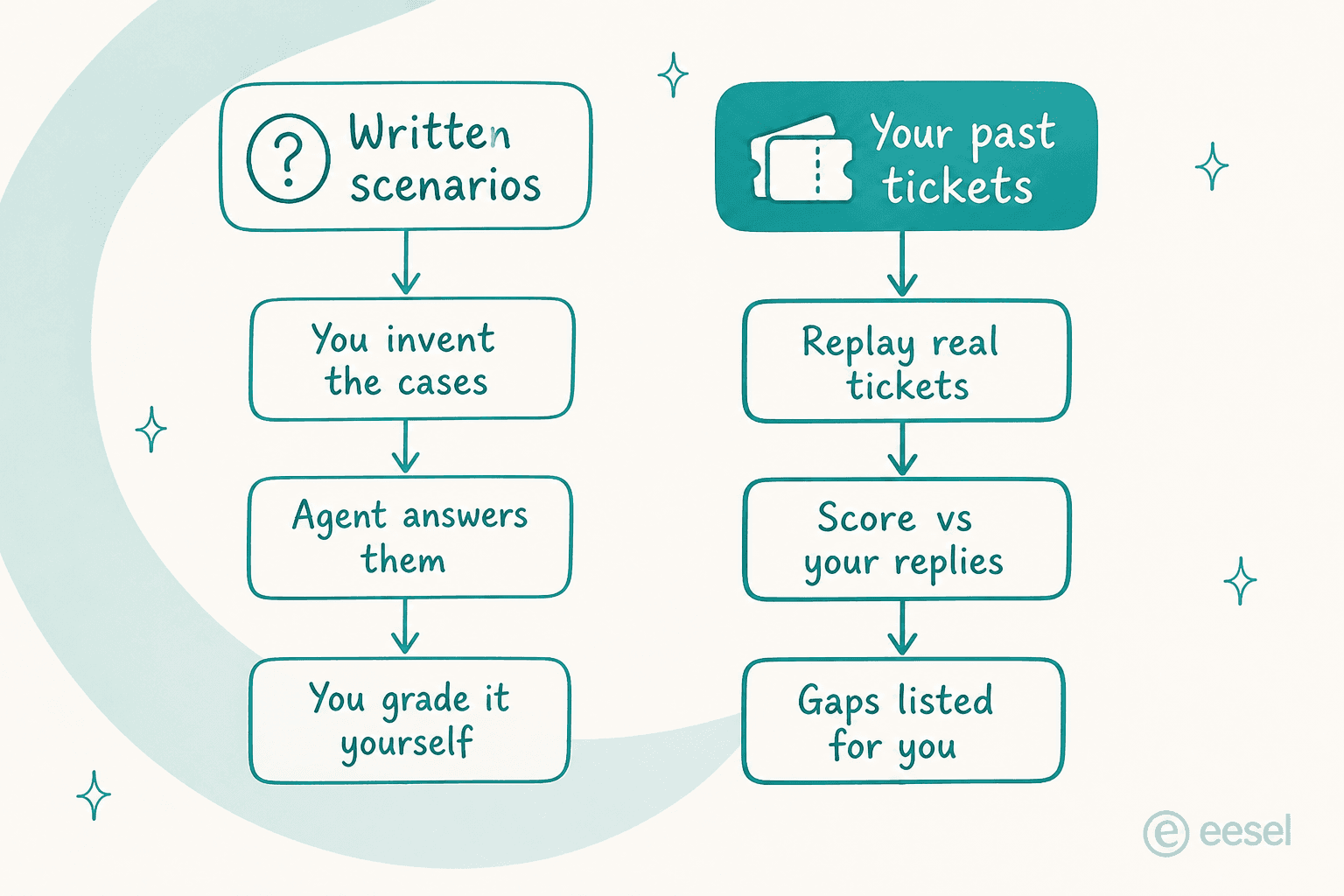
This matters because of the number I opened with. A marketing page says up to 70%, the vendor's own named case study says 30%, and the honest answer to "which one will I get?" is that nobody knows until it runs on your queue. A dry run over your own history is how you find that out for a few dollars, rather than for a quarter. Same logic applies to whatever tier-1 deflection target you have been handed, and to the wider question of how to reduce ticket volume with AI without guessing at it.
The other quiet trap sits on the knowledge side, and Assembled documents it plainly enough. From its own help centre: "if you do have ticket field tagging enabled, Assembled AI will only reference articles that are explicitly tagged by the ticket fields you pass in." Supported fields are Brand, Ticket tags, Organization, and internal/external. Turn tagging on while your knowledge base is incompletely tagged, and the agent quietly stops seeing the untagged articles. Not a bug, that. Documented behaviour, and exactly the kind of thing a replay over real tickets surfaces inside an afternoon.
Which one I would actually pick
Start by naming which half you are replacing.
Replacing the schedule? Zendesk WFM at $50 per agent per month in the WEM bundle, when you are Zendesk-only and have no BPOs. Peopleware or Aspect when you need it standalone, accepting a blind negotiation, and for Aspect a 100-seat minimum. Verint or NICE above roughly a thousand agents, which is where Assembled reviewers say the forecasting starts to strain under multi-skill routing anyway. Genesys only if the contact centre was getting replatformed regardless.
Replacing the queue? This is where most people reading an Assembled alternatives post actually sit, because the AI agent is the newer purchase, and the shakier one. Sierra, if you want outcome pricing and have the procurement patience for it. Decagon, if you want the meters spelled out. eesel, if you want to know how it performs on your tickets before signing anything, and want a rate you can multiply on a napkin.
If the schedule was never really the problem, and the queue volume was, then the honest comparison is against AI helpdesk software and the AI-versus-human agent cost. Not against another forecasting engine.
And if your helpdesk is Freshdesk, Front, Help Scout, HubSpot, Gorgias or Zoho Desk, then the decision is already made for you. Assembled's published directory lists a connector for none of them, so the AI half was never reaching your queue in the first place.
Try eesel for the AI half of the job
If you are reading this because Assembled's AI agent is priced on a unit you cannot verify, sitting on a connector list that may not include your helpdesk, with no way to see how it would have handled last month's tickets, then that is the exact shape of problem eesel got built for.

It connects to Zendesk, Freshdesk, Gorgias, Front, Help Scout, HubSpot, Salesforce or Jira Service Management, reads the help centre and the docs you already have, and gets a first agent live in about half an hour. It works as a helpdesk copilot for your agents too, not only as a front-line responder. Before it answers anybody at all, you run Simulation over hundreds of your real past tickets, then read a scored report against what your team actually replied. Plans start at $299 a month for 500 credits, one credit per ticket or chat handled, used regardless of outcome so the arithmetic stays honest. No seats, no platform fee, and a free plan with 100 credits that needs no card.
Keep your scheduler. Fix the queue. Try eesel free.
Frequently Asked Questions
How much does Assembled cost?
Is there a cheaper Assembled alternative for a small support team?
Does Assembled work with Freshdesk, Front or HubSpot?
Can you test an AI support agent before it goes live?



Article by
Rama Adi
Rama is a software engineer at eesel AI with two years of experience writing about B2B SaaS, AI tools, and customer support technology. Based in Bali, Indonesia, he brings a developer's perspective to product comparisons — cutting through marketing copy to what the integrations and APIs actually do.