Claude customer service alternatives: 10 real picks for 2026

Kurnia Kharisma Agung Samiadjie

Katelin Teen
Last edited August 12, 2026

Why people go looking for a Claude alternative
I want to open with something we do not usually put in writing. eesel has lost customers to Claude. Not to a competitor's AI agent, to Claude itself: our churn analysis from May 2026 lists a DTC beauty brand that left to build directly on the Claude API, alongside two other accounts that went in-house. That is a real competitive alternative for any team with engineers, and pretending otherwise would be silly.
It is also why I can be specific about where that path goes wrong, because we have watched it run both directions. Here is the other half of the same story, from an engineering lead who chose the opposite:
"We could try to write our own LLM application but we didn't want to invest our time into that. We wanted something that we would not have to maintain."
an engineering lead at a Bitcoin-ATM and crypto-hardware company, running a 300+ article Confluence and Telegram knowledge base
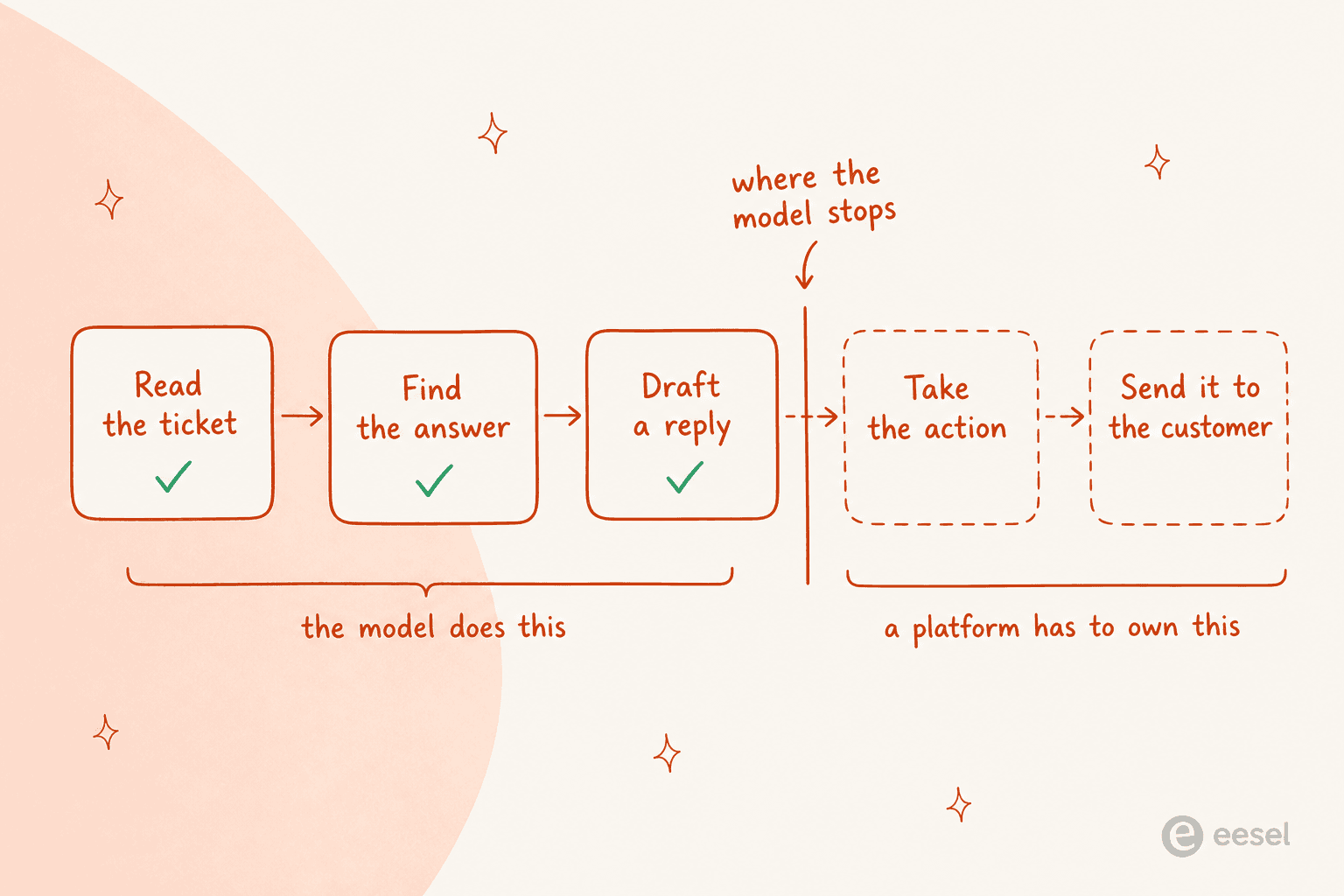
Both teams were right about the same fact. The model is the easy part. What breaks is everything after it, and the people who have run support at scale say this louder than any vendor does:
"I come from a world where customer support is a significant expense for operations and everyone was SO excited to implement AI for this. It doesn't work particularly well and shows a profound gap between what people think working in customer service is like and how fucking hard it actually is."

There are three concrete reasons people start shopping, and they tend to show up in this order.
The last mile. You get Claude answering tickets beautifully in a chat window, then discover there is no way to land the answer where your agents work. This is the single most common story in r/Zendesk:
"I built a 'ticket response drafter' with Claude that uses my knowledge base to draft responses to every customer ticket that comes in. I want my agents to be able to edit and then send that response to the customer instead of drafting each one from scratch. I know through the Zendesk API that I can send these drafted responses into the ticket as an internal message... but is there a way to acutally make the drafted response a DRAFT sitting in the ticket, so they don't have to copy/paste the draft response every time?"

The reply they got is the part that matters: Zendesk's draft state is not written to the ticket, so a bring-your-own build can only post an internal note or a custom field. Someone in a different thread hit the same wall after training a custom model on their Zendesk knowledge base: it works great at answering tickets, "but you've got to copy paste back to ZD."
The meter. A Claude subscription is priced for a person, not a queue. Claude Pro is $17 a month on annual billing and Team seats are $20 each, which is lovely right up until you notice that none of those plans can act on a ticket unattended. The moment you move to the API you are on token billing, which is very cheap per ticket and completely unpredictable per month.
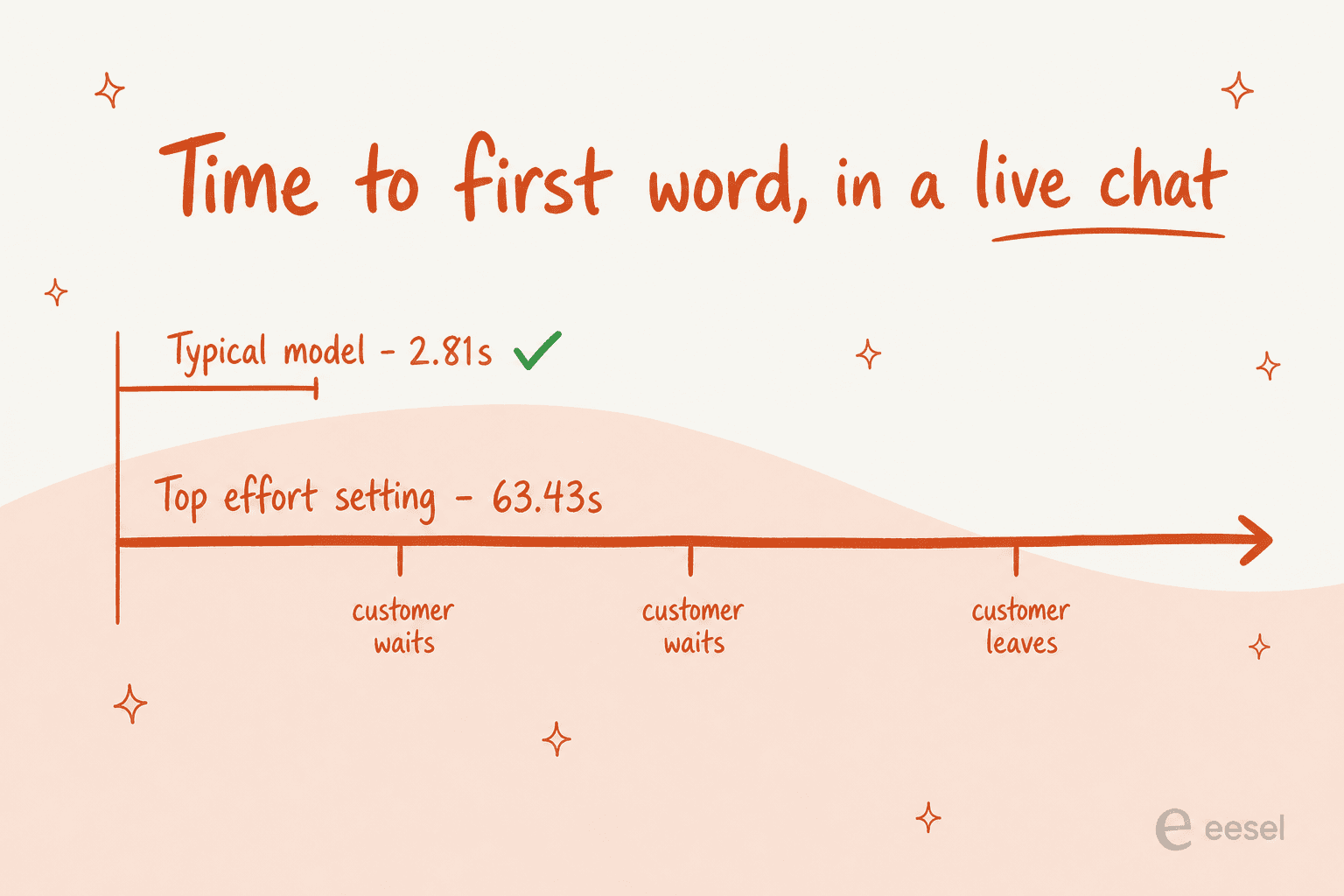
The live loop. This one is underrated. Opus 5 is the strongest model Anthropic sells for reasoning work, and independent measurement from Artificial Analysis puts its time to first token at the top effort setting at 63.43 seconds, against a 2.81-second class median. That is fine for an overnight batch job. In a chat widget, it is a customer who has already left.
What Claude is good at first
It would be a bad post that skipped this. Claude is excellent at the read side of support, and if that is all you need, you may not need an alternative at all.
Claude's own product surface, as taken from Anthropic.
The clearest version of the win I have seen came from a developer who wired several internal systems into Claude Code at once:
"We have just connected up our internal zendesk, Jira, confluence, and github in Claude Code and it's incredible how useful it is to find information spread across different services in 1 minute instead of it personally taking me 15 minutes of manual search."
Fifteen minutes down to one, across four systems. That is real, and no alternative on this list beats it for internal knowledge lookup. They later explained they wrote their own CLIs for each service, and it "only took a couple days."
Where it stops is memory and agency. On memory, a paying reviewer put the problem in the exact shape a helpdesk cannot absorb:
"The biggest frustration is that Claude doesn't retain anything between conversations. Every new chat starts from zero, so if you're in the middle of a long-running project you end up re-explaining context that should already be there."

A ticket thread is a long-running project. Starting from zero on the customer's third message is the failure a support tool cannot ship with, so anything you build has to carry that state yourself.
On agency, Anthropic's remote MCP directory carries 293 connectors, and the mainstream helpdesks are simply not on it. Zendesk, Freshdesk, Jira Service Management, Gorgias, Front, Help Scout and Salesforce are all absent. Zoho Desk is the one named helpdesk, and it is one of the few entries that publishes no endpoint URL at all. The support-shaped servers that do exist are newer tools and adjacent systems: Pylon, Unthread, Lorikeet, DevRev, Guru, HubSpot, Linear, PagerDuty and incident.io.
The Agent SDK tells the same story from the other end. Its published capability list is file tools, shell commands, web search, hooks, subagents, MCP, permissions and sessions. There is no ticket routing, no triage, no queue, no macros, no SLA logic and no customer identity model anywhere in it. Anthropic is also explicit that third-party products cannot offer claude.ai login, so anything you ship runs on your own API key at API rates. Our explainer on AI agents covers what that missing layer normally contains.
Zendesk built the closest thing to a first-party bridge itself, and it is worth crediting. Its Claude connector is first-party and useful, and it exposes exactly four actions: send prompt, summarize text, analyze sentiment, extract keywords. None of the four is "post this as a public reply." It also offers Opus 4.6, Sonnet 4.6 and Haiku 4.5, one generation behind the current family, so a Zendesk action flow runs Sonnet 4.6 at $3 per million input tokens while the API sells Sonnet 5 at $2.
How I picked these
I write about search intent for a living, and this keyword is unusual because it hides two buyers behind one phrase. So the list is split, and every item had to clear the same five bars:
- It closes the loop, or it honestly does not claim to. Platform picks have to be able to send a customer-facing reply. Model picks are labelled as models.
- Published pricing, or a published reason there is none. No "contact us" hand-waving passed off as a price.
- It connects to a helpdesk people actually run, or it is the helpdesk.
- You can test it before it touches a customer. This is the bar most tools quietly fail.
- The numbers came from the vendor's own pages, checked in August 2026, never from a roundup site.
The 10 best Claude customer service alternatives in 2026 at a glance
| # | Tool | Best for | Layer | Billing unit | Entry price | Sends replies | Test before live | Helpdesk fit | Free to start |
|---|---|---|---|---|---|---|---|---|---|
| 1 | eesel | Any existing helpdesk, fast | Platform | Per ticket handled | $0.40/ticket | Yes | Simulation on past tickets | 100+ integrations | $50 credit |
| 2 | Zendesk AI agents | Teams already on Zendesk | Platform | Per automated resolution | $19/agent/mo + $1.50 | Yes | Limited | Native | Trial |
| 3 | Freddy AI Agent | Freshdesk on a budget | Platform | Per AI session | $19/agent/mo | Yes | Limited | Native | 6-month free plan |
| 4 | Gorgias AI Agent | Shopify merchants | Platform | Per automated interaction | $40/mo | Yes | Limited | Native, Shopify only | 30-day trial |
| 5 | Front Autopilot | Shared-inbox teams | Platform | Per conversation | $0.05/conversation | Yes | Scenario simulation | Native | Trial |
| 6 | Zoho Desk | Cheapest full helpdesk | Platform | Per user | $14/user/mo | Yes | Limited | Native | Free, 3 users |
| 7 | Decagon | Enterprise, vendor-led | Platform | Per resolution | Quote only | Yes | Testing and QA sims | Integrations | No |
| 8 | GPT-5.6 Luna | Cheapest capable model | Model | Per million tokens | $0.20 in / $1.20 out | No | Your own evals | You build it | Credits |
| 9 | Gemini 3.6 Flash | Long context and computer use | Model | Per million tokens | $1.50 in / $7.50 out | No | Your own evals | You build it | Free tier |
| 10 | DeepSeek V4 Flash | Self-hosting on open weights | Model | Per million tokens | $0.14 in / $0.28 out | No | Your own evals | You build it | Yes |
The first seven are alternatives to Claude doing the job. The last three are alternatives to Claude being the model. Mixing them up is the most expensive mistake in this category.
1. eesel
Best for: teams who already have a helpdesk and want the reply automated this week, not next quarter.

The eesel dashboard showing live Zendesk ticket activity.
I build this one, so read the rest with that in mind and check the pricing page yourself. The reason it opens the list is structural rather than promotional: it sits exactly where Claude stops. It plugs into your existing helpdesk rather than replacing it, trains on your resolved tickets rather than only your help centre, and owns the send.
The feature I would actually point a Claude refugee at is simulation. You run the agent over your own historical tickets before it touches a customer, see coverage by theme, fill the gaps, re-run. That is the loop you would otherwise have to build yourself, and it is why we do not ship blind rollouts.
Pricing: $0.40 per ticket or chat handled, billed regardless of outcome. No seat fees, no platform fee, no minimum. Heavy tasks like a full blog draft are $4. Commit to $300 a month for a year and it drops 25%. Enterprise adds a $1,000 monthly platform fee for SSO, HIPAA and a BAA. Trials start with $50 of free usage and no card.
Pros
- Per-ticket pricing with a hard monthly spend cap, so the bill cannot surprise you.
- Simulation over your real ticket history before go-live.
- Learns from resolved tickets, not just help-centre articles.
- 100+ integrations and 80+ languages out of the box.
Cons
- It is not a helpdesk, so you need one already.
- The $1,000 Enterprise platform fee is a real step for a small team that needs a BAA.
- Usage pricing means a volume spike shows up on the invoice, cap or no cap.
Verdict: the right pick if you liked what Claude was doing and just want it finished inside the helpdesk you already run. There is a dedicated Zendesk integration, and a matching one for Freshdesk.
Ecommerce teams get the same treatment through Gorgias, and shared-inbox teams through Front. Skip eesel entirely if you have no helpdesk at all.
2. Zendesk AI agents
Best for: teams already paying for Zendesk who want the AI to be native and audited.
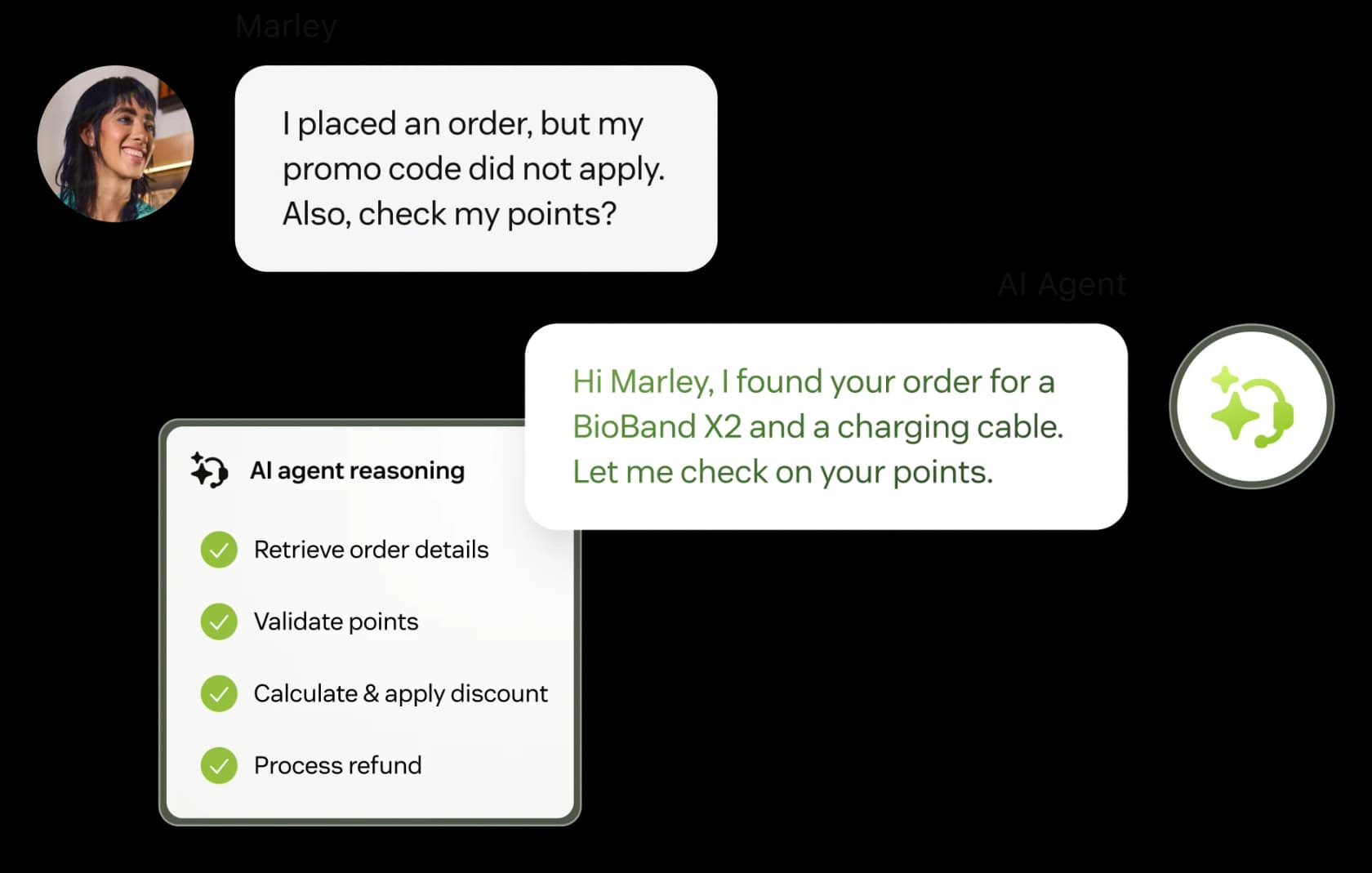
A Zendesk AI agent working a promo-code ticket end to end, as taken from Zendesk.
This is the thing Claude cannot be, and Zendesk knows it. The AI agent runs inside the platform, sees the ticket, calls the actions and posts the reply. It is worth reading our full guide to Zendesk AI agents before you switch it on, because the setup has more corners than the marketing suggests, and the escalation behaviour in particular repays a read.
The catch everyone hits is the definition of a resolution:
"What is defined as a resolution isn't really fair. If it's an abandoned deflection, it shouldn't count. Mechanisms to understand that aren't well-tuned."
That commenter works for a competing vendor and said so in the thread, which is worth knowing. The same complaint came three days earlier from a Zendesk admin reading their own invoice, so it is not one vendor's talking point.
Pricing (from the Compare all plan features table, not the plan cards):
| Row | Support Team | Suite Team | Suite Professional |
|---|---|---|---|
| Per agent/month, annual | $19 | $55 | $115 |
| Per agent/month, monthly | $25 | $69 | $149 |
| Included automated resolutions | 5 per agent/mo | 5 per agent/mo | 10 per agent/mo |
| Committed resolution rate | $1.50 | $1.50 | $1.50 |
| Pay-as-you-go rate | $2.00 | $2.00 | $2.00 |
Included allowances cap at 10,000 a year. Copilot is a $50 per agent add-on, and Suite Enterprise stays quote-only.
Pros
- Native, so there is no last-mile problem to solve.
- Zendesk publishes its per-resolution rate, which most vendors still do not.
- Its own Claude connector lets you keep Claude in the loop for summarising and tagging.
Cons
- $2.00 per resolution pay-as-you-go is among the highest published rates in the category.
- Abandoned chats can count as resolutions, and there is no documented dispute process.
- No API logs for AI agent tool calls, so teams end up proxying requests to get an audit trail.
- The Claude connector offers only legacy models, so you pay Sonnet 4.6 rates for Sonnet 4.6.
Verdict: the obvious pick if you are staying on Zendesk and your volume is low enough that the per-resolution meter does not bite. At high volume, run the numbers against a per-ticket alternative first, and read up on resolution rate metrics so you know exactly what you are being billed for.
3. Freshdesk Freddy AI Agent
Best for: small teams who want autonomous AI without a four-figure monthly floor.
Freddy AI Agent, as taken from Freshworks.
There is a persistent myth, including in some of our own older posts, that Freddy's autonomous agent needs the Pro plan. It does not. The pricing page lists Freddy AI Agent on all three tiers including Growth at $19, each with the first 500 sessions included. The Pro gate is Freddy AI Copilot at $29 per agent, which is a different product. Getting that wrong costs a five-seat team about $180 a month for nothing.
The thing Claude shoppers should know: Freddy runs on enterprise-grade Azure OpenAI models. There is no model selector and no API-key field anywhere in AI Agent Studio, so bringing Claude to Freshdesk is not an option on the native path. Freshworks does ship its own MCP integration naming Claude Desktop and Claude Code as clients, but it is Enterprise-only, in early access, and agent-side.
Pricing: Growth $19, Pro $49, Enterprise $79 per agent per month on annual billing. First 500 AI Agent sessions included one time, then $49 per 100 sessions. An email session is a 72-hour window from the customer's first message. Copilot is $29 per agent on Pro and above.
Pros
- The autonomous agent starts at $19 a seat, the cheapest native entry on this list.
- A real free tier exists for two agents for six months.
- A strong ecosystem of automation apps around it.
Cons
- No bring-your-own-model path, so Claude cannot power it.
- The 500 included sessions are one time, not a monthly refill.
- $49 per 100 sessions works out at $0.49 each, which stacks fast above 1,000 tickets a month.
Verdict: the best-value native AI here if you are already on Freshdesk, or shopping Freshdesk alternatives and want a low floor. Not the pick if keeping Claude specifically is what matters to you, in which case start with AI for Freshdesk instead.
4. Gorgias AI Agent
Best for: Shopify merchants who want order actions, not just answers.
Gorgias AI Agent, as taken from Gorgias.
Gorgias is the ecommerce specialist, and its AI agent is good at what ecommerce support actually is: where is my order, I want to return this, change my address. If that is your ticket mix, this is a stronger fit than a general assistant.
Two things to know before you sign. First, AI Agent requires Shopify and is explicitly unsupported on BigCommerce, Magento and WooCommerce, even though the helpdesk itself supports them. That gate catches non-Shopify merchants late. Second, a fully automated ticket is billed twice on post-May-2025 accounts: you pay the ticket fee and the automation fee on the same ticket. Hand it to a human and you pay the ticket fee only.
Pricing:
| Plan | Monthly | Annual/mo | Tickets | Included AI interactions | Seats |
|---|---|---|---|---|---|
| Starter | $40 | monthly only | 50 | 30 | 3 |
| Basic | $90 | $77 | 300 | 30 | 500 |
| Pro | $550 | $471 | 2,000 | 190 | 500 |
| Advanced | $1,430 | $1,227 | 5,000 | 530 | 500 |
Every card reads "Then a $1.50 per automated interaction fee past your limit," so $1.50 is the overage rate, not the base rate. Inside the bundled allowance the effective rate works out closer to $0.90 on the annual plans and about $1.00 on Starter. That is our arithmetic from the published allowances, not a figure the page prints. Crossing the allowance is a 67% step-up on most plans and 50% on Starter.
Pros
- Deep Shopify actions, not just retrieval.
- Priced by ticket volume rather than per agent.
- Clear published allowances on every tier.
Cons
- AI Agent needs Shopify, full stop.
- Double billing on fully automated tickets for newer accounts.
- "Unlimited users" is not accurate: the compare table shows a 3-seat cap on Starter and 500 elsewhere.
- The published API rate limit disagrees with the developer docs, so budget against the lower figure.
Verdict: the best pick for a Shopify store and a non-starter for anyone else. If you are weighing it against the field, our Gorgias alternatives roundup and our notes on AI agents in Gorgias go deeper on the ecommerce angle.
5. Front Autopilot
Best for: teams running a shared inbox rather than a ticket queue.
Front's AI product line, as taken from Front.
Front sells four AI products separately, which is either flexible or annoying depending on your mood. Autopilot is the autonomous one, quoted from $0.05 per conversation, and it is the only one no plan bundles, Enterprise included. Copilot is $20 a seat, Smart QA $20, Smart CSAT $10.
That creates a pricing trap worth knowing. Professional at $65 plus all three add-ons comes to $115 a seat, which is more than Enterprise at $105, where the last three are included. If you are buying more than one add-on, price Enterprise first.
Autopilot does have simulation, which an older version of this post got wrong and a Front user would spot instantly. The honest distinction is what it simulates: scenarios you write, rather than a replay over your own historical tickets.
Pricing: Starter $25 up to 10 seats, Professional $65 up to 50, Enterprise $105 uncapped and annual only, all per seat per month. Autopilot from $0.05 per conversation on top. Compose, translate and summarise sit in every seat, capped at 200 actions per teammate per day.
Pros
- $0.05 per conversation is the lowest published per-unit rate on this list.
- Real simulation before go-live, not a blind switch.
- The shared-inbox model fits teams who never wanted tickets.
Cons
- Knowledge sources outside Front are public-website crawls only, up to five, which rules out Confluence, Google Docs and gated help centres.
- One chatbot answers from a Front knowledge base or a public site, not both.
- Three-hour initial sync, and manual re-sync limited to once per 24 hours.
- The add-on stack can quietly cost more than the tier above it.
Verdict: strong if your knowledge lives in Front or on a public site, awkward if it lives in Confluence. Our AI for Front piece covers the knowledge-source question in detail.
6. Zoho Desk
Best for: the lowest price per seat, and the only helpdesk Anthropic lists at all.
Zia inside Zoho Desk, as taken from Zoho.
Zoho earns a spot for a strange reason: it is the only mainstream helpdesk with a listing in Anthropic's own directory. The blurb reads "Zoho Desk MCP for Customer Support Automation." It is also one of the entries with no published endpoint URL, because Zoho MCP is a builder you stock with tools rather than one fixed server. It is free to use today, and Claude is listed first among its five supported clients.
The irony is that Claude still cannot be Zoho Desk's actual AI. The pricing page spells out that generative AI on Express is bring-your-own-key with an OpenAI key, or a DeepSeek key in the China data centre. Anthropic is not an option, and Zia has no model selector.
Pricing: Free $0 for 3 users, Express $7, Standard $14 with Answer Bot, Professional $23 with Zia built in, Enterprise $40 with guided conversations, all per user per month billed annually. Express includes 30 million free AI tokens a month.
Pros
- $14 a user for Answer Bot is the cheapest native AI here.
- The only helpdesk Anthropic actually names in its directory.
- A real free tier for three users.
Cons
- Bring-your-own-key accepts OpenAI or DeepSeek, never Anthropic.
- Knowledge training is help-centre articles plus optional open-domain data, so Confluence, Google Docs and Slack are not connectable sources.
- The Zoho MCP server URL embeds its own API key, so it has to be treated like a password.
- Logs have a 30-day shelf life.
Verdict: the budget pick, and a surprisingly interesting one if you want Claude reading your tickets through MCP while Zia handles replies. See our AI integrations list for the wider Zoho ecosystem.
7. Decagon
Best for: enterprises who want a vendor-led rollout and have a budget conversation ready.
Decagon's product overview, as taken from Decagon.
Decagon is the enterprise end of this category, with funding to match: a $250M Series D led by Coatue and Index in January 2026, at a $4.5B valuation. Its published case-study numbers are the most concrete of any vendor here. Chime reports 70% chat-and-voice resolution plus a 60% support-cost decrease, Duolingo 80% deflection, ClassPass a 95% cost reduction.
The company also runs its own models. Decagon Labs states that over 80% of all model traffic runs on models they trained themselves, which is a meaningful answer to "which LLM is under this" and a very different bet from wiring Claude to a helpdesk yourself.
Pricing: none published. /pricing returns a 404 and every call to action is "get a demo." The per-resolution model is confirmed only through their own glossary entry on resolution-based pricing. Any specific dollar figure you see quoted for Decagon online is not sourced from Decagon.
Pros
- The most detailed public case-study numbers in the category.
- Runs its own trained models rather than reselling a frontier API.
- Ships testing and QA simulations, experiments and A/B testing, plus an air-gapped deployment option.
Cons
- No published price and no self-serve path.
- No published implementation timeline either, so plan for a sales cycle.
- Their own docs note that technical teams retain control of guardrails, integrations and versioning, so it is not purely non-technical to run.
Verdict: shortlist it if you are an enterprise with a procurement process and a real volume problem. Skip it if you want to try something this afternoon. Our Decagon alternatives roundup covers the mid-market options around it.
Those seven replace Claude doing the job. The next three replace Claude being the model, and they only make sense if you are building the layer above yourself.
8. GPT-5.6 Luna
Best for: the cheapest capable model to sit under your own support agent.
OpenAI's API surface, as taken from OpenAI.
Luna is the direct swap for Sonnet 5 in a support loop, and after the July 2026 repricing on OpenAI's price card it is dramatically cheaper: $0.20 in and $1.20 out per million tokens, against Sonnet 5's $2 and $10. That is a 10x gap on input for work that mostly consists of stuffing a knowledge base into context.
One trap: the GPT-5.6 launch post still shows the old prices in its body text, and quoting Luna at $1/$6 is wrong by 5x. Read the price card, not the announcement. If you are weighing the two families generally, our ChatGPT vs Claude comparison covers the wider trade.
Pricing: Luna $0.20 in / $1.20 out, Terra $2.00 / $12.00, Sol $5.00 / $30.00 per million tokens on short context. Long context roughly doubles it. Batch and Flex are half standard.
Pros and cons
- Cheapest capable frontier-family model for high-volume ticket work.
- Batch and Flex tiers halve the bill for anything not customer-facing.
- Still just a model: no knowledge sync, no action layer, no review interface.
- The published launch-post prices are stale, which is an easy way to budget wrong.
Verdict: the model to pick if you have already decided to build. It does not change the build-versus-buy maths, it just makes the model line smaller than it already was.
9. Gemini 3.6 Flash
Best for: long-context retrieval and computer-use workflows.
Gemini Flash, as taken from Google DeepMind.
Flash is the workhorse pick, and the reason it belongs in a support conversation is token efficiency rather than raw score. Google's own numbers put it at roughly 17% fewer output tokens than 3.5 Flash, and up to 65% fewer on agentic coding work. In a per-token world, fewer tokens is the same thing as a lower price.
It also ships computer use built in, with a knowledge cutoff of March 2026, and Google's own comparison table is honest that GPT-5.6 Luna and Claude Sonnet 5 beat it on some coding and knowledge benchmarks. It wins on computer use and long context.
Pricing: $1.50 in / $7.50 out per million tokens. Batch is half. Around 1M context, with a 65K output cap.
Pros and cons
- Strong long-context retrieval, which suits stuffing a whole help centre into a prompt.
- Built-in computer use for workflows that have to click through an admin panel.
- More expensive per token than Luna or DeepSeek Flash.
- Same fundamental gap as every model pick: you still own the last mile.
Verdict: the pick when the hard part of your support problem is retrieval over a lot of context, rather than raw reasoning.
10. DeepSeek V4 Flash
Best for: teams who want open weights they can run themselves.
DeepSeek's published API rates, as taken from DeepSeek.
At $0.14 in and $0.28 out per million tokens, Flash is roughly 36x cheaper than Opus 5 on input. The weights are MIT-licensed at around 167GB, which is the actual argument: you can run it on your own hardware and stop worrying about a vendor's data policy entirely.
Two honest cautions. The cheap configuration and the good configuration are different runs of the same weights, and DeepSeek's own cross-mode table shows Flash at 8.1 on HLE without thinking against 34.8 at max effort, with reasoning tokens billed at the output rate. And if you use the hosted API rather than self-hosting, the paid Open Platform terms are silent on training use rather than permissive, with no published data-processing agreement and no zero-retention option, and the data sits under PRC law. For customer data, that is a reason to self-host rather than a reason to avoid it.
Pricing: $0.14 cache-miss in, $0.0028 cache-hit in, $0.28 out per million tokens. Pro is $0.435 / $0.87. 1M context, 384K max output.
Pros and cons
- MIT open weights, so self-hosting is a genuine option.
- The cache-hit input rate is close to free for repeated knowledge-base context.
- Hosted-API data terms are silent rather than protective, so self-hosting is the serious path.
- Text only, with no documented image input, which rules out screenshot-heavy tickets.
Verdict: the right answer if your blocker is data residency rather than capability. The wrong answer if "self-host a 167GB model" is not a sentence your team wants to own.
What each one actually costs you
Here is the part the comparison table cannot show, because the units are not comparable. A resolution, a session, an interaction and a ticket are four different things that all sound like "one customer got helped."
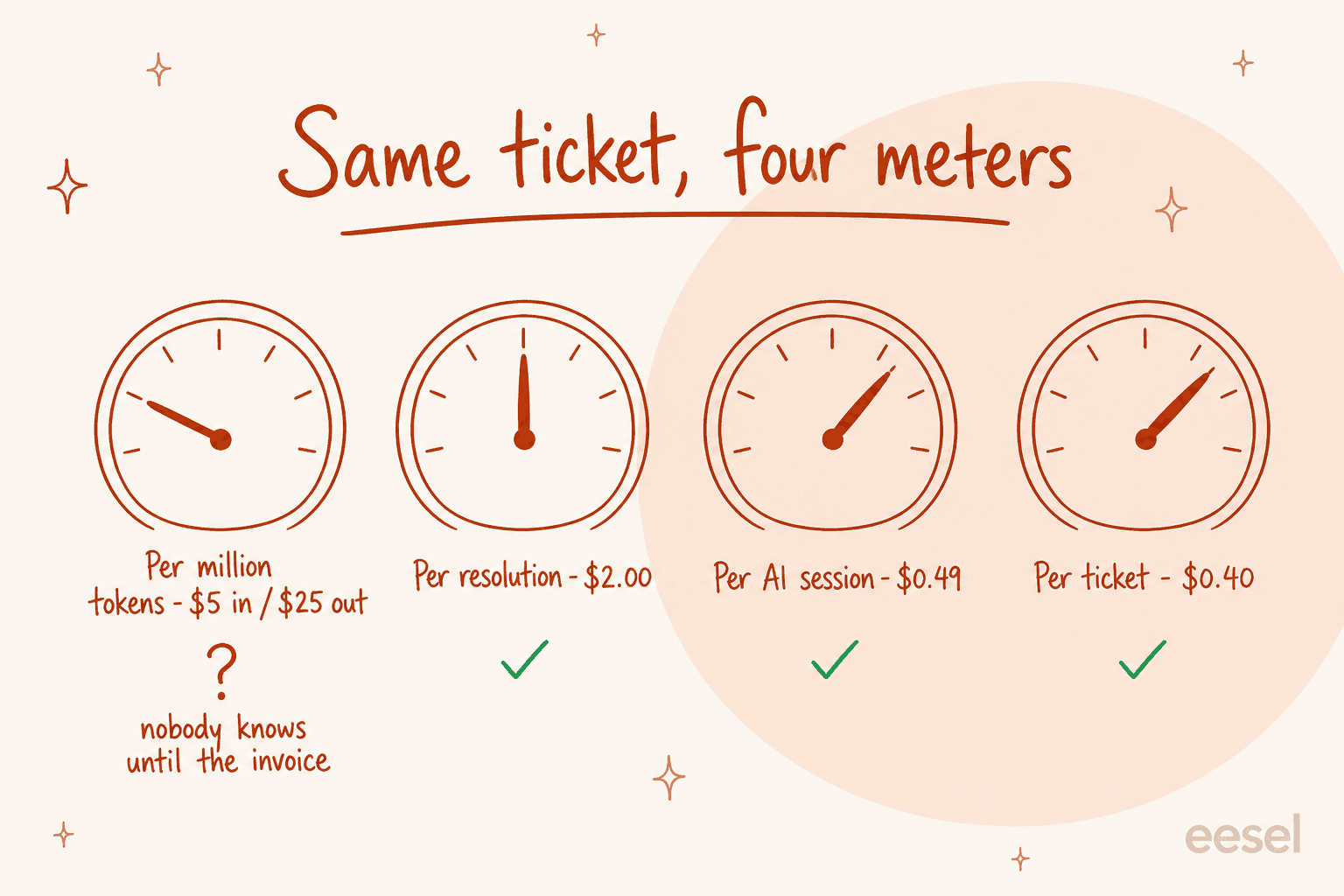
Run your own volume through it:
At 2,000 tickets a month the spread runs from $100 to $4,000 for work the customer experiences identically. That is why the meter, not the model, is the thing to negotiate. If you want the headcount comparison alongside it, our breakdown of AI agent cost does that maths, and our notes on tier-1 deflection cover how much volume is realistically in scope.
Should you just build it on the Claude API?
Sometimes yes. I would rather say that plainly than pretend otherwise, and the numbers on the DIY side are hard to argue with:
"raw api cost on a typical zendesk ticket (3-4k tokens in, 500 out) lands between $0.005 and $0.02 across the major models, two orders of magnitude under vendor pricing. what you're paying the rest for is the action layer (writing back to shopify, refunds, address changes), inbox plumbing, and the eval/guardrail loop."
That is the honest framing of the whole decision, and it came from an evaluator rather than a vendor. Two orders of magnitude is not a rounding error. The question is whether the four things in the back half of that sentence cost you more than the gap.
For a lot of teams they do. Someone else in that thread, who builds in this space, put the counter-case bluntly: maintaining your own evals, prompt engineering, knowledge-base sync and action layer "eats more time than the per-resolution charge would have cost." They run a competing product, so weigh it accordingly, but the point stands on its own.
The most useful version of this argument came from a developer who actually built the thing and then reported back on which part was hard. It was not the model. They built a minimal helpdesk with Claude Code in a few days, specifically because they needed an interface for the human operator to approve and edit what the AI wrote. The review surface was the product.
And then the ceiling, from a different thread:
"Coding a solution was never a problem. Supporting and maintaining it was. I can guarantee you an in-house ticketing system will be more expensive than Zendesk for every small and medium company."
So here is my actual rule. Build on Claude if support automation is a differentiator for your product, you have engineers who will still be there in eighteen months, and your volume is high enough that a per-ticket meter really hurts. Buy if support is a cost centre you want to shrink quietly. Our guide to AI hallucinations covers the guardrail half of what you would be taking on. For the routing half, start with ticket triage and then ticket classification.
One more thing the DIY path underestimates. Tool retrieval gets unreliable at scale. In a vendor-run test on a 4,000-tool catalogue, Arcade.dev reported that Claude's built-in tool search hit 56% with regex and 64% with BM25, and named Zendesk_CreateTicket among the common tools it failed to retrieve reliably. That is a vendor's own benchmark and should be read as such, but "just add an MCP server" has a ceiling nobody mentions in the demo.
Try eesel
If you got here because Claude was doing the hard part and you needed something to finish it, that gap is exactly what eesel was built for. It connects to the helpdesk you already run, learns from your resolved tickets rather than just your help centre, and then actually sends the reply, at $0.40 per ticket handled with no seat fee.

eesel's reporting view, showing what the agent handled and where it escalated.
The differentiator I would point at is the one thing every route in this post is missing: you can simulate the agent against your own historical tickets before a customer ever sees it, see coverage by theme, fill the gaps and re-run. Gridwise resolved 73% of tier-1 requests in the first month, with results visible during a seven-day trial. Start with $50 of free usage, no card, and point it at last month's tickets to see what it would have caught.
Frequently Asked Questions
What are the best Claude customer service alternatives in 2026?
Can Claude reply to customers directly in Zendesk or Freshdesk?
How much do Claude customer service alternatives cost per ticket?
Is it cheaper to build a customer service agent on the Claude API?
What is the best Claude alternative for a small support team?



Article by
Kurnia Kharisma Agung Samiadjie
Kurnia is a software engineer and writer at eesel AI with two years of SEO experience, writing about AI tools, helpdesk software, and customer support. He pairs a developer's understanding of how these products are built with search-driven research into what actually ranks and resonates with the people searching for them.