

"Free AI for customer service" splits into three very different things, and knowing which one you're looking at saves a lot of wasted setup time. Some tools (Chatling, Chatbase, Tidio's Lyro) give you a genuinely free AI agent with a small monthly cap. Some helpdesks (Zoho Desk, HubSpot, Help Scout) hand you a free plan, and Freshdesk a 6-month free program, but keep the AI on a paid tier. And plenty of the "free" listings you'll find are just time-limited trials of a paid product.
If you want to test AI on real tickets without committing, the honest shortlist is short: start with a free AI chatbot builder if you just need a website bot, and layer an AI agent on top of your existing helpdesk if you already run Zendesk, Freshdesk or Gorgias. eesel AI sits in that second camp, free to run real tickets on 100 free credits, no card required.
Below: what each kind of "free" actually gets you, how a free AI support agent works under the hood, a comparison table, and a ranked look at eight tools.
What "free AI for customer service" actually means
Here's the thing nobody puts in the headline: the word "free" is doing a lot of work, and it means three completely different things depending on the tool.
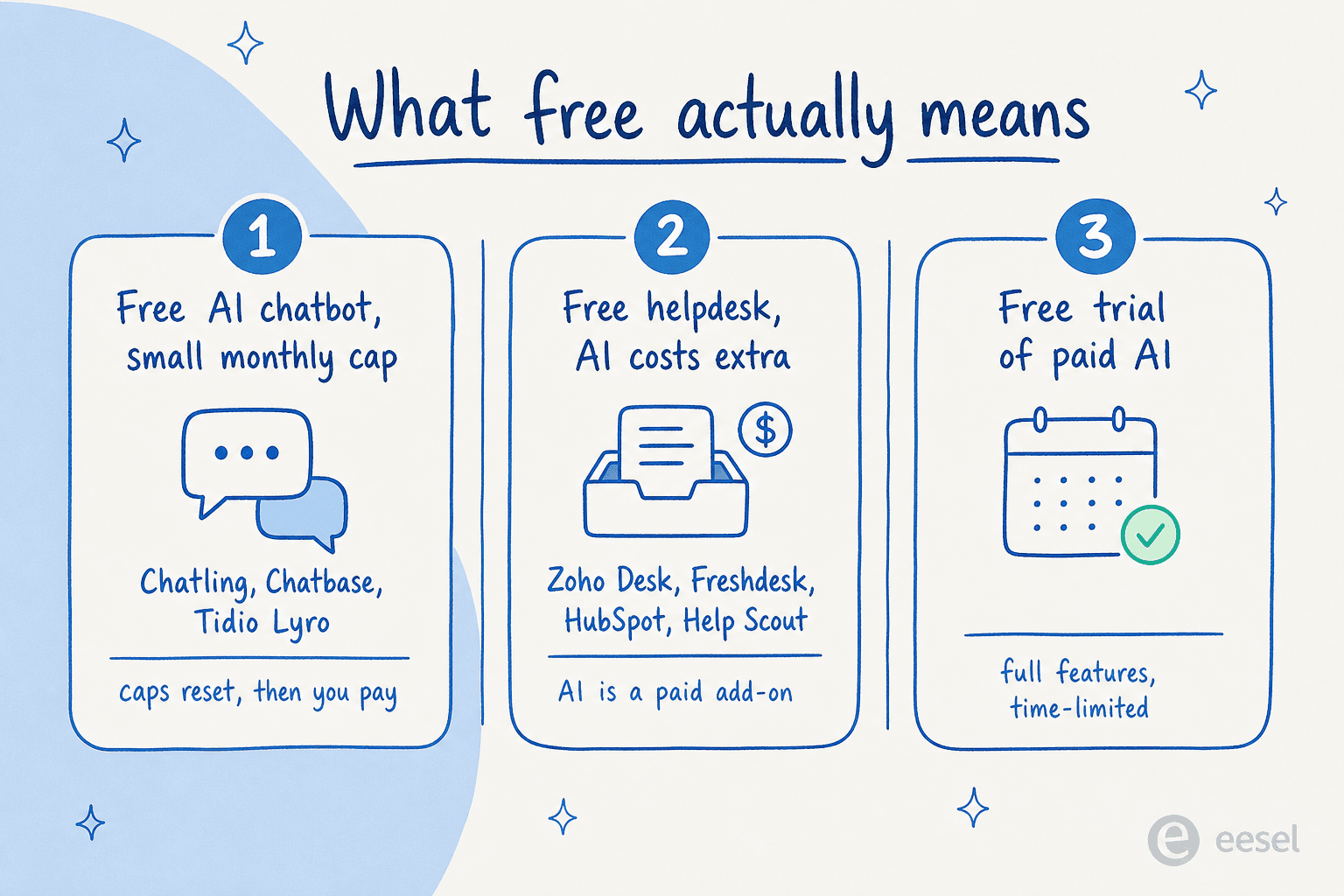
1. A free AI chatbot with a small monthly cap. Tools like Chatling and Chatbase let you build an AI bot trained on your docs and deploy it for free, but you get a fixed allowance of AI replies each month. Chatbase's free plan is 50 message credits a month; Chatling's is 100 AI credits. Great for a low-traffic site, tight once you get real volume.
2. A free helpdesk where the AI is a paid add-on. This is the most common bait. Zoho Desk and HubSpot Service Hub have legitimate free plans, and Freshdesk offers a 6-month free program for up to 2 agents, but the actual AI agent lives on a paid tier. You get the ticketing for free; the AI helpdesk agent costs extra.
3. A free trial of a paid product. Most enterprise AI customer service software gives you 7 or 14 days of the full thing, then the meter starts. Useful for evaluating, useless as a permanent free tier.
None of these is a scam. They're just different deals, and the mistake is assuming "free AI" means "a free AI agent answering all your tickets forever." It almost never does. The useful question isn't "is it free?" but "what exactly is free, and for how long?"
A small support team can get a surprising amount of mileage out of even a capped free tier, because so much of the inbox is repetitive. As one small e-commerce team running on the Team plan (Zendesk, around 335 interactions) put it in a review of their AI setup, a simple AI "really relieves our small support team from being over ran by questions that can be easily answered."
That's the sweet spot for free AI: the FAQ-shaped questions (where's my order, how do I reset my password, what's your refund window) that drown a small team. You don't need an enterprise contract to deflect those. You need a bot that knows your docs and a clean handoff for everything else.
How a free AI support agent actually works
Before you pick a tool, it helps to know what's happening when a customer types a question into one of these things. Almost every modern AI support agent, free or paid, follows the same loop.
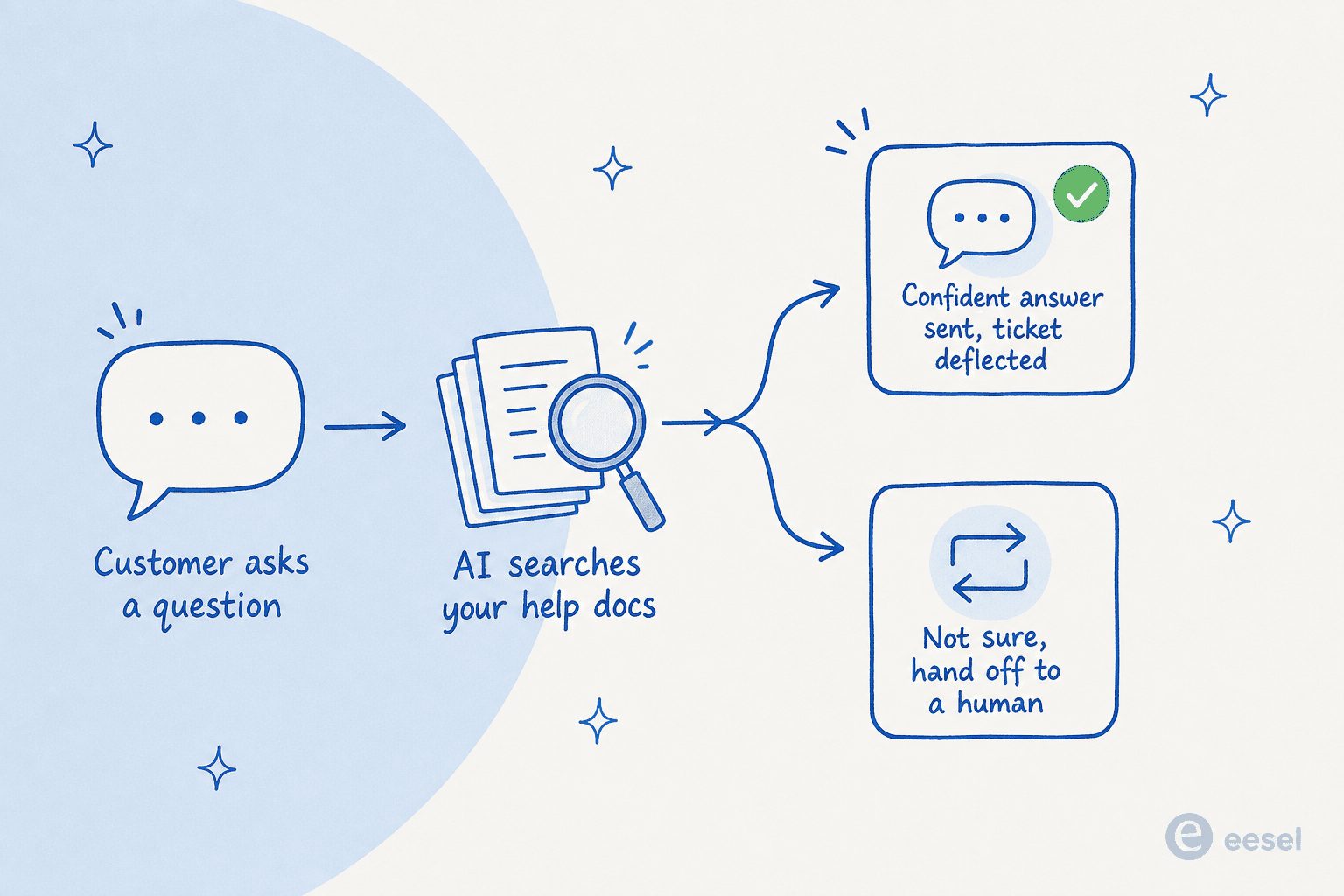
A customer asks something. The AI searches the knowledge you've connected (help center articles, past tickets, a website, uploaded PDFs), finds the relevant passages, and writes an answer grounded in them. If it's confident, it replies and the ticket never reaches a human. If it isn't, it should hand off cleanly rather than guess.
That last part is the whole game, and it's where free tools differ most from each other. A bot that confidently invents a refund policy is worse than no bot at all. The setup you actually want lets the AI answer only what it's sure of and escalate the rest, a point a DTC supplements CX lead made better than we could when describing what they needed from an AI agent versus a rule-based chatbot: the AI "will never be able to answer 100% of the questions," so they wanted "an AI who is only handling the tickets that it's confident to handle and all the other ones, leave them alone."
So when you're trying a free tier, the two things to test aren't "can it answer FAQs" (they all can) but: how good is its AI customer service workflow for the questions it shouldn't answer, and how easily does it sit on top of the tools you already use? A standalone widget that can't see your helpdesk is a different animal from an AI for customer service automation that drafts replies inside Zendesk.
The best free AI for customer service in 2026, compared
Here's the shortlist at a glance. "Free AI included" is the column that matters most: it's the difference between a tool you can actually run AI on for free and one where free just means free ticketing.
| Tool | Best for | Free AI included? | What the free tier gives you | Free seats | Paid starts at (annual) |
|---|---|---|---|---|---|
| eesel AI | Layering AI onto your existing helpdesk | Yes, 100 credits | Real tickets on 100 free credits, no card | Unlimited | $299/mo (500 credits) |
| Tidio (Lyro) | Small e-commerce live chat | Yes, capped | 50 Lyro AI conversations (one-time), 50 chats | 10 | $24.17/mo |
| Chatling | A no-code site bot from your docs | Yes, capped | 100 AI credits/mo, unlimited chats, 2 agents | 1 | $32/mo |
| Chatbase | A quick GPT-style bot on your content | Yes, capped | 50 message credits/mo, 1 agent | 1 | $32/mo |
| HubSpot Service Hub | Teams already in HubSpot CRM | No (AI is Pro+) | Free ticketing + basic live chat, 2 users | 2 | $7/seat/mo (AI at $90+) |
| Freshdesk | Very small teams wanting tidy ticketing | No (Freddy is paid) | 6-month free program: ticketing + knowledge base, 2 agents | 2 | $19/agent/mo |
| Zoho Desk | Free email ticketing in the Zoho stack | No (Zia is Express+) | Email ticketing, help center, 3 agents | 3 | $7/agent/mo |
| Help Scout | Free shared inbox + docs | Partly (AI Answers is paid) | 1 inbox, 1 docs site, 100 contacts/mo, 5 users | 5 | $25/user/mo |
A quick note on how we ranked these. We're an AI customer service company ourselves, so eesel is up top because it's the option we know best, but the order also tracks how much actual free AI you get to run. The genuinely-free-AI tools (eesel, Tidio, Chatling, Chatbase) come before the free-helpdesk-with-paid-AI tools (HubSpot, Freshdesk, Zoho Desk, Help Scout), because if your goal is testing AI without paying, that distinction is the whole point.
1. eesel AI: best for layering AI onto your existing helpdesk
Most tools on this list ask you to adopt their widget. eesel AI takes the opposite approach: it drops an AI teammate into the helpdesk you already run, whether that's Zendesk, Freshdesk, Gorgias, Help Scout or Front. It reads your past tickets, help center and docs, then drafts or fully answers tickets in place.
What you get for free. No free-forever plan with a token cap here. Instead, you get 100 free credits, no credit card needed. At 1 credit per ticket or chat, that's roughly 100 real AI customer service chatbot interactions to test on your own tickets, which is a far more honest trial than 50 messages on a demo widget.
Pros. Setup is genuinely fast (minutes, not a migration), it works on top of your existing stack so nobody has to learn a new tool, and the human-in-the-loop trust ramp lets you start in draft mode and only go autonomous when you're ready. You can simulate it against past tickets before it ever touches a live one.
Cons. It's a paid plan after the free 100 credits rather than free-forever, so it's built for teams that genuinely want to deploy AI, not for someone who wants a permanently free toy bot. At high volume the monthly plan grows with your credits (though it still tends to undercut per-seat helpdesk AI).
Pricing. One fixed monthly price sized to volume, with no platform fee and no per-seat fee: 500 credits are $299/month, 1,000 are $499/month and 2,500 are $999/month (1 credit per ticket or chat). Pay a year upfront and get two months free. Add-ons cover SSO and MFA from $199/month and data residency.
One Gridwise team put the trial experience plainly on G2:
"In the first month, eesel is resolving 73% of our tier 1 requests... results quickly during our 7-day trial."
Kim Simpson, Gridwise (G2 review)

Our take: the best fit if you already have a helpdesk and want to test AI on your tickets rather than a sandbox. Skip it if you just want a free standalone website widget and never plan to pay.
2. Tidio (Lyro AI): best for small e-commerce live chat
Tidio is a live chat tool with an AI agent called Lyro bolted on. It's a popular pick for Shopify and small online stores because the chat widget is polished and the AI handles the WISMO-style questions (where is my order) that dominate e-commerce inboxes.
What you get for free. Tidio's free plan includes 50 Lyro AI conversations and 50 billable human conversations, plus 100 Flows visitors and up to 10 seats. The catch worth flagging: those 50 Lyro conversations are a one-time lifetime allowance, not a monthly reset. You test it, you use them up, then it's a paid add-on.
Pros. Clean widget, fast to install, strong live-chat-plus-AI combo for stores. The free tier is generous on seats.
Cons. The one-off 50-conversation cap is the lowest-commitment trial on this list, so it's really an evaluation, not a free service. Lyro conversations are billed separately from human chats once you're paying, so costs have two meters running.
Pricing. Paid plans start at $24.17/month (Starter, annual) and climb to $49.17/month for Growth, with Lyro AI conversations as a usage axis on top. If the per-conversation model feels limiting, our best Tidio Lyro alternatives guide covers where teams go next.
Our take: a solid free trial for a small store that lives in live chat. Just go in knowing the 50 Lyro conversations won't last, and plan for the paid step.
3. Chatling: best for a no-code site bot from your docs
Chatling is a no-code AI chatbot builder. You point it at your website or upload docs, it trains a bot, and you embed it. It's aimed at people who want a no-code AI chatbot live on a marketing site without touching a helpdesk.
What you get for free. The free plan is one of the more usable here: 100 AI credits a month, unlimited chats, up to 500,000 knowledge-base characters, 2 AI agents and access to 4 AI models. That's enough to run a real (if low-traffic) FAQ bot for free, with the allowance resetting monthly rather than expiring once.
Pros. Monthly-resetting free credits (rare on this list), generous knowledge-base size, genuinely no-code. The visual builder and live chat are included even on free.
Cons. Copilot (agent-assist), analytics, file attachments and the ability to remove "Powered by Chatling" branding are all gated behind paid plans. It's a standalone widget, so it won't draft replies inside your helpdesk.
Pricing. Standard is $32/month (annual, 3,000 AI credits) and Plus is $112/month (15,000 credits). Removing branding is a $35/month add-on or included on Plus.
Our take: the best pure free-AI-chatbot tier if you just need a bot on a website and don't run a helpdesk. If you do run one, you'll outgrow the standalone-widget model fast.
4. Chatbase: best for a quick GPT-style bot on your content
Chatbase is the tool a lot of indie makers reach for first, because spinning up a bot trained on your content takes minutes. It's a capable AI customer service chatbot builder with a developer-friendly bent.
What you get for free. The free plan is 50 message credits a month, 1 AI agent, 1 member and 400 KB of training data, with zero AI Actions. One detail that trips people up: on the free plan, agents are deleted after 14 days of inactivity, so it's not somewhere to park a bot you check on occasionally.
Pros. Fastest setup on this list, clean to embed, and the bot quality on a well-scoped FAQ is good. Easy to recommend to non-technical clients.
Cons. 50 credits a month is tiny, AI Actions (the part that lets a bot actually do things) are off entirely on free, and the 14-day deletion rule is a real gotcha. It's also more of a content-answering bot than a sales or workflow tool, a limit Chatbase users name themselves. As one put it on r/SaaS:
"Chatbase and similar tools nail FAQs but don't really sell. They're great for support, not for driving revenue."

Pricing. Hobby is $32/month (500 credits), Standard $120/month (4,000 credits, the popular tier that adds help desk, voice and Zendesk integration), Pro $400/month. Removing branding is a steep $1,188/year.
Our take: great for a fast FAQ bot proof-of-concept, especially for developers. The free tier is too small for production and the deletion rule means you can't treat it as set-and-forget.
5. HubSpot Service Hub: best for teams already living in HubSpot
If your company already runs on HubSpot CRM, Service Hub is the path of least resistance. Its free tools give you basic ticketing and a live chat widget that ties into the contact records you already have.
What you get for free. HubSpot's free tools cover up to 2 users with basic ticketing, limited live chat (carrying HubSpot branding), 3 canned snippets and email templates, and reporting dashboards. The important caveat: the Breeze Customer Agent, HubSpot's actual AI support agent, is a Professional-plan feature. On free, you get rule-based chatflows, not a true AI agent.
Pros. Tight CRM integration, so support context and customer history live in one place. The free tier is a real product, not a teaser, if all you need is ticketing.
Cons. No AI agent on free or even Starter. To get the best HubSpot AI chatbot experience you're on Professional at $90/seat/month, plus a one-time $1,500 onboarding fee. That's a steep jump for AI.
Pricing. Starter is $7/seat/month (annual), Professional $90/seat/month (where Breeze lives), Enterprise $150/seat/month. The free-to-AI gap is the widest on this list.
Our take: worth it for free ticketing if you're already a HubSpot shop. But "free AI" it is not; the AI is a five-figure-a-year commitment once you add seats. Many teams layer a cheaper AI add-on for HubSpot on top instead.
6. Freshdesk: best for very small teams wanting tidy ticketing
Freshdesk is the friendly, approachable helpdesk a lot of small teams start on. Its 6-month free program is one of the more useful free ticketing offers around. The AI is the catch.
What you get for free. Freshdesk's Free Program covers up to 2 agents for 6 months, with ticketing, a knowledge base and pre-built reports. Solid basics. But Freddy AI, Freshworks' AI suite, sits on paid plans: the Email AI Agent includes its first 500 sessions on the Growth plan ($19/agent/month), and the deeper Freddy AI copilot features climb from there.
Pros. Clean, easy onboarding, and the free ticketing genuinely works for a tiny team. Good docs and a big integration marketplace.
Cons. No AI on the free tier at all. Freddy's session-based consumption can also get hard to predict once you're paying. If you want free AI specifically, this isn't it. Teams looking for that often check Freshdesk AI free alternatives.
Pricing. Growth $19/agent/month, Pro $55/agent/month, Enterprise $89/agent/month (all annual). There's a 14-day free trial on Enterprise.
Our take: a great free helpdesk for 1-2 agents, but treat the AI as a separate paid decision. If AI is your main goal, you can layer one onto Freshdesk rather than paying up the tier ladder.
7. Zoho Desk: best for free email ticketing in the Zoho stack
Zoho Desk has the most explicitly named free tier here: a "Free Forever" plan. If you already use Zoho's wider suite (CRM, Mail, Projects), it slots in neatly.
What you get for free. The Free Forever plan gives you 3 agents, email ticketing on one channel, a help center, default SLAs, 2 macros and a feedback widget. What it does not include: any AI. Zoho's Zia AI agents start on the paid Express plan ($7/agent/month), which bundles up to 30M tokens a month of in-house LLM usage.
Pros. True free-forever (not a trial), three free agents, and deep integration if you're a Zoho shop. The paid AI is cheap relative to rivals once you do upgrade.
Cons. Zero AI on free, email-only channel, and a hard 3-agent cap. The free tier is a starter helpdesk, full stop.
Pricing. Express $7/agent/month, Standard $14, Professional and Enterprise above that (all annual, with up to 34% off for annual commitments). Trials downgrade to Free if you don't convert. There are also plenty of AI integrations for Zoho Desk if you want something beyond Zia.
Our take: the best free ticketing tier for a Zoho-native small team. But like Freshdesk and HubSpot, "free AI" isn't on the menu here, just free email support.
8. Help Scout: best for a free shared inbox and docs
Help Scout is the inbox people pick when they want support to feel like email, not a ticket factory. It reintroduced a free plan, which makes it a real contender for the smallest teams.
What you get for free. The free plan covers 5 users, 1 inbox and 1 Docs site, with 100 contacts a month, 10 saved replies and limited integrations. AI is partial: the AI Inbox assistant features arrive on Standard, and AI Answers (the customer-facing AI) is a separate usage-based add-on billed per resolution. So free gets you the inbox, not the AI agent.
Pros. Clean, human-feeling support experience, and 5 free users is the most generous seat count of the free helpdesks here. Good for a tiny team that mostly does email.
Cons. The 100-contacts-a-month cap is low, AI is mostly paid, and Help Scout's pricing history has rattled some users. It flip-flopped between seat-based and per-contact pricing, which burned trust:
"We just received an email from HelpScout that they'll change their pricing to a completely new model. Whereas before you'd be charged by seat, you're now charged by customer interaction. It makes the costs unpredictable."
u/PlaneConcentricTube, r/SaaS (thread)
Pricing. Standard $25/user/month, Plus $45, Pro $75 (all annual), with AI Answers billed separately per resolution on top.
Our take: a lovely free shared inbox for a 5-person team that lives in email. Just know the free tier's AI is thin, and watch the contact cap.
How to choose the right free option for you
Eight tools is a lot, but the decision is simpler than it looks once you sort by where your support already lives.
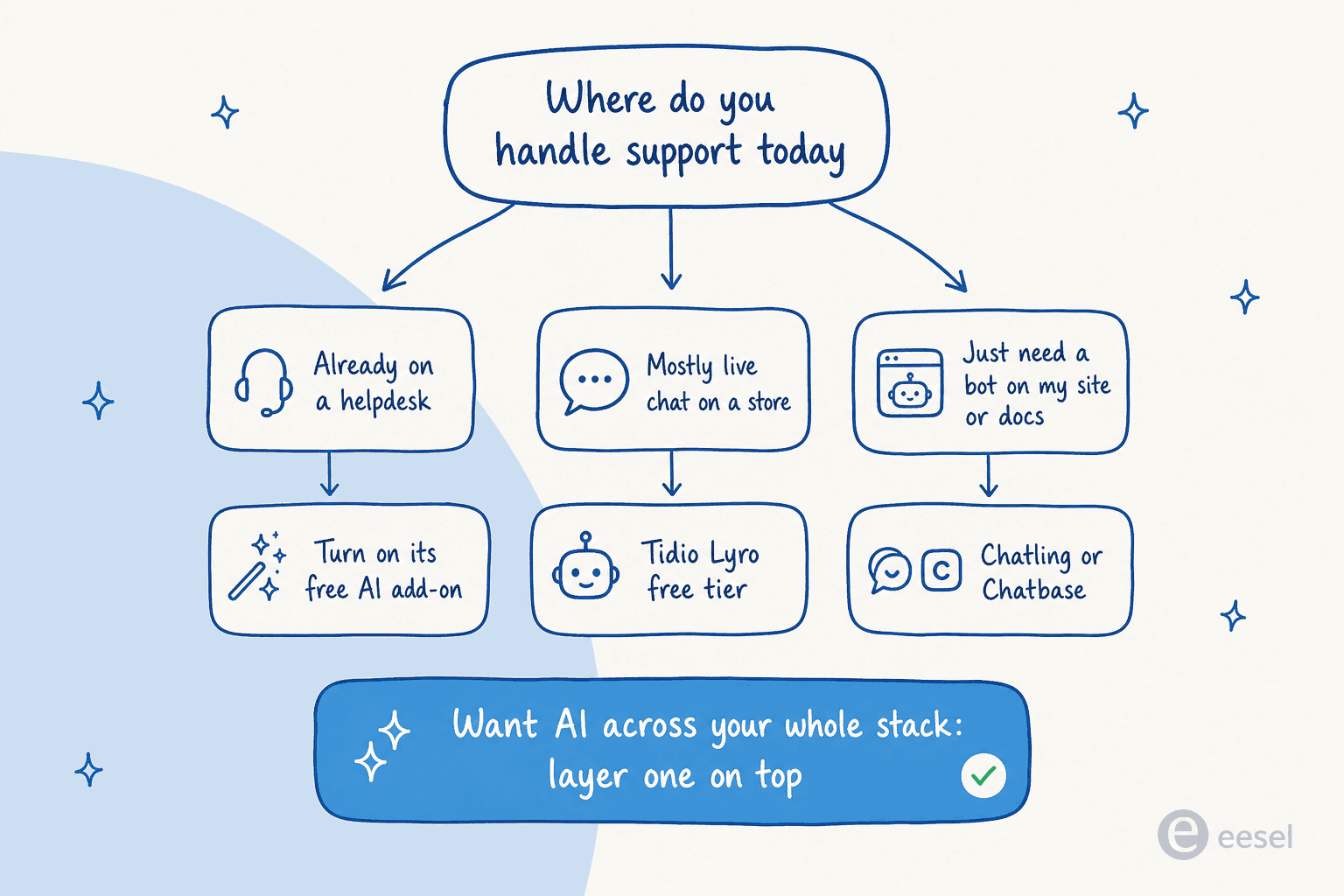
- You already run a helpdesk (Zendesk, Freshdesk, Gorgias, Help Scout): don't rip it out for a free widget. Either turn on its native AI add-on (and pay for it) or layer an AI for customer service on top that works inside your existing tools. The second route usually wins on setup time and cost.
- You mostly do live chat on a store: Tidio Lyro's free conversations are a good, low-effort test.
- You just need a bot on your website or docs: Chatling or Chatbase will get you live for free in an afternoon.
- You want free ticketing first, AI later: Zoho Desk's or HubSpot's free plans (or Freshdesk's 6-month free program) are all solid, just budget for AI as a separate line item.
The community advice tends to land the same way. As one r/SaaS commenter summed up the small-team helpdesk choice:
"Help Scout's often a winner for simple email flows and mobile access; Freshdesk might offer better bang for low volume without overkill features. Zoho's solid if you want integrations."
u/muabaca, r/SaaS (thread)
The one rule that holds across all of them: free is for testing, not for pretending you've solved support. Use the free tier to prove the AI can handle your repetitive questions and escalate the rest cleanly. Once it does, the question stops being "what's free" and becomes "what scales without the cost spiraling," which is a much better problem to have. For the wider field, our roundups of the best AI tools for customer service and best AI helpdesk for small business go deeper.
Try eesel
eesel AI is the option to reach for when "free to test" matters but you don't want to abandon the helpdesk you already run. It connects to Zendesk, Freshdesk, Gorgias, Help Scout, Slack and 100+ more, learns from your past tickets and docs, and drafts or fully resolves tickets in place, with a human-in-the-loop trust ramp so you stay in control until you're ready to go autonomous.

The differentiator is the trial itself: instead of 50 demo messages, you run real tickets on 100 free credits, no credit card, so you find out how it does on your support, not a sandbox. Try eesel and point it at the inbox you already have.