The 12 best Front AI alternatives and integrations in 2026

Kurnia Kharisma

Katelin Teen
Last edited October 14, 2026

Why teams start looking for a Front AI alternative
Let me be fair to Front first, because it earns it. Front rethinks the shared inbox so a whole team can see, assign, comment on, and resolve conversations together across email, chat, SMS, social, and WhatsApp. It's trusted by 9,300+ companies, and it holds a 4.7 out of 5 across roughly 2,500 G2 reviews, which is a strong score for a category this crowded. Front's own 2026 positioning is pointed too: "AI for simple support is everywhere. Complex customer operations demand Front." For multi-step, cross-team work, Front AI is real, and Autopilot markets resolving up to 70% of requests.
So the problem usually isn't that Front's AI is bad. It's the shape of the bill. Here's how the native pieces price out (per Front's pricing page):
| Front AI piece | What it does | Price |
|---|---|---|
| Autopilot | Autonomous AI agent that resolves end to end | From $0.05/conversation (add-on on every plan) |
| Copilot | Real-time agent assist, suggested replies | $20/seat/mo (included on Enterprise) |
| Smart QA | AI scorecards, auto-QA | $20/seat/mo (included on Enterprise) |
| Smart CSAT | Infers satisfaction with no surveys | $10/seat/mo (included on Enterprise) |
And that's before the seats themselves: Front runs $25 (Starter), $65 (Professional), and $105 (Enterprise) per seat per month, per its pricing page. A ten-person team that wants Copilot for everyone is already paying $200/month in Copilot alone, on top of $650 in Professional seats, before Autopilot conversations get counted. The AI feels less like a feature you switched on and more like a second subscription growing next to your first.
That leaves you with a real two-branch decision, and it's worth being honest about which branch you're on before you shop.
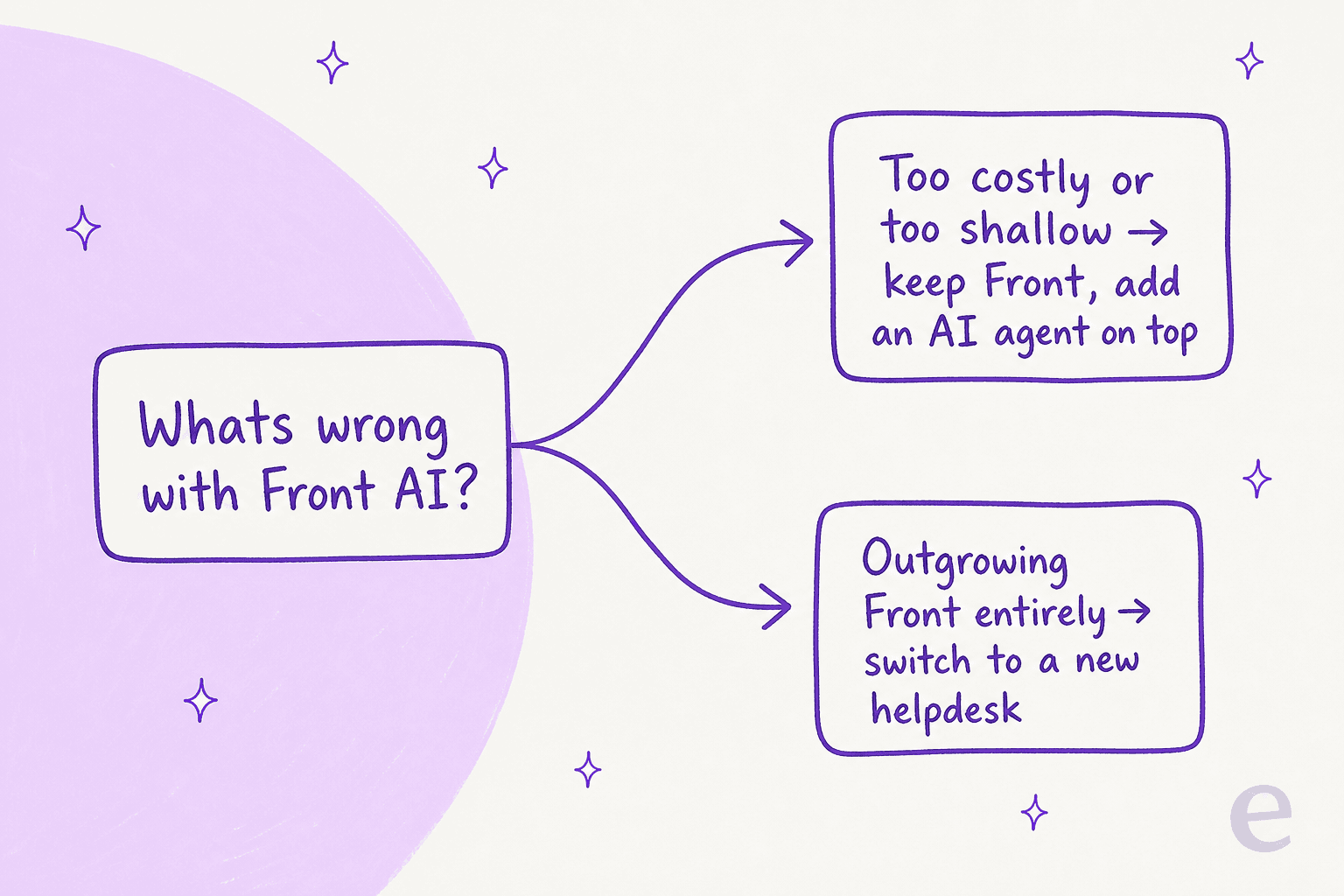
If Front's inbox still works for your team and the AI is the only sore spot, you don't need to rip anything out, you need a better agent that plugs in and handles tickets automatically, not just one that helps human agents work faster. If you're hitting Front's ceiling as a support platform (no deep ticketing lifecycle, or you've simply outgrown the shared-inbox model), then you're really shopping for a new helpdesk, and the AI is one column among many.
How I compared these (and the one number that matters)
I've spent the last few years putting AI agents on live support queues, and the thing that surprises teams most isn't accuracy, it's the invoice. Two tools can both quote "AI resolutions" and bill you in completely different ways. So the first thing I compare on any Front alternative is the billing unit, then whether it plugs into Front or replaces it, then how fast it actually goes live.
Here's the per-unit AI price laid out, because it's the comparison the pricing pages work hard to avoid making easy:
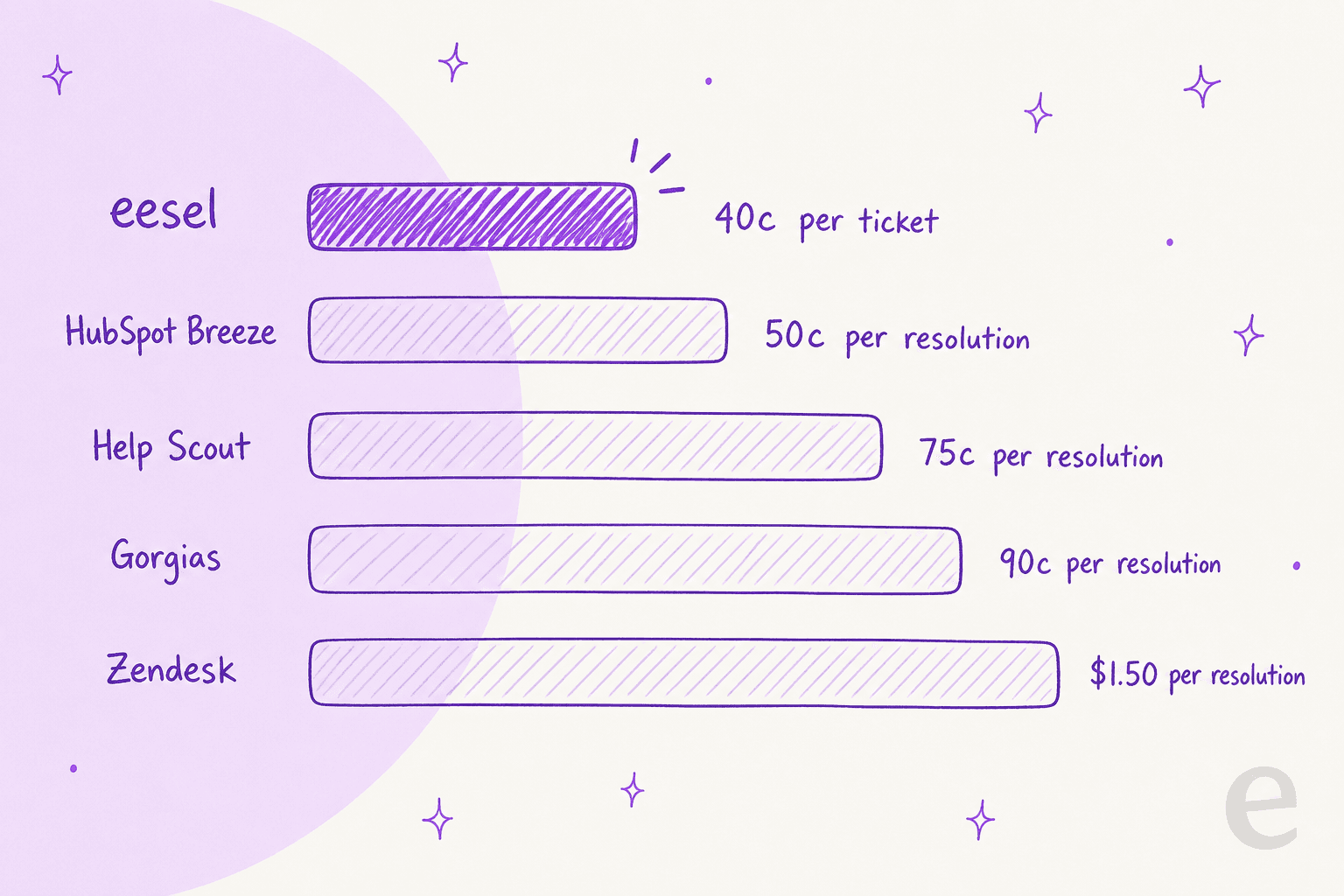
Two watch-outs that the chart can't show. First, most of those per-resolution prices sit on top of a per-seat helpdesk bill, so the true cost of AI is the resolution price plus the seats it rides on. Second, the definition of a billable event shifts between vendors: Zendesk only counts an LLM-verified resolution, Gorgias counts each resolved conversation and the helpdesk ticket it creates, and Freshdesk bills a 72-hour "session" rather than a single reply. Read the fine print for your own volume before you commit.
The 12 best Front AI alternatives at a glance
| Tool | Best for | AI billing unit | Plugs into Front? | Helpdesk price (from) | Free tier |
|---|---|---|---|---|---|
| eesel AI | Keeping Front, upgrading the AI | From $299/mo (500 credits) | Yes, native | No seat fee (fixed monthly plan) | 100 free credits |
| Help Scout | Simple shared-inbox support | 75c per resolution | No (replace) | $25/user/mo | Yes (5 users) |
| Gorgias | Shopify / ecommerce stores | 90c per resolution | No (replace) | $10/mo | 7-day trial |
| Zendesk | Scaling / enterprise support | $1.50 per resolution | No (replace) | $55/agent/mo | 14-day trial |
| Freshdesk | Budget all-rounder | $49 / 100 sessions | No (replace) | $19/agent/mo | 6-month Free Program (2 agents) |
| HubSpot Service Hub | Teams already on HubSpot CRM | 50c per resolution | No (replace) | $7/seat/mo | Yes (2 users) |
| Zoho Desk | Cheapest full helpdesk | Zia (tier-gated) | No (replace) | $7/user/mo | Yes (3 users) |
| Missive | A Front-like shared inbox | AI usage metered | No (replace) | $18/user/mo | Yes (3 users) |
| Moveo.AI | An AI agent working inside Front | Plans by "meaningful conversations" | Yes, native | Quote only | None listed |
| Forethought | Mid-market and enterprise AI suite | Platform fee plus outcome-based | Yes, listed integration | Quote only | Proof of Value |
| Decagon | Enterprise AI across chat, email and voice | Not published | Not named (API and MCP) | Quote only | None listed |
| Sierra | Enterprise brands with complex use cases | Outcome-based | Not named on its site | Quote only | None listed |
Now the detail, starting with the option that doesn't ask you to leave Front at all.
1. eesel AI
Best for: teams who like Front and just want stronger, cheaper AI without switching helpdesks.
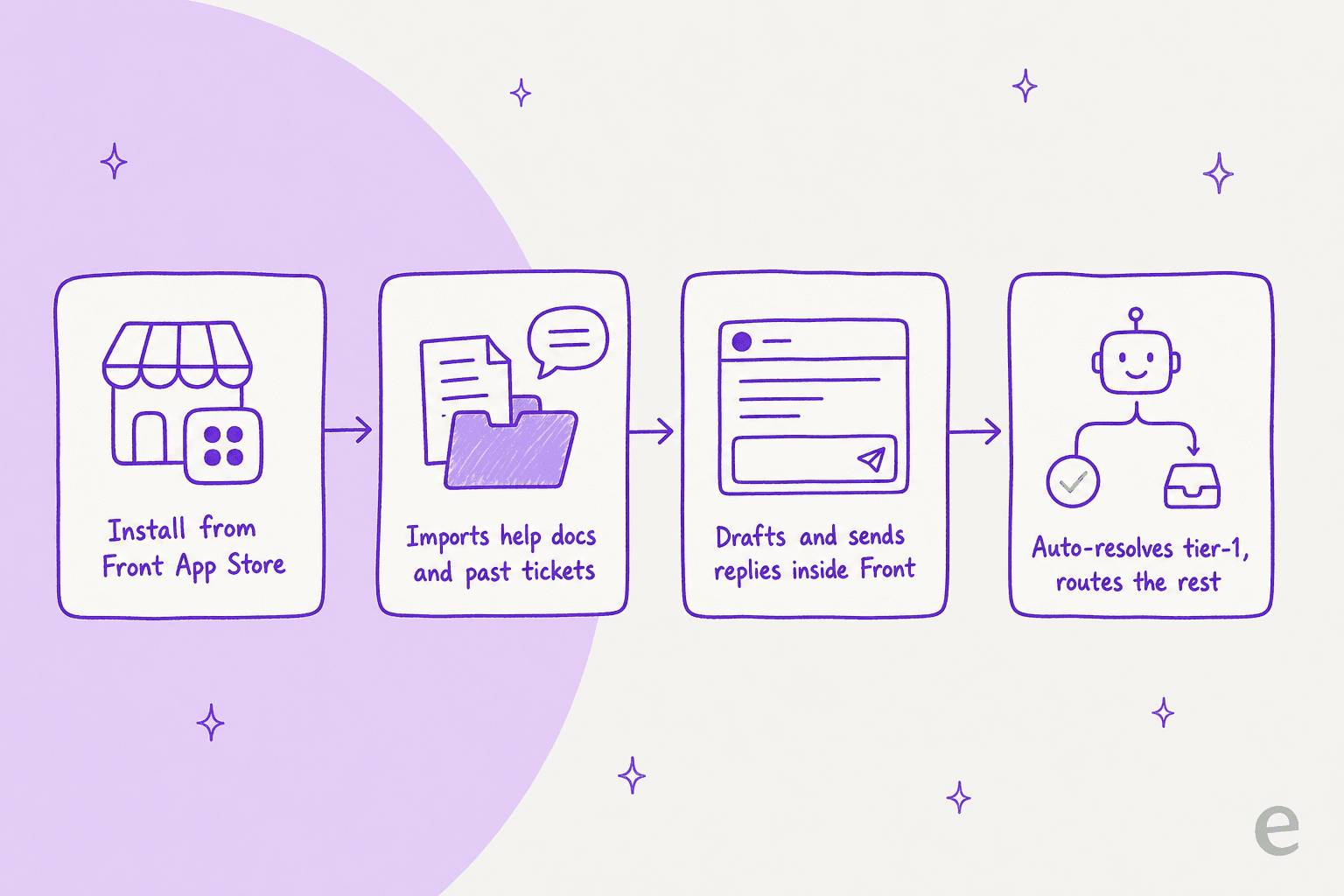
This is the one alternative on the list that doesn't make you choose between Front and better AI. eesel AI installs from the Front App Store and joins your shared inbox as a real AI agent, not a chatbot widget bolted on the side. It reads conversations, drafts and sends replies, adds internal comments, updates tags, and routes to teammates, exactly like a human agent would, and it respects the Front routing rules, assignment rules, and SLA policies you already set up.
The part that makes it fast: on connection, eesel automatically imports your help center articles, past Front conversations, and canned responses, so there's no manual training. eesel claims 85%+ average tier-1 resolution out of the box within a week, and setup runs under 30 minutes. It handles email, web chat, and SMS across 80+ languages, and replies in whatever channel the customer used.
On price, eesel is a fixed monthly plan sized to volume, from $299/month for 500 credits (1 credit per ticket or chat, however long), with no per-seat fees and no platform fee. Only tickets the agent actually works on count, so a team handling 1,000 tickets a month but sending 200 to eesel needs the 500-credit plan. Before going live, you can simulate the agent against your historical Front tickets to see what it would have resolved, which is the step I'd never skip, because a confident-sounding bot answering wrong is worse than no bot at all.
Pros:
- Keeps your Front inbox; nothing to migrate.
- Flat 40c/ticket with no seat or platform fee, so cost doesn't scale with headcount.
- Learns from your past Front tickets and simulates before go-live.
Cons:
- It's an AI layer, not a helpdesk; you still need Front (or another inbox) underneath.
- Fully autonomous resolution is only as good as your knowledge base; thin docs mean more escalations.
Our take: if the inbox is fine and the AI is the problem, this is the cleanest fix on the list, and the only one where you don't pay a switching cost. If you actually want to leave Front, read on.
2. Help Scout
Best for: teams that want the closest thing to Front's clean, email-first feel but with a proper help center attached.
Help Scout is the natural landing spot for a Front team that wants to stay simple. It's a shared inbox with a genuine knowledge base, an embeddable widget (Beacon), and AI split into four named pieces: AI Answers (the customer-facing agent), plus AI Assist, AI Drafts, and AI Summarize for agents. It feels light in the same way Front does, which is exactly why people cross-shop them.
Pricing is per user per month: Standard $25, Plus $45, Pro $75 on the pricing page, all billed annually, with a real free plan for up to 5 users. The customer-facing agent, AI Answers, is a separate usage-based add-on at $0.75 per resolution on top of any paid plan. So unlike Front, the agent-assist pieces are baked into the seat price and only the autonomous resolutions meter.
Pros:
- Clean, email-first UX that Front users adapt to quickly.
- Built-in knowledge base and widget, which Front lacks natively.
- Free plan and a straightforward per-seat model.
Cons:
- AI Answers at 75c/resolution stacks on top of the per-seat bill.
- Lighter on complex, cross-team routing than Front or Zendesk.
Our take: the most Front-like helpdesk here, and a good pick if you want self-service and support in one tidy tool. Just price the AI Answers add-on against your resolution volume, and note that eesel also integrates with Help Scout if you want the same layer-on approach.
3. Gorgias
Best for: Shopify and ecommerce brands where support and revenue live in the same conversation.
If your Front inbox is mostly WISMO, refunds, and order changes, Gorgias is built for exactly that. It's an ecommerce-first helpdesk with deep native Shopify integration, so orders, customers, and store data sit inside the ticket and the AI Agent can actually take actions. Gorgias says it powers 40% of Shopify brands and serves 17,000+ stores. That commerce context is the thing a general shared inbox like Front can't match.
Here's how ecommerce folks describe the trade-off, which I think is fair:
"I've been around ecommerce for 10+ years and this is honestly how I'd choose: 40%+ tickets need Shopify actions -> I'd lean Gorgias. Mostly conversational support -> Zendesk is fine."

Pricing is ticket-volume based, not per seat: Starter from $10/mo (50 tickets), Basic $50 (300), Pro $300 (2,000), Advanced $750 (5,000). The AI Agent is a usage add-on at $0.90 per resolved conversation on annual plans ($1.00 monthly), and each AI interaction also counts as a billable helpdesk ticket, which is the double-count to watch.
Pros:
- Deepest native Shopify/ecommerce context of anything here.
- AI can take store actions, not just answer questions.
- Ticket-based pricing suits high-volume, low-seat teams.
Cons:
- Each AI resolution also burns a helpdesk ticket, so the effective cost is higher than 90c looks.
- Overkill (and off-target) if you're not an online store.
Our take: if a meaningful chunk of your tickets need Shopify actions, Gorgias is worth the premium. For non-ecommerce teams, skip it. eesel plugs into Gorgias too, if you'd rather keep the helpdesk and swap the AI.
4. Zendesk
Best for: teams scaling into higher volumes that need enterprise routing, reporting, and a mature ecosystem.
Zendesk is the enterprise default, and for good reason: deep ticketing, a huge app marketplace, strong reporting, and AI agents that resolve autonomously. If Front's ceiling is that it isn't a heavy-duty ticketing platform, Zendesk is the obvious step up. It publishes real outcomes too, like Humi's 57% automated resolutions.
The pricing is where I'd slow down. Suite plans start at $55/agent/mo (Suite Team), and AI resolutions are billed separately at $1.50 per committed resolution or $2.00 pay-as-you-go, per Zendesk’s tiers. That's the highest per-resolution price on this list, on top of the highest starting seat price. And the sentiment on the AI itself is mixed:
"The Co-Pilot stuff is decent, but we found its effectiveness really depends on having a perfectly curated Zendesk knowledge base, which... ours isn't, lol."
Pros:
- Mature ticketing, routing, and reporting at real enterprise scale.
- Largest integration ecosystem of anything here.
- Publishes verified per-resolution outcomes.
Cons:
- Most expensive combination of seat price plus AI resolution price.
- AI quality leans heavily on a well-curated knowledge base.
Our take: the right call when you've truly outgrown a shared inbox and need enterprise depth. If cost-per-resolution is your deciding factor, it's the pricey end of the market, and eesel layers onto Zendesk at a fraction of the per-resolution price.
5. Freshdesk
Best for: budget-conscious teams that want a full helpdesk with a genuine free on-ramp.
Freshdesk is Freshworks' helpdesk, and it's the value pick among the full platforms. Standalone plans run Growth $19, Pro $55, Enterprise $89 per agent per month (pricing); the omnichannel Freshdesk Omni suite runs $29/$79/$119. There's a Free Program for up to 2 agents for 6 months, though no permanent free plan.
The AI is Freddy, with a customer-facing AI Agent (including a dedicated Email AI Agent) and an agent-side Copilot. The billing model is the quirk: the AI Agent is priced per session, where a session is a 72-hour window from the customer's first email, and every AI reply inside that window counts as one session. You get 500 sessions free (Growth, Pro and Enterprise, once per account), then it's $49 per 100 sessions. Copilot is a separate $29/agent add-on. The 72-hour session is generous, but community users note the session count can get confusing at volume.
Pros:
- Free Program for up to 2 agents (6 months); low starting prices.
- Session-based AI billing can be cheaper than per-reply for chatty threads.
- No-code AI Agent Studio and a dedicated Email AI Agent.
Cons:
- Two similarly named SKUs (standalone vs Omni) make pricing easy to misread.
- Session counting surprises high-volume teams.
Our take: the best value if you want a full helpdesk on a budget and don't mind the session model. Model your real volume against the 100-session blocks first, or run eesel's Freshdesk integration on top if you'd rather pay one fixed monthly price.
6. HubSpot Service Hub
Best for: teams already living in HubSpot's CRM who want support in the same system as sales and marketing.
If your company runs on HubSpot, Service Hub is the path of least resistance: a help desk workspace, knowledge base, and the Breeze Customer Agent all sitting on top of the same CRM your sales team uses. That shared customer record is the real draw, and it's something Front can't offer.
Pricing is per seat: Free (2 users), Starter $7, Professional $90, Enterprise $150 per seat per month (pricing), with Professional and Enterprise carrying one-time onboarding fees of $1,500 and $3,500. The Breeze Customer Agent bills at 50 credits ($0.50) per resolved conversation and is Professional-tier and up. The recurring complaint isn't the AI, it's the total cost and the lock-in:
"Additionally, pricing has become difficult to justify compared to alternative solutions in the market. The Knowledge Base page customization options are also quite limited."

Pros:
- Support, sales, and marketing on one shared CRM record.
- Breeze at 50c/resolution is among the cheaper native agents.
- Strong automation and reporting if you're already in the ecosystem.
Cons:
- Onboarding fees ($1,500 to $3,500) and per-seat jumps get expensive fast.
- Knowledge base customization is limited, per reviewers.
Our take: an easy yes if you're already on HubSpot, a hard sell if you're not. The value is the CRM tie-in, not the AI on its own, and eesel connects to HubSpot if you want a cheaper agent on the same records.
7. Zoho Desk
Best for: cost-sensitive teams that want a full-featured helpdesk for the lowest possible seat price.
Zoho Desk is the budget champion of full helpdesks. Plans run Express $7, Standard $14, Professional $23, Enterprise $40 per user per month billed annually (pricing), with a Free tier for 3 users. A customer testimonial on Zoho's own pricing page even claims it "comes at a better price than Zendesk." For a Front team that wants ticketing, a knowledge base, and multichannel support without an enterprise bill, the numbers are hard to argue with.
The catch is where the AI sits. Zoho's Zia has generative features from the Express tier, but only if you connect your own OpenAI API key. The native Answer Bot, the AI reply assistant that answers from your knowledge base, starts at Standard ($14), with the Answer Bot inside the ASAP widget on Enterprise ($40). Zia Actions and the pre-built AI agents are Enterprise only.
Pros:
- Lowest seat prices of any full helpdesk here, plus a free tier.
- Genuinely broad feature set (KB, community, multichannel, ASAP widget).
- Multilingual help center (40+ languages).
Cons:
- Zia Actions and the pre-built AI agents are locked to the $40 Enterprise tier.
- Lower tiers need your own OpenAI key for generative AI.
Our take: the value pick if budget is the deciding factor and you're willing to reach Enterprise for the native agent. Below that tier, the AI story is more "bring your own."
8. Missive
Best for: teams that love Front's collaborative shared-inbox feel and don't need a full ticketing helpdesk.
Missive is the closest thing on this list to Front's actual product experience: a collaborative team email client with internal comments right beside the customer-facing thread, assignments, tasks, and team chat inside the email. It even runs a Front vs Missive comparison page of its own. It's trusted by 6,000+ companies and holds 4.7 out of 5 from 854 G2 reviews.
Be clear on what it is, though: Missive is emphatically not a helpdesk. There's no ticket lifecycle, no SLA engine beyond DIY rules, and no customer-facing knowledge base. Its AI is a writing assistant, not an autonomous resolution agent. Pricing is per active user per month: Starter $18, Productive $30, Business $45 (pricing), with yearly rates lower, with a free plan for up to 3 users. The AI assistant unlocks on the Productive tier and meters AI usage separately.
Pros:
- The most Front-like collaboration experience here, at a lower seat price.
- Team chat inside the email thread is a genuine differentiator.
- Free plan and no quote-gated enterprise tier.
Cons:
- Not a helpdesk: no tickets, SLAs, or knowledge base.
- AI is assistive writing, not an autonomous agent that resolves tickets.
Our take: a strong pick if what you liked about Front was the shared inbox, not the AI. If you specifically want AI that resolves tickets, pair it with a layer like eesel or choose a full helpdesk instead.
9. Moveo.AI
Best for: teams that want a dedicated AI agent working inside Front and are fine with a sales-led setup.
Moveo.AI is an AI agent platform with an out-of-the-box Front integration. It imports your Front knowledge base and past conversations, then answers inside your existing Front workspace alongside your team, across email, SMS, chat, and social channels. There are two ways to run it, per Moveo's Front docs. In System Mode the agent works as a separate system and doesn't take a Front teammate seat. In Agent Mode it acts as a named teammate and does need a seat. On a handover to a human, System Mode adds a "Moveo Handover" tag and Agent Mode unassigns the conversation, so your teammate picks it up with the full history. Setup needs the Company admin role in Front.
Moveo's plans are sized by "meaningful conversations" per month: Pro includes 100, Growth 1,000, and Enterprise 10,000. No prices are published. Every plan is "Talk to sales", so you need a quote to compare it with the others here. The plans page lists 100+ languages out of the box.
Pros:
- Native Front integration that can run without using a teammate seat.
- Learns from your Front knowledge base and past conversations.
- Tag-based handover keeps the full conversation in Front.
Cons:
- No public pricing; every plan goes through sales.
- Agent Mode, the teammate-style setup, uses a Front seat.
Our take: one of the few dedicated AI agents built to sit inside Front. Get a quote at your real conversation volume and compare it with a fixed monthly plan before you commit.
10. Forethought
Best for: mid-market and enterprise support teams that want a full AI agent suite and are fine with quote-based pricing.
Forethought is a customer service AI platform, and Front is listed on its integrations page. Its plans split by channel. Team covers AI agents for chat and mobile, plus Autoflows, custom actions, ticket triage models, and AI QA. Professional adds AI agents for email, voice, and Slack, plus custom handoff models. Enterprise adds knowledge gap detection, AI article creation, and an Analytics API. If most of your Front traffic is email, that points you at the Professional tier.
Forethought doesn't publish prices. Its pricing page describes the model as "a blend of platform access fees and an outcome-based pricing cost", and every plan is behind a quote. Instead of a free trial, it runs a Proof of Value on your own data.
Pros:
- Front is a listed integration.
- Separate AI agents for chat, email, voice, and Slack.
- Proof of Value on your own data before you commit.
Cons:
- Quote-only, with a platform fee on top of outcome-based charges.
- Email AI agents start at the Professional tier.
Our take: a fuller AI suite than most layers here, aimed at larger teams. Price the platform fee and the outcome charge together against your own volume.
11. Decagon
Best for: large enterprises that want one AI agent across chat, email, and voice.
Decagon builds AI agents for voice, chat, and email, with workflows it calls AOPs and built-in testing and QA that runs simulations before launch. Its integrations page names Salesforce and Zendesk among its CRM and helpdesk connectors, and it also offers APIs and MCP connectivity for other systems. Front isn't named there, so if you plan to keep Front, ask Decagon how it would connect to your inbox. The same page cites Chime at 70% chat and voice resolution.
Decagon doesn't publish pricing. You start with a demo and get a quote from there.
Pros:
- Chat, email, and voice from one agent.
- Simulation testing and live A/B experiments before and after launch.
- MCP and API options for connecting custom systems.
Cons:
- No public pricing.
- Front isn't among its named pre-built integrations.
Our take: built for enterprise scale. For a Front team, the first question is how it connects to your inbox, and the second is the quote.
12. Sierra
Best for: large brands with complex, multi-step use cases and the budget for an enterprise partnership.
Sierra builds AI agents that run across chat, SMS, WhatsApp, email, voice, and ChatGPT. Its product page says agents work in 59 languages and connect to systems of record, from order management to CRM, to finish tasks like returning an order or processing an insurance claim. Sierra says 40% of the Fortune 50 partner with it, and deployments run with its own agent development team, launching in weeks. Front isn't named as an integration on Sierra's site, so check how it would connect to your Front inbox.
Sierra uses outcome-based pricing, where "you pay only when the software achieves specific, valuable outcomes." It doesn't publish rates; you get them through sales.
Pros:
- Outcome-based pricing.
- Broad channel coverage, including voice and WhatsApp.
- A hands-on deployment team.
Cons:
- No published rates.
- Front isn't named as an integration.
- Built for enterprise deployments, a bigger project than most small teams need.
Our take: strong for big brands automating complex customer journeys. If you just want better AI in your Front inbox, a layer that installs from the Front App Store is the shorter path.
Try eesel for Front
Here's the thing most of this list misses: you probably don't need to leave Front. If the shared inbox works and the native AI is just too expensive or too shallow, eesel AI drops into your Front inbox as a real AI agent in under 30 minutes, learns from your past Front tickets and help docs automatically, and resolves the front line on a fixed monthly plan from $299/month for 500 credits, with no seat or platform fee. You can simulate it against your own historical tickets before it ever replies to a customer, so you know the resolution rate before you commit. There is a free plan with 100 credits, no card required.
If you do decide to switch helpdesks, everything above still stands, just match the billing unit to your volume and don't let the seat price hide the AI price.