9 best Corebee alternatives in 2026 (tested and priced)

Riellvriany Indriawan

Katelin Teen
Last edited August 24, 2026

Why people go looking for Corebee alternatives
I work the support queue at eesel, so I read a lot of these "we're switching" conversations. The pattern with Corebee is a bit unusual though. Most of the people looking around are not unhappy with the price at all. They came for the price.
Corebee launched in early 2026 with one plan and one number. $99 a month, everything included, no per-seat fee and no per-resolution fee either. Founder Jonathan Bar's own framing on the homepage is that he built it after watching his own support bill go from $800 to $2,400 to over $4,000 inside six months on a per-resolution tool, and concluded that "the better our AI got, the more we paid."
He is not wrong on that, and I want to say it plainly before anything else, because honestly it is the strongest argument in the whole category. We ran the same arithmetic internally for a customer who was comparing vendors and it lands in the same place. At 1,000 tickets a month with an 80% resolution rate, per-resolution pricing at $0.99 comes out to $792 a month. Push that to a Black Friday spike of 4,000 tickets at the same rate, now the bill is $3,168. A flat rate does not move. Per-resolution pricing charges you more the better your AI gets, and more again when your customers need you most. That is a real design flaw and Corebee is right to go after it.
So why look elsewhere, then. Four reasons keep coming up, and not one of them is "it's too expensive."
The AI reads your docs, not your systems. This is the big one, and most of this post is going to sit on it. Corebee's ticket deflection and knowledge base both work off your help center, uploaded PDFs and typed-in answers. The features page says the AI reads "your help center and last 1,000 tickets," and past tickets gets in by CSV upload during setup, not by a live sync from the helpdesk you already run. So anything the answer depends on that lives inside your own product is out of reach.
You are migrating, not adding. Corebee is a shared inbox. Adopting it means you move Gmail, Outlook, live chat, WhatsApp and Instagram DMs into Corebee's workspace, then run your team out of there. Their own homepage FAQ is upfront about the tradeoff: "Your ticket history stays in your current tool. Corebee starts fresh." If you already like your helpdesk, that is a real cost and it does not appear anywhere on the price page.
It is early, and the receipts are thin. One G2 review, sitting at 5.0. Zero reviews on the Shopify listing. Corebee's own security page says SOC 2 Type I is planned for Q4 2026, but a badge over on the features page reads "SOC 2 Type II," so if your buyer needs a report, ask which one is accurate before you sign anything.
Integration counts varies across pages as well. The integrations page says 20 are available, the features FAQ says 32, the homepage says 50-plus. None of this is disqualifying on its own. It does mean you want to confirm the specific connector you need instead of trusting a headline count.
The $99 is founding-member pricing. The pricing page labels it "Founding Member Pricing, Locked In Forever." Locked for you, probably yes. Not necessarily the number that a team joining in 2027 is going to see.
The one question that sorts every alternative
Here is the reframe I would have wanted, back when I was the one shopping.
Every tool in this category is really answering the one question: how much of your business is the AI allowed to read? Price then falls out of that answer, and not the other way round.
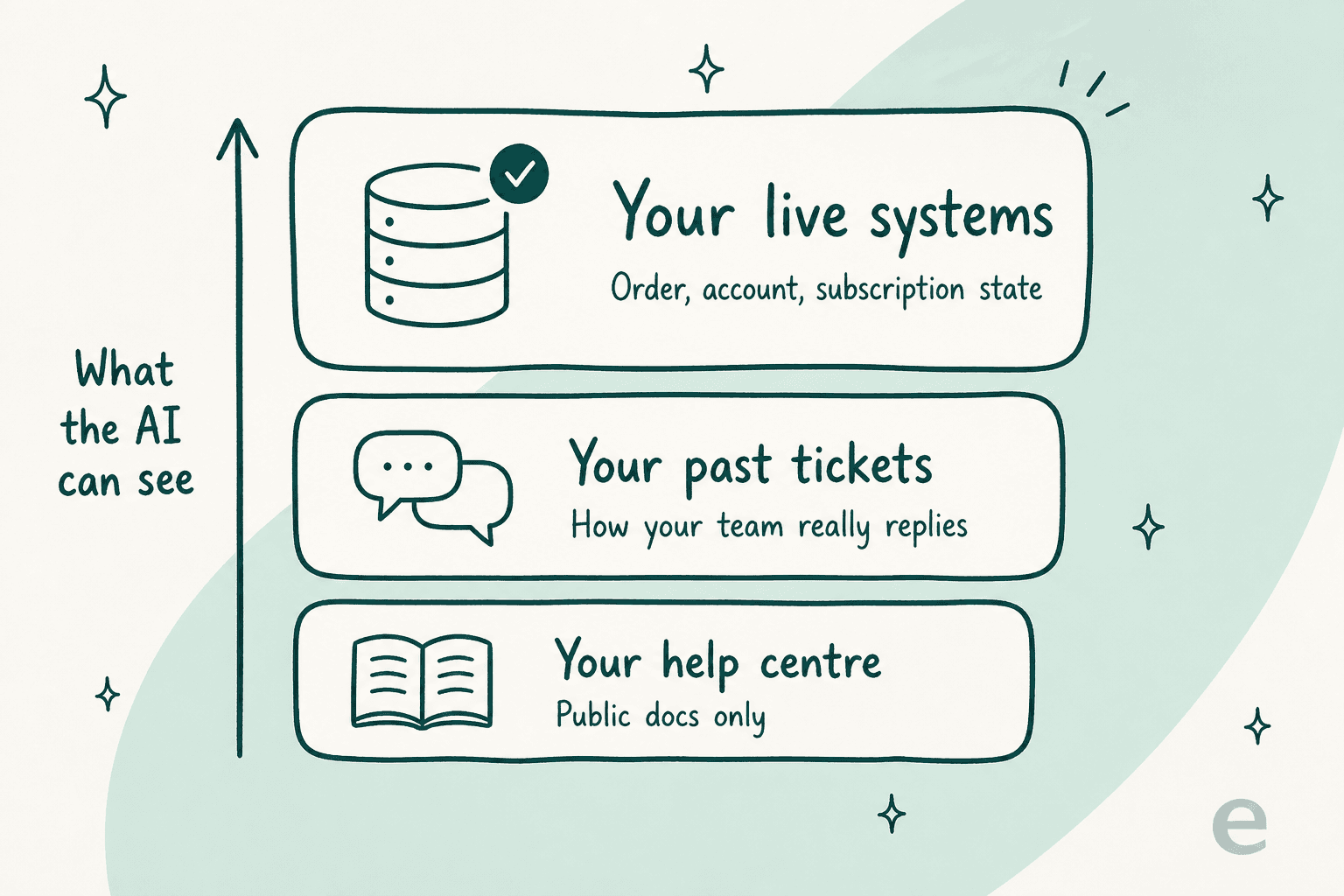
At the bottom sits your help center. Public docs, FAQs, a website crawl. Cheap to index and cheap to run, and it answers the "how do I export my data" class of question pretty well. This is where Corebee lives, and Chatbase, and most of the widget tools.
In the middle there is your past tickets. Not the docs. The actual replies your team wrote, so tone, edge cases, and that workaround your senior agent invented back in March which nobody ever wrote down. This layer is the single most-requested capability I see, and my colleague Amogh, who sits in on most of our demo calls, has a running joke about it.
"People really, really, really want to train on past tickets."
Amogh, eesel co-founder, on what comes up in nearly every demo call
Top of the ladder is your live systems. Order state, subscription tier, where a candidate actually sits inside a hiring pipeline. This is the layer that turns "here's our refund policy" into "I've refunded order #4821."
Corebee's marketing does show the top layer. Their homepage demo has the AI processing a $42 refund and unlocking a locked account, and the governance page carries a permissions matrix with dollar thresholds for exactly this. Those actions run through integrations, Shopify and Stripe being the named ones. What the one real reviewer says is that for your own product's data, that layer is not there:
"It answers from our docs but it can't see inside our own product. So a hiring manager asking something account-specific, like the exact stage a candidate is at in their pipeline, still has to reach a human because Corebee doesn't have that live data."

That same reviewer is warm about the rest of it and I want to be fair here. They praise the source attribution sitting under every reply, the clean handoff with the whole thread attached, also the fact that it takes phone calls. Live in an afternoon, apparently. It is a good review. It just happens to name the ceiling very precisely.
What each tool actually charges for
Before the list itself, the money. The tools here bill on three different meters, and comparing sticker prices straight across them is how people end up surprised later.
Below is the AI meter only, isolated so the comparison is apples to apples. Seats and helpdesk fees I have called out separately, since for most of these they stack on top.
Corebee wins that table at every volume and it is not close. I am not going to pretend some other way. On the AI meter alone, nothing here beats $99 flat.
But the meter is not the bill, and the bill is still not the decision. There is two things the table cannot show you.
First one, at low volume the flat rate is actually the expensive option. Corebee costs $1,188 a year whether you handle 40 conversations in a month or 4,000. Chatwoot self-hosted is free, and Help Scout has a free plan for five users, and Freshdesk has a free tier too. If you are a founder doing 60 tickets a month, $99 flat is not a bargain, it is a subscription you notice every month.
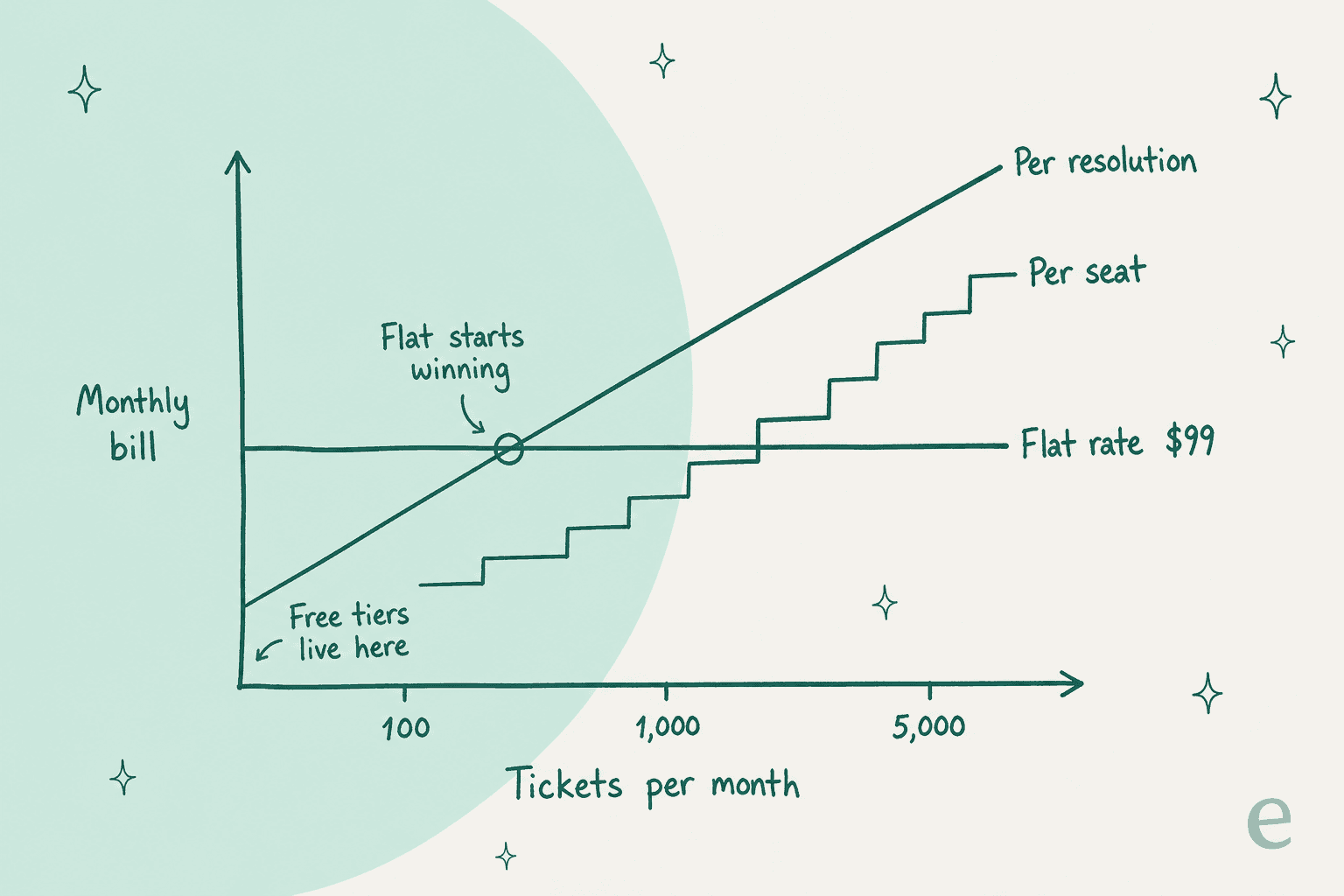
Second one, the cheapest meter is attached to the least-informed AI. Which is not a coincidence. Reading a public help center is cheap. Reading a live order record, holding a permission model, keeping a helpdesk in sync, those are not cheap. You are choosing what you pay for, and choosing the cheap one is completely fine, so long as you know that is what you did.
The 9 best Corebee alternatives in 2026
| Tool | Best for | AI meter | Entry price | Replaces your helpdesk? | Trains on past tickets | Live system lookups | Free tier | Channels | Security posture |
|---|---|---|---|---|---|---|---|---|---|
| Corebee | Solo founders who want one bill | Flat, unlimited | $99/mo flat | Yes | CSV upload at setup | Via integrations, not your own product | No, 14-day trial | Chat, email, WhatsApp, IG, FB, phone | SOC 2 Type I planned Q4 2026, GDPR, PIPEDA |
| eesel AI | Teams keeping their current helpdesk | From $299/mo (500 credits) | Free plan, 100 credits | No, layers on top | Yes, live sync | Yes, via integration actions | 100 free credits, no card | Follows your helpdesk plus Slack, chat, email | SOC 2 in progress, GDPR, EU residency, DPAs |
| Tidio | Small ecommerce sites | Per Lyro AI conversation | Free plan, paid from $24.17/mo | Yes | No | Via ecommerce apps | Yes | Chat, email, Messenger, IG, WhatsApp | GDPR, SOC 2 |
| Chatbase | A doc-trained widget, nothing more | Message credits | Free, paid from $40/mo | No, widget only | Ticket import on Pro | Via AI Actions | Yes, 50 credits | Web chat, API | SOC 2 Type II, GDPR |
| Crisp | Cheapest real omnichannel inbox | AI credits by plan | Free, paid from $45/mo flat | Yes | No | Via ecommerce sync | Yes, 2 seats | Chat, email, WhatsApp, IG, Messenger, SMS | GDPR, ISO 27001 |
| Chatwoot | Teams that want to own the stack | $20 per 1,000 Captain credits | Free self-hosted, cloud from $19/agent | Yes | Via Captain assistant | Custom, you build it | Yes | Chat, email, social, WhatsApp, SMS | Self-host means your own posture |
| Help Scout | Small teams who want a calm inbox | $0.75 per resolution | Free 5 users, paid from $25/user | Yes | AI drafts from past convos | Via sidebar apps | Yes | Email, chat, social, WhatsApp | SOC 2 Type II, HIPAA, GDPR |
| Gorgias | Shopify stores that need actions | $1.50 per automated interaction | From $40/mo bundle | Yes | Yes | Yes, native ecommerce actions | No, free trial | Chat, email, social, SMS, voice | SOC 2 Type II, GDPR |
| Freshdesk | Teams that need a full helpdesk | 500 sessions then $49/100 | Free tier, paid from $19/agent | Yes | Yes | Via connector apps | Yes | Email, chat, phone, social, WhatsApp | SOC 2, ISO 27001, GDPR, HIPAA |
| Re:amaze | Multi-store ecommerce teams | $0.85 per extra resolution | From $29/user, $59 flat starter | Yes | No | Via ecommerce integrations | No, 14-day trial | Email, chat, social, SMS, VOIP, push | GDPR, SOC 2 |
How I picked these
Nine tools, and every one of them is somewhere a real Corebee shopper actually ends up. Four things I weighted.
Does it solve the thing that sent you looking? If you left over unpredictable bills, then a per-resolution tool is no answer at all. If you left because the AI could not see your data, a cheaper widget is not an answer either.
Is the rate card published? Every tool here publishes a real number that you can go and check. Several quote-only vendors got dropped for exactly this reason. A price you have to book a call to hear is not really a price.
Does it fit a team of two to twelve? Corebee's own features FAQ puts it plainly: "If you have 50 reps and a procurement team, we're not the fit." I kept to that shape. So no enterprise contact-center software appears on this list.
Have I actually seen it work? I use eesel every day at my job, which I will be upfront about here. For the other eight I went through the docs, the pricing pages and the help centers, then captured the product surfaces you see below. Where a claim is the vendor's own I have said so, and linked it.
1. eesel AI
Best for: teams who want AI on the queue without moving out of the helpdesk they already run.
What it does
I work here, so take the enthusiasm with an appropriate amount of salt, though the structural difference is easy enough to check yourself. eesel is not an inbox. It connects to the one you already have, reads out of it, then writes back into it. Zendesk, Freshdesk, Gorgias, Help Scout, Jira, HubSpot, Slack, your website, Google Drive, Confluence, Notion. Your team keeps on working where they already work.
The part that matters for this comparison is what it reads. eesel trains on your solved tickets, and not just your help center. That is the middle layer from the diagram further up, and it is the thing which comes up in almost every sales call we take. One of our customers, a warehouse-software company, connected 717 knowledge items across Salesforce and Slack. Another one, Gridwise, resolved 73% of tier-1 tickets in month one.
It does the top layer too. Integrations carry actions and not only sources, so the agent can look up an order, tag a ticket, open an issue. And because the sources are not walled off per integration, a single reply can pull from your help center, your internal wiki and your ticket archive all at once.
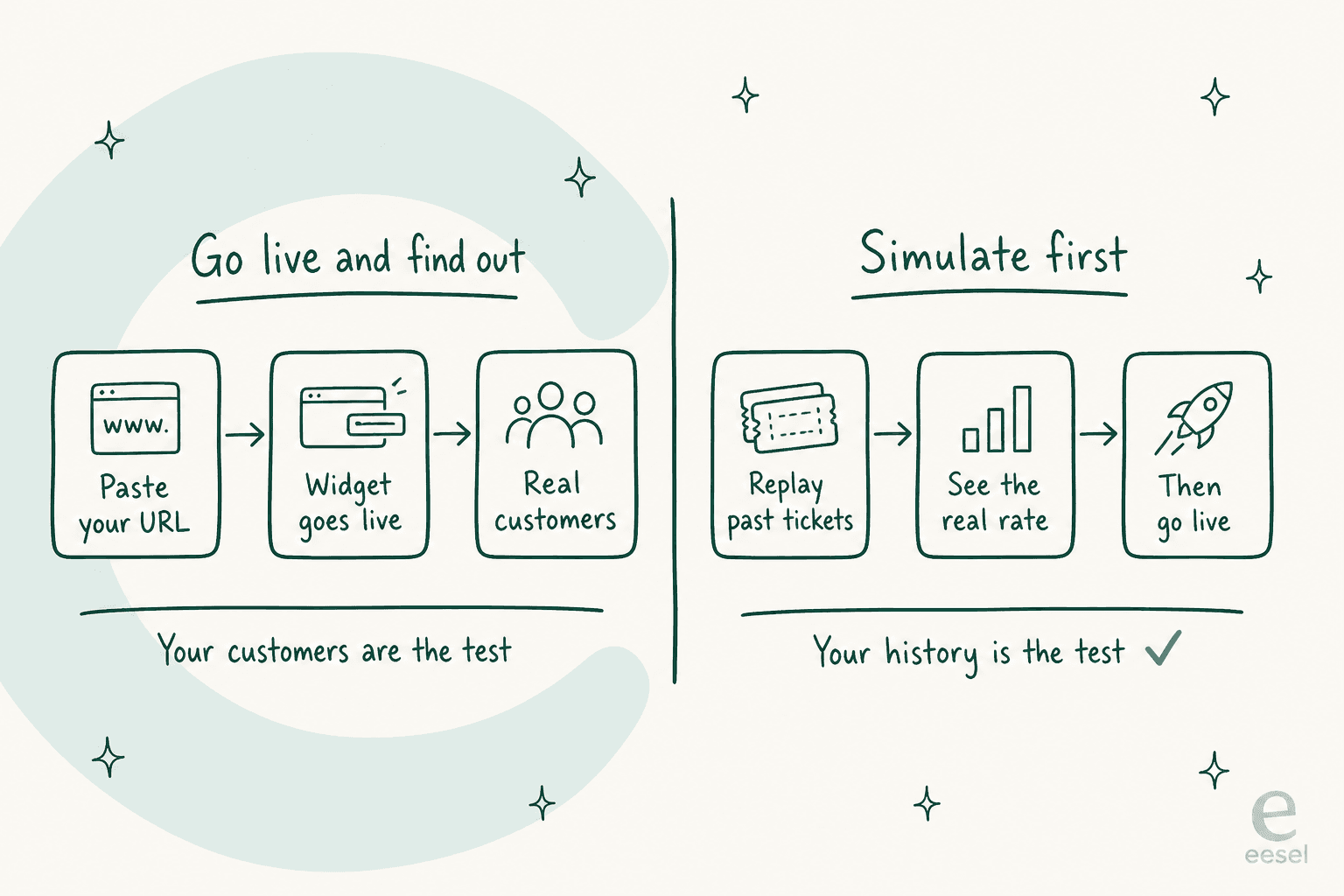
The feature I would point a nervous Corebee shopper at is the Simulation one. Before the agent replies to a single live customer, you replay it across your own historical tickets and see the resolution rate you would really get. Your content, your questions.
Pricing
| Item | Cost |
|---|---|
| Free plan | 100 credits, no card |
| 500 credits a month | $299/mo |
| 1,000 credits a month | $499/mo |
| 2,500 credits a month | $999/mo |
| 5,000 credits a month | $1,899/mo |
| Dashboard questions and lookups | Mostly free |
| Blog post drafts | $4.00 each |
| Platform fee | None |
| Per-seat fee | None |
One credit covers one ticket or chat, however long it runs. A worked example. 1,000 tickets a month routed to the AI fits the $499 plan. Route only 200 of them during a gradual rollout and the 500-credit plan at $299 is plenty, since tickets your humans handle do not use credits. If you run out, agents pause until credits reset, or you can turn on overage with a monthly cap you set, at $0.80 per extra credit.
Pros
- Trains on past tickets with a live sync, not a one-time CSV
- No migration: your helpdesk, your inbox, your history stay put
- Simulation gives you the real number before go-live
- 80-plus languages, trained on your multilingual ticket history
- Credits count tickets worked, not resolutions, so a higher resolution rate does not raise your bill
Cons
- It is not a helpdesk. If you do not have one and do not want one, this is the wrong shape and Corebee is a better fit
- Pricing is sized to volume, so the monthly price steps up as your ticket count grows, which is exactly what some Corebee buyers left to escape
- SOC 2 is in progress rather than certified, though sub-processors are SOC 2 Type II and EU data residency is available
My take: pick eesel if the answer to "can the AI see it?" has to be yes, and if you have a helpdesk that you do not want to abandon. Skip it when you have no helpdesk at all, because then you are buying two things instead of one.
2. Tidio
Best for: small ecommerce sites that want a chat widget with an AI agent behind it and a free tier to start on.
What it does
Tidio is the closest thing on this list to Corebee's own shape. A widget, a shared inbox, an AI agent they call Lyro, plus channels for chat, email, Messenger, Instagram and WhatsApp. It is the tool most people put next to Corebee on the way in, and it holds 4.6 out of 5 across nearly 2,000 G2 reviews, which is a review depth Corebee does not have yet.
Lyro trains on your help center plus a Q&A set that you write yourself. Tidio also sells Lyro as a standalone layer you can bolt onto Zendesk or Salesforce, which is unusual at this price point. The Flows builder handles the rule-based half, worth to know if you have specific paths (order tracking, returns) that you want deterministic instead of generative. We go deeper on the tradeoffs in our Tidio review.
Pricing
Tidio's pricing page is a two-slider affair: billable conversations on one axis, Lyro AI conversations on the other.
| Plan | Price | What you get |
|---|---|---|
| Free | $0 | 50 billable conversations/mo, 50 one-time Lyro conversations, 100 unique Flows visitors/mo |
| Starter | From $24.17/mo annual | Billable conversation tiers from 100 upward |
| Growth | From $49.17/mo annual | Higher conversation tiers, more automation |
| Plus / Premium | From $300/mo plus usage | Priority support, advanced team management, lower per-conversation rates |
Both meters scales independently, so read that slider carefully before you commit to anything. Full breakdown sits in our Tidio pricing post.
Pros
- Real free tier, so you can test with zero spend
- Lyro can run standalone on top of another helpdesk
- Deep review history, unlike most newer entrants
- Flows gives you deterministic paths alongside the AI
Cons
- Two meters that both move means the bill is harder to predict than Corebee's, which is the exact thing you left
- Lyro trains on your help center and Q&A, not on your past ticket history
- The Free plan's 100-unique-visitor Flows cap is easy to hit on a busy storefront
My take: the best free starting point on this list, and the right pick if you sell online and want the widget live by this afternoon. Skip it when predictable billing was your whole reason for shopping around.
3. Chatbase
Best for: teams who want the doc-grounded widget and nothing else, at the lowest possible spend.
What it does
Chatbase does one job. You point it at your content, it builds an agent, then you embed it. No shared inbox, no team assignment, and no ticket lifecycle either. If Corebee's inbox half is the part you do not need, this is the honest version of whatever is left.
It supports AI Actions, so the agent can call an API and actually do something, which nudges it up toward the top layer if you are willing to wire that up. Ticket-as-a-source only arrives on the Pro plan. Our Chatbase review covers where it fits and where it thins out.
Pricing
Chatbase meters in message credits, and one conversation is many messages, so the plan sizes are less generous than how they look on the pricing page.
| Plan | Price | Message credits |
|---|---|---|
| Free | $0 | 50/mo, agents deleted after 14 days idle |
| Hobby | $40/mo | 700/mo, advanced models |
| Standard | $150/mo | 4,000/mo, auto-retrain |
| Pro | $500/mo | 15,000/mo, tickets as a source |
| Enterprise | Contact sales | Custom |
Add-ons: $40 per 1,000 extra credits, $25 per extra agent per month, $99 a month to remove Chatbase branding. That last one is worth flagging: removing the branding costs exactly what Corebee charges for the entire product.
Pros
- Cheapest real entry point at $40 a month
- Clean, fast, does the doc-grounded thing well
- AI Actions can reach beyond documents if you build the wiring
- SOC 2 Type II, which Corebee does not yet hold
Cons
- No shared inbox, so it does not replace a helpdesk at all
- Message credits are a fuzzier unit than conversations, and heavy threads burn through them
- White-labelling at $99/mo is steep relative to the plan price
- Past-ticket training is gated to the $500 Pro tier
My take: if all you want is a website chatbot and you already handle tickets somewhere else, this is the cheapest clean answer there is. If you need an inbox, it is not one. More options in our Chatbase alternatives roundup, the open-source route included.
4. Crisp
Best for: the closest thing to Corebee's flat-price promise from a company with a decade of history behind it.
What it does
Crisp deserves a serious look from anyone drawn in by Corebee's pricing model, because it does something structurally similar. A flat rate per workspace, with seats included rather than metered. $45 a month buys you four seats. $95 buys ten. That is not per-agent pricing, and it comes from the same anti-per-seat instinct that Corebee is built on.
The inbox covers chat, email, WhatsApp, Instagram, Messenger and SMS, with ecommerce sync for Shopify, WooCommerce, Adobe Commerce and PrestaShop. The AI runs on credits that come included with each plan, and Crisp does the translation for you: roughly 90 automated conversations on the $45 plan, 450 on the $95, then 1,350 on the $295. See our Crisp AI chatbot write-up for how the assistant behaves in practice.
Pricing
| Plan | Price | Seats | AI credits |
|---|---|---|---|
| Free | $0 | 2 | None |
| Mini | $45/mo per workspace | 4 | ~90 automated conversations |
| Essentials | $95/mo per workspace | 10 | ~450 automated conversations |
| Plus | $295/mo per workspace | 20+, extra seats $10 | ~1,350 automated conversations |
The conversations themselves are unlimited on every paid plan. Only the AI gets metered. Full numbers are in our Crisp pricing breakdown.
Pros
- Flat per-workspace pricing, the same instinct that makes Corebee appealing
- Unlimited human conversations on every paid plan
- Established product with a long track record and real review volume
- Live chat is the mature part of the product, not an afterthought
Cons
- The AI credit pool is finite, so heavy automation means moving up a tier
- Crisp trains its assistant on your help center and website, not on past ticket history
- The jump from $95 to $295 is a big step for a growing team
- eesel does not have a Crisp integration, so the two are an either/or
My take: the safest flat-rate alternative on this list, and the one I would test first if Corebee's pricing model drew you in but its youth worries you. Skip it when you need the AI running most of your volume, because that credit pool will push you up the tiers. More in Crisp AI alternatives.
5. Chatwoot
Best for: teams with an engineer to spare who want the bill to actually be zero.
What it does
Chatwoot is open source. Self-host it, and the software cost is nothing, forever, without any founding-member asterisk attached. That is a stronger version of the flat-price promise than a hosted vendor can make, and it is the answer for teams who read "locked in forever" and then wondered who exactly is doing the locking.
The inbox covers web chat, email, social, WhatsApp and SMS. The AI part is a separate assistant they call Captain, doing reply suggestions, drafted responses, conversation summaries, knowledge base answers. Our Chatwoot Captain piece covers what it does and what it does not.
Pricing
| Plan | Price | Conversations |
|---|---|---|
| Hacker | $0/agent/mo | Up to 2 agents, 500 conversations/mo |
| Startups | $19/agent/mo | Unlimited, 300 Captain credits/mo |
| Business | $39/agent/mo | Unlimited, 500 Captain credits/mo |
| Enterprise | $99/agent/mo | Unlimited, 800 Captain credits/mo |
| Extra Captain credits | $20 per 1,000 | Tracked in the billing dashboard |
Self-hosting stays free and unmetered. The cloud pricing above is what you pay in order to skip the ops work. Our Chatwoot pricing post has all the detail.
Pros
- Free forever if you self-host, with no vendor able to change the terms
- Data stays entirely on your infrastructure, which settles most security questionnaires
- Mature omnichannel inbox, not a chat widget with an inbox bolted on
- Captain credits are transparently priced at $20 per 1,000
Cons
- Someone has to run it: servers, upgrades, backups, uptime
- Captain is assist-shaped, closer to a copilot for agents than an autonomous agent
- Per-agent cloud pricing on the hosted plans is exactly the model Corebee argues against
- No live product data unless you build the connection yourself
My take: the only tool here where "flat forever" is a fact and not a policy. Take it if you have the engineering capacity, and a security team asking hard questions. Skip it when nobody on your team wants to own a deployment. More in Chatwoot alternatives and our Chatwoot AI overview.
6. Help Scout
Best for: small teams who want the calmest inbox in the category with AI available when they want it.
What it does
Help Scout has spent years now being the tool people pick when a full helpdesk feels like too much machinery. It reads like email, your customer never gets confronted with a ticket number, and the docs product is good enough that it can actually be your help center.
The AI here is AI Answers, an autonomous agent resolving questions on its own, billed per resolution instead of folded into the seat price. There is AI Drafts as well, writing a reply out of your past conversations and help content for an agent to send. Help Scout publishes its own average too, a 73% resolution rate, which is a specific number and not a marketing adjective, and I appreciate them for that.
Pricing
| Plan | Price | Notes |
|---|---|---|
| Free | $0 | 5 users, 1 Inbox, 1 Docs site, 100 contacts/mo |
| Standard | $25/user/mo | 2 Inboxes, extra Inboxes $10/mo |
| Plus | $45/user/mo | 5 Inboxes, company grouping, 25 light users |
| Pro | $75/user/mo | 10 Inboxes, unlimited viewers, 50 light users |
| AI Answers | $0.75/resolution | Billed monthly on top of seats |
Note the contacts meter here. A contact is anyone who got a reply from your team or from the AI, counted once no matter how many conversations they have with you. Our Help Scout pricing post walks through where that one bites.
Pros
- Free plan with five users is the most generous starting point here
- Per-resolution AI at $0.75 undercuts most of the field
- SOC 2 Type II and HIPAA, which matters if you handle health data
- AI Drafts learns from your past conversations, unlike most doc-only tools
Cons
- Per-user pricing means every hire raises the bill, the thing Corebee exists to avoid
- Three seats on Standard plus 1,000 AI resolutions is $825 a month against Corebee's $99
- The contacts meter is a second thing to watch alongside seats
- Reporting depth is lighter than the bigger suites
My take: the best fit for a small team that wants support to feel human and does not mind paying by the seat. Skip it if seat-based billing is the thing you are running from. eesel integrates with Help Scout, so keeping the inbox and changing only the AI is also on the table. More options in Help Scout alternatives and our Help Scout AI piece.
7. Gorgias
Best for: Shopify stores where the AI has to actually do things, not just explain them.
What it does
Gorgias is the answer to that exact gap the G2 reviewer named. Its AI Agent does not only cite your return policy, it looks up the order, checks the eligibility, processes the return, all because it is wired natively into the store. Gorgias says it powers 40% of Shopify brands, which tells you where their attention has been going.
So that is the top layer of the diagram, delivered. If your support volume is mostly "where is my order" and "can I change my address," then this is a different class of tool to a doc-grounded widget. Our Gorgias review covers how the AI Agent behaves once it is in production.
Pricing
Gorgias bundles up the helpdesk and the AI together, priced by ticket band. From the pricing page:
| Band | Helpdesk | AI Agent | Overage rates |
|---|---|---|---|
| 50 tickets/mo | $10/mo | $30/mo | $0.40/ticket, $1.50/automated interaction |
| 300 tickets/mo | $50/mo | $27/mo | $0.40/ticket, $1.50/automated interaction |
| 2,000 tickets/mo | $300/mo | $171/mo | $0.36/ticket, $1.50/automated interaction |
| 5,000 tickets/mo | $750/mo | $477/mo | $0.36/ticket, $1.50/automated interaction |
Voice and SMS are add-ons priced by volume. Never priced per agent, which is worth noting. Full picture in our Gorgias AI breakdown.
Pros
- The AI takes real actions against real store data, which nothing else at this price does natively
- No per-agent pricing at any tier
- SOC 2 Type II, and the ecommerce depth is unmatched here
- Trains on your ticket history, not only your docs
Cons
- $1.50 per automated interaction past the limit is the most expensive AI meter in this comparison
- It is ecommerce-shaped. A B2B SaaS team, which is Corebee's stated audience, will not use most of it
- The 2,000-ticket band lands at $471 a month before overages
- Bundled bands mean you pay for helpdesk capacity you may not need
My take: if you sell on Shopify, this is the strongest tool on the list and the price difference is buying you something real. If you do not, wrong shop. eesel also connects to Gorgias if you want the inbox without that AI meter. See our Shopify AI helpdesk roundup for the wider field.
8. Freshdesk
Best for: teams who will outgrow a lightweight tool and would rather not migrate twice.
What it does
Freshdesk is the full helpdesk of this lineup. SLAs, automations, a real ticketing model, phone, and reporting that goes deeper than anything else here does. Freddy AI Agent comes included on every paid plan with the first 500 sessions bundled in, which is more generous than it sounds at first.
The reason it belongs on a Corebee alternatives list is not similarity. It is that a chunk of Corebee's audience is a two-person team which will be a twelve-person team in eighteen months, and the migration you avoid today is just the one you do later on. Our Freshdesk AI agent piece covers what Freddy handles.
Pricing
From the Freshdesk pricing page, billed annually:
| Plan | Price | AI included |
|---|---|---|
| Free | $0 | Limited, email ticketing |
| Growth | $19/agent/mo | Freddy AI Agent, first 500 sessions |
| Pro | $55/agent/mo | Freddy AI Agent + Copilot at $29/agent/mo |
| Enterprise | $89/agent/mo | Adds Freddy AI Insights |
| Extra AI sessions | $49 per 100 | Applies to all paid plans |
| Day passes | $2 to $12 each | For occasional agents |
Three agents on Growth works out to $57 a month, and the first 500 AI sessions are sitting in there. So it undercuts Corebee, right up until the AI volume climbs. Full detail lives in our Freshdesk AI pricing post.
Pros
- A real free tier, plus $19/agent paid entry with AI included
- 500 Freddy sessions bundled on every paid plan
- SOC 2, ISO 27001, GDPR, and HIPAA, the deepest compliance posture here
- Day passes at $2 make seasonal staffing cheap
Cons
- $49 per 100 extra AI sessions works out to $0.49 each, which climbs fast past the bundle
- Copilot is a separate $29/agent/mo line item on Pro
- It is heavier than a two-person team needs, and setup takes longer than 15 minutes
- Per-agent pricing at every tier
My take: the right answer if you can picture yourself at fifteen people and would rather migrate only once. Skip it when you want to be live before lunch. eesel layers onto Freshdesk too, and we compared the options in Freshdesk AI alternatives. Also worth reading: alternatives for small teams and the free chatbot tier.
9. Re:amaze
Best for: teams running several storefronts out of one inbox.
What it does
Re:amaze is the multi-brand specialist of the group. If you run three storefronts and want a single inbox that still keeps them separate, it handles that better than anything else here does. Channels cover email, chat, social, SMS, VOIP and push notifications, the widest spread on this list.
The Re:amaze AI Agent comes included on every plan, with a small allowance of resolutions per user per month, and then it bills per resolution. There is a flat-rate Starter plan too, which is unusual in this category and worth to know about. Our Re:amaze review covers the product in more depth.
Pricing
From the Re:amaze pricing page:
| Plan | Price | AI resolutions included |
|---|---|---|
| Basic | $29/user/mo ($26 annual) | 5 per user/mo, then $0.85 each |
| Pro | $49/user/mo ($44 annual) | 10 per user/mo, then $0.85 each |
| Plus | $69/user/mo ($62 annual) | 20 per user/mo, then $0.85 each |
| Starter | $59/mo flat | Unlimited team members, 500 responded conversations/mo |
That Starter plan is the one to notice. $59 flat, unlimited seats, capped at 500 responded conversations a month. For a small team sitting under that ceiling it undercuts Corebee by $40, and a real multi-channel inbox is included. Full numbers in Re:amaze pricing.
Pros
- $59 flat Starter plan with unlimited team members beats Corebee on price under 500 conversations
- Widest channel spread here, including SMS, VOIP, and push
- Multi-brand handling is best in class
- 14-day trial with no card, and trials include Plus features
Cons
- The AI allowance is tiny: 5 to 20 resolutions per user per month before $0.85 each kicks in
- No free plan, only a trial
- The AI trains on your knowledge base, not on your past ticket history
- Starter's 500-conversation cap is a hard ceiling, and past it you move to per-user pricing
My take: that flat Starter plan makes this the cheapest real inbox on the list for a small team, and the multi-store handling is a proper specialty. Skip it when you want the AI carrying most of your volume, because the included allowances are small. If you want more on the AI half specifically, we wrote up the Re:amaze chatbot options separately.
How to choose, in about five minutes
Answer three questions, in order, and this list collapses down to one or two options.
Do you already have a helpdesk you like? If yes, then do not migrate. Put an AI layer on top and keep your inbox, your history, your team's muscle memory. If no, you are shopping for an inbox and an AI at the same time, so Corebee, Crisp, Re:amaze and Help Scout make the shortlist.
Does the AI need to see your product data? If a meaningful share of your questions are account-specific ("what plan am I on", "where is my candidate in the pipeline", "did my invoice go through"), then a doc-grounded widget is going to hit that ceiling the G2 reviewer described. What you need is a tool with integration actions. eesel, Gorgias, or a Chatbase agent with AI Actions you wired up yourself.
What is your monthly volume, honestly? Under about 200 conversations, the free tiers on Freshdesk, Help Scout and Chatwoot all beat $99 flat. Between 200 and 2,000 is where Corebee's model is strongest and hardest to argue against. Above 2,000 the flat rate is a bargain on the AI meter, but do check whether the AI can really handle that volume on doc-grounded answers alone, before you count up the savings.
One more thing, and this is the one I would insist on no matter which tool wins. Do not let your customers be the test. Ask every vendor on your shortlist whether you can run their AI against your own historical tickets before it replies to a live person. Corebee's setup path goes paste-your-URL, widget goes live, real customers. Fast, and fast is a real feature. It also means your resolution rate becomes a number you discover in production. A simulation step turns it into a number you know before go-live, which changes the conversation with your boss quite a lot.
And a small check that saves you an argument later on. Ask each vendor whether their quoted resolution rate counts auto-closed spam. On one account we analysed, 22% of the inbox was spam. A tool that auto-closes that can post a very impressive number without answering one real question. Our note on AI CSAT covers why an internal quality score is not the same thing as a resolution rate.
Try eesel for AI support that reads more than your docs
If the thing that sent you looking at Corebee alternatives is the ceiling and not the price, then that gap is the specific problem eesel was built for. It plugs into Zendesk, Freshdesk, Gorgias, Help Scout, Jira or Slack in a few minutes, trains on the tickets your team already solved instead of only your help center, then runs a simulation across your own history so you see the real resolution rate before any customer meets it. Pricing starts at $299 a month for 500 credits (1 credit per ticket or chat), with no seat fee, no platform fee, and optional overage with a cap that you set yourself.

You get 100 free credits, and no credit card is needed to start, which is enough to run a simulation over a hundred of your own tickets and see that number for yourself. Try eesel, or book a demo if you would rather we walked you through it.
Frequently Asked Questions
What are the best Corebee alternatives for a small support team?
How much does Corebee cost, and is $99 a month really flat?
Is there a free Corebee alternative?
Can I keep my current helpdesk instead of migrating off it?
What happens if the AI gets an answer wrong?


Article by
Riellvriany Indriawan
Riell is a designer and writer at eesel AI with about two years of experience researching CX platforms, AI chatbots, and helpdesk software. She combines her design background with a sharp eye for how these tools actually look and feel in practice — making her comparisons unusually visual and user-focused.