The 8 best Gmelius alternatives in 2026, priced and tested

Rama Adi

Katelin Teen
Last edited August 26, 2026

Why teams start looking for a Gmelius alternative
I work on eesel's integrations, so a lot of my week goes on other people's inboxes and I wire AI into the places support actually lands. One thing comes up over and over. A colleague put it bluntly on a sales call last year, after a prospect asked for Gmail support that we did not have at the time: email is the world's biggest help desk, so we really need to support that. He was right, and it explains why a product like Gmelius exists at all. Most teams never buy a helpdesk. They buy a shared inbox, bolt it onto Gmail, and run support out of support@.
So let me be fair about Gmelius before I pick it apart.
What Gmelius gets right
The collaboration half of Gmelius is good, and it has clearly been built by people who have watched a team try to run support@ out of a forwarded mailbox. There is no separate mailbox to log into: Gmelius syncs a shared address into every member's own Gmail in real time, so nobody shares a password and nobody is CC'ing each other, per its help center. Inside Gmail you get five views, three statuses, collision alerts, shared drafts, tags, notes with @mentions, conversation permalinks, and a per-conversation audit trail called Pulse.
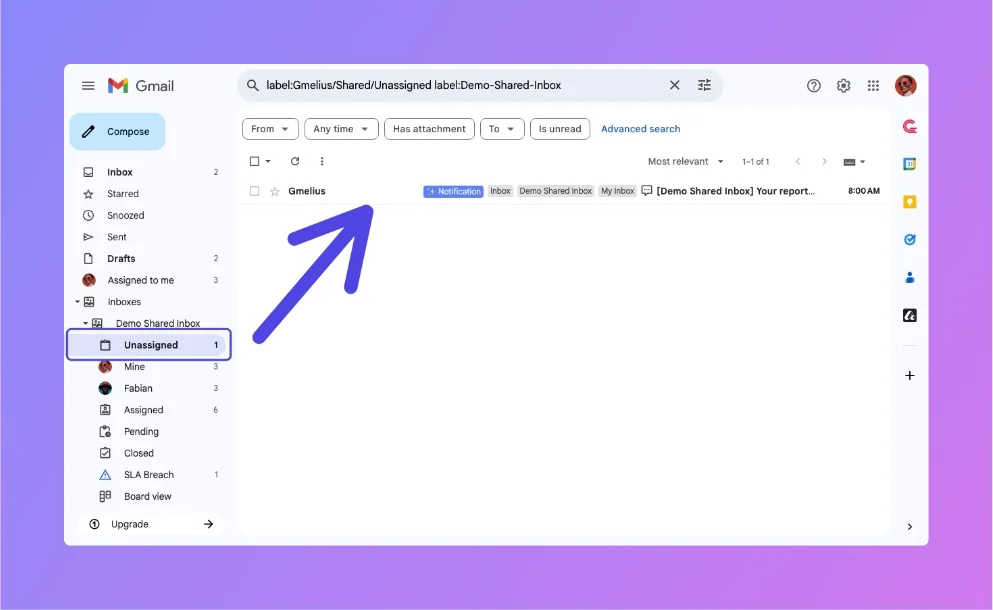
The reviews back that up. Gmelius sits at 4.4 out of 5 from 776 reviews on G2, with 483 five-star ratings, and 4.7 from 43 reviews on Capterra. It has north of 105,000 installs on the Google Workspace Marketplace. The French Red Cross runs 8,000 shared inboxes across 40,000 staff and volunteers on it, which is not a small deployment.
The five-star reviews are specific about what they like, which is usually a good sign. Here is a social media manager on a small-business plan:
"Gmelius stands out for its ease of use and seamless integration with Gmail and other tools. I particularly love how it transforms my inbox into a powerful collaboration hub, allowing me to assign emails to team members, track email statuses, and manage projects directly from Gmail."

That is a real product with real users. Nobody leaves Gmelius because the shared inbox is bad.
What they do leave over shows up in the more measured reviews. An enterprise product manager titled his three-and-a-half-star review "An Apt Copilot for Gmail", which puts the ceiling in a single word without meaning to:
"Gmelius is a solid Gmail add-on, but not without its quirks. It's great at automating routine tasks and providing some useful insights, Still, it's saved me time and is worth a try – just don't expect perfection."
Copilot. That is the category, and it is the right word for it.
The three walls people actually hit
Wall one: the AI drafts, it never sends. This is the big one, and it is documented in Gmelius's own help center rather than inferred. The AI Draft Assistant "automatically generate a draft based on the email content and your communication patterns." AI Follow-up generates a follow-up draft into a Gmail label. And the rules engine's Send email action is explicitly a canned response, not a generated one: "you can create a pre-written reply from scratch or use one of your Gmelius templates." There is no path where Meli answers a customer and you never see the email.
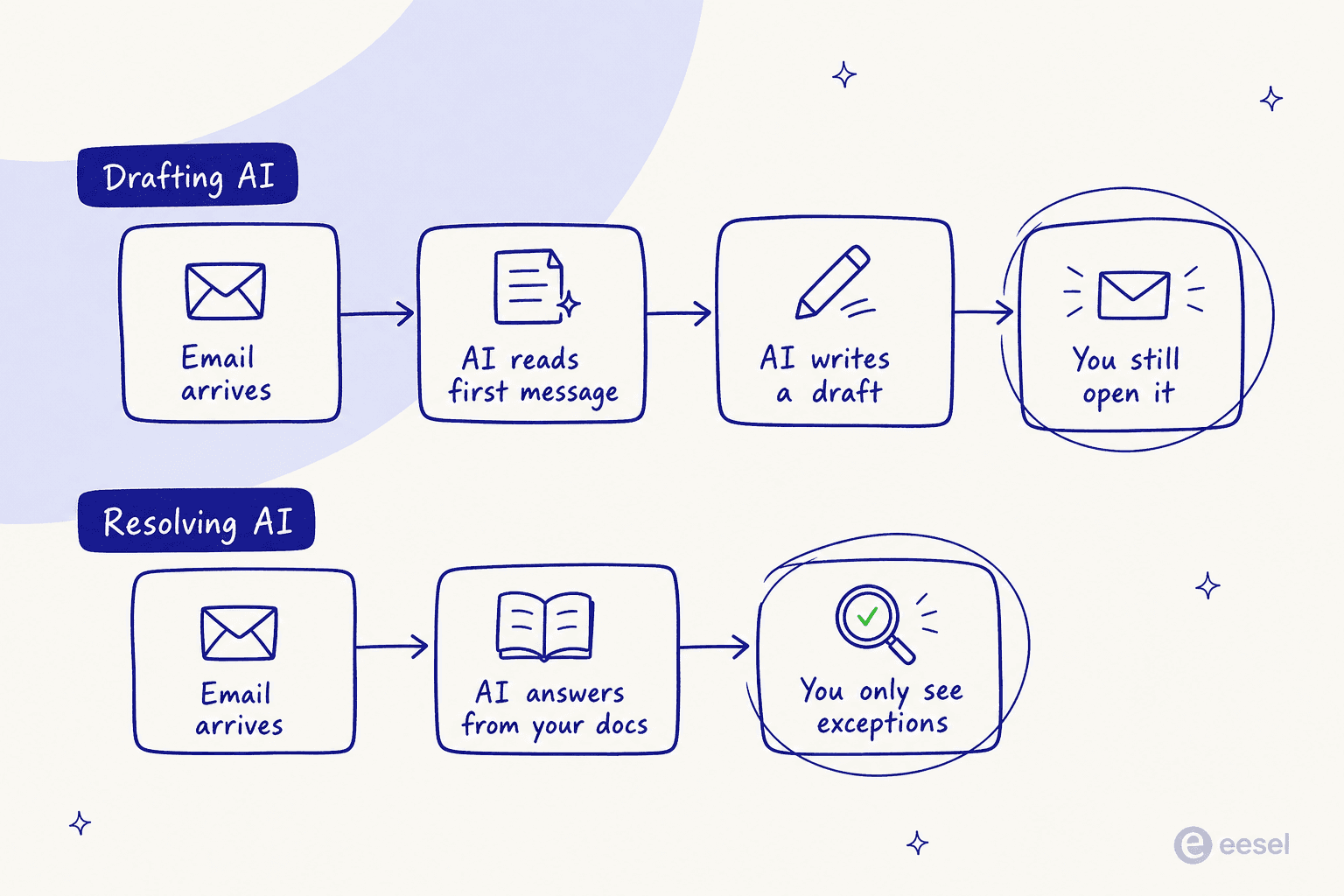
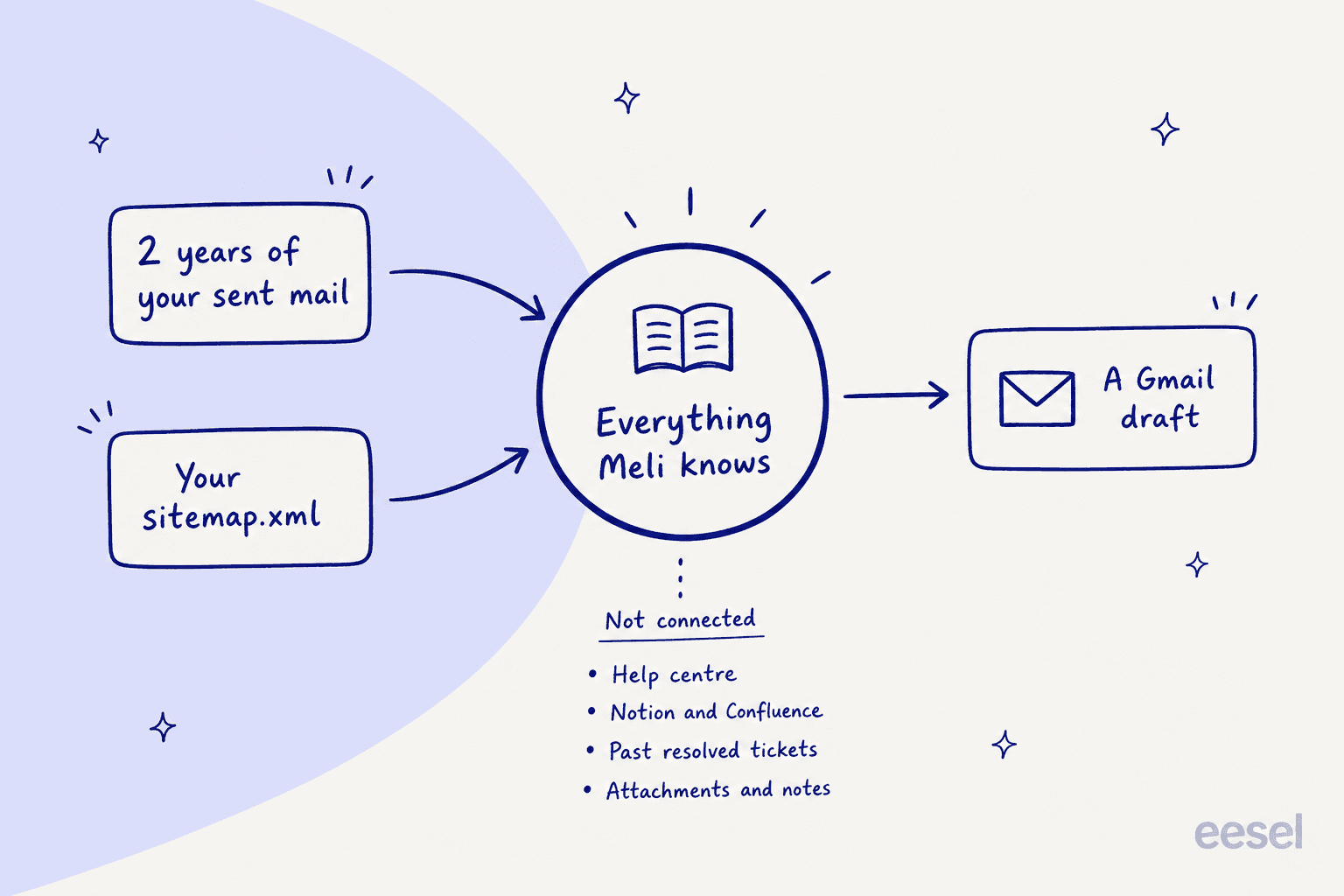
Wall two: the knowledge layer is two sources wide. The AI Draft Assistant docs name them both, and that is the complete list: "the history of your past email conversations (up to 2 years of your email history)" and "content from your provided website (through the sitemap.xml)." You can see it in the setup panel, where the entire knowledge base is a single field asking for a sitemap URL.
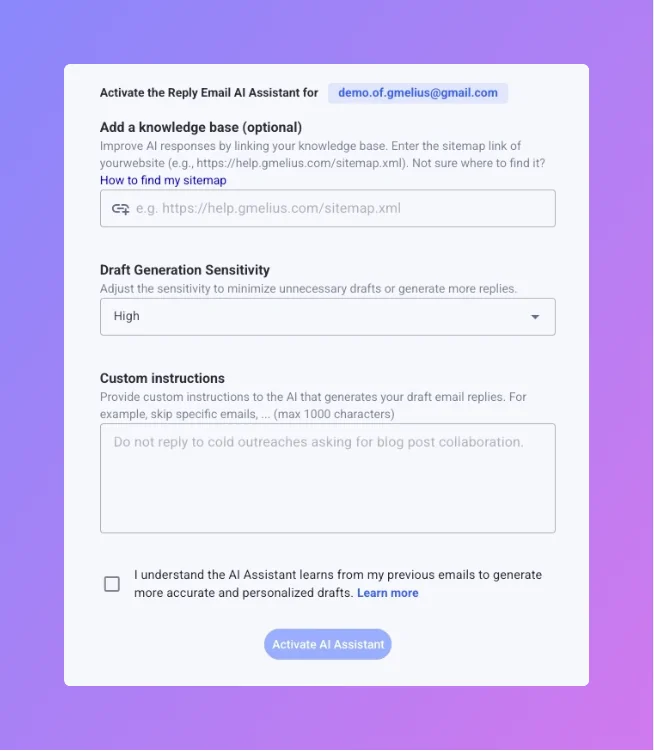
There is no connector for a help center product, Notion, Confluence, Google Drive, an uploaded file, or your macro library. Two years of sent mail teaches the AI how your team sounds. It does not teach it what your team knows.
That distinction matters more than it looks. Across our own sales calls, the thing buyers ask for most consistently is training the AI on their own past tickets, to the point where a colleague started logging it as "past ticket training strikes again." Nobody asks for tone matching. They ask for the AI to already know the answer.
Wall three: the caps and the Gmail ceiling. Gmelius bills per seat and then caps volume on top: 5,000 conversations a month on Meli, 10,000 on Growth, 100,000 on Pro. A conversation is one Gmail thread, counted when a new thread lands in a Gmelius-powered workspace. No overage rate is published anywhere on the pricing page, so the only stated remedy for hitting a cap is upgrading. And the whole thing is Google-only. Outlook is waitlist-only, and Gmelius's own year-in-AI post hedges non-Google email clients as arriving "by Q3-Q4 2026."
One more honest note, because it comes up constantly in reviews and it is a browser-extension problem rather than a feature problem: speed. Three of the five negative themes on G2 are the same complaint, and a mid-market accounting reviewer gave it the sharpest version:
"Gmelius can be extremely slow to load emails. Like, we're talking 10+ seconds to load an email within the Gmail app. That's quite unacceptable. I also don't like how the preview text on a board card shows the first email's text, and not the most recent email's reply."
To be fair to Gmelius, it has publicly rebutted a matching Capterra complaint by pointing at plug-in conflicts, and one reviewer agrees that Chrome extension conflicts are "the same for everyone." Worth testing on your own machines with your own extension stack before you commit either way.
How I picked these eight
I wanted alternatives a Gmelius customer could actually switch to, so the bar was:
- It has to handle a shared address for a team. A personal AI email assistant like Fyxer is a different purchase, so it is not on the list.
- Published, checkable pricing. Every price below comes off the vendor's own pricing page, not a sales call.
- I read the AI docs, not the AI marketing page. Where a vendor names an AI feature, I went looking for what it is allowed to do and what it reads. That is where every real difference on this list turned up.
- It has to be a plausible move from Gmail. Two of these keep you in Gmail, three replace it, three sit in between.
I have not run all eight in production for a year, and I am not going to pretend otherwise. What I did do is go through each product's own docs, pricing tables and help center the way I would if I had to wire one up, which is roughly what you are about to do.
Gmelius alternatives at a glance
| Tool | Best for | Entry price (annual, per user/mo) | Does the AI send? | AI pricing | Seat rules | Free tier | Volume cap | G2 |
|---|---|---|---|---|---|---|---|---|
| Gmelius (incumbent) | Gmail-native collaboration | $25 (Growth) | No, drafts only | Included in tier | Growth max 50 users | No, 7-day trial | 10,000 conv/mo | 4.4 (776) |
| eesel AI | Keeping Gmail, actually clearing it | $0 seats | Yes | From $299/mo (500 credits) | None | 100 free credits | None | n/a |
| Hiver | The closest structural swap | $25 (Growth) | Yes | Included, no published limit | 2-seat min, steps 2/5/10/15/20 | No, removed in 2026 | None published | 4.6 (1,283) |
| Drag | Cheapest Gmail inbox with an agent | $12 (Starter) | Yes, Pro tier | Included, "nothing metered" | None, unlimited users | No, 7-day trial | None | 4.7 (1,200+), vendor-stated |
| Front | Outgrowing Gmail entirely | $25 (Starter, max 10 seats) | Yes, Autopilot add-on | From $0.05 per conversation | 2-seat min reported | No | 200 AI actions/day/user | n/a |
| Missive | Inbox that is also team chat | $14 (Starter, max 5 users) | No | Provider cost + 25% | None | Yes, 3 users | 15-day history on Free | 4.7 (854) |
| Help Scout | A real help desk with a customer-facing AI | $25 (Standard) | Yes | $0.75 per resolution | None | Yes, 5 users | 100 contacts/mo on Free | n/a |
| Keeping | Cheap shared inbox, no AI theatre | $14 (Essentials) | No | One feature, included | 2-seat min | No, 14-day trial | None | 4.5, vendor-stated |
| Freshdesk | Scaling past email into ticketing | $19 (Growth) | Yes | $49 per 100 sessions | None | Yes, 1-2 agents/6mo | 500 AI sessions included | n/a |
Security note, since it splits the list in a way pricing does not: Gmelius, Keeping, Help Scout and Freshdesk all carry SOC 2 Type II. HIPAA is the real divider. Gmelius gates its HIPAA BAA to Enterprise with a 50-user minimum, Keeping sells a dedicated HIPAA tier at $49 per user per month annual, Help Scout states HIPAA compliance, and Drag offers no BAA at all.
What this actually costs at your headcount
Nobody puts this in a comparison table. Seat pricing scales with how many people you have. Per-conversation pricing scales with how much email you get. Those two lines cross, and where they cross decides your answer more than any feature does. A five-person team drowning in 3,000 emails a month and a twenty-person team handling 800 should not buy the same product, even though they are in the same market.
Plug your real numbers in:
Two patterns fall out of that fast. At low headcount and high volume, seats are cheap and metered AI is expensive. Flip that to high headcount and modest volume and it inverts hard, so the per-conversation options stop looking like the pricey ones. Gmelius, notably, does not move on either axis until you cross a cap, at which point it moves in one $15-per-user step.
1. eesel AI
Best for: teams who like Gmail, do not want to migrate, and want the number of emails a human opens to actually go down.
I work here, so treat my verdict with the appropriate salt and read the pricing page yourself. But this list needs the category that Gmelius is not in, and this is it.
eesel is an AI teammate platform, and the teammate relevant here is the support one. Instead of replacing your shared inbox, it joins it. The Email AI Agent reads incoming support email, drafts a reply from your knowledge, and sends it. That last verb is the entire difference from Gmelius.
Features
- It reads where you actually wrote things down. Google Drive, Confluence, Notion, Zendesk help center, and past email threads, all indexed automatically. That is the gap the sitemap field cannot close.
- It sends, and escalates what it should not answer. The default posture is answer confidently, hand over the rest.
- Rollout is partial by design. Route 200 of your 1,000 monthly emails through it and leave the rest to humans, which is the only sane way to start.
- 80+ languages out of the box, which matters more than teams expect. Ours handled eight unprompted in one customer trial.
- Predictable limits. When credits run out, agents pause until they reset, or you can turn on overage with a monthly cap you set. Agents pause rather than surprise you.
Pros
- No seats, so growing the team costs nothing.
- You keep Gmail, Gmelius, Hiver or whatever else you already run underneath.
- 100 free credits with every feature unlocked and no credit card, so you can test on real email before deciding.
- Setup is a click-through OAuth flow rather than a Google Groups reconfiguration.
Cons
- If your email volume is huge and your headcount is tiny, a flat seat price can beat a credit plan priced on volume. Run the widget above.
- It is an AI layer, not a shared inbox. If what you need is collaboration primitives and nothing else, Keeping or Drag is a better and cheaper answer.
- Blog generation is billed separately at $4 per blog post, so the bill is not one number if you use more than the support teammate.
Pricing
| Monthly credits | Price |
|---|---|
| 100 (free plan, no card) | Free |
| 500 | $299/mo |
| 1,000 | $499/mo |
| 2,500 | $999/mo |
| 5,000 | $1,899/mo |
| Blog post draft | $4 each |
No platform fee, no per-seat fee, per the pricing page. One credit covers one ticket or chat, no matter how many replies go back and forth. Worked example: 1,000 emails a month with 40% routed to AI is 400 credits, which fits the 500-credit plan at $299/month.
My take: the honest framing is less Gmelius replacement, more Gmelius complement that makes the Gmelius upgrade unnecessary. If your reason for leaving is "the AI is not saving us time," adding a resolving layer to the inbox you already have is a cheaper experiment than a migration. If your reason for leaving is "the shared inbox itself is wrong for us," pick from the rest of this list.
2. Hiver
Best for: teams who want the Gmelius shape, the Gmail-native feel, and an AI that is allowed to close a ticket.
Hiver is the most direct structural swap on this list. It started where Gmelius started, as a shared inbox living inside Gmail, and it has spent the last two years turning into a helpdesk with a proper AI layer. If you are on Gmelius Growth and want the same daily muscle memory with more capability behind it, this is the shortlist of one.
This exact switch is well documented by people who made it, including a co-founder at a localization firm:
"Gmelius had too many bugs. I wrote the support constantly and many of the features I needed were still on their roadmap. I believe Gmelius is a great mail management tool, but they need more development before they are able to compete with Hiver."

Features
- AI Agents running Agent Operating Procedures, Hiver's name for the written playbooks that govern how the agent handles a request type. The old Harvey branding is retired.
- AI Copilot, Skills, and an AI Knowledge Builder for turning resolved conversations into reusable knowledge.
- AI QA, AI Insights and Customer Intelligence on the top tier, useful once you have enough volume to audit.
- Two product shapes, Hiver in Gmail and Hiver Omni, at identical prices, so you can add channels without a repricing conversation.
- Voice as a priced add-on rather than an enterprise mystery: $30 per voice seat with 1,000 pooled minutes.
Pros
- AI Agents, Copilot, Skills and Knowledge Builder all ship in the cheapest paid tier, which is unusual and generous. Compare that with Freddy AI pricing, where the good stuff sits above the entry plan.
- No published AI usage limit of any kind. No bot sessions, no credits, no per-resolution rate, and the pricing FAQ does not mention AI usage at all.
- 4.6 out of 5 from 1,283 G2 reviews with zero one-star ratings, which is a rare distribution at that volume.
- Entry price matches Gmelius Growth exactly at $25, so the switch is not a budget conversation.
Cons
- The free plan is gone. It existed in June 2026 and it does not now. The 404 page still advertises it, and 2025 reviews still praise it, so do not walk into a trial expecting one.
- Seat minimums are fiddly: a 2-seat floor, then increments of 2, 5, 10, 15 and 20, so a 7-person team is buying 10.
- The homepage cannot decide whether it integrates with "1,000+ tools" or "10,000+ tools." Both claims are live on the same page. Minor, but it is the kind of thing that makes you check the other numbers.
- No published AI limit cuts both ways: nothing to blow through, and nothing to forecast against either.
Pricing
| Plan | Annual (per user/mo) | Monthly | AI included |
|---|---|---|---|
| Growth | $25 | $35 | AI Agents, Copilot, Skills, Knowledge Builder |
| Pro | $55 | $65 | Above, plus deeper automation |
| Elite | $85 | $95 | Above, plus AI QA, AI Insights, Customer Intelligence |
2-seat minimum. Voice add-on $30 per voice seat per month with 1,000 pooled minutes and $0.03 per minute overage, Omni only. Full breakdown in our Hiver pricing guide, and Front vs Hiver if you are weighing both.
My take: the strongest straight swap here. You get the Gmail-native thing you already like, plus an AI that is not capped at drafting, for the same $25 entry price. The seat-increment quirk is the one thing that will annoy you, and losing the free plan means the trial is your only look before a card goes in.
3. Drag
Best for: the cheapest way to stay in Gmail and still get an agent that sends.
I expected Drag to be the lightweight also-ran on this list. It is not any more. It has repositioned as "the inbox for teams and agents," and it now ships seven named AI features plus an autonomous agent and an MCP server. That is a lot of product for $24 a seat.
Features
- Drag Agent for autonomous resolution, gated to the Pro tier.
- An MCP server so Claude, ChatGPT, Gemini, Copilot and Cursor can reach the inbox directly. Nobody else on this list ships that.
- Seven AI features on Plus and above: Drafts, Classification, Sentiment, Summaries, Co-pilot, Compose assistant and a Knowledge base.
- An Intelligence grounding layer, which is the bit that decides what the AI is allowed to answer from.
- Kanban boards over Gmail, and unlike Gmelius's board view, these are stage boards rather than one column per teammate.
Pros
- $12 per user per month annual is the cheapest real entry price here, with no seat minimum and unlimited users.
- "Nothing metered" on every tier, which is a rare and clean promise next to Missive's credit balance or Freshdesk's session packs.
- Emails stay in Gmail and are not stored on Drag's servers, which shortens a lot of security reviews.
- Drag claims 200,000+ users and 4.7 out of 5 from over 1,200 reviews on its own pricing page, with Canva, Uber and MIT on the logo wall. Treat that as a vendor restatement rather than a verified read of the review base.
Cons
- No HIPAA and no BAA at all. If you are in healthcare this is a hard stop, and Keeping's $49 tier or Gmelius Enterprise are your Gmail-native options instead.
- The docs contradict themselves on where the agent lives: the comparison table shows Agents on Plus, while the plan card and the AI block both say Pro only. Get that in writing before you buy Plus expecting an agent.
- The AI is newer than Hiver's or Help Scout's, and there is less public evidence of it running at volume.
- Chrome extension, so the same performance caveat that dogs Gmelius applies in principle. Test it on your fleet.
Pricing
| Plan | Annual (per user/mo) | Monthly | What unlocks |
|---|---|---|---|
| Starter | $12 | $16 | Shared inboxes, Kanban boards |
| Plus | $18 | $22 | The seven AI features |
| Pro | $24 | $30 | Drag Agent, MCP server |
No seat minimum, unlimited users, 7-day trial, no free plan.
My take: the value pick, and the most interesting product on this list relative to its price. Pro at $24 is a dollar under Gmelius Growth and it includes an agent that will actually send. The two things that would stop me are the healthcare gap and the Plus-versus-Pro contradiction, both of which are answerable in one email to their sales team.
4. Front
Best for: teams who have outgrown Gmail and are running complex customer work across several teams.
Front is the grown-up version of the shared inbox idea, and the only tool here that positions explicitly against simple AI support. Its 2026 homepage line is that AI for simple support is everywhere and complex customer operations demand Front. That is a real position, and it tells you exactly who should and should not buy it.
Features
- Omnichannel shared inboxes across email, chat, SMS, social, WhatsApp and voice, not just Gmail.
- Autopilot, the autonomous agent, which Front markets as resolving up to 70% of requests and which can be tested via simulations before go-live. That pre-launch test is the thing Gmelius has no documented equivalent for.
- Copilot for real-time agent assist grounded in conversation history and connected systems.
- Smart QA and Smart CSAT, the latter inferring satisfaction without sending a survey.
- Cross-team routing built for handoffs between departments, which is the actual reason people leave a Gmail overlay.
Pros
- 9,300+ companies including ClickUp, Uber Freight and Reed & Mackay, so this is proven at scale.
- Autopilot from $0.05 per conversation is the lowest published per-unit AI rate on this list by a wide margin.
- Simulation before go-live is the most underrated feature in this whole category. We simulate every eesel rollout against historical tickets for the same reason: we have watched confident-sounding bots quietly give wrong answers.
- A deep integrations marketplace and REST API, so third-party AI is a supported path rather than a workaround.
Cons
- The price step is brutal. Starter is $25 but caps at 10 seats. Seat 11 puts you on Professional at $65, a 160% jump per user.
- The AI you get for free is capped at 200 actions per teammate per day across Compose, Translate and Summarize.
- The good AI is add-ons on Starter and Professional: Copilot $20 per seat, Smart QA $20, Smart CSAT $10. They are only included at $105 Enterprise.
- Autopilot is an add-on on every plan, Enterprise included, and "from $0.05" is a floor rather than a rate card.
- You are leaving Gmail. That is the point, but it is also a migration.
Pricing
| Plan | Annual (per seat/mo) | Seat cap | AI included |
|---|---|---|---|
| Starter | $25 | up to 10 | AI Topics; add-ons available |
| Professional | $65 | up to 50 | Add-ons available |
| Enterprise | $105 | none | Copilot, Smart QA, Smart CSAT |
Add-ons: Autopilot from $0.05/conversation, Copilot $20/seat/mo, Smart QA $20/seat/mo, Smart CSAT $10/seat/mo (QA and CSAT bundled at $25). More in our Front review, our take on Front AI, and the wider Front alternatives list.
My take: buy Front if your support work spans departments and channels and you have the budget for the seat curve. Do not buy it as a Gmelius replacement for a five-person team answering support@, because you will pay platform money for a shared inbox you already had. Watch seat 11 specifically.
5. Missive
Best for: small teams whose inbox doubles as their team chat.
Missive's whole idea is that the conversation about an email should live next to the email, so team chat is built into the thread rather than happening in Slack. For small teams that is a real change in how the day runs, and the reviews read like people who like it.
Features
- Team chat inside the thread, which is the reason people pick it over everything else here.
- Email across Gmail, Outlook and IMAP, two-way synced. It is the least Google-locked option on this list after Front.
- SMS via Quo and Dialpad, plus WhatsApp, Messenger and Instagram.
- Bring your own AI key, which is a real cost lever nobody else offers.
- Rules, assignment and shared drafts on the collaboration side, competitive with Gmelius.
Pros
- 4.7 out of 5 from 854 G2 reviews with 81% five-star, and 4.9 from 184 on Capterra. This is a well-liked product.
- A real free plan for up to 3 users, plus a 30-day trial with no card and a 30-day refund window. The most generous "try before you buy" here.
- $14 per user per month annual at Starter undercuts Gmelius Growth by $11.
- No seat minimums, no quote-gated tier, so the price list is the price.
- BYOK at provider price with no markup lowers the AI bill outright if you already have API keys.
Cons
- The AI does not send. Same ceiling as Gmelius, so if that is your reason for leaving, this is a lateral move.
- AI is gated to Productive and above, then metered on top at provider price plus a 25% markup, with only a $5 one-time starting balance and no monthly allowance. It hard-stops at $0.
- No per-action or per-conversation unit is published anywhere, so you cannot forecast the AI line before you turn it on.
- No native live chat widget, no help center and no customer portal, so this is an inbox rather than a support platform.
- Recurring gripes in reviews: no open or read tracking, no inline grammar or tone AI, a ramp measured in weeks, and search slowing at volume.
Pricing
| Plan | Annual (per user/mo) | Monthly | User cap | AI |
|---|---|---|---|---|
| Free | $0 | $0 | 3 | No |
| Starter | $14 | $18 | 5 | No |
| Productive | $24 | $30 | 50 | Metered add-on |
| Business | $36 | $45 | Unlimited | Metered add-on |
Free plan carries 15-day history. No discounts of any kind. More context in our Missive alternatives roundup.
My take: the sentiment split in the reviews tells you who should buy this. People arriving from a plain email client find it expensive. People arriving from Front find it cheap. If you are coming from Gmelius you are in the second camp, and Missive is a nicer collaboration product for less money. Just go in knowing you are trading a draft-only AI for a different draft-only AI, and that the AI meter has no published unit.
6. Help Scout
Best for: teams who want a real help desk with a customer-facing AI and a resolution rate they can check.
Help Scout is the tidiest packaging of "help desk without the enterprise weight" on this list, and it is unusually honest in its documentation, which I appreciate more than I probably should.
Features
- AI Answers, the customer-facing agent, sold per resolution rather than per seat.
- Docs, a first-class knowledge base bundled into every plan including Free, gated by number of sites and articles.
- Beacon, the embeddable support hub carrying AI answers, live chat, contact form and help articles.
- Inbox Assistant, grouping AI Assist, AI Drafts and AI Summarize on the agent side.
- Test in private, a scenario runner for seeing how AI Answers handles a conversation before you go live.
Pros
- It publishes its own average resolution rate: 73.19%. Almost nobody in this category puts a number on the wall, and a checkable number beats a marketing claim.
- The resolution definition is unusually tight and in the customer's favour: a conversation resolved without human assistance, counted only if the customer does not escalate, search the knowledge base, ask more questions or say they need more help. Charged once per conversation.
- Three months of free unlimited AI Answers for new accounts, which is the most substantial free AI trial here by a distance.
- A monthly spending cap that disables AI Answers rather than billing through it, plus up to 33% off for prepaying.
- SOC 2 Type 2, HIPAA compliance, and a stated policy of never training AI on your data.
- A free plan for 5 users with one inbox and one Docs site.
Cons
- Historical ticket transcripts are not listed as an AI Answers training source anywhere on Help Scout's own pages. Knowledge base, web sources and custom instructions are. AI Drafts is the feature that draws on past conversations, and that is agent-side.
- "Test in private" is a scenario runner, not a bulk dry run against your own ticket archive, so the pre-launch confidence is thinner than the wording suggests.
- $75 per user per month at Pro is Front-adjacent pricing without Front's channel breadth.
- Extra Docs sites are $20 a month each on top, paid annually.
- You are leaving Gmail.
Pricing
| Plan | Annual (per user/mo) | Docs sites | AI Answers |
|---|---|---|---|
| Free | $0 | 1 (10 articles) | Not available |
| Standard | $25 | 2 | $0.75 per resolution |
| Plus | $45 | 3 | $0.75 per resolution |
| Pro | $75 | 5 | $0.75 per resolution |
Details in our Help Scout pricing guide, plus a full Help Scout review.
If you are also looking upmarket from here, the Help Scout alternatives list covers the step up.
My take: the best-documented product here, and the three-month unlimited AI trial makes it the cheapest way to find out whether a customer-facing agent actually works on your email. The thing I would push on in a sales call is what it learns from, because a knowledge-base-only agent is only as good as your knowledge base, and most teams' real answers live in resolved threads rather than published articles.
7. Keeping
Best for: a cheap, boring shared inbox that does not pretend to have an AI strategy.
I have a soft spot for products that know exactly what they are. Keeping is a Gmail shared inbox with ticket assignment, and its entire AI story is one feature that detects when a reply is just someone saying thank you. That is refreshingly free of nonsense.
Features
- A ticket UI painted into Gmail by a Chrome extension, with assignment, statuses and notes.
- "Thank You" Detection AI, which auto-detects replies that need no response. That is the whole AI list.
- A dedicated HIPAA tier, which is rare at this price point.
- 12 integrations, deliberately modest.
- SOC 2 Type II on all tiers.
Worth understanding the mechanism, because it differs from everything else here: mail is routed through Keeping's own servers, then copies are synced to each agent's Gmail. It is not Gmail labels and it is not delegation.
Pros
- $14 per user per month annual, $11 under Gmelius Growth, for a comparable collaboration feature set.
- 14-day trial and 2,000+ customers. On its rating, Keeping is its own source and not a consistent one: its pricing page says 4.5 out of 5 on G2 while its features page says 4.4, and no review count appears anywhere on the site.
- No AI meter, no credit balance, no session packs. The price is the price.
- The HIPAA tier means a small clinic can buy this without an enterprise contract, which is not true of Gmelius.
Cons
- There is no AI worth the name. No drafting, no summaries, no agent, no API and no MCP anywhere on the site. If you came here from a Gmelius AI complaint, this does not answer it.
- The $49 HIPAA tier adds zero features over Advanced. It is a pure compliance surcharge, which is fair enough but worth naming.
- 2-seat minimum and no free plan.
- Its own
/features/collaborate-gmailpage still advertises "Essential $12 annual" against the live $14, so double-check the number you are quoted. - Mail routing through a third party's servers is a longer security conversation than Drag's "emails never leave Gmail" model.
Pricing
| Plan | Annual (per user/mo) | Monthly | Notes |
|---|---|---|---|
| Essentials | $14 | $19 | Shared inbox, assignment, statuses |
| Advanced | $24 | $29 | Deeper reporting and automation |
| HIPAA | $49 | $59 | Advanced plus a BAA, no added features |
2-seat minimum, 14-day trial, no free plan.
My take: the right answer for a specific team, which is one that wants Gmelius's collaboration at two-thirds the price and has no interest in AI yet. Pair it with a separate resolving AI layer later if you change your mind, which is exactly the architecture the widget above prices out. Do not buy it expecting the AI question to be answered.
8. Freshdesk
Best for: teams whose email volume has outgrown the "shared inbox" framing entirely.
At some point a shared inbox stops being the right shape, and what you actually need is a ticketing system with SLAs, routing, a customer portal and reporting that goes back further than three months. Freshdesk is the least painful version of that step, and its entry price is lower than Gmelius Growth.
Features
- Full ticketing with a customer portal, knowledge base, SLA policies and routing.
- Freddy AI Agent, the customer-facing agent, including an email AI agent, billed per session.
- Freddy AI Copilot for agent assist, $29 per agent on Pro and Enterprise.
- Freddy AI Insights on Enterprise for analytics.
- Two SKUs: standalone Freshdesk (ticketing-first) and Freshdesk Omni (omnichannel), at different price ladders.
Pros
- $19 per agent per month at Growth undercuts Gmelius Growth by $6, and you get a real helpdesk for it. Our ticket triage and SLA management guides both assume this class of tool.
- 500 Freddy sessions are included before you pay a session fee, which is a useful runway.
- Free plan for 1-2 agents for six months, and a 14-day trial that unlocks full Enterprise.
- Reporting, audit logs and approval workflows that a Gmail overlay will never have.
Cons
- $49 per 100 sessions is $0.49 a session, the most expensive published AI unit on this list, and a session is not the same as a resolution.
- Freddy Copilot at $29 per agent nearly doubles the effective seat price at Growth, and it only unlocks on Pro and above on Omni.
- The two-SKU structure is confusing: Omni Growth is $29 against standalone Growth's $19 for overlapping capability.
- It is a migration, a portal, and a change in how your customers reach you.
- Community reports circulate older figures like "$100 per 1,000 sessions," so quote against the live page rather than a forum post.
Pricing
| Plan (standalone) | Annual (per agent/mo) | Freddy |
|---|---|---|
| Free | $0 | 1-2 agents for 6 months |
| Growth | $19 | 500 sessions included, then $49/100 |
| Pro | $55 | Copilot $29/agent add-on |
| Enterprise | $89 | Copilot add-on, plus Freddy Insights |
Freshdesk Omni runs $29, $79 and $119. More in our Freshdesk pricing breakdown and our Freddy AI pricing guide.
Still deciding whether you need a helpdesk at all? Read shared inbox vs ticketing system first, then the Freshdesk alternatives list.
My take: the right move when your problem is process rather than typing speed. If you are missing SLAs, routing rules and a year of reporting, no amount of Gmail overlay fixes that. Price the Freddy line carefully though, because at $0.49 a session it is the AI meter most likely to surprise you, and it is where free AI helpdesk options start looking attractive.
The one question that decides this
Every feature grid in this category buries the actual decision, so here it is plainly. There are only two products on the market, and eight brand names.
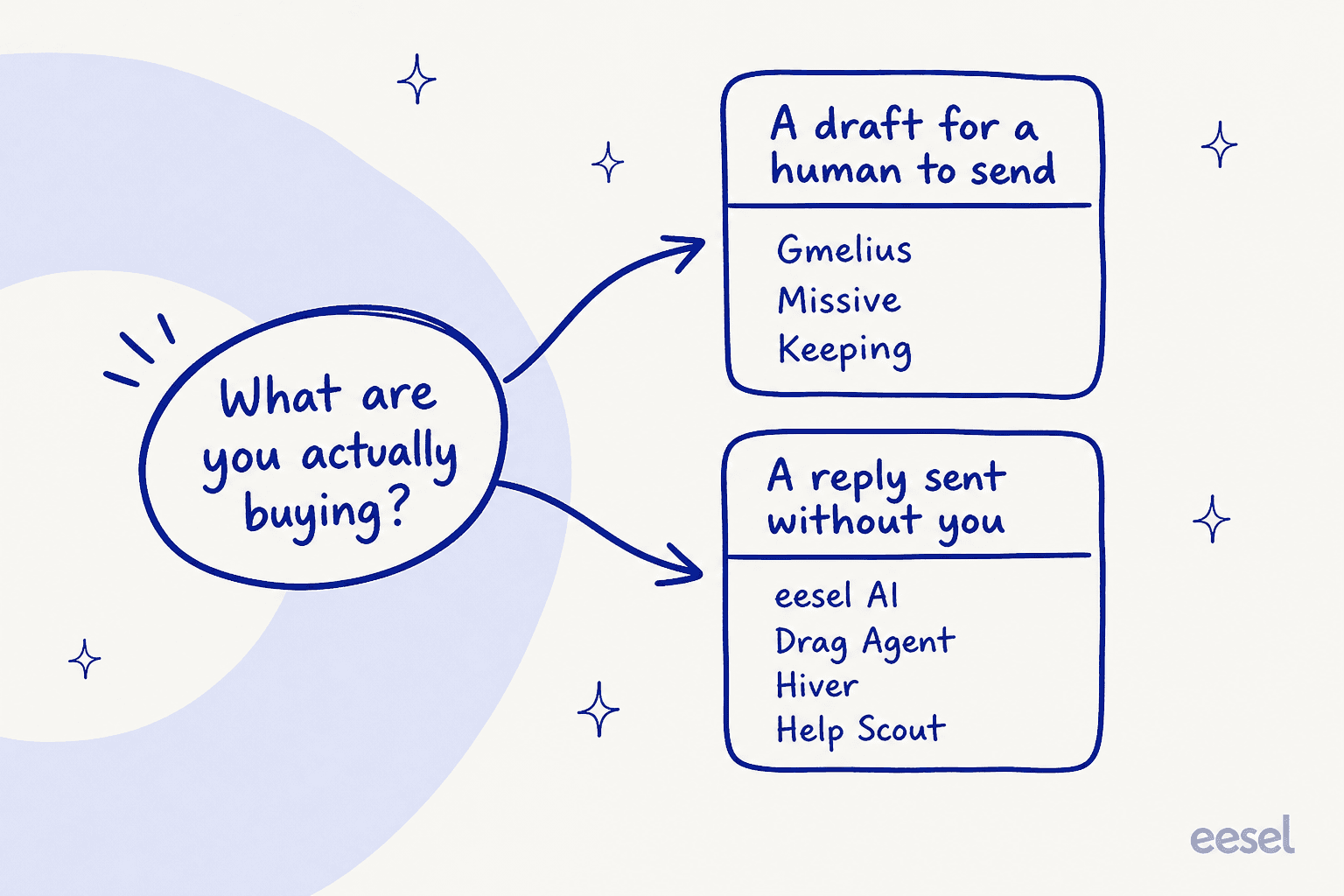
If you want a better draft, Gmelius is already fine and the alternatives are mostly cheaper versions of it. Missive at $14 and Keeping at $14 both undercut Gmelius Growth by $11 a seat for comparable collaboration. Stop reading and pick on price and feel.
If you want fewer emails to open, seat count stops being the question and three things start mattering:
- Will it send? Hiver, Drag Pro, Front Autopilot, Help Scout AI Answers, Freddy and eesel will. Gmelius, Missive and Keeping will not.
- What does it read? This is where most of the difference hides. Gmelius reads your sent mail and your sitemap. Help Scout reads your knowledge base and web sources but does not list ticket transcripts. eesel reads Drive, Confluence, Notion, your help center and past email threads. An agent is only as good as its worst knowledge gap, which is why an AI knowledge base audit is worth doing before you shop.
- Can you test it before it talks to a customer? Front simulates. Help Scout runs private scenarios. Gmelius has no documented dry run for any of its three assistants. We simulate every eesel rollout against historical tickets because we have watched a confident bot give a wrong answer to a real customer, and once is enough to make it policy.
And do the seat-versus-volume arithmetic before the feature comparison, not after. Ten people and 500 threads a month is a completely different purchase from three people and 4,000, and the widget above will tell you which one you are in about ten seconds.
Try eesel on the inbox you already have
If your Gmelius problem is that the AI writes nicely and saves nobody any time, you do not need to migrate to fix that. eesel's Email AI Agent joins your existing support email, reads your Google Drive, Confluence, Notion, help center and past email threads, then drafts and sends the replies it is confident about and flags the rest for a human. Setup is an OAuth flow, teams report going live in under 30 minutes, and it runs in 80+ languages out of the box.

Pricing is one fixed monthly price with no seats and no platform fee, so a five-person team routing 400 of its 1,000 monthly emails fits the 500-credit plan at $299/month and keeps its shared inbox exactly as it is. You get 100 free credits with every feature unlocked and no credit card, which is enough to find out on real email whether the AI can actually answer your customers. Start with the email integration, or check the pricing page if you want to run your own numbers first.
Frequently Asked Questions
What is the best Gmelius alternative in 2026?
How much does Gmelius cost per user?
Does Gmelius have a free plan?
Can Gmelius AI reply to customers on its own?
What does Gmelius AI train on?
sitemap.xml. There is no connector for a help center product, Notion, Confluence, Google Drive, uploaded files, or your archive of resolved tickets. If ticket history is the knowledge you want the AI using, that is a gap worth pricing.Is there a cheaper Gmelius alternative for a small team?
Does Gmelius work with Outlook?
How do I pick between Gmelius alternatives without a long trial?


Article by
Rama Adi
Rama is a software engineer at eesel AI with two years of experience writing about B2B SaaS, AI tools, and customer support technology. Based in Bali, Indonesia, he brings a developer's perspective to product comparisons — cutting through marketing copy to what the integrations and APIs actually do.