Workativ alternatives: 10 tools I priced for IT and HR in 2026

Riellvriany Indriawan

Katelin Teen
Last edited August 19, 2026

Why teams start looking past Workativ
Let me be fair to Workativ before I pick it apart, because the value story is real.
I work eesel's support queue every day, and the thing I notice about employee support tooling is how brutally the per-employee pricing model punishes you for growing. You hire 200 people and your AI bill doubles, even though those 200 people ask about four things. Workativ sidesteps that entirely. Its pricing FAQ answers the question flatly: "No, there is no limit on the number of users using the AI Agent." Unlimited employees on a $99 plan, in a category where the going rate is $150 per employee per year, is a legitimately good deal.
Founded in 2019 and run out of Wilmington, Delaware by Imran Quraishy, it is a small team shipping a broad connector library. The best-documented deployment is GoTo, which Workativ says auto-resolves 80% of employee requests across 50+ apps after replacing BOLD360.
So what drives the switching conversations? Three things, and only one of them is price.
The session meter has no overage, it has a wall
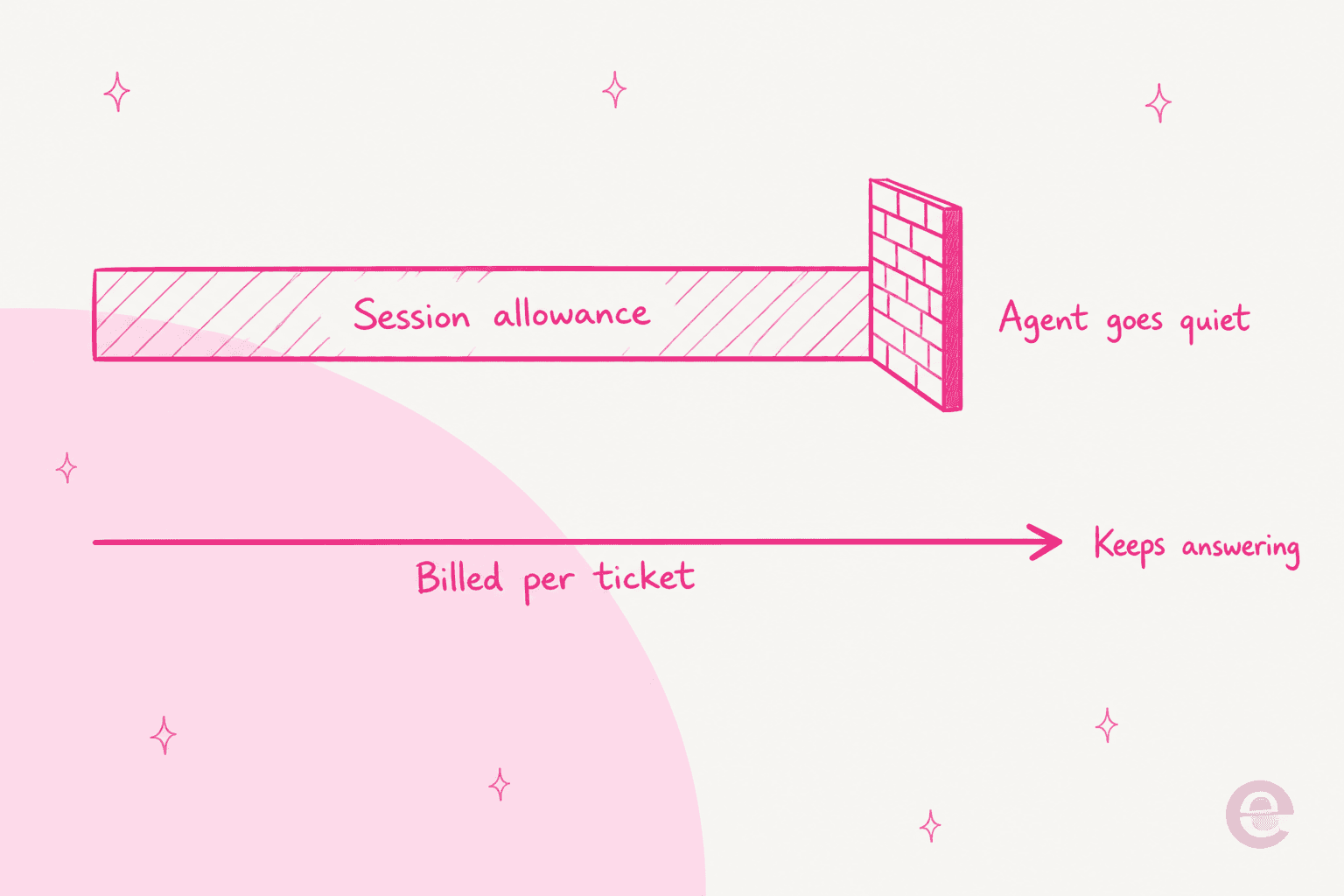
This is the sharpest thing on Workativ's price list. Ask what happens when you exceed your allowance and the pricing FAQ says:
"Your AI Agent will stop responding to user messages for the current billing period. We may notify you in advance via email."
No overage rate exists, per session, action or character, because there is no overage. On Starter's 200 sessions that hard stop is about six or seven conversations a day away. And the warning email is worded as discretionary.
What makes this hard to plan around is a second gap. Workativ defines a session as "a conversation between an AI Agent and the user" that runs "until the session expires", and the expiry window is not published anywhere. That single missing number decides whether 200 sessions covers your month or your first week. I checked the pricing page, the features page and the get-started page for it.
Worth knowing: Workativ is not alone here. Freshservice bundles 1,200 Freddy sessions per year per Enterprise license and publishes no overage rate either. The pattern across this category is that the allowance is published and the worst case is not.
It learns from your docs, not your tickets
Every training input Workativ documents is a knowledge artefact: website crawls, uploaded PDFs and policies, and connected stores like SharePoint, Confluence, Google Drive and Notion. Ticket history is not on the list, and it is not on the list in Workativ's own "what data can I train AI agents on" FAQ either. The closest thing is Knowledge AI's "Continuous Learning", which means the bot learning from its own conversations after launch, inside a 30 or 60 day retention window.
That matters more than it sounds. Your internal knowledge base is written for the people who maintain it. Your tickets are written by the people who are confused. Those are different documents, and only one of them tells the AI how your team actually answers. It is the difference between a tidy wiki and a real deflection rate.
This is not a theory I am floating. Past-ticket training is the single most requested thing we hear on eesel demo calls, to the point where our co-founder Amogh's standing note after calls is that people "really, really, really want to train on past tickets." One case that stuck with me: a French public-sector IT services firm on Freshdesk, running around 3,000 tickets a month of complex ERP troubleshooting, was losing two senior engineers that year and wanted their tribal knowledge captured in AI before they walked out the door. A website crawl was never going to do that job.
There is no dry run, and no self-serve door
Workativ has testing: a live chat preview, workflow testing in a controlled environment, and reasoning observability it calls AI Thoughts. What it does not have is a replay of your own historical tickets, so there is no way to get an automation-rate estimate before you go live. You configure, you deploy, and your employees are the test.
The other friction is the buying process. There is no self-serve signup anywhere, and no help center either. help.workativ.com refuses connections, the docs subdomains do not resolve, and onboarding is delivered as in-product tours. Every plan including the $99 Starter routes to the same demo booking, and onboarding assistance is Business and Enterprise only.
Two more things a buyer should check rather than assume. SSO, MFA, RBAC, SIEM and private hosting are all Enterprise-only rows on the pricing page, even though the homepage FAQ says enterprise-grade security is "included across all plans". And the deploy-time estimate ranges from "under 10 minutes for basic use cases" on the IT page to "Most teams go live within 2-3 days" in the site's own structured data, against "Most customers complete their migration in 2-4 weeks" on the migration page.
The review footprint is thin, and that is a finding
I could not build a picture of user sentiment here, and the reason is worth stating plainly. Workativ has 3 reviews on G2 at 4.8, 4 on Capterra at 4.5, and 1 on TrustRadius. Deduplicated, that is about four companies, and nothing is newer than July 2024, which means the current session-priced product has never been publicly reviewed. G2 says so itself on the page:
"There are not enough reviews of Workativ AI for G2 to provide buying insight. Below are some alternatives with more reviews:"

There is no Reddit, Hacker News or independent LinkedIn footprint either. That is not a knock on the product, it just means you cannot do reference checks the normal way, so your own trial has to carry more weight than usual.
The thing nobody tells you about this market
Here is what I found when I priced the whole shortlist, and it reframed the search for me.
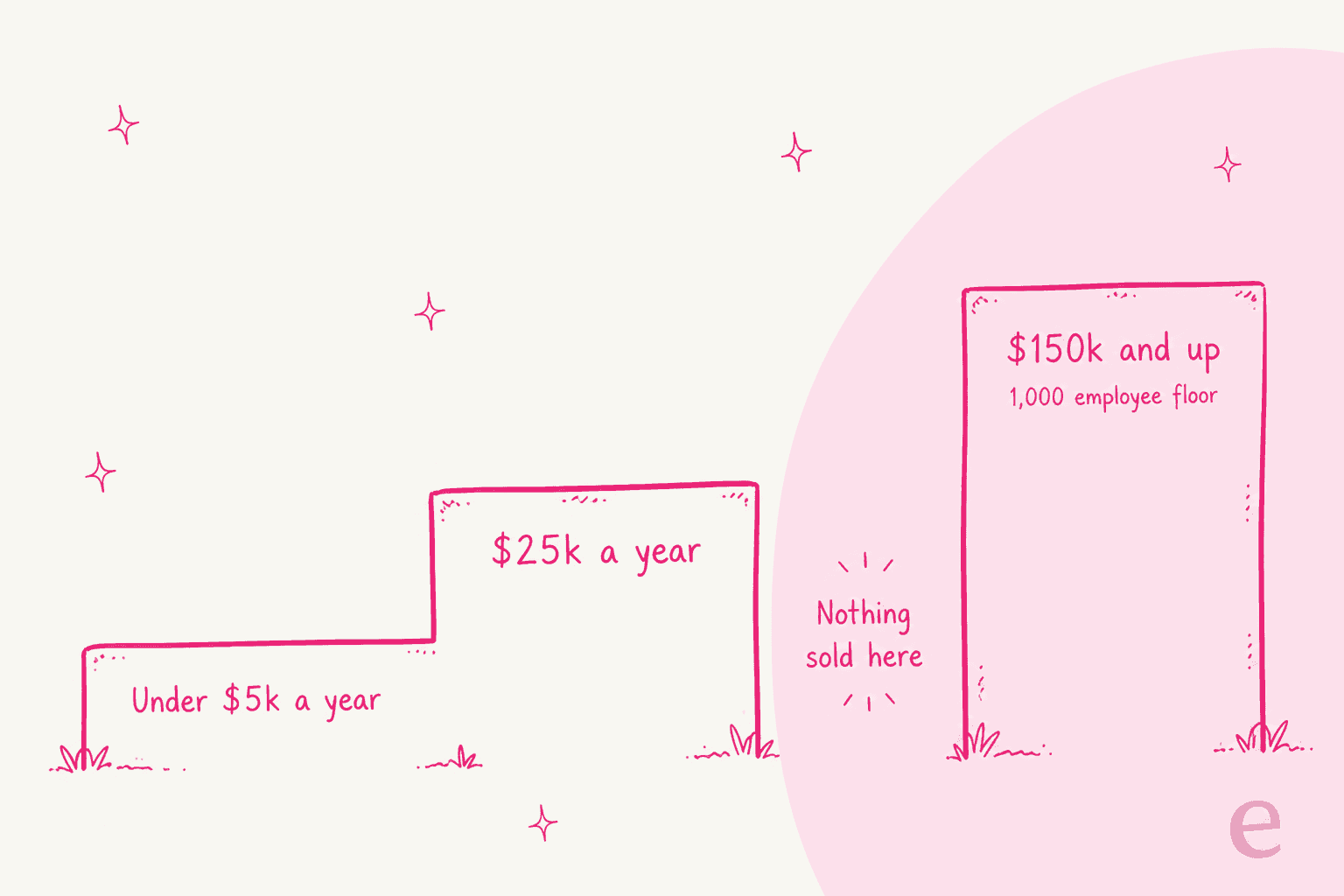
Workativ's own alternatives pages benchmark it against Moveworks, Leena AI, Aisera and Espressive. Fair enough, those are the category's famous names. But go and price them. Moveworks starts at a 1,000-user minimum. Aisera's cheapest published tier is $200,000/year. Leena AI's marketplace listing starts at 1,000 seats. Rezolve.ai publishes a 2,000-employee floor and says so on its own pricing page.
There is a canyon in the middle of this market, and Workativ sits on the cheap side of it. Between roughly $5,000 and $150,000 a year, almost nothing is sold. So the "alternatives" a Workativ customer is invited to compare against are, for most of them, not purchasable.
Which means the useful question is not "what is cheaper than Workativ". It is this:
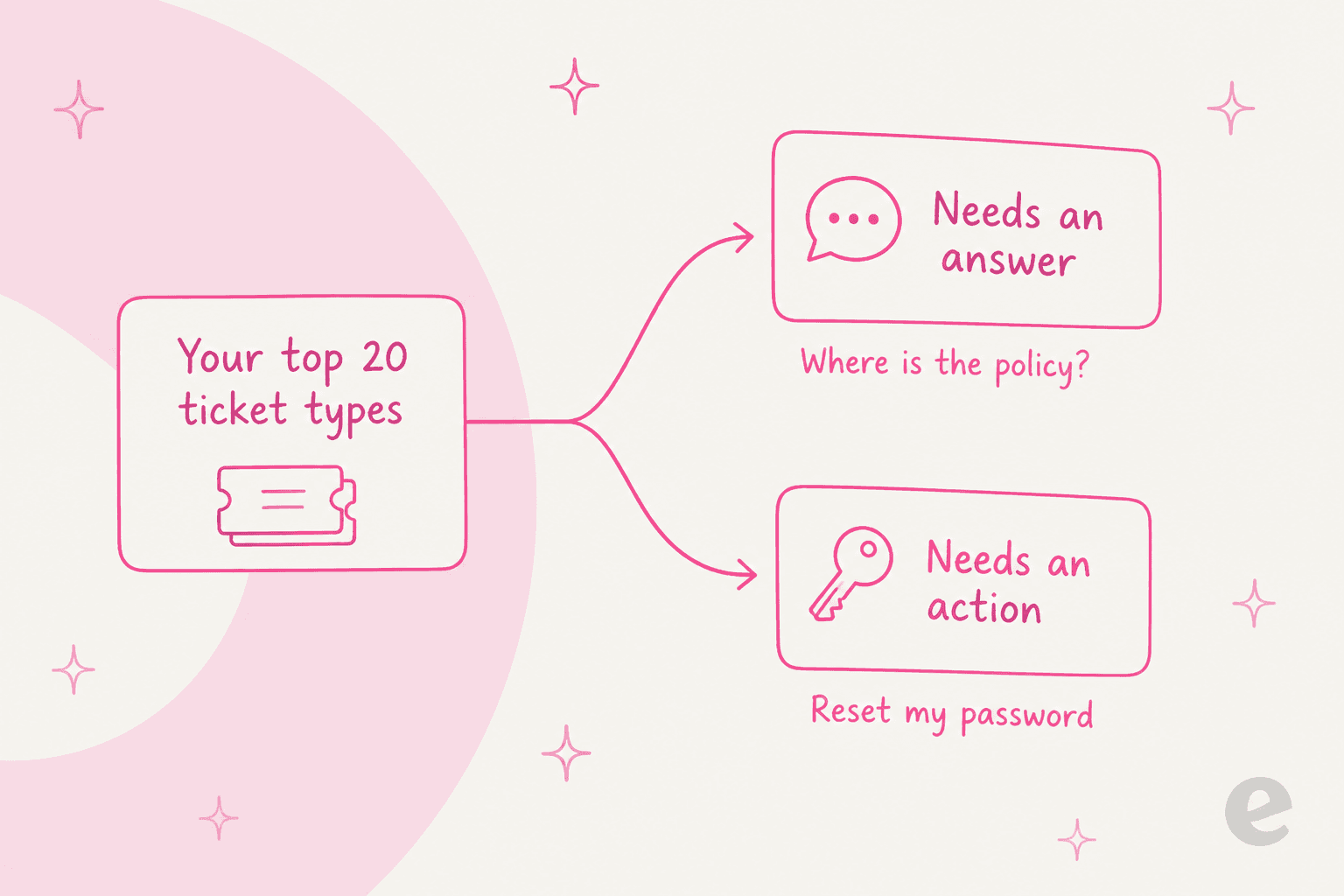
Pull your last 500 internal tickets and sort them. "Where is the travel policy", "how do I expense this", "what is the parental leave process" all need an answer, and the tool that wins is the one grounded in the best material. "Reset my password", "add me to the marketing Drive", "provision a Figma seat" need an action, and the tool that wins is the one with a real connector that writes to your directory.
Most teams I talk to are 70/30 on answers, and they shop as though they are 30/70. That is how you end up paying for a workflow platform to do a retrieval job.
How I picked these
Ten tools, all of them things a real IT or HR team could shortlist against Workativ. What I graded on:
- A published price, or an honest note that there isn't one. Where a vendor hides its rate, I went looking on Microsoft, AWS and SAP marketplaces and public procurement records, because that is where quote-only vendors accidentally publish real numbers.
- The employee or seat minimum. The most commonly hidden disqualifier in this category, and the reason most ITSM tools for small teams never make a shortlist.
- What the AI actually learns from. Docs only, or your ticket history too.
- Whether you can test before go-live, and whether that test uses your data or invented questions.
- Whether it acts or only answers, with a real published action list rather than an "integrates with" logo wall. Real ticket automation needs the former.
- Employee-facing only, or customer-facing too. Workativ is employee-only, and some teams need both.
- Where the queue lives. A Slack ticketing system and a Teams IT support bot are different products in practice, even when a vendor claims both.
Everything below is priced from the vendor's own pages or their own marketplace listings, checked on 20 August 2026. Where I use a competitor's characterisation of a rival, I say so.
The 10 best Workativ alternatives in 2026
| Tool | Best for | Entry price | Billable unit | Employee floor | Learns from tickets | Dry-run on your data | Acts in Okta/AD | Channels | Reviews |
|---|---|---|---|---|---|---|---|---|---|
| eesel AI | Answer-heavy queues, no floor | From $299/mo (500 credits) | Credit per ticket or chat | None | Yes | Yes | No | Slack, Teams, helpdesk, widget | Public case studies |
| Workativ | Action-heavy queues on a budget | $99/mo (200 sessions) | Session, hard stop | None | No | No | Yes | Slack, Teams, web | 4.8 (3 on G2) |
| Siit | Slack-first teams wanting flat cost | $23/admin/mo | Per admin seat | None | No | Playbooks only | Yes | Slack, Teams, email, portal | 5.0 (29 on G2) |
| Ravenna | Slack-native service desk | ~$50/agent/mo | Per agent seat | None | No | Testing mode | Yes | Slack, Teams (early access) | 5.0 (2 on G2) |
| Freshservice | Full ITSM with assets and change | $19/agent/mo | Per agent + AI sessions | None | Routing only | Docs-based tests | Via orchestration | Portal, Teams, Slack | 4.6 (1,349 on G2) |
| Atomicwork | Mid-market ITSM replacement | $25,000/yr | Platform + outcomes | 250 user cap | No | Not published | Yes | Slack, Teams, portal | 4.0 (1 on G2) |
| Moveworks | ServiceNow estates | $150/user/yr | Per employee | 1,000 users | No | Not published | Yes | Slack, Teams, portals | 4.4 (127 on G2) |
| Aisera | Large regulated enterprises | $200,000/yr | Per employee | 1,000-user tier | No | Not published | Yes | Slack, Teams, voice, web | 4.4 (146 on G2) |
| Leena AI | HR-led back-office automation | $150/user/yr (2-yr) | Per employee | 1,000 seats | No | Not published | Yes | Slack, Teams, web | 4.6 (151 on G2) |
| Rezolve.ai | Teams-first enterprises | Quote only | Per employee + fulfiller | 2,000 employees | Planning only | No | Yes | Teams, Slack | 4.8 (38 on G2) |
What this actually costs at your size
The table above hides how violently these models diverge once you put your own numbers in. Sixty employees and 400 tickets a month is a completely different shortlist to 3,000 employees and 400 tickets a month, and the difference is not the ticket count.
Play with the employee count and watch what happens. At 240 employees, six of the ten will not sell to you at all. Push past 1,000 and the enterprise tier unlocks, but the cheapest option there is still around 40 times the annual cost of the per-conversation meter.
1. eesel AI
Best for: teams whose top ticket types need answers, who want to see the automation rate before they commit.
I work here, so treat my enthusiasm accordingly and check the links. But the reason eesel belongs at the top of a Workativ list is specific, and it maps exactly onto the two gaps above.
Features. It trains on your resolved tickets as well as your wiki, and the ticket history is the input Workativ does not accept. Then it simulates: you point it at your past Jira Service Management requests and it reports per-theme coverage before it answers a single employee. The output is specific enough to act on, things like "Refund policy 28%" or "SSO login errors 35%", so you know which docs to write before go-live rather than after. It runs in Slack, Microsoft Teams, the helpdesk itself, and a chat widget, and it reads Confluence, Notion, Google Docs and SharePoint alongside the ticket history.
Pros. The meter is a conversation handled, not a reply: one credit each, with plans from $299/month for 500 credits on the published pricing page, and no seats and no platform fee. When credits run out, agents pause until they reset, or you turn on overage at $0.80 per extra credit with a monthly cap you set. The free plan is 100 credits with no card, and simulation runs inside it, so you can measure your own automation rate before you spend anything.
Cons. Two real ones, and the first is the reason this is not an automatic win over Workativ. eesel does not ship directory action connectors. I checked the live integrations page for Okta, Entra, JumpCloud, Workday and BambooHR and none are there. It resolves the question and drives the ticket, updating fields, priority and routing, but it will not reach into your directory and reset the password itself. If half your volume is provisioning, that is disqualifying and Workativ is the better buy. Second, ITSM coverage is Jira Service Management only, so no ServiceNow and no Freshservice. Also worth knowing: credits are used regardless of outcome, so a wrong answer still uses a credit, SOC 2 Type II is underway rather than certified, and HIPAA is talk-to-us while SSO and MFA are an add-on from $199/month.
Pricing.
| Plan | Credits per month | Price |
|---|---|---|
| Free | 100 | $0, no card |
| Teammate | 500 | $299/mo |
| Teammate | 1,000 | $499/mo |
| Teammate | 2,500 | $999/mo |
| Teammate | 5,000 | $1,899/mo |
One credit covers one ticket or conversation, however long. Pay a year upfront and get two months free. Add-ons: priority support from $299/mo, SSO and MFA from $199/mo.
My take: the honest split is that eesel wins the answer half of your queue decisively and does not compete on the action half. For a service desk drowning in "how do I" questions, being able to prove the deflection number during a free trial is worth more than a connector you will configure twice and forget. Our InDebted case study is the honest version of the numbers: a 5 to 10 person IT team supporting hundreds of employees on Jira, at 15% deflection today with 55% as the target. Not a hockey stick, a real ramp.
2. Workativ, if you stay
Best for: small IT teams with predictable volume and a lot of provisioning work.
Worth saying clearly: staying is a legitimate outcome. If your queue is action-heavy and your volume is stable under the session cap, Workativ is priced better than anything on this list except the per-conversation meter.
Features. 100+ advertised integrations, with a published breakdown of 19+ ITSM, 15+ access management, 13+ HR and 9+ MDM connectors. The ServiceNow connector reads, creates, updates and closes, does CMDB lookups, and routes approvals while respecting existing ACLs and assignment groups. That is a real step up from most ServiceNow AI options at this price. Jira creates with the right request type, queue and SLA, then auto-closes once the underlying action completes. Password resets and account unlocks execute in Okta, Azure AD or Active Directory, with the ticketing tool getting the audit record.
Pros. Unlimited end users on every plan. Real action execution, so it closes the loop instead of only filing the ticket. An on-prem connector for systems behind a firewall.
Cons. The session hard stop with no published expiry window. No past-ticket training and no historical dry run. SSO, MFA and RBAC are Enterprise-only. No public API or webhooks that I could find across the sitemap. Around 18 of the 95 catalogue tiles are flagged coming soon, and SAP SuccessFactors is one of them. Connector counts vary between "100+" and "80+" depending on the page.
Pricing. Starter $99/month for 200 sessions, 1 agent, 2 actions, 1 admin, 3 million training characters, 30-day retention. Business $349/month for 500 sessions, 2 agents, 5 actions, 3 admins, 10 million characters, 60-day retention. Annual shows as $84 /month billed annually and $3560 /year respectively, which is a genuine unit switch to watch when you compare them.
My take: stay if provisioning is the job and your volume is flat. Leave if volume is growing, because the tier step from Starter to Business buys 300 extra sessions for $250, which works out worse per session than the plan you were on.
3. Siit
Best for: Slack-first teams who want a flat, predictable bill and real directory actions.
Siit is the closest thing on this list to a cheaper Workativ, and it is the one I would put head to head with it.
Features. Slack-native rather than a relay: create a ticket with a mention, a DM or a right-click, follow up in-thread, approve in-thread. On the Pro tier the whole intake conversation happens in Slack, including service matching and form validation. Microsoft Teams is a true peer rather than a skin, and email plus a branded portal come on every plan. The action list is published and concrete: /okta reset password, /okta add to group, /jumpcloud reset user mfa, /google add to group, all approval-gateable. It writes to Okta, Google, Entra ID and JumpCloud, and to Jamf, Intune and JumpCloud for devices.
Pros. The pricing model is the standout. Siit's own FAQ: "Siit is priced per Admin. You can support unlimited employees at no extra cost, and your employee headcount never increases your bill." No AI usage meter at all, which in 2026 is rare. SSO, RBAC, SOC 2, MCP and an open API are all on the entry tier. Shadow mode lets you run playbooks with "simulate" to log what would have happened without changing anything.
Cons. There are effectively two Siits, because all AI is gated to the $89 Pro tier and SLA management is stapled to it. Knowledge grounding is Notion, Confluence and Slab only, with no CSV import and, per its own docs, no path to train on past tickets. Only annual billing is published. G2 reviewers flag reporting limits, Notion sync not being real-time, and Teams mobile forms breaking on iOS.
Pricing. Essentials $23/admin/month billed annually, Standard $45, Pro $89 with all AI. No free plan, 14-day trial, no published seat minimum.
My take: if you have four people working the queue and you want the bill to stop moving, Pro at $89 for four admins is $4,272 a year with no session anxiety and real Okta actions. That is the cleanest structural answer to Workativ's hard stop. Just be clear that below Pro you are buying a ticketing system, not an AI agent, and that wiki-only grounding puts a ceiling on tier-1 deflection.
4. Ravenna
Best for: Slack-native service desks that want the agent to finish the task, not route it.
Ravenna frames itself against Jira Service Management with a line I think is the sharpest positioning statement in this whole category: "Ravenna doesn't route the work. It finishes it."
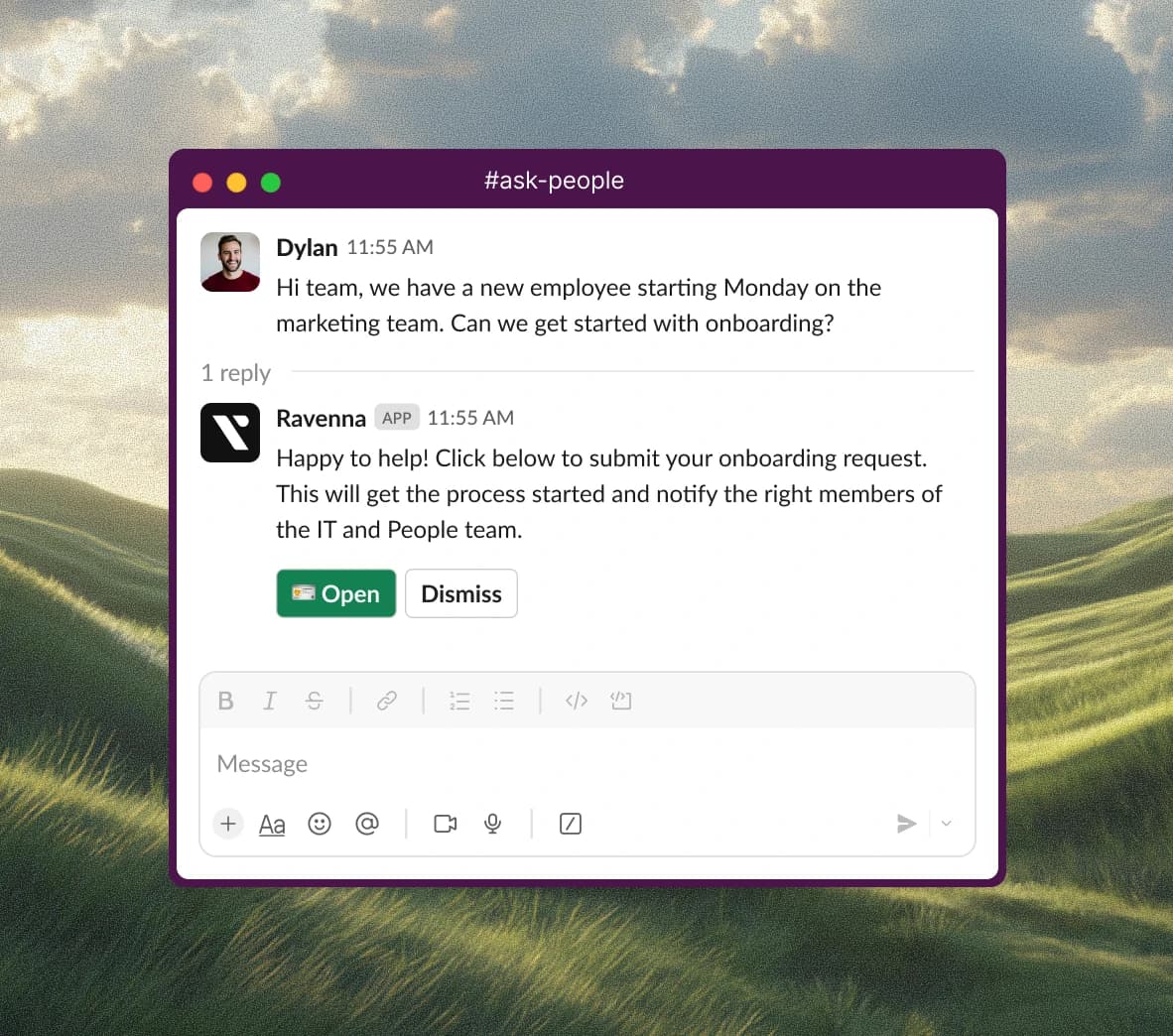
Features. Any Slack message becomes a ticket. Five ITSM ticket types, approvals with multi-stage rounds, private tickets for HR and legal cases. Agents have a sandboxed Testing Mode before rollout, and per-tool execution policies where write and delete tools default to requiring confirmation while reads auto-execute. There is a real access-provisioning catalogue with access policies and entitlement lifecycle, which is what makes "grants the Okta seat" true rather than aspirational. Nice touch: when a response contains a password or API key, it goes as an ephemeral DM with a placeholder left in the channel.
Pros. Was a Slack Assistants launch partner. Knowledge creation by emoji reaction on any good answer. An MCP server so Claude and other clients can drive tickets. $15M raised from Madrona and Khosla.
Cons. No pricing page at all, ravenna.ai/pricing 404s. The only published rate is a vendor-supplied G2 line, "plans starting at $50/agent/month", which G2 stamps as last updated 1 July 2025, so treat it as stale. A paid Slack plan is required for the AI agent in the Slack app container, so budget a second vendor's bill for the headline feature. Teams is early access. And the evidence base is two G2 reviews, both of which flag immaturity.
Pricing. No published page. Roughly $50/agent/month per the stale G2 figure, after a two-week trial with no card.
My take: the most architecturally interesting tool here and the one I would trial if my team lives in Slack and my volume is provisioning-heavy. Also the one where I would push hardest on a written price, because a rate last confirmed over a year ago is not a rate. If you want the fuller picture, we went deeper in our Ravenna alternatives writeup.
5. Freshservice
Best for: teams that need real ITSM discipline underneath the chat agent.
If what you actually want is ITSM with assets, change management and a CMDB underneath the AI, Freshservice is the obvious move and Workativ was never really competing.
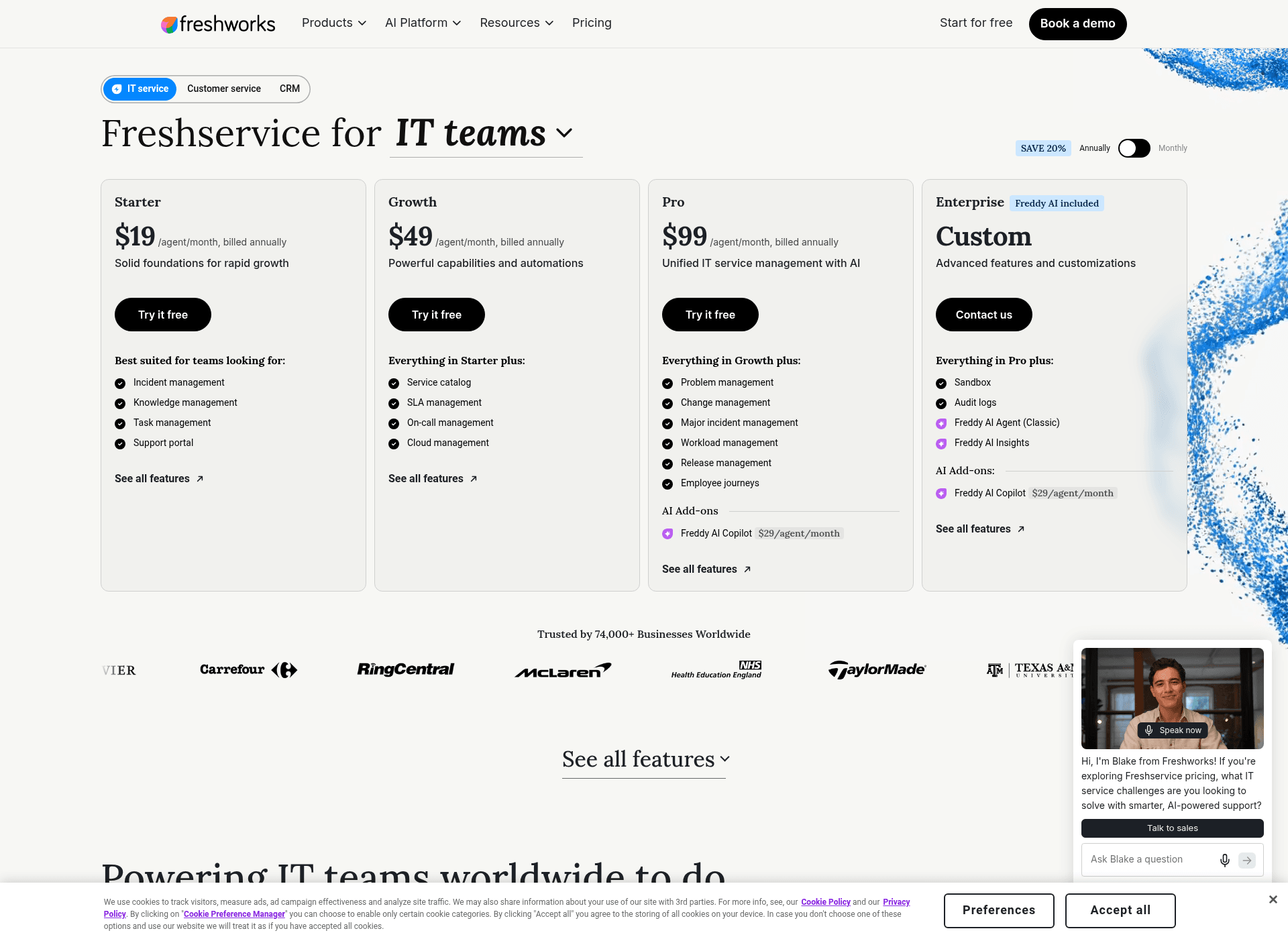
Features. Full ITIL practice coverage, with problem, change including CAB and change calendars, release and major incident management on Pro. Service catalog, SLA and on-call on Growth. Sandbox and audit logs on Enterprise. It connects to Microsoft Teams and Slack, and the non-IT expansion path is a Business Agent License at $49/agent/month for HR, facilities and finance.
Pros. The only tool here with a serious review base, at 4.6 from 1,349 on G2 and 4.6 from 790 on Capterra. Billing is per agent, so employees are unmetered. Freddy AI Agent Studio is on Growth and up, and Freshworks is currently giving it away as "a promotional Free Service" through 30 September 2026.
Cons. The AI story is fragmented into four differently-gated products, which is easy to get wrong. Freddy AI Agent Classic, the actual deflection bot, is Enterprise-only, bundles 1,200 sessions per year per license, and publishes no overage rate and no session packs. Its session is "a unique user interacts with an AI Agent within a 24-hour window", and a conversation running past 24 hours counts as multiple sessions. Freddy AI Copilot is a separate $29/agent/month add-on on Pro and above. Past tickets are not a knowledge source, and batch testing runs at most 50 questions that Freddy generates from your docs, so it proves the agent answers your documentation rather than last quarter's queue. Asset management is a second purchase and the ITAM price list publishes no prices at all. Trustpilot sits at 2.2 from 102 reviews, which is a real counterweight to the G2 score.
Pricing. Starter $19, Growth $49, Pro $99 per agent per month billed annually, or $29/$59/$119 monthly. Enterprise is quote-only. No free plan, 14-day trial.
My take: buy it for the ITSM, not the AI agent. Getting Freddy Classic means Enterprise, which means a quote, which means you have left the price band that made Workativ attractive. We wrote up the gaps in more detail under Freshservice AI limitations.
6. Atomicwork
Best for: mid-market teams replacing a legacy service desk outright.
Features. Atomicwork is an AI-first service management platform with named AI Coworkers, aimed at IT, HR, security and finance. Its most interesting commercial idea is outcome pricing, sold alongside the platform: $1 per knowledge outcome with a 25,000/year minimum, $2 per access outcome with a 12,000/year minimum, and from $3 per service-resolution outcome with an 8,000/year minimum. You can also bring your own ServiceNow or Jira Service Management and pay outcomes only, with no platform fee.
Pros. A real published floor, which is rarer than it should be at this level. Capacity caps count employees who can ask rather than multiplying per head, so a 240-person company with a 4-person IT team is a 240-user contract with no per-employee rate. Funded, with a Series A of over $25 million in January 2025 co-led by Khosla Ventures and Z47.
Cons. $25,000/year is the entry, billed annually, with no monthly option at all. The Professional tier caps you at 250 end users, 500 devices, 50 apps and 2 AI Coworkers, and each extra Coworker is $499/month, a 23.95% uplift on the floor. Custom models are Enterprise-only despite being a headline pitch. The evidence base is thin: 4.0 from exactly 1 review on G2 and 4.0 from 1 on Capterra, and the Capterra one is vendor-referred and incentivised. A practitioner in r/itsm names the model problem directly:
"Console and Atomicwork charge per employee, not per technician, and that gets expensive fast."

Pricing. Professional from $25,000/year including 25,000 credits, 2 AI Coworkers and up to 250 end users. Business is "flexible pricing". Enterprise is a custom contract.
My take: at a filled 250-user cap that is $100 per employee per year, which is respectable. At half cap it is $200, which is not. This is a platform replacement decision, not a Workativ swap, and if you are only shopping because of a session cap you are about to spend 20 times more to solve it.
7. Moveworks
Best for: large ServiceNow estates that want the incumbent's AI layer.
Features. The original of the species, and still the deepest employee-support agent at scale. Moveworks does enterprise search, workflow execution, record updates and approvals across chat apps, web, intranets, service portals and mobile.
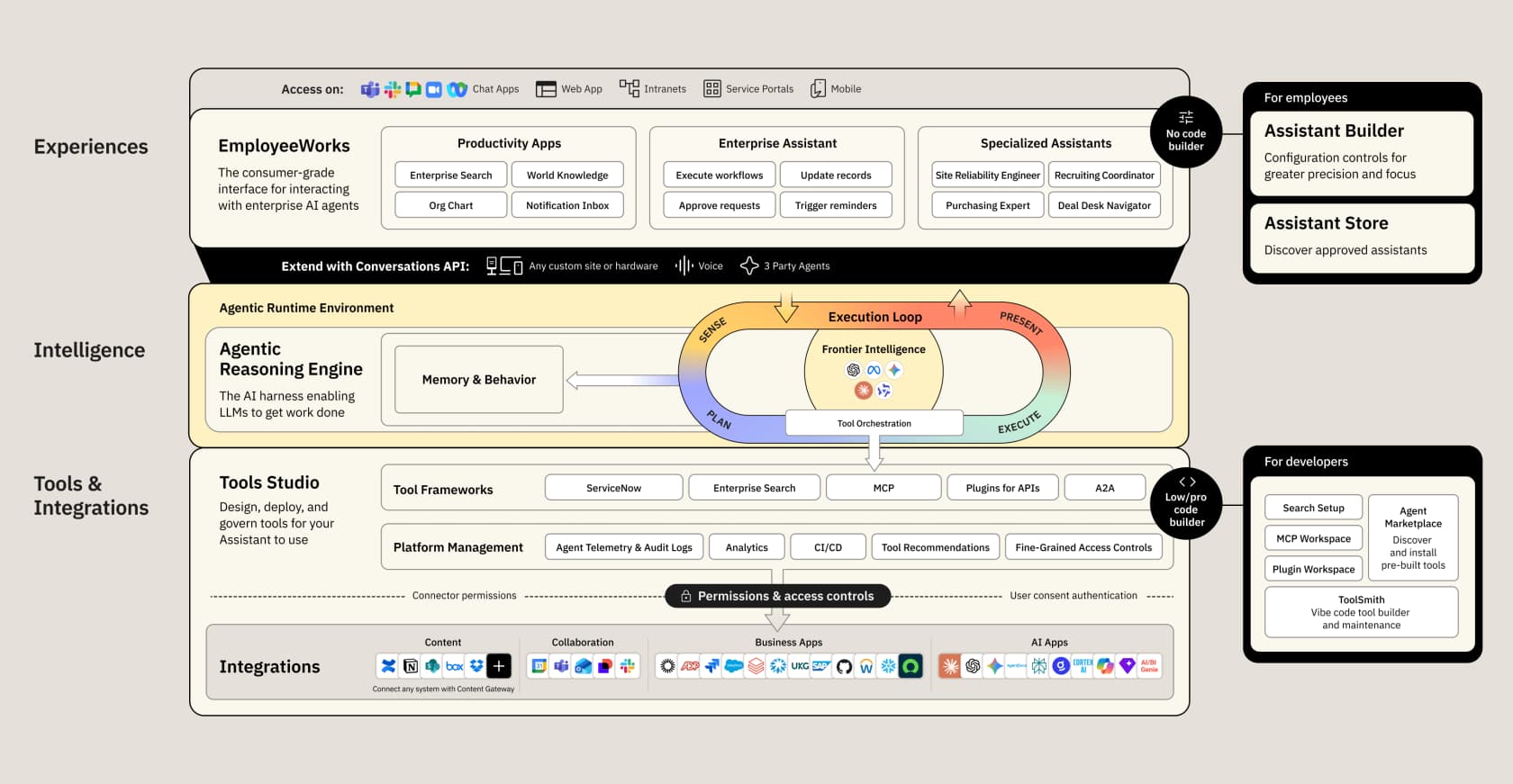
Pros. 4.4 from 127 reviews on G2, the second-largest evidence base here. ServiceNow acquired it, with the deal closing 15 December 2025, and ServiceNow's own February 2026 release says plainly that "Moveworks continues to be offered as a standalone product within the ServiceNow portfolio". So a non-ServiceNow shop can still buy it.
Cons. The naming is in flux, and buyers should ask about it directly. ServiceNow shipped Otto at Knowledge 2026, and the Otto product page's FAQ says it "replaces Now Assist and Moveworks across all ServiceNow products, channels, and surfaces", with rollout "across all products in the year ahead" and no per-product date. G2 has already renamed the listing to ServiceNow EmployeeWorks while the review bodies still say Moveworks. No pricing is published on any Moveworks page. Reviewer-reported implementation runs about 3 months against an 8-week marketing claim. Assistant Builder is still marked coming soon.
Pricing. No public price. The real number is on AWS Marketplace at $150/user/year in the 1,000 to 2,500 user band, and that 1,000-user floor is the only published minimum, so the practical entry point is around $150,000 a year. One public procurement record exists, a Navy purchase order at $50,011, but no seat count is published so no per-user rate is derivable from it.
My take: a serious product and completely irrelevant to anyone shopping at Workativ's price. If you are already on ServiceNow and above 1,000 employees, it is the default. Otherwise the floor decides for you. We keep a fuller comparison in Moveworks alternatives and a price breakdown at Moveworks pricing.
8. Aisera
Best for: large regulated enterprises that want one vendor across ITSM, HR and voice.
Features. Aisera is the broadest platform on this list, spanning AI service desk, customer service, AIOps and voice. It was named a Visionary in Gartner's September 2025 Magic Quadrant for AI Applications in ITSM.
Pros. 4.4 from 146 reviews on G2. Unusually for this tier, there is now a free door in: an AWS Marketplace listing for Aisera Assistant, sold by Automation Anywhere, with a 30-day free trial for up to 50 users at $0.00. That is the only no-sales-call way to touch any enterprise tool here.
Cons. The published price is the story. Microsoft Marketplace lists AI Service Desk at $200,000.00/year for up to 1,000 users and $1,200,000.00/year for up to 10,000, and both are scoped to a single ticketing or knowledge system. AWS states the unit plainly: "each individual person who accesses the service desk counts as one billable user", so a 200-person company pays $1,000 per employee per year with no smaller tier to step into. G2's own aggregate reviewer data says time to implement is 4 months and time to ROI is 18 months, against Aisera's integrations page promising "in minutes, not months". Integration counts differ between Aisera's own materials, 100+ on the integrations page and 500+ on AWS. Capterra 404s and TrustRadius has no reviews, so G2 is the only volume, and many recent reviews there are flagged as incentivised.
Pricing. $200,000/year up to 1,000 users, $1,200,000/year up to 10,000, per Microsoft Marketplace. Quote-only above that.
My take: the honest read is that Aisera's floor is its filter. Also note the shape of the evidence: all five case studies on its own homepage are internal employee support, so if you are shopping the customer-facing half you are buying the side with no named reference. Our Aisera pricing page tracks the numbers, Aisera vs Moveworks covers the head to head.
9. Leena AI
Best for: HR-led back-office automation in large, stable organisations.
Features. Leena AI runs three internal assistants across IT, HR and finance, pitched as "AI Colleagues for the back-office". If HR is the department driving your project rather than IT, this is the one built for that org chart, and it is a different shape to a standard HR ticketing system. It connects to ServiceNow and Workday as systems of record, and it names Copilot Studio, Moveworks and Glean as its rivals rather than any helpdesk vendor, which tells you where it thinks it sits.
Pros. The largest review base of the enterprise group at 4.6 from 151 on G2, plus 4.5 from 13 on Capterra.
Cons. leena.ai/pricing 404s and there is no pricing link in the nav or footer, so nothing is published on its own site. The real rate is on marketplaces, and there the floor is 1,000 seats. A Reddit rollout account from August 2026 names the integration reality:
"Was easy to get our ServiceNow and Workday integrated, but we have a few custom applications where we have to get the APIs built internally. That was a pain, but had to do it."
Worth noting for balance: 128 of the 151 G2 reviewers are in Asia, and many are tagged as incentivised or G2-invited, so the score is not an unprompted global sample. One G2 reviewer says directly that "pricing transparency could be improved".
Pricing. Microsoft Marketplace publishes $150.00/user/year on a two-year subscription, billed as $300.00/user for 2 years, with a seat range of 1,000 to 1,000,000. So the cheapest published door is $300,000 for two years. The SAP Store lists the Enterprise Virtual Assistant Edition at USD 300,000.00 Per Year plus a USD 50000.00 setup fee, including 1,000 users on a one-year minimum.
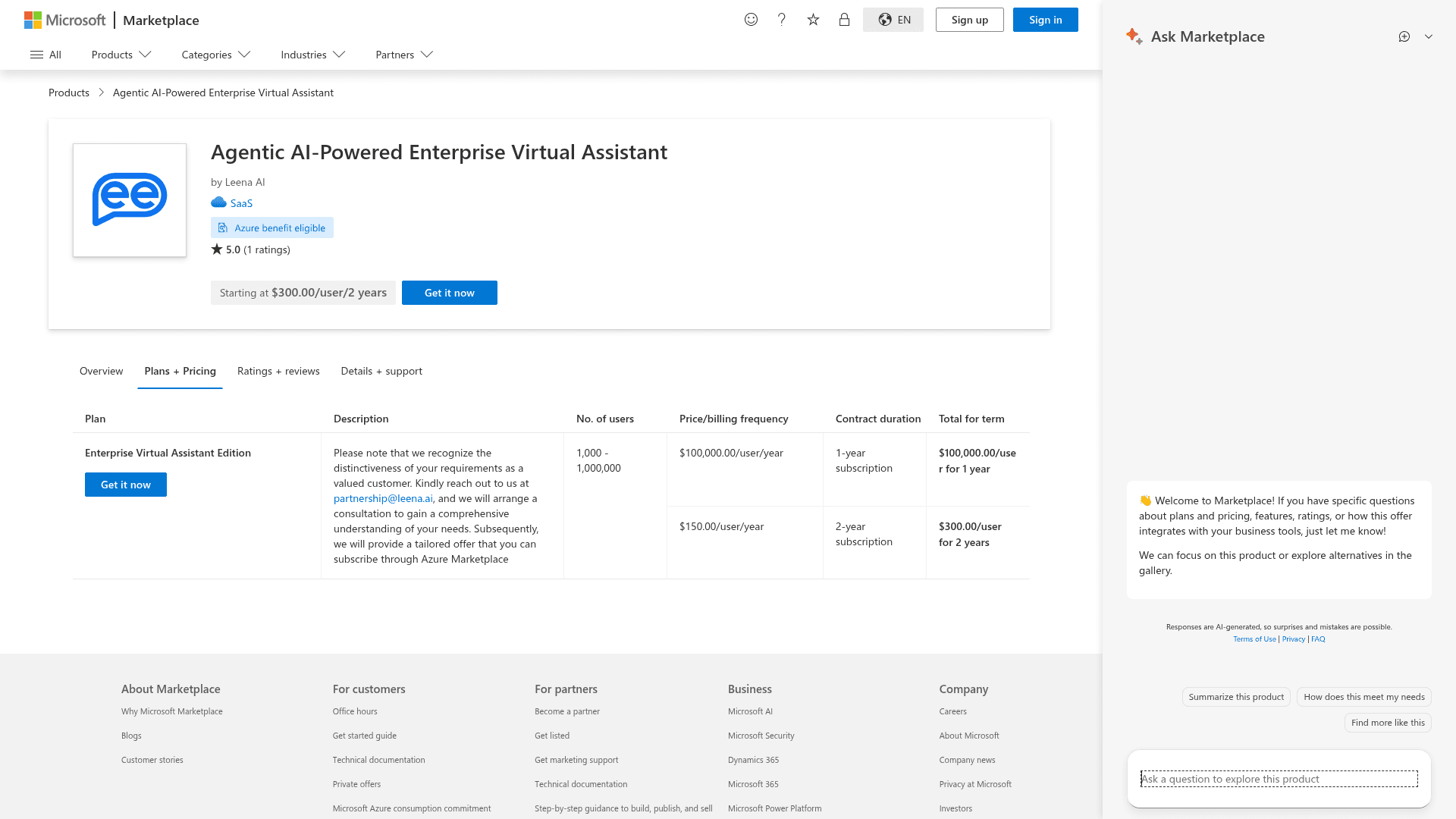
One caveat on reading that listing: the one-year row shows $100,000.00/user/year, which against a 1,000-seat minimum would imply a $100 million floor. That is clearly a total-contract figure typed into a per-user field, so use the two-year rate.
My take: the term ladder is the interesting part, and it is negotiable. One year lands near $25 per employee per month, two years halves it to about $12.50, and the setup fee ranges from $50,000 on SAP to $200,000 on AWS for what is broadly the same thing. A 4x spread on a setup fee is a negotiating anchor, not a price. None of which helps if you have 240 employees.
10. Rezolve.ai
Best for: Microsoft-heavy enterprises above 2,000 employees.
Quick disambiguation first, because search will mislead you: this is Rezolve.ai, legally Actionable Science Inc., founded 2016 in Dublin, California. An unrelated NASDAQ-listed company owns a nearly identical name and dominates the search results.
Features. Properly Teams-first, with the Microsoft estate as the deepest integration set across Entra ID, Active Directory, Intune, SharePoint and M365. It ships an optional full ITSM record layer with incident, problem, change including CAB, requests, joiner-mover-leaver, assets and CMDB, so it can either sit on your ServiceNow or replace it. Its DeskIQ feature is the most interesting thing here: it clusters 12 months of ticket history into ranked automation opportunities with projected hours saved, which is the only pre-purchase estimate anyone on this list offers.
Pros. 4.8 from 38 reviews on G2 and 4.8 from 9 on Capterra, plus a 4.8 on Microsoft AppSource. An explicit anti-meter stance: you pay for people, not usage, with only the Autonomous Agents SKU carrying a per-run option. The technician and ITSM SKUs price per fulfiller, so only people who work tickets count, and they "true down" at renewal.
Cons. A hard minimum of 2,000 employees, stated openly on its own pricing page with the reasoning that "below that, the return rarely justifies an enterprise deployment". No published price anywhere, four separately-bought SKUs, typical two to three year contracts, and no free trial or self-serve signup. On answers it grounds only in approved knowledge bases and specified websites, describing that as "never Reddit, never the open web, never invented", so DeskIQ's ticket reading informs planning and agent assist but not the answer index. There is no historical-ticket dry run; the safety model is runtime approval gates instead. Creator Studio, the natural-language automation builder, is marked coming soon, so automations are built for you as a service today. And despite 38 G2 reviews, 36 are North American and there is effectively no independent community footprint.
Pricing. Quote only. One 30-minute scoping call, then an all-in figure in roughly 48 hours.
My take: I like the honesty of publishing a floor that disqualifies most readers, and DeskIQ is the feature I wish more vendors shipped. But an unpublished price on a two to three year term with no trial means your evaluation is a procurement exercise, not a pilot.
So which one would I actually pick
Sort your last 500 internal tickets into answers and actions first. Everything else follows from that ratio.
- Mostly answers, any size, want proof before you pay. eesel AI. From
$299a month for 500 conversations, learns from your closed tickets, and the simulation gives you a real number during a free trial. Accept that it will not reset a password for you. - Mostly actions, flat volume, small budget. Stay on Workativ. Nothing else at
$99a month executes in Okta and Active Directory with unlimited employees. - Mostly actions, growing volume, Slack shop. Siit Pro at
$89per admin. You trade the session cliff for a per-seat bill that ignores your ticket count. - You want the agent to finish the task inside Slack. Ravenna, with a written price in hand before you sign.
- You need assets, change management and a CMDB. Freshservice, bought for the ITSM rather than for Freddy. Our ITSM automation guide covers what to sequence first.
- Above 1,000 employees with real budget. Moveworks if you are on ServiceNow, Aisera if you want one vendor across everything, Leena AI if HR is driving, Rezolve.ai if you are a Microsoft shop above 2,000 people.
Two adjacent options worth a look if none of the above fits: Unthread and ClearFeed both work the Slack-first internal queue from a lighter angle, and if you inherited a Workativ-shaped brief from a legacy vendor, Espressive alternatives covers that migration.
The one pattern I would push back on hardest: do not buy a workflow-automation platform to solve a retrieval problem. If your top 20 ticket types are questions, the tool that reads your ticket history will beat the tool with 100 connectors, and it will cost a fraction as much. That is as true for an HR helpdesk as it is for IT service desks.
Try eesel AI for your internal service desk
If your IT or HR queue is mostly the same questions asked in different words, that is the problem eesel was built for. It plugs into Slack or Microsoft Teams and reads the tickets your team has already closed, so it answers the way your team answers rather than the way your wiki is written.
The differentiator against everything above is the dry run. Point it at your past Jira Service Management requests and it reports coverage per theme before it replies to a single employee, so you find out it only covers 28% of refund-policy questions while there is still time to write the doc. Billing is one credit per conversation handled on a fixed monthly price from $299, with no seats and optional capped overage, and the free plan is 100 credits with no card, simulation included. Start with the pricing page if you want the numbers first.
Frequently Asked Questions
How much does Workativ cost?
$84 /month billed annually for Starter and $3560 /year for Business, and Enterprise is quote-only. There is no per-user fee, which is unusual in this category. See how that compares in our roundup of internal support chatbot options.What are the best Workativ alternatives for a small IT team?
Does Workativ train its AI on past tickets?
What happens if you run out of Workativ sessions?
Is Workativ good for customer support as well as employee support?
Which Workativ alternatives can actually reset a password?
Can I try a Workativ alternative for free before paying?


Article by
Riellvriany Indriawan
Riell is a designer and writer at eesel AI with about two years of experience researching CX platforms, AI chatbots, and helpdesk software. She combines her design background with a sharp eye for how these tools actually look and feel in practice — making her comparisons unusually visual and user-focused.