

The best HR ticketing system in 2026 depends on one question almost no vendor page answers: what happens to a case that HR's own business partner must not see. Workday sets security per case, ServiceNow's customers run employee-relations cases on a separate restricted track, HR Acuity builds privilege controls in, and Zendesk names no confidential-ticket feature at any published tier. That is the split, not the feature grid.
On price, the published list runs from $24 per agent per month (HappyFox Basic, hard-capped at five agents) through $49 (Freshservice Business Teams) to $99 (Zendesk Employee Service Professional). ServiceNow, Workday, HR Acuity, Leena AI and Applaud publish nothing. And the sticker is never the bill: Zendesk's Copilot add-on costs $50 per agent per month, more than an entire Suite Team seat, and Zoho hides HR case management behind its top plan.
If your problem is really "the same five questions, 200 different ways," a new queue does not fix it, and HR practitioners will tell you so. That is the gap eesel fills: it sits on the helpdesk you already have, answers from your own handbook inside Slack and Teams, and you can simulate it against your real past requests before a single employee sees it.
The question every HR ticketing thread asks and nobody answers
I work eesel's support queue, so I spend my days in other people's ticketing systems. When I went looking at how HR teams choose one, I expected arguments about features. What I found instead, in thread after thread, was one question raised and then quietly dropped.
"What do you prefer? The shared inbox or a ticketing service? My team is looking into this but we're concerned with the confidentiality of some questions and issues we get."

Nobody answered her. The thread moved on to tool recommendations, and the most common recommendation was the one that makes the confidentiality problem worse: piggyback on whatever IT already runs.
"We use Fresh Service, which is what our IT uses. Maybe see what your IT team is using and piggyback on that."
That advice is not wrong, and it is often the cheapest path. But an HR queue is not an IT queue with different labels, and the difference is structural. ServiceNow says it plainly in its own category page: HR systems hold extremely confidential data, so you have to enable various levels of access or you end up with "users … gaining access to sensitive information they do not need, even among your HR department" (ServiceNow on HR case management). An IT incident queue almost never needs a permission model that excludes members of the team that owns the queue.
So before comparing prices, split your inbound into three lanes, because each one wants a different answer.
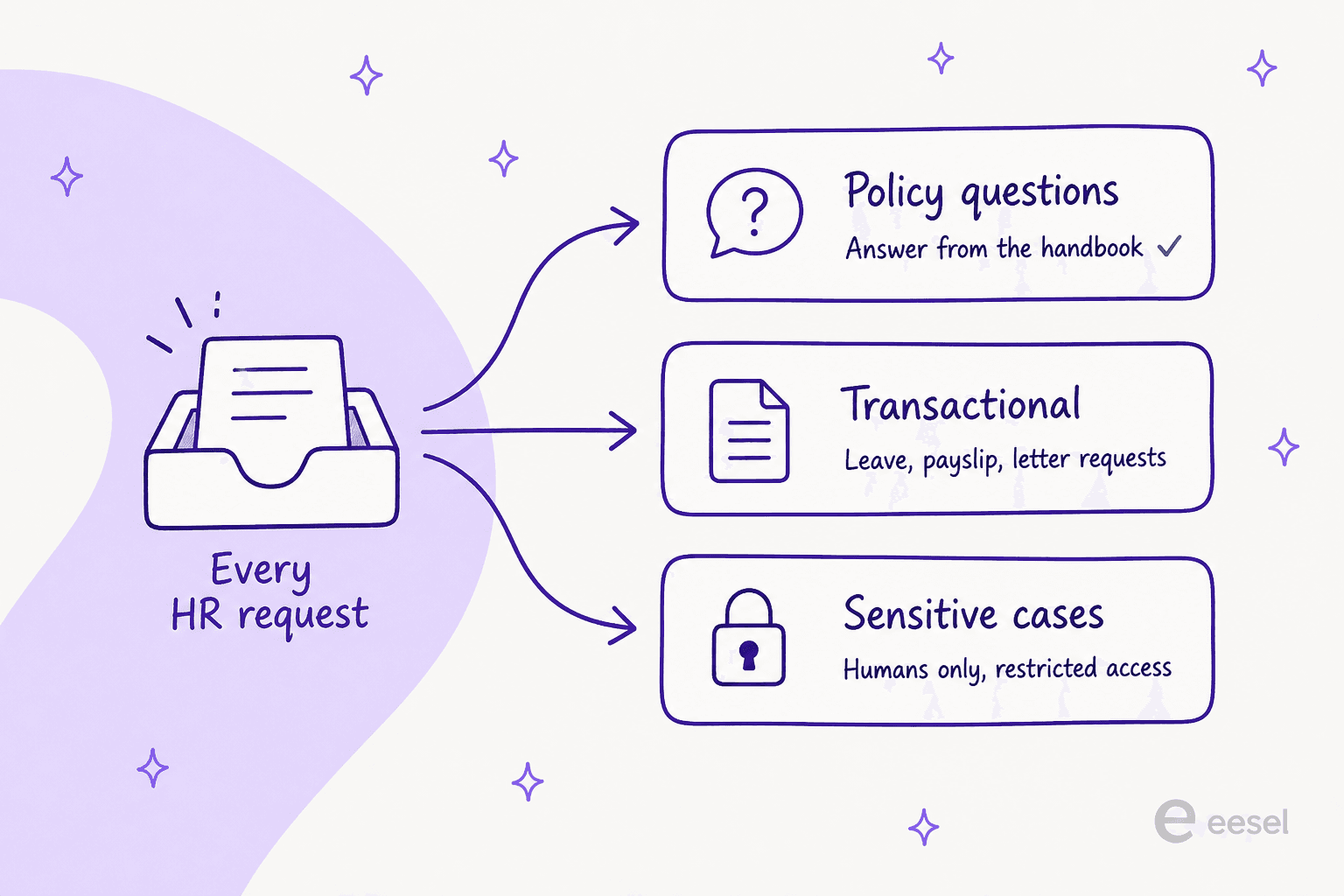
Lane one is policy questions, and it is almost all of your volume, the lane where an HR chatbot earns its keep. Lane two is transactional work with a real workflow behind it. Lane three is grievances, investigations and accommodations, where the record itself is the sensitive artefact. A tool that is brilliant at lane one can be actively dangerous in lane three, which is why the biggest HR orgs run two systems and never mention it in the buying conversation.
There is direct evidence for that split hiding in ServiceNow's own case study. Ryder, with more than 48,000 employees, reports over 60,000 cases in the second half of 2022, and the fine print in Ryder's case study says those figures are "not including COE cases such as leave, employee relations, and other specialized areas". The flagship number excludes exactly the cases this article says are different.
Do you even need one yet?
Worth asking before you spend anything. When a People Ops lead at a 120-person company asked for HR ticketing recommendations, the top-voted replies told her not to buy one at all.
"That headcount and having two people doesn't need a ticketing system.
If you feel you must, make an MS form or something. Spending money on that would be absurd"
That reply got 87 points, and the reply under it argued that needing a queue at that size means your self-service resources are too thin. Both are fair. A shared inbox plus a well-kept internal knowledge base carries most teams a long way, which is the same conclusion I reached writing about the HR help desk generally.
The rebuttal came from the person who asked, and it is a better description of the buying trigger than any vendor page:
"I want a ticketing system that will point people back to self-service resources and that will scale with us when we grow. We have employees in 35 states and the business is very complex and has a lot of more green leaders. All this to say, my whole day can get sucked up answering questions. I'm creating a people ops Hub with a lot of this info, but I want something that will point back to that. I also like the idea of using ticketing data to figure out where we need more self-service resources."
That is the honest case for a queue: not speed, but data and accountability. An HR ops lead who ran the numbers at a 16,000-employee company found roughly 3% of HR staff sat on tier-1 ticketing and about 43% handled escalations, meaning that in their analysis, nearly half of all HR staff had ticketing responsibilities. Once that many people touch a request, a shared inbox stops being a system and starts being a rumour.
The volume side is real too. HR Acuity's tenth annual benchmark study, fielded across 274 US organisations covering 8.8 million employees, puts employee relations case volume at 145.5 issues per 1,000 employees for 2025, with discrimination, harassment and retaliation allegations at an all-time high of 15.5 per 1,000. Meanwhile ER staffing moved from 0.6 to 0.68 professionals per 1,000. Case volume is climbing and the team is not. That gap is why ticket reduction has become an HR conversation rather than only a support one, and why so many teams now start from an AI HR helpdesk rather than a bigger rota.
What an HR ticketing system actually costs
Every vendor quotes you a seat price. Almost nobody quotes you a bill.
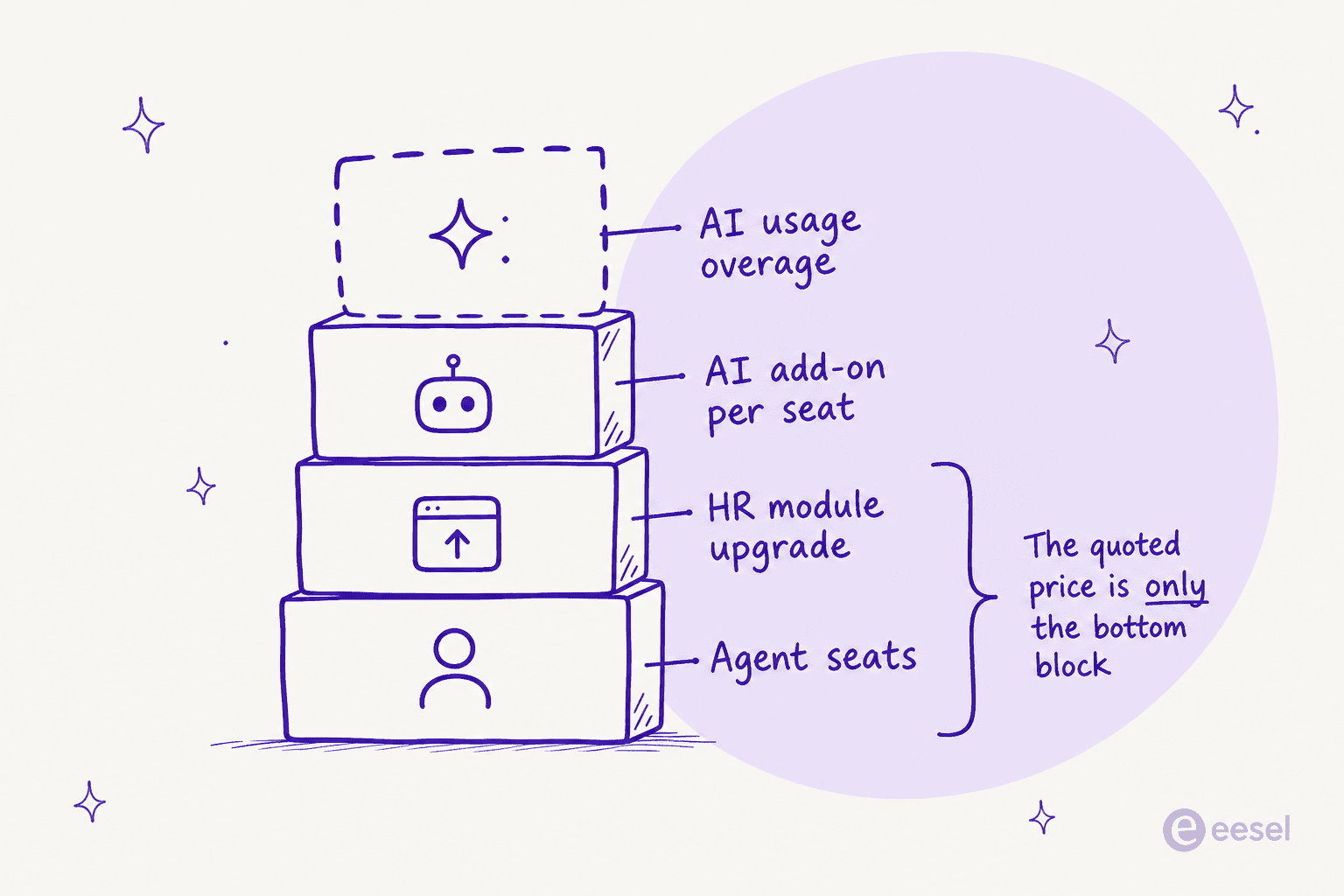
Four things stack up. The seat is the part you see. The HR module is often an upgrade, and Zoho People is the sharpest example: HR Help Desk is bundled only in the top Enterprise plan, and on cheaper plans it is a separate line at US$0.58 per user per month. Then the AI add-on, which at Zendesk means $50 per agent for Copilot on top of a seat that might only cost $29. Then usage overage, which is the part nobody can forecast, because Zendesk names App Builder, Action Builder and Voice as consumption-billed past allowances it does not publish.
Here is the same maths with your numbers in it. The thing worth watching is what happens when you drag headcount up while the HR team stays the same size.
How I picked these 10
I read each vendor's own pricing and product pages on 31 July 2026 and took the figures verbatim, no rounding. Where a price is quote-gated I say so rather than repeating a number from a review site. I read HR practitioners arguing about these tools on Reddit and Capterra, and I did not use a single quote I could not open and read in full.
Three columns decided the ranking: what the entry plan really costs once HR case management is switched on, what the AI is billed on, and whether the tool has a real answer for a confidential case. Applaud was the one I looked at and left out of the numbered list, because its 500-user minimum and unpublished pricing put it outside what most readers here can buy.
The comparison table
| Tool | Best for | Entry list price | Where HR case management sits | AI billing unit | Confidential case model | Employee channels | HRIS links | Free tier / trial |
|---|---|---|---|---|---|---|---|---|
| eesel AI | Answering before a ticket exists | From $299/mo (500 credits) | Layer on your existing desk | 1 credit per ticket or chat | Inherits the desk's permissions | Slack, Teams, chat, email | Via the helpdesk and docs tools | 100 free credits, no card |
| ServiceNow HRSD | Enterprises with a platform team | Quote only | HR Foundation and up | Bundled allocations by tier | Restricted COE track | Employee Center, Teams, Slack | Broad, integration-led | None published |
| Workday Help | Companies already on Workday | Quote only | Included in HR Service Delivery | Not published | Per-case security groups | Desktop, mobile, Teams | Native | None published |
| Freshservice | Mid-market ESM buyers | $49 per agent (Business Teams) | Business Teams packaging | $29 per agent Copilot add-on | Not a named feature | Portal, Slack, Teams, email | Marketplace | 14-day trial, no free plan |
| Zendesk Employee Service | Teams that want AI in the seat | $29 per agent | All tiers | Consumption past unpublished allowance | Not a named feature | Portal at Growth, Slack, Teams | Workday named | 14-day trial |
| Jira Service Management | Atlassian shops | $0 (3 agents) then $25 | Any service project | $1 per Rovo resolution | Project permissions | Portal, Slack, Teams | Marketplace | Free for 3 agents |
| Zoho People | Small teams on a budget | $1.25 per user | Enterprise plan or $0.58 add-on | Zia included | Case agents and categories | Portal, mobile | Zoho stack | Free for 5 users |
| HappyFox | Small HR teams wanting one price | $24 per agent (max 5) | Same desk, HR is a use case | $14 per agent, 2¢ per action | Private notes | Portal, Slack, Teams | ADP, BambooHR, Workday, DarwinBox | 14-day trial |
| HR Acuity | Investigations and ER cases | Quote only | The whole product | Included in platform | Privilege controls | Portal, hotline, anonymous | Integration-led | None published |
| Leena AI | Tier-1 deflection at enterprise scale | Quote only | Sits over your HRIS | Not published | Guardrails on write actions | Teams, Slack, web, phone | 200+ claimed | None published |
1. eesel AI: best for answering the question before it becomes a ticket
Best for: teams whose real problem is repeat questions, not missing tickets.
What it does
eesel is the AI layer that sits on the helpdesk you already run rather than replacing it. It trains on your handbook, your knowledge base, your Confluence or Notion or Google Docs pages, and your past tickets.
From there it answers employees directly in Slack or Microsoft Teams, and drafts replies inside whichever desk your HR team works in, including Jira Service Management, Zendesk and Freshdesk.
I am biased here, so let me be specific about the part I would actually defend. I have spent years watching confident-sounding bots give wrong answers on live queues, which is why every rollout starts as a simulation against historical requests: eesel pulls your old tickets, scores what the AI would have said against what your humans actually sent, and hands you the gap report before an employee ever talks to it.
The internal use case is the one that maps cleanest onto HR. A SaaS customer running it for onboarding put the outcome better than eesel's own marketing page does:
"We can onboard new employees much faster with eesel AI's Copilot, and help train them or answer questions with accurate responses straight from the source. Managers are now asked the important questions, and sourcing documents or learning processes has become much easier."
a SaaS company using eesel's Copilot for internal onboarding
"Managers are now asked the important questions" is the whole pitch for HR, and it is the same reason a Nordic HR-software company runs eesel over Confluence with per-team Slack bots and EU data residency for GDPR.
Pricing
One fixed monthly price on the Teammate plan, where 1 credit covers a support ticket or a chat, however long it runs. There are no per-seat fees, and the free plan gives you 100 credits with no card.
| Credits per month | Price |
|---|---|
| 100 | Free |
| 500 | $299/mo |
| 1,000 | $499/mo |
| 2,500 | $999/mo |
| 5,000 | $1,899/mo |
Pay a year upfront and get two months free. Every integration and channel is included. SSO and MFA are add-ons from $199/month, and data residency (EU or US) is an add-on at $500/month.
Where it falls down
It is not a system of record. If you need a case object with SLA timers, an approvals engine and an audit trail built for an EEOC request, eesel is the layer on top, not the thing underneath. It also does nothing for lane three: sensitive investigations should stay with humans in a restricted tool, and I would say the same on a sales call.
Verdict: pick eesel when your queue is drowning in questions your handbook already answers. Pick something else, and then put eesel on it, when you need the case record itself.
2. ServiceNow HR Service Delivery: best for enterprises that can staff a platform team
Best for: 10,000-plus employees, with people whose job is the platform.
What it does
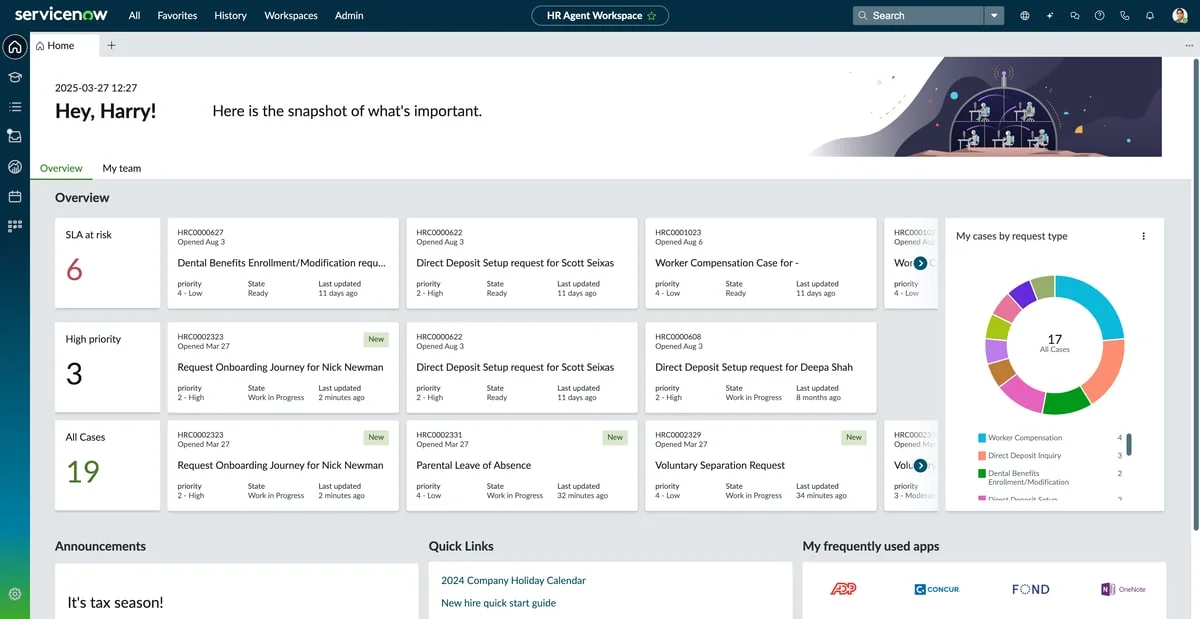
HRSD is the reference implementation of HR ticketing: case and knowledge management with assignment rules and SLAs, Employee Center Pro as the front door, and Employee Journey Management for multi-step life events. That last one is the piece a plain queue cannot fake, because an exit is not one ticket, it is an HR case plus a laptop return plus a badge deactivation. Our ServiceNow ticketing breakdown covers the platform mechanics.
The proof points are real and unusually specific. Ryder reports an 80% increase in HR agent efficiency and chat wait times falling from ten minutes to two. Lowe's reports 4 million HR cases in four years and 2,000 knowledge articles viewed over 40 million times.
Pricing
Nothing published, at any tier. HR Foundation, Advanced and Prime all say "Get Custom Quote." The one hard limit ServiceNow does publish is HR Knowledge Search, capped by package tier at 25,000, 50,000 and 150,000 indexed documents and restricted to the HR domain. Virtual Agent conversations are unlimited on all three, and Moveworks for HR is bundled from Foundation up.
Where it falls down
Cost and size, and users say both out loud.
"Assuming OP sees this, ServiceNow is WAY too big for a 120 EE company."
Three separate Capterra reviewers flag licensing cost, including one Capterra reviewer who writes that "Licensing Cost is a bit challenging in ServiceNow HR". And the sharpest line in the whole corpus is about implementation, not product: one practitioner argues it "requires a smart implementation to work well in your environment", which is the difference between the Ryder outcome and the ones you hear complained about. Whether the AI earns its keep is a separate question, covered in my take on ServiceNow AI.
Verdict: the right answer above roughly 5,000 employees if you have implementation budget. Below that it is a sledgehammer, and the people who own it will tell you so.
3. Workday Help: best if your HR data already lives in Workday
Best for: Workday shops that want cases next to the record.
What it does
Workday's HR service delivery gives employees a help centre and cases they can open from desktop, mobile or Microsoft Teams, sitting directly on the HCM data. That proximity is the entire pitch: a leave balance question does not need an integration, because the balance is right there.
The confidentiality model is the best published one in this roundup. Workday states that "Security levels are set for groups or individuals. Only those involved with the case have access to the confidential information inside." Per-case, not per-role, which is exactly what a grievance about a named HR business partner requires.
Pricing
Not published anywhere, for Help, Journeys or HCM. The only call to action is Contact Sales, so any per-employee number you have seen quoted is somebody's deal, not a rate card.
Where it falls down
Two things. The AI is new rather than proven: Workday Case Agent was announced in September 2025, and the launch release states flatly that "New Illuminate agents will be available in 2026". Second, HR teams who tried to bend Workday into employee relations case management got a blunt answer from peers.
"There was a thread on here a few days ago about this.
TL;DR, don't."
The most useful published customer number is refreshingly modest. Memorial Healthcare System, 17,000 employees and 76% deskless, reports in its Workday story a 10 to 15% reduction in HR case volume from self-service enablement. When vendors elsewhere are quoting 70%, that number is worth pinning to your wall.
Verdict: obvious if you are on Workday and your cases are transactional. Do not expect it to hold your investigations.
4. Freshservice: best mid-market pick with HR packaging that exists
Best for: 200 to 2,000 employees, IT and HR sharing one desk.
What it does
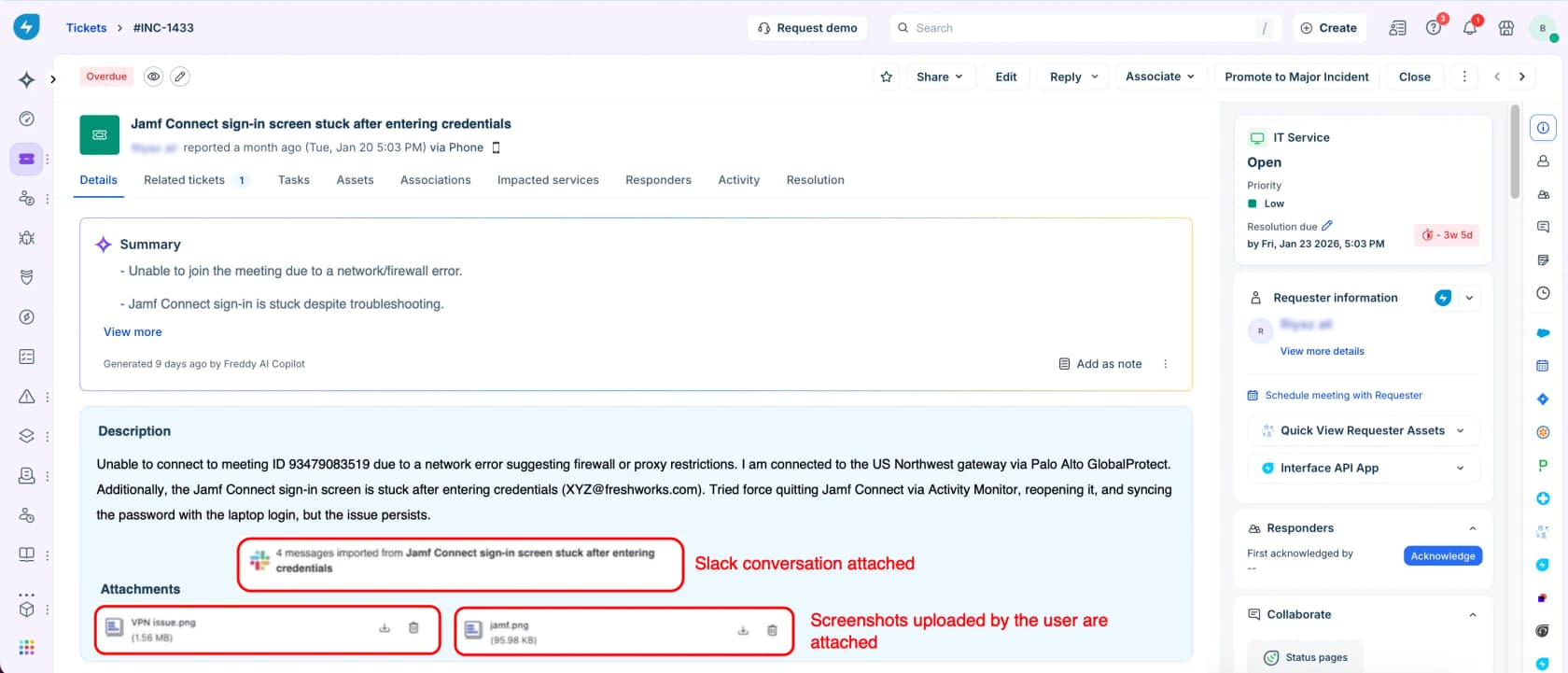
Freshservice is the tool HR teams most often inherit from IT, and Freshworks has leaned into that with a Business Teams edition aimed at HR rather than ITSM. You get the same ticket workspace, SLAs, service catalogue and a ServiceBot in Slack and Teams. Our Freshservice knowledge base guide covers the self-service side, and Freddy AI covers the AI.
Pricing
Business Teams starts at $49 per agent per month billed annually. Core Freshservice runs $19, $49 and $99 per agent per month annually for Starter, Growth and Pro, or $29, $59 and $119 monthly. There is no free plan, only a 14-day trial.
The AI is where it gets expensive. Freddy AI Copilot is a $29 per agent per month add-on on annual billing ($35 monthly), and the autonomous Freddy AI Agent is bundled only with Enterprise, which includes 1,200 sessions per licence per year. A session is any interaction a unique user has within a 24-hour period, and the overage rate past 1,200 sessions is not published anywhere.
Where it falls down
Price, for smaller teams, and the reviewer who says so most clearly lists their own role as HR:
"The main reason we decided not to continue using their service was the price. As a small business, the cost they were asking for was higher than we could fit into our budget, especially for purchase orders. Once the trial period ended, we stopped using their service."

Confidential case handling is also not a named feature at any tier, which puts it in the same bucket as Zendesk. See the Freshservice versus ServiceNow comparison if you are weighing the step up.
Verdict: the safest mid-market default, especially when IT is already on it. Budget for Freddy separately or plan to put a cheaper AI layer on top.
5. Zendesk Employee Service: best when you want AI included in the seat
Best for: teams who want an employee desk that behaves like a modern support desk.

What it does
Zendesk sells Employee Service as one product spanning ITSM and HR, with AI agents, an AI knowledge base and Action Builder included from the entry tier. It pitches support in Slack and Teams, and covers onboarding, offboarding, approvals and life-event workflows. If you already run Zendesk for customers, the ticketing model is identical.
Pricing
Suite Team $29, Suite Growth $59 and Suite Professional $99 per agent per month paid yearly, per the Employee Service price list, with Enterprise plus Copilot quote-only. Monthly rates are not published at all. Add-ons: Copilot $50, Quality Assurance $35, Advanced Data Privacy and Protection $50, each per agent per month.
Two gates matter for HR specifically. The self-service employee portal starts at Growth, not Team. Full approval workflows sit only on the unpriced Enterprise tier, which is awkward when leave and expense approvals are your core use case.
Where it falls down
The AI meter is opaque. Zendesk names App Builder, Action Builder and Voice as billed on consumption past "applicable plan allowances" in its pricing FAQ and publishes neither the allowance nor the overage rate. And for a product sold into HR, there is no named private-ticket or restricted-visibility feature on either page I read. The closest published control is the $50 privacy add-on.
Practitioners flag the cost too:
"My former employee uses HappyFox for her 500 person company and loves it. We use ZenDesk but we're closer to 5k employees and it's pricey."
Verdict: strong product, honest entry price, and the add-on stack is where it stops being cheap. Read the Zendesk pricing analysis before signing an annual deal.
6. Jira Service Management: best free start, if you already live in Atlassian
Best for: companies where IT already runs Jira and HR wants a queue this quarter.
What it does
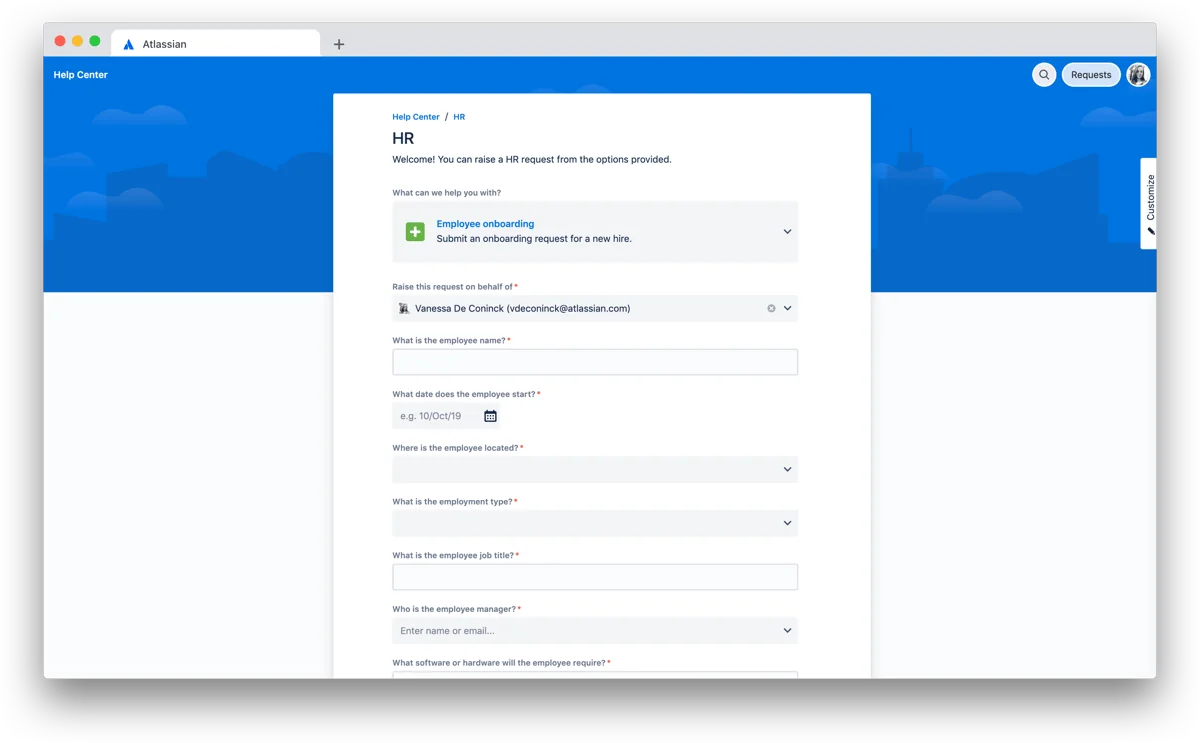
An HR service project in Jira gives you request types, a portal, queues and automation, and it is the one tool here with a free entry point that actually works. The screenshot above is exactly what an HR portal looks like out of the box: pick "Employee onboarding," fill in the new hire's details, done. Our Jira ticketing guide covers the mechanics.
Pricing
Atlassian now sells Service Collection rather than standalone JSM, bundling Jira Service Management, Customer Service Management, Assets and Rovo into one seat. Free covers 3 agents with unlimited customers. Monthly list rates are progressive: $25 per agent for the first 15 agents on Standard and $57.30 on Premium, per the licensing tables, dropping in bands above that. The headline figures on the pricing page are blended rates for 75 seats, so read the licensing tables, not the calculator.
Where it falls down
Reporting, and the HR team using it says it plainly:
"We use Jira. I like it because it allows us to assign tickets to appropriate team members in a way that's easier than utilizing a shared mailbox. The reporting is pretty terrible, you have to pay for better reports so we just make do with the free ones."
Confidentiality is a project-permission exercise you have to design yourself, which is fine if you have an admin and risky if you do not. Rovo's AI is bundled into the seat now, though the resolution meter is still the thing to watch.
Verdict: the best free option by a distance, and the fastest to stand up if IT already runs Atlassian. Expect to pay for reporting and to design the permission model yourself.
7. Zoho People: best for small teams counting every dollar
Best for: under 200 employees, already in the Zoho ecosystem.
What it does
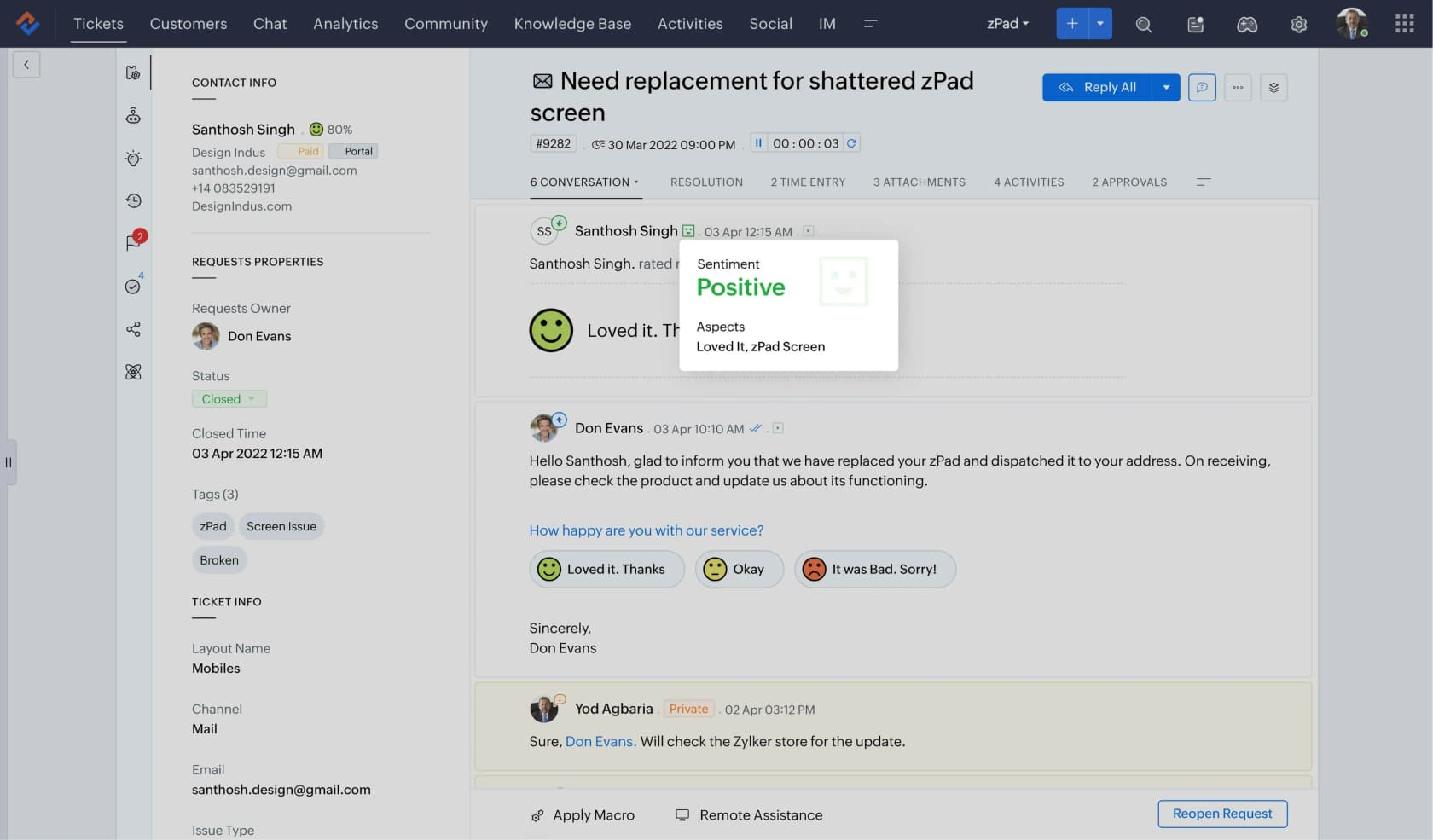
Zoho People is an HRIS with an HR Help Desk module bolted on: case categories, case agents and SLA tracking, plus the Zia assistant. It is by far the cheapest way to get a structured HR queue with a real employee record behind it. Zoho's AI story is modest but included rather than metered.
Pricing
Per user per month, billed annually: Essential HR $1.25, Professional $2, Premium $3 and Enterprise $4.50, per Zoho People pricing. Monthly is $1.50, $2.50, $3.50 and $5. Free for 5 users, with a 5-user minimum on every paid plan and a quote wall above 500 users.
Now the catch, and it is the sharpest plan gate in this roundup. HR Help Desk is bundled only in Enterprise. On Essential HR, Professional and Premium it is a separate add-on at US$0.58 per user per month, and on the Free plan you cannot buy it at all. One quirk worth knowing: Zoho People Plus bundles the helpdesk into every paid tier from $3 per user, so the bundle is cheaper than standalone People for ticketing.
Where it falls down
The unit is the employee, not the agent, which is fine at 80 people and painful at 2,000. Push the headcount slider in the calculator above and watch it overtake tools that cost ten times more per seat. It is also the thinnest option here for sensitive cases.
Verdict: unbeatable value under a couple of hundred employees. Just buy the right plan, or you will discover the module you came for is not in the box.
8. HappyFox: best single price for a small HR desk
Best for: small HR teams that want a real desk without an enterprise conversation.
What it does
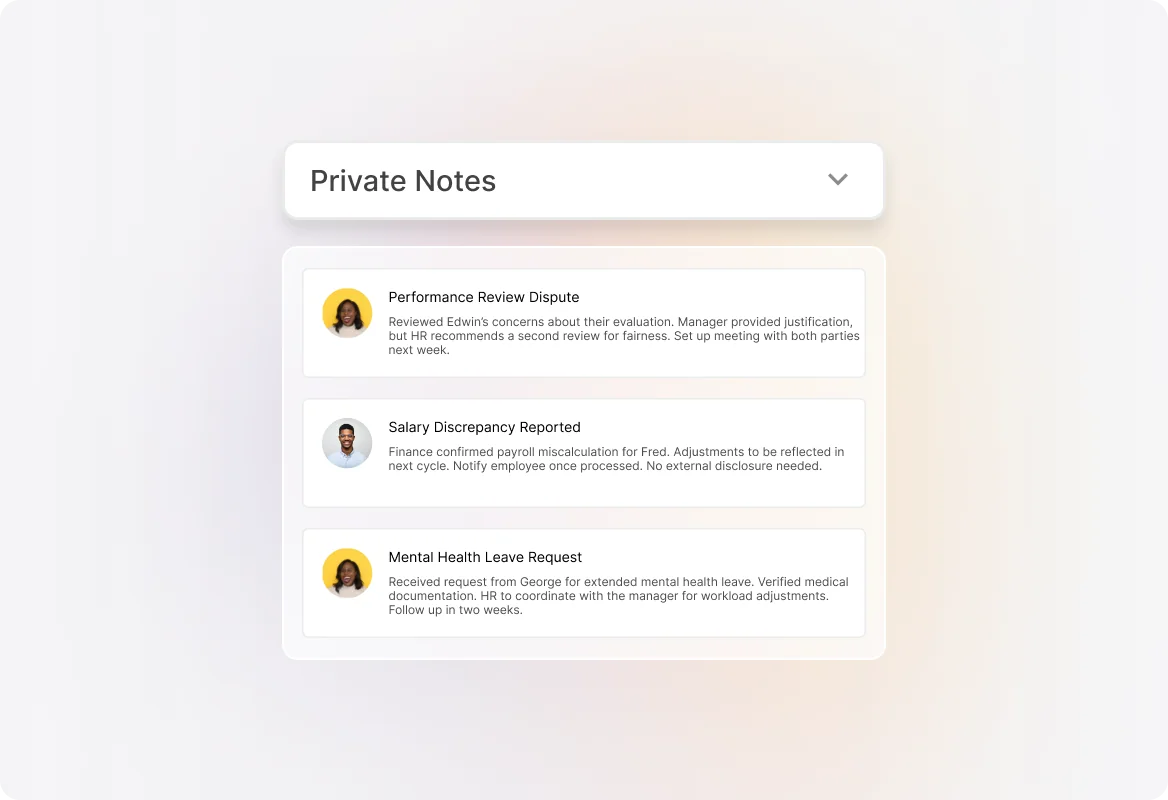
HappyFox sells one help desk and markets it to five teams, HR among them. There is no HR SKU, no HR seat type, and no HR-specific price. What you do get is a competent ticketing core with SLAs and a knowledge base at the entry tier, private internal notes for sensitive threads, and four named HRIS integrations: ADP, BambooHR, Workday and DarwinBox. That HRIS list is broader than Zendesk's, which names only Workday. If you are weighing the AI, I covered AI for HappyFox separately.
Pricing
Billed annually: Basic $24, Team $49 and Pro $99 per agent per month on the Help Desk price card, Enterprise PRO custom. The trap is the Basic cap: Basic is hard-limited to five agents, so hiring a sixth doubles your per-seat price to $49.
AI is unbundled and, unusually, published: HappyFox AI at $14 per agent per month, Autopilot from 2 cents per successful action, Assist AI $1 per user per month for Slack and Teams, and Chatbot at $0.33 per resolution. Assist AI is the HR-shaped one, since it is priced per employee rather than per agent.
Where it falls down
Every paid tier's button says "Get a Demo," not "Buy now," so there is no self-serve checkout even on the published prices. Monthly rates and the unlimited-agent option render no numbers at all.
Verdict: the best-value real help desk under five agents, provided you know the sixth hire changes the maths.
9. HR Acuity: best for investigations, and nothing else on this list competes
Best for: employee relations teams who will be asked to defend a case in two years.
What it does
This is lane three, and HR Acuity is built only for it. Cases follow a documented Plan, Investigate, Determine methodology with guided interview templates, retaliation check-ins and stakeholder approvals. Documentation is structured for audits, EEOC reporting and legal scrutiny, with role-based access and attorney-client privilege protections built in. Its anonymous reporting product, from the Speakfully acquisition, supports 35 languages across 56 countries with two-way anonymous messaging, so an investigator can keep talking to a reporter without unmasking them.
Named customers include Shopify, Snowflake, Verizon, Adobe and Nasdaq.
Pricing
None published. The pricing URL 404s, every path is a demo booking, and the form gates on employee-count bands starting at 1,000. The only dollar figures on the site are outcome claims, not prices.
Where it falls down
It is not an HR ticketing system, and buying it as one would be a mistake. It will not answer "where is my payslip." Large HR orgs run it alongside a service desk rather than instead of one, which is a second contract and a second permission model to maintain.
Verdict: if your team runs investigations, this is the specialist, and the general-purpose desks are not close. If you do not, skip it entirely.
10. Leena AI: best deflection-first bet for large enterprises
Best for: 5,000-plus employees with a real HRIS to write back into.
What it does
Leena has repositioned as an agentic platform with pre-built "AI Colleagues" for HR, IT and finance. The HR assistant, named Harrison, closes tier-1 requests such as leave, letters, benefits and payroll inside Teams, Slack, web and phone, and writes back into Workday, Oracle, SAP or ServiceNow rather than just answering. Cross-functional requests hand off between agents mid-thread instead of spawning a second ticket, and you can lock rules so no irreversible action happens without a check. If you are shopping this category, my Moveworks alternatives roundup covers the neighbours.
Pricing
Not published. There is no pricing page and no self-serve entry.
Where it falls down
Every impressive number is Leena's own claim on its own site: 70%-plus tickets auto-resolved, 60 to 70% tier-1 and tier-2 deflection, first response falling from 8 hours to 8 seconds. None of it is third-party audited. Compare that with Memorial Healthcare's published 10 to 15%, and you can see how wide the honest range is. My guide to AI resolution rate explains why the two numbers can both be true and mean different things.
Verdict: a serious enterprise option if deflection is the whole project and you can absorb a sales cycle. Not buyable, or affordable, for anyone smaller.
Rolling one out without torching adoption
Every practitioner I read said the same thing: the tool was never the hard part.
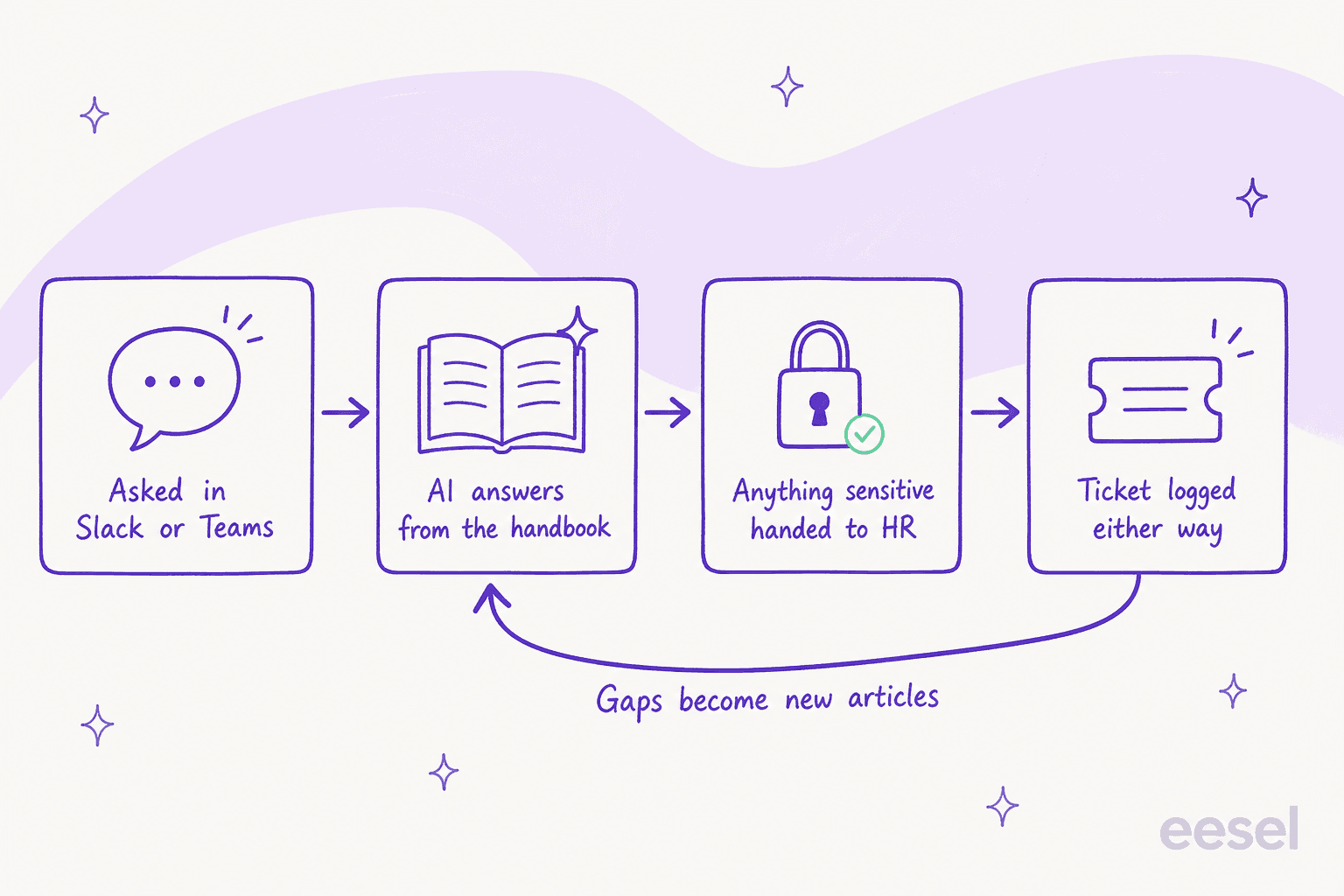
Meet employees where they already ask. A portal nobody opens deflects nothing, and the sharpest version of that objection is worth reading twice:
"Searching for Information/Employee Services - Employees already don't do this when it's on the landing page of an internal website. They're not going to ask the AI agent for it."
That reply got 66 points, and it is correct about portals. It is why the channel matters more than the interface: people will not visit a hub, but they will type in the Slack channel they already have open.
Hold the line on the model. The bypass problem comes from the top, not the bottom.
"Word of advice if you move to a ticketing/centralized system - STICK TO THE MODEL. It can be tempting to answer a quick question here or there instead of directing them to a case. But you're just prolonging the adoption of the model and shooting yourself in the foot."
Do not promise a deflection number you have not tested. The most credible warning about HR AI comes from someone who built the bots themselves:
"We built an internal Benefits chat bot & a leave of absence bot. They have been fun to create. They are helpful. But they make lots of mistakes despite having actual plan docs & policies built into their core."
This is the whole argument for simulating against your own history before go-live, and for a strict escalation path. Get the handoff wrong on a leave-of-absence question and you have not saved a ticket, you have created a grievance. One customer framed the same worry from the buying side, and it is the standard I would hold any HR bot to:
"The AI will never be able to answer 100% of the questions, but if it tries and just answers 'sorry I don't know this,' I cannot go and check all my 7,000 tickets to see if the AI actually made a good answer, then the point is a little bit gone. I need an AI who is only handling the tickets that it's confident to handle and all the other ones, leave them alone."
a CX lead handling roughly 7,000 tickets a month
Measure the boring things. Time to first response, reopen rate and CSAT on internal tickets are what tell you whether the queue is helping or just recording, and SLA policies per request type stop leave requests and laptop requests being judged the same way.
Feed the gaps back into the handbook. The requests the AI cannot answer are a content backlog, not a failure. That loop is what turns a queue into real self-service rather than a slower inbox, and it is the same discipline behind clearing a backlog anywhere else.
Try eesel for your HR queue
If your HR team is small and the volume is questions rather than cases, do not start by replatforming. Point eesel at your handbook, your internal docs and whichever desk you already run, and let it answer the leave-policy and payslip questions in Slack while the real cases still land in a human's queue. You can simulate it against your past requests first, so you see the actual resolution rate before an employee ever talks to it, and you pay one fixed monthly price, from $299 for 500 credits, rather than for seats you are not using. Free to try, 100 credits on the house, no card.

The decision underneath all ten of these tools is simpler than the feature grids suggest. Pick the desk that fits your size and your stack, make sure the plan you are quoted actually includes HR case management, and answer the confidentiality question before you sign rather than in the thread afterwards.