


A ticketing system example is one real request turned into a tracked record, and the interesting part is never the request. It is the record: what fields get stamped on it, which status path it walks, who is allowed to close it, and what handling it costs. This post works through eight of them (order chasing, refunds, password resets, access requests, bug escalations, billing disputes, outages, feature requests) with the exact field and status behaviour from Zendesk, Freshdesk, Jira Service Management and HubSpot docs.
Two things surprised me most from working the queue. First, the same request is a different object in every system: six statuses in Zendesk, four in Freshdesk, no status field at all in HubSpot. Second, the channel decides the cost far more than the question does. HDI and MetricNet priced the same query at $2.37 through self-help and $37.52 at a walk-up desk in 2021.
Roughly half of these examples repeat forever and never need a person. That is the slice eesel takes: it sits on your existing helpdesk, handles the order-status and password-reset shaped tickets at 1 credit each, and leaves the outage to you.
What people actually mean by "ticketing system examples"
Two different searches land on the same phrase, and both are fair.
Some people want examples of systems: name me the tools, show me the screens, tell me which one fits a 12-person support team. Others want examples of tickets: what does a real record look like once it lands, and what happens to it next. I work the support queue at eesel, so I care mostly about the second one, and I have opinions about it. The tool comparison is downstream of knowing what a good ticket looks like, which is why the ticketing system software roundup makes more sense after this post than before it.
Here is the thing three years of live queues taught me: the ticket record is where support teams quietly lose money. Not on the reply. On the ticket that sat in Pending for nine days because nobody defined who closes it, on the priority field every requester set to Urgent, on the two tickets that were the same problem filed by two people.
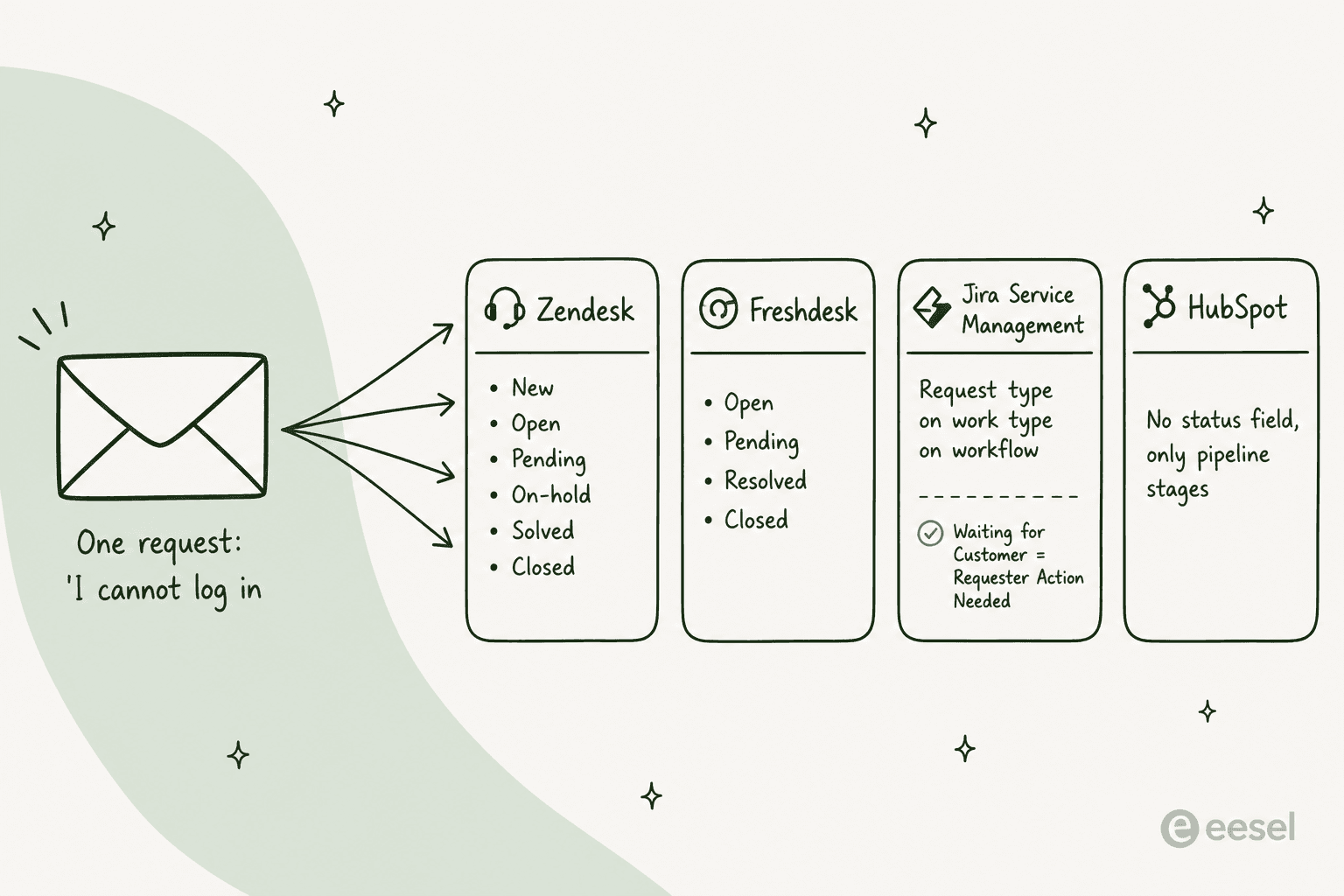
That difference is not cosmetic. Zendesk ships six statuses (New, Open, Pending, On-hold, Solved, Closed). Freshdesk ships four that cannot be deleted, and in HubSpot there is no status field at all, because a ticket there is a CRM record moving along a support pipeline.
Jira Service Management stacks three objects: a request type on a work type on a workflow. Skip the request type layer and the work item loses access to service-desk features entirely.
Pick the example that matches your queue
Six of the eight examples below, in the shape they arrive in. Click through them before you read the long versions.
Eight ticketing system examples, worked end to end
Each one below follows the same shape: the request as it actually arrives, the record it creates, the status path, and the gotcha that bites teams in month three.
1. "Where is my order?" in an ecommerce queue
The highest-volume example in any retail queue, and the least interesting to answer. A customer pastes an order number, the agent opens the carrier tab, copies a date back. In Gorgias the order sits in a side panel next to the conversation, which is the whole argument for an ecommerce-native helpdesk over a generic one.
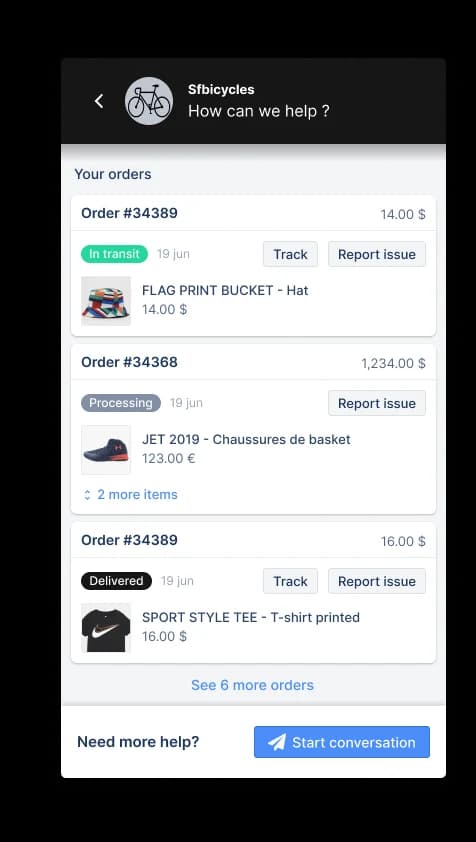
The record is thin: requester, order number, a tag, one public reply. Status goes New to Open to Solved and almost never reopens. This is the shape that makes people buy AI order tracking, because the answer is a lookup, not a judgement. If a ticket type never needs an opinion, it should not need an agent.
The gotcha is measurement. Zendesk counts one-touch resolution as "solved or closed tickets with a single agent reply or no replies", per its one-touch resolution docs, so a queue full of these makes your team look faster than it is.
2. A refund outside the return window
This one arrives polite and turns into a policy decision. The customer is 11 days past the return window and has a decent reason.
The record picks up an approval status, which takes four values in Zendesk's ticket fields: Pending, Approved, Denied, Withdrawn. Many teams add a custom status such as "Refund processed" so finance can filter for it later. Worth knowing before you build that: Zendesk allows up to 100 ticket statuses, but "the status picker will display the first 10" according to its status management docs, and a ticket solved with a custom status keeps that label after it closes.
The status path detours through Pending while you wait for photos or an order confirmation, and Pending is where refund tickets go to die. Freshdesk resets a ticket to Open "any time a customer responds", which is helpful, but nothing rescues the ticket where the customer never replies. Automating the drafting is fine here, per our refund automation walkthrough. Automating the exception decision is not.
3. Password reset and MFA lockout
The most-written-about ticket in IT, and the one with the widest cost spread. Same question, six front doors:
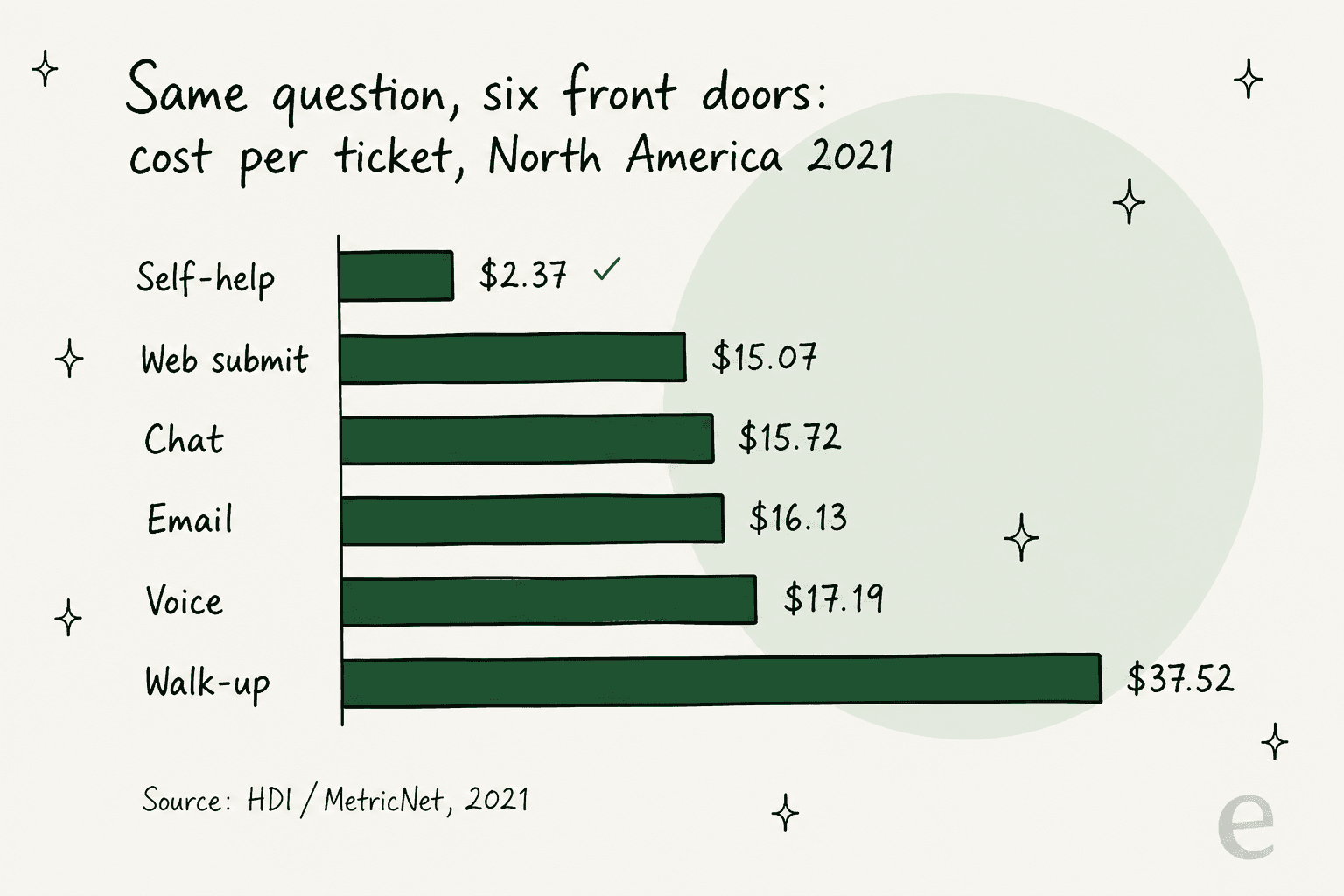
HDI's 2021 figures put self-help at $2.37 and a walk-up at $37.52, a spread the authors of HDI's cost analysis describe as "more than two orders of magnitude (100X)". Nothing about the answer changed. Only the door the user walked through.
The catch is that deflection does not make the queue cheaper on average. HDI is blunt about it in its self-service benchmark: as low-handle-time incidents move to self-service, "the average complexity and the average handle time of the incidents that continue to be handled by live agents will increase". Your cost per ticket can go up while your total cost goes down. Plan the reporting conversation before your self-service portal goes live, or the first monthly review will look like a failure.
Worth grounding the ambition too: MetricNet's benchmark database puts the average self-service completion rate at 10.4 percent, against vendor decks promising 60 or 80. Our ticket deflection guide uses the same number as its baseline.
4. New-hire access and equipment request
A manager files one line ("new starter Monday, the usual kit") and creates a week of work. This is a service request, not an incident, and the distinction is expensive: MetricNet's field data puts incident work time at 12.3 to 21.5 minutes against 35.4 to 95.9 minutes for a service request in MetricNet's volume study.
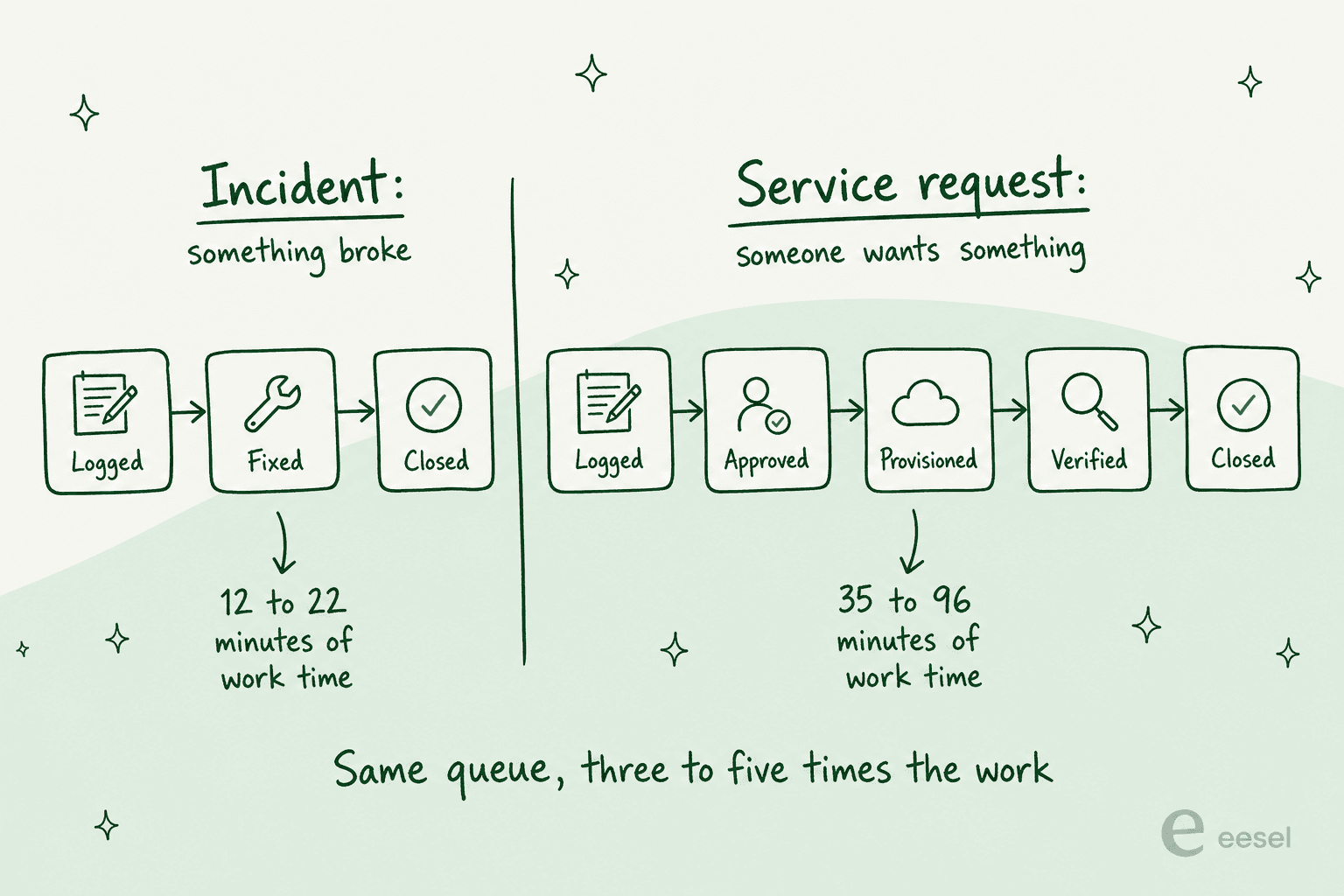
Jira Service Management models this properly. A new space ships five work types (IT Help, Purchase, Change, Fault, Access) and two request types out of the box, and request type fields come from its work type. It also renames statuses for the requester: internally the ticket says Waiting for Customer, and the portal shows "Requester Action Needed" in the default JSM configuration. Small thing, big difference in how many "any update?" replies you get.
If this shape dominates your queue, read the access request and hardware request breakdowns next, and treat HR onboarding as the same pattern with different approvers.
5. A bug report that becomes an engineering escalation
A customer finds a genuine defect. Support reproduces it, links an engineering issue, and now owns a ticket it cannot close.
Zendesk's Type field carries four values (Question, Incident, Problem, Task) in the standard field set, and it is one-way: once set, you cannot blank it again. Deactivating the field entirely defaults every ticket to Incident. Jira Service Management separates the two axes instead, keeping status for where the work is and resolution for how it ended, with a Known error resolution value for the documented-cause-plus-workaround case.
The gotcha here is On-hold. It is an optional internal status that "the ticket requester never sees", per the Zendesk lifecycle docs; their view still says Open. So the ticket is parked and the customer thinks it is being worked. Set a proactive update cadence, and see escalation management plus bug report triage for the routing side.
6. A billing dispute in a CRM-first helpdesk
"You charged me twice in June" is a support ticket that is really a finance ticket, which is exactly why teams run it in a CRM-shaped system.
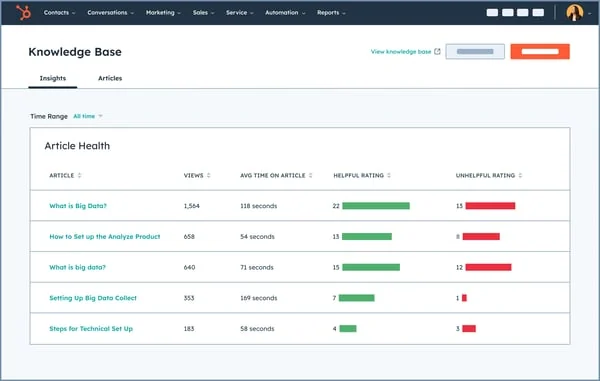
In HubSpot Service Hub the ticket is an object on a pipeline, and the default Support Pipeline has four statuses: New, Waiting on contact, Waiting on us, Closed. A few behaviours matter for a dispute that bounces between teams. Close date is bidirectional, so moving a ticket back to an open stage clears the value. Category is set by AI from the first message and only exists on Enterprise. And hs_ticket_owner_type records whether a Human rep, Customer Agent or Rule-based bot touched the record, which is the first honest audit trail I have seen for AI-handled tickets in a mainstream helpdesk.
Deflection targets should be modest on this shape. Our HubSpot ticket deflection post has the plan-gating detail, and customer service CRM covers when the CRM-first model actually wins.
7. An outage that arrives as forty tickets
One failure, forty records, and a priority field that is about to be tested.
Jira's five priorities come with Atlassian's own wording, in the JSM priority scheme, from Highest ("This problem will block progress") down to Lowest. Freshdesk's four priorities are "hard-coded into our systems" because SLA policies depend on them, per its ticket fields guide. Zendesk hides a nastier dependency: deactivate the Priority field and SLA targets stop applying at all.
Let requesters set priority themselves and the field stops meaning anything:
"Dealt with this decades ago. It was scrapped quickly because as you might imagine it was abused to death. It really didn't bother me though. I still got the same number of tickets and just slogged through them. When people got mad because we were missing SLAs we just replied there was nothing we could do now that all tickets were priority."

371 upvotes on that comment, which tells you how common the pattern is. Priority should be derived from impact and urgency rules you control, not typed in by whoever is loudest. The SLA management guide has the policy side, and AI ticket prioritization covers deriving it automatically.
8. A feature request that will never be built
The politest ticket in the queue and the one most likely to rot. Someone asks for a dark mode, product says no, and the record has nowhere to go.
Jira Service Management has a clean answer: resolution Won't do, separate from status, and the work item key renders in strikethrough once resolved. Zendesk and Freshdesk push you to Solved or Resolved instead, which quietly encodes "we did the thing" when you did not. Freshdesk is at least explicit about the split: in its own wording, Resolved means done "according to the agent" and Closed means done according to the customer, with auto-close after 72 hours.
Closure is often not the agent's to give anyway. Zendesk states plainly in its ticket lifecycle docs that "tickets can't manually be set to Closed": a default automation closes four days after Solved, and with closing automations off, a hard 28-day cap kicks in that cannot be changed.
The same ticket in six real systems
Now the other reading of the keyword: example systems. This is what an identical request costs and looks like across six of the tools I see most often on customer calls.
| System | A ticket is | Statuses out of the box | Entry price | AI billing unit | Best example fit |
|---|---|---|---|---|---|
| Zendesk | Ticket object with 15 standard fields | 6 (plus up to 100 custom) | $19/agent/mo Support Team, $55 Suite Team | Verified automated resolution, rate unpublished | Big multi-brand queues |
| Freshdesk | Ticket with 11 undeletable defaults | 4 | $19/agent/mo Growth | Session, $49 per 100 extra | Mid-size teams wanting simple |
| Zoho Desk | Ticket inside a department | 3 core plus custom | $0 Free (3 users), $14 Standard | Zia, bundled by edition | Cost-sensitive teams |
| Help Scout | Conversation in a shared inbox | Active, Pending, Closed | $0 Free (5 users), $25/user/mo | Resolution, $0.75 | Small teams, email-shaped work |
| Gorgias | Ticket tied to a Shopify order | Open, Closed | $40/mo (50 tickets), never per agent | Automated interaction, $0.85-$1.00 | Ecommerce order examples |
| Jira Service Management | Request type on work type on workflow | Dual-named, workflow-defined | $25/agent/mo Standard (1 to 15 agents) | $1 per resolution, plus $0.30 assisted conversation | Internal IT and approvals |
Prices are annual list rates from each vendor's pricing page, checked this week. Two of them deserve a flag. Jira Service Management advertises a blended $20 per agent, which is the rate for its default 75-agent slider under progressive volume pricing, not what a 10-agent team pays. And Zendesk's headline unit, the automated resolution, has no published dollar figure anywhere on the pricing page, which makes budgeting the AI layer a sales call.

Ratings and feature grids will not tell you which of these fits. The ticket shapes above will. An ecommerce queue that is 60 percent order chasing wants the Gorgias model; an internal IT desk full of approvals wants Jira Service Management.
For the wider field, top helpdesk software goes tool by tool, and software examples covers the customer-facing end.

Three examples of tickets going wrong
The failure cases are more instructive than the happy path, and every one of these is fixable with configuration rather than headcount.
The ticket nobody is waiting on. A support lead counted their queue and found the backlog was mostly fiction:
"I was going through our queue today and found 90 tickets where we responded, asked for more information from the customer but then never heard back from them. They just sit there inflating our numbers and that honestly doesn't look good for management. We have been called before for unresolved open tickets so this is a big deal."
90 of 200 open tickets were waiting on a silent customer, so the open count was never the backlog. Another IT manager reported cutting a group's backlog 54 percent just by auto-closing tickets older than five days. Our backlog clearing post is the longer version of that fix.
The knowledge base nobody updates. Every self-service example above assumes an article exists and is current:
"I run a small team, and we have an internal wiki for processes, FAQs, and troubleshooting. The problem? No one updates it. People keep asking the same questions in Slack instead of checking the wiki."
Both halves fail together: the internal knowledge base rots, and people route around it. Training AI on past tickets rather than only on articles is the practical answer, which our knowledge base training guide covers.
The reporting you cannot get out of the tool. A support lead who has built dashboards in a real BI tool still could not get basic numbers out:
"I have never found anything as complex as Zendesk explore. I've worked with ThoughtSpot building dashboards, reports and exports but omg Zendesk, you are taking so much of my time!!!!!!!!"
Check the reporting layer against these exact examples before you buy, not after. Zendesk reporting and customer service KPIs are the two things to test on day one of a trial.
What an AI layer changes on these eight examples
Not all eight, and that is the point. Examples 1, 3 and most of 6 repeat forever with a known answer. Examples 2, 5, 7 and 8 need a person holding the policy.
I have watched the failure mode up close. One of our own customers, a Danish solar-energy provider, had a bot fabricate subscription claims and send them to real people when its knowledge base had no matching article. That incident is why every eesel rollout now runs a simulation against historical tickets before it answers anyone live. A CX lead at a supplements brand on Gorgias put the requirement better than our docs did:
"The AI will never be able to answer 100% of the questions, but if it tries and just answers 'sorry I don't know this,' I cannot go and check all my 7,000 tickets to see if the AI actually made a good answer. I need an AI who is only handling the tickets that it's confident to handle and all the other ones, leave them alone."
That is a fair ask, and it maps exactly onto the example list: hand the AI the order-status shape, keep it away from the outage. When the scoping is right the numbers are good. Gridwise resolved 73 percent of tier-1 requests in its first month after a seven-day trial. When the scoping is wrong you get the solar-panel story.
Read AI hallucinations in support and AI-to-human handoff before you pick which shapes to automate.
Ticket classification and ticket tagging are the safe first steps in almost every queue, because a wrong tag costs nothing and a wrong answer costs a customer.
Try eesel on your own ticket examples
If your queue looks like the list above, the useful move is not switching helpdesk. It is putting an AI layer on the one you have and pointing it at the two or three shapes that repeat.

eesel plugs into Zendesk, Freshdesk or Gorgias in a few minutes, trains on your past tickets and help centre, then simulates against historical volume so you see the answers it would have sent before a customer ever does.
You choose which ticket shapes it touches, so example 7 never reaches it. Billing is 1 credit per ticket handled, no per-seat fee, so routing 200 of your 1,000 monthly tickets fits inside the 500-credit plan at $299/month, not a new seat-based plan tier. Free to try with 100 credits.

Start with example 1 or example 3. They are the highest volume, the lowest risk, and the easiest to prove in a week.