


What a customer service CRM actually is
A customer service CRM is the system that stores the full history of a customer's relationship with your company, their contact record, past orders or subscriptions, and every prior conversation, and pairs it with the tools your team needs to answer them across channels. The defining idea is a single shared record: the person answering a ticket sees the whole story, not a context-free message sitting in a queue.
That's a different job from the two things people usually confuse it with.
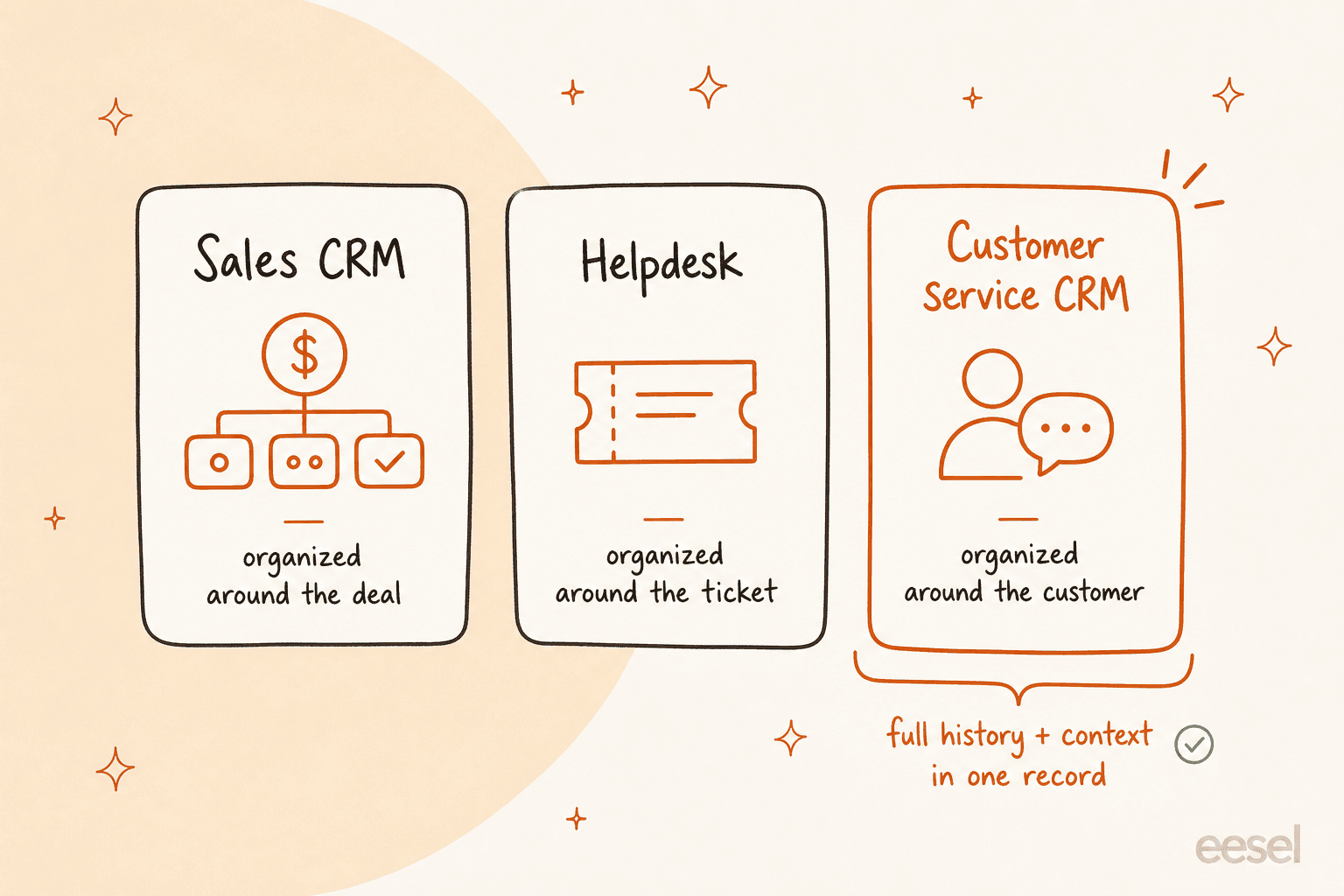
Versus a sales CRM. A sales CRM like Salesforce Sales Cloud or HubSpot Sales Hub is built around the deal pipeline: leads, opportunities, forecasts, quotes. Its record is optimised for "will this person buy, and for how much." A customer service CRM is built around the conversation and the resolution: tickets, SLAs, response times, CSAT. Plenty of vendors sell both on one platform (HubSpot, Salesforce, Zoho), so the contact record is shared, but the service product adds ticketing, an omnichannel inbox, a help center, and support analytics that the sales product simply doesn't have.
Versus a plain helpdesk. A bare ticketing tool just tracks and routes tickets. A customer service CRM leans harder on the persistent customer record and usually ties into commerce, subscription, or CRM data, so an agent can see order history, issue a refund, or check a subscription without leaving the ticket. Honestly, the categories have converged: most tools that call themselves a helpdesk now market themselves as customer-service platforms with a CRM-style contact object. So in 2026 the useful distinction isn't "CRM or helpdesk," it's how rich the customer record is and what systems it pulls from.
What's inside one
Strip the branding away and every serious customer service CRM is built from the same six parts. When you're comparing tools, you're really comparing how good each one is at each of these.
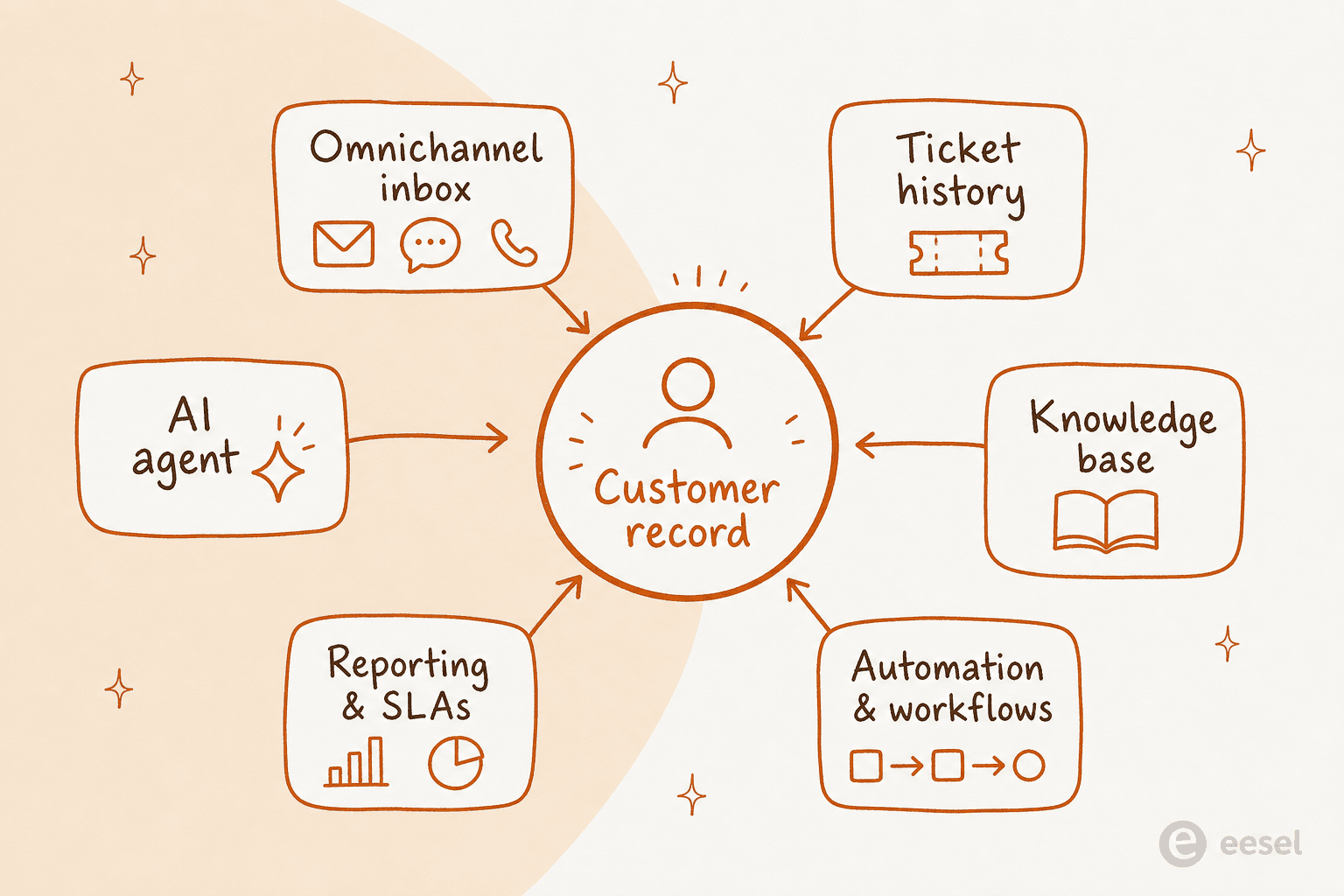
- A shared contact and ticket record - one profile per customer, with full interaction and often order or subscription history.
- An omnichannel inbox - email, live chat, social (Instagram, Facebook, WhatsApp), SMS, and voice, all landing in one queue.
- Automation and workflows - routing rules, SLAs, macros, triggers, and assignment logic that move tickets without a human touching them.
- A knowledge base - a public help center and customer portal so people can deflect their own questions.
- Reporting and analytics - volume, response and resolution time, CSAT, and agent performance in one place.
- AI - the 2026 differentiator: agents that resolve tickets autonomously, copilots that draft replies, auto-triage and tagging, and AI-written knowledge.
That last one is where the money, and the confusion, now lives.
The best customer service CRM software in 2026
I pulled the current entry pricing for the eight platforms most teams actually shortlist, straight from each vendor's own pricing page. A few ground rules before the table: every price below is the lowest paid plan, billed annually, and the billable unit matters as much as the number. Seven of the eight charge per agent per month; Gorgias is the odd one out and bills by ticket volume.
| Tool | Lowest paid plan | Free tier? | Billable unit | Best for |
|---|---|---|---|---|
| Zendesk | $19/agent/mo (omnichannel from $55) | No | Per agent | Mid-market to enterprise support |
| Freshdesk | $19/agent/mo | Yes (1–2 agents) | Per agent + AI sessions | SMB to mid-market |
| HubSpot Service Hub | $7/seat/mo (Pro $90) | Yes (2 users) | Per seat + credits | Teams already in HubSpot |
| Salesforce Service Cloud | $25/user/mo (service-grade $175) | No | Per user | Large, complex enterprises |
| Zoho Desk | $7/user/mo | Yes (3 agents) | Per user | Cost-conscious SMB |
| Gorgias | $10/mo helpdesk ($40 with AI) | No | Per ticket volume | Shopify / DTC ecommerce |
| Front | $25/seat/mo | No | Per seat (AI add-on) | B2B shared-inbox teams |
| Help Scout | $25/user/mo | Yes (5 users) | Per user + per resolution | Small teams valuing simplicity |
A quick read on where each one fits, because the table flattens some real differences.
Zendesk and Salesforce are the depth options. Zendesk rebranded itself as an AI-first "Resolution Platform" with an 1,800+ app marketplace, but note the entry $19 Support Team plan is email and ticketing only, messaging, live chat, and voice start at Suite Team ($55). Salesforce Service Cloud is the most customisable and the most expensive, with the genuinely service-grade edition at $175/user/mo; it's the right call when you're already standardised on Salesforce and can afford the complexity, and the wrong one when you can't (its AI limitations are real).
Zoho Desk and Help Scout are where lean teams should look first. Zoho Desk is the price-to-feature champion, free forever for three agents and paid from $7, and it's the obvious pick if you already use other Zoho apps. Reviewers back that up:
"What I like best about Zoho Desk is how much functionality it offers at a competitive price. It combines powerful ticket management, automation, AI features, omnichannel support, SLAs, knowledge base, and detailed reporting in a single platform."

Gorgias is the ecommerce specialist, and its pricing model is genuinely different: you pay by monthly ticket volume, not per agent, so adding headcount doesn't inflate the bill. It's Shopify-native, which is why it powers a big slice of DTC support:
"I use Gorgias as our first touch for all customer service inquiries across phone, text, email, and chat, and I love how it consolidates everything into one place. Its easy integration with Shopify is a huge plus, letting us pull up orders and issue replacements when necessary."
HubSpot Service Hub and Front round it out. HubSpot's $7 starter seat is the cheapest headline, but two gotchas bite: required one-time onboarding ($1,500 on Pro, $3,500 on Enterprise) and usage-based credits that power the AI, so weigh whether the AI is worth it before committing. Front sits between a shared team inbox and a helpdesk and is strong for B2B teams collaborating on external conversations, though its AI features are all add-ons on top of the seat price.
The billable unit is the whole game
Here's the thing the pricing pages bury: with a per-agent tool, your bill scales with your team, and with Gorgias it scales with your ticket volume. That sounds academic until you plug in real headcount. Toggle a team size below to see roughly what the entry seats cost per month, seats only.
The takeaway isn't "cheap tools win." It's that the model you pick decides what you're punished for later: per-agent tools tax you for growing the team, and volume-based tools tax you for a busy month. Neither is wrong, but pick the one whose growth curve matches yours.
What to look for when you're choosing
Six things separate a good fit from an expensive mistake. In rough order of how often they burn people:
- The AI gotcha in the pricing. The seat is half the bill now. Map the total: per-agent seats plus metered AI (HubSpot credits, Freshdesk sessions, Help Scout and Gorgias per-resolution) plus one-time onboarding plus add-ons like voice and SMS. A $7 headline seat can end up costing more than a $25 all-in seat once AI and onboarding stack.
- Integrations with your actual stack. Does it plug into what you already run, Shopify and commerce, your sales CRM, Slack, your phone system? Count the integrations you'll really use, not the marketplace total.
- AI and automation quality. Every vendor claims an "AI agent" in 2026. The real question is resolution quality on your content, not the demo: does it train on your existing help center and tickets, can it take actions (refund, cancel, look up an order) rather than just chat, and can you test it before it goes live?
- Omnichannel coverage on the plan you're pricing. If you support email, chat, Instagram, WhatsApp, and voice, confirm each channel is on the entry plan you're costing, not gated to a higher tier (Zendesk gates messaging and voice to Suite; Front gates omnichannel to Professional).
- Reporting depth. Can you see resolution time, CSAT, and SLA adherence without exporting to a spreadsheet? Custom reports are often a higher-tier feature, so check the tier, not just the checkbox.
- Scalability and lock-in. Price the tier you'll be on in 18 months, not the one you start on. And weigh switching cost: leaving a deeply-integrated CRM like Salesforce or HubSpot is far harder than leaving a standalone helpdesk.
Where AI actually changes the equation
Point four and the AI gotcha both point at the same uncomfortable truth: the AI baked into your customer service CRM is often the weakest part of it. It usually only reads your published help center (not your solved tickets), it's metered in a way that makes the bill unpredictable, and it's tied to the platform you happen to have bought.
There's another route, and it's the one I'd argue for: run a dedicated AI agent on top of the CRM you already have.
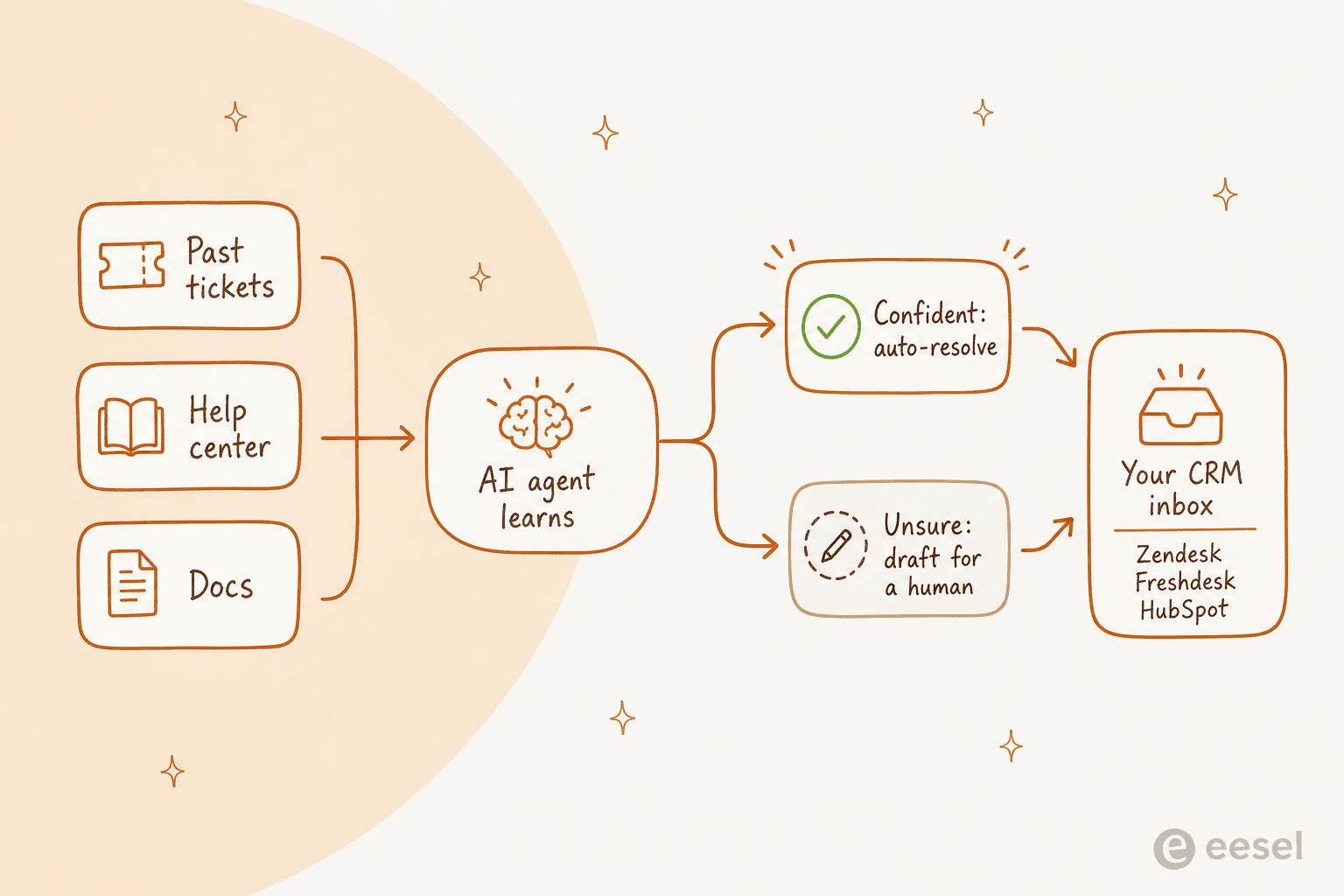
This is the part I can speak to from experience rather than a spec sheet. We've spent the last few years putting AI agents on live support queues, and the single most consistent request, across every helpdesk, is the same: train the AI on our own past tickets, not just the help center, and don't let it answer unless it's sure. We've watched confident-sounding bots quietly give wrong answers, which is why every rollout now gets simulated against historical tickets before it ever touches a customer. One CX lead we spoke to, at a DTC supplements brand running thousands of tickets a month, put the whole objection in a sentence:
"The AI will never be able to answer 100% of the questions, but if it tries and just answers 'sorry I don't know,' I can't go check all my 7,000 tickets to see if it made a good answer. I need an AI that only handles the tickets it's confident to handle, and all the others, leave them alone."
That's exactly the bar. It's also why the "should I use the CRM's AI or something else" question is worth taking seriously instead of defaulting to whatever's bundled.
Try eesel on top of your existing CRM
eesel is the AI layer that answer solves for. Instead of asking you to switch customer service CRMs, it plugs into the one you already run, Zendesk, Freshdesk, HubSpot, Gorgias, Front, and 100+ others, and learns from your past tickets, help docs, and tooling on day one.

Two things make it worth a look for this specific problem. First, you can simulate it against your historical tickets before it goes live, so you see coverage by theme and catch gaps instead of finding them in front of customers. Second, the pricing is one fixed monthly price from $299 for 500 credits (1 credit per ticket or chat) with no per-seat fee, which sidesteps the per-agent tax that makes the tools above expensive as your team grows.
For Gridwise, eesel resolved 73% of tier-1 requests in the first month, with results showing up during a 7-day trial. It's free to start (no credit card), which means you can point it at your own tickets and see the real number for your team before you decide anything.